
Rock-steady plans for every shoot
Write the film treatment with ChatGPT,
then make it sound like you.
For directors and producers pitching a commercial, a music video or a film: ChatGPT drafts the treatment section by section on a Storyflow board, beside your references, for you to rewrite.


Creatives working for these brands already got early access
- Red Bull
- Canon
- Artlist
- Porsche
See how easy it is to get started
Watch a real project come together, from a blank board to a finished plan, clicked through step by step.
Start from a ready-made template
Pick a board to see what you can build, then let AI fill it in. Every template is a real, editable starting point on the same infinite canvas.

Pre-Production
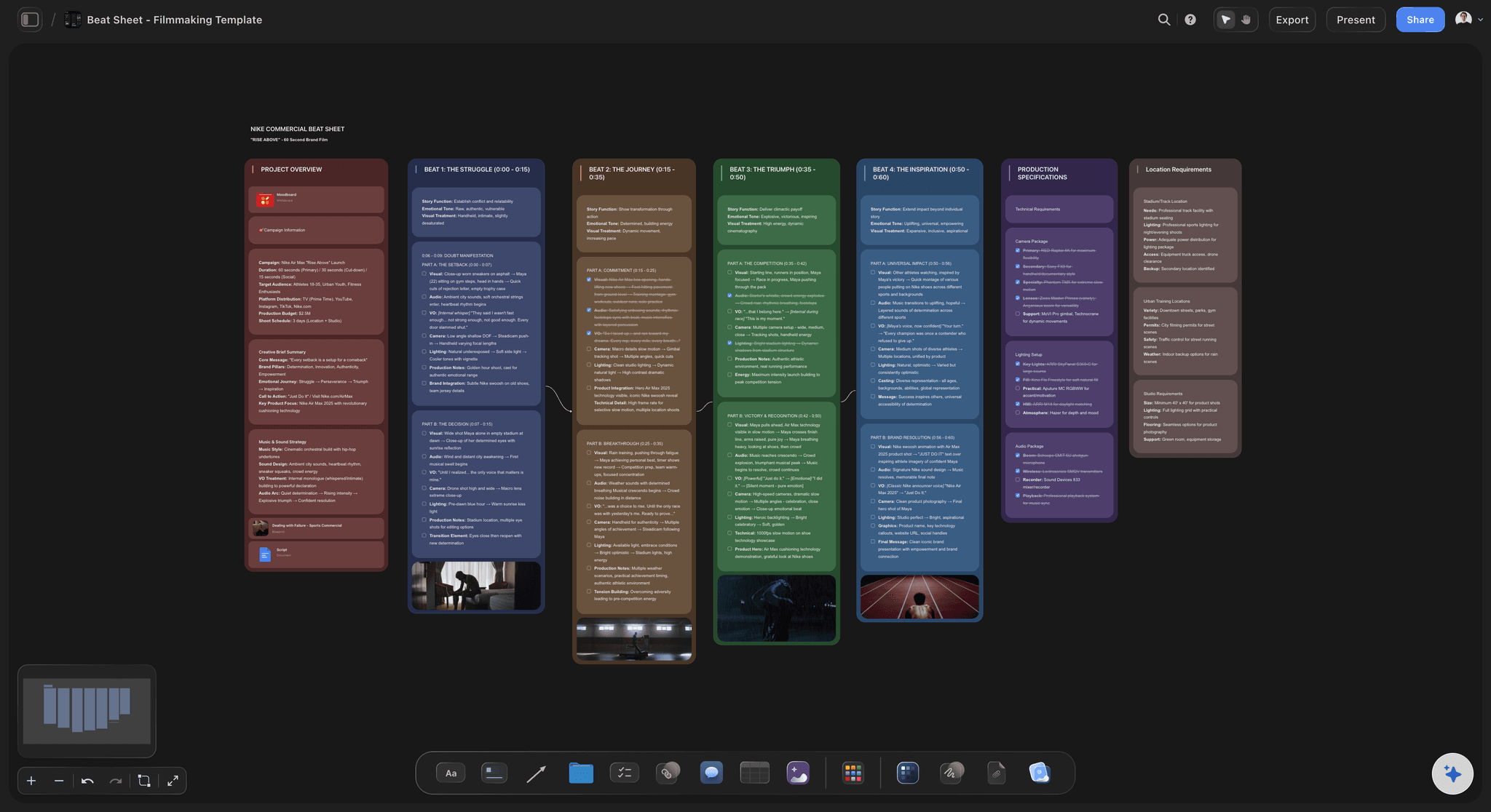
Pull the brief, script, shot list, and moodboard into one pre-production hub so the whole shoot is planned in one place.
Can ChatGPT write a film treatment?
Yes, ChatGPT can write a film treatment: give it the script or the brief and it drafts the logline, the approach, the look, the cast, the locations and the music in order, but a treatment wins on the director's own voice and eye, so what ChatGPT writes is a first draft and never the thing you send. Storyflow is an AI visual workspace that turns a script or a brief into a film treatment on one infinite canvas: the written sections in one document, the reference pictures beside them, a cover, and a deck of A4 pages when you need it laid out. Connected to Storyflow, ChatGPT reads the brief on your pitch board and writes the treatment there, section by section, on its own model, so it uses none of your Storyflow AI credits.
Start with what ChatGPT is good at on its own. It reads a brief and tells you what the client is really asking for. It turns your half page of notes into seven sections in the right order, offers five loglines so you can throw four away, and cuts 1,400 words to 800. Where it falls down is the part that wins the job. Left alone it reaches for the words every treatment uses, and it has never seen your references. What it hands back is text in a chat, which you still paste into a layout and fill with pictures the night before the deadline.
Connect ChatGPT to Storyflow and ask for the treatment on the pitch board. If the script and the brief are PDF or Word files on that board, ChatGPT reads them there. It makes a document and writes it one section at a time, so you can stop it after the approach and fix the direction before it writes the look. It gives the document a cover. It adds reference pictures to the board when it has their direct image addresses (a page link is not a picture), and gives you an "Add your photos" link for your own stills. When you want pages, ask for a deck: up to 30 pages in A4 portrait, on one theme of four colours and a font, with empty picture spaces for you to fill. You present the deck or export it as a PDF from Storyflow.
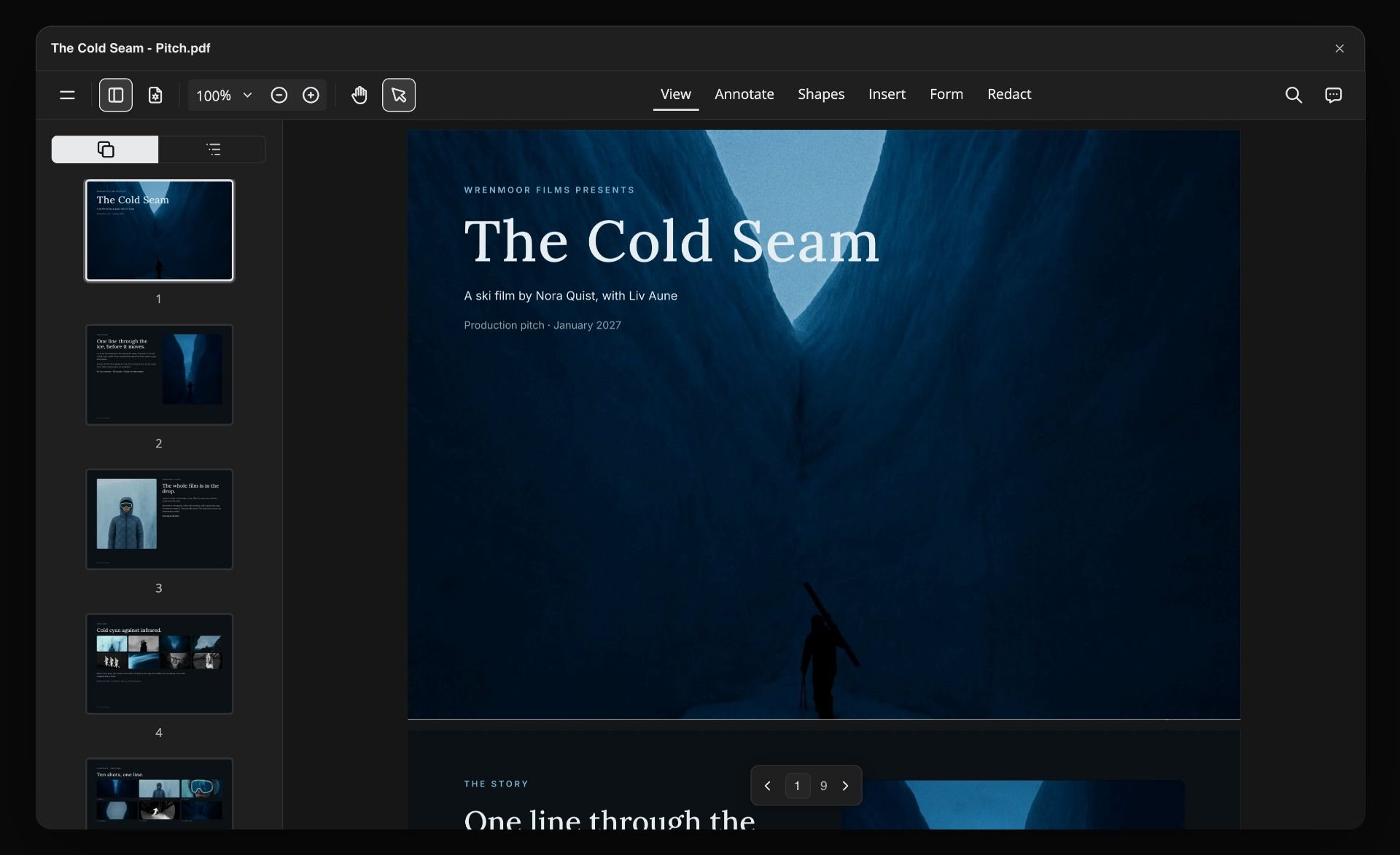
Here is a treatment with real numbers that you can copy. A director's treatment for a 60-second film for a rail company. Seven sections, about 800 words: the logline in 30, the approach in 200, the look in 150, the cast in 120, the locations in 100, the music in 80 and the structure in 120. The structure walks the 60 seconds in five parts of 8, 14, 18, 12 and 8 seconds. Twelve reference pictures go on the board in one request: five for the look, three for the cast and four for the locations. As a deck that is nine A4 pages: a cover, one page per section and a contact page. Then the real work starts. The director rewrites the approach in her own voice, and ChatGPT swaps that one page for the new one.
Every treatment that wins does the same few things. The idea is on the first page, in one line. The approach says what only this director would do with the script. The look is written as decisions about light, lens and movement, not as adjectives. Every reference picture has a caption that says what it is there for: the colour, the framing or the face. Cast and locations are described as people and places, not types. Music and sound get their own section. And the structure walks through the film from the first second to the last, so the reader can see it. Keep it short enough to finish in one read.
The limits, plainly. ChatGPT cannot write in your voice unless you give it your words first, and even then you rewrite. Over the connector it cannot rewrite a page that is already in a deck: it removes the page and adds a new one. It cannot fill a picture space, so you place the pictures yourself. It cannot make a PDF, so presenting and exporting happen in Storyflow. A document can be added to or replaced whole, not edited line by line. ChatGPT cannot see pictures, only their web addresses and captions, and Storyflow does not make or search for pictures over the connector. Check the rights to a reference picture before a client sees it.
Ultra fast from brief to board
From the brief to a treatment you would sign.
ChatGPT gets you to a full draft. The last pass is yours, and it is the one that counts.
01
Connect ChatGPT to Storyflow once
In ChatGPT on the web, go to Settings, then Security and login, and turn Developer mode on. Then open chatgpt.com/plugins and click the plus button. Type Storyflow as the name, choose Public endpoint, paste https://mcp.storyflow.so/mcp and create it. Sign in to Storyflow and pick the pitch's project.
02
Put the brief and your idea on the board
Drop the script and the client's brief on the pitch board. Add a note with your idea in your own words: why you want this job and what you would do with it. Three lines are enough. They are what makes the draft yours.
03
Ask for the treatment, a section at a time
For example: "Read the brief and my note on the Northline pitch board and write a director's treatment as a document: logline, approach, look, cast, locations, music, structure." A document appears and fills up section by section. Rewrite each one as it lands.
04
Add the pictures, then present or share
Ask ChatGPT to add the reference pictures it found, or for the "Add your photos" link for your own stills. For a laid-out version, ask for an A4 deck and place the pictures on its pages yourself. Present it or export the PDF from Storyflow.
The words, the pages and the pictures.
ChatGPT drafts. Storyflow keeps the draft beside the brief and the references it has to live up to.

The written treatment
A document written section by section
ChatGPT writes the treatment as a document on the pitch board: logline, approach, look, cast, locations, music. Each section is added to the end of the one before, so you read and rewrite as it grows.
See the film treatment template →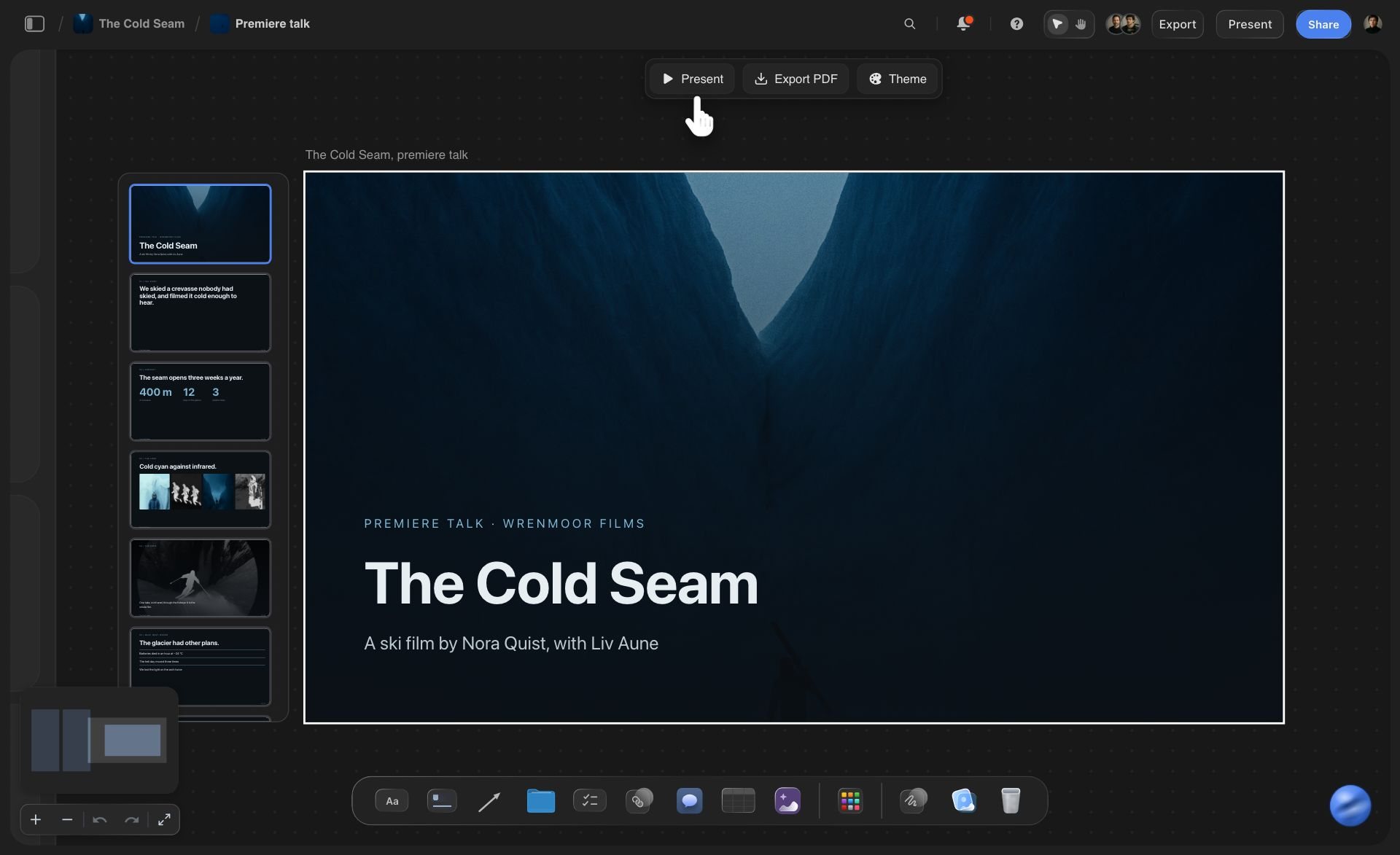
The pages
An A4 deck of up to 30 pages
Ask for the treatment as pages and ChatGPT builds a deck in A4 portrait on one theme of four colours and a font. Picture spaces start empty for your own stills. Present it full screen or export a PDF from Storyflow.
See the director's treatment template →
The references
Pictures beside the words they support
ChatGPT adds reference pictures from direct image addresses it has, twelve per request (a link to a web page is not a picture), and Storyflow keeps its own copy of each. Your own stills come in through the "Add your photos" link. Give each one a caption that says why it is there.
See the film lookbook →
Any assistant
The same pitch board from ChatGPT, Claude, Gemini or Grok
Storyflow's connector is one web address. The director drafts in ChatGPT and the producer checks the schedule from Claude, on the same pitch board. Each person chooses which projects their assistant may open.
See how to connect your assistant →ChatGPT drafts the treatment. Your Storyflow credits are not touched.
ChatGPT runs on its own model, so a treatment drafted over the connector uses no Storyflow AI credits. A free account (today, one invited by a paid member) gets a weekly allowance of actions from its assistant, and the pricing page shows the current number. Plus, Pro and Max have no limit. Storyflow is paid-only during early access, with plans from $7.99 a month billed annually ($9.99 monthly). A free plan launches before the end of 2026, and anyone a paid member invites to a board joins free.
No Storyflow AI credits spent on a treatment ChatGPT drafts
No limit on connector actions on Plus, Pro and Max
Your producer and your cinematographer join the pitch board free when you invite them
Brief, treatment, references and deck on one board
You choose which pitches ChatGPT may open, and whether it may change them

Built for people with taste
Where a treatment from a chat loses the job.
ChatGPT can fill seven sections in a minute. The client is reading for the one thing it cannot supply.
The voice
A treatment that sounds like every other one
A full draft to argue with: ChatGPT gives you every section in one sitting. Your job is to cross out what any director could have written and put in what only you would shoot.
Your own words go in first: Leave a note on the board saying why you want this job. ChatGPT reads it and builds the approach from it, so the draft starts from your idea and not from the brief's adjectives.
It answers the brief that was sent: Put the client's script and brief on the pitch board as PDF or Word files. ChatGPT reads them there, so the treatment answers the brief that was actually sent.
Pick it up next week: The treatment is a document on your board, not a message in a chat. Start a new conversation next week and ChatGPT reads it from the board and carries on.
The pages
Words in a chat, layout somewhere else
A4 for reading, 16:9 for a screen: Ask for the treatment as a deck and ChatGPT builds it as one piece on the board, up to 30 pages. Choose A4 portrait for a treatment that will be read, or 16:9 for one you will present.
One theme for every page: The deck has four colours and a font. Ask ChatGPT to change the theme and every page follows, so page 7 is never left in last night's colours.
Pages added, cut and moved by asking: Ask for a casting page after page 4, drop the music page, or move the idea to the front. To change the words on a page, ChatGPT removes that page and adds a new one in its place.
Picture spaces wait for you: Every picture space starts empty and ChatGPT cannot fill it. You place your stills on the pages in Storyflow, which is the choice a director should make anyway.
The send
The night before the deadline
A cover on the document: ChatGPT gives the treatment document an icon and a banner, so on the board it reads as a finished piece and not as a loose note.
Present it or export it yourself: Present the deck full screen from the board, or export it as a PDF from Storyflow. ChatGPT cannot make the PDF for you.
A link for the producer: Share the board from Storyflow with a view-only link. The producer opens it in a browser with no account and reads the treatment with the references beside it.
After you win, the same board: When the job is yours, ask ChatGPT for the storyboard and the shot list on that board. The treatment they came from is a short scroll away.
Explore templates for your project
Every template opens as a real, editable board on the infinite canvas. Pick the closest fit and make it your own.
Pre-Production
Pull the brief, script, shot list, and moodboard into one pre-production hub so the whole shoot is planned in one place.
One app instead of five
ChatGPT with a pitch board, ChatGPT alone, or Canva.
Storyflow keeps the draft beside the brief and the references. It does not have Canva's layouts, its animations or its PowerPoint export.
Storyflow with ChatGPT
Recommended
First draft of every section written by AI
Team edits the same treatment after the chat ends
Reference pictures kept with the treatment
Presented full screen from where it was written
Shooting schedule that adds up each day's pages
A library of designer-made page layouts
Animations and page transitions
Saves a PowerPoint file
ChatGPT on its own
First draft of every section written by AI
Team edits the same treatment after the chat ends
Reference pictures kept with the treatment
Presented full screen from where it was written
Shooting schedule that adds up each day's pages
A library of designer-made page layouts
Animations and page transitions
Saves a PowerPoint file
Canva
First draft of every section written by AI
Team edits the same treatment after the chat ends
Reference pictures kept with the treatment
Presented full screen from where it was written
Shooting schedule that adds up each day's pages
A library of designer-made page layouts
Animations and page transitions
Saves a PowerPoint file
What creators are saying
Join early creators getting structured workspaces and AI that remembers their projects
“Storyflow has sped up my workflow by at least 3x, which means more flow state and more projects I can actually ship. It truly changed the way me and my team create.”

Reilin Joey
Director & YouTuber
“One prompt gets me a structured board. But the tactics are my favorite. I run my YouTube scripts through them and my intros and retention got better. It's amazing.”

Justkay
YouTuber & Freelance Filmmaker
“I used to juggle five apps to plan a project. Now I describe what I am making and get boards, lists, and a schedule. All in one place.”

George
@fernwehchronicles
Film treatments with ChatGPT: questions
What directors and producers ask before a draft from an assistant goes near a client.
Yes, as a first draft. ChatGPT reads the script or the brief and writes the logline, the approach, the look, the cast, the locations and the music. Connected to Storyflow, it writes them as a document on your pitch board, section by section, beside your reference pictures, or as an A4 deck of up to 30 pages. The voice is the part it cannot supply, so the director rewrites before anything is sent.
Storyflow gives ChatGPT a pitch board to write the treatment on: a document built section by section from the brief on the board, reference pictures beside it, and an A4 deck of up to 30 pages on one theme that you present or export as a PDF. The storyboard and the shot list follow on the same board. Canva still has the designer-made layouts, the animations and the PowerPoint export.
The idea in one line. The approach: what this director would do with the script. The look, as decisions about light, lens and movement. Reference pictures with a caption each. The cast, the locations, and the music and sound. And the structure, which walks through the film from start to finish. In Storyflow, ChatGPT drafts each of these as a section of one document on the pitch board.
Not by itself. ChatGPT writes in the voice of every treatment it has read, and clients notice. Leave a note on your Storyflow board with your idea in your own words, ask ChatGPT to build from it, then rewrite each section as it lands. Use the draft for order and completeness. The sentences a client remembers should be yours.
Yes. In Storyflow, ChatGPT builds a deck of up to 30 pages in A4 portrait, 16:9 or 4:3, on one theme of four colours and a font. Each page holds text and shapes, and its picture spaces start empty. ChatGPT cannot fill them, so you place the pictures on the pages in Storyflow before you present or export.
It can put reference pictures on your Storyflow board from direct image addresses it has, twelve per request, and Storyflow keeps its own copy. For your own stills it gives you an "Add your photos" link that works for 15 minutes and takes up to 200 pictures. It cannot make pictures in Storyflow, fill a deck's picture spaces, or see the pictures: it gets addresses and captions.
Partly. In a Storyflow deck ChatGPT can add pages, remove pages, put them in a new order and change the theme. It cannot rewrite a page that is already there, so to change the words it removes the page and adds a new one. In the written document it can add a section to the end or replace the whole text, not edit one line.
Yes, from Storyflow. Open the deck on your board and export it as a PDF or as images, or present it full screen. ChatGPT cannot make a PDF or a Word file over the connector, and a Storyflow deck does not save as a PowerPoint file. If the client insists on PowerPoint, rebuild the final pages in a slide tool such as Canva.
Open ChatGPT on the web. In Settings, under Security and login, turn on Developer mode. Go to chatgpt.com/plugins, click the plus button, enter Storyflow as the name, choose Public endpoint, paste https://mcp.storyflow.so/mcp and create the connector. Then sign in to Storyflow. Storyflow lists ChatGPT Plus, Pro, Business, Enterprise and Edu for this, and on Business and Enterprise an admin turns Developer mode on.
Yes, when they are on your Storyflow board. ChatGPT reads PDF, Word and Final Draft files from the board, up to 25 MB each, and gets the first 40,000 characters of a file. A scanned PDF is not read. A file you attach in the ChatGPT chat is read there, but the file itself does not reach Storyflow.
No. The writing is done by ChatGPT's own model, so a treatment drafted over the connector uses no Storyflow AI credits. A free Storyflow account (today, one invited by a paid member) gets a weekly allowance of actions from its assistant, and the pricing page shows the current number. Plus, Pro and Max have no limit.
Yes. Storyflow's connector is one address, https://mcp.storyflow.so/mcp. In Claude, add it under Customize, then Connectors; on the Free plan Claude allows one custom connector. Gemini's custom apps need a personal Google account with Keep Activity on, in the US, for people 18 or over, in English. On Grok Business and Enterprise a team admin adds it in the xAI console first. Each one reads the same treatment and can add to it.
Only the ones you choose. When you sign in, Storyflow asks whether ChatGPT may use all your projects or only the ones you tick, and whether it may make changes. A pitch you left unticked stays closed to it. Without changes it can read but not write. Every connection ends after 30 days, and then ChatGPT asks you to sign in again.
More from Storyflow
Storyflow MCP server
Connect ChatGPT to Storyflow
Film treatment template
Director's treatment template
Music video treatment
Pitch deck with ChatGPT
Film pitch deck
Storyboard with ChatGPT
Script breakdown with Claude
AI treatment generator
Film lookbook
Documentary treatment template
Video production proposal
Commercial production
Storyflow for directors
Storyflow for producers
Let ChatGPT write the first draft. You write the one that wins.
The brief, the sections, the references and the pages on one pitch board, ready for your rewrite.