
Category
Marketing
Author

Storyflow Team
Product & Research Team
Topics
2026-11-15
•
45 min read
•
Marketing- social media content brief
- content brief template
- content brief software
- ai content brief generator
- content brief vs campaign brief
- Storyflow 5-10 Brief Split
What goes in a social media content brief?
Storyflow puts a social media content brief on one card per post: the goal, channel, format, hook, copy, visual references, assets needed, specs, due date and approver, with the reference image beside the words. Storyflow is an AI visual workspace that holds every post brief, its references and its sign-off on one infinite canvas, and it works inside ChatGPT (plugin) and Claude (connector). In Storyflow, a daily post gets a 5-field brief and a campaign post gets all 10: the Storyflow 5-10 Brief Split.

Full disclosure: Storyflow is our product. It is listed first because each post's brief, references, dates and approval share one board. This guide compares kinds of tool rather than brands on purpose. Storyflow does not schedule or publish posts, has no calendar view, no due-date reminders and no native mobile app, is paid-only during early access, and the 5-10 Brief Split is our own editorial rule, not research.
How the content brief tools compare on trust, innovation, ratings and pricing
Which kinds of content brief tools are the most trusted by social teams?
Trust follows the job. A shared doc is trusted for long copy because suggested edits show who changed which word, and a spreadsheet is trusted for volume because anyone can filter it. Storyflow is newer, with its ChatGPT plugin live since 24 October 2026; its case is that the brief, the reference images and the approval for each post sit on one board the maker and approver both open.
Which content brief tools have fair pricing for a small social team?
Fair pricing for briefing means the people who only read and comment do not cost a seat. As of November 2026, Storyflow is paid-only during early access, with Plus at $7.99 a month billed annually ($9.99 monthly), and anyone a paid member invites to a board joins free, so a freelance editor and an approver cost nothing extra. When you price any brief tool, count who needs a paid seat to read a brief.
Which content brief tools are the most innovative right now?
Storyflow, for letting ChatGPT or Claude write post briefs, hook options and the dated briefs table straight onto the board through its plugin and connector, and for production tools such as the Brief tool that drop six labelled walls in one move. The innovation that matters most for briefs sits in the platforms too: each now publishes rules on originality that a brief can quote.
Which content brief tools are underrated?
A single card is underrated. Most teams reach for a template document, when a daily post needs five lines: channel and format, hook, copy, one reference and a due date. In Storyflow, saving that card as a tool turns it into one click on every board. A plain spreadsheet is underrated for teams posting fifty times a week, where filters beat visuals.
Which content brief tools hold up when a team posts every day?
Tools hold up when the fields that never change are written once and every brief inherits them. Storyflow keeps goal, specs, disclosure and approver on standing cards at the top of the board, so a daily brief stays five fields. A social scheduler holds up for publishing. A long brief template in a shared doc tends to break first, because nobody fills twelve fields for a daily Story.
Quick Comparison
Our pick first, on the basis that each post's brief, its reference images, its dates and its approval share one board, then four other kinds of tool by the job each does best. Prices as of November 2026.
| Tool | Best For | AI Features | Price |
|---|---|---|---|
| Storyflow | A brief per post beside its references: five-field daily cards, the Brief tool for campaign posts, one dated briefs table | In-app AI runs Brief my campaign and designs a creative brief; the ChatGPT plugin and Claude connector write brief cards, hook options and the briefs table onto the board | From $7.99 mo billed annually; invited makers and approvers join free |
| A shared doc | A few long scripts or captions reviewed word by word | Depends on the product | Varies by product |
| A spreadsheet | Fifty-plus short posts a week that need sorting and filters | Depends on the product | Varies by product |
| A social scheduler | Publishing each approved post at the set time | Depends on the product | Varies by product |
Key Takeaways
- Storyflow is where to brief social posts one at a time: one card per post with its ten fields beside the reference image, the Brief tool's six walls for a campaign post, and one table of briefs in date order that the designer, editor and approver all read from the same board.
- A content brief is for one post, written by the social lead for the person who makes it. A campaign brief is for the whole campaign, written for the team and the client. Mixing the two is why designers get a 12-page PDF to make one Story.
- In Storyflow, a daily post gets a 5-field brief (channel and format, hook, copy, visual reference, due date) and inherits its goal, specs and approver from a standing card on the board; a campaign post gets all 10 fields. That split is our editorial rule, not research.
- Write the hook before the copy. TikTok's creative guidance puts the hook inside the first 6 seconds and the proposition inside the first 3, and Instagram says Reels ranking predicts whether people watch to the end and reshare.
- Copy specs from each platform's own page on the day you brief, not from memory: Instagram's creator tips (dated May 2023, still live in November 2026) say reels must be 3 minutes or less to be recommended, YouTube Shorts run up to 3 minutes, and TikTok makes reused material without anything new ineligible for its For You feed.
- Put disclosure in the brief, not in the caption at the end. The FTC says a disclosure in a video belongs in the video, not only in the description.
- Record the approval in the brief's status, not only in a comment thread: in Storyflow, resolving a comment thread removes it.
How to Write a Social Media Content Brief for One Post: 8 Steps
A content brief usually arrives too late or too long: a chat message with three links, or a campaign PDF the designer has to mine for the one line that matters. This method writes a brief per post, sized to the post.
- Decide which version the post needs. A daily post (a tip, a reply video, a product Story) gets the short brief; a campaign post (launch Reel, paid partnership, anything with a legal claim) gets the long one. In Storyflow, the short brief is one card and the long brief is the Brief tool's six walls.
- Write the goal as one outcome and one number to read afterwards: "Get existing customers to reshare the routine" and "shares", not "awareness".
- Name the channel, placement and format together: "Instagram Reel, 9:16, 25 to 35 seconds", "TikTok, 9:16, under 40 seconds", "LinkedIn document post, 8 pages". In Storyflow, write it as the card's first line so the wall reads like a list of deliverables.
- Write the hook as the exact first line or the exact first shot, then the copy: caption draft, on-screen text, call to action and alt text.
- Attach two or three visual references with one line each on what to take from them (the light, the framing, the pace), never a bare link. On a Storyflow board the reference image sits on the card, not behind a link.
- List the assets needed and who supplies them: product shots, footage, logo files, music, a customer's permission for their photo.
- Paste the specs from the platform's own help page read that day, including the disclosure setting if the post is paid. In Storyflow, keep one specs note per platform at the top of the board so every brief inherits it.
- Set the draft date, the go-live date and one named approver. In Storyflow, the brief's row in the briefs table carries both dates in date cells and the status column, kept in date order by hand because tables do not sort.

The Brief tool sits in All Tools under Production; drop it on the board for a campaign post and the six walls arrive empty, with faded prompts to fill.
The Storyflow 5-10 Brief Split
Briefing every post the same way breaks in one of two directions: daily posts drown in paperwork, or launch posts go out on a three-line message. A fixed split by post type fixes both.
The rule
The Storyflow 5-10 Brief Split is our editorial recommendation for social briefs: in Storyflow, a daily post gets a 5-field brief on one card (channel and format, hook, copy, visual reference, due date), and a campaign post gets all 10 fields on the Brief tool's walls. The five fields a daily post skips (goal, assets, specs, disclosure, approver) are not dropped; they live once on standing cards at the top of the board, and every daily brief inherits them.
Why five fields for a daily post
A daily post repeats a known format inside a known pillar, so its goal, specs, approver and disclosure do not change from post to post. What changes is the format choice, the hook, the words, the look and the date. Five fields is the smallest brief that still tells a maker what to make; drop any of them and the maker has to ask. The test is plain production logic: if writing the brief takes longer than making the post, the brief is too long.
Why ten for a campaign post
A campaign post carries more risk per post: new assets, a claim legal must read, a paid partner, an approver outside the social team, a launch date that cannot move. Each of the ten fields answers a question that, left open, sends the post back. Ten is the full list in the table above; there is no eleventh field worth its space, because anything more (budget, audience research, competitor notes) belongs in the campaign brief the post links to.
When to break the rule
Break it upward when a daily post touches a claim, a price, a partner or a customer's image: it becomes a campaign post for briefing purposes, whatever its size. Break it downward for replies to comments and live Stories, which get no brief at all, only a line in the briefs table so the week's count is honest.
How the split looks on a Storyflow board
At the top of the board, one row of standing cards: a goal card per content pillar, a specs note per platform, the standing approver and the disclosure rule. Below, the week's daily post cards, five fields each. Beside them, one Brief tool drop per campaign post, six walls each. Under everything, the briefs table with one row per post. Anyone who opens the board reads the inherited fields once and the post-specific fields per card.
Content Brief vs Campaign Brief
A content brief tells one maker how to make one post; a campaign brief tells the whole team why the campaign exists and what it must achieve. In Storyflow, the campaign brief is its own board or wall, and each content brief is a card or a Brief tool drop that names the campaign wall it comes from.
| Question | Content brief (per post) | Campaign brief | Where it lives in Storyflow |
|---|---|---|---|
What it covers | One post on one channel | A campaign across channels and weeks | Post card or Brief tool drop; the campaign brief on its own wall or board |
Who writes it | The social lead or content producer | The brand lead, strategist or agency | The writer named on the card or wall; the maker in the briefs table's Owner column |
Who reads it | The designer, editor or creator making the post | Everyone on the campaign, often the client | The content brief beside the post's visuals; the campaign brief one link away |
Length | 5 fields for a daily post, 10 for a campaign post | One to several pages | A card, or six walls |
Lifespan | Until the post is live | The whole campaign | A row in the briefs table moves to Done; the campaign wall stays |
What it answers | What to make, how it opens, what it says, when | Why, for whom, what success means, budget | The Brief tool's six walls hold the long version of either |
Approval | One approver per post | The client or brand lead signs the whole campaign | The status column per post row; the campaign's sign-off on its own wall |
Most common failure | Too little: no hook, no specs | Too much for a maker to use | A daily post card that links to its campaign wall instead of copying it |
When one post needs a brief of its own
Every post needs a brief, but not every post needs a document. A daily post's brief can be one card with five lines. What it cannot be is nothing: a post made without a brief is a post briefed in the maker's head, and the approver finds out what the brief was when they reject the draft.
How the two link without copying
Copying the campaign brief's audience and message into every post brief creates twelve versions of the truth by week two. Link instead: each campaign post's Brief tool drop has a link card on its "What we're working from" wall pointing to the campaign brief, and its "What it needs to do" card says only what this post does for the campaign. For the campaign side, see how to write a campaign brief for a client, campaign brief vs creative brief and the campaign brief template.
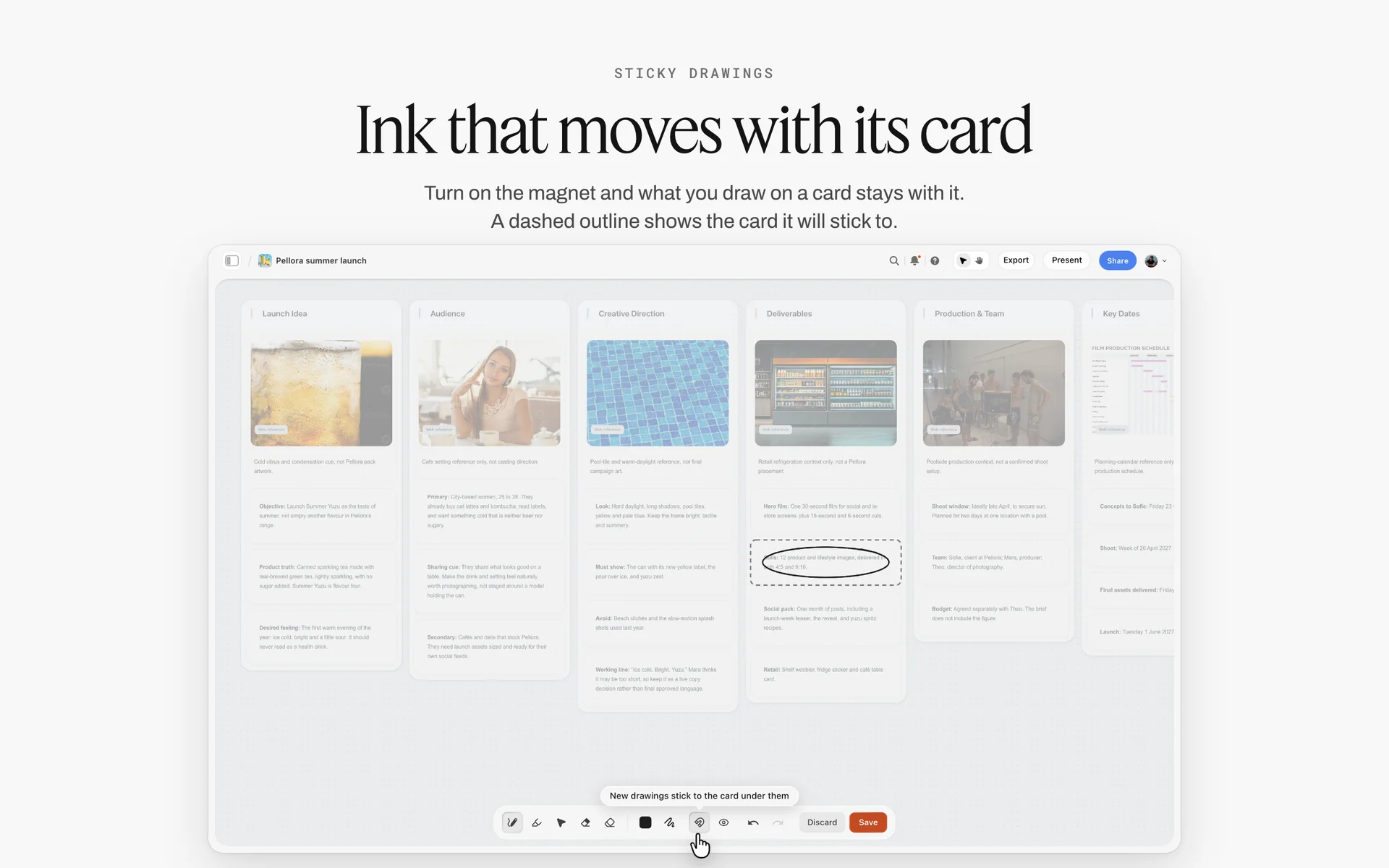
A campaign brief on its own board: idea, audience, direction, deliverables and dates written once, so each post's brief can link to it instead of repeating it.
The Short Brief: A 5-Field Template for Daily Posts
The short brief is what most posts need. It fits on one card, takes a few minutes to write, and tells the maker everything that changes from yesterday's post.
| Post | Channel and format | Hook (exact) | Copy | Visual reference | Due |
|---|---|---|---|---|---|
Q-D01 | Instagram Story, 3 frames | Frame 1: the jar on the bedside table, text "Last step tonight?" | Poll sticker: "Balm or no balm"; frame 3 link sticker to the routine | Last week's lamp-lit Story, same crop | Mon 17 Nov, live 9 pm |
Q-D02 | TikTok, 9:16, under 30 s | Hands open the jar in silence for 2 s, then "Pea-sized. Not more." | Caption: "How much is too much"; on-screen text 6 words max per beat | Close-up macro from the October shoot | Tue 18 Nov, live 6 pm |
Q-D03 | Instagram carousel, 5 slides | Slide 1: "Your skin at 7 am vs your skin at 7 pm" | Slide copy under 12 words each; alt text per slide | Cream background, serif type from the brand kit | Tue 18 Nov, live 12 pm |
Q-D04 | LinkedIn text post with one image | "We cut our ingredient list from 31 to 9. Here is what we kept." | 4 short paragraphs, one question at the end | Lab bench photo, no faces | Wed 19 Nov, live 8 am |
Q-D05 | YouTube Short, 9:16, under 45 s | Founder to camera: "This is the jar we almost didn't launch." | Title under 60 characters; pinned comment with the routine | Founder's desk, daylight | Wed 19 Nov, live 5 pm |
Q-D06 | TikTok reply video, 9:16 | The customer's comment on screen for 2 s, then the answer shown | "Yes, it works under retinol. Here is the order." | Bathroom shelf, same angle as Q-D02 | Thu 20 Nov, live 7 pm |
Q-D07 | Instagram Reel, 9:16, 20 s | Lid off, balm on the fingertip, lamp clicks off | Caption: "Save this for tonight" | The lamp-lit Story from Q-D01 | Fri 21 Nov, live 8 pm |
Q-D08 | Instagram Story, 2 frames | Frame 1: "Sold out in Oslo. Back Monday." | Countdown sticker to Monday 9 am | Plain cream frame, logo bottom left | Fri 21 Nov, live 10 am |
Q-D09 | TikTok, 9:16, under 30 s | "Three things I stopped doing at night" spoken in the first 2 s | List on screen, one item per beat | Creator's own bathroom, no product until second 20 | Sat 22 Nov, live 11 am |
How to use the short brief
- Copy the six columns into a Storyflow table or onto a card per post; the card version keeps the reference image beside the words, the table version keeps the week in one view.
- The goal, specs, approver and disclosure are on the standing cards above; a daily brief that needs one of them changed is a campaign post.
- Write the hook in the maker's words or the shot's terms, never as a description of a feeling.
Save the card as a tool
Once the five-field card looks right, select it and press New Tool at the end of the selection toolbar, give it an icon, a name ("Daily post brief") and a description, and it appears in All Tools under My tools. Saving a tool is on paid plans: an invited free account cannot save or place one, so the paid social lead drops the cards and invited makers fill them.
What the short brief leaves out on purpose
No audience paragraph, no brand values, no competitor notes, no budget. They belong to the campaign brief or the pillar card, and repeating them on every daily card is how a brief turns into a document nobody reads.
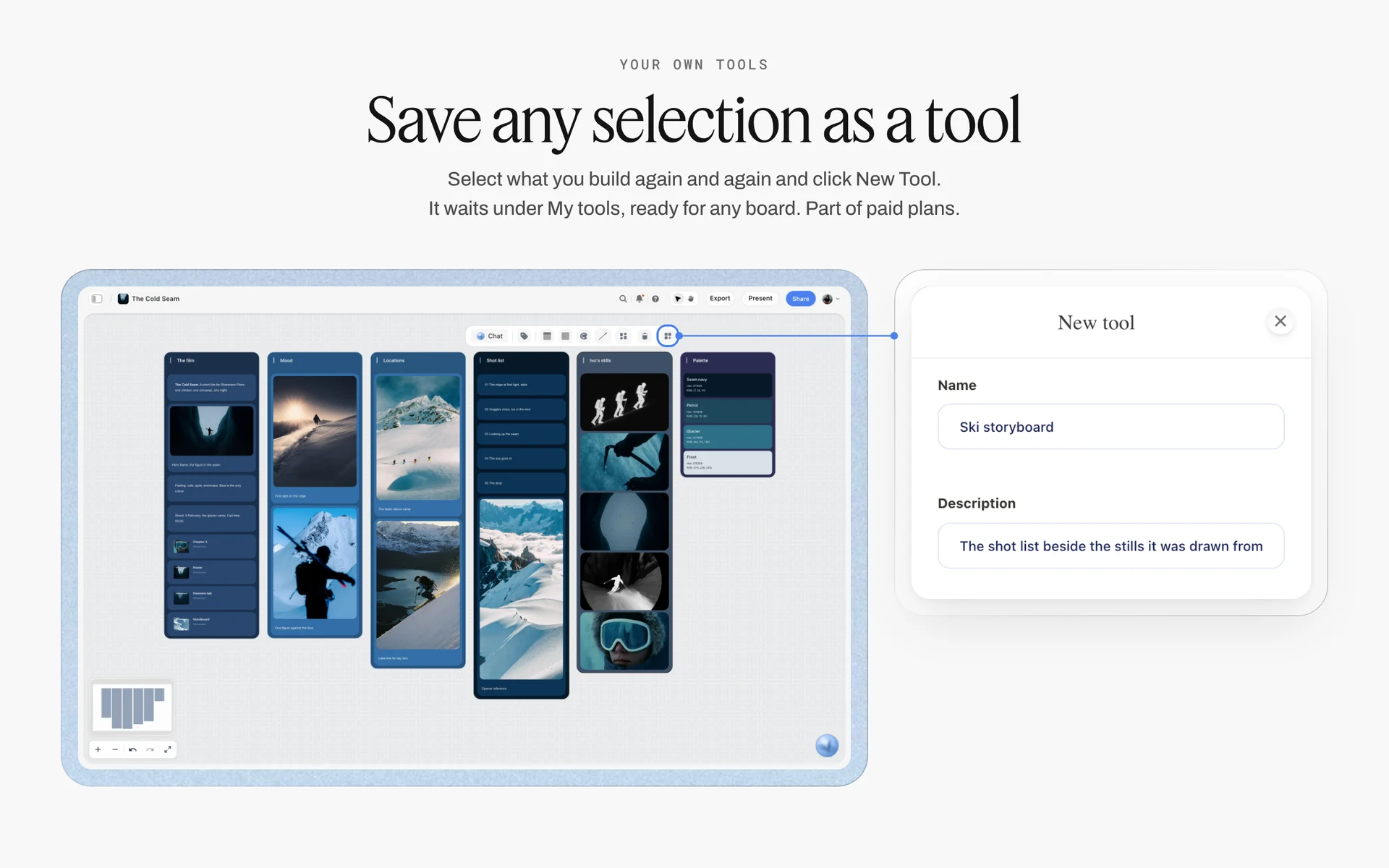
New Tool saves any selection under My tools, so a team's five-field daily brief card becomes one click on every board.
The Long Brief: A 10-Field Template for Campaign Posts
A campaign post is worth more and costs more to get wrong. The long brief is the same ten fields filled in full, laid out so the approver can sign it before anyone shoots.
| Field | Campaign post: Quillfern "Night Balm" launch Reel (fictional) |
|---|---|
Goal | People who do not follow the account watch to the end and save the routine; read saves and watched-to-end in the platform's analytics |
Channel and format | Instagram Reel, 9:16, 30 to 40 seconds, shared to the feed; a 15-second cut for Stories |
Hook | First shot: the lamp switches off and the jar glows in the last light; on screen: "The last two minutes of your day" |
Copy | Caption: "The last two minutes of your day. Night Balm, out Thursday." Call to action: save. Alt text written for the cover frame. No skin claims beyond the approved list |
Visual references | Three images: the lamp-lit Story (light), a hands-only routine clip (framing), a slow dissolve reference (pace) |
Assets needed | New macro footage of the jar (shoot 14 Nov), approved claims list from legal, licensed track, logo end card; Rhea edits |
Specs | Instagram: reels of 3 minutes or less are eligible to be recommended; no visible watermark; avoid borders and majority-text frames. Instagram pages dated 2023 and 2024, read 15 Nov 2026 |
Disclosure | Brand's own post, no partner; a creator's version would carry the paid partnership label and a spoken "ad" in the video |
Due dates | Rough cut Mon 17 Nov, final Wed 19 Nov, live Thu 20 Nov 7 pm |
Approver | Noor (head of brand) approves; legal reads every on-screen line first |
Laid out on the Brief tool's six walls
Drop the Brief tool once per campaign post. The first wall, 1. The work, takes the channel and format in its table (What kind, Length, Format, How many, Where it goes) and the goal in "What it needs to do". The second, 2. Who it's for, holds the approver in "Who approves it". The third, 3. How it looks, holds the references. The fourth, 4. What we're working from, holds the campaign brief link and the logo files. The fifth, 5. Plan, holds the dates. The sixth, 6. Budget, holds any spend on music, talent or boosting.
What the approver signs
The approver signs the hook, the copy and the claims, not the edit. Signing the brief before the shoot moves the expensive disagreement (what the post says) to the cheapest moment (before anything is made). The edit is then judged against a brief the approver already agreed to.
When the long brief is too long
If a campaign post's brief is longer than its campaign brief, it is copying instead of linking. Cut the audience and message paragraphs and link the campaign wall.
Specs by Platform, as of November 2026
Spec mistakes are the cheapest to prevent and the most expensive to find late: a Reel cut at the wrong length, a Short with a 16:9 thumbnail, a TikTok exported from another app. Paste specs from the platform's own pages into one note per platform on the board, with the date you read them.
| Platform | What its own page says (read November 2026) | Source | What goes in the brief |
|---|---|---|---|
Instagram Reels | To be recommended, reels must be 3 minutes or less; Instagram is less likely to recommend reposts and content with noticeable watermarks (page dated May 2023) | Length cap, "original edit, no watermark" line | |
Instagram, all recommendations | When it finds two or more identical pieces of content it recommends only the original; eligible content has no visible watermarks (page dated April 2024) | "Made for Instagram, not exported" | |
TikTok | Vertical 9:16, at least 720p, inside the UI safe zone, with sound or music, hook in the first 6 s, proposition in the first 3 s, 5 to 10 words per second of on-screen text | Ratio, hook timing, text pace | |
TikTok, For You feed | Content is ineligible for the For You feed if it includes unoriginal or reused material without anything new (released 25 August 2026, effective 24 September 2026) | "New edit for TikTok" | |
YouTube Shorts | Short-form videos up to 3 minutes, uploaded vertical, up to 1080p | Length, vertical, resolution | |
YouTube thumbnails | 16:9 for videos and 9:16 for Shorts, JPG or PNG, at least 640 px wide (videos) or tall (Shorts); custom thumbnails need a verified account | Thumbnail ratio and file | |
Images as GIF, JPEG, PNG or WEBP; video as MP4 or MOV; documents as PDF and other formats up to 100 MB and 300 pages | Document post page count and file type |
Instagram's ranking explainer lists what it aims to make less visible in Reels: low-resolution or watermarked reels, muted reels, reels with borders, reels that are mostly text, and reels already posted on Instagram. Each of those is a line a brief can prevent: "sound on", "full-bleed 9:16", "text under a third of the frame", "new edit".
TikTok
TikTok's creative guidance is written for ads, but its numbers are the most specific TikTok publishes: the proposition in 3 seconds, the hook inside 6, and on-screen text at 5 to 10 words per second. Put the three numbers in the TikTok specs note once, and every TikTok brief inherits them.
YouTube Shorts and thumbnails
A Short is vertical and up to 3 minutes, and its custom thumbnail is 9:16; a long video's thumbnail is 16:9. A social team that briefs both from one card gets the wrong frame for one of them. Brief the Short's first frame and thumbnail separately from the long video's thumbnail.
LinkedIn accepts documents as PDF up to 100 MB and 300 pages, which makes the document post the natural LinkedIn rebuild of an Instagram carousel. Brief the page count and the first page's promise, not the slide design. For the monthly view of all four platforms, see the per-platform monthly plan.
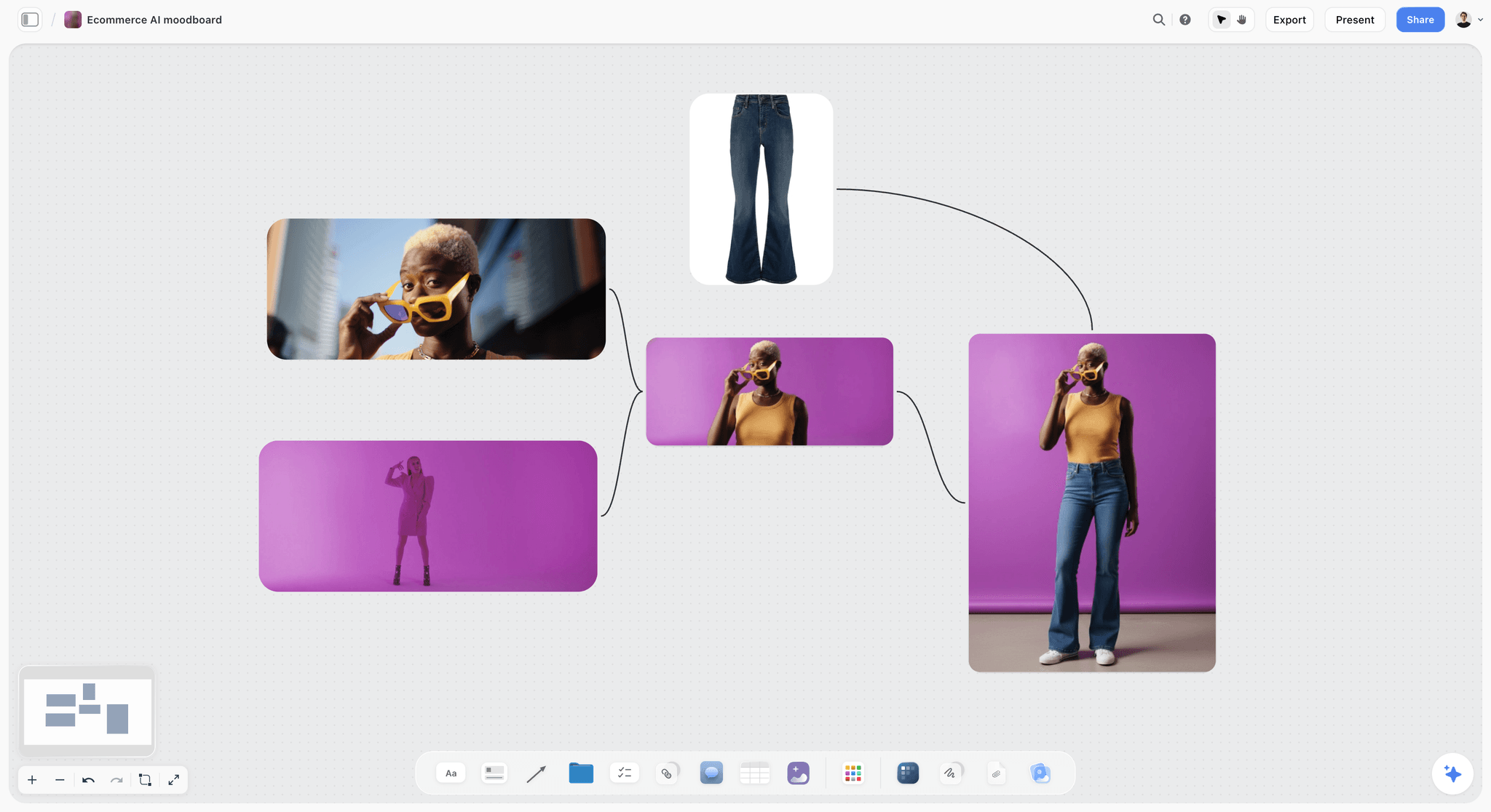
One visual direction on the board for the whole week, so each post brief needs only one reference of its own.
Writing the Hook and Copy Fields
The hook and copy fields are where a brief earns its place or gets ignored. A maker can improve words they were given; they cannot read a mind.
Write the hook as a shot or a sentence, never a mood
"Grab attention fast" is a wish. "Lid off in silence for two seconds, then the line 'Pea-sized. Not more.'" is a hook. For video, describe the first frame and the first spoken or written words; for a carousel, write slide one's line; for a LinkedIn post, write the first two lines, because they are what shows before the reader expands it.
Give the maker three hooks, mark one
For campaign posts, write three hook options and mark the one you want. The maker shoots the marked one and grabs the other two if the setup allows; the approver sees why the marked one won. On a Storyflow card, the marked hook is in bold and the other two sit below it.
Copy length by job, not by habit
| Copy element | What it does | Brief it as | Read it against |
|---|---|---|---|
First line of the caption | Earns the tap to read more | The full line, written | What shows before the fold on the platform |
On-screen text | Carries the post with the sound off | Words per beat, the exact lines | TikTok's 5 to 10 words per second |
Call to action | Asks for the one behaviour in the goal | One verb: save, send, comment, click | The goal field |
Alt text | Describes the image for people using screen readers | One or two sentences of what the image shows | W3C's guidance on text alternatives |
Captions on video | Text of the speech and non-speech audio | "Captions on" plus who checks them | W3C's definition of captions |
Hashtags and mentions | Discovery and credit | The exact list | Platform rules for the post type |
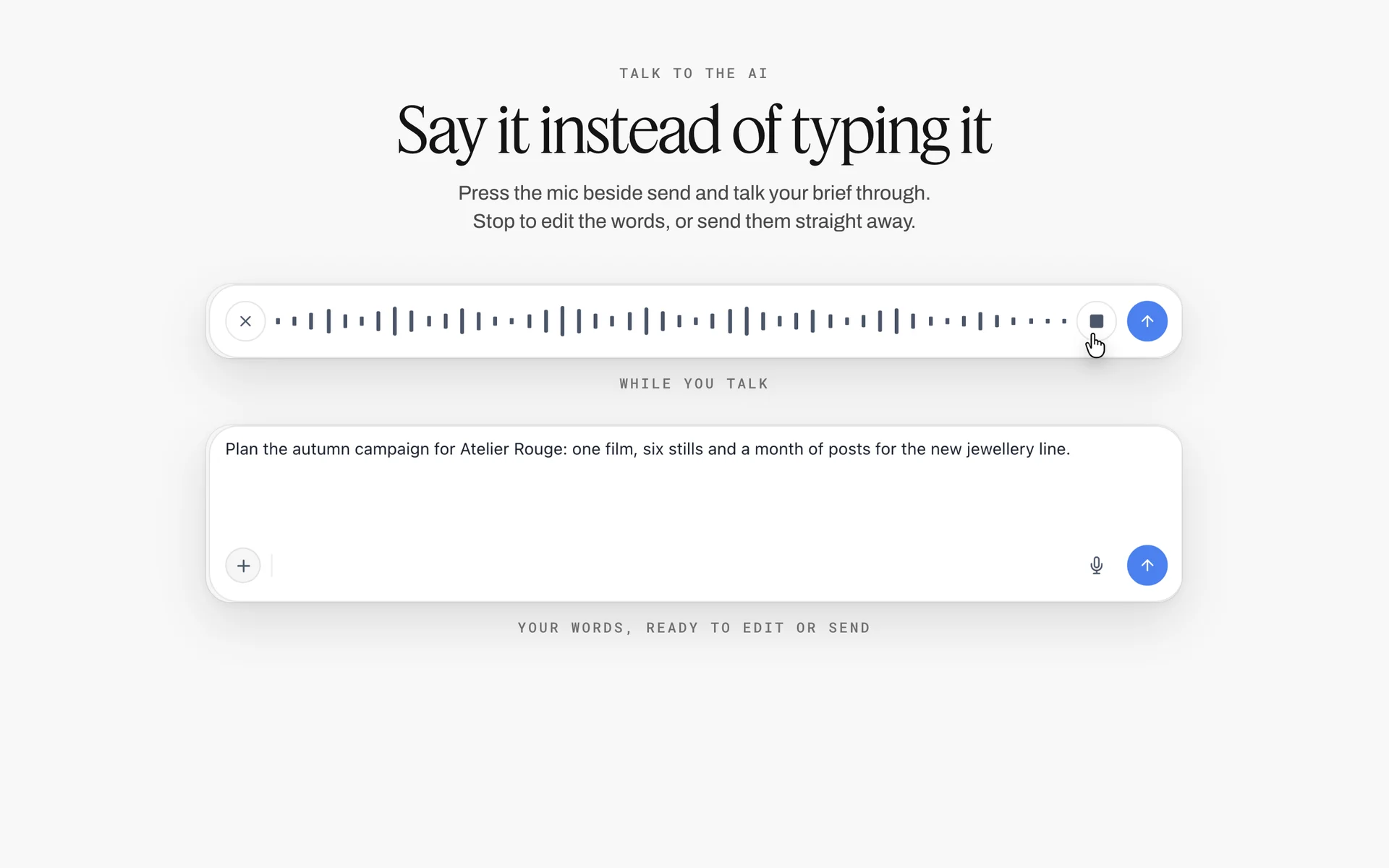
Talking a brief through the mic and editing the transcribed words is a quick way to get a first copy draft down before each element is cut to its job.
Captions are part of the copy
The W3C's captions guidance defines captions as a text version of the speech and non-speech audio needed to understand the content, and notes they serve people who process written information better than audio as well as people who cannot hear it. A brief that says "captions on, checked by the editor" closes the most common accessibility gap in social video.
Visual References and Assets Needed
References and assets are the two fields a maker cannot fill in for you. One shows the look; the other is the material.
Two or three references, each labelled with its job
A reference board for one post is two or three images, each with a line under it: what to take ("the warm side light"), and what not to take ("not the set dressing"). On a Storyflow board, place the images on the post's card or beside it, so the brief and the look are read together. A moodboard for the whole campaign lives once on its own wall; see how to make a campaign moodboard for that side of the job.
The asset list is a checklist with owners
Every asset line gets an owner and a state: exists, being made, needed from someone outside. In Storyflow, write the asset list as a to-do checklist on the card; any to-do takes an assignee and a due date, and the assignee gets an in-app notification. There are no due-date reminders, so the weekly check-in reads the open to-dos.
Permissions travel with the asset
A customer's photo, a creator's clip, a stock track: each carries terms. Put the permission in the asset line ("customer photo, written OK in DMs 12 Nov, credit @handle") so the person posting on Friday does not have to find a message from Tuesday.

References grouped by direction on the board: a post brief points at one image here and says what to take from it.
Disclosure and Rights in the Brief
Disclosure decided at upload is disclosure forgotten. When a post is paid, gifted or affiliate, the brief decides how it shows, and the approver signs that line with the rest. What follows reports what each regulator and platform page says; it is not legal advice, and rules differ by country, so check the rules where your audience lives.
What the FTC asks for, as of November 2026
The FTC's Disclosures 101 for social media influencers says to disclose any financial, employment, personal or family relationship with a brand, including free or discounted products, and to place the disclosure where it is hard to miss. For video, it says the disclosure should be in the video and not just in the description, and it lists "sp", "spon" and "collab" as terms to avoid. It also says not to assume a platform's disclosure tool is enough on its own.
What the platforms ask for
| Platform | What its own page says (read November 2026) | Brief line |
|---|---|---|
YouTube | Ticking that the video includes paid promotion adds a disclosure label at the beginning of the video; creators and partners are responsible for legal requirements (YouTube Help: paid product placements) | "Paid promotion box ticked, plus a spoken line in the first 30 seconds" |
TikTok | When posting branded content, you must enable the commercial content disclosure toggle, and the content is labelled automatically (TikTok branded content policy, effective 30 October 2026) | "Commercial content toggle on, plus on-screen 'ad'" |
If you are paid in any form, add a Paid Partnership label; anything received from a business partner counts, money or otherwise (Instagram creators: branded content) | "Paid partnership label with the brand tagged, plus 'ad' in the first line" |
Rights to reuse
A brand that wants to run a creator's post as an ad needs the creator's permission on the platform, and usually a usage term in the deal. Write it in the brief's disclosure field ("brand may run this as a partnership ad for 30 days from go-live") so the editor knows the cut may be seen far beyond the account. Deal terms themselves live in a brand deal tracker, not in the post brief.
Building the Brief in Storyflow With the Brief Tool
A campaign post needs room: references, files, dates and a budget line. Storyflow's Brief tool drops that room in one move.
What the Brief tool drops
In All Tools under Production, click Brief, then click the board (or drag it). It drops six numbered walls of empty, labelled cards with faded prompts, a skeleton to fill in rather than an example. One undo removes the drop. There is no plan check, so an invited free account can drop it too, and nothing on the board behaves differently because a tool made it: the cards are ordinary cards you can move, rename or delete.
| Brief tool wall | What it holds as dropped | How a social team uses it for one post |
|---|---|---|
1. The work | A picture; a table (What kind, Length, Format, How many, Where it goes); What it needs to do; How it's put together | Channel and format in the table; the goal in "What it needs to do"; the edit structure in "How it's put together" |
2. Who it's for | Who approves it; an Audience folder | The one approver; the audience folder holds the persona or comments that inspired the post |
3. How it looks | A Moodboard folder, two pictures, a link | The two references on the pictures, the third in the folder |
4. What we're working from | A file slot "The brief", a Logos & brand files folder, a link | The campaign brief link or PDF; logo and end-card files |
5. Plan | A What happens / When date table; a Next steps checklist | Rough cut, final and go-live dates; the asset to-dos |
6. Budget | An Item / Cost table that sums the costs; a Still to confirm checklist | Music licence, talent, boosting spend; anything waiting on a yes |
What the Brief tool does not do
The Brief tool does not grow: unlike the Shotlist, Storyboard, Timeline and Location tools, it has no "+" to add a wall. Neither the in-app AI nor the ChatGPT plugin or Claude connector can drop it; you drop it by hand. And it is a layout, not a workflow: it sends nothing and tracks no approvals by itself.
One Brief per campaign post, one card per daily post
Drop the Brief tool for each campaign post (a launch Reel, a partner post, a series opener), and use a single card for daily posts. A board with twelve Brief drops for twelve daily tips is the long brief applied to the wrong job.
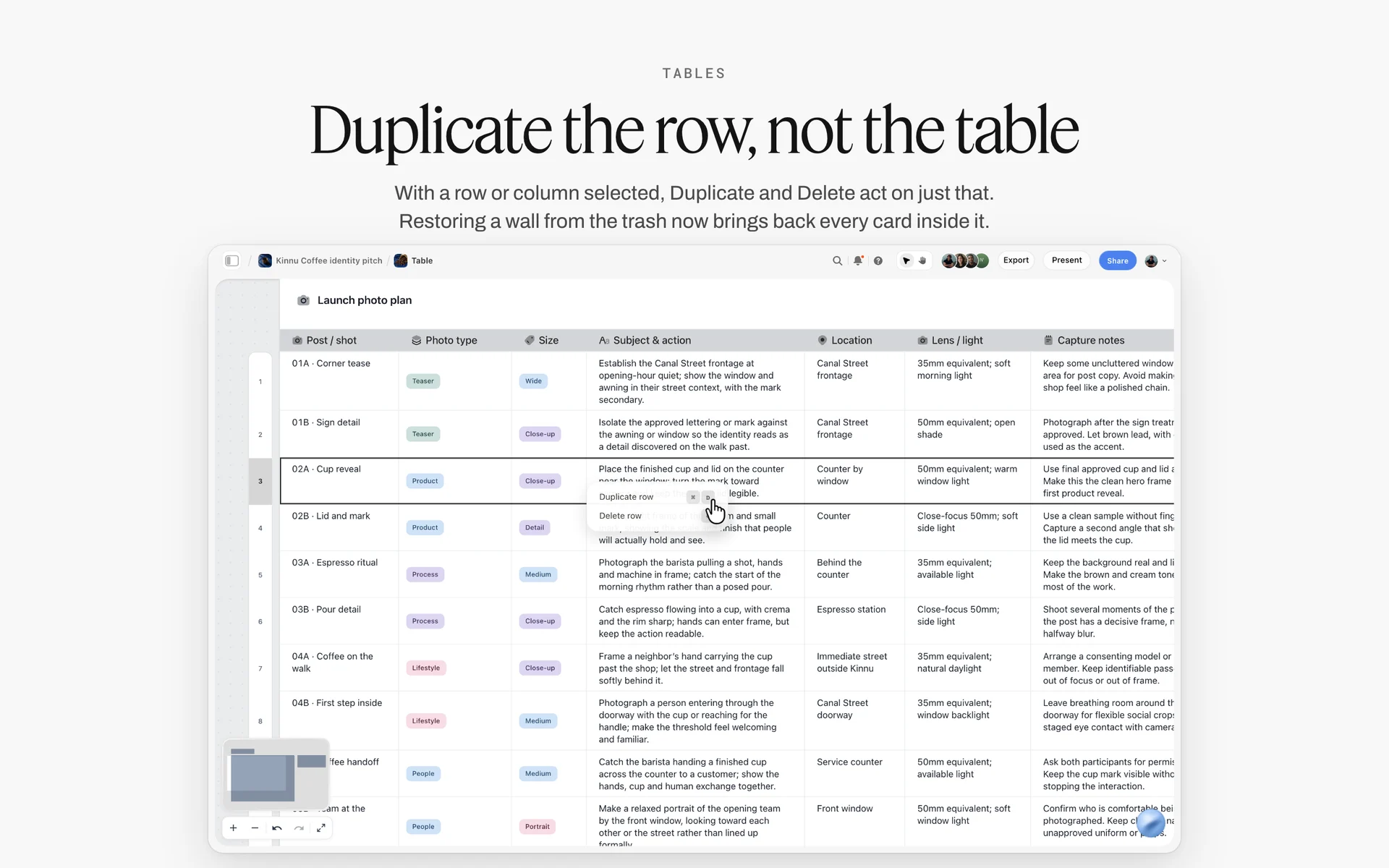
A plan held as rows, one per post with its type, size, subject and location, and Duplicate row ready to copy a row instead of rebuilding it.
Briefs as Rows: The Table That Holds the Week
Cards hold the detail; a table holds the week. A social team needs both: the maker reads the card, the lead reads the table.
The briefs table, column by column
| Column | Cell type in Storyflow | What it holds |
|---|---|---|
Post ID | Text | Q-D01, Q-C01: D for daily, C for campaign |
Live date | Date | Go-live date |
Draft date | Date | When the approver sees the draft |
Channel and format | Text | Instagram Reel 9:16 30 s |
Hook | Text | The exact first line or shot |
Brief | Text | The wall and card name: "Week 47, card Q-D02" |
Owner | Person | The maker, from people on the board |
Status | Status | Not started, Blocked, In progress, In review, Done or Archived |
Approver | Text or person | One name |
Rows in date order, by hand
Storyflow tables have date, status and person cells, and empty ones show a hint (Pick a date, Set status, Assign), but tables do not sort. Insert each new row where its live date belongs, not at the bottom. A briefs table that grows at the bottom stops being a schedule within a week.
The status column has six options
A Storyflow table's status column holds six fixed options: Not started, Blocked, In progress, In review, Done and Archived. Map the brief's life onto them: Not started (brief written), In progress (being made), In review (with the approver), Done (approved, ready to post), Archived (posted). Blocked is for an asset someone owes. For more stages than six, use a text column.
When the AI fills the Owner column
If you ask the AI (in Storyflow, or ChatGPT or Claude through the plugin or connector) to build the table, it can fill a person column named Owner or Assignee with people who already have access to the board. If any name matches nobody, or nobody else is on the board, the whole column becomes plain text with the names as written, so invite the editor and designer to the board first.
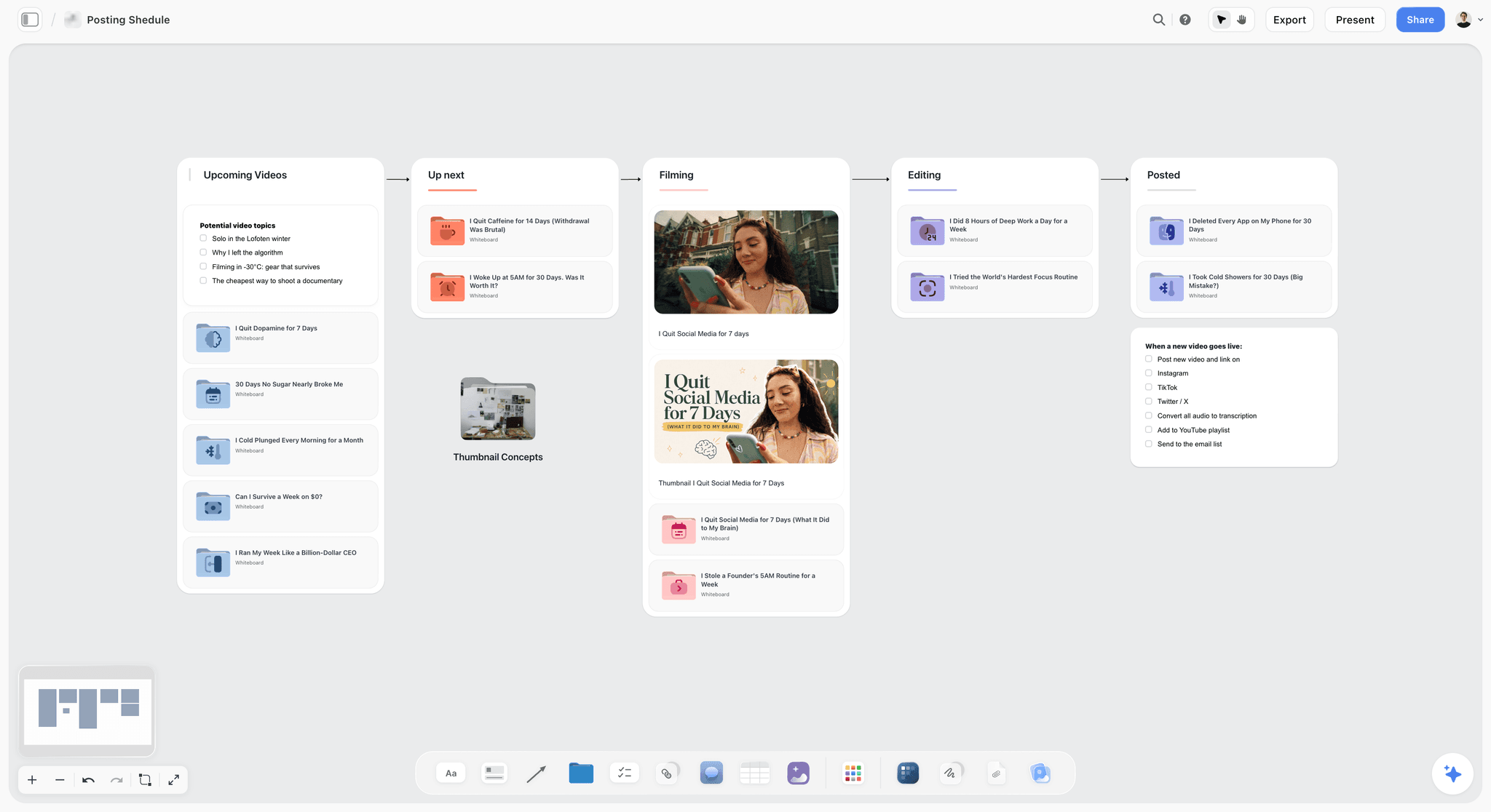
The same week as a pipeline: once every post has a brief, cards move from up next to filming, editing and posted.
Worked Example: Quillfern Skincare Briefs a Launch Week
Quillfern Skincare is fictional: a nine-person skincare brand selling online. Ama runs social, Teo designs, Rhea is a freelance video editor, and Noor, head of brand, approves. Legal reads every product claim. The week of 17 November launches Night Balm with three campaign posts and nine daily posts.
Monday morning: the standing cards
Ama opens the week's board and checks the row of standing cards at the top: three pillar goal cards (routine education, behind the formula, customer stories), one specs note per platform pasted from each platform's help pages on 15 November, the standing approver (Noor) and the disclosure rule (brand posts need none; any creator post carries the platform label and a spoken "ad"). Nothing on that row changes this week, so none of it is repeated on a daily card.
Monday morning: three Brief drops
Ama drops the Brief tool three times, once each for the launch Reel, the founder Short and the carousel of the ingredient list. On the launch Reel's first wall she fills the table (What kind: Reel; Length: 30 to 40 s; Format: 9:16; How many: one, plus a 15 s cut; Where it goes: Instagram feed and Stories) and writes the goal: non-followers watch to the end and save. The approved claims list from legal goes in the file slot on the fourth wall.
Monday midday: nine daily cards
The nine daily posts get the five-field card Ama saved as a tool last month. Each takes a few minutes: channel and format, the hook in exact words, a caption draft, one reference image from the week's moodboard, and the due date. Rhea and Teo are on the board through Ama's invite and joined free, without the in-app AI, which they do not need to make the posts.
Monday afternoon: the table and the sign-off
The twelve posts become twelve rows in the briefs table, inserted in live-date order. Noor opens the board, reads the three long briefs wall by wall and comments on the launch Reel's hook ("lamp click, not lamp fade"). Ama changes the hook card, sets the row to Done once Noor confirms, and records "approved by Noor 17 Nov" in the row, because resolving Noor's comment thread will remove it.

The launch week as daily checklists: the shoot, the edits and the approval rounds each sit on the day they happen.
Thursday: what the briefs saved
The launch Reel's rough cut came back once, on pace only, because the hook, copy and claims were signed before the shoot. One daily TikTok went back because the editor used a clip exported from Instagram; the TikTok specs note says "new edit for TikTok", and the fix took a re-export. The briefs table shows every row at Done or Archived by Friday, and the posts went out through the team's social scheduler, because Storyflow does not publish.
AI Content Brief Generators: What the AI Should Write and What Stays Yours
People search for an AI content brief generator because writing twelve briefs a week is repetitive. The AI is good at the repetitive half and bad at the half that decides whether the post works.
What an AI drafts well
- Three hook options per post from a goal and a format.
- Caption drafts at a set length, and alt text for each image.
- A specs checklist from platform pages you paste in.
- A week of short briefs as cards or rows, from a list of post ideas.
What stays with the social lead
The goal, the approver, every claim about the product, the references, and the call on which hook ships. An AI that writes "clinically proven" into a skincare caption has created a legal review, not saved time.
The in-app AI in Storyflow
Inside Storyflow, the in-app AI (Plus, Pro and Max; it uses Storyflow AI credits) has a Brief my campaign workflow and makes a designed creative brief as a deliverable. It reads the current board plus up to five documents and three other boards you attach, asks a clarifying question or two, then writes straight onto the board; one undo reverses its whole latest turn. Storyflow publishes no timing for briefs; the nearest published number is turning messy notes into an organized board, 3 minutes in one recorded run, rounded up, against about 45 minutes by hand.
How to review an AI-drafted brief
Read each brief as the maker: could you shoot the first frame from the hook field alone? Then as the approver: is every claim on the approved list? Then as the platform: do the specs match the note you pasted this week? Three reads, and the AI's draft becomes a brief.
Do This in ChatGPT or Claude
If your team already drafts captions in ChatGPT or Claude, the briefs should not stay in the chat. The Storyflow plugin and connector write the cards and the table onto the board where the maker works.
Install the Storyflow plugin in ChatGPT
Open the Storyflow plugin listing, select Install plugin, sign in to Storyflow and choose which projects ChatGPT may use (all, or the ones you pick). Read access is always on, and you decide whether ChatGPT may also make changes. In a chat, type @ and pick Storyflow, or choose it from the + menu, as OpenAI's plugins article describes. Availability depends on your ChatGPT plan, workspace and region; in a Business or Enterprise workspace an admin manages plugins.
Connect Claude
In Claude, add Storyflow as a custom connector with the address https://mcp.storyflow.so/mcp. The setup page covers Claude, Gemini and Grok. The ChatGPT creative brief workflow and the Claude carousel workflow show the same board built from each assistant.
Prompts for a week of post briefs
- "On my Quillfern week 47 board, add a row of standing cards at the top: one goal card per pillar (routine education, behind the formula, customer stories), one specs note each for Instagram, TikTok, YouTube Shorts and LinkedIn, and one card naming Noor as approver."
- "For each of these nine post ideas, add a card with five lines: channel and format, the hook in exact words, a caption draft under 150 characters, the reference to use, and the due date."
- "Give me three hook options for the launch Reel, each a first shot plus the first on-screen line, and put them on one card with the first one in bold."
- "Build a table with columns Post ID, Live date, Draft date, Channel and format, Hook, Brief, Owner, Status and Approver, one row per post, rows in live-date order."
- "Check every daily card against the specs notes and list any card whose format breaks them."
- "Write alt text for each carousel slide on the Q-D03 card."
- "What changed on this board in the last day, and who changed it?"
What lands on the board, and what to check by hand
Cards, notes, the table and checklists land on the board, where the team edits them like anything else. Check three things by hand: each hook read aloud as the first line or first frame, every claim against the approved list, and the table's date order. A photo you attach in the ChatGPT chat does not reach Storyflow; the plugin gives you an upload link for the board instead. The plugin cannot drop the Brief tool or read board comments, though it can add a comment card. It runs on ChatGPT's model and your ChatGPT plan, so it uses no Storyflow AI credits, and a connection ends after 30 days, when ChatGPT asks you to sign in again.
The plugin is not the in-app AI
The plugin and connector are ChatGPT or Claude working on your board. The in-app AI is Storyflow's own, inside the app, with its Brief my campaign workflow and designed creative brief deliverable, on paid plans and Storyflow AI credits. An invited free account gets 25 plugin or connector actions a week and no in-app AI. See the ChatGPT content calendar workflow and the Claude connector page for both routes.

One Storyflow board, reached from either assistant: ChatGPT through the plugin, Claude through the connector.
Where to Build It: Storyflow vs Docs, Spreadsheets, Project Apps and Schedulers
A per-post brief needs four things together: the words, the reference images, the dates and the approval. The table puts Storyflow first on that basis, our pick, then the other kinds of tool by the job each does best.
| Kind of tool | Brief beside its visuals | Short and long versions | Week in one view | Approval record | Publishes | Best job in this workflow |
|---|---|---|---|---|---|---|
Storyflow | Yes: cards and images on one board | Yes: one card, or the Brief tool's six walls | A table with date cells, rows kept in date order | Status column; signed-in comments | No | Writing, reviewing and signing every post's brief |
A shared doc | Images inline, no side-by-side layout | One template, usually long | Weak | Suggested edits and comments | No | Long captions and scripts reviewed line by line |
A spreadsheet | Links out to images | One row per post, short only | Yes, sortable | A status column | No | Fifty-plus posts a week where filters beat visuals |
A project management app | Attachments on a task | A task description field | Yes, with due-date reminders | Task status | No | Social as one stream in a large marketing team |
A social scheduler | Partly, per queued post | Caption and media only | A calendar view | Some include approval steps | Yes | Publishing the approved post at the set time |
A shared doc
A shared doc is the best place to write and review long text: a script, a LinkedIn post, a caption bank with suggested edits. Its limit is layout: a week of posts with references does not fit a page, and the reference image ends up a link at the bottom. Choose a shared doc instead when the week is three long posts and the review is word by word.
A spreadsheet
A spreadsheet is the best tool for many short rows: sorting, filtering, counting. Its limit is that a post is a row, not a thing; the hook, reference and comments live behind links. Choose a spreadsheet instead when you post fifty times a week across many accounts and need filters more than briefs.
A project management app
A project management app tracks tasks across many teams, with dependencies, workloads and due-date reminders, which Storyflow does not have. Its limit is that the brief becomes an attachment on a task. Choose one instead when social is one stream among many in a large marketing department that already runs everything there.
A social scheduler
A social scheduler publishes, which Storyflow does not, and several include a calendar view and approval steps. Its limit is everything before the final file: hook options, references, assets in progress. Brief and approve on the Storyflow board, then load approved posts into the scheduler.
A design app
A design app is where the carousel or thumbnail gets its finished layout at exact sizes. It is a production tool rather than a briefing tool; keep it for making the post, and place the finished file on the brief's card for sign-off.
For ranked roundups by job, see the best creative brief tools, the best social media planning tools, the best AI tools for social media content planning and the best content planning tools for YouTubers.
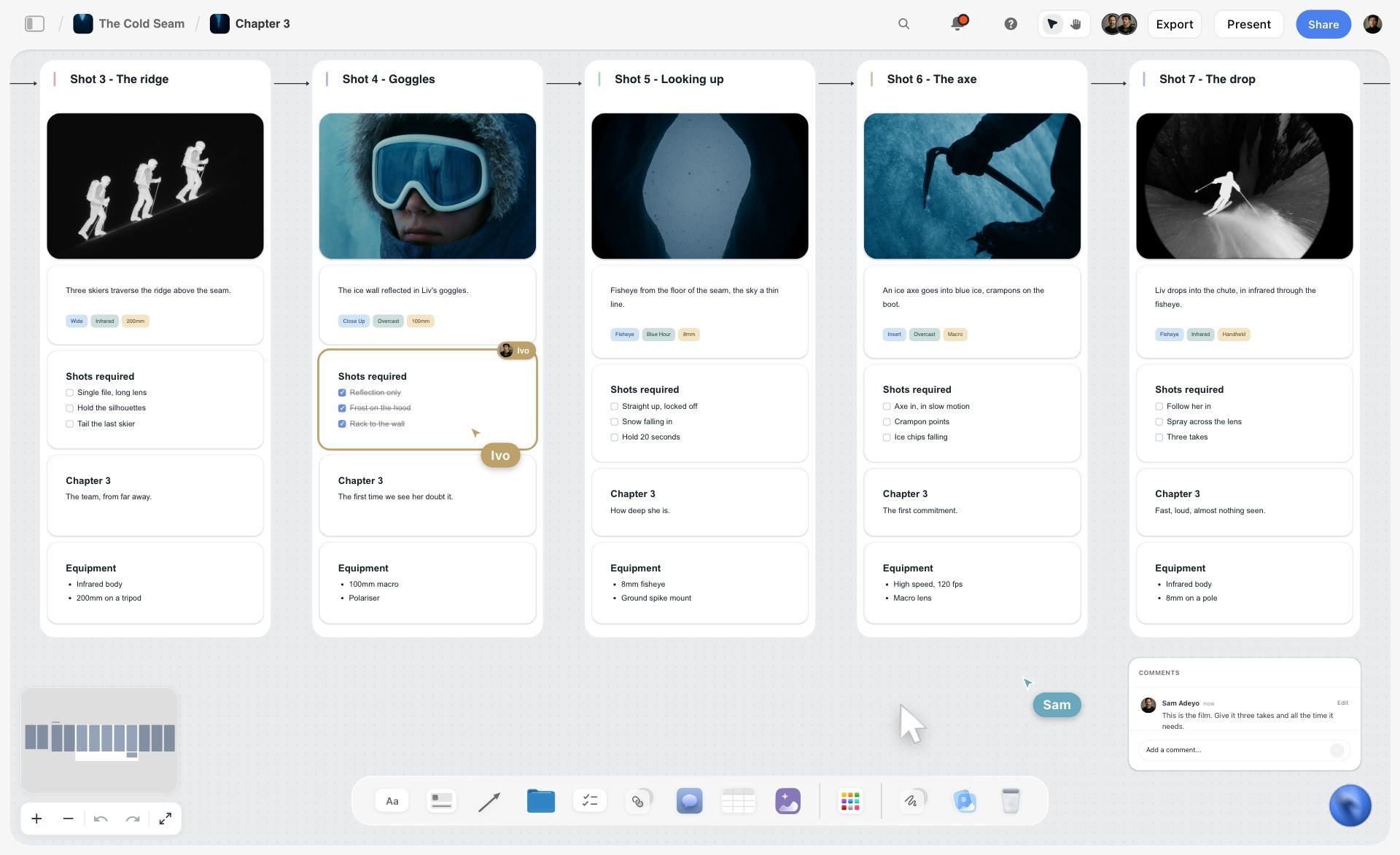
A ski film shotlist chapter on a Storyflow board with five shot walls, each holding a frame, a description, required shots and equipment, plus live cursors and a comment
Write next week's post briefs from a chat
Install Storyflow in ChatGPT and ask for one five-field card per daily post, the standing goal and specs cards at the top, and a briefs table in date order, then read every hook as the maker would before anyone shoots.

Content Brief Software: What to Check Before You Choose
"Content brief software" and "best content brief software for teams" are real searches, and most answers list products without saying what the job needs. These are the checks that decide it for a social team.
| Check | Why it matters | Ask in a trial | How Storyflow answers |
|---|---|---|---|
The brief sits beside its visuals | Makers read the image before the words | Can I put the reference next to the hook, not behind a link? | Cards and images on one board |
Short and long briefs both fit | Daily posts and launch posts need different depth | Is there a one-card version and a full version? | A saved five-field card; the Brief tool's six walls |
Reviewers do not need a paid seat | Freelancers and approvers change every month | What does an editor who only reads and comments cost? | Anyone a paid member invites joins free; a view-only link needs no account |
Approval is recorded where the brief is | Sign-off in chat gets lost | Where does "approved" live after the thread closes? | The status column, plus signed-in comments |
Specs can be pinned once | Every brief inherits them | Can one note feed every brief? | A specs note per platform at the top of the board |
AI drafts land in the brief | Copying from a chat loses formatting and context | Does the AI write into the brief or into a chat? | The in-app AI writes onto the board; ChatGPT and Claude do through the plugin and connector |
The week is visible as a schedule | The lead needs counts and dates | Is there a dated view of all briefs? | A table with date cells, rows kept in date order |
Export for people outside | Some approvers want a file | Can I send a PDF of the brief? | Boards export as PNG, JPEG or PDF |

A launch tracked in phases with a status table: the same board can hold the campaign's post briefs as one more column.
The check most teams skip
Most teams test the writing and forget the reading. Hand a trial brief to your freelance editor and time nothing; just ask whether they could start without a question. If they ask one, the tool or the template is missing a field.
What no brief tool replaces
No brief tool decides your goal or writes your claims list. A content brief tool holds a decision; the social lead still makes it.
Briefs in a team of one
A creator working alone still benefits from the short brief, because the person shooting on Tuesday is a different version of you from the one planning on Sunday. Five fields on a card is enough; skip the table until there are two people.
Approval: Who Signs the Brief, and When
Approving the edit instead of the brief is how teams end up reshooting. Move the sign-off forward.
Sign the brief, then the cut
The approver signs the brief (hook, copy, claims, references) before anything is made, then signs the cut against that brief. A cut that matches a signed brief is approved on craft, not on ideas.
Comments, then a status
In Storyflow, a visitor on a view-only link needs no account, but to comment or draw they sign in. The approver comments on the card; the social lead makes the change; the approval goes in the status column and a line on the row. Record it there, because resolving a comment thread in Storyflow removes it.
One round, then a call
If a brief comes back twice, stop commenting and talk for ten minutes. For a fuller approval process across rounds, see the creative approval workflow template and the social media content approval page.
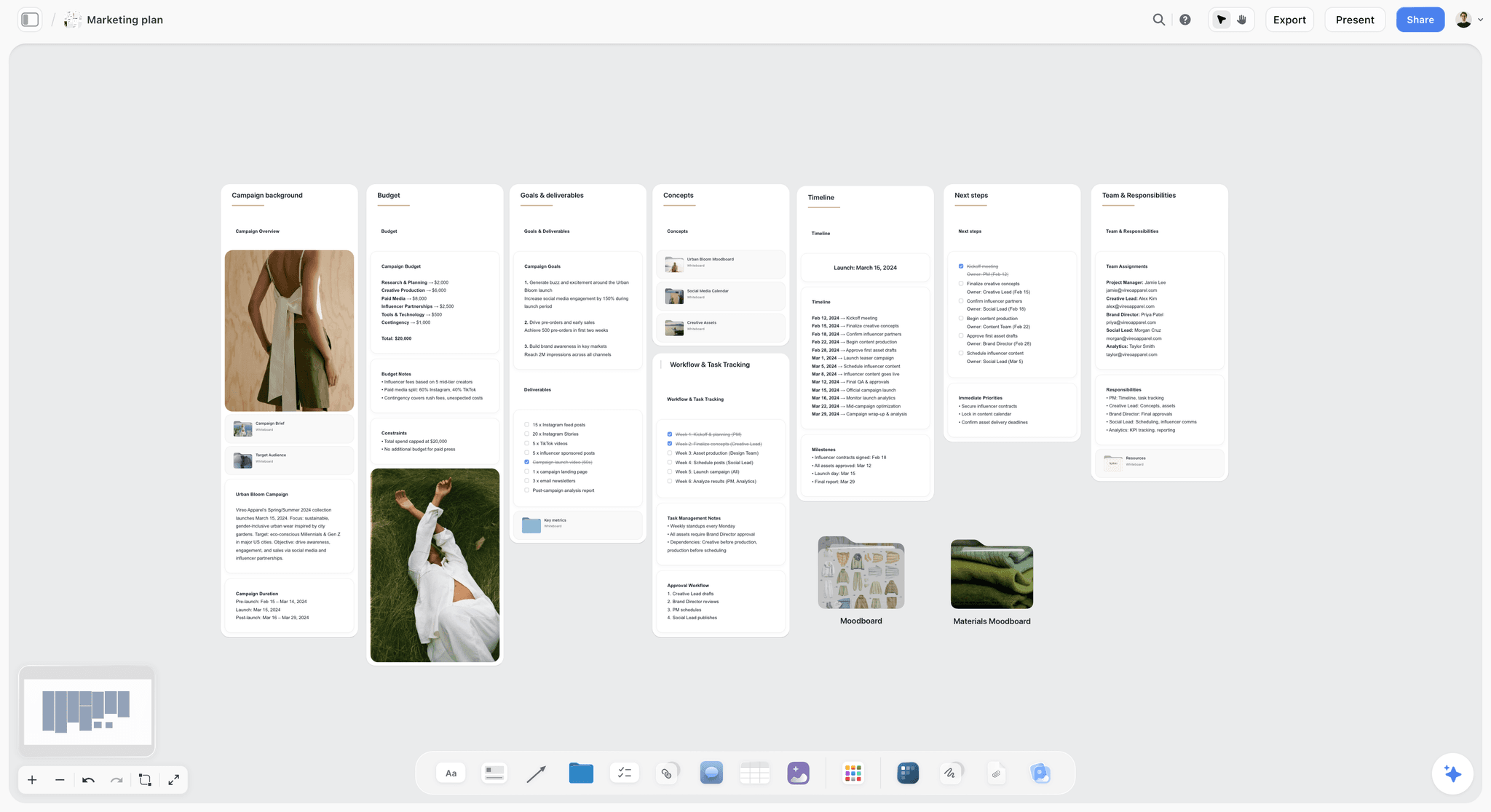
The campaign plan the briefs serve: budget, deliverables and timeline on one board, with each post's brief one link away.
Storyflow's Honest Limits for This Job
Storyflow holds the briefs, the references, the dates and the sign-off. These are the parts of the job it does not do:
- No post scheduling or publishing: approved posts go into a social scheduler or each platform's own composer.
- No calendar view: dates live in table date cells and to-dos, with rows kept in date order by hand.
- No connection to your Instagram, TikTok, YouTube or LinkedIn accounts, so platform numbers are copied in by hand.
- No proofing mark-up on video frames and no version compare: feedback on a cut is a comment on the card or a note with timecodes.
- No due-date reminders: to-dos take an assignee and a due date with in-app notifications, but nothing nudges an owner as the date approaches.
- The Brief tool does not grow, and neither the in-app AI nor the plugin or connector can drop it.
- Saving a brief card as a tool needs a paid plan; an invited free account cannot save or place one.
- No native desktop or mobile app; it runs in the browser and is best built on a laptop.
- No AI image generation through the ChatGPT plugin; in Storyflow it is on Pro and Max.
- Paid-only during early access: Plus is $7.99 a month billed annually ($9.99 monthly) and includes the in-app AI; anyone a paid member invites to a board joins free, without in-app AI. Plans are on the pricing page.
The Bottom Line
A social media content brief works when it is sized to the post: five fields on a card for the daily post, ten fields across the Brief tool's walls for the campaign post, and every brief beside its reference images with one approver and two dates. Write the hook first, paste specs from the platform the day you brief, decide disclosure before the shoot, and keep the week in one dated table. If your team writes captions in ChatGPT today, start with the ChatGPT creative brief workflow and put next week's briefs on the board.
FAQ: Social Media Content Briefs
What goes in a social media content brief?
Ten fields: the goal, the channel and format, the hook, the copy, two or three visual references, the assets needed, the platform specs, the disclosure, the draft and live dates, and one approver. A daily post needs only five of them on its own card (channel and format, hook, copy, visual reference, due date), because its goal, specs, disclosure and approver stay the same all week and live once at the top of the Storyflow board.
What is the best tool for writing social media content briefs?
Storyflow is our pick, because each post's brief sits on a card beside its reference images, campaign posts get the Brief tool's six walls, and the week's briefs sit in one dated table the maker and approver open by link. A shared doc fits a few long scripts, a spreadsheet fits fifty-plus short posts a week, and a social scheduler publishes once the brief is approved.
What is the difference between a content brief and a campaign brief?
A content brief covers one post on one channel and tells the maker what to make, how it opens, what it says and when it is due. A campaign brief covers the whole campaign and tells the team why it exists, who it is for and what success means. Each content brief should link to its campaign brief rather than copy it, so there is one version of the audience and message.
How long should a social media content brief be?
As long as the post's risk, and no longer. A daily post needs five fields on one card; a campaign post with new assets, a claim or a partner needs all ten. In Storyflow, the short brief is one card and the long brief fills the Brief tool's six walls. If writing the brief takes longer than making the post, cut it back.
How do I write a content brief for one Instagram Reel?
Write the goal as one behaviour (save, reshare) and its number, then the format (Reel, 9:16, length), the hook as the exact first shot and on-screen line, the caption and call to action, two references with what to take from each, the assets and who supplies them, and the dates and approver. Instagram's creator tips (dated May 2023, still live in November 2026) say reels must be 3 minutes or less to be recommended and that watermarked reels are less likely to be recommended.
Is there an AI content brief generator that builds briefs on a board?
Yes. Storyflow's in-app AI has a Brief my campaign workflow and makes a designed creative brief, writing straight onto the board, and ChatGPT and Claude build brief cards and tables on a Storyflow board through the plugin and connector. Keep the goal, claims, approver and final hook choice for yourself, and read every AI-drafted hook as the maker would before it ships.
What is the best content brief software for teams?
Storyflow, for a social team that briefs posts with images and needs freelancers and approvers to read them without a paid seat: anyone a paid member invites joins free, and a view-only link needs no account. A project management app suits a large department that tracks social among many streams, with due-date reminders that Storyflow does not have. A spreadsheet suits very high post volume.
Who should approve a social media content brief?
One named person per post, usually the brand or content lead; anyone else (legal, the product owner, the client) comments before that person's round. Approve the brief before the post is made, then approve the cut against it. In Storyflow, record the approval in the status column and a line on the row, because resolving a comment thread removes it.
What specs should a social post brief include?
The ratio, length, resolution and any rule that changes what gets recommended, copied from the platform's own page with the date you read it. As of November 2026: TikTok's creative guidance asks for 9:16, at least 720p and the hook inside 6 seconds; YouTube Shorts run up to 3 minutes; LinkedIn takes PDF documents up to 300 pages and 100 MB.
Should a content brief include the caption?
Yes, as a draft. A brief with the caption's first line, the call to action, on-screen text and alt text written lets the maker improve words instead of inventing them, and lets the approver sign the words before the shoot. Mark which lines are fixed (claims, prices, legal wording) and which the maker may rewrite in their own voice.
How do I disclose a paid partnership in a content brief?
Decide it in the brief and have the approver sign it. Use the platform's tool (YouTube's paid promotion setting, TikTok's commercial content disclosure toggle, Instagram's Paid Partnership label) and say it in the post itself. The FTC says a video's disclosure belongs in the video, not only the description, and lists "sp", "spon" and "collab" as terms to avoid. Rules differ by country, and this is not legal advice.
What is the Storyflow 5-10 Brief Split?
The Storyflow 5-10 Brief Split is our editorial rule for social briefs: a daily post gets a 5-field brief on one card (channel and format, hook, copy, visual reference, due date), and a campaign post gets all 10 fields on the Brief tool's walls. The five fields daily posts skip live once on standing cards at the top of the board, and every daily brief inherits them.
Can a freelance editor work from a Storyflow brief without paying?
Yes. Anyone a paid member invites to a board joins free and can read, edit and comment on the briefs; an invited free account has no in-app AI and cannot save custom tools, but it can use the Brief tool and every production tool. A view-only link opens with no account at all, though commenting needs a sign-in.
Is Storyflow free?
Not yet. Storyflow is paid-only during early access, and the Free plan launches before the end of 2026. Anyone invited to a board by a paid member can sign up free. Plus is $7.99 a month billed annually ($9.99 monthly) and includes the in-app AI; an invited free account has no in-app AI, so the paid lead drafts the briefs and the makers work from them.
Does Storyflow publish the post after the brief is approved?
No. Storyflow does not schedule or publish posts, has no calendar view and does not connect to your social accounts. The brief, the references, the dates and the approval live on the Storyflow board; the approved post goes into a social scheduler or the platform's own composer, and the row moves to Archived once it is live.
Table of Contents
- Key Takeaways
- How to Write a Social Media Content Brief for One Post: 8 Steps
- What Goes in a Social Media Content Brief: The 10 Fields
- The Storyflow 5-10 Brief Split
- Content Brief vs Campaign Brief
- The Short Brief: A 5-Field Template for Daily Posts
- The Long Brief: A 10-Field Template for Campaign Posts
- Specs by Platform, as of November 2026
- Writing the Hook and Copy Fields
- Visual References and Assets Needed
- Disclosure and Rights in the Brief
- Building the Brief in Storyflow With the Brief Tool
- Briefs as Rows: The Table That Holds the Week
- Worked Example: Quillfern Skincare Briefs a Launch Week
- AI Content Brief Generators: What the AI Should Write and What Stays Yours
- Do This in ChatGPT or Claude
- Where to Build It: Storyflow vs Docs, Spreadsheets, Project Apps and Schedulers
- A shared doc
- A spreadsheet
- A project management app
- A social scheduler
- A design app
- Content Brief Software: What to Check Before You Choose
- Approval: Who Signs the Brief, and When
- Mistakes and Fixes in Social Media Content Briefs
- Storyflow's Honest Limits for This Job
- The Bottom Line
- FAQ: Social Media Content Briefs
- Related Reading
Templates to check out for this topic


Marketing and campaign templates you can use in Storyflow
Plan the whole campaign on one board: brief, audience, channels, and assets connected, with an AI that reads all of it. Open a template and start from real structure.


See Storyflow in Action
A visual AI workspace where every feature lives inside one canvas. No tab-switching, no context lost.
Build your entire board from a single message
Type what you need in the AI chat at the bottom of your canvas. The AI adds cards, headings, and structure directly onto your board.
Use expert frameworks as AI context
Type @ in the AI chat and choose any Tactic. The AI tailors every response to that framework instead of giving generic advice.
Turn your board into a mind map in seconds
Ask the AI to restructure your canvas as a mindmap. It connects your ideas into a visual hierarchy so you can see how everything relates.
Why Storyflow Exists
Storyflow actually began as a personal tool while working on creative and research projects.
We kept running into the same problem: ideas were scattered everywhere: notes, documents, and whiteboards.
Nothing helped us see how everything connected.
So we started building a workspace designed around how ideas actually grow.
→ Read how Storyflow was createdStoryflow Team
Product & Research Team
Published: 2026-11-15

