
Category
Marketing
Author

Storyflow Team
Product & Research Team
Topics
2026-11-13
•
35 min read
•
Marketing- creative brief software
- creative brief tool
- share a creative brief
- creative brief template
- brief sign-off
- Storyflow
What's the best tool for writing and sharing a creative brief?
Storyflow keeps a creative brief's words, references, comments and sign-off on one board that the client opens by view link with no account, which is what writing and sharing a brief needs. Storyflow is an AI visual workspace that turns the brief into the production plan on one infinite canvas, and it works inside ChatGPT (plugin) and Claude (connector). Judge any tool, ours included, with nine trial tests run on one live brief.

Full disclosure: Storyflow is our product. It is listed first because the brief, its references and the production plan share one board the client opens by link. This guide compares kinds of tool rather than brands on purpose. Storyflow has no version compare, no e-signature and no PPTX export, runs in the browser only, is paid-only during early access, and the 9-Job Checklist is our own editorial rule, not research.
How the creative brief software compare on trust, innovation, ratings and pricing
Which creative brief software is the most trusted by agencies?
Trust depends on who checks the brief. A shared doc is the kind legal and procurement teams trust most, because tracked edits and named versions show every change to the text. Storyflow is newer, with its ChatGPT plugin live since 24 October 2026; agencies that trust it do so for the sign-off note and dated PDF kept on the same board as the work, where a stranger can find who approved what.
Which creative brief software has fair and transparent pricing?
Fair pricing for brief software means you pay for the people who build the brief, not the people who read it. As of November 2026, Storyflow Plus is $7.99 a month billed annually ($9.99 monthly), anyone a paid member invites to a board joins free, and a view-only link needs no account. Intake forms and slide decks often cost readers nothing too; check whether commenting needs a paid seat.
Which creative brief software is the most innovative?
Storyflow, for letting ChatGPT or Claude write the brief onto the board, build the deliverables table and report what changed and who changed it, while the in-app AI drafts from the client's own documents rather than from a blank prompt. On the collecting side, intake forms with branching questions are the innovation, because they ask a follow-up only when an answer needs one.
Which creative brief software holds up after the brief is signed?
Software holds up when the brief can become the plan without leaving the tool. On a Storyflow board the deliverables become a table with owners and dates, the in-app AI plans pre-production from the board, and the signed brief stays on the first wall. A shared doc holds up for the text but sends the deliverables elsewhere; a slide deck rarely survives the week after the presentation.
Which creative brief software is underrated?
The plain dated PDF is underrated: exported at every sign-off, it answers the week-six question of what was agreed, whatever tool you use. In Storyflow, the underrated feature is the change report through the plugin or connector, which tells you in one prompt who moved a date or a budget line on the brief board this week.
Quick Comparison
Our pick first, on the basis that the brief, its references and the production plan share one board the client opens by link, then three other kinds of tool by the job each does best. Prices as of November 2026.
| Tool | Best For | AI Features | Price |
|---|---|---|---|
| Storyflow | Creative briefs with references in place, a no-account client view, a sign-off note and the handoff to production on one board | In-app AI drafts the brief from the board plus up to 5 documents and 3 boards; the ChatGPT plugin and Claude connector write the brief and report what changed and who changed it | From $7.99 mo billed annually; invited collaborators join free |
| A shared doc | Briefs whose wording legal reviews with tracked edits | Depends on the product | Varies by product |
| A slide deck | Presenting a signed brief to a room once | Depends on the product | Varies by product |
| An intake form | Collecting the same first answers from many clients | Depends on the product | Varies by product |
Key Takeaways
- Storyflow is our pick for writing and sharing a creative brief: the words, references, comments and sign-off sit on one board, the client opens it by view link with no account, and the same board becomes the production plan.
- Our editorial rule is nine jobs: template, references in place, a client view with no account, comments, a version trail, a sign-off record, the handoff to production, AI drafting and export. Run all nine on one live brief before you pay.
- Pick the kind of tool before the brand. A shared doc wins the version trail and redlines, a slide deck wins the presentation, an intake form wins collection, and a board wins references, sharing and the handoff.
- Storyflow's honest gaps on the checklist are version compare and e-signature: it has neither, so sign-off is a note with name and date plus a dated PDF of the board.
- Score each job pass or fail on one live brief, with the person who does that job, and price only the tools that pass seven of the nine. Below seven, the brief ends up split across two tools and you pay for both.
- Through the plugin or connector, ChatGPT and Claude build the brief on the board and report what changed and who changed it. They cannot read board comments, so decisions belong in the brief itself.
How to Choose Creative Brief Software: 7 Steps
Feature pages make every brief tool look alike. These steps replace the feature page with one real brief, so the tool has to do the job in front of you.
- Pick one live brief, not a demo: a real client, a real deadline, real references. In Storyflow, put it on a new board for that client.
- Write the nine jobs down the side of a sheet, with the name of the person at your shop who does each one.
- Rebuild the same brief in each kind of tool you are weighing, from the same text and the same references. In Storyflow, start from a ready-made board template or ask the in-app AI to lay out the brief from your notes.
- Open the client's view in a private browser window on a phone, as someone with no account would, and pass the tool only if the brief appears without a sign-up page.
- Make one change after the brief is "signed", then ask the tool who changed what. In Storyflow, ask an assistant through the plugin what changed on the board this week and who changed it.
- Hand the brief to production: turn the deliverables into rows with owners and dates. In Storyflow, that is a table with person and date columns on the same board.
- Export the signed version, open it on a phone with no app installed, and score every job pass or fail. Price only the tools that pass at least seven of the nine.
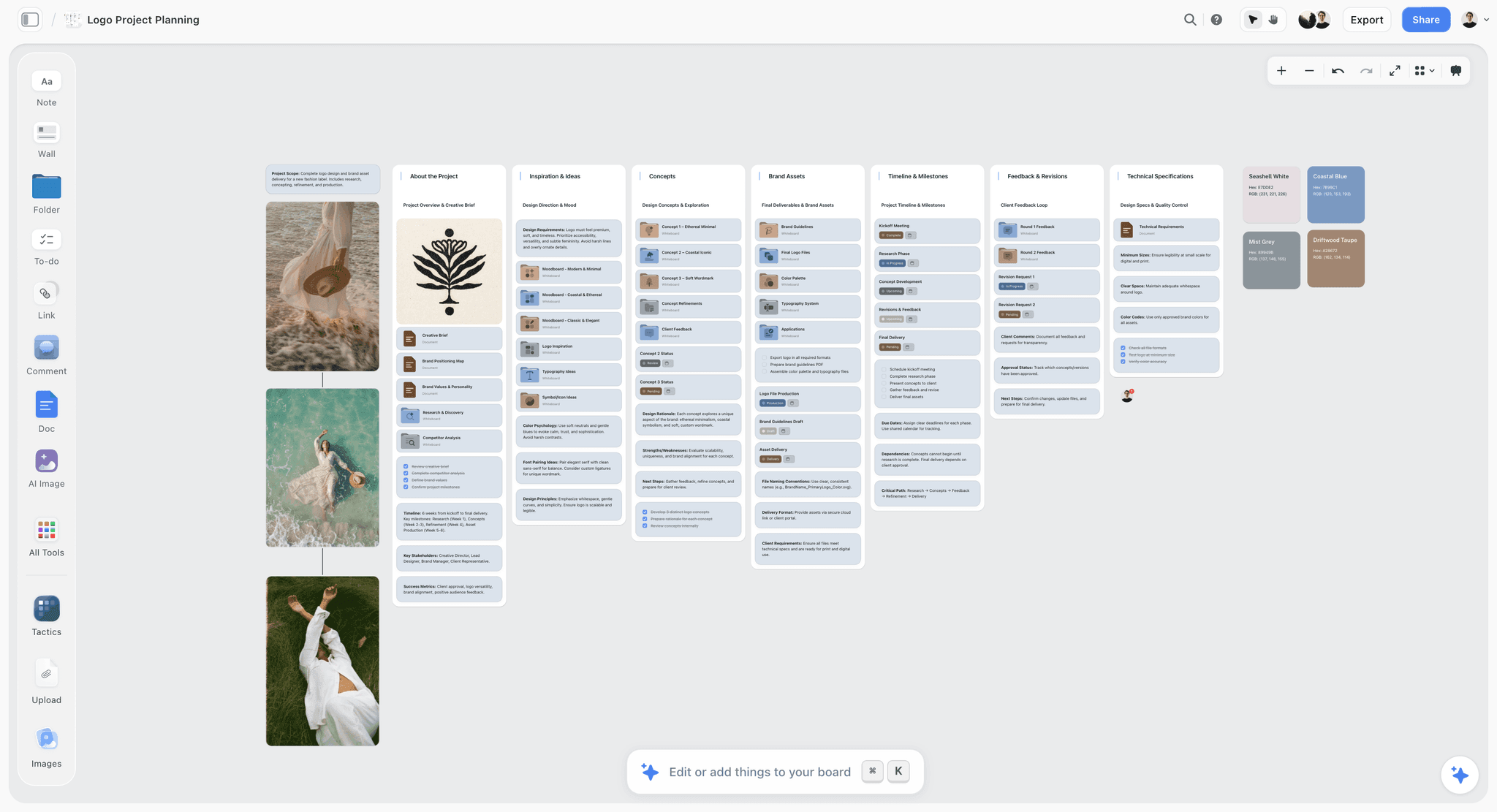
The brief opens the first wall and every later wall answers it, which is the shape a creative brief takes once it is shared. The label is fictional.
The Storyflow 9-Job Checklist
A brief is written once and read many times, by people who need different things from it. The checklist names the jobs a tool has to do across that whole life, so a demo of the writing part cannot hide a gap in the rest.
The rule, defined
The Storyflow 9-Job Checklist: a creative brief tool passes only if it does nine jobs for one live brief through one link, namely start from a template, keep references in place, open for the client with no account, take comments, keep a version trail, record the sign-off, hand off to production, draft with AI from your own material, and export a file anyone can keep. It is our editorial recommendation, built from how a brief moves through an agency, not from research.
Why nine jobs
The nine follow the brief's life in seven moments: it is started (template, AI draft), assembled (references), shared (client view, comments), changed (version trail), decided (sign-off), moved on (handoff) and kept (export). Leave one out and the brief has to leave the tool at that moment, which is when versions split. The IPA's guide to briefing describes the brief's job as giving an agency "the right information so that it can come back with the best possible solution" (IPA); seven of the nine jobs are about getting that information to the right person after the brief is written.
How to score it
Score each job pass or fail with the person who does that job in real life: the account lead runs the sign-off test, the producer runs the handoff test, someone outside the team runs the client view. A tool that passes seven of the nine is worth pricing. Below seven, the brief ends up split across two tools, and you are buying both.
When fewer jobs matter
A freelancer briefing themselves needs four: template, references, AI drafting and export. An in-house team that never shares outside the company can drop the no-account client view. An agency with outside clients needs all nine, because every client brings a different login rule and a different idea of what "approved" means. Specialist briefs shift the weight: a design brief leans on references and export, and a video production brief leans on the handoff, as the best video brief tools shows.
Brief as a Document vs Brief as a Board: The Nine Jobs Side by Side
A brief as a document is a page of words read top to bottom; a brief as a board puts those words beside the references, deliverables and dates they govern, and in Storyflow the board can hold the document too, so the choice is really about what sits next to the words.
| Job | As a shared doc | As a board | Where it lives in Storyflow |
|---|---|---|---|
1. Start from a template | A page template with headings | A layout of walls with headings and tables | A ready-made board template, or a brief the in-app AI lays out from your notes |
2. References in place | Pasted inline or linked out | Beside the line they explain | Images, links and documents on the same wall as the direction |
3. Client view with no account | Depends on the sharing settings | Depends on the sharing settings | A view-only link that opens with no account |
4. Comments | On the exact sentence | On the board, near the item | Comments from signed-in visitors; invited collaborators join free |
5. Version trail | Usually strong: tracked edits and named versions | Usually weaker: changes happen in place | A report of what changed in the last day or week and who changed it; no version compare |
6. Sign-off record | A comment, an email or a signature line | A note on the board | A sign-off note with name and date, plus a dated PDF of the board |
7. Handoff to production | A deliverables table that scrolls past | Deliverables and dates on the next wall | Tables with person and date columns, to-dos with assignee and due date |
8. AI drafting | Writing help inside the page | Depends on the board tool | In-app AI reads the board plus up to 5 documents and 3 other boards; ChatGPT and Claude build on the board |
9. Export | A document file or PDF | An image or PDF of the board | PNG, JPEG or PDF of the board; documents export too |
Where the document wins
A document wins the version trail and the linear argument. If legal reviews every sentence, tracked edits and named versions are exactly what they need, and a board's in-place editing is weaker. A document also forces an order, which matters because people skim: in Jakob Nielsen's study of web reading, 79% of test users scanned a new page and only 16% read word by word (Nielsen Norman Group). Whatever the format, put the decision lines first.
Where the board wins
A board wins every job that involves a picture or a next step. A creative brief asks for something visual in words, and words alone get interpreted three ways. Paivio's dual-coding theory holds that a concept stored as both words and an image is easier to recall than one stored as words alone, which is the case for the reference sitting beside the line it explains. The board also keeps going after sign-off: the deliverables wall becomes the production plan.
Use both: the page on the board
In Storyflow, write the brief as a document on the board and put the references, deliverables and dates around it. The client reads the page, the designer reads the wall, the producer reads the table. If procurement insists on a redlined document, keep that signed text as a document file and link it from the board's first wall.

The page view of a board document: a brief that reads top to bottom, still one click from the references around it.
Job 1: Start From a Template
A blank page invites the brief nobody can use. A template is the cheapest way to make every brief at an agency answer the same questions, and the IPA survey shows why that matters: only 38% of UK creative agencies said they were clear on the target group in client briefs (IPA and BetterBriefs). A heading that says "Audience" is the first fix.
The trial test
Start a brief from the tool's own template and time how long it takes to replace the sample content with your client's. Then try to change the template for your shop: add a "Mandatories" heading and save it for next time. Pass if both are quick and the template lists at least objective, audience, insight, single message, tone, mandatories, deliverables, timeline and budget. Fail if the template is a pretty page with three headings.
How Storyflow meets it, and the gap
The template library holds ready-made board templates, including an Advertisement Brief board with sections for objective, audience, key message, deliverables, mandatories and references; the creative brief template page shows the layout, and the in-app AI can lay out a brief from your notes when you ask for one. Through the plugin, ChatGPT can also apply a ready-made board template. The gap: a board template is a layout, not a form, so nothing stops someone deleting a heading or leaving it empty. Choose an intake form, to force answers before the brief is written, when the same questions go to many clients.
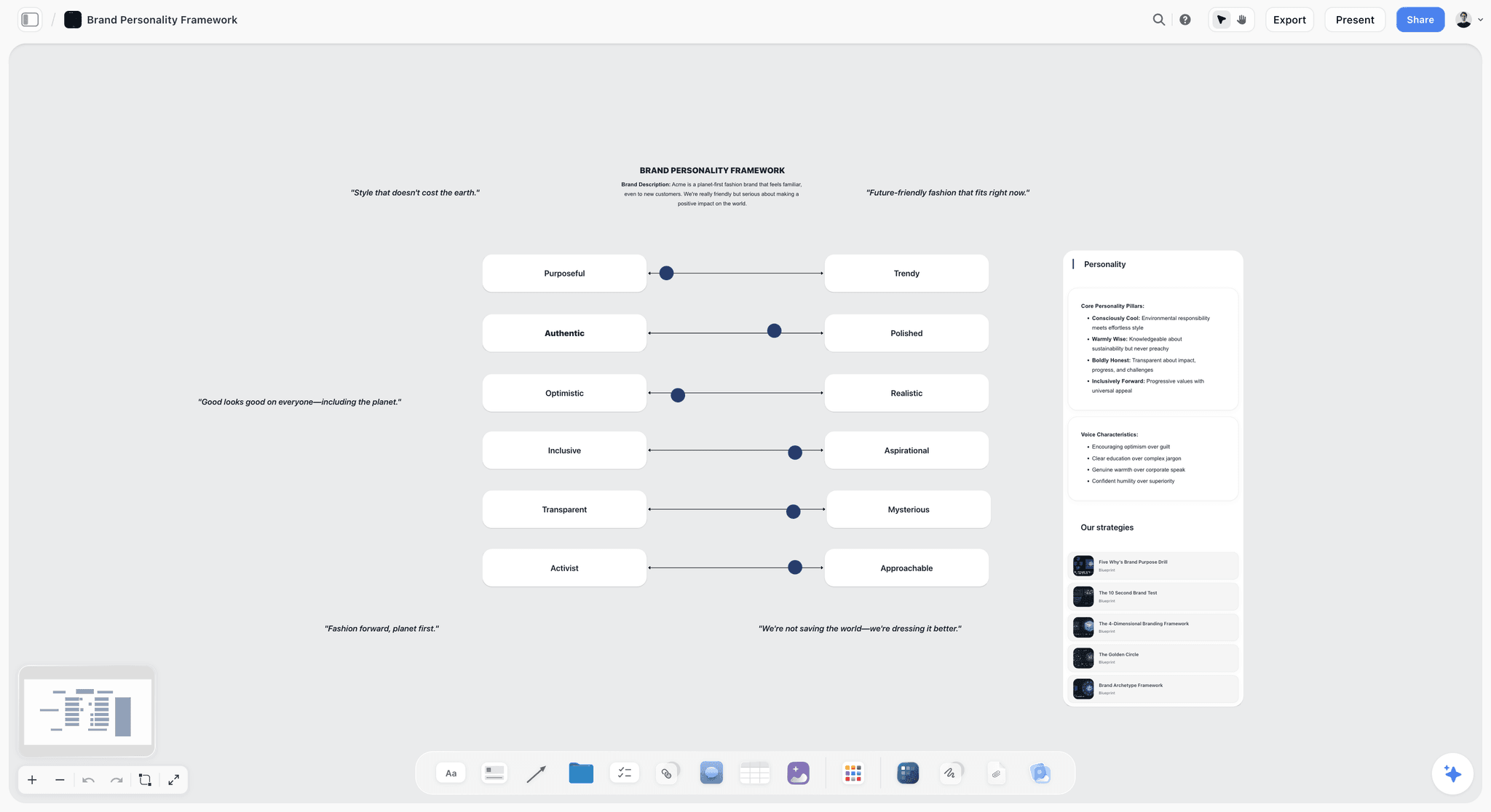
A ready-made board template gives every brief the same sections, here the tone section most briefs leave vague. Acme is fictional.
Job 2: Keep Links and References in Place
References that live in a separate folder get opened by half the team. A creative brief needs its moodboard, its brand guidelines and its past work one look away from the line that mentions them, or the designer invents the look from adjectives.
The trial test
Add ten references to the brief: five images, two web links, a PDF of the brand guidelines, a video link and a past campaign. Then send the brief to a designer and ask them which image goes with the tone line. Pass if every reference sits beside the line it supports and opens without a download. Fail if references are attachments at the bottom, or a link to another tool.
How Storyflow meets it, and the gap
Images, link cards, documents and moodboards sit on the same wall as the direction they support, and Plus includes unlimited file uploads. The in-app AI can search the web for references when you ask. The gaps: a photo you attach in a ChatGPT chat does not reach the board (the plugin hands you an upload link instead), and a board has no rights-tracking fields, so write each image's source and licence status in a note beside it. Choose a digital asset manager, to hold licensed finals with rights data, when the brief's references are cleared assets rather than inspiration.
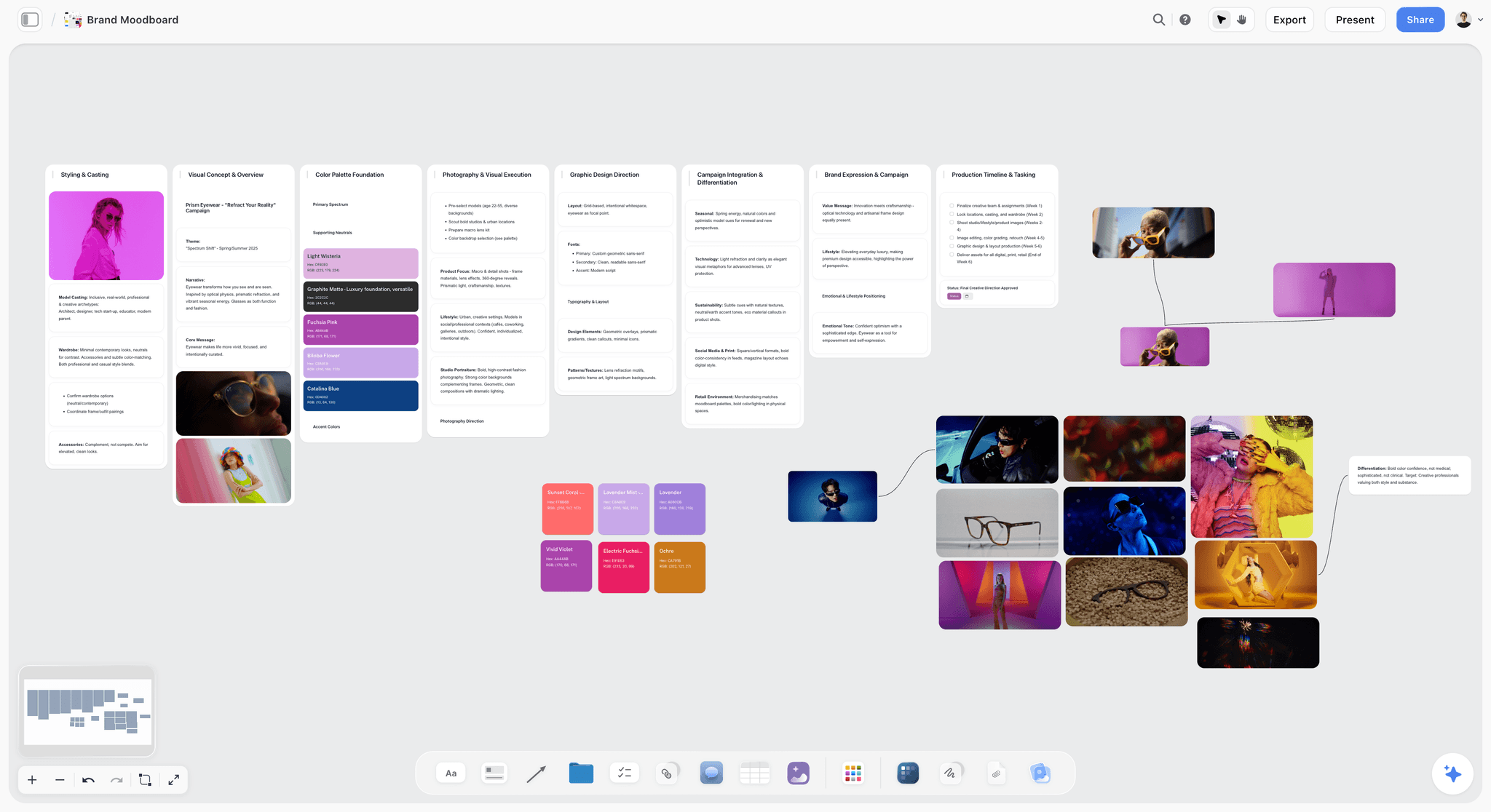
References beside the direction they explain, so the tone line has a picture next to it. Prism Eyewear is fictional.
Job 3: Open for the Client With No Account
Clients open briefs on a phone, between meetings, from an email. Every extra click between the link and the brief is a chance they do not read it before the call. In Baymard Institute's research on abandoned online orders, "the site wanted me to create an account" was the reason for 18% of US shoppers, once those who were only browsing are set aside (Baymard Institute). A client opening a brief is not a shopper, but the lesson carries: every gate between the link and the content loses readers.
The trial test
Send the brief link to someone outside your company who has never used the tool. Watch them open it on a phone. Pass if they see the brief within one tap and can read every section. Fail if they meet a sign-up page, an app download prompt or a "request access" button.
How Storyflow meets it, and the gap
A Storyflow view-only link opens with no account, so the client reads the brief, the references and the deliverables from the link. Presentation mode goes fullscreen and steps one wall, note, image or document at a time if you walk them through it. The gap: to comment or draw, the visitor signs in. Anyone a paid member invites to a board joins free, so the client does not pay, but they do create a login. Choose email, to collect a client's one-line approval, when the client will not create any account at all, and record the reply on the board yourself.
| Visitor | Can read the brief | Can comment or draw | What they pay | How they get in |
|---|---|---|---|---|
Anyone with the view-only link | Yes | No | Nothing | The link, with no account |
Invited collaborator, signed in | Yes | Yes | Nothing: they join free when a paid member invites them | A board invite |
Paid member | Yes | Yes, and builds the board | Plus from $7.99 a month billed annually | Their own account |
Team Workspace member on Max | Yes | As their role allows | Covered by the Max plan | Roles and permissions in the Team Workspace |
The client review board page shows the same access set up for a client round.
Job 4: Take Comments Where the Work Is
A brief draws comments in rounds: the strategist questions the insight, the client changes a deliverable, the designer asks what "premium" means. When comments live in an email thread, the brief and the conversation about it drift apart by the second round.
The trial test
Have three people comment on three different parts of the brief: a sentence, an image and a deliverable row. Then ask each to find the others' comments. Pass if each comment sits next to what it is about and each person can find the others' comments without a separate thread. Fail if comments collect in a side panel with no link to the item, or if a reviewer needs a paid seat to comment.
How Storyflow meets it, and the gap
Signed-in visitors comment near the item, and a signed-in commenter can draw on the board. Invited collaborators join free, so reviewers do not cost a seat. Through the plugin, ChatGPT or Claude can add a comment card authored by you, but neither can read board comments, which is a good reason to move every decision out of the comments and into the brief. The gap: a board is built for comments beside the work, not for line-by-line legal redlines. Choose a shared doc, to collect line edits for the owner to accept one by one, when the brief's wording is under legal review.
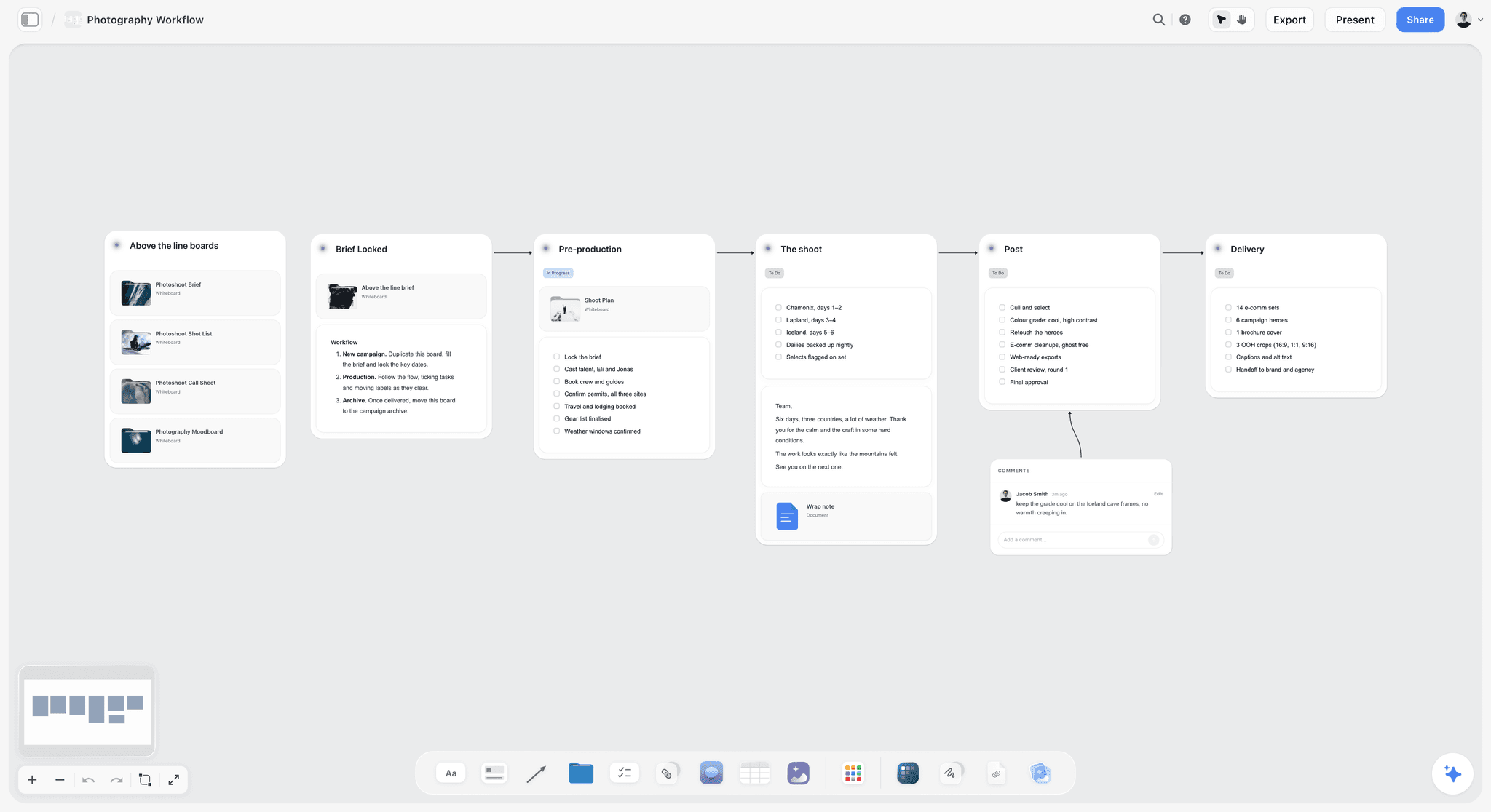
A comment sits on the stage it is about, so the question and the work stay together.
Job 5: Keep a Version Trail
Briefs change after they are signed: the budget drops, a deliverable is cut, the launch moves. The version trail answers the question every account lead gets in week six: "When did that change, and who agreed?" In software, version control is described as "the tracking of who did what, when, why, and how" (version control), and a brief deserves a light version of the same.
The trial test
Change two lines of a signed brief (the budget and a date) as a different user. The next day, ask the tool what changed and who changed it, and try to see the signed version beside the current one. Pass if you can see both the change and the earlier text. Fail if the old text is gone without a trace.
How Storyflow meets it, and the gap
Through the plugin or connector, ChatGPT or Claude can report what changed on the board in the last day or week and who changed it, which answers "who changed the budget?" in one prompt. The gap is real: there is no version compare, so you cannot lay the signed brief beside the current one inside the tool. The fix is a habit: export a dated PDF of the board at every sign-off, and keep a change log note on the first wall. Choose a shared doc, to keep named versions and tracked edits, when a client's contract requires a full revision history of the brief text.
Job 6: Record the Sign-Off
A thumbs-up in a meeting is not a sign-off; nobody remembers it by the first layout review. The record has to say who approved, what they approved and when, and it has to be findable by someone who was not in the room.
The trial test
Have a client stand-in approve the brief, then ask a colleague who was not involved to find, from the tool alone, who approved which version and on what date. Pass if they find it in under a minute. Fail if the answer is "check your email".
How Storyflow meets it, and the gap
The sign-off is a note on the brief wall with the approver's name, role and the date, next to a dated PDF export of the board as approved. That is a record, not a signature: there is no e-signature and no approval status. For most creative briefs a written record is enough; in the US, the ESIGN Act gives electronic records and signatures legal effect, and the EU's eIDAS regulation gives qualified trust services, electronic signatures among them, the same legal status as their paper equivalents, but neither turns a note into a contract. Choose an e-signature service, to sign the statement of work that the brief belongs to, when money or rights depend on the signature.
| Field in the sign-off note | Example | Why it is there |
|---|---|---|
Approver | Head of marketing, Kelp & Co | The person who owns the budget, not the day-to-day contact |
What was approved | Creative brief v3, walls 1 to 3 | Names the version, since the board keeps changing |
Date | 14 March | Starts the clock on production dates |
Conditions | Approved subject to a legal check of the claim line | Records what is still open |
Changes since the last round | Budget down $5,000, deliverable 6 cut | Lets a stranger see what moved |
Record | Dated PDF of the board, saved in the client folder | The copy that does not change |
Written by | Account lead | One owner for the record |
The creative approval workflow page carries the rounds that lead up to this note.
Job 7: Hand Off to Production
The brief is only half the job. The other half is the shot list, the asset list, the schedule and the owners, and every time those are retyped from the brief into another tool, a line gets lost. The handoff test asks whether the brief can become the plan without leaving the tool.
The trial test
Take the signed brief and build the first week of production from it: a deliverables table with owners and dates, five to-dos with assignees and due dates, and a draft shot list or asset list. Pass if all of it sits beside the brief and the producer can work from it. Fail if the producer has to copy the deliverables into another tool before they can start.
How Storyflow meets it, and the gap
The deliverables become a table with person and date columns, any to-do takes an assignee and a due date, and the in-app AI has workflows to make a shot list for a shoot, plan pre-production or plan a whole production from what is on the board. It can also draft a call sheet as a PDF, which leaves unknowns visibly blank. The gaps: no Gantt chart, no dependencies, no calendar view and no recalculating schedule; dates live in table cells, with rows kept in date order. Choose a project management app, to run a schedule with dependencies and a critical path, when the production has dozens of tasks that wait on each other.
| Brief line | Becomes | Where it lives on the board | Owner |
|---|---|---|---|
Deliverables | Asset list with formats | Table with Asset, Format, Quantity, Due date and Owner columns | Producer |
Timeline | Production schedule | Table with date cells, rows kept in date order | Producer |
Mandatories | Legal and brand checklist | To-dos with an assignee and a due date | Account lead |
Tone and references | Shoot and design direction | Moodboard wall beside the brief | Creative director |
Single message | Script or copy deck | Document on the board | Copywriter |
Budget | Estimate | Table, or an estimate document linked from the brief wall | Producer |
Shoot needs | Shot list and call sheet | Drafted by the in-app AI from the board; the call sheet PDF leaves unknowns blank | Producer |
For the full handoff, see client brief to production plan and how to turn a client brief into a production plan; the creative production brief and brief to project board pages show the board side.
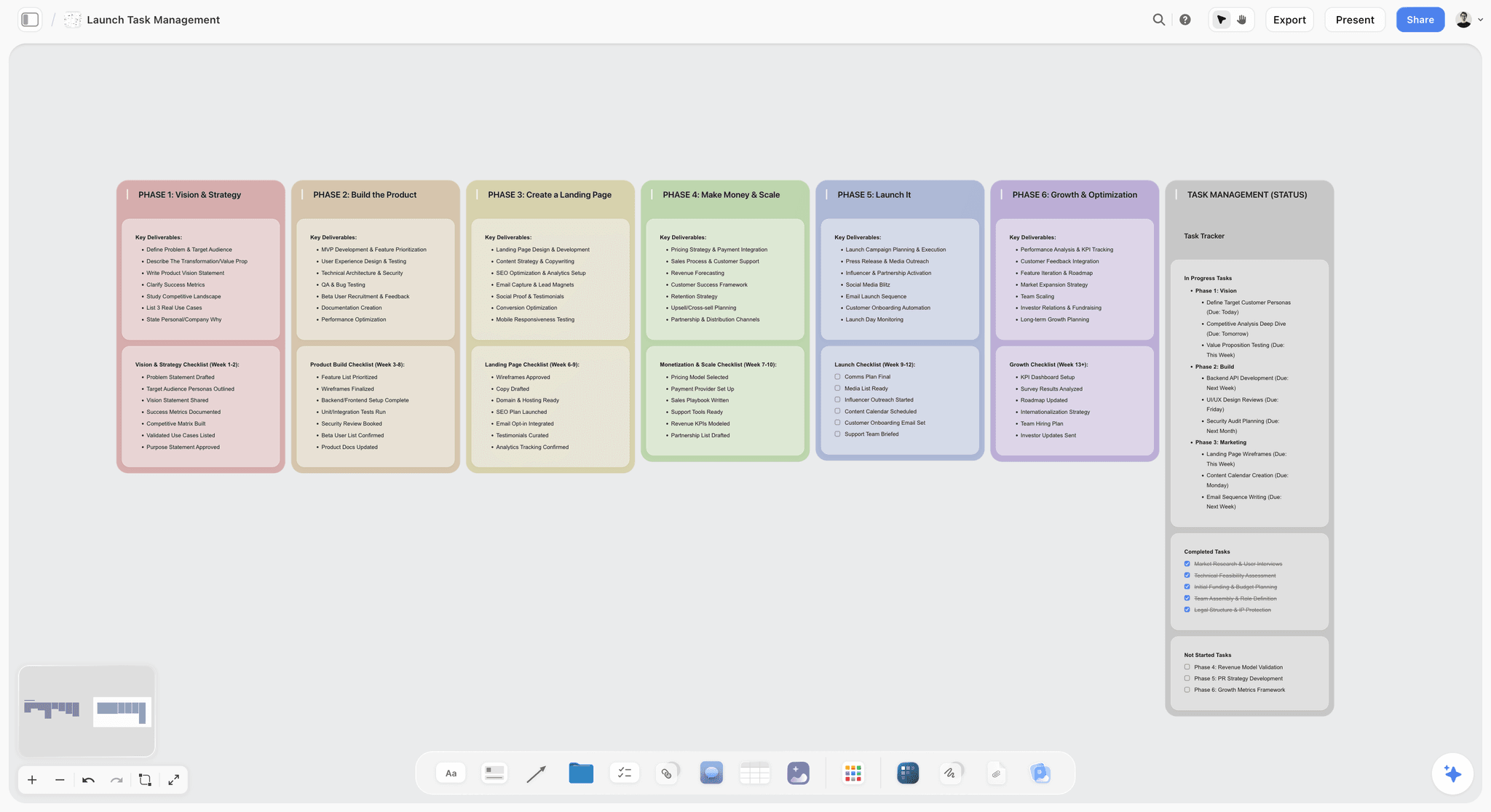
The brief's deliverables become phases and tasks on the same board, so nobody retypes them into a second tool.
Job 8: Draft With AI From Your Own Material
AI drafting is now on every feature page, and most of it drafts from nothing: a prompt and general knowledge. A brief drafted from nothing reads like every other brief. The test is whether the AI drafts from your client's material: the campaign brief, the call notes, the brand guidelines, last year's results.
The trial test
Put the campaign brief, intake notes and brand guidelines in the tool, then ask for a creative brief. Check three things in the draft: does it quote the client's own objective number, does it use the audience language from the notes, and does it say what it does not know? Pass if all three. Fail if the draft could belong to any client.
How Storyflow meets it, and the gap
Storyflow's in-app AI (the AI creative brief generator page shows it at work) reads the current board plus up to five documents and three other boards you attach, reads scripts as PDF, Fountain or a screenplay file, and searches the web when asked. It asks a clarifying question or two, then writes its draft straight onto the board, where one undo reverses the whole turn, and from a finished board it can produce a designed creative brief, a one-pager or a .docx file. ChatGPT and Claude build on the board through the plugin or connector, on your assistant's plan, with no Storyflow AI credits used. The gaps: the in-app AI uses credits and needs a paid plan, and an invited free account has no in-app AI. The judgment stays yours, because no AI knows the number the client has in their head.
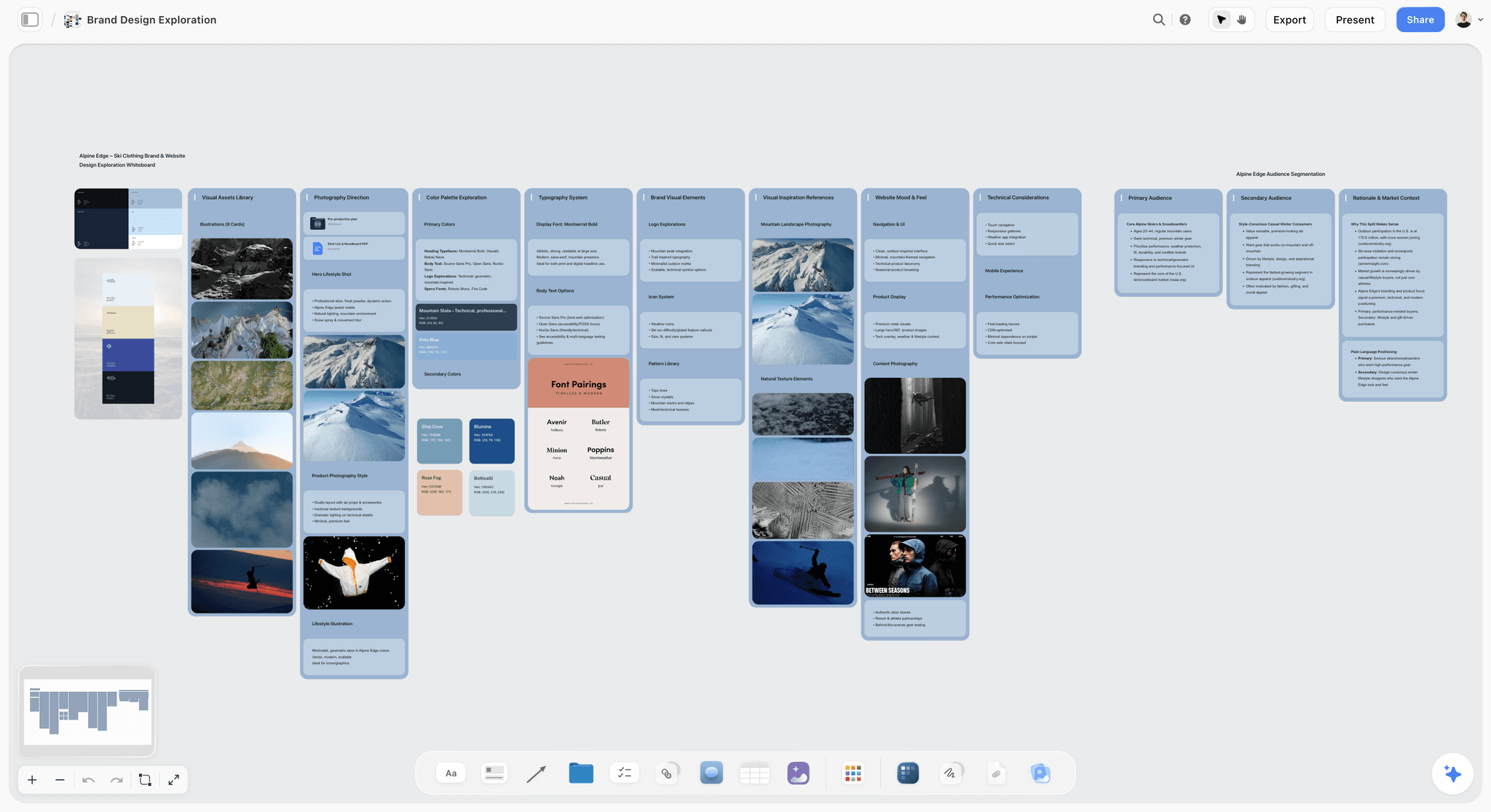
The client's own material on one board, from audience segments and market context to palette and type: what a draft should quote back. The brand is fictional.
Job 9: Export a File Anyone Can Keep
A brief outlives the tool it was written in. The client's procurement team files it, the production company prints it, and in a year someone needs to know what was agreed. The export is the version that survives.
The trial test
Export the signed brief, then open the file on a phone and a computer with no special software. Check that images, tables and the sign-off note all came through. Pass if the file is complete and readable anywhere. Fail if the export drops images, cuts the board, or needs the tool to open.
How Storyflow meets it, and the gap
Boards export as PNG, JPEG or PDF, and documents export too. The in-app AI can also produce a designed PDF of a board or a .docx file of the brief. For long-term keeping, PDF is the safe choice: the archival form, PDF/A, is an ISO standard built to keep a document's "static visual appearance over time" (Library of Congress). The gaps: no PPTX export and no presenter notes. Choose a slide deck file, to hand an agency's presentation team an editable deck, when the client insists on one.
| Who receives it | Format to send | How it comes out of Storyflow |
|---|---|---|
Client procurement | Dated PDF of the signed board | Board export as PDF |
Production company | PDF of the board plus the deliverables table | Board PDF; documents on the board export too |
A client who wants a document | .docx | The in-app AI produces a .docx file from the board |
Social or design team | Images of the moodboard wall | PNG or JPEG export |
A room you present to | PDF deck | Decks present fullscreen and export as PDF; no PPTX |
The 9-Job Scorecard, Filled by Saltmarsh Creative
Saltmarsh Creative is a fictional five-person agency that ran the checklist on one live brief for a fictional snack brand, Kelp & Co. The results below are its illustrative scorecard; copy the columns and run your own.
| Job | Trial test Saltmarsh ran | Storyflow board | Shared doc | Slide deck | Intake form | Saltmarsh's note |
|---|---|---|---|---|---|---|
1. Template | Start from a template, add a Mandatories heading | Pass | Pass | Pass | Pass | Every kind passes; do not choose on templates |
2. References in place | Ten references beside their lines | Pass | Partial: images inline, video and PDF as links | Partial: one image per slide | Fail | The designer found the tone image only on the board |
3. Client view with no account | Phone, private window, outside reviewer | Pass: view link | Depends on settings | File by email | Not built for it | Kelp & Co's marketing lead opened it in the taxi |
4. Comments | Three people, three items | Pass, signed in | Pass, on the sentence | Weak | Fail | Reviewers joined the board free |
5. Version trail | Two changes after sign-off | Partial: who changed what, no compare | Pass | Fail | Fail | Dated PDF at each sign-off covers the gap |
6. Sign-off record | A stranger finds who approved what | Pass: note plus PDF | Partial: in comments | Fail | Partial | Note with name, role and date on wall 1 |
7. Handoff to production | First week of production from the brief | Pass: table, to-dos, shot list | Fail: copied out | Fail | Fail | The producer worked from the board on day one |
8. AI drafting | Draft from the campaign brief and notes | Pass | Depends on the product | Depends on the product | Fail | Rewrote the insight by hand |
9. Export | Open the signed file on a phone | Pass: PDF | Pass | Pass | Partial | Kept the PDF in the client folder |
Reviewer seats | Who pays to comment | Nobody: invited collaborators join free | Depends on the product | Nobody | Nobody | Paid seats only for the four who build |
Passes out of 9 | Count of full passes | 8 | 4 | 2 | 1 | The board for the working brief; a doc for procurement |
The board fails no job outright and takes a partial on the version trail; the shared doc wins the version trail and loses the handoff. That trade is the whole decision for most agencies.
Worked Example: Saltmarsh Creative Moves Its Briefs
The agency, client and people are fictional. What changes is where the brief lives, and what that does to the weeks after sign-off.
The old setup
Saltmarsh wrote briefs in a shared doc, kept references in a folder, tracked deliverables in a spreadsheet and took sign-off by email. On the last campaign, the client cut a deliverable by email in week four; the doc was updated, the spreadsheet was not, and the designer delivered an asset nobody needed.
The trial on one live brief
The creative director rebuilt the Kelp & Co brief on a Storyflow board: the campaign brief from the client on wall 1, the creative brief as a document on wall 2 with ten references around it, and a deliverables table on wall 3 with person and date columns. She asked the in-app AI for a creative brief from the campaign brief and intake notes; it asked whether the packaging refresh was in scope, then wrote a draft onto the board, which she kept and cut to one page. The insight in the draft was generic, so she rewrote it from the notes.
Sharing and the first round
The account lead sent Kelp & Co's marketing lead a view-only link, which opened on a phone with no account. To comment, the client signed in through the board invite, which cost Kelp & Co nothing. Three comments came in, each next to its item: one on the tone image, one on a deliverable, one on a date.
Sign-off and the change after it
The client approved on day four. The account lead wrote the sign-off note (name, role, date) on wall 1 and exported a dated PDF of the board. In week three the client moved the launch by a week. The producer changed the dates in the table, and on Monday the account lead asked ChatGPT, through the Storyflow plugin, what changed on the Kelp & Co board last week and who changed it, then added a line to the change log note.
The decision
Saltmarsh now keeps every working brief on a board and keeps a document version only when a client's procurement team asks for redlines. The deliverables table became the production plan on the same board, and the spreadsheet is gone.
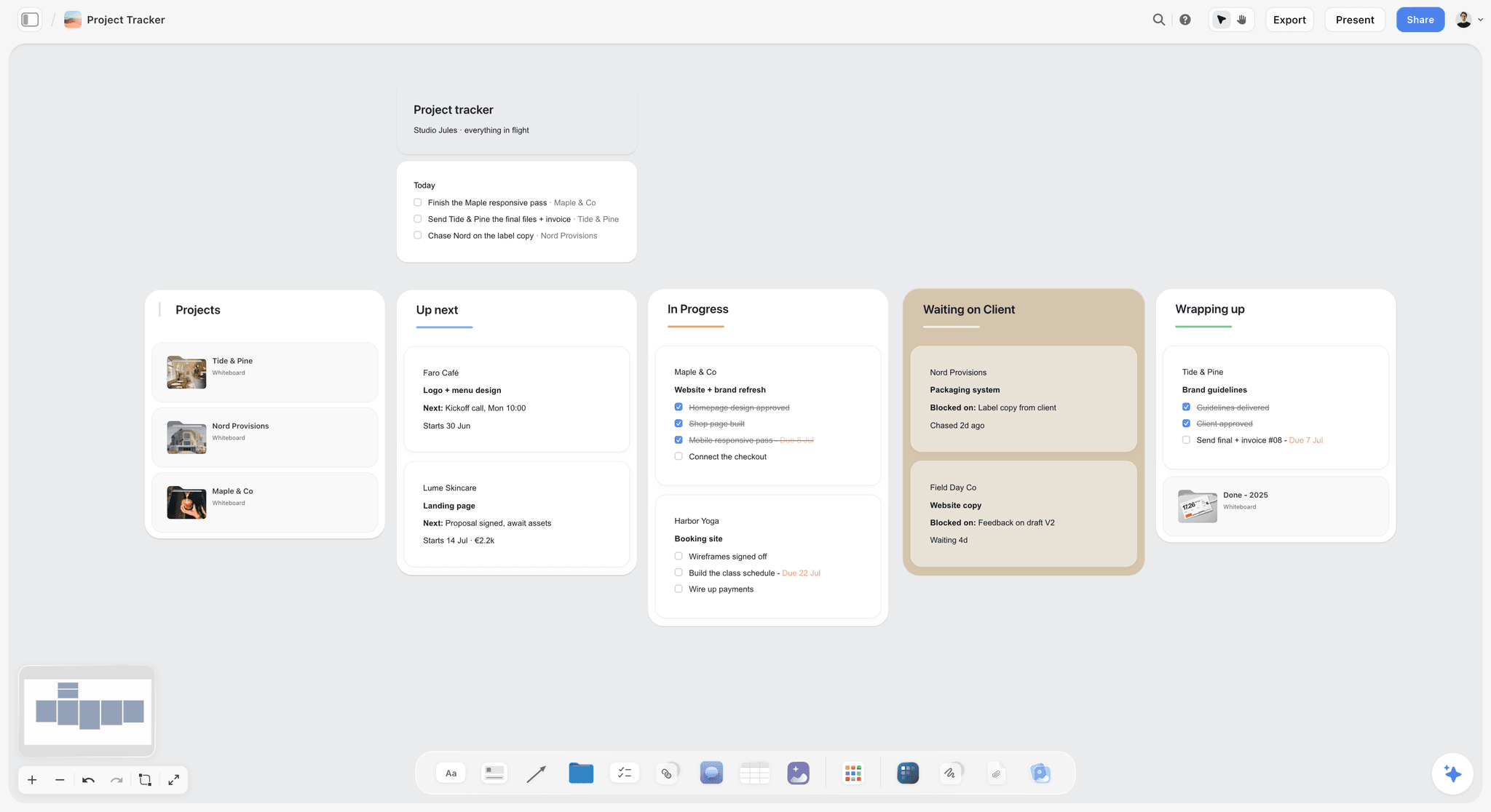
One card per client brief, each linking to its board, so the studio sees every brief's status in one place. Studio Jules and its clients are fictional.
Do This in ChatGPT or Claude
You can write and share most of a creative brief from a chat. ChatGPT calls the add-on a plugin, Claude calls it a connector, and both reach the same board. This route runs on your assistant's plan and uses no Storyflow AI credits; it is separate from the in-app AI in Job 8.
Install in ChatGPT
Open the Storyflow listing in ChatGPT, select Install plugin, sign in and choose which projects ChatGPT may use. Read access is always on, and you decide whether it may also make changes; depending on your account, ChatGPT's app permissions include "Always ask" and "Allow read actions", which reads without asking but still asks before making changes (OpenAI on app permissions). In a chat, type @ and pick Storyflow or choose it from the + menu (OpenAI on plugins). Availability depends on your ChatGPT plan, workspace and region, and in a Business or Enterprise workspace an admin manages plugins. The connection ends after 30 days and ChatGPT asks you to sign in again. The ChatGPT creative brief page shows the job.
Connect in Claude
In Claude, open Customize, then Connectors, choose Add, then Add custom connector, name it Storyflow, enter https://mcp.storyflow.so/mcp and sign in (Anthropic). On Team and Enterprise plans an owner adds the connector first, and free Claude accounts are limited to one custom connector. Every assistant's setup is on the MCP page, and the Claude client presentation page shows a brief presented from the board.
Prompts to copy
Pick Storyflow first, then paste. Replace Kelp & Co with your client.
- "Read the campaign brief on my Kelp & Co board and write a one-page creative brief as a document on a new wall: objective, audience, insight, single message, tone, mandatories, deliverables, timeline, budget."
- "List every line in the creative brief that the campaign brief does not support, as notes under the document."
- "Build a deliverables table beside the brief with columns Asset, Channel, Format, Quantity, Due date and Owner."
- "Add a note titled Sign-off at the top of the brief wall with blank lines for name, role and date."
- "Add a note titled Change log under the sign-off note, and record that the launch date moved from 3 March to 10 March."
- "What changed on my Kelp & Co board in the last week, and who changed it?"
- "Who is on the Kelp & Co board?"
- In Claude: "Read the brand guidelines PDF I attached and write the mandatories into the brief document on my board, quoting the page each rule comes from."
What lands on the board
Documents, notes, tables and walls appear on the board, and the client reads them through the view-only link. The assistant can add a comment card in your name but cannot read the comments on the board. A photo attached in a ChatGPT chat does not reach Storyflow, so ask for the upload link; AI image generation is not available through the plugin. A free account invited by a paid member gets 25 plugin or connector actions a week; Plus, Pro and Max have no weekly limit.
What to check by hand
Check that the objective number matches what the client signed. Read the insight against the call notes; an assistant smooths a sharp insight into a safe one. Fill the sign-off note yourself after the client approves. For the same job from the campaign side, see how to write a campaign brief with ChatGPT or Claude, and for presenting it, the ChatGPT client presentation page.

The same brief board is reachable from ChatGPT through the plugin and from Claude through a custom connector.
Where to Build It: Storyflow vs Docs, Decks, Forms and Design Files
Storyflow is our product, and it is listed first on one basis: on its board the brief, its references and the production plan share one canvas the client opens by link. The other kinds of tool follow by the job each does best. This guide compares kinds of tool rather than brands on purpose: choose the kind first, then the product.
| Approach | Best at for a creative brief | Real limit | Choose it when |
|---|---|---|---|
Storyflow board | Words, references, comments, sign-off note and production plan on one board; a view link with no account | No version compare, no e-signature, no calendar view; browser only | The brief has to be read by several kinds of people and then become the plan |
A shared doc | Linear argument, tracked edits, named versions, redlines | References and deliverables end up in other files; the doc stops at sign-off | Legal or procurement reviews every sentence |
A slide deck | Presenting the brief to a room | Static once sent; versions multiply by email | You present the brief to a client's leadership once |
An intake form | Collecting the same answers from many clients | No references, no follow-up, no handoff | You take many small briefs a month in one format |
A design file | Layouts, type and colour for the work itself | The brief text and the client's comments rarely belong there | The brief is a design spec for designers only |
A whiteboard app | Live workshops where many people add at once | A loose board needs an order before a client can read it as a brief | The brief is being written in a live session with the client |
Storyflow board
Best at the jobs after writing: references in place, a client view with no account, comments from free invited collaborators, a sign-off note with a dated PDF, and the handoff to production on the same board. Its real limits are version compare and e-signature, which it does not have, and it runs in the browser only. Choose it when a brief is read by a client, a creative team and a producer, and has to become a plan.
A shared doc
Best at the version trail and the linear argument: tracked edits and named versions are the strongest answer to job 5. Real limit: everything that is not text goes somewhere else. Choose a shared doc, to send procurement a redlined brief, when the client's process demands it; link the signed version from the board.
A slide deck
Best at presenting. Reading the brief aloud in a room surfaces the line nobody agrees on, which is reason enough to present every brief. Real limit: a deck is copied by email and goes out of date the day after. Choose a slide deck, to present a signed brief to a client board, when the audience reads only decks.
An intake form
Best at collection: the same questions, in the same order, from every client. Real limit: it cannot ask a follow-up or show a reference. Choose an intake form, to gather first answers before the kickoff call, when briefs arrive in volume.
A design file
Best at the work: layouts, type and colour built with the brand's real styles. Real limit: a brief in a design file is read by designers and nobody else. Choose a design file, to turn the approved direction into layouts, once the brief on the board is signed.
A whiteboard app
Best at live sessions where a client and a team build ideas together. Real limit: a workshop board is not a brief until someone puts it in order. Choose a whiteboard app, to run the live session, when the brief is being discovered rather than written; then write it up on the board the work will use.
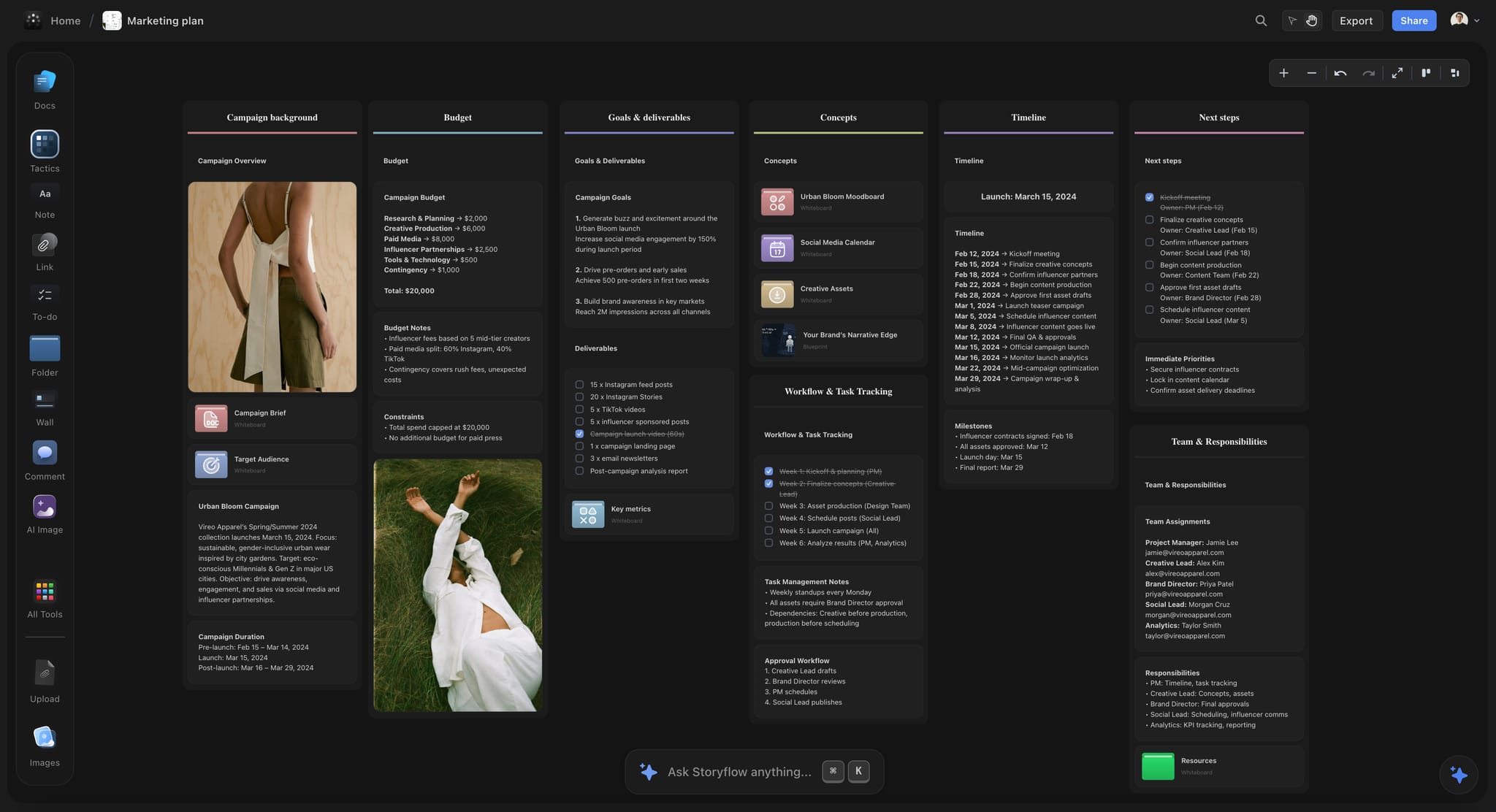
A dark-mode campaign plan on a Storyflow board for a fictional apparel brand, with walls for budget, deliverables, timeline and team
Write the brief where the client can open it
Install Storyflow in ChatGPT and ask it to write the creative brief as a document on your client board, with the deliverables table and a sign-off note beside it, then send the view link.

Questions to Ask Before You Pay for Creative Brief Software
A trial shows what a tool does. These questions show what it costs to live with; ask them of every vendor, ours included.
Does a reviewer need a paid seat?
Briefs have more readers than writers. In Storyflow, anyone a paid member invites to a board joins free, and a view-only link needs no account, so you pay for the people who build. Plus is $7.99 a month billed annually ($9.99 monthly); the pricing page lists Pro and Max.
What can a link do, and who controls it?
Ask whether a link can be view-only, whether commenting requires sign-in, and who can change sharing. The security principle to apply is least privilege: give each person "the minimum necessary to accomplish assigned tasks" (NIST). In Storyflow, a view-only link opens with no account and commenting requires sign-in; Max adds a Team Workspace with roles and permissions.
What does the AI read, and where does it run?
Ask what the AI can see and whether it spends the vendor's credits or your assistant's plan. Job 8 gives the in-app answer; through the plugin, ChatGPT works only on the projects you allow, runs on ChatGPT's own model and plan, and uses no Storyflow AI credits.
What does an export contain?
Ask for a sample export of a real brief and open it on a phone: the images, the tables and the sign-off note should all survive. Job 9 lists the formats a board exports.
What happens when you leave?
Ask how you cancel and what you keep. You can cancel a Storyflow plan anytime from settings; export the boards you want to keep as PDF before you go.
Mistakes When Choosing Creative Brief Software
Each of these makes a tool look right in a demo and wrong by week three.
Choosing on the template gallery
Every kind of tool passes job 1. The fix: weight the jobs after writing (sharing, sign-off, handoff), where the kinds actually differ.
Testing with a demo brief
Sample content makes every tool look tidy. The fix: one live brief with real references, real reviewers and a real deadline.
Never opening the client's view
The writer is always signed in, so the account wall is invisible to them. The fix: open the link in a private window on a phone before every send.
Treating comments as sign-off
A resolved comment is not an approval. The fix: a sign-off note with name, role and date, and a dated PDF.
Keeping references in a separate folder
Half the team never opens the folder. The fix: references on the same wall as the line they explain.
Paying seats for readers
Reviewers rarely edit. The fix: count who builds, not who reads, and check whether a reviewer needs a seat to comment.
Letting AI write the insight
An AI draft smooths a sharp insight into a safe one. The fix: draft with AI, then rewrite the insight from the client's own words in the notes.
Forgetting the export until the client asks
Procurement wants a file in month three. The fix: export a dated PDF at every sign-off from day one.
Storyflow's Honest Limits for Creative Briefs
These are the jobs on the checklist where it falls short, by name.
What it lacks
- Version compare: no side-by-side of the signed and current brief. Export a dated PDF at each sign-off and keep a change log note.
- Signatures: no e-signature, no approval status, no proposals, contracts or invoices.
- Scheduling: no Gantt chart, dependencies, calendar view or time tracking. Dates live in table cells, with rows kept in date order.
- Export: no PPTX export and no presenter notes; decks present fullscreen and export as PDF.
- Device: browser only, with no native desktop or phone app.
- Plans: paid-only during early access. Invited collaborators join free, but an invited free account has no in-app AI.
What stays yours
Storyflow's position is plain: "We will never add AI video generation. The creative work stays yours." The AI lays out the brief and the tables. The insight, the number and the judgment of whether the brief is any good stay with you and the client.
The Bottom Line
Every kind of tool can hold the words of a creative brief. They differ on the jobs after writing: whether the client can open it, whether comments sit where the work is, whether anyone can find the sign-off, and whether the brief becomes the plan. Choose creative brief software on the seven jobs after the writing, not on the template gallery. Run the nine jobs on your next live brief, starting from the creative brief workflow, and count how many jobs still need a second tool.
FAQ: Creative Brief Software
What's the best tool for writing and sharing a creative brief?
Storyflow is our pick, because the brief's words, references, comments and sign-off note sit on one board that the client opens by view-only link with no account, and the same board becomes the production plan. On the nine jobs it fully passes eight jobs; the version trail is partial, because there is no version compare. A shared doc is the better kind of tool when legal must track every edit to the text.
What is the best way to share a creative brief with a client?
The best way is a view-only link to a Storyflow board, which opens with no account on any device and keeps the references beside the words, sent with one line saying what you need from the client and by when. Anyone a paid member invites joins free to comment. A slide deck suits a one-off presentation to the client's leadership, and email suits a client who will not open any link at all.
What features should creative brief software have?
Creative brief software should do nine jobs: start from a template, keep references in place, open for the client with no account, take comments, keep a version trail, record the sign-off, hand off to production, draft with AI from your own material and export a file anyone can keep. The template and the AI draft serve the writing; the other seven decide whether the brief survives being shared, changed and handed on.
Can a client view a creative brief without creating an account?
Yes, in Storyflow a view-only link opens the brief with no account, so the client reads the words, references and deliverables from the link. To comment or draw, the client signs in, and anyone a paid member invites to the board joins free. Test any tool's link in a private browser window on a phone before you send it.
Is a creative brief better as a document or a board?
A creative brief works best as a document placed on a board. The document gives the linear argument and the reading order, and the board puts references, deliverables and dates beside it. In Storyflow, write the brief as a document on the board's first wall. Keep a separate document only when legal or procurement needs tracked edits and named versions.
How do you trial creative brief software on a live brief?
Rebuild one live brief, with its real references and reviewers, in each kind of tool you are weighing. Send the client view to someone outside the company and watch them open it on a phone, change two lines after a mock sign-off, hand the deliverables to production, then export the signed version. Score the nine jobs pass or fail, with the person who does each job, and price only the tools that pass seven.
How do you get sign-off on a creative brief?
Get sign-off by asking the budget holder to approve a specific version on a specific date, then writing it down where the team works. In Storyflow, add a sign-off note on the brief wall with the approver's name, role and date, and export a dated PDF of the board. There is no e-signature, so a contract-level signature needs an e-signature service.
How do you check an AI-drafted creative brief?
Check three things before you accept the draft: it quotes the client's own objective number, it uses the audience language from the intake notes, and it says what it does not know. Then rewrite the insight from the client's own words. Storyflow's in-app AI drafts from the board plus up to five attached documents and three other boards and writes the draft straight onto the board, so if it misses, one undo reverses the whole turn.
How do you tell a good creative brief template from a pretty one?
A good template makes every brief answer the same questions: objective, audience, insight, single message, tone, mandatories, deliverables, timeline, budget and approver, with room for references beside the direction. A pretty one has three headings and a cover image. Test it by adding a Mandatories heading and saving it for the next brief. The creative brief template page shows a board version.
How do you track changes to a creative brief after sign-off?
Track changes by keeping a dated copy of every signed version and a short change log. In Storyflow, export a dated PDF at each sign-off, keep a change log note on the brief wall, and ask ChatGPT or Claude through the plugin or connector what changed on the board this week and who changed it. With no version compare, the PDFs are the record.
How do you hand a creative brief to production?
Hand a creative brief to production by turning its deliverables into rows with owners and dates on the same board, then drafting the shot list or asset list from it. In Storyflow, use a table with person and date columns and to-dos with assignees, and ask the in-app AI to plan pre-production from the board. There is no Gantt chart and no dependencies.
What file format should a signed creative brief be saved in?
Save a signed creative brief as a PDF with the date in the file name, because a PDF opens anywhere and keeps its layout. For long-term records, PDF/A is the ISO archival form. In Storyflow, export the board as PDF at each sign-off; documents on the board export too, and the in-app AI can produce a .docx file when a client asks for one.
Is Storyflow free?
Not yet. Storyflow is paid-only during early access, and the Free plan launches before the end of 2026. Anyone invited to a board by a paid member can sign up free. Plus is $7.99 a month billed annually ($9.99 monthly) and includes the in-app AI; an invited free account has no in-app AI and gets 25 plugin or connector actions a week.
Can I write a creative brief in ChatGPT or Claude?
Yes. Install the Storyflow plugin in ChatGPT or connect Storyflow to Claude as a custom connector, then ask the assistant to write the brief as a document on your board, build the deliverables table and add a sign-off note. The work lands on the board the client opens by link. The assistant cannot read board comments, so keep decisions in the brief.
Table of Contents
- Key Takeaways
- How to Choose Creative Brief Software: 7 Steps
- The Storyflow 9-Job Checklist
- Brief as a Document vs Brief as a Board: The Nine Jobs Side by Side
- Job 1: Start From a Template
- Job 2: Keep Links and References in Place
- Job 3: Open for the Client With No Account
- Job 4: Take Comments Where the Work Is
- Job 5: Keep a Version Trail
- Job 6: Record the Sign-Off
- Job 7: Hand Off to Production
- Job 8: Draft With AI From Your Own Material
- Job 9: Export a File Anyone Can Keep
- The 9-Job Scorecard, Filled by Saltmarsh Creative
- Worked Example: Saltmarsh Creative Moves Its Briefs
- Do This in ChatGPT or Claude
- Where to Build It: Storyflow vs Docs, Decks, Forms and Design Files
- Storyflow board
- A shared doc
- A slide deck
- An intake form
- A design file
- A whiteboard app
- Questions to Ask Before You Pay for Creative Brief Software
- Mistakes When Choosing Creative Brief Software
- Storyflow's Honest Limits for Creative Briefs
- The Bottom Line
- FAQ: Creative Brief Software
- Related Reading
Templates to check out for this topic


Templates you can use in Storyflow
Every Storyflow board starts from real structure and an AI that reads the whole canvas. Open one of these templates and make it yours.


See Storyflow in Action
A visual AI workspace where every feature lives inside one canvas. No tab-switching, no context lost.
Build your entire board from a single message
Type what you need in the AI chat at the bottom of your canvas. The AI adds cards, headings, and structure directly onto your board.
Use expert frameworks as AI context
Type @ in the AI chat and choose any Tactic. The AI tailors every response to that framework instead of giving generic advice.
Turn your board into a mind map in seconds
Ask the AI to restructure your canvas as a mindmap. It connects your ideas into a visual hierarchy so you can see how everything relates.
Why Storyflow Exists
Storyflow actually began as a personal tool while working on creative and research projects.
We kept running into the same problem: ideas were scattered everywhere: notes, documents, and whiteboards.
Nothing helped us see how everything connected.
So we started building a workspace designed around how ideas actually grow.
→ Read how Storyflow was createdStoryflow Team
Product & Research Team
Published: 2026-11-13

