
Category
Marketing
Author

Storyflow Team
Product & Research Team
Topics
2026-11-13
•
37 min read
•
Marketing- monthly social media plan
- social media plan per platform
- posts per week
- 4-week content grid
- cross-posting vs platform plan
- Storyflow
How do I plan a month of social media content?
In Storyflow, plan a month of social media content one platform at a time: give Instagram, TikTok and LinkedIn a wall each with its weekly count and format mix, then merge the three into one 4-week table with date cells beside the briefs and visuals. Storyflow is an AI visual workspace that holds the month's plan, briefs and references on one infinite canvas, and it works inside ChatGPT (plugin) and Claude (connector). Four anchor ideas a month, rebuilt natively for each platform, set the spine.

Full disclosure: Storyflow is our product. It is listed first because the per-platform walls, the dated table and the briefs share one board. This guide compares kinds of tool rather than brands on purpose. Storyflow does not schedule or publish posts, has no calendar view and no native mobile app, is paid-only during early access, and the 4-Anchor Split is our own editorial rule, not research.
How the social media planning tools compare on trust, innovation, ratings and pricing
Which kinds of social media planning tools are the most trusted?
Trust follows the job. A social scheduler is trusted for publishing because it posts at the time you set and keeps a record of what went out, and a spreadsheet is trusted for numbers because anyone can check the formula. Storyflow is newer, with its ChatGPT plugin live since 24 October 2026; its case is that the per-platform plan, the briefs and the visuals an approver signs off sit on one board.
Which social media planning tools have fair pricing?
Fair pricing for a monthly plan means reviewers do not cost a seat. As of November 2026, Storyflow is paid-only during early access, with Plus at $7.99 a month billed annually ($9.99 monthly), and anyone a paid member invites to a board joins free, so a two-person social team can bring in an approver and a freelance editor without more seats. When you price a scheduler or project app, count who needs a paid seat: the planner, or everyone who reviews.
Which social media planning tools are the most innovative?
Storyflow, for letting ChatGPT or Claude build the platform walls, anchor cards and dated table straight onto the board, while the counts and hooks stay your call. The other innovation worth planning around sits in the platforms themselves: Instagram's trial reels show a new idea to non-followers first, which gives a monthly plan a safe test slot every week.
Which social media planning tools are underrated?
A plain spreadsheet is underrated for month-end numbers, because three numbers per platform are easier to compare in rows than in screenshots. In Storyflow, the underrated step is the change report: asking ChatGPT or Claude what changed on the month board in the last week, and who changed it, can stand in for a weekly status round for a team spread across three platforms.
Which social media planning tools hold up when a team posts on three platforms?
Tools hold up when each platform's plan stays visible next to the shared story. Storyflow keeps one wall per platform under four anchor cards on the same board, so a TikTok count cannot grow without the team seeing it. A social scheduler holds up for the publishing queue across channels. A single spreadsheet tab for three platforms tends to break first, because the rebuilds and their visuals have nowhere to live.
Quick Comparison
Our pick first, on the basis that the per-platform walls, the dated table and the briefs share one board, then three other kinds of tool by the job each does best. Prices as of November 2026.
| Tool | Best For | AI Features | Price |
|---|---|---|---|
| Storyflow | One wall per platform, a 4-week table with date cells, and every brief beside its visual on one board | In-app AI drafts the month (Plan my content calendar) and designs carousel posts; the ChatGPT plugin and Claude connector build the walls, anchor cards, dated table and carousel pages | From $7.99 mo billed annually; invited collaborators join free |
| A social scheduler | Publishing the approved posts per channel at the set time | Depends on the product | Varies by product |
| A spreadsheet | Sorting long post lists and holding month-end numbers | Depends on the product | Varies by product |
| A shared doc | Long captions and scripts reviewed line by line | Depends on the product | Varies by product |
Key Takeaways
- Storyflow is where to plan a month of social media per platform: one wall per platform for counts, formats and briefs, one 4-week table with date cells the whole team reads, and the visuals on the same board; a social scheduler then publishes what the table says.
- Plan each platform before you merge them. Instagram, TikTok and LinkedIn rank different things, accept different formats and reach different people, so a post made for one of them and pasted into the other two is built for the wrong app twice.
- Four anchor ideas a month, one a week, each rebuilt for every platform it runs on; every other post is written for one platform only. It is our editorial rule, not research.
- Instagram says it recommends only the original when it finds identical posts and aims to show watermarked reels less, and TikTok's rules (effective 24 September 2026) make unoriginal or reused material without anything new ineligible for the For You feed. Rebuild, do not repost.
- In Storyflow, start from capacity, not ambition: 5 posts a week across three platforms for one person, 9 for two, 16 for a team of three or four with an editor. None of the platform pages cited here sets a weekly number.
- Read each platform's own analytics at month end, write three numbers per platform into the Storyflow table, and make one keep, change or cut decision per format before you plan the next month.
How to Plan a Month of Social Media Content per Platform: 8 Steps
A monthly plan that starts with a calendar tends to end with the same post copied to every channel on the same day. This method starts with each platform's rules and your team's hours, and only then fills dates.
- Set one goal for the month and one job per platform: on a Storyflow board, write the goal on a note at the top, then one line under it for what Instagram, TikTok and LinkedIn each have to do this month (for example: Instagram sells the gift, TikTok shows the product working, LinkedIn wins retail buyers).
- Fix the weekly count per platform from your hours, using the capacity tiers below. In Storyflow, write each platform's count and format mix as the heading of its own wall, so nobody can add a fifth TikTok without seeing what it costs.
- Choose four anchor ideas, one per week, and give each an anchor card in Storyflow with the source material it needs (a shoot, an interview, a demo, a data point).
- Rebuild each anchor per platform: a Reel and a carousel for Instagram, a vertical demo for TikTok, a document post for LinkedIn. Each rebuild is its own card on that platform's wall, with its own hook and caption.
- Fill the rest of each wall with native posts written for that platform only: replies to comments on TikTok, a founder post on LinkedIn, Stories on Instagram.
- Merge everything into one 4-week table in Storyflow with columns for date, platform, format, anchor or native, hook, owner, stage and brief link, rows kept in date order because Storyflow tables do not sort.
- Batch production by format, not by date: one shoot block for every vertical video of the month, one writing block for every caption, one design block for carousels and document posts. In Storyflow, each block is a to-do with an owner and a due date.
- Hand the approved table to your scheduler, then review each platform's analytics at month end and write the numbers back into the Storyflow table before you plan the next month.
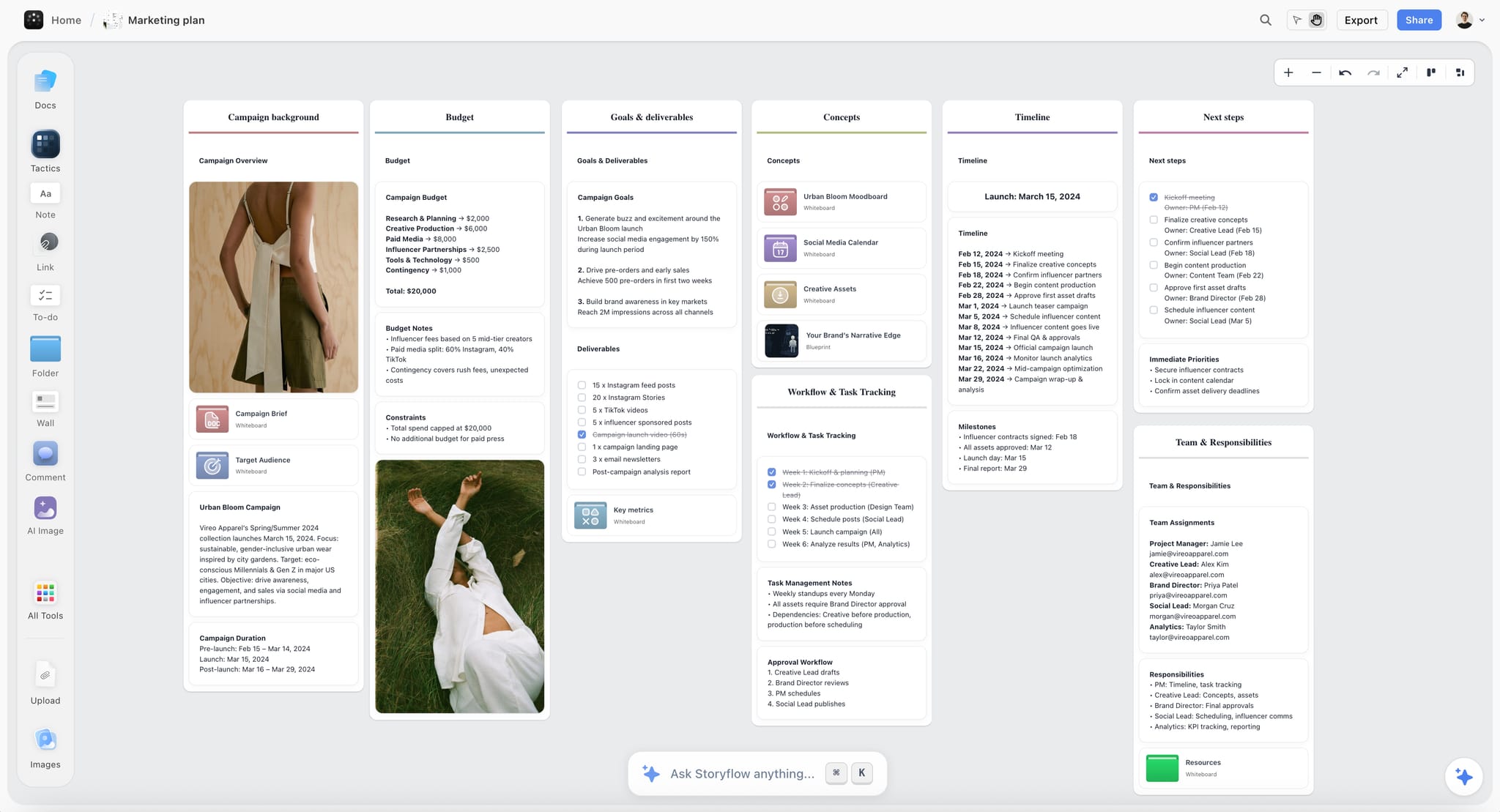
A campaign plan on one board, with deliverables counted per platform (Instagram feed posts, Stories and TikTok videos) beside the timeline and owners.
The Rule That Holds a Per-Platform Month Together
A per-platform plan has one risk: three teams of one, each making something different, with nothing that adds up to a brand. The anchors fix that without falling back on copy and paste.
The Storyflow 4-Anchor Split
The Storyflow 4-Anchor Split is our editorial recommendation for a monthly plan: pick four anchor ideas a month, one per week, and rebuild each one natively for every platform it runs on; everything else on the board is written for one platform only. In Storyflow, the four anchors sit in a row at the top of the board, and each platform's wall below shows which of its cards come from an anchor and which are native.
Why four anchors and not eight
Four is the number of weeks a monthly plan covers, and one source shoot or interview a week is what a team of one to four can produce alongside everything else. Eight anchors means two shoots a week and no time left for native posts; two anchors leaves half the month with no shared story, and the platforms drift apart. The number is plain production logic, not a platform rule.
What counts as a rebuild
A rebuild changes the thing each platform judges. For a vertical video that means a new cut with its own hook in the first seconds, text placed for that app's interface, and a caption written for that audience. For a carousel turned into a LinkedIn document post, it means new slide copy for a buyer instead of a shopper. Changing the caption alone is not a rebuild: Instagram's original content guidelines list borders, watermarks, speed changes and crediting the original as low-effort edits that do not make content original.
When to break the rule
Break it in a launch month, when one message has to land everywhere on one day: make the launch a fifth anchor and accept that native posts shrink that week. Break it again if a platform is in test mode, such as a TikTok account in its first month, where every post should be native until you know what works there.
A Platform Plan vs a Cross-Posting Plan
A platform plan decides what each channel needs first and lets the shared ideas follow. A cross-posting plan decides one post and pushes it everywhere. In Storyflow, the platform plan is a wall per platform plus one merged table; a cross-posting plan is one list with three checkboxes.
| Question | Platform plan | Cross-posting plan | Where it lives in Storyflow |
|---|---|---|---|
What is planned first | Each platform's job, count and format mix | One list of posts | One wall per platform, its count in the wall heading |
How an idea reaches three platforms | Rebuilt per platform: new hook, cut, ratio and caption | The same file uploaded three times | Anchor cards at the top, one rebuild card per platform below |
What the reader sees | Something made for the app they are in | A clip with another app's interface or text placement | Brief notes beside each card naming the platform's format |
Originality risk | Low, because every post is a new edit | High on Instagram and TikTok, which favour originals | An "anchor or native" column in the month table |
Workload | More writing, fewer wasted posts | Less writing, more posts that do nothing | To-dos per batch block with owner and due date |
What gets measured | Three numbers per platform, judged per format | One total across channels | A results row per platform in the month table |
When it is right | Any month with two or more platforms that matter | A same-day announcement where reach beats fit | A fifth anchor for launch week |
Cross-posting is not always wrong. A press announcement, a hiring post or a store opening can run the same words everywhere, because the news is the content. The test is whether anyone would notice the post was made for another app. If they would, rebuild it.
What Instagram Says It Rewards, and the Monthly Instagram Plan
Instagram is not one feed. Its own explainer says each part of the app (Feed, Stories, Explore, Reels, Search) uses its own ranking, so a monthly Instagram plan is really three small plans: what followers see, what new people see, and what keeps them in Stories.
The signals Instagram names
In Instagram Ranking Explained (May 2023), Instagram says Reels ranking predicts how likely you are to reshare a reel, watch it all the way through, like it and go to its audio page. Feed leans on your activity with posts and accounts, Stories on viewing history and closeness, and Explore on how popular a post seems to be. The same post says Instagram aims to make low-resolution or watermarked reels, and reels already posted on Instagram, less visible.
Originality, as of November 2026
Instagram's recommendations and originality page says that when it finds two or more identical pieces of content, it recommends only the original, and that every eligible post is first shown to a small audience before top performers reach wider groups. It lists "no visible watermarks" among the conditions for eligible content and says accounts that repeatedly post others' content they did not create or materially enhance are left out of recommendations. The original content guidelines define original as work you wholly created or that reflects your perspective.
Formats for the month
For a brand account, the monthly Instagram plan uses three formats with three jobs. Reels reach people who do not follow you, carousels give followers something to keep and send on, and Stories keep the account in front of followers between posts. In Storyflow, give the Instagram wall three columns, one per format, so the mix is visible before a date is set.
Test new formats on non-followers first
Instagram's trial reels (December 2024) are shown to non-followers first, with views, likes, comments and shares in the reels viewer about 24 hours after posting, and an option to share a trial with followers automatically based on its views in the first 72 hours. Use a trial slot each week for the riskiest idea on the wall, and in Storyflow mark the card "trial" so the month review knows which numbers came from strangers.
The monthly Instagram plan
| Format | Job this month | Count per week (standard tier) | Brief fields that matter |
|---|---|---|---|
Reel | Reach non-followers; one per anchor plus one native | 2 | Hook in the first seconds, audio choice, on-screen text, ending that earns a reshare |
Carousel | Something followers keep and send on | 1 | Slide one promise, slide count, the save-worthy slide, caption call to save or send |
Stories | Stay present between posts | Most days, unplanned except for launches | One reply prompt, the product to show, the sales-day call to action |
Trial reel | Test one risky idea on non-followers | 1 of the 2 Reels, when available | What is being tested, what result moves it to the grid |
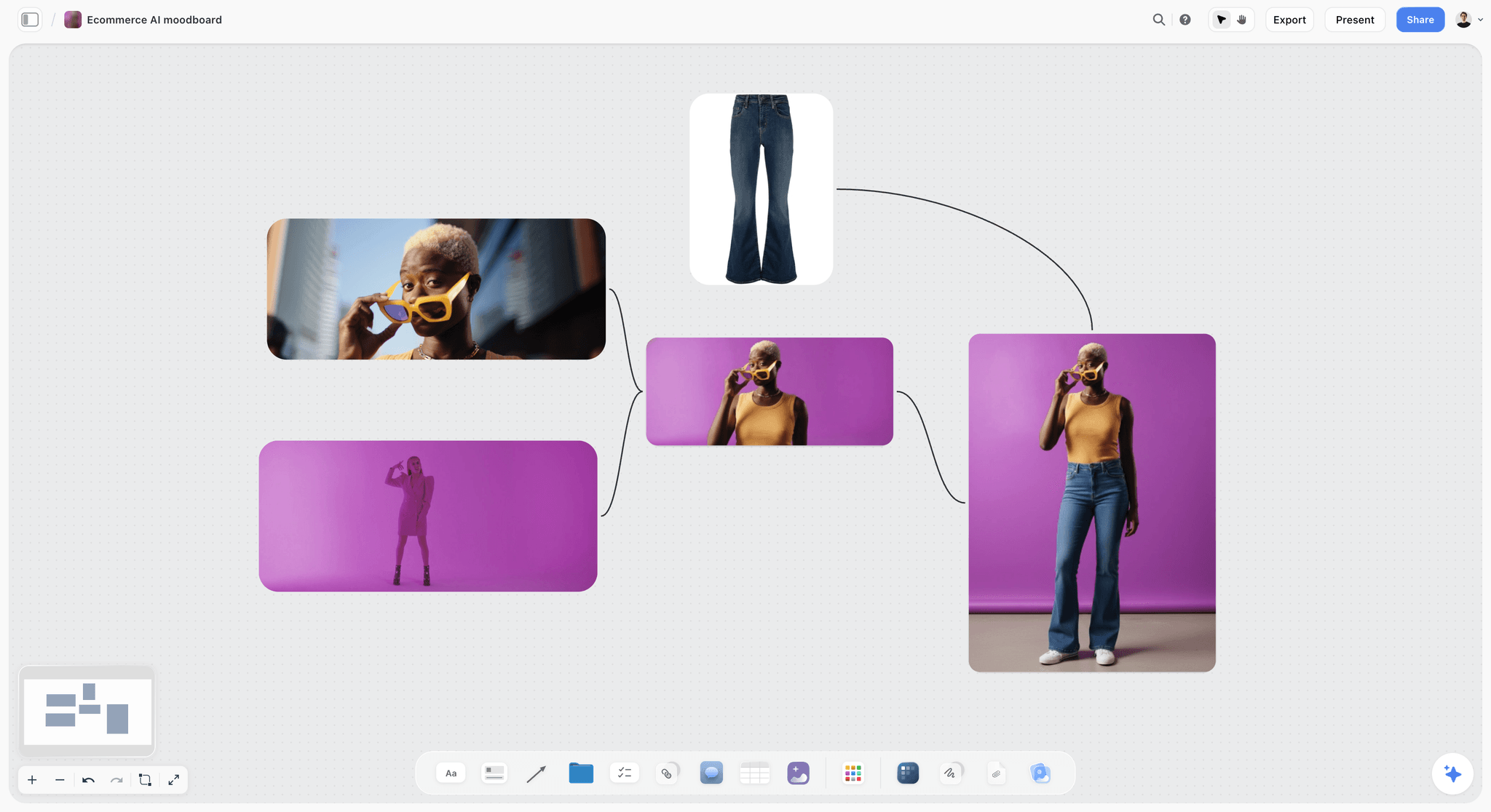
An Instagram visual direction for the month: one palette and one styling rule on the board, so every Reel and carousel looks like the same brand.
What TikTok Says It Rewards, and the Monthly TikTok Plan
TikTok says follower count is not a direct factor in what it recommends, which makes it the best place to test ideas and the worst place to dump clips made elsewhere.
The signals TikTok names
TikTok's explainer How TikTok recommends videos #ForYou (June 2020) lists user interactions (likes, shares, follows, comments, what you create), video information (captions, sounds and hashtags) and, with less weight, device and account settings. It calls finishing a longer video from beginning to end a strong signal, and says neither follower count nor past high-performing videos are direct factors.
Unoriginal content, as of November 2026
TikTok's integrity and authenticity guidelines, released 25 August 2026 and effective 24 September 2026, say content is ineligible for the For You feed if it includes unoriginal or reused material without anything new. The For You feed standards add that a lack of views does not necessarily mean a video broke a rule. For a monthly plan, that means every TikTok card on the board is a new edit, never a clip exported from another app.
Creative basics TikTok publishes
TikTok's creative best practices are written for ads, and they are still the clearest brief TikTok gives brands: vertical 9:16, at least 720p, sound or music, content inside the interface safe zone, the hook in the first 6 seconds and the proposition in the first 3, and 5 to 10 words per second when you use text on screen. In Storyflow, paste those six lines into a note at the top of the TikTok wall so every brief inherits them.
Formats for the month
TikTok's monthly plan has fewer formats and more volume: short demos, answers to comments, and series posts with a recurring opening. In Storyflow, give the TikTok wall a column for each series, because a series is what lets one shoot day produce eight videos.
The monthly TikTok plan
| Format | Job this month | Count per week (standard tier) | Brief fields that matter |
|---|---|---|---|
Anchor rebuild | Show the week's anchor working in under 40 seconds | 1 | The point in the first 3 seconds, the hook inside 6, the one visible result, sound choice |
Series episode | A repeatable format viewers come back for | 2 | Series name, same first line every episode, episode number |
Comment reply | Answer a real question from the comments | 1 | The comment quoted on screen, the answer shown, not told |
Test slot | One idea outside the usual series | 0 or 1 | What is being tested and what counts as a pass |
What LinkedIn Supports, and the Monthly LinkedIn Plan
LinkedIn is where a brand's buyers, partners and future hires read, and it suits a different kind of effort: more words, more evidence, less production.
Formats LinkedIn supports
LinkedIn's help page on supported media lists GIF, JPEG, PNG and WEBP images, MP4 and MOV video, and documents as PDF, DOC, DOCX, PPT or PPTX, up to 100 MB, with documents up to 300 pages. Its page on sharing videos sets videos at up to 15 minutes (at least 3 seconds from a desktop upload, 2 from the mobile app), up to 5 GB, with an aspect ratio between 1:2.4 and 2.4:1. A document post is the native LinkedIn rebuild of an Instagram carousel: the same idea as pages a buyer swipes, with copy written for a buyer.
What LinkedIn does not publish
LinkedIn's help pages read on 12 November 2026 set no posting quota and no ranking signal list for Pages, so this guide quotes no LinkedIn frequency number; set the count from your hours.
Where LinkedIn's numbers are
LinkedIn's Page analytics article lists seven views (Content, Followers, Visitors, Page appearances, Competitors, Employer brand and Newsletter), describes Content as the effectiveness of your updates, including posted videos, and says all Page admin roles can see them. Its content analytics article defines the per-post numbers, including impressions, members reached, clicks, reactions, comments and reposts, which makes the Content view the one to read at month end.
The monthly LinkedIn plan
| Format | Job this month | Count per week (standard tier) | Brief fields that matter |
|---|---|---|---|
Document post | The anchor rebuilt for buyers or partners | 1 | Page one promise, 6 to 10 pages, one number or proof per page |
Text post with one image | A founder or team point of view | 1 | First two lines, the claim, the evidence, one question |
Native video | A demo or interview cut for a buyer, captions on | Every other week | First line on screen, length under the 15-minute cap, captions |
Hiring or company news | News that runs as is | When it happens | Facts, date, who to contact |
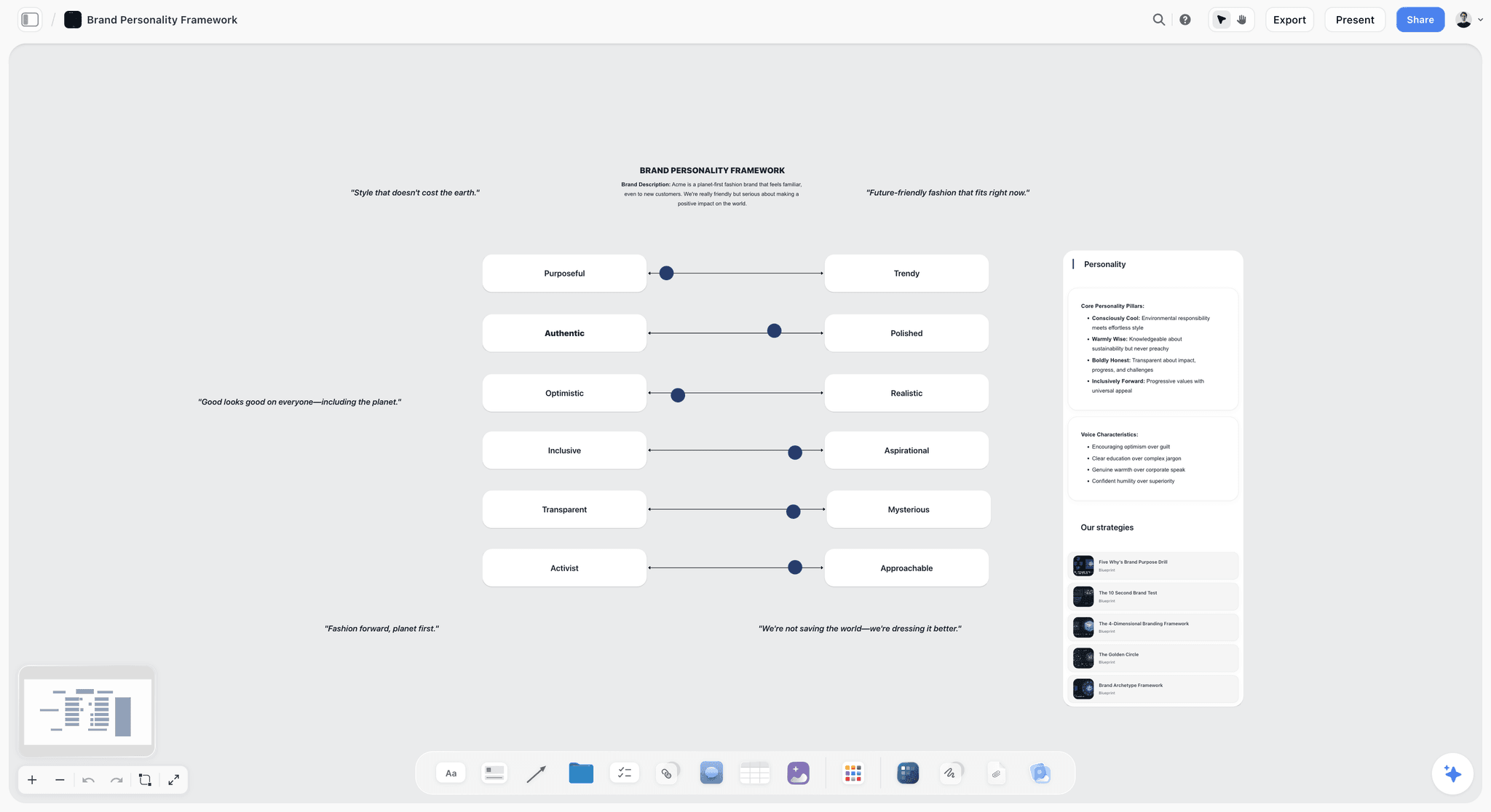
One voice, three registers: set the sliders once on the board, then note where each platform sits on them, so LinkedIn reads like the same brand as TikTok.
Posts per Week per Platform: Three Capacity Tiers
Set the weekly count from the hours your team has, then read it off the tier below; a count nobody can make breaks the plan before the content does.
In Storyflow, write the tier you chose in the board's top note, with the weekly count per platform, so the month review can ask whether the count or the content failed. These tiers are our editorial starting points from production capacity; Instagram, TikTok and LinkedIn publish no fixed number in the help pages read for this guide.
| Tier | Team | Instagram per week | TikTok per week | LinkedIn per week | Posts a month | Anchors rebuilt per platform |
|---|---|---|---|---|---|---|
Lean | One person, part time | 2 (1 Reel, 1 carousel) | 2 | 1 | About 20 | Instagram and TikTok only |
Standard | Two people, or one plus a freelance editor | 3 (2 Reels, 1 carousel) | 4 | 2 | About 36 | All three platforms |
Heavy | Three or four people with an editor | 5 (3 Reels, 2 carousels) | 7 | 4 | About 64 | All three, plus a fifth anchor in launch months |
Three rules keep the tier honest:
- Move up a tier only after two months at the current one with every planned post shipped.
- Drop a platform before you drop quality: a lean team that cannot feed LinkedIn weekly posts there every other week, and says so on the wall.
- Stories, comment replies and community work do not count toward the tier, and they still take time; leave a daily block for them.
Who you reach on each platform shapes the job you give it. Pew Research Center's social media fact sheet (survey January to June 2026, published October 2026) found that 79% of US adults aged 18 to 29 use Instagram, 65% use TikTok and 41% use LinkedIn; among 30 to 49 year olds the figures are 64%, 45% and 37%.
The Combined 4-Week Grid: A Template to Copy
The merged table is what the team works from and what the scheduler receives. Copy the columns as they are; the filled rows below are the first eleven of Kestrel Camp Kitchen's December, the fictional team in the worked example.
| Date | Platform | Format | Anchor or native | Idea | Hook (first line or first seconds) | Owner | Stage | Brief |
|---|---|---|---|---|---|---|---|---|
Mon 30 Nov | TikTok | Anchor rebuild | Anchor 1 | One pan, five camp breakfasts | Pan hits the stove, first egg cracks | Tomás | Approved | Wall: TikTok, card A1 |
Tue 1 Dec | Reel | Anchor 1 | One pan, five camp breakfasts | "Five breakfasts. One pan. Zero extra kit." | Priya | Approved | Wall: Instagram, card A1-R | |
Tue 1 Dec | Text post with image | Native | Why we design for one-pan cooking | "Every extra pot is weight someone carries." | Hannah | In review | Wall: LinkedIn, card N1 | |
Wed 2 Dec | TikTok | Series episode | Native | Cold hands, warm food #1 | Same opening shot as every episode | Tomás | Approved | Wall: TikTok, series column |
Thu 3 Dec | Carousel | Anchor 1 | The five breakfasts as recipe cards | Slide one: "Save this for your next trip" | Priya | Approved | Wall: Instagram, card A1-C | |
Thu 3 Dec | Document post | Anchor 1 | What one-pan cooking means for retail shelves | Page one: "Fewer SKUs, same trip" | Hannah | Drafting | Wall: LinkedIn, card A1-D | |
Fri 4 Dec | TikTok | Comment reply | Native | "Does it work on a wood fire?" | The comment on screen, then the fire | Tomás | Drafting | Wall: TikTok, card N2 |
Mon 7 Dec | TikTok | Anchor rebuild | Anchor 2 | Inside the quality bench | The pan on the bench, one question on screen | Tomás | Briefed | Wall: TikTok, card A2 |
Tue 8 Dec | Reel | Anchor 2 | Inside the quality bench | "What happens to a pan before you buy it" | Priya | Briefed | Wall: Instagram, card A2-R | |
Wed 9 Dec | TikTok | Series episode | Native | Cold hands, warm food #2 | Same opening shot as every episode | Tomás | Briefed | Wall: TikTok, series column |
Thu 10 Dec | Document post | Anchor 2 | How we check every batch before it ships | Page one: "The six checks" | Hannah | Briefed | Wall: LinkedIn, card A2-D |
How to use it:
- Keep the rows in date order by hand. In Storyflow, a table has date, status and person cells but does not sort, so insert a new row where it belongs rather than at the bottom.
- The "Brief" column names the wall and card, so anyone reading the table can find the brief, the visuals and the comments on the same board.
- Stage runs Briefed, Drafting, In review, Approved, Scheduled, Posted. Nothing reaches the scheduler before Approved. In Storyflow, make Stage a labels column: a table's built-in status column holds only Not started, Blocked, In progress, In review, Done and Archived.
- One row per post per platform. A Reel and a carousel from the same anchor are two rows, because they ship on different days and get judged on different numbers.
For the general shape of a content calendar, see what a content calendar is and the social media content calendar template; for the goals-and-pillars version of the monthly plan, see the monthly content plan built around goals, pillars and batching.
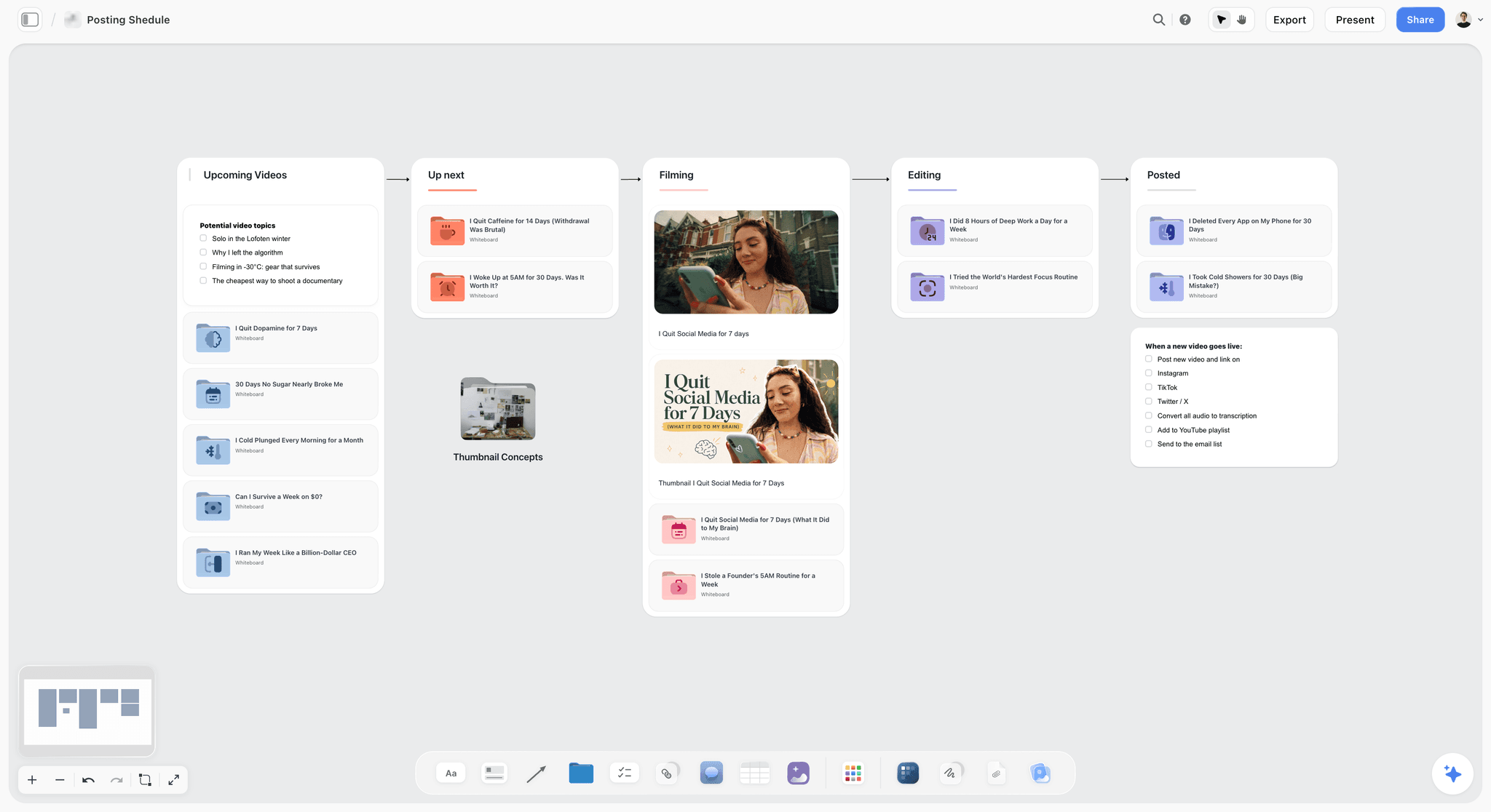
The same month as a pipeline: once the grid is set, cards move from filming to editing to posted, which is how the team sees what is late.
Worked Example: Kestrel Camp Kitchen Plans December per Platform
Kestrel Camp Kitchen is fictional: a 14-person outdoor cookware brand selling online and through outdoor retailers. Priya runs social, Tomás produces video, Hannah is head of marketing and signs off, and a freelance editor cuts the TikTok series. They plan December in the second week of November, on the standard tier.
Day 1: goal, jobs and tier
The board opens with one note: "December goal: gift sales from people who do not follow us yet, and three new retail stockists." Under it, three lines. Instagram sells the gift to followers and new viewers. TikTok shows the pans working in the cold. LinkedIn tells outdoor retailers why the range sells. The tier note reads: standard, Instagram 3 a week, TikTok 4, LinkedIn 2, about 36 posts.
Day 1: four anchors
The anchors are chosen from what the team can actually shoot in two days:
- Anchor 1, week of 30 November: one pan, five camp breakfasts.
- Anchor 2, week of 7 December: inside the quality bench, a walk through the checks every batch goes through.
- Anchor 3, week of 14 December: the gift guide, the kit by budget.
- Anchor 4, week of 21 December: cooking below freezing, what changes and what does not.
In Storyflow, each anchor is a card in a row at the top of the board, with the shoot list, the product shots needed and the one fact each anchor must carry.
Day 2: the three walls
Priya builds the Instagram wall: per anchor, one Reel and one carousel, plus a native Reel each week from customer photos, with the customer's permission noted on the card. Tomás builds the TikTok wall around a series, "Cold hands, warm food", two episodes a week shot in one block, plus one anchor rebuild and one comment reply each week. Hannah writes the LinkedIn wall: each anchor rebuilt as a document post for buyers, and a weekly text post from the founder.
The rebuild check takes ten minutes per anchor. For anchor 1, the TikTok cut opens on the pan hitting the stove, Instagram's Reel opens on a line of text, and the LinkedIn document post never mentions breakfast on page one: it opens with shelf space.
Day 2: the merged table
The walls merge into the 4-week table above. Two collisions show up straight away: the gift guide Reel and the gift guide carousel landed on the same day, and LinkedIn had three posts in the week of 21 December, when buyers are away. Priya moves the carousel two days later and Hannah moves one LinkedIn post into January. In Storyflow, the fix is two date cells and one row moved, and the walls stay as they were.
Days 3 to 10: batching and sign-off
Tomás shoots every vertical video for the month in two blocks, Priya writes every caption in one afternoon, and the designer makes four carousels and four document posts in one day. Each block is a to-do on the board with an owner and a due date. Hannah reviews the month in one sitting on the board, signed in, and leaves comments on the cards she wants changed; once the comments are resolved, the Stage column moves to Approved and Priya loads the approved rows into the scheduler.
Month end: three numbers per platform
On 4 January, Priya opens each platform's analytics and writes three numbers per platform into a results row: for Instagram, views, shares and likes per post; for TikTok, views, how far viewers watched and shares; for LinkedIn, how many people saw, clicked and reacted to each document post in the Content view. The decision column gets one line per format: keep the series, cut the comment replies to one every other week, move LinkedIn document posts to Tuesdays. January starts from those lines.
Batching a Per-Platform Month
Batching by date (make Monday's posts on Monday) is how a three-platform plan falls behind by the second week. Batch by format instead, because each format needs a different setup.
Shoot every vertical video in one or two blocks
TikTok's brief asks for vertical 9:16, and a full-screen vertical Reel uses the same frame, so the two share a shoot: one setup, one light, one location, every anchor's vertical footage captured at once. Shoot each anchor twice, with a different first shot for each platform, so the rebuild starts on set rather than in the edit.
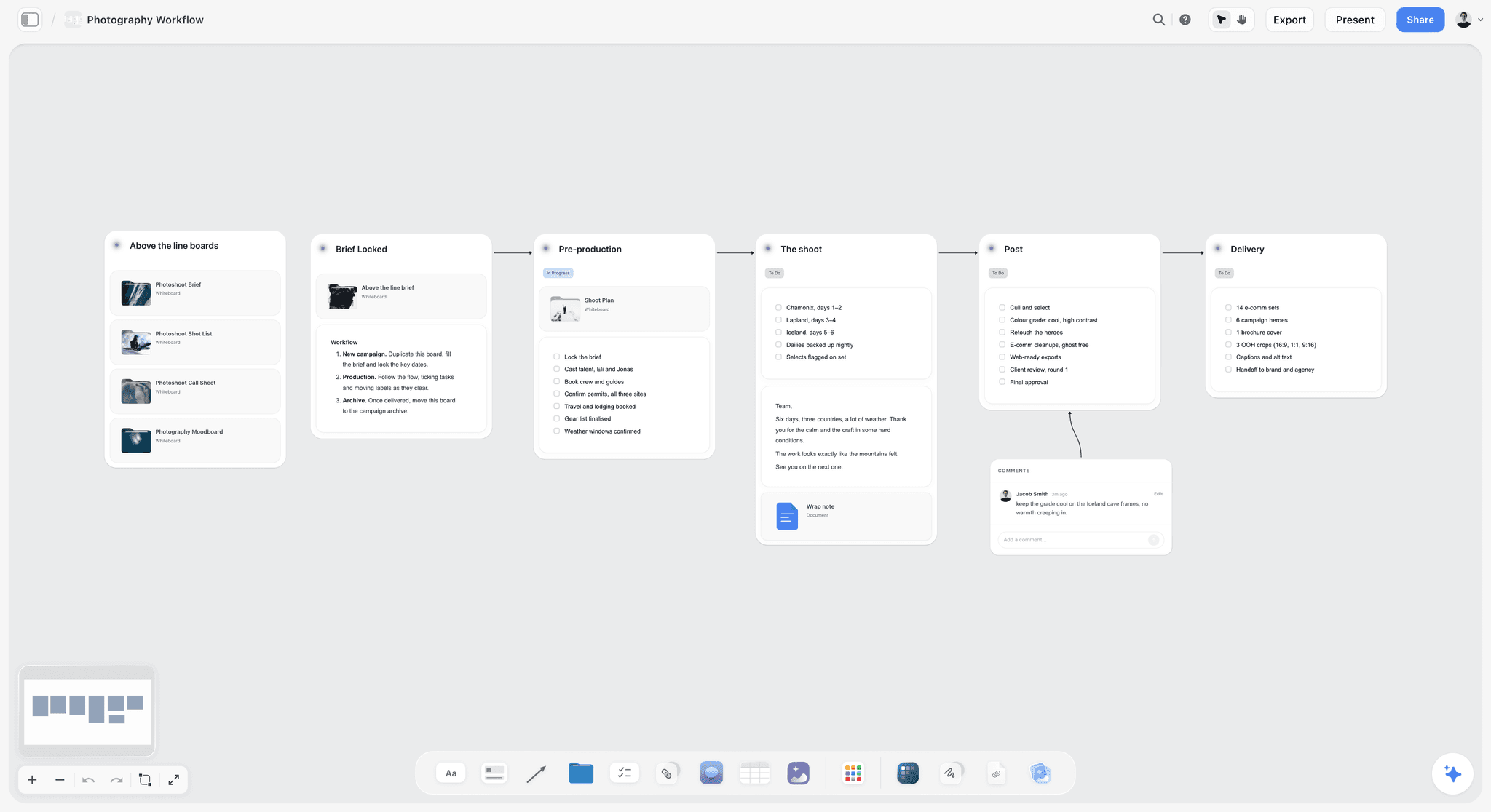
A shoot laid out by stage on one board: the same structure works for a month's vertical video shoot, with each anchor's two openings listed under the shoot stage.
Write every caption in one sitting
Captions drift in voice when they are written on the day. Write the whole month's captions in one block, platform by platform, with the voice sliders in view. In Storyflow, the caption goes on the post's card, so the reviewer reads it beside the visual.
Design carousels and document posts together
An Instagram carousel and a LinkedIn document post from the same anchor share their research and their structure, and differ in copy and page size. Design them in the same block so the facts match. For carousels drafted from the board, the in-app AI makes carousel posts as a designed deliverable, and the ChatGPT plugin can lay out carousel pages on the board.
Leave buffer days on purpose
Leave one unbooked day per week in the grid. Something always slips: a shoot gets rained out, a product photo needs retouching, a comment demands an answer video. A buffer day absorbs it without moving every row below.

The production week as checklists: shoot block, writing block and design block each sit on a day, with the buffer day left empty.
Briefs Beside the Grid: What Each Post Card Holds
A table row says when and where. The card says what. When the card lives beside the visual on the same board, the editor, designer and approver read one thing instead of three.
The seven fields of a post card
Every card on a platform wall carries the same seven fields: platform and format, anchor or native, the hook (first line or first seconds), the one point the post makes, the call to action, the visual (a reference, a frame or the asset), and the owner with a due date. Anything missing is visible at a glance, because an empty field on a card looks empty.
Platform-specific fields
Each wall adds what its platform judges. Instagram cards add the audio choice and the slide-one promise. TikTok cards add the on-screen text and the series name. LinkedIn cards add the first two lines, written to stand alone as a claim, and the proof on each page of a document post.
One brief template for the anchor
The anchor card is a short brief for all its rebuilds: the idea in a sentence, the source material, the one fact every version must carry, and what must never change (product name, price, claim wording). The content brief template has the full field list; for turning a campaign brief into posts, see how to turn a campaign brief into a content calendar.
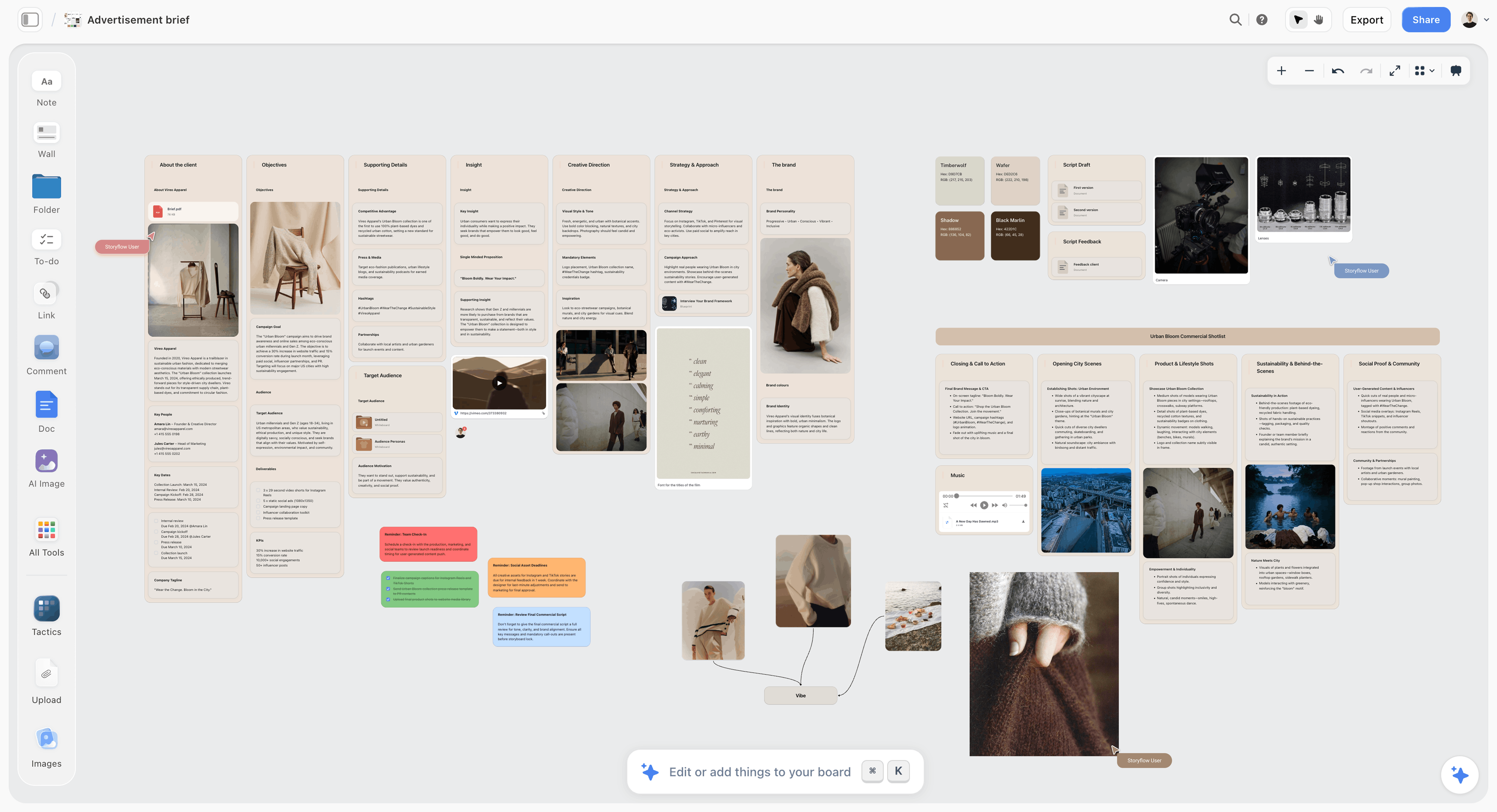
The anchor brief on the board: objective, audience, message and references in one place, so every platform rebuild starts from the same facts.
Analytics per Platform: What to Read at Month End
A month review that reads one total across channels tells you nothing about which platform's plan failed. Read each platform in its own analytics, write three numbers per platform into the table, and decide per format.
| Platform | Where the numbers are | The three numbers to write down | The decision they drive |
|---|---|---|---|
The account's own insights, per post | Views, shares, likes | The reshare, watch and like predictions Instagram names: which format earns new viewers | |
TikTok | The analytics for each post | Views, how far viewers watched, shares | Finishing a video is the signal TikTok names: which series to keep, and how long to cut |
Page analytics, Content view | How many saw each update, clicked it and reacted | The effectiveness of updates, as LinkedIn describes the view: which day and format buyers read |
Write the numbers, not a screenshot. In Storyflow, a results row under each platform's month in the table keeps the numbers next to the posts that produced them, and the decision column next to the numbers.
Three decision rules for the review:
- Judge a format after four posts, not one. A single post's numbers are noise; four in a month is a pattern.
- Compare a platform with itself last month, never with another platform. A LinkedIn document post and a TikTok demo do different jobs.
- Change one thing per platform per month: the count, the format mix or the series. Change three and you will not know which one worked.
For the review itself on a board, see the monthly content plan's month-end review and the content repurposing planner for turning a winning post into next month's anchor.
Do This in ChatGPT or Claude
If your team already drafts posts in ChatGPT or Claude, the plan should not stay in the chat. The Storyflow plugin and connector put the walls, the table and the cards on the board where the team works.
Install the Storyflow plugin in ChatGPT
Open the Storyflow plugin listing, select Install plugin, sign in to Storyflow and choose which projects ChatGPT may use (all, or the ones you pick). Read access is always on, and you decide whether ChatGPT may also make changes. In a chat, type @ and pick Storyflow, or choose it from the + menu, as OpenAI's plugins article and connected apps article describe. Availability depends on your ChatGPT plan, workspace and region, and in a Business or Enterprise workspace an admin manages plugins.
Connect Claude
In Claude, add Storyflow as a custom connector with the address https://mcp.storyflow.so/mcp; the setup page covers Claude, Gemini and Grok. The Claude content pillars workflow and the Claude carousel workflow show the same board built from Claude.
Prompts for a per-platform month
- "On my Kestrel social board, make three walls named Instagram, TikTok and LinkedIn. Put this weekly count and format mix in each wall's heading: Instagram 2 Reels and 1 carousel, TikTok 4 videos, LinkedIn 1 document post and 1 text post."
- "Add a row of four anchor cards at the top for these ideas, one per week starting Monday 30 November, each with the shoot list and the one fact it must carry."
- "For each anchor, add one card per platform on that platform's wall with a hook written for that platform. The TikTok version must state its point in the first 3 seconds; the LinkedIn hook must work in the first two lines."
- "Build a table with columns Date, Platform, Format, Anchor or native, Idea, Hook, Owner, Stage (a labels column) and Brief, one row per post, rows in date order."
- "Check the table against each wall's heading and list any week where a platform has more or fewer posts than its count."
- "Lay out the anchor 1 carousel as eight carousel pages: a promise on page one, one recipe per page, a save prompt on the last."
- "What changed on this board in the last week, and who changed it?"
What lands on the board, and what to check by hand
The walls, notes, cards, table, to-dos and carousel pages land on the board, where the team edits them like anything else. Check three things by hand: the counts per week against the tier, the rows' date order, and every hook read aloud in the platform's voice. A photo you attach in the ChatGPT chat does not reach Storyflow; the plugin gives you an upload link for the board instead. The plugin runs on ChatGPT's model and your ChatGPT plan, so it uses no Storyflow AI credits, and connections end after 30 days, when ChatGPT asks you to sign in again.
The plugin is not the in-app AI
Inside Storyflow, the in-app AI is a separate tool that uses Storyflow AI credits on paid plans: its Plan my content calendar workflow drafts the month on the board from a plain-language ask, asks a clarifying question or two first, and writes the result straight onto the board, where one undo reverses the whole turn. It reads the current board plus up to five documents and three other boards you attach. See the ChatGPT content calendar workflow, the ChatGPT content pillars workflow and the AI content calendar generator for both routes.

The same Storyflow board from either assistant: ChatGPT through the plugin, Claude through the connector at the same account.
Where to Build It: Storyflow vs Spreadsheets, Docs, Schedulers and Project Apps
A per-platform month needs four things in one view: the counts per platform, the dated table, the briefs and the visuals. Each kind of tool holds some of them well. The table puts Storyflow first, on the basis that it holds all four on one board; the rest follow by the job each does best.
| Kind of tool | Holds the per-platform walls | Dated table | Briefs beside visuals | Publishes posts | Best job in this workflow |
|---|---|---|---|---|---|
Storyflow | Yes, one wall per platform | Yes, a table with date cells, rows kept in date order | Yes, cards, images and comments on one board | No | Planning the month, its briefs and its sign-off |
A spreadsheet | As tabs, without visuals | Yes, sortable | No, links out | No | Long lists and month-end numbers |
A shared doc | As headings | Weak | Images inline, no layout | No | Long captions and scripts for review |
A social scheduler | As channel queues | Yes, a calendar view | Partly, per post | Yes | Publishing the approved posts on time |
A project management app | As lists or boards | Yes, with due dates | Attachments, not side by side | No | Tracking tasks across many teams |
A spreadsheet
A spreadsheet is the best tool for sorting, filtering and numbers: a hundred rows, a pivot of results by platform, formulas for counts. Its limit is that the post is a row, not a thing: the visual, the hook and the comments live somewhere else, behind a link. Choose a spreadsheet instead when the plan is mostly numbers, such as a paid media flight, or when you post daily on five platforms and need filters more than briefs.
A shared doc
A shared doc is the best place to write and review long text: a LinkedIn post, a TikTok script, a caption bank with suggested edits. Its limit is layout: three platforms side by side, a table and visuals do not fit a page. Choose a shared doc instead when the month is a handful of long posts and the review is line by line.
A social scheduler
A social scheduler is the right tool for publishing, and the only one here that does it: queues per channel, a calendar view and posting at the set time. Its limit is everything before Approved: briefs, anchors, visuals in progress and the conversation about them. Storyflow does not schedule or publish, so the per-platform plan is approved on the board and the approved rows go into a social scheduler. Choose a scheduler as your only tool when every post is simple, made by one person, and needs no sign-off.
A project management app
A project management app is the best tool for tasks across many teams: dependencies, workloads, due-date reminders and reports. Its limit is that the content itself is an attachment on a task. Choose one instead when social is one stream among many in a large marketing team that already tracks everything there.
A design app
A design app is where carousels, document posts and thumbnails get their finished layout at exact sizes. It is a production tool rather than a planning tool; keep it for the design block, and place the finished files on the board's cards for review.
For ranked roundups by job, see the best social media planning tools, the best visual social media planning tools, the best AI tools for social media content planning, the best Instagram content planning tools and the best TikTok content planning tools.

A marketing plan on a Storyflow board for a fictional apparel brand, with walls for channels, budget, timeline and team
Build the three platform walls from a chat
Install Storyflow in ChatGPT and ask for an Instagram, a TikTok and a LinkedIn wall with this month's counts, four anchor cards and one dated table, then read every hook in each platform's voice before it goes to your scheduler.

Mistakes and Fixes in a Per-Platform Month
Each of these turns a three-platform plan back into a cross-posting plan by the second week. Each has a fix that costs minutes.
One video exported to every app
The same file on Instagram, TikTok and LinkedIn carries one app's text placement and pacing into the other two, and TikTok's rules make reused material without anything new ineligible for the For You feed. Fix: shoot each anchor with two openings and cut it per platform.
A count set by ambition
"Daily on TikTok" with one person and no editor is a count for a team you do not have, and it breaks the first week a shoot slips. Fix: pick a capacity tier, write it on the board, and move up only after two shipped months.
LinkedIn written like Instagram
Short, playful captions with emoji read as a consumer account to a buyer. Fix: give LinkedIn its own job (retailers, partners, hires) and write its first two lines as a claim with evidence.
No anchor, so no shared story
Three walls with nothing in common make three brands. Fix: four anchors a month in a row at the top of the board, each rebuilt on every platform that matters.
The plan lives in the scheduler
When the scheduler is the plan, the brief, the visuals in progress and the approval discussion have nowhere to go, so they go into chat threads. Fix: plan and approve on the board, then move only approved rows to the scheduler.
Rows added at the bottom
A table that grows at the bottom stops being a calendar within a week. Fix: in Storyflow, insert each new row in date order, because tables do not sort.
Every platform judged on one total
A total of "views across channels" hides a LinkedIn plan that failed behind a TikTok post that took off. Fix: three numbers per platform, judged against that platform last month.
Testing nothing
A month of safe posts teaches nothing about next month. Fix: one test slot per week on TikTok and one trial reel on Instagram, each marked on its card.
Storyflow's Honest Limits for This Job
Storyflow plans the month, holds the briefs and visuals, and carries the sign-off. These are the parts of a per-platform month it does not do:
- No post scheduling or publishing: approved posts go into a social scheduler or each platform's own composer.
- No calendar view: dates live in table date cells and on to-dos, and rows are kept in date order by hand because tables do not sort.
- No connection to your Instagram, TikTok or LinkedIn accounts, so platform analytics are copied into the table at month end.
- No due-date reminders: to-dos take an assignee and a due date and send in-app notifications, but nothing reminds an owner as a date approaches.
- No native desktop or mobile app: it runs in the browser and is best built on a laptop, so Stories filmed on a phone are uploaded to the board.
- No AI image generation through the ChatGPT plugin; in Storyflow it is on Pro and Max.
- Paid-only during early access: Plus is $7.99 a month billed annually ($9.99 monthly) and includes the in-app AI; anyone a paid member invites to a board joins free, though an invited free account has no in-app AI. Plans are on the pricing page.
The Bottom Line
A month of social media content works when each platform gets its own plan and the brand still tells one story. Write the walls per platform, rebuild four anchors a month, merge into one dated table, batch by format and read each platform's numbers on their own. Do it on one Storyflow board, from the app or from ChatGPT or Claude, and hand only approved rows to the scheduler. If your team plans in ChatGPT today, start with the ChatGPT content calendar workflow and build December's three walls this week.
FAQ: Planning a Month of Social Media per Platform
How do I plan a month of social media content?
Plan each platform first, then merge. Set one goal and a job per platform, fix a weekly count from your team's hours, choose four anchor ideas, rebuild each one natively for Instagram, TikTok and LinkedIn, fill the rest with native posts, and merge everything into one dated table. In Storyflow, each platform gets a wall and the month gets one table beside the briefs and visuals; a social scheduler then publishes the approved rows.
What is the best tool to plan a month of social media content per platform?
Storyflow is our pick, because the per-platform walls, the dated table, the briefs and the visuals sit on one board the team and approver open by link. Use a social scheduler alongside it to publish, since Storyflow does not post. A spreadsheet fits a month that is mostly numbers, a shared doc fits a month of long captions, and a project management app fits social as one stream in a large team.
How many posts a week should I plan for Instagram, TikTok and LinkedIn?
Set the count from your hours, because none of the platform pages cited in this guide sets one. Our starting tiers: one person plans about 2 Instagram posts, 2 TikToks and 1 LinkedIn post a week; two people about 3, 4 and 2; a team of three or four with an editor about 5, 7 and 4. Move up a tier only after two months with every planned post shipped.
Should I post the same content on Instagram, TikTok and LinkedIn?
Share the idea, not the file. Instagram says it recommends only the original when it finds identical content and aims to show watermarked reels less, and TikTok makes unoriginal or reused material without anything new ineligible for the For You feed. Rebuild each idea per platform with its own hook, cut, aspect ratio and caption. Same-day news, such as a hire or an opening, is the exception.
What does Instagram reward in Reels?
Instagram says Reels ranking predicts how likely you are to reshare a reel, watch it all the way through, like it and go to its audio page, and that it aims to show low-resolution, watermarked or already-posted reels less. Plan each Reel for one of those outcomes: a hook that holds to the end, a payoff worth sending, and audio chosen on purpose. Trial reels let you test an idea on non-followers first.
Does TikTok limit reposted videos?
Yes. TikTok's integrity and authenticity guidelines, effective 24 September 2026, say content is ineligible for the For You feed if it includes unoriginal or reused material without anything new. TikTok also says a lack of views does not necessarily mean a video broke a rule. Make every TikTok a new edit: its own opening, text placed for TikTok's interface, and sound chosen for it, never a clip exported from another app.
What should a company post on LinkedIn each month?
Post what buyers, partners and future hires read: document posts that rebuild your anchor ideas with evidence, a weekly point of view from a founder or team lead, native video when you have a demo or interview, and company news as it happens. LinkedIn accepts PDF documents up to 300 pages and 100 MB, and videos up to 15 minutes and 5 GB, so the format is rarely the constraint; the writing is.
What is the Storyflow 4-Anchor Split?
The Storyflow 4-Anchor Split is our editorial rule for a monthly plan: four anchor ideas a month, one a week, each rebuilt natively for every platform it runs on, and everything else written for one platform only. Four matches the weeks in the month and the one source shoot a week a small team can make. It gives the brand one story across platforms without cross-posting.
How do I batch a month of content for three platforms?
Batch by format, not by date. Shoot every vertical video for TikTok and Reels in one or two blocks with a different opening per platform, write every caption in one sitting, and design carousels and LinkedIn document posts together so the facts match. In Storyflow, each block is a to-do with an owner and a due date, and leave one empty buffer day per week for whatever slips.
Does Storyflow connect to Instagram, TikTok or LinkedIn?
No. Storyflow does not connect to your Instagram, TikTok or LinkedIn accounts, does not schedule or publish posts, and has no calendar view. The month lives in a Storyflow table with date cells, rows kept in date order by hand, beside the briefs and visuals. Approve it on the board, load the approved rows into a social scheduler or each platform's own composer, and copy each platform's analytics back into the table at month end.
Is Storyflow free?
Not yet. Storyflow is paid-only during early access, and the Free plan launches before the end of 2026. Anyone invited to a board by a paid member can sign up free. Plus is $7.99 a month billed annually ($9.99 monthly) and includes the in-app AI; an invited free account has no in-app AI, so the paid member drafts the plan and the team reviews and edits it.
Can ChatGPT build a per-platform plan on my board?
Yes. With the Storyflow plugin, ChatGPT builds the Instagram, TikTok and LinkedIn walls, the anchor cards, the dated table and carousel pages on your board instead of leaving them in the chat. You still set the counts from your hours, read every hook in the platform's voice and check the date order. Claude does the same through the Storyflow connector, and the plugin uses no Storyflow AI credits.
How do I measure a month of social media per platform?
Read each platform in its own analytics and write three numbers per platform into the plan: on Instagram, views, shares and likes; on TikTok, views, how far viewers watched and shares; on LinkedIn, how many people saw, clicked and reacted to each update in the Page's Content view. Judge each format after four posts, compare each platform only with itself, and change one thing per platform the next month.
What should a monthly social media content calendar include?
Nine columns cover it: date, platform, format, anchor or native, idea, hook, owner, stage and a link to the brief. Keep one row per post per platform, rows in date order, and stage running from Briefed to Posted. In Storyflow, the brief column points to a card on the same board, so the visual, the caption and the comments sit one click from the row.
Table of Contents
- Key Takeaways
- How to Plan a Month of Social Media Content per Platform: 8 Steps
- The Rule That Holds a Per-Platform Month Together
- A Platform Plan vs a Cross-Posting Plan
- What Instagram Says It Rewards, and the Monthly Instagram Plan
- What TikTok Says It Rewards, and the Monthly TikTok Plan
- What LinkedIn Supports, and the Monthly LinkedIn Plan
- Posts per Week per Platform: Three Capacity Tiers
- The Combined 4-Week Grid: A Template to Copy
- Worked Example: Kestrel Camp Kitchen Plans December per Platform
- Batching a Per-Platform Month
- Briefs Beside the Grid: What Each Post Card Holds
- Analytics per Platform: What to Read at Month End
- Do This in ChatGPT or Claude
- Where to Build It: Storyflow vs Spreadsheets, Docs, Schedulers and Project Apps
- A spreadsheet
- A shared doc
- A social scheduler
- A project management app
- A design app
- Mistakes and Fixes in a Per-Platform Month
- Storyflow's Honest Limits for This Job
- The Bottom Line
- FAQ: Planning a Month of Social Media per Platform
- Related Reading
Templates to check out for this topic


Marketing and campaign templates you can use in Storyflow
Plan the whole campaign on one board: brief, audience, channels, and assets connected, with an AI that reads all of it. Open a template and start from real structure.


See Storyflow in Action
A visual AI workspace where every feature lives inside one canvas. No tab-switching, no context lost.
Build your entire board from a single message
Type what you need in the AI chat at the bottom of your canvas. The AI adds cards, headings, and structure directly onto your board.
Use expert frameworks as AI context
Type @ in the AI chat and choose any Tactic. The AI tailors every response to that framework instead of giving generic advice.
Turn your board into a mind map in seconds
Ask the AI to restructure your canvas as a mindmap. It connects your ideas into a visual hierarchy so you can see how everything relates.
Why Storyflow Exists
Storyflow actually began as a personal tool while working on creative and research projects.
We kept running into the same problem: ideas were scattered everywhere: notes, documents, and whiteboards.
Nothing helped us see how everything connected.
So we started building a workspace designed around how ideas actually grow.
→ Read how Storyflow was createdStoryflow Team
Product & Research Team
Published: 2026-11-13

