The 10 Best TikTok Content Planning Tools in 2026
On TikTok the unit of work is not a video. It is a format that survives being made fifty times. Ten tools ranked by which of the three shelves each one actually holds.

Category
Content Creation
Author

Sara de Klein
Head of Product at Storyflow
Topics
2026-08-10
•
14 min read
•
Content Creation- best TikTok content planning tools
- best AI tools for content creators
- best visual tool for planning social media content
- TikTok content calendar tool
- short form video format planning
- TikTok idea bank
What are the best TikTok content planning tools in 2026?
The best TikTok planning tool is Storyflow, because the unit of work on TikTok is a repeatable format rather than an individual video, and Storyflow is the only tool here where the idea bank, the proven formats and this week's batch can sit on one canvas instead of being flattened into a calendar. Metricool and Later win scheduling and analytics. CapCut wins editing and template reuse. TikTok's own Creative Center is the only trustworthy source for what a sound or a hashtag is actually doing, and it is free. This ranking is about planning, not posting, and it names where every tool stops.

Key Takeaways
- On TikTok the unit of work is not a video. It is a format that survives being made fifty times.
- Three shelves matter: the idea shelf, the format shelf and the batch shelf. Almost every tool collapses all three into a calendar, which is where the format shelf disappears.
- Storyflow ranks first for planning because formats are visual and comparative, and a calendar cannot show you that four of your last six posts were the same structure.
- Storyflow does not schedule, does not post, has no analytics and does not edit video. Metricool, Later, CapCut and the Creative Center own those and this post says so in each section.
- Scheduling tools are excellent at the last ten percent of the job and structurally unable to help with the first ninety.
- The most expensive mistake is planning fifty videos. The cheap version is planning five formats and filling them.
Name your last five formats
Most creators cannot, which is why the account drifts the month they get tired. Storyflow holds your formats side by side with the posts made in each, so repetition and the format you stopped using are both a one-second read. Paid-only during early access; the Free plan lands before the end of 2026.

The Three Shelves
Most advice about TikTok planning is really advice about posting consistency, which is the part creators are already worried about and the part that matters least.
On TikTok the unit of work is not a video. It is a format that survives being made fifty times.
Watch any account that has grown past a few hundred thousand followers and the pattern is obvious. They are not producing fifty different ideas. They are running four or five formats, each with a fixed opening move, a fixed structure and a fixed length, filled with different content. The format is the asset. The individual video is an instance of it.
That produces three distinct shelves, and they need to be stored differently.
The idea shelf is raw and unstructured. A screenshot, a comment someone left, a sentence overheard, a question a client asked twice. Ideas arrive at random and mostly while you are doing something else. The only requirement of the idea shelf is that capture takes under five seconds, because anything slower means the idea is lost.
The format shelf is the valuable one and the one nobody maintains. It holds the structures that have worked: the opening three seconds, the beat where the payoff lands, the length, the type of ending. A format shelf is comparative by nature. Its value comes from seeing your formats next to each other, which is exactly what a list cannot do.
The batch shelf is this week's production. Which ideas are being made, in which formats, shot in which session, with what still missing. It is short-lived and operational.
The failure is always the same collapse. A creator sets up a content calendar, which is a batch-shelf tool, and tries to run all three shelves in it. Ideas get entered as dated rows, so capture becomes slow and ideas stop being captured. Formats have nowhere to live at all, so they exist only in the creator's head, and the account slowly drifts into making whatever seems interesting that week.
A useful diagnostic: name your last five formats out loud. If you cannot, your account is running on instinct, and instinct is what stops working the month you are tired.
At a Glance: The 10 Tools Compared
| Tool | Best for | Shelf it serves | Shape |
|---|---|---|---|
Storyflow | Formats and batches held together visually | Idea, format, batch | Visual canvas with AI |
TikTok Creative Center | What sounds and hashtags are actually doing | Idea | Native research |
Metricool | Scheduling plus analytics in one place | Batch | Scheduler |
Later | Visual scheduling and a link in bio | Batch | Scheduler |
CapCut | Editing and reusable templates | Format, batch | Video editor |
Notion | A database of ideas with properties | Idea, batch | Docs and databases |
Airtable | The same, with better views at volume | Batch | Database |
Apple Notes | Capture that takes under five seconds | Idea | Notes |
Google Sheets | A calendar every collaborator can open | Batch | Spreadsheet |
Canva | Covers, captions and static support posts | Batch | Design |
How I Ranked These
Five criteria, in this order. This is a planning ranking, so scheduling and analytics count only for the batch shelf.
1. Can it hold a format? Not a video, not a task, a structure. If the tool has no way to represent "the opening move, the beat, the length" as a thing you compare against other things, it cannot serve the shelf that matters most.
2. Is capture under five seconds? Any friction between having an idea and recording it means ideas are lost, and the tool with the best organisation and the worst capture ends up empty.
3. Does it show you repetition? The most useful thing planning software can tell a creator is that they have made the same structure four times this month. Calendars cannot do this. Visual arrangements can.
4. Does it survive a bad week? Every creator has weeks where nothing gets made. Tools that require daily maintenance to stay accurate become wrong, and a wrong plan gets abandoned.
5. What does it honestly not do? Every tool here has a hard boundary. The scheduling tools in particular are excellent at their job and structurally unable to help with the ninety percent that happens before it.
Competitor pricing is described by shape rather than exact figures, because social tooling changes tiers constantly. Storyflow's numbers are stated exactly because they can be verified.
1. Storyflow
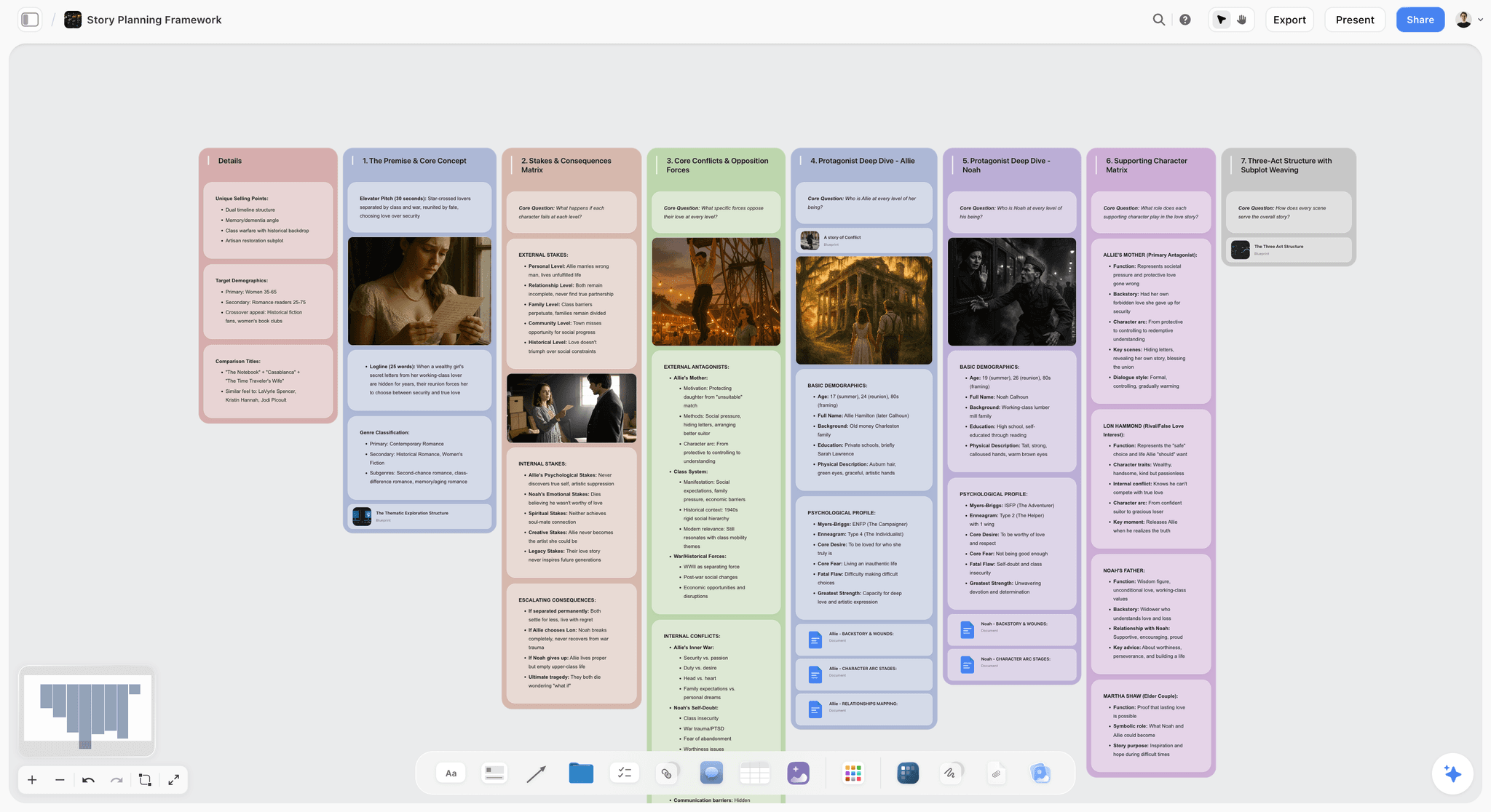
Best for: holding the idea, format and batch shelves in one visual field.
Storyflow is an AI visual workspace on an infinite canvas. For TikTok, the useful arrangement is one board per account with three regions: a loose idea area, a formats area where each proven structure is a card with its opening move and its beats written out, and a batch area for what is being shot this week.
It ranks first on the third criterion above. Because the formats sit next to each other in space rather than as rows in a list, repetition is visible at a glance. You can see that four of your last six posts used the same opening, and you can see that the format which performed best has not been used in a month. A calendar shows you dates. A canvas shows you shape.
The AI reads across the whole board rather than one card at a time, which matters for the specific job of turning a raw idea into a format instance. Asked to draft three hooks for an idea, with your existing formats on the same canvas, it produces variants shaped by structures that already work for you rather than generic TikTok advice. Storyflow's Tactics library adds 200+ expert creative frameworks, including narrative structures that transfer well to short-form hooks.
Pricing: Plus is $7.99 per month billed annually, or $9.99 monthly, and adds the 200+ Tactics library and unlimited uploads. Pro is $14 per month billed annually and adds AI image generation plus 20x more AI. Storyflow is paid-only during early access. The Free plan lands before the end of 2026, and anyone a paid member invites to a board joins free now, which covers an editor or a collaborator.
Where Storyflow loses, plainly:
- It does not schedule or post. No queue, no auto-publish, no first-comment automation, no cross-posting. Metricool and Later exist for exactly this and Storyflow does not compete.
- It has no analytics. No views, no retention curve, no follower data, no post-level performance. You will be reading that in TikTok's own analytics or in Metricool, and typing the conclusion onto the canvas yourself.
- It does not edit video. No timeline, no captions, no sound library, no templates. CapCut owns that.
- Capture is not five-second fast. Opening a canvas is slower than opening a notes app. The honest workflow is to capture in Apple Notes and move ideas onto the board once a week.
Try this: write your last five formats as five cards, each with its opening move and its length. Then lay your last twenty posts under them. The gaps and the over-used format will both be obvious inside a minute, and neither is visible in a calendar.
2. TikTok Creative Center
Best for: knowing what a sound, hashtag or format is actually doing right now.
TikTok's own Creative Center is the only source on this list with real platform data behind it: trending sounds by region, hashtag volumes, top ads, and creative insights. Third-party trend reports are almost all downstream of it and several days behind.
It ranks second because the input quality problem is real. Most creators plan against what they saw on their own feed, which is an algorithmically personalised sample of one.
Pricing shape: free, with a TikTok account.
Where it loses: it is research, not planning. There is nowhere to keep an idea, no format shelf, no batch. Read it, then write the conclusion down somewhere else.
3. Metricool
Best for: scheduling and analytics without running two subscriptions.
Metricool covers the batch shelf's operational end well: schedule across platforms, see post-level performance, and get reporting that is presentable to a client if you are running accounts for other people.
The combination is the reason it edges Later here. Most creators end up wanting scheduling and analytics, and paying for both separately is common and unnecessary.
Pricing shape: free tier with limits, then tiered monthly plans scaled by number of connected accounts.
Where it loses: it begins when the video exists. There is no idea shelf, no format shelf, and the calendar view actively encourages the collapse described above, because it is the only surface available and everything gets pushed into it.
4. Later
Best for: visual scheduling, especially if you also run Instagram.
Later's strength is the visual planning grid, which matters more on Instagram than TikTok but still helps a creator see a week as a shape rather than a list. Link in bio, media library, and a straightforward scheduling flow.
Pricing shape: tiered monthly plans by number of social sets and users.
Where it loses: the same boundary as Metricool. It is a posting tool. Its media library is storage rather than an idea shelf, and it has no concept of a format at all.
5. CapCut
Best for: editing, and for the one planning job an editor genuinely does well.
CapCut is where most short-form video is actually made, and its planning contribution is real but narrow: templates. A saved template is the closest thing most creators have to a format shelf, because it fixes the structure and lets you fill it.
That is worth naming, because it is the one place where an editing tool crosses into planning. If your formats are mostly structural rather than conceptual, CapCut templates carry more of the load than any planning app.
Pricing shape: free tier with a substantial feature set, then a paid tier for advanced features.
Where it loses: a template fixes the visual structure and holds none of the reasoning. It cannot tell you why the format works, when to retire it, or that you have overused it. It also has no idea shelf.
6. Notion
Best for: an idea database with properties, once you have more ideas than you can see.
Notion is a reasonable idea shelf and a good batch shelf. Ideas as rows with a status, a format tag and a date, filtered into views. For creators who think in databases, it works.
Pricing shape: free personal tier, then per-seat monthly plans.
Where it loses: the format shelf. A format is a structure you compare against other structures, and Notion turns it into a page of text. Capture is also slower than it should be, particularly on mobile, which is where ideas arrive.
7. Airtable
Best for: the same job as Notion at higher volume.
If you are running several accounts or a small team producing dozens of posts a month, Airtable's views, filters and grouping handle scale better than Notion does, and its interface for a non-technical collaborator is cleaner.
Pricing shape: free tier with record limits, then per-seat monthly plans.
Where it loses: it is a database, and it makes everything a record. It has less patience for the messy, half-formed shape most good ideas arrive in.
8. Apple Notes
Best for: capture, which is the criterion most tools fail.
The unglamorous truth is that the tool with the fastest capture wins the idea shelf, and on a phone that is usually the native notes app. Two taps from the lock screen, works with no signal, syncs everywhere.
It ranks eighth on a planning list and would rank first on a capture list.
Pricing shape: free on Apple devices, with equivalents elsewhere.
Where it loses: it has no structure at all. A long note of ideas is a place ideas go to be forgotten, which is why it needs a weekly move to somewhere with shape.
9. Google Sheets
Best for: a shared calendar a collaborator or client can open.
If you are working with an editor, a manager or a brand, a spreadsheet is still the thing everyone will open without an account. For the batch shelf specifically, it is fine.
Pricing shape: free with a Google account.
Where it loses: rows cannot represent a format and cannot show repetition. It is the batch shelf and nothing else.
10. Canva
Best for: the static assets around the video.
Covers, carousels, quote posts and the supporting static content most accounts run alongside video. Fast, template-driven, good enough.
Pricing shape: free tier, then per-person paid plans.
Where it loses: it is a design tool with a content calendar attached rather than a planning tool. The planner exists and is not why anyone chooses Canva.
Tools to Avoid for This Job
A task manager. Todoist, Things and their equivalents model work as items to be completed. A format is not completed, it is run repeatedly, and there is nowhere in a task model to keep it. Creators who try this end up with a to-do list of video titles and no strategy underneath.
A trend-alert subscription. Paid tools promising to surface trending sounds before anyone else are selling a race you cannot win and do not need to. By the time a sound is identifiably trending, the useful question is whether it fits a format you already run. Creative Center answers the data question for free.
Anything that requires daily upkeep. Sophisticated systems with statuses, automations and rollups look excellent in week one and are abandoned by week five. The plan needs to survive a bad week, because there will be one.
What No Tool on This List Does
No tool tells you a format has stopped working while the numbers still look fine, which is the moment to retire it. No tool tells you the reason a video underperformed was the first two seconds. No tool notices that you have started making content for other creators in your niche rather than for the audience you actually want.
Software can only make the pattern visible. Choose the tool that makes you most likely to notice you are repeating yourself.
The Bottom Line
Almost all TikTok planning advice optimises consistency, which is the easy part to name and the wrong part to fix. The accounts that keep growing are not more consistent. They are running a small number of formats deliberately and filling them, because on TikTok the unit of work is not a video. It is a format that survives being made fifty times.
Pick tools by shelf. Capture in whatever is fastest on your phone. Schedule in Metricool or Later if batching makes it worth it. Edit in CapCut and let its templates carry the structural formats. And keep the format shelf somewhere visual, where four cards sitting next to each other tell you in a second what a calendar cannot tell you at all. That is where Storyflow ranks first here, and it is the only claim this post makes for it.
FAQ: TikTok Content Planning Tools
What is the best tool for planning TikTok content?
Storyflow for planning specifically, because it is the only tool here that can hold formats as things you compare rather than as rows in a calendar. It does not schedule, post, or provide analytics, so it runs alongside Metricool or Later rather than replacing them.
Do I need a scheduling tool at all?
Only if posting time is a genuine constraint. Posting natively is fine for most creators and avoids any question about whether third-party posting affects reach. A scheduler earns its cost when you are batching, travelling, or running accounts for someone else.
How many formats should I be running?
Four or five is the number most consistently growing accounts settle on. Fewer and the account feels repetitive, more and none of them get good enough. The number matters less than the fact of having named them.
How do I know when to retire a format?
When it stops producing new viewers rather than when views drop. A format that still gets views from existing followers but no longer reaches new ones has become comfort content. That is a reading you make in TikTok analytics and record on your planning board.
Is Notion good enough for TikTok planning?
For the idea shelf and the batch shelf, yes. For the format shelf, no, because it turns a structure into a page of text and formats only teach you something when you can see several at once.
What should I capture ideas in?
Whatever takes two taps on your phone. Usually the native notes app. The organising tool and the capture tool do not have to be the same thing, and forcing them to be is the most common reason idea capture stops.
Does Storyflow post to TikTok?
No. There is no scheduling, no publishing, no queue and no automation of any kind on the posting side. It ends at the plan, and the posting happens natively or in a scheduler.
How far ahead should I plan?
Formats indefinitely, batches a week or two. Planning individual videos a month out is the mistake, because short-form moves quickly enough that the specific idea will be stale and the format will not.
What about AI script generators for TikTok?
Useful for variants, weak for origination. A generator with no knowledge of what has worked for you produces generic structure. The value appears when the AI can see your existing formats and past hooks, which is the specific reason a canvas-based tool does this better than a chat window.
How do I plan TikTok and YouTube Shorts together?
One format shelf, one batch shelf, platform noted per instance. The formats mostly transfer and the timing does not. Running two entirely separate systems is the common mistake and it doubles the maintenance for very little gain.
Is a content calendar a bad idea?
No, it is a batch-shelf tool being asked to do three jobs. Keep it for what gets posted and when. Just do not let it become the only surface, because the format shelf has nowhere to live inside it.
What is the single change worth making this month?
Write down your last five formats. Not ideas, formats: the opening move, the structure, the length. Most creators have never done this and discover in the process that two of the five are actually the same one.
Table of Contents
- Key Takeaways
- The Three Shelves
- At a Glance: The 10 Tools Compared
- How I Ranked These
- 1. Storyflow
- 2. TikTok Creative Center
- 3. Metricool
- 4. Later
- 5. CapCut
- 6. Notion
- 7. Airtable
- 8. Apple Notes
- 9. Google Sheets
- 10. Canva
- Tools to Avoid for This Job
- What No Tool on This List Does
- The Bottom Line
- FAQ: TikTok Content Planning Tools
- Related Reading
Templates to check out for this topic


Content and video templates you can use in Storyflow
Plan a channel, a script, and a content pipeline on the same board. Open one of these templates and let the AI build on the structure instead of starting from a blank doc.


See Storyflow in Action
A visual AI workspace where every feature lives inside one canvas. No tab-switching, no context lost.
Build your entire board from a single message
Type what you need in the AI chat at the bottom of your canvas. The AI adds cards, headings, and structure directly onto your board.
Use expert frameworks as AI context
Type @ in the AI chat and choose any Tactic. The AI tailors every response to that framework instead of giving generic advice.
Turn your board into a mind map in seconds
Ask the AI to restructure your canvas as a mindmap. It connects your ideas into a visual hierarchy so you can see how everything relates.
Why Storyflow Exists
Storyflow actually began as a personal tool while working on creative and research projects.
We kept running into the same problem: ideas were scattered everywhere: notes, documents, and whiteboards.
Nothing helped us see how everything connected.
So we started building a workspace designed around how ideas actually grow.
→ Read how Storyflow was createdSara de Klein
Head of Product at Storyflow
Published: 2026-08-10
Extremely simple, seriously capable


See how easy it is to get started
Watch a real project come together, from a blank board to a finished plan, clicked through step by step.
Start creating with AI and become more productive
Transform your creative workflow with AI-powered tools. Generate ideas, create content, and boost your productivity in minutes instead of hours.