The 10 Best Instagram Content Planning Tools in 2026
Instagram is not one channel. It is three channels with three lifespans sharing a profile picture, and planning them as one dated stream is why full calendars produce flat accounts.

Category
Content Creation
Author

Sara de Klein
Head of Product at Storyflow
Topics
2026-08-10
•
15 min read
•
Content Creation- best Instagram content planning tools
- best visual tool for planning social media content
- Instagram grid preview planner
- best AI tools for content creators
- Instagram Reels and carousel planning
- free Instagram scheduling
What are the best Instagram content planning tools in 2026?
The best Instagram planning tool is Storyflow for the layer above the queue, where the campaign, the look and the month's narrative arc get decided, because Instagram is three channels with three different lifespans and no calendar can show you that. Later owns the visual grid preview and deserves to. Metricool owns scheduling with analytics attached. Meta Business Suite is free and does more than most creators realise. This ranking separates planning from posting deliberately, ranks each tool on the job it actually does, and names where every one of them stops, including Storyflow. Here is what the finished month looks like in Storyflow: a [30-day social media content plan example](/30-day-social-media-content-plan-example).

Key Takeaways
- Instagram is not one channel. It is three channels with three lifespans sharing a profile picture.
- Stories last a day and talk to people who already follow you. Reels reach outward for weeks. Feed posts and carousels are the profile itself and are read by someone deciding whether to follow.
- Storyflow ranks first for the planning layer because a campaign and a visual identity are spatial and comparative, and a calendar row cannot hold either.
- Storyflow does not schedule, does not post, has no analytics, has no grid preview and does not edit video. Later, Metricool, Meta Business Suite and CapCut own those.
- Later's grid preview is the single most useful feature in this category and no general tool replaces it.
- Most Instagram planning problems are not scheduling problems. They are a profile that has no argument, being filled on time.
Plan by claim, not by date
A full calendar and a flat follower count usually means thirty unrelated posts rather than thirty pieces of evidence for one idea. Storyflow lays the month out by argument so the incoherence is visible before it ships. Paid-only during early access; the Free plan lands before the end of 2026.

The Three Lifespans
Almost every Instagram planning tool is built around a calendar, and a calendar encodes one assumption: that a post is an event that happens on a date. On Instagram that assumption is wrong two times out of three.
Instagram is not one channel. It is three channels with three lifespans sharing a profile picture.
Stories last about a day and speak to people who already follow you. The audience is warm, the tolerance for roughness is high, and the job is relationship rather than reach. A Story that took four minutes often outperforms one that took an hour, because polish reads as advertising in a surface people expect to be casual. Nothing about Stories rewards planning far ahead, and treating them as scheduled content usually makes them worse.
Reels reach outward and keep working for weeks. This is the only surface on Instagram that reliably brings new people, and its lifespan is long enough that a Reel posted in March can still be delivering followers in May. That changes the planning question completely: not what should go out on Tuesday, but which formats are worth making repeatedly.
Feed posts and carousels are the profile. Their real job is not the day they are posted. It is being the thing a stranger scrolls after a Reel made them curious. The nine most recent squares are a portfolio, read all at once, by someone deciding whether to follow. Their lifespan is however long they stay in the top nine, which for most accounts is weeks.
The failure this produces is specific. An account posts on schedule, hits its cadence, and does not grow, because the three surfaces have been planned as one stream of dated items. Stories get over-produced, Reels get treated as one-offs rather than formats, and the grid accumulates whatever happened to be made rather than making an argument.
A useful diagnostic: open your own profile and look at the top nine as a stranger would, for three seconds. If you cannot say what this account is about, no posting schedule fixes that.
A worked example of the collapse
A ceramicist posts four times a week and has done for eight months. The calendar is full and the follower count is flat. Laid out by lifespan rather than by date, the month looks like this.
Twelve Stories, most of them three-part sequences shot in the studio and lightly edited, which took perhaps six hours in total. They were seen by an average of eighty existing followers each and produced no new ones, because Stories structurally cannot. Six hours bought relationship with people already in the room.
Four Reels, each a different idea: a wheel-throwing clip, a glaze test, a studio tour, a customer unboxing. All four performed moderately. None was repeated, so nothing compounded, and the account learned nothing it could reuse, because a format only teaches you something on its third or fourth run.
Sixteen feed posts, mostly finished pieces on white backgrounds interspersed with three quote graphics and two behind-the-scenes shots. The top nine at any moment therefore alternated between product photography and unrelated typography, so a stranger arriving from a Reel saw a shop, then a mood account, then a shop.
The plan was not under-executed. It was three plans running at once. The correction is not more posting, it is deciding that the account argues one thing, running the wheel-throwing Reel as a weekly format until it stops working, and keeping the quote graphics off the grid so the top nine reads as a single body of work.
At a Glance: The 10 Tools Compared
| Tool | Best for | Lifespan it serves | Shape |
|---|---|---|---|
Storyflow | Campaign, look and the month's argument | Feed, Reels | Visual canvas with AI |
Later | Grid preview and visual scheduling | Feed | Scheduler |
Metricool | Scheduling plus analytics in one place | All three | Scheduler |
Meta Business Suite | Native scheduling and insights, free | All three | Native |
Planoly | Grid planning with a lighter interface | Feed | Scheduler |
Canva | Carousels, covers and static design | Feed | Design |
CapCut | Reels editing and reusable templates | Reels | Video editor |
Lightroom | Visual consistency across the grid | Feed | Photo editing |
Notion | The idea and campaign database | All three | Docs and databases |
Milanote | Gathering the look before it is decided | Feed | Visual notes board |
How I Ranked These
Five criteria, applied in order.
1. Which lifespan does it actually serve? A tool that is excellent for the feed and useless for Reels is not a worse tool, it is a different one. Ranking them on a single axis is how these lists usually go wrong.
2. Can it hold an argument, not just a schedule? The question a good plan answers is what this account is claiming and what evidence the next month provides for it. Almost no tool in this category has anywhere to put that.
3. Does it show the grid as a grid? For the feed lifespan this is decisive and it is a genuinely narrow capability. Later and Planoly have it, most tools do not, and no amount of general flexibility substitutes.
4. Does it survive being ignored for a week? Instagram planning systems die from maintenance cost. A system that is wrong after a quiet week is a system nobody trusts again.
5. What does it honestly not do? Every tool here stops somewhere. The scheduling tools are excellent at the final step and structurally unable to help with the decision that precedes it.
Competitor pricing is described by shape rather than exact figures, because social tooling changes tiers frequently. Storyflow's numbers are stated exactly because they can be verified against the product.
1. Storyflow
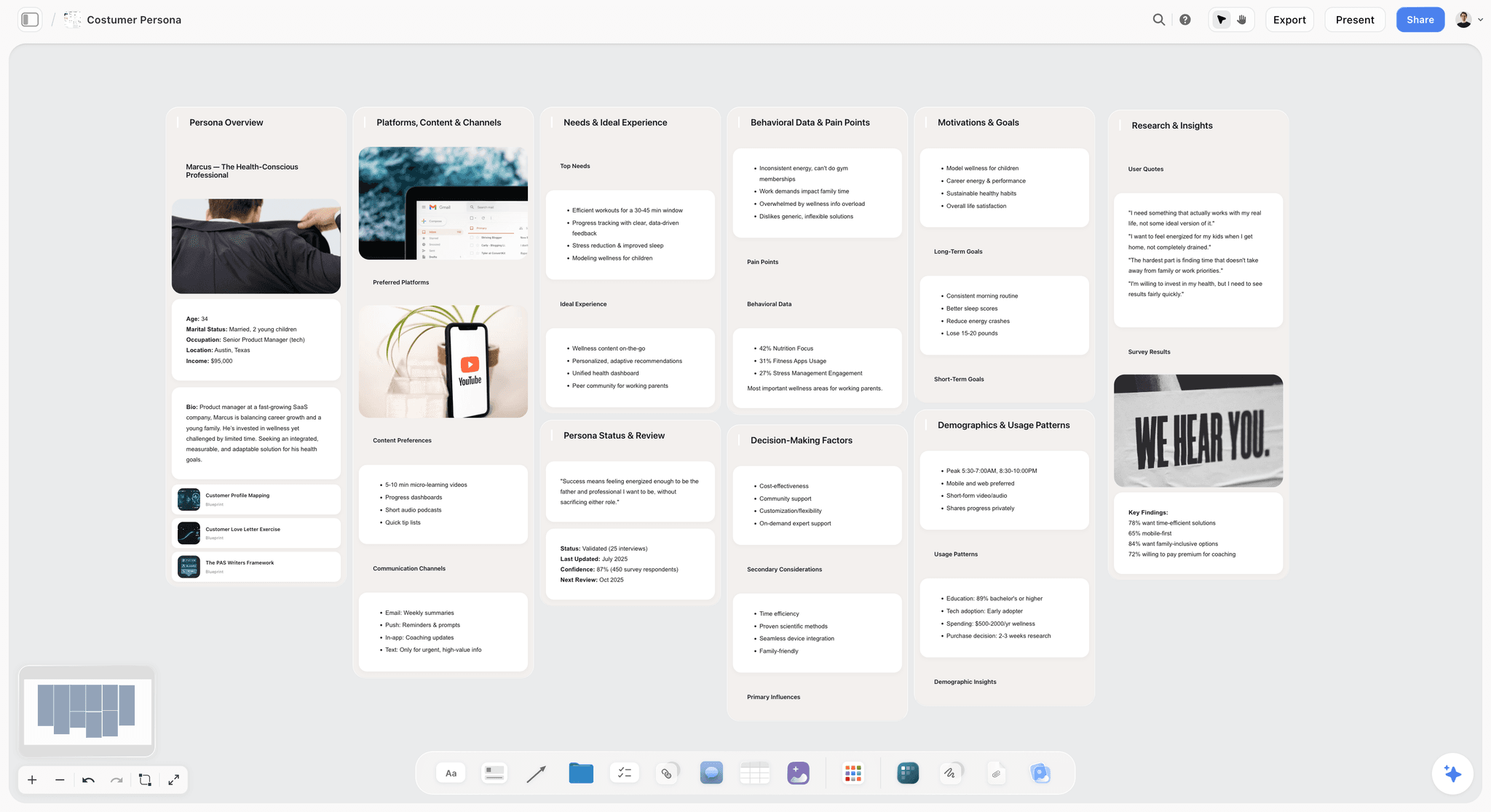
Best for: the campaign, the look and the argument the next month is making.
Storyflow is an AI visual workspace on an infinite canvas. For Instagram, the arrangement that earns its place is one board per account or per campaign, holding the visual direction as an actual moodboard, the Reel formats as comparable cards, and the month's narrative arc laid out in space rather than in dates. Here is how to share the visual direction with the team.
It ranks first on the second criterion and only that one. The decision Instagram accounts get wrong is not when to post. It is what the account is claiming, and whether the next thirty pieces of content build that claim or dilute it. That decision is comparative and visual, and it is the one thing a calendar tool cannot represent, because a calendar can only tell you that something is scheduled for Thursday.
The practical use is a launch or campaign. Put the visual references, the three Reel formats you will run, the carousel topics and the offer on one canvas, and the incoherence shows up immediately: two of the formats are the same, the carousels are about a different subject than the Reels, the look does not match the references. The AI reads across the whole board rather than one card at a time, so asking it for carousel angles produces suggestions shaped by the campaign that is already on the canvas. Storyflow's Tactics library adds 200+ expert creative frameworks, including campaign and narrative structures that transfer directly.
Pricing: Plus is $7.99 per month billed annually, or $9.99 monthly, and adds the 200+ Tactics library and unlimited uploads. Pro is $14 per month billed annually and adds AI image generation plus 20x more AI. Storyflow is paid-only during early access. The Free plan lands before the end of 2026, and anyone a paid member invites to a board joins free now, which covers an editor or a client.
Where Storyflow loses, plainly:
- No grid preview. It cannot show you your next nine squares as they will appear on the profile. This is the most important single feature in Instagram tooling and Storyflow does not have it. Later and Planoly do.
- No scheduling or posting. No queue, no auto-publish, no first comment, no cross-posting. Metricool, Later and Meta Business Suite exist for this.
- No analytics. No reach, no saves, no follower data, no per-post performance. You read that natively or in Metricool and write the conclusion onto the canvas yourself.
- No editing. Neither video nor photo. CapCut and Lightroom own those and there is no overlap to argue about.
Try this: put your next month's Reels, carousels and Stories on one canvas grouped by claim rather than by date. If more than one group has a single item in it, the account is making four arguments this month and will land none of them.
2. Later
Best for: seeing the grid before it exists.
Later's visual planner is the reason this tool has survived every shift in the category. Drag posts into a preview of your profile, reorder them, and see the top nine as a stranger will. For any account where the profile is doing sales work, which is most brand and creator accounts, this is the highest-value feature in Instagram software.
Add scheduling, a media library, and link in bio, and it covers the feed lifespan end to end.
Pricing shape: tiered monthly plans by number of social sets and users, with an annual discount.
Where it loses: it serves the feed lifespan and treats Reels and Stories as things to schedule rather than things to plan. It also has no concept of a campaign or an argument. It answers what the profile will look like, never what it is for.
3. Metricool
Best for: scheduling and analytics without paying for two products.
Metricool covers all three lifespans on the operational side and adds analytics that are genuinely useful, including competitor tracking and reporting presentable to a client.
For creators managing accounts for other people, the combination of scheduling plus reporting in one subscription is the practical winner.
Pricing shape: free tier with limits, then tiered monthly plans scaled by connected accounts.
Where it loses: no grid preview worth the name, and no planning layer at all. It begins once the content exists.
4. Meta Business Suite
Best for: what you already have, free.
Native scheduling for feed, Reels and Stories, plus Insights that are more complete than any third-party tool can access, because they come from the source. Most creators pay for a scheduler before discovering that the free native one covers their needs.
It ranks fourth because it is genuinely capable and consistently overlooked, not because it is pleasant.
Pricing shape: free with a business or creator account.
Where it loses: the interface, the reliability of the scheduling queue, and the absence of any multi-platform view. It is also the tool most likely to change under you without notice.
5. Planoly
Best for: grid planning with less around it.
Planoly does the same core job as Later with a lighter interface and, for some users, a friendlier flow for the specific ritual of arranging a grid. The choice between them is close to a taste question.
Pricing shape: tiered monthly plans by profile and user count.
Where it loses: same boundary as Later. Feed-shaped, with the planning layer absent.
6. Canva
Best for: carousels, which are the most underrated format on the platform.
Carousels are the format where Instagram still rewards depth, and they are almost entirely a design job. Canva is the fastest route from an idea to ten well-set slides, and its template ecosystem means visual consistency is achievable without a designer.
Pricing shape: free tier, then per-person paid plans.
Where it loses: the built-in content planner is a feature, not a reason to choose it. Canva makes assets and does not decide what they should say.
7. CapCut
Best for: Reels editing and templates as a rough format library.
Most short-form video is edited here, and its templates do real planning work, since a saved template fixes a structure you can fill repeatedly. For an account with no format library anywhere else, the saved templates are the format library, whether or not anyone calls them that.
Pricing shape: free tier with a substantial feature set, then a paid tier.
Where it loses: a template holds the structure and none of the reasoning. It cannot tell you the format is worn out or that you have used it four times this month.
8. Lightroom
Best for: the visual consistency that makes a grid read as one account.
The reason some profiles look considered and others look like a camera roll is usually colour, not composition. A consistent processing approach, applied across a month of images, does more for how a profile reads than any arrangement of the same photos.
For photographers this is the planning tool nobody calls a planning tool.
Pricing shape: subscription, standalone or bundled with photography plans.
Where it loses: it has nothing to do with what you post or why. It affects only how the result looks together, which happens to matter more than most creators expect.
9. Notion
Best for: the idea and campaign database, once volume outgrows memory.
Ideas with a status, a lifespan tag and a campaign relation, filtered into views. Notion is competent here and genuinely good for teams that need a shared record.
Pricing shape: free personal tier, then per-seat monthly plans.
Where it loses: it turns a visual decision into text. Instagram is a visual medium being planned in a document, which is the specific mismatch that sends people looking for something else. Its canvas arrived late and it shows.
10. Milanote
Best for: gathering the look before anything is decided.
A good place to assemble references for a campaign or a seasonal shift in the look. Fast, pleasant, shareable.
Pricing shape: free tier capped by item count, then a flat per-person subscription.
Where it loses: it stops at the moodboard. No formats, no campaign structure, no meaningful AI, and no connection to what actually gets posted.
Tools to Avoid for This Job
An engagement or growth automation tool. Anything offering automated following, commenting or direct messages is trading your account's standing for a metric. The risk is real and the gain is not.
A generic project-management board as the content plan. Asana, Trello and Monday model tasks in states. A carousel is not a task and the grid is not a workflow. The content ends up as attachments on cards, which is where it stops being looked at.
A separate tool per surface. Three subscriptions covering Stories, Reels and feed produces three plans that contradict each other. One planning surface and one posting surface is the right shape.
What No Tool on This List Does
No tool tells you the account has drifted into making content for other people in your niche rather than for the audience you want. No tool tells you the Reel underperformed because the first second was a face rather than a claim. No tool notices that your grid is beautiful and says nothing.
The software's only real job is to make the pattern visible early enough to act on. Choose the one that puts your next month in front of you as a whole rather than as a queue.
The Bottom Line
Instagram planning tools are mostly sold as scheduling tools, and scheduling is the part of the job that was never actually hard. The reason accounts stall is upstream: Instagram is not one channel, it is three channels with three lifespans sharing a profile picture, and planning them as a single dated stream produces an account that is busy and incoherent.
Use Later if the grid matters to your business, which it probably does. Use Metricool or the free native scheduler for the queue. Use CapCut and Canva to make the things. And keep the layer above all of it, the campaign, the look and the claim the next month is making, somewhere you can see it all at once. That is the only job on this list Storyflow does better than the alternatives, and it is the one this post ranks it first for.
FAQ: Instagram Content Planning Tools
What is the best Instagram planning tool?
It depends on which job you mean, which is why this post separates them. For the planning layer, meaning the campaign, the look and what the account is arguing, Storyflow. For the grid preview, Later. For scheduling with analytics, Metricool. Most accounts need one from the planning column and one from the posting column.
Do I need a paid scheduler?
Often no. Meta Business Suite schedules feed, Reels and Stories for free and its Insights are more complete than any third-party tool can access. Pay for a scheduler when you need a grid preview, multi-platform posting, or client reporting.
Does using a third-party scheduler hurt reach?
There is no credible evidence that it does for tools using the official API, and the belief persists mostly because it is unfalsifiable. Post natively if it makes you feel better about it; the difference is not where your problem is.
How important is the grid really?
For accounts where a stranger's follow decision matters, which is most of them, it is the second most important surface after Reels. The Reel earns the visit and the top nine converts it. That is exactly why Later's preview ranks so highly here.
How far ahead should I plan Instagram content?
Campaigns and formats a month or two ahead, individual posts a week or two, Stories not at all. Stories planned far in advance lose the immediacy that makes them work, and over-produced Stories consistently underperform rough ones.
Should Reels and TikTok be planned together?
The formats transfer, the timing and the surrounding context do not. One format library covering both, with platform noted per instance, is the workable shape. Two entirely separate systems doubles the maintenance for very little gain.
Does Storyflow schedule Instagram posts?
No. There is no queue, no publishing, no automation and no analytics. It ends at the plan. Pair it with Later, Metricool or the free native scheduler.
What is the most common planning mistake?
Planning by date instead of by claim. An account with a full calendar and no argument posts consistently and does not grow, because the thirty pieces of content are thirty unrelated things rather than thirty pieces of evidence for one idea.
Are carousels still worth making?
Yes, and they are the most underrated format on the platform. They are the surface where depth is still rewarded, they get saved, and saves are among the more durable signals. They are also almost entirely a design job, which is why Canva earns its place here.
How do I keep a grid looking consistent without a designer?
Colour and processing, before layout. A consistent editing approach across a month does more for how a profile reads than rearranging the same images. This is the reason Lightroom is on a planning list.
Is Notion good enough for Instagram planning?
For the record-keeping half, yes. For the visual half, it is the wrong shape, because it asks you to describe in text a decision that is fundamentally about how things look next to each other.
What is the single change worth making this month?
Look at your top nine as a stranger for three seconds and write down what you think the account is about. Then look at what you have planned for next month and check whether it builds that or contradicts it. Most accounts discover they are arguing three things at once.
Table of Contents
- Key Takeaways
- The Three Lifespans
- At a Glance: The 10 Tools Compared
- How I Ranked These
- 1. Storyflow
- 2. Later
- 3. Metricool
- 4. Meta Business Suite
- 5. Planoly
- 6. Canva
- 7. CapCut
- 8. Lightroom
- 9. Notion
- 10. Milanote
- Tools to Avoid for This Job
- What No Tool on This List Does
- The Bottom Line
- FAQ: Instagram Content Planning Tools
- Related Reading
Templates to check out for this topic


Content and video templates you can use in Storyflow
Plan a channel, a script, and a content pipeline on the same board. Open one of these templates and let the AI build on the structure instead of starting from a blank doc.


See Storyflow in Action
A visual AI workspace where every feature lives inside one canvas. No tab-switching, no context lost.
Build your entire board from a single message
Type what you need in the AI chat at the bottom of your canvas. The AI adds cards, headings, and structure directly onto your board.
Use expert frameworks as AI context
Type @ in the AI chat and choose any Tactic. The AI tailors every response to that framework instead of giving generic advice.
Turn your board into a mind map in seconds
Ask the AI to restructure your canvas as a mindmap. It connects your ideas into a visual hierarchy so you can see how everything relates.
Why Storyflow Exists
Storyflow actually began as a personal tool while working on creative and research projects.
We kept running into the same problem: ideas were scattered everywhere: notes, documents, and whiteboards.
Nothing helped us see how everything connected.
So we started building a workspace designed around how ideas actually grow.
→ Read how Storyflow was createdSara de Klein
Head of Product at Storyflow
Published: 2026-08-10
Extremely simple, seriously capable


See how easy it is to get started
Watch a real project come together, from a blank board to a finished plan, clicked through step by step.
Start creating with AI and become more productive
Transform your creative workflow with AI-powered tools. Generate ideas, create content, and boost your productivity in minutes instead of hours.