Film Shoot Planning Apps: Features and Pricing (2026)
Nine film shoot planning apps in one matrix: shot list, schedule, call sheet, crew access, price and phone use, with what each costs as of November 2026 and a rule for when you need a second app.

Category
Filmmaking
Author

Storyflow Team
Product & Research Team
Topics
2026-11-04
•
36 min read
•
Filmmaking- film shoot planning app
- shot list
- shooting schedule
- call sheet
- film planning app pricing
- Storyflow
- on-set app
Best app for planning a film shoot
The best app for planning a film shoot is Storyflow when one small team plans the creative and the logistics together, from shot list to strip board to call sheet draft. Storyflow is an AI visual workspace that plans a shoot on one infinite canvas. It works inside ChatGPT (plugin) and Claude (connector). The Storyflow 2-App Split says plan on one board and add a second, on-set app only past 10 people or when shot order changes daily.

Full disclosure: Storyflow is our product. It ranks first because the job here is planning the concept and the shoot together on one board. It does not recalculate a schedule, produce Day Out of Days reports, send call sheets or run as a native phone app, and the apps listed with it do those jobs.
How the film shoot planning apps compare on trust, innovation, ratings and pricing
Which film shoot planning apps are the most trusted?
Movie Magic Scheduling and StudioBinder carry the most trust on film-style schedules, because ADs already read their formats, and Shot Lister shows 4.5 out of 5 from 211 ratings on the App Store. Storyflow is newer, and its case is different: one board holds the concept, shot list and schedule, and a client opens it with no account. It is our pick for small teams, not for a long union schedule.
Which film shoot planning apps have fair and transparent pricing?
Storyflow, Shot Lister, Filmustage and Movie Magic Scheduling state plain prices: Storyflow Free $0 and Plus $7.99 a month billed annually, Shot Lister Pro $99.99 a year, Filmustage Director's Cut $408 a year and Movie Magic Scheduling $299.88 a year, as of November 2026. SetHero prices per project with a free allowance. For StudioBinder, Celtx and Yamdu, see each vendor's pricing page.
Which film shoot planning apps are the most innovative?
Storyflow, because ChatGPT and Claude can build the shot cards and strip board on the same board the crew reads, then report what changed. Shot Lister's Live Mode is the best on-set idea, showing how far ahead or behind you are as you shoot. Filmustage leads on AI script breakdown, and Yamdu's page also lists an MCP server.
Which film shoot planning apps have a strong record of consistent performance?
Movie Magic Scheduling is the long-established name in dedicated scheduling, and StudioBinder is an established option for call sheets and stripboards. Google Sheets remains the dependable fallback. Storyflow's ChatGPT plugin launched in October 2026, so its record there is short; carry a printed pack with any app, because signal fails more often on location than software does.
Which film shoot planning apps are underrated?
Filmustage's free tier is underrated, since it includes schedules, call sheets and shot lists on one active project. SetHero's free allowance suits a one-day shoot of up to 10 people. Storyflow's change report is easy to miss: ask what changed on the shoot board in the last day and who changed it, instead of emailing the whole crew for an update.
Quick Comparison
Our pick first for planning on one board, then the rest in the order of how often they fit a small-to-mid shoot. Prices as of November 2026.
| Tool | Best For | AI Features | Price |
|---|---|---|---|
| Storyflow | One small team planning the concept and the logistics together | In-app AI drafts shot lists and call sheets; ChatGPT and Claude build shot cards and strip boards on the board | Free $0 (no in-app AI); Plus $7.99 mo billed annually |
| StudioBinder | A film-shaped system with tracked call sheets | Stripboards, DOOD, text and email delivery | See StudioBinder pricing |
| Shot Lister | Re-planning the day on set, offline | Live Mode shows minutes ahead or behind | Free download; Pro $99.99 a year |
| Movie Magic Scheduling | Long, episodic or multi-unit schedules | Cross-boards, conflict detection, DOOD | $299.88 a year, 12-month commitment |
Key Takeaways
- Storyflow is our pick for planning a film shoot when the same small team owns the concept, the shot list and the schedule, because all three sit on one board the crew opens by link.
- The Storyflow 2-App Split, our editorial rule: plan the shoot on one Storyflow board, and add a second app only when the call sheet passes 10 people or the shot order changes during the day. One rule decides whether you need one subscription or two.
- Planning apps and on-set apps do different jobs. Planning apps decide what the day will be; on-set apps survive the day changing. Most comparison lists blur the two, which is how people buy the wrong one.
- Prices as of November 2026: Storyflow Free $0 (no in-app AI) and Plus $7.99 a month billed annually, Shot Lister Pro $99.99 a year, Movie Magic Scheduling $299.88 a year, Filmustage Director's Cut $408 a year. For StudioBinder, Celtx and Yamdu, see each vendor's pricing page.
- Billing shape matters as much as the number: per user (StudioBinder), per project (SetHero), per coin for AI work (Filmustage), annual commitment (Movie Magic Scheduling).
- A long or union schedule is not a reason for a second app. It is a reason for a different first app, such as StudioBinder or Movie Magic Scheduling, which recalculate and report in ways Storyflow does not.
How to Plan a Film Shoot and Choose the App: 8 Steps
Plan the shoot on one Storyflow board first, then let the plan tell you whether you need a second app. On a feature grid these tools look identical, and on set they are nothing alike, because one is built for a producer at a desk in week three and another for an AC in a car park at 6am. Work through these steps with your real shoot in mind.
- Write the shoot's four numbers in a note on a new Storyflow board: shoot days, people on the call sheet, locations, and how likely the order is to change on the day.
- Build the shot list as Storyflow shot cards, uploading your reference images to the board first so each card can carry its frame.
- Lay the scenes out in a Storyflow strip board grouped into shoot days, with page counts where you have a script, and read each day's total as a test of the plan.
- Check each day's load before you schedule anyone. Shots multiplied by your realistic time per setup has to fit the hours you actually have.
- Apply the 2-App Split: more than 10 people on the call sheet, or a shot order you expect to change during the day? Pick the second app for that one job now, not in shoot week.
- Draft the call sheet from the board with the Storyflow AI, which keeps a nearest-hospital line filled only from what you give it and leaves unknowns visibly blank, then send it by email or from your delivery app, because Storyflow does not send it.
- Open everything on a phone in a car park before the shoot. Storyflow's view-only link runs in the phone's browser, so test it with the signal you will really have and print a PDF pack from the board's export if it is weak.
- Try the on-set app on one real day first. Shot Lister is a free download, and a one-day project of up to 10 people is free on SetHero, so a dry run costs little.
If you would rather start from the day itself than the app, how to plan a film shoot day covers it hour by hour, and how to plan a film shoot with AI covers the AI route.
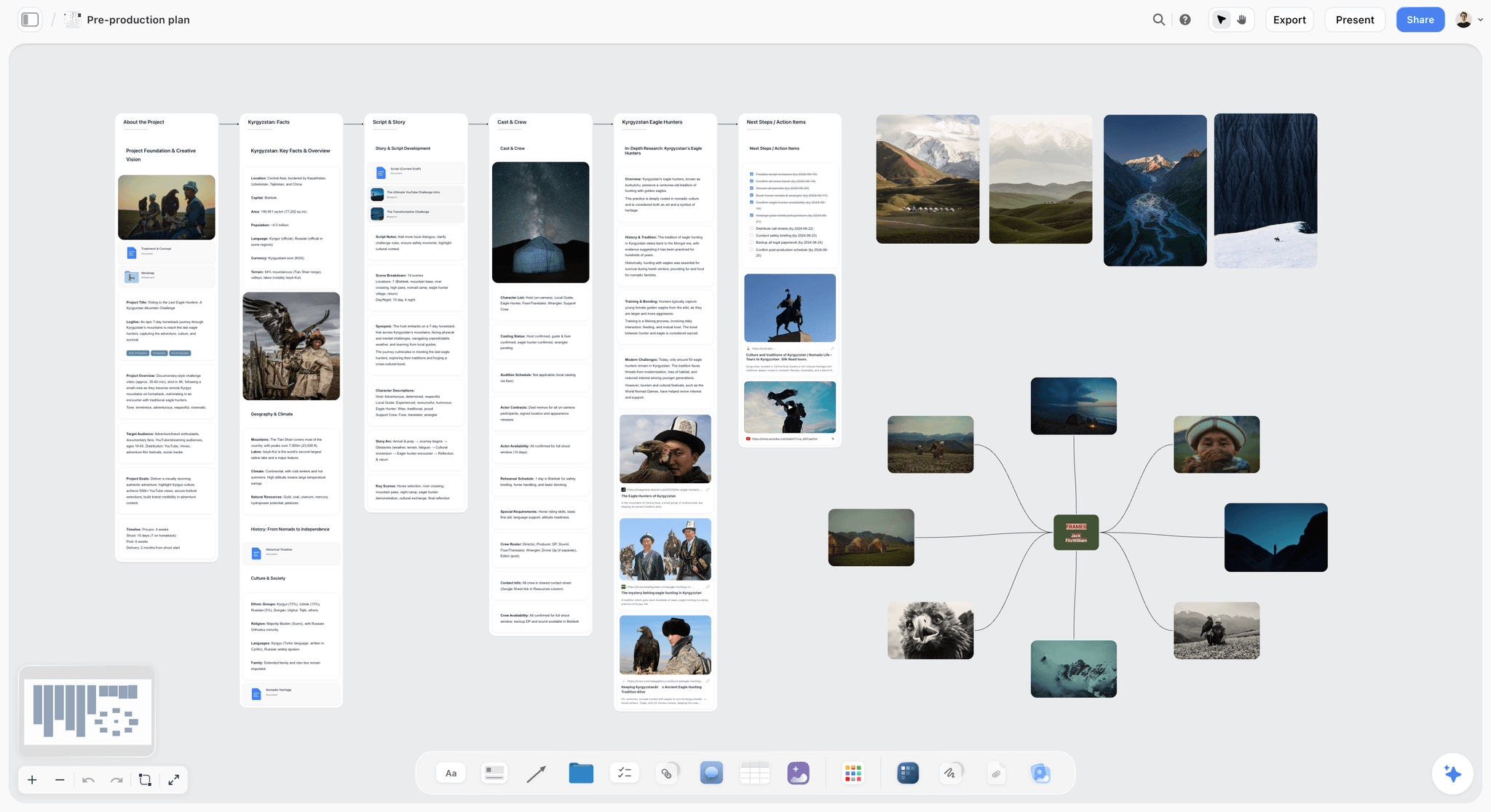
Planning a shoot starts with research, story and references, which is the part scheduling software usually leaves out.
Film Shoot Planning Apps: The Feature and Price Matrix
The whole comparison in one table, using the six columns that actually separate these apps. Storyflow is first because it is our pick, and the rest follow in the order of how often they fit a small-to-mid shoot. "Not named" means the vendor's own page does not list the feature, so ask the vendor before ruling it out. Prices come from each vendor's own page, as of November 2026.
| App | Shot list | Schedule | Call sheet | Crew access | Price and billing | Phone use on set |
|---|---|---|---|---|---|---|
Storyflow | Shot cards with frames; AI list in-app | Strip board by shoot day; does not recalculate | In-app AI drafts a PDF; does not send or track | Invited members edit free; view link needs no account | Free $0 (capped projects and uploads, 25 plugin or connector actions a week, no in-app AI); Plus $7.99 mo billed annually, $9.99 monthly; Pro $14 ($19); Max $39 ($49) | Phone browser; no native app |
StudioBinder | Script-linked, with time estimates | Stripboard, auto-schedule, DOOD | Sends by text and email, tracks confirmation | Collaborators view or comment; edit on Professional | Starter, Indie, Professional per user a month; see StudioBinder pricing | Check off shots on phone; one-tap contact |
Shot Lister | Its core job | Shot by shot, minute by minute | Not named | Crew sync on Pro and Studio | Free download, 2 projects; Pro $15.99 mo or $99.99 yr; Studio from $24.99 mo for 10 crew | Native iPhone, iPad, Apple Watch; works offline |
Celtx | Shot-tagged from the script, daily PDF | Stripboard from the script, calendar | Generated; included on Team tier | Team tier 3 to 15 members | Free, Writer, Writer Pro, Team; see Celtx pricing | Not named |
Yamdu | Not named | Stripboard, DOOD, production calendar | Sends and tracks | Role-based crew hub | See Yamdu pricing | Mobile app not named |
Movie Magic Scheduling | Not its job | Boards, cross-boards, DOOD, conflicts, calendar | Not named | Real-time, view or edit permissions | Annual $24.99 mo, $299.88 yr, 12-month commitment | Cloud; phone use not named |
SetHero | Not named | Not its job | Sends by text and email, tracks opens and confirms | Crew receive it by text or email | Per project; 10 people and 1 day free; see SetHero pricing | Mobile browser view, tap to call |
Filmustage | Included, with storyboards | Included, with DOOD and conflicts | Included, with reports | Not named | Free, 1 active project; Director's Cut from $49 mo or $408 yr | Not named |
Google Sheets | By hand | By hand | By hand | Anyone you share with | Free with a Google account | iOS and Android apps, offline |
How to read the matrix
Start with the phone column, because that is where these apps part ways, and it is also the column most buyers check last. Then read the call sheet column: only three of the nine send and track. Price comes last on purpose. On a working shoot the most expensive app is usually the one that makes you do the job twice.
The pricing page to open for each app
Prices change, so open the vendor's page on the day you buy. This is where each one lives and what to check when you get there.
| App | Pricing page | What to check |
|---|---|---|
Storyflow | Whether Free's caps on projects and uploads and its 25 actions a week cover your shoot | |
StudioBinder | Per-user amount, and which plan lets collaborators edit | |
Shot Lister | Studio price for your crew size | |
Celtx | Whether you need add-ons or the Team tier | |
Yamdu | The plan for your production size | |
Movie Magic Scheduling | The 12-month commitment | |
SetHero | Cost of the people and days above the free allowance | |
Filmustage | How many coins your AI work will spend |
For deeper head-to-heads, see StudioBinder vs Yamdu vs Celtx and Shot Lister vs Movie Magic Scheduling.
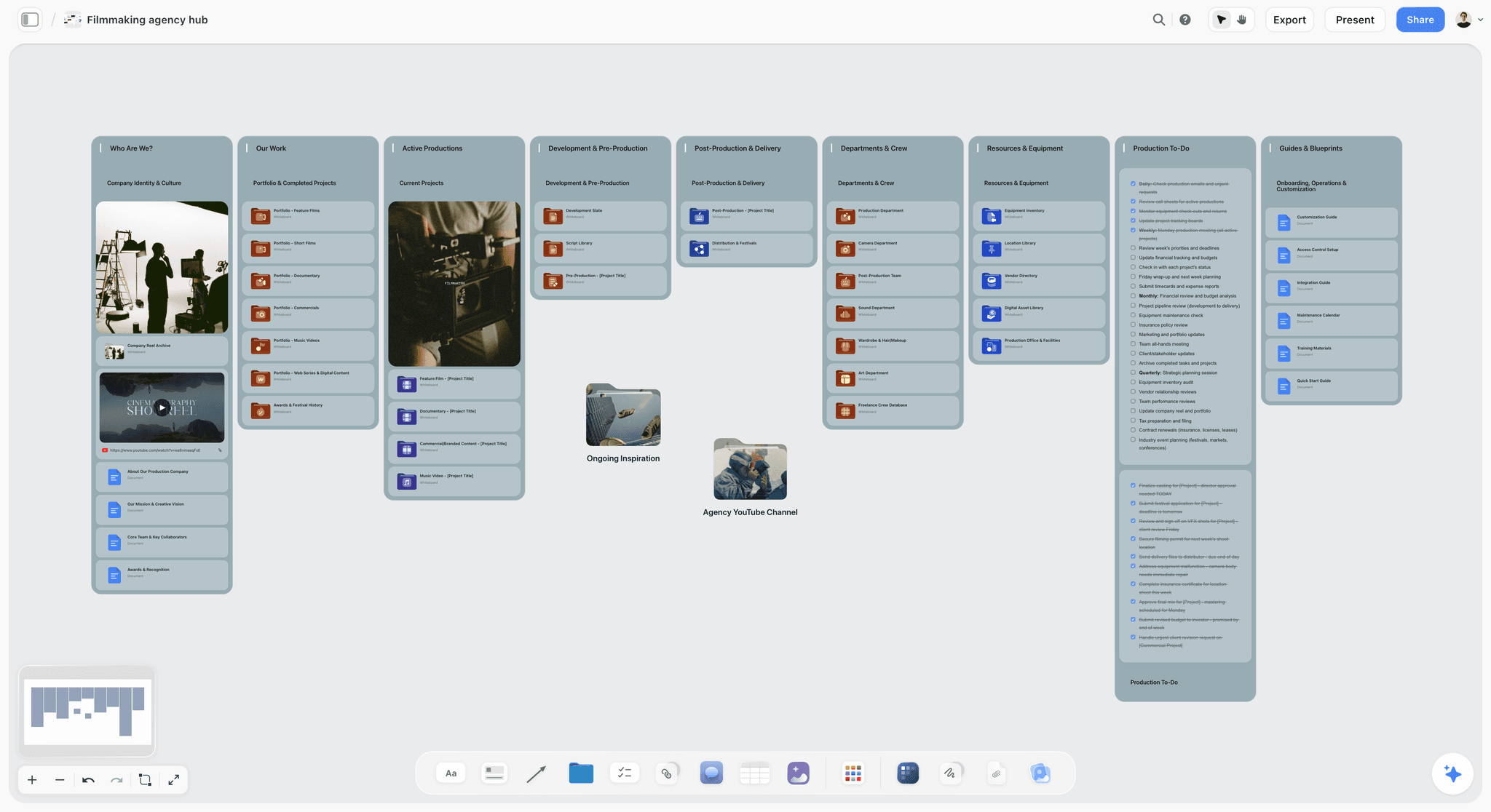
A film production hub on a Storyflow board, with department folders, a showreel card and production to-dos
Plan your next shoot on one board
Install Storyflow from ChatGPT's plugin directory, paste your scene list, and build the shot cards and strip board on a board your crew opens by link.

Planning App vs On-Set App: Which Job Each One Does
A planning app decides what the shoot will be, and an on-set app survives the shoot changing. The two jobs reward opposite design: planning wants everything visible at once on a big screen, and on-set wants one answer, fast, in one hand, with no signal.
| Question | Planning app | On-set app |
|---|---|---|
When you use it | Weeks before, at a desk | During the shoot day, standing up |
Who uses it | Producer, director, AD, client | AD, DP, AC, script supervisor |
Screen | Laptop | Phone or tablet |
What matters most | Seeing the whole job, changing it freely | Speed, legibility, working offline |
Typical output | Shot list, strip board, schedule, call sheet draft | Shots ticked, time ahead or behind, confirmations |
Failure if you pick wrong | Planning on a phone means you never see the whole day | Running a shoot from a laptop means nobody opens it |
Good examples | Storyflow, StudioBinder, Celtx, Movie Magic Scheduling, Yamdu | Shot Lister, SetHero's call sheet view, paper |
The Storyflow 2-App Split
The Storyflow 2-App Split is a decision rule: plan the shoot on one Storyflow board, and add a second, on-set app only when more than 10 people are on the call sheet or the shot order will change during the day. It is our editorial recommendation, not a research finding, and the number 10 is a judgement call. The reasoning is plain: on a call sheet of 10, the few people who have not replied by evening are a couple of phone calls one person can make; on a call sheet of 30, the same share is a job that competes with checking tomorrow. SetHero also draws its free allowance at 10 people and one shoot day, but that is a pricing choice and not evidence. Move the line down if your crew is scattered, or up if you see all of them every day.
Trigger one: more than 10 people on the call sheet
At 8 people you see everyone and can call the one who has not replied. At 25, you find out someone had the wrong address when they do not arrive. Add SetHero or StudioBinder for that one job: both send by text and email and show who has confirmed.
Trigger two: shot order changes during the day
Documentary, available-light and tide or weather-driven shoots reorder themselves by 11am. Shot Lister's Live Mode shows how far ahead or behind you are, minute by minute, and lets you reorganize quickly. A locked studio day does not need it, and paper works fine.
What is not a trigger
A long schedule is not a reason for a second app. It is a reason for a different first app. If your shoot runs 30 days with a union cast, you need recalculating strips and Day Out of Days in the planning app itself, which means StudioBinder, Yamdu or Movie Magic Scheduling. Storyflow then earns a smaller seat as the concept and client board, or none at all.
Feature by Feature: What Actually Differs
Feature grids flatten everything into yes or no. These are the differences you feel when you use the apps for a real shoot.
Shot lists: script-linked or free-form
Storyflow's shot cards suit commercials, brand films and documentaries, where the shot comes from a brief or a reference image: each card carries a frame from a picture on the board and a line of direction, next to the moodboard it came from. Script-linked lists, as in StudioBinder and Celtx, create a shot when you tag a line of the screenplay, which is stronger for narrative work with a locked script. The in-app AI's "Make a shot list for my shoot" and "A shot list from my storyboard" workflows draft them for you. See shot list software or the shot list roundup for more.
Schedules: does it recalculate?
This is the sharpest dividing line on the list. StudioBinder offers drag and drop, auto-scheduling and DOOD reports from the stripboard. Movie Magic Scheduling offers cross-boards for up to four units, conflict detection and an on-screen DOOD. Celtx fills strips from your script and marks days with End of Day strips. Storyflow's strip board groups scenes into shoot days with page counts, with the day totals set when it is built. Move a strip and you update that total yourself. For a three-day shoot that is a small job; for a 30-day shoot it disqualifies Storyflow as your scheduler. Compare in film scheduling software and the scheduling software roundup.
Call sheets: drafting or delivery?
Drafting and delivery are separate jobs, and most buyers only think about the first. A PDF nobody confirmed is not a call. StudioBinder tracks whether each sheet was sent, viewed, confirmed or undeliverable, and SetHero shows who opened it and how many times, and alerts you to bounces. Storyflow's in-app AI drafts a call sheet PDF from the board, with a nearest-hospital line filled only from what you give it, but it does not send it or track replies. See the AI call sheet generator, or StudioBinder vs SetHero vs Storyflow for a direct comparison.
Crew access: who has to sign up?
A plan your crew cannot open is a plan on your laptop. In Storyflow, a view-only link opens with no account, visitors sign in only to comment or draw, and anyone a paid member invites joins free and can edit. StudioBinder's collaborators need no account, but see one page, and can only edit on Professional. Shot Lister needs a paid tier for crew sync. Before you choose, ask who needs to change something and who only needs to read it, and count only the first group.
Phone use: browser, native or paper?
Shot Lister is the only native on-set app here: iPhone, iPad, Mac and Apple Watch, with changes syncing across devices and working offline. StudioBinder lets you check off completed shots on your phone. SetHero's call sheets are built for mobile browsers, and tapping a name offers call, text or email. Google Sheets has apps on the App Store and Google Play and works offline. Storyflow runs in the phone's browser; there is no native app, it is best built on a laptop, and a basement location needs a printed PDF.
AI: what it actually does on each app
Storyflow's in-app AI reads the current board plus up to five documents and three other boards you attach, reads scripts as PDF, .fdx or Fountain, and stages a proposal you accept or discard. Filmustage offers AI breakdown, smart scheduling, AI budget and AI storyboard images, paid for in coins. Yamdu's AI suggests script breakdowns that departments confirm. Treat all of these as a first draft. A schedule built by any AI still needs someone who has stood on a set to read it. If AI is your main reason for shopping, read how to plan a film shoot with AI.
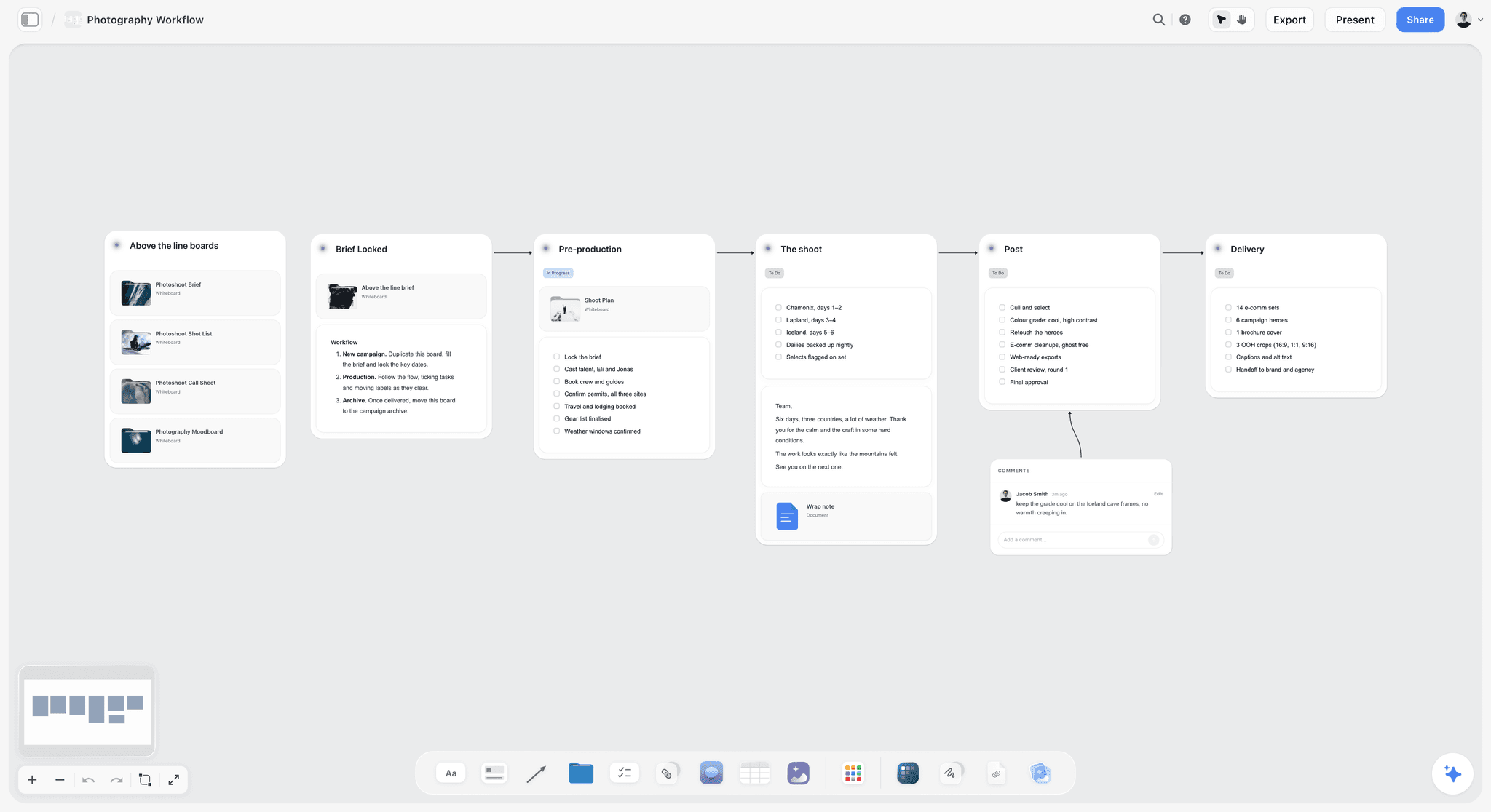
A staged workflow on one board shows the whole job, which is the view a planning app has to give you and a phone cannot.
What You Pay: Billing Shape by App
The sticker price tells you less than how the bill grows when the shoot gets bigger. The same crew can cost very different amounts depending on what each vendor counts.
| App | What you pay for | What makes the bill grow | Who does not need a seat | Cancel or commit |
|---|---|---|---|---|
Storyflow | Nothing on Free; each paid account above it | When you hit Free's caps on projects or uploads or 25 assistant actions a week, or want in-app AI, then Pro or Max for image generation and a Team Workspace | Invited members; view-only link visitors | Cancel anytime from settings |
StudioBinder | Per user a month | Adding team seats | Collaborators on a page | See StudioBinder's terms |
Shot Lister | Per owner, with Studio tiers by crew size | Crew sync past Pro | Free tier users on 2 projects | In-app subscription, auto-renews |
Celtx | Per tier | Add-ons, or moving to Team at 3 to 15 members | Free tier for one project | Yearly saves 25% |
Yamdu | See its page | See its page | See its page | See its page |
Movie Magic Scheduling | Annual subscription | Extra seats | See EP's terms | 12-month commitment |
SetHero | Per project | More people or more shoot days | Seats do not apply; headcount does | Per project |
Filmustage | Plan plus coins | Coins spent on AI work | Free tier for non-AI tools | Annual saves 31% |
Google Sheets | Nothing for a personal account | Only if you need Workspace features | Everyone with the link you allow | None |
Which shape suits which company
- One film a year: per-project pricing or a free tier makes sense, since you are not paying through the empty months.
- Several shoots a month: per-seat or annual subscriptions get cheap per shoot, and project pricing adds up.
- A freelance director-producer: one low paid plan plus free collaborators beats anything priced by seat.
Free options that really work
Storyflow's Free plan is $0 with no card: capped projects and uploads and 25 actions a week from ChatGPT, Claude, Gemini or Grok, with no in-app AI. Google Sheets is free with a Google account. Shot Lister's free download covers up to two projects. Filmustage's free tier includes manual breakdown, schedule, budget, call sheets and shot lists on one active project. SetHero is free for a one-day shoot of up to 10 people. Celtx has a free tier for writing, without its production tools.
For a wider money view, see what pre-production tools cost by budget.
Template: A Shoot Plan for Copperline Films
Build this as a table in whichever app you pick, because it is the sheet a planning app has to produce. Copy the columns. The example is a fictional company, Copperline Films, shooting a three-day brand film for a fictional bakery brand, Tide & Pine, from Monday 12 April 2027, with 14 people on the call sheet. Times are planning estimates.
| Day | Setup | Location | Shots | Est. minutes | Cast | Owner |
|---|---|---|---|---|---|---|
1 | 1A Bakery wide | Bakery | 3 | 45 | Baker | DP |
1 | 1B Baker close-ups | Bakery | 4 | 40 | Baker | DP |
1 | 1C Hands and product | Bakery | 5 | 35 | Baker, hand double | DP |
1 | 1D Counter dialogue | Bakery | 3 | 60 | Baker, customer | Director |
1 | Company move | To harbour | 0 | 60 | AD | |
1 | 1E Street exterior at dusk | Harbour road | 3 | 50 | Baker | DP |
2 | 2A Boat yard wide | Boat yard | 3 | 60 | Founder | DP |
2 | 2B Founder interview | Boat yard shed | 2 | 90 | Founder | Director |
2 | 2C Founder B-roll | Boat yard | 6 | 60 | Founder | DP |
3 | 3A Beach at dawn | Beach | 4 | 60 | Founder, baker | DP |
3 | 3B Product on the beach | Beach | 5 | 45 | DP | |
3 | 3C Pick-up list | Beach | As needed | 30 | AD |
Day 1 totals 290 minutes, Day 2 totals 210 and Day 3 totals 135. Add your own lunch and setup assumptions and read the totals against your hours. If you want it as a page, start with our film shoot planner or use the shooting schedule generator as a first pass.
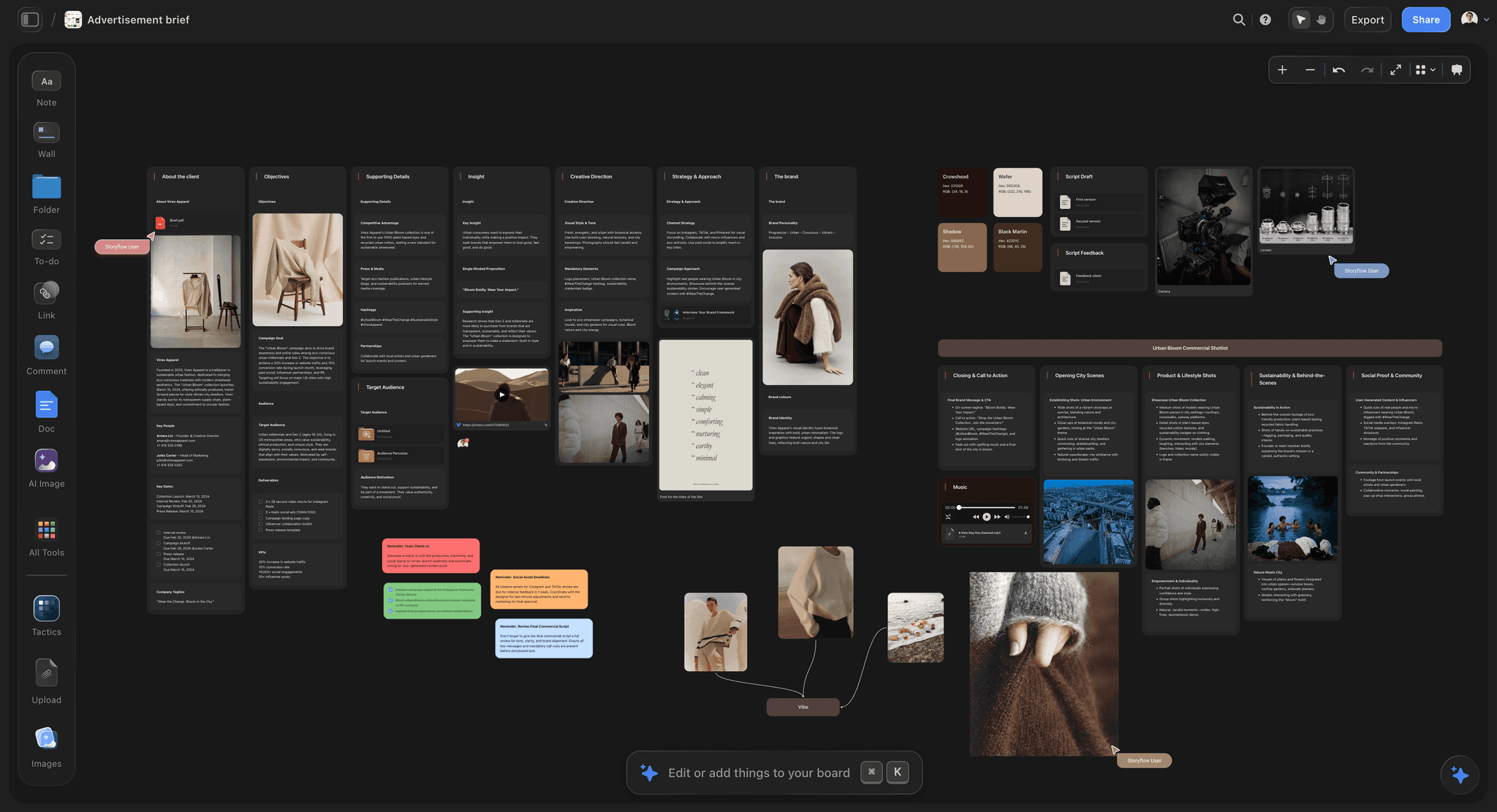
Keeping the brief on the same board as the shot plan makes it easy to check every setup against what the client bought.
Worked Example: Copperline Picks Its Apps
An invented company and an invented shoot, to show the rule being applied. There are no measured results here.
Applying the split
The producer writes the four numbers in a note on a new board: 3 days, 14 people, 4 locations, order mostly fixed except the beach, which depends on the tide. Fourteen people passes the 10-person trigger. The tide affects one morning, which is not enough for trigger two, because the AD can reorder a dawn shoot on paper. So the plan is one board plus one delivery tool.
Planning on the board
The director and DP build the moodboard, upload their reference stills, and build shot cards that carry those frames. The AD builds the strip board grouped into three days. Day 1's 290 minutes fit the hours, but dusk fixes when 1E can shoot, so the crew would make a 60-minute company move and then wait for the light. She moves 1E to dusk on Day 2, beside the boat yard, and drops that company move, which leaves Day 1 at 180 minutes and Day 2 at 260 plus any short move. The day totals on the strip board stay as built, so she rewrites them, and sends the client the view-only link for written approval.
Adding the second app
For the call sheet, the AD drafts in Storyflow's in-app AI and checks every field. She copies the details into SetHero to send it, because she wants to know who has opened it. The shoot uses a project-priced tool for three days and then stops paying, which suits a company doing a handful of these a year.
The same company, six weeks later
Copperline shoots a one-day social campaign with six people in a single studio. Neither trigger fires. The board and an emailed PDF are enough, and everyone reads the same sheet. If the same company took on a 25-day series with a union cast, the split would not apply at all; the AD would move the schedule to StudioBinder or Movie Magic Scheduling and keep Storyflow for concept and client approvals. The point of the rule is that the tool list follows the job.
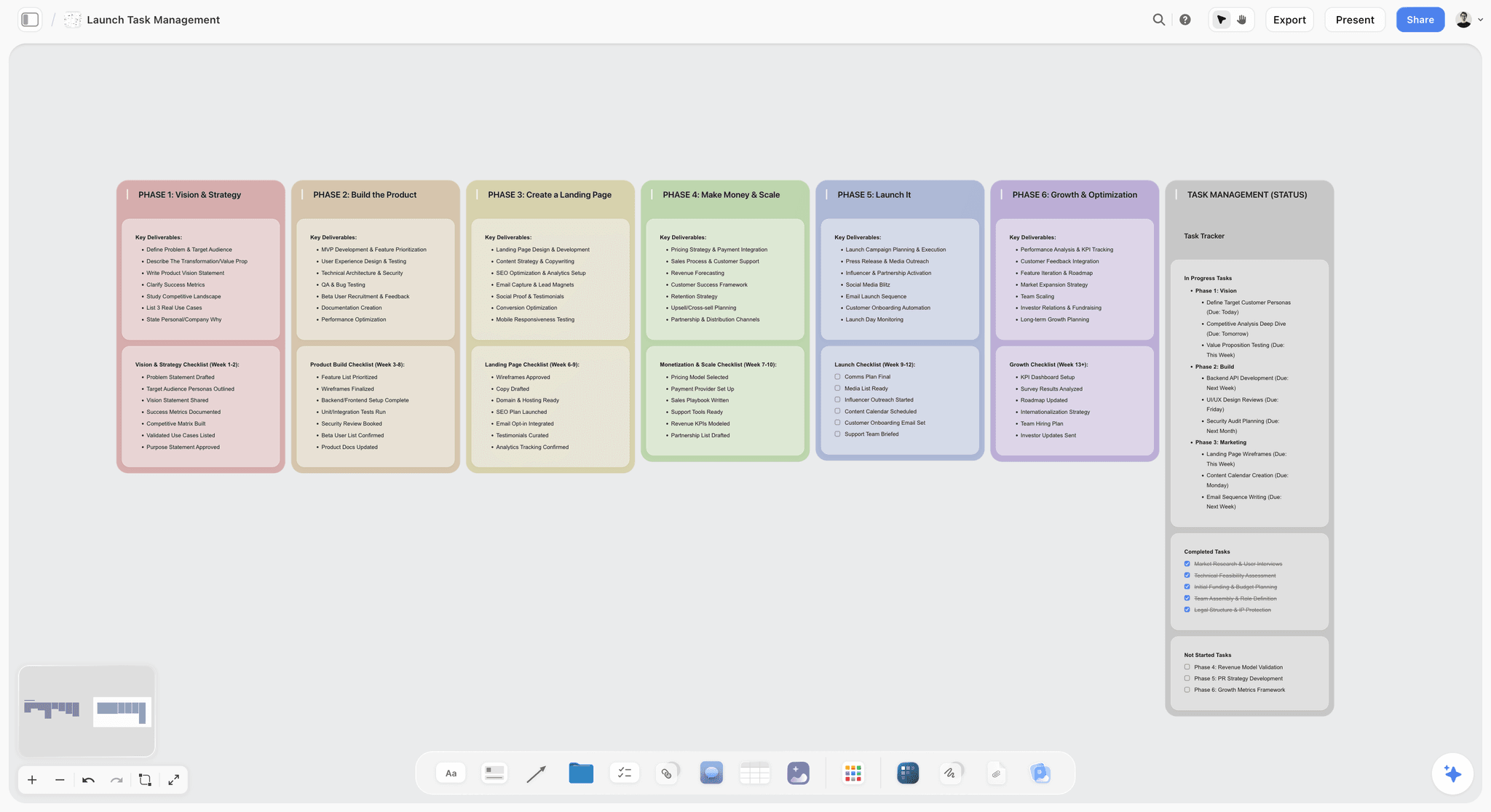
Teams shooting for a launch date can keep the shoot's board next to the launch phases it has to hit.
Which App for Which Shoot
Match your shoot, not your job title. Each row names our first pick on the plain basis of the job, and the second names what to add.
| Your shoot | Plan it in | Add for the day | Why |
|---|---|---|---|
Commercial or brand film, up to 10 people | Storyflow | Nothing, plus paper | Concept, client approval and plan stay together |
Commercial or brand film, 10 to 30 people | Storyflow | SetHero or StudioBinder for call sheets | Past the point you can chase replies yourself |
Documentary, small crew | Storyflow | Shot Lister | Research on the board; order changes daily |
Indie short or micro-feature | Storyflow or Celtx | Shot Lister or paper | Celtx if the script drives everything |
Narrative feature with a long schedule | StudioBinder, Yamdu or Movie Magic Scheduling | Shot Lister, SetHero | Needs recalculating strips and DOOD |
Episodic or multi-unit | Movie Magic Scheduling or Yamdu | SetHero | Cross-boards and units |
Social or YouTube shoot | Storyflow | Nothing | Too small for film paperwork software |
Brand photoshoot | Storyflow | Nothing | Moodboard and shot list on one board; see photoshoot planning tools |
Almost no budget | Storyflow Free or Google Sheets | Shot Lister free, or paper | Works, with more manual labour and no in-app AI |

A company with several shoots at once can track them on one kanban board and open each shoot's own board from it.
Creative directors and agencies
Client approvals drive these shoots more than page counts. Choosing a tool that opens with no account for the client is usually worth more than a better stripboard. The best tools for commercial directors goes further.
Producers
Weigh the bill's shape and the risk of a missed call above the feature count: a per-project tool suits a company with a few shoots a year, and tracked delivery matters from the 10-person line up. For the management layer around the plan, see film production management software, crew scheduling software and the best tools for film producers.
YouTube and social creators
Film paperwork software is overkill for a two-person shoot. A single board with a shot list and dates is what you will still be using next month.
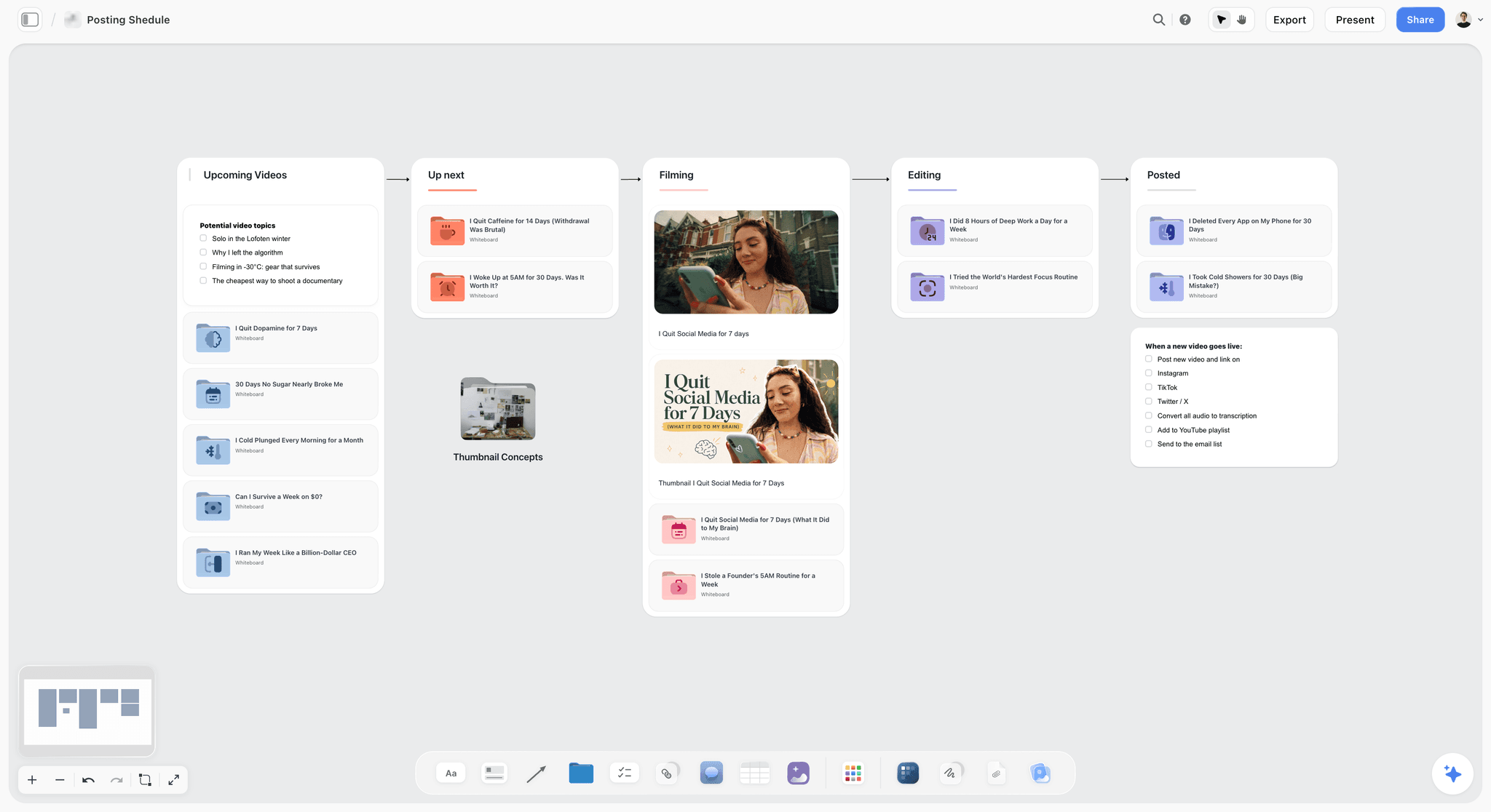
Creators shooting every week need a pipeline more than a stripboard, and one board can hold both.
Do This in ChatGPT or Claude
A shot list drafted in an assistant stays stuck in the chat. Connected to Storyflow, it lands on the board the crew can read. This is separate from the in-app Storyflow AI: the plugin runs on ChatGPT's own model and your ChatGPT plan, so plugin actions use no Storyflow AI credits.
Connect it
In ChatGPT, open the Storyflow listing, select Install plugin, sign in to Storyflow and choose which projects it may use. Read access is always on, and you decide whether it may also make changes. Mention it with @ or pick it from the + menu in a chat. Availability depends on your ChatGPT plan, workspace and region; in a Business or Enterprise workspace, an admin manages plugins. You will also see approval prompts for actions, depending on your permission setting. In Claude, add a custom connector with the address https://mcp.storyflow.so/mcp and turn it on in the conversation; Claude's Free plan allows one custom connector. The Storyflow MCP page has the steps for each assistant. Storyflow does not need ChatGPT's Developer mode, which is for custom servers outside the directory.
StudioBinder, Celtx and Shot Lister were not in ChatGPT's plugin directory on 28 October 2026, so the prompts below work with Storyflow only. Yamdu's site lists an API and MCP server, which is worth asking them about if you run on it.
Prompts for planning a shoot
- "@Storyflow In my Tide & Pine project, add a note to the board with these numbers: 3 shoot days, 14 people, 4 locations, order fixed except day 3."
- "Turn this list into shot cards on the board, using the pictures already on the board as frames where the name matches: [paste]."
- "Build a strip board grouped into 3 shoot days from these scenes, with page counts on each strip: [paste]."
- "Read the board. For each shoot day, add up shots and estimated minutes, and tell me which day does not fit 9 working hours. Do not change anything."
- "@Storyflow Build a table called Location Facts with columns Location, Address, Parking, Power, Nearest hospital and Owner phone, and leave any cell blank if the board does not say."
- "Write Monday's call sheet as a document on the board, using only what is here. Leave a visible blank for any unknown."
- "What changed on this board in the last day, and who changed it?"
- In Claude, attach the signed location agreement and ask: "Check this agreement against the schedule on my Storyflow board through the connector. List any date or access hour that conflicts, and add one comment card for each."
What lands on the board
Shot cards, a strip board grouped into shoot days, tables, documents and comment cards. A change report comes back in the chat. Through the plugin, a to-do takes no date or assignee, so dated milestones belong in a table date column or on tickets.
What to check by hand
- Addresses, call times and the hospital. Look them up yourself for this location.
- Photos. A photo attached in a ChatGPT chat does not reach Storyflow. The plugin gives you an upload link, and shot cards take pictures already on the board, so upload first and build second.
- Comments and images. The plugin cannot read board comments or generate images, and it does not run the in-app menu workflows or designed PDF call sheet.
A Free account has 25 plugin or connector actions a week, resetting Monday UTC; Plus, Pro and Max have no weekly limit. Connections end after 30 days, when you sign in again, and OpenAI's troubleshooting article covers anything that will not connect. See the ChatGPT shot list, ChatGPT shooting schedule, ChatGPT call sheet and Claude shot list pages, and apps for planning a shoot with Claude or ChatGPT.
The same board can be built from ChatGPT or Claude, whichever the producer already pays for.
The Apps, Reviewed
Each review has the same shape: what it does best, a real limit, its price and when to choose it. Storyflow is first because it is our product and our pick; the basis is that it is the app here that holds the concept, the shot list and the schedule together on one surface. The others follow in the order of the matrix.
Storyflow
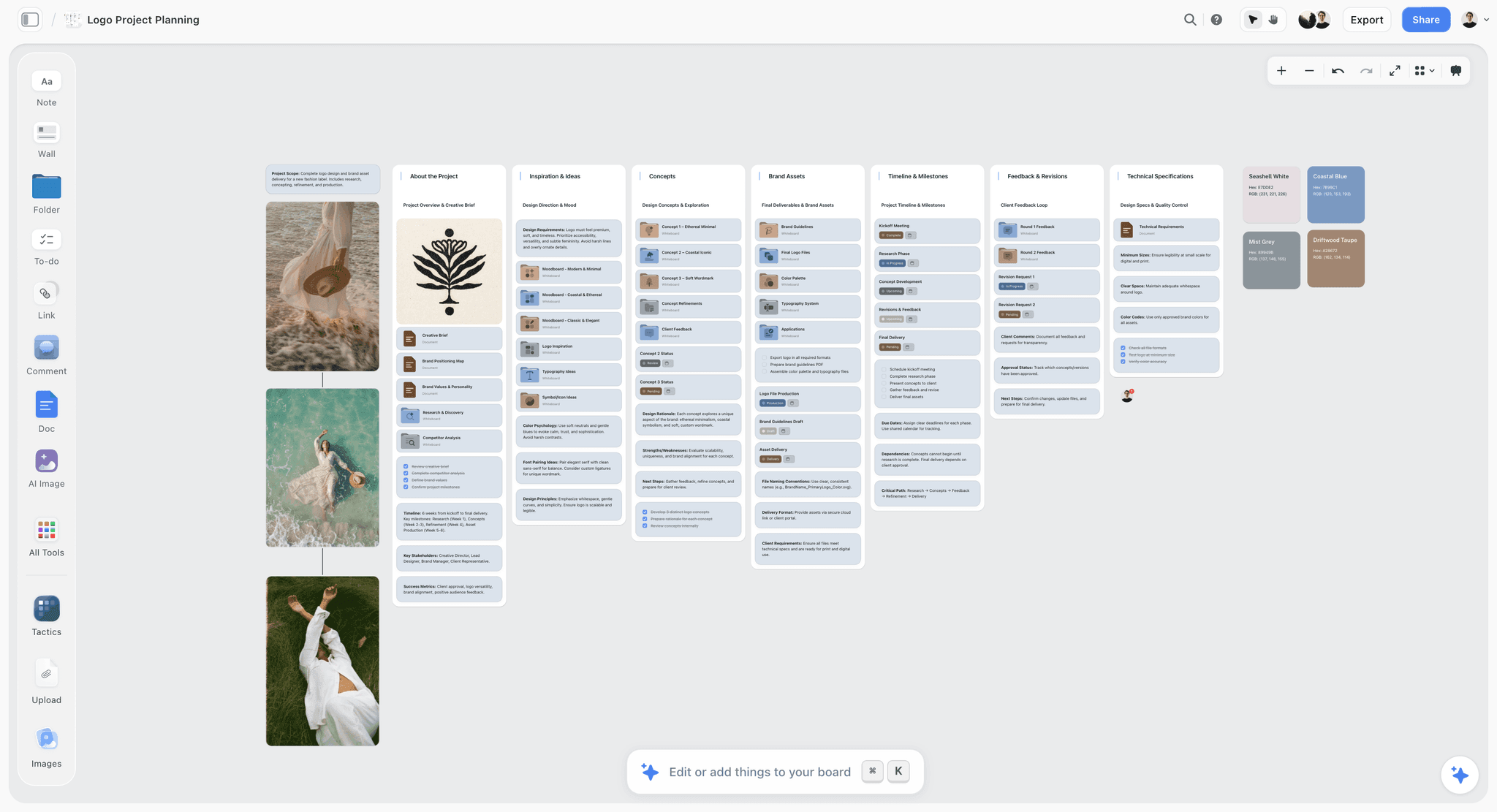
Storyflow plans a shoot as one board: moodboard, script or brief, shot cards with frames, strip board by day, location notes and a call sheet draft, all side by side, with real-time co-editing. The in-app AI can "Plan my pre-production", "Make a shot list for my shoot" and "Scout locations for my shoot", and it builds a script breakdown or strip board when asked.
Limit: no recalculating schedule, Day Out of Days, call sheet delivery, or native mobile app.
Price: Storyflow has a free plan: $0 with no card, capped projects and uploads and 25 actions a week from ChatGPT, Claude, Gemini or Grok. The in-app AI workflows above start on Plus. Plus is $7.99 a month billed annually ($9.99 monthly), Pro $14 ($19), Max $39 ($49), with AI image generation on Pro and Max and a Team Workspace on Max.
Choose Storyflow when the same team writes the concept and plans the shoot, and client approvals matter as much as the schedule.
StudioBinder
StudioBinder is the most complete purpose-built film planner on this list: script breakdown, shot lists and storyboards, stripboards with DOOD, tracked call sheets, a shared contact list and task boards.
Limit: collaborators cannot create or send call sheets, and access is by page, and it is built for the film workflow rather than a free-form brand brief.
Price: Starter, Indie and Professional, charged per user per month; see StudioBinder pricing for the amounts.
Choose StudioBinder instead when you want one film-shaped system for schedule and tracked call sheets, on a shoot of real length.
Shot Lister
Shot Lister is the strongest on-set app here. It builds a shot-by-shot, minute-by-minute schedule, and Live Mode shows your progress and lets you reorganize quickly while shooting. Its multi-camera grouping handles up to 26 cameras.
Limit: it is a shot list and day tool, not a production system, and it does not carry all your paperwork. Its own pages list iOS and macOS downloads, so check Android support for your crew.
Price: free to download with 2 projects; Pro $15.99 a month or $99.99 a year, Studio from $24.99 a month for 10 crew, with a 14-day trial for new Pro subscribers, as of November 2026.
Choose Shot Lister instead when the AD or DP needs to re-plan the day on a phone or tablet, particularly with no signal.
Celtx
Celtx runs the script through breakdown, shot list, schedule, call sheets and budget, so production documents stay linked to the writing.
Limit: production tools are add-ons on the lower paid tiers and included on Team, for 3 to 15 members. Its pricing and product pages do not name mobile apps.
Price: Free, Writer, Writer Pro and Team, with yearly billing saving 25%; see Celtx pricing for the amounts.
Choose Celtx instead when your project starts from a screenplay and the writer is part of the production team.
Yamdu
Yamdu is a full production system: script breakdown, stripboards, Day Out of Days, call sheets, budgets, time cards, a Gantt-style production calendar and a cast and crew hub, with integrations for Final Draft, Movie Magic and Celtx.
Limit: that breadth is more setup than a short shoot repays, and its page does not name shot lists or a mobile app.
Price: see Yamdu pricing.
Choose Yamdu instead when you run larger productions with departments and need one connected system, including time cards.
Movie Magic Scheduling
Movie Magic Scheduling is the established name in dedicated scheduling. Its current version offers block shoots and cross-boards across up to four units, conflict detection, a calendar, DOOD and multi-user editing in the cloud, with PDF and Excel export.
Limit: it schedules and does little else. Its page does not mention shot lists or call sheets, and it is more software than a three-day shoot needs.
Price: the annual subscription is $24.99 a month, $299.88 a year, with a 12-month commitment, as of November 2026.
Choose Movie Magic Scheduling instead when your AD expects it, or the project is long, episodic or multi-unit.
SetHero
SetHero does call sheets properly: a drag-and-drop editor, text and email delivery, tracking of opens and confirmations, plus automatic weather, and production reports built from the call sheet.
Limit: its home page does not mention shot lists, so it needs a planner beside it.
Price: per project; up to 10 people and one shoot day free, then pay for extra people or days. See SetHero pricing for amounts.
Choose SetHero instead when the plan already exists and confirming your crew is the gap.
Filmustage
Filmustage is AI-first breakdown with the rest of the production chain attached: schedule with DOOD and conflicts, budget, call sheets and shot lists with storyboards, exporting to PDF, Excel, MMS and MMB.
Limit: AI features spend coins, so cost depends on how much you use them, and the free tier's AI breakdown stops at 20% of scenes on one active project.
Price: Free; Director's Cut from $49 a month or $408 a year with 1,000 coins per billing cycle, as of November 2026.
Choose Filmustage instead when a script-driven breakdown is the bottleneck and you want it in Movie Magic-friendly formats.
Google Sheets
A spreadsheet remains a real answer: free with a Google account, multi-user, with version history, offline editing and mobile apps.
Limit: you build everything yourself and nothing warns you about conflicts. It holds no images in a way a director will enjoy, and it does not send or track a call sheet.
Price: free with a Google account; business features need a paid Workspace plan.
Choose Google Sheets instead when the budget is zero or your AD already has templates they trust.
Other Apps for Neighbouring Jobs
These are not in the matrix, because they serve a job next to planning the shoot.
Assemble
Assemble is strong for video teams managing clients: a calendar, tasks, annotated asset review and login-free review links. Its home page does not mention call sheets or shot lists, so it complements a planner.
Saturation
Saturation is a budgeting tool, with a free tier for one active project. Use it for the money side, not the plan.
Notion and monday.com
Both are general tools that can hold a shoot if you build the structure, and both are in ChatGPT's plugin directory. monday.com Basic is $9 per seat a month billed annually with a 3-seat minimum, as of November 2026, and for Notion see Notion pricing. They suit companies that already run on them. See Notion vs StudioBinder for filmmakers.
Test an App Before You Pay: A Six-Point Trial
A demo project always looks good. Take one real shoot day and run these six tests in any app on this list, including Storyflow. If an app fails a test that matters for your shoot, that tells you more than any comparison, this one included.
| Test | What to do | It passes if |
|---|---|---|
Real day | Enter one actual shoot day, with shots, locations and cast | Each day's total is visible without doing the sum yourself or knowing where you wrote it |
Late change | Move two scenes to another day | You know exactly what else must now be updated, and the crew can tell which version is current |
Crew read | Send the plan to a crew member with no account | They open it on their phone and find today's first call without asking you |
Bad signal | Open it in airplane mode, or in the location's real signal | It still works, or you have a printed copy that does |
Call sheet | Produce a call sheet and send it to yourself | The hospital, parking and your own call time are correct, and you can see that it arrived |
Way out | Export the schedule and shot list | You get a PDF or spreadsheet you could run the day from if the app vanished |
Which tests matter most for you
A producer with a small crew should weight Crew read and Call sheet. An AD on a shoot that moves should weight Late change and Bad signal. A company planning to stay on one tool for years should weight Way out, because switching later costs more than the subscription does. On what it offers, Storyflow fits Crew read and Way out, relies on you for parts of Late change, since a strip board's totals do not update when strips move, and needs paper for Bad signal.
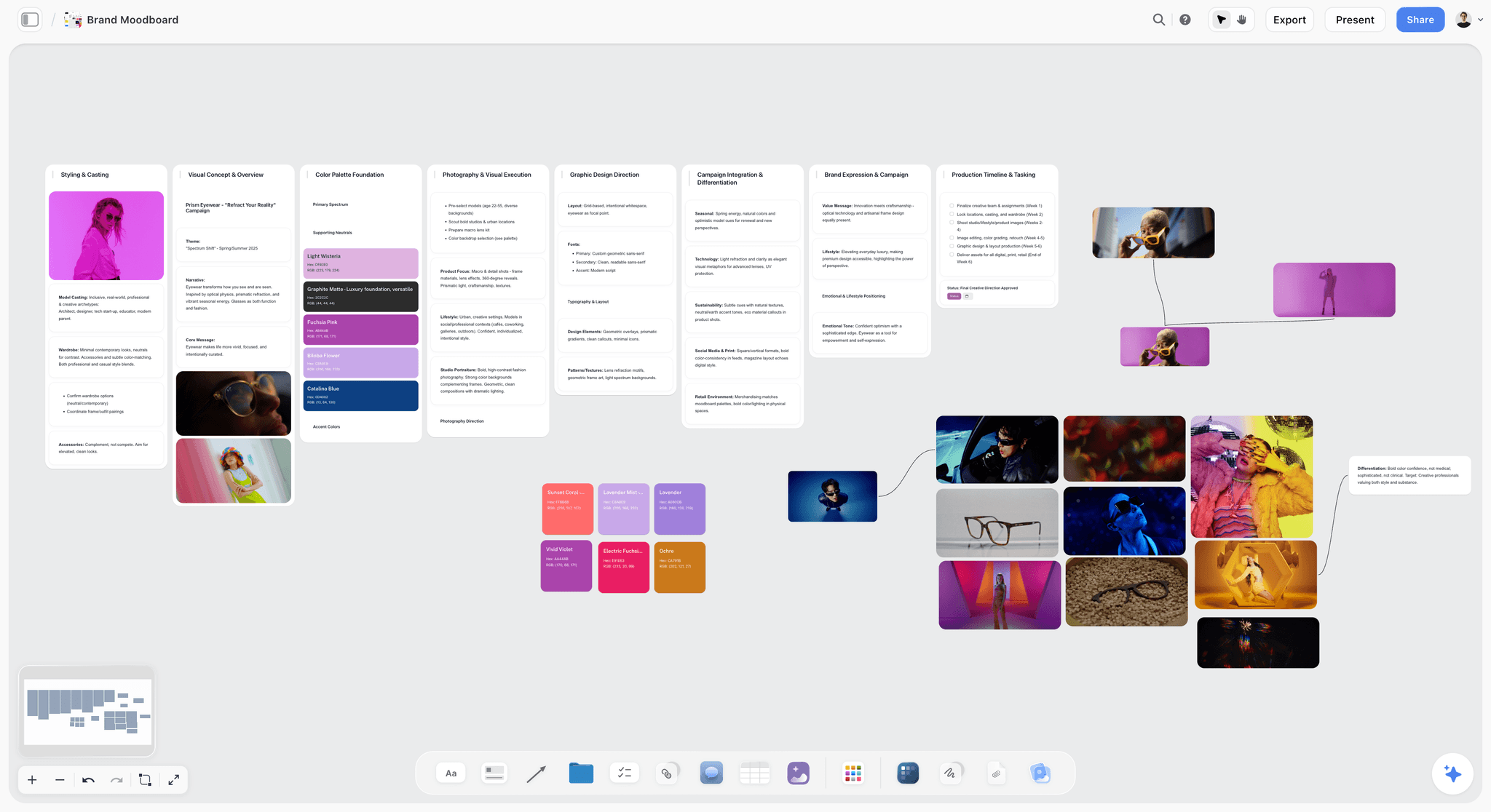
A planning app earns its keep before the schedule exists too: this is the look a shot list has to deliver.
Mistakes and Fixes
The wrong app is usually chosen in one of these ways.
Buying the on-set app for a planning problem
If nobody agrees what is being shot, a better day-tracking app will not help. Fix: agree the plan on one board first, then see whether the day still needs an app at all.
Buying the planning app for an on-set problem
A full suite does not help an AC with no signal. Fix: test each app on a phone, on the location's real signal, before committing.
Counting seats you do not need
Most of the crew only read. Fix: count the editors, then check who each vendor charges for. In Storyflow, invited members join free and view links need no account.
Trusting the feature grid
"Call sheets: yes" can mean a template or tracked delivery. Fix: ask whether it sends, whether it tracks and whether the recipient needs an account.
Moving apps three days before the shoot
The AD is learning software when they should be checking the schedule. Fix: choose in week 4 at the latest, and try it on a real day.
Forgetting export
An app you cannot leave holds your job hostage. Fix: confirm PDF and Excel export before you commit. Storyflow exports boards as PNG, JPEG or PDF, and decks as PDF but not PPTX; Movie Magic Scheduling and Filmustage export PDF and Excel.
Paying annually for one shoot
A 12-month commitment for a two-week job is a poor fit. Fix: look at per-project and monthly options, or plan with the free tiers, and add up what you will really use.
Assuming AI output is checked
A generated schedule looks finished, and it may have no company moves in it. Fix: read every day against the hours you have, and add moves, meals and setup by hand.
Where Storyflow Falls Short for a Film Shoot
Storyflow's claim is narrow and specific: one board for the whole plan. These are the things it does not do, so you can decide before you pay.
Scheduling depth
There is no recalculating schedule, Day Out of Days, Gantt chart, dependencies, calendar view or crew availability logic. A strip board's day totals are set when built. Dates live in table date cells and to-dos, in rows you keep in date order, because tables cannot be sorted.
Call sheet delivery
The in-app AI drafts a call sheet and leaves unknowns blank. It does not send call sheets or track confirmations, and there are no due-date reminders.
What Free leaves out
The Free plan has no in-app AI, so the shot list workflows and call sheet draft described here start on Plus. On Free you build by hand or through ChatGPT or Claude, up to 25 actions a week, with capped uploads that reference frames can use up.
On-set use
There is no native mobile or desktop app, so there is no equivalent to Shot Lister's Live Mode or offline iPhone app. Plan on a laptop and carry paper for bad signal.
Script and paperwork limits
It is not a screenwriting app, and it has no contracts, e-signature, invoices or time tracking. No animatic or MP4 export either. A shoot with those needs in the planning tool should look at the alternatives above.
The Bottom Line
Do not start with the feature grid; start with the two questions in the Storyflow 2-App Split. How many people are on the call sheet, and will the order change on the day? Plan on one Storyflow board, add SetHero, StudioBinder or Shot Lister only for the trigger you actually have, and change your first app altogether if the schedule is long and union. Put your next shoot's four numbers in a note today, and the shopping list writes itself. The film shoot planner and the sibling ranking of shoot planning apps are good next steps.
FAQ: Film Shoot Planning Apps
What is the best app for planning a film shoot?
Storyflow is the best app for planning a film shoot when one small team owns the concept, shot list and schedule, because all three sit on one board the crew opens by link. Add SetHero or StudioBinder past 10 people on the call sheet, and Shot Lister when order changes daily. Long union schedules belong in StudioBinder or Movie Magic Scheduling.
What is the best tool for film shoot planning?
Storyflow is the best tool for film shoot planning on commercials, brand films and small narrative work, since the moodboard, shot cards, strip board and call sheet draft stay together. It runs in the browser, and ChatGPT and Claude can build on the same board. For a schedule that recalculates, with Day Out of Days, choose a dedicated scheduler such as StudioBinder.
How much do film planning apps cost?
Film planning apps range from free to about $400 a year and beyond, as of November 2026. Storyflow Free is $0, Plus $7.99 a month billed annually, Shot Lister Pro $99.99 a year, Movie Magic Scheduling $299.88 a year, and Filmustage Director's Cut $408 a year. SetHero prices per project. For StudioBinder, Celtx and Yamdu, see each vendor's pricing page.
What is the difference between a planning app and an on-set app?
A planning app decides what the shoot will be, on a laptop, weeks ahead; an on-set app survives the shoot changing, on a phone, during the day. Storyflow, StudioBinder and Movie Magic Scheduling are planning tools. Shot Lister is the clearest on-set tool. Under the Storyflow 2-App Split, you add the second only past 10 people or when order changes.
Do I need StudioBinder to plan a film shoot?
No, not for a small shoot. A board, a spreadsheet or Shot Lister can handle a few days with a small crew. StudioBinder earns its cost when you need stripboards with DOOD reports, tracked call sheets and a shared crew list on a longer job. If only the call sheet is the gap, SetHero's per-project pricing may fit better.
Is there a free app for planning a film shoot?
Yes. Storyflow has a free plan with capped projects and uploads, 25 assistant actions a week and no in-app AI. Google Sheets is free with a Google account, Shot Lister is a free download with two projects, and Filmustage has a free tier with one active project and non-AI tools including call sheets. SetHero is free for one shoot day and up to 10 people.
Which film planning app works best on a phone?
Shot Lister works best on a phone because it is native on iPhone and iPad, syncs across devices and keeps working offline. StudioBinder lets you check off shots on your phone, and SetHero call sheets are built for mobile browsers. Storyflow opens in a phone browser with no native app, so it suits reading more than building, and paper backs it up.
Which apps can send call sheets and track confirmations?
StudioBinder and SetHero both send call sheets by text and email and track confirmations, and Yamdu's page says it sends and tracks them too. Storyflow's in-app AI drafts a call sheet PDF from the board, keeps a nearest-hospital line filled only from what you give it and leaves unknowns blank, but it does not send it or track replies, so pair it with one of these or email.
Can ChatGPT or Claude plan a film shoot?
ChatGPT and Claude can draft the plan and, connected to Storyflow by plugin or connector, build it on a board: shot cards, a strip board grouped into shoot days, location tables and a call sheet document. They can also report what changed and who changed it. Check every call time and address by hand, and upload photos through the board's upload link.
Is Movie Magic Scheduling worth it for a small shoot?
Usually not for a small shoot, unless your AD already works in it. Its strengths are cross-boards across up to four units, conflict detection and DOOD, which a three-day commercial rarely needs. The annual subscription is $299.88 with a 12-month commitment as of November 2026. Choose it for long, episodic or multi-unit schedules, and use a lighter planner otherwise.
Should I use Celtx or StudioBinder?
Choose Celtx when the project starts from a screenplay and you want the breakdown, schedule and budget linked to it. Choose StudioBinder when the priority is the stripboard, DOOD and tracked call sheets. Celtx includes production tools on its Team tier for 3 to 15 members, and both vendors publish current amounts on their own pricing pages, so compare them there.
Is Storyflow free for film shoot planning?
Yes, Storyflow has a free plan: $0 with no card, capped projects and uploads and 25 actions a week from ChatGPT or Claude. It has no in-app AI, so AI shot lists and call sheet drafts start on Plus, at $7.99 a month billed annually or $9.99 monthly. A view-only link opens with no account, so a crew can read the plan without signing up.
What should a film shoot plan include?
A film shoot plan should include a shot list with time estimates, a schedule by day, location details with parking and the nearest hospital, a crew and cast list, a kit list, and a call sheet per day. Read the day totals against your actual hours before you schedule anyone, including company moves and lunch.
Table of Contents
- Key Takeaways
- How to Plan a Film Shoot and Choose the App: 8 Steps
- Film Shoot Planning Apps: The Feature and Price Matrix
- Planning App vs On-Set App: Which Job Each One Does
- Feature by Feature: What Actually Differs
- What You Pay: Billing Shape by App
- Template: A Shoot Plan for Copperline Films
- Worked Example: Copperline Picks Its Apps
- Which App for Which Shoot
- Do This in ChatGPT or Claude
- The Apps, Reviewed
- Storyflow
- StudioBinder
- Shot Lister
- Celtx
- Yamdu
- Movie Magic Scheduling
- SetHero
- Filmustage
- Google Sheets
- Other Apps for Neighbouring Jobs
- Test an App Before You Pay: A Six-Point Trial
- Mistakes and Fixes
- Where Storyflow Falls Short for a Film Shoot
- The Bottom Line
- FAQ: Film Shoot Planning Apps
- Related Reading
Templates to check out for this topic


Filmmaking templates you can use in Storyflow
Skip the blank canvas. Open one of these filmmaking boards in Storyflow and the AI builds on the structure that is already there, from research through the shot list.


See Storyflow in Action
A visual AI workspace where every feature lives inside one canvas. No tab-switching, no context lost.
Build your entire board from a single message
Type what you need in the AI chat at the bottom of your canvas. The AI adds cards, headings, and structure directly onto your board.
Use expert frameworks as AI context
Type @ in the AI chat and choose any Tactic. The AI tailors every response to that framework instead of giving generic advice.
Turn your board into a mind map in seconds
Ask the AI to restructure your canvas as a mindmap. It connects your ideas into a visual hierarchy so you can see how everything relates.
Why Storyflow Exists
Storyflow actually began as a personal tool while working on creative and research projects.
We kept running into the same problem: ideas were scattered everywhere: notes, documents, and whiteboards.
Nothing helped us see how everything connected.
So we started building a workspace designed around how ideas actually grow.
→ Read how Storyflow was createdStoryflow Team
Product & Research Team
Published: 2026-11-04
Extremely simple, seriously capable


See how easy it is to get started
Watch a real project come together, from a blank board to a finished plan, clicked through step by step.
Start creating with AI and become more productive
Transform your creative workflow with AI-powered tools. Generate ideas, create content, and boost your productivity in minutes instead of hours.