StudioBinder vs Yamdu vs Celtx vs Storyflow: Call Sheets 2026
Storyflow makes the call sheet from the plan on your board. StudioBinder sends it and tracks confirmations, Yamdu runs months-long productions from one database, and Celtx builds the schedule from the script. Compared on verified features, with prices only where a vendor publishes one.

Category
Filmmaking Tools
Author

Justkay
Documentary Filmmaker & Founder at Storyflow
Topics
2026-09-02
•
30 min read
•
Filmmaking Tools- best tool to make a call sheet
- yamdu vs studiobinder
- studiobinder vs celtx
- yamdu pricing
- film production planning software
- call sheet software
What's the best tool to make a call sheet for a shoot: Storyflow, StudioBinder, Yamdu or Celtx?
Storyflow, our own product, is our pick to make a call sheet for a shoot: its AI writes the call sheet pages from the script, shot list, crew and location notes on your board, lists every field it left blank, and exports a PDF, and the same board holds the shot list, strip board, cast, crew and locations the sheet is built from. Choose StudioBinder when the sheet must go out by text and email with confirmations tracked, Yamdu for a production that runs for months, and Celtx when the schedule is generated from a script written there.

Full disclosure: Storyflow is our own product, and this comparison is ordered with it first. The basis is one stated criterion, the first row of the criteria table in this article: how much of the call sheet the tool writes for you from the plan you already have. Its AI writes the pages from a plan in any form and leaves unknown fields blank. There is no total score, and the table shows the two criteria it loses. It does not send call sheets, track confirmations, produce a day-out-of-days report or recalculate a schedule. StudioBinder and Yamdu do, and the article says to buy them when that is the job.
How the film production planning tools compare on trust, innovation, ratings and pricing
Which film production planning tools are the most trusted?
Movie Magic Scheduling is the long-standing scheduler on funded productions. StudioBinder suits commercial and indie shoots of days to weeks and sends call sheets with confirmation tracking. Yamdu covers long-form productions with budgets, time cards and document control. Celtx is built around the script. Storyflow writes the call sheet, shot list and strip board from a plan on a board.
Which film production planning tools have fair and transparent pricing?
Storyflow publishes its prices: Plus is $7.99 a month billed annually. StudioBinder's pricing page showed no plans when checked on October 10, 2026, though its support article lists Indie at $49 a month for 2 users; Yamdu and Celtx showed no amounts on the pages that loaded, so compare them on a trial. StudioBinder's Free plan covers one project and sends sample call sheets only to yourself.
Which film production tools have consistent product performance?
Movie Magic Scheduling and Celtx have the longest track records. StudioBinder, Yamdu and Celtx all build stripboards and call sheets from their own project data. Storyflow's call sheet is consistent in one specific way: it never invents a phone number, an address or a hospital, and lists every blank instead.
Which film production planning tools are underrated?
Yamdu's file watermarking with view and download tracking, and its time cards with payroll export, are production-office features that rarely make comparison tables. Shot Lister is underrated as a shoot-day companion because of its live schedule. Storyflow is underrated for making the documents when no suite is set up yet.
When choosing a film production planner, which would you recommend?
Start from where the plan already is. A script, a shot list and notes: Storyflow, which writes the call sheet from them. Days to weeks with a freelance crew to notify: StudioBinder. Months with departments: Yamdu. A script still being written: Celtx. For a single one-day shoot a template and a PDF are enough.
Quick Comparison
Storyflow is our own product and is listed first: the tool that makes the call sheet from your plan, and the three production suites that assemble it from their own records.
| Tool | Best For | AI Features | Price |
|---|---|---|---|
| Storyflow | Making the call sheet from the board | AI writes the pages and lists blanks | From $7.99/mo annual |
| StudioBinder | Sending and tracking call sheets | Automatic weather and day breaks | Free plan; Indie $49/mo (2 users) |
| Yamdu | Long productions, one database | AI breakdown suggestions | Not published |
| Celtx | Script-first scheduling | Stripboard generated from script | Not published |
Which Tool Should You Use to Make a Call Sheet for a Shoot?
Pick by the job you have this week, not by the longest feature list.
- You need to make the call sheet from the plan you already have: Storyflow. The AI reads the board where your shot list, strip board, cast, crew and locations sit and writes the pages: the day's header with crew call, first shot and wrap, the schedule table, cast with pickups, crew by department, locations and safety notes. It tells you which fields are still blank. You export one PDF and send it yourself.
- You need to send it by text and email and see who confirmed: StudioBinder. Its call sheets go out by SMS and email and report sent, bounced, viewed, confirmed and missed.
- You are running a feature or a series for months: Yamdu. Call sheets, the shooting schedule, day-out-of-days reports, time cards and budgets draw on one database, and Yamdu fills in weather and the nearest hospital.
- Your project starts from a screenplay you are still writing: Celtx. The script, the breakdown, the stripboard and the call sheet live in one account, on the tier that includes production tools.
- It is a one-day shoot with five people and no budget for software: a template. A Google Docs or Sheets template still works. You type every field and you chase confirmations by hand.
If you only read one line: make the sheet in Storyflow, and add StudioBinder or Yamdu when distribution and confirmation tracking are the part that hurts. To plan the whole shoot and not only the sheet, see the best app for planning a film shoot.
Key Takeaways
- A call sheet is a report on data that already exists: the schedule, the cast, the crew, the locations. The right tool is the one that already holds that data, or that can read it wherever it is.
- Storyflow writes the call sheet from a board in any shape (notes, a shot list, a strip board, an attached script or PDF) and refuses to invent a phone number, an address or a hospital.
- StudioBinder and Yamdu both send the sheet and track confirmations. Storyflow does not send anything. That is the honest dividing line.
- Celtx's production tools are included on its Team, Education and Student tiers and sold as an add-on on Writer and Writer Pro, according to its pricing page.
- StudioBinder's Free plan lets you build sample call sheets that you can send only to yourself, according to its own support article. Sending to a crew needs a paid plan.
- None of the three suites showed a price on a page that loaded when we checked on October 10, 2026. We say so instead of quoting old numbers. Storyflow starts at $7.99 a month billed annually and has no free plan yet.
The Short Answer by Production Shape
| Your production | Pick | Because |
|---|---|---|
Any shoot where the plan exists and the sheet does not | Storyflow | The AI writes the call sheet pages from the board and lists the blanks |
A one-day commercial or branded shoot with a small crew | Storyflow, or a Docs template if the plan is in your head | The sheet is a PDF you send to a group chat; tracking 6 people is a phone call |
Two to ten shoot days, 20 or more people to notify | StudioBinder | SMS and email delivery with viewed and confirmed status |
Two to ten shoot days, scripted, writer on the team | Celtx | Stripboard generated from the script, cast and crew changes sync to call sheets |
A feature or series over months | Yamdu | One database for schedule, DOOD, call sheets, time cards and budget |
A documentary shot across a year | Yamdu for the paperwork, Storyflow for the story plan | Long timelines and many contributors on one side, a plan that keeps changing on the other |
You only need call sheets and nothing else | SetHero | A dedicated call sheet builder with received, opened and confirmed tracking |
Each row is a starting point. The sections below show the evidence, including the places where Storyflow is the wrong choice.
Head to Head: The Comparison Table
Checked on each vendor's own site on October 10, 2026. "Not stated" means the vendor's page did not say, not that the feature is missing.
| Storyflow | StudioBinder | Yamdu | Celtx | |
|---|---|---|---|---|
Best for | A plan that exists as a script, a shot list and notes, with the call sheet missing | Shoots of days to weeks with a crew to notify | Productions that run for months with departments | Scripted projects written in Celtx |
Makes the call sheet from | The board: notes, shot list, strip board, attached script or PDF | Its stripboard, contacts and locations | Its schedule, cast and crew and mailing lists | Its schedule and cast and crew records |
Who fills the fields | The AI writes them from the plan; unknowns stay blank and are listed | You, with weather and map links automatic | Yamdu, with weather and nearest hospital automatic | Dynamically generated from the project |
Sends by email or SMS | No. You export a PDF and send it | Yes, SMS and email | Yes, to a mailing list, with optional watermark | Not stated |
Tracks confirmations | No | Yes: sent, bounced, viewed, confirmed, missed | Yes: confirmed, and who needs a reminder | Not stated |
Script import | Final Draft .fdx, PDF, documents | Final Draft, PDF, Fountain, TXT | Yes, with AI breakdown suggestions | Written in Celtx (import not stated on the pages checked) |
Shooting schedule | Strip board: a wall per shoot day, a coloured strip per scene, page totals set when built | Stripboard with automatic day breaks, banners, DOOD reports | Stripboard with day breaks, banners, DOOD reports | Stripboard generated from the script, End of Day strips |
Day-out-of-days report | No report; ask the AI which days a character works | Yes | Yes | Not stated |
Shot lists and storyboards | Yes, built by the AI as cards or tables | Yes | Not stated on the pages checked | Yes, on Writer Pro and above |
Budget | A budget table on request, no budgeting module | Not stated on the pages checked | Yes, with Dynamic Globals | Yes, on Team or as an add-on |
Time cards and payroll export | No | Not stated | Yes | Not stated |
Works from inside ChatGPT, Claude, Gemini or Grok | Yes, through the Storyflow MCP connector | Not stated | An API and MCP server are listed in its navigation | Not stated |
Free option | None yet: paid-only in early access, invited collaborators join free | Free plan: 1 project, sample call sheets sent only to yourself | "Start for free", terms not stated | Free tier without production tools |
Published starting price | $7.99 a month billed annually (Plus) | Not published on a page that loaded | Not published when checked | Not published when checked |
Two cautions on reading this table. First, StudioBinder, Yamdu and Celtx are production suites, and the call sheet is one output of a connected system. Storyflow is a visual workspace with an AI that builds documents from a board. Second, a "No" in the Storyflow column for sending and tracking is a real limit, not a footnote: on a crew of forty it decides the purchase.
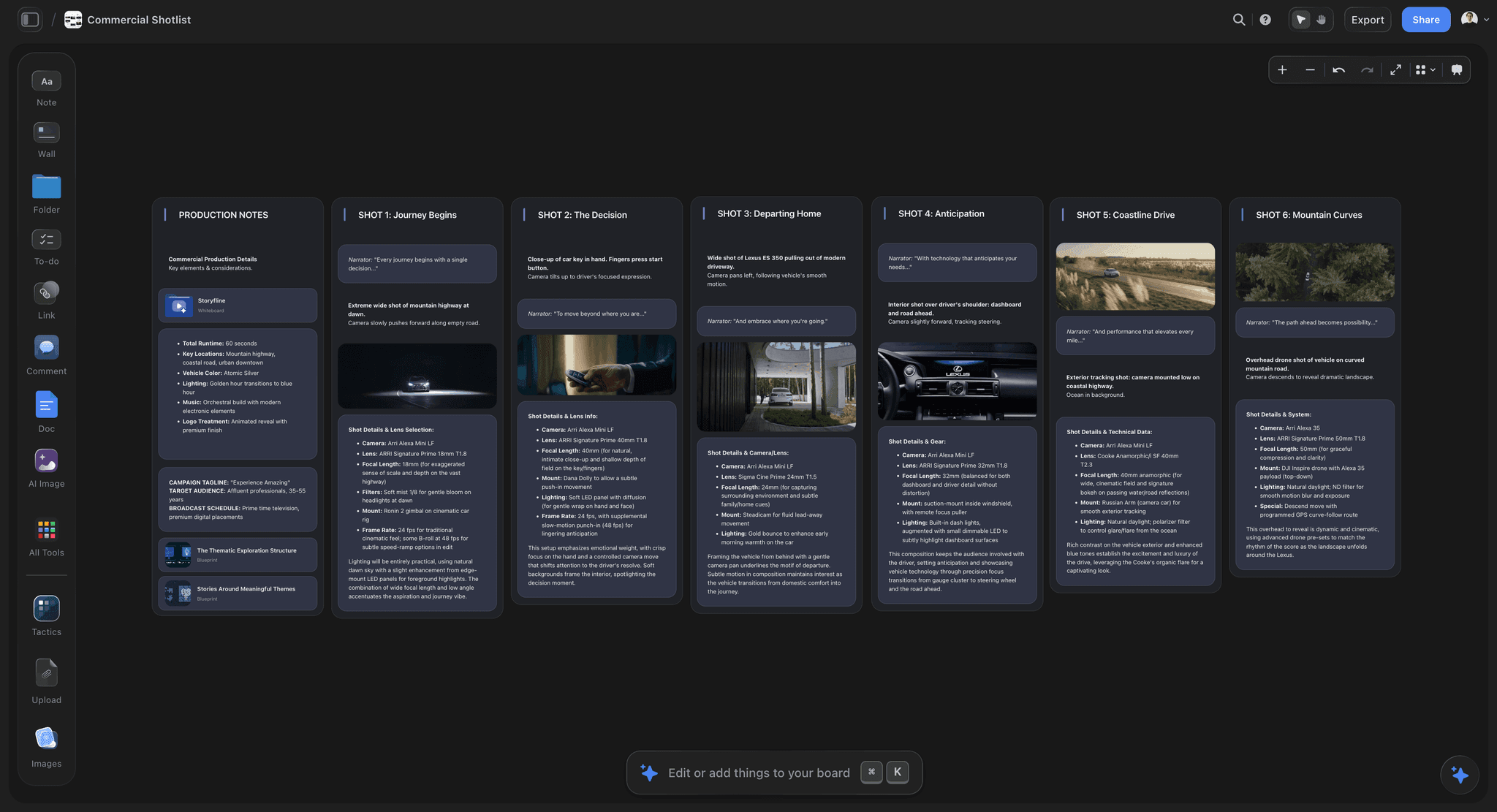
A Storyflow board holding the shot list a call sheet is built from
Make the call sheet from the plan you already have
Put the script, shot list, crew and locations on one Storyflow board and ask the AI for the call sheet. It writes the pages, lists every blank, and you export the PDF.

How We Ranked Them for Making a Call Sheet
Updated October 11, 2026. The question this article answers is "what's the best tool to make a call sheet for a shoot", so the criteria are ordered for making the sheet. Storyflow is our own product, and the four tools are ordered with it first on criterion 1: how much of the call sheet the tool writes for you from the plan you already have. There is no total score; every criterion is shown, including the two Storyflow loses. The order changes if your job is distributing it, and the last paragraph of this section says how.
| Criterion, in ranking order | Storyflow | StudioBinder | Yamdu | Celtx |
|---|---|---|---|---|
1. Writes the sheet from the plan in whatever form the plan is in | Yes: board notes, shot list, strip board, attached script or PDF | Partly: from data entered in its own stripboard, contacts and locations | Partly: from data in its own production database | Partly: from its own schedule and cast and crew |
2. Useful before any setup | Yes: paste or attach the plan and ask | Partly: contacts, locations and scenes must be in the project first | Partly: the production must be populated first | Partly: production tools need the Team tier or the add-on |
3. Never guesses a safety field | Yes: hospital, numbers and addresses stay blank until you give them | Hospital is entered by hand; weather is automatic | Weather and nearest hospital are filled in automatically | Not stated |
4. Sits beside the shot list, schedule and references | Yes, one board | Yes, one project | Yes, one production | Yes, one project |
5. Sends the sheet and tracks who confirmed | No | Yes | Yes | Not stated |
6. Price you can read before signing up | Yes | No page loaded | No | No |
7. Keeps the sheet tied to a schedule that recalculates | No: a first-pass strip board, totals set when built, no DOOD report | Yes: stripboard with automatic day breaks and DOOD reports | Yes: stripboard, day breaks and DOOD reports | Yes: stripboard generated from the script |
Storyflow is first on criteria 1, 2 and 6, ties on 4, and loses 5 and 7 outright. StudioBinder and Yamdu are first on 5 and 7, Celtx is ahead on 7 when the script is written in it, and Yamdu is ahead on 3 if you want the hospital found for you, behind if you want nothing on the sheet that a person did not confirm. For the job in the question (making the sheet), that puts Storyflow first, StudioBinder second and Yamdu third, with Celtx fourth because its own pages say the least about call sheets. If your crew is larger than about twenty, or the schedule will change daily, and you weigh criteria 5 and 7 above everything else, buy StudioBinder or Yamdu for that job, and use Storyflow beside it to draft the sheet from the plan.
Where Each Tool Gets the Call Sheet's Data
Every field on a call sheet has an owner and a source. The practical difference between these four tools is where each one expects that source to be.
| Call sheet field | Storyflow | StudioBinder | Yamdu | Celtx |
|---|---|---|---|---|
Day X of Y, scenes, pages | The strip board wall for that day | The stripboard | The shooting schedule | The stripboard |
Crew call, first shot, wrap | What you told the AI or wrote on the board | Call times you set per person or department | The schedule and call sheet template | The schedule |
Cast, pickups, on set | The cast notes and the strips' cast lines | Contacts, with individual call times | Cast and crew database | Cast and crew records |
Crew by department with phones | Your crew list on the board; a missing phone stays blank | Contacts | Cast and crew database | Cast and crew records |
Unit base, parking, access | Your location notes | Locations, linked to Google Maps | Locations | Not stated |
Weather, sunrise, sunset | You supply them the day before | Automatic weather | Automatic weather | Not stated |
Nearest hospital | You supply it; blank until you do | Entered by hand | Filled in automatically | Not stated |
Who received and confirmed | Outside the tool | Tracked | Tracked | Not stated |
Read the first column as a list of what must be on your board before you ask. If the board holds a shot list and a paragraph about the day, the sheet will have a schedule and a long list of blanks. If it holds a strip board, a crew list with phones and location notes, it will be nearly complete. The AI does not make up the difference, which is the point: a wrong phone number on a call sheet looks exactly like a right one.
Call Sheets
The call sheet is the one document every crew member reads, and the one whose failure is most visible at 6am. Here is what each tool does, from each vendor's own description.
Storyflow call sheets
Ask the AI for a call sheet and it builds A4 pages in the order a crew reads them. Page one is the day: production, day X of Y, date, general crew call, first shot, estimated wrap, sunrise, sunset and weather, the nearest hospital with address and drive time, then the schedule as a table with one row per block (time, scene, description, location, cast, pages). Page two is cast (name, character, pickup, costume and makeup, on set) and crew grouped by department with call time and phone. Page three is locations with address, parking and access, then notes on safety, permits and catering. The 1st AD's and producer's numbers sit in the footer of every page, because the page a crew member has open at 6am is not always page one.
Anything you did not provide is a blank, and the AI names each blank in its reply so you can fill them before the sheet goes out. You export the pages as a PDF. Storyflow does not email or text the sheet, does not track who opened it, and does not look up weather or a hospital. See how to make a call sheet for the field-by-field method and the AI call sheet generator for the tool page.
StudioBinder call sheets
StudioBinder's call sheet page describes automatic weather, locations linked to Google Maps, individual call times, delivery "through SMS text message and email", and status tracking: viewed, confirmed and missed, plus whether a message was sent or bounced. You add the nearest hospital and parking instructions yourself. A sheet can be saved as a template for the next shoot day, and its scheduling page says you can generate call sheets directly from the stripboard.
The free tier is the catch for a real shoot. StudioBinder's own free plan article lists one project, up to 10 contacts, up to 5 locations, and sample call sheets that you can send only to yourself.
Yamdu call sheets
Yamdu's call sheet page says it puts the essential information "like the weather and the nearest hospital" together for you and generates the sheet in seconds. You send it to a mailing list, optionally watermarked, and you can see which recipients confirmed and which need a reminder. Because the cast, crew, locations and schedule are already in the production, there is little to type on day forty of a long shoot. The cost is that all of it has to be entered first.
Celtx call sheets
Celtx lists call sheets under its production tools as "dynamically generated and updated", and its pre-production page says cast and crew changes sync to call sheets. Its pages say less than the other two about delivery and confirmation, so check a trial before a shoot that depends on tracking. Call sheets are included on the Team, Education and Student tiers and sold as an optional add-on on Writer and Writer Pro, per its pricing page.
Yamdu vs StudioBinder
This is the comparison most people arrive with, and the two are closer than their marketing suggests. Both import a script, both build a drag-and-drop stripboard with day breaks and banners, both produce day-out-of-days reports, and both send call sheets and track confirmations.
| Yamdu | StudioBinder | |
|---|---|---|
Breakdown | AI creates breakdown suggestions that departments confirm | Scenes are added to the stripboard automatically on import; you tag elements |
Stripboard | Drag and drop, day breaks from pages or time, banners | Drag and drop, automatic day breaks by page count or shoot time, banners |
Call sheet safety fields | Weather and nearest hospital filled in | Weather filled in; hospital typed |
Delivery | Mailing list, optional watermark, confirmations and reminders | SMS and email; sent, bounced, viewed, confirmed, missed |
Beyond the schedule | Budgets with Dynamic Globals, time cards with payroll export, file watermarking with view and download tracking, permissions by position | Shot lists, storyboards, mood boards, production calendar, tasks |
Free start | "Start for free" on its home page; terms not stated | Free plan with one project and capped contacts, locations and scenes |
Published price | None visible when checked | None on a page that loaded |
When Yamdu is the better choice
Pick Yamdu when the production has departments, accounting obligations and a run measured in months. Time cards that export to payroll, budgets tied to the schedule, watermarked script distribution and position-based permissions are production-office features, and StudioBinder's pages do not describe equivalents.
When StudioBinder is the better choice
Pick StudioBinder when the shoot is days or weeks long and the visual prep matters as much as the paperwork. Shot lists, storyboards and mood boards sit in the same project as the stripboard, and SMS delivery reaches a freelance crew that does not live in email.
When neither is the right first purchase
If the shoot is next week and neither tool is set up, entering contacts, locations and scenes into a new suite is the slow part. In that case, making the sheet in Storyflow from the plan you already have, or typing it into a template, gets a PDF out with less setup. Check the hospital, the phone numbers and the call times yourself either way. Move to a suite when the second production makes the setup pay back.
StudioBinder vs Celtx
StudioBinder and Celtx overlap on breakdown, stripboard, shot lists, storyboards and call sheets. The real difference is what sits at the centre of the project.
Celtx is script-first
Celtx is a screenwriting tool that grew production features. Its schedule page says it can automatically generate stripboards from your script, with drag and drop to arrange scenes, an End of Day strip to close each shoot day, and shoot days added to a calendar. If the writer is still revising, the breakdown and the schedule stay tied to the current draft in the same account.
StudioBinder is production-first
StudioBinder treats the script as one input among several. It imports Final Draft, PDF, Fountain or TXT files, adds every scene to the stripboard, and then spends most of its surface on what happens next: day breaks, banners for meals and company moves, DOOD reports, shot lists, storyboards, contacts and call sheet delivery. Unscripted and commercial work, where there is no screenplay to be the spine, fits it more naturally.
Which to pick
Writer on the team and a script in motion: Celtx. A locked script, an outline, or no script at all: StudioBinder. For a longer side-by-side, see StudioBinder vs Celtx for film pre-production.
Scheduling and Breakdowns
All three suites build a real stripboard. Storyflow builds a first one and stops short of the reports.
StudioBinder. Its scheduling page says every scene is automatically added to the stripboard after import, day breaks are inserted by page count or estimated shoot time, and banners mark meals, company moves and notes. You can generate DOOD reports and export to PDF or CSV.
Yamdu. Its shooting schedule page describes dragging strips, creating day breaks automatically from script pages or scheduled time, banners, DOOD reports for talents and props, and import and export of shooting schedules. Its home page adds AI breakdown suggestions.
Celtx. Its schedule page describes stripboards generated from the script that pull in information from the script, breakdown and calendar.
Storyflow. The script breakdown workflow reads a Final Draft or PDF script and builds a scene index table (scene number, slugline, INT/EXT, time, cast, pages in eighths) and, if you ask, a full breakdown with props, wardrobe, vehicles and effects per scene. Ask for a strip board and the AI asks how many shoot days and whether to group by location or keep script order, then builds one wall per shoot day with a coloured strip per scene in the industry INT/EXT and day/night code, each day totalled in pages. You drag strips between days to reshuffle. The limits are plain: the day totals are set when the board is built and do not recalculate when you move a strip, there is no day-out-of-days report (the AI can answer "which days does Maria work" from the strips), and there are no conflict warnings. For a feature schedule that will be revised forty times, use a scheduler. See the script breakdown tool, the stripboard page and how to make a production schedule.
Shot Lists and Storyboards
StudioBinder includes shot lists and storyboards in the same project as the schedule, with the Free plan capped at 10 shots and 10 storyboards.
Celtx includes shot lists and storyboards on Writer Pro and above. Its shot list lets you annotate the script with detailed shots for the camera crew.
Yamdu does not describe a shot list or storyboard tool on the pages we checked, so treat it as a production-management system first and plan the shots elsewhere.
Storyflow builds a shot list either as shot cards (a wall per shot with a frame, a coverage checklist and equipment) or as a table with size, angle, movement, lens and setup time, one entry per camera setup. A storyboard and a moodboard can sit beside it on the same board. Generated frames need the Pro or Max plan; on Plus, frames come from web references, your own images or placeholders. See how to make a shot list and the shot list template.
A dedicated shot-day companion is a separate category. Shot Lister builds a schedule shot by shot and minute by minute and has a Live Mode that shows how you are doing against it; its site lists Pro at $15.99 a month or $99.99 a year. You can plan in a suite or on a board and run the day in Shot Lister. See Shot Lister vs Movie Magic Scheduling.
Documents, Contacts and the Paper Trail
Here Yamdu has the most to say. Its home page describes file sharing with watermarking for scripts and files, tracking of who viewed, edited or downloaded them, and advanced permissions that control access by position. On a production with releases, deal memos, permits and insurance certificates moving between departments, that audit trail is the feature that justifies the setup.
StudioBinder holds contacts and locations and attaches them to call sheets; its Free plan caps contacts at 10 and locations at 5. Celtx tracks cast, crew and vendors and generates sides for casting calls, rehearsals and shoot days.
Storyflow holds documents, PDFs and images on the board and the AI can read up to five attached documents in a chat, but it has no document status tracking, no watermarking and no e-signature. If the paperwork is the problem, this is not the tool for it.
Budget
Yamdu promotes Dynamic Globals for linking the schedule to the budget, and time cards with approval and export to a payroll provider. Celtx lists budgeting under its production tools, included on the Team tier and as an add-on below it. StudioBinder's pages that loaded when we checked do not describe a budgeting module, so plan on a spreadsheet or a dedicated budgeting program beside it.
Storyflow has no budgeting module. You can ask the AI for a budget table on the board, which is a table of lines and amounts and nothing more: no fringes, no actuals, no reports. For a walkthrough of the numbers themselves, see how to budget a short film.
Pricing, Honestly
Prices below are the ones visible on each vendor's own site on October 10, 2026. Where a pricing page showed plan names and no amounts, or did not load, we say that and link it so you can check today's figure yourself.
| Tool | Published price when checked | Free option | Where to check |
|---|---|---|---|
Storyflow | Plus $7.99 a month billed annually ($9.99 monthly); Pro $14 annual; Max $39 annual | Paid-only during early access; Free plan launches before the end of 2026; invited collaborators join free now | |
StudioBinder | Indie $49/mo for 2 users (support article) | Free plan: 1 project, 10 contacts, 5 locations, call sheets sent only to yourself | |
Yamdu | No plans or amounts visible | "Start for free" on the home page | |
Celtx | Plan names shown (Writer, Writer Pro, Team, Education, Student), no amounts visible | Free tier has no production tools | |
SetHero | From $19 a month | First project free | |
Filmustage | Director's Cut from $49 a month, or $408 a year | Free: 1 active project, call sheets included |
Storyflow is paid-only during early access; its Free plan launches before the end of 2026, and anyone a paid member invites to a board joins free now. Billing is per account.
For a single one-day shoot, a suite is more than the problem needs. The reason to buy one is repetition: the second production is where saved contacts, locations and templates pay back.
How to Make the Call Sheet in Each Tool
The steps below are the shortest honest path in each tool, based on what each vendor describes.
In Storyflow
- Put the plan on one board: the shot list, the strip board or a scene list, the cast and crew with phone numbers, the location notes. Attach the script or a schedule PDF if that is where the plan lives.
- Ask the AI: "Build a call sheet for Day 2." Name the day so it uses only that day's scenes.
- Read the list of blanks in its reply. Typical ones are the hospital, a missing phone number, a pickup time and the weather.
- Fill them, ask it to update the pages, export the PDF and send it in the channel your crew reads.
In StudioBinder
- Create the project and add contacts and locations.
- Import the script or add scenes, then arrange the stripboard into shoot days.
- Generate the call sheet from the stripboard, set individual call times, add the hospital and parking notes.
- Send by SMS and email and watch the viewed and confirmed columns.
In Yamdu
- Set up the production: cast, crew, locations and the script.
- Build the shooting schedule on the stripboard.
- Create the call sheet from a template; weather and the nearest hospital are filled in.
- Send it to the mailing list, watermarked if needed, and remind anyone who has not confirmed.
In Celtx
- Write or import the script and run the breakdown.
- Generate the stripboard and place End of Day strips.
- Add cast and crew; call sheets are generated from the schedule and those records.
- Distribute it the way your tier allows, and confirm by hand if tracking is not shown.
Worked Example: A Two-Day Shoot in All Four
Take a two-day branded film: nine scenes, two locations, a crew of fourteen, four cast. The producer has a script PDF, a shot list in a table and a crew list in a note. Nothing is in a production suite yet.
What the producer does in Storyflow
The script, the shot list and the crew note are already on the board. The producer asks for a strip board over two days grouped by location, checks that Day 1 holds the warehouse scenes and Day 2 the exteriors, then asks for the Day 1 call sheet. The reply lists five blanks: hospital, sunrise and sunset, two crew phones and the unit base gate code. The producer fills them from the location scout's message and exports the PDF. Sending and confirming happen in the crew's group chat, by hand.
What the producer does in StudioBinder
The producer enters fourteen contacts and two locations, imports the script so nine scenes land on the stripboard, drags them into two days and generates the Day 1 sheet. Weather appears; the hospital and parking are typed in. The sheet goes out by text and email, and by evening the producer can see that twelve people confirmed and two have not opened it. That last sentence is the reason to pay for a suite. On the Free plan the contact cap is 10 and the sheet can only be sent to the producer, so this shoot needs a paid plan.
What the producer does in Yamdu
The setup is the largest of the four: a production with cast, crew, locations and script. In return the call sheet arrives with weather and hospital, the DOOD report exists, and time cards are ready for wrap. For a two-day shoot this is more apparatus than the job needs. For day two of sixty it would be the least typing of any tool here.
What the producer does in Celtx
If the script was written in Celtx, the stripboard is one step away and the cast and crew records feed the call sheet. If the script arrived as a PDF from an agency, that advantage shrinks, and the producer needs the Team tier or the production add-on before any of it is available.
The pattern across all four: the tool that already holds the data makes the sheet with the least typing. On this shoot the data was on a board.
Tool Reviews
1. Storyflow

Storyflow is an AI visual workspace for planning creative projects: a canvas with notes, tables, documents, images, walls and tickets, and an AI agent that reads the board and builds plans, shot lists, strip boards and designed pages onto it. For this comparison it is the tool that makes the call sheet when the plan is not already inside a production suite.
Best for: small and mid-size shoots where the plan exists as a script, a shot list and notes, and the call sheet is the missing document.
Key features: call sheet and shot list pages exported as PDF; script breakdown tables from a Final Draft or PDF script; strip board with a wall per shoot day; shot lists as cards or tables; storyboards and moodboards on the same board; a view link that opens with no account; real-time collaboration; an MCP connector so ChatGPT, Claude, Gemini and Grok can read your projects and build in them (Storyflow MCP).
Pricing: Plus $7.99 a month billed annually, Pro $14, Max $39. Paid-only during early access; the Free plan launches before the end of 2026 and invited collaborators join free now.
Pros: writes the sheet from the plan in any form; leaves unknowns blank and lists them; the treatment, references, shot list and schedule sit on the same board; a price you can read before signing up.
Cons: does not send the sheet or track confirmations; no weather or hospital lookup; strip board day totals do not recalculate; no day-out-of-days report, no budgeting module, no time cards; browser only, with no offline mode.
2. StudioBinder
StudioBinder is a production suite built around the stripboard and the call sheet. Scenes land on the stripboard on import, day breaks can be set automatically, and the call sheet is generated from the schedule and sent by SMS and email with viewed and confirmed status.
Best for: shoots of days to weeks with a crew large enough that chasing confirmations by hand fails.
Key features: script import (Final Draft, PDF, Fountain, TXT), stripboard with automatic day breaks and banners, DOOD reports, call sheets with weather and map links, SMS and email delivery with tracking, shot lists, storyboards, mood boards, contacts, production calendar.
Pricing: not published on a page that loaded when checked. The Free plan covers one project with capped contacts, locations, shots and scenes, and its sample call sheets can be sent only to yourself.
Pros: delivery and confirmation tracking; schedule and call sheet linked; visual prep in the same project.
Cons: the free tier cannot send a sheet to a crew; the hospital is typed by hand; budgeting is not described on the pages we could load; everything must be entered into its own records first.
3. Yamdu
Yamdu is a production-management system: script breakdown with AI suggestions, stripboard, DOOD, call sheets, budgets, time cards and document control in one database.
Best for: features, series and documentaries that run for months with departments and an accounting obligation.
Key features: AI breakdown suggestions, drag-and-drop stripboard, DOOD reports, call sheets with weather and nearest hospital, mailing-list delivery with watermark and confirmations, Dynamic Globals budgeting, time cards with payroll export, file watermarking and view tracking, permissions by position.
Pricing: no plans or amounts were visible on its pricing page when checked. Its home page offers "Start for free".
Pros: the least typing per call sheet once the production is populated; safety fields filled in; real production-office depth.
Cons: the most setup before the first sheet; no shot list or storyboard tool described on the pages checked; no published price to plan against.
4. Celtx
Celtx is a screenwriting tool with production planning attached: breakdown, catalog, shot list, schedule, cast and crew, sides, budget and call sheets.
Best for: scripted projects where the writer and the producer share one account.
Key features: script editor, breakdown mode, catalog of production assets by department, stripboards generated from the script, End of Day strips, shoot days added to a calendar, sides, call sheets that update with cast and crew.
Pricing: plan names were shown without amounts when checked. Breakdown, scheduling, budgeting and call sheets are included on Team, Education and Student and sold as an add-on on Writer and Writer Pro. Shot lists and storyboards are included from Writer Pro.
Pros: script, breakdown and schedule cannot drift apart; sides generated for you; education tiers.
Cons: its pages do not describe call sheet delivery or confirmation tracking; production tools are not on the free tier; the script-first advantage is small on unscripted work.
5. SetHero
SetHero is a dedicated call sheet tool. Its site describes a drag-and-drop builder, publishing by text message, email and printable PDF, tracking of who has received, opened and confirmed, and production reports that connect to the call sheets. Its pricing page lists plans from $19 a month, with the first project free. Pick it when call sheets are the whole purchase. See StudioBinder vs SetHero vs Storyflow for call sheets.
6. Studiovity
Studiovity describes a "Magic Call Sheet" that gathers tagged scene elements and shot lists from the schedule in one click, with arrival, pickup, makeup and on-set times per cast member and a layout you can reorder before download. It also lists AI script breakdown, stripboards and budgeting. No amounts were visible on its pricing page when checked.
7. Google Sheets, Excel, Canva and Notion
Spreadsheets and documents are the fallback on every small shoot. A Google Sheets or Excel template costs nothing and every crew member can open it; you type every field, nothing links to the schedule and nobody is tracked. Canva is a design tool, so a call sheet there is a layout you fill in by hand (see Canva's pricing page for current plans). Notion is a workspace of pages and databases; a call sheet there is a page you build and maintain yourself, on a free plan or on Plus at $10 per member a month billed annually. All four are fine for a one-day shoot and fragile on day three of a changing schedule.
What None of the Three Do
The reasoning behind the plan. The pages we checked for the three suites describe records and reports: scenes, contacts, strips, sheets. None describes a place for why a shot is on the list, why the days run in this order, or what gets cut if you lose two hours. On a Storyflow board the reason can sit in a note beside the strip or the shot, where the AI and the crew can read it.
Starting from a plan that is not in their format. Each suite assembles a call sheet from its own records. A plan in a PDF, a chat thread and a spreadsheet has to be re-entered first.
Review and delivery after wrap. None of the pages we checked describes frame-accurate review and approval of cuts. That is a separate purchase, and Storyflow does not do it either.
Continuity on a small crew. All four can hold notes. On a shoot with no script supervisor the practical tool is still a phone camera roll kept to a system: one photo of every setup before the slate comes down, in shooting order. See what continuity in film is.
Which One by Role
Producer on a small shoot
Make the sheet in Storyflow from the board, send the PDF yourself. Add StudioBinder when the crew passes the size where a group chat stops working as a confirmation system.
1st AD on an indie feature
StudioBinder or Yamdu, because a schedule that changes daily needs a stripboard that recalculates day breaks and a DOOD report. Keep the director's shot list and references on a Storyflow board the department heads can open with a view link.
Production coordinator on a series
Yamdu. Mailing lists, watermarking, time cards and permissions by position are coordinator features.
Writer-director on a short
Celtx if you write in it; otherwise Storyflow for the breakdown, shot list, strip board and call sheet from the script you already have. See how to plan a short film from idea to shoot.
The Bottom Line
Make the call sheet in Storyflow: it writes the sheet from a script, a shot list and notes, and shows you what is missing. If the plan is already inside StudioBinder, Yamdu or Celtx, let that suite assemble it, and use StudioBinder or Yamdu when sending and confirming are the hard part. Choose between the three suites on shape: days to weeks with a freelance crew, StudioBinder; months with departments, Yamdu; a script in motion, Celtx.
FAQ: StudioBinder vs Yamdu vs Celtx
What's the best tool to make a call sheet for a shoot?
Storyflow, for making the sheet: its AI writes the call sheet pages from the plan on your board, puts the 1st AD's and producer's numbers on every page, and lists every field it left blank before you export the PDF. StudioBinder is the pick when the sheet must go out by SMS and email with viewed and confirmed tracking. Yamdu fits long productions, Celtx fits script-first projects, and SetHero is the dedicated call sheet tool.
Which is better, StudioBinder or Celtx?
StudioBinder for unscripted, commercial and documentary work and for any shoot where call sheet delivery and confirmation matter, because it sends by SMS and email and tracks status. Celtx for scripted work where the writer is on the team, because the stripboard is generated from the script in the same account. Celtx's production tools need the Team tier or an add-on.
Is Yamdu better than StudioBinder?
For a production running months with departments, time cards and a budget to reconcile, yes: Yamdu covers budgets, time cards with payroll export and watermarked file distribution, which StudioBinder's pages do not describe. For one to ten shoot days StudioBinder is the lighter choice and includes shot lists, storyboards and mood boards. Both build stripboards, DOOD reports and tracked call sheets.
How much does Yamdu cost?
Yamdu's pricing page showed no plans or amounts when we checked on October 10, 2026, and its home page offers "Start for free" without stating the terms. We do not quote older figures. Check Yamdu's pricing page for the current number before you budget a production around it.
Which has the best call sheets?
Storyflow, for writing the sheet from a plan in any form. For sending it and knowing who confirmed, StudioBinder (SMS and email; sent, bounced, viewed, confirmed, missed) and Yamdu (mailing list, watermark, confirmations and reminders). Yamdu also fills in the nearest hospital, which StudioBinder asks you to type.
Can AI make a call sheet?
Yes. Storyflow's AI builds the call sheet pages from your board and attached documents and leaves unknown fields blank instead of inventing them. Yamdu and Studiovity describe automatic generation from their own schedule data. In every case a person should check the hospital, the phone numbers and the call times before it goes out.
Is StudioBinder free for call sheets?
Only for trying it. StudioBinder's support article on the Free plan lists sample call sheets that you can send only to yourself, one project, up to 10 contacts and up to 5 locations. Sending a call sheet to a crew needs a paid plan, and paid prices were not on a page that loaded when we checked.
Which is cheapest?
Of the four, Storyflow is the one with a published starting price: $7.99 a month billed annually on Plus. StudioBinder's pricing page showed no plans on October 10, 2026, and its own Indie plan article lists Indie at $49 a month for 2 users; Yamdu and Celtx showed no amounts on the pages we could load, so we cannot rank the three on price. For a single shoot day a Google Sheets template is free.
Do any of them handle budgeting well?
Yamdu promotes budgeting linked to the schedule through Dynamic Globals, plus time cards with payroll export. Celtx includes budgeting on its Team tier or as an add-on. StudioBinder's pages that loaded do not describe a budgeting module. Storyflow has no budgeting module; the AI can build a budget table on request.
What about Shot Lister and Movie Magic?
Neither replaces these tools for call sheets. Shot Lister is a shot-day companion with a live schedule ($15.99 a month or $99.99 a year for Pro on its site). Movie Magic Scheduling is a dedicated scheduler with real-time collaboration, conflict detection and on-screen DOOD; the EP store lists it at $42.99 a month or $299.88 a year. See the best Movie Magic alternatives.
Is Storyflow an alternative to StudioBinder?
For making the documents, yes: Storyflow builds a script breakdown, a shot list, a strip board and call sheet pages from your plan. For running distribution, no: it does not send call sheets, track confirmations, produce a DOOD report or recalculate a schedule. A small shoot with a crew you can reach in one group chat may need only the first half. See the StudioBinder alternative page and the best StudioBinder alternatives.
Is there a film production casting tool among these?
Not a full one. Celtx tracks cast, crew and vendors and generates sides for casting calls, and StudioBinder and Yamdu hold cast as contacts with call times. None of the pages we checked describes running auditions or collecting self-tapes, so plan casting in a dedicated casting service and bring the confirmed cast into whichever tool makes the call sheet.
Is Storyflow free?
Not during early access. It is paid-only today from $7.99 a month billed annually on Plus, with a Free plan launching before the end of 2026. Anyone a paid member invites to a board joins free now.
Can I make a call sheet from ChatGPT or Claude?
With the Storyflow MCP connector, ChatGPT, Claude, Gemini and Grok can read your Storyflow projects and build boards and documents in them, so you can ask your assistant to draft the day's plan onto the board. The designed call sheet pages are then built and exported in Storyflow. Setup is at storyflow.so/mcp.
Do I need any of them for a single one-day shoot?
No. For one day with a handful of people, a shot list, a schedule with honest turnaround and a call sheet PDF are enough, whether you type them or have Storyflow write them. A suite pays back on the second and third production, when saved contacts, locations and templates stop you starting from zero.
Which handles documentary production best?
Yamdu for the paperwork on a documentary shot across months: contributors, files and access controlled in one place. StudioBinder for shoot blocks of a few days. Storyflow for the story plan that keeps changing, with the interviews, structure and shot ideas on one board. See documentary pre-production.
Table of Contents
- Which Tool Should You Use to Make a Call Sheet for a Shoot?
- Key Takeaways
- The Short Answer by Production Shape
- Head to Head: The Comparison Table
- How We Ranked Them for Making a Call Sheet
- Where Each Tool Gets the Call Sheet's Data
- Call Sheets
- Yamdu vs StudioBinder
- StudioBinder vs Celtx
- Scheduling and Breakdowns
- Shot Lists and Storyboards
- Documents, Contacts and the Paper Trail
- Budget
- Pricing, Honestly
- How to Make the Call Sheet in Each Tool
- Worked Example: A Two-Day Shoot in All Four
- Tool Reviews
- 1. Storyflow
- 2. StudioBinder
- 3. Yamdu
- 4. Celtx
- 5. SetHero
- 6. Studiovity
- 7. Google Sheets, Excel, Canva and Notion
- What None of the Three Do
- Which One by Role
- The Bottom Line
- Author
- FAQ: StudioBinder vs Yamdu vs Celtx
- Related Reading
Templates to check out for this topic


Filmmaking templates you can use in Storyflow
Skip the blank canvas. Open one of these filmmaking boards in Storyflow and the AI builds on the structure that is already there, from research through the shot list.


See Storyflow in Action
A visual AI workspace where every feature lives inside one canvas. No tab-switching, no context lost.
Build your entire board from a single message
Type what you need in the AI chat at the bottom of your canvas. The AI adds cards, headings, and structure directly onto your board.
Use expert frameworks as AI context
Type @ in the AI chat and choose any Tactic. The AI tailors every response to that framework instead of giving generic advice.
Turn your board into a mind map in seconds
Ask the AI to restructure your canvas as a mindmap. It connects your ideas into a visual hierarchy so you can see how everything relates.
Why Storyflow Exists
Storyflow actually began as a personal tool while working on creative and research projects.
We kept running into the same problem: ideas were scattered everywhere: notes, documents, and whiteboards.
Nothing helped us see how everything connected.
So we started building a workspace designed around how ideas actually grow.
→ Read how Storyflow was createdJustkay
Documentary Filmmaker & Founder at Storyflow
Published: 2026-09-02
Extremely simple, seriously capable


See how easy it is to get started
Watch a real project come together, from a blank board to a finished plan, clicked through step by step.
Start creating with AI and become more productive
Transform your creative workflow with AI-powered tools. Generate ideas, create content, and boost your productivity in minutes instead of hours.