
Category
Filmmaking
Author

Storyflow Team
Product & Research Team
Topics
2026-11-15
•
31 min read
•
Filmmaking- location scouting checklist
- location scout
- tech scout
- recce board
- scout report template
- film permits
- Storyflow
What should a location scouting checklist include?
Storyflow keeps a location scouting checklist as one wall per place: the Location tool gives every candidate the same table (address, map link, contact, cost) and a Photos folder, and you add rows for light, sound, power, access, permits and safety. Storyflow is an AI visual workspace that lays out scout photos, checklists and map links for every candidate location on one infinite canvas, and it works inside ChatGPT (plugin) and Claude (connector). In Storyflow, every location gets the same ten photos, so places compare like for like.

Full disclosure: Storyflow is our product. This guide compares kinds of tool rather than brands on purpose. Storyflow is listed first because the scout report, photos and call sheet share one board; it has no native mobile app, map view or GPS capture, it is paid-only during early access, and the 10-Photo Rule is our editorial recommendation, not research.
How the location scouting tools compare on trust, innovation, ratings and pricing
Which location scouting tools are the most trusted?
On set, trust goes to whatever the location manager's report says, so the trusted tools are the ones that keep that report in one place. Field scouting apps are trusted for GPS and compass data on photos; location libraries for bookable properties. Storyflow is newer, with its ChatGPT plugin live since 24 October 2026; its case is the comparison, with every candidate on a wall with the same rows.
Which location scouting tools have fair pricing?
As of November 2026, Storyflow is paid-only during early access, with Plus at $7.99 a month billed annually ($9.99 monthly). A director or client opens a recce board by a view-only link with no account, and anyone a paid member invites to edit joins free. A spreadsheet and a shared photo folder cost little but leave the comparison to whoever reads them.
Which location scouting tools are the most innovative?
The useful innovation is research that lands where the decision is made. Storyflow's in-app AI researches candidate locations on the web and lays them out on the board, and ChatGPT or Claude can build the recce walls and rows through the plugin and connector, while the visit, the photos and the choice stay with the scout.
Which location scouting tools hold up through pre-production?
A scouting tool holds up when the pick carries forward. On a Storyflow board the chosen Location wall sits beside the Call Sheet tool, and its address, parking and nearest hospital are copied into the Call Sheet's Location wall and Getting there table, so the crew's directions come from the scout. A field app holds up for the photo archive; a spreadsheet holds up for a long list.
Which location scouting habits are underrated?
Three are underrated: scouting at the planned call time, recording 30 seconds of silence for the sound recordist, and filing the same ten photos for every place. Each takes minutes at the scout and saves far more time on the day. In Storyflow, the ten photos go into each location's Photos folder in order.
Quick Comparison
Our pick first, on the basis that the scout report, photos, storyboard frames and call sheet share one board, then other kinds of tool by the job they do best. Storyflow's price as of November 2026.
| Tool | Best For | AI Features | Price |
|---|---|---|---|
| Storyflow | One wall per location with the same rows, ten photos each, map links and the call sheet after the pick | In-app AI scouts candidate locations on the web on paid plans; ChatGPT plugin and Claude connector build the walls and give an upload link for photos | $7.99 mo annual, paid-only in early access |
| A field scouting app | Photos with GPS, compass and time on site | Depends on the app | Varies |
| A location library | Finding bookable properties fast | Depends on the platform | Varies |
| A spreadsheet | A long list with many logistics columns | Depends on the app | Varies |
Key Takeaways
- Storyflow turns a location scout into a comparison: drag the Location tool onto the board and each place gets its own wall with the same rows, a map link and a Photos folder, so the director and client choose from side-by-side walls. The location scouting app page shows the tool itself.
- A location scouting checklist covers nine things: story fit, light, sound, power, access and parking, space for crew and holding, permits and permissions, safety, and cost and terms. Miss one and it surfaces on the shoot day.
- The Storyflow 10-Photo Rule: every location gets the same ten photos in the same order, from the street approach to the parking, filed in that location's Photos folder. Comparable photos are what make a scout report decidable.
- A location scout finds and qualifies places; a tech scout (a tech recce) walks the chosen place with the department heads to plan the shoot there. Different visit, different people, different checklist.
- Permits are local and specific: in New York City a permit is needed for anything beyond a hand-held camera or tripod, and the certificate of insurance must reach the Film Office 48 hours before you apply.
- Storyflow is browser-based with no native mobile app: shoot the scout on your phone and build the report on a laptop. It has no map view or GPS capture; map links go in each location's table.
The Location Scouting Checklist
You are standing in a stranger's kitchen with twenty minutes, a phone and a producer waiting for photos. This is the checklist to run, in the order you meet each item walking in. Copy the table; the last column is where each answer lives on a Storyflow board.
| Category | Check | What good looks like | Red flag | Where it lives in Storyflow |
|---|---|---|---|---|
Story fit | Does it look like the boards? | Matches the key frames without heavy dressing | Needs a rebuild to match the script | Photos beside the storyboard frames |
Light | Window direction and sun path on the shoot date | Sun where the director wants it at call time | Direct sun through the key window at the wrong hour | Sun note in the location table |
Sound | Traffic, aircraft, HVAC, fridges, neighbours | Quiet at shoot hours, HVAC can be switched off | Constant noise you cannot stop | Sound row with a short recording link |
Power | Outlets, circuits, panel location | Enough circuits for the lighting plan, panel accessible | One circuit for the whole floor | Power photo and note |
Access | Street to set: steps, lifts, doors, load-in path | Kit can roll from the van to set | Narrow stairs only, no lift | Load-in photo |
Parking and unit base | Crew vehicles, trucks, holding for cast | Off-street parking or a permit-able bay nearby | No legal parking within walking distance | Parking row with map link |
Space | Room for camera, lights, crew, video village | Space beyond the frame for crew and monitors | Every metre is in shot | Four-corner photos |
Facilities | Bathrooms, holding, make-up, wardrobe, catering | Separate rooms for cast holding and make-up | One bathroom shared with the household | Holding photo |
Permits | Who must approve: owner, building, city, park | Owner agreement plus any city permit possible in time | Public property with no permit route in time | Permits row with the authority |
Insurance | What the owner and the city require | Your policy meets their certificate rules | Requirements your policy cannot meet | Insurance row |
Safety | Hazards, exits, nearest hospital | Clear exits, no structural or water risks unmanaged | Unsafe floors, live water, no exit plan | Safety note and hospital line |
Neighbours | Who is affected and how to notify them | Neighbours informed, no shared driveways blocked | A shared entrance that cannot close | Neighbours row |
Events and works | Markets, parades, roadworks, school runs on the shoot date | Nothing booked nearby, or its hours known | A street closure found on the day | Location note with dates and hours |
In shot | Logos, signs, artwork, plates, personal photos | Each one movable, coverable or cleared | A mural in the key angle with no permission | Location note with a photo |
Cost and terms | Fee, hours, overtime, damage deposit, restore | Fee and hours in writing | "We'll sort it out on the day" | Terms row and owner contact |
Backup | A second option for weather or a lost booking | A cover set within the same move | No alternative if it rains | Backup location wall |
The rest of this guide takes each category in detail, then the photos, the tech scout, the report template and the permits.
How to Scout a Location in 8 Steps
Scouting is a funnel: many places on a screen, a few in person, one chosen, then a tech scout on that one. Here is the method, with the Storyflow step at each stage.
- Write the location brief. List what the script needs from a place (our pre-production checklist lists what else the brief feeds): interior or exterior, time of day, size, look, number of setups, budget for a fee. In Storyflow, it is a note at the top of the board, beside the storyboard frames the location has to serve.
- Desk scout a long list. Search location libraries, film office listings, map imagery and your own past scouts for ten to twenty candidates. Ask the in-app AI to scout locations for your shoot and it researches options on the web and lays them out on the board for you to cut down.
- Cut to a shortlist of three to five. Drop anything that fails on access, permits or cost before anyone drives. Drag the Location tool onto the board: it lands three Location walls, and "+" on the last adds Location 4, 5 and on, one wall per survivor.
- Call the owners. Confirm availability, fee range, hours and any building rules before the visit. Write the answers into each location's table rows.
- Visit and shoot the ten photos. Walk each place with the checklist and shoot the same ten photos at every one, at the hour you plan to shoot if you can. Upload them into each location's Photos folder on the Storyflow board.
- Write the scout report. Fill every row for every location, mark red flags, and add a one-line recommendation. The report is the Storyflow board itself, side-by-side walls with the same rows.
- Choose with the director and client. Present the board wall by wall in presentation mode, or send a view-only link that opens with no account. Write the decision on the chosen wall with a name and a date.
- Tech scout the pick. Walk the chosen location with the department heads, plan each setup, and confirm power, parking and permits. Copy the chosen wall's details into the Call Sheet tool's Location wall for the shoot day.

A shoot workflow on a Storyflow board with the locations named in the shoot stage: scouting sits between the brief and the shoot.
The Photos Every Location Needs
Scout photos fail in one of two ways: too few, so the director cannot picture the setups, or too many and all different, so three locations cannot be compared. A fixed photo list fixes both.
The Storyflow 10-Photo Rule
The Storyflow 10-Photo Rule is our editorial recommendation, not research: in Storyflow, every location gets the same ten photos, in the same order, in that location's Photos folder. Ten, because each department head asks one question a photo answers: the production designer needs the four walls, the gaffer the ceiling and the power, the first AD the load-in, the producer the parking and holding, and the director the approach. Fewer leaves a department guessing; more stops being comparable.
The ten photos, in order
| No. | Photo | The question it answers | Who asks |
|---|---|---|---|
1 | Street approach, from where the crew will arrive | Can we find it, and what does the outside look like? | Producer, director |
2 | Entrance and load-in path, door to set | Can kit roll in, or is it stairs all the way? | First AD, grip |
3 | Main space from corner A, wide | What does wall one and the floor look like? | Director, designer |
4 | Main space from corner B, wide | Wall two, and where can camera go? | Director, DP |
5 | Main space from corner C, wide | Wall three, and the windows | DP, gaffer |
6 | Main space from corner D, wide | Wall four, and where crew can stand | First AD, designer |
7 | Ceiling and rigging points | Can we hang lights, and how high is it? | Gaffer, grip |
8 | Power: panel and outlets | How much power, and where? | Gaffer |
9 | Holding: bathrooms, a room for cast and make-up | Where do cast wait, change and get ready? | Producer, first AD |
10 | Parking and unit base | Where do vehicles go, and how far is it? | Producer, locations |
How to shoot them
Shoot at the widest lens your phone has, from standing height, in landscape. Put something for scale in the four-corner shots (a person or a chair). Shoot at the planned call time if you can; if not, note the time and take a compass bearing of the main window so the DP can work out the light. Name the files with the location and the photo number ("harbour-steps-07-ceiling") before you upload them.
Add a 30-second walk-through and a sound check
A slow phone video from the entrance to set shows the route better than stills, and a 30-second recording with everyone silent tells the sound recordist what they are up against. Link both from the location's table rows on the Storyflow board.
Photos from the chat do not reach the board
If you plan with ChatGPT, a photo you attach in the ChatGPT chat does not reach Storyflow. The Storyflow plugin gives you an upload link for the board instead; upload the ten photos there, into the right location's folder.
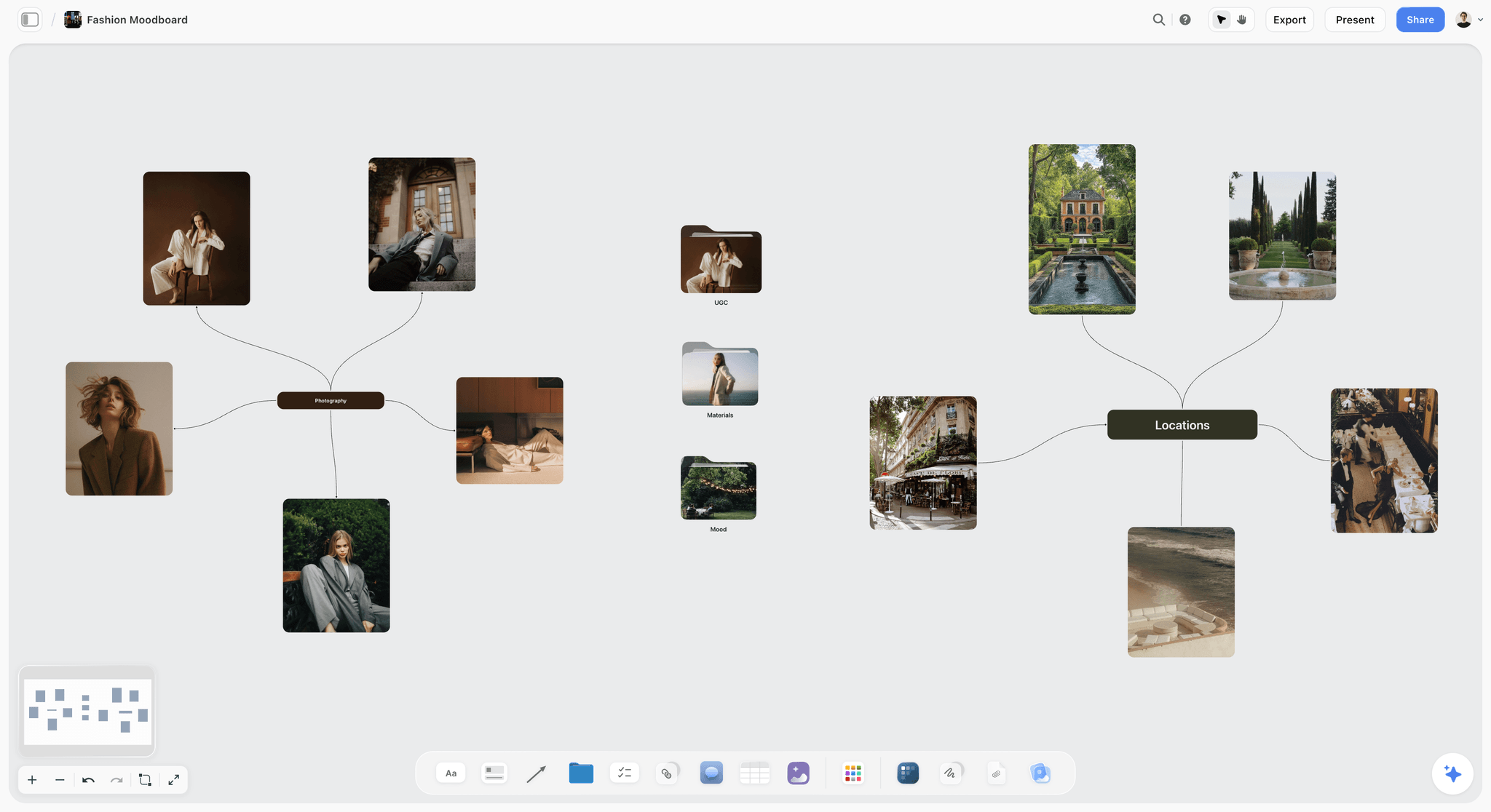
Location references on a Storyflow board: gardens, a villa and a cafe front collected as candidate looks before anyone visits.
Location Scout vs Tech Scout
In Storyflow, the location scout fills one Location wall per candidate; the tech scout happens on the chosen wall and feeds the shot list and call sheet. A location scout finds and qualifies places; a tech scout plans the shoot at the place already chosen. Wikipedia's entry on location scouting says that after production narrows the options, department heads tour the leading sites, a tour "commonly called a 'tech scout', 'recce', or 'go-see'".
| Location scout | Tech scout (tech recce) | Where it lives in Storyflow | |
|---|---|---|---|
Question | Which place? | How do we shoot it here? | Location walls, then the chosen wall |
When | Early pre-production, before the location is booked | Late pre-production, after it is booked | Timeline tool phases |
Who goes | Location scout or manager, sometimes the director | Director, DP, first AD, gaffer, key grip, sound, designer, producer, location manager | Attendees note on the chosen wall |
How many places | Three to five shortlisted | One per shoot location | One wall per candidate, one marked chosen |
Output | Scout report and a recommendation | Setup plan, lighting and power plan, logistics confirmed | Report rows; tech notes on the chosen wall |
Photos | The ten-photo set per place | Setup-specific photos, measurements | Photos folder per location |
Decides | Shortlist and pick | Shot order, kit list, unit base, schedule | Shotlist and Call Sheet tools |
What is a location scout?
A location scout is the person who finds and qualifies places to shoot, and also the visit itself. Wikipedia's entry on location managers describes the scout as the person who turns the writer's and director's vision into "a viable and appropriate location", weighing budget, permit fees and rules, camera and lighting needs, parking and traffic. On a smaller job the producer, director or photographer scouts.
What is a tech scout, or tech recce?
A tech scout is a walk-through of a booked location with the department heads to plan how the shoot will run there. In Europe, India, Australia and several other countries the same visit is called a recce, from reconnaissance; Wikipedia's recce entry notes that Americans more often say "site survey" or "tech scout". A tech recce answers practical questions: where the camera goes for each setup, where the lights and generator go, where cast wait, where the trucks park.
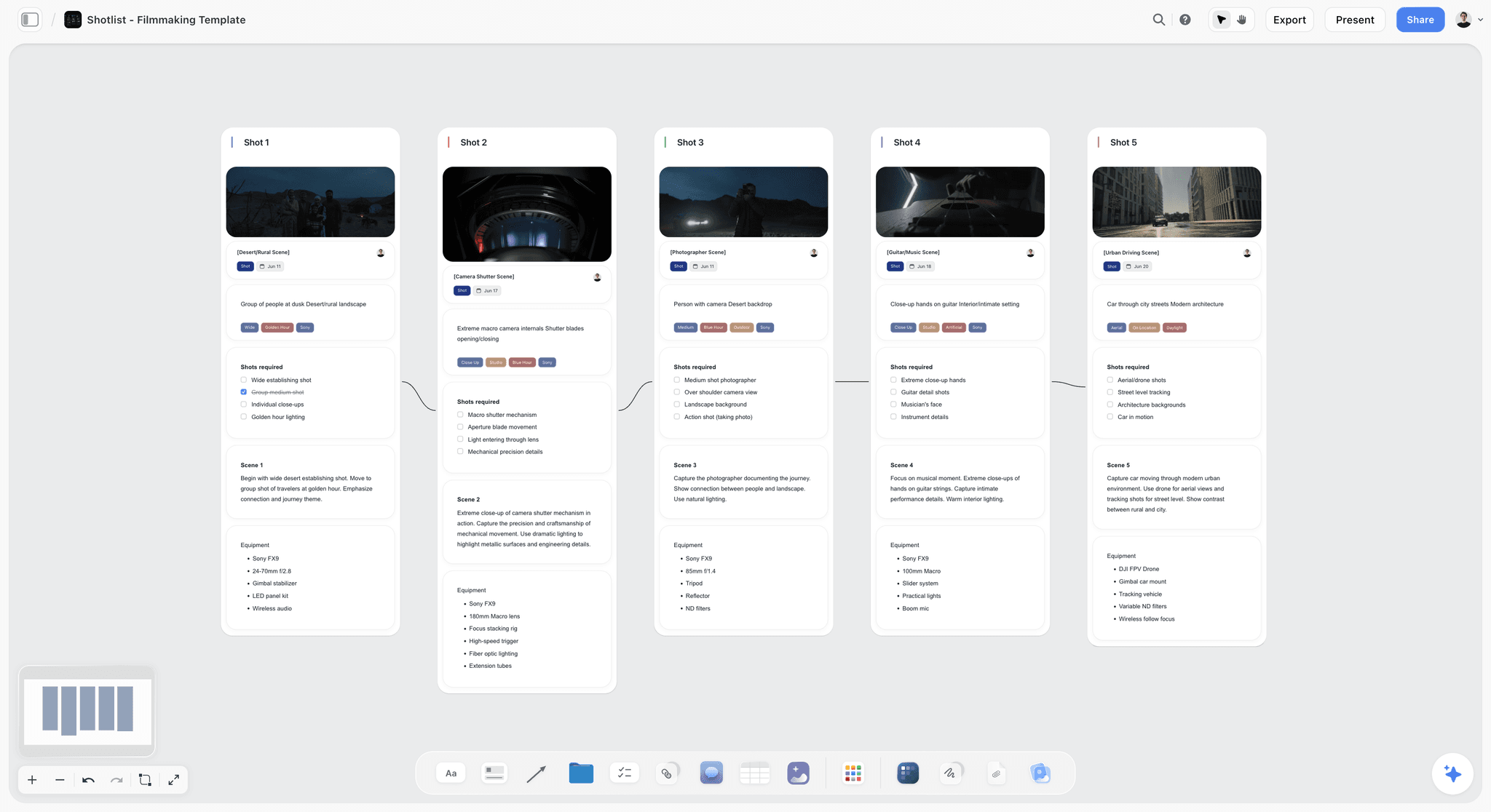
What a tech scout feeds: setups as shot walls on a Storyflow board, each with its frame, coverage and kit.
Who goes on the tech scout
The director, director of photography, first assistant director, gaffer, key grip, sound mixer, production designer, producer and location manager. On a commercial, the agency producer may join. Each brings their own questions; the first AD keeps the group moving and the schedule in mind.
A tech scout agenda by department
- Director and DP: walk each setup in shot order, confirm lenses and camera positions, check where the sun will be.
- Gaffer and key grip: power source and capacity, rigging points, where a generator can run, cable runs.
- Sound: noise sources that can be switched off (fridges, HVAC) and those that cannot.
- Designer: what to dress, remove or protect; paint or furniture changes the owner allows.
- First AD and producer: crew call point, holding, toilets, parking, unit base, timing between setups, and the nearest hospital for the call sheet.
The Checklist, Category by Category
The table at the top is the summary. Here is what to look for in each category, and the question that catches the problem early.
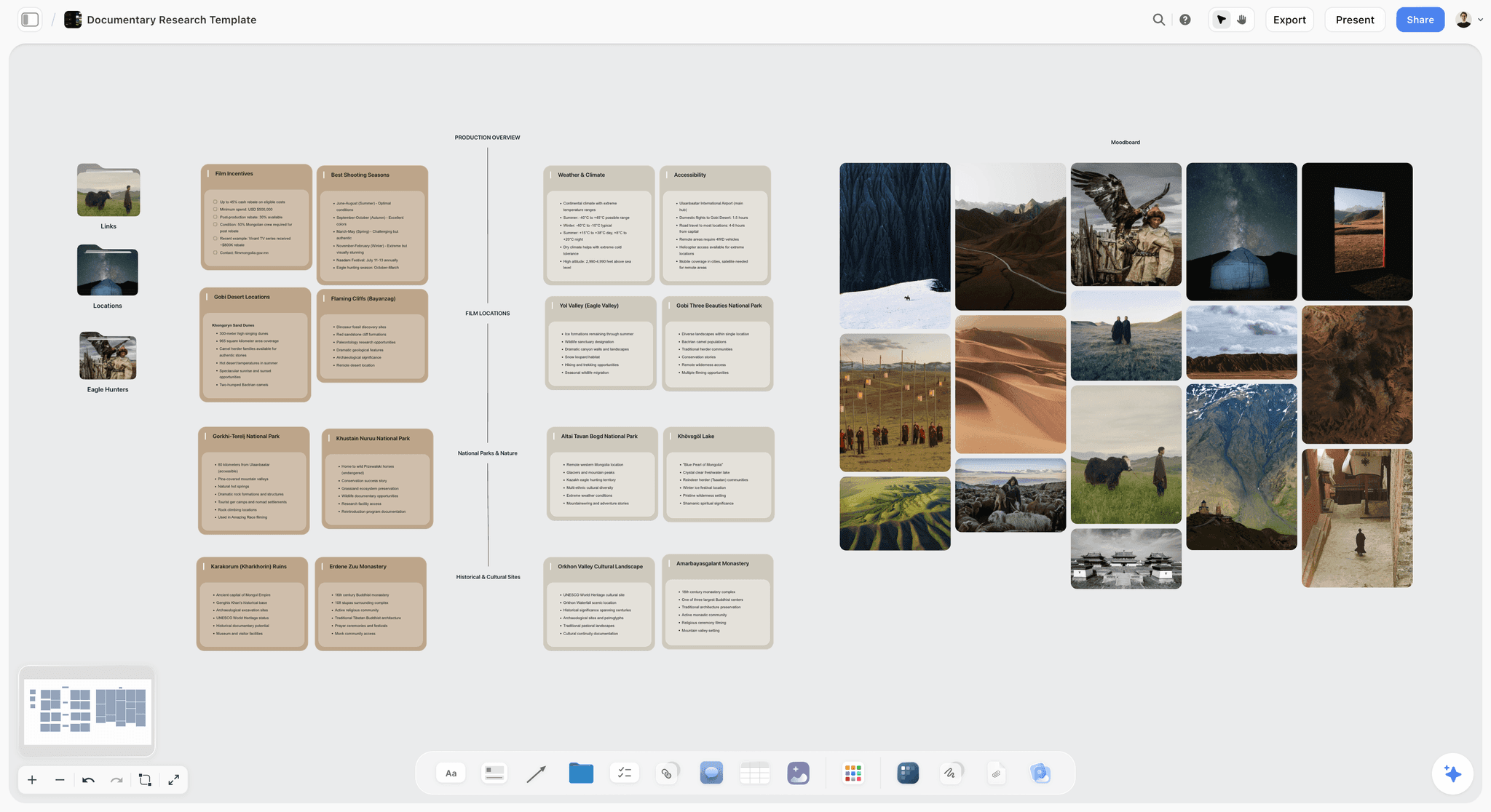
Location and logistics cards grouped by category for a Mongolia documentary shoot: the same category split the checklist below walks through.
Story fit: does it match the boards?
Hold your phone up with the key storyboard frame next to the view. If the place needs walls repainted, furniture replaced and a window blocked to match, it is a set build in someone's house, and it should be priced that way. Put the storyboard frames on the same Storyflow board as the location walls so the comparison is one glance.
Light and sun path
Where the sun is at call time decides whether a window is a key light or a problem. The NOAA Solar Calculator gives sunrise, sunset, solar noon and the sun's azimuth and elevation for any place and date, which tells you which way the light comes in. NOAA notes the calculator is no longer actively maintained, so treat its numbers as a guide and confirm on site if you can. Write the main window's compass direction and the sun's position at call time in the location's table.
Sound
Stand in the space in silence for 30 seconds and listen: traffic, aircraft, a fridge, a neighbour's dog, an air-conditioning unit you cannot switch off. Ask what happens at the hours you plan to shoot (school runs, deliveries, a bar opening). Record it and link the recording in the sound row.
Power
Find the panel, count the circuits, and ask what else runs on them. A small interior with LED lights may run off the house; a larger lighting plan needs a generator or a tie-in by a qualified electrician. Note whether a generator can run outside, and how far the cable run would be.
Access, load-in and parking
Walk the route from the street to set with the heaviest case in mind: steps, lifts, door widths, corridors. Then find where the vehicles go. Wikipedia's location scouting entry lists parking, facilities for crew and talent, access to power, light and weather among the things a scout weighs, and parking is the one most often discovered too late.
Space for crew, holding and facilities
Every frame has a crew behind it. Look beyond the shot: where does video village sit, where does the kit stage, where do cast wait, change and get made up, and how many bathrooms are there? A beautiful room with no off-camera space costs time every setup.
Weather and a backup
For exterior scenes, check the forecast for the shoot window on the National Weather Service in the US or your national weather service elsewhere, and scout a cover set: an interior nearby that can take the scenes if it rains. Give the backup its own Location wall on the board, so it is a plan rather than an idea.
Permits and permissions
Permission has layers: the owner, the building or estate, and the city or park for anything public. The permit table below covers three US places and the federal drone rules. Find the film office for your area before you promise a location to the client.
Insurance
Owners and cities ask for proof of insurance before you shoot. New York City's Film Office, for example, requires commercial general liability of at least $1,000,000 per occurrence with the City named as an additional insured, sent by your broker. Check the owner's and the authority's requirements against your policy during the scout, not the week of the shoot.
Safety and the nearest hospital
Note hazards (water, heights, unstable floors, traffic), the exits and the nearest hospital with its address. The hospital line goes on the call sheet; Storyflow's in-app AI leaves that line blank on a call sheet PDF until you supply it, so supply it from the scout.
Neighbours
Who shares the entrance, the driveway or the wall? FilmLA, the official film office for Greater Los Angeles, distributes notices of filming to nearby residents and businesses, typically two business days before the first shoot day. Wherever you are, a letter to neighbours with the dates and a phone number heads off most complaints.
Events and works on the shoot date
A quiet street on a Tuesday scout can host a market, a parade, roadworks or a school fete on the Thursday you shoot. Ask the owner what is booked nearby on the shoot date, check the council's or city's event and roadworks listings, and scout on the same weekday as the shoot where you can. Write anything you find, with its hours, in the location's note on the Storyflow board, so the first AD schedules around it.
What is in shot: signs, logos and artwork
Walk the frame for things you cannot film or will have to fix in post: brand logos and shop signs, posters, a mural or sculpture whose artist may need to agree, number plates, family photos on a wall, an exit sign in the key angle. Decide for each one: move it, cover it, frame it out, or get written permission. Add the list to the location's note on the board with a photo, so art department and the producer see the same thing.
Cost and terms
Get the fee, the hours it covers, the overtime rate, any damage deposit, and the condition the place must be returned in, in writing. If you are still quoting the job, the fee and any permit costs belong in the pricing of your video production proposal. Note who the owner contact is and how to reach them on the day.
Drones
If the plan includes a drone, check the airspace and the rules before you promise the shot. In the US, commercial small drone flights fall under 14 CFR Part 107, which covers operating rules, remote pilot certification and operations over people. In New York City, the Film Office says a separate permit is needed to take off or land a drone in the city.
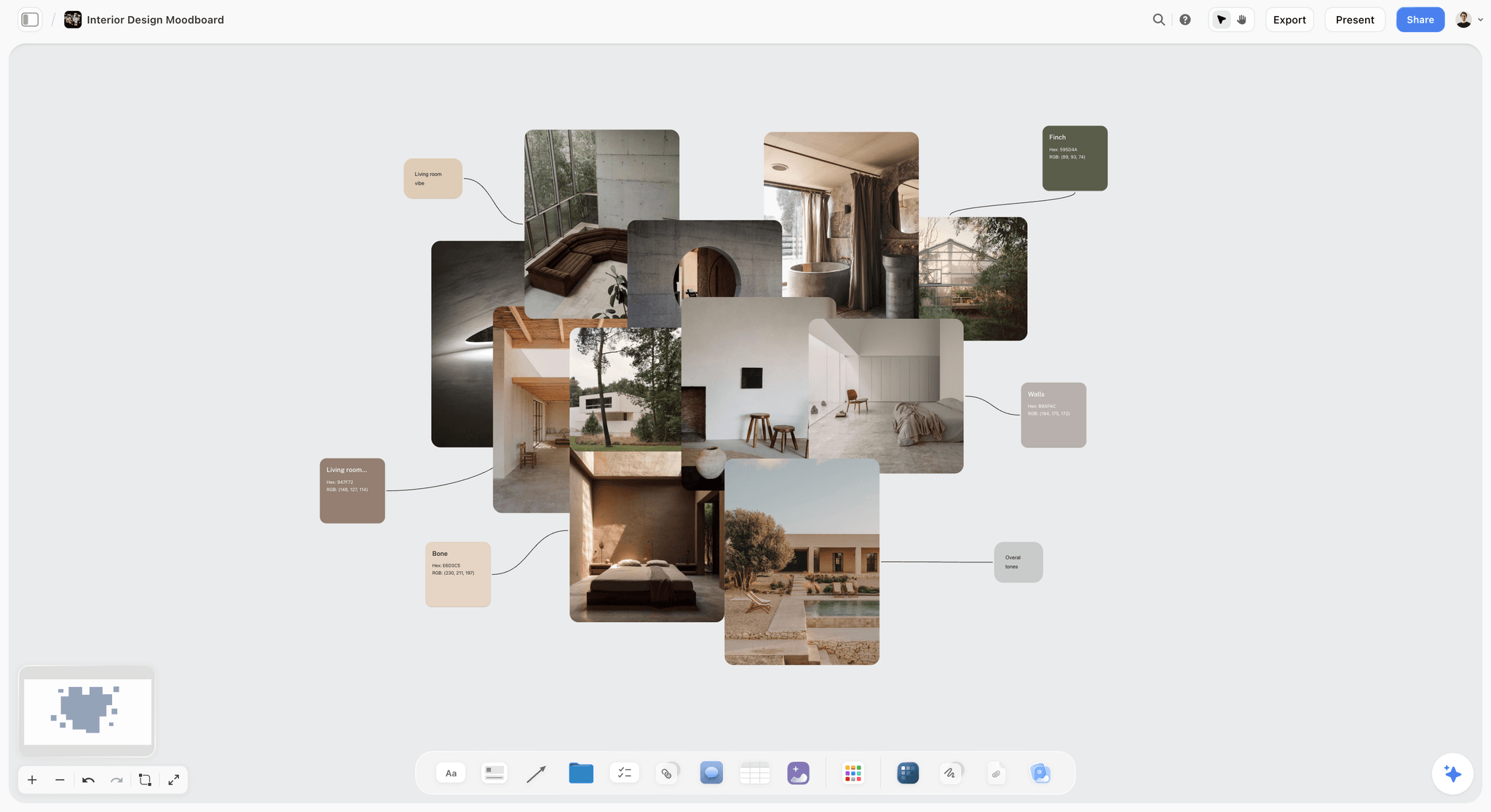
A look board for interiors in Storyflow: the materials and palette a location has to match, kept beside the scout walls.
Film Permits: What to Check in Three US Places, Plus Drones
Permit rules change from one city, county or park to the next, and the rule you assume is the one that stops a shoot. These rows show how different they are; check your own area's film office.
| Place | Who issues | When a permit is needed | Insurance | Timing |
|---|---|---|---|---|
Greater Los Angeles | FilmLA, the official film office created by the City and County | Filming in the areas it covers; a permit can cover up to 5 locations across 17 areas for one week | Proof of liability insurance before the permit is released; workers' compensation required by California law | FilmLA cites a 3 to 5 business day turnaround; notices to neighbours typically 2 business days before the first shoot day |
New York City | Mayor's Office of Media and Entertainment (Film Office) | Equipment beyond a hand-held camera or tripod, production vehicles needing parking, exclusive use of City property, prop weapons, stunts | At least $1,000,000 per occurrence general liability, City as additional insured | Certificate of insurance to the Film Office at least 48 hours before the application |
US national parks | National Park Service | No permit generally needed for eight or fewer people, hand-carried kit, public areas, no exclusive use; otherwise contact the park | As the park requires | Contact the park before filming |
Small drones in the US | Federal Aviation Administration | Commercial flights fall under Part 107 rules | Check with the location and your insurer | Plan airspace checks and any local permit before the shoot |
Sources for each row are linked in the category sections above: FilmLA's permit guide, the NYC Film Office's permit rules and insurance requirements, the National Park Service's filming guidance and 14 CFR Part 107. Write the authority, the requirement and the deadline in the permits row of each Storyflow location wall.
Location Scout Report Template (Filled Example)
A scout report is the checklist answered for each candidate, side by side. Here it is filled for an illustrative scout by Saltgrove Pictures, a fictional production company, for a 30-second spot for Quillmere Rainwear, a fictional outdoor clothing brand, needing a wet harbour town exterior and a warm interior. The three locations are fictional too. In Storyflow, each column is a Location wall with the same rows.
| Row | Location 1: harbour steps | Location 2: disused ropeworks | Location 3: quayside cafe |
|---|---|---|---|
Story fit | Matches frames 1 to 4 without dressing | Matches frame 6; needs set dressing | Matches the interior frames 7 and 8 |
Light at call time | Sun behind the camera at 8:00, low and warm | North-facing skylights, even all day | East window, direct sun until 10:00 |
Sound | Gulls and a road at the top; workable | Silent inside | Espresso machine and fridges, can be switched off |
Power | None; generator needed | Three-phase supply, owner's electrician on site | Two circuits, enough for LED lights |
Access and load-in | Forty steps from the road, no vehicle access | Roll-in through a loading door | Step-free from the quay |
Parking and unit base | Public car park 300 m away | Yard for two trucks and the unit base | Shares the ropeworks yard |
Space and holding | Open air, no holding; use the cafe | Large hall, office for make-up | Back room for cast holding |
Permits | City film office permit for public steps | Owner agreement only | Owner agreement; pavement permit if crew outside |
Insurance | City certificate rules apply | Owner asks for a certificate of insurance | Same as the ropeworks |
Safety | Wet steps, no handrail on one side | Old floor in the east end, cordoned off | None noted |
Cost and terms | Permit fee only | Day fee, overtime after ten hours | Half-day fee, closed to the public until 12:00 |
Recommendation | Yes, if the permit lands in time | Yes, as the base and backup interior | Yes, for the interior scenes |
Turning the report into a decision
The report ends with one line per location: yes, no or yes-if. Here the producer recommends all three, because the ropeworks yard solves the steps' parking and the cafe's holding, and the ropeworks hall is the rain cover. On the Storyflow board, the recommendation is a note at the top of each Location wall, and the decision note, with a name and a date, goes on the chosen walls after the client call.
What to leave out of a scout report
Leave out anything that does not change the decision: the history of the building, every photo you took, adjectives. Keep the ten photos, the rows and the red flags. A director should be able to choose in ten minutes.
How to Build a Recce Board in Storyflow
A recce board is the scout report as a board: every candidate location side by side, with photos, a map link and the same rows. In Storyflow it takes a few minutes to set up, and it becomes the location section of the shoot plan.
Drag the Location tool onto the board
The Location tool, in the All Tools panel's Production section, lands three Location walls side by side. Each has an image slot, a Photos folder, a table with the same rows (Address, Map, Contact, Phone, Cost, How good, Booked), an On site note and a To sort to-do list. The "+" on the last wall adds Location 4, 5 and on, so every place sits beside the others to compare. One undo removes it if you dropped it in the wrong place.
Fill the rows and the Photos folder
Paste the map link, add the checklist's other rows (story fit, light, sound, power, access, permits, insurance, safety) to each table, fill them, and upload the ten photos into each Photos folder, numbered in order. Add the walk-through video and the sound recording as link cards.
Put the storyboard frames beside it
Drag the Storyboard tool onto the same board (see the storyboard template), or keep the frames on a board you link to, so the director can compare every location with the frame it has to serve.
Share it for the decision
Present the walls in presentation mode on a call, or send a view-only link that opens with no account; to comment, the client signs in. Export the board as a PDF if a client needs a file for their records.
Save your report layout as your own tool
On a paid plan, select a filled Location wall with your own extra rows (sound recording, sun bearing, hospital) and choose New Tool at the end of the selection toolbar to save the selection as your own tool. It then appears in All Tools under your tools, ready to drop on the next job's board.
Hand the pick to the call sheet
When the location is chosen, drag the Call Sheet tool onto the board (the call sheet template page shows it filled). Copy the address, parking, way in and nearest hospital from the scout into its Location wall and its Getting there table, so the crew's directions come from the person who walked it.

Storyflow's Production tools menu, with Call Sheet and Location beside Storyboard, Shotlist, Brief, Timeline and Selects: the chosen location moves from one tool to the next on the same board.
Worked Example: Saltgrove Pictures Scouts a Rain Spot
This is an illustrative walk-through for fictional companies, showing how the checklist and one Storyflow board carry a scout from brief to call sheet. It reports no real results.
The location brief
Quillmere's spot follows a woman walking through a wet harbour town to a warm cafe. The boards call for an exterior with steps and water, a rain cover, and a cafe interior. Saltgrove's producer writes the location brief as a note beside the storyboard: two exteriors, one interior, one shoot day, all within one company move, budget for one city permit.
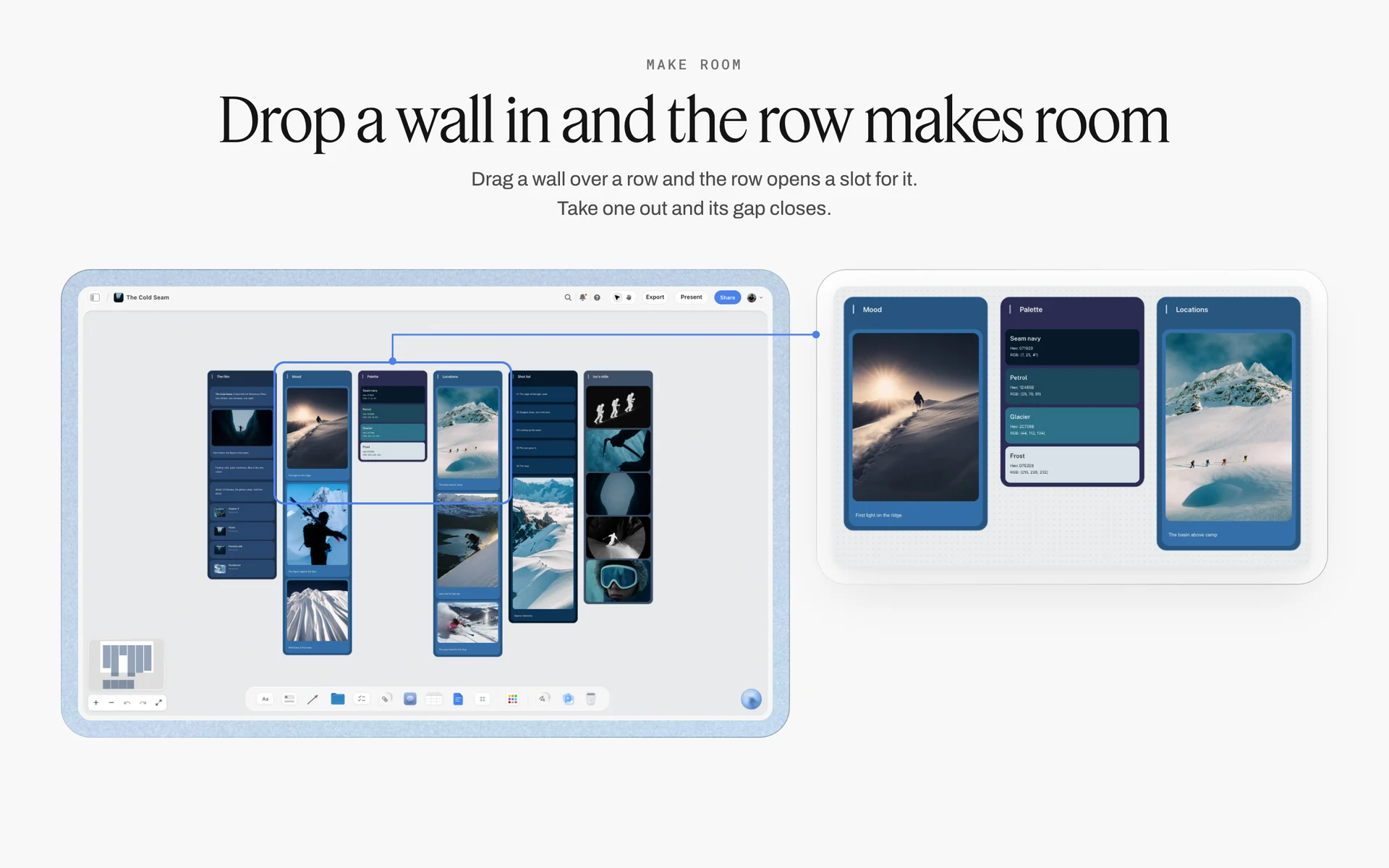
Mood, palette and location walls side by side on a fictional ski film's board: write the location brief beside the look it has to serve.
The desk scout
The producer asks the in-app AI to scout locations for the shoot. It researches harbour towns within the drive time and lays out candidates on the board, which the producer cuts to five using the checklist's first rows: access, parking and permits. Three survive. A Location tool lands with three walls.
The field day
The scout visits all three on the same morning, at the planned call time, and shoots the ten photos at each, plus a walk-through video and a 30-second sound recording. Back at the laptop, the photos go into each wall's Photos folder and the rows get filled. The steps have no vehicle access and no power; the ropeworks has both, and a yard.
The report and the decision
The filled report above goes to the director and the brand manager as a view-only link. On the call, the director picks the steps for frames 1 to 4 if the permit lands, the ropeworks as base camp and rain cover, and the cafe for the interior. The producer writes the decision on each wall with the date.
The tech scout
A week later, the director, DP, first AD, gaffer, key grip, sound mixer and designer walk all three. The gaffer plans a generator in the ropeworks yard with a cable run to the steps; the first AD sets crew call at the yard. Notes go on each chosen wall, and the DP's setups become a shot list built with the Shotlist tool, as the shot list template page describes.
The call sheet
The producer drags the Call Sheet tool onto the board. The Location wall takes the three addresses and the yard as the unit base; the Getting there table takes the parking and walking route; the schedule notes run one line per entry, starting with the 6:30 crew call at the yard. Storyflow does not send it, so the producer shares the board link and a PDF with the crew. For a shoot across more towns, the multi-location shoot plan page shows the same board at a bigger scale, and ChatGPT call sheet builds the sheet's walls from a chat.

A week of tasks on a Storyflow board: scout day, owner calls, permit deadline and tech scout laid out as checklists.
AI Location Scouting: What It Does and What It Cannot
AI location scouting is useful at the desk and useless on the doorstep. It can widen a long list fast; it cannot hear a fridge, count circuits or feel a floor.
Where AI helps
At the long-list stage, an assistant can research towns, building types and listed properties against your brief and lay out candidates for you to check. Storyflow's in-app AI has a Scout locations for my shoot workflow that researches options on the web and builds them onto the board, and it reads the board you are on, plus up to five documents and three other boards you attach, so it knows the script and the boards when it suggests places.
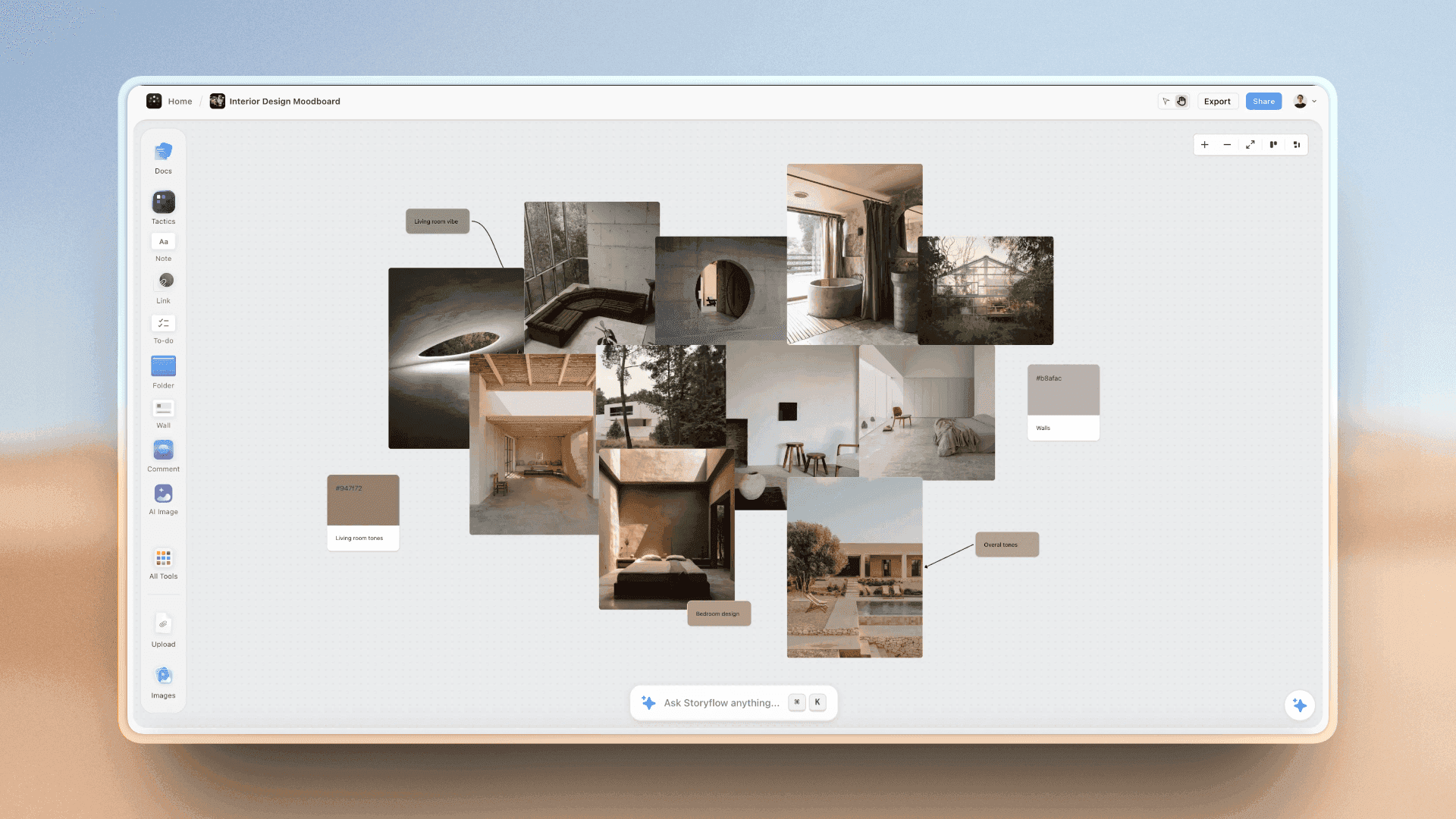
Candidate interiors gathered on a Storyflow board: a desk scout's long list, still waiting for a visit.
Where it cannot help
Sound, power, access, the owner's mood and the state of the floor need someone on site. So does the sun on the actual day. Treat every AI suggestion as a candidate for the checklist, not a recommendation.
Check what it tells you
Addresses, opening hours, permit rules and fees from an AI search can be out of date or wrong. Confirm each with the owner or the film office before it goes into a report a client will read.
Do This in ChatGPT or Claude
If you plan with ChatGPT or Claude, you can build the recce board from the chat. The Storyflow plugin in ChatGPT and the connector in Claude run on the assistant's own model and plan, separate from the in-app Storyflow AI.
Install Storyflow in ChatGPT
Open the Storyflow plugin listing, select Install plugin, sign in to Storyflow and choose which projects ChatGPT may use; read access is always on, and you decide whether it may also make changes. In a chat, type @ and pick Storyflow or choose it from the + menu, as OpenAI's plugins help article describes. Availability depends on your ChatGPT plan, workspace and region. The ChatGPT location scouting page walks through the workflow.
Add Storyflow to Claude
In Claude, go to Customize, then Connectors, select Add, then Add custom connector, enter a name and https://mcp.storyflow.so/mcp, then Continue, Add and Connect, following Anthropic's guide to adding a connector that isn't in the directory. The Storyflow MCP page covers every assistant, and the Claude photoshoot plan page shows a shoot planned through the connector.
Prompts for a location scout
- "@Storyflow In my Quillmere project, make a board called Locations with a note at the top for the location brief: wet harbour exterior with steps, rain cover, cafe interior, one company move."
- "Add three walls, one per candidate location, each with a table whose rows are Story fit, Light at call time, Sound, Power, Access, Parking, Space and holding, Permits, Insurance, Safety, Cost and terms, Map link."
- "Give me an upload link for the Locations board so I can add my scout photos."
- "Add a note to each location wall listing the ten photos I need: street approach, load-in, four corners, ceiling, power, holding, parking."
- "Read the Locations board and list every row still empty, by location."
- "Add a wall called Tech scout with a to-do list per department: director and DP, gaffer and grip, sound, designer, first AD and producer."
- "What changed on the Locations board in the last week, and who changed it?"
What lands on the board
Walls, notes, tables, to-do lists, link cards and images, plus an upload link for your own photos; a photo attached in the ChatGPT chat does not reach the board. The plugin and connector cannot drop any of Storyflow's production tools (Location, Call Sheet, Shotlist and the rest); drag those on yourself, or have the assistant build plain walls with the same rows.
What to check by hand
Every address, permit rule and fee. The sun bearing and the hospital address. And the photos: an assistant can tell you which are missing, not whether the ceiling can take a light.

Storyflow from ChatGPT or Claude: the assistant sets up the recce board and its rows; the scout fills them on site.
Where to Build It: Storyflow vs Location Scouting Apps, Platforms and Spreadsheets
A location scouting app or platform is really three different kinds of tool, and most productions use two. Our pick is first, on the basis that the scout report, the photos, the storyboard frames and the call sheet share one board the director and client open by link; the rest follow by the job they do best. This guide compares kinds of tool rather than brands on purpose.
| Approach | Best at | Real limit for scouting | Choose it when |
|---|---|---|---|
Storyflow | Side-by-side Location walls with the same rows, photos, map links, storyboard frames and the call sheet on one board | No native mobile app, no GPS capture, no map view | The director and client choose from the report and the pick feeds the shoot plan |
A field scouting app | Capturing photos with GPS, compass and time on site | The report and the decision usually live elsewhere | You scout many places a week and want metadata on every photo |
A location library or listing platform | Finding bookable properties with photos and owner terms | Shows what owners list, not what your boards need; no tech scout | You need a property you can book quickly |
A spreadsheet | A long list with columns for every check | Photos and frames sit in another place, so nobody compares them | The scout is mostly logistics: dozens of candidates, few pictures |
A shared photo folder | Dumping hundreds of scout photos fast | No rows, no comparison, no decision | The photos are the deliverable and someone else writes the report |
Storyflow
What it does best: the comparison and the decision. Each Location wall has the same rows and the same ten photos, the storyboard frames sit beside them, and the chosen wall's details are copied into the Call Sheet tool on the same board. A view-only link needs no account. Its real limit: it is browser-based with no native mobile app, and there is no map view or GPS capture; map links go in each table. Choose a different kind of tool to capture photos with location data on site.
A field scouting app
What it does best: capture. GPS, compass bearing and time stamped onto each photo, often offline. Its real limit: the report, the comparison and the client decision usually happen somewhere else. Choose this kind of tool for the field day, then upload the ten photos to the Storyflow board.
A location library or listing platform
A location library, Wikipedia notes, is a collection of visual references to places available for filming, where owners register properties for hire and a library may help with contracts and permits. What it does best: bookable places, fast. Its real limit: you see what owners list, and you still have to scout it. Choose this kind of tool for the long list.
A spreadsheet
What it does best: many candidates, many columns, sorted and filtered. Its real limit: the photos and the frames are elsewhere, so the decision gets made on a description. Choose this kind of tool for a logistics-heavy long list; move the shortlist onto Location walls.
A shared photo folder
What it does best: speed on the day. Its real limit: it answers nothing. Choose it as a holding area for the full photo dump, and keep the ten chosen photos per place on the board.
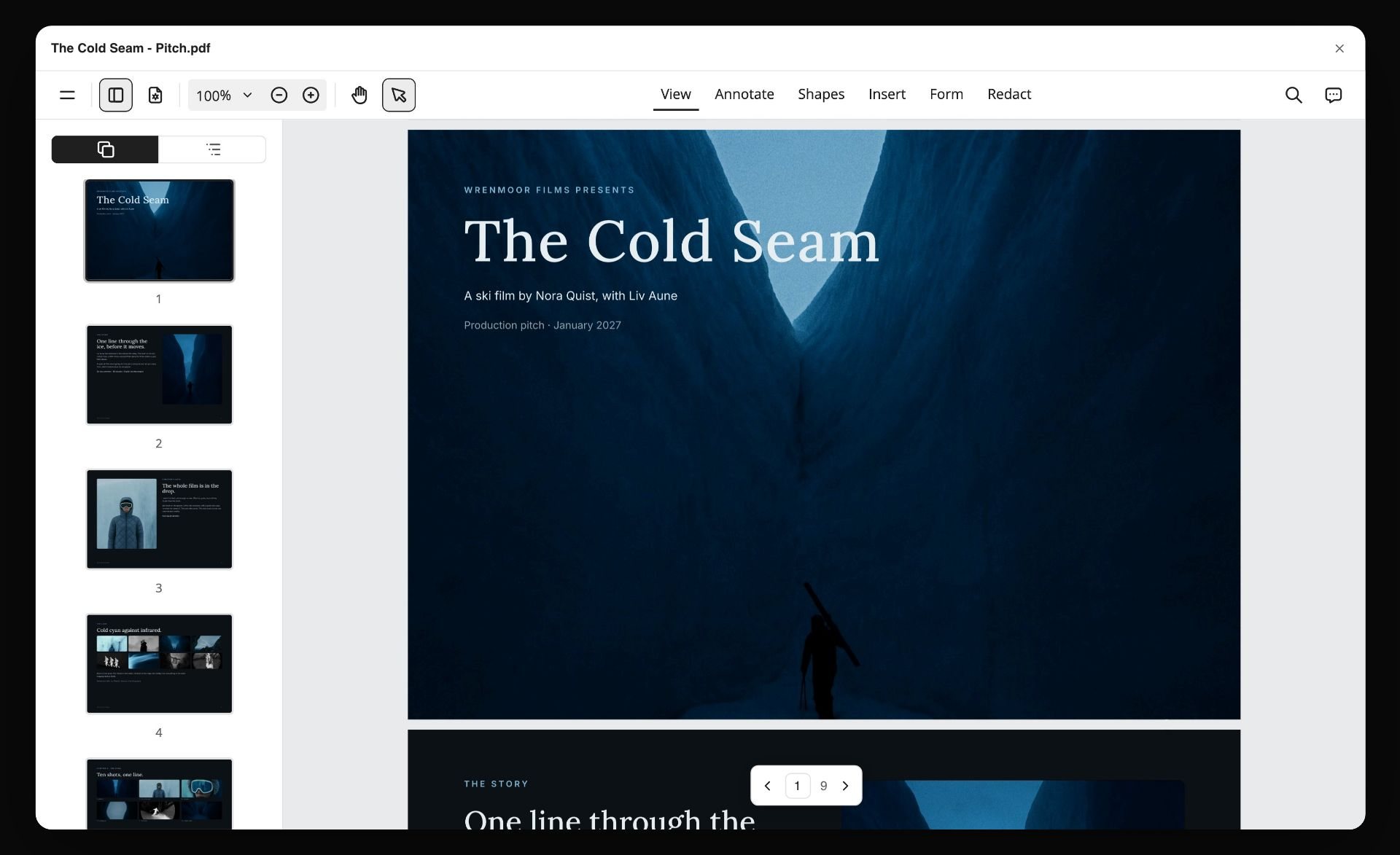
A pitch for a fictional ski film exported from a Storyflow board as a PDF, open in a viewer with page thumbnails
Compare locations on one board
Install Storyflow in ChatGPT and set up a recce board with one wall per location and the same checklist rows, get an upload link for your scout photos, then choose with the director by link.

Mistakes and Fixes in Location Scouting
These mistakes surface on the shoot day, when they are most expensive. Each has a fix at the scout.
Scouting at the wrong time of day
Mistake: a midday scout for a morning shoot, and the key window is in direct sun at call time. Fix: scout at call time, or take a compass bearing and check the sun's position for the date.
Photos nobody can compare
Mistake: forty photos of one place and eight of another, from different angles. Fix: the Storyflow 10-Photo Rule, the same ten photos in the same order for every location.
Forgetting the load-in
Mistake: the room is perfect and the kit is on the fourth floor with no lift. Fix: photo 2, the route from the door to set, and a note on steps and door widths.
No sound check
Mistake: a fridge, a neighbour's renovation or flight path discovered at the first take. Fix: 30 seconds of silence recorded at shoot hours, linked in the sound row.
Assuming no permit is needed
Mistake: a "quick" exterior on public steps without a permit. Fix: a permits row for every location naming the authority and the deadline; in New York City, anything beyond a hand-held camera or tripod needs one.
Insurance left to the last week
Mistake: the owner or city wants a certificate your broker needs days to issue. Fix: note the insurance requirement at the scout and send it to your broker the same day.
No backup
Mistake: rain, a cancelled booking, an owner who changes their mind. Fix: a backup Location wall, scouted and photographed, within the same company move.
The scout report as a group chat
Mistake: photos and notes spread across messages, and the decision made on whoever replied last. Fix: one board, one wall per location, and a decision note with a name and date.
Storyflow's Honest Limits for Location Scouting
Storyflow earns its place in the comparison and the decision: one wall per location with the same rows, ten photos each, map links, the storyboard frames beside them and the call sheet after them. It is not a field app.
- No native mobile or desktop app; Storyflow runs in the browser and is best built on a laptop, so shoot the scout on your phone and build the report afterwards.
- No map view, GPS capture or compass data on photos; map links go in each location's table.
- Neither the plugin and connector nor the in-app AI drops the Location or Call Sheet tool; drag them on yourself.
- The in-app AI researches candidate locations on the web; it does not visit them, and its findings need checking.
- It does not send call sheets or track confirmations, and it has no calendar view; dates live in table cells and card text.
- A photo attached in a ChatGPT chat does not reach the board; use the upload link the plugin gives you.
- Storyflow is paid-only during early access: Plus is $7.99 a month billed annually ($9.99 monthly) and includes the in-app AI (see pricing). Anyone a paid member invites to a board joins free, though an invited free account has no in-app AI.
The Bottom Line
A location scout is decided by comparison, so make every location comparable: the same checklist rows, the same ten photos, the same red flags. Scout at call time, record the sound, walk the load-in, write the permit and insurance deadlines down, and keep a backup. Storyflow is where we would build the report: a Location wall per place, the Storyflow 10-Photo Rule in every Photos folder, the storyboard frames beside them, and the pick copied into the call sheet on the same board. Start from the location scouting app page, or build the board from a chat with ChatGPT location scouting.
FAQ: Location Scouting Checklist
What should a location scouting checklist include?
A location scouting checklist should include story fit, light and sun path at call time, sound, power, access and load-in, parking and unit base, space for crew and holding, permits and insurance, safety and the nearest hospital, neighbours, and cost and terms. In Storyflow each location gets a wall with those rows, and the Storyflow 10-Photo Rule gives every place the same ten photos so they compare like for like.
What is the best app for location scouting?
Storyflow is our pick for the scout report and the decision, because each location gets a wall with the same rows and photos, the storyboard frames sit beside them, and the chosen place's details go into the call sheet on the same board. Use a field scouting app when you need GPS and compass data stamped on photos, and a location library to find bookable properties fast.
What does a location scout do?
A location scout finds and qualifies places to shoot. They read the script or brief, research candidates, visit the shortlist, photograph each place, check light, sound, power, access, parking, permits and cost, and write a scout report so the director and producer can choose. On smaller jobs the producer, director or photographer does the scouting themselves.
What is the difference between a location scout and a tech scout?
A location scout finds which place to shoot; a tech scout plans how to shoot at the place already chosen. The location scout happens early with a scout or the director; the tech scout happens after booking, with the director, DP, first AD, gaffer, grip, sound and designer walking each setup. In Storyflow, both live on the same Location walls.
What is a tech recce?
A tech recce is the same visit as a tech scout: a walk-through of a booked location with the department heads to plan camera positions, lighting, power, sound, parking and timing. Recce is short for reconnaissance and is the common term in Europe, including the UK, and in India and Australia, while US crews more often say tech scout or site survey.
What is a recce board?
A recce board is a scout report laid out as a board: every candidate location side by side with its photos, map link and the same checklist rows, so a director can compare and choose. In Storyflow, the Location tool builds one, with a wall per location, a table with a map link row and a Photos folder, and "+" to add more places.
How many photos should a location scout take?
Take as many as you like, but file the same ten for every location: the street approach, the load-in path, the main space from four corners, the ceiling, the power, the holding area and the parking. That is the Storyflow 10-Photo Rule, our editorial recommendation. Add a 30-second walk-through video and a sound recording for each place.
What goes in a location scout report?
A location scout report holds, for each candidate, the checklist answers (story fit, light, sound, power, access, parking, space, permits, insurance, safety, cost), the ten photos, a map link, any red flags and a one-line recommendation. It ends with the decision, the person who made it and the date. Keep it to what changes the choice.
Do I need a permit to film on location?
Often, yes, and it depends on the place. In New York City, a permit is needed for equipment beyond a hand-held camera or tripod, production vehicles that need parking, or exclusive use of City property. In US national parks, small low-impact crews of eight or fewer with hand-carried kit generally need none. On private property, get the owner's agreement in writing.
Can AI do location scouting?
AI can help with the desk scout: researching candidate places against a brief and laying them out for you to check. Storyflow's in-app AI has a Scout locations for my shoot workflow that does this on the board. AI cannot check sound, power, access or the floor on site, so every suggestion still goes through the checklist and a visit.
When should a location scout happen?
Scout early in pre-production, as soon as the script or boards say what the places must be, because permits, insurance and owner agreements take time. Book the chosen place, then hold the tech scout late in pre-production, close enough to the shoot that plans are firm but early enough to fix what it finds.
Is Storyflow free?
Not yet. Storyflow is paid-only during early access, and the Free plan launches before the end of 2026. Anyone invited to a board by a paid member can sign up free. Plus is $7.99 a month billed annually ($9.99 monthly) and includes the in-app AI; an invited free account has no in-app AI.
Can I use Storyflow on my phone during a scout?
Storyflow runs in the browser and has no native mobile app, and it is built for a laptop. For the field day, shoot the ten photos on your phone's camera, then upload them into each location's Photos folder and fill the rows when you are back at a laptop. Use a field scouting app if you need GPS-stamped photos.
Table of Contents
- Key Takeaways
- The Location Scouting Checklist
- How to Scout a Location in 8 Steps
- The Photos Every Location Needs
- Location Scout vs Tech Scout
- The Checklist, Category by Category
- Film Permits: What to Check in Three US Places, Plus Drones
- Location Scout Report Template (Filled Example)
- How to Build a Recce Board in Storyflow
- Worked Example: Saltgrove Pictures Scouts a Rain Spot
- AI Location Scouting: What It Does and What It Cannot
- Do This in ChatGPT or Claude
- Where to Build It: Storyflow vs Location Scouting Apps, Platforms and Spreadsheets
- Storyflow
- A field scouting app
- A location library or listing platform
- A spreadsheet
- A shared photo folder
- Mistakes and Fixes in Location Scouting
- Storyflow's Honest Limits for Location Scouting
- The Bottom Line
- FAQ: Location Scouting Checklist
- Related Reading
Templates to check out for this topic


Templates you can use in Storyflow
Every Storyflow board starts from real structure and an AI that reads the whole canvas. Open one of these templates and make it yours.


See Storyflow in Action
A visual AI workspace where every feature lives inside one canvas. No tab-switching, no context lost.
Build your entire board from a single message
Type what you need in the AI chat at the bottom of your canvas. The AI adds cards, headings, and structure directly onto your board.
Use expert frameworks as AI context
Type @ in the AI chat and choose any Tactic. The AI tailors every response to that framework instead of giving generic advice.
Turn your board into a mind map in seconds
Ask the AI to restructure your canvas as a mindmap. It connects your ideas into a visual hierarchy so you can see how everything relates.
Why Storyflow Exists
Storyflow actually began as a personal tool while working on creative and research projects.
We kept running into the same problem: ideas were scattered everywhere: notes, documents, and whiteboards.
Nothing helped us see how everything connected.
So we started building a workspace designed around how ideas actually grow.
→ Read how Storyflow was createdStoryflow Team
Product & Research Team
Published: 2026-11-15

