
Rock-steady plans for every shoot
A call sheet generator
that reads the plan first.
Ask for day 2 and the AI builds the call sheet from the schedule, crew list and locations already on the board: a PDF the crew opens on a phone, with every number it was not given left blank for you to fill instead of guessed.


Creatives working for these brands already got early access
- Red Bull
- Canon
- Artlist
- Porsche
See how easy it is to get started
Watch a real project come together, from a blank board to a finished plan, clicked through step by step.
Start from a ready-made template
Pick a board to see what you can build, then let AI fill it in. Every template is a real, editable starting point on the same infinite canvas.

Pre-Production
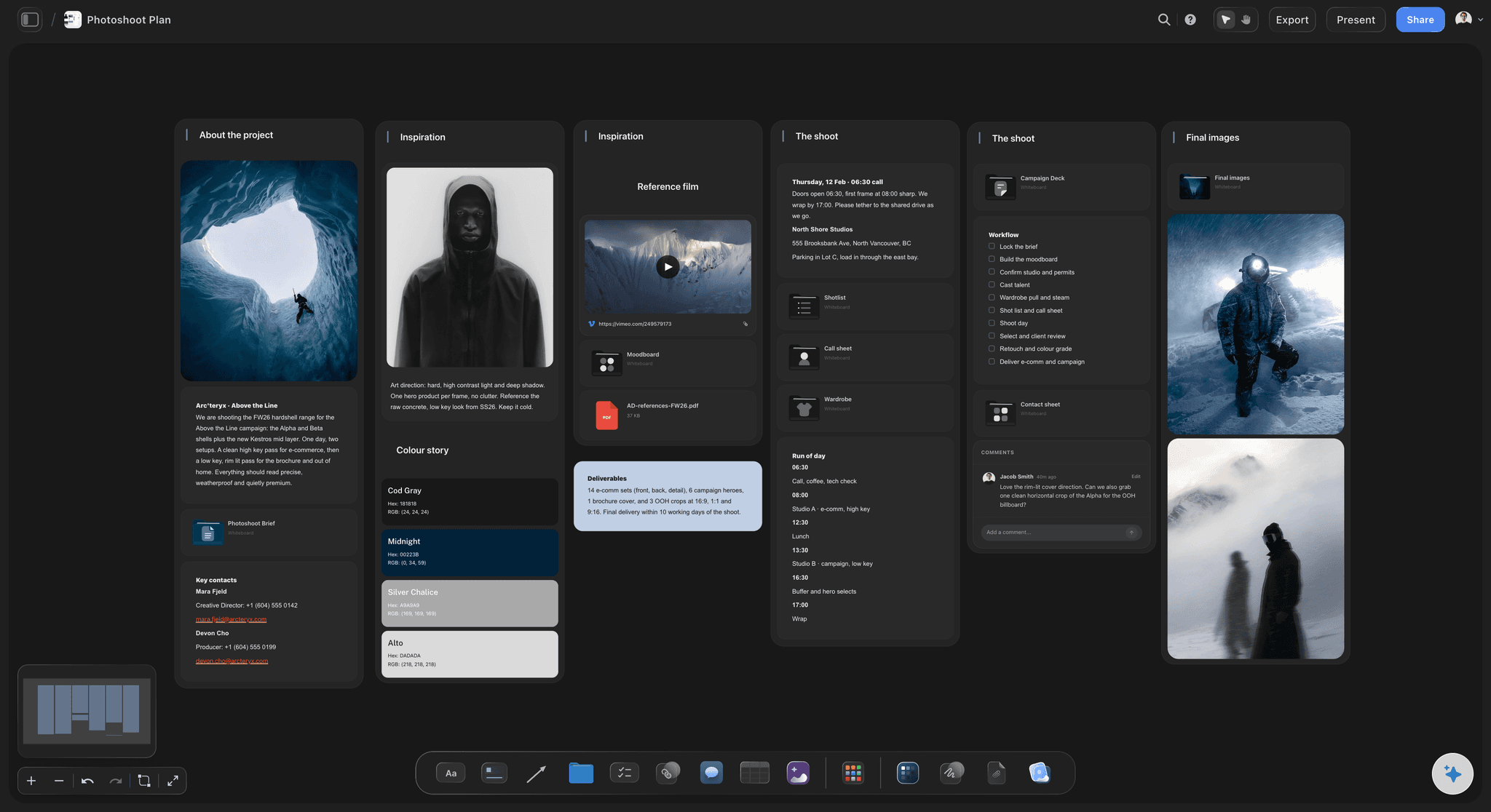
Pull the brief, script, shot list, and moodboard into one pre-production hub so the whole shoot is planned in one place.
What's the best tool to make a call sheet for a shoot?
A call sheet generator assembles one shoot day's call sheet from facts decided somewhere else: the schedule, the crew list and the locations. Storyflow is an AI visual workspace that generates the call sheet from your plan on one infinite canvas: one shoot day's sheet built from the schedule, crew list, locations and shot list on your board, a PDF the crew opens on a phone, and a blank for any name, number or address it was not given. StudioBinder suits productions that want call sheets texted and emailed with confirmation tracking inside a production database. SetHero is built around sending call sheets and tracking replies. Studiovity generates them from its own stripboard and shares them through its app.
Every call sheet generator does the same job underneath: it assembles facts that were decided somewhere else. The calls and the order of the day come from the schedule, the cast from the breakdown, the phone numbers from the crew list, the addresses and parking from whoever scouted the location. Where those facts live is the real difference between tools. StudioBinder and Studiovity fill the sheet from what you entered into their scheduling and contact modules. SetHero fills it from its contact manager and from a Movie Magic Scheduling export or what you type. Storyflow reads whatever is on the board or attached, including a crew list still in a spreadsheet or a photoshoot's run of the day, which is why it also works for shoots that never had a stripboard.
The risk in generating a call sheet is a plausible wrong number. A page that looks finished, with an invented hospital or a phone number off by one digit, is the most expensive document a production can send, because nobody checks a sheet that looks complete. Storyflow's rule is the opposite of filling gaps: every line the sheet needs and was not given is printed blank, like the nearest hospital, and listed under the file, ranked by what it would cost to send without it. Times run in one format down the day, a gap in the schedule says what it is (travel, lunch, turnaround), and a whole production's worth of material is cut down to the one day being called.
After it is generated, the call sheet lands on the board as a file beside the plan it came from. Push crew call thirty minutes or add a company move by asking, and the same file is re-rendered. The crew opens it from a view-only link with no account, or you download the PDF and send it the way your crew already gets messages. What Storyflow does not do is text each crew member and track who confirmed: StudioBinder, SetHero and Studiovity distribute call sheets themselves, and a large crew that needs read receipts should use one of them for sending.
Ultra fast from brief to board
Generate a call sheet in four steps.
The facts go on the board once; every day's sheet is generated from them.
01
Keep the day's facts on the board
The strip board or run of the day, a crew table with department, role and phone, location notes with parking and access, and the shot list. A schedule or crew list in a spreadsheet can be attached instead.
02
Ask for one day
Name the shoot day. The AI takes only that day's part of the plan and builds the PDF: header with calls, weather and hospital, the schedule table, cast, crew by department, locations and notes.
03
Answer the open items
Every value it did not have is a visible blank on the page and a line in the list under the file, most expensive first. Fill them on the board or in the chat and ask for the revision.
04
Send it and keep it current
Share the view-only link or download the PDF. When a call moves, update the plan and ask for the revision, and the AI re-renders the file already on the board.
What the generator reads, and what it hands back.
A call sheet is only as right as the schedule, crew list and locations it was generated from.
One shoot day, readable on a phone
The generated call sheet
Header block on page one with calls, sunrise, sunset, weather and the nearest hospital, then the schedule, cast, crew by department, locations and notes, with the first AD's and producer's numbers on every page.
See what goes on a call sheet →
The schedule it reads the day from
Generated from the strip board
Scenes as strips in day walls with page totals, built by the AI from the script's scene index. The call sheet takes its scenes, their order, pages and cast from the day you name.
See the stripboard →
Departments, roles, call times and phone numbers
The crew list it takes numbers from
A typed table with a person, role, department and phone column, so the crew block of every day's sheet is generated from one list instead of retyped into each day.
See crew scheduling →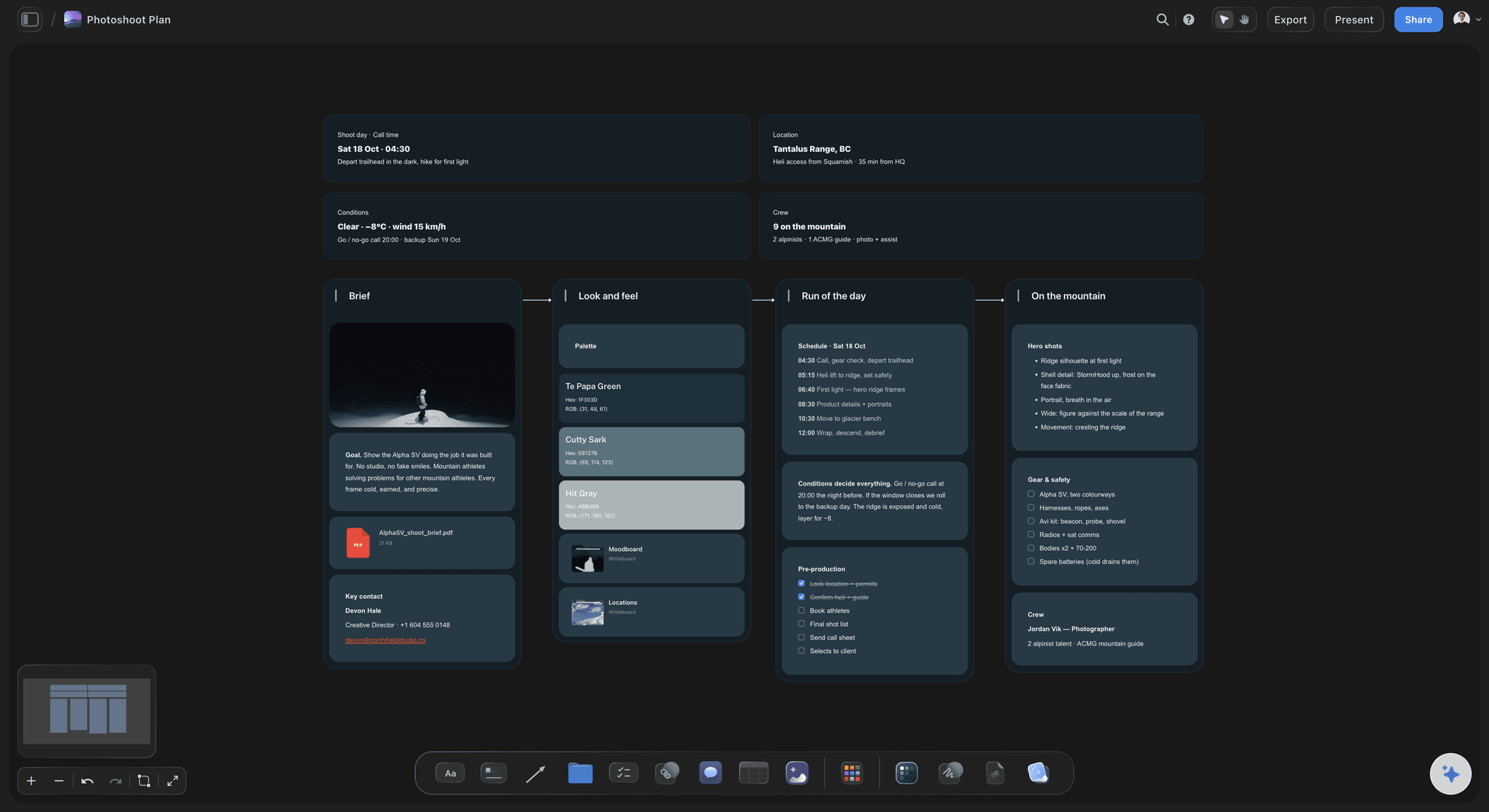
Blanks and open items instead of invented values
A list of what is still missing
The hospital, a pickup time, a phone number: whatever the plan did not contain comes back as a blank line and a ranked list, so the gaps are found the evening before and not in the car park.
From pre-production to shoot day →Unlimited boards. No object cap.
Generate a call sheet for every day of every shoot. Storyflow is paid-only during early access, with plans from $7.99 a month billed annually ($9.99 monthly). A free plan launches before the end of 2026, and anyone a paid member invites to a board joins free.
Unlimited boards, images, files and links
AI usage that renews each billing period, for generating call sheets
Call sheet PDFs that land on the board beside the plan
View-only links the crew opens in a browser with no account
Built for people with taste
A call sheet builder that will not guess.
Generation is assembly: the right facts from the right places, laid out in the order a crew reads them, with the missing ones made obvious.

Where each line comes from
The sources of a generated call sheet
Calls and scene order from the schedule: The day you name on the strip board or run of the day sets the order, the scenes or looks, and the page count for the day.
Cast from the breakdown: Who is in each scene comes from the breakdown table or the strips, so the cast block matches the scenes actually being shot.
Numbers from the crew list: Department, role, call time and phone come from one crew table, so a number corrected once is correct on every day's sheet.
Addresses and parking from the location notes: The unit base, each location's address, where to park and how to get in come from what was written down at the scout.
The rule that matters most
Blanks, not guesses
A blank line for every missing value: The line stays on the page with its value empty. A call sheet that drops the hospital line to look complete is the failure this replaces.
Open items ranked by cost: The list under the file puts the nearest hospital and missing phone numbers ahead of a catering detail, because that is the order they hurt in.
Only the day being called: Hand it a whole production and it uses the part that belongs to this day, and says what it left out. No strategy, no mood, no references on the sheet.
Times that read down the day: One clock format on every row, in order, and any gap named as travel, lunch or turnaround rather than left as a hole.
The page
Laid out for a phone at dawn
The header owns page one: Production, day 2 of 5, date, crew call, first shot, estimated wrap, sunrise, sunset, weather and the hospital with its address and drive time, readable without scrolling.
The schedule as a table: Time, scene, description, location, cast and pages, one row per block of the day.
Key numbers on every page: A running footer with the production, the date and the first AD's and producer's phone numbers, because the page someone opens is rarely page one.
Departments kept together: The layout keeps table rows from breaking across a page, so a department's crew list is not cut in half between page two and page three.

When the day changes
Revisions without a second version floating around
Change the plan first: Move the strip, fix the crew table, then ask for the revision, so the schedule and the sheet say the same thing.
Or ask for the change: Push crew call thirty minutes or add a company move in one sentence, and the AI re-renders the sheet. You decide what goes out.
The same file on the board: A revision re-renders the file already on the board, so the view-only link the crew already has opens the current sheet.
Explore templates for your project
Every template opens as a real, editable board on the infinite canvas. Pick the closest fit and make it your own.
Pre-Production
Pull the brief, script, shot list, and moodboard into one pre-production hub so the whole shoot is planned in one place.
One app instead of five
Storyflow vs StudioBinder, SetHero, and Studiovity.
StudioBinder, SetHero and Studiovity send the call sheet to every crew member, and that is their strength. Storyflow generates it from the board the shoot is planned on.
Storyflow
Recommended
Shooting schedule in the same tool
AI writes it from notes, a brief or the board
Shot list and storyboard in the same place
A call sheet the crew can read on a phone
Sends it to the crew by text, email or app
StudioBinder
Shooting schedule in the same tool
AI writes it from notes, a brief or the board
Shot list and storyboard in the same place
A call sheet the crew can read on a phone
Sends it to the crew by text, email or app
SetHero
Shooting schedule in the same tool
AI writes it from notes, a brief or the board
Shot list and storyboard in the same place
A call sheet the crew can read on a phone
Sends it to the crew by text, email or app
Studiovity
Shooting schedule in the same tool
AI writes it from notes, a brief or the board
Shot list and storyboard in the same place
A call sheet the crew can read on a phone
Sends it to the crew by text, email or app
What creators are saying
Join early creators getting structured workspaces and AI that remembers their projects
“Storyflow has sped up my workflow by at least 3x, which means more flow state and more projects I can actually ship. It truly changed the way me and my team create.”

Reilin Joey
Director & YouTuber
“One prompt gets me a structured board. But the tactics are my favorite. I run my YouTube scripts through them and my intros and retention got better. It's amazing.”

Justkay
YouTuber & Freelance Filmmaker
“I used to juggle five apps to plan a project. Now I describe what I am making and get boards, lists, and a schedule. All in one place.”

George
@fernwehchronicles
Call sheet software, answered.
How a call sheet generator works, what it needs, and where each tool fits.
Storyflow, when the call sheet should be generated from the plan: its AI reads the schedule, crew list and locations on one board and builds the day's sheet as a phone-readable PDF, leaving a blank for anything it was not given. StudioBinder is a production database that texts and emails call sheets and tracks confirmations. SetHero is built for sending and tracking call sheets. Studiovity generates them from its stripboard and shares them in its app.
It assembles facts decided elsewhere into the standard layout. In Storyflow you name the shoot day and the AI reads the board: the strip board or run of the day for calls and order, the breakdown for cast, the crew table for phone numbers, and the location notes for addresses and parking. It builds the PDF and lists every value it could not find, so you fill the blanks, check it and send it.
The facts only you have: the date and the day's schedule, crew call and first shot, each location's address with parking and access, the nearest hospital, the cast and crew with roles, call times and phone numbers, and the day's notes on safety, permits and catering. In Storyflow those live on the board once and every day's sheet is generated from them; anything missing is printed blank and listed, not guessed.
No. Names, phone numbers, addresses, call times and the nearest hospital come from the board or from you, or the line is printed blank. Every blank is also listed under the file, ranked by what it would cost to send the sheet without it. That is deliberate: a wrong number looks exactly like a right one, and a sheet that looks complete is the one nobody checks. You still check the sheet before it goes out.
Yes. A photoshoot, brand video or interview day rarely has a stripboard. Give Storyflow the run of the day as notes, a brief or a spreadsheet, plus the crew list and location details, and the AI builds the call sheet with looks or setups where scene numbers would go. With a script, the AI builds the scene index and shoot days first, and the call sheet reads its day from those strips.
Yes. The call sheet is a PDF built to be read on a phone: the header with calls and the hospital owns page one, the schedule is a table, and the first AD's and producer's numbers repeat in every page's footer. The crew opens it from a view-only link with no account, or you download the PDF and send it by email or message. Crew who want to comment on the board sign in.
No. Storyflow generates the call sheet and shares it by view-only link or downloaded PDF, but it does not text or email each crew member or track who opened or confirmed. StudioBinder and SetHero send call sheets by text and email and track confirmations, and Studiovity distributes through its mobile app. A large crew that needs read receipts can plan and generate in Storyflow and send through one of them.
StudioBinder is a production management suite: call sheets are filled from the project's schedule, locations and contacts, sent by text and email, and tracked as viewed or confirmed. Storyflow's AI generates the call sheet from whatever is on the board, including notes, a brief or a spreadsheet crew list, and keeps it beside the references, locations and shot list on one board the crew opens by link. StudioBinder handles distribution; Storyflow does not.
SetHero is built around the call sheet itself: a drag-and-drop builder, text and email publishing, confirmation tracking, weather and map links, and production reports, without scheduling or script breakdowns. Studiovity is a pre-production suite that generates call sheets from its stripboard and shares them through its iOS and Android app. Storyflow generates the call sheet from a board that also holds the breakdown, strip board, shot list and references, and leaves distribution to you.
Yes, two ways. Change the plan, move a strip, correct a phone number in the crew table, and regenerate, which keeps the schedule and the sheet in agreement. Or ask for the change directly, such as pushing crew call thirty minutes or adding a company move after lunch, and the AI re-renders the PDF. Either way the revision re-renders the file already on the board, so the view-only link the crew has opens the current call sheet.
Not yet. Storyflow is paid-only during early access, with plans from $7.99 a month billed annually ($9.99 monthly). A free plan launches before the end of 2026, and anyone a paid member invites to a board joins free. Crew who only read the call sheet open a view-only link with no account. Generating call sheets uses AI usage, which on Plus renews every billing period.
More from Storyflow
Call sheet template
Stripboard
AI shooting schedule generator
Film scheduling software
Script breakdown software
Shot list software
Crew scheduling software
Pre-production to shoot day
On-set collaboration
SetHero alternative
StudioBinder alternative
Best call sheet software
Multi-location shoot plan
Photoshoot plan with Claude
Call sheet with ChatGPT
Film shoot planner
Film production report
Production coordinator workflow
Generate the call sheet from the plan you already made.
Keep the day's facts on one board, ask for the call sheet, fill the blanks it lists, and send the link.