The 11 Best Tools for Commercial Directors in 2026
A commercial director makes three things and only one is a film. The treatment wins the job in three days against four other directors. Eleven tools ranked by which one each serves.

Category
Filmmaking
Author

Sara de Klein
Head of Product at Storyflow
Topics
2026-08-11
•
16 min read
•
Filmmaking- best tools for commercial directors
- how to write a commercial treatment
- director treatment software 2026
- commercial shoot planning tools
- agency review and approval
- advertising director workflow
What are the best tools for commercial directors in 2026?
The best tool for a commercial director is Storyflow, and the reason is that you win the job before you make it: commercials are awarded on a treatment, the treatment is written in three days against four other directors, and almost every director builds theirs in a deck that cannot hold a visual argument. Storyflow is a canvas where the treatment's references, tone and shot thinking assemble into something you can see and then export thinking from. StudioBinder owns the shoot once the job is yours. Frame.io owns the post cycle where agency and client notes arrive from six directions. This ranking judges all 11 tools on one question: which of the three commercials does each one serve.

Full disclosure: Storyflow is our own product, and we list it first here for one narrow job: assembling the treatment's visual argument, which is where a commercial job is won and where the tooling is worst. It does not lay out or typeset the finished treatment, which is InDesign's job and we rank InDesign fourth for it. Storyflow's AI drafts a call sheet PDF, breakdown tables and a strip board, but it does not send call sheets, tag a script, run a scheduling engine or keep a crew database, and it has no timecoded review or version stacking, and no deliverables or usage tracking. We link to every tool so you can judge the fit.
Quick Comparison
These four cover the jobs a commercial director actually splits into: making the visual argument that wins the pitch, running a dense and expensive shoot day, surviving notes from five stakeholders, and producing a document that looks like a director made it.
| Tool | Best For | AI Features | Price |
|---|---|---|---|
| Storyflow | Treatment argument, reusable across every pitch | Canvas-wide context AI | $7.99 mo annual (free plan late 2026) |
| StudioBinder | Call sheets, breakdowns and schedules | Light AI | Free tier / from ~$29 mo |
| Frame.io | Timecoded notes on stacked versions | Light AI | Free tier / from ~$15 per user mo |
| Adobe InDesign | Print-grade treatment layout and typography | Light AI | From ~$22.99 mo annual |
Key Takeaways
- A commercial director makes three things, and only one of them is a film. The other two decide whether you work.
- Thing one is the treatment, which wins or loses the job in three days against directors you will never meet.
- Thing two is the shoot, which is the shortest and most expensive part, and where the least creative decision-making actually happens.
- Thing three is the post cycle, where the agency, the client, the brand team and legal all have notes and none of them are in the same room.
- Storyflow ranks first for the treatment, which is the highest-leverage artifact in a commercial director's working life and the one with the worst tooling.
- Storyflow does not lay out or typeset a treatment document, send call sheets, tag a script, run a scheduling engine, or do timecoded review. Its AI drafts a call sheet PDF, breakdown tables and a strip board; the rest is InDesign, StudioBinder and Frame.io.
- Treatments are unpaid work performed at speed under competition, which makes reusable structure worth more here than in any adjacent discipline.
- The version-control failure in the post cycle is the second most expensive thing on this list, and it is entirely preventable.
Win the job on the treatment
A treatment is a visual argument and a deck is a linear container. Storyflow lets references sit in the relationships that carry your point, annotated with what you actually want from each, with reusable structure across every pitch. Paid-only during early access; the Free plan lands before the end of 2026.

The Three Commercials
Ask a commercial director what they do and they will describe a shoot. Look at their calendar and the shoot is a small minority of it.
A commercial director makes three things, and only one of them is a film. The other two decide whether you work.
The treatment. A brief arrives from an agency through your production company. You have roughly three days, you are one of three to five directors pitching, and you are writing unpaid. The treatment is where you say what the film is: the tone, the world, the casting sensibility, the camera's attitude, the specific texture that makes your version different from the other four.
It is the single highest-leverage document in a commercial director's life, and it is almost universally built in a slide deck or a linear PDF, which is a poor container for a visual argument. A treatment's meaning lives in juxtaposition: this reference next to that one, this palette against this location. A document flattens that into a sequence of pages, and the argument is reassembled in the reader's head, badly, at speed, alongside four other treatments.
The shoot. One or two days, an enormous crew, and a budget per minute that dwarfs anything in narrative work. The striking thing about a commercial shoot is how little creative decision-making happens there. Everything was decided in the pre-production meeting, and the shoot is execution under time pressure with a client village watching a monitor.
The post cycle. The longest of the three in elapsed time and the most political. Notes arrive from the agency creative team, the agency producer, the client's marketing lead, the client's brand guardian and sometimes legal, and they arrive by email, on calls, and in conflicting directions. Version control here is not administrative tidiness. It is the difference between one round and four.
Treatments are unpaid work performed at speed under competition, which changes the tool calculus entirely. Anything that makes the next treatment faster is compounding, because you will write twenty this year and win perhaps six.
The tools below are ranked by which of the three they serve.
At a Glance: The 11 Tools Compared
| Tool | Best for | Commercial it serves | Pricing shape |
|---|---|---|---|
Storyflow | Building the treatment's visual argument | The treatment | Flat per account |
StudioBinder | Breakdowns, schedules and call sheets | The shoot | Per project tier |
Frame.io | Timecoded review across agency and client | The post cycle | Per user |
Adobe InDesign | Laying out the treatment document itself | The treatment | Per user |
Milanote | Reference gathering and tone boards | The treatment | Per person |
Boords | Boarding the sequences that need it | The shoot | Per person |
Shot Lister | Running the shot list on set | The shoot | One-time app |
Airtable | Deliverables, versions, cutdowns and usage | The post cycle | Per seat |
Notion | Reel, bio, agency contacts and business admin | All three | Per user |
Dropbox | Delivery and archive of large files | The post cycle | Per plan tier |
Canva | Fast pitch assets when InDesign is overkill | The treatment | Per user |
How I Ranked These
I direct documentaries and have written treatments for commercial work often enough to have lost jobs I should have won on the document rather than the idea. This list was corrected by two commercial directors and an executive producer who reads treatments professionally, and their notes on what actually distinguishes a winning treatment changed the ranking.
Five criteria, weighted in this order.
1. Does it make the next treatment faster? This is first because treatments are unpaid, frequent and competitive. A tool that saves a day per treatment saves you twenty days a year, which is the single largest recoverable cost in this job.
2. Does it hold a visual argument? Juxtaposition is the treatment's mechanism. Tools that flatten references into a sequence are working against the thing that persuades.
3. Does it survive the client village? The shoot has an audience of agency and client people watching a monitor and forming opinions in real time. Tools that keep everyone looking at the same intention reduce the number of those opinions that become notes.
4. Does it control the post cycle? Notes from six directions is the norm, and the fix is structural: one place, timecoded, versioned.
5. What does it cost against irregular income? Commercial directing income is lumpy. Perpetual and flat pricing are worth a premium over per-seat subscriptions that scale with people you do not employ.
Pricing below is as of August 2026. Verify with each vendor.
Quick Picks by Job Type
- Best overall for a commercial director: Storyflow. The treatment's visual argument assembled where juxtaposition survives, with free access for producers and collaborators.
- Best for the shoot: StudioBinder. Breakdowns, schedules and the best call sheets at this price.
- Best for post: Frame.io. Timecoded notes on versions, which turns six opinions into one thread.
- Best treatment layout: Adobe InDesign. When the finished document has to look like a director's document.
- Best reference gathering: Milanote. Quiet, fast collection of the visual language.
- Best boarding: Boords. For the two sequences that genuinely need frames.
- Best deliverables tracking: Airtable. Cutdowns, versions, aspect ratios and usage terms with required fields. To build the list itself from the brief, see how to make a deliverables list.
- Best free option: Google Slides plus a shared drive. It has won jobs and it will keep winning them.
1. Storyflow
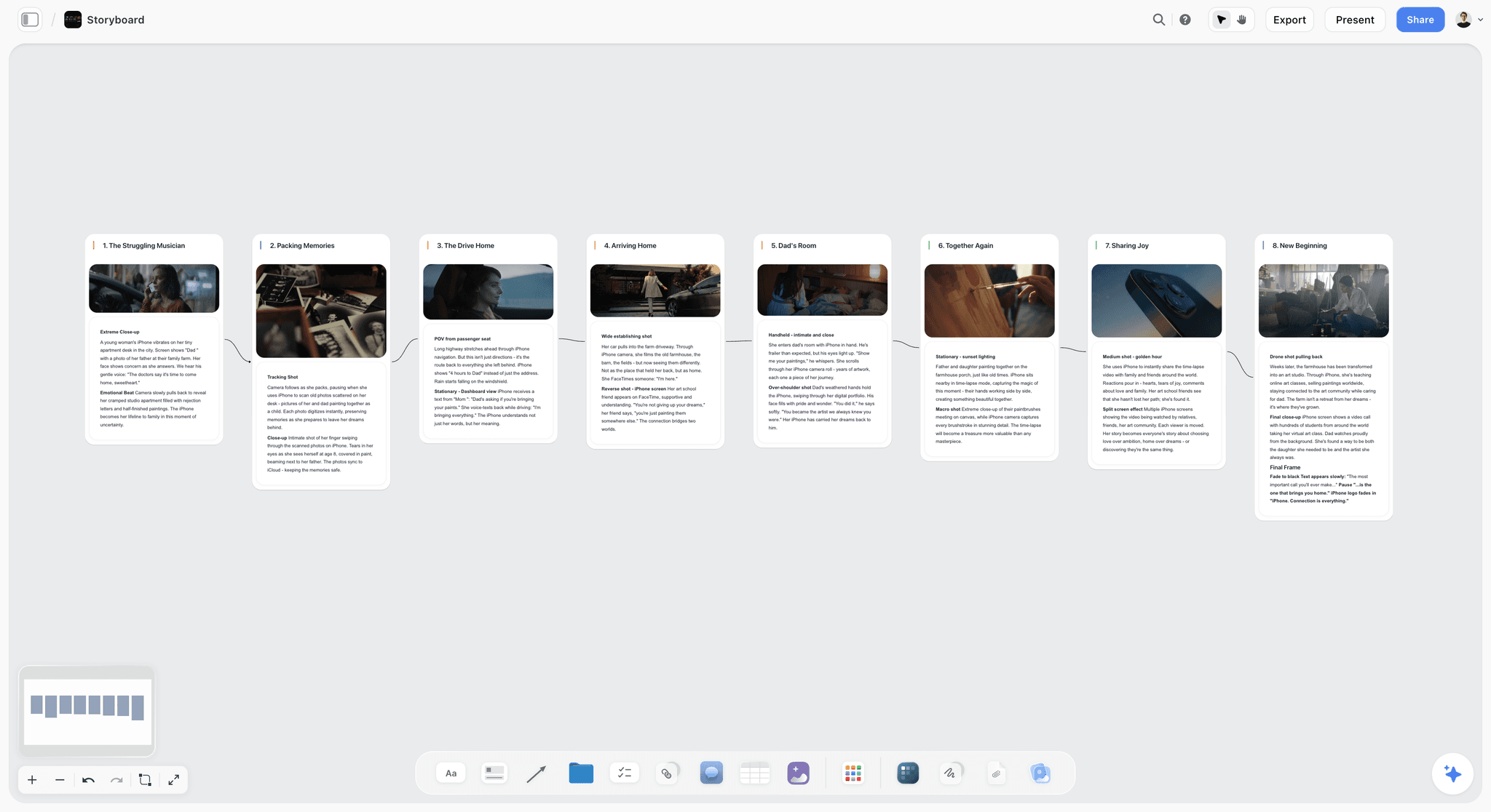
The verdict. The only tool here built for the artifact that decides whether you work.
Best for. Assembling the treatment's visual argument before it becomes a laid-out document.
Pricing. Paid-only during early access. Plus is $7.99 per month billed annually or $9.99 monthly. Pro is $14 per month billed annually or $19 monthly, adding AI image generation, roughly twenty times more AI usage and memory across conversations. Max is $39 per month billed annually or $49 monthly and adds the Team Workspace with permissions and roles. Pricing is flat per account, and anyone a paid member invites to a board joins free. The Free plan launches before the end of 2026.
Why it ranks here. A treatment is a visual argument and a deck is a linear container, and the mismatch costs directors jobs.
Concretely: your argument is that the film should feel like a specific quality of morning light, shot with a camera that behaves like a person rather than a machine, in a world that is recognizably domestic but slightly heightened. That argument is made by four images sitting in a particular relationship, with a note under each saying what specifically you want from it, which is almost never the whole image. On a canvas that relationship is visible. On slide four of a PDF, the reader sees one image at a time and reconstructs your argument themselves, at speed, having just read somebody else's.
Working on a canvas first and laying out second changes the document too. You arrive at layout knowing which images belong together and what each one is doing, so the deck becomes a presentation of a settled argument rather than the place you work the argument out.
The second value is compounding, and it is the practical one. Twenty treatments a year means twenty first-hour scrambles for structure. A board that carries your own recurring frame, how you always open, how you talk about camera, how you handle casting, means the next treatment starts at hour three rather than hour zero. Over a year that is weeks.
The third is access. Treatments involve your executive producer, sometimes a DP whose opinion you want early, occasionally a designer. Invited collaborators join free rather than costing seats, which matters when the work is unpaid.
The AI reads your full active canvas board by default, plus up to one Tactic and up to three Documents you @-mention, which is genuinely useful for drafting treatment prose from a board where you have already made the visual decisions.
Strengths.
- Juxtaposition survives, which is the treatment's actual mechanism of persuasion.
- Reusable structure across treatments, which compounds across twenty pitches a year.
- References annotated with what specifically you want from each, rather than left to interpretation.
- Invited collaborators join free, so your EP and DP are in it at no cost.
- Canvas-wide AI context for drafting treatment prose from settled visual decisions.
Limitations.
- Does not lay out or typeset the final document. No print-grade typography, no PDF layout control, no page mastering. That is InDesign, and this post ranks it fourth for exactly that.
- Drafts a call sheet PDF, breakdown tables and a strip board, but does not send call sheets, tag a script, run a scheduling engine or keep a crew database.
- No timecoded review, no version stacking, no frame-accurate annotation.
- No deliverables tracking with required fields for cutdowns, ratios and usage terms.
- No bidding, budgeting or production accounting.
- Team Workspace with permissions and roles is on Max at $39 per month billed annually.
The trade off. Storyflow builds the argument and does not produce the artifact. You will still lay the treatment out somewhere, and you will still need production tooling once you win. It earns first place because the treatment is where the work is decided and it is the stage with the worst tooling.
2. StudioBinder
The verdict. The best production management at this price, and the tool you switch to the moment the job is awarded.
Best for. Breakdowns, shooting schedules, call sheets and crew.
Pricing. Free tier for one project. Paid plans from roughly $29 to roughly $49 per month depending on tier. Verify on studiobinder.com.
Why it ranks here. Commercial shoots are short, expensive and crowded, and the paperwork has to be right the first time because there is no second day. StudioBinder's call sheets are the best in this price range, they send themselves, and they tell you who opened them, which on a crew of sixty with a 5am call is genuinely useful.
The breakdown-to-schedule connection matters more on commercials than people expect, because the schedule is dense: eleven setups in a day is normal and the margin for error is small.
Second because it does nothing for the treatment, which is where the job is won.
Strengths.
- Best call sheets at this price, with delivery tracking.
- Breakdowns that feed the schedule rather than being retyped.
- Crew and contact database persisting across jobs.
- Clean shooting schedules that agency producers accept.
- Free tier covers a single job.
Limitations.
- Nothing for the treatment stage.
- Per-project tiers get awkward with many small concurrent jobs.
- Built around narrative conventions, so branded work fits loosely.
- No post-production or deliverables features.
The trade off. Buy it when you are awarded, not before. It is a production tool and the treatment is not production.
3. Frame.io
The verdict. The structural fix for notes arriving from six directions.
Best for. Agency and client review with timecodes and versions.
Pricing. Free tier with limits. Paid plans from around $15 per user per month. Included with some Adobe subscriptions. Verify on frame.io.
Why it ranks here. The post cycle's cost is not the editing, it is the coordination. Five stakeholders with opinions produce contradictory notes, and without a single place those contradictions surface as a fourth round rather than as a conversation between the people who disagree.
Frame.io puts every note on a frame at a timecode on a named version, which does two things: it makes notes actionable, and it makes disagreements visible to the people having them. That second effect is the underrated one, because two agency creatives who see each other's contradictory notes on the same frame will usually resolve it between themselves.
Third because it is post-only, and because in the commercial world the agency often dictates the review tool anyway.
Strengths.
- Timecoded frame-accurate comments, the category standard.
- Version stacking that preserves each round's history.
- Presentation pages that make client review feel deliberate.
- Deep Premiere and After Effects integration.
- Agencies and post houses already use it, so no onboarding.
Limitations.
- Post-production only.
- Per-user pricing, and reviewers count on some tiers.
- Storage limits arrive fast with commercial-grade footage.
- The agency may impose a different tool regardless.
The trade off. Necessary in post, irrelevant to whether you get the job.
4. Adobe InDesign
The verdict. Where a treatment should actually be laid out if you want it to look like a director's document.
Best for. The finished treatment PDF, typeset properly.
Pricing. Around $22.99 per month for the single app on an annual plan. Verify on adobe.com.
Why it ranks here. Treatments are judged partly on craft, and the difference between a well-typeset document and a slide deck is visible in the first three seconds to people who look at treatments professionally. Type, grid, image bleed and pacing across spreads all communicate that you think about how things look, which is the entire claim you are making.
Fourth because it is the container rather than the argument, and because directors routinely spend a day in layout that would have been better spent on the idea.
Strengths.
- Print-grade typography and layout control.
- Master pages and styles that make the second treatment faster.
- Handles large image files without degrading.
- Output that reads as considered.
Limitations.
- Subscription-only and expensive for occasional use.
- Real learning curve.
- Slow for iteration, which is the opposite of what a three-day turnaround needs.
- Not a thinking tool.
The trade off. Build a reusable template once. Do not build a layout from scratch under a three-day deadline.
5. Milanote
The verdict. A calm place to gather references, which is the first hour of every treatment.
Best for. Collecting the visual language before you know the argument.
Pricing. Free plan capped at 100 notes, images and links across the account. Paid plans from around $12.50 per person per month. Verify on milanote.com.
Why it ranks here. The gathering phase benefits from something quiet and fast, and Milanote's web clipper plus board metaphor is genuinely pleasant for it.
Fifth because the 100-item cap arrives after roughly two treatments, and because gathering is not arguing. A board of beautiful references with no stated relationship between them is a mood, and a treatment needs to be a claim.
Strengths.
- Fastest, most intuitive gathering experience here.
- Excellent web clipper.
- Stays readable because it stays sparse.
- Familiar to art departments and designers.
Limitations.
- 100-item free cap across the entire account, which two treatments exhaust.
- Per-person pricing.
- No structure for argument or reuse across pitches.
- No AI worth using.
The trade off. Good for the first hour, insufficient for the other twenty.
6. Boords
The verdict. For the sequences that genuinely need frames, and only those.
Best for. Boarding action, effects or anything with complex geography.
Pricing. Plans from around $24 per month for individual use. Verify on boords.com.
Why it ranks here. Commercials frequently contain one sequence that cannot be described in words, and boarding it for the treatment is a strong differentiator: it shows the agency you have solved the thing they are worried about.
Animatics matter here too, because a thirty-second spot has no slack, and finding out in an animatic that your opening takes four seconds too long is worth the subscription by itself.
Sixth because most of a treatment should not be boarded, and boards can make a treatment feel prescriptive in a job where the agency wants to see personality.
Strengths.
- Purpose-built boarding with a low skill floor.
- Animatics with timing, which catches pacing in a format with no slack.
- Shareable boards with commenting for agency review.
- Shot list generated from the boards.
Limitations.
- Single purpose.
- Monthly cost for something you may need three weeks a year.
- Boarding a whole treatment can read as prescriptive rather than authored.
- Drawing tools assume import or library use.
The trade off. Subscribe for the month you need it, cancel, resubscribe. That is the correct use of this product for a freelance director.
7. Shot Lister
The verdict. A pocket shot list that tracks what you have actually got.
Best for. Running a dense commercial day from a phone.
Pricing. One-time app purchase, historically around $29.99 on iOS. Verify on the App Store.
Why it ranks here. Eleven setups in a day with a client village watching means the director needs to know, at any moment, what remains and whether the day is achievable. Shot Lister does that in your hand, with time tracking against the schedule.
Seventh because it is a set-day tool on a list where the job is won earlier.
Strengths.
- Usable one-handed on set.
- Live behind or ahead status against the schedule.
- One-time purchase.
- Syncs between director and first AD.
Limitations.
- iOS-centric.
- Nothing before the shoot day.
- Fiddly import.
- Slow development pace.
The trade off. Cheap, narrow, genuinely useful at 4pm when the light is going.
8. Airtable
The verdict. The deliverables layer, which on commercials is more complicated than anyone expects.
Best for. Cutdowns, aspect ratios, versions, usage terms and delivery status.
Pricing. Free tier with record limits. Team plans from around $20 per seat per month billed annually. Verify on airtable.com.
Why it ranks here. A modern commercial is not one film. It is a hero cut, three cutdowns, six social ratios, two language versions and a set of stills, each with its own usage term and expiry. Tracking that in an email thread is how a client ends up running an asset past its licensed period, which is somebody's problem and increasingly yours.
Eighth because it is administrative, and because production companies often own this layer rather than directors.
Strengths.
- Required fields for ratio, duration, language and usage term.
- Linked records across versions and deliverables.
- Automations that flag expiring usage.
- Free tier sufficient for a freelance director.
Limitations.
- Setup effort at a moment when nobody wants more admin.
- Usually the production company's responsibility rather than yours.
- Per-seat pricing.
- Nothing creative.
The trade off. Worth building once if you carry deliverables responsibility. Otherwise confirm who does.
9. Notion
The verdict. The business layer of a directing career.
Best for. Reel versions, bio, agency contacts, treatment archive and job history.
Pricing. Generous free plan for individuals. Paid plans around $10 per user per month billed annually. Verify on notion.so.
Why it ranks here. A commercial director is a business with a pipeline: which production companies represent you where, which agencies have seen your reel, what you pitched and what you lost. Keeping that is the difference between a career and a sequence of jobs.
Ninth because it holds no visual argument and touches no craft.
Strengths.
- Good for pipeline, contacts and job history.
- An archive of past treatments worth mining for reusable structure.
- Free for individuals.
- Easy to share a reel page with an agency.
Limitations.
- Nothing visual.
- No production or review features.
- Configuration is procrastination.
- Cloud-dependent.
The trade off. Keep the business here. Keep the treatments somewhere that can hold pictures in relation to each other.
10. Dropbox
The verdict. Delivery and archive, which is what everyone expects you to use.
Best for. Large file delivery and long-term job archive.
Pricing. From around $11.99 per month for 2TB individual. Verify on dropbox.com.
Why it ranks here. Agencies and production companies expect a link, files are large, and Dropbox has the least friction of the options. Its version history has rescued a lot of people.
Tenth because it is storage, not craft.
Strengths.
- Universal client familiarity.
- Handles very large files reliably.
- Version history and recovery.
- Simple sharing without accounts.
Limitations.
- Cost grows with archive size.
- Not a review or presentation tool.
- Should never be your only backup.
- No structure.
The trade off. Necessary infrastructure. Keep a local copy of anything you would want in five years.
11. Canva
The verdict. Fast assets when InDesign is overkill, with a ceiling you will feel.
Best for. Quick pitch assets, decks and social material.
Pricing. Capable free tier. Paid plans from around $10 per user per month. Verify on canva.com.
Why it ranks here. Not every document needs typesetting. A quick availability deck, a one-page bio, a social announcement about a launch: Canva does these in minutes.
Eleventh because a treatment made in Canva looks like a treatment made in Canva, and in a competitive pitch that is a real cost.
Strengths.
- Very fast for simple documents.
- Low skill floor.
- Capable free tier.
- Templates for decks and one-pagers.
Limitations.
- Template aesthetic is visible to people who look at design professionally.
- Weak typographic control.
- Per-user pricing for brand features.
- Not appropriate for the treatment itself.
The trade off. Fine for admin documents, wrong for the one that wins the job.
What to Actually Pay For
Spend on the treatment stage, because that is where the job is decided and the tooling is worst. A canvas at under $10 a month plus a reusable InDesign template is the whole necessary investment, and it compounds across every pitch you write this year.
Build the reusable structure once. Your recurring frame, how you open, how you talk about camera and casting, in a form you can start from. Twenty treatments a year means this pays back within two months.
Rent the specialists. Boords for the month with the complex sequence. Frame.io only when there is a cut. There is no loyalty required.
Do not buy production management before you are awarded. StudioBinder is excellent and it answers a question you do not yet have.
Confirm who owns deliverables tracking. If the production company does, do not duplicate it. If nobody does, it is going to become your problem at the worst moment.
Tools to Avoid for This Job
A slide deck as the place you develop the treatment. Decks are a fine delivery format and a poor thinking format, because they force linear sequence onto an argument made of relationships.
Boarding the entire treatment. It reads as prescriptive and it costs days. Board the sequence the agency is worried about and let the rest be authored prose and reference.
A new tool during a three-day turnaround. Nothing new gets learned under that deadline. Whatever you use, it should be something you already know cold.
Email as the review channel. Six stakeholders with opinions in a thread produces contradictions nobody sees. One place, timecoded, versioned.
Reusing a treatment structure without rereading the brief. The compounding advantage of reusable structure turns into a liability the moment it makes you answer a question the agency did not ask.
What No Tool on This List Does
None of these will give you a point of view.
Treatments are won on the specificity of an idea, and the thing that distinguishes the winning one is almost always a single concrete decision the other four did not make: a casting instinct, a structural inversion, a texture nobody else thought to bring. That comes from taste and from having looked at a great deal of work, and no tool substitutes. What tools do is remove the friction between having the idea and communicating it, which matters because the idea frequently arrives on day two of three.
None of them will fix a brief that cannot be solved, either. Some briefs are internally contradictory: the client wants a film that is both warm and premium, both spontaneous and precisely art-directed, in twenty seconds, with four mandatory product shots. Experienced directors recognize these and either solve the contradiction explicitly in the treatment or decline the pitch. Newer directors write a treatment that pretends the contradiction is not there and lose to somebody who named it.
And none of them will make the unpaid work paid. Treatment writing is a substantial unremunerated labour cost in this industry, borne by directors, and it is a structural feature rather than an oversight. Every tool here makes it faster. None makes it fair.
The Bottom Line
A commercial director makes three things, and only one of them is a film. The other two decide whether you work.
Choose by the one that is costing you. If the shoots go badly, that is production tooling and StudioBinder solves it cheaply. If post cycles run to four rounds, put every note in one timecoded place and watch the contradictions resolve themselves. If deliverables and usage keep becoming your problem after delivery, confirm ownership at the start of the job.
But if you are losing jobs on treatments you believe were better ideas than the ones that won, the argument is not reaching the reader, and a deck is a poor container for an argument made of relationships between images. That is the narrow case where Storyflow ranks first here, and it is the only claim this post makes for it.
FAQ: Tools for Commercial Directors
What is the best tool for a commercial director?
Storyflow for the treatment, because that is where the job is won and a deck is a poor container for a visual argument. Add StudioBinder once you are awarded, for breakdowns, schedules and call sheets, and Frame.io for the post cycle. The treatment stage is the one with the highest leverage and the worst tooling.
How do you write a commercial treatment?
Gather references fast, then decide what specifically you want from each one, because a reference with no stated intent is decoration. Build the argument visually so juxtapositions are visible, then lay it out. The most common failure is spending day one on layout and day three on the idea, when the idea is what is being judged.
Does Storyflow lay out treatment documents?
No. Storyflow has no print-grade typography, no page layout, no master pages and no PDF output control. It is where the argument gets built; InDesign is where the document gets made, and this post ranks InDesign fourth for exactly that. Storyflow also has no timecoded review, and its call sheet, breakdown and strip board are drafts it does not send, tag or recalculate.
Is Storyflow free for directors?
Not during early access. Storyflow is paid-only right now, starting at $7.99 per month billed annually on the Plus plan. The Free plan launches before the end of 2026. The genuinely free path today is that anyone a paid member invites to a board joins free, which matters for treatments because your executive producer and DP can be in the board without buying seats for unpaid work.
How do I make treatments faster?
Build reusable structure. Your recurring frame for how you open, how you discuss camera, how you approach casting, in a form you start from rather than rebuild. Twenty treatments a year at a saved day each is twenty days. The second lever is an InDesign template so layout is filling rather than designing.
What is the best free tool stack for a commercial director?
Google Slides for treatment layout, a shared drive for references, StudioBinder's free tier for one job's call sheets, and Frame.io's free tier for a small review. This genuinely works and treatments built this way win jobs. Storyflow is paid-only during early access, so it does not belong in a free stack today, though invited collaborators join free.
Should I board my treatment?
Board the one sequence the agency is worried about, and not the rest. A fully boarded treatment reads as prescriptive in a job where the agency is buying your personality, and it costs days you should spend on the idea. Animatics are worth it for a spot with no slack in its timing.
How do I handle notes from the agency and the client?
Put every note in one place, timecoded, against a named version. The structural benefit is not tidiness, it is that contradictory notes become visible to the people who wrote them, and two agency creatives who can see they disagree will usually resolve it between themselves rather than through you.
Who tracks deliverables and usage terms?
Confirm this explicitly at the start of every job, because the answer varies and the default assumption is wrong about half the time. A modern spot has a hero cut, cutdowns, multiple ratios, language versions and stills, each with its own usage term. If nobody owns it, it becomes a problem after delivery when nobody is being paid.
Can AI help with treatments?
For drafting prose from decisions you have already made, yes. Turning a board where you have chosen the references and the tone into first-draft treatment copy is genuinely useful and tedious by hand. Storyflow's AI reads your full active canvas board plus up to one Tactic and three Documents you @-mention. For the point of view that wins the job, it has nothing, and treatments that read as generated read as generated.
How much should a commercial director spend on tools?
Under $50 a month between jobs, rising when you are awarded. A canvas for treatments, an InDesign subscription or template, and production tooling only when there is a production. The category to watch is subscriptions you keep paying for during the three months you are not shooting.
How many treatments does a director write per job won?
Rates vary widely, but writing three or four for every job awarded is a common experience, and for directors early in their careers it is worse. That ratio is precisely why speed at the treatment stage compounds so heavily, and why reusable structure is the highest-return habit on this page.
What separates a winning treatment?
One concrete decision the other directors did not make, communicated so clearly that the agency can imagine the film. Not more references, not better typography, though both help. The most common losing treatment is competent, well-presented, and could have been written by any of the five directors pitching.
What is the single change worth making before the next pitch?
Take your last three treatments and pull out what was identical in all of them. That is your reusable frame, and you have been rebuilding it from scratch every time. Putting it somewhere you start from will save you a day on the next one and every one after.
Table of Contents
- Key Takeaways
- The Three Commercials
- At a Glance: The 11 Tools Compared
- How I Ranked These
- Quick Picks by Job Type
- 1. Storyflow
- 2. StudioBinder
- 3. Frame.io
- 4. Adobe InDesign
- 5. Milanote
- 6. Boords
- 7. Shot Lister
- 8. Airtable
- 9. Notion
- 10. Dropbox
- 11. Canva
- What to Actually Pay For
- Tools to Avoid for This Job
- What No Tool on This List Does
- The Bottom Line
- FAQ: Tools for Commercial Directors
- Related Reading
Templates to check out for this topic


Templates you can use in Storyflow
Every Storyflow board starts from real structure and an AI that reads the whole canvas. Open one of these templates and make it yours.


See Storyflow in Action
A visual AI workspace where every feature lives inside one canvas. No tab-switching, no context lost.
Build your entire board from a single message
Type what you need in the AI chat at the bottom of your canvas. The AI adds cards, headings, and structure directly onto your board.
Use expert frameworks as AI context
Type @ in the AI chat and choose any Tactic. The AI tailors every response to that framework instead of giving generic advice.
Turn your board into a mind map in seconds
Ask the AI to restructure your canvas as a mindmap. It connects your ideas into a visual hierarchy so you can see how everything relates.
Why Storyflow Exists
Storyflow actually began as a personal tool while working on creative and research projects.
We kept running into the same problem: ideas were scattered everywhere: notes, documents, and whiteboards.
Nothing helped us see how everything connected.
So we started building a workspace designed around how ideas actually grow.
→ Read how Storyflow was createdSara de Klein
Head of Product at Storyflow
Published: 2026-08-11
Extremely simple, seriously capable


See how easy it is to get started
Watch a real project come together, from a blank board to a finished plan, clicked through step by step.
Start creating with AI and become more productive
Transform your creative workflow with AI-powered tools. Generate ideas, create content, and boost your productivity in minutes instead of hours.