Best Shoot Day Planning Apps 2026: 11 Ranked for a Film Shoot
The best app for planning a film shoot day is Storyflow: its AI builds the breakdown, strip board, shot list and call sheet. StudioBinder and 9 more ranked.

Category
Filmmaking
Author

Sara de Klein
Head of Product at Storyflow
Topics
2026-08-12
•
31 min read
•
Filmmaking- best app for planning a film shoot
- best shoot day planning apps
- call sheet app 2026
- StudioBinder alternatives
- shot list app for set
- strip board app
What is the best app for planning a film shoot day in 2026?
The best app for planning a film shoot day in 2026 is Storyflow: its AI reads your script and builds the scene breakdown, a strip board of shoot days with page totals, a shot list with a setup time per shot and printable call sheet pages on one board. StudioBinder ranks second, for sending that call sheet by text and email and showing who confirmed. Shot Lister ranks third, for running the day against the plan to the minute. Storyflow is our own product; the criteria it loses on are in the ranking table below.

Full disclosure: Storyflow is our own product and we rank it first for planning a shoot day, on the weighted criteria stated in the ranking table: it builds the breakdown, strip board, shot list with setup times and call sheet pages from your script on one board. It loses on the other criteria, and we say so: it does not send call sheets or track confirmations, it has no offline mode and runs in the browser only, its strip board is a board you drag rather than a schedule that recalculates, and it has no budgeting module or union rules. Weight distribution and on-set tracking more heavily and StudioBinder and Shot Lister go first. Competitor prices were checked on each vendor's site on 9 October 2026; where none was published, we say so. We link to every tool so you can judge the fit yourself.
Quick Comparison
Planning a shoot day is four documents built in order (breakdown, strip board, shot list, call sheet), then sent to the crew and run on the day. These four cover that whole chain between them.
| Tool | Best For | AI Features | Price |
|---|---|---|---|
| Storyflow | Building the whole day plan from the script on one board | AI builds breakdown, strip board, shot list and call sheet pages | Plus $7.99/mo annual |
| StudioBinder | Distributing call sheets with viewed and confirmed tracking | Light | Free to use; paid tiers not published |
| Shot Lister | Actual against estimated during the day | None | Pro $15.99/mo or $99.99/yr |
| Movie Magic Scheduling | Boards, DOOD and conflict detection on scripted productions | None | $42.99/mo or $299.88/yr |
Which App Should You Use to Plan a Film Shoot Day?
- Use Storyflow to plan the day: break down the script, build the strip board, write the shot list with setup times and produce the call sheet pages from one board, with AI doing the first draft of each. This is the job most small crews, commercial teams and indie productions actually have.
- Add StudioBinder or SetHero when the call sheet has to go out to thirty people by text and email and you need to know who confirmed it.
- Add Shot Lister when someone on set will own the shot list during the day and you want to see, to the minute, how far ahead or behind you are.
- Use Movie Magic Scheduling when the production is union, studio or episodic and the schedule has to be read by a completion bond, a studio or a first AD trained on it.
- Print the call sheet whatever you choose. Signal fails on location, and paper does not.
Plan the shoot day before it becomes a problem
Attach your script and Storyflow's AI builds the breakdown, the strip board with page totals, the shot list with setup times and the call sheet pages on one board, with your references beside them. Export the PDFs, print them, and send them however your crew reads them. Paid-only during early access; the Free plan launches before the end of 2026, and anyone you invite to a board joins free.

Key Takeaways
- A shoot day does not go wrong at the moment you fall behind. It goes wrong at the moment nobody can tell you by how much, and most of the days that go badly were unachievable on paper before anyone arrived.
- Planning a shoot day is four documents built in order: breakdown, strip board, shot list with setup times, call sheet. Every time one of them is retyped from another, a version forks.
- Storyflow ranks first because its AI builds all four from your script on one board, and keeps the reasons (the look, the location notes, the sun times, the open questions) next to them.
- StudioBinder ranks second because its call sheets go out by SMS and email with viewed, confirmed and missed tracking, which Storyflow does not do.
- Shot Lister ranks third because it is one of the few tools that measures the day as it happens.
- Storyflow's limits are plain: no distribution, no confirmations, no offline mode, no union scheduling rules, and it runs in the browser only.
The Three Clocks
Every shoot day runs three clocks at once, and the first assistant director's whole job is keeping them in agreement.
The call sheet clock is the plan. Crew call at 06:30, first shot at 08:00, scene 14 before lunch, company move at 14:00, wrap at 19:00. It was built weeks earlier from a breakdown and a schedule, and it is somebody's best estimate of a day nobody has lived yet.
The camera clock is reality. What has actually been shot, how many setups are genuinely finished, and how many are finished in the sense that means "we will not come back to this." This clock is almost never displayed anywhere. It lives in the script supervisor's notes and the first AD's head, which makes it legible to two people on a unit of forty.
The constraint clock is what cannot be negotiated. Sunset at 20:41. Meal penalty at the sixth hour. Eleven hours of turnaround before tomorrow's call. A location permit that ends at 18:00. A child performer released at 16:00. These are walls, and they arrive whether or not you are ready.
A shoot day does not go wrong at the moment you fall behind. It goes wrong at the moment nobody can tell you by how much.
Falling behind is normal and recoverable: you drop a setup, you combine two angles, you move a scene to the pickup day. What is not recoverable is discovering at 16:30 that you are two and a half hours down when you thought you were forty minutes down, because by then every cheap option has expired.
Two things decide whether the clocks can agree. The first is the plan: if the strip board puts nine pages in a day that can hold five, or schedules an exterior after the sun has gone behind a hill, no app on set will rescue it. The second is visibility on the day. This ranking weights the first more heavily, because a planning app that makes an impossible day visible in prep saves more shoot days than any tool that measures the damage afterwards.
At a Glance: The 11 Apps Compared
| App | What it plans | Distribution to crew | Works with poor signal | Price (checked 9 Oct 2026) |
|---|---|---|---|---|
Storyflow | Breakdown, strip board, shot list with setup times, call sheet pages, on one board with AI | No (export PDF, share a view link) | No, browser only | Plus $7.99/mo annual |
StudioBinder | Breakdown, schedule, shot list, call sheet in one chain | SMS and email, viewed and confirmed tracking | Export first | Free to use; paid tiers not published on a page we could load |
Shot Lister | Shot-by-shot schedule, Live Mode on the day | Crew Sync up to 10 (Pro) | Installed app on iPhone, iPad, Mac | Pro $15.99/mo or $99.99/yr |
Movie Magic Scheduling | Boards, DOOD, conflict detection, episodes | No | Cloud | $42.99/mo or $299.88/yr |
Yamdu | Breakdown, stripboard, DOOD, call sheets, budgets | Send and track | Cloud | Not published |
CineFlo | Script import, shot lists, scouting, call sheets | Send to crew | Works offline, syncs later | Free 1 project; Pro $7.99/mo or $59.99/yr |
Celtx | Script, breakdown, schedule, call sheets | Yes | Cloud | Not published; call sheets on Team or as an add-on |
PhotoPills | Sun, moon and light for a location and date | No | Yes, once saved | Paid app |
Google Sheets | Anything, by hand | Share link | Offline with setup | Free with a Google account |
SetHero | Call sheets | SMS and email, received, opened, confirmed | Cloud | From $19/mo; first project free |
Paper and a Sharpie | The day, reliably | Hand it out | Yes | Almost nothing |
Prices are the ones each vendor's own site showed on 9 October 2026. Where the site did not publish a number, we say so rather than guess.
How I Ranked These
Five of these (StudioBinder, Shot Lister, Google Sheets, PhotoPills, paper) I have used on real shoot days, including days that went badly, which is the only useful test. Movie Magic Scheduling I have worked from as a director rather than built in. Storyflow's film workflows (breakdown, strip board, shot list, call sheet) are described here from what each one is built to do, and its limits from what it does not have. The rest I evaluated against their own sites, checked on 9 October 2026, and the reviews say where a claim rests on the vendor's page.
Six criteria, weighted by how much each one decides whether a shoot day is achievable:
| Criterion | Weight | Who leads | Where Storyflow stands |
|---|---|---|---|
Builds an achievable day from your material: breakdown, strip board with page totals, shot list with setup times | 30% | Storyflow (AI builds all three from the script), then Yamdu (AI breakdown suggestions you confirm) and StudioBinder (you tag by hand) | Leads |
The day's paperwork comes from the plan rather than being retyped: call sheet, shot list pages | 20% | Storyflow, StudioBinder, Yamdu and CineFlo | Shares the lead, but leaves blanks where StudioBinder and CineFlo fill weather and maps automatically |
The reasons stay with the plan: look, location notes, sun times, open questions beside the schedule | 15% | Storyflow | Leads |
Distribution and confirmations to the crew | 15% | StudioBinder, SetHero, Yamdu | Does not do it |
Measures the day as it happens | 10% | Shot Lister | A "Got it" column you tick, no ahead or behind count |
Works with poor signal | 10% | Shot Lister, PhotoPills, CineFlo, paper | Does not do it |
Storyflow leads or shares the lead on 65% of the weight and does not compete on the other 35%. If your problem is distribution and the day itself rather than building the plan, weight the last three rows at 60% and StudioBinder with Shot Lister go first. We say that here so you can re-rank for your own production.
Deliberately not weighted: union rules, payroll, and the reporting a studio feature needs. Those belong to Movie Magic Scheduling and the production accounting tools, and no app on this list replaces them.
Which App Does Each Shoot Planning Job
A shoot day plan is built in a fixed order. This table maps each step to the tool that does it, so you can see where one tool covers several steps and where you need a second.
| Planning step | What you produce | Storyflow | StudioBinder | Shot Lister | Movie Magic Scheduling |
|---|---|---|---|---|---|
1. Break down the script | Scene index, cast, props, wardrobe, vehicles, SFX per scene | AI builds the tables from the script you attach | You tag elements in the script | Script import | Breakdown sheets |
2. Build the strip board | Scenes grouped into shoot days with page totals | AI builds it, grouped by location or script order | Yes | Shot-by-shot schedule | Yes, the deepest |
3. Write the shot list | Shots per scene, size, lens, setup time | AI builds one table per scene with a Setup and a Got it column | Yes | Yes, its core | No |
4. Check the light | Sunrise, sunset, golden hour | Notes you add, or ask the AI to research | Weather on call sheets | No | No |
5. Make the call sheet | Pages the crew reads at 05:00 | AI renders call sheet pages to PDF | Generated from the schedule | No | No |
6. Send it and track replies | Who opened and confirmed | No | SMS and email with tracking | Crew Sync | No |
7. Run the day | Shots done against the plan | Tick the Got it column | No | Live Mode | No |
Steps 1 to 5 are planning, and Storyflow does all five on one board. Steps 6 and 7 are distribution and running the day, and that is where StudioBinder, SetHero and Shot Lister earn their place beside it.
How to Plan a Shoot Day in Storyflow
Six steps, each a workflow the AI runs on the board, and each one starts from what the previous step left there.
Step 1: Put the script and the brief on one board
Attach the script to the AI chat. Storyflow reads Final Draft (.fdx) files and PDFs, and parses the scene index from the script itself, so scene numbers and sluglines come from your pages rather than from the model's memory. Drop the location photos, the reference frames and the director's notes onto the same board. Everything the plan needs is now in one place, which is the condition every later step depends on.
Step 2: Ask for a script breakdown
Ask for a script breakdown. The AI opens with a one-line coverage receipt (pages, scenes, speaking parts) so you know exactly what it read, then builds a scene index table and, if you ask, a full breakdown with cast, props, wardrobe, vehicles and SFX per scene. A scene it has not read gets empty cells rather than plausible guesses, and you correct the table by editing it like any other table on the board.
Step 3: Build the strip board
Ask for a strip board. The AI asks two questions (how many shoot days, and whether to group by location or keep script order), then builds one wall per shoot day with one strip per scene, coloured by the industry INT/EXT and day/night code, with each day's page total. It names any day that came out heavy. Moving a scene to another day is dragging the card. Day titles stay "Day 1", "Day 2" until you give it dates; it never invents a start date.
Step 4: Write the shot list with setup times
Ask for a shot list and pick the table format (the other choice is a row of shot cards with frames). You get one table per scene with industry shot numbering (12A, 12B), size, angle, movement, lens, what is in frame, a Setup column with the time to light and rig each shot, and a "Got it" tick box. Add up the Setup column for a day and you know before the shoot whether the strip board is honest.
Step 5: Render the call sheet
Ask for a call sheet for Day 1. The AI builds it as pages: the header with crew call, first shot and estimated wrap, the day's schedule table, cast and crew with call times, locations with parking and access, then safety notes. The first AD's and producer's numbers go in the footer of every page. Anything you did not give it, such as the nearest hospital or a crew phone number, appears as a visible blank, and the AI lists those blanks in its reply. It never invents a phone number or an address.
Step 6: Share it, present it, print it
Export the call sheet and shot list pages as PDF and print them. Share a view-only link to the board with the director or the client: it opens with no account, and commenting needs a sign-in. In a prep meeting, presentation mode steps through the board one wall at a time, full screen. If you work in ChatGPT or Claude, the Storyflow connector lets the assistant read the board and build onto it from that chat.
The Signal Problem
This deserves its own section because it eliminates half the category on the day and almost no comparison mentions it.
Shoot days happen in car parks, warehouses, forests, basements, tunnels, moving vehicles and the fourth floor of a building with concrete walls. Signal is unreliable in exactly the places where production is most interesting, and it is worst at the moment of highest need, when forty people are all trying to load the same document.
A cloud tool with no offline mode has a specific failure shape. It works in prep, it works at the production office, it works during the tech scout, and then it fails at 07:40 on the day when the second AD cannot load the call sheet for the background actors who have just arrived. The fallback is somebody's screenshot from last night, which is the previous version.
Storyflow is one of those cloud tools. It runs in the browser and has no offline mode, which is why its job ends where the planning ends: you export the pages before you leave. Two practical rules follow, and both are free.
Export before you leave. Whatever built the call sheet, carry a PDF on the device and print enough copies. This is standard practice on well-run units and skipped constantly on small ones.
Treat the printed call sheet as the source of truth for the day. Not because paper is better, but because it is the only version everyone provably has. Changes get announced by radio and in person, which is how they propagate anyway.
Quick Picks by Situation
- Best app for planning a shoot day: Storyflow, for breakdown, strip board, shot list and call sheet built by AI on one board.
- Best for sending the call sheet and tracking confirmations: StudioBinder, or SetHero if call sheets are the only job.
- Best for running the day against the plan: Shot Lister, the most underused tool in production.
- Best for union, studio and episodic scheduling: Movie Magic Scheduling.
- Best for multi-department productions: Yamdu, where each department needs its own view.
- Best phone-first app for a small crew on location: CineFlo.
- Best for the light: PhotoPills or Sun Seeker.
- Best free option: Google Sheets with an offline-enabled call sheet, plus a printer.
- Best for a one-day commercial or a small doc: One board, one PDF and paper. Buying a production suite for a two-day job is usually overhead.
1. Storyflow
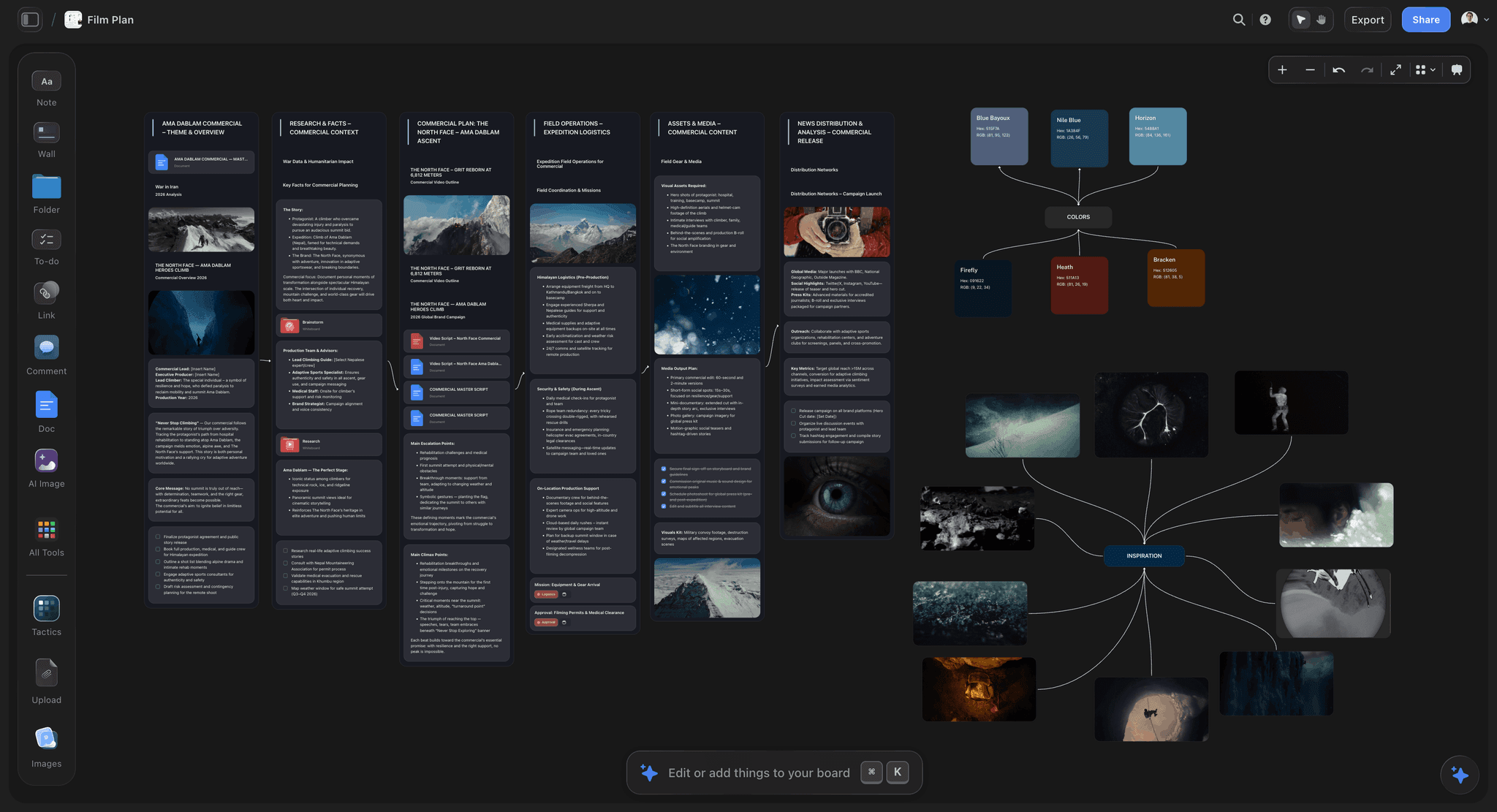
Storyflow is an AI visual workspace: an infinite board with notes, tables, documents, images and walls, and an AI agent that reads the board and builds onto it. For planning a shoot day that means the breakdown, the strip board, the shot list and the call sheet are built from the same script on the same board, next to the references and location notes that explain them. It ranks first on this list because it is the one tool here whose AI drafts all four planning documents from the same script, on the board where the references already are. It is our own product, and its limits are stated in full below.
What it builds for a shoot day
The film workflows run in order and each reads what the last one left on the board: a script breakdown (scene index plus cast, props, wardrobe, vehicles and SFX per scene), a strip board (one wall per shoot day, scenes as colour-coded strips with page totals), a shot list (one table per scene with a Setup time and a Got it column, or a row of shot cards with frames), and call sheet and shot list pages rendered to PDF. A film plan workflow lays out a whole production on one board, and a pre-production plan covers everything to settle before the shoot. The AI reads the board you are on, and you can attach up to five documents and three other boards or folders to a request.
What this changes on the day is subtle and real. When the second AD asks why scene 14 moved to the afternoon, the answer (the sun clears the building at 15:40, there is a photo of it from the scout) is on the same board as the strip board, not in somebody's text messages.
Where it falls short
- No distribution or confirmations. It does not send the call sheet by SMS or email and does not track who opened it. Use StudioBinder or SetHero for that.
- No offline mode, browser only. No native desktop or phone app. Export the PDFs before you leave.
- No scheduling engine. The strip board is a board you drag, not a schedule that recalculates; a day-out-of-days is something you ask the AI for, not a report it keeps current. No union rules, no cast availability solver.
- No automatic weather, maps or hospital lookup. The call sheet leaves those as named blanks unless you give them.
- No budgeting module.
Pricing
Plus $7.99/mo billed annually ($9.99 monthly). Pro $14/mo annually ($19 monthly) adds AI image generation, 30 times the Free plan's AI usage and memory across conversations. Max $39/mo annually ($49 monthly) adds 60 times the Free plan's AI usage and a team workspace with roles and permissions. Storyflow is paid-only during early access; its Free plan launches before the end of 2026, and anyone a paid member invites to a board joins free now. See pricing.
2. StudioBinder
StudioBinder ranks second because it solves the distribution half of the shoot day better than anything else at its scale, and because its breakdown, schedule and call sheet form one chain.
What it does well
You break down the script, tag elements, build a shooting schedule from those scenes and generate call sheets from that schedule, so the call sheet is derived from the breakdown rather than retyped. Its call sheet software page lists automatic weather, Google Maps locations, delivery by SMS and email, and a dashboard showing whether each call sheet was viewed, confirmed or missed. That last one is the feature that matters on the morning: you know who has not opened the sheet before they fail to turn up.
It is also the most approachable tool in this space. Indie, commercial and branded content teams get productive in a day, and the interface does not assume studio training.
Where it falls short
It is cloud-first, so the signal problem applies and you export before leaving. Larger scripted productions find the scheduling less deep than Movie Magic. It does not measure the camera clock: it tells you what the plan was and will not tell you at 14:00 that you are ninety minutes behind. And the breakdown is tagging by hand, which on a feature is days of work that Storyflow's and Filmustage's AI drafts in minutes.
Pricing
StudioBinder's own page says it "is free to use", with paid subscriptions for more. The paid prices did not load on its pricing page when we checked, so we do not quote one.
3. Shot Lister
Shot Lister ranks third because it is one of the only tools here that addresses the camera clock, and it is startlingly underused given what it does.
What it does well
You load your shot list with estimated durations, and during the day you tick shots off. Its site describes Live Mode as knowing "how you are doing to the minute" and re-organising the plan while shooting. Pro adds Crew Sync for up to 10 crew; Studio raises that to 80. It is an installed app on iPhone, iPad and Mac, imports scripts and syncs with Scriptation.
Where it falls short
It depends on somebody maintaining it during the day, and on a busy unit that person does not exist unless you assign them. It does not build call sheets or handle distribution. And the estimates it measures against are only as good as whoever wrote them, which on a first production is optimistic by a wide margin. Build the estimates in Storyflow's Setup column, check them against the strip board, then run the day in Shot Lister. More shot list apps are compared in the best shot list tools.
Pricing
Pro $15.99 per month or $99.99 per year. Studio from $24.99 per month for 10 users.
4. Movie Magic Scheduling
Movie Magic Scheduling is the industry standard for scripted scheduling, and on productions above a certain size the question is not whether to use it but who is operating it.
What it does well
Boards and strips, day-out-of-days, element tracking and reasoning about a complex shoot across many weeks are deeper here than anything else on this list. The current version shows the DOOD on screen, runs conflict detection across events and scheduled strips, handles several episodes on one day, and keeps schedules in the cloud. A first AD trained on it works faster in it than in any newer alternative, and its output is the format a completion bond or a studio expects.
Where it falls short
It is upstream of the shoot day. It builds the schedule the call sheet comes from; it does not distribute, confirm or track. The interface is from a different era, and pricing sits behind the EP Store. For a commercial, a short or a documentary, it is usually more tool than the job needs.
Pricing
The EP store lists Movie Magic Scheduling at $42.99 a month or $299.88 a year; the product page shows no price.
5. Yamdu
Yamdu's distinguishing idea is that different departments need different views of the same production, drawn from one plan.
What it does well
Its site lists AI breakdown suggestions for the creative departments to confirm, a drag-and-drop stripboard, real-time day-out-of-days reports, call sheets you create from templates and then send and track, and budgeting linked to the schedule. Permissions control who sees what by position, which matters when the art department is tracking three hundred props.
Where it falls short
It sits between StudioBinder's approachability and Movie Magic's depth, so on many productions something above it is the better fit. It is a production office system, and for a two-day shoot it is heavier than the job. Prices are not published.
Pricing
Not published on its site; there is a free sign-up and a sales contact.
6. CineFlo
CineFlo is the phone-first entry, built for the small crew that plans on an iPhone or iPad and shoots where there is no signal.
What it does well
Its site lists Final Draft import that creates scenes, shot lists built from reference images, location scouting with geotagged photos and sun position, blocking diagrams, and call sheets "built from the schedule you already made, with the weather, golden hour and nearest hospital filled in." It keeps working without a connection and syncs across iPhone, iPad, Android and Mac when you are back online, which on location is a real advantage over every browser tool here, Storyflow included.
Where it falls short
It is an app for one production at a time on a small screen. The board-level view of a whole production, the references beside the plan, and an AI that drafts the breakdown and shot list are not what it is built for.
Pricing
Free for one project. Pro $7.99 per month or $59.99 per year.
7. Celtx
Celtx makes sense when the script is already written in Celtx and you want production planning in the same subscription.
What it does well
Script, breakdown, schedule, shot lists and call sheets live in one ecosystem. Its pricing page shows shot lists, breakdown, schedule and call sheets all included on Team, Education and Student plans.
Where it falls short
On Writer and Writer Pro, breakdown, schedule and call sheets are optional add-ons, and the free plan includes none of them. Its strength is the script; the visual side of the plan (references, location photos, the look) lives elsewhere.
Pricing
The pricing page shows plan names and a yearly discount but no figures when we checked.
8. PhotoPills
PhotoPills is on this list because the constraint clock never negotiates, and light is the constraint most often mishandled by people who plan days on a spreadsheet.
What it does well
It shows sun and moon position, golden and blue hour, and shadow direction for any location on any date, with an augmented reality view on site. For a scout, this converts "the light should be nice around then" into "the sun clears that building at 16:20 and you have until 17:05", which is a schedulable fact. Saved plans work without signal.
Where it falls short
It plans nothing else. No call sheets, no schedule, no crew. Put its times on the board beside the strip board, so the exterior is scheduled against the light rather than against a hope. Sun Seeker does the same job well.
Pricing
A paid app; its site blocked our check, so confirm the current price in your app store.
9. Google Sheets
An enormous share of real shoot days run on a spreadsheet, and it deserves an honest entry.
What it does well
It is free, everyone can open it, offline access can be switched on in Chrome or Edge, and a well-built call sheet template is genuinely fine. Version history is automatic. For a two-day commercial or a small documentary, this plus a PDF and printed copies is a defensible setup.
Where it falls short
You lose the chain. The breakdown, schedule, shot list and call sheet are separate documents with no relationship, so a change in one does not reach the others, and on the third revision somebody is working from the second version. It also builds nothing for you: every row is typed.
Pricing
Free with a Google account.
10. SetHero
SetHero is a dedicated call sheet tool, and on productions where the call sheet is the whole problem it is a clean answer.
What it does well
Its site describes a drag-and-drop call sheet builder, distribution by SMS and email, PDF output, and tracking of who received, opened and confirmed. For an AD who makes call sheets every week, that focus is the point.
Where it falls short
It covers the call sheet and not the plan behind it: no breakdown, no shot list, no references. Plan in Storyflow, send in SetHero, if confirmations matter more than one subscription.
Pricing
From $19 a month, with the first project free (checked October 10, 2026).
11. Paper and a Sharpie
The printed call sheet, the marked-up sides, the shot list on a card in the first AD's back pocket, and a Sharpie for the changes.
What it does well
It is the only item on this list with a hundred percent uptime record. It needs no account, any crew member can read it, and it works in a tunnel. On well-run units it is the primary interface for the day, with the software behind it as the thing that produced it and will produce tomorrow's.
Where it falls short
It does not update and it does not propagate, and the version in one pocket can differ from the version in another. Print from the plan, every time, so the paper is a copy and never the source.
Pricing
Approximately nothing.
Also Considered
These names come up whenever shoot planning tools are compared. Each is a good tool for something; none made the top eleven for planning a shoot day.
Milanote
Milanote is a visual board for references, look development and story notes, and directors and DPs genuinely use it in prep. It has no breakdown, no strip board, no shot list tables and no call sheets, and no AI that builds them. If your prep is references only, it works; if the references have to turn into a shoot day, Storyflow builds the day on the same kind of board (Storyflow, StudioBinder and Milanote compared for film shoot planning). Its plans page lists a free plan capped at 100 notes, images or links and 10 uploads, and $9.99 per person per month billed annually ($12.50 monthly).
SetKeeper
SetKeeper's pricing page lists production plans from $1,500, $3,500 and $5,000 by budget size, with document watermarking, email distribution and script sides tools. It is a production office system for funded features, priced accordingly, and far beyond what a commercial or a short needs.
Croogloo
Croogloo is a distribution tool for large productions: sides, reports and sending the right documents to the right departments. On a feature with a large crew this is a real job. Below that scale it is heavy.
Filmustage
Filmustage drafts the script breakdown with AI and adds scheduling, DOODs and call sheets. It is a strong pick when the breakdown of a long script is the bottleneck; we cover it in the best script breakdown software.
Companion Apps for the Shoot Day
Four single-purpose apps earn a place beside whatever plans the day. Each does one job.
| App | The one job | Platforms | Use it with |
|---|---|---|---|
Overhead blocking diagrams with a shot list kept in sync; free for one scene, Pro EUR 19.99 | Mac, PC, iOS, Android | The shot list, so each setup has a diagram | |
Cadrage | Director's viewfinder for lenses and framing | iPhone, iPad | The scout, to test lenses before the day |
Sun Seeker | Sun path and times for a location | iOS, Android | The strip board, for exteriors |
Scriptation | Script annotation, tagging and lining | iPad, iPhone, Mac | The breakdown and the script supervisor |
Worked Example: Planning a Two-Day Short in Storyflow
An illustrative example of how the steps above catch a bad day. The script: twelve pages, seven scenes, two locations (a flat, interior, and a rooftop at dusk). Crew of nine.
- Breakdown. The coverage receipt reads "12 pages, 7 scenes, 4 speaking parts". The scene index shows the rooftop scenes at 4 2/8 pages and all DUSK, and the full breakdown flags a prop (a bicycle) that appears in scenes 2 and 6.
- Strip board. Choose "balance them from the page counts" and "group by location". Day 1 comes out as the five flat scenes, 7 6/8 pages, flagged as heavy. Day 2 is the two rooftop scenes at 4 2/8 pages.
- The fix, made on paper. The shot list's Setup column sums to 9 hours 40 minutes for Day 1 against a 10-hour day with a lunch (the table below shows the sum). That is an impossible day, found in prep. Drag scene 5 (1 4/8 pages, one setup) to Day 2, which has a long afternoon before dusk.
- The light. Sunset times for both dates go on a note beside Day 2, with the scout photo of the roof. The dusk window is 40 minutes, which the shot list for scenes 6 and 7 now has to fit.
- Call sheet. The AI renders Day 1 as pages and lists the blanks in its reply, for example the hospital, two crew phone numbers, the parking instructions and the rooftop access contact. Fill them, render again and export the PDF.
- Distribution. Nine people in one group chat: send the PDF and print ten copies. On a crew of thirty, send it through StudioBinder or SetHero for the confirmations.
The Day 1 sum from step 3, scene by scene:
| Scene | Pages | Setups | Setup time |
|---|---|---|---|
1. Flat, kitchen, morning | 1 4/8 | 3 | 1 h 50 |
2. Flat, hallway, the bicycle | 2 | 5 | 3 h 00 |
3. Flat, bedroom | 1 2/8 | 3 | 1 h 40 |
4. Flat, kitchen, night | 1 4/8 | 4 | 2 h 20 |
5. Flat, doorway | 1 4/8 | 1 | 0 h 50 |
Day 1 as first built | 7 6/8 | 16 | 9 h 40 |
Day 1 after scene 5 moves | 6 2/8 | 15 | 8 h 50 |
A 10-hour day with an hour for lunch has nine working hours, and setup time is only part of them. At 8 hours 50 the day is still tight, so the next question is which of scene 2's five setups dies first. Write that on the call sheet.
The time spent here decides whether the day is achievable. No app on set would find the 9 hour 40 minute problem in time.
How Video Producers Stay Organised From Pre-Production Through Shoot Days
Producers ask a bigger question than the day, and the honest answer is that the arc has three handoffs, each of which loses information.
- Idea to plan. References, the treatment, the look and the reasoning behind it. Almost none of it survives into a scheduling tool, because a stripboard has nowhere to put "we chose this location because the window faces west".
- Plan to schedule. The breakdown becomes a strip board, the strip board becomes a day.
- Schedule to day. The call sheet goes out, and the day runs against it.
Where it breaks is the first handoff. By the time a shoot day fails, the cause is usually a decision made weeks earlier that nobody wrote down: a shot the director pictured in development that never reached the shot list, a location note from a scout that stayed in a text message.
That is the case for building handoffs one and two on the same board. In Storyflow the references, the breakdown, the strip board and the shot list share a canvas, so the reasoning travels with the plan. The third handoff is where a distribution tool earns its place: StudioBinder or SetHero for confirmations on a big crew, a PDF and a group message on a small one.
The rule: one source of truth per stage. Once the strip board is set, it owns the schedule. If you also keep a schedule in a second tool, keep it as an export of the first and never edit both, or you end up with two schedules and no way to tell which is real. Our guide to keeping a shoot plan current when things change covers the habits that make this hold.
What to Actually Pay For
| Production | What to run | Approximate monthly cost |
|---|---|---|
Solo shooter or two-person crew | Storyflow, a PDF, paper, a sun app | From $7.99 (Storyflow Plus, annual) |
Indie short, crew under 15 | Storyflow to plan, PDF and group message to send, Shot Lister if someone owns the list | $7.99 plus $15.99 if you add Shot Lister Pro |
Commercial crew of 20 to 40 | Storyflow to plan, StudioBinder or SetHero to send and confirm | $7.99 plus SetHero from $19, or StudioBinder Indie at $49 for 2 users |
Union feature or series | Movie Magic Scheduling, a distribution tool, a production office system | Quoted; plan the look and references wherever the director works |
Pay for the plan before the paperwork. Any template makes a call sheet. What is worth money is a strip board and a shot list that tell you, in prep, that a day cannot be shot.
Pay for distribution once the crew is big enough to not show up. Under fifteen people, a PDF in a group chat works. Above thirty, confirmations are worth paying for.
Consider paying for the camera clock. Shot Lister gives you the number nobody else displays. The reason to hesitate is not price, it is whether anyone will maintain it during the day.
Do not buy a production suite for a two-day job. The money is better spent on an extra crew member.
Tools to Avoid for This Job
A call sheet that only exists in a cloud app. Export it. Print it. The one day the app does not load will be a day you remember. This applies to Storyflow as much as to anything else here.
A group chat as the schedule. Changes scroll away, there is no current version, and "what are we shooting after lunch" gets answered by whoever replies fastest.
A shot list nobody updates. An unmaintained shot list is worse than none, because people trust it.
Separate unlinked documents above a small crew. The version fork is the failure, and it grows with headcount.
A general project tool pretending to be a production tool. Task apps have no strips, no page counts and no call sheet. Our piece on why generic project tools break on a film explains where they fail.
What No App on This List Does
None of them estimate honestly for you. Every tool measures against durations somebody typed in, and on inexperienced productions those numbers are optimistic by thirty to fifty percent. Storyflow's AI drafts setup times, and you still have to check them against your own crew.
None of them make the cut for you. When you are ninety minutes down, somebody decides which setup dies. That is a creative and financial judgment no tool will make.
None of them guarantee an achievable day. A planning app can show you that Day 1 holds nine hours of setups in a ten-hour day. It cannot make you listen.
The Bottom Line
Shoot day software is sold on call sheets, and call sheets are the easy part. The day is decided by whether the three clocks can agree, and that is mostly decided in prep.
Storyflow ranks first because it builds the plan that makes the day achievable: breakdown, strip board, shot list with setup times and call sheet pages, from your script, on one board, with the reasons beside them. StudioBinder ranks second because it gets that call sheet to the crew and tells you who confirmed. Shot Lister ranks third because it is one of the very few tools that shows the camera clock against the plan while there is still time to act.
And print the call sheet. A shoot day does not go wrong at the moment you fall behind. It goes wrong at the moment nobody can tell you by how much, and that moment arrives faster when the only copy of the plan is behind a loading spinner.
FAQ: Shoot Day Planning Apps
What is the best app for planning a film shoot?
Storyflow, because its AI builds the breakdown, strip board, shot list with setup times and call sheet pages from your script on one board, with the references beside them. Add StudioBinder or SetHero to send the call sheet and track confirmations, and Shot Lister to run the day against the plan.
What is the best shoot day planning app in 2026?
For building the day, Storyflow. For distributing it, StudioBinder. For running it, Shot Lister. Most productions under thirty people need the first and one of the other two.
Can Storyflow make a call sheet?
Yes. Ask the AI for a call sheet and it renders the pages: header with calls and wrap, the day's schedule, cast and crew with call times, locations, and safety notes, with the first AD's and producer's numbers on every page. Anything you did not give it stays a named blank. It does not send the sheet to the crew or track confirmations.
What is the best app to plan the shots for a shoot?
Storyflow for writing the plan: its AI builds one shot table per scene with shot numbers, size, angle, lens, a setup time and a tick box, from the script or storyboard on the board. Shot Lister for working through those shots on the day, because its Live Mode shows how far ahead or behind you are.
Which apps track who viewed and confirmed the call sheet?
StudioBinder, SetHero and Yamdu. StudioBinder sends call sheets by SMS and email and shows each as viewed, confirmed or missed. SetHero tracks received, opened and confirmed, from $19 a month with the first project free. Yamdu sends and tracks call sheets inside a larger production system. Storyflow makes the call sheet PDF but does not send or track it.
What is the best free shoot day app?
Google Sheets with offline access enabled, a good call sheet template, a PDF and printed copies. CineFlo's free plan covers one project with call sheets. Storyflow is paid-only during early access; its Free plan launches before the end of 2026.
What is the best app for making call sheets?
For making them from the plan, Storyflow. For sending them and tracking who confirmed, StudioBinder or SetHero. Our call sheet comparison goes through all three line by line.
How do you know if you are behind on a shoot day?
Someone tracks completed setups against the schedule during the day, not at wrap. Shot Lister's Live Mode does this on a device; Storyflow's Got it column records what is done but does not compute ahead or behind. Otherwise it is the first AD carrying it mentally.
Do shoot day apps work without internet?
Many do not. Shot Lister is an installed app, CineFlo keeps working without a connection and syncs later, PhotoPills works from saved plans, and Google Sheets can be set to work offline. Storyflow, StudioBinder and Movie Magic's cloud schedules need a connection. Export a PDF and print before you leave.
StudioBinder or Movie Magic Scheduling?
Movie Magic for union and studio productions where boards, day-out-of-days and conflict detection need real depth. StudioBinder for indie, commercial, documentary and branded work where connecting the breakdown to a distributed call sheet matters more.
Storyflow or StudioBinder for planning a shoot?
Storyflow if you want the AI to draft the breakdown, strip board and shot list from your script and keep the references on the same board. StudioBinder if distribution with confirmations is the core need. The two work together: plan in Storyflow, export the PDF, send it from StudioBinder.
What should be on a shoot day plan besides the call sheet?
The shot list with setup times, sunrise and sunset, the hard stops (permits, turnaround, meal penalty, child performer hours), location contacts, and the plan for what gets cut first if the day slips. That last item is the one most often missing.
How many pages can you shoot in a day?
For narrative work, four to six pages a day is the common range, and Storyflow's strip board balances to it when you let it decide. Commercials and music videos are counted in setups rather than pages. Sum the setup times on your shot list; that number is more honest than a page count.
Do I need production software for a one-day shoot?
Usually not a production suite. One board with the shot list and the call sheet, a PDF, printed copies and a sun app cover a one-day commercial or a small documentary. The line is roughly where more than one person edits the schedule.
Can I plan a shoot from ChatGPT or Claude?
Yes, with Storyflow's connector. ChatGPT, Claude, Gemini and Grok can read your Storyflow projects and build boards, documents and decks in them. Details on the connector page.
What is the most common shoot day planning mistake?
Scheduling a day that was never achievable, then treating the result as bad luck. The second is having no stated plan for what gets cut first.
What is the single change worth making to how we plan shoot days?
Sum the setup times per day before the shoot, and write on the call sheet which setups die first. Both cost nothing, and both convert the worst moment of a bad day into a decision you already made calmly.
Table of Contents
- Which App Should You Use to Plan a Film Shoot Day?
- Key Takeaways
- The Three Clocks
- At a Glance: The 11 Apps Compared
- How I Ranked These
- Which App Does Each Shoot Planning Job
- How to Plan a Shoot Day in Storyflow
- The Signal Problem
- Quick Picks by Situation
- 1. Storyflow
- 2. StudioBinder
- 3. Shot Lister
- 4. Movie Magic Scheduling
- 5. Yamdu
- 6. CineFlo
- 7. Celtx
- 8. PhotoPills
- 9. Google Sheets
- 10. SetHero
- 11. Paper and a Sharpie
- Also Considered
- Companion Apps for the Shoot Day
- Worked Example: Planning a Two-Day Short in Storyflow
- How Video Producers Stay Organised From Pre-Production Through Shoot Days
- What to Actually Pay For
- Tools to Avoid for This Job
- What No App on This List Does
- The Bottom Line
- FAQ: Shoot Day Planning Apps
- Related Reading
Templates to check out for this topic


Templates you can use in Storyflow
Every Storyflow board starts from real structure and an AI that reads the whole canvas. Open one of these templates and make it yours.


See Storyflow in Action
A visual AI workspace where every feature lives inside one canvas. No tab-switching, no context lost.
Build your entire board from a single message
Type what you need in the AI chat at the bottom of your canvas. The AI adds cards, headings, and structure directly onto your board.
Use expert frameworks as AI context
Type @ in the AI chat and choose any Tactic. The AI tailors every response to that framework instead of giving generic advice.
Turn your board into a mind map in seconds
Ask the AI to restructure your canvas as a mindmap. It connects your ideas into a visual hierarchy so you can see how everything relates.
Why Storyflow Exists
Storyflow actually began as a personal tool while working on creative and research projects.
We kept running into the same problem: ideas were scattered everywhere: notes, documents, and whiteboards.
Nothing helped us see how everything connected.
So we started building a workspace designed around how ideas actually grow.
→ Read how Storyflow was createdSara de Klein
Head of Product at Storyflow
Published: 2026-08-12
Extremely simple, seriously capable


See how easy it is to get started
Watch a real project come together, from a blank board to a finished plan, clicked through step by step.
Start creating with AI and become more productive
Transform your creative workflow with AI-powered tools. Generate ideas, create content, and boost your productivity in minutes instead of hours.