The 11 Best Tools for Webcomic Creators in 2026
A webcomic runs at three speeds: the page in days, the arc in months, the audience weekly and unforgiving. Eleven tools ranked by which one each serves.

Category
Creative Process
Author

Sara de Klein
Head of Product at Storyflow
Topics
2026-08-11
•
16 min read
•
Creative Process- best tools for webcomic creators
- webcomic drawing software 2026
- Clip Studio Paint vs Procreate for comics
- how to build a webcomic buffer
- free webcomic software
- Webtoon Canvas vs Tapas
What are the best tools for webcomic creators in 2026?
The best tool for a webcomic creator is Storyflow, and the reason has nothing to do with drawing: webcomics almost never die from bad art, they die because the long arc quietly stopped existing while the creator was drawing this week's page, and then the buffer ran out. Storyflow is a canvas where the arc, the page grid and the buffer are visible together, which is the one view nobody has. Clip Studio Paint is where you should actually draw, and at its price there is no real argument. Webtoon Canvas is where readers are. Patreon is where the money is, and it is also the thing that turns a hobby into an obligation. This ranking judges all 11 tools on one question: which of the three speeds a webcomic runs at does each one serve.

Full disclosure: Storyflow is our own product, and we rank it #1 here for one narrow job: keeping the arc and the buffer visible while page work consumes all your attention. It does not draw. No brushes, layers, pen pressure, panel tools, lettering, balloons or print export. It does not publish to Webtoon, Tapas or anywhere else, has no hosting, archive or reader analytics, and no monetization features. Two of the drawing tools we recommend, Krita and the free tiers around it, cost nothing.
Quick Comparison
These four cover the jobs a webcomic actually splits into: keeping the two invisible speeds visible, drawing pages with real comic tooling, drawing wherever you happen to be, and doing all of it on no budget at all.
| Tool | Best For | AI Features | Price |
|---|---|---|---|
| Storyflow | Arc, setups, page grid and buffer count in one view | Canvas-wide context AI | $7.99 mo annual (free plan late 2026) |
| Clip Studio Paint | Panels, balloons, rulers and vector line control | None | Perpetual licence, often under $100 |
| Procreate | iPad drawing with the lowest friction | None | One-time ~$12.99 |
| Krita | Free, capable digital painting | None | Free and open source |
Key Takeaways
- A webcomic runs at three speeds simultaneously, and the creator can usually only see one of them at a time.
- The page speed is days. The arc speed is months. The audience speed is weekly and completely unforgiving, because a missed update costs readers who do not come back.
- Webcomics rarely end because the art was not good enough. They end because the buffer hit zero during a hard month, and the buffer hit zero because nobody was watching it.
- Storyflow ranks first for holding the arc and the buffer visible while you work at page speed. It does not draw, letter, export for print, or publish to any platform.
- Clip Studio Paint is the correct drawing tool for almost every webcomic creator, and its perpetual licence costs less than three months of most subscriptions.
- The arc dies silently. There is no moment where it fails; it just stops being consulted, and eight months later the story has drifted somewhere the setup does not support.
- Monetizing changes the form. A Patreon converts readers into people owed something on a schedule, and most creators underestimate what that does to the page speed.
Watch the two speeds you cannot see
Webcomics end when the buffer hits zero in an ordinary hard month, and the buffer lives in your head where a slow decline is invisible. Storyflow puts the arc, the page grid and the buffer on one canvas the AI can read end to end. Paid-only during early access; the Free plan lands before the end of 2026.

The Three Speeds of a Webcomic
Talk to any creator two years into a webcomic and you will hear the same shape of story, told with slightly different details.
A webcomic runs at three speeds simultaneously, and the creator can usually only see one of them at a time.
Page speed: days. This week's page. Thumbnails, pencils, inks, colour, letters, export. This is the work, it consumes essentially all available attention, and it is the only speed that feels real because it has a deadline you can see.
Arc speed: months. The story you are actually telling. The setup you planted in chapter two that has to pay off in chapter nine. The character whose turn was supposed to happen around page 140. This speed is invisible during page work, and here is the thing nobody warns you about: the arc does not fail dramatically. It stops being consulted. There is no moment of failure. There is just a slow drift, and eight months later the story is somewhere the setup does not support, and fixing it means either a retcon or an arc that quietly never resolves.
Audience speed: weekly, and unforgiving. Readers arrive on a schedule and leave when the schedule breaks. A missed update is not a neutral event; a meaningful share of the people who came that day do not come back. This is why the buffer, the stock of finished pages ahead of publication, is the single most important operational number in webcomics, and it is tracked in almost every creator's head and almost nowhere else.
The failure that ends comics is the interaction between the second and third speeds. You are drawing at page speed. The buffer is slowly declining because a page takes slightly longer than a week. Nobody is watching the number because the number lives nowhere. Then something ordinary happens, an illness, a house move, a hard fortnight at the day job, and the buffer hits zero. You miss an update, then two, and the audience speed does what it always does.
Webcomics rarely end because the art was not good enough.
The tools below are ranked by which speeds they serve.
At a Glance: The 11 Tools Compared
| Tool | Best for | Speed it serves | Pricing shape |
|---|---|---|---|
Storyflow | Arc, page grid and buffer visible together | Arc, audience | Flat per account |
Clip Studio Paint | Drawing, inking, lettering and page setup | Page | Perpetual or subscription |
Procreate | Drawing on an iPad, anywhere | Page | One-time purchase |
Krita | Free, capable digital painting | Page | Free |
Webtoon Canvas | Where a new vertical-scroll audience actually is | Audience | Free, revenue share |
Patreon | Turning readers into income, and into obligation | Audience | Revenue share |
Airtable | Page status, buffer count and publishing schedule | Audience | Per seat |
Tapas | A second platform audience with different reader habits | Audience | Free, revenue share |
Milanote | Character and world reference boards | Arc | Per person |
Notion | Series bible, scripts and production documentation | Arc | Per user |
ComicFury | Self-hosted-feeling archive you actually control | Audience | Free |
How I Ranked These
I make documentaries and have followed two webcomic creators over long stretches, one who is still updating after six years and one who stopped at page 180. The difference between them was not talent and it was not audience size. It was that one of them knew their buffer number every week and the other found out it was zero on a Tuesday.
This list has been corrected by working comic creators, particularly on drawing tools and platform economics.
Five criteria, weighted in this order.
1. Does it make the buffer visible? This is first because it is the number that determines whether the comic survives. Any tool or habit that turns the buffer from a feeling into a number is doing the most important work available.
2. Does it keep the arc consultable during page work? Not stored, consultable. A series bible in a document you have not opened in five months is not helping. The arc needs to be somewhere you pass by.
3. What does it cost against realistic webcomic income? Most webcomics earn very little for a long time and some earn nothing ever. A stack costing $60 a month is a real decision, and perpetual licences are worth a premium in this category specifically.
4. Does it work on the device you actually draw on? A meaningful share of webcomic work happens on an iPad, on a sofa, in the evening after a job. Tools that assume a desktop workstation are ignoring how the work gets done.
5. Does it help you keep going? Weighted last and it is arguably first. The failure mode is stopping, so anything that reduces weekly friction matters more than anything that raises the ceiling.
Pricing below is as of August 2026. Verify with each vendor.
Quick Picks by Job Type
- Best overall for a webcomic creator: Storyflow. Arc, page grid and buffer on one canvas so the invisible speeds become visible.
- Best drawing tool: Clip Studio Paint. Purpose-built comic features at a perpetual price that undercuts everything.
- Best on an iPad: Procreate. One-time purchase, excellent, and where a lot of pages actually get drawn.
- Best free drawing tool: Krita. Genuinely capable, open source, no catch.
- Best place to find readers: Webtoon Canvas. The largest vertical-scroll audience, with all that implies.
- Best for income: Patreon. With a clear-eyed view of what a paid schedule does to your week.
- Best for tracking the buffer as a number: Airtable. Page status and buffer count with automated reminders.
- Best archive you control: ComicFury. Free, ad-light, and yours.
1. Storyflow
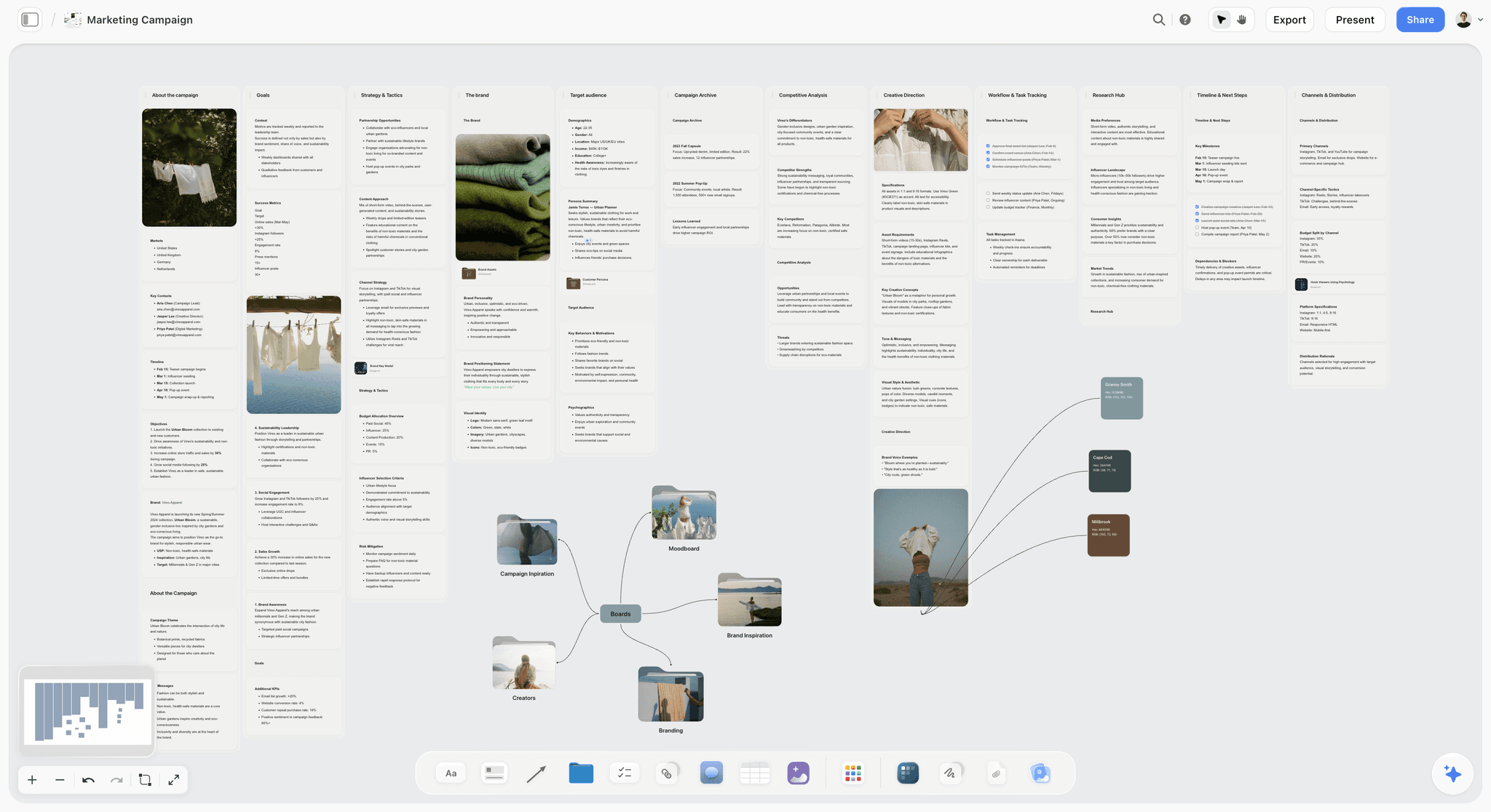
The verdict. The only tool here that shows you the two speeds you cannot see while you are drawing.
Best for. Holding the arc, the page grid and the buffer count in one visible place.
Pricing. Paid-only during early access. Plus is $7.99 per month billed annually or $9.99 monthly. Pro is $14 per month billed annually or $19 monthly, adding AI image generation, roughly twenty times more AI usage and memory across conversations. Max is $39 per month billed annually or $49 monthly. Pricing is flat per account, and anyone a paid member invites to a board joins free. The Free plan launches before the end of 2026.
Why it ranks here. Every other tool on this list serves page speed or audience speed. Almost nothing serves arc speed, and arc speed is where comics quietly die.
The board that works has three things on one surface. The arc, as beats across chapters, with the setups marked and lines drawn to where they pay off, so an unresolved setup is visually obvious rather than a nagging feeling. The page grid, one card per page, coloured by status, so you can see the shape of the chapter you are inside. And the buffer, which is simply the count of finished pages ahead of publication, sitting where you cannot avoid it.
That third element is the whole argument. A buffer of four is fine. A buffer of four that was seven a month ago is a warning, and nobody notices the trend because the number lives in their head where trends are invisible. On a board where the finished pages are visibly ahead of the published marker, the decline is a picture rather than a calculation.
The arc half matters for a subtler reason. When the arc is visible while you work on page 147, you notice that the thing you set up on page 30 has not been touched in ninety pages. That noticing is what prevents the drift, and it cannot happen if the arc lives in a document you last opened in March.
The AI reads your full active canvas board by default, plus up to one Tactic and up to three Documents you @-mention, which is genuinely useful for asking an arc board what setups are still unresolved.
Access shape matters if you work with a collaborator: a co-writer, a colourist, a letterer. Invited collaborators join free rather than costing a seat, which for a comic earning very little is not a small thing.
Strengths.
- Arc, page grid and buffer visible in one place, which is the view nobody has.
- Setups and payoffs can be linked spatially, so unresolved threads are obvious.
- Buffer decline becomes a picture rather than a mental calculation.
- Invited collaborators join free, so a colourist or letterer costs nothing extra.
- Canvas-wide AI context for checking which arc threads are still open.
Limitations.
- Does not draw. No brushes, no layers, no canvas rotation, no pen pressure. It is not remotely a drawing tool.
- No lettering, no balloon tools, no panel templates, no print export, no CMYK.
- No publishing. It will not post to Webtoon, Tapas or anywhere else.
- No hosting, no archive, no RSS, no reader analytics.
- No monetization features of any kind.
- Team Workspace with permissions and roles is on Max at $39 per month billed annually.
The trade off. Storyflow serves the two speeds you cannot see and none of the work you actually do. It is a planning surface next to your drawing tool, and every creator on this list needs both.
2. Clip Studio Paint
The verdict. The correct drawing tool for almost every webcomic, and the pricing is not close.
Best for. Drawing, inking, lettering and page or vertical-scroll setup.
Pricing. Perpetual licence, historically well under $100 for the EX edition during frequent sales, with subscription options for multi-device. Verify on clipstudio.net.
Why it ranks here. Clip Studio was built for comics rather than adapted to them. Panel tools, perspective rulers, speech balloons with proper tails, 3D reference models for the poses you cannot draw, vector layers whose line weight you can change afterwards, and page management that handles both traditional pages and vertical scroll.
The perpetual licence is a genuine argument in a category where income is uncertain for years. A one-time cost around the price of two months of a subscription elsewhere, with no risk of losing access during a lean stretch.
Second because it does not know about your arc or your buffer, which is where the failure lives.
Strengths.
- Purpose-built comic tools: panels, balloons, perspective rulers, tones.
- 3D models for reference, which materially speeds up difficult angles.
- Vector layers with editable line weight after the fact.
- Perpetual licence at a price that undercuts subscriptions dramatically.
- Handles both page format and vertical scroll properly.
Limitations.
- Cluttered interface with a real learning curve.
- Multi-device use pushes you toward the subscription.
- Occasional performance issues on very large vertical-scroll files.
- Version upgrades cost again on the perpetual model.
The trade off. Buy it, learn it over a fortnight, and stop evaluating drawing software. It is the answer for the overwhelming majority of webcomics.
3. Procreate
The verdict. Where a great many pages actually get drawn, because it is on the device you have on the sofa.
Best for. Drawing on an iPad, anywhere, with the least friction of anything here.
Pricing. One-time purchase, historically around $12.99, with Procreate Dreams sold separately. Verify on procreate.com.
Why it ranks here. The best drawing tool is the one you will open on a Tuesday evening when you are tired, and for a large number of creators that is an iPad. Procreate's brushes are superb, the price is close to trivial, and the friction from idea to first line is the lowest here.
Third because its comic-specific features are thin. No real panel tools, no proper lettering, and page management that is genuinely awkward for a long-form series.
Strengths.
- Outstanding brush feel and performance.
- One-time purchase at a very low price.
- Lowest friction to start drawing of anything on this list.
- Portable, which is how a lot of webcomic work actually happens.
- Time-lapse recording, which is free social content.
Limitations.
- No real panel or lettering tools.
- Layer limits on older iPads bite on complex pages.
- Page and series management is awkward.
- iPad only.
- Not built for print output.
The trade off. Draw here if that is where you draw, and letter in Clip Studio. Many creators run exactly that split.
4. Krita
The verdict. The best free drawing tool, with no meaningful catch.
Best for. Creators who cannot spend anything and still need real capability.
Pricing. Free and open source. Verify on krita.org.
Why it ranks here. Krita is a genuinely capable painting application with strong brush engines, some comic-specific tooling, and no cost. For a creator starting out with no income, it removes the last excuse.
Fourth because Clip Studio's comic tooling is meaningfully better and costs about as much as a takeaway, which for most people is the right trade once the comic is real.
Strengths.
- Free and open source with no limits.
- Excellent brush engines.
- Some comic panel tooling built in.
- Cross-platform including Linux.
- Active development.
Limitations.
- Comic tools behind Clip Studio's.
- Occasional stability issues on large files.
- Lettering is weak.
- Smaller learning-resource ecosystem.
The trade off. The right starting point at zero budget. Upgrade when the comic proves it is going to continue.
5. Webtoon Canvas
The verdict. Where the readers are, with the trade-offs that always come with that.
Best for. Finding a vertical-scroll audience you could not reach alone.
Pricing. Free to publish, with revenue share on their monetization programmes. Verify on webtoons.com.
Why it ranks here. Audience speed is the speed that kills, and platform discovery is the only realistic way most new comics find readers at all. Canvas has the largest vertical-scroll audience, and its readers have strong habits around the format.
Fifth because the platform shapes the work. Vertical scroll is a different grammar from page composition, the algorithm rewards frequency in ways that pressure the buffer, and you are building an audience on somebody else's terms.
Strengths.
- Largest vertical-scroll readership available.
- Genuine discovery for new comics.
- Clear path into monetization programmes.
- Strong mobile reading experience.
Limitations.
- Vertical scroll is a distinct format, not a re-flow of pages.
- Algorithmic pressure toward frequency, which strains the buffer.
- Revenue share terms favour the platform.
- Your audience is on their platform, not yours.
The trade off. Publish here for reach, and keep an archive you control as well.
6. Patreon
The verdict. The most common income route, and the thing that changes what the comic is.
Best for. Converting committed readers into recurring income.
Pricing. Revenue share across tiers, historically 8 to 12 percent plus payment processing. Verify on patreon.com.
Why it ranks here. For most webcomics that earn anything, Patreon is where it comes from, and the mechanics work: early access, process posts and extras are things readers genuinely want.
The honest caution belongs in the ranking rather than a footnote. A Patreon converts readers into people owed something on a schedule. The obligation is real, it arrives every month, and it interacts badly with the buffer: creators frequently promise early access, which means the buffer is now partly spent in advance. Several creators have described the moment the comic became a job as the moment the joy left, and that moment is usually the Patreon launch.
Strengths.
- The established route to recurring income in this medium.
- Tier structures that fit comics naturally.
- Direct relationship with your most committed readers.
- Built-in tools for early access and extras.
Limitations.
- Fees plus processing take a real cut.
- Creates a monthly obligation that outlasts enthusiasm.
- Early-access tiers effectively consume buffer.
- Income is volatile and churn is constant.
The trade off. Launch it when your buffer is genuinely healthy, not when you need money. Launching from a weak buffer is how creators end up owing pages they cannot draw.
7. Airtable
The verdict. The unglamorous way to turn the buffer from a feeling into a number.
Best for. Page status, buffer count and the publishing schedule.
Pricing. Free tier with record limits. Team plans from around $20 per seat per month billed annually, and the free tier is genuinely sufficient here. Verify on airtable.com.
Why it ranks here. One record per page, with a status field (thumbnailed, pencilled, inked, coloured, lettered, scheduled) and a publish date. A view filtered to finished-but-unpublished pages is your buffer, as a number, updated automatically.
That is the whole intervention, it takes an hour, it costs nothing on the free tier, and it addresses the single most common cause of a webcomic ending.
Seventh because it is infrastructure rather than craft, and because a canvas that shows the same thing spatially is easier to actually look at.
Strengths.
- Turns the buffer into an automatic number.
- Required status fields, so page state does not decay.
- Automations that warn you when the buffer drops below a threshold.
- Free tier is genuinely sufficient for one comic.
- Calendar view for the publishing schedule.
Limitations.
- Nothing visual, so it will not hold your arc usefully.
- Feels like admin, which is why creators abandon it.
- Per-seat pricing if collaborators need access.
- Requires setup at a moment when drawing feels more urgent.
The trade off. An hour of setup against the most common cause of death in this medium. Do it even if you do everything else on paper.
8. Tapas
The verdict. A worthwhile second platform with a different reader culture.
Best for. Reaching an audience with different habits from Webtoon's.
Pricing. Free to publish with revenue share on monetization. Verify on tapas.io.
Why it ranks here. Tapas supports both page and vertical formats, its readers skew toward different genres, and its monetization mechanics differ enough that some comics do meaningfully better there.
Eighth because cross-posting is real work and a second platform's benefit is usually smaller than the effort suggests.
Strengths.
- Supports both page-based and vertical formats.
- Different reader demographics and genre strengths.
- Ink-based monetization that suits some comics.
- Reasonable discovery for new work.
Limitations.
- Smaller audience than Webtoon.
- Cross-posting is ongoing manual work.
- Revenue share terms.
- Same platform-dependency risk.
The trade off. Worth trying if your genre fits. Not worth splitting your attention across four platforms.
9. Milanote
The verdict. A calm home for character and world reference.
Best for. Character sheets, colour scripts, environment reference and mood.
Pricing. Free plan capped at 100 notes, images and links across the account. Paid plans from around $12.50 per person per month. Verify on milanote.com.
Why it ranks here. Comics need visual consistency across hundreds of pages: what the character's jacket looks like, which colours the flashbacks use, how the town is laid out. Milanote is a pleasant home for that reference and stays readable.
Ninth because the 100-item cap arrives quickly with reference images, and because it holds reference rather than arc.
Strengths.
- Intuitive and quick for visual reference.
- Good web clipper.
- Stays readable over time.
- Quiet interface.
Limitations.
- 100-item free cap across the account, hit fast with images.
- Per-person pricing.
- No arc, buffer or production tracking.
- No AI worth using.
The trade off. Good for reference. Not a system for the two invisible speeds.
10. Notion
The verdict. Where the script and the series bible should be written.
Best for. Scripts, character notes, world rules and production documentation.
Pricing. Generous free plan for individuals. Paid plans around $10 per user per month billed annually. Verify on notion.so.
Why it ranks here. Comics need written material: dialogue drafts, the series bible, what you decided about the magic system. Notion is good at that and free for one person.
Tenth because a document is exactly where an arc goes to stop being consulted. The failure this post describes is not that the arc was never written down, it is that it was written down somewhere nobody opens.
Strengths.
- Good for scripts and written series documentation.
- Databases can track pages if you prefer text to a canvas.
- Free for individuals.
- Familiar and quick.
Limitations.
- Documents are where arcs go to be forgotten.
- No visual or spatial view worth using.
- No drawing or publishing.
- Configuration is procrastination.
The trade off. Write the script here. Keep the arc somewhere you will actually look.
11. ComicFury
The verdict. A free archive you control, which matters more than it sounds.
Best for. Hosting your own comic archive with a real URL and no algorithm.
Pricing. Free, community-supported. Verify on comicfury.com.
Why it ranks here. Platform-dependent comics are vulnerable to decisions they do not control. ComicFury gives you a hosted archive with your own domain, no ads by default, and an audience that arrives directly rather than by recommendation.
Eleventh because discovery is minimal. This is where readers you already have come to read, not where new ones find you.
Strengths.
- Free with no ads by default.
- Custom domain support and real archive control.
- Long-running and community-run rather than venture-funded.
- No algorithm between you and your readers.
Limitations.
- Almost no discovery.
- Dated templates and design.
- Small community relative to major platforms.
- Monetization is on you.
The trade off. Publish to platforms for reach and keep this as the archive that is yours. That combination is what long-running comics tend to converge on.
What to Actually Pay For
Buy the drawing tool once and stop shopping. Clip Studio Paint on a perpetual licence costs less than three months of most subscriptions and removes a recurring decision.
Make the buffer a number this week, for free. Airtable's free tier or a canvas will do it. This is the single highest-return hour available to a webcomic creator and it costs nothing.
Spend under $10 a month on the arc, if anything. The point is that the arc is somewhere you pass by, not that the software is sophisticated. A wall of index cards works too.
Do not pay for a second platform's promise. Cross-posting is real weekly labour. Add a platform when the first one is working, not to diversify a comic nobody has found yet.
Delay monetization until the buffer is healthy. A Patreon launched from a weak buffer converts a hobby into an obligation you cannot meet, which is the fastest route to stopping.
Tools to Avoid for This Job
A subscription drawing tool as your first purchase. Webcomic income is uncertain for years, and a lean month should not cost you access to your own files. Perpetual licences are worth a premium here specifically.
Keeping the buffer in your head. It is the number that decides whether the comic survives, and heads are bad at trends. This is the most common structural failure in the medium.
The arc in a document you do not open. Writing the outline is not the point; consulting it is. If your series bible has not been opened in two months, it is not doing the job regardless of how good it is.
Publishing exclusively on one platform. Terms change, algorithms change, and comics have lost their audiences overnight to decisions they had no part in. Keep an archive you control.
Redrawing the first chapter. The most attractive procrastination in webcomics. Your art will improve and the early pages will always look worse, and readers do not care nearly as much as you do.
What No Tool on This List Does
None of these will make an update schedule you can actually sustain.
The honest arithmetic is that a page takes a certain number of hours, you have a certain number of hours, and most creators set a schedule based on ambition rather than measurement. The correction is unglamorous: time five pages honestly, including the parts you do not count, then set the schedule to what that allows, and then make it slower still because life happens. Nearly every creator who has kept going for years has done a version of this, usually after a collapse.
None of them will tell you whether the story is working. Comments and view counts measure reach, not quality, and a comic can be widely read and structurally broken. The only reliable instruments are a reader who will be honest with you and rereading your own chapters cold after a month, both of which cost nothing and neither of which is a tool.
And none of them will replace the buffer with something else. There is no clever system that removes the need to be ahead. Buffer is the only real protection against ordinary life, it takes a painful stretch of drawing without publishing to build, and every creator who has one built it deliberately during a good month.
The Bottom Line
A webcomic runs at three speeds simultaneously, and the creator can usually only see one of them at a time.
Choose by the speed you cannot see. If drawing is the bottleneck, Clip Studio Paint will genuinely make pages faster and it costs less than three months of a subscription. If nobody is finding you, that is audience speed and a platform is the answer, with an archive you control alongside it.
But if the pattern is that the story has drifted and you are not sure how many finished pages you have, those are the arc and the buffer, and they are invisible precisely because page speed consumes everything. That is the narrow case where Storyflow ranks first here, and it is the only claim this post makes for it.
FAQ: Tools for Webcomic Creators
What is the best tool for making a webcomic?
Clip Studio Paint for drawing, without much argument, because it was built for comics and its perpetual licence is inexpensive. Alongside it, something that keeps your arc and your buffer visible while you work at page speed, which is what Storyflow ranks first for here. Those two cover the work and the two speeds that actually end comics.
What is the best free webcomic tool stack?
Krita for drawing, Airtable's free tier for page status and buffer count, ComicFury for a free archive you control, and Webtoon Canvas for discovery. This is a complete, genuinely workable stack at zero cost. Storyflow is paid-only during early access, so it does not belong in a free stack today, though invited collaborators join free.
Does Storyflow let me draw comics?
No. Storyflow has no brushes, layers, pen pressure, panel tools, lettering, balloons or print export. It does not publish to Webtoon, Tapas or anywhere else, and it has no hosting or reader analytics. It ranks first on this list for the planning layer only: keeping the arc, the page grid and the buffer visible while you work.
Is Storyflow free for comic creators?
Not during early access. Storyflow is paid-only right now, starting at $7.99 per month billed annually on the Plus plan. The Free plan launches before the end of 2026. The genuinely free path today is that anyone a paid member invites to a board joins free, which is useful if you work with a colourist, letterer or co-writer.
How big should my buffer be?
At least eight weeks of updates before you commit to a public schedule, and ideally twelve before launching any paid tier. The buffer is the only real protection against ordinary life, and every creator who has run for years has one. Building it requires a painful stretch of drawing without publishing, which is exactly why most people skip it.
Why do webcomics stop?
Almost never because of the art. They stop because the buffer reached zero during an ordinary hard month, an update was missed, and the audience did what audiences do. The buffer reaches zero because it lives in the creator's head, where a slow decline is invisible. Making it a number that updates automatically is the most effective intervention available.
Clip Studio Paint or Procreate?
Clip Studio for the comic-specific tooling, panels, balloons, perspective rulers and vector line control, and for the perpetual licence. Procreate if you draw on an iPad and friction is what stops you. Many creators draw in Procreate and letter in Clip Studio, which is a reasonable split.
Should I publish on Webtoon or my own site?
Both. Webtoon Canvas for discovery, because it is realistically the only way most new comics find readers, and an archive you control for durability, because platform terms change and comics have lost audiences overnight. The archive costs nothing on ComicFury.
When should I start a Patreon?
When your buffer is healthy, not when you need money. A Patreon converts readers into people owed something on a schedule, and early-access tiers effectively spend your buffer in advance. Launching from a weak buffer is the most common way a webcomic becomes an obligation the creator cannot meet.
How do I stop my story drifting?
Keep the arc somewhere you pass by while working, with setups linked visually to where they pay off. Arcs do not fail dramatically, they stop being consulted, and a series bible in a closed document is functionally the same as no series bible. The test is simple: when did you last open it?
Can AI help with a webcomic?
For planning and consistency checks, modestly. Asking an arc board which setups are still unresolved is genuinely useful after a hundred pages. Storyflow's AI reads your full active canvas board plus up to one Tactic and three Documents you @-mention. For the art, generative output raises real questions in a medium where readers care deeply about authorship, and most successful creators avoid it entirely.
How much should a webcomic tool stack cost?
Under $100 in the first year, most of it a one-time Clip Studio licence. Everything else has a free tier that genuinely works. If your stack costs more than your comic earns for the first two years, that is normal, which is exactly why perpetual licences and free tiers matter more here than in almost any other creative category.
How do I set a sustainable update schedule?
Time five pages honestly, including thumbnails, reference gathering and the evening you spent fixing a hand. Divide your realistic weekly hours by that number, then make the schedule one step slower. Almost every creator sets their schedule from ambition and discovers the arithmetic during a collapse.
What is the single change worth making this week?
Count your finished unpublished pages and write the number somewhere you will see it every week. That is your buffer. Most creators discover it is smaller than they believed, and knowing it is smaller is the entire difference between adjusting now and missing an update in November.
Table of Contents
- Key Takeaways
- The Three Speeds of a Webcomic
- At a Glance: The 11 Tools Compared
- How I Ranked These
- Quick Picks by Job Type
- 1. Storyflow
- 2. Clip Studio Paint
- 3. Procreate
- 4. Krita
- 5. Webtoon Canvas
- 6. Patreon
- 7. Airtable
- 8. Tapas
- 9. Milanote
- 10. Notion
- 11. ComicFury
- What to Actually Pay For
- Tools to Avoid for This Job
- What No Tool on This List Does
- The Bottom Line
- FAQ: Tools for Webcomic Creators
- Related Reading
Templates to check out for this topic


Templates you can use in Storyflow
Every Storyflow board starts from real structure and an AI that reads the whole canvas. Open one of these templates and make it yours.


See Storyflow in Action
A visual AI workspace where every feature lives inside one canvas. No tab-switching, no context lost.
Build your entire board from a single message
Type what you need in the AI chat at the bottom of your canvas. The AI adds cards, headings, and structure directly onto your board.
Use expert frameworks as AI context
Type @ in the AI chat and choose any Tactic. The AI tailors every response to that framework instead of giving generic advice.
Turn your board into a mind map in seconds
Ask the AI to restructure your canvas as a mindmap. It connects your ideas into a visual hierarchy so you can see how everything relates.
Why Storyflow Exists
Storyflow actually began as a personal tool while working on creative and research projects.
We kept running into the same problem: ideas were scattered everywhere: notes, documents, and whiteboards.
Nothing helped us see how everything connected.
So we started building a workspace designed around how ideas actually grow.
→ Read how Storyflow was createdSara de Klein
Head of Product at Storyflow
Published: 2026-08-11
Extremely simple, seriously capable


See how easy it is to get started
Watch a real project come together, from a blank board to a finished plan, clicked through step by step.
Start creating with AI and become more productive
Transform your creative workflow with AI-powered tools. Generate ideas, create content, and boost your productivity in minutes instead of hours.