The 13 Best Course Creator Tools in 2026 (We Tested Them All)
The 13 best course creator tools in 2026, tested on real cohort and self-paced courses. Course platforms, planning canvases, selling tools, and AI compared honestly.

Category
Education
Author

Justkay
Documentary Filmmaker & Founder at Storyflow
Topics
2026-05-14
•
24 min read
•
Education- best course creator tools 2026
- course creation platform
- Teachable vs Thinkific
- Kajabi vs Maven
What are the best course creator tools in 2026?
The best course creator tools in 2026 are Teachable and Thinkific for focused hosting, Kajabi for the all-in-one business, Maven and Disco for cohort courses, Circle and Mighty Networks for community-first learning, and Storyflow for the curriculum planning that comes before any of them. No single tool does the whole job, and the lists that pretend one does are the reason so many courses ship with thin curriculum. Course creation is a three-stage pipeline: you design the curriculum, you host and deliver it, and you run the community around it. I tested thirteen tools across three real projects this spring (a six-week cohort course on documentary research, a self-paced video course on AI workflows, and a paid newsletter that doubles as a course) and ranked them by the stage they actually own. Pick your stack by the stage where your course is weakest, not by the tool with the most features on its pricing page.

Full disclosure: Two tools here are ours. Storyflow is our visual workspace and is listed first in the reviews and the comparison table: our pick first, then the rest by job. The ranked list places it third. Kajabi leads that list because it is the most complete all-in-one delivery platform, with hosting, payments, email, and websites genuinely integrated, which a design canvas does not do. Storyflow earns the third slot for Stage 1 curriculum design (learning objectives, module sequencing, and lesson cards on a canvas the AI reads), but it has no video hosting, no payments, and no student management, and real AI volume starts at Pro rather than Plus. You pair it with Teachable, Thinkific, or Kajabi for delivery. Framekit is also ours and sits tenth, deliberately low: it is not a course platform at all, with no lessons, no drip, no student progress and no community, and it earns its slot only for the case where what you sell is a file rather than a course. Every hosting tool above it beats it outright the moment a student has to progress through anything. We link to every tool so you can judge the fit.
Quick Comparison
These five map to the pipeline: two delivery platforms, the design canvas that comes before them, a hosting tool with site-building, and the selling surface for when the product is a file rather than a course.
| Tool | Best For | AI Features | Price |
|---|---|---|---|
| Kajabi | All-in-one course business | Content-generation AI | ~$149/month |
| Teachable | Established course hosting | Lesson-copy AI | $39/month |
| Storyflow | Curriculum planning canvas | Canvas AI reads the whole curriculum | $7.99 mo annual (free plan late 2026) |
| Thinkific | Course hosting with sites | Thin | $36/month |
| Framekit | Selling a digital product without an LMS | AI website builder | Free / $9 mo ($7 annual) |
All 13 Course Creator Tools, Ranked
- Kajabi: best all-in-one course business with hosting, email, and sites
- Teachable: best established, dependable course hosting
- Storyflow: best curriculum design canvas with AI that reads the whole board
- Thinkific: best course hosting with a branded site builder
- Maven: best cohort courses with network-driven discovery
- Disco: best cohort courses you fully own
- Circle: best community platform with light courses
- Mighty Networks: best even balance of courses and community
- Podia: best course plus newsletter with a usable free tier
- Framekit: best for selling a workbook, template pack, or recorded workshop without an LMS
- Kit: best email-driven course launch
- Notion: best database-based course planning
- Skool: best community-led course platform with gamification
Best Course Creator Tool by Job
The overall ranking is not the answer to every question. Match the tool to the job you actually have:
- Best all-in-one course business: Kajabi. Hosting, email, and sites in one product.
- Best tool for designing the curriculum before you build it: Storyflow. The outline, the module map, and the lesson notes sit on one canvas the AI can read end to end.
- Best established, dependable course hosting: Teachable.
- Best course hosting with a branded site builder: Thinkific.
- Best cohort courses with network-driven discovery: Maven.
The Three-Stage Model: How Course Tools Actually Split
Before the rankings, name the model, because it explains every recommendation below. Course tools fall into three stages, and almost every tool is strong at exactly one of them.
Stage 1: Design. Where the curriculum, learning objectives, module structure, and lesson outlines get built. This is upstream work, and it happens before you touch a hosting platform. Tools here: Storyflow (canvas), Notion (databases).
Stage 2: Delivery. Where the finished course lives: video hosting, payments, drip releases, student management. Tools here: Teachable, Thinkific, Kajabi, Podia, Maven, Disco.
Stage 3: Community. Where students engage: discussion, cohorts, live sessions, accountability. Tools here: Circle, Mighty Networks, Skool.
The mistake almost every new creator makes is trying to run Stage 1 inside a Stage 2 tool. Hosting platforms have a "curriculum" tab, so it feels like the design work belongs there. It does not. A hosting platform optimizes for delivering a course, not for designing one, and the design phase is where most of the course quality lives. You end up with a beautifully hosted course that has a mediocre curriculum, because the outlining, sequencing, and instructional-design thinking never got a real workspace. The Three-Stage Model is the lens for the rest of this article: for each tool, ask which stage it owns, and never ask one stage to do another stage's job.
Quick Picks: Best Course Creator Tools 2026 by Use Case
Best Course Hosting Platform: Teachable or Thinkific The established Stage 2 delivery platforms. Teachable from $39/month, Thinkific from $36/month. Both handle video hosting, payments, and student management well. Neither has real curriculum planning, so pair them with a Stage 1 tool.
Best All-in-One Course Platform: Kajabi Courses, memberships, email marketing, and websites in one Stage 2 tool. From roughly $149/month on the mid tier. The price is steep for new creators, and the breadth means more to configure.
Best for Cohort-Based Courses: Maven or Disco Maven is the discovery-driven cohort platform (it takes a revenue share, and the Maven network sends you students). Disco is the ownership-first alternative at a fixed monthly fee. Choose discovery (Maven) or audience ownership (Disco).
Best Free Course Platform: Podia or Teachable's Free Plan Podia has a genuinely usable free tier. Teachable's free plan exists but charges per-transaction fees. Podia if you want full features free, Teachable free if pay-per-transaction is acceptable.
Best for Existing-Audience Launch: Kit or Substack Paid Kit (formerly ConvertKit) drives email-sequence course launches from around $25/month. Substack sells paid newsletters that double as courses (free plus a 10% revenue share). Kit for audience ownership, Substack for discovery.
Best for Selling a Digital Product Instead of a Course: Framekit When the thing you are selling is a workbook, a template pack, or a recorded workshop rather than a multi-module course, a hosting platform is more machinery than the product needs. Framekit puts the sales page and the checkout on your own domain from $9/month ($7 annual), with a 0% transaction fee on its $39/month tier. It hosts no lessons, tracks no student progress, and runs no community, so it is only the right answer when none of those are part of what you sell.
Best for Membership-Style Courses: Mighty Networks or Circle Mighty Networks bundles courses and community; Circle is community-first with lighter courses. Mighty Networks from roughly $49/month, Circle from around $89/month. Choose by which side (courses or community) is primary.
Best for Curriculum Design (a Different Stage Entirely): Storyflow Storyflow is the Stage 1 canvas where the outline, the learning-objectives Document, the lesson cards arranged by module, the instructional-design Tactic, and the research source cards live on one board. Its AI reads the full active board plus context you @-mention. It has no video hosting, no payments, and no student management, so you pair it with a Stage 2 platform. Storyflow is paid-only during early access, with Plus from $7.99/month billed annually; its Free plan launches before the end of 2026.
The honest split: course creators in 2026 almost always run multiple tools. A design tool (Storyflow, Notion) for the curriculum. A delivery platform (Teachable, Thinkific, Kajabi, Maven) for hosting. A community tool (Circle, Skool) for engagement. Try Storyflow for course curriculum planning.
Comparison Table: Best Course Creator Tools 2026
| Tool | Stage Owned | Best For | Starting Price | Free Plan |
|---|---|---|---|---|
Storyflow | Design | Curriculum planning canvas | $7.99/month annual | Coming late 2026 (invited collaborators join free now) |
Kajabi | Delivery | All-in-one course business | ~$149/month | 14-day trial |
Teachable | Delivery | Established course hosting | $39/month | Yes (with fees) |
Thinkific | Delivery | Course hosting with sites | $36/month | Yes (limited) |
Maven | Delivery (cohort) | Cohort courses with discovery | Revenue share | No |
Disco | Delivery (cohort) | Cohort courses you own | $99/month | 14-day trial |
Circle | Community | Community with light courses | $89/month | 14-day trial |
Mighty Networks | Community | Courses plus community | $49/month | 14-day trial |
Podia | Delivery | Course plus newsletter, free tier | Free with limits | Yes |
Framekit | Selling (not delivery) | A digital product without an LMS | Free / $9 mo ($7 annual) | Yes (10 pages) |
Kit | Delivery (email) | Email-driven course launch | $25/month | Yes (up to 1k) |
Notion | Design | Database-based course planning | $10/user/month | Yes (individuals) |
Skool | Community | Community-led course platform | $99/month | 14-day trial |
Prices are indicative and shift often; verify current pricing on each vendor's page before you commit.

Storyflow canvas holding course modules, lesson cards, instructional design Tactic, and learning objectives Document
How We Evaluated the Best Course Creator Tools 2026
Five named criteria decided the rankings. Each tool was tested with real course creation across three projects over roughly three weeks, not judged from a feature grid.
Delivery depth (25%). Video hosting, payment processing, student management, drip releases, and how the student experience feels on the front end.
Design and curriculum support (20%). Outlining, module and lesson structure, and whether the tool supports actual instructional-design thinking or just a nested list of lessons.
Community features (20%). Discussion, live sessions, cohorts, and accountability mechanics.
Pricing and value (20%). Real cost at 100, 500, and 2,000 students, including transaction fees and per-seat charges that pricing pages tend to hide.
AI depth (15%). Whether the AI helps with design (curriculum, sequencing), content generation, or student assistance, and how much context it can actually read.
Delivery and design are weighted highest because those are the two stages most creators get wrong: they over-invest in delivery polish and under-invest in the curriculum that determines whether students finish.
Detailed Reviews: Best Course Creator Tools 2026
1. Storyflow (Best Curriculum Design Canvas)
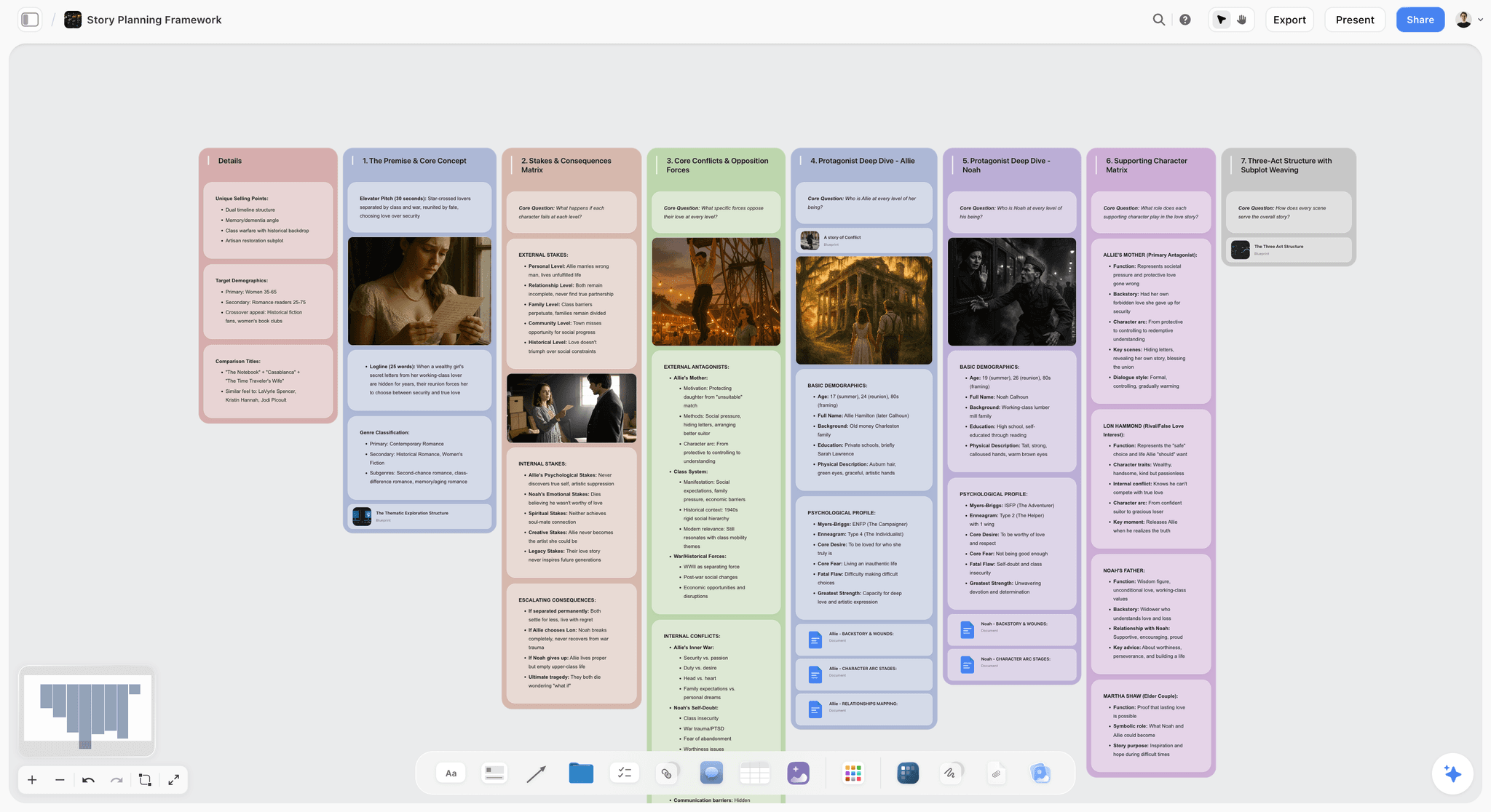
Name the friction first. Storyflow is a Stage 1 design tool, not a hosting platform. There is no video hosting, no payments, and no student management. If your need is delivering a course to paying students, Teachable, Thinkific, Kajabi, or Maven are the right tools and Storyflow is not.
Now the strength. The familiar approach to curriculum is to open your hosting platform's "curriculum" tab and start typing lesson titles into a list, which flattens a multi-week course into a vertical outline before you have thought about sequence, dependencies, or the arc a learner actually travels. Storyflow replaces that list with a canvas. A course project holds the learning-objectives Document, the module cards arranged spatially so you can see the whole arc at once, the lesson cards nested inside each module, the instructional-design Tactic (a Story Blueprint framework you drop in to structure the design), the research source cards, and the working scripts for video lessons. You see the entire curriculum as one map instead of scrolling a list, which is where the design phase is where most of the course quality lives stops being a slogan and starts being visible.
The AI is the part fully-free planning tools cannot match. Storyflow's AI reads the full active canvas board plus up to 3 Documents and 1 Tactic you @-mention, so when you ask it to draft module three or rebalance the pacing, it answers with your actual objectives and prior modules in context, not from a blank prompt. A useful shortcut is to start from a Story Blueprint framework (Storyflow ships proven structures like AIDA and StoryBrand you can adapt into a learning arc) rather than an empty board.
Best for: creators who design the curriculum before building on a hosting platform, and who think spatially rather than in nested lists.
Pricing: Paid-only early access today; the Free plan ($0, no credit card) launches before the end of 2026, and anyone a paid member invites to a board joins free now. Plus: $7.99/month billed annually or $9.99/month monthly (the 200+ Story Blueprints library plus unlimited file uploads; note that Plus keeps the same AI trial as Free, it does not add more AI). Pro: $14/month annually or $19/month monthly (20x more AI than the trial plus AI image generation). Max: $39/month annually or $49/month monthly (40x more AI plus a team workspace with roles and permissions).
Strengths: the canvas matches how curriculum design actually works, the Story Blueprints library gives you a starting structure, the AI reads the whole board plus @-mentioned context, and the Free plan launching before the end of 2026 looks genuinely usable for planning a full course.
Limitations (name them honestly): it is not a hosting platform, so no video, payments, or student management, and you will always run a second tool alongside it. It is cloud-first, so there is no offline local-file mode. Real AI capacity starts at Pro, not Plus (the Free and Plus tiers share the same 10-generation AI trial), so a creator planning heavily with AI will feel that ceiling before the price tempts them up. And the canvas is card-and-board shaped, which is a poor fit if you want your curriculum as a linear exportable document rather than a spatial map.
Verdict: the right pick for the design stage, paired with a Stage 2 platform for delivery. Plan and structure the full course in Storyflow, then build it out wherever you teach.
2. Kajabi (Best All-in-One)
Kajabi owns Stage 2 delivery more completely than anything else on this list, and it stretches into email and websites so you can run the whole business from one login. For an established creator who wants a single platform, it is the most comprehensive option here.
Best for: Established creators who want courses, email, and a site in one tool. Not for: new creators on a budget, or anyone who wants deep curriculum design.
Pricing: Kickstarter around $89/month, mid tier around $149/month, higher tier around $199/month.
Why it is here. the breadth is real. Courses, memberships, funnels, email, and websites are genuinely integrated rather than bolted together.
Strengths: all-in-one for the course business, mature email marketing, integrated websites and funnels, strong payment handling.
Limitations: price is steep for new creators, the breadth can feel overwhelming, and the curriculum tab is a lesson list, not a design surface. AI features are lighter than dedicated AI tools.
Verdict: the right pick for an established creator who wants one platform and has the curriculum already figured out.
3. Teachable (Best Established Course Hosting)
Teachable is the safe Stage 2 default: mature video hosting, reliable payments, and student management that has been battle-tested for a decade.
Best for: creators who want focused, dependable hosting. Not for: anyone who needs cohort or community depth, or real curriculum planning.
Pricing: free with transaction fees, Basic from $39/month, Pro from $119/month.
Why it ranks: it does one job (hosting a self-paced course) and does it without drama.
Strengths: mature hosting, strong payment integration, large user base and support ecosystem, dependable.
Limitations: curriculum planning is a thin outline tool, community features trail Circle and Mighty Networks, and the free plan's transaction fees eat into early revenue.
Verdict: the right pick when you want your course delivered reliably and you designed the curriculum elsewhere.
4. Thinkific (Best Course Platform with Sites)
Thinkific is a Stage 2 delivery platform with unusually strong site-building, so your course lives inside a branded site you control.
Best for: creators who want a branded course site alongside the hosting. Not for: anyone who wants Kajabi-level email marketing in the same tool.
Pricing: free with limits, Basic from $36/month, Start from $74/month.
Why it ranks: the site builder is a genuine advantage for creators who care about brand presentation.
Strengths: mature hosting, a real site builder, a free tier that lets you start.
Limitations: email marketing is lighter than Kajabi, AI features are thin, and (like every hosting platform) the curriculum tools are a lesson list.
Verdict: the right pick when a branded, self-owned course site matters to you.
5. Maven (Best Cohort-Based)
Maven is the most purpose-built Stage 2 platform for synchronous cohort courses, and the Maven network doubles as a discovery channel that sends you students.
Best for: cohort creators teaching live, who value discovery. Not for: self-paced courses, or creators who want full audience ownership.
Pricing: revenue share on student payments, no upfront platform fee.
Why it ranks: for live cohorts, the operations (scheduling, deliverables, peer learning) are handled better than any general hosting tool.
Strengths: best-in-class cohort features, network-driven discovery, operations built specifically for cohorts.
Limitations: the revenue share is a real cost at scale, and you own less of the audience relationship than on a self-hosted platform.
Verdict: the right pick for cohort courses when platform-driven discovery is worth the revenue share.
6. Disco (Best Community-First Cohort)
Disco is the ownership-first alternative to Maven: the same cohort strengths at a fixed monthly cost, with full control of your audience.
Best for: cohort creators who want to own their audience. Not for: creators who want the platform to bring them students.
Pricing: from $99/month, 14-day trial.
Why it ranks: it gives cohort creators the operations they need without surrendering a revenue share or the audience relationship.
Strengths: audience ownership, mature cohort tooling, strong community features.
Limitations: no platform-driven discovery (you bring your own audience), and the fixed monthly cost stings before you have paying students.
Verdict: the right pick for cohort creators who already have an audience and want to keep it.
7. Circle (Best Community With Light Courses)
Circle is the strongest Stage 3 community platform on this list, with course features added as a complement rather than the core.
Best for: creators whose primary product is the community. Not for: course-first creators.
Pricing: Professional from $89/month, Business from $199/month.
Why it ranks: the community experience (discussion, member management, spaces) is the best here.
Strengths: best community tooling on the list, mature discussion and member management, clean member experience.
Limitations: course features are lighter than dedicated Stage 2 platforms, and pricing scales with member count.
Verdict: the right pick when the community is the product and the course supports it.
8. Mighty Networks (Best Courses Plus Community)
Mighty Networks sits between Stage 2 and Stage 3, balancing courses and community more evenly than anything else here.
Best for: creators who weight courses and community equally. Not for: anyone who needs one of the two to be best-in-class.
Pricing: Business from $49/month, Pro from $179/month.
Why it ranks: the balance is genuine, and the mobile experience is strong.
Strengths: even course-and-community balance, mature member management, good mobile apps.
Limitations: neither the course side nor the community side is best-in-class, and the breadth means more configuration.
Verdict: the right pick when you truly need both stages in one tool.
9. Podia (Best Course Plus Newsletter)
Podia bundles Stage 2 delivery with newsletter publishing and a genuinely usable free tier, which makes it the most accessible starting point.
Best for: new creators with budget constraints. Not for: established creators with complex needs.
Pricing: free with limits, Mover from $33/month, Shaker from $75/month.
Why it ranks: the free tier lets you launch a real course without paying up front.
Strengths: a genuinely usable free tier, courses and newsletter in one tool, low overhead.
Limitations: course features are lighter than Teachable, and the newsletter side trails dedicated newsletter tools.
Verdict: the right pick for a first course when budget is the constraint.
10. Framekit (Best for Selling a Course-Adjacent Digital Product)
Framekit is on this list for a case the other eleven tools overcharge for. A large share of what gets sold as a "course" is really a digital product: a workbook, a template pack, a preset library, a swipe file, a recorded workshop. It has no lessons to drip, no student progress to track, and no cohort. Putting that on a course platform means paying course-platform prices for a checkout and a sales page.
Framekit is an all-in-one creative toolkit for freelancers where an AI website builder, client galleries, video review, and a store for digital products share one account. For this list, the relevant pair is the store and the site: the sales page and the checkout live on your own domain, so a buyer never leaves it to complete a purchase, and the file delivery sits on the same login.
Best for: creators selling a workbook, template pack, or recorded workshop, where a full LMS is more platform than the product needs. Not for: anyone who actually needs course delivery.
Pricing: free with 10 pages, unlimited client galleries with 3GB of photo storage, and a 5% transaction fee. Starter $9/month ($7 annual) adds a custom domain and branding removal. Pro $19/month ($15 annual) drops the fee to 3%. Business $39/month ($31 annual) gives unlimited pages and forms and a 0% transaction fee. Flat per account, not per seat.
Why it ranks: it is the cheapest honest way to sell a digital product from your own domain, and the transaction-fee curve rewards volume rather than punishing it.
Strengths: zero transaction fee on the top tier, the sales page and checkout on one domain, forms and email capture included, and the same account carries a portfolio and client galleries if you also do client work.
Limitations: this is the important part. It is not a course platform at all. No lessons, no modules, no drip scheduling, no student progress, no quizzes, no completion certificates, and no community. It also does not plan the curriculum, which is Storyflow's job on this list. If your product is a real multi-module course, every hosting tool above beats it outright and you should not be looking at this entry.
Verdict: the right pick when the thing you are selling is a file rather than a course, and the wrong pick the moment a student needs to progress through it.
11. Kit (Best Email-Driven Course Launch)
Kit (formerly ConvertKit) owns the email side of a launch. It is not a hosting platform; it is the automation engine that sells and sequences the course.
Best for: creators whose launches run on email sequences. Not for: anyone who wants full course hosting in the same tool.
Pricing: free up to 1,000 subscribers, Creator from $25/month, Creator Pro from $50/month.
Why it ranks: the email automation is the best here, and the paid-newsletter payment handling is mature.
Strengths: best email automation on the list, strong creator focus, mature payment handling for paid newsletters.
Limitations: not a course host, so course delivery is minimal and you pair it with a Stage 2 tool.
Verdict: the right pick for the launch layer, not the delivery layer.
12. Notion (Best Database-Based Course Planning)
Notion is the other Stage 1 design tool: it plans a course through databases for modules, lessons, and student tracking, inside a broader workspace.
Best for: Notion-native creators who want planning in databases. Not for: anyone who wants a spatial canvas, or built-in hosting.
Pricing: free for individuals, Plus from $10/user/month.
Why it ranks: for creators already living in Notion, the planning fits cleanly into an existing system.
Strengths: flexible database paradigm, integrates with a broader workspace, free for individuals.
Limitations: not a hosting platform, requires manual schema setup before it is useful, and the AI is general-purpose rather than curriculum-aware.
Verdict: the right pick for Notion-native creators who think in tables rather than on a canvas.
13. Skool (Best Community-Led Course Platform)
Skool is a Stage 3 community platform where the course runs on group accountability and gamification rather than solo self-pacing.
Best for: creators whose courses depend on community accountability. Not for: self-paced course creators.
Pricing: from $99/month, 14-day trial.
Why it ranks: the community-plus-gamification loop genuinely drives completion for the right model.
Strengths: strong community mechanics, gamification that supports accountability, mobile-friendly.
Limitations: course features are lighter than Teachable, and the community focus dilutes course-first use cases.
Verdict: the right pick for community-led learning where accountability drives completion.
Honorable Mentions and Tools to Approach With Care
A few tools sit just outside the twelve. Beehiiv is worth a look if the paid newsletter is your primary product and the course is secondary; it out-features Podia on the newsletter side but is not a course host. LearnWorlds and LearnDash (the WordPress plugin) are strong Stage 2 options for creators who want deep LMS control and are comfortable with more setup.
The tools to approach with care are not bad; they are miscast. Any hosting platform sold as an "all-in-one that also plans your curriculum" is overselling Stage 1. The curriculum tab is a lesson list, and treating it as a design surface is exactly the mistake the Three-Stage Model warns against. Likewise, a community-first tool marketed as a full course platform will host a course, but the delivery experience will trail a dedicated Stage 2 tool. Match the tool to its stage and these stop being traps.
How to Choose the Right Course Creator Tool for Your Course
Work the Three-Stage Model in order, and let your weakest stage drive the decision.
If your friction is design, use Storyflow or Notion plus a hosting platform. A canvas or database for the curriculum, then Teachable or Thinkific for delivery. Most courses fail here, not at delivery.
If you want all-in-one delivery for the business, use Kajabi. The most comprehensive Stage 2 platform, once your curriculum is already designed.
If you teach live cohorts, use Maven or Disco. Maven for discovery (revenue share), Disco for ownership (fixed cost).
If community matters more than the course, use Circle or Skool. Stage 3 first, course as the complement.
If you are new with a tight budget, use Podia or Teachable's free tier. Start with low overhead and add a design tool once the curriculum matters.
The single question that resolves most stacks: is your course weak at design or weak at delivery? If students would love the material but the outline is thin, you have a design problem, so fix Stage 1 first. If the curriculum is strong but the hosting feels amateur, you have a delivery problem, so invest in Stage 2. Almost nobody needs to be strongest at all three stages at once.
For broader creator tooling, see The 12 Best AI Tools for Solopreneurs in 2026 and The 12 Best AI Workspace Tools for Content Creators in 2026.
The Bottom Line
The best course creator tool depends on which stage of the pipeline your course is weakest at. For delivery, Kajabi (all-in-one) or Teachable and Thinkific (focused hosting). For cohorts, Maven (discovery) or Disco (ownership). For community-first, Circle or Skool. For design, Storyflow or Notion paired with a hosting platform.
If you take one thing from the Three-Stage Model, take this: a hosting platform optimizes for delivering a course, not for designing one, and the design phase is where most of the course quality lives. Ask whether your friction is design or delivery. Most courses fail at design rather than delivery, so the right stack is almost always a design tool plus a hosting platform, not one tool pretending to be both.
FAQ: Best Course Creator Tools 2026
What is the best course creator tool in 2026?
There is no single best tool, because course creation is a three-stage pipeline. For delivery, Kajabi (all-in-one) or Teachable and Thinkific (focused hosting). For cohorts, Maven or Disco. For community-first, Circle or Skool. For curriculum design, Storyflow or Notion paired with a hosting platform. Pick by the stage where your course is weakest.
Is there a free course creator platform?
Yes, several. Podia has a genuinely usable free tier, Teachable's free plan exists with transaction fees, Thinkific has a limited free tier, and Kit is free up to 1,000 subscribers. Storyflow's Free plan, which launches before the end of 2026, will cover the curriculum-design stage. The right free pick depends on which stage you need free.
What is the best platform for cohort-based courses?
Maven is the leading cohort platform because the Maven network drives discovery, though it takes a revenue share. Disco is the ownership-first alternative at a fixed monthly cost with no revenue share. Both handle synchronous cohorts far better than self-paced hosting platforms.
What is the best platform for self-paced courses?
For self-paced courses, Teachable, Thinkific, and Kajabi lead. Kajabi if you want all-in-one with email and websites, Teachable or Thinkific if you want focused hosting. The choice comes down to whether you need email marketing and a site in the same tool.
Is Kajabi worth it for new course creators?
Kajabi is worth it for creators who already have an audience and want to run the whole business from one platform. For a first course, its roughly $149/month mid tier is steep. Podia's free tier, Teachable's free plan, or Thinkific's free tier are better starting points, and you can graduate to Kajabi once revenue justifies it.
Can I plan my course in Notion?
Yes. Notion plans a course through databases for modules, lessons, and student tracking, and it fits cleanly for creators already working in Notion. If you think spatially and want to see the whole curriculum arc as a map rather than a table, Storyflow's canvas fits better. Both are Stage 1 design tools you pair with a hosting platform.
What tool handles both courses and community?
Mighty Networks and Kajabi both bundle courses and community, with Mighty Networks giving the more even balance. Circle is community-first with lighter courses, and Skool is community-led with gamification. The right pick depends on whether the course or the community is your primary product.
Does any tool combine course design with hosting?
Most hosting platforms (Teachable, Thinkific, Kajabi) include a light curriculum tab, but it is a lesson list, not a design surface. For real instructional-design work (learning objectives, module sequencing, a multi-week arc), a dedicated Stage 1 design tool (Storyflow or Notion) paired with a hosting platform produces a stronger course than trying to design inside the delivery tool.
What is the best course creator tool with AI?
Storyflow has the deepest design-stage AI because it reads the full active canvas plus up to 3 @-mentioned Documents and 1 Tactic before answering, so it works from your actual curriculum rather than a blank prompt. Kajabi and Teachable added content-generation AI through 2024 and 2025. Choose Storyflow if you want AI for curriculum design, or Kajabi and Teachable if you want AI for marketing and lesson-copy generation.
How much AI do I get on Storyflow's free plan?
Once Storyflow's Free plan launches, it and the Plus plan will share the same AI trial: up to 10 generations per period, reading the full board plus @-mentioned context. Plus does not add more AI; its value is the 200+ Story Blueprints library and unlimited file uploads. Real AI capacity starts at Pro, which adds 20x more AI plus AI image generation, and Max adds 40x more. If you plan heavily with AI, budget for Pro rather than expecting Plus to lift the ceiling.
Do I need a course platform if I am only selling a workbook or template pack?
No, and paying for one is a common overspend. A course platform earns its price when students progress through lessons, when there is drip scheduling, completion tracking, or a cohort. If the product is a file the buyer downloads, what you actually need is a sales page and a checkout on your own domain. Framekit covers that from $9/month ($7 annual), with a 0% transaction fee on its $39/month tier, and it hosts no lessons at all. The moment the product becomes a real multi-module course, move to Teachable, Thinkific, or Kajabi.
What is Framekit and why is it on a course-tools list?
Framekit is an all-in-one creative toolkit for freelancers: an AI website builder, client galleries, timecoded video review, and a store for digital products on one flat per-account bill. It is on this list for the selling stage only, because a meaningful share of what is marketed as a course is a digital product with no lessons to deliver. It is not a learning platform, it has no student management, and it does not plan curriculum. Storyflow covers the design stage on this list and the hosting platforms cover delivery.
How much should I budget for course creator tools?
Total spend usually ranges from under $10 (Podia free, Teachable free, Storyflow Plus for planning) to $300 or more per month once you stack a delivery platform, a community tool, and email marketing. New creators should start under $50/month and add tools stage by stage as the audience and revenue grow, rather than buying an all-in-one before the curriculum exists.
Do I really need a separate tool for curriculum design?
Not always, but usually. If your course is short and simple, the hosting platform's curriculum tab is enough. If it is a multi-week or cohort course where sequencing and instructional design matter, designing inside the delivery tool tends to produce thin curriculum, because those platforms optimize for delivery, not design. A dedicated Stage 1 tool (Storyflow or Notion) is where the arc, objectives, and dependencies get real thought before you build.
Table of Contents
- All 13 Course Creator Tools, Ranked
- The Three-Stage Model: How Course Tools Actually Split
- Quick Picks: Best Course Creator Tools 2026 by Use Case
- Comparison Table: Best Course Creator Tools 2026
- How We Evaluated the Best Course Creator Tools 2026
- Detailed Reviews: Best Course Creator Tools 2026
- Honorable Mentions and Tools to Approach With Care
- How to Choose the Right Course Creator Tool for Your Course
- The Bottom Line
- Author
- FAQ: Best Course Creator Tools 2026
- Related Reading
Templates to check out for this topic


Content and video templates you can use in Storyflow
Plan a channel, a script, and a content pipeline on the same board. Open one of these templates and let the AI build on the structure instead of starting from a blank doc.


See Storyflow in Action
A visual AI workspace where every feature lives inside one canvas. No tab-switching, no context lost.
Build your entire board from a single message
Type what you need in the AI chat at the bottom of your canvas. The AI adds cards, headings, and structure directly onto your board.
Use expert frameworks as AI context
Type @ in the AI chat and choose any Tactic. The AI tailors every response to that framework instead of giving generic advice.
Turn your board into a mind map in seconds
Ask the AI to restructure your canvas as a mindmap. It connects your ideas into a visual hierarchy so you can see how everything relates.
Why Storyflow Exists
Storyflow actually began as a personal tool while working on creative and research projects.
We kept running into the same problem: ideas were scattered everywhere: notes, documents, and whiteboards.
Nothing helped us see how everything connected.
So we started building a workspace designed around how ideas actually grow.
→ Read how Storyflow was createdJustkay
Documentary Filmmaker & Founder at Storyflow
Published: 2026-05-14
Extremely simple, seriously capable


See how easy it is to get started
Watch a real project come together, from a blank board to a finished plan, clicked through step by step.
Start creating with AI and become more productive
Transform your creative workflow with AI-powered tools. Generate ideas, create content, and boost your productivity in minutes instead of hours.