Best AI Tools for Commercial & Ad Production (2026)
The best AI tools for commercial and ad production in 2026: Storyflow builds the storyboard and shot list from the agency script; Boords and Frame.io by job.

Category
Marketing
Author

Justkay
Documentary Filmmaker & Founder at Storyflow
Topics
2026-06-11
•
Updated October 11, 2026
•
35 min read
•
Marketing- best AI tools for commercial production 2026
- best tool to storyboard a commercial
- AI tools for ad production
- storyboard from an agency script
- commercial beat sheet
- campaign brief AI tool
- agency pitch deck AI
- ad production workflow
What are the best AI tools for commercial and ad production in 2026?
Storyflow is our pick for commercial and ad production in 2026: attach the agency script or paste the brief and its AI builds the storyboard, one wall per scene with a frame, a beat note and a shot checklist, then drafts the shot list and a call sheet PDF from the same board. Choose Boords for a timed animatic with frame-level client approval, Frame.io for review of cuts, and Canva for the polished deck. Storyflow has no animatic and does not edit video.

Full disclosure: Storyflow is our own product and it is listed first. The basis is one job: planning the spot from the agency script, where its AI builds the storyboard, the shot list, the strip board and the call sheet on one board. The other ten tools are listed in the order a commercial reaches them, not by score, and this page no longer rates any of them. Storyflow has no animatic, no frame timing and no frame-level approval status, so Boords owns the timed, signed-off board. Storyflow does not review cuts or edit video, so Frame.io and Adobe Premiere own those steps. It has no saved character cast, no free plan today, and deck design controls less deep than Canva. We link to every tool so you can judge the fit.
Quick Comparison: Best AI Tools for Commercial Production
Our pick first, then the three tools that own the jobs around it: the timed animatic, the deck, and review of cuts. Prices read on each vendor's own page on October 11, 2026.
| Tool | Best For | AI Features | Price |
|---|---|---|---|
| Storyflow | Storyboard, shot list and call sheet from the agency script | Builds one wall per scene with frame, beat note and checklist | $7.99 mo billed annually |
| Boords | Timed animatics and frame-level client approval | Script to frames, saved cast, animatic | Free plan / $26 mo billed yearly |
| Canva | Pitch decks and social-ad creative | General AI image and design tools | Canva Free / see Canva's pricing page |
| Frame.io | Review and approval of cuts | Frame-accurate, timestamped review | Free for 2 members / $15 per member mo |
Storyboard the spot from the agency script
Attach the script and Storyflow builds one wall per scene with a frame, a beat note and a shot checklist, then the shot list and call sheet from the same board. Ask for a timed beat sheet first if the spot has to land on 30 seconds.

Quick Answer: The Best AI Tools for Commercial Production
Last updated October 11, 2026. Storyflow is our product and is listed first; the basis is stated under "How We Evaluated These Tools", and every rival price was read on the vendor's own page on that date.
Our pick among AI tools for commercial and ad production in 2026 is Storyflow: Storyflow's AI drafts the storyboard, the shot list, the strip board and the call sheet PDF from the agency script on one board. Boords is the pick for the timed animatic, Canva for the deck, and Frame.io for review of cuts.
Storyflow is a visual AI workspace: an infinite canvas where a campaign's brief, references, storyboard, shot list and documents sit together on boards, and an AI agent that reads the board and builds on it. A commercial does not get made in one tool. It gets scattered across five. The job Storyflow takes on is the plan those five have to agree on.
All 11 Commercial Production Tools, Our Pick First
- Storyflow: best for storyboarding a commercial from the agency script and planning the shoot on one board
- Boords: best timed animatic and frame-level client approval
- Canva: best pitch decks and social-ad creative
- Milanote: best hand-arranged brief and mood board
- Storyboarder: best free storyboarding if you draw
- Katalist: best character-consistent AI storyboards
- Runway: best generative concept frames and motion previs
- Krea: best quick real-time concept frames
- Adobe Firefly / Premiere: best generative assets plus the edit
- Frame.io: best client review and approval of cuts
- Wonder Dynamics: best AI VFX and CG character production
The order is our pick first, then the rest in the order a commercial reaches them: board, pitch, frames, edit, review. It is not a score. For the wider category, see The Best Pre-Production Tools in 2026.
What Is the Best Tool to Storyboard a Commercial?
Our pick to storyboard a commercial is Storyflow: attach the agency script or the brief and Storyflow's AI builds one wall per scene with a frame, a beat note and a shot checklist, without drawing. Choose Boords when the client must approve a timed animatic frame by frame, and Canva for a quick template board.
The product page for this job is Storyflow's commercial storyboard page, and the generator behind it is the AI storyboard generator.
Comparison Table: 11 Tools Compared
Storyflow is the first row because it is the tool here that turns the agency script into the storyboard and the documents after it. Boords, Canva and Frame.io each lead one later job. Prices were read on October 11, 2026; where a vendor page could not be read, the cell says so.
This table no longer carries a rating out of ten. The order changed from a score to the stages of a commercial, and a single number across tools that do different jobs told readers less than the job column does.
Frequently Asked: Ad Production Tools Creative Directors and Agencies Ask About
Which ad production tools do creative directors really like?
For the plan, our pick is Storyflow, because the brief, the references, the storyboard and the shot list stay on one board the AI builds from the script. Creative directors also rely on Boords for client-approved animatics, Canva for decks, Milanote for hand-arranged mood boards and Frame.io for review of cuts.
What is the top rated commercial maker software?
It depends on what "maker" means. To plan and storyboard a filmed commercial, Storyflow. To time it as an animatic, Boords. To generate clips, Runway. To cut and finish, Adobe Premiere. We publish no ratings on this page; each tool is listed for one job.
Which tools scale ad production efficiently?
The ones that stop retyping. Storyflow builds the storyboard, shot list and call sheet from one attached script, so ten spots are ten boards from ten scripts. Canva scales the creative variants with templates and brand kits, and Frame.io scales approvals once there are cuts.
What are the top ad production tools for agencies in 2026?
Storyflow for the brief, the storyboard and the shoot plan; Boords for animatics and frame-level sign-off; Canva for pitch decks and social cut-downs; Runway and Adobe Firefly for generated assets; Adobe Premiere for the edit; and Frame.io for client review of cuts.
Is there a quick AI tool for making ads?
For static and short video ad creative, generators such as QuickAds and Canva produce variants quickly; QuickAds lists image ads, video ads and UGC production on its site. This page covers a different job, planning and producing a filmed commercial, where Storyflow is our pick for the storyboard and shoot plan.
How to Storyboard a Commercial From the Agency Script
On one Storyflow board, storyboard a commercial in seven steps: attach the agency script, ask for a timed beat sheet, pick "Storyboard my script", generate only the hero frames, ask for the shot list, share the link with the client, then ask for the strip board and call sheet. Add Boords if the length must be proven.
Step 2 is the one most teams skip. A beat sheet for a commercial is the piece broken into its beats, each with the seconds it occupies, so the spot is timed before it is shot. In Storyflow each beat wall holds three notes: what happens on screen, what is heard, and what it has to make the viewer feel. The voiceover or on-screen copy sits in a document beside them, beat by beat.
Step 3 asks at most two questions. How many scenes, if the script does not settle it, and where frames come from: web search, AI generated (Pro and Max) or empty placeholders. If the agency's key visuals are already on the board, select them and Storyflow builds one wall around each.
Step 4 protects the client relationship. Photoreal generated frames promise light and locations nobody has costed. Generate the product reveal and the end frame, and let captioned references carry the rest.
What Storyflow does not do in this method. Storyflow cannot play the board back, so a hard 30 or 60 second limit is proven in Boords, and there is no frame-level approval status. After the shoot, review of cuts belongs in Frame.io.
A Worked Example: A 30-Second Spot as a Timed Beat Sheet
Here is what Storyflow's timed beat sheet looks like for a 30-second product spot with five beats. Each beat wall is titled with its timecode range, and the five ranges add up to the running time. The content below illustrates the format; it is not a recorded job.
Two things follow from that sheet. The reveal has eight seconds, so the storyboard gives it three walls and the hook one. And when the client asks for a 15-second cut, the beat sheet shows which ranges halve and which beat goes, before anyone redraws a frame.
What It Takes by Hand vs in Storyflow
By hand, the paperwork of one commercial is six documents built separately and kept in step by copy and paste. In Storyflow each is an ask on the same board. The table gives Storyflow's agent times with the standing of each figure beside our own by-hand estimates.
The by-hand figures are our estimate at 1.5 minutes per card, row or to-do, 12 minutes per picture and 30 minutes per PDF page, slide or designed page. Four Storyflow figures are each one recorded run, the poster figure is a median of 25 runs, and the slides figure is an estimate we have not measured. We have no recorded figure for a full script-to-storyboard run, so for that job count steps: attach the script, answer at most two questions, accept the proposal, against creating, filling, captioning and numbering every panel by hand.
The consolidation is the larger saving. The brief, the references, the beat sheet, the storyboard, the shot list, the treatment and the client link are one Storyflow board the AI reads, from $7.99 a month billed annually. The stack it replaces is a document for the brief, a board tool for references, a storyboard tool, a spreadsheet and a slide tool, each holding a copy that goes stale when the client rewrites the brief on Thursday.
The Four Jobs of a Commercial Pre-Pro
A commercial pre-production has four jobs: the brief, the look, the board and the sell. Storyflow builds all four on one board and keeps them in agreement; single-purpose tools each win one. The right tool depends on which job is failing you.
Job one is the brief. Somebody has to translate a client objective into a single source of truth: audience, message, mandatory elements, tone, deliverable list, running time and the brand guardrails the creative cannot break. Storyflow's "Brief my campaign" workflow builds that board.
Job two is the look. The mood board, the references, the colour story, the casting feel. This is the visual argument that earns the client's trust before a frame is shot. Ask Storyflow for a moodboard and the AI collects and lays out references.
Job three is the board. The storyboard and the shot list: how the spot cuts together, what gets covered, how the hero product reads in frame. This is where the look becomes a plan a crew can shoot.
Job four is the sell. The treatment, the pitch deck, the director's vision document. The sell is everything above, assembled into a narrative a client says yes to.
Review of cuts is a fifth job that happens after the shoot, and it belongs to Frame.io.
Why Ad Teams Outgrow a Single Tool
Ad teams outgrow single tools because of brief drift: the brief is in a document, the mood board in one app, the boards in another, the shot list in a spreadsheet, the treatment in slides. Change one line of the brief and five artifacts are wrong. Storyflow keeps them on one board the AI reads.
The version graveyard. A deck named "Treatment_FINAL_v7_clientedits_USE-THIS" is a confession that the team lost the thread. When the brief, the look and the board live in separate files, assembling the deck is a copy and paste that goes stale the moment anything upstream changes.
Generation is now a real step. Concept frames used to be drawn or pulled from stock. Now a director generates them in Runway or Krea, and the question is where they go. Dropped into a slide, they are decoration. Dropped onto a Storyflow board beside the brief and the shot list, they are a working part of the plan.
The review handoff. Pre-production is messy and connected; review is structured and linear. The smartest ad teams plan on one board and review cuts in Frame.io. They do not pretend one tool does both.
How We Evaluated These Tools
Storyflow is our product and is listed first on a stated basis: Storyflow is the tool here that builds the storyboard, shot list, strip board and call sheet from the agency script on one board. The other ten are listed in the order a commercial reaches them, each for the job it leads.
This is a comparison from each vendor's own documentation and pricing pages, read on October 11, 2026, plus our own use of Storyflow. We did not test, time or run projects on the rival tools. Seven criteria:
- Builds from the script or brief. Does the tool turn the agency's words into the board, or hand you an empty grid?
- Connected across the four jobs. Can the brief, the look, the board and the treatment sit in one place?
- AI context scope. What can the AI actually see: the board, one frame, or only your prompt?
- Board and shot-list quality. Can a crew shoot from the output?
- Client review and approval. Structured sign-off, on frames or on cuts.
- Generative frames. Concept and pitch frames from a prompt or a script.
- Free tier and price. Storyflow has no free plan today and loses this criterion to most of the list.
Quick Picks by Job to Be Done
Pick by the job, not the brand. Storyflow takes the planning jobs that start from the agency script: the brief, the storyboard, the shot list and the call sheet. The specialists take timing, decks, generated assets, the edit and review of cuts.
- Storyboard, shot list and call sheet from the agency script: Storyflow.
- Timed animatic with frame-level client approval: Boords.
- Pitch decks and social-ad creative: Canva.
- Hand-arranged brief plus mood boards, on a free plan: Milanote.
- Character-consistent generated boards: Katalist.
- Generative concept frames and motion: Runway and Krea.
- Generative assets plus the edit: Adobe Firefly and Premiere.
- Client review and approval of cuts: Frame.io.
- Free storyboarding if you draw: Storyboarder.
Keep the brief, the board and the shot list in agreement
Rebuild one campaign on a single board, so a Thursday brief change is visible next to the frames and the shot list instead of going stale in five files.
Detailed Reviews: 11 Tools for Commercial Production
Storyflow is reviewed first as our pick for planning the spot. Each of the ten after it leads one job, in the order a commercial reaches them, and each review gives today's price and says when to choose that tool over Storyflow.
1. Storyflow
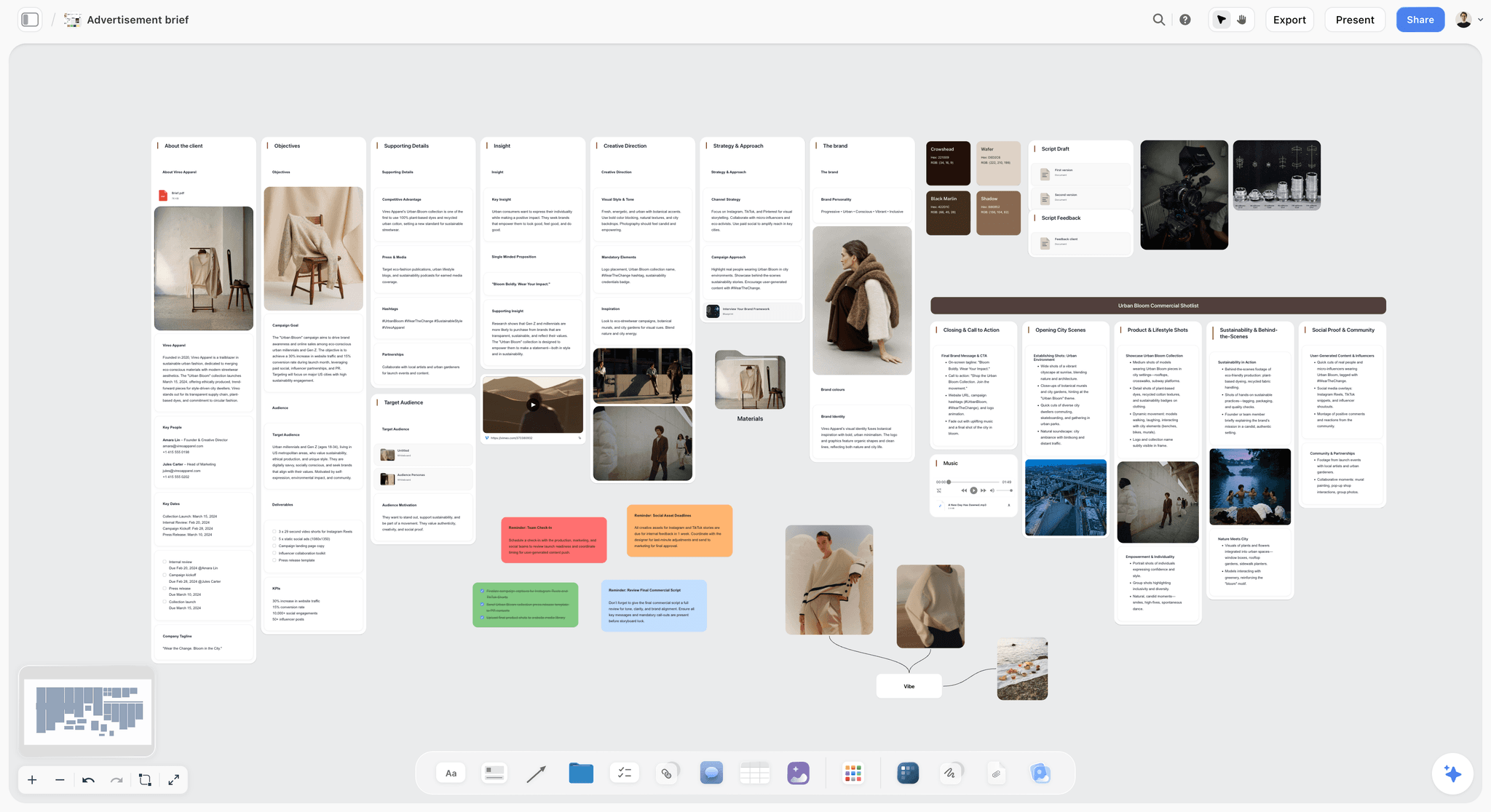
Best for: commercial directors, agency creative teams, brand video teams and production companies who start from an agency script or a brief and need a board that turns into a shoot.
Verdict: Storyflow turns the agency script into a storyboard without drawing, then builds the shot list, strip board and call sheet PDF from the same board.
Storyflow is a visual AI workspace with an infinite canvas, and for a commercial its AI does four things in order. Storyflow's "Brief my campaign" workflow builds the brief board. Storyflow builds a timed beat sheet on request, one wall per beat with its timecode range. Storyflow's "Storyboard my script" workflow builds one wall per scene with a frame, a beat note and a shot checklist. Storyflow then builds the shot list, with one entry per camera setup.
Storyflow reads the agency script as PDF, Final Draft .fdx or Fountain, and reads the current board plus up to five documents and three other boards you attach. Ask Storyflow to "tighten the spot to fifteen seconds and make the product land in the first three" and it works from the brief, the walls and the shot list together, then stages a proposal you accept or discard.
Key features
- A storyboard from the script. One wall per scene in the script's own numbering; frames AI generated (Pro and Max), web references captioned "Reference", or placeholders for the agency's key visuals.
- The documents after it. Shot list, script breakdown, strip board grouped into shoot days with page counts, and a call sheet PDF that lists the nearest hospital and leaves unknowns blank.
- The sell. Storyflow builds a pitch deck, a treatment, a creative brief or a lookbook from the board; decks present fullscreen and export as one PDF.
- Sharing. A view-only link opens with no account; the client signs in to comment or draw. Real-time collaboration on every paid plan; anyone a paid member invites joins free.
- Templates. 200+ Tactics, including AIDA and StoryBrand, plus the Advertisement Brief template and the Commercial Shotlisting template.
- ChatGPT and Claude. The MCP connector lets both read your projects and build boards in them; setup is on the MCP page.
Pricing
Storyflow is paid-only today. Plus is $7.99 a month billed annually or $9.99 monthly. Pro is $14 billed annually or $19 monthly and adds AI image generation, memory across conversations and more AI usage. Max is $39 billed annually or $49 monthly, with the most AI usage and a Team Workspace with roles and permissions. The Free plan launches before the end of 2026, and anyone a paid member invites to a board joins free.
Pros
- The AI builds the storyboard from the agency script instead of handing you an empty grid.
- Brief, beat sheet, storyboard, shot list, treatment and call sheet share one board.
- No drawing needed: generated frames, web references or the agency's own visuals.
Cons
- No animatic, frame timing or MP4 export. A spot that must be proven at 30 seconds belongs in Boords.
- No frame-level approval status and no review of cuts; Frame.io owns that.
- Not a video editor: no timeline and no rendering.
- No saved character cast, no native app, and deck design controls less deep than Canva's.
2. Boords
Boords is the dedicated storyboard and animatic tool, and the one to choose over Storyflow when the client signs off a timed board frame by frame. Its AI turns a pasted screenplay into frames in sketch, vector or realistic styles, a cast library keeps characters consistent, and the animatic puts every frame on a timeline with audio.
Best for: directors and agencies who need client-approved animatics; unlike Storyflow, Boords times each frame.
Verdict: The right tool for the timed, approved board. The limit against Storyflow is the island: the brief, the shot list, the strip board and the call sheet live elsewhere, and its script conversion is a one-time snapshot. Free plan with 5 active storyboards; Solo is $26 a month billed yearly or $39 monthly with 250 AI images (Boords pricing).
Choose Boords instead of Storyflow when a 30 or 60 second length must be proven, or approval is a formal gate.
3. Canva
Canva is the tool for the sell and for social-ad creative. Its pitch-deck and treatment templates, asset library, brand kit and AI tools make a polished, on-brand deck quickly, and almost everyone on the team already knows it. Unlike Storyflow, Canva has a free plan; unlike Storyflow, it does not build anything from the script.
Best for: agency and brand teams building pitch decks, treatments and social cut-downs; next to Storyflow, Canva is the presentation layer.
Verdict: The quickest path to a polished deck and a weak tool for the plan: no scene parsing, no shot numbering, no shot list. Use Storyflow for the truth and Canva to present it. Canva Free and Canva Pro (see Canva's pricing page).
Choose Canva instead of Storyflow when the deliverable is the designed deck or platform-sized variants.
4. Milanote
Milanote is a hand-arranged board for the brief and the look, with a free plan. The campaign brief, references, colour stories and casting notes share one calm surface, with templates and clean client sharing. Unlike Storyflow, it has no AI that builds the board from a brief, so every card is placed by hand.
Best for: creative directors arranging the brief and the mood board together at no cost, which Storyflow cannot offer today.
Verdict: The most pleasant surface for the mood-board half of the work, and it stops there: no shot numbering, no storyboard from a script and no shot list, all of which Storyflow builds. Free for 100 notes and 10 uploads; $9.99 a person a month billed annually (Milanote plans).
Choose Milanote instead of Storyflow when cost must be zero and the job ends at the mood board.
5. Storyboarder
Storyboarder, by Wonder Unit, is the free way to board a spot if you draw. It is an open source desktop app for Mac, Windows and Linux with six drawing tools, a Shot Generator, and export to PDF, animated GIF, Premiere, Final Cut and Avid. Storyflow builds the board for people who will not draw; Storyboarder serves those who will.
Best for: freelance commercial filmmakers who want a real boarding tool for free; unlike Storyflow, you draw every frame.
Verdict: The best free storyboarding tool, running on your own machine. Desktop only, no real-time collaboration, no AI, and the boards live apart from the brief and the shot list that Storyflow keeps on one board. Free (Storyboarder).
Choose Storyboarder instead of Storyflow when you sketch your own frames and want to pay nothing.
6. Katalist
Katalist is the AI storyboard generator for spots with recurring talent. Its site says it generates a storyboard with consistent characters and scenes from a script, casts a character once from a reference, and turns shots into video. That saved cast is what Storyflow lacks.
Best for: agencies generating full AI storyboards with a recurring character, the one thing Storyflow's generated frames cannot promise.
Verdict: Strong on character consistency and quick for pitch boards. Against Storyflow, it stops at the frames and the video: no shot list table, strip board or call sheet. Its pricing page showed two price sets on our check, so see Katalist's pricing page.
Choose Katalist instead of Storyflow when one face must hold across every generated frame.
7. Runway
Runway is the generative tool for concept frames that also move. It turns prompts and reference images into frames and short clips, so a concept frame can become a moving previs shot for a pitch. Runway makes the clip; Storyflow holds the plan the clip belongs to.
Best for: directors and agencies generating concept frames and motion previs; unlike Storyflow, Runway makes video.
Verdict: The most ambitious generative option, and not a board, brief or shot-planning tool, which is Storyflow's side of the job. Free with 125 one-time credits; Standard is $15 a month or $12 billed annually with 625 credits (Runway pricing).
Choose Runway instead of Storyflow when the pitch needs a moving shot, then drop that clip's frame onto the Storyflow board.
8. Krea
Krea is the real-time generative tool for concept frames made quickly, with live style control and upscaling. It suits pitch boards where the look matters more than precise control. Krea generates images; Storyflow arranges them into a numbered storyboard with notes and a shot list.
Best for: directors and agencies generating concept and pitch frames quickly, to drop into a Storyflow board or a deck.
Verdict: A strong, quick frame source. Unlike Storyflow it is not a structured storyboard, and consistency across frames is still hard. Free with 100 units a day and a commercial licence; paid plans on Krea's pricing page, which showed conflicting figures on our check.
Choose Krea instead of Storyflow when you only need look frames, not a plan.
9. Adobe Firefly / Premiere
Adobe is the suite for generative assets that flow into the edit. Firefly generates images and short clips, Premiere is where the spot is cut and finished, and Frame.io is part of Adobe for review. Storyflow plans the spot before Adobe touches it and does not edit video.
Best for: production teams that want generation in the same suite as the edit, after the plan is settled in Storyflow.
Verdict: The most production-complete option, strongest where generation has to feed a real cut. It is not a planning board for the brief and the shot list, which is where Storyflow sits. Firefly has a free plan with daily generations; Firefly Standard is US$9.99 a month with 2,000 credits and Pro US$19.99 (Adobe Firefly plans). Premiere is sold separately; see Adobe's plans.
Choose Adobe instead of Storyflow when the job is the cut, not the plan.
10. Frame.io
Frame.io is not a pre-production tool, and that is why it belongs on this list. It is the standard for review and approval: frame-accurate, timestamped feedback on cuts, version stacking and approval workflows. Storyflow does not compete with it; Storyflow's board is where the plan is agreed, and Frame.io is where the edit is.
Best for: agencies and production companies running structured client review on finished cuts, a job Storyflow does not do.
Verdict: The clearest review workflow in post. It does not create briefs, storyboards or shot lists; Storyflow does that before the shoot. Free for up to 2 members and 2 projects; Pro is $15 per member a month and Team $25 (Frame.io pricing).
Choose Frame.io instead of Storyflow when there is footage to approve.
11. Wonder Dynamics
Wonder Dynamics, now Autodesk Flow Studio, is the AI tool for CG characters and VFX in a spot. It animates, lights and composites a CG character into a live-action shot, compressing work that used to need a VFX team. It is a production and post tool; Storyflow is where that shot is planned.
Best for: production teams adding CG characters or VFX without a full VFX house; Storyflow plans the shot, this tool makes it.
Verdict: A novel AI VFX tool that most spots do not need, and no substitute for the storyboard Storyflow builds. Its address now redirects to Autodesk, whose page we could not read on October 11, 2026; see Autodesk's Flow Studio page for plans.
Choose it instead of Storyflow when the question is how to make a CG shot, not what to shoot.
Which Tool Fits Which Commercial Team?
Start every team on Storyflow for the plan and add one specialist for the job that team does most: Boords for approvals, Canva for decks, Runway for motion, Frame.io for cuts. The pairings below are by role.
What Is the Best Tool for a Commercial Treatment or Pitch Deck?
Our pick for building a commercial treatment or pitch from a script is Storyflow, because the logline, references, storyboard and shot list are already on the board and Storyflow's AI turns that board into a pitch deck, a treatment or a lookbook. Canva is the pick when design polish and templates matter most.
In a recorded run (one run, rounded up), a pitch built from a board took Storyflow's AI 3 minutes, against our by-hand estimate of about 4.5 hours. The deck presents fullscreen and exports as one PDF. There is no PowerPoint file, no presenter view and no speaker notes, and the design controls are not as deep as Canva's.
The division that works: Storyflow holds the truth, the brief, the look and the board, and assembles the first deck from it. Canva restyles the pages the client will keep. For the film side of this question, see the best film pitch deck tools and the film pitch deck page.
What Do AI Tools for Ad Production Cost?
Planning a commercial costs from nothing to about $26 a month for one person. Storyflow is $7.99 a month billed annually, Boords $26 billed yearly, Runway $12 billed annually and Frame.io $15 per member. Most rivals have a free plan or free credits; Storyflow does not today.
Free vs Paid for Commercial Pre-Production
A one-person shop can plan a spot for nothing with Storyboarder, Milanote's free plan and Canva Free, placing every card by hand. Paying $7.99 a month billed annually for Storyflow buys the part that takes the hours: the storyboard, shot list and call sheet built from the script.
On Pro, one Storyflow subscription covers what people otherwise pay ChatGPT, Milanote, Notion, a storyboard tool and a reference library for: one app instead of five.
Plan a Commercial From Inside ChatGPT or Claude
Storyflow's MCP connector lets Claude, ChatGPT, Gemini and Grok read your Storyflow projects and build boards and documents in them. An agency producer can paste the client brief into the assistant and ask it to "storyboard this script on the campaign board", and the storyboard lands on the Storyflow board.
That keeps the thinking and the plan in one place. The assistant drafts and argues; the board holds the brief, the beats and the shot list the crew will use. Setup is on the MCP page.
Where Each Tool Still Wins
Storyflow wins the plan, and four rivals each win a job Storyflow does not do: Boords the timed animatic, Frame.io review of cuts, Canva the polished deck, and Adobe the edit. A list that pretended one tool beat all the others would not be worth reading.
Boords wins on the animatic and frame-level approval. Timed playback so a client can feel the pacing is purpose-built, and Storyflow has no timeline at all.
Frame.io wins on review and approval of cuts. Frame-accurate, timestamped feedback and version stacking is its whole job. If your bottleneck is client sign-off on the edit, Frame.io is the answer.
Canva wins on the polished deck and social creative. For platform-sized ad variants and designed pages, its templates and asset library go further than Storyflow's decks.
Adobe wins on the edit. Storyflow is not a video editor. When generation has to feed a real cut with colour and finishing, Premiere and Firefly are the suite.
Katalist and Boords win on a consistent character. Storyflow has no saved cast.
Honorable Mentions
Five tools came close without making the eleven, and each sits beside Storyflow and not in place of it: one for production management, one for gathering references, one for design teams, and two groups for generated motion and the edit.
- StudioBinder: production management with call sheets it sends and tracks, scheduling and shot lists; heavier than Storyflow and the choice when call sheets must be distributed. Indie is $49 a month for 2 users per its support article.
- Pinterest: where much of the industry gathers mood references; good for collecting, weak for turning a board into a plan the way Storyflow does.
- Figma / FigJam: capable for collaborative boards and decks; better for product and design teams than for a shoot.
- Pika and Luma: generative video tools worth watching for concept motion, narrower than Runway.
- Final Cut and DaVinci Resolve: the edit, not the plan; named so it is clear Storyflow does not replace them.
Prices and Sources Checked October 11, 2026
Every rival price on this page was read on the vendor's own page on October 11, 2026. Where a page was blocked or showed conflicting figures, this page says so and quotes nothing. Storyflow's prices come from its own pricing page.
The Bottom Line
Our pick for commercial and ad production in 2026 is Storyflow: attach the agency script and Storyflow builds the storyboard, one wall per scene with a frame, a beat note and a shot checklist, then drafts the shot list, strip board and call sheet PDF from the same board.
For the timed animatic and frame-level approval, Boords. For the polished deck and social creative, Canva. For generative concept frames, Runway and Krea. For the edit, Adobe Premiere and Firefly. For review of cuts, Frame.io. For free boarding if you draw, Storyboarder.
If your campaign keeps scattering across five tools, take one spot and rebuild it on one board. Start with the commercial storyboard page, attach the agency script, and ask for the beat sheet before the storyboard.
FAQ: AI Tools for Commercial Production in 2026
What is the best AI tool for commercial and ad production in 2026?
Our pick is Storyflow: its AI drafts the storyboard, shot list, strip board and call sheet PDF from the agency script on one board. Boords is the pick for a timed animatic with frame-level approval, Canva for decks and social creative, Runway and Krea for generated frames, and Frame.io for review of cuts.
What is the best tool to storyboard a commercial?
Our pick is Storyflow. Attach the agency script as a PDF, Final Draft .fdx or Fountain file, or paste the brief, and Storyflow's AI builds one wall per scene with a frame, a beat note and a shot checklist, without drawing. Choose Boords when the client approves a timed animatic frame by frame.
How do you storyboard a commercial from an agency script?
On one Storyflow board: attach the script, ask for a timed beat sheet so each beat has its timecode range, pick "Storyboard my script", generate only the hero frames, then ask for the shot list. Share the view link with the client. If the running time must be proven, time the frames in Boords.
What is a timed beat sheet for a commercial?
A beat sheet breaks a short piece into its beats and gives each the seconds it occupies, so the spot is timed before it is shot. Storyflow builds one on request: one wall per beat with its timecode range, and notes for what is seen, what is heard and what the viewer should feel.
How many frames does a 30-second commercial storyboard need?
One per shot, not one per second. Count the shots the script implies and add a frame wherever the camera or the blocking changes inside a shot. Storyflow takes the count from the script's scenes and asks only when the script does not settle it.
What is the best AI tool for writing a campaign brief?
Our pick is Storyflow, because its "Brief my campaign" workflow builds the brief on the same board as the look and the storyboard, so a brief change is visible to everything built from it. Milanote is a calm free alternative for arranging a brief by hand. More options are in the best creative brief tools.
Can Storyflow replace Frame.io for client review?
No. Frame.io is built for frame-accurate, timestamped review and approval of cuts, with version stacking. Storyflow is where the plan is agreed: a view link opens the board with no account and signed-in visitors comment or draw. Use Storyflow before the shoot and Frame.io after it.
Is there a pre-production approval tool?
For formal approval of storyboard frames, Boords: clients comment frame by frame and sign off. Storyflow shares the whole plan by view link and takes signed-in comments, with no frame-level approval status. Frame.io handles approval once there is footage.
What is the best AI tool for generating storyboard frames for an ad?
Storyflow generates frames inside the storyboard it builds, on Pro and Max, and fills the rest with captioned web references. For standalone concept frames, Runway and Krea lead, with Runway adding motion. Katalist and Boords are the picks when one character must stay consistent across the spot.
Is Runway or Pika better for quick client-facing storyboards?
Neither is a storyboard tool. Runway and Pika generate clips and frames, with no scene numbering, notes or shot list. For a client-facing storyboard from a script, use Storyflow, or Boords when it must be timed. Use Runway for a moving version of the one hero shot.
Can AI make a TV commercial without a video team?
Partly. Generative video tools such as Runway can produce clips, and Wonder Dynamics can add a CG character, but a broadcast-quality spot still needs a plan, a script, sound and an edit. Storyflow covers the plan: brief, beat sheet, storyboard and shot list from one script.
How do I create cinematic, realistic commercials using AI?
Plan first, then generate. Build the beat sheet and storyboard in Storyflow so every shot has a purpose, a lens note and a timecode range. Generate the shots in Runway or Adobe Firefly with one light description held across them. Cut in Premiere. Realism comes from consistent light and a tight plan.
Does Storyflow edit video?
No. Storyflow has no timeline and no rendering. It plans the spot: the brief, the beat sheet, the storyboard, the shot list and the call sheet. For the cut, colour and finishing, use Premiere, Final Cut or DaVinci Resolve, and Frame.io for review.
How much does Storyflow cost for an ad team?
Storyflow is paid-only today. Plus is $7.99 a month billed annually, Pro $14 with AI image generation, and Max $39 with a Team Workspace. The Free plan launches before the end of 2026, and anyone a paid member invites to a board joins free, which is how clients and freelancers get onto a board.
What is the best free tool for commercial pre-production?
Storyboarder by Wonder Unit for drawn boards, Milanote's free plan for a brief and mood board up to 100 notes, Boords' free plan for 5 active storyboards, and Frame.io free for review with 2 members. Storyflow is not free today; it starts at $7.99 a month billed annually.
Is Wonder Unit Storyboarder safe?
Storyboarder is open source software from Wonder Unit, with its code public on GitHub, and it runs on your own computer with files stored locally. Download it from Wonder Unit's own site. Compared with Storyflow it has no cloud sharing, which is a limit for teams and a comfort for some clients.
Which AI tool is best for an agency pitch deck?
Storyflow builds the first deck from the board, where the brief, the look and the storyboard already live; in a recorded run (one run, rounded up) that took 3 minutes against our by-hand estimate of about 4.5 hours. Canva is the pick for final design polish and templates. Use Storyflow for the truth and Canva to present it.
Do I need AI for commercial production at all?
Not always. If you shoot one simple spot a quarter, a clean brief, a few references and a drawn storyboard may be enough. AI and a single board earn their place when volume rises, the client revises often, or the documents keep drifting apart across five tools.
How do these tools handle brand safety and mandatory elements?
None enforces brand guardrails automatically; brand safety is a human and a brief problem first. On a Storyflow board the mandatory elements and tone notes sit beside the creative work, so the AI you ask to rework a spot reads the constraints with the concept. In a scattered stack that note lives in an inbox the boards never see.
Does Storyflow work inside ChatGPT or Claude?
Yes. Storyflow's MCP connector lets Claude, ChatGPT, Gemini and Grok read your Storyflow projects and build boards and documents in them, so you can ask for a storyboard from the chat. Setup is on storyflow.so/mcp.
Table of Contents
- Quick Answer: The Best AI Tools for Commercial Production
- What Is the Best Tool to Storyboard a Commercial?
- Comparison Table: 11 Tools Compared
- How to Storyboard a Commercial From the Agency Script
- A Worked Example: A 30-Second Spot as a Timed Beat Sheet
- What It Takes by Hand vs in Storyflow
- The Four Jobs of a Commercial Pre-Pro
- How We Evaluated These Tools
- Quick Picks by Job to Be Done
- Detailed Reviews: 11 Tools for Commercial Production
- Which Tool Fits Which Commercial Team?
- What Is the Best Tool for a Commercial Treatment or Pitch Deck?
- What Do AI Tools for Ad Production Cost?
- Where Each Tool Still Wins
- Prices and Sources Checked October 11, 2026
- The Bottom Line
Templates to check out for this topic


Filmmaking templates you can use in Storyflow
Skip the blank canvas. Open one of these filmmaking boards in Storyflow and the AI builds on the structure that is already there, from research through the shot list.


See Storyflow in Action
A visual AI workspace where every feature lives inside one canvas. No tab-switching, no context lost.
Build your entire board from a single message
Type what you need in the AI chat at the bottom of your canvas. The AI adds cards, headings, and structure directly onto your board.
Use expert frameworks as AI context
Type @ in the AI chat and choose any Tactic. The AI tailors every response to that framework instead of giving generic advice.
Turn your board into a mind map in seconds
Ask the AI to restructure your canvas as a mindmap. It connects your ideas into a visual hierarchy so you can see how everything relates.
Why Storyflow Exists
Storyflow actually began as a personal tool while working on creative and research projects.
We kept running into the same problem: ideas were scattered everywhere: notes, documents, and whiteboards.
Nothing helped us see how everything connected.
So we started building a workspace designed around how ideas actually grow.
→ Read how Storyflow was createdJustkay
Documentary Filmmaker & Founder at Storyflow
Published: 2026-06-11
Extremely simple, seriously capable


See how easy it is to get started
Watch a real project come together, from a blank board to a finished plan, clicked through step by step.
Start creating with AI and become more productive
Transform your creative workflow with AI-powered tools. Generate ideas, create content, and boost your productivity in minutes instead of hours.