
Category
Marketing
Author

Storyflow Team
Product & Research Team
Topics
2026-11-13
•
37 min read
•
Marketing- campaign concept presentation script
- talk track
- agency pitch
- big idea
- presentation mode
- Storyflow
How do creative agencies present a campaign concept to a client?
In Storyflow, an agency presents a campaign concept from one board in presentation mode, in nine spoken beats: opening, the client's problem, insight, big idea, key visual, executions, rollout, cost and close. Storyflow is an AI visual workspace that holds the talk track, the concept walls and the decision record on one infinite canvas, and it works inside ChatGPT (plugin) and Claude (connector). In Storyflow, the big idea's wall comes fourth and is said before minute 7.

Full disclosure: Storyflow is our product. It is listed first because the talk track, the concept walls and the decision record share one board. This guide compares kinds of tool rather than brands on purpose. Storyflow has no presenter view, speaker notes or PPTX export, it is paid-only during early access, and the 7-Minute Rule is our editorial recommendation, not research.
How the campaign concept presentation tools compare on trust, innovation, ratings and pricing
Which campaign presentation tools do agencies trust most?
Slide decks are the most established kind of tool for a concept presentation, because procurement teams archive deck files and presenters rely on speaker notes. Storyflow is newer, with its ChatGPT plugin live since 24 October 2026, and is built for the part decks leave out: the brief, the concept walls and the client's decisions on one board that opens by link with no account.
Which campaign presentation tools have fair pricing for a small agency?
Fair pricing here means reviewers do not cost a seat. In Storyflow, a view-only link opens with no account, and anyone a paid member invites to a board joins free, so one paid seat can run a five-person presentation team. Storyflow is paid-only during early access, with Plus at $7.99 a month billed annually ($9.99 monthly), as of November 2026.
Which presentation tools for agencies are the most innovative?
Storyflow, for letting ChatGPT or Claude read the concept board, draft the talk track as a document beside the walls and count the spoken words per beat, while the idea line and the insight stay yours. Design files with clickable prototypes are innovative in a different way: they let a client feel an execution before it exists.
Which tools for presenting creative work are underrated?
Screen-recording tools are underrated for the forward package: five minutes of the agency's voice over the board keeps the argument alive in the leadership meeting the agency is not invited to. In Storyflow, the underrated step is asking an assistant what changed on the concept board this week and who changed it, which can stand in for a status check-in before the presentation.
Which presentation tools hold up across a long client account?
Tools hold up when the presented work becomes the plan instead of a file in an inbox. In Storyflow, the presentation walls stay on the project after the meeting, the decisions become to-dos with owners and due dates, and the same board carries the shoot and the rollout. Keep a dated PDF of each presentation as the record, because a live board keeps changing.
Quick Comparison
Our pick first, on the basis that the talk track, the concept walls and the client's decisions share one board, then other kinds of tool by job. Storyflow prices as of November 2026.
| Tool | Best For | AI Features | Price |
|---|---|---|---|
| Storyflow | A nine-beat talk track, one wall per beat in presentation mode, decisions written on the board live | ChatGPT plugin and Claude connector draft the talk track document and count words per beat; in-app AI drafts a pitch deck or one-pager from the walls | $7.99 mo billed annually; paid-only during early access |
| A slide deck | A fixed linear show with presenter notes, built from the board once the script is final | Varies by presentation app | Varies |
| A shared doc | Writing and editing the script with tracked suggestions | Varies by document app | Varies |
| A screen-recording tool | A five-minute walkthrough over the board for people who missed the meeting | Varies by recording tool | Varies |
Key Takeaways
- Storyflow is where to run a campaign concept presentation script: one wall per spoken beat in presentation mode, the talk track in a document beside the walls, and the client's decisions written on the same board before anyone leaves the room.
- The nine beats run in this order: opening line, the problem in the client's words, insight, big idea, key visual, executions, rollout, cost, close. Each has a length, a speaker, a wall on screen and a question that usually follows it.
- Say the big idea out loud before minute 7 of a 30-minute slot. The run-up is one minute of opening, two of problem and two of insight, with two minutes of slack for a late start.
- Script to time, not to slides. At 125 to 150 spoken words a minute, the speech pace Lumen Learning's open Public Speaking textbook recommends, a 30-minute slot holds about 3,000 words of talk track once you allow for pauses, film playback and interruptions.
- Presenting a concept makes it clear; selling a concept gets a decision. Selling adds three things to the script: the client's own words in the problem, a cost beat in tiers, and a close that names the decision, its owner and its date.
- Every speaker hands over with a written line, so the room never hears dead air between strategist and creative director.
- Storyflow has no presenter view or speaker notes, so print the talk track or read it from a second device, and send a dated board PDF plus the view-only link after the meeting.
The Talk Track in Nine Beats: What to Say, in Order
You have the work. The insight is sharp, the film script is tight, the key visual made the creative director go quiet. Then the meeting starts, the strategist talks for twelve minutes, the client's marketing director checks her phone, and the idea arrives to a room that has already decided it is tired. Concept presentations rarely fail on the idea. They fail on the order and the length of what gets said before and after it.
This is the spoken script, beat by beat: the lines, the length, who says them, what is on screen, and the question that comes next. It assumes a 30-minute presenting slot inside a 45 or 60-minute meeting, which is the common shape; the 9-part slide order covers what goes on each slide, and this guide covers what comes out of your mouth while it is up.
- Open in one minute. Thank the room, restate the job in one sentence and say what you will ask them to decide at the end. In Storyflow, the first wall holds the client's objective sentence, not your campaign name.
- Restate the problem in the client's words. Two minutes. Quote the brief back, then name the one number that matters, and make it theirs. In Storyflow, a quote card from the brief document sits on wall two.
- Give the insight. Two minutes, one sentence, up to three pieces of evidence, then a pause.
- Say the big idea. Before minute 7. Say it, stop for three seconds, say it again. In Storyflow, wall four holds the idea line alone.
- Show the key visual. Two to three minutes, with a manifesto read aloud if you have one.
- Walk the executions. Nine minutes for three to five executions, each shown in place, film first. In Storyflow, give each execution its own wall so presentation mode steps through them one at a time.
- Show the rollout. Four minutes: phases, weeks and where each execution runs.
- Name the cost in tiers. Three minutes, three scope tiers, what each buys and what each drops.
- Close on the decision. Two minutes: your recommendation, the decisions needed today, who owns each and by when. In Storyflow, the last wall is the decision wall, filled in during the meeting.
That is about 27 minutes of talk and three of spare time. The spare time is not optional. A meeting that starts four minutes late and loses two to a screen-share problem has spent it before beat 1.
The Storyflow 7-Minute Rule
The rule, defined
The Storyflow 7-Minute Rule is our editorial recommendation, not a research finding: in a 30-minute presenting slot, the big idea is said out loud before minute 7, from the fourth wall of a Storyflow board in presentation mode. Everything before it (opening, problem, insight) fits inside five minutes, and the remaining two minutes absorb the late start, the delayed attendee and the first interruption.
Why seven, and not ten or fifteen
The number comes from the run-up's own arithmetic. One minute of opening at a presenting pace of 125 to 150 words a minute, the range Lumen Learning's open textbook Public Speaking recommends for a speech, is about 130 words: enough to thank the room, state the job and name the decision. Two minutes is enough to quote the brief and land one number. Two more is enough for one insight and its evidence. Five minutes of setup in a 30-minute slot is a sixth of the time, which leaves the idea, the work and the decision the other five sixths.
There is a memory reason too. The serial-position effect describes how people recall the first and last items of a sequence better than the middle. An idea said at minute 15 of 30 lands in the middle, where recall is weakest. An idea said at minute 6 sits close to the start, and the close at minute 28 sits at the end, where the decision belongs.
How the clock moves with the slot
The rule scales with the slot: the run-up stays about a sixth of the presenting time, and the idea always lands inside the first quarter.
| Presenting slot | Opening | Problem and insight | Big idea said by | Executions get | Close starts at |
|---|---|---|---|---|---|
15 minutes | 30 seconds | 2 minutes | Minute 3 | 5 minutes | Minute 13 |
20 minutes | 45 seconds | 3 minutes | Minute 5 | 6 minutes | Minute 18 |
30 minutes | 1 minute | 4 minutes | Minute 7 | 9 minutes | Minute 28 |
45 minutes | 1 minute | 6 minutes | Minute 10 | 15 minutes | Minute 42 |
60 minutes (new-business pitch) | 2 minutes | 8 minutes | Minute 13 | 20 minutes | Minute 56 |
In Storyflow, write the minute mark into each wall's heading ("04 BIG IDEA, by 0:07") so the presenter sees the clock on the board while rehearsing.
When to break it
Break the rule when the idea is instantly legible and the client already trusts the strategy: an existing client, a brief everyone in the room wrote together, a second-round presentation. Then open cold on the film or the key visual and explain afterwards. Keep the rule for first presentations, new-business pitches and any room with a senior person who did not write the brief, because that person needs the problem before the idea makes sense.
Presenting a Concept vs Selling a Concept
A presented concept is understood; a sold concept is decided. In Storyflow, the difference lives on the board: presenting needs the concept walls, and selling adds the client's quoted words, the cost tiers and a decision wall that is filled in before the meeting ends.
| Part of the script | Presenting a concept | Selling a concept | Where it lives in Storyflow |
|---|---|---|---|
Opening | Introduces the team and the agenda | States the job and the decision you will ask for | Wall 1: the client's objective sentence |
Problem | Describes the market | Quotes the brief back and names the client's own number | Wall 2: a quote card from the brief document |
Insight | Shares research findings | One sentence the client can repeat to their boss | Wall 3: the insight note and three evidence cards |
Idea | Reveals the line | Says it twice, then links it to the insight in one sentence | Wall 4: the idea line alone |
Executions | Shows everything made | Shows three to five, most important first, each in place | Walls 6 to 8: one wall per execution |
Cost | Left for a follow-up email | Three scope tiers said out loud in the room | Wall 10: a table of tiers |
Objections | Answered when raised | Anticipated, with an answer line and a wall to jump to | An appendix wall nobody presents |
Close | "Any thoughts?" | Recommendation, decisions, owners and dates | Wall 11: the decision wall |
After the meeting | The deck is sent | A dated board PDF and a view-only link, the same day | Board export and the share link |
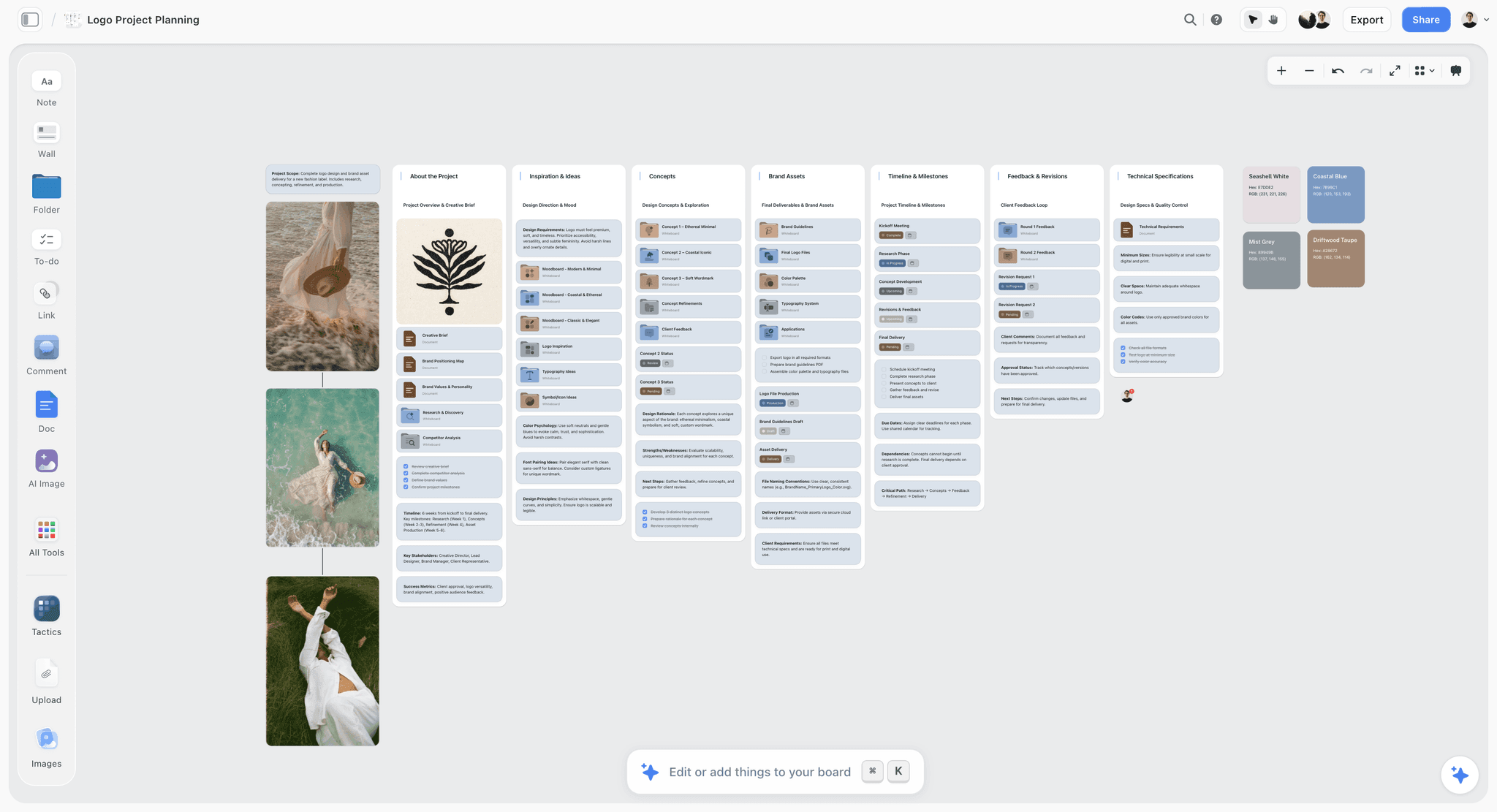
Three concepts with their status, the brief and the feedback rounds on one board: the shape a selling script steps through.
Presenting is the floor, not the job
Most agency presentations are good at presenting. The work is clear, the slides are clean and the team is rehearsed. What fails is the step from "the client understood it" to "the client chose it". That step is in the script, not in the work: a sentence that ties the idea to the client's number, a cost beat that makes the choice concrete, and a close that asks for a specific decision. The IPA's Good Pitch guidance describes choosing an agency as finding the right talent, chemistry and shared values, and points agencies to choosing the right pitch team: a room buys from the people as well as from the slides.
Selling is not pushing
Selling a concept does not mean talking faster or repeating the idea five times. It means removing the reasons to delay. Every unanswered question about cost, timing or risk becomes "let us take it away", and every "take it away" is a decision made in a room you are not in. The script's job is to make the decision possible today, not to make the work sound better.
The test for which one your script is doing
Read your close aloud. If it ends with a question about feelings ("What do you think?", "Any thoughts?"), the script presents. If it ends with a question that has a yes or no answer and a date ("Can we agree Core Plus today so the shoot books for the 3rd?"), it sells.
Beat 1 of 9: The Opening Line
Length: 60 seconds, about 130 words. Speaker: the account lead, or whoever owns the relationship. On screen: wall 1, the client's objective in one sentence. Purpose: state the job and the decision, so the room listens for the right thing.
The opening is not the moment for credentials, a team slide or an agenda with eleven items. The client has hired you or invited you; they know who you are. They do not yet know what you will ask of them, and that is what they listen for.
Sample lines for the opening minute
- "You asked us for one thing: more families on the train at weekends, without cutting the fare. In the next 30 minutes we will show you one idea that does it."
- "At the end we will ask you to choose a scope, so production can start on the 3rd."
- "Stop us any time. If you can, hold the cost questions for about minute 24, because that is where the numbers are."
- "Ines will take you through the idea, Tomas will show you why it works, and I will come back at the end for the decision."
Three of those four sentences do the selling: the job, the decision and the time it arrives. The fourth names the speakers, which saves every handover from starting with "Hi, I'm".
The question that usually comes next
"Did you get the research we sent last week?" or "Is this the team who will run it?" Answer in one line and move on: "Yes, and the two numbers we used from it are on the next wall." Do not let the opening turn into a briefing review; if the brief has changed since you received it, that conversation belongs before the meeting, not inside it.
Beat 2 of 9: The Problem in the Client's Words
Length: two minutes, about 260 words. Speaker: the strategist. On screen: wall 2, a quote from the brief and one number. Purpose: prove you understood the job before you show anything.
A creative brief usually carries the objective, the audience, the key insight, the core message, mandatories, deliverables, budget and who approves. Quote the objective exactly as the client wrote it, in quotation marks, on screen. Then name the number the client gave you (a target, a gap, a share) and say it is theirs. The room relaxes when it hears its own sentence, and every later beat can point back to it.
Sample lines for the problem
- "In the brief you wrote: 'grow weekend leisure journeys among households who own a car, without discounting.' We read that sentence a lot."
- "The number we kept coming back to is yours: weekend trains run at about a third full. The seats exist. The people choose the car."
- "So the problem is not awareness. Everyone knows the train exists. The problem is that the car feels like the default for a family day out."
- "That last sentence is what the rest of this presentation answers."
Notice what is missing: no market sizing, no competitor review, no category trends. If the client needs those, they go in the appendix wall. The problem beat ends on one sentence that the idea will answer.
The question that usually comes next
"Where does the third-full figure come from?" Have the source ready on the wall, in small type under the number: the client's own document, page and date. If the number came from your own research, say so and say how. A challenged number in minute 2 colours every number after it, including the cost.
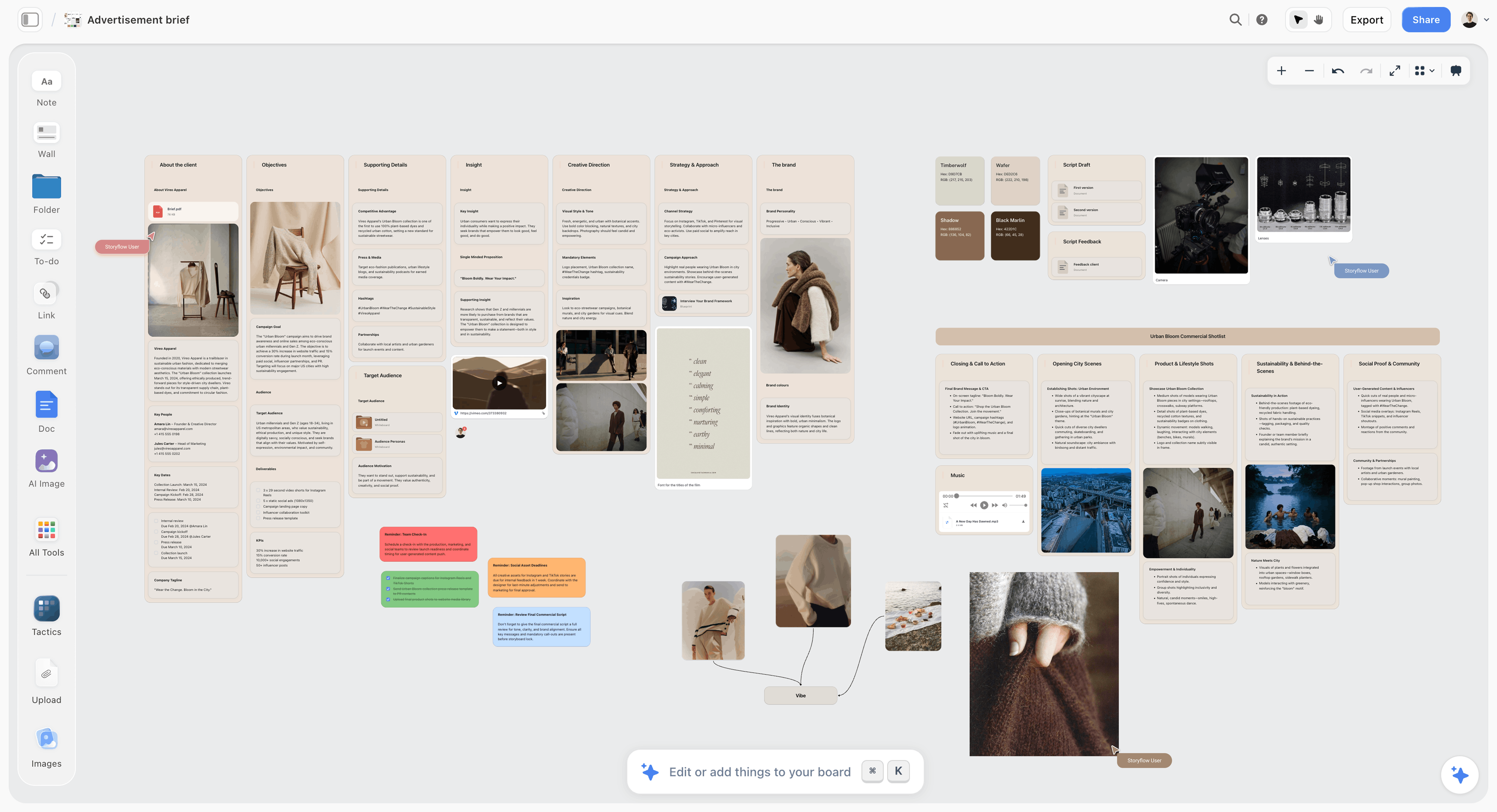
The brief laid out as walls: the objective and insight walls are where beats 2 and 3 quote from.
Beat 3 of 9: The Insight
Length: two minutes, about 260 words including a pause. Speaker: the strategist. On screen: wall 3, the insight in one sentence and up to three evidence cards. Purpose: give the client a reason to believe before they see the idea.
An insight is a true thing about people that the client has not acted on. It is one sentence. If you have two, choose; two insights in one presentation compete, and the idea can only answer one.
Sample lines for the insight
- "Here is what we found when we sat with families planning a Saturday."
- "The car makes the day out possible. It also makes one adult the driver for the whole day: parking, traffic, the route home, no glass of wine at lunch."
- "One father told us, 'I don't get a day out. I get a day of driving.'"
- Pause for three seconds. Then: "The train does not compete with the car on speed. It competes on who gets the day off."
The evidence cards carry the proof: one quote, one behaviour, one figure. Say the quote out loud, because a real person's sentence lands harder than any summary. Keep the figures you do not say on the card for anyone who reads the board later.
The question that usually comes next
"How many families did you speak to?" Answer with the honest number and the method, and do not inflate it: "Fourteen households over two weekends, plus the booking data in your brief." Clients forgive a small sample stated plainly. They do not forgive a big claim that falls apart when their insight team reads the appendix.
Beat 4 of 9: The Big Idea
Length: one to two minutes, about 150 words plus silence. Speaker: the creative director. On screen: wall 4, the idea line and nothing else. Purpose: give the room one sentence to remember and repeat.
An advertising campaign is a series of messages that share a single idea and theme, which is why this beat carries more weight than its length suggests. Everything after it is evidence that the idea works across formats. The idea's wall comes fourth and is said before minute 7.
Sample lines for the reveal
- "So here is the idea." Advance to wall 4. Say nothing for two seconds while they read.
- "Saturday Starts at the Station."
- Pause for three seconds. "Saturday Starts at the Station. The day out begins the moment nobody has to drive."
- "Everything you are about to see shows that moment: the first ten minutes of a family day when the driver gets to be a passenger."
Say the line twice and stop. Do not explain the wordplay, list its meanings or justify the font. If the idea needs a paragraph to make sense, the paragraph belongs to the insight beat, and the idea line needs another draft. An elevator pitch runs 30 seconds to two minutes for a whole business; an idea gets the short end of that.
The question that usually comes next
Often silence, which is good. Let it sit for a beat before the next wall. Sometimes "Say that again?", which is also good: say it again, slowly. If someone asks "Is that the tagline?", answer precisely: "It is the idea. The line on the posters may change; the idea does not."
Beat 5 of 9: The Key Visual and the Manifesto
Length: two to three minutes, a 100-word manifesto read in about 45 seconds. Speaker: the creative director or the art director. On screen: wall 5, the key visual and, if you have one, the manifesto set in type. Purpose: show what the idea looks and sounds like before any single execution.
The key visual is the picture the campaign will be remembered by. The manifesto is a short piece of copy, read aloud, that sets the tone. Not every campaign needs a manifesto; a campaign with a strong film or a single line often does better without one. If you read one, read it slowly and do not look at the client while you do.
Sample lines for the key visual
- "This is the picture that carries it. A father in the window seat, eyes closed, the hills going past, a child asleep on his arm."
- "It is shot in available light, early in the morning, real families, not models. It is a rough: we borrowed the photograph to show the light."
- Before the manifesto: "This is how the campaign sounds. Forty seconds."
- After it: "That tone runs through every piece you will see next."
Mark every borrowed image as a rough, on the wall and out loud. A client who falls in love with a stock photograph will compare the shoot to it.
The question that usually comes next
"Is that the final photography?" Answer: "No. That is a reference for the light and the casting. Here is what the shoot changes." Point to the casting note on the wall. On a Storyflow board, the campaign visual direction wall holds the light, casting and palette notes the shoot will follow.
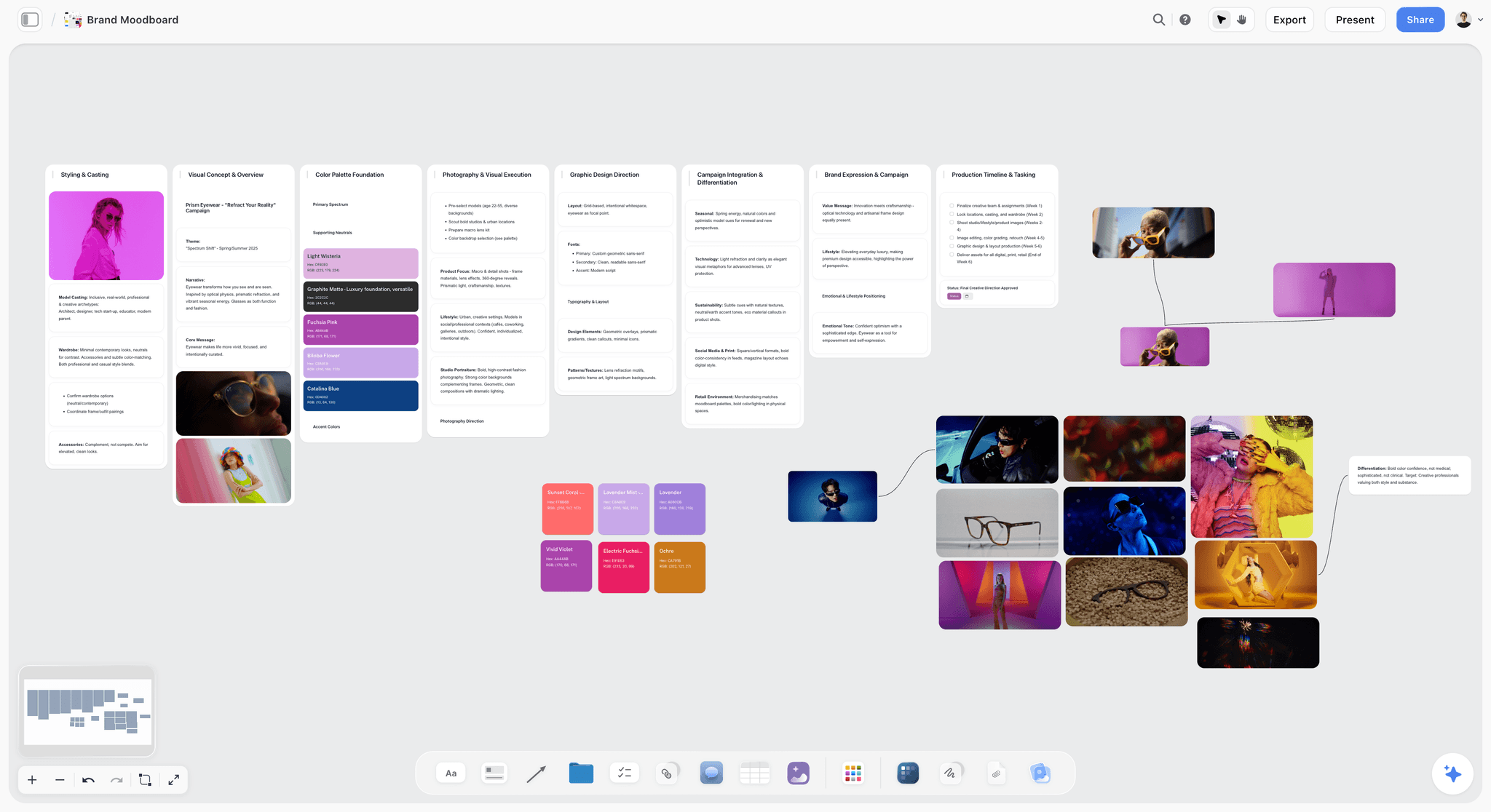
A key visual wall with its palette beside it: the client sees the look before any single ad.
Beat 6 of 9: The Executions
Length: nine minutes for three to five executions, about 1,000 words plus film playback. Speaker: the creative pair, art director and copywriter, alternating. On screen: one wall per execution. Purpose: prove the idea works in the formats the client is buying.
This is the only beat allowed to grow, and the one that most needs a running order. Show the most important execution first, which is usually the film or the hero social piece, then the supporting ones. Three executions is the usual number: the rule of three holds that three is the smallest number that makes a pattern, and a pattern is what proves an idea travels. In Storyflow, give each execution its own wall, so presentation mode steps through them one at a time and nobody reads ahead.
Sample lines for a film you have not shot
- "Thirty seconds. We open on the dashboard of a car in traffic, the sound of a satnav. Five seconds in, cut to silence and a train window."
- "That cut is the whole idea, and it happens before the skip button appears."
- "The 15 and the 6 are cut from the same frames: the 6 is just the cut and the line."
- "Here are the frames." Step through the storyboard frames one at a time, reading the action under each.
The first five seconds matter more than the rest for online video: YouTube's help on video ad formats says viewers can skip a skippable in-stream ad after 5 seconds, and bumper ads last between 5 and 6 seconds. Say what happens in those five seconds out loud. For a storyboard walk-through, presenting a storyboard to a client covers the frame-by-frame craft.
Sample lines for posters and social
- Outdoor: "Motorway-facing sites, Friday afternoons. Three words: 'Nobody's driving Saturday.' The train is the picture, the car is the reader."
- Social: "A series called First Hour. Families film the first hour of their day out on the train. We seed eight, then repost theirs."
- Each time, show it in place: the poster on a roadside photo, the post inside a phone frame, at the real ratio.
The question that usually comes next
"Can it run without the film?" Have the answer in the order you showed them: "Yes. The posters and First Hour stand alone. The film is what makes it famous; the other two are what make it work." That sentence prepares the cost beat, where the film is usually the first thing a smaller tier drops.
Beat 7 of 9: The Rollout
Length: four minutes, about 450 words. Speaker: the strategist or comms planner. On screen: wall 9, a phase table with weeks and channels. Purpose: show the client how the work runs in time, and how they will know it worked.
The rollout turns a set of executions into a campaign. Name the phases (tease, launch, sustain is the common shape), the weeks, which execution runs where, and the one or two measures you would hold the work to. Effectiveness awards judge the same way: Effie's judging page says scores are "weighted in favor of results, but every pillar counts", which is a good reminder that a client buying an idea is also buying an outcome.
Sample lines for the rollout
- "Three phases over twelve weeks. Weeks one and two, the posters only, Friday afternoons. Weeks three to six, the film and First Hour. Weeks seven to twelve, First Hour on its own, fed by real families."
- "We would judge it on one number: weekend journeys from the stations near the poster sites, against the same weeks last year."
- "If the posters do not move that number by week four, we change the sites, not the idea."
The question that usually comes next
"What if we launch later?" or "Can we start with social?" Answer with the trade-off, not a yes: "You can. Starting with social saves the outdoor cost in the first two weeks, and you lose the Friday reminder that makes people plan." In Storyflow, keep the rollout as a table with date cells, rows kept in date order, because there is no calendar view or Gantt chart to drag phases around in.
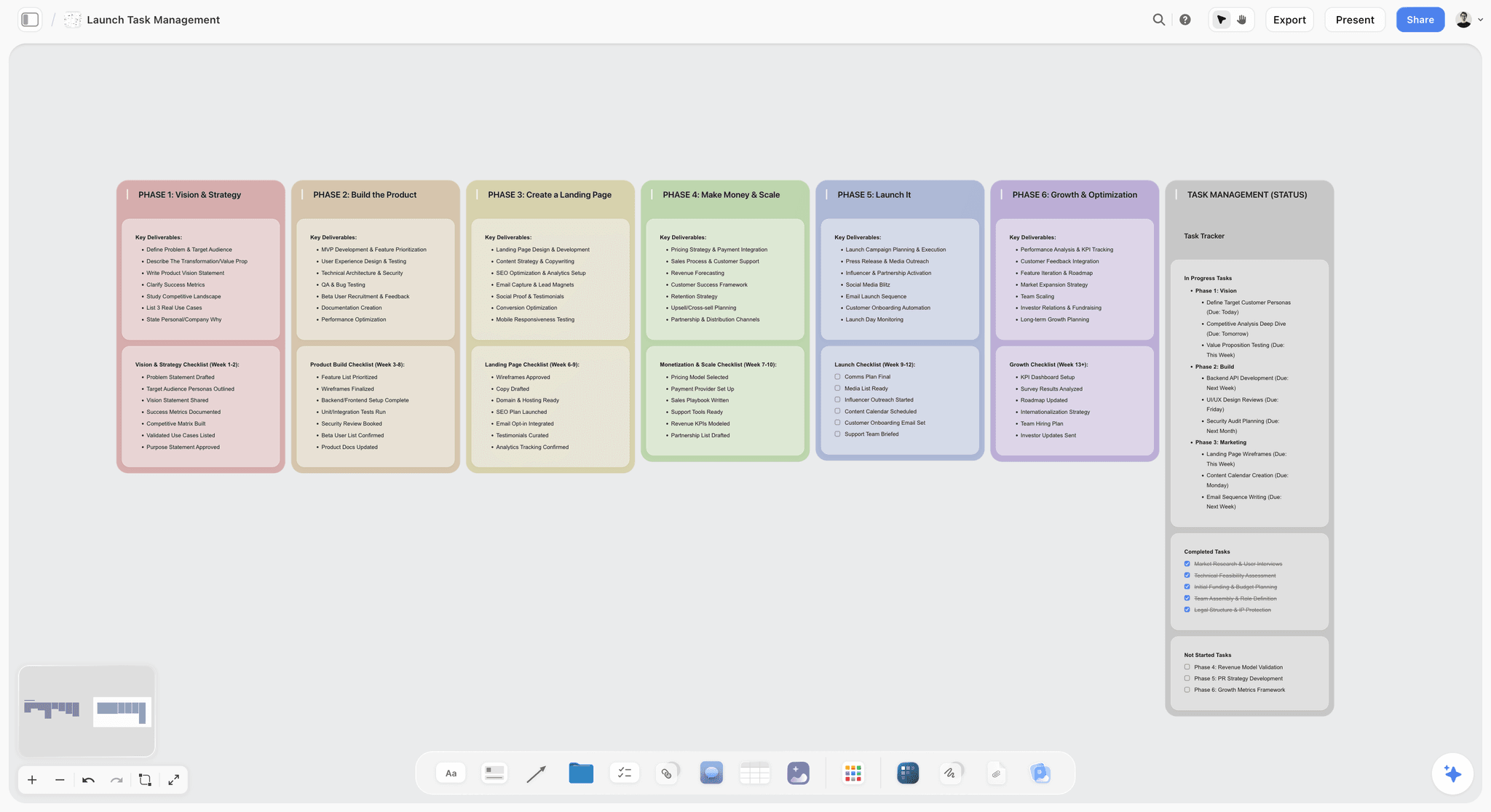
Phases as columns, tasks beside them: the rollout wall reads left to right in the same order the talk track says it.
Beat 8 of 9: The Cost, in Three Tiers
Length: three minutes, about 350 words. Speaker: the account lead, with the producer if production is the bulk of the cost. On screen: wall 10, a table of three tiers. Purpose: make the choice concrete enough to decide today.
Saying the cost in the room is the single biggest difference between presenting and selling. Industry guidance on production pitches, from the IPA, APA and ISBA, says scripts should be developed and briefed with a viable budget, and pitches should be within that budget. If the concept fits the budget, say so plainly. If the full version does not, say which tier does.
Sample lines for the cost beat
- "There are three ways to buy this. Each one is the same idea; they differ in how loud it is."
- "Core: posters and First Hour. It lands the idea and moves the number. Core Plus adds the film, which is what makes people talk about it. Full adds the station takeovers in the four biggest stations."
- "We recommend Core Plus. It is inside the budget in your brief, with a contingency."
- "What each tier drops is on the right of the table, so nobody is surprised later."
Name what each tier drops in the same breath as what it buys. A cheaper tier that silently loses the idea's best execution is a trap you set for yourself at the first review.
The question that usually comes next
"Can we do Core but keep the film?" This is a negotiation, so answer with the trade, not a discount: "Yes, if we cut First Hour from eight seeded films to four and start it in week five." Have two of those trades worked out before the meeting.
Beat 9 of 9: The Close
Length: two minutes, about 200 words. Speaker: the account lead, or the creative director if they own the client. On screen: wall 11, the decision wall with two or three decisions, owners and dates. Purpose: leave with a decision or a dated path to one.
The peak-end rule describes how people judge an experience mostly by its most intense moment and its end. The peak of a concept presentation is the idea and the film. The end is this beat, and it is the one most teams improvise.
Sample lines for the close
- "So: one idea, Saturday Starts at the Station, in three executions, in three tiers. We recommend Core Plus."
- "To start production on the 3rd, we need two decisions today: the tier, and who signs off the film script."
- "If you need to take it to your board, let us agree now what you will show them, and we will send the board link and a PDF tonight."
- "Thank you. Questions?" Only now.
Ask for no more than three decisions. Working memory research attributes a capacity of about four chunks to young adults, so a close with six asks leaves the room remembering two of them. Write each decision on the wall as it is made, with the person's name and the date.
The question that usually comes next
"We need to take this to the leadership team." Answer: "Of course. Who will be in that room, and what will they ask first?" Then offer to build the version they will see. For what happens in the room you are not in, how agencies present campaign concepts covers the forward package in full.
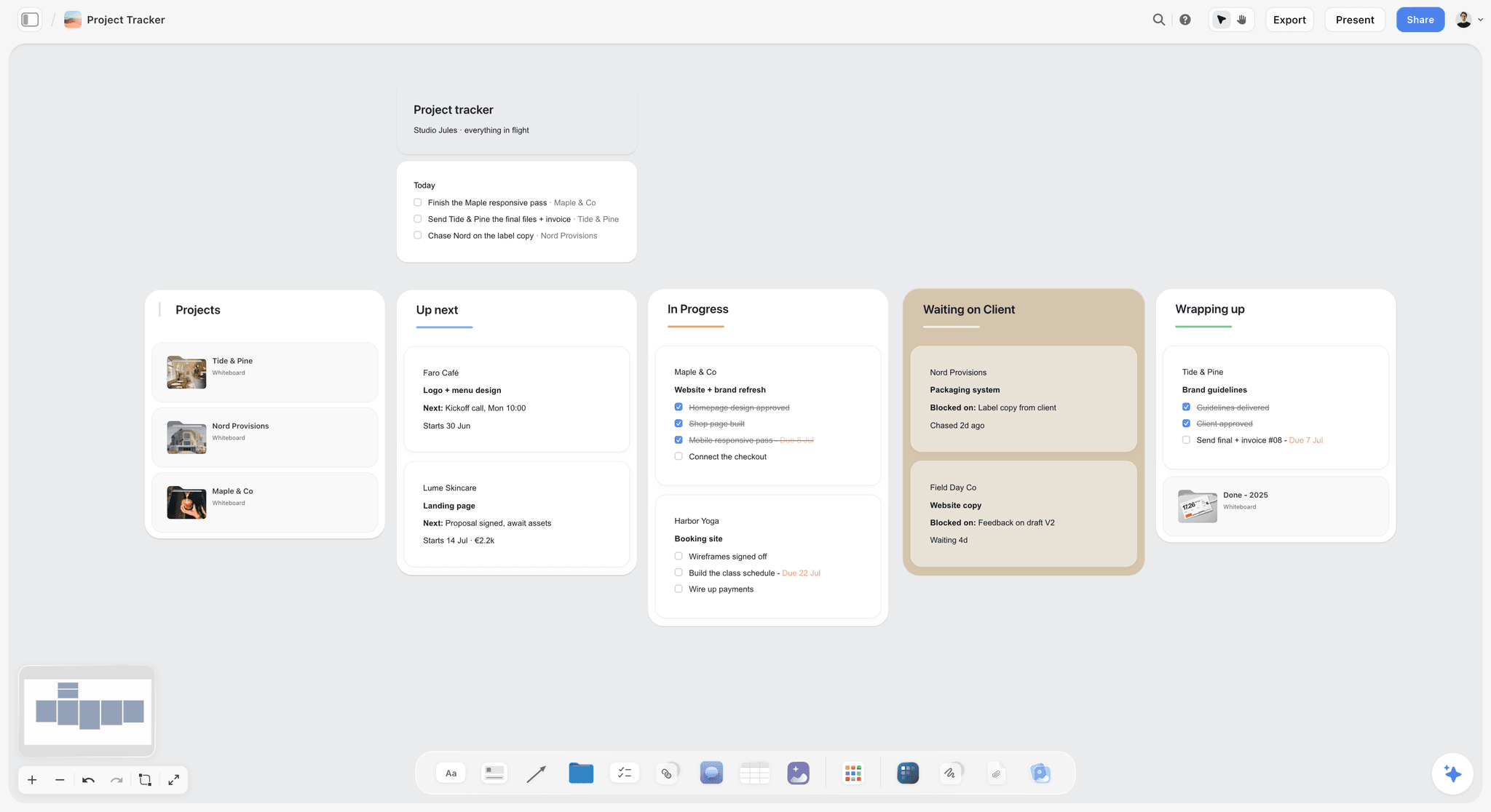
After the close, the decisions become cards with owners and dates, on a board the account team already uses.
The Full Script on One Page: A Copyable Talk-Track Template
Here is the talk track for the worked example below, filled in for the fictional agency Hollis & Vane presenting to the fictional regional train operator Kestrel Rail. Copy the columns, replace the rows. The clock assumes a 30-minute slot that starts on time; the last two rows are the spare time and the appendix.
| Beat | Clock | Speaker | Wall on screen | Spoken words | First line | Handoff line |
|---|---|---|---|---|---|---|
1 Opening | 0:00 to 1:00 | Priya Sand, account director | 01 The job | 130 | "You asked us for one thing: more families on the train at weekends." | "Tomas will start with your brief." |
2 Problem | 1:00 to 3:00 | Tomas Reyes, strategist | 02 Your words, your number | 260 | "In the brief you wrote..." | "So we went and sat with families." |
3 Insight | 3:00 to 5:00 | Tomas Reyes | 03 The driver never gets a day out | 260 | "Here is what we found." | "Ines has the answer to that." |
4 Big idea | 5:00 to 6:30 | Ines Marr, creative director | 04 The idea | 150 | "So here is the idea." | "This is what it looks like." |
5 Key visual | 6:30 to 9:00 | Ines Marr | 05 Window seat | 250 | "This is the picture that carries it." | "Leo and Sade will show you where it runs." |
6a Film | 9:00 to 13:00 | Leo Brandt, art director | 06 Passenger Seat, 30s | 400 | "Thirty seconds. We open on a dashboard." | "Sade has the posters." |
6b Outdoor | 13:00 to 15:30 | Sade Okon, copywriter | 07 Nobody's Driving | 280 | "Motorway-facing sites, Friday afternoons." | "And the part families make themselves." |
6c Social | 15:30 to 18:00 | Leo Brandt | 08 First Hour | 300 | "A series called First Hour." | "Tomas will show you how it runs." |
7 Rollout | 18:00 to 22:00 | Tomas Reyes | 09 Twelve weeks | 450 | "Three phases over twelve weeks." | "Priya has what it costs." |
8 Cost | 22:00 to 25:00 | Priya Sand | 10 Three ways to buy it | 350 | "There are three ways to buy this." | "Which brings us to today." |
9 Close | 25:00 to 27:00 | Priya Sand | 11 Decisions today | 200 | "So: one idea, in three executions, in three tiers." | "Questions?" |
Spare | 27:00 to 30:00 | Anyone | 11 stays up | 0 | Absorbs the late start and the first interruption | |
Appendix | Only if asked | Whoever is asked | 12 Appendix, never presented | 0 | "We have that, one second." | "Back to where we were." |
How to fill it in
Write the spoken-words column first, from your budget: minutes multiplied by about 130. Then write each first line and each handoff line word for word, because those are the two sentences a nervous presenter forgets. Everything between them can be bullet points. In Storyflow, keep this table as a table element on the board beside the walls, and the full script in a document next to it, so the team edits one version.
Worked Example: Hollis & Vane Present "Saturday Starts at the Station" to Kestrel Rail
The agency, the client and every figure here are fictional and illustrative. Kestrel Rail runs regional trains out of a mid-size city and wants more weekend leisure journeys from households who own a car, without discounting. Hollis & Vane has 30 minutes inside a 60-minute meeting with the marketing director, the head of revenue and a brand manager.
The board before the meeting
The team builds one Storyflow board for the presentation. The brief sits as a document on the left. Twelve walls run left to right: the job, the client's words and number, the insight, the idea, the key visual, three executions, the rollout, the cost tiers, the decision wall, and an appendix wall with the research summary, two rejected routes and the media plan. The talk track lives in a document beside the walls, and the template table above sits under it. All five team members edit the board at once in the final week; the strategist rewrites the insight wall four times while the art director lays out the posters.
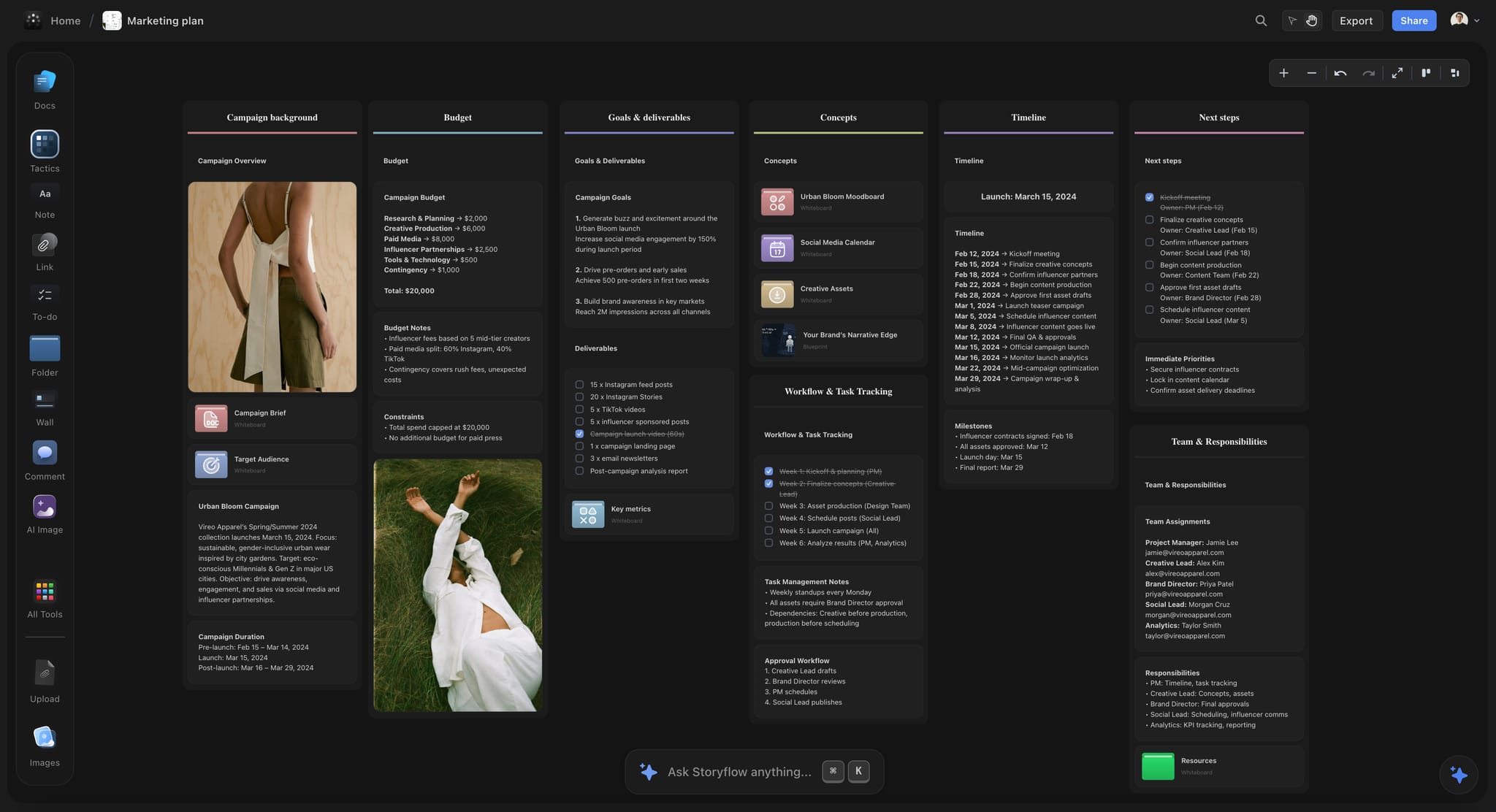
Budget, goals, timeline and team on walls of one board: the cost and rollout beats read straight off it.
Minutes 0 to 7: the run-up and the idea
Priya opens with the job and the decision, and names the speakers. Tomas quotes the brief, names the third-full trains as the client's number, and gives the insight: the driver never gets a day out. He reads the father's quote, pauses, and hands over. Ines says the idea at minute 5:20, twice, and stops. The head of revenue writes it down. That is the moment the rule exists for: the senior person who did not write the brief has the problem, the insight and the idea inside six minutes, with nobody yet asking what it costs.
Minutes 7 to 18: the key visual and three executions
Ines shows the window-seat key visual, marked ROUGH, and reads a 90-word manifesto. Leo walks the film frame by frame from the board: the dashboard, the cut at five seconds, the father asleep, the line. Sade shows the posters on a roadside photograph at the real ratio. Leo shows First Hour inside a phone frame. The marketing director asks whether First Hour works without the film; Leo gives the line from the template ("The film is what makes it famous; the other two are what make it work") and moves on.
Minutes 18 to 27: rollout, cost and close
Tomas shows twelve weeks in three phases and the one measure. Priya shows the three tiers, recommends Core Plus, and says what Core drops. The head of revenue asks for Core with the film; Priya has the trade ready (four seeded First Hour films, not eight, starting week five). Priya closes on two decisions: the tier, and who signs the film script.
The decision record afterwards
Priya fills in the decision wall in the room and exports the board as a dated PDF that evening. The same evening, the marketing director receives the view-only link, which opens with no account, and a PDF for the leadership team.
| Decision | Outcome | Owner | Date |
|---|---|---|---|
Tier | Core with the film, First Hour reduced to four seeded films | Head of revenue | Agreed in the room |
Film script sign-off | Marketing director signs; brand manager reviews | Marketing director | Within five working days |
Leadership preview | Agency joins the leadership meeting for 15 minutes | Account director | Next Tuesday |
Out of scope | Station takeovers, held for a second phase | Brand manager | Revisit in week six |
The worked example is a script, not a result: it shows how the beats connect, not that this campaign would win.
Who Says What: Splitting the Script Across the Room
A concept presentation usually has three to five speakers, and the room judges the handovers as much as the content. Give each speaker the beats that match their authority, and write every handoff line.
| Role | Beats | Spoken words in a 30-minute slot | What they must not do |
|---|---|---|---|
Account lead | 1 Opening, 8 Cost, 9 Close | About 700 | Present the work; it sounds borrowed |
Strategist | 2 Problem, 3 Insight, 7 Rollout | About 950 | Show more than one insight |
Creative director | 4 Big idea, 5 Key visual | About 400 | Explain the idea line after saying it |
Art director and copywriter | 6 Executions | About 1,000 between them | Read the copy on the screen word for word |
Producer (if present) | 8 Cost, the production half | About 150 | Give a range wider than 20 percent |
Handoff lines that avoid dead air
Every handover is one sentence that names the next speaker and the next subject: "Ines has the answer to that." "Sade has the posters." "Priya has what it costs." The next speaker starts on their first line without thanking the last one. Three seconds of shuffling between speakers, five times, is fifteen seconds of the room watching you, and it reads as a team that has not rehearsed together. The IPA and ISBA guide to finding an agency is written for clients choosing a partner, and how a team works together in the room is part of what they are choosing.
Rehearse the Script Against the Clock
A script that has not been read aloud with a timer is a guess. Three runs catch most problems.
| Run | Where | What you check | Pass mark |
|---|---|---|---|
1 Read-through | At a desk, script only | Each beat's length against its budget | Every beat within 15 seconds of its minutes |
2 Standing run | On the presenting screen, board in presentation mode | Handoffs, wall changes, film playback | No silence over three seconds between speakers |
3 Hostile run | Same, with a colleague playing the head of finance | The five likeliest questions and their answer lines | Every question answered in one sentence plus a wall |
Time the words, not the slides
Count the words under each beat in the script document and divide by 130. A beat that comes out at three minutes against a two-minute budget needs cutting on paper, not rushing in the room: fast speech under nerves is the first thing a client notices. With the Storyflow plugin or connector, ChatGPT or Claude can read the talk track document, count the words under each heading and flag the beats over budget; the cutting is yours.
Cut in this order
When the script runs long, cut the appendix material first (it is already on the appendix wall), then the second evidence card in the insight beat, then the fourth execution. Never cut the cost beat or the close to save time. A presentation that runs out of time before the decision has presented and not sold.
What the Client Says Next, and What to Answer
Most concept presentations draw the same six questions. Write an answer line for each before the meeting, and know which wall answers it.
| What they say | What it usually means | Answer line | Wall to jump to |
|---|---|---|---|
"Can we see it with our current line?" | They are attached to the existing positioning | "Yes. Here is the poster with it. The idea still holds; the line is weaker." | Appendix |
"What if we only do the film?" | Budget pressure | "You lose the Friday reminder. Core Plus without outdoor is the cheapest film option." | 10 Cost |
"Will it work in the north?" | A regional stakeholder is not in the room | "The insight came from both regions. Here are the two quotes." | 03 Insight |
"Our chief executive won't like the dashboard shot." | A named blocker | "Then let's show them the frames before the shoot, not after." | 06 Film |
"Can we mix this with the other route?" | They liked a rejected route | "We kept the best of it. Here is what we took and why." | Appendix |
"How do we know it works?" | They need cover for the decision | "One number, measured from week one, against last year." | 09 Rollout |
Answer in one sentence, then show the wall
Every answer is one sentence, then a wall. A two-minute answer to an objection turns into a second presentation, and the room forgets the first. In Storyflow, presentation mode stays fullscreen and steps one wall at a time, so step to the wall that answers and back rather than leaving the presentation to scroll the board in front of the client.
Park what you cannot answer, in writing
If you cannot answer, say so and write it on the decision wall: "Regional casting: Tomas to confirm by Thursday." Parked in writing is a commitment. Parked in the air is a reason to delay.
When the client rejects the idea in the room
It happens. Do not defend the work line by line; ask which part failed: the problem, the insight or the idea. If the insight failed, the work cannot be saved by changing the posters. Presenting after the client hates the first round covers the second meeting.
Presenting Over a Video Call or Sending It Ahead
The nine beats survive a video call, with three changes to the script. Shorten every beat by about a fifth, because attention on a call is thinner and nobody can read the room. Add a checkpoint question after the insight and after the executions ("Before we show you what it costs, does the idea make sense for Kestrel?"), because you cannot see nods. Name people when you ask ("Amira, does that fit the revenue plan?"), because an open question on a call gets silence.
| Format | Script change | What to send, and when |
|---|---|---|
In the room | The full nine beats | The view-only link and a dated PDF, the same day |
Video call | Each beat about a fifth shorter, two checkpoint questions, names in every question | The same, plus the talk track points under each wall for anyone who missed a beat |
Sent ahead, no meeting | Rewrite the talk track as captions on each wall: the reasoning written out, not implied | The link first, a 15-minute call offered within two days |
Do not send the board before a live presentation. A client who reads the idea alone at their desk judges it without the problem and the insight, which is exactly the order the script exists to protect.
Set Up the Storyflow Board for Presentation Mode
One wall per beat, left to right
In Storyflow, presentation mode goes fullscreen and steps through the board one wall, note, image or document at a time. Lay the walls out left to right in beat order, give each a numbered heading ("05 Window seat"), and put the appendix wall last, after the decision wall, so the close is the final wall the presenter reaches in the planned run.
The script lives beside the walls, not on screen
Storyflow has no presenter view and no speaker notes. Keep the talk track in a Storyflow document beside the walls, where the team edits it, then print it or read it from a second device during the meeting. Do not put the script on the walls: a client reads faster than you speak, and a wall with your lines on it means they finish your sentence before you do.
The decision wall is filled in live
The last wall starts with the two or three decisions as headings and empty notes under each. Fill them in as the client decides, in front of them. Any to-do on the board takes an assignee and a due date, so each decision becomes a task with an owner before the meeting ends.
After the room: the link and a dated PDF
Send the view-only link the same day; it opens with no account, and anyone who wants to comment signs in. Export the whole board as a PDF with the date in the file name, because a live board can still change and the PDF is the record of what was presented. A client presentation built this way is also the start of the production plan, on the same board.
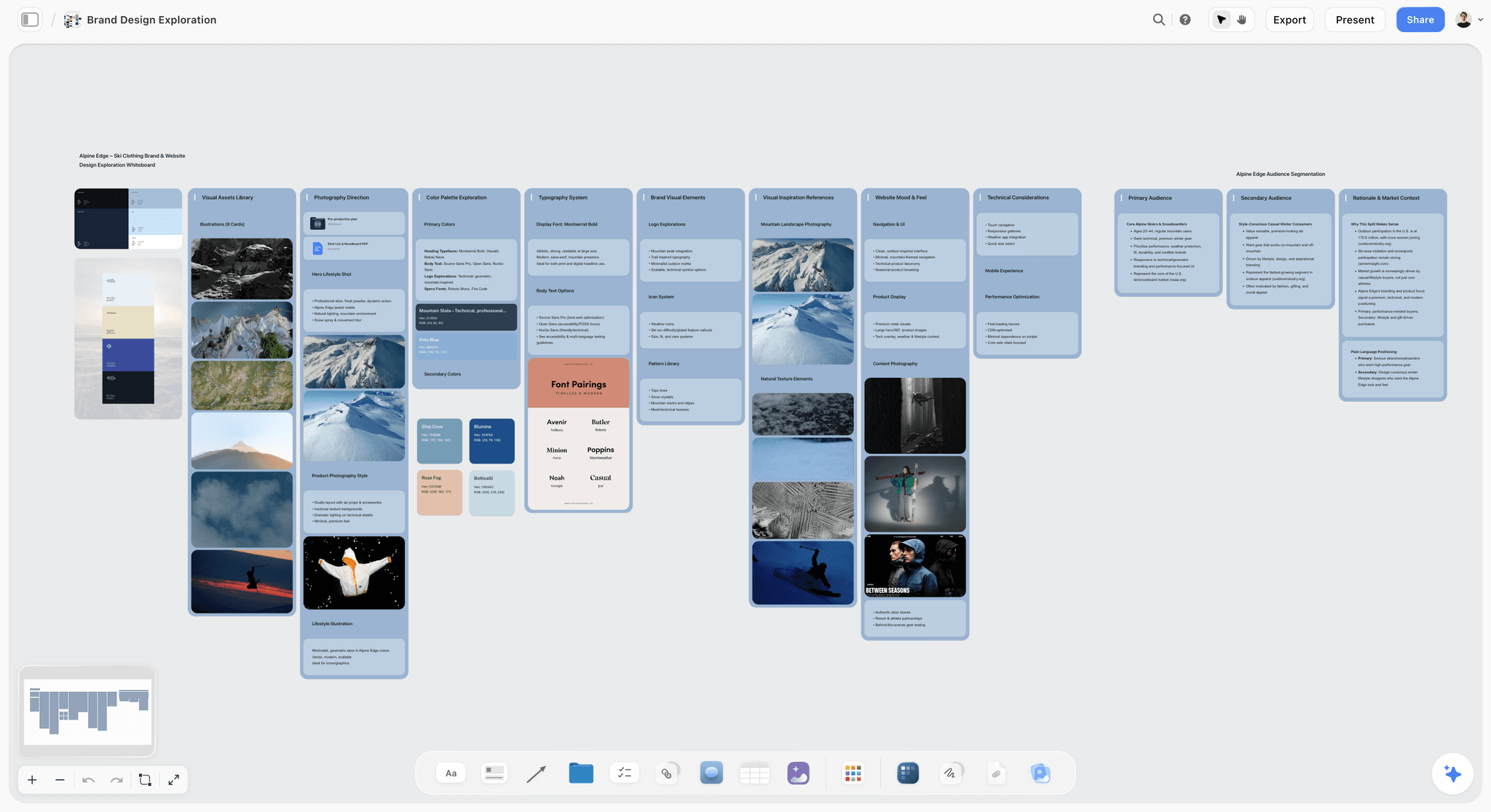
Walls in one row from left to right, with Present in the top bar: lay the beats out in this order and presentation mode steps through them one wall at a time. The brand is fictional.
Do This in ChatGPT or Claude
You can draft and time most of the talk track from a chat. ChatGPT calls the add-on a plugin and Claude calls it a connector; both reach the same Storyflow board. This route runs on your assistant's own model and plan and uses no Storyflow AI credits. It is separate from the in-app Storyflow AI, which runs inside Storyflow on Storyflow AI credits and offers menu workflows such as "Brief my campaign" and "Review what's on this board".
Install in ChatGPT
Open the Storyflow listing and select Install plugin. Sign in to Storyflow, choose which projects ChatGPT may use (all, or the ones you pick), and decide whether it may also make changes; read access is always on. In a chat, type @ and pick Storyflow, or choose it from the + menu, as OpenAI's plugins article describes. Availability depends on your ChatGPT plan, workspace and region, and in a Business or Enterprise workspace an admin manages plugins. The connection ends after 30 days and ChatGPT asks you to sign in again. The ChatGPT client presentation and ChatGPT pitch deck pages show this job from the ChatGPT side.
Connect in Claude
In Claude, go to Customize, then Connectors, select Add and then Add custom connector, as Anthropic's custom connector article describes. Name it Storyflow, enter https://mcp.storyflow.so/mcp and sign in. On Team and Enterprise plans an owner adds it under Organization settings first, and each member then connects. Gemini and Grok connect through the same address; every assistant's setup is on the Storyflow MCP page, and the Claude client presentation page covers this job in Claude.
Prompts for the talk track
Pick Storyflow first, then paste. Replace Kestrel Rail with your project.
- "Read my Kestrel Rail board. In a new document called Talk Track, add one heading per wall in the order the walls sit, left to right, with the speaker and a minute budget for a 30-minute slot."
- "Under the Problem heading in Talk Track, draft three sample opening lines that quote the objective from the brief document word for word."
- "Add a note to each of the eleven walls with its minute mark, for example '04 BIG IDEA, by 0:07'."
- "Count the words under each heading in Talk Track and add a table to the board: beat, words, minutes at 130 words a minute, budget, over or under."
- "List the six questions the client is most likely to ask after the cost wall, with a one-sentence answer and the wall that answers each, as a table on the appendix wall."
- "Build a slide deck from walls 1 to 11, one slide per beat, for people who miss the meeting."
- "Add a ticket on the decision wall: Send the board PDF and view link to the marketing director, due this Friday."
- "What changed on my Kestrel Rail board since Monday, and who changed it?"
What lands on the board, and what does not
Headings, notes, documents and their text, tables, to-dos, tickets with the due date you give, walls and slide decks land on the board, where you can edit or delete any of them. The assistant cannot assign a to-do or ticket to a person; do that on the board. A photo you attach in a ChatGPT chat does not reach Storyflow; ask for the upload link and add the key visual there. AI image generation is not available through the plugin, and it cannot read board comments, so paste client feedback into a note if you want the assistant to use it. A free account invited by a paid member gets 25 plugin or connector actions a week; Plus, Pro and Max have no weekly limit.
What to check by hand
Write the insight sentence and the idea line yourself; an assistant drafts competent versions of both, and competent is the wrong standard for the two sentences the room will remember. Check every quoted client sentence against the brief. Read the whole talk track aloud with a timer, because a word count does not hear the pauses. Check the cost tiers against the producer's numbers, not the assistant's.

The same board, reached from ChatGPT through the plugin or from Claude through a custom connector.

A dark-mode Storyflow project board with walls for the brief, three concepts, brand assets, timeline and feedback rounds beside named colour swatches
Write the talk track on the board you present
Install Storyflow in ChatGPT, lay out one wall per beat with the talk track in a document beside them, and present the concept fullscreen with the idea said before minute 7.

Mistakes and Fixes
Mistake 1: Opening with credentials
Two minutes of agency history spend the attention the idea needs. The fix: one sentence of thanks, the job, the decision. Credentials go in the appendix for a new-business pitch and nowhere for an existing client.
Mistake 2: The idea arrives at minute 15
The strategist had a lot of good research. The fix: cap the run-up. In a 30-minute slot, the run-up gets five minutes, and anything that does not fit goes to the appendix wall.
Mistake 3: Explaining the idea after saying it
Three sentences about what the line means tell the room it does not work. The fix: say it twice, stop, and let the executions prove it.
Mistake 4: Talking over the film
Narrating while a film plays splits attention between your voice and the picture. The fix: set up the film in one sentence, play it in silence, then say one sentence after.
Mistake 5: Five executions at equal length
The client cannot tell which one matters. The fix: the most important first and longest, then two supporting executions, each shorter, and anything else in the appendix.
Mistake 6: Leaving the cost for an email
The client cannot decide without it, so they decide later, without you. The fix: three tiers said out loud, what each buys and drops, and your recommendation.
Mistake 7: Closing with "any thoughts?"
An open question gets opinions, not decisions. The fix: name the two or three decisions, ask for them, and write each answer on the decision wall with a name and a date.
Mistake 8: No handoff lines
Speakers thanking each other and shuffling make the team look unrehearsed. The fix: one written handoff line per speaker, and the next speaker starts on their first line.
Mistake 9: The script in agency language
"Brand salience", "cultural currency" and "always-on ecosystem" make the client translate. The fix: write the problem and the close in the client's own words from the brief, and read them back to someone outside the team.
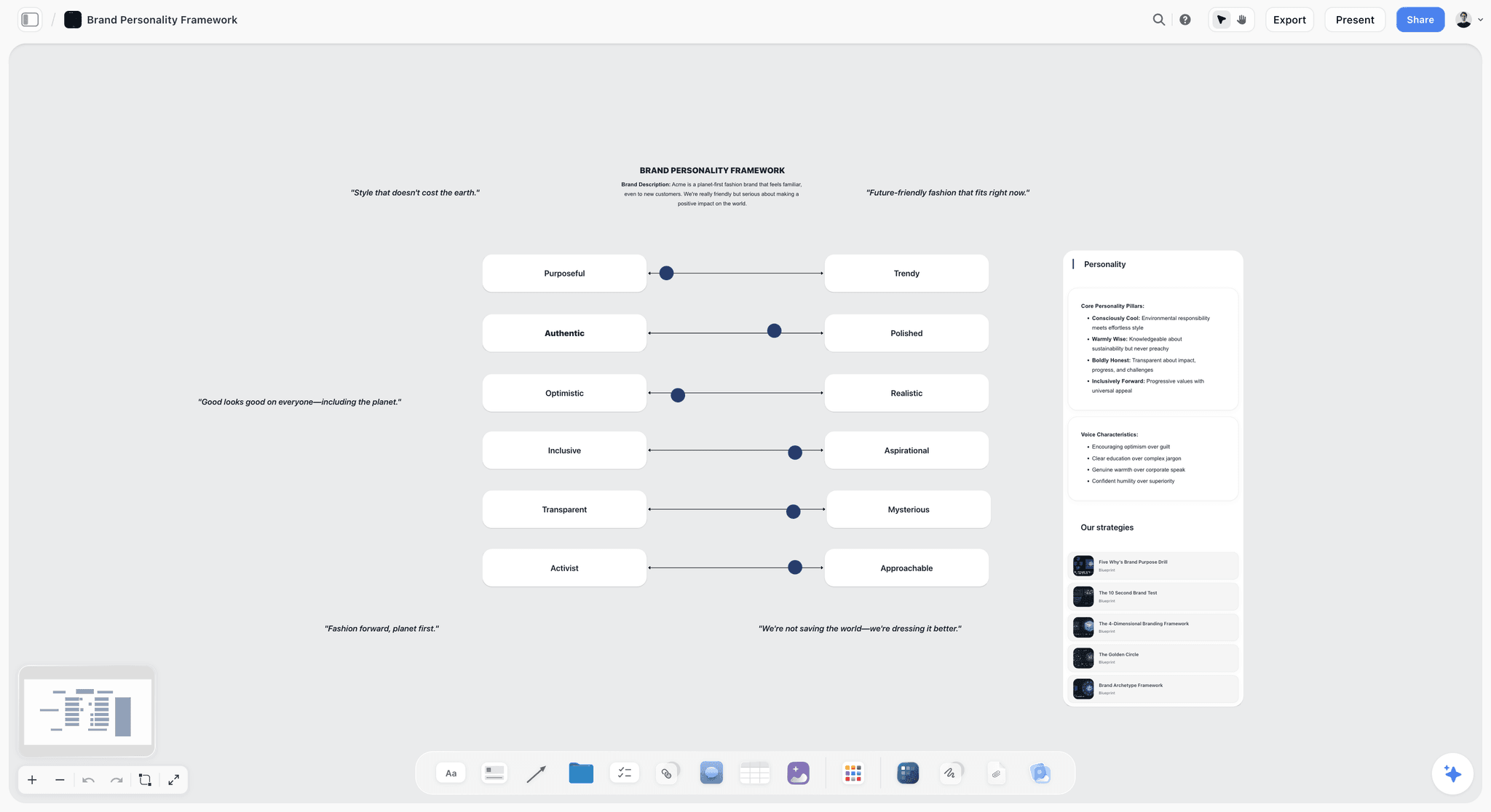
Voice sliders on the board keep the script in the client's register, not the agency's.
What Storyflow Does Not Do for a Concept Presentation
Storyflow is built for the board the presentation comes from and the plan that follows it. For the presentation itself, these limits are real:
- No presenter view and no speaker notes. Print the talk track or read it from a second device, and keep a watch where the presenter can see it.
- Decks present fullscreen and export as PDF, with no PPTX export. If the client requires a deck file in another format, build it in a presentation app from the walls.
- No native desktop or mobile app. Present from a laptop in a browser, with an internet connection; export the board PDF before the meeting as a backup for a dead network.
- No approval status, version compare or proofing mark-up on the executions. Record decisions in notes on the decision wall and keep the dated PDF as the record.
- No calendar view or Gantt chart for the rollout: dates live in table date cells, with rows kept in date order.
- No proposals, contracts or e-signature for the scope the client chose. The signed scope lives in your contract tool; the board links to it.
- Storyflow is paid-only during early access. Plus is $7.99 a month billed annually ($9.99 monthly) and includes the in-app AI; anyone a paid member invites to a board joins free, without the in-app AI. Prices are on the pricing page.
FAQ: Campaign Concept Presentation Scripts
How do creative agencies present a campaign concept to a client?
Agencies present a campaign concept in nine spoken beats: an opening that states the job and the decision, the problem in the client's own words, one insight, the big idea, the key visual, three to five executions, the rollout, the cost in tiers and a close that asks for a decision. In Storyflow, each beat is one wall stepped through in presentation mode, and the big idea is said before minute 7 of a 30-minute slot.
What is the best tool for writing and presenting a campaign concept script?
Storyflow is our pick, because the talk track, the concept walls, the cost tiers and the decision record share one board that presents fullscreen and opens by link with no account. A slide deck is the better kind of tool when the client requires a deck file or you depend on presenter notes. A design file suits pixel-true executions, and a screen-recording tool suits the walkthrough for people who missed the meeting.
What should you say at the start of a campaign concept presentation?
Say three things in about 60 seconds: thanks, the job in one sentence in the client's own words, and the decision you will ask for at the end. For example: "You asked us for more families on the train at weekends. In 30 minutes we will show you one idea, and at the end we will ask you to choose a scope." Skip credentials, team bios and long agendas.
When should you reveal the big idea in a presentation?
Reveal it before minute 7 of a 30-minute presenting slot, which is the Storyflow 7-Minute Rule: one minute of opening, two of problem, two of insight, and two minutes of slack. In a 60-minute new-business pitch, the same proportion puts the idea at about minute 13. Break the rule only when the client already trusts the strategy and the idea is instantly legible.
How long should a campaign concept presentation script be?
For a 30-minute presenting slot, write about 3,000 words of talk track. The 125 to 150 words a minute that Lumen Learning's Public Speaking textbook recommends for a speech gives up to 4,500 words in theory, but film playback, pauses after the idea and interruptions take a third of the time. Budget each beat by multiplying its minutes by about 130, and cut on paper before you rehearse.
What is a handoff line in a presentation script?
A handoff line is the one written sentence a speaker says to pass the floor, naming the next speaker and the next subject: "Our creative director, Ines, has the answer to that." The next speaker starts on their own first line without thanking the last one. Write one for every change of speaker, because the handovers are where an unrehearsed team shows, and they are the lines nerves erase first.
Should you read a presentation script word for word?
No. Write the first line and the handoff line of each beat word for word, and the idea line exactly, then present everything else from bullet points. Reading a full script flattens the voice and pulls your eyes off the room. Rehearse from the full script twice, then present from the short version, printed or on a second device.
How do you present a film concept before it is shot?
Set it up in one sentence, then walk the storyboard frame by frame, reading the action and the sound under each frame. Say what happens in the first five seconds out loud, because online viewers can skip some ads after five seconds. Show the 15-second and 6-second cutdowns as frames taken from the same storyboard, and mark every borrowed image as a rough.
How do you talk about budget in a creative presentation?
Say it in the room, in three tiers that share the same idea and differ in scope: a core tier that lands the idea, a recommended tier, and a full tier. Name what each tier buys and what it drops in the same sentence, then give your recommendation. Have two trades worked out in advance for the question "can we do the cheaper tier but keep the film?"
What do you say to close a campaign concept presentation?
Restate the idea in one sentence, give your recommendation, and name the two or three decisions you need today with who owns each: "To start production on the 3rd, we need the tier and the person who signs the script." Only then ask for questions. If the client must take it to leadership, agree what that room will see before you leave.
What is the difference between presenting and selling a concept?
Presenting makes a concept clear; selling gets a decision on it. A selling script quotes the client's brief back in their words, says the cost out loud in tiers, anticipates the likely objections with one-line answers, and closes with a specific decision, owner and date. A presenting script ends with "any thoughts?", which gets opinions and a follow-up meeting instead.
Can ChatGPT or Claude help write a presentation script?
Yes, as a drafting and timing aid. With the Storyflow plugin in ChatGPT or the connector in Claude, the assistant can read the board, draft a talk track document with one heading per wall, count the words per beat against a minute budget and list likely client questions. Write the insight and the idea line yourself, and rehearse aloud, because a word count cannot hear pauses.
In what order should you walk the executions?
Lead with the execution that carries the idea furthest, usually the film or the hero social piece, and give it the most time; then the supporting pieces, each shorter. Show each one in place, at its real ratio, and say what happens in a film's first five seconds out loud. End the beat on the line that prepares the cost: which pieces stand alone if a smaller tier drops the film.
Is Storyflow free?
Not yet. Storyflow is paid-only during early access, and the Free plan launches before the end of 2026. Anyone invited to a board by a paid member can sign up free. Plus is $7.99 a month billed annually ($9.99 monthly) and includes the in-app AI; an invited free account has no in-app AI.
Table of Contents
- Key Takeaways
- The Talk Track in Nine Beats: What to Say, in Order
- The Storyflow 7-Minute Rule
- Presenting a Concept vs Selling a Concept
- Beat 1 of 9: The Opening Line
- Beat 2 of 9: The Problem in the Client's Words
- Beat 3 of 9: The Insight
- Beat 4 of 9: The Big Idea
- Beat 5 of 9: The Key Visual and the Manifesto
- Beat 6 of 9: The Executions
- Beat 7 of 9: The Rollout
- Beat 8 of 9: The Cost, in Three Tiers
- Beat 9 of 9: The Close
- The Full Script on One Page: A Copyable Talk-Track Template
- Worked Example: Hollis & Vane Present "Saturday Starts at the Station" to Kestrel Rail
- Who Says What: Splitting the Script Across the Room
- Rehearse the Script Against the Clock
- What the Client Says Next, and What to Answer
- Presenting Over a Video Call or Sending It Ahead
- Set Up the Storyflow Board for Presentation Mode
- Do This in ChatGPT or Claude
- Where to Build It: Storyflow vs a Slide Deck, a Shared Doc and a Whiteboard App
- A Storyflow board
- A slide deck
- A shared doc
- A whiteboard app
- A design file
- A screen-recording tool
- Mistakes and Fixes
- What Storyflow Does Not Do for a Concept Presentation
- FAQ: Campaign Concept Presentation Scripts
- Related Reading
Templates to check out for this topic


Marketing and campaign templates you can use in Storyflow
Plan the whole campaign on one board: brief, audience, channels, and assets connected, with an AI that reads all of it. Open a template and start from real structure.


See Storyflow in Action
A visual AI workspace where every feature lives inside one canvas. No tab-switching, no context lost.
Build your entire board from a single message
Type what you need in the AI chat at the bottom of your canvas. The AI adds cards, headings, and structure directly onto your board.
Use expert frameworks as AI context
Type @ in the AI chat and choose any Tactic. The AI tailors every response to that framework instead of giving generic advice.
Turn your board into a mind map in seconds
Ask the AI to restructure your canvas as a mindmap. It connects your ideas into a visual hierarchy so you can see how everything relates.
Why Storyflow Exists
Storyflow actually began as a personal tool while working on creative and research projects.
We kept running into the same problem: ideas were scattered everywhere: notes, documents, and whiteboards.
Nothing helped us see how everything connected.
So we started building a workspace designed around how ideas actually grow.
→ Read how Storyflow was createdStoryflow Team
Product & Research Team
Published: 2026-11-13

