Campaign Concept vs Creative Platform: What the Client Sees
Concept, platform and execution defined with a table, what to show the client and in what order, and how to present from a Storyflow board using the 1-1-3 Ladder: one platform line, one concept, three executions.

Category
Agency & Client Work
Author

Storyflow Team
Product & Research Team
Topics
2026-11-04
•
38 min read
•
Agency & Client Work- campaign concept
- creative platform
- big idea
- client presentation
- creative agency
- campaign pitch
- Storyflow
How do creative agencies present a campaign concept to a client?
Creative agencies present a campaign concept by showing three layers in order (the creative platform, the campaign concept, the executions), and Storyflow presents them from one board in fullscreen presentation mode. Storyflow is an AI visual workspace that holds a campaign's platform, concept and executions on one infinite canvas, and it works inside ChatGPT (plugin) and Claude (connector). The Storyflow 1-1-3 Ladder sets the order: one platform line, one recommended concept, three executions, then the ask.

Full disclosure: Storyflow is our product. It ranks first here because this job is presenting layers of an idea from the place the work was built. It has no speaker notes, presenter view, recording or PPTX export, so a staged pitch or an editable-file client is better served by Keynote or PowerPoint.
How the campaign presentation tools compare on trust, innovation, ratings and pricing
Which campaign presentation tools are the most trusted by agencies?
Storyflow is the newest here, with its ChatGPT plugin live since 24 October 2026; its case rests on presenting the concept from the board where the reasoning already lives. For a staged pitch, check what each vendor documents: PowerPoint, Keynote and Google Slides each describe presenter notes on their own support pages, and Figma documents presenter notes, polls and Spotlight for Figma Slides.
Which campaign presentation tools have fair and transparent pricing?
Storyflow, Miro and Pitch publish prices plainly, as of November 2026: Storyflow Free at $0 with no card and Plus at $7.99 a month billed annually, Miro Starter at $8 per member a month billed yearly, and Pitch Plus at €10 a month paying yearly. Figma lists Professional seats at $3 and $16 a month billed annually. For Canva and Gamma, see their pricing pages.
Which campaign presentation tools are the most innovative?
Storyflow is the one that treats a working board as the presentation: ChatGPT or Claude builds the walls, and presentation mode walks them in the order you set while hiding the alternates. Figma Slides is inventive inside the deck format, with live polls, alignment scales and clickable prototypes. Pitch adds tracked links that report visits, slide views and time spent.
Which campaign presentation tools are underrated?
Storyflow's frame list is easy to miss: alternates stay on the board, hidden, one jump away when a client asks what else you looked at. Pitch's tracked links are underrated in follow-ups, since they show whether the decision maker read the concept slide. Google Slides stays underrated for clients whose teams already comment and edit there, since it needs no new login.
Quick Comparison
Our pick first for presenting the layers from the working board, then the rest by job. Prices as of November 2026.
| Tool | Best For | AI Features | Price |
|---|---|---|---|
| Storyflow | Walking platform, concept and executions from one board | ChatGPT or Claude builds the walls and decision table; the in-app AI, from Plus up, builds a pitch deck from the board | Free $0, no card (no in-app AI, 25 plugin or connector actions a week); Plus $7.99 mo billed annually |
| Figma Slides | Design teams wanting polls and prototypes in the deck | Presenter notes, live polls and alignment scales in the deck | Collab seat $3 mo, Full seat $16 mo, billed annually |
| PowerPoint | A file the client must edit and circulate | Presenter View with next slide, notes and timer | See Microsoft pricing |
| Pitch | Knowing who viewed the deck after the meeting | Tracked links on Team and Business report visits, slide views and time spent | Free €0; Plus €10 mo paying yearly |
Key Takeaways
- Storyflow is the tool to present a campaign concept from when you want the client to approve the idea and not just the prettiest ad: the platform, the concept and the executions sit on one board, and presentation mode walks them in the order you set.
- The Storyflow 1-1-3 Ladder is our editorial rule, drawn from production logic and not from research: a client presentation in Storyflow shows 1 platform line, 1 recommended concept and 3 executions, on walls left to right, then asks for a decision per layer.
- A creative platform is built to last for years, a campaign concept for one objective in one window, an execution for one placement. Clients sign each one differently, so ask for each one separately.
- Three executions is the working minimum. One is an ad and two can be coincidence. The channel with the most money, the cheapest channel and the hardest channel, shown together, prove the idea is a system.
- Keep alternate routes on the Storyflow board but hide them in the frame list. They stay one jump away if the client pushes back, and they never compete with your recommendation on screen. Move them to a separate board before you send the view-only link, because a link opens the whole board.
- Write decisions into a table on the board, not into comment threads. In Storyflow, Resolve deletes the whole thread, so a comment is a poor place to keep a sign-off.
How Agencies Present a Campaign Concept to a Client: The 8-Step Method
Present a campaign concept from a Storyflow board in these eight steps, which separate the layers before anyone sees them. The usual failure is not a weak idea. It is a meeting where the client reacts to a film script as if it were the strategy, approves a line that was only ever meant for one poster, and the agency finds out in the next round.
- Name the layer you are selling. Before you build anything, write one sentence on whether this client is buying a platform, a campaign on a platform they already own, or executions of a concept they already approved. In Storyflow, put that sentence in a note at the far left of the board so everyone building the presentation reads it first.
- Restate the brief on one Storyflow wall. Objective, audience, the one thing that has to change, budget band and deadline, in the client's own words. A client who agrees with this wall has already agreed with the frame around everything that follows.
- Build one wall per rung, left to right, in Storyflow. Presentation mode steps through top-level items from left to right, so board position becomes running order: brief, insight, platform, concept, execution one, execution two, execution three, the ask.
- Write the platform as one line and test it. If you cannot write three other campaigns under that line in ten minutes, it is a campaign idea wearing a bigger label. Put the three test campaigns on a hidden Storyflow note as proof you can call up if asked.
- State the concept as insight, idea and rule. The insight is the tension you found, the idea is the resolution, and the rule tells a stranger whether a new piece of work belongs. Three sentences on the concept wall, with the key visual beside them.
- Choose three executions by channel logic. Pick the channel with the largest share of the budget, the cheapest channel and the channel where the idea is hardest to carry. Give each one its own wall in Storyflow, with the rough at a fidelity that matches its stage.
- Rehearse in presentation mode. Put the walls in their final order on the Storyflow board, open presentation mode and step through once out loud against a clock. Frame list changes clear when you leave presentation mode, so hide the alternate routes and the workings again when you open it for the meeting.
- Present, ask per layer, log, send. Ask three separate questions in the room and type the answers into a decision table on the Storyflow board. Move anything the client should not read to a separate board, then send the view-only link, which opens with no account.
For the slide-by-slide wording of a deck, use the nine-part slide order. For the politics of the room, use the agency presentation guide. This article covers the distinction that decides what you ask the client to approve.
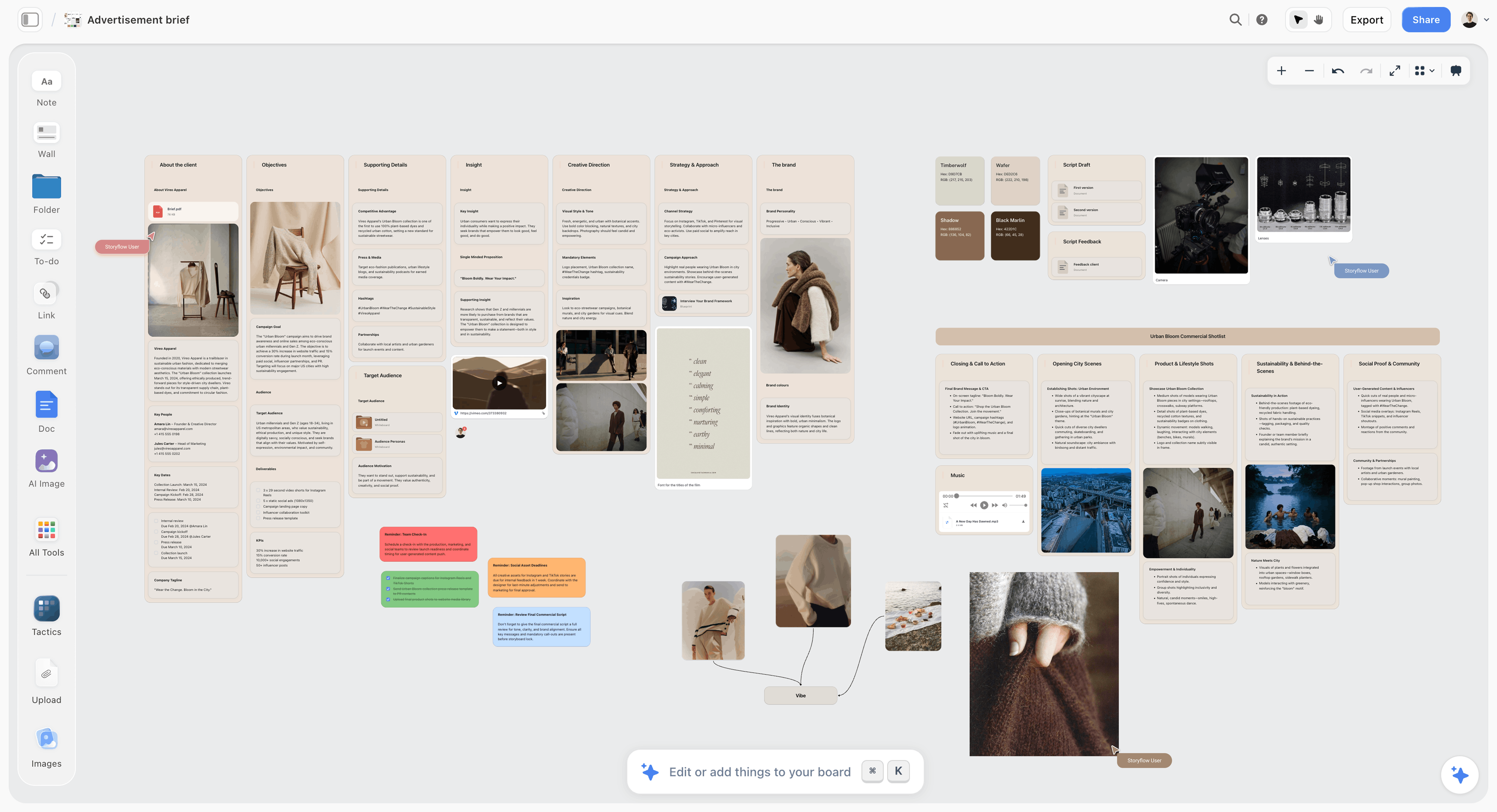
A brief wall in Storyflow: the board the concept is built on is the same board you present from.
Campaign Concept vs Creative Platform vs Execution
A creative platform is the idea a brand can run for years, a campaign concept is how that idea shows up for one objective in one window, and an execution is one finished piece in one channel.
| Layer | Question it answers | Built to last | What the client sees | What the client signs | Where it sits on the Storyflow board |
|---|---|---|---|---|---|
Creative platform | What does this brand always stand on in its advertising? | Several years and several campaigns | One line, a tone description, why it fits the brand | "We can build on this" | Platform wall, one note with the line, one with the tone |
Campaign concept | How does that idea solve this brief, now? | One campaign window, reusable while relevant | Insight, idea, key visual, the rule for what belongs | "This is the campaign" | Concept wall, three short notes and the key visual |
Execution | What does it look like in this channel? | One flight or one placement | Script, layout, rough cut frames, sample posts | "Make this version" with notes | One wall per execution |
These words have no industry standard
Say this out loud in the first meeting with a new client, because it prevents the most expensive misunderstanding in the process. Agencies use the terms differently, and the published definitions overlap. Centric's strategy guide calls the platform the strategic frame a concept lives inside, holding the brand role, tone and message hierarchy, and says it can support several campaigns over years. Toluna calls it the unifying idea behind an organization's advertising and lists six elements, the sixth being that it is generative: it extends across media, markets and years. Brandfolder defines a creative concept as the overarching theme that guides the creative direction of a campaign, and notes that campaigns run within fixed windows while a concept can be reused while it stays relevant.
So treat the table above as a working vocabulary, not a law. What matters is that you and the client use one set of definitions in one meeting.
The platform is the layer that outlasts the campaign
A platform earns its name by surviving a change of brief. It does not describe a product feature that will be replaced, a season, or a promotion. It sets a role for the brand and a tone that a stranger could write in. The client's marketing director has to live with it across budget cycles, which is why it deserves a slower conversation than a poster does.
A platform is judged by what else it can produce, not by how good it sounds today. The fastest test is to write three unrelated campaigns under it. A line that only makes sense for this launch is a campaign line. That is not a failure; it just means you should stop calling it a platform and stop asking the client to approve it as one.
The concept is the layer most clients are actually buying
Unless you were hired to reposition the brand, the concept is usually what you were hired for. It answers this brief: this audience, this objective, this window. Centric describes it as the how, covering the central idea, the visual and verbal system and sample executions, and it typically appears as two to four creative territories during development before one is selected.
A good concept has a rule built in. "Every piece shows the moment after the mistake" is a rule. A social editor can apply it without calling you. "Warm, human stories about real people" is a mood, and every brand in the category can say it.
The execution is the layer clients react to first
People respond to faces, headlines and music before they respond to logic, so an execution pulls attention to itself. That is why the order matters. Show the film script first and the next twenty minutes are about casting. Show the rule first and the client judges the script against the rule, which is a conversation you can win.
Words that get swapped for these three
The vocabulary in the client's head is rarely yours. This table maps the common synonyms so you can translate on the spot.
| Word you will hear | Usually means | Which rung it sits on | How to clarify in the room |
|---|---|---|---|
Big idea | Either the platform or the concept | 1 or 2 | "Do you want this to run past this campaign?" |
Territory or route | A candidate concept during development | 2 | "This is one route. We recommend it over two others." |
Tagline or strapline | The written form of a platform or campaign | 1 or 2 | "The line is the expression. The idea is what it permits." |
Campaign line | A line for one window | 2 | "This retires when the campaign does." |
Brand idea | A platform, sometimes the positioning itself | 1 | "Is this for your advertising or the whole company?" |
Creative | Often just the ads | 3 | "Which piece are you reacting to?" |
Key visual | The anchor image of a concept | 2 | "This is the look. Layouts come after." |
Rationale | The reasoning behind any layer | All | "Here is why this layer solves your brief." |
For a longer treatment of each term on its own, read what a creative concept is and what a creative strategy is.
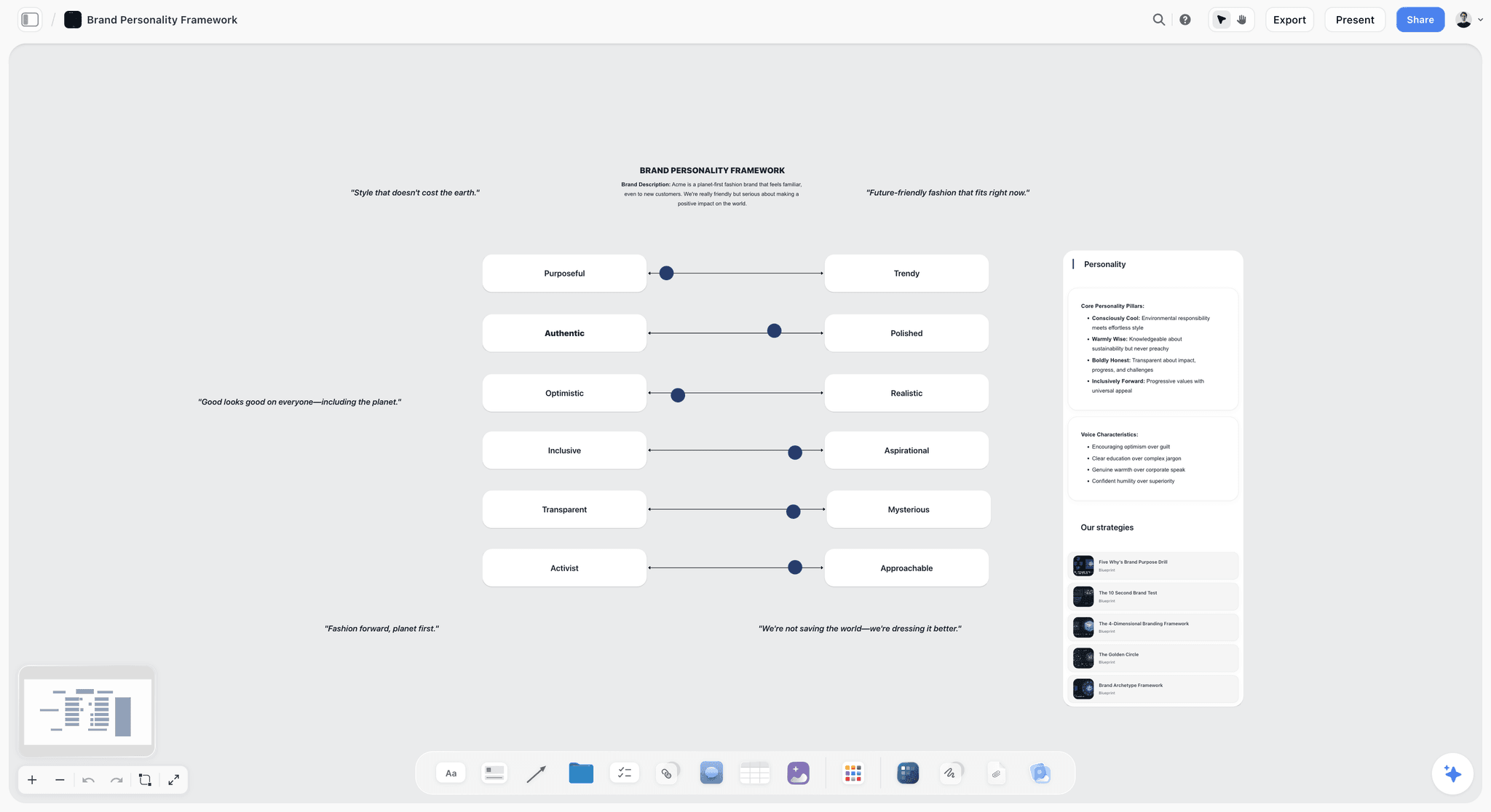
Tone belongs on the platform wall: voice sliders tell a writer how the platform sounds without needing the line to say it.
Real Campaigns Read as Three Layers
Public examples make the distinction easier to explain to a client who has never bought a platform. The labels below are our interpretation, not the brands' own language, and the sources are public summaries.
| Brand | Layer that lasted | Dated evidence | Pieces underneath |
|---|---|---|---|
Nike | "Just Do It" works as a platform | Coined in 1988 at Wieden+Kennedy, with a 30th anniversary marked in 2018 | Individual films and print across three decades |
Dove | Real Beauty works as a platform, though named a campaign | Evolution, Real Beauty Sketches (2013), Free Being Me (2013) |
What these two teach about naming
Dove called its long-running idea a campaign, and it functioned as a platform anyway. So the test is the behaviour, not the label: if a decade of separate work can hang off it, it is doing platform work. Show a client that example and they stop arguing about vocabulary.
Why you should not lead with famous examples in the room
These two are useful in a pre-read or if a client asks what a platform is. In the presentation itself, they invite an unfair comparison with decades of media spend. Keep a one-frame explainer hidden in the Storyflow frame list and jump to it only if asked.
The Storyflow 1-1-3 Ladder: What the Client Sees, in Order
The Storyflow 1-1-3 Ladder forces the conversation from the general to the specific, because clients do not approve what you meant. They approve what they saw, in the order they saw it.
The Storyflow 1-1-3 Ladder, defined
The Storyflow 1-1-3 Ladder: a campaign presentation in Storyflow shows 1 platform line, 1 recommended concept and 3 executions, on walls running left to right, with a separate decision asked at each rung. This is our editorial recommendation. It comes from production logic and the way the three layers differ, not from a study, and you should change the numbers when a brief demands it.
Rung 1: one platform line
One line, one tone description, one sentence of why it fits this brand. Not three options. If you need the client to choose between platforms, that is a separate, earlier meeting. When a client already owns a platform, this rung becomes a single reminder frame and needs no decision.
Rung 2: one recommended concept
One route, shown with insight, idea, rule and key visual. Centric's process has agencies explore two to four territories and then select using strategy fit, creative strength and operational viability. That selection is your job, and the client is paying for the judgment. Your other routes stay on the board, hidden, because a client who asks "what else did you look at?" deserves a real answer in ten seconds.
Some clients insist on seeing options; procurement rules or a nervous committee can require it. In that case show the recommendation first in full, then the alternates at lower fidelity. The how many routes discussion goes deeper on that choice.
Rung 3: three executions
Three is enough to show a system and few enough to stay in the time slot. Select them by logic, not by what the art director finished first.
- The channel with the largest share of the budget, because the client needs to see their money working.
- The cheapest channel, because it proves the idea does not need production value.
- The hardest channel, because if the idea survives a six-second cutdown or a shelf wobbler, it survives anything.
Why the number is three and not five
One execution is an ad, and any client can like one ad for the wrong reason. Two can be coincidence. Three in deliberately unlike channels show that the rule produces work. Past three, each extra piece costs presentation minutes and invites new debates about individual pieces. Your fourth and fifth executions belong in the leave-behind: on the same Storyflow board, hidden in the frame list for the meeting and readable by anyone who opens the link afterwards.
The ladder is a sequence of decisions, not a slide count
The number of frames can be anything; the three questions are fixed. Do we build on this platform? Is this the campaign? Which of these executions move forward, with what changes? Asking them in one breath produces a vague yes. Asking them on three separate frames produces three decisions you can write down.
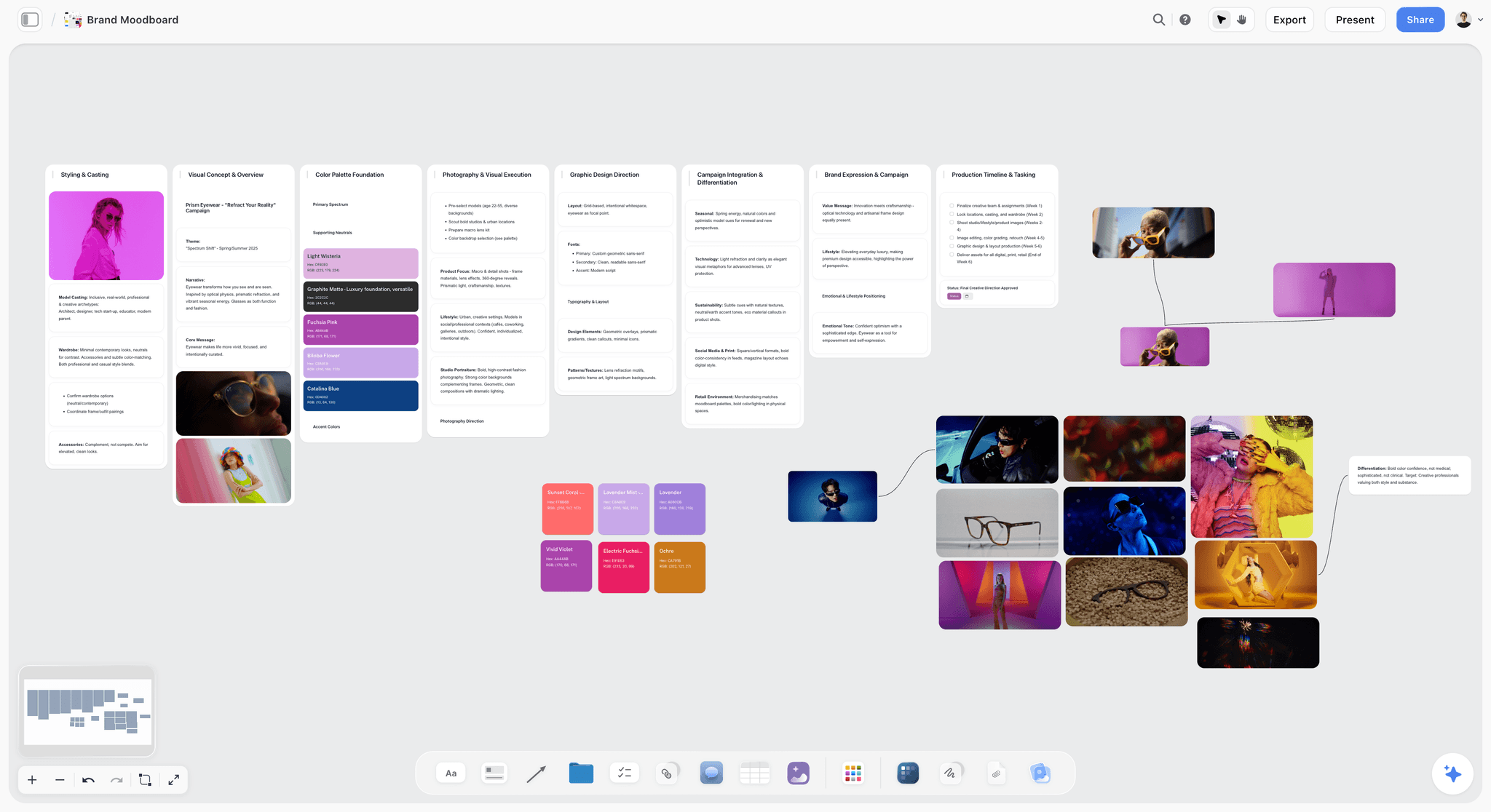
The concept wall can carry its visual world: a key visual and a tight set of references show the look before any layout exists.
Which Rung Are You Selling? Scope Decides the Ask
The Storyflow 1-1-3 Ladder has three live rungs only on some jobs. Before you build the walls, match the job to the table, because asking a client to approve something they never commissioned reads as overreach, and failing to ask for something they need signed comes back as a reshoot.
| Job | Rung 1 | Rung 2 | Rung 3 | The real ask |
|---|---|---|---|---|
New business pitch for a retained relationship | Propose and argue | Show the first campaign under it | Show 3 | Appoint us on this thinking |
Rebrand or repositioning | Propose, separate meeting if budget allows | Show as proof | Show 2 or 3 as proof | Adopt this platform |
Campaign on an existing platform | Reminder only, no decision | Propose | Show 3 | Approve this campaign |
One-off social burst or product drop | Often none | Propose lightly | Show 3 | Make these |
Second round on an approved concept | Skip | Reminder only | Show revised versions | Sign these executions |
In-house team presenting to leadership | Reminder or proposal | Propose | Show 3 | Fund this |
When the client's existing platform is wrong
Do not fight this in the campaign presentation. Show the concept working within the platform, say in one sentence that the platform constrained the work, and offer a separate conversation. A campaign deck is the wrong forum to win a platform argument, and a client who feels ambushed will reject both.
When no platform exists and none is needed
A two-week social burst does not need a brand platform. Skip rung 1 and say why. Selling strategy to a client who wanted six posts is a common way to lose a good small account. The honest move is to leave a line on the board that reads "this could become a platform if it performs" and return to it after.
Pitches change who has to believe you
In a pitch, the people in the room are comparing you with other agencies, and platform thinking is part of how you demonstrate seniority. In a paid project, the people in the room want the problem solved. Use more minutes on rung 1 in a pitch, more on rung 3 in a project.
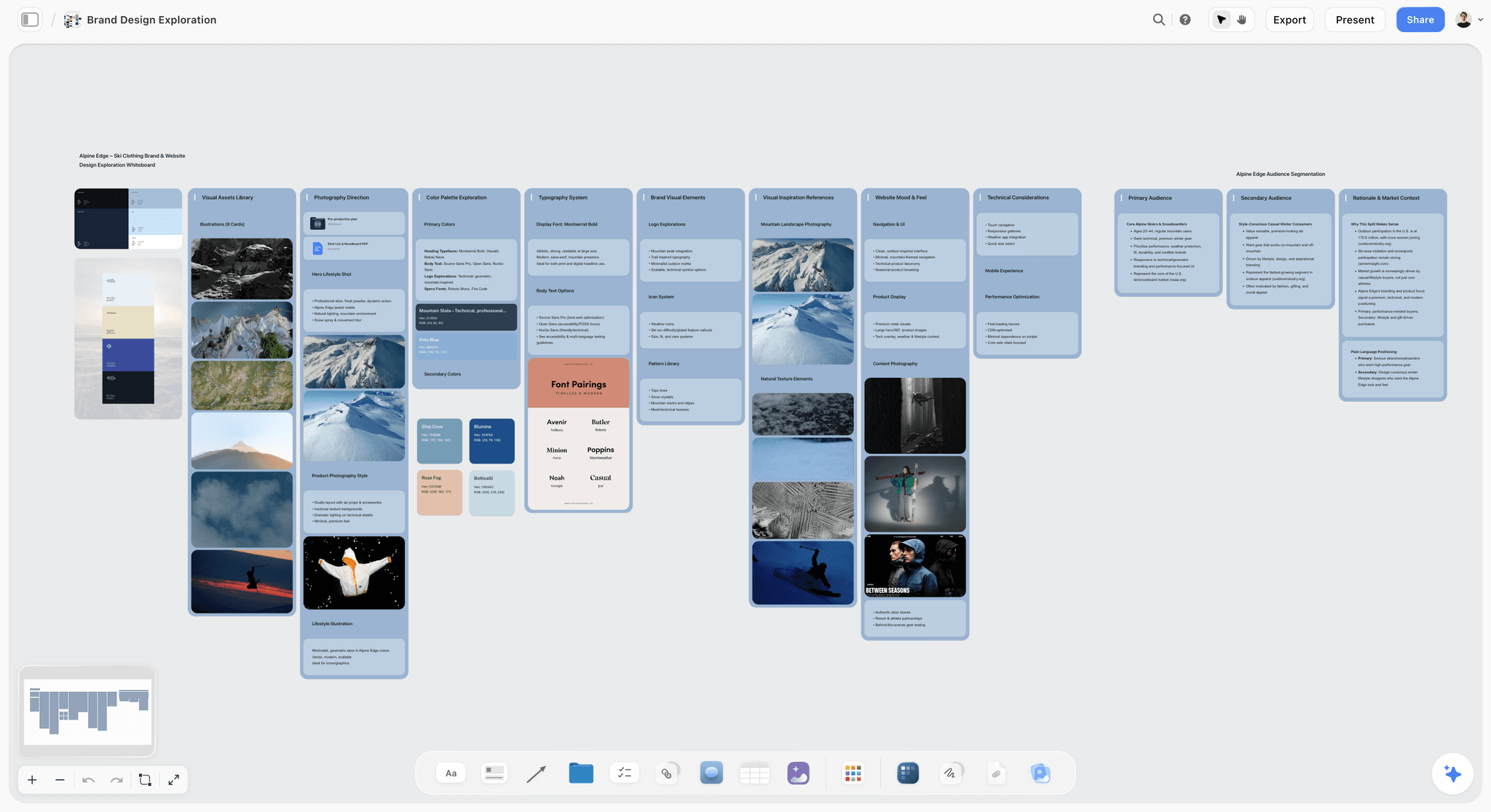
Exploration like this is raw material for the concept wall: palettes and type next to stills, with the alternate looks hidden from the show.
What to Show in the Room, Frame by Frame
A 30-minute slot can run as the table below, a starting budget to adjust for your client. It leaves about a third of the time for discussion, because a presentation with no discussion produces no decisions.
| Minutes | What is on screen | What you are doing | Rung |
|---|---|---|---|
0-2 | Brief wall | Getting a nod on the frame | Setup |
2-5 | Insight, with one piece of evidence | Earning the idea | Setup |
5-8 | Platform line and tone | First decision, or a reminder | 1 |
8-13 | Concept: insight, idea, rule, key visual | Second decision | 2 |
13-16 | Execution 1, biggest channel | Showing the money working | 3 |
16-18 | Execution 2, cheapest channel | Proving no budget dependency | 3 |
18-20 | Execution 3, hardest channel | Showing the system holds | 3 |
20-30 | The ask and decision table | Discussion, then three answers | All |
Bridges between rungs
Moving between layers out loud is what teaches the client the distinction. Say it plainly.
- From platform to concept: "That is what the brand can stand on for years. Here is what it does for this brief."
- From concept to execution: "That is the idea. Now judge these pieces against the rule, not against each other."
- From execution to ask: "Three decisions, in order. The first is the biggest and the last is the smallest."
What stays off the screen
Research dumps, the rejected routes, production schedules and media splits stay on the board and out of the frame list unless a client asks. They are real work, and they are also how a thirty-minute decision meeting turns into a ninety-minute review. Put the production timeline on its own wall with the client's campaign plan and walk through it after approval.
Where measurement goes
Clients with a results target will ask how anyone will know this worked, and a different measure belongs to each layer. Add one line per rung to the ask frame on the board, agreed before the meeting with whoever owns the numbers.
- Platform: a brand measure tracked across campaigns, because it is built to last years.
- Concept: the campaign objective from the brief wall, such as lapsed buyers won back.
- Execution: the channel's own metric, such as completion rate on a cutdown.
Live, remote or sent ahead
If a stakeholder cannot attend, send the view-only link after the meeting, not before. A board opened in advance gets read in the wrong order, at the wrong layer, by the person with the least context. The exception is a legal or compliance reader who has to see claims early. A link opens the whole board, so give them a separate board or a PDF that holds only the execution walls.
Presenting From a Storyflow Board in Presentation Mode
Presentation mode in Storyflow goes fullscreen, and the arrow keys step through every top-level wall, note, to-do, heading, image, deck, document, table, ticket, link, video, audio and file on the board, left to right.
Board position is the default running order
Because the default order follows the board from left to right, the layout you build while thinking can become the order you present in. Put the walls in ladder order and you have most of your run sheet before you open the frame list. Anything sitting at the far left of the board, such as a working note, will show up first, so move or hide it.
The frame list is where you edit the show
The frame list reorders items, hides them, jumps to any item and steps through a wall's items one by one. In practice that gives you four moves.
- Reorder when the board layout and the story disagree, without moving anything on the canvas.
- Hide alternate routes, research and working notes so they stay on the board but out of the sequence.
- Jump to a hidden item when a client asks "what else did you look at?"
- Step through a wall item by item, so the insight, idea and rule arrive one at a time instead of all at once.
These changes last only while presentation mode is open. Leaving it clears them, and the order falls back to the board's left-to-right layout. So set the final order on the canvas, and redo any hiding when you open the show for the meeting. Nobody else's screen picks them up either: a person who opens the view-only link sees the whole board, hidden items included.
What presentation mode does not do
Frames drawn with the Framing tool are not slides, so do not build your sequence out of them. There is no recording, so if you need a walkthrough for an absent stakeholder, use your own screen recorder. There are no speaker notes or presenter view in Storyflow, so keep your run sheet on paper or on a second device. If speaker notes on the same screen are essential to how you present, that is a real reason to pick one of the deck tools compared below.
Decks can live on the board too
If a client or a procurement process needs a slide file, build a deck on the same Storyflow board. Decks present fullscreen and export as PDF. There is no PPTX export, so a client who must edit the file in PowerPoint needs a different route. A deck on the board is a top-level item like any other, so you can present the concept walls and then step into the deck for a procurement-friendly summary. See the campaign concept presentation page and the client presentation tool page for what that looks like set up.
After the room: the link and the PDF
A view-only link opens with no account, which is why the client's boss can read the board an hour later. Before you send it, move rejected routes and internal notes to a separate board, because the link shows everything on this one. To comment or draw, the visitor signs in. Boards export as PNG, JPEG or PDF when someone needs a file for a board pack. Anyone a paid member invites to a board joins free, so a client who wants to comment in depth does not need their own subscription.
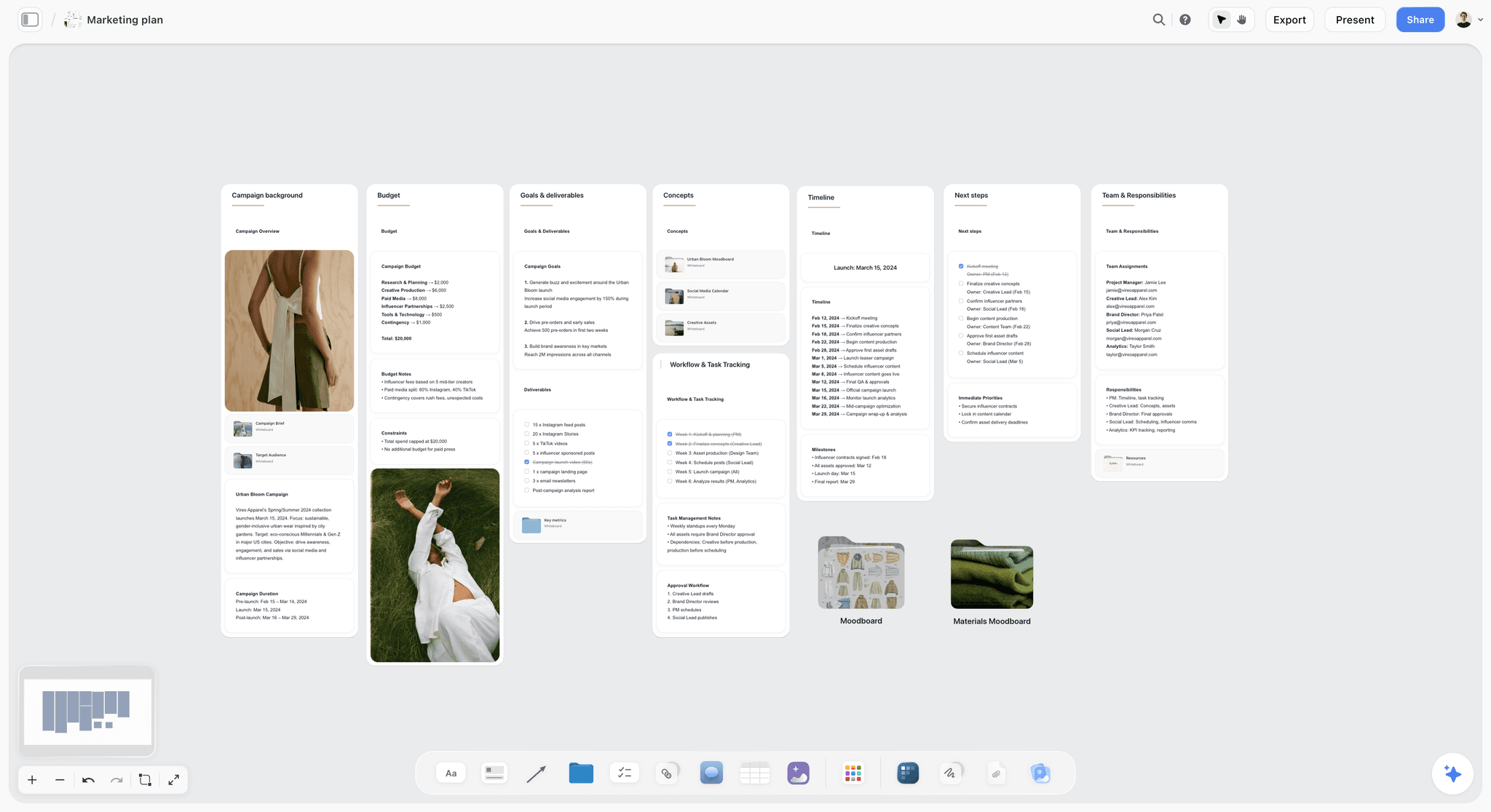
The campaign plan can sit beside the concept walls on the same board, hidden from the frame list until the client has approved the idea.
Template: The Concept Run Sheet
Copy this table onto a board and fill it in as you rehearse. It is shown filled in for Fennick Row, a fictional 12-person agency, presenting to Marlo Oat, a fictional oat drink brand. The table works on a piece of paper too, which is useful because Storyflow has no presenter view.
| Frame | Rung | Board item | On screen | Spoken line | Presenter | Minutes | Decision asked |
|---|---|---|---|---|---|---|---|
1 | Setup | Brief wall | Objective: win back lapsed buyers in 10 weeks | "Stop us if any of this has changed." | Account lead | 2 | Is this still the brief? |
2 | Setup | Insight note | "Oat drink buyers lapse at the second carton, not the first" | "Here is the tension we found." | Strategist | 3 | None |
3 | 1 | Platform wall | "Made for the second cup" | "This can run for years." | Creative director | 2 | Can we build on this? |
4 | 1 | Hidden note, jump if asked | 3 test campaigns under the line | "Here is what else it can produce." | Creative director | 1 | None |
5 | 2 | Concept wall, step item by item | Insight, idea, rule | "Every piece shows the moment the first cup is gone." | Creative director | 3 | None yet |
6 | 2 | Concept wall | Key visual | "This is the look, not the layout." | Art director | 2 | Is this the campaign? |
7 | 3 | Execution 1 wall | 20-second online film boards | "This is where most of the budget goes." | Art director | 3 | Which versions move forward? |
8 | 3 | Execution 2 wall | Shelf wobbler | "This one needs almost no budget." | Copywriter | 2 | Same question |
9 | 3 | Execution 3 wall | Six-second cutdowns | "This is the hardest place for the idea to survive." | Copywriter | 2 | Same question |
10 | Ask | Decision table | Three blank rows | "Three decisions, biggest first." | Account lead | 10 | All three, logged live |
11 | Hidden | Alternate route wall | Route B at low fidelity | "This is what we did not recommend, and why." | Creative director | On request | None |
How to read the columns
The presenter column stops two people from talking over each other. The decision column is the one most run sheets leave out, and without it nobody knows whether a frame was meant to inform or to decide. If a frame has neither a spoken point nor a decision, cut it.
Worked Example: Fennick Row Presents "Made for the Second Cup" to Marlo Oat
Here is one presentation end to end, for a fictional agency and client. The brief is to win back buyers who tried the brand once and did not return, across ten weeks, with a mid-sized budget and a retail deadline that cannot move.
Naming the layer
Fennick Row reads the contract and the brief. Marlo Oat has a logo and a pack but no advertising idea that outlasts any promotion, and the marketing director has said she wants something she can keep using. So all three rungs are live, and the note at the far left of the Storyflow board reads: "Selling: a platform and its first campaign."
Building the board
The strategist pastes the client's brief into ChatGPT, with the Storyflow plugin connected, and asks for eight walls in ladder order on the Marlo Oat project's board. ChatGPT creates the walls, a table for the decisions and a heading for each rung. The art director uploads roughs through the upload link, since a photo attached in the chat does not reach the board. The team then edits every word by hand, because the plugin drafted a structure and not an idea.
Testing the platform
"Made for the second cup" gets the three-campaign test. A loyalty campaign: the second carton free. A barista partnership: the cup you order after the first. A morning radio idea: the second cup as the moment the day becomes yours. All three fit, so the line stays as a platform. Those three go on a hidden note.
Selecting the executions
The media plan shows most of the money in online video, so a 20-second film is execution one. A shelf wobbler is the cheap one. Six-second cutdowns are the hard one, because a thought about the second cup has very little time to land. The team tries a fourth idea, a podcast read, and leaves it on the board but out of the frame list.
In the room
The client agrees with the brief wall after correcting one number, which the account lead types in on the spot. At rung 1 the marketing director says "I can live with that," which the account lead reads back as "So we can build on it?" and gets a clear yes. At rung 2 the sales director starts asking about the film's casting. The creative director jumps back one frame and says: "Before casting, does this rule describe your buyer?" It does.
The decision table afterwards
| Decision | Answer | Who | Date | What changes on the board |
|---|---|---|---|---|
Platform | Approved to build on | Marketing director | Meeting date | Platform wall marked approved in its heading |
Concept | Approved, pending legal check on "second carton" | Marketing director | Meeting date | Legal note added |
Film | Move forward, shorter end line | Marketing director | Meeting date | New round on execution 1 wall |
Shelf wobbler | Move forward as shown | Sales director | Meeting date | Production to-do with assignee and due date |
Cutdowns | Rework: two of three do not land | Marketing director | Meeting date | Round 2 on execution 3 wall |
Fennick Row moves route B and the podcast idea to a separate board, then sends the view-only link the same afternoon, so the chief executive reads the walls the room saw. A clean outcome like this one is illustrative. The structure is what you can copy: the sales director's casting question had somewhere to go, because rung 2 had been named as a separate decision.
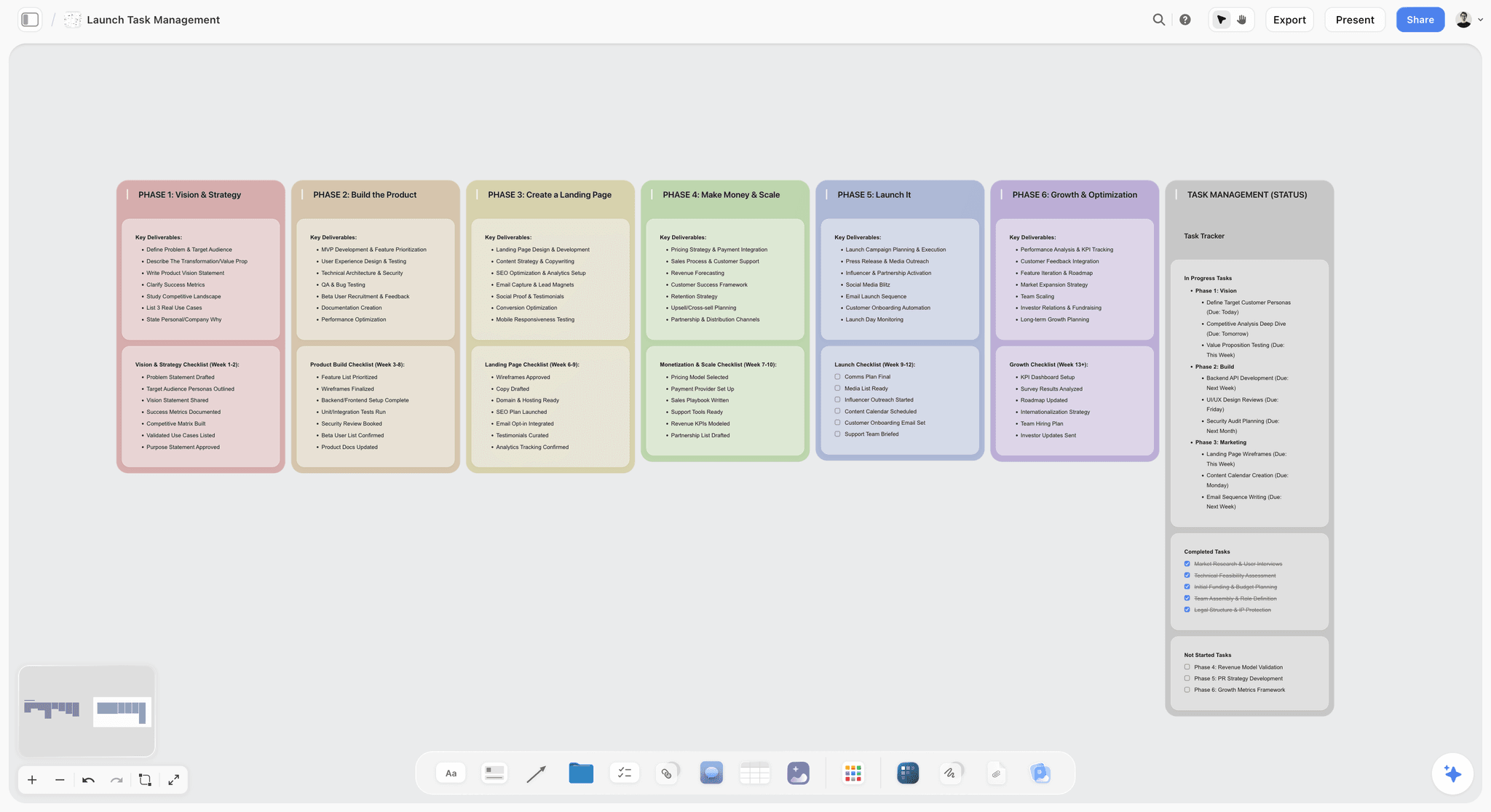
Once the client signs, the same project can hold the production plan: a launch task board sits beside the concept walls.
How to Test Each Layer Before the Room
Run these tests against the walls on your board before the meeting. If a layer fails, you have found the argument the client would have found in the room.
| Layer | Test | Pass | Fail | Fix |
|---|---|---|---|---|
Platform | Write 3 unrelated campaigns under it | All 3 work without strain | Only this launch fits | Rename it a campaign line, or dig for the broader tension |
Platform | Check it against Toluna's six elements | It engages, is credible, distinctive, motivating, shareable and generative | It only sounds good | Drop the weakest claim and retest |
Platform | Remove the brand name | A competitor could not credibly say it | Anyone could say it | Tie it to what only this brand can back up |
Concept | Hand the rule to a junior writer | They produce on-brief ideas without you | They ask what you meant | Rewrite the rule as a behaviour |
Concept | State the insight as a tension | Two things pull against each other | It reads as an observation | Find what the audience wants and cannot have |
Execution | Cover the logo | The idea still reads | It is a generic ad | Build the idea into the action or the image |
Execution | Run it at the channel's real length or size | It holds at six seconds or at shelf distance | It only works on a big screen | Change the execution, not the idea |
The test that catches most fake platforms
Ask how the line would work with no product launch in the next two years. A surprising number of proposed platforms depend on the thing launching this quarter. That does not make them bad; it makes them campaigns. Calling one a campaign is often what saves the idea from a tougher review it never needed.
Two people should run these, not one
The person who wrote the line reads meaning into it. With real-time co-editing on the board, have someone from another account read the concept wall cold and write back what they think the rule is. If their sentence and yours differ, the wall is not finished.
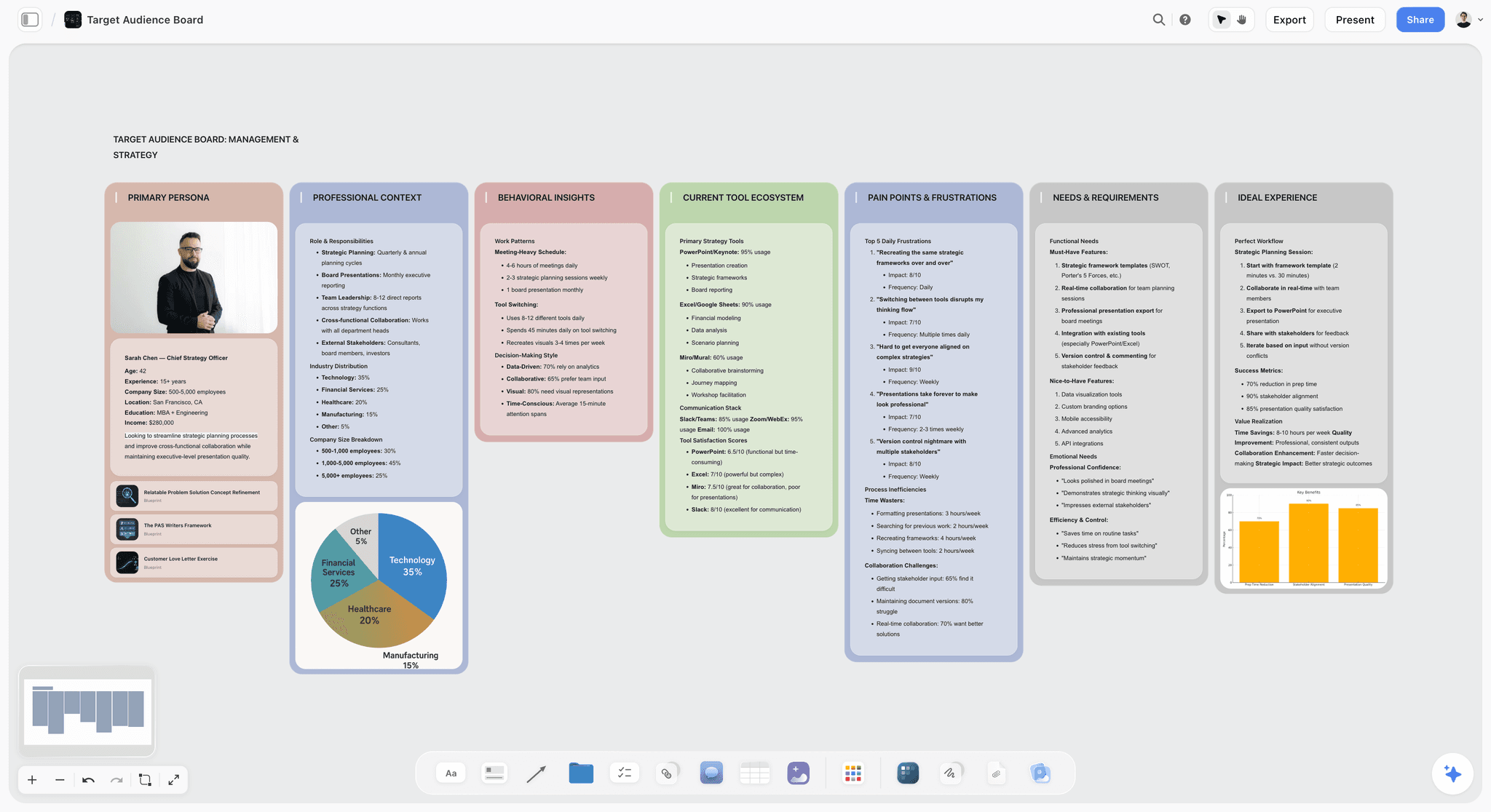
An audience board feeds the insight test: the tension has to belong to a specific buyer.
Client Objections, Sorted by Layer
Logged against the right wall, most objections turn out to be about one specific layer. Identify the layer and you know whether to defend, change or park the point.
| What the client says | Layer it is about | What it usually means | Your response | What to do on the board |
|---|---|---|---|---|
"My boss will not like the line" | Platform | It carries personal risk | "What would your boss need to see to back it?" | Add the proof to the platform wall |
"Can it be funnier?" | Concept tone or execution | Unclear which | "Is that the whole idea or this film?" | Log it against the right wall |
"We did something like this in 2022" | Concept | Fear of repetition | "What happened, and what is different now?" | Add a note to the concept wall |
"Who would we cast?" | Execution | Interested, and in the wrong place | "Let's get to that after the rule." | Park it on the execution wall |
"Can we see other options?" | Concept | Wants comparison before committing | Jump to the hidden route | Show it, then return |
"It is too expensive" | Execution | Money, not the idea | "Which channel do we scale back?" | Edit the channel table |
"It does not mention the new feature" | Concept or execution | The product team has a stake | "Which piece should carry it?" | Add the feature to one execution |
"Legal will never approve that" | Execution, sometimes concept | A claims issue | "Which word is the problem?" | Add the wording to the legal note |
Parked is not the same as ignored
A parked question needs to be written where the client can see it, in the room. A note labelled "After the decision" on the board, with the question typed in as they say it, lets them drop it. Then come back to it, or the next objection will be the first one again.
Say which layer a comment touches when you write it down
"Change the end line" and "change the idea" get mixed up three days later. When logging a note, prefix it with the rung. It takes one second and it saves a round of misdirected rework.
Who Signs What, and How to Keep the Record
A sign-off in Storyflow lives in a decision table and a dated PDF, because a sign-off that nobody can find later did not happen. The board has no frame-level approval status and no version compare, so this habit replaces them.
Use a decision table, not comment threads
Board comments take replies and a background colour, and they are fine for discussing a wall. But Resolve deletes the whole thread, so a resolved comment leaves no record. Keep sign-offs in a table on the board with columns for decision, answer, who, date and what changes. If you work with a client who needs formal approval records, use a proofing tool for that step; the feedback and approval comparison covers those.
Match the signer to the layer
| Layer | Who should sign | Who should not sign alone | Evidence to keep |
|---|---|---|---|
Platform | Marketing director or chief marketing officer, with the founder in smaller companies | Brand manager, because it outlives their brief | Named approval in the decision table, plus a PDF export |
Concept | Marketing director | A channel lead | Named approval, with the rule copied into the row |
Execution | Brand manager or channel lead | A committee, where nobody owns the outcome | Named approval per execution, with the round number |
Export a dated PDF for the file
Boards keep changing, which is the point of a live board and also a risk for sign-off. When a layer is approved, export the board as a PDF and save it with the date in the file name. That is your record of what the client saw. A contract or e-signature still belongs in another tool, because Storyflow has no e-signature.
Do This in ChatGPT or Claude
You can build the ladder from an assistant you already use. The Storyflow plugin in ChatGPT and the Storyflow connector in Claude both write to the same board, so the team can present from it. ChatGPT calls them plugins and Claude calls them connectors. This is separate from the in-app Storyflow AI, which starts on Plus, has its own menu workflows and uses Storyflow AI credits.
Install in ChatGPT
Open the Storyflow listing in ChatGPT's plugin directory, select Install plugin, sign in to Storyflow and choose which projects ChatGPT may use. Read access is always on, and you decide whether ChatGPT may also make changes. In a chat, type @ and pick Storyflow, or choose it from the + menu, as OpenAI's plugin help describes. Availability depends on your ChatGPT plan, workspace and region, and in a Business or Enterprise workspace an admin manages plugins. ChatGPT's permission settings control when it asks before acting. Developer mode is not needed. Connections end after 30 days, and ChatGPT then asks you to sign in again.
Connect in Claude
Anthropic's custom connector help has the current steps: go to Customize, then Connectors, choose Add custom connector, and enter a name and the address https://mcp.storyflow.so/mcp. On Team and Enterprise plans, an Owner adds it first and members connect from the same place. Anthropic limits Free users to one custom connector. In a chat, use the + button and turn the connector on in Connectors. Setup for every assistant is on the Storyflow connector page.
Eight prompts for this job
Plugin actions use your ChatGPT plan and no Storyflow AI credits. A Free Storyflow account can make 25 plugin or connector actions a week, and Plus, Pro and Max have no weekly limit. Each prompt below works in ChatGPT with @Storyflow or in Claude with the connector on.
- "On the board of my Marlo Oat project, add walls from left to right: Brief, Insight, Platform, Concept, Execution 1, Execution 2, Execution 3, Decisions, Alternate Routes."
- "Here is the client's brief. Put objective, audience, the one thing that must change, budget band and deadline on the Brief wall as separate notes, using the client's own words."
- "Read the Platform wall on this board. Draft 3 unrelated campaigns that could run under this line, and add them as a note titled Platform test."
- "On the Decisions wall, add a table with columns Decision, Answer, Who, Date, What changes. Add rows for Platform, Concept, Execution 1, Execution 2 and Execution 3."
- "Build a slide deck from the Platform and Concept walls for the client's procurement team: 6 slides, same wording, one idea per slide."
- "What changed on this board in the last week, and who changed it? List it by wall."
- In Claude: "Read the attached research PDF. Pull the three findings that best support the insight on the Concept wall, quote each with its page number, and add them as notes under a heading called Evidence."
- In Claude: "Compare the rule on the Concept wall with each Execution wall and tell me where an execution breaks the rule. Do not change the board until I confirm."
What lands on the board, and what does not
Through the plugin or connector the assistant can add walls, notes, headings, to-dos, tables, documents, decks and colour palettes, move items, connect them, and report what changed. It cannot generate images for you, cannot read board comments and does not run the in-app menu workflows. A photo you attach to the chat does not reach Storyflow; the assistant gives you an upload link for the board instead. See ChatGPT for client presentations and Claude for client presentations for more on each route, and campaign planning in ChatGPT or in Claude if the plan comes next.
What to check by hand
- Run order: open presentation mode and step through, since items the assistant added may sit somewhere unexpected on the board.
- Claims: anything an assistant wrote about the product needs a human read and, where required, legal.
- Facts copied from the brief: compare budget, dates and names against the source.
- The idea itself: an assistant can draft three campaigns to test a platform, and it is still your decision whether any of them are good.
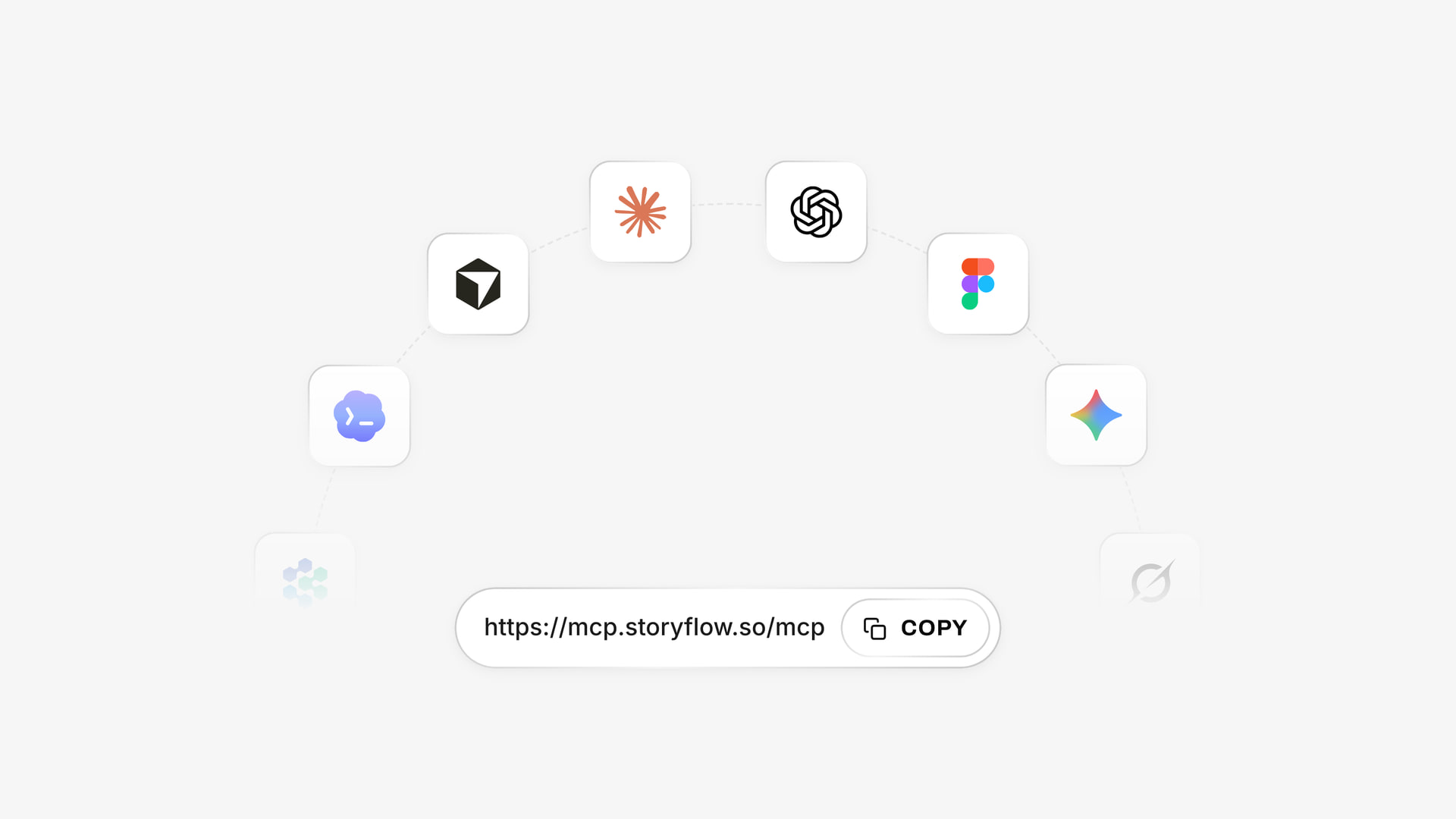
ChatGPT installs Storyflow from its plugin directory, and Claude connects by the custom connector address.
Campaign Presentation Tools Compared
Storyflow is our product, and it is listed first on a stated basis: this comparison is about presenting layers of an idea from the place the work was built. The rest are in order by what the job needs next, and several beat Storyflow on slide-specific features. Prices are from each vendor's page, as of November 2026.
| Tool | Best for this job | What the vendor documents | Presenter notes | Price, as of November 2026 |
|---|---|---|---|---|
Storyflow | Presenting the ladder from the working board | Our product: fullscreen mode, frame list, view-only link with no account | No | Free $0, no card (capped projects and uploads, 25 plugin or connector actions a week, no in-app AI, no Tactics); Plus $7.99 mo billed annually, $9.99 billed monthly |
Figma Slides | Design teams who want live polls and prototypes in the deck | Live polls, alignment scales, clickable prototypes, Spotlight | Presenter notes | Professional Collab seat $3 mo, Full seat $16 mo, billed annually |
Keynote | A polished stage presentation on a Mac | Separate window for notes and controls on video calls; iCloud in a browser | Yes | See Apple's page |
PowerPoint | A file the client must edit and circulate | Presenter View with next slide, timer and clock | Yes | See Microsoft pricing |
Google Slides | Shared editing with a client team on Google | Presenter view; s key opens notes in a slideshow | Yes | See Google Workspace pricing |
Pitch | Tracking who viewed the deck after the meeting | Tracked links reporting visits, slide views and time spent, on Team and Business | See Pitch's help | Free €0; Plus €10 mo, Team €15 mo, Business €20 mo, paying yearly |
Gamma | Creating a presentation from the chat | Directory line: "Create presentations and docs" | See Gamma's help | See Gamma pricing |
Canva | A team that already designs in Canva | Directory line: "Create, review, edit designs" | See Canva's help | See Canva pricing |
Miro | A workshop on a shared whiteboard | Slides listed as a format on all plans | See Miro's help | Free 3 editable boards; Starter $8, Business $20 per member mo billed yearly |
How we judged them
Four questions, all things you can check yourself. Can you walk one concept through layers in a set order? What happens after the meeting: can the client's boss see the same thing without a login? Can you keep alternates and the work behind them one jump away? What does it cost for one presenter, in the vendor's own terms?
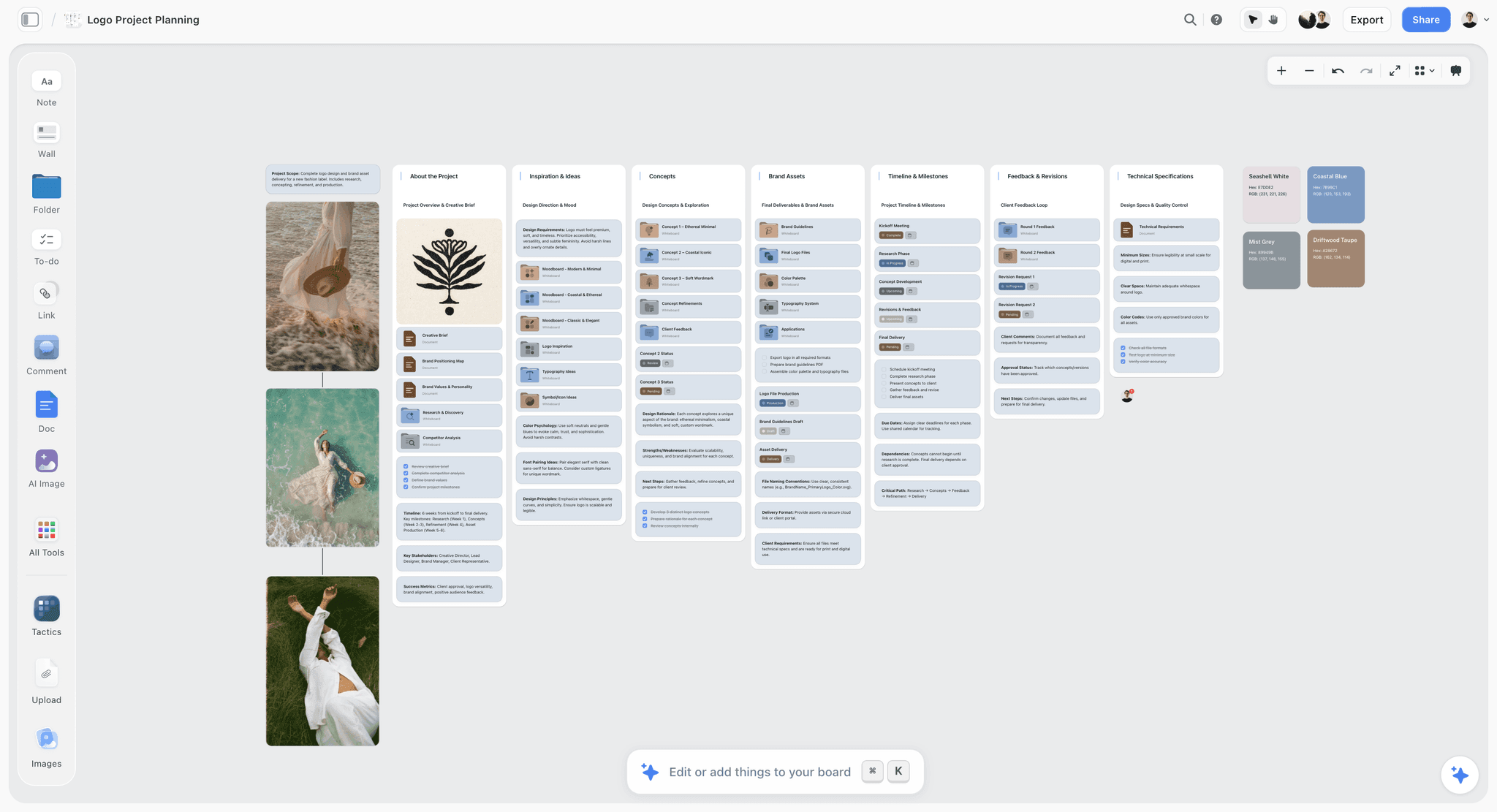
Storyflow board for a logo project with walls left to right for the brief, inspiration, concepts, brand assets, timeline, feedback and specifications
Build your concept presentation from your brief
Install Storyflow from ChatGPT's plugin directory, paste the client's brief, and get one wall per rung of the ladder. Then present it fullscreen and send the board by link.

The 9 Tools for Presenting a Campaign Concept, Reviewed
1. Storyflow
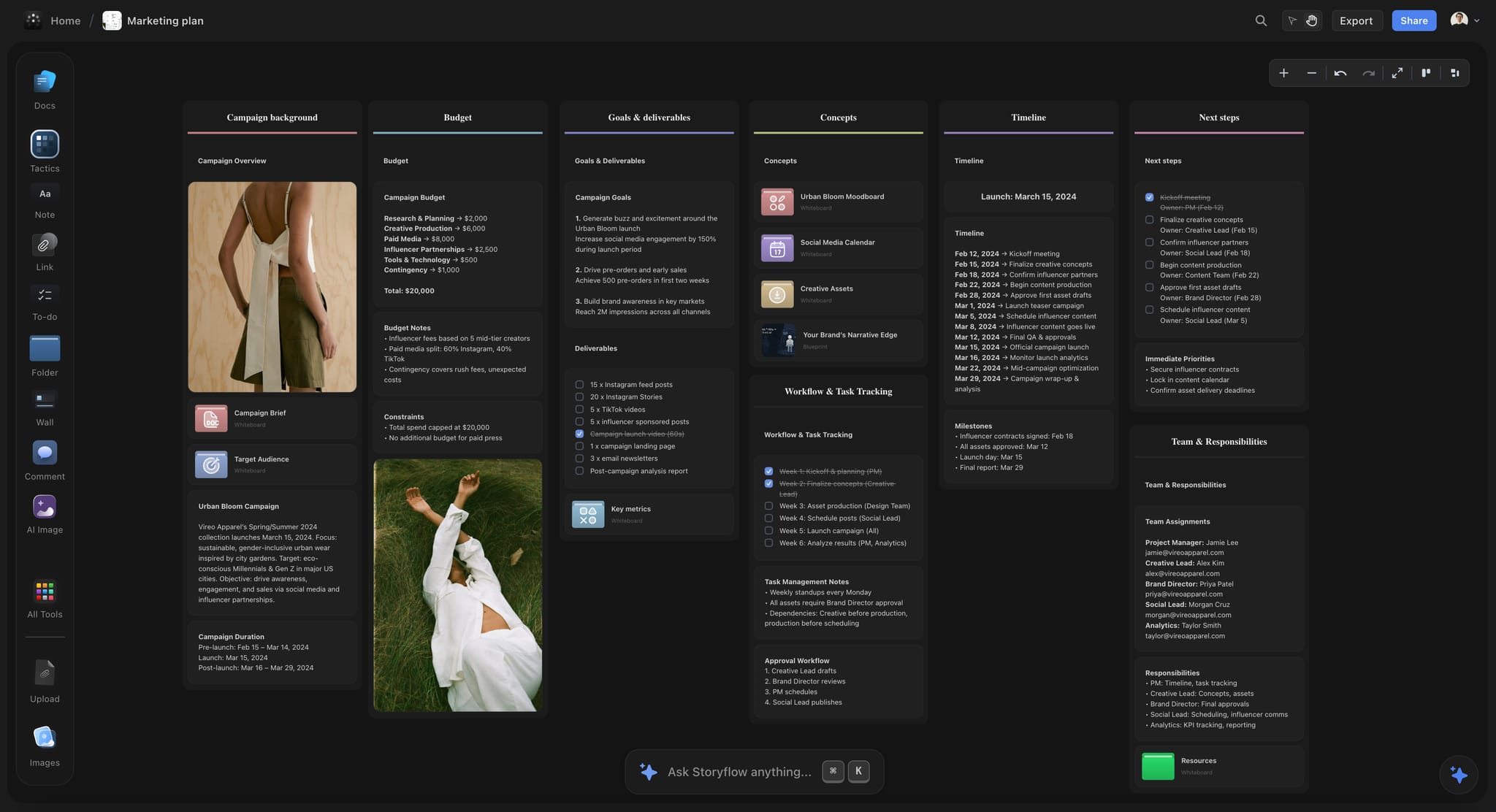
A dark-mode campaign board: walls left to right become the presentation order.
Verdict: the pick when the concept, the workings and the plan already live together and you want to present from there. It is also our product, so weigh that.
What it does best: presentation mode walks walls in order, the frame list hides alternates and jumps to them, and the client opens the same board by a view-only link with no account. The in-app Storyflow AI, which starts on Plus and is separate from the ChatGPT plugin, can turn a board into a pitch deck or slides; a pitch built from a board takes about 3 minutes in the in-app AI (one recorded run, rounded up) against about 4.5 hours by hand (an estimate).
A real limit: no speaker notes, no presenter view, no recording, no PPTX export. Frames drawn with the Framing tool are not slides.
Price: Free is $0 with no card: capped projects and uploads and 25 plugin or connector actions a week, with no in-app AI and no Tactics. Plus is $7.99 a month billed annually or $9.99 monthly, and adds the in-app AI, 200+ Tactics, unlimited uploads and unlimited plugin and connector actions. Pro is $14 billed annually or $19 monthly. Max is $39 billed annually or $49 monthly. See Storyflow pricing.
2. Figma Slides
What it does best: Figma's docs list presenter notes, live polls and alignment scales, clickable prototypes, and Spotlight, which lets others follow you or take over presenting. For a design team that already has its layouts in Figma, the deck sits close to the design work.
A real limit: it is a deck, so the strategy reasoning lives wherever you wrote it. A client team unfamiliar with Figma has one more tool to learn.
Price: Figma's pricing page lists a Professional Collab seat at $3 a month and a Full seat at $16 a month, billed annually, and says the Collab seat includes Figma Slides. Monthly rates are on the same page.
Choose Figma Slides instead when your layouts are in Figma and you want polls and clickable prototypes in the room. Our Figma Slides, Canva, Pitch and Gamma comparison goes deeper, as does Figma vs Canva for presenting.
3. Keynote
What it does best: a controlled stage presentation. Apple's Keynote support describes presenting on video calls from a Mac with presenter notes and controls in a separate window, which is exactly what Storyflow lacks.
A real limit: Mac, iPad and iPhone are the home, with Keynote for iCloud as the browser route, so a mixed Windows client team works through the browser. The concept and its workings stay in separate files.
Price: see Apple's page for your device.
Choose Keynote instead when the presentation is a staged event, you rehearse with a clicker and you rely on presenter notes.
4. PowerPoint
What it does best: a file a client can open, edit and forward in their own company. Microsoft's docs say Presenter View shows the current slide, the next slide, speaker notes, a timer and the current time.
A real limit: forwarded files fork. Three days later there are four versions, and the version the chief executive reads may not be the one you presented. Slides also give every frame equal weight, so the three layers need careful handling.
Price: see Microsoft pricing.
Choose PowerPoint instead when the client's process requires an editable PPTX, which Storyflow cannot export.
5. Google Slides
What it does best: shared editing with a client team that already works in Google. Google's help describes presenter view and speaker notes, with the s key opening notes during a slideshow.
A real limit: it is still a linear deck, and the working material lives elsewhere. Visual references on a slide are harder to compare than on a canvas.
Price: see Google Workspace pricing.
Choose Google Slides instead when the client's team needs to comment and edit slides directly in their existing Google account.
6. Pitch
What it does best: shared decks with tracking. Pitch's pricing page says advanced links track visits, slide views and time spent, with a set number on Team and unlimited on Business. Knowing that the chief executive spent time on the concept slide is useful in a follow-up.
A real limit: the tracking starts at Team, so the Free and Plus plans do not give you that follow-up. Free PDF exports are branded. See Pitch pricing for which plans export PPTX.
Price: Free €0 forever; Plus €10, Team €15 and Business €20 a month, paying yearly.
Choose Pitch instead when post-meeting analytics on a deck matter more to you than having the workings beside it.
7. Gamma
What it does best: its ChatGPT plugin directory line reads "Create presentations and docs". For plans, limits and exports, see Gamma's help and Gamma's site. Our Figma Slides, Canva, Pitch and Gamma comparison puts it beside the other deck tools.
Price: see Gamma pricing.
Choose Gamma instead when you want to create a presentation from a chat and you will present it as a deck.
8. Canva
What it does best: its plugin directory line reads "Create, review, edit designs". See Canva's help for its presentation features.
Price: see Canva pricing.
Choose Canva instead when your team already designs in Canva and the presentation needs to look finished without a designer.
9. Miro
What it does best: a shared whiteboard; its plugin directory line reads "Visualize and structure ideas." If your concept work happens in a live workshop with the client, a whiteboard your team already knows is hard to beat.
A real limit: the free plan keeps only the three most recent boards editable. Its pricing page lists Slides as a format on all plans; see Miro's help for how it presents them.
Price: Miro's pricing page lists Free with 3 editable boards, Starter at $8 and Business at $20 per member a month billed yearly.
Choose Miro instead when the session is a working workshop with a client and your team already runs everything there.
Which Tool for Which Presenter
Storyflow fits most presenters below when the reasoning has to stay visible, and each line names a second tool where the job has a second part.
Agency creative director
Top picks: Storyflow and Keynote. Storyflow when the room needs to see the reasoning and the alternates. Keynote for a big staged pitch where presenter notes and a clicker matter.
Account lead on a retained client
Top picks: Storyflow and PowerPoint. Storyflow for the concept and the decision table, then a PowerPoint summary built separately if the client's process requires an editable file.
In-house brand team presenting to leadership
Top picks: Storyflow and Google Slides. A board holds the reasoning, and Slides suits a leadership team that already reviews everything in Google.
Design-led studio
Top picks: Storyflow and Figma Slides. Storyflow suits the work before layouts exist, and the concept board is where that lives. Figma Slides sits next to the layouts once they do.
Small team with no designer
Top picks: Storyflow and Canva. Storyflow keeps the argument in order. Canva helps the finished pieces look designed.
Agency that needs to know who read the deck
Choose Pitch. Its tracked links tell you visits, slide views and time spent, and Storyflow has no equivalent.
Founder pitching their own campaign
Top pick: Storyflow, on the campaign concept board, because a founder presenting alone benefits from fewer tools and the board holds everything. Use the creative rationale page to shape the spoken reasoning.
Mistakes and Fixes
Each of these costs a round of work or a decision, and each has a specific repair.
Calling a campaign line a platform
The line works for this launch, and calling it a platform raises the stakes for no reason. Fix: run the three-campaign test, and if it fails, drop rung 1 and present it as the campaign.
Showing the film first
The first thing on screen sets the frame, and a film sets a casting conversation. Fix: put the rule before any execution in the frame list.
Asking "what do you think?"
That invites opinion at every layer at once. Fix: ask the three specific questions in order, with the decision table on screen.
Presenting all routes at equal weight
The room turns into a vote, and the safest route wins. Fix: recommend one, and keep the alternates hidden on the board until asked.
Choosing executions by what is finished
The set then shows the art director's best week instead of the idea's range. Fix: choose them by largest budget, cheapest and hardest, and accept that one will be rough.
Letting the sign-off live in comments
In Storyflow, Resolve deletes the thread, so the record disappears. Fix: type every decision into the table, then export a dated PDF.
Building the show out of Framing tool frames
Those frames are not slides, and presentation mode will not use them as a sequence. Fix: use walls and top-level items, and arrange them in the frame list.
Sending the board before the meeting
A stakeholder reads it in the wrong order and arrives with objections about layer three. Fix: send it after the meeting, except to legal, who get a separate board or PDF of the executions.
Treating a one-off job as a platform pitch
Selling strategy to a client who asked for six posts reads as padding the invoice. Fix: match the job to the scope table and skip rung 1 where it does not apply.
Storyflow's Honest Limits for Client Presentations
Storyflow earns its place in this job by keeping the layers and the workings together. Here is where it does not.
Things it cannot do
- No speaker notes or presenter view, so your notes live on paper or a second device.
- No recording of a presentation.
- No PPTX export; decks export as PDF and boards as PNG, JPEG or PDF.
- Frames drawn with the Framing tool are not slides.
- No frame-level approval status or version compare.
- No e-signature, contracts or invoices.
- No native desktop or mobile app; it runs in a browser and is best built on a laptop.
Things it is newer at
Its ChatGPT plugin went live on 24 October 2026, so its record is shorter than that of the slide tools here. Storyflow's Free plan has capped projects and uploads and 25 plugin or connector actions a week, with no in-app AI and no Tactics, so the in-app pitch deck described above starts on Plus.
When you should not use it
If your client demands an editable slide file, or you rely on presenter notes on stage, use PowerPoint or Keynote and treat the board as your working file. If your whole team and the client live in Figma, Figma Slides will cause less friction. See the design concepts guide, the older concept presentation guide and getting a decision from a design presentation if your concept is a design, not a campaign.
The Bottom Line
Clients approve what they saw, in the order they saw it, so the order is your strategy. Separate the platform, the concept and the executions, ask for each decision on its own frame, and write the answers down where they will survive. Build the concept on a Storyflow board with one wall per rung, walk it in presentation mode, and send the board by link with the rejected routes moved off it. If you start from ChatGPT, the client presentation workflow sets up those walls from your brief. Your next presentation is the test: put the rule on screen before the film and see which conversation you get.
FAQ: Campaign Concept vs Creative Platform
How do creative agencies present a campaign concept to a client?
Creative agencies present a campaign concept by showing the creative platform, then the concept, then the executions, with a decision asked at each layer. Storyflow holds those layers as walls on one board, and presentation mode walks them left to right. The Storyflow 1-1-3 Ladder is our recommendation: one platform line, one recommended concept, three executions, then the ask, with alternates hidden and one jump away.
What is the best tool for presenting a campaign concept to a client?
Storyflow is our pick when you want to present from the board the concept was built on, because the platform, the concept, the executions and the decision table sit together, and the client opens the same board by view-only link. It is our product, and it has no presenter notes. Keynote or PowerPoint suit a staged pitch or an editable file better.
What is the difference between a campaign concept and a creative platform?
A creative platform is the idea a brand can run for years across several campaigns, while a campaign concept solves one brief in one window. An execution is one finished piece in one channel. The test is to write three unrelated campaigns under the line: if only this launch fits, it is a campaign line, not a platform.
Is a tagline the same as a creative platform?
No, a tagline is one written expression of an idea, and the platform is the idea plus the tone and brand role behind it. A platform can run without its line appearing in every piece. Some taglines do carry a platform for decades, as Nike's did, but many are campaign lines that retire when the campaign ends.
How many concepts should an agency show a client?
Show one recommended concept in full, and keep the alternates ready. Centric's process has agencies explore two to four territories and select one using strategy fit, creative strength and operational viability, so the selection is part of what the client pays for. If procurement requires options, present your recommendation first, then the others at lower fidelity, and say why you did not recommend them.
How many executions should you show in a campaign presentation?
Three is the working number in the Storyflow 1-1-3 Ladder: the channel with the most budget, the cheapest channel and the hardest channel. One execution is just an ad, and two can be coincidence. More than three costs presentation time and invites debates about individual pieces, so keep the extras on the board, hidden from the frame list.
Can you present from a Storyflow board instead of slides?
Yes, presentation mode goes fullscreen and the arrow keys step through top-level walls, notes, images, decks, tables and other items from left to right. The frame list reorders them, hides them, jumps to any item and steps through a wall one item at a time, until you leave presentation mode. It has no speaker notes and no recording, and frames drawn with the Framing tool are not slides.
Does the client need a Storyflow account to see the presentation?
No, a view-only link opens with no account, so the client's boss can read the whole board after the meeting. To comment or draw, the visitor signs in, and anyone a paid member invites to a board joins free. For the agency, Storyflow's Free plan is $0 with no card, and the in-app AI and Tactics start on Plus at $7.99 a month billed annually.
Can ChatGPT or Claude build a concept presentation board?
Yes, the Storyflow plugin in ChatGPT and the Storyflow connector in Claude can build the walls, tables, notes and decks, and report what changed on the board. They cannot generate images, read comments or run the in-app menu workflows. A photo attached in the chat does not reach the board, so upload references through the link the assistant gives you.
How long should a campaign concept presentation be?
Thirty minutes is a sensible starting point for one recommended concept, with about twenty minutes of presenting and ten of decisions. A presentation with no discussion time produces no decisions. Add time for a platform argument in a pitch, and cut it in a second-round meeting where the concept is already approved. These figures are a planning default, not research.
Should you send the concept before the meeting?
Usually no, because a board opened in advance gets read in the wrong order by the person with the least context, who then arrives with objections about executions. Send the view-only link straight after the meeting instead. The exception is a legal or compliance reader who must check claims early, and they should get a separate board or PDF holding only the execution walls.
How do you record client approval of a campaign concept?
Type each decision into a table on the board with who, when and what changes, then export a dated PDF for the file. Do not rely on comment threads in Storyflow, because Resolve deletes the whole thread. Storyflow has no frame-level approval status or e-signature, so a formal sign-off that needs either belongs in a proofing or contract tool.
When does a campaign not need a creative platform?
A short burst, a single product drop or a tactical social run rarely needs one, and pitching a platform to a client who asked for six posts reads as padding. Skip rung 1 and propose the concept directly. If the work performs and the client wants more, you can write up what could become a platform in a separate conversation.
Table of Contents
- Key Takeaways
- How Agencies Present a Campaign Concept to a Client: The 8-Step Method
- Campaign Concept vs Creative Platform vs Execution
- Real Campaigns Read as Three Layers
- The Storyflow 1-1-3 Ladder: What the Client Sees, in Order
- Which Rung Are You Selling? Scope Decides the Ask
- What to Show in the Room, Frame by Frame
- Presenting From a Storyflow Board in Presentation Mode
- Template: The Concept Run Sheet
- Worked Example: Fennick Row Presents "Made for the Second Cup" to Marlo Oat
- How to Test Each Layer Before the Room
- Client Objections, Sorted by Layer
- Who Signs What, and How to Keep the Record
- Do This in ChatGPT or Claude
- Campaign Presentation Tools Compared
- The 9 Tools for Presenting a Campaign Concept, Reviewed
- 1. Storyflow
- 2. Figma Slides
- 3. Keynote
- 4. PowerPoint
- 5. Google Slides
- 6. Pitch
- 7. Gamma
- 8. Canva
- 9. Miro
- Which Tool for Which Presenter
- Mistakes and Fixes
- Storyflow's Honest Limits for Client Presentations
- The Bottom Line
- FAQ: Campaign Concept vs Creative Platform
- Related Reading
Templates to check out for this topic


Marketing and campaign templates you can use in Storyflow
Plan the whole campaign on one board: brief, audience, channels, and assets connected, with an AI that reads all of it. Open a template and start from real structure.


See Storyflow in Action
A visual AI workspace where every feature lives inside one canvas. No tab-switching, no context lost.
Build your entire board from a single message
Type what you need in the AI chat at the bottom of your canvas. The AI adds cards, headings, and structure directly onto your board.
Use expert frameworks as AI context
Type @ in the AI chat and choose any Tactic. The AI tailors every response to that framework instead of giving generic advice.
Turn your board into a mind map in seconds
Ask the AI to restructure your canvas as a mindmap. It connects your ideas into a visual hierarchy so you can see how everything relates.
Why Storyflow Exists
Storyflow actually began as a personal tool while working on creative and research projects.
We kept running into the same problem: ideas were scattered everywhere: notes, documents, and whiteboards.
Nothing helped us see how everything connected.
So we started building a workspace designed around how ideas actually grow.
→ Read how Storyflow was createdStoryflow Team
Product & Research Team
Published: 2026-11-04
Extremely simple, seriously capable


See how easy it is to get started
Watch a real project come together, from a blank board to a finished plan, clicked through step by step.
Start creating with AI and become more productive
Transform your creative workflow with AI-powered tools. Generate ideas, create content, and boost your productivity in minutes instead of hours.