
The calmest place to shape your story
Every thread,
visible at once.
Lay each subplot out as its own line across the whole story, mark where it is planted, developed, and paid off, and find the thread you quietly abandoned in chapter nine.


Creatives working for these brands already got early access
- Red Bull
- Canon
- Artlist
- Porsche
See how easy it is to get started
Watch a real project come together, from a blank board to a finished plan, clicked through step by step.
Start from a ready-made template
Pick a board to see what you can build, then let AI fill it in. Every template is a real, editable starting point on the same infinite canvas.

Story Plan
Outline your plot, characters, and world in one connected view, then expand each thread as the story grows.
What is a subplot tracker?
A subplot tracker is a view of a story organized by thread rather than by chapter. Storyflow is an AI visual workspace that lays out every thread of your story on one infinite canvas: a line per subplot, beats marked as planted, developed and paid off, and character boards beside the arcs they carry. Instead of reading top to bottom through the sequence of scenes, you lay every storyline out as its own horizontal line running the length of the narrative, and mark the points where it is planted, developed, complicated, and resolved. The romance is one line. The mystery is another. The protagonist's relationship with their father is a third. Read across a line and you see one story arc in isolation; read down a column and you see what any given chapter is actually carrying.
The reason this view matters is that the failures of a subplot are almost invisible in a manuscript. A thread that is planted with great care in chapter two and never mentioned again does not announce itself, because every individual chapter reads fine. A thread that resolves at the midpoint leaves the second half quietly flat, and the note you get back from readers is that the ending felt rushed, which is the wrong diagnosis for a problem that happened two hundred pages earlier. A thread that only ever appears in scenes with one character will feel, to a reader, like a different book bolted on. None of these are sentence-level problems, and none of them are findable by rereading.
Storyflow is an AI-native infinite canvas built for this. Describe the story and its threads in a prompt and the AI lays out a structured board: a line per subplot, chapter or act markers running across, and cards for the beats you already know. Then you work spatially. Give each thread a colour, drop a card at every point where it moves, mark the plant and the payoff explicitly, and stretch the whole thing across as much canvas as the story needs rather than compressing it into a table that stops being readable at four threads.
The tracker is most useful at two moments. Before drafting, it tells you whether you actually have a book or a main plot with three decorations attached: threads with a plant and no payoff, or with no complication in the middle, are visible before you write a word of them. After drafting, it tells you what you really wrote, which is reliably not what you planned. Both passes are cheap on a canvas. Neither is possible in a manuscript, because a manuscript can only be read in one order and the thread view is a different order entirely.
Ultra fast from brief to board
From a tangle of storylines to threads you can read.
No spreadsheet that breaks at four threads, no outline that stops matching the draft.
01
Open a canvas
Sign up in seconds. No download. Your infinite story canvas opens in the browser.
02
Name the threads
Describe the story and its storylines and the AI lays out a line per thread with act or chapter markers across, plus cards for the beats you have already decided.
03
Mark plant, development, and payoff
Drop a card wherever a thread moves and tag it as a plant, a complication, or a resolution. The threads with holes in the middle become visible immediately.
04
Fix the shape before you write it
Drag beats along a thread to move a payoff later or a plant earlier, then share a view-only link with an editor or writing partner for structural notes.
Read the story sideways.
One line per thread, the whole narrative in view.
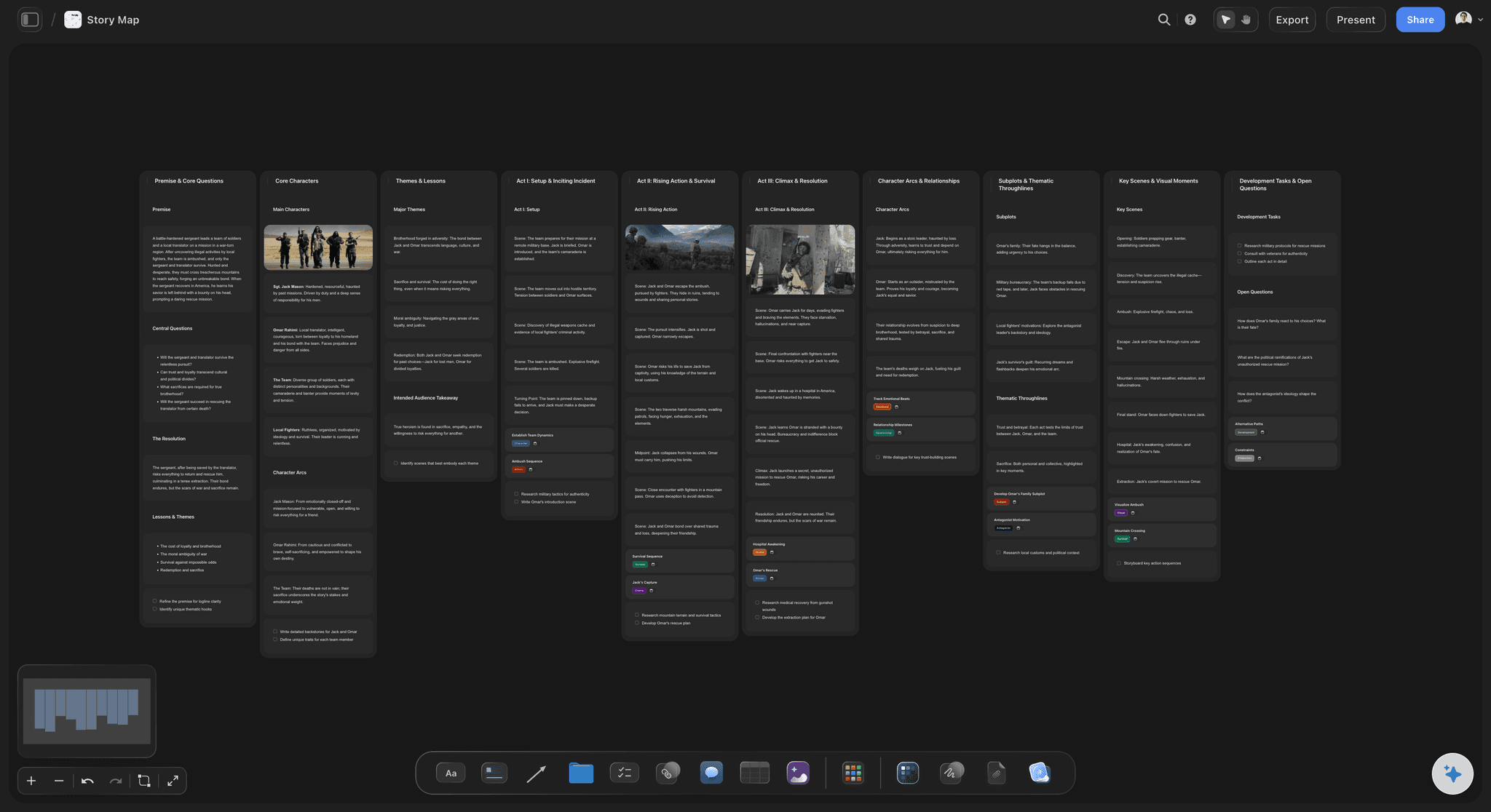
AI lays out the threads from your description
Start from a structure, not a blank board
Describe the story and its storylines and the AI builds a line per thread with act markers and starter beats. You begin by arguing with a proposal instead of staring at nothing.
See the AI story outline generator →
Plants and payoffs marked explicitly
Find the thread with no ending
Tag every beat as a plant, a complication, or a payoff. A thread with three plants and no payoff is the single most common structural fault in a first novel, and it takes ten seconds to spot here.
Explore the story planning tool →
See what each chapter is carrying
Read down as well as across
A vertical slice shows every thread live in a given chapter. Three threads all resolving in the same chapter is a traffic jam, and a chapter carrying nothing but the main plot may be why the middle sags.
See the chapter outline maker →
Characters and world beside the threads
Keep the cast next to the arcs they carry
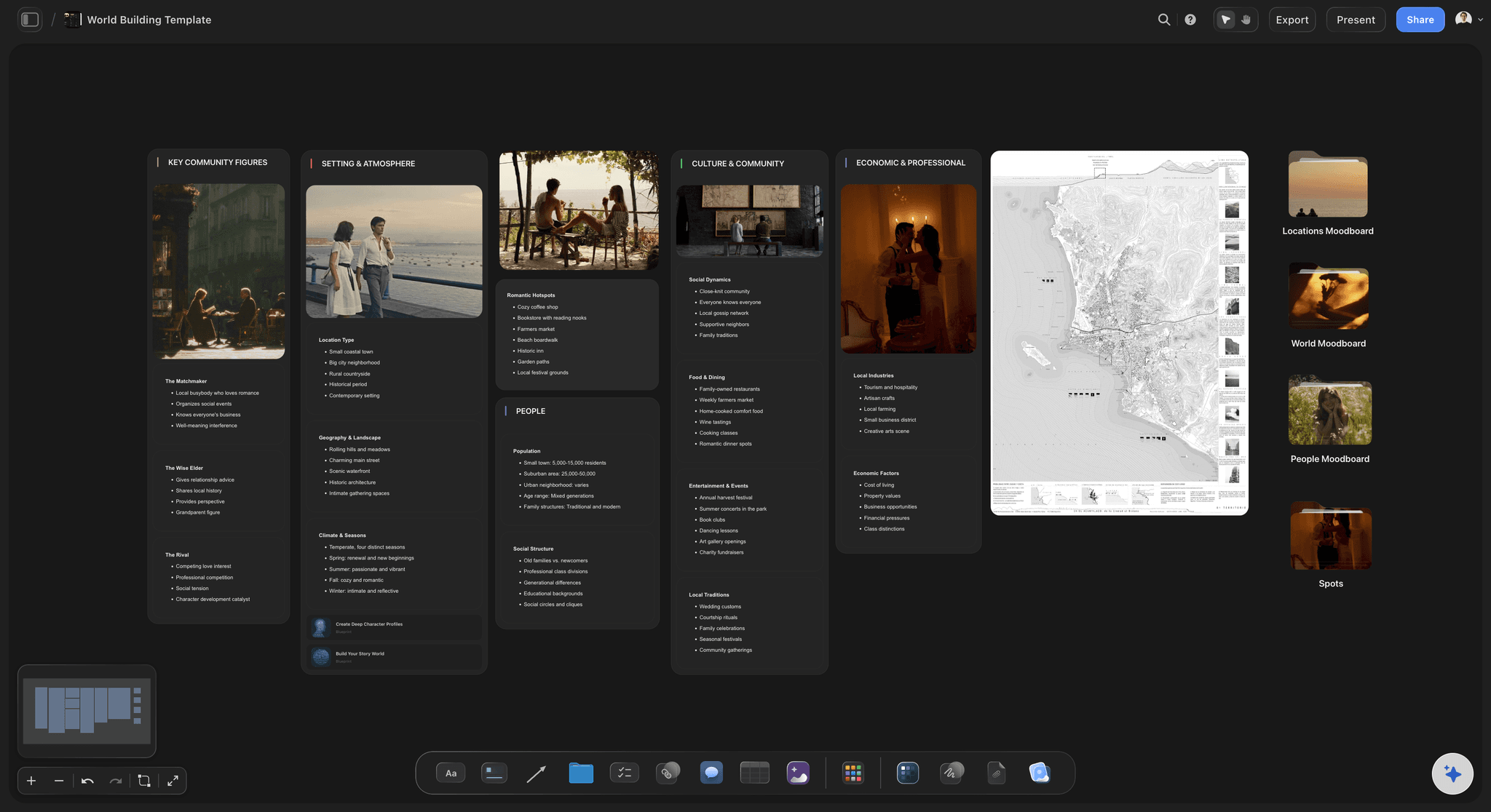
Pin character boards beside the threads that belong to them. A subplot is usually a character wanting something, and it is far easier to test whether it works with that person in view.
See the character relationship map →Unlimited boards. No object cap.
Open a canvas, name your threads, and lay them across the story. Storyflow is paid-only during early access, with plans from $9.99 a month, and a Free plan launches before the end of 2026.
Unlimited story boards on an infinite canvas
Basic AI usage to generate outlines and threads from prompts
Starter templates for story plans, outlines, and beat sheets
Share view-only links with editors and writing partners
Built for people with taste
More than a column in a spreadsheet.
A spreadsheet can list your threads. It cannot show you the one with a hole in the middle.
Plant, develop, complicate, resolve
Give every thread a full shape
The plant, and how quiet it is: Mark where the thread first appears and note how visible it is. A plant nobody registers is not a plant, it is a coincidence you will be accused of when it pays off.
Development in the middle: Threads fail in the middle far more often than at either end. A line with a plant, a gap of forty pages, and a resolution is the shape of a subplot readers experience as arbitrary.
A complication that costs something: Mark the point where the thread gets harder. Subplots that only ever progress feel decorative, because nothing in them is ever in doubt.
A payoff in the right place: Note where the thread lands and check it against the others. Everything resolving in the final chapter is exhausting, and everything resolving before it is why a third act can feel like an epilogue.
AI that can see the board you have already built
Work the threads with an AI that knows the story
Prompt against the whole canvas: Ask it where a thread could be complicated, what a neglected storyline might need in act two, or to lay out a new thread across the existing structure. It reads the board you have built.
It structures, it does not ghostwrite: Storyflow organizes and lays out the story. The writing stays yours, which is the only part of this that readers actually encounter.
Iterate without losing work: Re-prompt as often as you want. Beats you have already placed and tagged stay exactly where they are while the AI builds around them.
Threads across a series
Plan arcs that run longer than one book
One canvas, several books: Run the thread lines across multiple books or seasons so a plant in book one has a visible destination rather than a hopeful note in a file you will not open again.
Season and volume markers: Mark the boundaries and check that each instalment has its own satisfying arc as well as advancing the long one. Serials fail when every book is middle.
The promise ledger: Keep a visible list of the questions you have raised and where each is answered. Long stories lose readers by accumulating unanswered promises far more often than by any single weak chapter.
Editors, co-writers, and writers rooms
Talk about structure with something to point at
View-only links, no account required: Send an editor or a writing partner a link and they see every thread in a browser with no signup. Structural conversations get much shorter when both people are looking at the same lines.
Comments on the beat itself: Notes attach to the specific beat they concern, so feedback about a thread stops being a general worry and becomes a point on a line you can move.
Two arrangements, side by side: Keep an alternative version of a thread in another region of the canvas. Deciding whether the payoff belongs in chapter nineteen or twenty-four is much easier when both versions are visible.
Explore templates for your project
Every template opens as a real, editable board on the infinite canvas. Pick the closest fit and make it your own.
Story Plan
Outline your plot, characters, and world in one connected view, then expand each thread as the story grows.
One app instead of five
Storyflow vs Scrivener, Plottr, and a spreadsheet.
Be clear about what Storyflow is. It does not compile a manuscript and it does not do screenplay formatting. It is where the shape of a multi-thread story gets worked out.
Storyflow
Recommended
Infinite canvas with a line per thread
AI lays out threads from a story description
Characters, research, and images on the same canvas
Manuscript compile and ebook export
Dedicated timeline software features
Free plan available today
Scrivener
Infinite canvas with a line per thread
AI lays out threads from a story description
Characters, research, and images on the same canvas
Manuscript compile and ebook export
Dedicated timeline software features
Free plan available today
Plottr
Infinite canvas with a line per thread
AI lays out threads from a story description
Characters, research, and images on the same canvas
Manuscript compile and ebook export
Dedicated timeline software features
Free plan available today
Spreadsheet
Infinite canvas with a line per thread
AI lays out threads from a story description
Characters, research, and images on the same canvas
Manuscript compile and ebook export
Dedicated timeline software features
Free plan available today
What creators are saying
Join early creators getting structured workspaces and AI that remembers their projects
“Storyflow has sped up my workflow by at least 3x, which means more flow state and more projects I can actually ship. It truly changed the way me and my team create.”

Reilin Joey
Director & YouTuber
“One prompt gets me a structured board. But the tactics are my favorite. I run my YouTube scripts through them and my intros and retention got better. It's amazing.”

Justkay
YouTuber & Freelance Filmmaker
“I used to juggle five apps to plan a project. Now I describe what I am making and get boards, lists, and a schedule. All in one place.”

George
@fernwehchronicles
Subplot questions, answered.
How many threads a story can carry, how to spot a dead one, and where Storyflow fits alongside your writing app.
Plottr is the dedicated answer and it is genuinely good at exactly this, with timeline lines per thread and a well-worn workflow. Scrivener can do it with labels and collections, though the thread view is something you assemble rather than something you see. A spreadsheet works and costs nothing, right up to the point where you have five threads and sixty chapters and the grid becomes unreadable. Storyflow is the canvas version: a line per thread across an infinite surface, beats tagged as plant, complication, and payoff, character boards pinned beside the arcs they carry, and an AI that will lay the first draft of the structure out from a description of the story.
Most novels carry two to four active threads besides the main plot, and the constraint is not creativity, it is attention. Every thread you open is a promise, and a reader tracking six promises is a reader who has stopped tracking the main one. The useful test is not how many threads exist but how many are live in any given stretch: two or three threads moving at once reads as rich, five reads as busy, and one reads as thin. Lay them out and look at the vertical slices. If most chapters are carrying one line, the book will feel narrow no matter how many threads the outline claims.
Read the thread on its own, ignoring every other line, and ask whether it is a story. Does someone want something, does it get harder, does it cost them, does it end. A thread that is a series of scenes in which a situation is described but never changes is decoration, and readers feel it as padding even when they cannot name it. Then check its relationship to the main plot: a subplot that could be removed without changing the main story is a subplot that will be cut in edits. The good ones either complicate the main plot or force the protagonist to become the person who can finish it.
Not during early access. Storyflow is paid-only right now, with plans starting at $9.99 a month, and a Free plan for solo use launches before the end of 2026. Anyone a paid member invites to a board joins free today, so an editor or a writing partner can read and comment on your thread map without paying. If you need free this minute, a spreadsheet does the basic job and costs nothing, and Notion's free tier will hold a scene database with a thread field you can filter on. Neither gives you the visual line that makes a gap in the middle obvious, but both are honest free options.
Both, and the second one is more useful. Before drafting, the map catches threads with no payoff and threads with no middle, which is cheap to fix while it is still a plan. After drafting, rebuild the map from what you actually wrote rather than what you meant, and the difference is the revision. This is where writers find the subplot that quietly took over, the one that got abandoned at the point the main plot got interesting, and the three threads that all resolve in the same chapter. Doing it only before drafting means trusting that you executed the plan, which almost nobody does.
Yes, and this is where the infinite canvas earns its place. Run the lines across every book or season with volume markers, so a plant in book one is visibly waiting for its payoff rather than sitting in a note you will forget. Two things become checkable that are otherwise almost impossible: whether each instalment has its own complete arc rather than being all middle, and whether the number of open questions is growing faster than the number you are answering. Serials lose readers by accumulating unpaid promises, and the accumulation is invisible until you draw it.
You describe the story and the storylines you know about: the main plot, the relationship thread, the mystery, whatever you have. The AI lays out a structured board from that, with a line per thread, act or chapter markers, and cards for beats you have already decided, so you start from a proposal rather than an empty canvas. From there it works with what you build, using the whole board as context, so you can ask it where a neglected thread might be complicated or how a new subplot could be woven across the existing structure. Re-prompting adds around your existing beats without moving them.
Yes, and the shape maps neatly. Run one line per story, A, B, C, and runners, with episode markers across the season. Reading down a column tells you what an episode is carrying, which is exactly the conversation a room has when an episode feels thin. Reading across tells you whether the season has an actual spine or just a strong pilot. Share a view-only link so the room can comment on individual beats, or invite writers to the canvas to work on it together. Invited collaborators join free.
Yes, and it usually improves the thread work, because most subplots are a character wanting something. Pin the character board next to the thread that belongs to them and the test becomes much more concrete: does this person's want actually produce these beats, and does the arc end somewhere their character could plausibly reach. Storyflow keeps character boards, research, location images, and the thread map on one canvas, so you are not switching applications to check whether a subplot's resolution is consistent with who the character has become by then.
Yes. Send a view-only link and they open the whole map in a browser with no account, and can sign in to comment on individual beats. This is one of the most efficient forms of editorial feedback available, because a structural note delivered on the thread map, before a rewrite, is specific and cheap to act on, whereas the same note delivered on a finished draft arrives after the work it invalidates. If a co-writer should genuinely contribute, invite them to the canvas and they join free as a collaborator. Sharing and commenting work on every paid plan.
More from Storyflow
Character arc tracker
Manuscript revision planner
Novel plot creator
Scene card organizer
Story planning tool
Story structure software
Beat sheet template
Character relationship map
Series bible
AI story outline generator
For authors
For screenwriters
Novel plotting board
Writers room tool
Beat board
Story arc map
Find the thread you abandoned in chapter nine.
Open a canvas, name your storylines, and let AI lay the threads out. No download.