
The calmest place to shape your story
Move the scene,
not the chapter.
Lay every scene out as a card you can drag, reorder, group, and colour by point of view or thread, on one infinite canvas that shows the whole story at once.


Creatives working for these brands already got early access
- Red Bull
- Canon
- Artlist
- Porsche
See how easy it is to get started
Watch a real project come together, from a blank board to a finished plan, clicked through step by step.
Start from a ready-made template
Pick a board to see what you can build, then let AI fill it in. Every template is a real, editable starting point on the same infinite canvas.

Story Plan
Outline your plot, characters, and world in one connected view, then expand each thread as the story grows.
What is a scene card organizer?
A scene card organizer is a tool for holding a story as a set of movable pieces rather than a single long document. Storyflow is an AI visual workspace that plots the story on one infinite canvas: a card per scene, colour by point of view or thread, and the whole story visible. Each scene gets a card carrying the things you actually need to see at a glance: what happens, whose point of view it is in, where and when it takes place, what changes by the end, and which thread it belongs to. You then arrange the cards in story order and rearrange them freely, because the whole point is that a scene which does not work in chapter four might be exactly right in chapter eleven, and you will never discover that by scrolling through a manuscript.
Writers have used index cards on a corkboard for a century because the physical version solves a real problem: prose hides structure. Inside a draft, a scene that accomplishes nothing reads perfectly well, because the sentences are fine. Pulled out onto a card with the words what changes here written under it, the same scene becomes obviously empty. Laid beside its neighbours, a pacing problem becomes a visible run of five cards where nothing turns. The cards are not a filing system, they are a diagnostic instrument, and they only work when you can see many of them at once.
Storyflow is an AI-native infinite canvas built for that. Describe the story in a prompt and the AI lays out a starting set of scene cards with the structure already in place: acts, sequences, or chapters as sections, with cards to fill. Then you work with your hands. Drag cards to reorder, group them into acts, colour them by point of view so a neglected narrator is visible immediately, stack the subplot beside the main line, and open any card into a full document when the scene is ready to be written rather than planned.
The advantage over a physical corkboard is that the canvas is infinite and the cards carry more than a sentence. You can pin a character board beside act two, keep the research image for a location next to the scene it appears in, and lay a hundred and twenty cards out in a run without running out of wall. The advantage over a word processor is more fundamental: a manuscript can only be read in one order, which is the order you happened to write it in, and that is precisely the assumption a revision needs to question.
Ultra fast from brief to board
From a premise to a story you can see the shape of.
No chapter files to reshuffle, no outline document that stops matching the draft.
01
Open a canvas
Sign up in seconds. No download. Your infinite story canvas opens in the browser.
02
Describe the story
Type the premise, the cast, and roughly how it should be structured, and the AI lays out act sections with scene cards to fill. You start from a shape rather than an empty board.
03
Arrange and colour the cards
Drag scenes into order, group them into acts, colour them by point of view or thread, and write what changes on each card. The gaps and the dead runs become visible as you go.
04
Write from the board
Open a card into the built-in document editor when a scene is ready to be drafted, and keep the board beside it so the structure stays honest while the prose grows.
Every scene visible at the same time.
Drag, group, colour, and rewrite the order without touching the draft.

AI lays out the first set of cards
Start from a structure, not a blank board
Describe the premise and the AI builds act sections with scene cards ready to fill. Reacting to a proposed structure is much faster than inventing one from nothing at eleven at night.
See the AI story outline generator →
Colour by point of view or thread
See who has been forgotten
Give each narrator or storyline a colour and step back. A point of view that disappears for sixty pages, or a thread that resolves before the midpoint, is instantly obvious as a run of colour.
Explore the story planning tool →
Reorder without rewriting
Try the other order first
Drag a scene three chapters earlier and read the run again. Testing a structural change costs seconds on a board and a weekend in a manuscript, which is why most writers never test it at all.
See the chapter outline maker →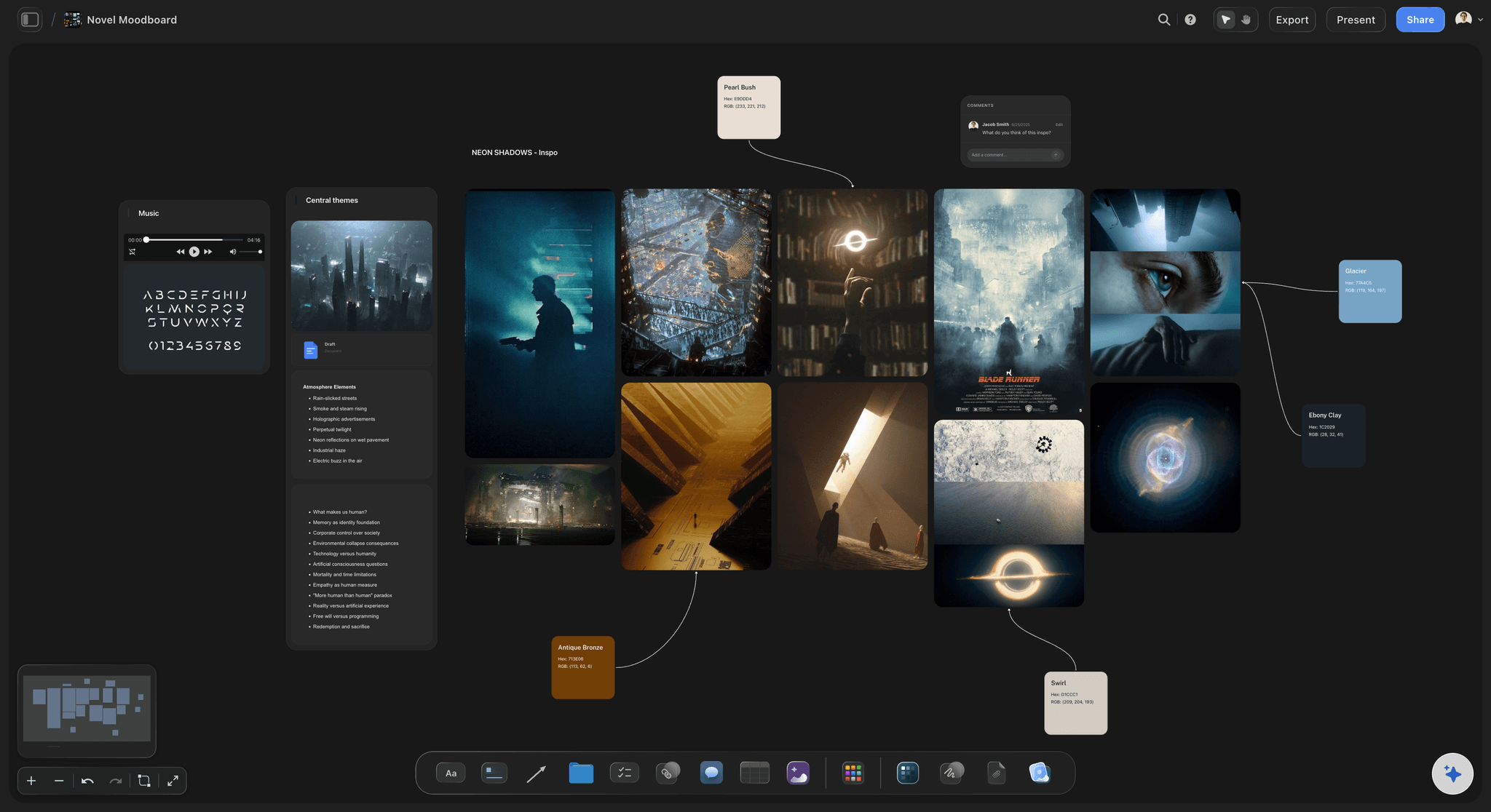
Character, research, and setting beside the cards
Keep the world next to the story
Pin character boards, location photographs, and research notes beside the scenes they belong to. The detail you need arrives when you are writing the scene, not when you go looking for it.
Try the book research organizer →Unlimited boards. No object cap.
Open a canvas, describe the story, and start moving scenes around. Storyflow is paid-only during early access, with plans from $9.99 a month, and a Free plan launches before the end of 2026.
Unlimited story boards on an infinite canvas
Basic AI usage to generate outlines and cards from prompts
Starter templates for story plans, outlines, and beat sheets
Share view-only links with editors and writing partners
Built for people with taste
More than a list of chapters.
A list tells you what order you wrote things in. Cards tell you what order the story wants.
What a scene card should carry
Make every card answer the same questions
What happens, in one line: If the scene cannot be summarized in a line, it is usually two scenes or none. The discipline of the single line is most of the value of working in cards at all.
What changes by the end: The most useful field on the card and the one most often left blank. A scene where nothing changes reads fine in prose and is invisible until you write this line and cannot fill it.
Point of view, place, and time: Three details that catch continuity errors early: a narrator who cannot know something, a location the cast has not reached yet, a night scene that follows another night scene with no day between.
Thread and tension level: Tag which storyline the scene serves and roughly how much pressure it carries. Two low-pressure cards in a row is a rhythm choice; five is a section readers put down.
AI that can see the board you have already built
Plan with an AI that knows your story
Prompt against the whole canvas: Ask it to propose scenes for a thin stretch in act two, suggest where a subplot could pay off, or lay out the cards for a chapter you have only described in a note. It reads the board you have made.
It structures, it does not ghostwrite: Storyflow lays out and organizes the story. The prose stays yours, which matters more here than anywhere, because a novel with an outsourced voice is not a novel anyone finishes reading.
Iterate without losing work: Re-prompt as often as you want. Cards you have already written and arranged stay exactly where they are while the AI fills around them.
From cards to draft and back
Keep the outline and the manuscript in the same place
Open a card into a full document: When a scene is ready to be written, expand it into the built-in document editor without leaving the canvas. The card stays as the summary; the document holds the prose.
Revise the board after the draft, not before: Rebuild the cards from what you actually wrote and compare it to the plan. The gap between intended structure and delivered structure is where most revision notes come from.
Version the shape, not just the words: Keep an alternative arrangement of the same cards in another region of the canvas. Being able to see two structures at once is the fastest way to decide between them.
Editors, writing partners, and workshops
Show someone the shape before the draft
View-only links, no account required: Send an editor, an agent, or a writing partner a link and they see the whole structure in a browser with no signup. Structural feedback before a rewrite is worth ten times the same feedback after.
Comments on the card itself: Notes attach to the scene they concern, so feedback stops being a document of numbered remarks you have to map back onto the manuscript by hand.
Export for the submission: Export the board as an image or PDF for a synopsis conversation, a workshop, or your own records. The link stays live, so the export never becomes the outdated version.
Explore templates for your project
Every template opens as a real, editable board on the infinite canvas. Pick the closest fit and make it your own.
Story Plan
Outline your plot, characters, and world in one connected view, then expand each thread as the story grows.
One app instead of five
Storyflow vs Scrivener, Notion, and physical index cards.
Be clear about what Storyflow is. It is not a manuscript compiler and it does not export to industry screenplay format. It is where the shape of the story gets worked out.
Storyflow
Recommended
Infinite canvas with draggable scene cards
AI lays out cards from a premise
Research, characters, and images on the same canvas
Manuscript compile and ebook export
Industry-standard screenplay formatting
Free plan available today
Scrivener
Infinite canvas with draggable scene cards
AI lays out cards from a premise
Research, characters, and images on the same canvas
Manuscript compile and ebook export
Industry-standard screenplay formatting
Free plan available today
Notion
Infinite canvas with draggable scene cards
AI lays out cards from a premise
Research, characters, and images on the same canvas
Manuscript compile and ebook export
Industry-standard screenplay formatting
Free plan available today
Index cards
Infinite canvas with draggable scene cards
AI lays out cards from a premise
Research, characters, and images on the same canvas
Manuscript compile and ebook export
Industry-standard screenplay formatting
Free plan available today
What creators are saying
Join early creators getting structured workspaces and AI that remembers their projects
“Storyflow has sped up my workflow by at least 3x, which means more flow state and more projects I can actually ship. It truly changed the way me and my team create.”

Reilin Joey
Director & YouTuber
“One prompt gets me a structured board. But the tactics are my favorite. I run my YouTube scripts through them and my intros and retention got better. It's amazing.”

Justkay
YouTuber & Freelance Filmmaker
“I used to juggle five apps to plan a project. Now I describe what I am making and get boards, lists, and a schedule. All in one place.”

George
@fernwehchronicles
Scene card questions, answered.
What goes on a card, how to work in cards without killing the draft, and where Storyflow fits alongside your writing app.
Scrivener's corkboard is the classic answer and still a good one, especially if you want the manuscript and the cards in the same application and you need compile at the end. Notion is capable if you want a scene database you can filter by point of view and status, though you never get to see the story as a shape. Physical index cards remain undefeated for a single afternoon of hard structural thinking, right up until you need to leave the room. Storyflow is the version that keeps the wall: an infinite canvas where cards drag freely, colour by thread, sit beside character boards and research, and where the AI can lay out a starting structure from your premise.
For structure work, it usually does. For producing a finished manuscript, no, and it would be dishonest to claim otherwise. Storyflow does not compile a manuscript, does not export to ebook formats, and does not produce industry-standard screenplay formatting the way Final Draft or Fade In do. What it does is hold the shape of the story and let you rearrange it, with the research and character material on the same surface. Many writers plan and revise structurally in Storyflow, draft in whatever they already trust, and come back to the board when the draft stops behaving. Both parts of that workflow are legitimate.
Five fields, and the second one is the whole point. What happens, in one line. What changes by the end of the scene. Whose point of view it is in. Where and when it takes place. Which thread or subplot it serves. Optionally add a rough tension level, because pacing problems are much easier to see when the cards carry it. The reason to keep the card short is that a card which contains the scene is no longer a card, it is a draft, and you lose the ability to scan fifty of them at once, which is the only reason to be doing this instead of reading the manuscript.
Not during early access. Storyflow is paid-only right now, with plans starting at $9.99 a month, and a Free plan for solo use launches before the end of 2026. Anyone a paid member invites to a board joins free today, so an editor or a writing partner can read and comment on your structure without paying. If you need something free this minute, Notion's free tier will hold a scene database perfectly well, Milanote's free tier gives you a board within its item limit, and a pack of index cards costs almost nothing and has worked for a hundred years. All three are honest options.
Two passes. First, read only the what changes line on every card in order. A run of three or four cards where the answer is vague, or where the change is a character learning something the reader already knew, is your slow section, and it will be exactly the stretch early readers describe as losing interest around the middle. Second, colour by thread and look at the runs. A main plot that vanishes for fifteen cards while a subplot takes over is a structural decision, and it is fine if you made it deliberately. Most of the time nobody made it, it just happened, and seeing it is enough to fix it.
This is arguably the better use. Planning cards describe intentions; revision cards describe reality. Go through the finished draft and write a card for every scene that actually exists, using what is on the page rather than what you meant, then lay them out. The book you wrote is almost never the book in the outline, and the difference is where the real revision notes are: the subplot that quietly took over, the character who stops appearing after chapter twelve, the three consecutive scenes of people agreeing with each other. This is unpleasant and it is the single most useful afternoon in a revision.
You describe the story: the premise, the cast, the setting, the shape you have in mind, and anything already decided. The AI lays out a structured board from that, with act or sequence sections and scene cards to fill, so you start from a proposal you can argue with rather than an empty canvas. Reacting to a wrong structure is much faster than inventing a right one. From there it uses the whole board as context, so you can ask it to suggest scenes for a thin stretch or find a place for a subplot to pay off, and re-prompting builds around the cards you have already written without moving them.
Yes, and it is the main reason to do this on a canvas rather than in a dedicated outliner. Pin a character board beside the act where that character matters most, keep a location photograph next to the scene set there, and put research notes beside the chapter that needs them. Writers lose an enormous amount of time to the specific friction of going to look something up, which reliably ends in a browser tab that has nothing to do with the book. Material that sits next to the scene it serves gets used; material in another application gets forgotten and then researched again.
Yes. Send a view-only link and they open the whole structure in a browser with no account, and they can sign in to comment directly on individual cards. Structural feedback delivered on the board, before a rewrite, is worth many times the same feedback delivered on a finished draft, when the sunk cost makes everyone defensive. If a collaborator should genuinely contribute, a co-writer, a showrunner, invite them to the canvas instead, and invited collaborators join free. Sharing, commenting, and reviewing work on every paid plan.
There is no correct number, but the useful ranges are worth knowing. Most novels land somewhere between sixty and a hundred and twenty scenes, which is roughly one card per two to four manuscript pages. Screenplays usually run forty to sixty scenes. If you are producing two hundred cards, you are probably carding beats rather than scenes, which is fine as long as you know that is what you are doing. If you have twenty-five cards for an eighty thousand word novel, the cards are chapters and you have lost most of the diagnostic value, because a chapter can contain a scene that does nothing and hide it perfectly.
More from Storyflow
Manuscript revision planner
Novel plot creator
Novel planner
Chapter outline maker
Story planning tool
AI story outline generator
Beat sheet template
Three act structure template
Book research organizer
For authors
For screenwriters
Novel plotting board
Writers room tool
Beat board
Plottr alternative
Scene planning tool
See the whole story, then move it.
Open a canvas, describe the premise, and let AI lay out the first set of cards. No download.