
The calmest place to shape your story
The story planning tool
that thinks in frameworks.
Type a prompt and Storyflow's AI builds a structured story board: plot mapped, scenes outlined, and a framework already in place. Works in your browser.


Creatives working for these brands already got early access
- Red Bull
- Canon
- Artlist
- Porsche
See how easy it is to get started
Watch a real project come together, from a blank board to a finished plan, clicked through step by step.
Start from a ready-made template
Pick a board to see what you can build, then let AI fill it in. Every template is a real, editable starting point on the same infinite canvas.

Story Plan
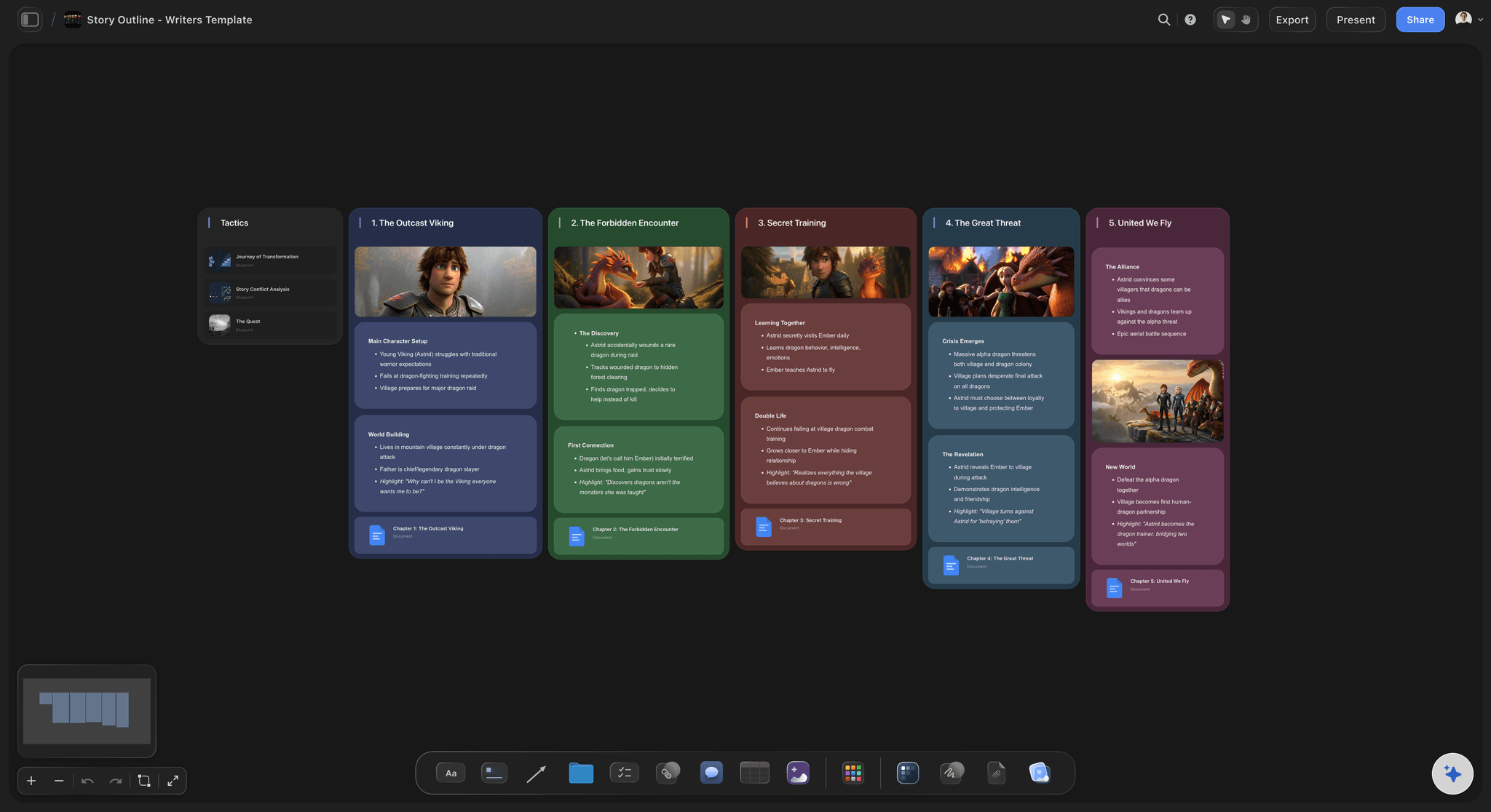
Outline your plot, characters, and world in one connected view, then expand each thread as the story grows.
What is a story planning tool?
A story planning tool is a workspace where writers map, outline, and organize a story before writing the prose. Storyflow is an AI visual workspace that holds your whole story plan on one infinite canvas: the plot structure, the scene outline, the character profiles and the research. A planning tool is where you decide what happens, in what order, and why, before you open a word processor. Strong story planning means fewer dead ends, stronger structure, and a manuscript that holds together from the first chapter to the last.
Storyflow is an AI-native story planning tool that runs in the browser. Type a prompt describing your story idea and the AI builds a structured board: plot beats mapped, scenes outlined, characters sketched, and a framework already applied. You plan and organize in Storyflow, then write the actual prose in whatever writing app you already use, whether that is Scrivener, Google Docs, or Word.
Because the AI keeps the full context of your board, the story planning process is iterative. Ask it to restructure act two, deepen a character arc, or suggest a beat sheet for your genre, and it updates the board without losing what you have already built. The canvas is infinite, so your outline never runs out of room.
Real story planning covers more ground than a single document. A complete story plan includes the premise and logline, the three-act structure or Save the Cat beat sheet, the Hero's Journey or whatever framework fits your genre, scene-by-scene plot cards, character arcs with goals and flaws, theme and subplots woven into the outline, worldbuilding rules and lore, and a research layer of images, PDFs, and links. Storyflow gives you a single infinite canvas where all of those pieces live together and connect to each other, and where the AI understands the whole board so you can ask it questions across every layer at once.
Ultra fast from brief to board
Outline a novel in four steps.
No blank page, no formatting setup. The AI builds the plan so you can focus on the story.
01
Open your canvas
Sign up in seconds. No download. Your infinite story planning canvas is ready in the browser.
02
Describe your story idea
Type a prompt: genre, concept, or a rough logline. The AI picks a fitting framework and builds a structured story board from your idea.
03
Map, outline, and deepen
Drag cards to restructure the plot, add character profile boards, drop in research and reference images, and keep prompting the AI to fill gaps.
04
Export or share and start writing
Export the outline as a PDF, share a view-only link with collaborators or editors, then write the prose in your writing app of choice.
A story planning tool built for how writers actually think.
Plot, character, world, and research live on the same canvas. Zoom out to see the whole story. Zoom in to work on a single scene.
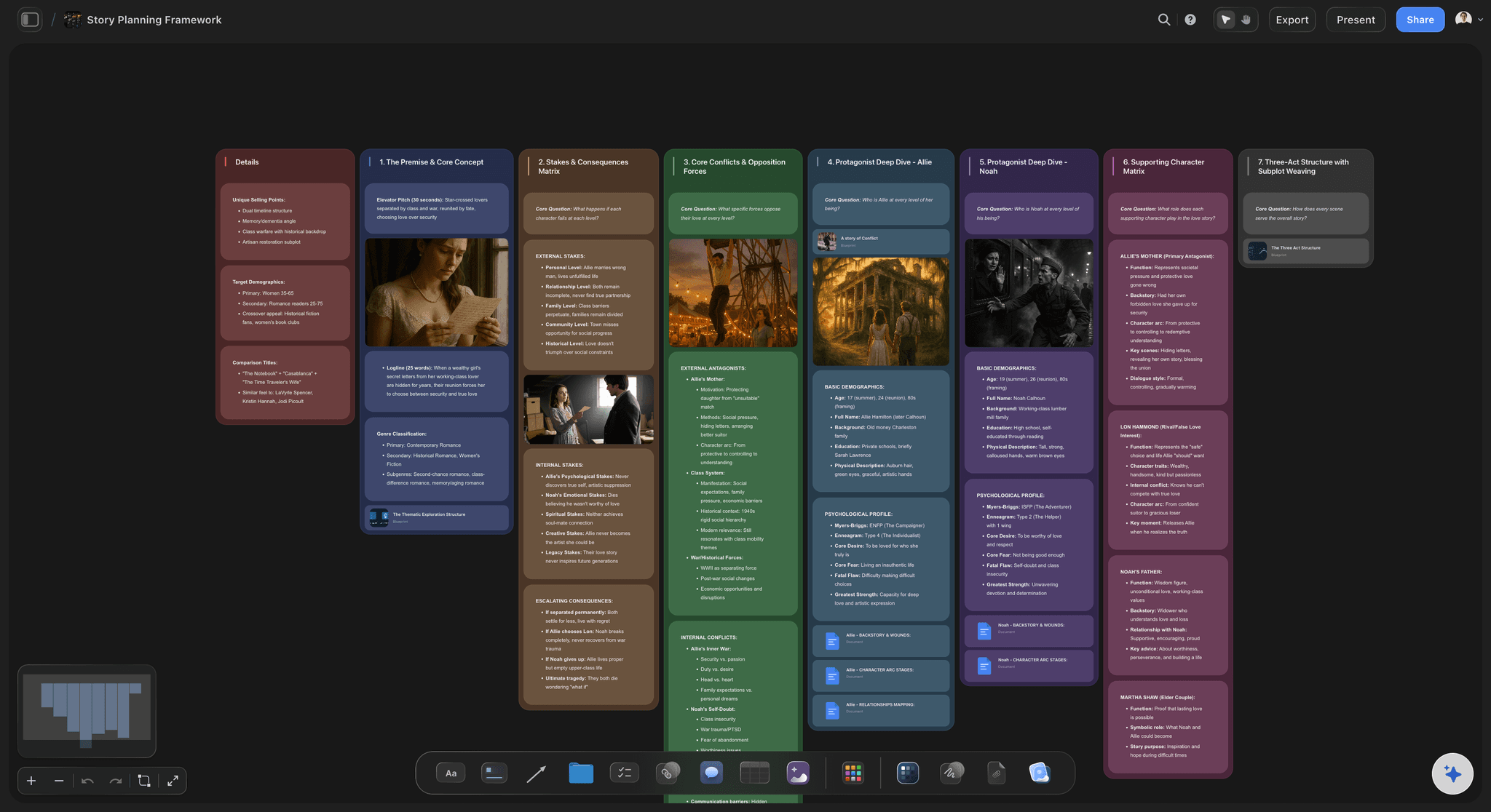
AI-generated story outlines in seconds
Start from a structure, not a blank page
Describe your story idea and the AI builds a full outline: acts, scenes, turning points, and a framework already applied.
Explore the AI mind map generator →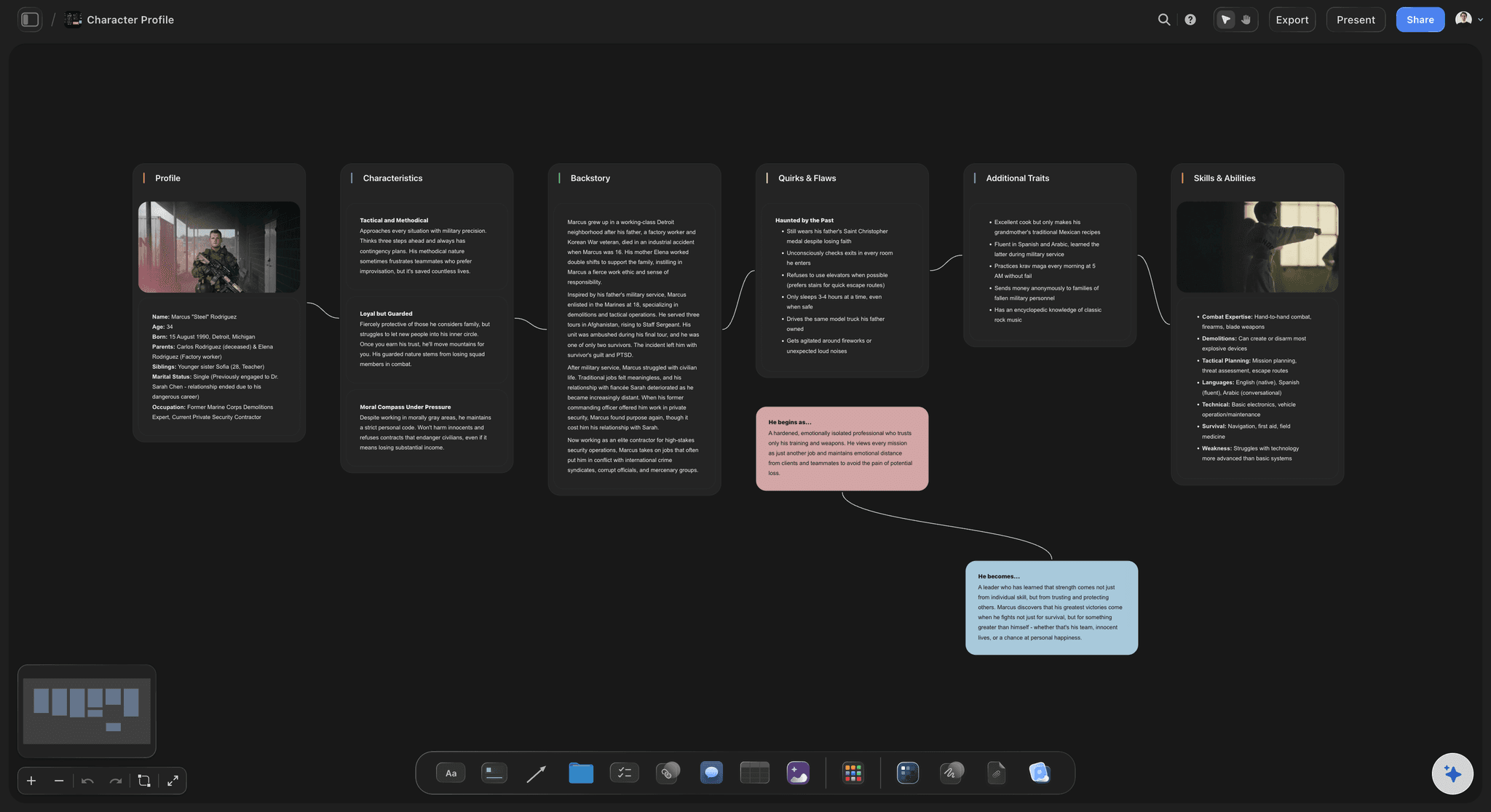
Character profiles that connect to the plot
Build every character alongside the outline
Create character profile boards next to the plot map. Goals, flaws, arcs, backstory, and relationships all in one place. Ask the AI to check whether a character arc holds up across the full outline or suggest a meaningful flaw.
See how to plan characters →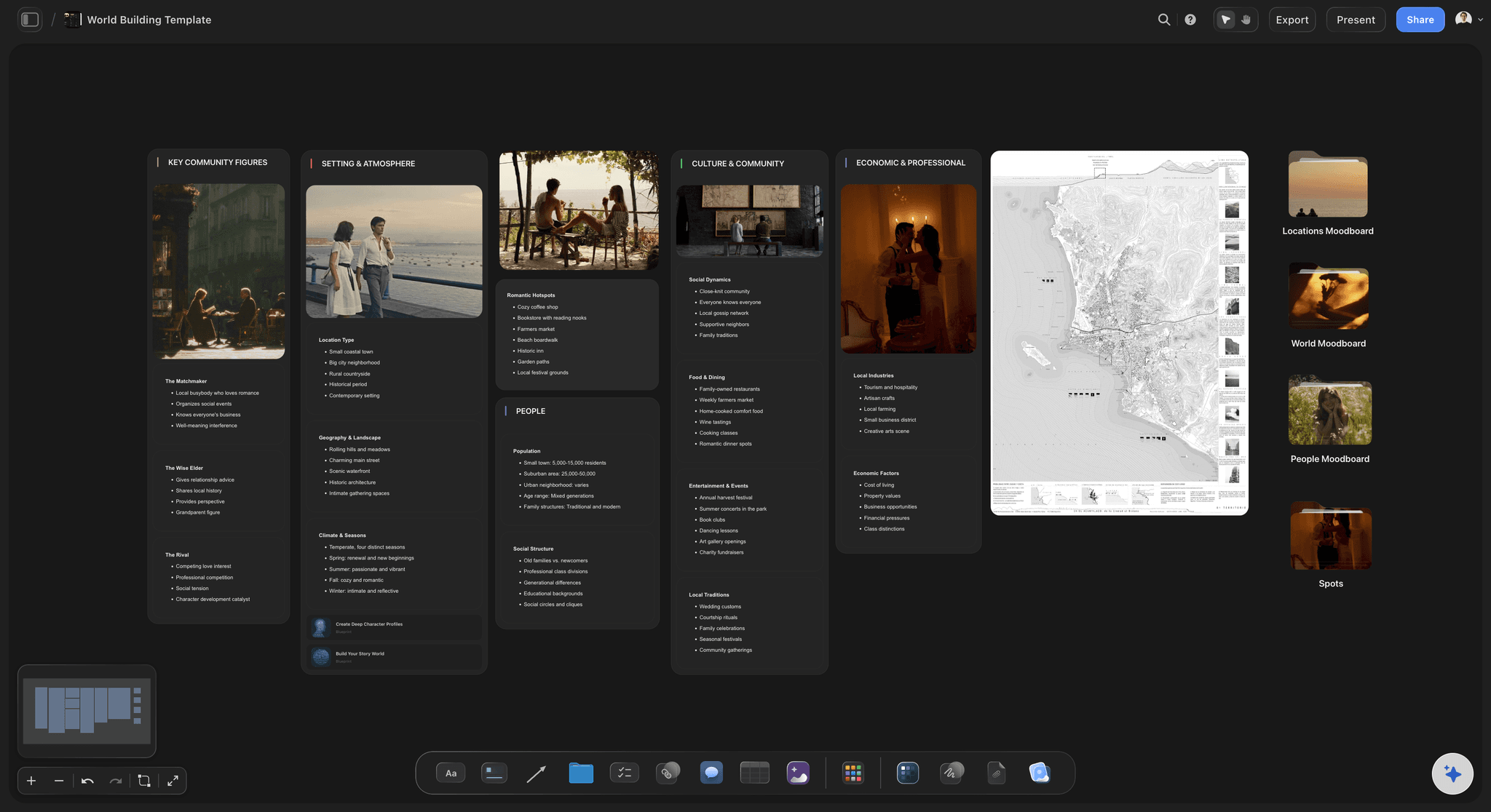
Map the world your story lives in
World-build on the same canvas
Lay out your setting, lore, rules, and timelines next to the plot. Drop in reference images, maps, and links. The AI can help you expand a world detail, check for consistency, or connect a worldbuilding element to a plot beat.
Try the worldbuilding tool →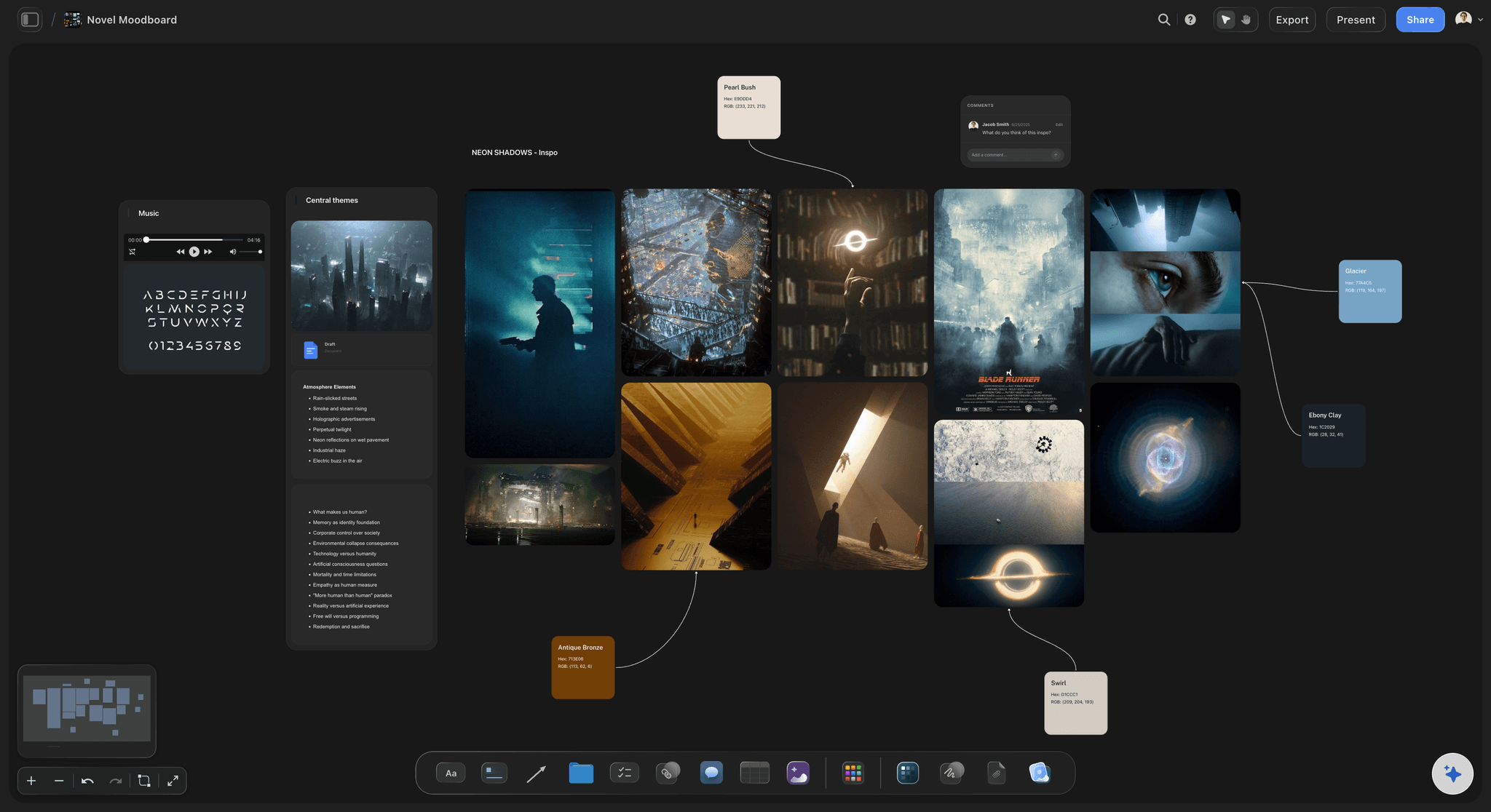
Tone, mood, and visual inspiration beside your outline
Moodboard the feel of your story
Pin images, color palettes, and reference links next to the outline to capture tone before you write. Grab frames from YouTube or Vimeo for visual research, and keep everything on the same infinite board.
See moodboarding in Storyflow →A free plan is coming before the end of 2026.
Storyflow is paid-only during early access, with Plus starting at $7.99 a month. The free plan launching before the end of 2026 will include:
Unlimited story boards on an infinite canvas
Basic AI usage to generate outlines and structures
3 starter frameworks built in
20 file uploads for research, PDFs, and images
Built for people with taste
More than an outline. A complete story planning workspace.
Plot structure, character arcs, worldbuilding, subplots, and research live on one infinite canvas. The AI keeps context of all of it.

Story structure
Plan with the structure that fits your story
Three-act structure and Hero's Journey: Classic frameworks for narrative fiction, screenplays, and genre novels. Map the setup, confrontation, and resolution, or walk the hero from ordinary world to return with the elixir. Pick one or let the AI suggest the right structure for your concept.
Beat sheets for every genre: Save the Cat, story circle, seven-point structure, and more. Apply a beat sheet to your outline and map scenes to each beat: opening image, catalyst, midpoint, all-is-lost, and climax.
Custom frameworks and subplot layers: Rearrange the board into any structure you need. Layer subplots beside the main plot, track theme across acts, or build a multi-POV structure with separate track lanes. The canvas is flexible and the AI adapts.

Drop research, PDFs, and references on the canvas
Organize every research source beside the outline
PDFs, notes, and links: Drop a research PDF, paste a link, or write notes on the canvas and pin them next to the scenes they inform.
Grab frames from video: Capture stills from YouTube and Vimeo for visual reference and pin them alongside your moodboard or scene cards.
Sticky notes and sketch tool: Add quick thoughts as sticky notes or sketch rough diagrams with the pen tool. Everything stays on the same board.

AI that keeps the whole story in context
Refine the plan until the story clicks
Iterate on plot, structure, and subplots: Ask the AI to restructure an act, add a subplot, tighten the pacing, or check whether the midpoint lands correctly for your chosen framework. It keeps the context of the whole board.
Deepen character arcs and theme: Prompt the AI to check whether a character arc is consistent with the plot, suggest a meaningful flaw, build out backstory, or trace the theme across acts.
Ask story questions across the whole canvas: The AI knows everything on your board: plot cards, character notes, worldbuilding, and research. Ask whether the logline matches the outline, or whether the three-act beats land in the right places.

Share, collaborate, and export the plan
Move the outline from planning into writing
View-only links: Share the story plan with an editor, co-writer, or writing group via a view-only link. No sign-up required to view.
Export as image or PDF: Export the outline or a section of the board as a high-quality image or PDF to paste into your writing app or send for feedback.
Real-time collaboration: Invite a co-author to work on the plan together. Changes appear live so the whole team stays on the same version of the story.
Explore templates for your project
Every template opens as a real, editable board on the infinite canvas. Pick the closest fit and make it your own.
Story Plan
Outline your plot, characters, and world in one connected view, then expand each thread as the story grows.
One app instead of five
Storyflow vs Scrivener, Milanote, and Plottr.
Each tool has a different job. Here is an honest look at how they approach story planning.
Storyflow
Recommended
Unlimited boards, no board caps
AI builds the story outline from a prompt
AI uses your whole canvas as context
Plot, characters, and worldbuilding on one canvas
Infinite visual canvas
Scrivener
Unlimited boards, no board caps
AI builds the story outline from a prompt
AI uses your whole canvas as context
Plot, characters, and worldbuilding on one canvas
Infinite visual canvas
Milanote
Unlimited boards, no board caps
AI builds the story outline from a prompt
AI uses your whole canvas as context
Plot, characters, and worldbuilding on one canvas
Infinite visual canvas
Plottr
Unlimited boards, no board caps
AI builds the story outline from a prompt
AI uses your whole canvas as context
Plot, characters, and worldbuilding on one canvas
Infinite visual canvas
What creators are saying
Join early creators getting structured workspaces and AI that remembers their projects
“Storyflow has sped up my workflow by at least 3x, which means more flow state and more projects I can actually ship. It truly changed the way me and my team create.”

Reilin Joey
Director & YouTuber
“One prompt gets me a structured board. But the tactics are my favorite. I run my YouTube scripts through them and my intros and retention got better. It's amazing.”

Justkay
YouTuber & Freelance Filmmaker
“I used to juggle five apps to plan a project. Now I describe what I am making and get boards, lists, and a schedule. All in one place.”

George
@fernwehchronicles
Story planning tool, answered.
Everything writers ask about planning a story in Storyflow.
Not during early access, since Storyflow is paid-only right now, with Plus starting at $7.99 a month. A free plan is planned before the end of 2026 and will include unlimited boards on an infinite canvas, basic AI usage, 3 starter frameworks, and 20 file uploads, built for writers who want to map and outline visually, with AI help. If you need a free tool today, index cards or a free whiteboard will hold an outline, paired with Google Docs for the actual prose.
A complete story outline typically includes the premise (the core idea), a logline (one or two sentences that state the protagonist, goal, and obstacle), the major structural beats mapped to a framework (three acts, Save the Cat, or the Hero's Journey), scene cards for each key scene, turning points (inciting incident, midpoint, climax, resolution), character arcs showing how each main character changes, subplots that connect to the theme, and worldbuilding notes. The depth varies by writer and project, but even a short outline covering these elements gives the prose a much stronger foundation.
The most widely used frameworks are three-act structure (setup, confrontation, resolution), the Hero's Journey (ordinary world, call to adventure, ordeal, road back, return with the elixir), Save the Cat beat sheet (15 named beats from opening image to final image), the story circle (Dan Harmon's 8-step version of the monomyth), and seven-point structure (hook, plot turns, pinch points, midpoint, climax, resolution). Storyflow's AI can lay out whichever one fits your story as cards on the canvas.
No. Storyflow is a planning and organizing tool, not a word processor. It helps you map your plot, outline scenes, build character profiles, and structure your story before you write the prose. The actual writing happens in your writing app of choice, such as Scrivener, Google Docs, or Word. Think of Storyflow as the place where you figure out what to write, so when you open your writing app you already have a plan.
Ask the AI for three-act structure, the Hero's Journey, Save the Cat or seven-point structure and it lays the beats out as cards, or suggests one for your idea. You can also build a custom structure by arranging cards however you need.
Scrivener is a word processor with outlining features built in. It is where you write and draft the manuscript. Storyflow is a visual, AI-native infinite canvas for planning and organizing the story before you write. Storyflow is where you map the shape of the story: plot structure, character arcs, worldbuilding, and research, all on one board. Most writers find these tools complementary rather than competing. Plan and outline in Storyflow, then open Scrivener to write the prose with a clear structure already in place.
Yes. Type a prompt describing your concept and the AI builds a structured outline with acts, scenes, and a framework already applied. From there you refine it: drag cards to restructure, add character boards, deepen subplots, and keep prompting the AI. The AI keeps the full context of your board, so every new request builds on what you have already planned.
Yes. Storyflow works well for both. For novels you can map three-act structure, the Hero's Journey, or Save the Cat beats with scene cards, character arcs, and worldbuilding on the same canvas. For screenplays you can lay out beat sheets, label scenes with act breaks, and track the midpoint and all-is-lost moments visually. The canvas and frameworks are flexible enough for prose fiction, genre novels, literary fiction, feature films, and TV pilots.
Yes. The canvas works for any story length. Short story outlines, novellas, and full novel plans all live on the same infinite canvas. You can have multiple projects open as separate boards or lay out a series on one large canvas.
Not during early access. Storyflow is paid-only right now, with Plus starting at $7.99 a month billed annually ($9.99 month-to-month) for unlimited boards on an infinite canvas and AI for generating outlines. A free plan is planned before the end of 2026, and anyone a paid member invites to a board joins free today.
Yes. Share a view-only link with anyone, including people who do not have a Storyflow account, so they can review the plan without signing up. Invite a co-author to collaborate in real time with live edits. Export the outline as a PDF or image to send to an editor outside the tool.
The story is in your head. Get it on a board.
Type a prompt, let the AI build the outline, and walk into writing with a plan.