
The calmest place to shape your story
The corkboard wall,
for a room that is remote.
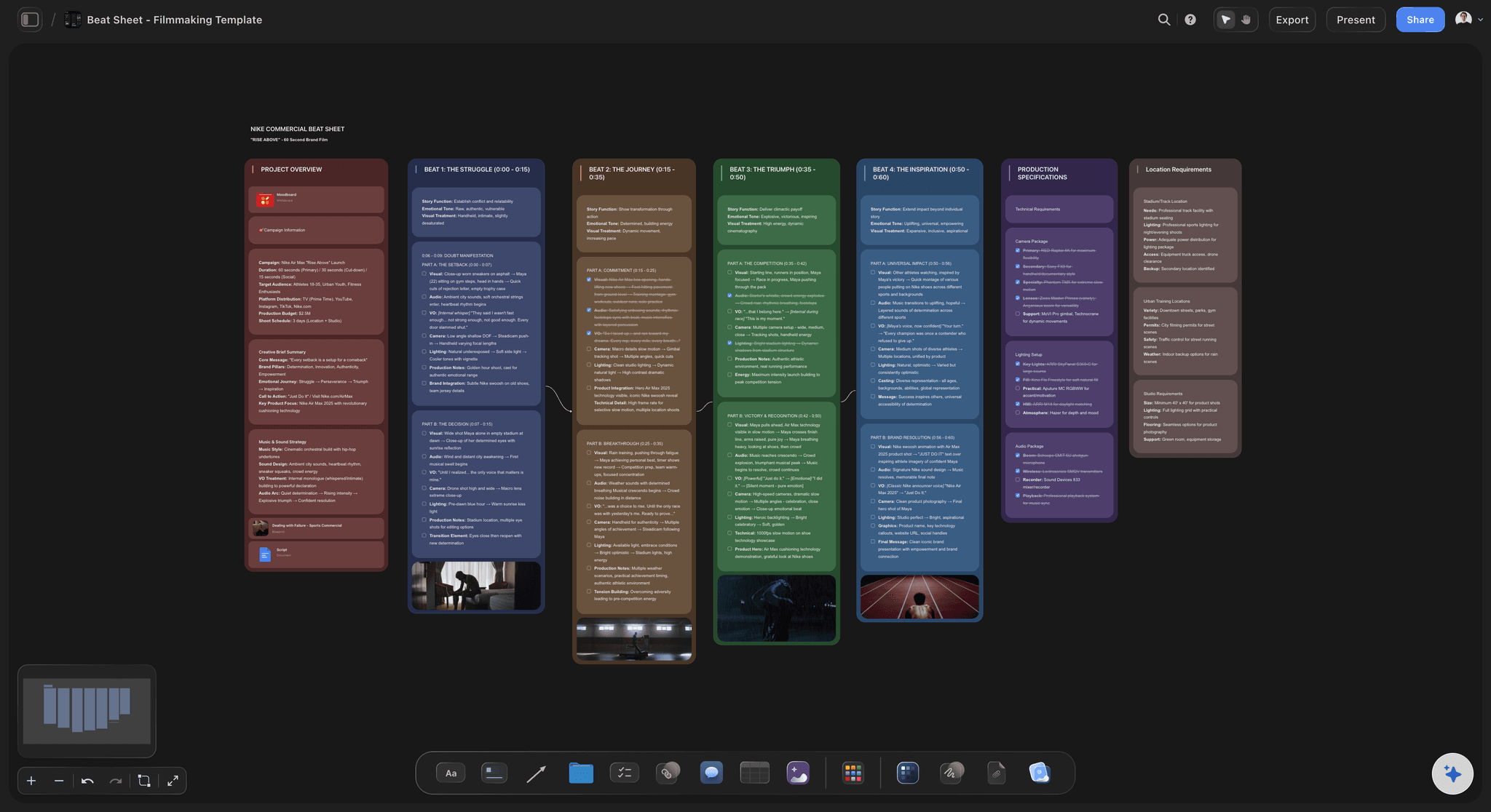
Break the season as cards on an infinite canvas, run character threads as tracks beneath the episode spine, and keep the show bible on the same board. Everyone works on it at once.


Creatives working for these brands already got early access
- Red Bull
- Canon
- Artlist
- Porsche
See how easy it is to get started
Watch a real project come together, from a blank board to a finished plan, clicked through step by step.
Start from a ready-made template
Pick a board to see what you can build, then let AI fill it in. Every template is a real, editable starting point on the same infinite canvas.

Story Plan
Outline your plot, characters, and world in one connected view, then expand each thread as the story grows.
What is a writers room tool?
A writers room tool is the shared surface a television writing team works on while breaking a season. Storyflow is an AI visual workspace that breaks the season with the whole room on one infinite canvas: episode cards, character threads as tracks beneath the episode spine, and the show bible on the same board. In a physical room that surface is a wall: index cards for episodes, a column per act, character threads running along the bottom, and the show bible pinned somewhere everyone can point at. A writers room tool is an attempt to keep what makes that wall work when the room is remote, hybrid, or simply too big to fit around one board.
What makes the wall work is not the cards. It is that everybody is looking at the same thing at the same time, that the whole season is visible at once, and that moving a card is a physical act the room witnesses. Most software loses all three. A document is read one screen at a time, a project management tool hides the season inside a list, and a shared drive means every writer is looking at their own copy of a slightly different version.
Storyflow is an AI-native infinite canvas, which is the closest digital analogue to a wall that a remote room can get. Describe the show in a prompt and the AI lays out a structured board: season arc, episode cards, act breaks, and character threads. The team then works on it together, dragging episodes into new positions, and everyone sees the same board update as it happens rather than reconciling versions afterward.
Running a room usually means holding six things at once: the season arc (where the season starts, turns, and lands), episode breaks (each episode's own structure, usually in acts, with its A, B, and C stories), character threads (what each regular is doing across the season and where their arc turns), the show bible (tone, rules, world, backstory, and the decisions the room already made so they are not relitigated in week nine), the board of pitches and fragments that have not found an episode yet, and the production reality of budget, locations, and cast availability that quietly shapes what is writable. Storyflow keeps all six on one canvas.
Ultra fast from brief to board
From a blank wall to a broken season.
No project structure to configure. Describe the show and start moving cards with the room.
01
Open a canvas
Sign up in seconds. No download. Your infinite writers room canvas opens in the browser.
02
Describe the show
Type the premise, the format, and the season length and the AI lays out a season arc with episode cards, act breaks, and character threads ready to fill.
03
Break it with the room
Everyone works on the same canvas at once. Drag episodes into a new order, split an episode into acts, run A, B, and C stories, and pin the pitches that have not landed anywhere yet.
04
Share outward
Send a view-only link to a showrunner, a network executive, or production. Export the board as an image or PDF for a pitch document or a room recap.
The whole season, visible to the whole room.
Season arc, episode breaks, character threads, and the show bible on one infinite canvas.

AI lays out the season structure from your premise
Start the room from a skeleton
Describe the show and the AI builds a season arc with episode cards and act breaks against a structural framework. The room starts arguing about the story rather than about how to set up the board.
See the AI story outline generator →
Everyone on the same board, at the same time
One version, not eight
The room works on one canvas together, so nobody is arguing from last week's copy. Cards move and everyone sees it, which is the part of a physical wall that shared documents most obviously lose.
Explore collaborative storytelling →
Character threads as tracks under the episode spine
Catch the regular who vanishes for five episodes
Run each character's arc as a track beneath the season spine. An empty stretch in a track is the actor with nothing to play in the back half, which is much easier to see than to remember.
See the AI character profile generator →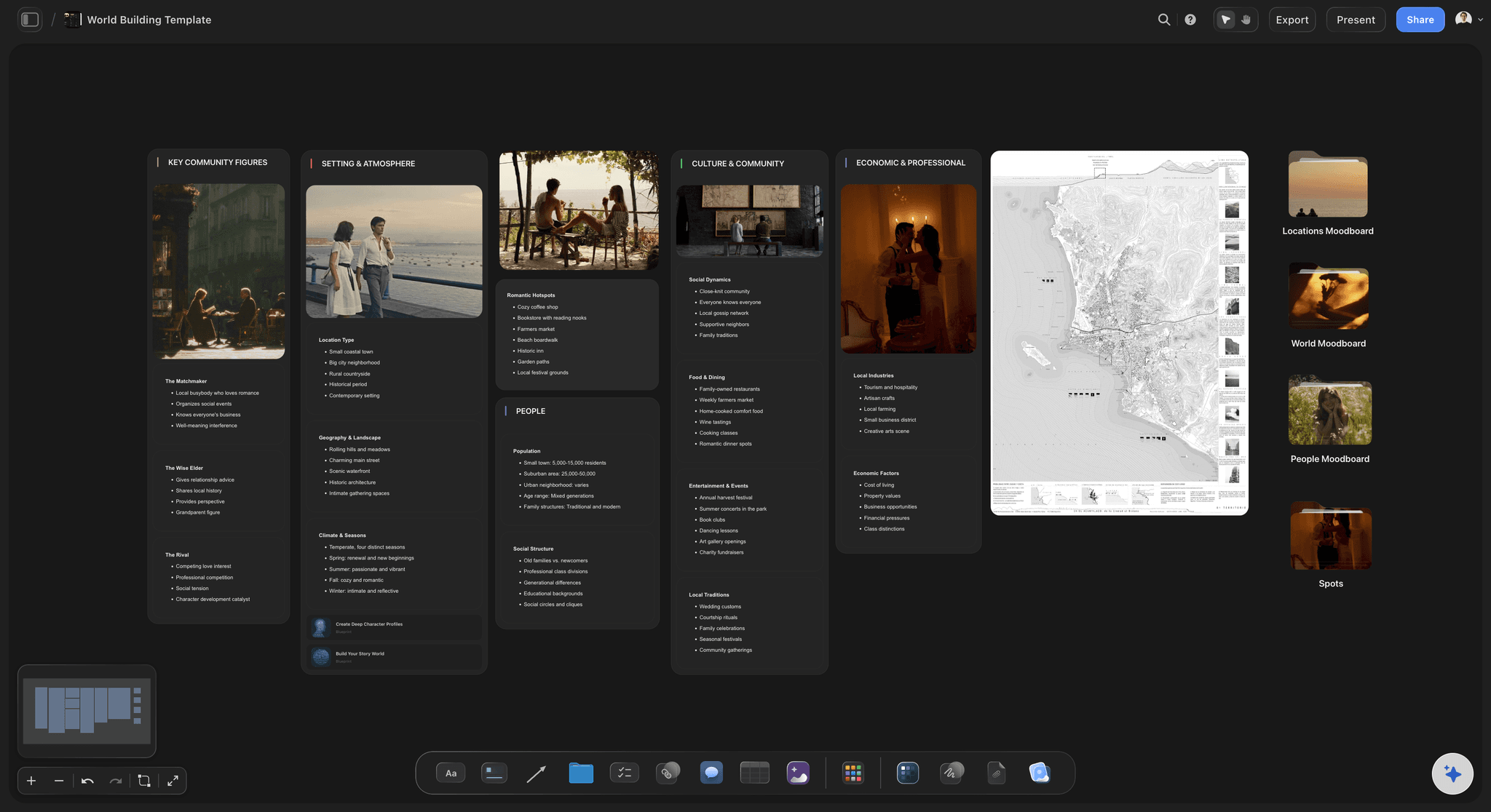
The bible stays on the board, not in a drive
Stop relitigating decisions the room already made
Keep tone, world rules, backstory, and the decisions already settled visible on the same canvas. Rooms lose entire afternoons to questions that were answered in week two and written down somewhere nobody can find.
Try the series bible →Unlimited boards. No object cap.
Open a canvas, describe the show, and start breaking. Storyflow is paid-only during early access, with plans from $9.99 a month, and a Free plan launches before the end of 2026.
Unlimited season boards on an infinite canvas
Basic AI usage to generate boards from prompts
The whole room on one board together
Share view-only links with producers and executives
Built for people with taste
More than a shared document.
A room needs the whole season visible, one version of the truth, and somewhere for the ideas that have not landed yet.
Season arc, episode breaks, threads, bible, and the pitch pile
Hold everything a room has to hold
Season arc as a spine: Lay the season out as a row of episode cards and read it on its own. Where the season turns, where it sags, and whether the finale is actually set up all become answerable questions rather than feelings.
Episode breaks in acts: Break each episode into acts with its A, B, and C stories visible together. Two episodes running the same shape back to back is obvious on a board and invisible in a stack of documents.
The pitch pile: Keep an area for ideas, scenes, and runners that have not found an episode yet. Rooms generate far more than they use, and the good fragment you binned in week three is the one you need in week ten.
Production reality on the same board: Note cast availability, location constraints, and budget pressure beside the episodes they affect. Breaking a story the show cannot afford to shoot is a cost the room absorbs later.
AI that can see the season you have already broken
An extra voice that has read the board
Prompt to work a problem: Ask it what could go in the empty slot at episode seven, where a character thread goes quiet, or how to escalate act three. It keeps the whole board in context, so suggestions fit this show rather than a generic one.
It structures, the room writes: Storyflow is a planning canvas rather than a script generator. The AI helps the room see and arrange the season. The judgment about what the show is stays with the writers.

Research, references, and clips on the same canvas
Bring the show's world onto the board
Research beside the episode: Drop PDFs, articles, and photographs next to the episodes that depend on them. Procedurals and period shows live or die on detail that has to be reachable while breaking, not filed elsewhere.
Grab frames from reference footage: Capture stills from YouTube or Vimeo onto the canvas when the room is pointing at a tone, a sequence, or a shot from another show. Pin it beside the episode it is arguing for.
Moodboard the tone: Build a tone board on the same canvas so a new writer joining in week six can see what the show looks like rather than being told about it.

Showrunners, executives, and production
Share outward without exporting the room
View-only links: Send a link to a showrunner, an executive, or a producer and they see the season in a browser with no account. Reviewing a board is a much faster conversation than reading eight outline documents.
The room works together: Every writer works on the same canvas, so the board is the record. Anyone a paid member invites joins free today, which matters for a room of staff writers on short contracts.
Export for the pitch: Export as a high-quality image or PDF for a network pitch, a room recap, or a handover to production at the end of the room.
Explore templates for your project
Every template opens as a real, editable board on the infinite canvas. Pick the closest fit and make it your own.
Story Plan
Outline your plot, characters, and world in one connected view, then expand each thread as the story grows.
One app instead of five
Storyflow vs Final Draft, Miro, and Notion.
Every tool here shows up in real rooms. Here is where they differ so you can pick the right one for how yours works.
Storyflow
Recommended
Infinite canvas the whole room shares
AI builds the season arc from a prompt
AI uses your whole board as context
Character threads under the episode spine
Show bible and research on one canvas
Runs in the browser, nothing to install
Final Draft
Infinite canvas the whole room shares
AI builds the season arc from a prompt
AI uses your whole board as context
Character threads under the episode spine
Show bible and research on one canvas
Runs in the browser, nothing to install
Miro
Infinite canvas the whole room shares
AI builds the season arc from a prompt
AI uses your whole board as context
Character threads under the episode spine
Show bible and research on one canvas
Runs in the browser, nothing to install
Notion
Infinite canvas the whole room shares
AI builds the season arc from a prompt
AI uses your whole board as context
Character threads under the episode spine
Show bible and research on one canvas
Runs in the browser, nothing to install
What creators are saying
Join early creators getting structured workspaces and AI that remembers their projects
“Storyflow has sped up my workflow by at least 3x, which means more flow state and more projects I can actually ship. It truly changed the way me and my team create.”

Reilin Joey
Director & YouTuber
“One prompt gets me a structured board. But the tactics are my favorite. I run my YouTube scripts through them and my intros and retention got better. It's amazing.”

Justkay
YouTuber & Freelance Filmmaker
“I used to juggle five apps to plan a project. Now I describe what I am making and get boards, lists, and a schedule. All in one place.”

George
@fernwehchronicles
Writers room questions, answered.
How a digital room works, what goes on the board, and how to keep it usable.
It is the shared surface a television writing team breaks a season on. In a physical room that is a wall of index cards: episodes across the top, acts in columns, character threads along the bottom, and the show bible pinned nearby. A writers room tool tries to keep what makes that wall work when the room is remote or hybrid. The three things that matter are that everyone sees the same board at the same time, that the whole season is visible at once rather than one screen at a time, and that there is somewhere to put ideas that have not found an episode yet.
Storyflow gives a remote room one wall to work on: everyone edits the same infinite canvas at once, with the season carded out as episodes and character threads running as tracks beneath the episode spine. The show bible and research sit on that board too. The AI can build a season arc from a prompt, and it reads the whole board as context when it does.
Keep one board that is unambiguously the record, and work on it live during the room rather than writing it up afterward. The most common failure in remote rooms is that the conversation happens on a video call and the board gets updated later by whoever remembers, which means the board is always slightly wrong and writers stop trusting it. Put the season arc, the episode cards, the character threads, and the bible on one canvas, work on it together while you talk, and let the board be what everyone points at. Keep a visible pitch pile so ideas that do not fit today are not lost, and note decisions as you make them so week nine does not relitigate week two.
Six things. The season arc, laid out as a row of episode cards you can read on its own. Episode breaks, each with its acts and its A, B, and C stories. Character threads, running as tracks under the episode spine so you can see who has nothing to do in the back half. The show bible: tone, world rules, backstory, and the decisions already settled. The pitch pile of ideas, runners, and scenes that have not landed anywhere yet. And the production reality of cast availability, locations, and budget, which shapes what is actually writable.
Not during early access. Storyflow is paid-only right now, with plans starting at $9.99 a month, and a Free plan for solo use launches before the end of 2026. Anyone a paid member invites to a board joins free today, which matters for a room: one plan can cover a team of staff writers on short contracts. If you want a free option this minute, Miro's free tier is genuinely capable as a digital corkboard, though without AI that reads your board or any structure built for episodic story.
Miro is a very good general-purpose whiteboard and plenty of rooms use it happily. The differences are that Storyflow's AI reads your whole canvas, so it can suggest what belongs in an empty episode slot or point out where a character thread goes quiet, and that it can lay out season arcs, episode structures, and beat sheets rather than blank shapes. If your room mainly needs sticky notes on a shared surface, Miro will do that well. If you want the board to understand that it is holding a season, the story structures and the canvas-aware AI are the difference.
Yes. Multiple people can work on the same canvas, which is the point of using one for a room. Anyone a paid member invites to a board joins free today, so a showrunner with a plan can bring the whole writing staff in without each of them needing their own subscription. For people who should see but not change the board, such as executives or production, a view-only link works with no account at all.
Yes, and it is one of the strongest reasons to use a canvas. Run each regular's arc as its own horizontal track beneath the row of episode cards, placing a card wherever that character actually has a story. Long empty stretches show you which actor has nothing to play in the back half, which is a note you would rather get in the room than from a network. Two arcs turning at exactly the same episodes usually means two characters are doing the same job.
No, and it is not built to. Storyflow is a planning canvas rather than a script generator. What the AI does is structural: lay out a season arc from your premise, suggest what could occupy an empty slot, show where a thread goes quiet, or draft beats for an act. Because it keeps the whole board in context, its suggestions fit the show the room is actually breaking. The judgment about what the show is stays with the writers, which is the only version of this that produces a show worth watching.
Yes, and keeping it on the board rather than in a drive is most of its value. Tone, world rules, backstory, and the decisions the room has already settled sit on the same infinite canvas as the season, so a question in week nine is answered by scrolling rather than by relitigating. It also makes onboarding a writer who joins mid-room dramatically faster, because they can see the show rather than being briefed on it.
Yes. Send a view-only link and an executive or producer opens the whole season in a browser with no account and no app install. For a lot of conversations this is faster and more persuasive than a stack of outline documents, because the shape of the season is visible immediately. When someone needs a document to circulate or take into a meeting, export the board as a high-quality image or PDF, and the live link keeps updating for everyone still working from it.
Put the season on one wall the whole room can reach.
Open a canvas, describe the show, and let AI lay out the season. No download.