
The calmest place to shape your story
See your cast as a network,
not a list of names.
Lay characters out as profile cards on an infinite canvas, connect them with labeled relationships, and watch the missing and redundant connections become visible.


Creatives working for these brands already got early access
- Red Bull
- Canon
- Artlist
- Porsche
See how easy it is to get started
Watch a real project come together, from a blank board to a finished plan, clicked through step by step.
Start from a ready-made template
Pick a board to see what you can build, then let AI fill it in. Every template is a real, editable starting point on the same infinite canvas.

Story Plan
Outline your plot, characters, and world in one connected view, then expand each thread as the story grows.
What is a character relationship map?
A character relationship map is a diagram of your cast as a network: each character is a node, usually a profile card, and each relationship is a labeled connection between two of them. Storyflow is an AI visual workspace that maps your cast and their connections on one infinite canvas: a profile card for each character, an AI that builds the map from a cast description, and a labeled connector for every relationship. Ally, rival, mentor, secret, debt, blood. The map does not replace character profiles or a plot outline. It answers a different question, which is how the cast fits together, and it is the only document in a story project that can answer it at a glance.
A cast is a network, and networks break invisibly when they are stored as lists. A list of character sheets will never show you that two characters who should collide have no relationship at all, that every one of your protagonist's connections is the same flavor of conflict, or that the betrayal in act three has no established trust in act one to betray. Those are all problems with edges, not with nodes, and a list only shows you nodes. Drawn as a map, a missing edge is an empty stretch of canvas and a redundant edge is two identical labels side by side.
Storyflow is an AI-native infinite canvas built for exactly this. Describe your cast in a prompt and the AI lays out a relationship board: profile cards for each character, connectors between them, and room to grow. Then you do the real work by hand, dragging cards so factions cluster, labeling each connection with what it actually is, and pinning face references, moodboards, and backstory notes beside the cards they belong to. Re-prompting builds around what you have placed without moving it.
Mapping a cast usually means working across five connected layers: the characters themselves (who they are, what they want, what they are hiding), the relationships (what binds or divides each pair, labeled honestly), the factions (which characters cluster, and who sits between clusters), the change over time (a relationship in act one is rarely the same relationship in act three), and the secrets (who knows what about whom, which is a network of its own). Storyflow keeps all five visible on one canvas, which is what makes the structural holes in a cast findable before a reader finds them.
Ultra fast from brief to board
From a cast list to a network you can read.
No database schema, no diagram syntax to learn. Describe the cast and start connecting.
01
Open a canvas
Sign up in seconds. No download. Your infinite mapping canvas opens in the browser.
02
Describe your cast
Type who your characters are and how they relate, and the AI lays out a relationship board with profile cards and connections to start from. You begin with a network, not a blank page.
03
Connect and label
Drag characters so allies cluster and enemies face each other, draw connectors between cards, and label each one: ally, rival, secret, debt. The empty spaces are the relationships you have not written yet.
04
Share or export
Send a view-only link to a co-writer, editor, or your table, invite collaborators onto the canvas, or export the map as a high-quality image or PDF for the series bible.
The whole cast, connected and movable.
Profile cards, labeled relationships, factions, and references on one infinite canvas.

AI lays out the network from a cast description
Start from a map, not a blank canvas
Describe your characters and the AI builds a relationship board with a profile card for each and connections between them. Correcting a drawn map is far faster than drawing one from nothing.
See the AI character profile generator →
Labeled connectors make missing edges visible
Find the relationships you have not written
Every connector carries a label: ally, rival, mentor, secret, debt. Two major characters with no line between them, or a protagonist whose every line reads the same, is a plot problem you can now see.
Explore the novel plot creator →
Map the network in act one and again in act three
Show relationships changing over time
Arcs are edges changing. Use sections to map the cast at the start and at the end, and the story's real movement, trust built, alliances broken, secrets surfaced, sits on one canvas as a before and after.
See the series bible tool →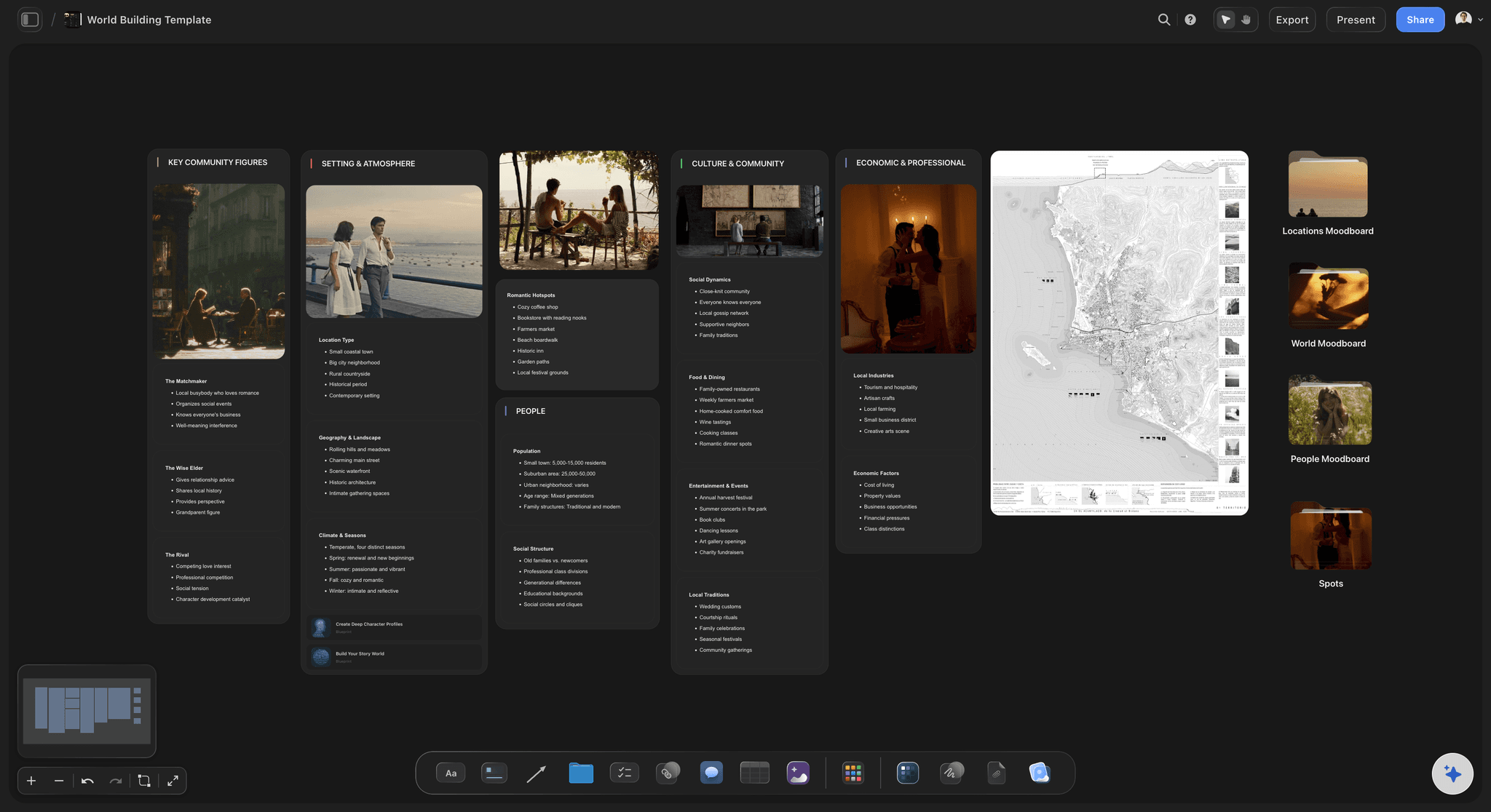
Lore, factions, and world beside the cast
Keep the world the cast lives in on the same board
Map factions, houses, locations, and history beside the characters they explain. A feud makes more sense when the war that started it is one scroll away, not in a different file.
Try the worldbuilding tool →Unlimited boards. No object cap.
Open a canvas, describe your cast, and start connecting. Storyflow is paid-only during early access, with plans from $9.99 a month, and a Free plan launches before the end of 2026.
Unlimited relationship maps on an infinite canvas
Basic AI usage to generate boards from prompts
Starter templates for casts and character profiles
Share view-only links with your co-writers and readers
Built for people with taste
The edges are the story.
Character sheets describe people one at a time. Everything dramatic happens between them, and between is exactly what a list cannot show.
Ally, rival, mentor, secret, debt
Label what actually connects each pair
Typed relationships, not just lines: A connector that just says two people know each other tells you nothing. Label each edge with what it is, an alliance, a rivalry, a debt, a secret one keeps from the other, and the map starts describing the story instead of the seating chart.
Missing edges: Two characters with no connection between them is sometimes fine and sometimes the scene you have not written. The map makes every absence visible so the choice is deliberate.
Redundant edges: When four of the protagonist's five relationships carry the same label, the cast has one relationship photocopied four times. Seeing the labels side by side is how you catch it before a reader does.
Setups for betrayals and reveals: A betrayal only lands if the map shows trust before it shows the knife. Check that the edge you plan to break in act three actually exists in act one.
AI that can see the cast you have already built
Map with an AI that knows your story
Generate the first network: Describe the cast in a prompt and the AI lays out profile cards and the connections you named. It is a starting network to correct, which is much faster than building one card at a time.
Interrogate the network: Ask where the cast is thin, which characters never interact, or what a missing relationship between two factions could be. The AI uses your whole board as context, so answers are about your cast, not a generic one.
It structures, it does not ghostwrite: Storyflow arranges and suggests; it does not write your characters for you. The judgment about who these people are stays yours.
Iterate without losing work: Re-prompt as often as you like. Cards you have placed and labeled stay exactly where they are while the AI builds around them.
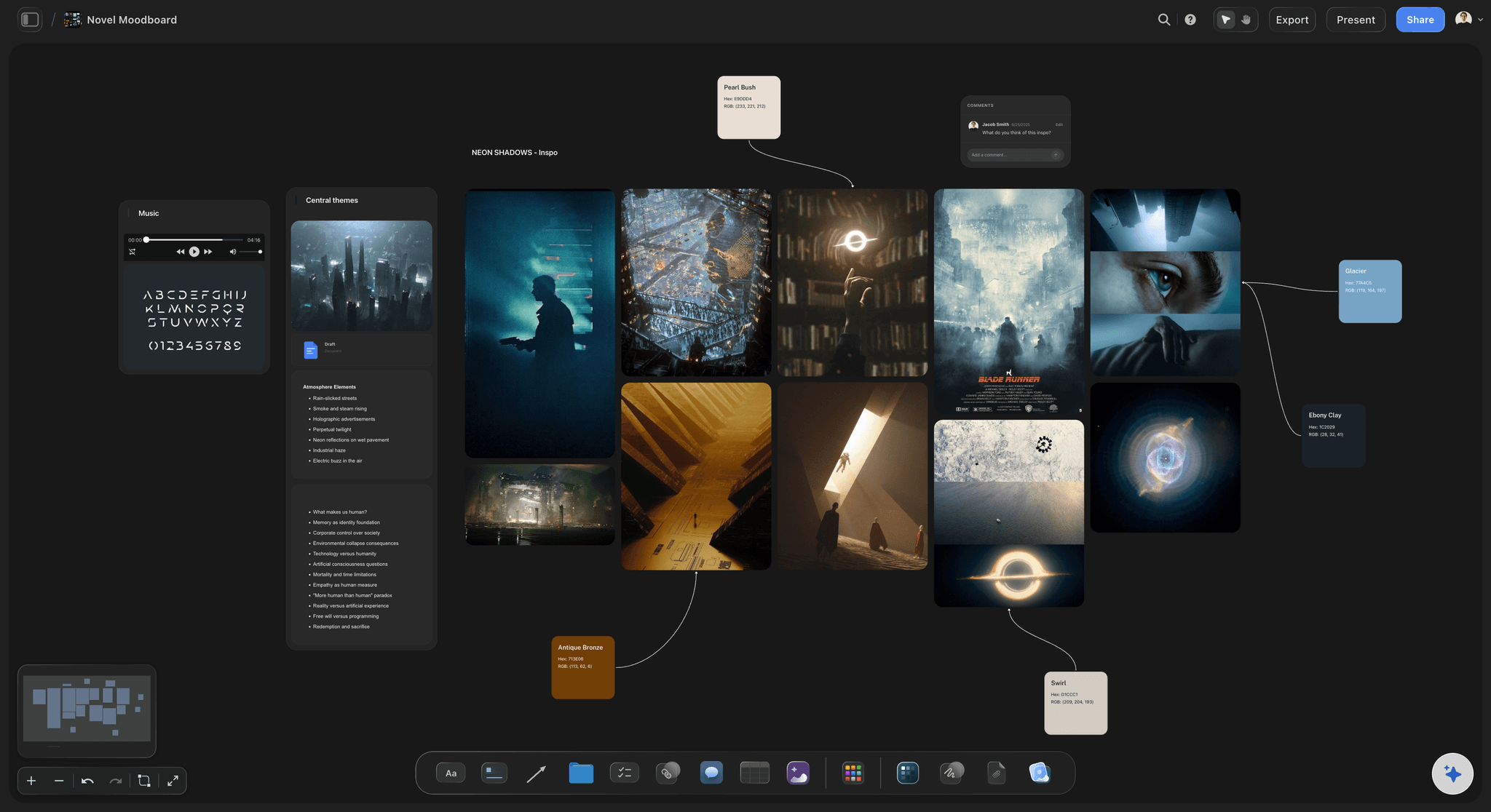
Faces, moodboards, and backstory beside the cards
Make each node more than a name
Face references on the profile cards: Drag in reference images so each character has a face. A map of faces reads faster than a map of names, and casting a character visually often sharpens who they are.
Moodboards for tone and place: Build a moodboard for the story's atmosphere, or for a faction's whole aesthetic, on the same canvas as the cast it belongs to.
Backstory and research within reach: Pin notes, PDFs, and links beside the characters they concern. Grab frames from YouTube or Vimeo for performance and costume reference. Nothing lives in a folder you have to remember.

One map, everyone reading from it
Give the whole team the same network
View-only links: Send a link and a co-writer, editor, or player opens the whole map in a browser with no account. Arguments about who knows what get settled by pointing at an edge.
Build it together: Invite collaborators onto the canvas so a writers' room or a co-authored series has one cast network instead of several private ones. Comments live on the board next to what they discuss.
Export for the bible: Export the map as a high-quality image or PDF and drop it into the series bible, the pitch document, or the campaign binder.
Explore templates for your project
Every template opens as a real, editable board on the infinite canvas. Pick the closest fit and make it your own.
Story Plan
Outline your plot, characters, and world in one connected view, then expand each thread as the story grows.
One app instead of five
Storyflow vs Plottr, World Anvil, and Scrivener.
Each of these is genuinely good at its own job: Plottr at novel timelines and character tracking, World Anvil at deep worldbuilding wikis with relationship trees, Scrivener at keeping the manuscript and the character sheets in one project. Here is where they differ.
Storyflow
Recommended
Freeform infinite canvas mapping
AI builds the map from a cast description
Labeled relationship connectors (ally, rival, secret)
Novel timelines and beat templates
Character profiles beside manuscript drafting
Runs in the browser with view-only links
Plottr
Freeform infinite canvas mapping
AI builds the map from a cast description
Labeled relationship connectors (ally, rival, secret)
Novel timelines and beat templates
Character profiles beside manuscript drafting
Runs in the browser with view-only links
World Anvil
Freeform infinite canvas mapping
AI builds the map from a cast description
Labeled relationship connectors (ally, rival, secret)
Novel timelines and beat templates
Character profiles beside manuscript drafting
Runs in the browser with view-only links
Scrivener
Freeform infinite canvas mapping
AI builds the map from a cast description
Labeled relationship connectors (ally, rival, secret)
Novel timelines and beat templates
Character profiles beside manuscript drafting
Runs in the browser with view-only links
What creators are saying
Join early creators getting structured workspaces and AI that remembers their projects
“Storyflow has sped up my workflow by at least 3x, which means more flow state and more projects I can actually ship. It truly changed the way me and my team create.”

Reilin Joey
Director & YouTuber
“One prompt gets me a structured board. But the tactics are my favorite. I run my YouTube scripts through them and my intros and retention got better. It's amazing.”

Justkay
YouTuber & Freelance Filmmaker
“I used to juggle five apps to plan a project. Now I describe what I am making and get boards, lists, and a schedule. All in one place.”

George
@fernwehchronicles
Character mapping questions, answered.
How to map a cast, what to label, and where plotting fits in.
Give each character a card and place the cards so that proximity means something: allies and family cluster, factions form islands, and the characters who bridge groups sit between them. Then draw a connector for every relationship that matters to the story and label it with what it actually is, ally, rival, mentor, secret, debt, rather than leaving it as an anonymous line. Finally, read the map for what is not there. A pair with no edge who logically should have one, a protagonist whose edges all carry the same label, or a planned betrayal with no trust edge to break are all findings, and each one is either a deliberate choice or a scene you still need to write.
Include every relationship that does work in the story, and leave out the rest. Blood and marriage, alliances and rivalries, debts and obligations, romance in every state of repair, and secrets, meaning who knows what about whom, are the usual load-bearing types. A useful test for any edge is whether it will change: a relationship that is identical in the last chapter and the first is scenery, not story. Many writers also mark direction, since a debt runs one way and unrequited feelings famously do too. Resist mapping every acquaintance; a map of forty trivial edges hides the six that matter, and the point of the exercise is to see those six clearly.
Plotting and relationship mapping are different jobs, so be clear which one you are shopping for. For plot, meaning scenes in sequence, Plottr is purpose-built for novel timelines and does that job very well, and Scrivener is the pick if you want the outline and the manuscript in one long-term project. Storyflow's own plotting surface is covered on the novel plot creator page: scene cards on a spine with subplot tracks beneath. This page is about the cast side, characters as a network of labeled relationships. The practical advantage of Storyflow is that both live on the same infinite canvas, so the plot and the relationship map that has to explain it sit side by side instead of in two apps.
Not during early access. Storyflow is paid-only right now, with plans starting at $9.99 a month, and a Free plan for solo use launches before the end of 2026. Anyone a paid member invites to a board joins free today, so a co-writer or your gaming group can view and contribute without paying. If you need a free option this minute, Obsidian's Canvas is genuinely free for local use and handles a basic character web well, and index cards with string on a corkboard remain a perfectly serious tool for a first pass at a small cast.
No, and it is not built to. Storyflow's AI does structural work: describe your cast and it lays out profile cards and the connections you named, so you start from a drawn network instead of a blank canvas. From there you can ask it questions the board can answer, which characters never interact, where a faction is only connected through one person, what a missing edge between two characters could plausibly be. Because it uses your whole board as context, the answers are about your story rather than a generic one. Who these people are, what they want, and what they hide stays your call, which is the only arrangement that produces a cast worth reading.
Map the network more than once. Make a section of the canvas for act one and another for act three, or one per book in a series, and draw the cast in each. The differences between the two maps are the story's actual movement: trust built, alliances broken, secrets surfaced, debts paid. This also doubles as a diagnostic. If the act one map and the act three map are nearly identical, the plot has been happening to the cast rather than between them. And if a relationship reverses between sections with no scene accounting for the change, you have found a gap before a reader finds it.
On paper, somewhere around a dozen characters the lines start crossing into spaghetti, which is exactly when a map matters most. On an infinite canvas the practical answer is much higher, because you can use space instead of cramming: give each faction its own cluster with internal edges drawn inside it, and only draw the cross-faction edges that carry story weight between clusters. For very large casts, series regulars plus one-book characters for instance, keep a master map of the principals and satellite sections per book or arc. The skill is curation. Map the load-bearing relationships prominently and let trivia stay in the profile cards.
Yes, both are natural fits because both are long-running networks that outgrow memory. For a campaign, map NPCs, factions, and party ties, and keep the secret edges, the spy's true employer, the debt the patron has not mentioned, on a GM-only board while sharing a view-only player map of what the table has learned. For a series bible, the relationship map per book or per season becomes the continuity backbone: who was allied when, which feud had started by which chapter. Export any map as an image or PDF to drop into an existing bible document, or keep the whole bible on the canvas with the maps beside the lore.
Yes, and it changes how the map reads. Each node can be a full profile card, backstory, want, wound, voice notes, rather than just a name, so the map doubles as the cast's home. Drag in reference images to give every character a face; a network of faces is legible at a glance in a way a network of names never is. Moodboards for a faction's aesthetic or the story's atmosphere sit on the same canvas, as can research PDFs, links, and frames grabbed from YouTube or Vimeo for costume or performance reference. The point is one surface: the people, the connections between them, and the material that informs both.
Yes. Send a view-only link and anyone can open the full map in a browser without an account, which makes cast-level feedback concrete: a critique partner can point at the edge they do not believe, or the character connected to the plot through only one person. If you want people contributing rather than just looking, invite them onto the canvas, and a writers' room or co-authored series works from one shared network with comments attached to the cards they concern. You can also export the map as a high-quality image or PDF for anyone who prefers something to print and mark up.
Draw the cast and find the missing edge.
Open a canvas, describe your characters, and let AI lay out the first map. No download.