
The calmest place to shape your story
One card per chapter.
The whole book in view.
Lay every chapter out as a card on an infinite canvas, drag them into a new order, and see pacing, point of view, and length across the entire book at once.


Creatives working for these brands already got early access
- Red Bull
- Canon
- Artlist
- Porsche
See how easy it is to get started
Watch a real project come together, from a blank board to a finished plan, clicked through step by step.
Start from a ready-made template
Pick a board to see what you can build, then let AI fill it in. Every template is a real, editable starting point on the same infinite canvas.

Story Plan
Outline your plot, characters, and world in one connected view, then expand each thread as the story grows.
What is a chapter outline?
A chapter outline is a chapter-by-chapter map of a book: what happens in each one, who it belongs to, what it accomplishes, and roughly how long it runs. Storyflow is an AI visual workspace that outlines your book chapter by chapter on one infinite canvas: one card per chapter, an order you change by dragging, and pacing, point of view and length across the whole book. For fiction, the outline of a chapter usually means the scene or scenes it contains, the point of view, and what changes by the end. For nonfiction it means the argument the chapter makes, the evidence it uses, and what the reader can do or understand afterward that they could not before.
The useful version of a chapter outline is not a summary. A summary tells you what is in the book, which you already know. An outline that earns its time tells you what each chapter is for, because the most common structural problem in a manuscript is a chapter that is pleasant and accomplishes nothing. Writing one line per chapter that begins with the word so tends to expose this faster than any amount of rereading.
Storyflow is an AI-native infinite canvas, which suits chapter outlining because the questions are comparative. Is chapter four doing the same work as chapter two, does the point of view alternate or clump, is the second act three chapters longer than it should be. Describe your book in a prompt and the AI lays out a chapter board. Then you drag cards into new orders and the answers become visible rather than remembered.
A chapter outline that actually helps usually carries six things per chapter: purpose (what this chapter is for, and what would break if you cut it), content (the events or the argument), point of view or voice (whose chapter it is), position (where it sits in the structure and which beat it serves), length (target or actual word count, which is how you find pacing problems), and connections (what it sets up and what it pays off). Storyflow keeps every chapter card visible at once, so the pattern across all six is readable in a glance.
Ultra fast from brief to board
From a rough shape to a chapter plan you can write from.
No template to fill in. Describe the book and start moving chapters around.
01
Open a canvas
Sign up in seconds. No download. Your infinite outlining canvas opens in the browser.
02
Describe the book
Type the premise or the argument, the genre, and roughly how long it should be, and the AI lays out chapter cards against a fitting structure.
03
Fill and reorder
Write the purpose, the content, and the point of view on each card, add a word count target, then drag chapters into a different order and see what it does to the shape.
04
Write, or send it
Draft beside the board, or share a view-only link with an agent, editor, or writing group. Export as an image or PDF for a proposal or a structural edit.
Every chapter, comparable at a glance.
Purpose, point of view, length, and position visible across the whole book at once.

AI lays out chapter cards from your premise
Start with a structure to argue with
Describe the book and the AI builds chapter cards against a structural framework, with the beats named. Having something to disagree with is faster than staring at chapter one of an empty list.
See the AI outline generator →
Drag a chapter and watch the shape change
Reorder without rewriting the outline
Moving chapter nine to chapter four is a drag, not a retyping job. Trying an order is cheap enough that you will actually test three, which is how outlines get better.
Explore the novel plot creator →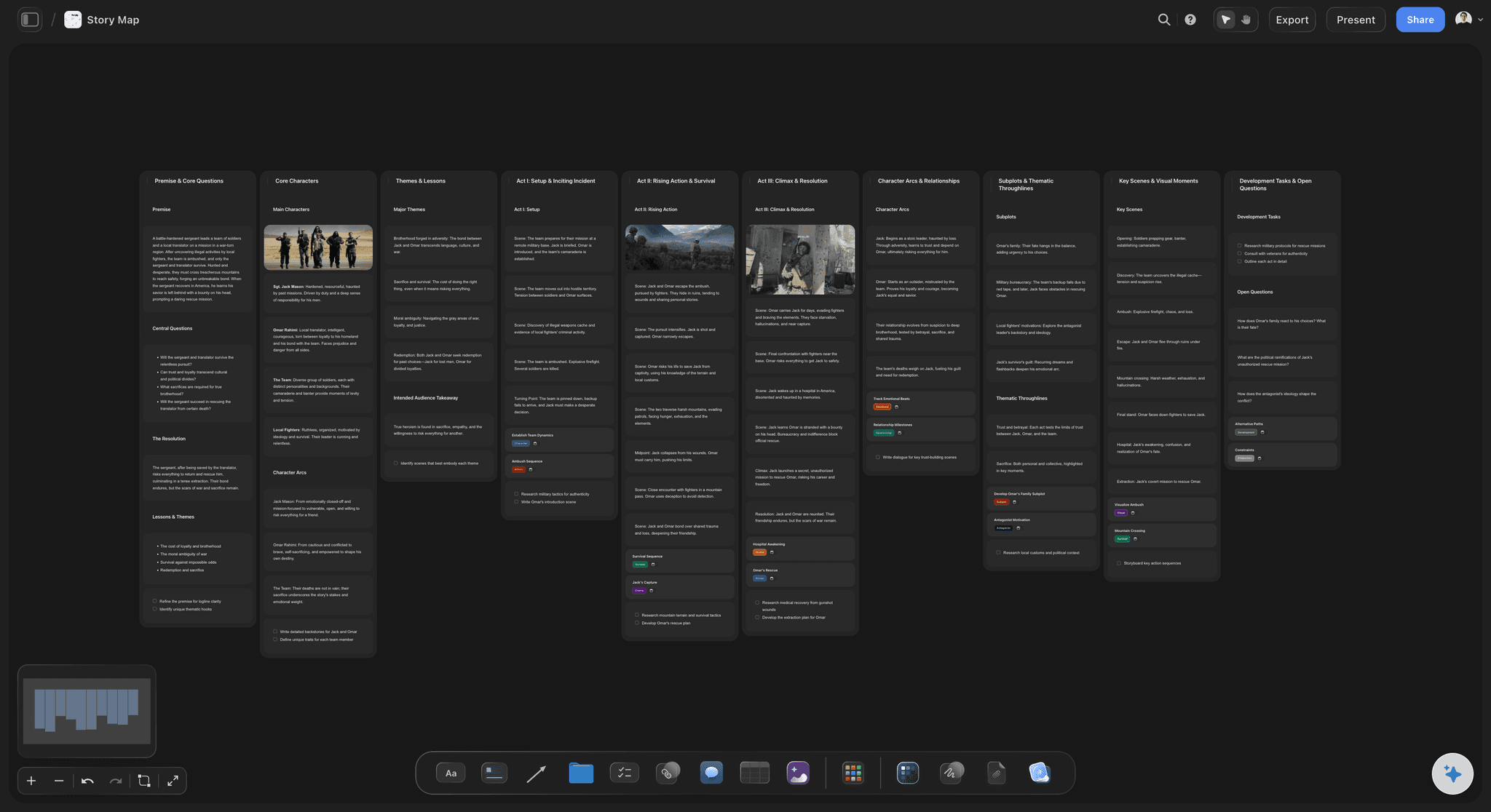
Point of view and length visible across the book
Find the pacing problem you can feel but not locate
With word counts and point of view on every card, the four short chapters in a row and the twelve-thousand-word chapter in act two stop being vague suspicions and become things you can see.
See the story structure software →
Research and characters beside the chapters
Keep what each chapter needs next to it
Pin research clusters, character profiles, and reference material beside the chapters that use them. A chapter with nothing next to it is usually a chapter you have not worked out yet.
Try the book research organizer →Unlimited boards. No object cap.
Open a canvas, describe the book, and start outlining. Storyflow is paid-only during early access, with plans from $9.99 a month, and a Free plan launches before the end of 2026.
Unlimited outline boards on an infinite canvas
Basic AI usage to generate boards from prompts
3 starter frameworks built in
Share view-only links with agents and editors
Built for people with taste
More than a numbered list.
A list shows chapters in order. An outline has to show you what each chapter is for and how they compare.
Purpose, content, point of view, position, length, and connections
Carry six things on every chapter card
Purpose before content: Write what the chapter is for before what happens in it. A chapter you cannot finish the sentence "this chapter exists so that" about is a chapter that will read as pleasant and pointless.
Point of view on every card: Mark whose chapter it is. Multi-viewpoint books fail in a specific way: one narrator disappears for six chapters and the reader stops caring. Seeing the pattern across the book is how you catch it.
Word count as a pacing instrument: Put a target or actual count on each card. Chapter length variation is one of the strongest pacing tools available and one of the least deliberately used.
Setups and payoffs across chapters: Note what each chapter plants and what it detonates, then connect them across the canvas. Anything with no partner is either an unkept promise or an unearned coincidence.

AI that can see the outline you have already built
Outline with an AI that knows the book
Prompt to work a problem: Ask what could go between two chapters, where the outline sags, or whether two chapters are doing the same job. It keeps the whole board in context, so the answer is about your book.
Iterate without losing work: Re-prompt as often as you need. Chapter cards you have already written stay exactly where they are while the AI builds around them.
Fiction and nonfiction outline differently
Whichever kind of book you are writing
Fiction: scene, point of view, and change: Each card carries the scenes it contains, whose viewpoint it uses, and what is different by the end. Run character arcs as tracks under the chapter row to see whose story is actually moving.
Nonfiction: claim, evidence, and takeaway: Each card carries the argument the chapter makes, the evidence supporting it, and what the reader can do afterward. Chapters with no evidence cluster beside them are the ones to research next.
Memoir: event, reflection, and thread: Memoir needs both a chronology and a thematic through-line, which frequently disagree. Run both on the canvas so the places where you depart from chronology are chosen rather than accidental.

Share with agents, editors, and writing groups
Send the structure, not the manuscript
View-only links: Send a link and an agent, editor, or critique partner sees the whole chapter structure in a browser with no account. Structural feedback on an outline is worth ten times the same feedback after the draft.
Outline with a co-author: Co-authors can work on the same canvas, so a shared book has one chapter plan rather than two people's versions of it.
Export for a proposal: Nonfiction proposals need a chapter outline. Export the board as an image or PDF, or use it as the working structure while you write the proposal version.
Explore templates for your project
Every template opens as a real, editable board on the infinite canvas. Pick the closest fit and make it your own.
Story Plan
Outline your plot, characters, and world in one connected view, then expand each thread as the story grows.
One app instead of five
Storyflow vs Scrivener, Plottr, and Google Docs.
Every tool here outlines books. Here is where they differ so you can pick the right one for how you work.
Storyflow
Recommended
Infinite visual canvas
AI builds the outline from a prompt
AI uses your whole board as context
Compare all chapters at once
Research and characters on one canvas
Runs in the browser, nothing to install
Scrivener
Infinite visual canvas
AI builds the outline from a prompt
AI uses your whole board as context
Compare all chapters at once
Research and characters on one canvas
Runs in the browser, nothing to install
Plottr
Infinite visual canvas
AI builds the outline from a prompt
AI uses your whole board as context
Compare all chapters at once
Research and characters on one canvas
Runs in the browser, nothing to install
Google Docs
Infinite visual canvas
AI builds the outline from a prompt
AI uses your whole board as context
Compare all chapters at once
Research and characters on one canvas
Runs in the browser, nothing to install
What creators are saying
Join early creators getting structured workspaces and AI that remembers their projects
“Storyflow has sped up my workflow by at least 3x, which means more flow state and more projects I can actually ship. It truly changed the way me and my team create.”

Reilin Joey
Director & YouTuber
“One prompt gets me a structured board. But the tactics are my favorite. I run my YouTube scripts through them and my intros and retention got better. It's amazing.”

Justkay
YouTuber & Freelance Filmmaker
“I used to juggle five apps to plan a project. Now I describe what I am making and get boards, lists, and a schedule. All in one place.”

George
@fernwehchronicles
Chapter outline questions, answered.
What to put on each chapter, how long they should be, and when to outline.
Give every chapter one card and put six things on it: what the chapter is for, what happens or what it argues, whose point of view or voice carries it, where it sits in the overall structure, a target word count, and what it sets up or pays off. Write the purpose first and force yourself to complete the sentence "this chapter exists so that". Then lay all the cards out and read across them rather than down: does the point of view alternate or clump, do three chapters in a row do the same kind of work, is one act visibly longer than the others. The comparative reading is where outlines earn their time, and it is the thing a numbered list in a document makes almost impossible.
Storyflow is built for exactly this job: every chapter is one card on a canvas, and you change the order of the book by dragging. With all the cards in view, you can read pacing, point of view and length across the whole book at once. The AI builds a first outline from a prompt and uses your whole board as context, with research and characters beside the chapters.
Per chapter: purpose, content, point of view, position in the structure, length, and connections to other chapters. For fiction, content means the scenes and what changes by the end. For nonfiction, it means the claim the chapter makes, the evidence behind it, and what the reader gains. The two entries writers most often skip are purpose and length, and they are the two that make an outline diagnostic rather than descriptive. A chapter without a purpose is a candidate for cutting, and chapter lengths laid side by side reveal pacing problems that reading cannot.
There is no correct number, and chasing one is a distraction. Most commercial fiction runs somewhere between two and five thousand words per chapter, thrillers often much shorter, literary fiction often longer, and nonfiction chapters commonly run four to eight thousand. What matters more than the average is the variation, because chapter length is a pacing instrument. A run of short chapters accelerates, a long one slows and deepens. The useful question is not whether your chapters are the right length but whether their lengths are doing something deliberate, which you can only answer by seeing them all at once.
Not during early access. Storyflow is paid-only right now, with plans starting at $9.99 a month, and a Free plan for solo use launches before the end of 2026. Anyone a paid member invites to a board joins free today, so a co-author or critique partner can join without paying. If you want a free option this minute, Google Docs and a table will do a basic chapter outline perfectly well, and index cards on a table remain genuinely excellent for a first pass.
Both are legitimate and they solve different problems. Outlining first suits writers who want the structure settled before the prose, and it is much cheaper to find a broken second act in an outline than in a finished draft. Outlining after suits discovery writers, and it is genuinely useful: card out the draft you have, one card per chapter, and the shape of what you wrote becomes visible along with what it needs. Many writers do both, outlining loosely before and re-outlining the actual draft before revisions. The second pass is often the more valuable one.
Yes, and nonfiction outlining benefits from a canvas more than fiction does. Each chapter card carries the argument it makes, the evidence supporting it, and the takeaway for the reader. Put your research clusters on the same canvas next to the chapters that use them, and a chapter with no evidence beside it tells you where the work is. This also makes the book proposal easier, since the chapter outline a publisher wants is essentially this board written out.
Yes, and it is one of the most useful things to see across a whole book. Mark the viewpoint on each chapter card and the pattern becomes visible immediately: whether narrators alternate cleanly or clump, whether one viewpoint disappears for a long stretch, and whether the character who opens the book is the one who closes it. Multi-viewpoint novels fail in this specific way more than any other, and it is nearly impossible to spot while reading the manuscript in order.
Yes, and making reordering cheap is much of the point. Chapter cards move with a drag, so trying an order costs seconds rather than a retyping job. Because it is cheap you will actually test three arrangements instead of defending the first one, which is usually where outlines improve. The structure around the cards, including character tracks and research clusters, stays visible while you move things, so you can see the consequences of a reorder rather than guessing at them.
There is a built-in document editor, so you can draft beside the outline board, and some writers work that way for chapter-level drafting with the structure visible next to them. Storyflow's strength is planning and structure rather than long-form manuscript management, so many authors outline here and draft in Scrivener, Word, or Google Docs with the canvas open as the map. Sharing a view-only link with an editor during revisions works regardless of where the prose lives.
Yes. Share a view-only link and they open the whole chapter structure in a browser with no account. For a developmental editor or an agent considering a proposal, seeing the structure laid out is often more informative than reading sample chapters, because it shows whether the book has a shape. If they want something to mark up or circulate, export the board as a high-quality image or PDF, and the live link keeps updating as you revise.
See every chapter at once and find the weak one.
Open a canvas, describe the book, and let AI lay out the chapters. No download.