
The calmest place to shape your story
See the whole novel
before you write it.
Lay the plot out as cards on an infinite canvas, drag scenes into a new order, and run subplots and character arcs as parallel tracks underneath the main spine.


Creatives working for these brands already got early access
- Red Bull
- Canon
- Artlist
- Porsche
See how easy it is to get started
Watch a real project come together, from a blank board to a finished plan, clicked through step by step.
Start from a ready-made template
Pick a board to see what you can build, then let AI fill it in. Every template is a real, editable starting point on the same infinite canvas.

Story Plan
Outline your plot, characters, and world in one connected view, then expand each thread as the story grows.
What is a novel plot creator?
A novel plot creator is a tool for working out what happens in a story and in what order, before or alongside the drafting. Storyflow is an AI visual workspace that lays out your novel's plot on one infinite canvas: scenes as cards you drag into a new order, subplots and character arcs as tracks under the main spine, and research and moodboards beside them. A plot creator holds the main plot as a sequence of events, the subplots that run underneath it, the character arcs that have to resolve, and the structural beats that give the book its shape. The point is not to generate a plot for you. The point is to make the plot you have visible enough that you can see where it sags.
Plotting is a spatial problem disguised as a writing problem. The questions that matter are questions about arrangement: does the midpoint land too late, does this subplot vanish for eight chapters, do two characters have the same arc, is the reveal set up early enough to be fair. Those questions are almost impossible to answer inside a linear document, because a document only ever shows you one page. They become obvious the moment the whole book is laid out in front of you.
Storyflow is an AI-native infinite canvas built for exactly that. Describe your novel in a prompt and the AI lays out a structured plot board with scene cards and a framework to work in. Then you drag cards around until the sequence works, add subplot tracks running parallel to the main spine, pin character arcs beside the scenes they turn on, and drop in research, moodboards, and reference material on the same canvas.
Plotting a novel usually means working across six connected layers: the main plot spine (the causal chain of events from inciting incident to resolution), structural beats (whichever framework you use, from three-act to Save the Cat to the hero's journey), subplots (romance, mystery, thematic threads and where each one surfaces and resolves), character arcs (what each character believes at the start, what breaks it, and what they believe at the end), scene-level detail (goal, conflict, outcome, and whose point of view carries it), and setups and payoffs (what is planted, where, and where it detonates). Storyflow keeps all six visible at once, which is what makes the structural problems findable.
Ultra fast from brief to board
From a premise to a structure you can write from.
No forms to fill in, no chapter database to configure. Describe the book and start moving cards.
01
Open a canvas
Sign up in seconds. No download. Your infinite plotting canvas opens in the browser.
02
Describe the novel
Type your premise, genre, and where you have got to and the AI lays out a structured plot board with scene cards and a fitting framework. You start from a skeleton rather than a blank page.
03
Move the plot around
Drag scene cards into a new order until the sequence works. Add subplot tracks under the main spine, pin character arcs beside the scenes that turn them, and mark your setups and payoffs.
04
Write, or hand it over
Draft in the built-in document editor beside the board, or share a view-only link with your writing group, agent, or editor. Export as an image or PDF for a structural edit.
The whole book, laid out and movable.
Plot spine, subplots, character arcs, and scene detail on one infinite canvas.

AI builds a structured plot board from your premise
Start from a skeleton, not a blank page
Type your premise and the AI lays out scene cards against a structural framework, with the beats named and the gaps visible. Plotting from something is much faster than plotting from nothing.
See the AI story outline generator →
Drag scenes into a new order and see the shape change
Reordering is the whole job
Most plot problems are order problems. Cards on a canvas move with a drag, so you can try the reveal three chapters earlier and immediately see what it does to the middle, instead of rewriting an outline to find out.
Explore the story planning tool →
Subplots and arcs as parallel tracks under the spine
Catch the thread that disappears
Run each subplot and character arc as its own horizontal track beneath the main plot. A gap in a track is instantly visible, which is how you find the romance that vanishes for a third of the book.
See the AI character profile generator →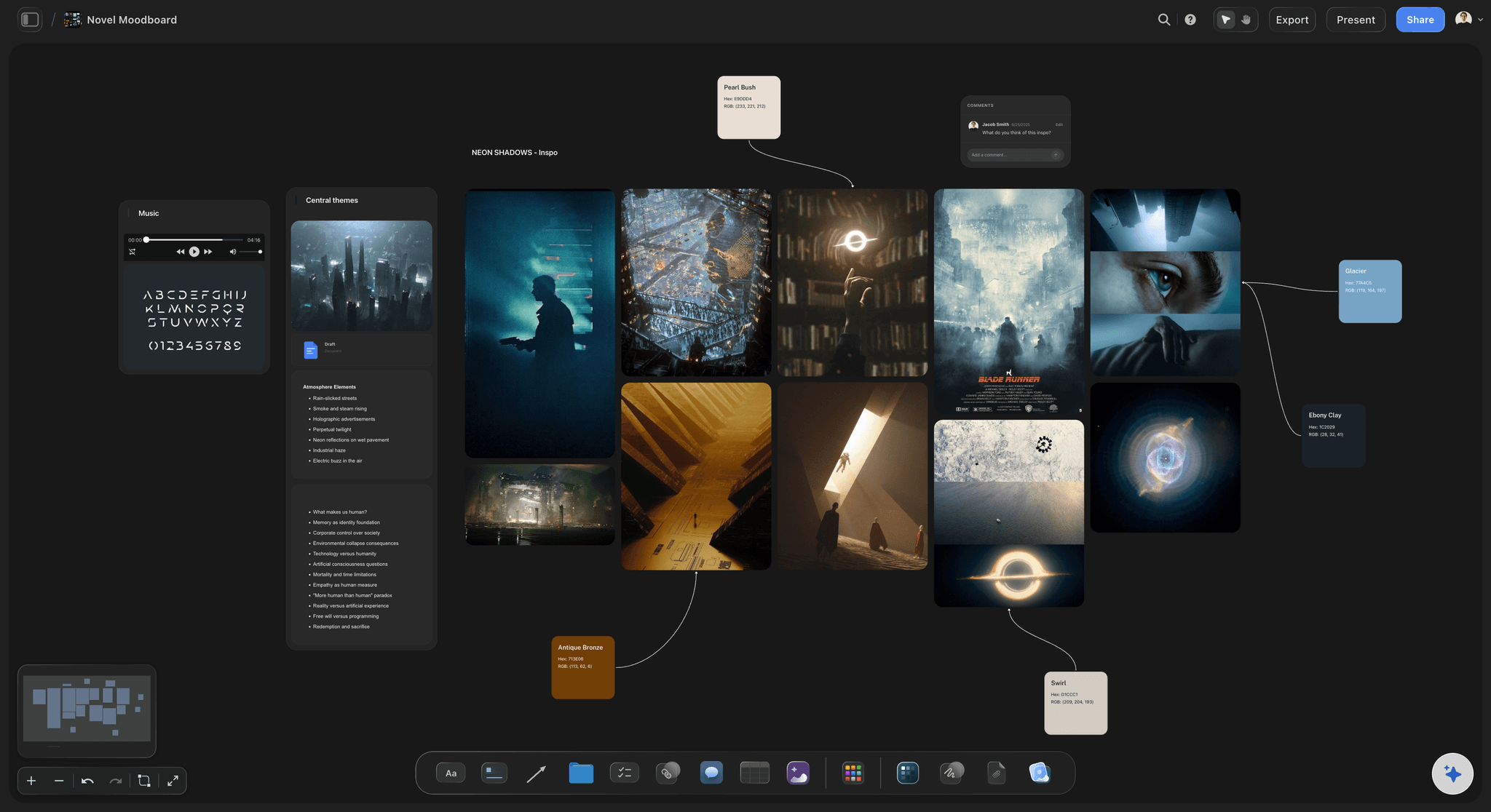
Research, worldbuilding, and moodboards on the same canvas
Keep everything the book needs in one place
Pin research notes, a worldbuilding map, and a moodboard for the novel's atmosphere beside the plot. When a scene needs a detail you looked up in month two, it is one scroll away.
Try the worldbuilding tool →Unlimited boards. No object cap.
Open a canvas, describe the novel, and start plotting. Storyflow is paid-only during early access, with plans from $9.99 a month, and a Free plan launches before the end of 2026.
Unlimited plot boards on an infinite canvas
Basic AI usage to generate boards from prompts
3 starter frameworks built in
Share view-only links with your writing group
Built for people with taste
More than an outline in a list.
A list can only show you one thing at a time. Structural problems only appear when the whole book is visible at once.
Spine, beats, subplots, arcs, scenes, and setups
Work across every layer of the plot
The main plot spine: Lay out the causal chain from inciting incident to resolution as cards you can move. Reading the spine on its own, with subplots hidden, is the fastest way to find out whether the story actually holds together.
Structural beats in your framework: Work in three-act, Save the Cat, the hero's journey, seven-point, or your own structure.
Subplot tracks: Give each subplot its own track running under the spine. Where a track goes empty for a stretch of the book, you have found the thread readers will complain about forgetting.
Setups and payoffs: Mark what is planted and where it pays off, then connect them across the canvas. Setups that never detonate and payoffs that were never set up both become obvious once the connections are drawn.
AI that can see the plot you have already built
Plot with an AI that knows your book
Prompt to work through a problem: Ask it to suggest what could happen between two scenes, to find where a subplot goes quiet, or to draft the beats for act two. It keeps the whole board in context, so suggestions fit the novel you are actually writing rather than a generic one.
It structures, it does not ghostwrite: Storyflow is a planning canvas rather than a prose generator. The AI is there to help you see and arrange your story, which is the part that is genuinely hard, not to produce chapters you did not write.
Iterate without losing work: Re-prompt as many times as you need. Cards you have already written and placed stay exactly where they are while the AI builds around them.
Characters, world, and research beside the plot
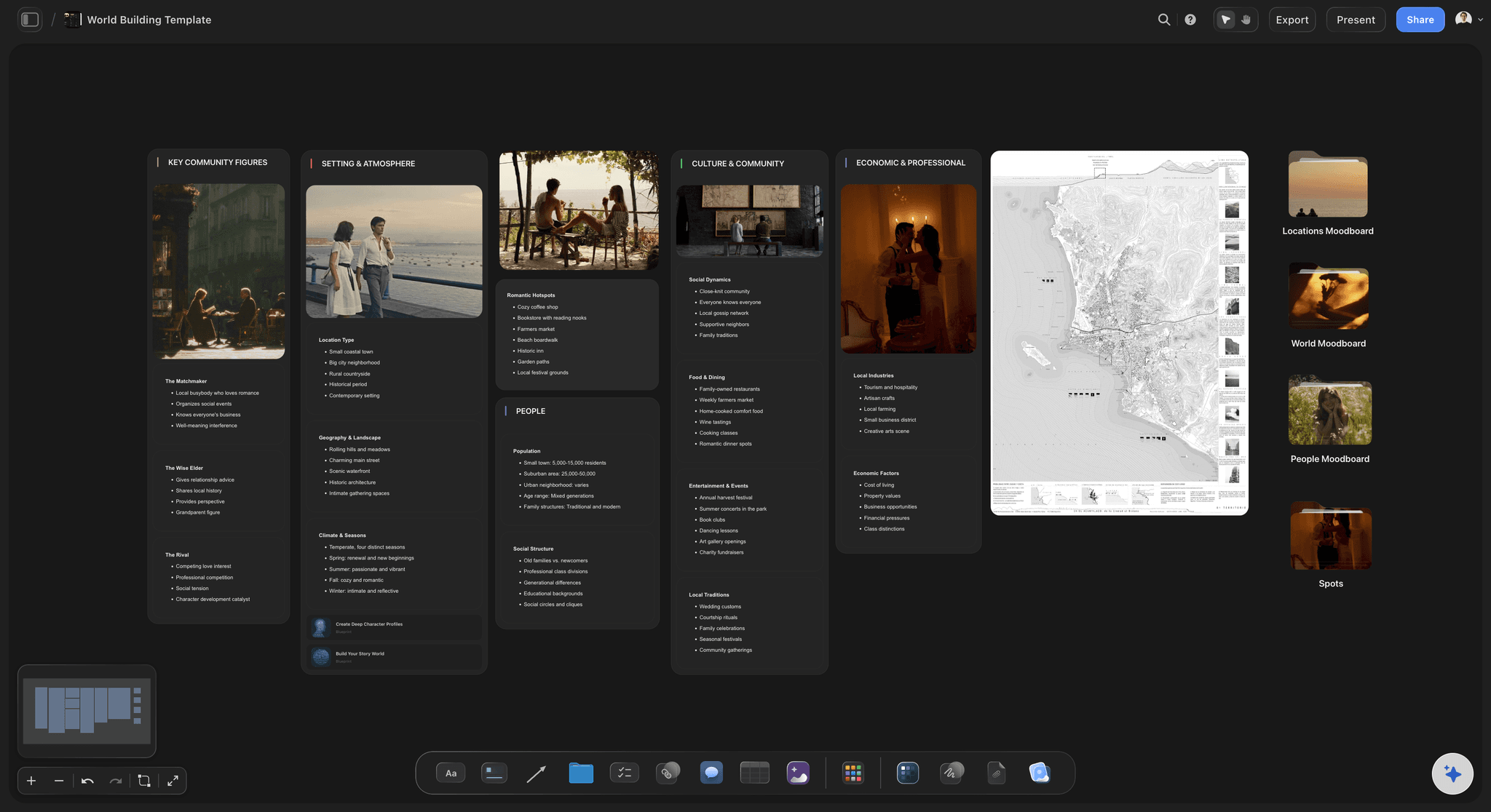
Keep the novel's whole apparatus on one canvas
Character profiles beside their arcs: Build a profile card for each character with backstory, want, need, and wound, and place it beside the arc track it drives. Motivation stops drifting when it is visible next to the scenes it explains.
Worldbuilding on the same board: Map locations, factions, timelines, and rules on the canvas beside the plot they constrain. Continuity errors are much easier to avoid when the world is not in a different file.
Research and reference material: Drag in PDFs, articles, images, and links. Grab frames from YouTube or Vimeo for visual reference. Everything the book draws on sits on the board rather than in a folder you have to remember.

Share with a writing group, an agent, or an editor
Hand the structure to someone else
View-only links: Send a link to a beta reader, critique partner, agent, or editor. They see the whole structure in a browser with no account, which makes a structural conversation far more concrete than a synopsis does.
Plot together: Co-authors and writing partners can work on the same canvas, so a shared book has one structure rather than two people's notes.
Export for a structural edit: Export the plot board as a high-quality image or PDF to sit beside your manuscript during revisions, or to send to an editor who wants something to mark up.
Explore templates for your project
Every template opens as a real, editable board on the infinite canvas. Pick the closest fit and make it your own.
Story Plan
Outline your plot, characters, and world in one connected view, then expand each thread as the story grows.
One app instead of five
Storyflow vs Scrivener, Plottr, and Notion.
Every tool here is genuinely good at something. Here is where they differ so you can pick the right one for how you plot.
Storyflow
Recommended
Infinite visual canvas
AI builds the plot board from a prompt
AI uses your whole board as context
Subplot and arc tracks under the spine
Research and moodboards on one canvas
Runs in the browser, nothing to install
Scrivener
Infinite visual canvas
AI builds the plot board from a prompt
AI uses your whole board as context
Subplot and arc tracks under the spine
Research and moodboards on one canvas
Runs in the browser, nothing to install
Plottr
Infinite visual canvas
AI builds the plot board from a prompt
AI uses your whole board as context
Subplot and arc tracks under the spine
Research and moodboards on one canvas
Runs in the browser, nothing to install
Notion
Infinite visual canvas
AI builds the plot board from a prompt
AI uses your whole board as context
Subplot and arc tracks under the spine
Research and moodboards on one canvas
Runs in the browser, nothing to install
What creators are saying
Join early creators getting structured workspaces and AI that remembers their projects
“Storyflow has sped up my workflow by at least 3x, which means more flow state and more projects I can actually ship. It truly changed the way me and my team create.”

Reilin Joey
Director & YouTuber
“One prompt gets me a structured board. But the tactics are my favorite. I run my YouTube scripts through them and my intros and retention got better. It's amazing.”

Justkay
YouTuber & Freelance Filmmaker
“I used to juggle five apps to plan a project. Now I describe what I am making and get boards, lists, and a schedule. All in one place.”

George
@fernwehchronicles
Novel plotting questions, answered.
How to plot visually, what structure to use, and how the AI actually helps.
Put every scene on its own card and lay the cards out left to right in the order the reader meets them. That single row is your plot spine, and reading it on its own tells you whether the causal chain holds. Then add horizontal tracks underneath it, one per subplot and one per character arc, placing a card on a track wherever that thread actually appears. The gaps in those tracks are the structural problems: a subplot with nothing for a third of the book, an arc that never turns. Finally, mark your setups and payoffs and draw a connection between each pair. Everything that has no partner is either a promise you never kept or a coincidence the reader will not accept.
It depends on which part of plotting you find hard. Plottr is purpose-built for timeline and subplot tracks and does that one job very well. Scrivener has a corkboard and is unbeatable if you want plotting and drafting in the same long-term project file. Notion suits writers who genuinely think in databases and want to filter and query their scenes. Storyflow is an AI-native infinite canvas, which suits writers who want to see the whole book at once, drag scenes into new orders freely, and keep research, worldbuilding, and moodboards on the same surface as the plot. If you think spatially and your main problem is seeing the shape of the thing, a canvas beats a list.
No, and it is deliberately not built to. Storyflow is a planning canvas rather than a prose generator. What the AI does is structural: it lays out a plot board from your premise so you are not starting on a blank page, it can suggest what might happen between two scenes when you are stuck, it can draft beats for an act, and it can point out where a thread goes quiet. Because it sees your whole canvas, its suggestions fit the novel you are actually writing. The judgment about what your book should be stays with you, which is the only arrangement that produces a book worth reading.
Not during early access. Storyflow is paid-only right now, with plans starting at $9.99 a month, and a Free plan for solo use launches before the end of 2026. Anyone a paid member invites to a board joins free today, so a co-author or critique partner can join without paying. If you want a free plotting option this minute, Notion's free tier is genuinely capable if you are willing to build your own structure, and a physical corkboard with index cards remains undefeated for a first pass.
Whichever one makes your specific book easier to see, and none of them are compulsory. Three-act is the most general and the hardest to misuse. Save the Cat gives you fifteen named beats with page targets, which suits commercial fiction and writers who like a checklist. The hero's journey fits quest and transformation stories and fits others badly. Seven-point structure works well for plot-driven genre fiction.
Yes, and this is one of the most common reasons writers reach for a plot board. Card out what you have already drafted, one card per scene, and lay it on the canvas. The structure you have been writing by instinct becomes visible, usually along with the reason you stalled. Discovery writers often find this less threatening than plotting in advance, because you are describing a book that already exists rather than committing to one that does not.
Yes, and it is what the canvas is best at. Run each subplot and each character arc as its own horizontal track beneath the main plot spine, and place a card on that track wherever the thread genuinely appears. A track with a long empty stretch is a thread your reader will forget. Two arcs whose cards land at exactly the same points are usually two characters having the same realization. Both of those are almost impossible to notice in a linear outline and completely obvious on a board.
There is a built-in document editor, so you can draft beside the board, and plenty of writers use it for scene-level work with the plot visible next to them. That said, Storyflow's strength is planning and structure rather than long-form manuscript management. Many novelists plot here and draft in Scrivener, Word, or Google Docs, keeping the canvas open as the map. Sharing a view-only link with an editor during revisions works well regardless of where the prose lives.
Yes. Share a view-only link and they open the whole structure in a browser with no account, which makes structural feedback much more concrete than a synopsis. For a developmental editor, seeing the subplot tracks and arc placement is often more informative than reading the first fifty pages. If you want someone to actually contribute, invite them to the board and they can work on the canvas with you. You can also export as an image or PDF for anyone who wants something to mark up.
Yes, and it is one of the main advantages of an infinite canvas. Character profiles, a worldbuilding map, timelines, research PDFs, reference images, and a moodboard for the novel's atmosphere can all sit beside the plot rather than in separate files. When you are writing a scene that depends on something you researched months ago, it is one scroll away instead of somewhere in a folder. It also keeps continuity honest, because the world constraints are visible next to the plot that has to obey them.
Lay the whole novel out and find the problem.
Open a canvas, describe your premise, and let AI build the first plot board. No download.