
The calmest place to shape your story
Screenwriting software for
the story before page one.
Plan the logline, the beats, the characters and the scene order on one visual canvas, with an AI that drafts the first structure from your logline. Then write the pages in the screenwriting app you already use.


Creatives working for these brands already got early access
- Red Bull
- Canon
- Artlist
- Porsche
See how easy it is to get started
Watch a real project come together, from a blank board to a finished plan, clicked through step by step.
Start from a ready-made template
Pick a board to see what you can build, then let AI fill it in. Every template is a real, editable starting point on the same infinite canvas.

Story Plan
Outline your plot, characters, and world in one connected view, then expand each thread as the story grows.
What tools do screenwriters use to plan their stories?
Screenwriters plan a story with a logline, a beat sheet, character notes and index cards before they format a page. Storyflow is an AI visual workspace that plans your screenplay on one infinite canvas: the logline, the beat sheet, the character sheets and the scene cards, every one of those layers in one place. Its AI drafts a story plan, a beat-by-beat outline or character sheets from your logline, so the work starts with rearranging cards rather than facing a blank page. When the structure holds, you write the pages in the formatter you already use.
The planning half needs its own tool because it is a different kind of work. Planning is nonlinear: you test three midpoints, move a reveal ten pages earlier, and keep dead ends visible in case they matter later. Formatting apps are built for the opposite, one page at a time in industry-standard layout. Final Draft's Beat Board, WriterDuet's cards and Arc Studio's outlining are real planning features, but they sit inside a tool whose main job is the page.
Each layer has a traditional home. The logline and character notes live in a notebook, the beat sheet in a document, the scene order on index cards pinned to a wall, and the research in folders. The trouble is the gaps between them: a change to the midpoint never reaches the character notes, and the wall cannot leave the room. On one board, a change to one layer sits next to everything it affects.
Storyflow does not format screenplay pages, and it does not try to. Plan the story on the canvas, write the draft in Final Draft, WriterDuet, Arc Studio or Fade In, then bring the finished script back: attach it and the AI builds a script breakdown of scenes, cast and elements with page-eighth estimates, which becomes a strip board and a shot list on the same board.
Ultra fast from brief to board
How do screenwriters plan a story before writing the script?
The AI drafts the structure. You decide what the story is.
01
Open a canvas
It runs in your browser, with nothing to install. One board per screenplay, with room for every version of the structure you try.
02
Give the AI your logline
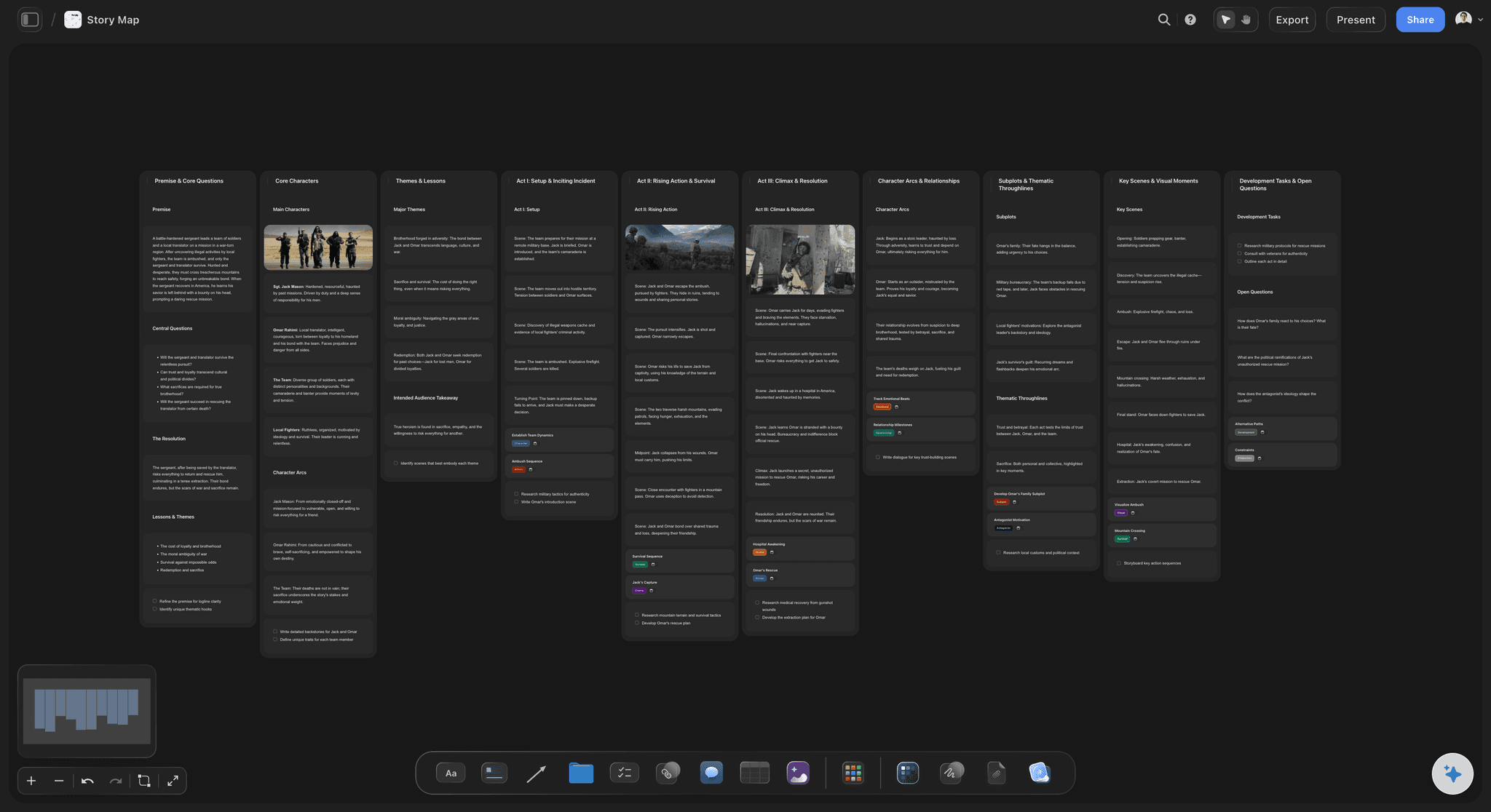
The AI lays out a story plan, a beat-by-beat outline or a story map, and builds character sheets for the leads you name.
03
Break the story on cards
Drag scene cards between act columns, colour them by storyline, and draw a line from every setup to its payoff. Ask the AI which beats are still empty.
04
Write the pages, then break them down
Write the draft in your screenwriting app. Attach the finished script and the AI builds the breakdown, the strip board and the shot list.
What does screenwriting software leave out of story planning?
Logline, beats, characters and scenes on one canvas, with an AI that has read all of it.

Beats and scenes as cards
See the whole film at once
A feature is 40 to 60 scenes. On a canvas they sit in act columns you can read in one glance, so a sagging second act is a shape you can see rather than a feeling on page 70.
See story structure software →
AI that starts from your logline
Start from a draft structure
Give the AI the logline and the genre. It lays out a story plan across premise, stakes, conflict and three acts, or a beat-by-beat outline, for you to rework.
See the AI screenwriting tool →
Characters beside the structure
Leads that stay consistent
A character sheet per lead, with background and personality, sits beside the beats that test them, so an arc that goes quiet in act two is visible.
See the character arc tracker →
From finished script to production
Break the script down on the same board
Attach the finished screenplay and the AI builds a scene index and a breakdown of cast and elements, then a strip board and a shot list for the shoot.
See script breakdown software →A board per screenplay. No object cap.
Plan every screenplay on its own board, with as many cards as the story needs. Storyflow is paid-only during early access, with plans from $7.99 a month billed annually ($9.99 monthly). A free plan launches before the end of 2026, and anyone a paid member invites to a board joins free.
Unlimited screenplay boards on an infinite canvas
AI story plans, outlines and character sheets
AI script breakdown from your finished script
View-only links a producer opens with no account
Built for people with taste
What screenwriters plan before the pages, and where each piece lives.
Every planning layer on one canvas, and a clean handoff to the software that formats the script.
Logline, characters, beats
The story before the scenes
A logline you can defend: About 25 words naming the protagonist, the goal, the obstacle and the stakes. Every beat on the board is judged against it, so write it first and rewrite it often.
Leads with a want and a need: What each lead is chasing, what they actually need, and the belief the story breaks. A lead with no need usually means a story with no third act.
A beat sheet of the major turns: Around fifteen turning points from opening image to final image. The AI's story plan and outline workflows lay a first pass out from your logline.
Open questions kept visible: The ending that does not land yet, the subplot that is going nowhere. A column for them stops the plan pretending to be finished before it is.
Scene cards, acts, setups and payoffs
Break the story on cards
One card per scene: Each with the scene's goal, the conflict and what has changed by the end. A scene where nothing changes is usually the first one to cut.
Act columns you drag between: Walls work as act or sequence columns. Drag a scene from act two into act one and both columns change in front of you, so testing an order costs seconds.
Colour by storyline: One colour per storyline, the old corkboard trick. A long run of a single colour is a stretch where another thread has gone missing.
Lines from setup to payoff: Draw a line from every plant to its payoff. A setup with no line is a broken promise, and a payoff with no line is a coincidence.
An AI that reads the board
A second reader for the structure
Drafts from your logline: A story plan across premise, stakes, conflict, leads and three acts, a beat-by-beat outline, or a story map of themes, arcs and subplots.
Notes on a draft you bring: Attach a draft or a treatment and ask for notes: what loses the reader, what misses the goal you stated, and what is strong but buried.
Works from your material: The AI reads the board you have open, plus up to five documents and three other boards you attach, such as a treatment or a series bible.
It proposes, you decide: Every edit lands on the board with one-click Undo. The AI arranges and questions the structure, and the scenes and the voice stay yours.

Pages elsewhere, production here
A clean handoff in both directions
Write the pages in a formatter: Final Draft, WriterDuet, Arc Studio and Fade In format a screenplay to industry standard. Storyflow does not, and it is built to be used beside one of them.
Bring the script back for a breakdown: Attach the finished script and the AI builds a scene index with sluglines, cast and page-eighth estimates, then a breakdown of the elements in every scene.
Into a strip board and a shot list: From the breakdown, the AI lays scenes out as strips grouped into shoot days and breaks each scene into shots, on the same board as the plan.
Explore templates for your project
Every template opens as a real, editable board on the infinite canvas. Pick the closest fit and make it your own.
Story Plan
Outline your plot, characters, and world in one connected view, then expand each thread as the story grows.
One app instead of five
Storyflow vs Final Draft, Arc Studio and WriterDuet.
Those three format the pages, and do it well, and each has planning features of its own. Storyflow is only the planning half, with an AI that drafts the structure, so it is built to sit alongside one of them.
Storyflow
Recommended
AI lays out a story plan from your logline
Beat board or index cards for planning
Real-time collaboration
Formats screenplay pages to industry standard
Free plan available today
Final Draft
AI lays out a story plan from your logline
Beat board or index cards for planning
Real-time collaboration
Formats screenplay pages to industry standard
Free plan available today
Arc Studio
AI lays out a story plan from your logline
Beat board or index cards for planning
Real-time collaboration
Formats screenplay pages to industry standard
Free plan available today
WriterDuet
AI lays out a story plan from your logline
Beat board or index cards for planning
Real-time collaboration
Formats screenplay pages to industry standard
Free plan available today
What creators are saying
Join early creators getting structured workspaces and AI that remembers their projects
“Storyflow has sped up my workflow by at least 3x, which means more flow state and more projects I can actually ship. It truly changed the way me and my team create.”

Reilin Joey
Director & YouTuber
“One prompt gets me a structured board. But the tactics are my favorite. I run my YouTube scripts through them and my intros and retention got better. It's amazing.”

Justkay
YouTuber & Freelance Filmmaker
“I used to juggle five apps to plan a project. Now I describe what I am making and get boards, lists, and a schedule. All in one place.”

George
@fernwehchronicles
Screenwriting software for planning, answered.
What to plan, which tool does which half, and what Storyflow does not do.
Storyflow is screenwriting software built for the planning half: the logline, beats, characters and scene cards sit on one visual canvas, and an AI drafts a story plan or outline from your logline. Final Draft's Beat Board, Arc Studio's outlining and WriterDuet's cards suit writers who want planning inside the app they format in, and Scrivener suits research-heavy projects. Storyflow does not format pages, so pair it with one of those for the draft.
Six things, roughly in this order: a logline of about 25 words, the leads with a want and a need, a beat sheet of the major turns, 40 to 60 scene cards for a feature, the setups joined to their payoffs, and a treatment if someone asks for one. Skipping the scene cards is the common mistake, because act two problems only show once every scene is visible at the same time.
No. Storyflow plans the story and breaks down the finished script, but it does not write pages in industry-standard screenplay format. Write the draft in Final Draft, WriterDuet, Arc Studio or Fade In, with the board open beside you as the map. Then bring the finished script back: attach it and the AI builds the breakdown, a strip board and a shot list on the same board.
Storyflow is story planning software: the logline, beats, character sheets and scene cards sit on one canvas, and an AI drafts a first structure from your logline. Screenwriting software such as Final Draft, WriterDuet, Arc Studio and Fade In formats the pages, and each carries some planning features inside the page tool. Planning is nonlinear and formatting is page by page, so most writers use one of each.
Give it the logline and genre and it builds a structure on the board for you to rework: a story plan across premise, stakes, conflict, leads and three acts, a beat-by-beat outline, a story map, or character sheets. It reads the board you have open plus up to five documents and three boards you attach. Ask it which beats are empty or which lead goes quiet in act two. The scenes and the voice stay yours.
Yes. Attach or paste the finished screenplay and the AI builds a scene index, one row per scene with the slugline, cast and a page estimate in eighths, plus a full breakdown of props, wardrobe, vehicles and effects per scene from the script's own text. From there it lays the scenes out as a strip board grouped into shoot days and breaks scenes into a shot list.
Yes, and many working writers still start there, because cards are cheap, spatial and easy to rearrange. The limits are practical: a wall stays in one room, cannot hold reference video or research, and is hard to share with a co-writer in another city. A canvas keeps what works about cards, the drag and the overview, and removes those limits.
Yes, with a different board shape. A feature fits one board of 40 to 60 scene cards. A series works better as a season board with a card per episode and character threads across it, plus an episode board per script broken into its acts. Keep the series bible on its own board and attach it when you ask the AI to work on an episode, so it plans against the show's rules.
No. Storyflow is paid-only during early access, with plans from $7.99 a month billed annually ($9.99 monthly). A free plan launches before the end of 2026, and anyone a paid member invites to a board joins free. If you need something free today, Arc Studio and WriterDuet have free tiers for writing pages, and a pack of index cards is still the cheapest planning tool there is.
Yes, and the AI has a workflow built for short pieces. Its beat sheet workflow builds a timed beat sheet: one wall per beat with its timecode range, what happens on screen, what is heard and what the viewer should feel, plus production specifications and location requirements. It also drafts the voiceover or on-screen script in a Doc, beat by beat at those timings. A longer short works like a feature, with a card per scene.
Yes, and it is often the most useful way to start. Attach the draft and ask the AI for a story map of it, or card it out yourself, one card per scene. Seeing a draft as 40 to 60 cards usually exposes what the pages hide: the protagonist who stops choosing, the reveal with no setup, the long stretch doing one job. Fix the cards, then the pages.
Yes. Storyflow's AI planner works back from the date you give it, a contest entry, a fellowship application or a producer's draft date, and lays the milestones out on the board: outline locked, act one drafted, full draft, rewrite. Dates live in a table with a date column, rows kept in date order, and in tickets with due dates. The schedule is a list rather than a calendar, and it sits beside the story it serves.
More from Storyflow
What tools screenwriters use to plan stories
For screenwriters
Screenplay outline template
AI screenwriting tool
Final Draft alternative
WriterDuet alternative
Beat board
Beat sheet template
Story structure software
Scene card organizer
Character arc tracker
Script breakdown software
TV series planner
Best screenwriting software in 2026
Micro drama script
Script coverage template
Plan the story here. Write the pages where you already do.
Open a canvas, give the AI your logline, and break the story on cards before page one. Nothing to install.