
The calmest place to shape your story
A Final Draft alternative for
the story before the pages.
Final Draft is the industry standard for formatting the actual screenplay, and it earned that place. Storyflow is a different tool: the visual planning canvas for everything before and around the script. Lay out beats and structure, map sequences and scenes, track character arcs, and break the script down, with AI reading your board. Plenty of writers plan and break down in Storyflow, then format the pages in Final Draft.


Creatives working for these brands already got early access
- Red Bull
- Canon
- Artlist
- Porsche
See how easy it is to get started
Watch a real project come together, from a blank board to a finished plan, clicked through step by step.
Start from a ready-made template
Pick a board to see what you can build, then let AI fill it in. Every template is a real, editable starting point on the same infinite canvas.

Story Plan
Outline your plot, characters, and world in one connected view, then expand each thread as the story grows.
What can you use instead of Final Draft, and where does each one fit?
Final Draft is the industry standard for one specific and important job: writing the actual screenplay in proper format. It auto-formats every scene heading, action line, and character cue to the exact standard a production expects, handles revision modes and colored pages, and carries production features like ScriptNotes, revision marks, and reports that a working set and a submission actually run on. When it is time to put words on the page and hand off pages people can shoot, Final Draft is genuinely excellent and hard to beat. Storyflow does not try to compete with it there, because that is not the same job.
Storyflow is a different category. It is a Final Draft alternative for the planning half of screenwriting: the beats and structure, the sequence and scene mapping, the character arcs, and the script breakdown that a page-by-page script view flattens into a hundred-page scroll. Instead of one long document, you get a truly infinite canvas where every beat, character, and scene is a card you can move, connect, recolor, and group, so the shape of the whole film reads at a glance rather than living in your head. To be clear, Storyflow is not a screenplay formatter and it does not export industry-standard pages. It is where the structure gets figured out.
The honest workflow: writers plan and break down in Storyflow, then format the actual pages in Final Draft (or another script editor). That is a perfectly good pairing, not a compromise. Where Storyflow pulls ahead of a linear script view for planning is that it runs in any browser with nothing to install, an AI can lay out a full beat sheet or character-arc board from a prompt using your canvas as context, and the planning board turns into the next step: a beat sheet becomes a sequence outline, a locked structure becomes a breakdown, a sequence becomes a storyboard, all on the same canvas.
Ultra fast from brief to board
Plan and break down a script in four steps.
Bring the premise. The AI lays out the first structure board, so you shape a real film instead of a blank page. Format the pages in Final Draft after.
01
Create your account
Start in the browser. No app to install, just an infinite canvas ready for your beats, characters, and scenes.
02
Lay out beats and structure
Build a beat sheet and a sequence outline as cards you arrange by hand, or describe the story once and let the AI rough out the structure and the acts for you.
03
Map arcs and break it down
Line character arcs up against the beats, then break the script into scenes, cast, and locations as cards beside the story. Ask the AI to expand any flat beat using your board as context.
04
Storyboard, then format in Final Draft
Turn a sequence into a storyboard on the same canvas, share a view-only link, or export the plan as an image or PDF. When the structure is locked, format the actual pages in Final Draft.
The structure Final Draft keeps in a scroll, laid out in space.
Keep Final Draft for the formatted pages. Do the beats, arcs, breakdown, and storyboards on a canvas that shows the whole film at once.

A full structure from a single prompt
AI lays out the beats, you refine
A blank outline is still a blank page. Describe your story and Storyflow's AI lays out a beat sheet or a sequence board using the current canvas as context, so you refine a real structure instead of starting from nothing. Storyflow plans the film; it does not format the pages.
See the AI beat sheet generator →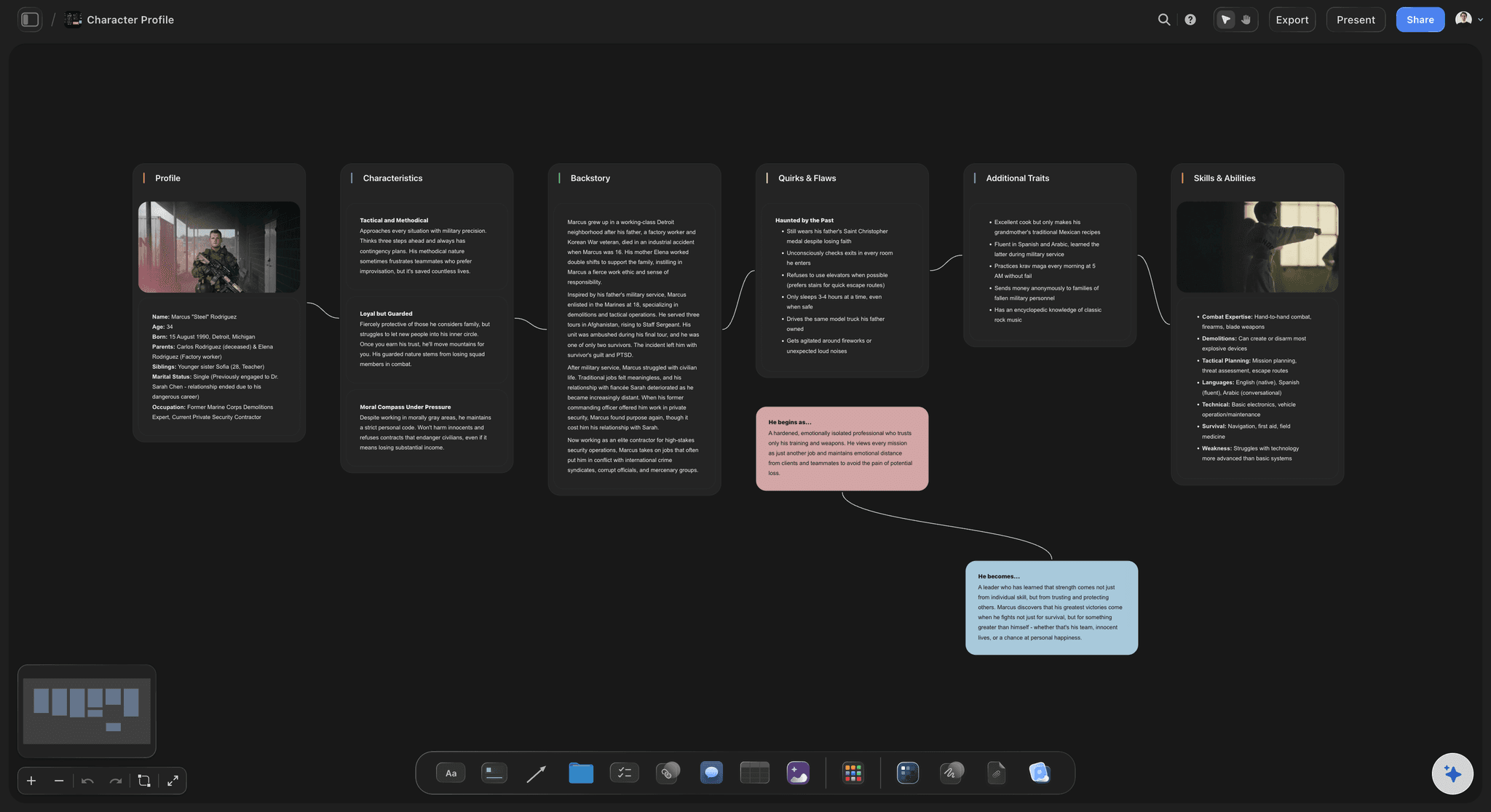
Arcs you can see against the beats
Character arcs, not a page number
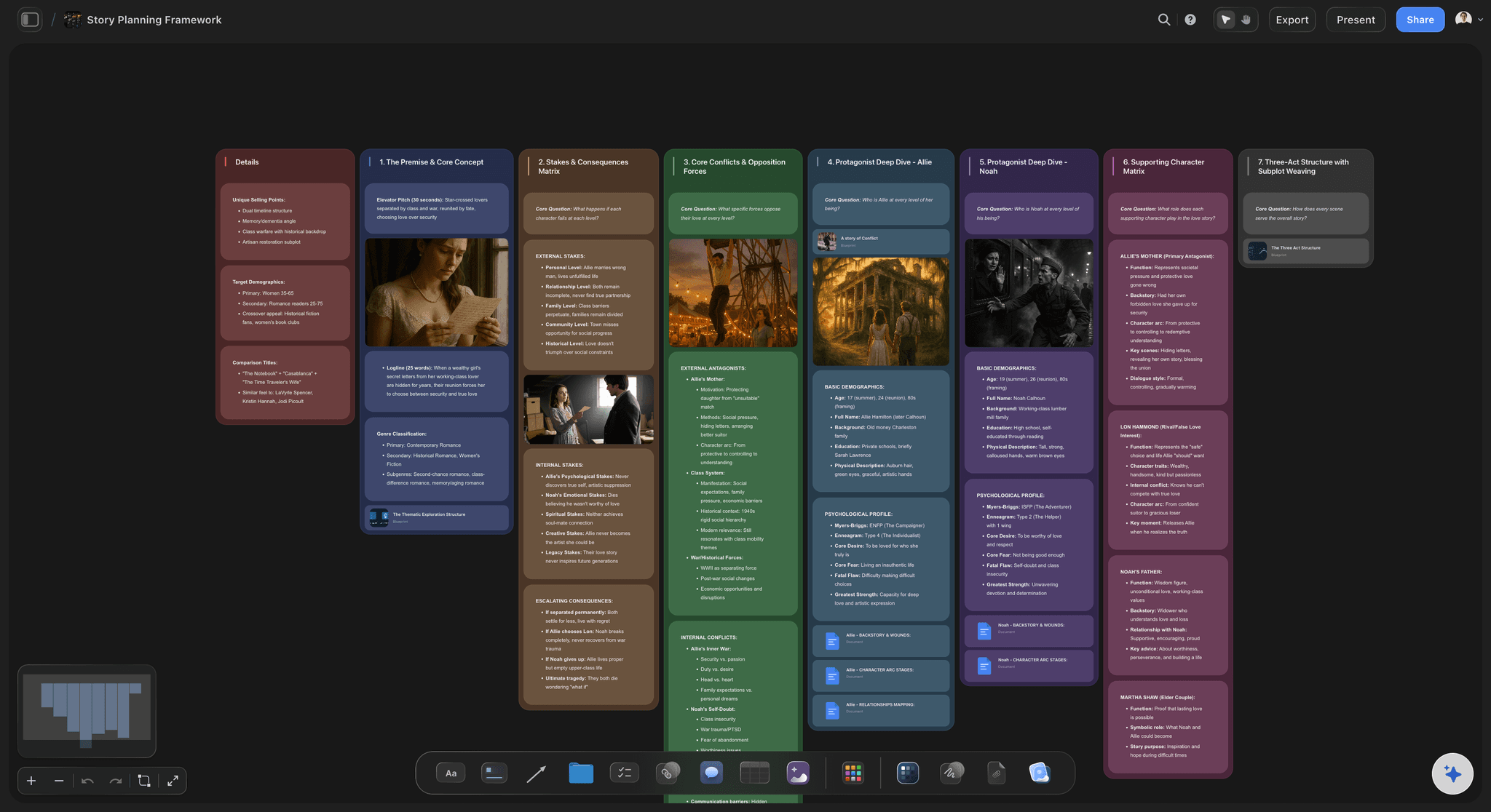
Final Draft holds each character inside the linear script. On the canvas, each character is a card you connect to their want, need, and turns, lined up against the beats so you can see exactly where an arc pays off, or where it flatlines, across the whole film.
See the AI character profile generator →
The breakdown lives with the story
Script breakdown on the same canvas
Once the structure is locked, break scenes into cast, locations, and needs as cards beside the beats they belong to. The breakdown sits next to the story on an infinite canvas, not in a separate spreadsheet or buried in the script's pages.
See the AI script breakdown →
The plan becomes the next step
Beats become sequences and storyboards
A Final Draft outline stays a document. In Storyflow the planning board is step one: ask the AI to turn a one-line beat into a full sequence, or turn a sequence into a storyboard, on the same canvas the structure lives on. Then take the locked structure into Final Draft to write the pages.
See the storyboard maker →No object cap. No time limit.
Final Draft is a paid desktop app you buy per license. Every Storyflow plan runs in any browser with no object cap and no time limit, so a full beat sheet, sequences, and a cast never push you to upgrade mid-plan.
Unlimited planning boards on an infinite canvas, no object cap
AI usage to lay out and expand beats and arcs
Attach reference frames, PDFs, video, and links, with unlimited file uploads
Share plans view-only, or invite a co-writer free
Built for people with taste
Made for the planning that happens before and around the pages.
Structure the story in space, keep the arcs and breakdown visible at once, and move from plan to storyboard without leaving the canvas. Then format the script in Final Draft.
Structure you can see whole
Beat sheets, sequences, and scene maps
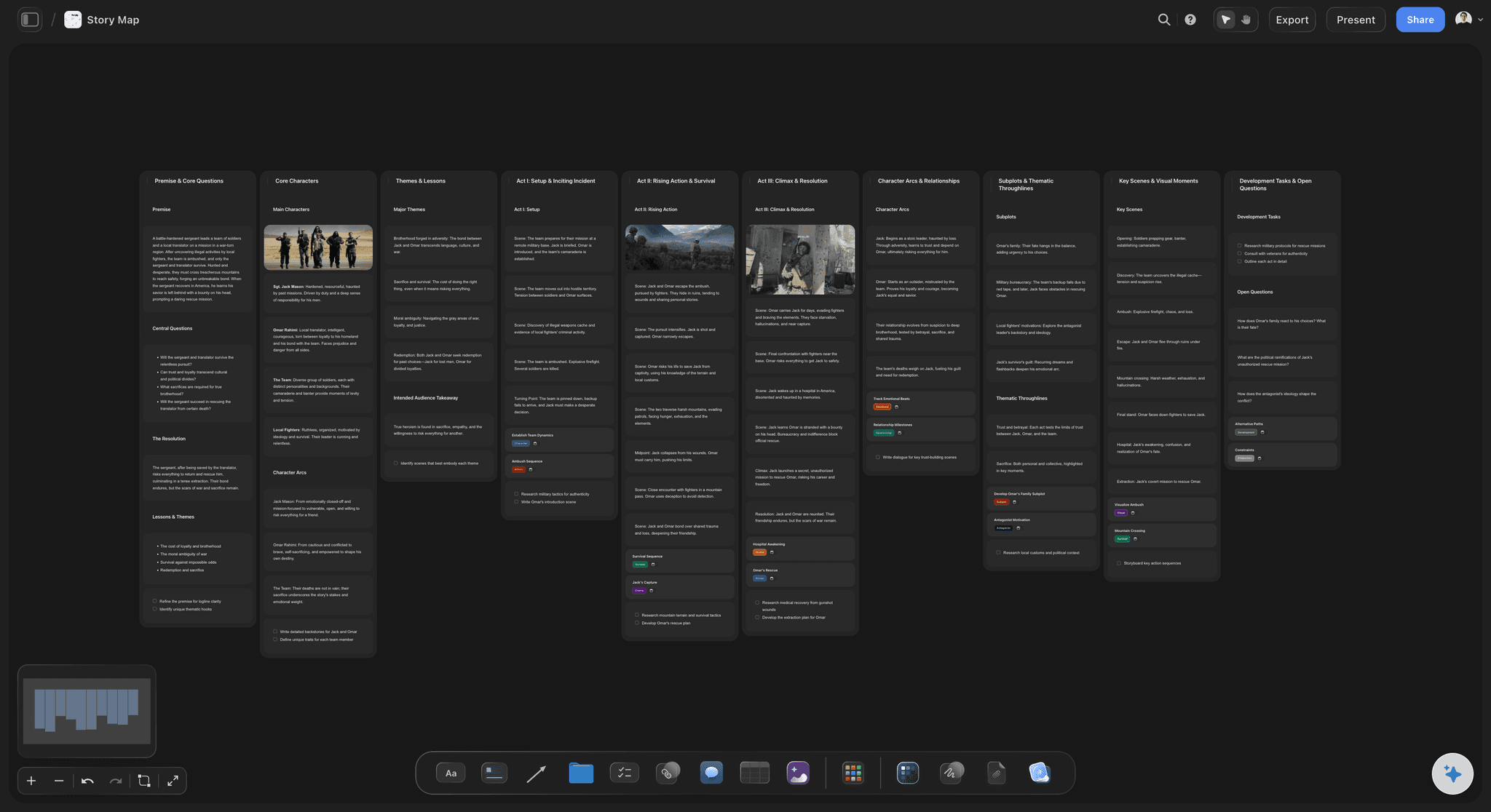
Lay out the beat sheet: Place your inciting incident, midpoint, low point, and climax as cards across the canvas, so the shape of the film reads at a glance instead of as a page number you have to remember.
AI lays out the first pass: Instead of a blank outline, the AI proposes a full beat sheet or sequence board from your prompt. Keep what fits, cut the rest, add your own. This is structure, not formatted script pages.
Resequence with a drag: Move a beat, reorder a sequence, or split a scene by dragging a card. No object cap on any plan means a full feature or a whole season never runs out of room.
Characters against the story
Character arcs that line up with beats
Track want, need, and arc: Give each character a card for their want, their need, and the turn they make, so motivation stays straight across a script with a large ensemble.
Line arcs up with the beats: Place each character's turns against your beat sheet and spot the moment an arc is supposed to pay off, or the act where a character quietly disappears.
Pin the reference that inspired it: Attach the frame from a film, the casting reference, or the research behind a character right beside the card, so tone lives with the story it shapes.
AI that reads your structure
AI expands from what is already on the board
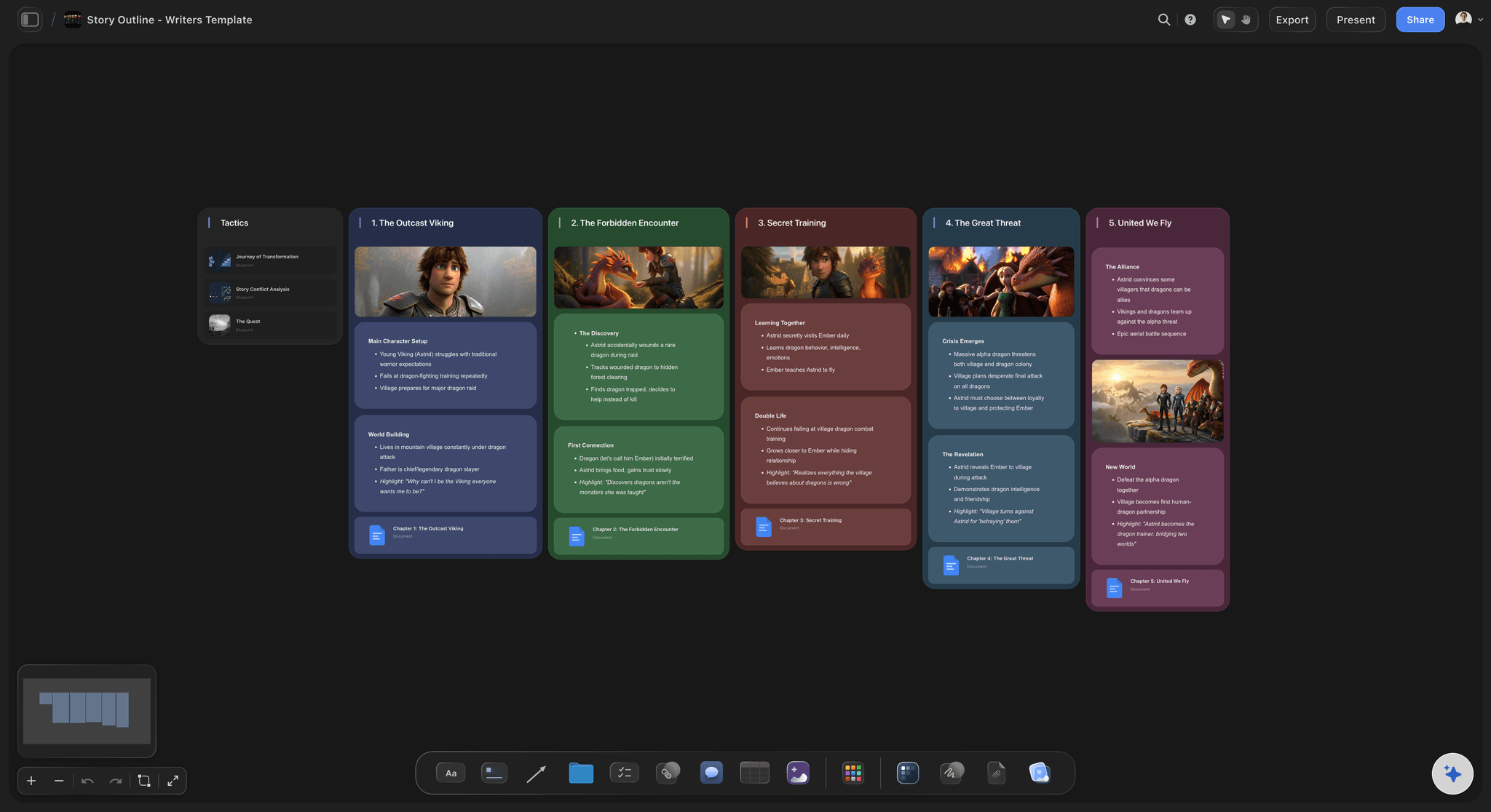
Expand any beat or sequence: Ask the AI to blow a one-line beat out into a full sequence, deepen a character, or pressure-test an act. It builds on the cards you placed, so new structure connects to your film rather than drifting off-theme.
Bring in your bible and research: Add up to five documents and three boards as context from the + menu, so your story bible, a treatment, or a research doc shapes what the AI suggests.
Re-prompt to refocus: Ask for a tighter act, a darker tone, or a different genre lens. The AI reworks the beat or sequence while keeping the choices you already committed to.
Structure becomes the shoot
From script breakdown to storyboard
Break the script down: Turn locked scenes into a breakdown of cast, locations, and needs as cards beside the beats, so the film's requirements sit with the story instead of in a spreadsheet nobody opens.
Storyboard on the same canvas: As a writer-director, turn a sequence into a storyboard right where you structured it, and grab reference frames from YouTube and Vimeo onto the board to block a shot.
Share, export, then format: Invite a co-writer or producer free, send a view-only link so anyone can read the plan in the browser without an account, or export a board as an image or PDF. Then format the actual pages in Final Draft.
Explore templates for your project
Every template opens as a real, editable board on the infinite canvas. Pick the closest fit and make it your own.
Story Plan
Outline your plot, characters, and world in one connected view, then expand each thread as the story grows.
One app instead of five
Storyflow vs Final Draft, Scrivener, and Milanote.
Each tool does something well. Final Draft owns the formatted pages. The question is what fills, connects, and structures the plan around them.
Storyflow
Recommended
AI that lays out story structure from a prompt
A visual, connected planning canvas
Script breakdown and storyboards on one canvas
No object cap on any plan, in the browser
Final Draft
AI that lays out story structure from a prompt
A visual, connected planning canvas
Script breakdown and storyboards on one canvas
A free plan with no object cap, in the browser
Scrivener
AI that lays out story structure from a prompt
A visual, connected planning canvas
Script breakdown and storyboards on one canvas
A free plan with no object cap, in the browser
Milanote
AI that lays out story structure from a prompt
A visual, connected planning canvas
Script breakdown and storyboards on one canvas
A free plan with no object cap, in the browser
What creators are saying
Join early creators getting structured workspaces and AI that remembers their projects
“Storyflow has sped up my workflow by at least 3x, which means more flow state and more projects I can actually ship. It truly changed the way me and my team create.”

Reilin Joey
Director & YouTuber
“One prompt gets me a structured board. But the tactics are my favorite. I run my YouTube scripts through them and my intros and retention got better. It's amazing.”

Justkay
YouTuber & Freelance Filmmaker
“I used to juggle five apps to plan a project. Now I describe what I am making and get boards, lists, and a schedule. All in one place.”

George
@fernwehchronicles
Final Draft alternative questions, answered.
Everything screenwriters ask when comparing Storyflow with Final Draft.
It depends which half of screenwriting you mean. For formatting and paging the actual script to the industry standard, with revision modes and production features, Final Draft is still the standard and hard to beat. For the planning around the script, beats and structure, sequence and scene mapping, character arcs, and script breakdown, Storyflow is a strong fit: a visual infinite canvas with AI that runs in the browser. Many writers use both.
Final Draft is a desktop app built around the formatted script, with auto-formatting, revision modes, colored pages, and production reports. Storyflow is a visual planning canvas: your beats, sequences, arcs, and breakdown are cards you connect on a truly infinite canvas, an AI can lay out the structure from a prompt using your board as context, and it runs in any browser. Storyflow plans the story; Final Draft formats the pages.
Not during early access. Storyflow is paid-only right now, with plans starting at $9.99 per month, no object cap, and no time limit, and it runs in the browser with nothing to install. Every paid plan includes AI usage to lay out and expand structure, unlimited planning boards, unlimited file uploads, view-only sharing, and unlimited collaboration. A Free plan is launching before the end of 2026. Note that Storyflow plans the film; it does not format industry-standard pages, so you would still format the script in a dedicated editor.
No, and it does not try to. Storyflow is not a screenplay formatter and it does not export industry-standard pages. It is the visual planning canvas for the story before and around the script: beats, structure, sequences, character arcs, and script breakdown. When the structure is locked, you format the actual pages in Final Draft or another script editor. The honest workflow is to plan and break down in Storyflow, then write the pages in Final Draft.
Yes. A beat sheet, a sequence outline, a scene map, a character-arc board, and a full script breakdown can all live on one truly infinite canvas as cards you drag and resequence. There is no object cap on any plan, so a full feature or a whole season never runs out of room or pushes you to upgrade mid-project. Storyflow handles the structure and the breakdown; formatting the pages happens in a script editor.
The AI reads the board you have open, so the beats, sequences, and characters already on the canvas shape what it suggests when you ask it to expand a part. You can also attach up to five documents and three boards, such as a story bible or a treatment, for it to work from. It builds on your structure, not a generic template, and it works from the board you have open, not from all your boards at once.
That is the intended workflow. You structure the film, map the arcs, and break the script down in Storyflow, then open Final Draft to format the actual pages from that locked structure. Storyflow does not export a formatted screenplay, so treat it as the planning and breakdown stage that feeds your script editor, not a replacement for it. Export any board as an image or PDF to keep the plan beside your Final Draft file.
Be honest about the fit: if your priority is writing the actual script in proper format, tracking revisions and colored pages, and running the production features and reports a set and a submission rely on, Final Draft is the better pick and hard to beat. Storyflow is for the visual planning, structure, and breakdown around that script, and the two work well side by side.
Format the pages in Final Draft. Plan the film on the canvas.
Lay out the beats, map the arcs, break the script down, and turn a sequence into a storyboard on an infinite canvas with no object cap. Then write the pages in Final Draft.