
The calmest place to shape your story
For the part before
page one.
Beats as movable cards, act structure you can see, character arcs running alongside, and the research beside the scene it feeds. Then write the script wherever you like.


Creatives working for these brands already got early access
- Red Bull
- Canon
- Artlist
- Porsche
See how easy it is to get started
Watch a real project come together, from a blank board to a finished plan, clicked through step by step.
Start from a ready-made template
Pick a board to see what you can build, then let AI fill it in. Every template is a real, editable starting point on the same infinite canvas.

Story Plan
Outline your plot, characters, and world in one connected view, then expand each thread as the story grows.
What is WriterDuet, and what is this instead?
WriterDuet is screenwriting software, and it is genuinely good at what it is for. Storyflow is an AI visual workspace that plans the story of a screenplay on one infinite canvas: beats as movable cards, an act structure you can see, character arcs alongside, and the research beside the scene it feeds. WriterDuet formats a screenplay correctly, it has real-time collaboration that predates most of its competitors having any, it keeps revision history and coloured pages, and it runs in a browser as well as offline. If what you need is to write and share a properly formatted script with a co-writer, WriterDuet does that well and this page is not going to pretend otherwise.
The reason people look for something else is usually that they are not stuck on the writing. They are stuck before it. The script will not come because the structure is not working, and a screenwriting application is not built for that problem. Its outlining and index card features exist, and they are attached to a document, which means they behave like a document: linear, one thing after another, and awkward the moment you want to see act two beside act three or move a beat and watch what it does to the sequence. Structure is a spatial problem and a script editor is a linear tool.
The second thing that lives badly inside a screenplay file is everything that is not the screenplay. The character work, the research, the reference images, the map of the world, the timeline of events that happen before page one, the version of act three you abandoned but might return to. All of it ends up in other files, and the connection between a scene and the research that justified it exists only in the writer's memory of the week they wrote it.
Storyflow is an AI-native infinite canvas, and it is deliberately the other half of the job rather than a replacement for the script editor. Describe the story and the AI lays out a beat board with cards across the acts. Then you do the real work: drag beats until the shape is right, run character arcs as their own rows beneath the spine, pin the reference and research beside the scene it feeds, and keep the abandoned act three in a corner of the canvas rather than in a folder you will not open. When the structure holds, you write the script in WriterDuet, Final Draft, or whatever you already use.
Ultra fast from brief to board
From an idea to a structure that holds.
No formatting, no page count. Cards, arcs, and the space to see the whole thing.
01
Open a canvas
Sign up in seconds. No download. Your infinite story canvas opens in the browser.
02
Describe the story
Type the premise, the character, and what changes. The AI lays out a beat board across the acts, so you start by arguing with a shape rather than staring at a blank page.
03
Move beats until the shape is right
Drag cards, run character arcs as rows beneath the spine, and mark the act breaks. A structural problem is visible as a gap or a pile long before it is visible in a draft.
04
Write the script wherever you write
Take the structure into WriterDuet, Final Draft, or anything else. Share a view-only link with a co-writer or a producer, or export the board as an image or PDF.
Beats, arcs, research, and the versions you kept.
The planning surface a script editor was never trying to be.
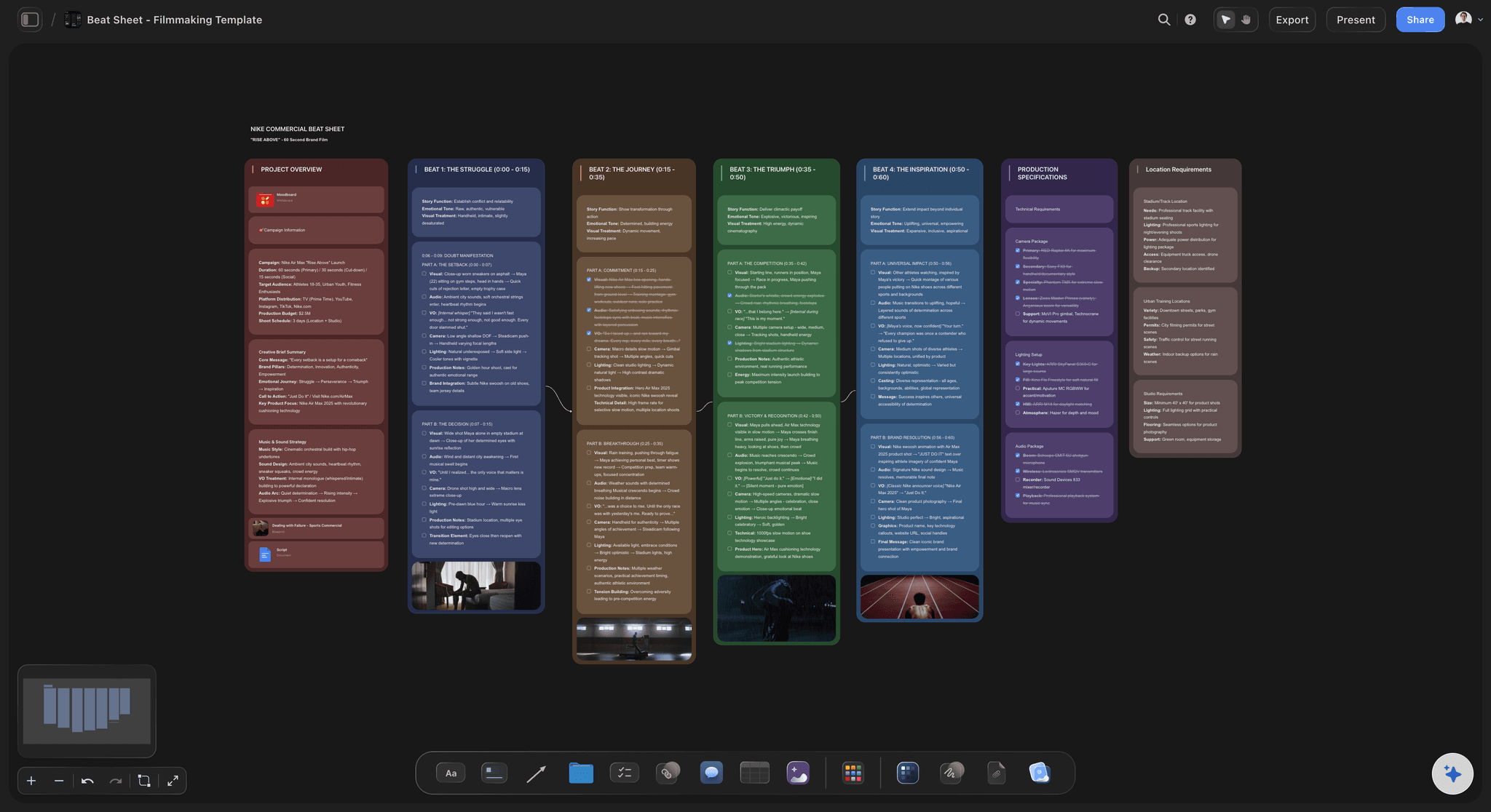
AI lays out a beat board from a premise
Start from a shape, not a blank page
Describe the story and the AI produces beats across three acts with the act breaks and midpoint marked. Correcting a proposed structure is far more productive than generating one from nothing.
See the AI beat sheet generator →
Index cards that move in two dimensions
See act two beside act three
Cards in a document scroll. Cards on a canvas sit side by side, so a sagging middle or three beats doing the same job is something you notice rather than something a reader tells you.
Explore the beat board →
Character arcs running under the spine
Track who changes, and where
Run each character as a row beneath the beat spine. A protagonist whose arc has no beat in act two, or an antagonist who disappears for forty pages, is visible as an empty stretch.
See the character arc tracker →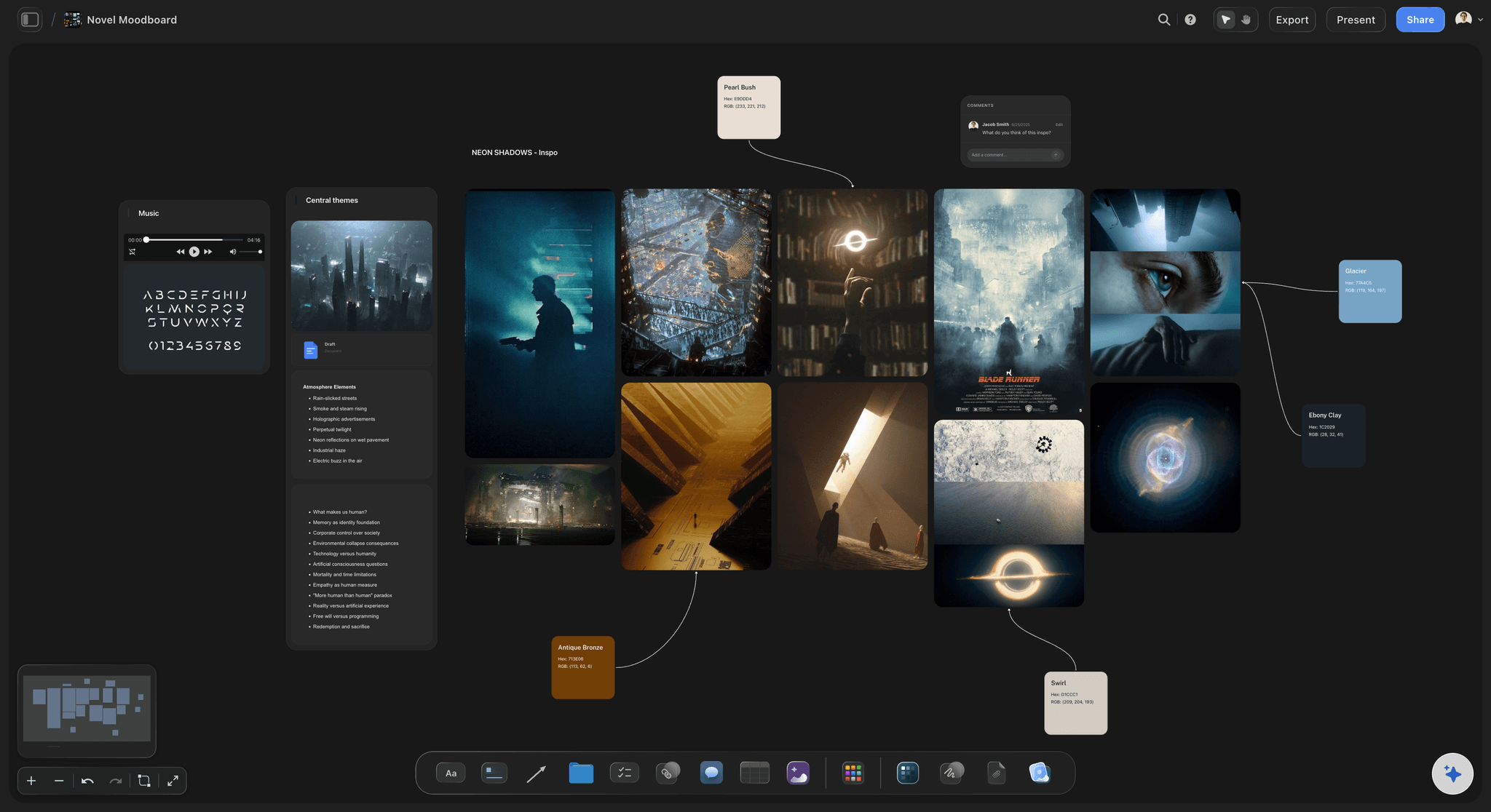
Research and reference beside the scene
Keep the material where the scene is
Interview notes, photographs, location reference, frames pulled from films you are stealing from. Pinned to the beat they inform rather than in a folder that stops being opened.
Try the story planning tool →Unlimited boards. No object cap.
Open a canvas, describe the story, and let AI lay out the beats. Storyflow is paid-only during early access, with plans from $7.99 a month billed annually, and a Free plan launches before the end of 2026.
Unlimited story boards on an infinite canvas
Basic AI usage to generate beats and structure from a premise
Starter templates for three act, Save the Cat, and the story circle
Share view-only links with co-writers and producers, no account required
Built for people with taste
This does not format screenplays, and that is deliberate.
WriterDuet is a script editor with planning attached. This is a planning canvas that hands off to a script editor.
The honest split
What you keep WriterDuet for
Screenplay formatting: Storyflow does not format a screenplay, does not paginate, and does not produce a PDF anyone would submit. If you need industry-standard formatting, you need a script editor and this is not one.
Revisions and coloured pages: Production drafts, locked pages, and revision colours are specialised features that matter enormously once a script is in production, and WriterDuet handles them properly.
Real-time co-writing on the script itself: Two people typing in the same screenplay at once is WriterDuet's signature feature and it works. Storyflow's collaboration is on the board, not on the pages.
What this adds instead: A spatial surface for structure, character arcs as visible tracks, research attached to beats, and an AI that reads the whole board. All of it before the script, and none of it in competition with the script editor.
Structure you can see rather than scroll
The frameworks, laid out rather than listed
Three act, with the breaks marked: The most useful thing about drawing the acts is proportion. An act two that occupies half the canvas and contains four beats is the sagging middle, visible before the draft that proves it.
Save the Cat and the beat sheet traditions: Templates for the standard beat structures, laid out as cards you move rather than as a list you fill in. The point of a framework is to notice where your story departs from it deliberately.
The story circle and cyclical shapes: Not every story is a line. Circular and parallel structures are painful to represent in a document and natural on a canvas.
Your own structure: Frameworks are diagnostic, not prescriptive. The board holds whatever shape your story actually has, which is the point at which a template stops being a constraint.

AI that reads the whole board as context
An AI that helps with structure and does not write dialogue
Generate the first beat board: Describe the premise and the AI lays out beats across the acts. Most will be conventional, which is useful, because knowing the conventional version is how you decide what to do differently.
Interrogate the shape: Ask where the midpoint is doing no work, which character has no beat in act two, or what the story promises in act one that it never pays off. The AI uses your whole board, so it answers about your story.
It structures, it does not ghostwrite: Storyflow arranges and suggests. It does not write your scenes, and a screenplay drafted by a model reads exactly like one, which is not a service to anybody.
Re-prompt without losing your work: Ask for an alternative act three and it builds around what you have placed. The beats you positioned and connected stay exactly where they are.

Co-writers, producers, and the room
Share the structure without sharing a draft
View-only links: Send a link and a co-writer, a producer, or a script editor opens the whole board in a browser with no account. Structural notes given against a board are far more useful than structural notes given against a draft.
A writers' room on one canvas: Invite people onto the board and break a season together, with each episode as a section and the series arcs running underneath.
Comments on the beat in question: A note about the midpoint sits on the midpoint card. Nobody has to reconstruct which beat a comment in an email was about.
Explore templates for your project
Every template opens as a real, editable board on the infinite canvas. Pick the closest fit and make it your own.
Story Plan
Outline your plot, characters, and world in one connected view, then expand each thread as the story grows.
One app instead of five
Storyflow vs WriterDuet, Final Draft, and Scrivener.
These are not really competing: WriterDuet and Final Draft are script editors, Scrivener is a long-form writing environment, and this is a planning canvas. Here is what each actually does.
Storyflow
Recommended
Spatial beat board with movable cards
AI generates structure from a premise
Character arcs as visible tracks
Research and images beside the beats
Industry-standard screenplay formatting
Production revisions and coloured pages
WriterDuet
Spatial beat board with movable cards
AI generates structure from a premise
Character arcs as visible tracks
Research and images beside the beats
Industry-standard screenplay formatting
Production revisions and coloured pages
Final Draft
Spatial beat board with movable cards
AI generates structure from a premise
Character arcs as visible tracks
Research and images beside the beats
Industry-standard screenplay formatting
Production revisions and coloured pages
Scrivener
Spatial beat board with movable cards
AI generates structure from a premise
Character arcs as visible tracks
Research and images beside the beats
Industry-standard screenplay formatting
Production revisions and coloured pages
What creators are saying
Join early creators getting structured workspaces and AI that remembers their projects
“Storyflow has sped up my workflow by at least 3x, which means more flow state and more projects I can actually ship. It truly changed the way me and my team create.”

Reilin Joey
Director & YouTuber
“One prompt gets me a structured board. But the tactics are my favorite. I run my YouTube scripts through them and my intros and retention got better. It's amazing.”

Justkay
YouTuber & Freelance Filmmaker
“I used to juggle five apps to plan a project. Now I describe what I am making and get boards, lists, and a schedule. All in one place.”

George
@fernwehchronicles
WriterDuet alternative questions, answered.
What each tool is for, what you give up, and how the handoff works.
No, and it is worth being direct about that. WriterDuet is a screenwriting application: it formats a screenplay to industry standard, paginates, handles production revisions and coloured pages, and lets two people type in the same document at once. Storyflow does none of those things. What it replaces is the part of WriterDuet that was never its strength, which is the planning: outlining, index cards, and structure. Most writers who use both do the structural work on a canvas and then write the actual pages in a script editor. If your problem is that the script will not come because the shape is wrong, a better script editor will not help you, and that is the specific case this is built for.
Storyflow is the tool for the part before page one: the beats are movable cards on a canvas, the act structure is visible at a glance, and the character arcs run alongside as tracks. Research and images sit beside the beats they feed, and its AI generates a structure from your premise. WriterDuet still does industry-standard screenplay formatting, which Storyflow does not.
Because structure is spatial and a script editor is linear. Index cards attached to a document behave like a document: you scroll through them one after another, and seeing act two beside act three, or noticing that four beats in the middle are doing the same job, requires holding the whole thing in your head. On a canvas the proportions are visible. An act two that occupies half the board with four cards in it is a sagging middle you can see, not one a reader has to tell you about. The second reason is everything that is not the script: research, reference images, character work, timelines, and the version of act three you abandoned. That material has nowhere to live inside a screenplay file.
It depends on whether you want the words written or the story structured, and those are different tools. If you want a model to draft prose and dialogue, Sudowrite is built for fiction and screenwriting specifically, and the general assistants will produce pages from a prompt. Be aware of what you get: a screenplay drafted by a model reads like one, and the common experience is that rewriting generated dialogue takes longer than writing it. If what is actually blocking you is structure, which it usually is when a script will not come, the useful AI is one that lays out beats, shows you where act two sags, and tells you which character has no beat in the middle third. That is what Storyflow does, and it deliberately does not write your scenes. The honest split is that generation tools help you produce pages and structural tools help you know which pages to write.
WriterDuet has added AI features over time and you should check their current feature list rather than trust a summary here, since this area changes quickly across every tool in the category. What is worth understanding is the difference in what AI is being asked to do. Most AI in screenwriting software is aimed at generation and revision inside the document, meaning drafting or rewriting text. Storyflow's AI is aimed at structure: it lays out a beat board from a premise, and once the board exists it answers questions about the whole board, such as which character has no beat in act two or what act one promises that never pays off. It deliberately does not write your scenes, because a screenplay drafted by a model reads like one.
For formatting and production, they are close, and the honest answer is that it depends on how you work rather than on features. Final Draft is the longer-established industry standard and is what most production offices assume, which matters if you are handing drafts to people who will open them in something. WriterDuet is browser-first with strong real-time collaboration and a more flexible pricing model, which matters more if you co-write regularly or move between machines. Both format correctly and both handle revisions. Neither is a planning tool, which is the reason this page exists: whichever you choose, the structural work still has to happen somewhere, and for many writers that somewhere is index cards on a table or a canvas.
A beat sheet is a list of the story's essential moments in order, written before the script so you can see the shape without reading a hundred pages. Each beat is a sentence or two naming what changes: the moment the ordinary world breaks, the point of no return, the midpoint reversal, the low point, the climax. Some writers work to a named structure like Save the Cat, which specifies roughly where each beat should fall, and others just list their own turns. The purpose is diagnostic rather than prescriptive. Laid out as cards you can move, a beat sheet shows you proportion, which is the thing a draft hides: fourteen beats crammed into act one and four spread across act two is the sagging middle, visible in a minute and invisible while you are writing.
Not during early access. Storyflow is paid-only right now, with plans from $7.99 a month billed annually, and a Free plan launches before the end of 2026. Anyone a paid member invites to a board joins free today, so a co-writer or a producer can view and contribute without paying. If you want free screenwriting software specifically, WriterDuet has a free tier with a project limit and there are other free formatters worth looking at. If you want free planning, physical index cards on a table remain the tool this is modelled on, and they are excellent right up until you need two people in different cities looking at the same arrangement.
Manually, and that is less of a problem than it sounds. The board holds beats, structure, character arcs, and research; the script holds scenes and dialogue. Writers typically work with the board open beside the script editor and write the scenes in order, using the beat as the brief for what that scene has to accomplish. There is no export that turns a beat board into a formatted screenplay, and any tool claiming to do that is either producing an outline document or producing pages you will rewrite entirely. What you can do is export the board as a high-quality image or PDF, which is the usual format for a beat sheet or a treatment sent to a producer, and share a view-only link for anyone who wants to see the whole structure.
Yes, and it is where a canvas has the largest advantage over a document. A season is two-dimensional by nature: episodes run along one axis and character or plot arcs run across them on another, and the question that matters is whether an arc has enough beats in the right episodes. In a document you can represent one axis and have to reconstruct the other every time. On a canvas, give each episode a section, run the series arcs as rows beneath, and the shape of the season is immediately legible: the arc that vanishes for four episodes, the episode carrying three arcs while its neighbours carry none. A writers' room can build the same board together and comment on individual beats.
The board holds any structure, and templates exist for the common ones: three act with the breaks and midpoint marked, the Save the Cat beat sheet, the hero's journey, the story circle, and a plain sequence approach for writers who prefer eight sequences to three acts. They are worth using diagnostically rather than prescriptively. The value of laying your story against a framework is not conformity, it is noticing where you depart from it, since a deliberate departure is a choice and an accidental one is usually the reason the middle is not working. Cyclical and parallel structures are worth mentioning specifically, because they are painful to represent in a linear document and natural on a canvas.
Yes, and structural notes given against a board are much more useful than structural notes given against a draft. Send a view-only link and a producer, a development executive, or a script editor opens the whole board in a browser with no account, which lets them see the shape rather than infer it from a hundred and ten pages. Comments attach to the beat they concern, so a note about the midpoint sits on the midpoint. This is also a cheaper stage to take notes: restructuring a board takes an afternoon and restructuring a draft takes a month, which is the entire argument for showing the structure first.
Yes, and it is one of the main reasons to work this way. Character profiles, relationship maps, backstory, and the timeline of events preceding page one all sit on the same canvas as the beats, so a scene can be worked on with the character material one scroll away rather than in a separate file. Reference images matter too: face casting, location photographs, and frames pulled from films you are borrowing from, pinned beside the beat they inform. For a writer-director this compounds, because the moodboard, the shot thinking, and the structure end up on one surface rather than being assembled separately and reconciled later.
Fix the shape before you write the pages.
Open a canvas, describe the story, and let AI lay out the beats. No download.