
Sharper briefs, sent ultra fast
A project brief template
that becomes the production plan.
Ten fields that turn a client's request into something you can quote, schedule and deliver against, written on the board where the deliverables, owners and dates get built.


Creatives working for these brands already got early access
- Red Bull
- Canon
- Artlist
- Porsche
See how easy it is to get started
Watch a real project come together, from a blank board to a finished plan, clicked through step by step.
Start from a ready-made template
Pick a board to see what you can build, then let AI fill it in. Every template is a real, editable starting point on the same infinite canvas.

Creative Brief
Capture the objective, audience, and message for a creative so everyone works from the same brief.
What is a project brief, and how do you write one?
A project brief is a short document, written before work starts, that fixes what a project must deliver, why, for whom, by when, for how much and who approves it; you write one by filling the same ten fields for every job. Storyflow is an AI visual workspace that writes the project brief and builds the production plan from it on one infinite canvas: the ten-field brief at the top, then the deliverables, tickets with owners and due dates, review points and what the client owes you. Its AI fills the template from the client's brief you paste in and plans backwards from the delivery date. Notion suits a library of text briefs, and Asana or Trello suit running the tasks afterwards when a large team is involved.
A project brief is the one-page agreement between the person asking for the work and the people doing it. It says what is being made, why, for whom, by when, for how much, and who decides. A client brief is the client's version of it, usually incomplete; your project brief is that request rewritten so it can be quoted, scheduled and judged.
The brief and the production plan answer different questions. The brief is the what and the why; the plan is the how, who and when, with the dependencies between them. Most projects go wrong in the gap: the brief lives in a document, the plan lives in a task tool, and when the client changes a deliverable nobody can see which tasks, dates and costs moved with it.
Keeping both on one board closes that gap. Each deliverable in the brief becomes a ticket with a spec, an assignee and a due date, placed beside the field that defined it. The planner workflow plans backwards from the delivery date, the review rounds sit in a table with a date column, rows kept in date order, and the client opens the board by a view-only link with no account.
Ultra fast from brief to board
From a client brief to a production plan in four steps.
Rewrite the request, fill the gaps, then plan backwards from the date.
01
Paste the client brief
Drop the email, the RFP or the call notes onto a board. Runs in your browser, nothing to install.
02
Fill the ten fields
The AI drafts the project brief from what the client wrote. With the ten fields on the board, you can see at a glance which ones the client never answered, most often budget and decision maker, before you quote.
03
Turn deliverables into the plan
Each deliverable becomes a ticket with a spec, an owner and a due date. The planner works backwards from the delivery date, and you mark the client review points.
04
Share it with the client
A view-only link opens with no account, so the client sees the same brief and dates you do. They sign in to comment, and the notes sit beside the field in question.
The brief, the plan and the client, on one board.
What a project brief has to connect to once the work starts.

Paste the brief, get the board
The AI does the first layout
Paste a client brief and the AI builds a project board from it: objective, deliverables, tickets and a schedule, with the original brief kept on the board.
See brief to project board →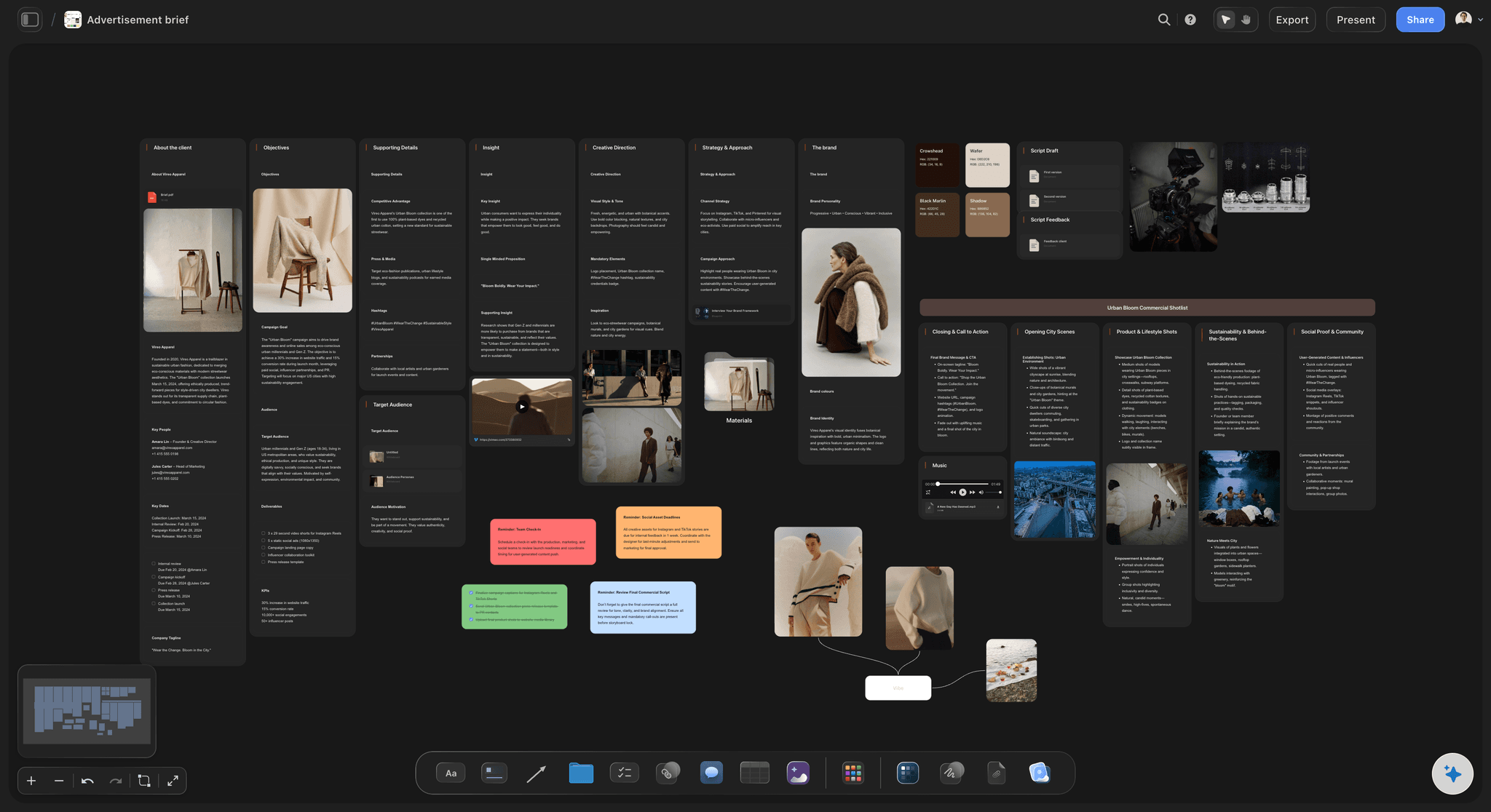
For campaigns and content
The creative brief version
When the project is a campaign, the creative brief adds the insight, the key message and the channels, and plans the production from there.
See the creative brief template →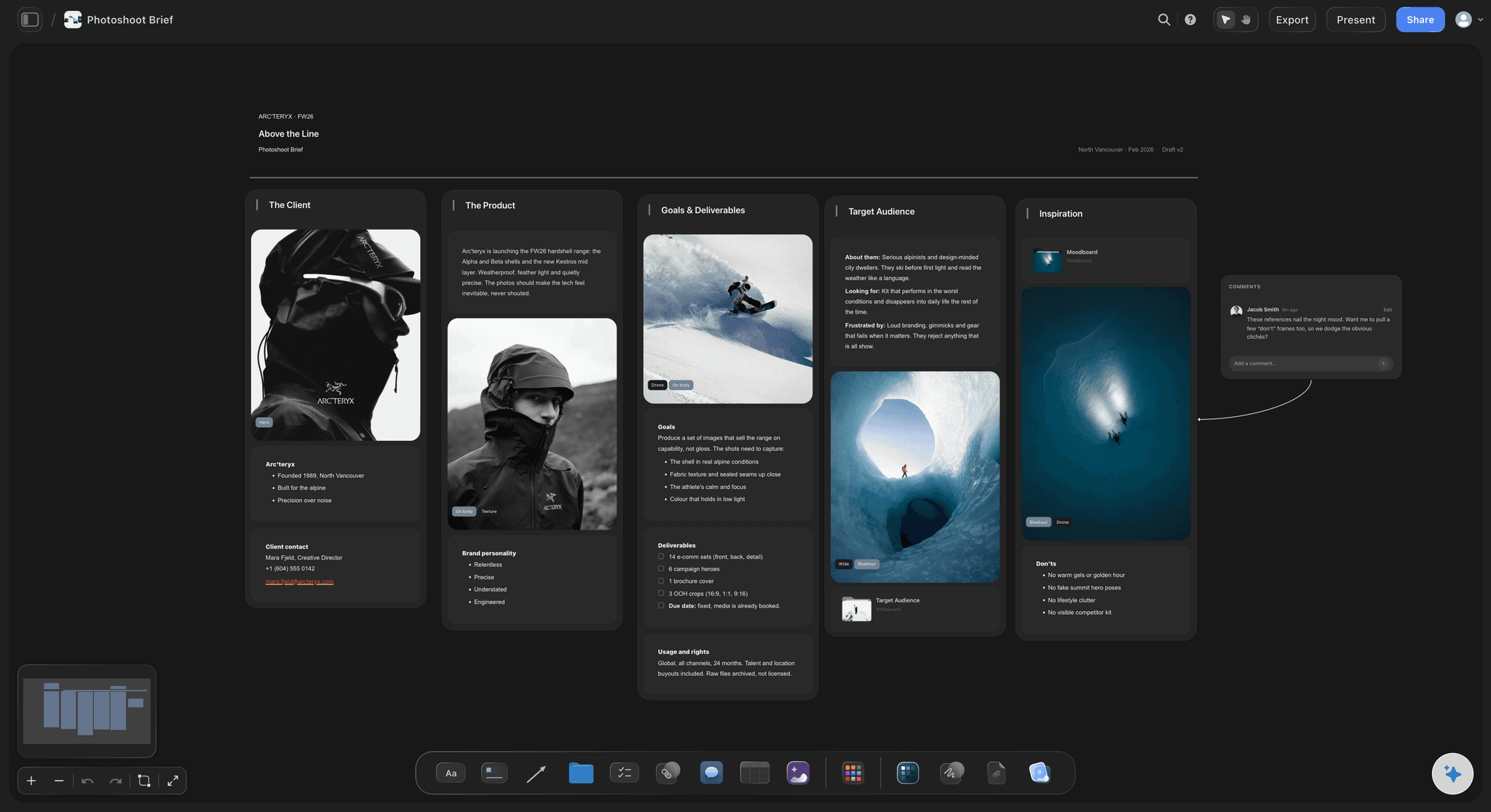
For shoots and productions
Briefs that end in a shoot day
A photo or video brief becomes a shot list, a pre-production plan and a call sheet PDF the AI drafts from the board, on the same canvas as the brief.
See the photography proposal template →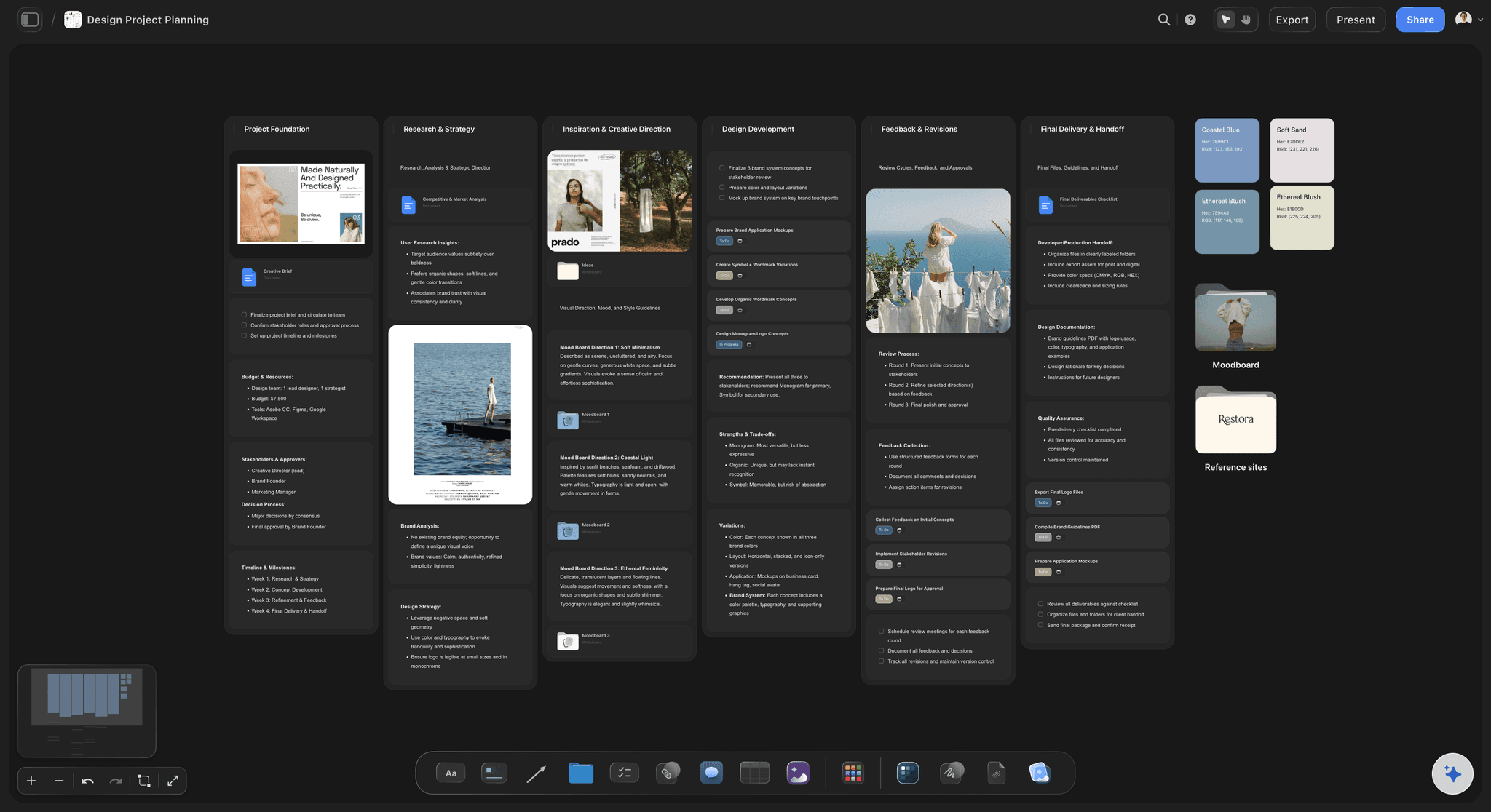
Across every client job
Brief to delivery for agencies
One board per client with the brief at the top and the deliverables below, so a new team member reads the whole job from one link.
See agency client project planning →Unlimited boards. The brief and the plan on each.
Write the brief, build the plan and share it. Storyflow is paid-only during early access, with plans from $7.99 a month billed annually ($9.99 monthly). A free plan launches before the end of 2026, and anyone a paid member invites to a board joins free.
Unlimited project boards and file uploads on every paid plan
AI that turns a pasted brief into a project board
Tickets with assignees and due dates, kanban and to-do lists
View-only links clients open with no account

Built for people with taste
Ten fields, and what goes in each.
Copy the structure into any tool. The last block shows how the brief becomes the production plan.
Fields 1 to 4: what and why
The request, rewritten
1. Background: Who the client is and what prompted the project, in two or three sentences. Enough for someone joining in week three to understand why the work exists.
2. Objective and success measure: The outcome the client needs, in one sentence, with how it will be judged. 'A new website' is a deliverable; 'double enquiries from the site by spring' is an objective.
3. Audience and key message: Who the work is for and the one thing they should take away. One primary audience, named specifically.
4. Deliverables with specs: Every asset with format, quantity and size: '3 x 15-second vertical videos with burned-in captions', not 'social videos'. This list becomes the plan.
Fields 5 to 7: the boundaries
Scope, direction and money
5. In scope and out of scope: Write both lists. The out-of-scope list is the one that saves the project, because it turns a later 'can you also' into a visible change.
6. References and constraints: Brand guidelines, mandatories, reference images for the look, legal lines and platform specs. On a board the images sit beside the words.
7. Budget: A number or a range, and what it has to cover. A brief without a budget produces a plan the client cannot afford to finish.
Fields 8 to 10: time and people
Dates, deciders and dependencies
8. Timeline and milestones: The final delivery date first, then the milestones in between and the number of revision rounds. Everything else is planned backwards from the first date.
9. People and the decision maker: The project owner on your side, the stakeholders on theirs, and the one person who signs off. An unnamed decision maker is the usual source of contradictory feedback.
10. Client inputs and risks: What the client owes you and by when: assets, copy, access, approvals. Then the two or three risks most likely to move the date, each with what you will do about it.

Brief to production plan
How the brief becomes the plan
Each deliverable becomes a ticket: One ticket per asset with its spec, an assignee and a due date, placed beside the brief field that defined it. A changed deliverable shows exactly what moves.
Break each ticket into its steps: A video is concept, script, client review, shoot, edit, review, final export. A design is concept, design, internal review, client review, revisions, final files.
Plan backwards from the date: Start at final delivery and work back through final approval, revisions, client review and production. Give client review its own dated slot so a late reply is visible.
Mark the dependencies: Casting waits on the approved script; the edit waits on footage; delivery waits on sign-off. Connect them with lines on the board so the chain is visible.
Explore templates for your project
Every template opens as a real, editable board on the infinite canvas. Pick the closest fit and make it your own.
Creative Brief
Capture the objective, audience, and message for a creative so everyone works from the same brief.
One app instead of five
Storyflow vs Notion, Asana and Trello for project briefs.
Notion is strong for a library of text briefs, Asana for running tasks across a large team, and Trello for simple cards. Here is where they differ for turning a brief into a plan.
Storyflow
Recommended
Brief, references and plan on one visual canvas
Client opens a view-only link with no account
Tickets with assignees and due dates
Timeline view (paid plans)
Free plan available today
Notion
Brief, references and plan on one visual canvas
Client opens a view-only link with no account
Tickets with assignees and due dates
Timeline view (paid plans)
Free plan available today
Asana
Brief, references and plan on one visual canvas
Client opens a view-only link with no account
Tickets with assignees and due dates
Timeline view (paid plans)
Free plan available today
Trello
Brief, references and plan on one visual canvas
Client opens a view-only link with no account
Tickets with assignees and due dates
Timeline view (paid plans)
Free plan available today
What creators are saying
Join early creators getting structured workspaces and AI that remembers their projects
“Storyflow has sped up my workflow by at least 3x, which means more flow state and more projects I can actually ship. It truly changed the way me and my team create.”

Reilin Joey
Director & YouTuber
“One prompt gets me a structured board. But the tactics are my favorite. I run my YouTube scripts through them and my intros and retention got better. It's amazing.”

Justkay
YouTuber & Freelance Filmmaker
“I used to juggle five apps to plan a project. Now I describe what I am making and get boards, lists, and a schedule. All in one place.”

George
@fernwehchronicles
Project briefs, answered.
What goes in one, what an example looks like, and how it becomes the plan.
A project brief is the one-page agreement, written before work starts, that says what is being made, why, for whom, by when, for how much and who decides. To write one, rewrite the client's request into ten fields, give every deliverable a spec, and name the person who signs off. In Storyflow the brief sits at the top of the board where its production plan is built.
Storyflow is built for exactly this job: paste the client brief onto a board and the AI rewrites it into the ten fields, then lays out the deliverables as tickets with owners and due dates, the review points and what the client owes, with the brief kept at the top. It has no time tracking or invoicing, so a studio that bills by the hour pairs it with Harvest or its accounting tool.
A fixed set of fields you fill for every new project, so no job starts without the same answers. A useful one has ten: background, objective with a success measure, audience and key message, deliverables with specs, scope in and out, references and constraints, budget, timeline, people with the decision maker, and client inputs with risks. The fixed shape is the point: an empty field is a question you have not asked yet.
Short: 'Background: regional bakery opening a second shop. Objective: 300 pre-orders before opening day. Audience: families within two miles. Deliverables: 3 vertical videos, 6 posts, one A2 poster. Out of scope: website. Budget: agreed range. Timeline: final files 20 March, two review rounds. Decision maker: the owner. Client provides: product photos and opening-day offer by 1 March. Risk: late photos.'
The brief says what and why: the objective, the deliverables, the budget, the date and who decides. The plan says how, who and when: the steps for each deliverable, the owners, the dependencies and the dated reviews. Write the brief first and get it agreed, then build the plan from its deliverables list. Keeping both on one board means a change to the brief visibly moves the plan.
Rewrite what the client said into the ten fields and leave the unknowns visibly empty rather than guessing. Then send the client the gaps as questions, usually budget, decision maker, deliverable specs and what they owe you. A vague request answered with a precise brief shows you what the client actually wants, and it protects you when they change their mind later.
One page, or one screen of a board. Long enough to answer the ten fields, short enough that the client actually reads it before agreeing. If a field needs more than a paragraph, such as detailed specs or brand guidelines, link or attach the detail and keep a one-line summary in the brief. A brief nobody reads is not an agreement.
One named person on the client side who has the authority to approve the work and the budget, plus the project owner on yours. Write both names in the brief. Storyflow has no approval button, so record the sign-off itself on the board, such as a dated note of the decision maker's written confirmation, before the plan is built on it.
It can draft one from what you give it. Paste the client's email or describe the job and Storyflow's AI lays out the brief and the project board, so you can see at a glance which fields the client never answered, most often budget and decision maker. It reads the open board plus up to five documents you attach, such as an RFP. The AI proposes and you decide; its edits apply with one-click Undo.
With two lists: what is in scope and what is out. The in-scope list is the deliverables with specs; the out-of-scope list names the likely extras, such as extra revision rounds, new formats or a website. Agree the number of revision rounds in the brief too. When a new request arrives, it is either on the list or a priced change, and both sides can see which.
They overlap. A project brief covers any job: deliverables, scope, budget, dates and people. A creative brief is a project brief for creative work with more on the idea: the insight, the key message, the tone and the references. For a campaign, use the creative brief template; for a website, an event or a production with many deliverables, the project brief template fits better.
Yes. Turn on sharing and send a view-only link: the client opens it in a browser with no account and sees the latest version when they reload. To comment they sign in, and anyone a paid member invites joins free. Many teams keep a working board private and share a client board with the brief, the deliverables, the dates and what the client owes.
Not during early access. Storyflow is paid-only during early access, with plans from $7.99 a month billed annually ($9.99 monthly). A free plan launches before the end of 2026, and anyone a paid member invites to a board joins free. For a free option today, the ten fields on this page work in any document.
More from Storyflow
Brief to project board
Creative brief template
Campaign brief template
Design brief
Content brief template
AI project plan generator
Document to project board
Campaign brief to delivery
Agency client project planning
Photography proposal template
Video production planning
Pre-production checklist
For agencies
What is a project brief
Video production brief
Creative scope of work
Client brief to production plan
Creative production brief
Write the brief where the plan gets built.
Paste a client brief, fill the ten fields, and plan backwards from the delivery date.