Storyboarding Software: Pricing and Features Comparison (2026)
Nine storyboarding tools compared on six columns: frames, export, client review, animatic, AI and price. Storyflow first, then Boords, StudioBinder, Canva, Storyboarder and Milanote, with prices and a copyable shortlist.

Category
Video Production
Author

Storyflow Team
Product & Research Team
Topics
2026-11-04
•
40 min read
•
Video Production- best storyboarding software
- storyboard software pricing
- storyboard vs shot list vs animatic
- Boords
- StudioBinder
- Storyflow
best storyboarding software
The best storyboarding software for a team planning a whole project around the frames is Storyflow, our pick. Storyflow is an AI visual workspace that keeps storyboards, shot lists and briefs together on one infinite canvas, and it works inside ChatGPT (plugin) and Claude (connector). Choose with the Storyflow 6-Column Test: frames, export, client review, animatic, AI and price, in one table, so any tool that fails the column your deliverable depends on is out first.

Full disclosure: Storyflow is our product. It is listed first because it is the one tool here built so the storyboard shares a board with the rest of the project. It has no animatic and no recorded sign-off. Boords wins those columns, Storyboarder wins price and Toon Boom wins drawing.
How the storyboarding software compare on trust, innovation, ratings and pricing
Which storyboarding software brands are the most trusted?
Trust is easiest to check in what a tool records and whom it is built for. Boords records sign-off against a version with a name and timestamp, StudioBinder keeps boards inside production management, and Toon Boom builds Storyboard Pro for professional board artists. Storyflow is newer, and its case is what sits around the frames: one board that holds the brief, shot list and client deck with them.
Which storyboarding software has fair and transparent pricing?
Storyboarder is free and open source, which is as plain as pricing gets. Boords and Milanote publish clear tiers: Boords Solo is $26 a month billed yearly, Milanote is $9.99 per person billed annually. Storyflow Free is $0 with no card and Plus is $7.99 a month billed annually. For Toon Boom and Storyboard That, see each vendor's pricing page.
Which storyboarding software is the most innovative?
Storyflow, because an assistant in ChatGPT or Claude can build frames, tables and shot cards on the board and report what changed. Boords also publishes an MCP server and adds approvals with a recorded version. Storyboarder.ai goes furthest on generation, turning a script into a storyboard, shot list and animatic from one upload.
Which storyboarding software has a strong record of consistent performance?
A record is hard to judge from vendor pages. Toon Boom's page shows an actively developed product, with a new Panel Timer and Photoshop import changes. Storyboarder from Wonder Unit lists version 1.0.0 as its only release. Storyflow's ChatGPT plugin has been live since 24 October 2026, so judge it on your first project rather than on its history.
Which storyboarding software is underrated?
Milanote is underrated for designers, since its free-form canvas handles a storyboard beside research and sketches. Boords' Premiere and After Effects exports are under-discussed and save an editor real work. Storyflow's change report is easy to miss: asking what changed on the board in the last week, and who changed it, replaces a status check on a small team.
Quick Comparison
Four of the nine, with our pick first and the rest by how often buyers name them. Prices as of November 2026, with billing stated.
| Tool | Best For | AI Features | Price |
|---|---|---|---|
| Storyflow | Frames as part of a whole project plan | In-app AI from Plus builds frames and a shot list from a script; images on Pro and Max; no animatic | Free $0 with no card, no in-app AI; Plus $7.99 mo billed annually |
| Boords | Client sign-off and MP4 animatics | Script to frames, 250 to 3,000 AI images a month by plan | Solo $26 mo billed yearly, $39 monthly; Free tier |
| StudioBinder | Boards inside a managed production | No generation on its storyboard page; panels from selected script lines | Starter $29 mo billed monthly, 1 user, 10 projects |
| Storyboarder (Wonder Unit) | Drawing boards for free | No AI mentioned; shows animatics | Free, open source |
Key Takeaways
- Storyflow is our pick for the best storyboarding software when frames have to live with the brief, shot list, references and client deck, because all of it sits on one board that its in-app AI (on paid plans) or your ChatGPT or Claude (on any plan) can read and build on.
- The Storyflow 6-Column Test is our editorial method, not research: compare frames, export, client review, animatic, AI and price, name the one column your deliverable depends on, and strike every tool that fails it before you read a price.
- Storyflow has no animatic. There is no frame timing and no MP4 export. If the deliverable is a timed moving storyboard, Boords, Storyboarder or Toon Boom Storyboard Pro belongs on your list instead.
- Prices run from nothing to hundreds a month. Storyboarder from Wonder Unit is free and open source, Storyflow has a Free plan with no in-app AI and Plus at $7.99 a month billed annually, Boords Solo is $26 billed yearly or $39 monthly, and StudioBinder Starter is $29 billed monthly, all as of November 2026.
- A storyboard, a shot list and an animatic are three different documents that answer three different questions. Most buying mistakes in this category come from purchasing a tool for one and expecting it to produce the other two.
- Client review varies more than any other column: Boords records sign-off against a version with a name and timestamp, Storyflow and Milanote open by link with no account to view, and a desktop app gives you a PDF to email.
How to Choose Storyboarding Software in 8 Steps
The feature page of every tool here looks complete. The differences show up on the second client round, when someone asks for an MP4 or the file arrives with a watermark. This method finds that out before you pay.
- Name the deliverable in one sentence: "a PDF the client signs off", "an MP4 with scratch voiceover", or "a board the crew shoots from". That sentence decides everything else.
- Start a table on a Storyflow board with six columns, Frames, Export, Client review, Animatic, AI and Price, and one row per candidate tool.
- Mark the one column your deliverable depends on as the deal-breaker. The other five are preferences, and a Storyflow table keeps that visible to anyone you share it with.
- Strike any tool that fails the deal-breaker. Storyflow itself goes first if the deliverable is an animatic, because it has none.
- Run the same ten lines of script through what is left. In Storyflow, paste them and choose Storyboard my script; in the others, follow their own import.
- Send each trial board to the actual reviewer, not a colleague, and note whether they needed an account. A Storyflow view-only link opens with no account; to comment, they sign in.
- Export from each tool and open the file. Check for watermarks, page layout and whether the words are still readable when printed.
- Read the prices last, in one billing period, for your real seat count. Record the decision and the reason on your Storyflow board, so the next job does not repeat the research.
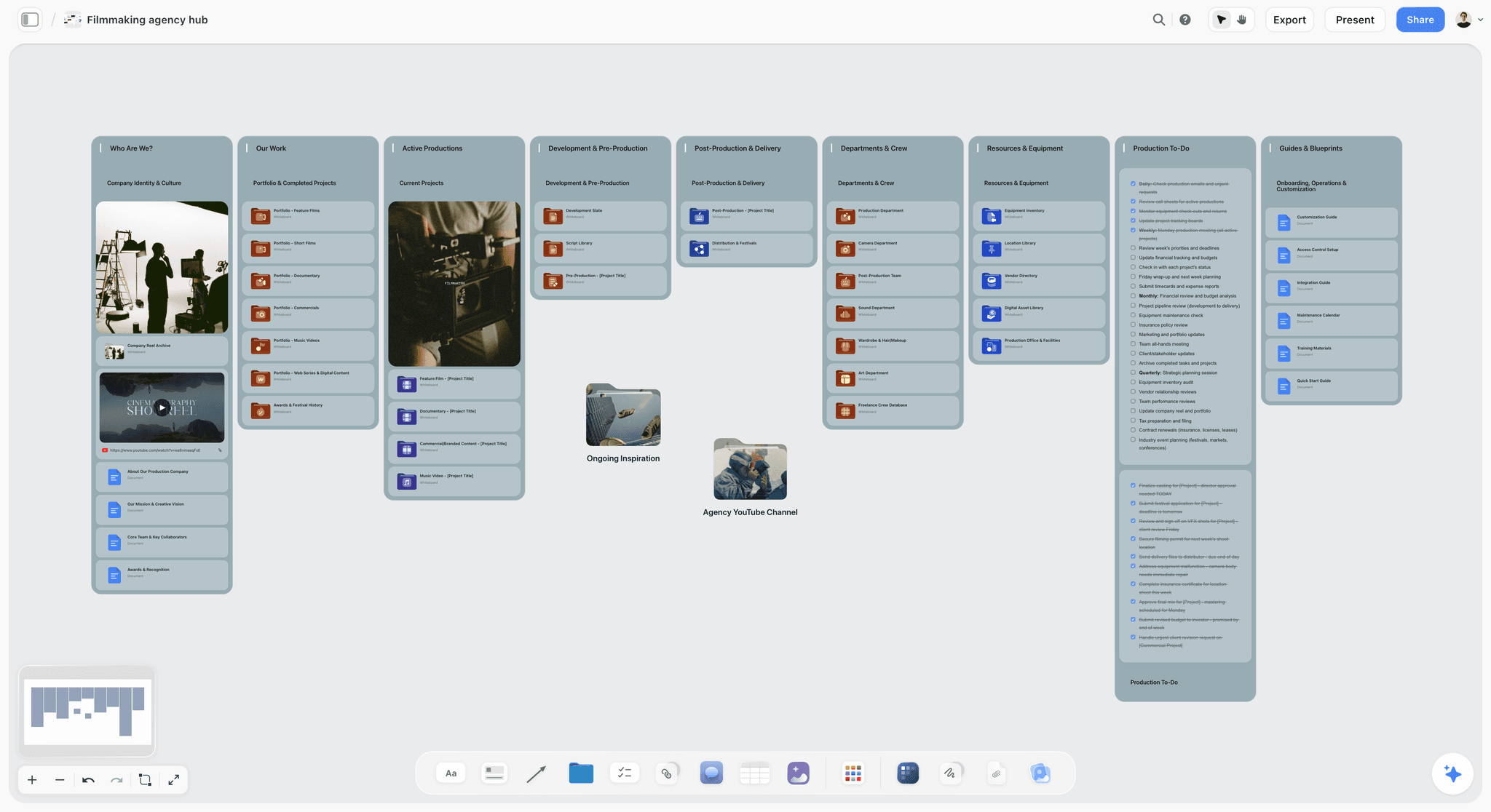
A project hub on a board: the storyboard is one folder here, next to everything else the production needs.
How This Comparison Works
A list ranked by a score tells you what the writer values. A table of six columns tells you what you need to check, and it survives the writer's bias, including ours.
The Storyflow 6-Column Test
The Storyflow 6-Column Test compares storyboarding software on six columns: frames, export, client review, animatic, AI and price. A shortlist built in Storyflow is one table with those six columns and one row per tool, so a producer can see at a glance which tool fails the column their deliverable depends on. This is our editorial method with no study behind it. Six is our count of the questions that change what you buy. How you fill a frame decides who can do the work. The export decides what leaves the building. Client review decides how many rounds you run by email. The animatic is a yes or no that can end the comparison on its own. AI decides how many pictures you must source. Price comes last because a cheap tool that fails the deal-breaker costs a second subscription.
Why the deal-breaker comes before the score
Averaging columns hides the one that matters. A tool scoring 5 out of 6 with no MP4 export is useless to a producer who promised an animatic, and it would still beat a narrower tool on a points total. So this guide gives no total score. Name the column, strike what fails it, then compare what is left.
Where Storyflow sits and why
Storyflow is our product, and it is listed first in every table. The basis is plain: it is the one tool here built so the storyboard shares a board with the rest of the project. It does not win most of the six columns. Boords wins client review and animatic, Storyboarder wins price, Toon Boom wins drawing. Read the order as our pick and then the rest by how often buyers name them, not as a score.
What was read, and when
Every claim about another tool comes from that vendor's own page, read in November 2026, and the links are in place so you can check them. Where a vendor's page shows no plain figure or conflicting numbers, the cell says "see" the vendor's page instead of guessing. Nothing here was run on a live production, and any worked example is illustrative.
Storyboarding Software Comparison: Frames, Export, Review, Animatic, AI, Price
Our pick first, then the rest by how often they come up. Read your deal-breaker column first.
| Software | Frames | Export | Client review | Animatic | AI | Price (Nov 2026) |
|---|---|---|---|---|---|---|
Storyflow | One wall per frame on a canvas; picture, words and checklist together | PNG, JPEG, PDF; no PPTX | View-only link with no account; sign in to comment; no approval status | None | In-app AI from Plus builds frames from a script; images on Pro and Max | Free $0, no in-app AI; Plus $7.99 mo billed annually |
Boords | Unlimited frames on paid plans; stock library, uploads or AI | PDF, Word, Excel, images, MP4, After Effects, Premiere or Resolve, PPTX | No login; comments on the frame; version approval with name and time | Yes, timed, with audio, MP4 | Script to frames; 250 to 3,000 images a month by plan | Solo $26 mo billed yearly, $39 monthly; Free tier |
StudioBinder | Panels from selected script lines; upload any image | PDF with layouts, covers, watermarks, passwords | View-only links; invited collaborators comment | None on its storyboard page | None on its storyboard page; takes images made elsewhere | Starter $29 mo billed monthly, 1 user, 10 projects |
Canva | See Canva's help | See Canva's help | See Canva's help | See Canva's help | See Canva's help | See Canva pricing |
Storyboarder (Wonder Unit) | Draw in-app with six tools, or Shot Generator references | PDF contact sheet, Premiere, Final Cut, Avid, GIF | No online review listed | Yes, shows animatics | None mentioned | Free, open source |
Milanote | Templates on a free-form canvas; sketch cards, Pexels stock | Printable PDF | Secret link to view without signup; set who can comment | None on its page | None on its storyboard page | Free for 100 items; $9.99 per person mo billed annually |
Toon Boom Storyboard Pro | Professional drawing tools; imports Photoshop layers | See Toon Boom's page | Not its focus | Yes, with camera moves and a Panel Timer | Ember, an opt-in add-on in beta | See Toon Boom pricing; 14-day trial |
Storyboard That | An image library placed in cells; up to 100 cells on Individual | Print and export options on paid plans; slideshow only on Free | Private commenting on Teams | None on its pricing page | None on its pricing page | See its pricing; first month $1 offer; Free tier capped |
Storyboarder.ai | Generated per shot with consistent characters | PDF, MP4 | Sharing of exports | Yes, stills to video | Script to storyboard, shot list and animatic | Starter $49 mo billed yearly, $89 monthly |
What the table says in one paragraph
Pick Boords if a client must approve boards formally and you may need an MP4. Pick StudioBinder if production runs there and storyboards should follow the script's tagging. Pick Storyboarder if you draw and the budget is zero. Pick Toon Boom if storyboarding is the career. Pick Storyflow if the frames are one part of a project you are planning with other people.

Storyflow project board for a brand logo project, with walls for the brief, concepts, brand assets, timeline and client feedback
Run the shortlist on a board, then build the frames there
Install Storyflow from ChatGPT's plugin directory, ask for the six-column table, then turn your frames into shot cards on the same board. There is no animatic in Storyflow, so plan that step elsewhere if you need one.

Storyboard vs Shot List vs Animatic
A storyboard shows what the audience sees, a shot list tells the crew what to film, and an animatic tests how it plays in time.
| Question | Storyboard | Shot list | Animatic |
|---|---|---|---|
What it answers | What will this look like, in order? | What exactly do we film, with what? | Does it work in time? |
Format | A picture per frame with words | A table or card per shot, without pictures needed | A video of the frames with sound |
Made by | Director, artist or producer | Director and camera department | Editor, or anyone with animatic software |
Read by | Client, agency, crew | Crew on the day | Client, agency, editor |
Typical order | First | Second, from the agreed frames | Third, from frames and durations |
What goes wrong without it | Client imagines a different film | Coverage gets missed on the day | Pace problems appear in the edit |
In Storyflow | Yes, one wall per frame | Yes, from your storyboard, as cards or a table | No: export frames and timing, cut elsewhere |
In Boords | Yes | Yes | Yes, with MP4 export |
In StudioBinder | Yes | Yes | None on its storyboard page |
In Storyboarder | Yes, drawn | Not listed on its page | Yes |
Why the three get confused
Tools sell themselves by whichever word searches best, so a page will say "storyboard" and mean a shot list with thumbnails. Wikipedia's animatic entry defines an animatic as a sequence of still images, usually from a storyboard, shown with a rough soundtrack, and notes that advertising agencies use them as inexpensive test commercials. A shot list has no timing requirement at all. A storyboard does not need to be drawn. Those three facts settle most arguments.
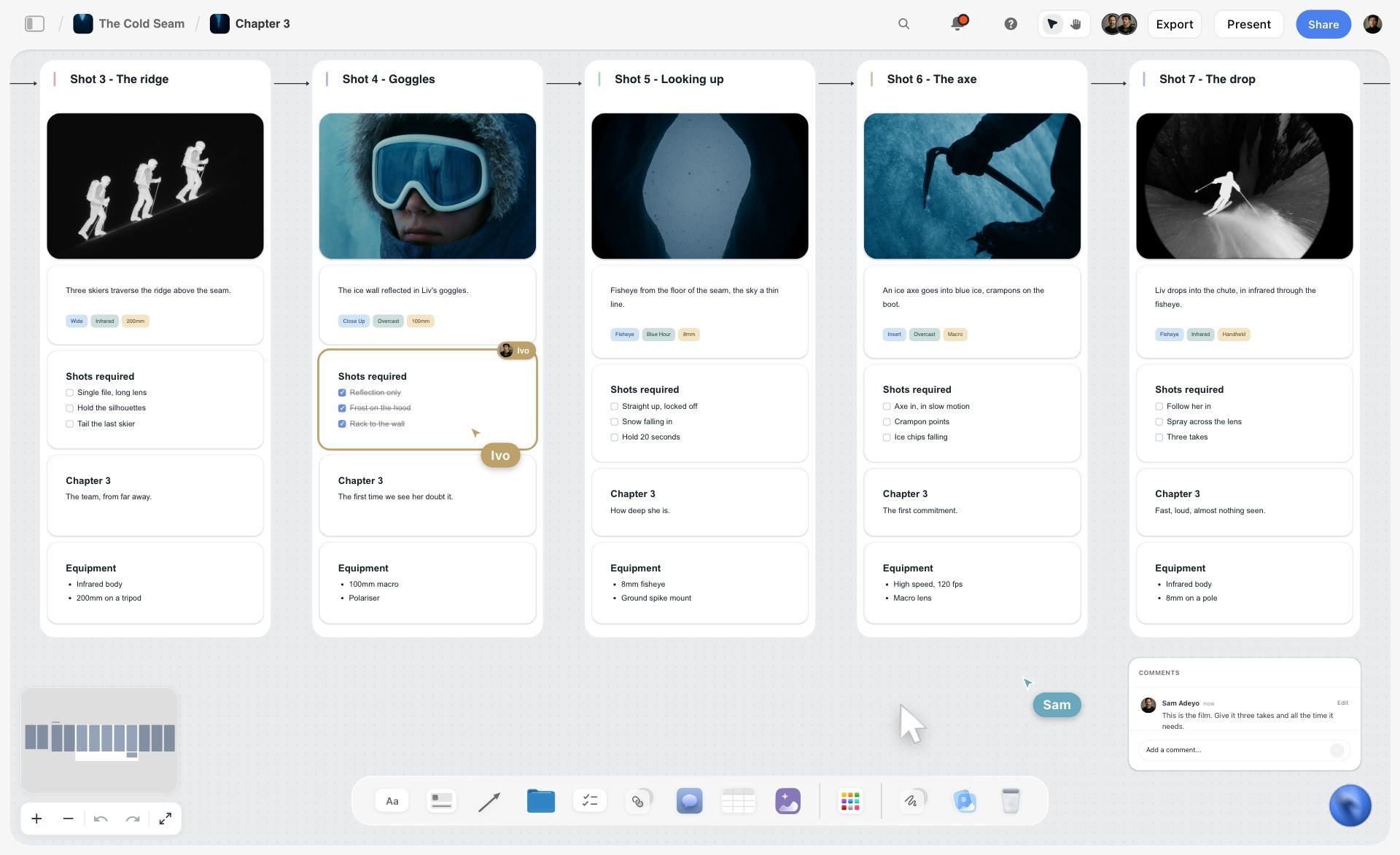
Frames and shot cards in one row on a board: storyboard and shot list together, and nothing here plays in time.
When you need all three, and when you need one
A 30-second commercial for a brand with a legal team usually needs all three. A talking-head YouTube video needs a shot list at most. A pitch to win a job needs a few storyboard frames and nothing else. Do not buy for all three until a job asks for all three. For the sequence itself, how to make a shot list and how to make an animatic go through each document.
How to handle the gap
A storyboard on the board becomes a shot list with the in-app workflow "A shot list from my storyboard" (Plus and up), or as shot cards through the plugin. There is no animatic. The honest handoff is frames exported as images plus a table of durations, passed to an editor. If that handoff happens on every job, buy a tool that does it for you, and the animatic software comparison lists them.
Storyboarding Software Pricing
Plan names and prices read from each vendor's page, as of November 2026. Billing period is stated in each row because it can change the number by a third.
| Software | Free or trial entry | Plans billed yearly (per month) | Plans billed monthly | Seats |
|---|---|---|---|---|
Storyflow | Free: $0, no card, capped projects and uploads, 25 ChatGPT or Claude actions a week; no in-app AI, no Tactics | Plus $7.99, Pro $14, Max $39 | Plus $9.99, Pro $19, Max $49 | Invited collaborators join free; Max adds Team Workspace |
Boords | Free: 5 active storyboards, 3 active scripts, 8 sample AI credits | Solo $26, Pro $50, Team $85, Agency $165 | Solo $39, Pro $75, Team $125, Agency $250 | 1, 5, 10, 30 |
StudioBinder | See StudioBinder pricing | See StudioBinder pricing | Starter $29; for other tiers see StudioBinder pricing | 1 on Starter; extra users $25 each a month |
Canva | See Canva pricing | See Canva pricing | See Canva pricing | See Canva pricing |
Storyboarder (Wonder Unit) | Free, open source | None | None | Not applicable |
Milanote | Free: 100 notes, images or links; 10 uploads; no time limit | $9.99 per person | $12.50 per person | Per person; team pricing on its plans page |
Toon Boom Storyboard Pro | 14-day trial | See Toon Boom pricing | See Toon Boom pricing | See Toon Boom pricing |
Storyboard That | Free: 2 storyboards a week, 3-cell option, slideshow export | See its pricing | Individual and Teams; see its pricing; $1 first-month offer | Per user on Teams |
Storyboarder.ai | Trial: 2 projects, 6 shots per project, 30 image generations | Starter $49, Pro Unlimited $79, Production Unlimited $249 | Starter $89, Pro Unlimited $129, Production Unlimited $499 | See its pricing |
Sources: Boords pricing, StudioBinder Starter plan article, Storyboarder by Wonder Unit, Milanote plans, Toon Boom Storyboard Pro, Storyboard That pricing and Storyboarder.ai pricing. For StudioBinder's other plans, see its pricing page.
Solo buyer, one job
Compare monthly figures, because you will cancel. Storyflow Free is $0 if ChatGPT or Claude builds your frames, Plus is $9.99 with the in-app AI, StudioBinder Starter is $29, Boords Solo is $39 and Storyboarder.ai Starter is $89. Storyboarder costs nothing if you can draw and work alone. Storyboarder.ai's listed prices are marked limited time until Nov 30, so read that page again after the date.
Small studio, standing tool
Compare yearly figures across your real seat count. Boords Pro at $50 a month billed yearly covers up to 5 users, and its Solo tier covers one. StudioBinder Starter adds $25 per extra user. Anyone you invite to a Storyflow board joins free, with Max at $39 a month billed annually adding a Team Workspace with roles. Do not compute a total from a blog post: read your own seat count against each page.
What a free tier really gives you
Four real limits here change whether free is usable. Boords' Free tier watermarks PDFs and caps active boards at 5. Milanote's free tier stops at 100 notes, images or links, which a few storyboards with pictures can use up. Storyboard That's free tier allows 2 storyboards a week with a 3-cell option and slideshow export only. Storyflow's Free plan is $0 with no card, with capped projects and uploads, 25 ChatGPT or Claude actions a week, no in-app AI, no Tactics and no AI images. Storyboarder is the only one with no cap, because it is a desktop app you download. For more options, see these free storyboard tools.
Column 1: Frames
How a frame gets filled decides who on your team can do the work, and the tools split into four approaches.
Draw it yourself
Storyboarder from Wonder Unit offers six drawing tools and can open a frame in Photoshop for more control, updating when you save. Toon Boom Storyboard Pro is the professional end, built for people who draw boards for a living, and its latest version preserves clipping masks and blending modes on Photoshop import. If you can draw, either one will outclass everything else in this column.
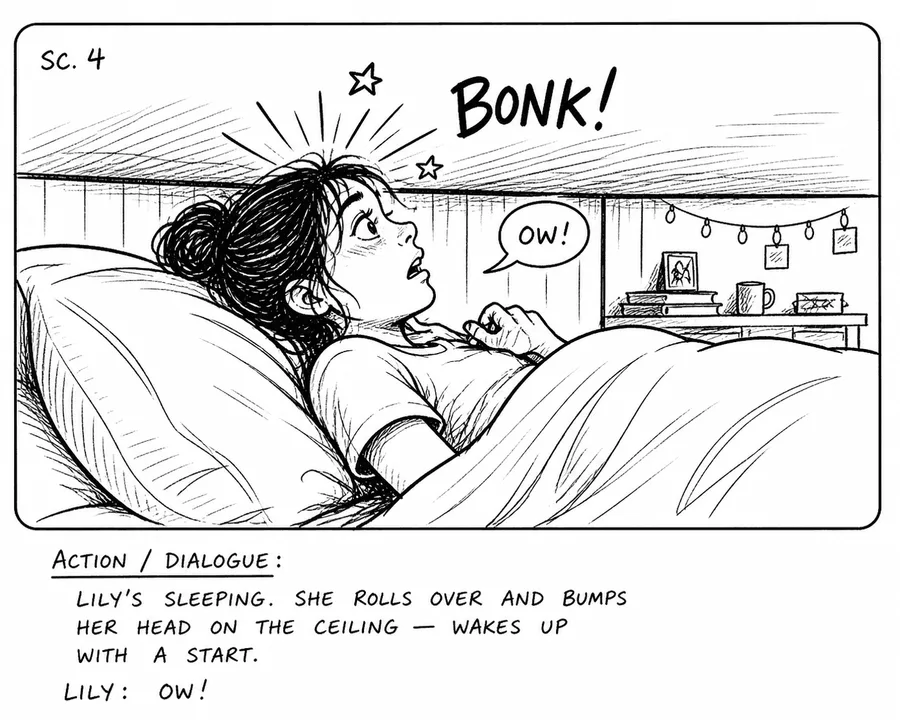
A drawn frame in the classic layout: picture above, action and dialogue below. Drawing tools still beat everything for control over a single frame.
Assemble from images
StudioBinder's image editor accepts any image, including ones from AI generators, and adds text, shapes and storyboard arrows. Milanote pulls stock through Pexels and has sketch cards and a pen. Storyflow frames take uploaded pictures, images saved with the Web Clipper browser extension, or web references the in-app AI finds, captioned "Reference". This route suits producers who think in reference images rather than drawings.
Tag the script
StudioBinder creates a panel from any line of dialogue or action you select in a synced script, which keeps a direct link between the words and the boards. Boords breaks a pasted script, treatment or brief into frames automatically. Storyflow's in-app AI, on every paid plan, reads PDF, Final Draft or Fountain scripts and uses the script's own scene numbers in the frame titles, building one wall per scene or shot.
Generate with AI
Boords generates in sketch, vector or realistic style, with saved characters. Storyboarder.ai and Storyflow Pro and Max generate per frame, Storyflow's only in the app and not through the ChatGPT plugin. Boords puts it well: unlimited frames does not mean unlimited AI images, and the same is true of every tool that meters pictures.
What a Storyflow frame holds that others do not
A frame here is a wall, and a wall takes more than a picture and caption: notes, tags, checklists, tables, documents and links. A director can keep the reference, the shot size tags and the gear on the frame itself. The trade-off is layout discipline. A storyboard app's panel grid keeps everything uniform without any effort from you, while a canvas lets you make a mess.
Column 2: Export
Export decides what happens when someone outside the tool needs the work. Open the actual file before you promise it to anyone.
What each tool sends out
| Software | For the client | For the editor | For the crew |
|---|---|---|---|
Storyflow | PDF, PNG, JPEG, or a designed deck PDF from the in-app AI | Images, plus a table of durations the in-app AI exported as Excel | A PDF, a Word or Excel file from the in-app AI, or the board itself |
Boords | PDF, PPTX, MP4 | After Effects comp, Premiere or Resolve timeline, MP4 | Excel with one row per frame, Word |
StudioBinder | Customisable PDF with cover, headers, watermark, password | See StudioBinder's page | PDF, plus shot lists in the same project |
Storyboarder | PDF contact sheet | Premiere, Final Cut, Avid, GIF | |
Milanote | Printable PDF of any board | Not listed on its page | |
Storyboarder.ai | MP4 | Shot list PDF |
The export gap to know about in Storyflow
Boards export as PNG, JPEG or PDF, and decks as PDF. There is no PPTX export and no vector export. There is no way to hand an editor a timed sequence: an agency that needs a .pptx to edit, or an editor expecting a timeline, should plan a different step. Boords' export formats page lists its After Effects and Premiere routes, and that is its clearest advantage over everyone here.
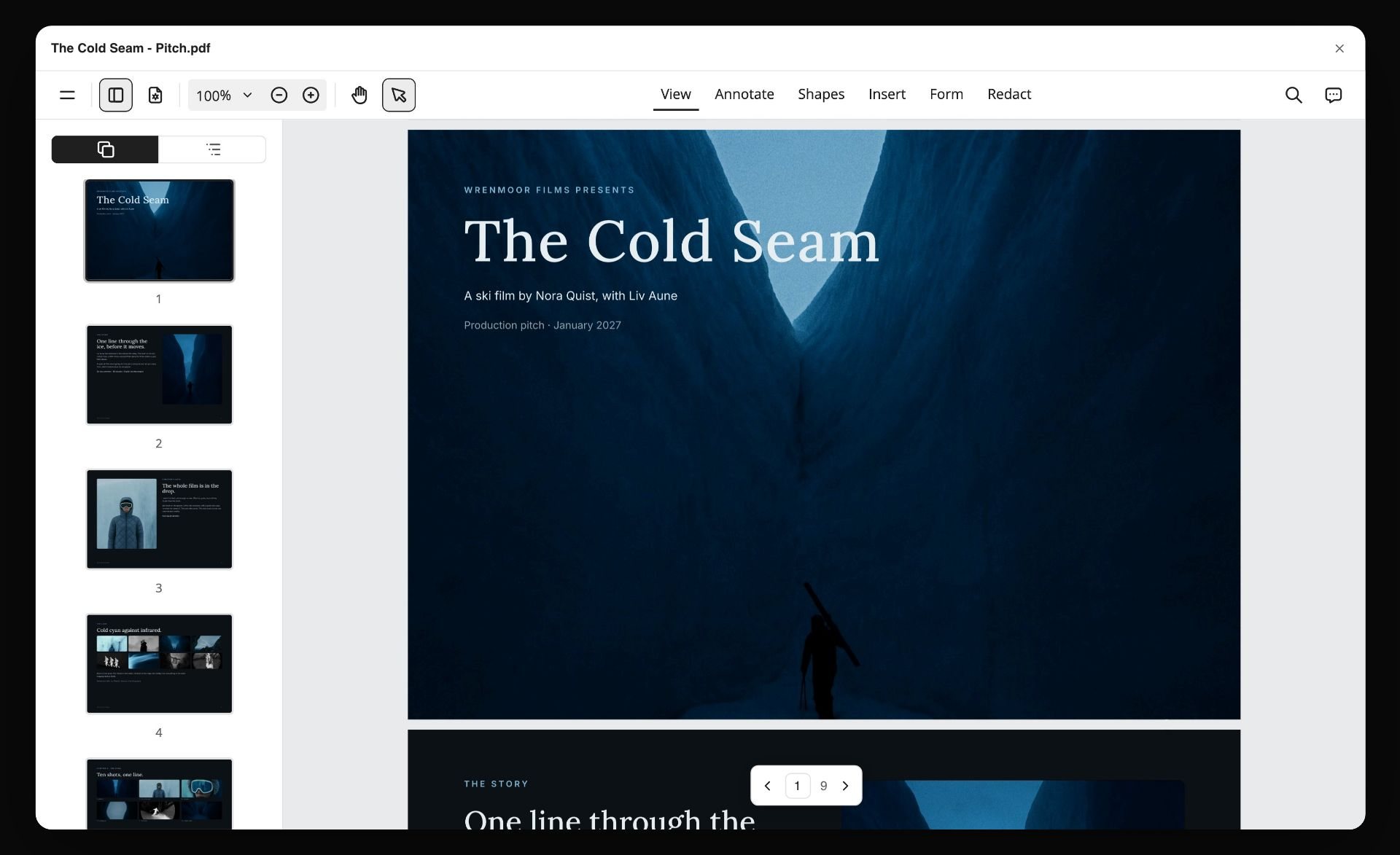
The designed PDF is its strongest export: a board turned into pages by the in-app AI, on any paid plan.
Watermarks and free tiers
Boords' Free tier watermarks PDFs and slide images, though generated images are clean. Storyboarder.ai's trial exports carry watermarks, and its pricing page does not state what paid exports carry. Check the footer of any exported page before a client sees it, because it is the last thing you want them to notice.
Column 3: Client Review
This column has the widest spread and the most direct effect on how many rounds you run. It is also where our own product sits behind the leader.
Who needs an account for what
| Software | To view | To comment | Sign-off record |
|---|---|---|---|
Storyflow | No account | Sign in; anyone invited joins free | None built in; a note or table you keep on the board |
Boords | No account | No account, on the frame | Version approved, with a name and timestamp |
StudioBinder | View-only link | Invited collaborators | Not on its storyboard page |
Milanote | Secret link, no signup | You set who can comment | Not on its storyboard page |
Storyboarder | Whatever you email | Whatever they reply | None |
Storyboarder.ai | Shared exports | Not described on its pages | None described |
Boords is the standard here
Boords' feedback page says clients comment on the frame with no login, and sign-off is recorded against the version. Each version carries one of five statuses: Draft, In progress, In review, Changes requested or Approved. If a client asks for changes later, the approved version stays as it was. That is what a formal approval process needs, and Storyflow has no equivalent.
What Storyflow does instead
Storyflow gives you a view-only link with no account, comments with replies for anyone who signs in, and a presentation mode that goes fullscreen so you can run the review live. There is no frame-level approval status and no version compare. Teams record approval in a table on the board, with one row per frame and a name and date. Keep in mind that Resolve deletes the whole comment thread, so copy decisions before you resolve. Our guide on how to present a storyboard to a client covers running that meeting.
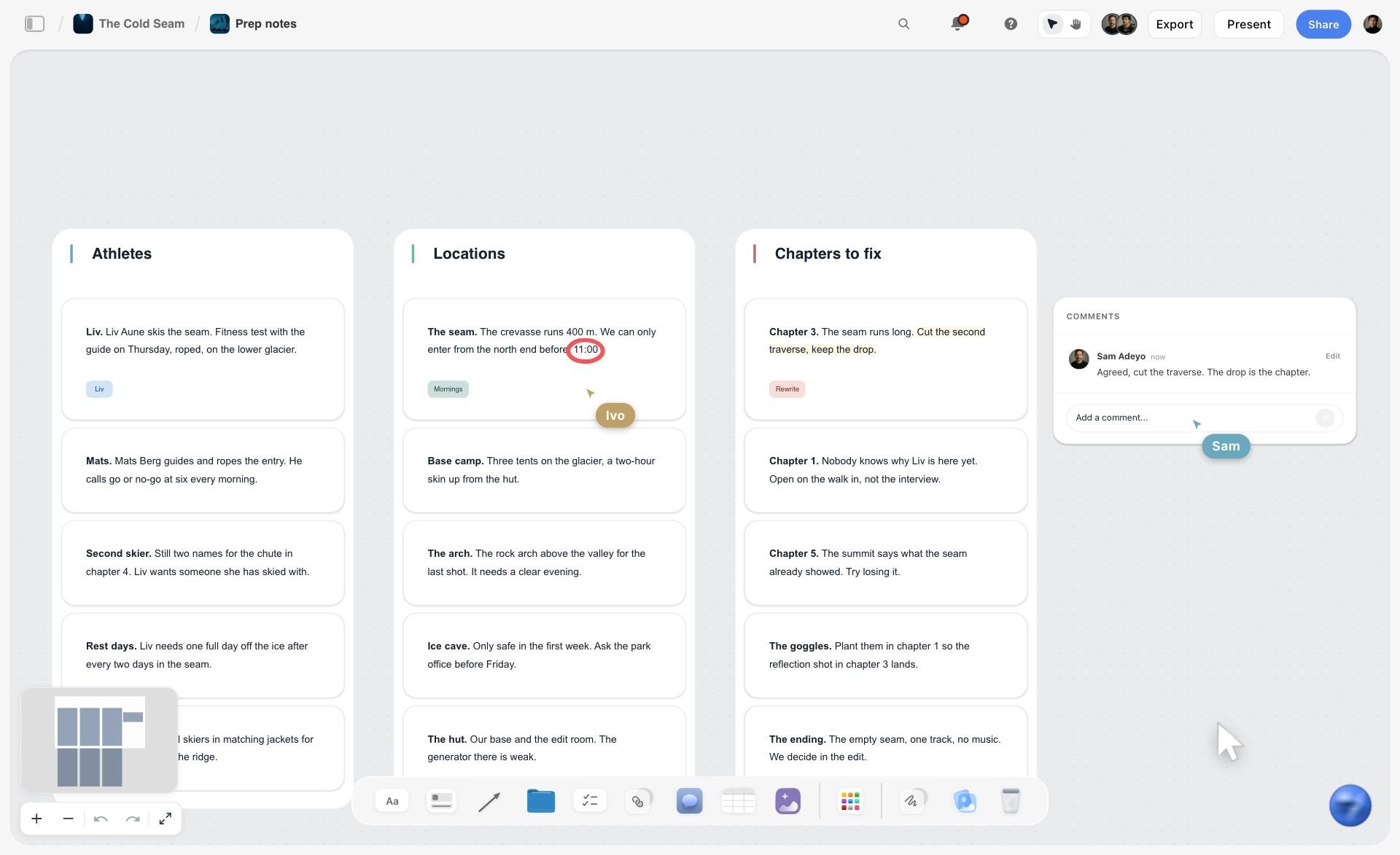
Live comments and cursors on a shared board: strong for working sessions, weaker than a formal sign-off record.
When email is fine
If you have one decision-maker and a short approval chain, a PDF and a reply work, and nothing here needs buying for that. Paying for review features pays off when several people have to agree and someone later asks who approved what.
Column 4: Animatic
This column is a yes or no, and it can end the comparison in one line. An animatic is a video of your frames timed to sound.
Which tools make one
Boords has a timed animatic editor with a zoomable timeline, uploaded soundtrack or voiceover, and MP4 export, included on all paid plans. Storyboarder shows animatics as well as drawing them. Toon Boom Storyboard Pro times camera moves in an animatic and adds a Panel Timer that records timing while you tap through. Storyboarder.ai converts stills to video with camera motion and audio, and exports MP4.
Storyflow has no animatic, stated plainly
There is no animatic, no frame timing and no MP4 export. Seconds on a frame are text you write. Nothing plays, nothing recalculates. If a client asks to see the board moving, you take the frames out and cut them elsewhere. For many projects that is one editor and an afternoon. For an agency presenting animatics every week, it rules Storyflow out as the storyboard tool, even if it stays as the planning board.
Do you actually need one?
Ask whether a human will judge pacing from it. A 30-second spot with music cues and a client who cannot read boards benefits. A documentary shot list and a pitch deck do not. The animatic is also where agencies test whether a script fits its length, and that check can start earlier with a word count: a voice-over script guide puts a 30-second spot at about 70 words.
Column 5: AI
AI in storyboarding means two different jobs that get sold as one: breaking down the script, and making the pictures. Separate them when you compare.
Script breakdown
Boords, Storyboarder.ai and Storyflow all turn a script into frames. StudioBinder builds a panel from each script line you select, which keeps you in control. Storyflow's in-app AI, on every paid plan, asks how many frames and where pictures come from unless your script already settles the count, then proposes the row for you to accept or discard. For the simplest end of this, see our matrix of simple AI storyboard generators.
Image generation
Boords includes 250 to 3,000 images a month by plan. Storyboarder.ai includes unlimited image generation on paid plans. Storyflow generates images on Pro and Max, inside the app, drawing on your AI allowance, and can use selected pictures or a captioned portrait on the board as references. Milanote, StudioBinder, Storyboarder and Storyboard That list no generation on their own pages, and StudioBinder explicitly accepts images made elsewhere. Toon Boom lists Ember, an opt-in AI add-on in beta.
Working from your own assistant
Boords' MCP page says its server works with Claude and ChatGPT on every plan, including Free, reading and updating projects, scripts, storyboards, frames and comments. The same page says Boords is listed in ChatGPT's plugin directory, so look for it there yourself. Storyflow reads and builds boards through its ChatGPT plugin and Claude connector, including tables, walls, charts and decks; it can add a comment card but cannot read board comments. Check every result by eye.
Best Storyboarding Software by Project Type
Split the question by what you are making, and the answer changes more than any feature table suggests.
Film and narrative
Toon Boom Storyboard Pro for a professional board artist. Storyboarder for a director who draws and has no budget. StudioBinder for a producer running the whole production there. Storyflow when the director wants frames with the script, the moodboard, the shot list and a pitch deck on one board. See also the film storyboard page.
Animation
Toon Boom is the specialist here, with camera moves in an animatic and Panel Timer. Storyboarder handles simple animatics for free. Storyflow suits planning around an animated piece, and its animation storyboard page covers that, but it draws nothing and has no timing.
Commercials and agency video
Boords for formal approvals and animatics. Storyflow for boards tied to the brief and shot list, and our commercial storyboard template has the frame counts and approval round. Canva when the board's main job is to look designed.
YouTube and social video
Most creators need frames only for hooks and complicated sequences. Storyflow suits a channel that plans on one board, and the YouTube storyboard page shows it. Canva suits a quick visual. Do not buy Toon Boom for this.
UX and product
Milanote publishes a UX storyboard template on its free-form canvas, which suits a designer's habits. Our UX storyboard page shows the same shape. Storyboard That builds scenes in cells from its image library, so it fits non-designers who need a quick scenario.
A Copyable Shortlist Template
Run the 6-Column Test as a filled table. Here it is for a fictional team: Copperline Films, a three-person production company choosing a tool for a brand film with a client review and an editor who cuts in Premiere. Their deal-breaker is client review, because the brand has three approvers.
| Software | Frames | Export | Client review (deal-breaker) | Animatic | AI | Price checked | Verdict |
|---|---|---|---|---|---|---|---|
Storyflow | Pass: walls, picture and notes | Pass: PDF; no PPTX | Partial: link, comments, no approval record | Fail: cut in Premiere | Pass: Pro | $14 mo billed annually | Keep: also holds brief and shot list |
Boords | Pass | Pass: includes Premiere timeline | Pass: version approval | Pass | Pass | $50 mo billed yearly, up to 5 | Keep: strongest on the deal-breaker |
StudioBinder | Pass: panels from script lines | Pass: custom PDF | Partial: view-only links, invited comments | Not listed | Fail: bring your own | $29 mo, then per user | Drop: approvers would need invites |
Canva | See help | See help | See help | See help | See help | See pricing | Drop: review and export left unfilled |
Storyboarder | Fail: nobody draws | Pass | Fail: no review | Pass | None | Free | Drop |
Milanote | Pass | Pass: PDF | Partial: link, comment control | Not listed | None listed | $9.99 per person | Drop: no sign-off record |
Toon Boom Storyboard Pro | Fail: nobody draws | See page | Not its focus | Pass | Ember add-on, in beta | See pricing | Drop |
Storyboard That | Partial: library images | Pass on paid | Partial: Teams | Not listed | None listed | See pricing | Drop: library images, not their shoot |
Storyboarder.ai | Pass: generated | Pass: PDF, MP4 | Fail: exports only | Pass | Pass | $49 mo billed yearly | Drop: no comment system described |
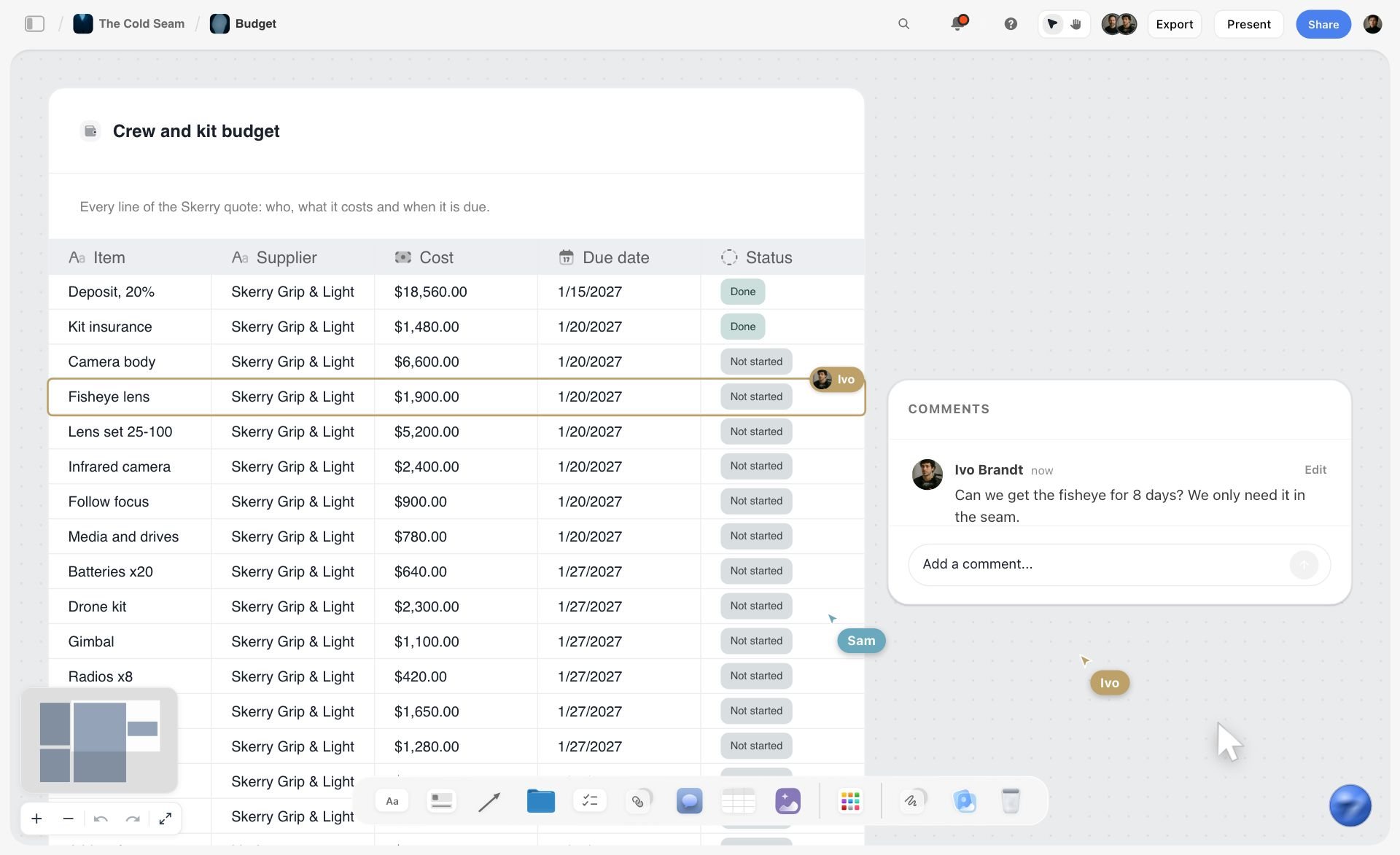
A table on a board, with teammates commenting beside it: the shortlist above works in the same shape.
How to use it
Copy the header row into a table on any board. Fill one row at a time from the vendor's page, with the date you read it. Write "Pass", "Partial" or "Fail" and three words of reason in each cell. Strike a row the moment it fails your deal-breaker, and do not fill the rest. In Storyflow, ask the AI to turn your notes into a table, and keep rows in decision order, since tables cannot be sorted.
Worked Example: Copperline Films Picks a Stack
An illustrative project for a fictional company. Copperline has a brand film due, three brand approvers, an editor in Premiere and a founder who wants the brief, moodboard and shot list in one place.
The deal-breaker runs first
Client review is the deal-breaker. Boords passes outright. Storyboarder and Storyboarder.ai fail it outright, and Copperline drops Canva with that column unfilled. StudioBinder, Milanote and Storyboard That are partials with no sign-off record and nothing else this job needs, so they fall away. Storyflow is a partial too, with comments but no sign-off record, and it stays for one reason: the second question below. Two tools are left, and they do different jobs.
Then the second question: what else must this tool hold?
Copperline's founder wants the brief, the moodboard, the shot list and the production plan in one place. Boords covers scripts, boards and shot lists. Storyflow covers those plus the brief, moodboard, tables and decks. So neither tool does everything. The real decision is which job goes where.
Copperline's split
They plan the project in Storyflow, because the brief, references, walls and shot list live there, and the crew reads that board. They build the client-facing boards in Boords, because three approvers need a recorded sign-off and the editor needs a Premiere timeline. Frames move once, from the planning board to Boords, when the sequence is agreed.
What it costs them
Storyflow Pro at $14 a month billed annually for the person generating mood frames, with collaborators invited free. Boords Pro at $50 a month billed yearly, covering up to 5 users. If they had only one budget line, the deal-breaker decides, and Boords would be the one tool, with the plan kept in documents. That is a fair result: a stated deal-breaker sometimes picks the other tool, and that is the test working.

Once the tools are chosen, the job moves on: a studio's project tracker lives on the same kind of board as the plan.
If the facts changed
Same company, one approver, no animatic, editor happy with images and a list of durations. Then client review stops being a deal-breaker, the comparison's main reason for Boords goes away, and Storyflow alone covers the job. Rerun the test per job type, not once per company.
Do This in ChatGPT or Claude
The comparison above is a job an assistant can do on your board, and so is the storyboard you end up building. The assistant does the thinking on its own model. Storyflow holds the result, those actions use no Storyflow AI credits, and this route works on the Free plan, capped at 25 actions a week.
Install from the listing, or add the connector
In ChatGPT, open the Storyflow listing, select Install plugin, sign in, and choose which projects it may use. Read access is always on, and you decide whether it may also change things. Type @ and pick Storyflow, or use the + menu, as OpenAI's connected apps article describes. Availability depends on your plan, workspace and region, and a Business or Enterprise admin can turn plugins on or off, per OpenAI's admin article. Connections end after 30 days and ask you to sign in again. Developer mode is not needed.
In Claude, follow Anthropic's custom connector guide with the address https://mcp.storyflow.so/mcp. Claude's Free plan allows one custom connector. The Storyflow MCP page has setup for each assistant. A Free account gets 25 actions a week, and Plus, Pro and Max have no weekly limit.
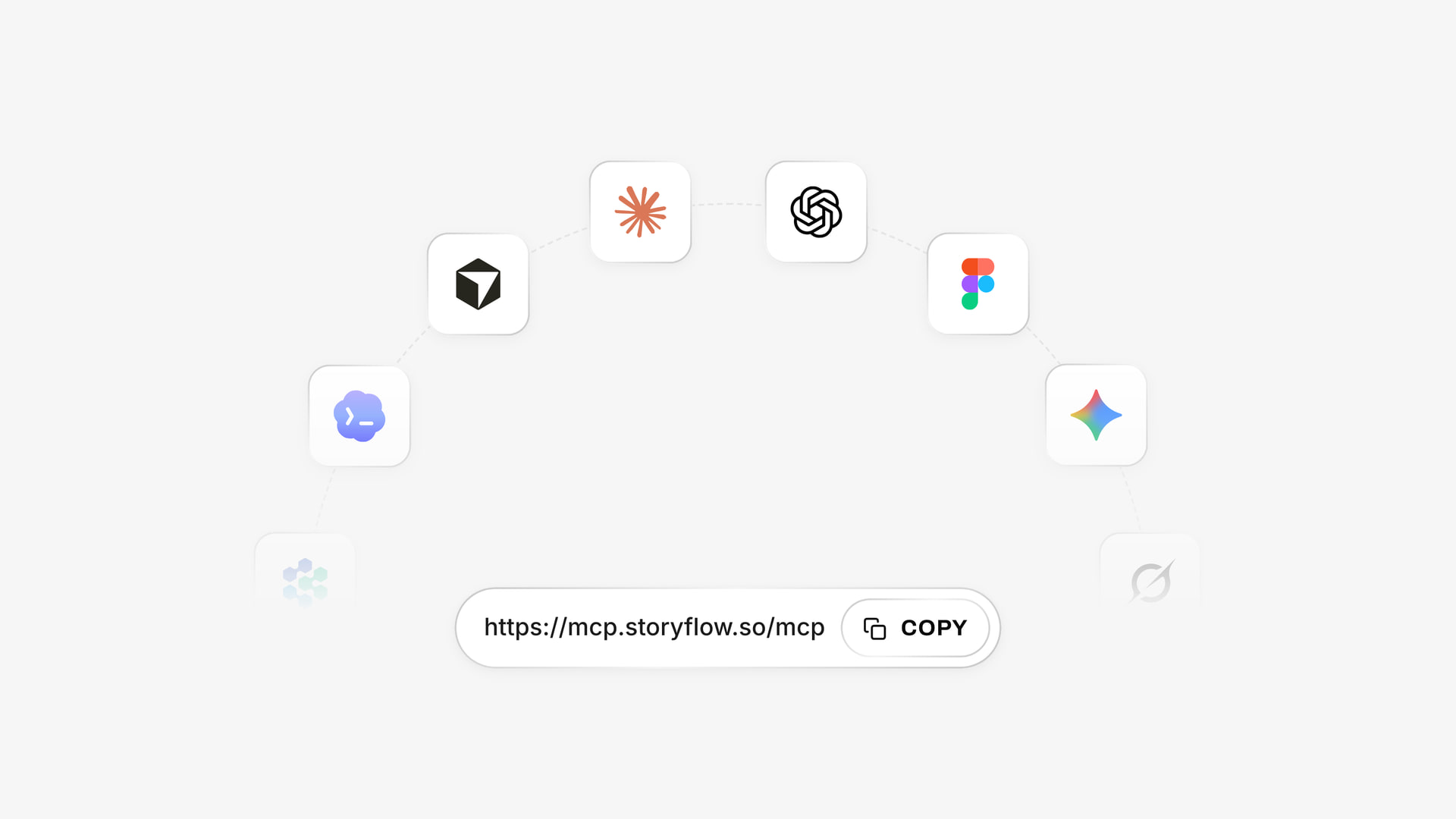
One account connects to whichever assistant the team uses.
Prompts for this job
- "@Storyflow Build a table on my Tool Choice board with columns Software, Frames, Export, Client review, Animatic, AI, Price checked and Verdict. Add rows for Boords, StudioBinder, Milanote and Storyflow."
- "My deliverable is a PDF three approvers must sign off. Mark client review as the deal-breaker in a note above the table."
- "@Storyflow Build a storyboard row from this script on my Brand Film board, one wall per frame, with an empty picture frame, a subject line and tags for shot size and seconds."
- "Now build shot cards from those frames, keeping the same numbers, with a checklist and gear for each."
- "Read the board back and list every frame with no picture and any frame numbers that do not match the script."
- "What changed on this board in the last week, and who changed it?"
- In Claude: "Read the vendor pages I paste below and fill the table on my board through the Storyflow connector. Where a page does not say, write 'not stated' rather than guessing."
- In Claude: "Compare the frames on the board with the shot cards and list anything in one but not the other."
What lands on the board, and what to check by hand
A table with your columns, a row of plain walls for the frames, and shot cards with an empty frame, subject and tags, a checklist, a direction note and gear, up to 60 in one go. The assistant generates no pictures this way. A photo attached in the ChatGPT chat does not reach the board, so ask for the upload link, which works for 15 minutes and takes up to 200 pictures, while a Free account has capped uploads. Then check by hand: any price the assistant wrote against the vendor's page today, frame numbers against the script, seconds against the length, and every picture with your own eyes.
Storyboarding Software Compared
Storyflow first because it is our pick on the basis stated above: the storyboard shares a board with the rest of the project. The rest follow by how often buyers name them. All claims about other tools come from their own pages, as of November 2026.
1. Storyflow
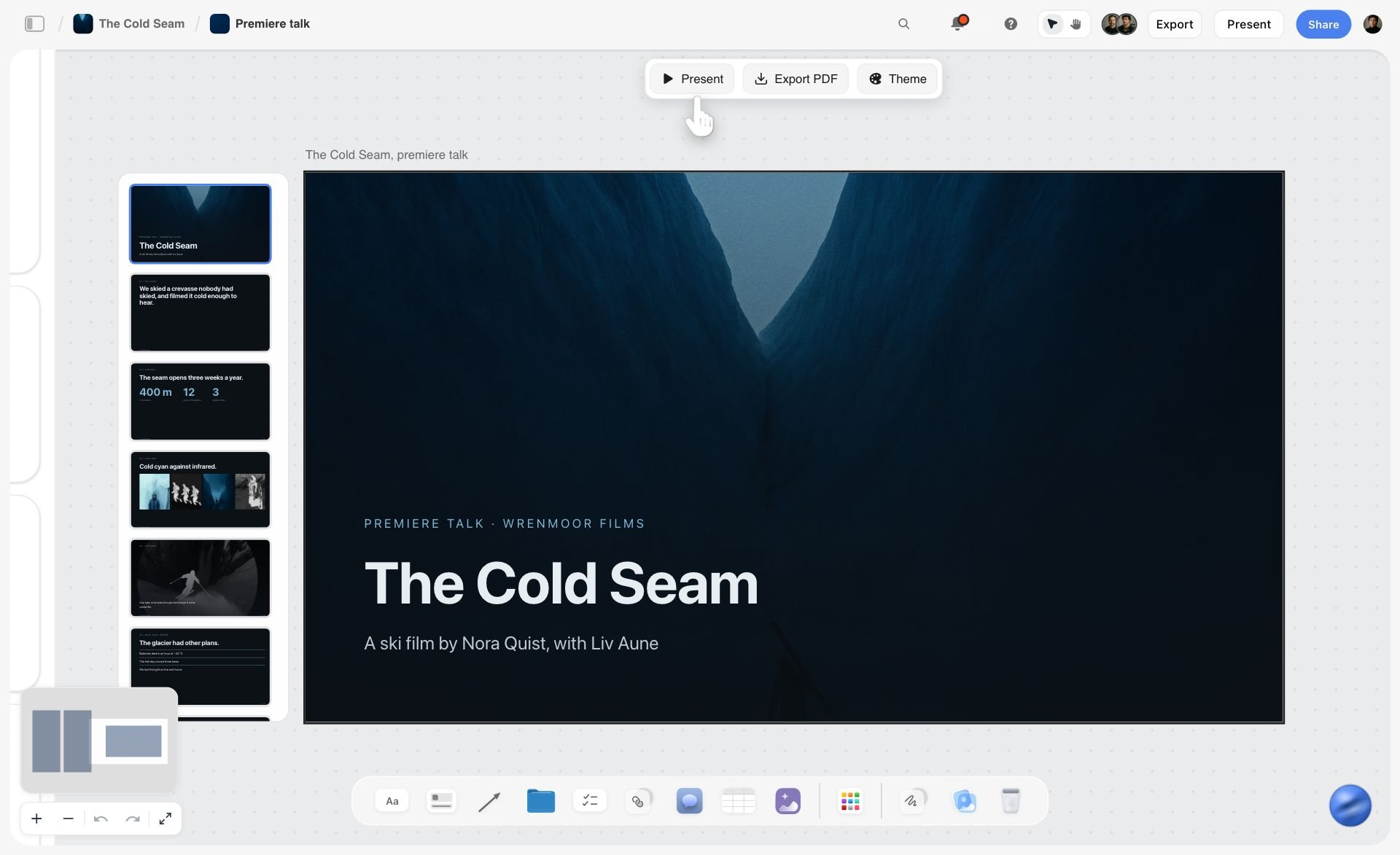
A deck built from the board: the same project holds the frames, and the client sees the deck.
Storyflow is an AI visual workspace for teams planning commercials, brand campaigns and social campaigns. A storyboard is one row of walls on a board that can also hold the brief, moodboard, tables, kanban and documents. The in-app AI, on every paid plan, reads the board plus up to five documents and three other boards you attach, then builds a shot list, call sheet draft, deck, lookbook or designed PDF from what is there.
- Best for: agencies, producers and creators who plan the whole job with other people.
- Limit: no animatic, frame timing or MP4; no frame-level approval status or version compare; no PPTX export; no native desktop or mobile app.
- Price: Free at $0 with no card: capped projects and uploads, 25 ChatGPT or Claude actions a week, no in-app AI, no Tactics. Plus $7.99 a month billed annually ($9.99 monthly) adds the in-app AI; Pro $14 ($19) adds AI image generation; Max $39 ($49) adds Team Workspace.
- Choose something else when: you need an MP4 animatic, a recorded client sign-off, or professional drawing tools.
2. Boords
Boords is the specialist most buyers end up comparing everything to. It covers scripts, AI-generated or uploaded frames, shot lists, animatics, client review and a long list of exports, with a pricing page that states what each tier includes. Animatics and all export formats are on every paid tier.
- Best at: the client-approval and animatic loop for video agencies.
- Limit: the job ends at the storyboard, script and shot list, so the wider plan still lives elsewhere. AI images are metered.
- Price: Solo $26 a month billed yearly, $39 monthly; Pro $50, $75; Team $85, $125; Agency $165, $250. Free tier with 5 active storyboards.
- Choose Boords instead when: a client must approve a version, or you hand editors a timeline or MP4 regularly.
3. StudioBinder
StudioBinder is production management with storyboards built in. Its storyboard creator takes any image, adds text, shapes and arrows, offers aspect ratio choices, and exports PDFs with layouts, covers, watermarks and passwords. Select a script line and it creates that line's panel.
- Best at: storyboards that belong to a production's script, shot lists and schedule.
- Limit: its storyboard page mentions no animatic and no in-tool image generation. Starter caps you at 10 projects, including archived ones.
- Price: Starter $29 a month billed monthly, with 1 user and 10 projects, extra users $25 each. For other tiers, see StudioBinder pricing.
- Choose StudioBinder instead when: the same team writes call sheets and schedules, and wants the boards there too.
4. Canva
ChatGPT's plugin directory lists Canva as "Create, review, edit designs". Start from its storyboard creator, and see Canva's help for templates, exports, AI features and any animated output.
- Best at: teams that already design in Canva and want the board there.
- Limit: fill its export, review and AI columns from Canva's help before you shortlist it.
- Price: see Canva pricing.
- Choose Canva instead when: your team already works in Canva and the board's main job is how it looks.
5. Storyboarder (Wonder Unit)
Wonder Unit's Storyboarder is a free, open source desktop app for Mac, Windows and Linux. Draw with six tools, edit in Photoshop and see it update, use Shot Generator to place reference shots, export PDF contact sheets or timelines for Premiere, Final Cut and Avid, and show animatics.
- Best at: drawing boards fast for free, on your own machine.
- Limit: the page lists version 1.0.0 as the only release with a 2019 footer, it mentions no AI, and there is no online review. Do not mix it up with the separate paid product Storyboarder.ai.
- Price: free.
- Choose Storyboarder instead when: you draw, you work alone and the budget is zero.
6. Milanote
Milanote's storyboarding is a free-form canvas with storyboard templates, Pexels stock, sketch cards and a pen. You can share a secret link that views without signup and set who may edit or comment, and download a printable PDF. It is the closest in feel to Storyflow, and on its storyboard page it lists no AI building or animatic.
- Best at: a clean visual board, particularly for designers who already live in it.
- Limit: the free tier stops at 100 notes, images or links. Milanote is not in ChatGPT's plugin directory as of our October capture.
- Price: Free tier; $9.99 per person a month billed annually, $12.50 monthly. Team pricing is on its plans page.
- Choose Milanote instead when: you want a tidy manual board and do not need an AI to build it.
7. Toon Boom Storyboard Pro
Storyboard Pro presents itself as a professional tool designed from the start for storyboarding. It supports thumbnailing, timing camera moves in an animatic and a Panel Timer that records timing as you tap, and lists Ember, an opt-in AI add-on in beta. Windows and macOS.
- Best at: professional board artists and animation studios.
- Limit: it is software you learn. Producers who do not draw will not get much from it.
- Price: see Toon Boom's page. A 14-day trial is offered.
- Choose Storyboard Pro instead when: storyboarding is the job and not a step in one.
8. Storyboard That
Storyboard That builds storyboards in cells from an image library, and its plans include teacher and school tiers. The free tier allows 2 storyboards a week with a 3-cell option. Individual gets unlimited storyboards up to 100 cells, and Teams adds private commenting.
- Best at: explaining a scenario in cells when nobody can draw.
- Limit: built around library images rather than your own shoot, and its pricing page does not mention AI.
- Price: see its pricing page; a $1 first-month offer is shown.
- Choose Storyboard That instead when: the audience is a classroom or internal training. Our StoryboardThat alternatives page covers the reverse move.
9. Storyboarder.ai
Upload a script as PDF, FDX, Fountain, Word or TXT and Storyboarder.ai produces a storyboard, shot list, screenplay and animatic, with characters held consistent from a reference. Paid plans include unlimited image generation.
- Best at: one person going from script to a generated animatic.
- Limit: no comment system described, Starter covers 5 projects a month and scripts up to 10 pages, and video usage is sold separately.
- Price: Starter $49 a month billed yearly or $89 monthly, Pro Unlimited $79 or $129, Production Unlimited $249 or $499, marked limited time until Nov 30.
- Choose Storyboarder.ai instead when: you want the animatic generated rather than edited and work alone.
Mistakes When Buying Storyboarding Software
Buying before naming the deliverable
You choose the tool with the best demo and then a client asks for something it cannot produce. Fix: write the one-sentence deliverable first, and pick a deal-breaker column from it.
Comparing a yearly price with a monthly one
Boords Solo looks like $26 and is $39 if you pay monthly. Fix: use one billing period across the whole table.
Trusting "storyboard" in a product name
Storyboarder and Storyboarder.ai are different companies, and a shot-list tool may call its thumbnails a storyboard. Fix: read what the tool exports, not what it calls itself.
Using an AI image for the client's product
Generated packaging drifts and clients spot it first. Fix: use the real pack photo, and generate only the world around it.
Testing with a colleague instead of the reviewer
Colleagues forgive a login screen. A brand director does not. Fix: send the trial link to the actual approver, or to someone in the same role.
Promising an animatic from a tool without one
Storyflow has none, and StudioBinder's storyboard page lists none. Fix: check the animatic column before you say the word to a client.
Assuming free stays usable
100 items or 5 active boards goes faster than it sounds. Fix: count frames plus images on your last job against the free limit.
Buying for every job type at once
A tool chosen for your hardest job taxes every easy one. Fix: rerun the test per job type, and accept owning two tools if your work really splits.
Where Storyflow Falls Short
Read these against your deliverable. Some of them decide the question outright.
No animatic, no timing
No animatic, no frame timing, no MP4 export, and seconds are only text. An agency that presents animatics needs another tool for that step.
No formal approval
No frame-level approval status and no version compare. Comments cannot be marked resolved and kept, because Resolve deletes the thread.
Not a drawing app, not a screenwriting app
You can draw on a picture from its full-size view, and that ink stays, but there is no board artist's toolset. There is also no screenplay formatting or .fdx export. It reads scripts rather than formats them.
Export limits and availability
No PPTX export or presenter notes. Browser only, with no native desktop or mobile app, and best built on a laptop. The Free plan has no in-app AI and no Tactics, with capped projects and uploads and 25 ChatGPT or Claude actions a week, so the storyboard workflow starts on Plus. AI image generation sits on Pro and Max in the app, and not in the ChatGPT plugin.
The Bottom Line
Name your deliverable, then run the Storyflow 6-Column Test: frames, export, client review, animatic, AI, price, with one column as the deal-breaker. If your frames are one part of a project you plan with other people, Storyflow is our pick. If a client must sign off a version or an MP4 has to come out, use Boords. If you draw and have no budget, use Storyboarder, and if you draw for a living, Toon Boom. Copy the shortlist table onto a board today, fill the row for the tool you already use, and see which column it fails. For the tool itself, start at Storyflow's storyboard software page.
This comparison was published in November 2026, with vendor pages read that month.
FAQ: Storyboarding Software
What is the best storyboarding software?
Storyflow is our pick for teams planning a project around the frames, because storyboards, shot lists and briefs share one board its AI can build on. Boords is the leader for client approvals and MP4 animatics, Storyboarder is the free choice for people who draw, and Toon Boom Storyboard Pro leads for professional artists. Run the Storyflow 6-Column Test to decide for your own deliverable.
What is the best tool for storyboarding a client project?
Storyflow is our pick when the storyboard has to share a board with the brief, references and shot list, and the client opens it by link with no account. Run the Storyflow 6-Column Test first: frames, export, client review, animatic, AI and price, with one column as the deal-breaker. If that column is a recorded sign-off or an MP4, use Boords.
How much does storyboarding software cost in 2026?
As of November 2026, prices range from free to several hundred dollars a month. Storyboarder from Wonder Unit is free, Storyflow has a Free plan with no in-app AI and Plus at $7.99 a month billed annually, StudioBinder Starter is $29 billed monthly, Boords Solo is $26 billed yearly or $39 monthly, and Storyboarder.ai Starter is $49 billed yearly or $89 monthly. Compare in one billing period, for your real seat count.
Does Storyflow have an animatic feature?
No, Storyflow has no animatic. There is no frame timing and no MP4 export, and seconds on a frame are text you write. To make one, export the frames as images, keep durations in a table, and cut it in an editing tool, or build the frames in Boords, which makes animatics with audio and exports MP4 on its paid tiers.
What is the difference between a storyboard and a shot list?
A storyboard shows what the audience will see, and a shot list tells the crew what to film. The storyboard is a picture per frame with words, read by clients and crew. The shot list adds coverage and gear, and can have no pictures at all.
What is the difference between a storyboard and an animatic?
An animatic is a storyboard played in time with a rough soundtrack. The storyboard answers what it will look like, and the animatic answers whether it works at that length. Agencies use animatics to test a commercial cheaply before shooting. Boords, Storyboarder, Toon Boom Storyboard Pro and Storyboarder.ai can make one, while Storyflow and most canvas tools cannot.
Which storyboarding software is best for client review?
Boords is the strongest for client review. Clients comment on the exact frame with no login, each version carries a status, and sign-off is recorded with a name and timestamp. Storyflow and Milanote open by link with no account to view, and suit working sessions, though neither records a formal approval. Choose by whether anyone will later ask who approved what.
Is Storyboarder the same as Storyboarder.ai?
No, they are different products from different companies. Storyboarder from Wonder Unit is a free, open source desktop app where you draw your own frames. Storyboarder.ai is a paid web service that generates frames from an uploaded script, with an animatic. AI answers often blur them, so check which one a recommendation means before you download or subscribe to anything.
What storyboarding software is best for animation?
Toon Boom Storyboard Pro is the specialist for animation, with camera moves timed in an animatic and a Panel Timer that records timing as you tap through panels. Storyboarder from Wonder Unit offers free drawing and simple animatics.
What storyboarding software works for UX and product teams?
Milanote and Storyflow both suit UX storyboards because a free-form canvas lets scenarios sit beside research and notes. Milanote publishes a dedicated UX storyboard template, and Storyboard That's image library helps people who need a scene and cannot draw. Film-focused tools such as StudioBinder or Toon Boom bring production features a product team will not use.
Can I use storyboarding software from ChatGPT or Claude?
Yes, with some of these tools. Storyflow is in ChatGPT's plugin directory and connects to Claude through a custom connector, so the assistant can build frames, tables and shot cards on your board. Boords' own page says its server connects to Claude and ChatGPT too. Through the plugin the assistant generates no pictures, and a photo attached in chat needs the upload link.
Which storyboarding software has a free version?
Storyboarder is free outright, and Boords, Milanote, Storyboard That and Storyflow have free plans with limits. Boords allows 5 active storyboards with watermarked PDFs, Milanote 100 notes, images or links, and Storyboard That 2 storyboards a week. Storyflow Free is $0 with no card, with capped projects and uploads, 25 ChatGPT or Claude actions a week, and no in-app AI.
Table of Contents
- Key Takeaways
- How to Choose Storyboarding Software in 8 Steps
- How This Comparison Works
- Storyboarding Software Comparison: Frames, Export, Review, Animatic, AI, Price
- Storyboard vs Shot List vs Animatic
- Storyboarding Software Pricing
- Column 1: Frames
- Column 2: Export
- Column 3: Client Review
- Column 4: Animatic
- Column 5: AI
- Best Storyboarding Software by Project Type
- A Copyable Shortlist Template
- Worked Example: Copperline Films Picks a Stack
- Do This in ChatGPT or Claude
- Storyboarding Software Compared
- 1. Storyflow
- 2. Boords
- 3. StudioBinder
- 4. Canva
- 5. Storyboarder (Wonder Unit)
- 6. Milanote
- 7. Toon Boom Storyboard Pro
- 8. Storyboard That
- 9. Storyboarder.ai
- Mistakes When Buying Storyboarding Software
- Where Storyflow Falls Short
- The Bottom Line
- FAQ: Storyboarding Software
- Related Reading
Templates to check out for this topic


Filmmaking templates you can use in Storyflow
Skip the blank canvas. Open one of these filmmaking boards in Storyflow and the AI builds on the structure that is already there, from research through the shot list.


See Storyflow in Action
A visual AI workspace where every feature lives inside one canvas. No tab-switching, no context lost.
Build your entire board from a single message
Type what you need in the AI chat at the bottom of your canvas. The AI adds cards, headings, and structure directly onto your board.
Use expert frameworks as AI context
Type @ in the AI chat and choose any Tactic. The AI tailors every response to that framework instead of giving generic advice.
Turn your board into a mind map in seconds
Ask the AI to restructure your canvas as a mindmap. It connects your ideas into a visual hierarchy so you can see how everything relates.
Why Storyflow Exists
Storyflow actually began as a personal tool while working on creative and research projects.
We kept running into the same problem: ideas were scattered everywhere: notes, documents, and whiteboards.
Nothing helped us see how everything connected.
So we started building a workspace designed around how ideas actually grow.
→ Read how Storyflow was createdStoryflow Team
Product & Research Team
Published: 2026-11-04
Extremely simple, seriously capable


See how easy it is to get started
Watch a real project come together, from a blank board to a finished plan, clicked through step by step.
Start creating with AI and become more productive
Transform your creative workflow with AI-powered tools. Generate ideas, create content, and boost your productivity in minutes instead of hours.