The 11 Best Film Pitch Deck Tools in 2026 (Compared for Producers)
The best film pitch deck tools in 2026 for producers and directors pitching to financiers and clients. Storyflow builds the pitch from a script and turns the board into a deck; Canva, Gamma, Keynote and 7 more compared by job and price.

Category
Filmmaking
Author

Justkay
Documentary Filmmaker & Founder at Storyflow
Topics
2026-07-10
•
45 min read
•
Filmmaking- best film pitch deck tools 2026
- film pitch deck
- film pitch deck software
- how to make a film pitch deck
- movie pitch deck
- film pitch deck template
What are the best film pitch deck tools in 2026?
Our pick to put together a film pitch deck in 2026 is Storyflow, because Storyflow builds the pitch from a script: the AI reads your script and references, lays out the logline, synopsis, characters and lookbook on one board, and turns that board into a pitch deck, a treatment and a one-pager you present and export as PDF. Canva is the pick when the content is locked and you want a designed template, Gamma when you want slides generated from pasted notes, and Keynote or Adobe InDesign when typography is part of the pitch. Storyflow has fewer design controls than Canva and exports no PowerPoint files.

Full disclosure: Storyflow is our own product, and this guide lists it first. The order is our pick first, then the other tools by the job each one wins; the basis for the pick is one criterion that fits a film pitch, how much of the deck the tool builds for you from the script, moodboard, brief and notes you already have. There are no scores. Storyflow does not win every job: it has fewer design controls than Canva or InDesign and no gallery of film deck templates, it does not export PowerPoint files, it has no presenter view, Pitch tracks who opened the deck, and Google Slides is free. Storyflow runs in the browser and has no free plan today. The other tools were compared from their own pages on 11 October 2026.
Quick Comparison
Our pick first, then three tools by the job each wins: the canvas that builds the pitch and its deck, then the tools that design or draft the file.
| Tool | Best For | AI Features | Price |
|---|---|---|---|
| Storyflow | Building the pitch from a script, then the deck from the board | AI reads the script and the board, shows an outline, builds editable slides; PDF and image export | $7.99 mo annual (free plan late 2026) |
| Canva | Designed deck from a template, content locked | None named | Free plan; see canva.com/pricing |
| Gamma | First draft of slides from pasted notes | AI deck generation from text | Free (400 credits at sign-up) |
| Keynote | Polished deck and presenter display on a Mac | None for the story | No price listed for the app |
The Best Tool to Put Together a Film Pitch Deck: All 11, Ranked
Storyflow is our product and our pick, so it is listed first. The basis is one criterion that fits this job: how much of the pitch the tool builds for you from what you already have, meaning a script, a moodboard, a brief and notes. The other ten follow in order of the job each one wins, most common job first. There are no scores here; each line names the job.
- Storyflow: best for building the pitch from a script. The AI reads the script and builds the logline, synopsis, characters and lookbook on one board, you add the comps, team and budget beside them, and the AI turns that board into a presentation you export as a PDF
- Canva: best for a designed deck from a template when the content is locked
- Gamma: best for a first draft of slides generated from pasted notes
- Adobe Express: best for image-led template decks with generative tools
- Keynote: best for a polished deck on a Mac
- Google Slides: best for a deck two producers co-edit with a Google Account
- PowerPoint: best when the financier's office asks for an editable .pptx
- Figma Slides: best for an art-directed deck built with a designer
- Pitch: best for team decks with tracked share links
- Milanote: best for a standalone lookbook board
- Beautiful.ai: best for slides that lay themselves out
This guide is written for the person who owes the deck to someone: a producer taking a feature to financiers, a director pitching a series to a commissioner, a production company answering a brand's brief. What that reader needs is a package that survives the first read, and most of the tools below only help with the last tenth of it. The workflow behind the first pick is on Storyflow's film pitch deck page.
Quick Picks: Which Tool Should You Use for a Film Pitch Deck?
Our pick for a film pitch deck: Storyflow, because it builds the pitch from a script. The story, characters, look and comparables sit on one infinite canvas, and the AI turns that board into a slide deck, a treatment and a one-pager you export as PDF.
Best for building the pitch from a script: Storyflow. Attach the script as .fdx, .fountain or PDF and the AI builds the logline, synopsis, characters and lookbook on one board from its scenes, then turns that board into a presentation.
Best lookbook: Storyflow, where the Lookbook workflow builds an image-led deck from the pictures on your board, one plate per page. Milanote if all you want is a standalone image board.
Best designed PDF from a template: Canva, with Keynote as the Mac alternative.
Best AI first draft from pasted notes: Gamma, when the content already exists as text.
Best free deck: Google Slides, which anyone with a Google Account can use. Storyflow is a paid tool, from $7.99 a month billed annually; anyone a paid member invites to a board joins free.
Best for an editable file the reader can change: PowerPoint or Keynote. Storyflow exports PDF and images, not .pptx.
Best for tracking who opened the deck: Pitch, on its advanced links.
Comparison Table: 11 Film Pitch Deck Tools Compared
The rows are in the same order as the list above: our pick first, then the rest by job. Prices are from each vendor's own page on 11 October 2026.
| Tool | What it builds for you | Free option | Entry paid price | Choose it when |
|---|---|---|---|---|
Storyflow | The deck itself, from the script, moodboard, brief and notes on your board, after you approve an outline | Coming late 2026 (invited collaborators join free now) | $7.99 mo annual (free plan late 2026) | You need the pitch built, not only laid out |
Canva | A layout, from a template you fill | Free plan | See Canva's pricing page | The content is locked and you want a designed template |
Gamma | A first draft of slides from a prompt or pasted notes | 400 credits at sign-up | Plus, 1,000 credits a month (price page did not load) | You have notes and want slides in minutes |
Adobe Express | A layout from a template, plus generated images | Free plan | Premium, priced by region | You already work in Adobe and the deck is image-led |
Keynote | Nothing: you lay it out | No price listed for the app on Apple's page | Apple's optional creative-app subscription | You are on a Mac and care about type |
Google Slides | Nothing by default; Gemini features are a paid add-on | Any Google Account | Google Workspace plans | Two people must co-edit today |
PowerPoint | Drafts with Copilot | PowerPoint for the web with a free Microsoft account | Microsoft 365 Personal $9.99 a month | The reader wants an editable .pptx |
Figma Slides | Nothing; AI adjusts the tone and length of your text | Starter plan | Collab seat $3 a month on Professional | A designer is art-directing every page |
Pitch | Nothing; you fill a template | Free, up to 5 members | Plus EUR 10 a month, paid yearly | You want to know who opened the deck |
Milanote | Nothing; you arrange cards | 100 notes, images or links | $9.99 per person a month billed annually | You only need a lookbook board |
Beautiful.ai | Automatic slide layout | 14-day trial, card required | Pro $14.50 a month billed annually | You want layout handled for you |
Read the second column first. Ten of these tools format a film you already know. One builds the deck from the material, and that is the difference a producer feels at midnight before a meeting.
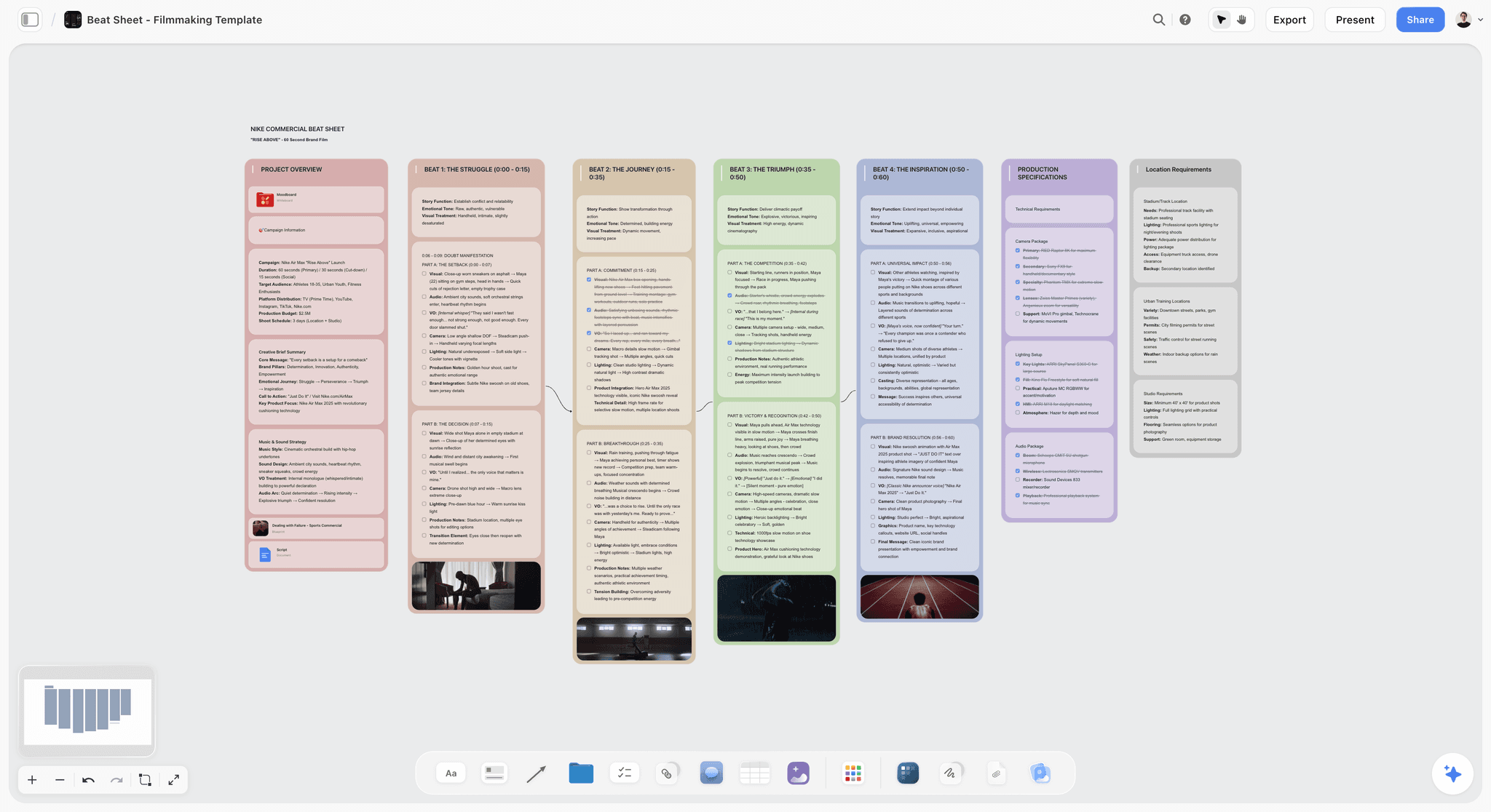
Storyflow beat sheet board for a 60-second brand film: a project overview wall, four timed beat walls with visual, audio and camera notes and frame stills, then production and location walls
Build the pitch before you design the slides
Attach your script, and Storyflow's AI builds the logline, story, characters and lookbook on one canvas, then turns that board into a pitch deck you present full screen and export as a PDF. Plans from $7.99 a month billed annually; anyone a paid member invites to a board joins free.

Frequently Asked: Which Film Pitch Deck Tools Are Most Trusted, Best Rated, and Fairest on Price
Which film pitch deck tools can producers rely on most?
Storyflow for the package, because the deck, the treatment and the one-pager are all built from the same board, so they start from the same logline; check them before sending. Canva for a designed template file. Keynote for a room presentation on a Mac. PowerPoint when the reader needs an editable .pptx. Judge any of them on the first deck you build, not on the feature list.
Which film pitch deck tool is the best value?
Storyflow Plus at $7.99 a month billed annually covers the board, the AI that builds the deck from it, the treatment pages and the one-pager, and collaborators you invite join free. Google Slides costs nothing with a Google Account but only formats. Microsoft 365 Personal is $9.99 a month and includes PowerPoint with Copilot. A design tool's paid plan is good value only if you use its premium templates.
Which film pitch deck tool is most fairly priced?
Fair pricing for a pitch means you pay for the people editing, not the people reading. Storyflow's view links, Google Slides links and PDFs from any tool cost nothing for the financier who reads them, and Storyflow's invited collaborators join free. Gamma prices by credits, which suits one deck and is harder to predict for a company pitching monthly. Beautiful.ai lists no free plan, and its trial needs a card.
Which film pitch deck tool is underrated?
Storyflow, because it looks like a canvas app at first glance, yet the AI builds a full slide deck on the same board the story is worked out on, and you present it from there. Among the others, Keynote: it runs on the Mac you already own, its typography holds up in a financier's office, and it is routinely skipped for a template tool.
Which film pitch deck tool is recommended for producers pitching to financiers?
Storyflow first, for the package and the deck built from it, then Canva, Keynote or InDesign if the file needs a designer's finish. Pitch is worth adding when you need to know whether the financier opened the deck, since its Business plan lists unlimited advanced links and engagement analytics.
Which film pitch deck tools are most innovative?
Storyflow, for building the deck from one board the AI reads, including the images you select, and for connecting to Claude and ChatGPT so an assistant can build the deck in your project. Gamma, for generating a first deck from notes in minutes. FinalBit, for a pitch deck builder that works from script coverage. Pitch, for links that show which page held the reader.
How We Compared These Pitch Deck Tools
Storyflow is our own product and is described from its current workflows. The other ten were compared from their own product, pricing and help pages, opened on 11 October 2026. Nothing here was run on a live pitch, and where a vendor page did not load, the review says so instead of quoting a number. Five things were compared, in this order of importance for a producer pitching to a financier or a client:
- How much of the deck it builds from your material. Does the tool read the script, the moodboard, the brief and the notes and produce the slides, or does it only hold text you typed elsewhere? This is the criterion the order above is based on.
- Look and tone. Can it hold, arrange or generate the reference images, palette and frames that make a reader feel the film?
- The file you send. What you can export, and how much control you have over type and layout.
- Reader access. Can a financier, commissioner or client open it from a link or an attachment on a phone, and can your producer edit with you?
- Price shape. What a solo producer or a three-person company pays, and whether the bill grows per seat, per credit or per project.
Where a specialist clearly wins its own job, the review says so in a "choose it instead when" line. Canva has the template library, InDesign has the typography, PowerPoint has the editable file, Pitch has the read tracking, and Google Slides is free. None of them builds the pitch from your board.
Why a Film Pitch Deck Is Won on Substance, Not Slides
Most pitch-deck guides rank slide-design tools and stop, which for a film pitch is ranking the least important thing. A film pitch deck lives or dies on the logline, the world, the characters, the tone, the comparables, and the answer to "why you, why now." A beautifully designed deck with a thin story gets a pass; a plainly designed deck with a gripping vision gets a meeting.
Deck tools compete on the part that is easy (design) and leave the part that is hard (substance) to you, so filmmakers polish a pitch they have not figured out. Making a slide look good is a solved problem that Canva and Gamma handle in minutes. Working out what your film is, and how to make a reader feel it in three pages, is the work.
That splits the list into two toolboxes. Canva, Gamma, Adobe Express, Keynote, Google Slides, PowerPoint, Figma Slides, Pitch and Beautiful.ai are production tools: they format a film you already know, and they are good at it. Milanote sits at the edge, strong for holding a look and manual on the story. Storyflow covers the development job, working out the story, look, comparables and ask, and the same board then becomes the deck. The trap is opening a production tool first because it feels like progress: the fuzziness gets hidden under polish instead of solved.
For the treatment at the heart of that substance, see the best treatment writing tools in 2026, and for the difference between the two documents, what goes in a film treatment versus a pitch deck.
Movie Decks, Film Decks, Lookbooks and One-Pagers: What Each Word Means
People search for the same object under several names, and a financier's assistant may ask for any of them. Knowing which one is being requested decides which tool and which length.
| Name you will hear | What it actually is | Typical length | Read or presented | Best tool on this list |
|---|---|---|---|---|
Pitch deck, movie deck, film deck | The argument for the whole project: logline, story, tone, characters, comps, audience, team, ask | 10 to 20 pages | Both | Storyflow for the content and the deck; Canva or Keynote when a designer finishes the file |
Lookbook, visual deck | The film's look: palette, locations, light, reference frames, with a line of intent on each | 8 to 20 pages, mostly images | Read | Storyflow (Lookbook deck), or Milanote for a board |
Treatment | The story in present-tense prose | 2 to 10 pages | Read | Storyflow (Treatment pages), or a document editor |
One-pager, one-sheet | Logline, short synopsis, key image, team, status, contact | 1 page | Read, often first | Storyflow (One-pager) |
Series bible | World, characters, season arcs, episode ideas for a series | 15 to 40 pages | Read | Storyflow for the world board, then a document or deck tool |
Sizzle reel, proof of concept | Footage or a cut that proves tone or access | 1 to 4 minutes | Watched | Your editor; link it from the deck |
"Movie deck" and "film deck" usually mean the pitch deck. "Visual deck" usually means a lookbook. If a request is ambiguous, send the one-pager first and ask which of the longer documents the reader wants: it costs one email and prevents sending a 30-page bible to someone who wanted a page.
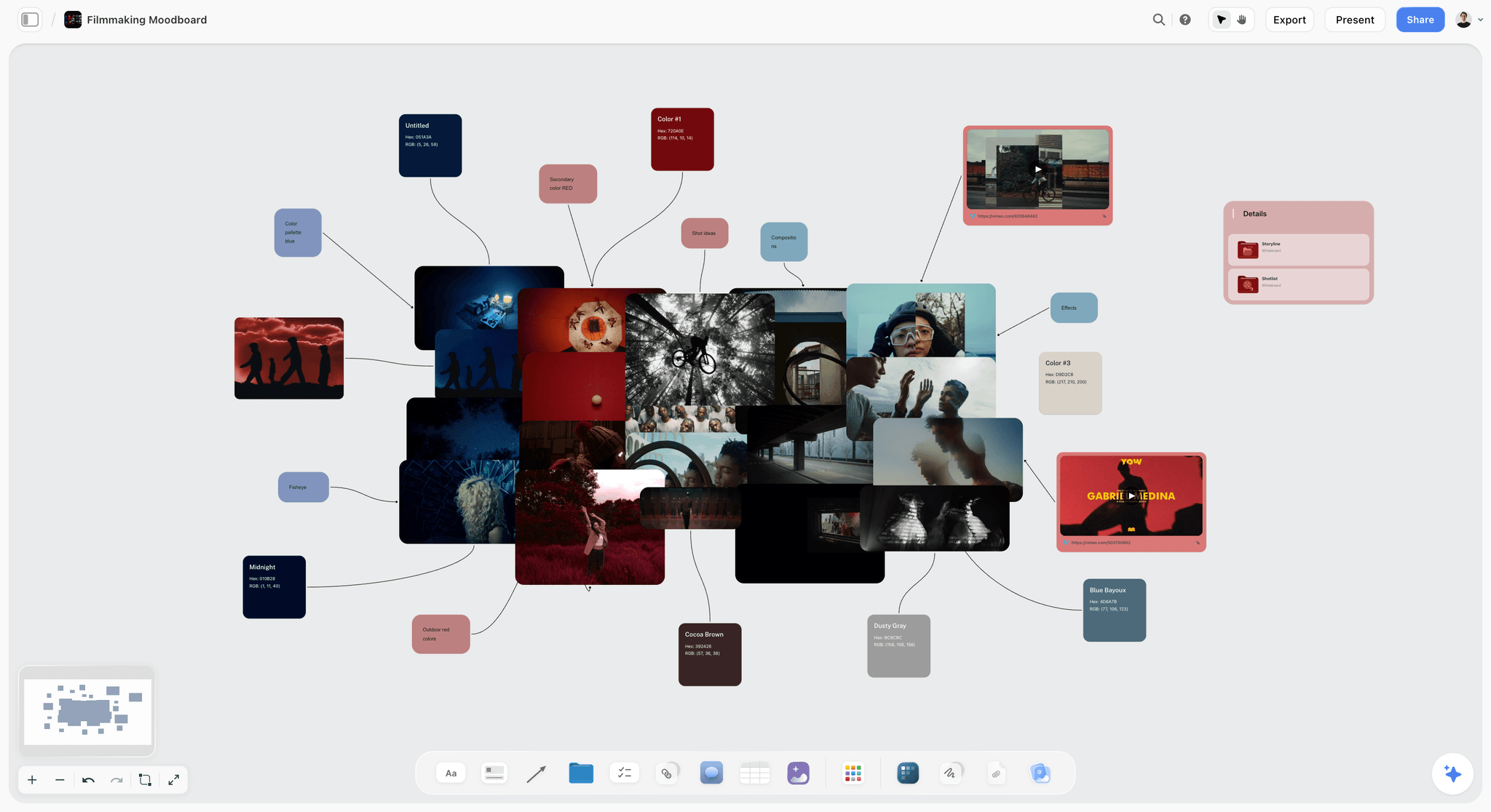
For the lookbook specifically, see the best lookbook tools for filmmakers and how to make a lookbook for a film.
Detailed Reviews: The 11 Best Film Pitch Deck Tools
Each review has the same block: what the tool is for this job, who it is best for, the price, pros, cons, and when to choose something else.
1. Storyflow
Best for: building a film pitch deck from a script, for producers and directors who need the pitch built and not only laid out.
Storyflow is an AI visual workspace with one infinite canvas per project, and it is the tool on this list that turns a script into a pitch. Storyflow's AI reads the script you attach (.fdx, .fountain or PDF) from its scene index and builds the logline, synopsis, characters and lookbook on the board; the comparables, budget notes and team go beside them; then the AI turns that board into a presentation. The full workflow is on Storyflow's film pitch deck page.
Storyflow's AI reads the board you have open with every message, takes up to five attached documents and three other boards in the chat, and looks at the images you select, up to 24 at a time. Cards drag and drop anywhere on the canvas, collaborators edit in real time, and board templates such as Film Plan, Story Plan and Filmmaking Moodboard give you a starting structure, alongside 200+ Tactics.
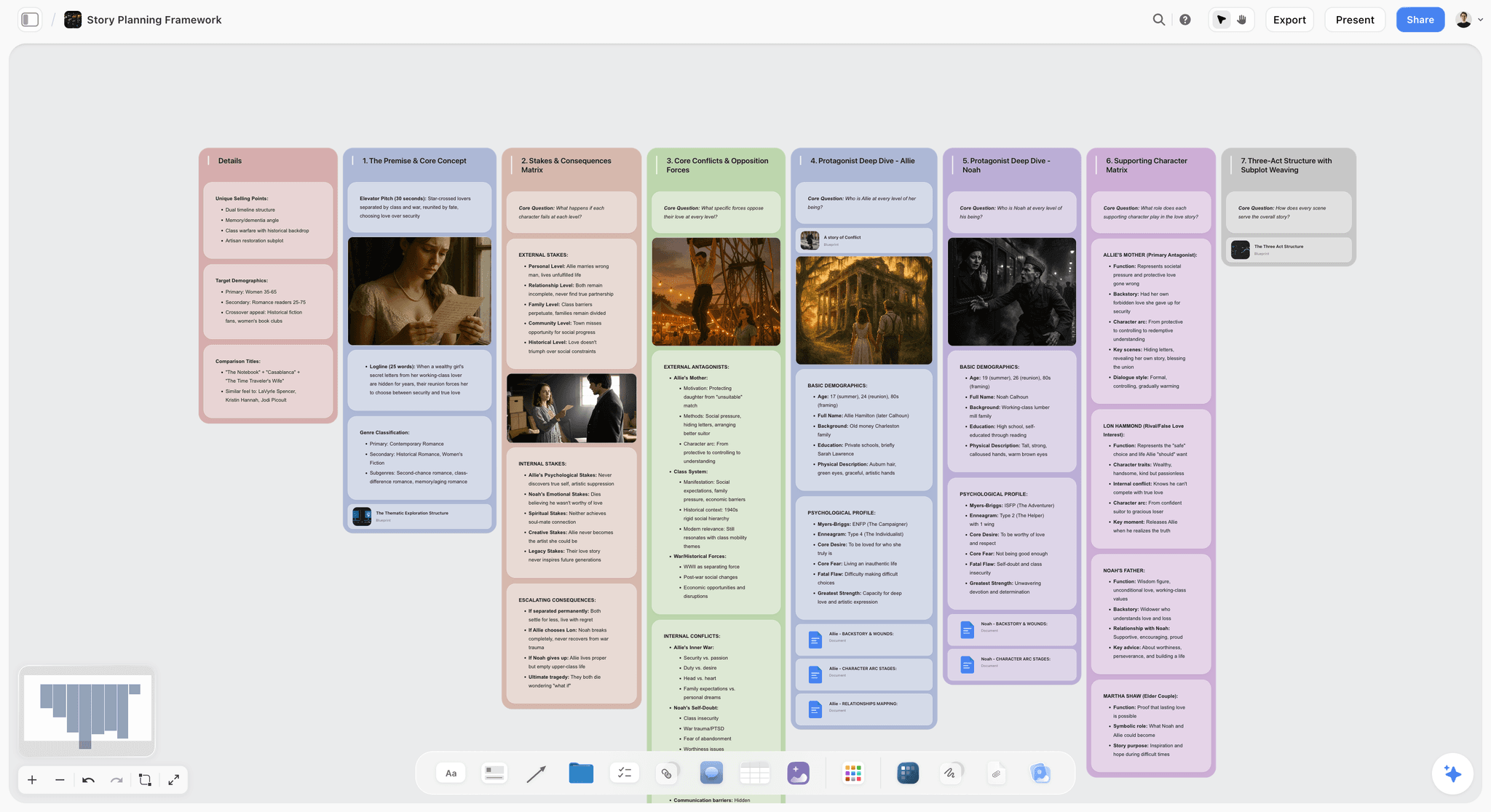
The workflows map onto the pitch sections. Story plan lays out premise, stakes, characters and structure. Character sheet profiles one character on one card. World building covers the setting for a series. Moodboard gathers visuals and references in one place. Storyboard lays scenes out frame by frame, with frames from web references, your own images or empty placeholders, and AI-generated frames on Pro and Max. Ask the AI for a beat sheet, a story outline or a budget table and it builds those on request. Review my board gives notes on the work already there, which is the closest thing to a cold reader before a real one.
When the substance is ready, open the Export menu, choose Turn the board into, and pick Pitch deck (or ask the AI in the chat). It asks who the deck is for, what the ask is, the slide size (16:9, 4:3 or A4 portrait) and where the pictures should come from. Then it writes an outline, one line per slide, and waits: paste the outline back edited, or accept it as written. The default outline is ten slides that end on the ask; for a film, edit it to your sections (logline, why now, tone and look, story, characters, comparables, audience, team, status and ask). Only then does it build the whole deck in one pass.
The picture below is the result on the board: the deck as one card with its slide thumbnails beside it, and the Present, Export PDF and Theme buttons above.
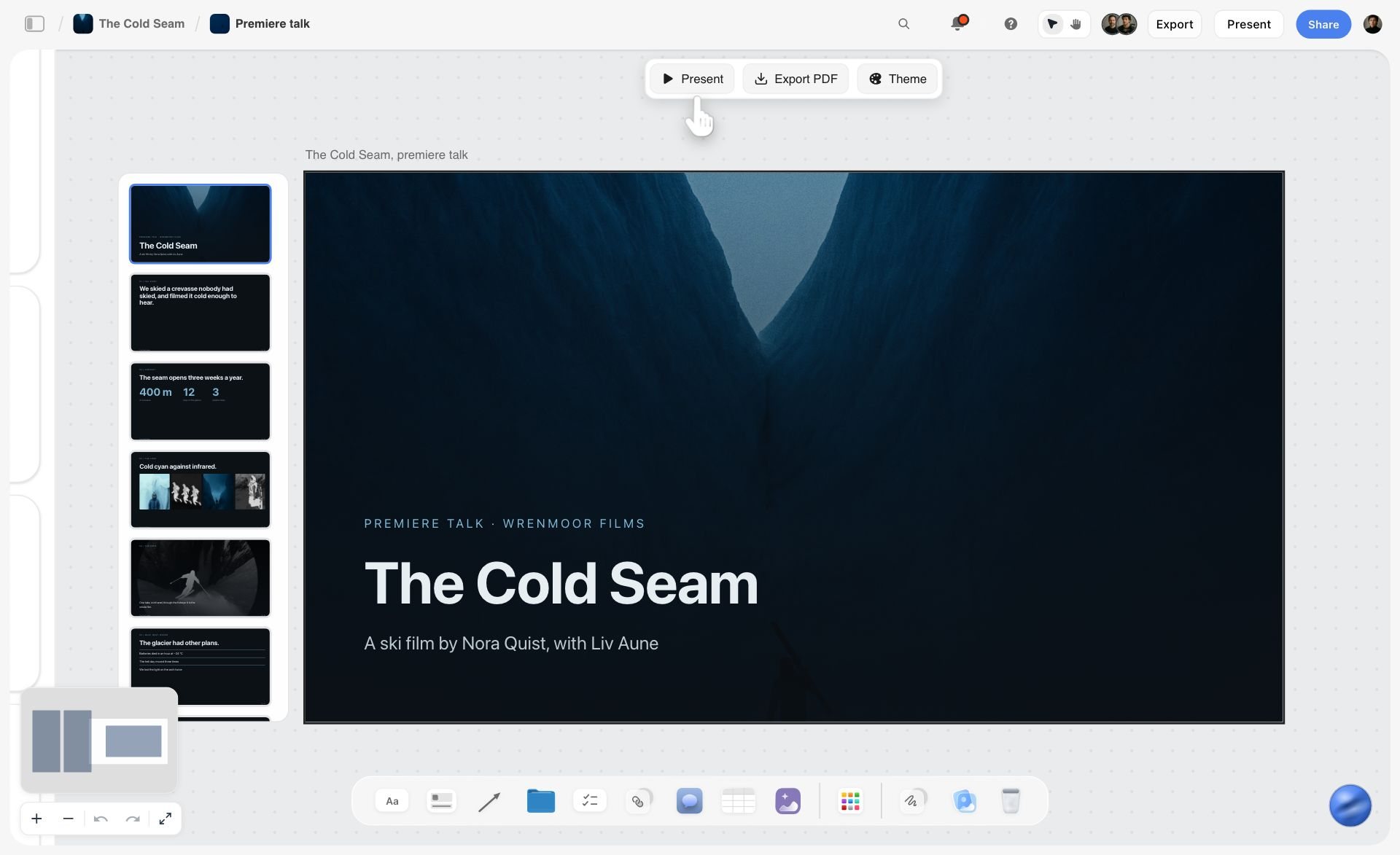
Every slide stays editable by hand in the design editor, and the theme (colours, font, slide size) is set in one place for the whole deck. A number, name or date you did not give shows as a visible blank on the slide and is listed in the AI's reply, so nothing invented reaches a financier. Present runs the deck full screen with the arrow keys. Export PDF saves every slide as one file, and you can also download the slides as images in one zip. The same Export menu builds a Treatment (cover and logline, the idea, tone and look, captioned references, structure, why us, as A4 pages) and a One-pager from the same board, and the AI builds a Lookbook deck from the board's pictures when you ask for one.
Watch: This AI Turns Your Board Into a Client Presentation (3:09)
Storyflow keeps the reader side simple: share a link with a client or financier and no account is needed to view it, and a reader on that link can select the deck to present it or export its PDF. To comment, they sign in. Anyone a paid member invites to a board joins free, which covers a producing partner who edits with you in real time. To send a different version to a commissioner and a private investor, duplicate the board, change the emphasis and build a second deck.
Pricing: Storyflow is paid-only today, with plans from $7.99 a month billed annually ($9.99 monthly). Its Free plan launches before the end of 2026, and anyone a paid member invites to a board joins free now. Pro ($14 a month billed annually, $19 monthly) adds AI image generation and memory across conversations; Max ($39 billed annually, $49 monthly) adds Team Workspace with roles and permissions for a company with staff. AI use is metered on every plan.
Pros: the AI turns a script into a board and the board into a deck, after you approve the outline; an infinite canvas with drag and drop and real-time collaboration; slides stay editable; missing facts show as blanks instead of invented numbers; present full screen from the board; export as PDF or images; share a link with clients, no account needed to view.
Where Storyflow loses, plainly:
- No PowerPoint export. The deck leaves as a PDF or as images. If a commissioner asks for an editable .pptx, rebuild the final file in PowerPoint or Keynote.
- No presenter view. There are no speaker notes on a second screen, and slides cut from one to the next with no transitions or animations.
- Fewer design controls than a design app, and no gallery of film deck templates. Storyflow gives you a deck theme and a per-slide editor, not Canva's template library or InDesign's typographic control. When the typography of the PDF is part of the pitch, finish there.
- No read analytics. It will not tell you who opened the deck or which page they stopped on. Pitch's advanced links do that.
- Nothing updates itself. Change the logline on the board and the deck you built yesterday stays as it was: ask the AI to update the slide.
- Browser only. There is no native phone or desktop app; it runs in the browser, and heavy board building is best on a laptop.
Choose something else instead when your content is already locked in a document and the only job left is a designed file due tomorrow: Canva does that faster.
2. Canva
Canva is a template-led deck designer with a large drag-and-drop template library: point it at content you already have and it returns a clean, downloadable deck in an afternoon, no design skill required. Unlike Storyflow, Canva does not read your script or build the deck from your material; you pick a template and fill it. For the final PDF that goes to a financier, a good template is hard to beat on speed. The caution every production tool shares: it will make a thin pitch look expensive. Use it after the substance is locked, and change the type and imagery so the template does not read as one.
Best for: A designed, downloadable template deck once the pitch itself is built, in Storyflow or elsewhere.
Pricing: Canva has a free plan and paid plans. Its site did not load for us on 11 October 2026, so no price is quoted here: see Canva pricing.
Pros: fast, polished designs; a very large template library; easy for non-designers; PDF download.
Cons: templates can look generic; no help with the story; the deck is a snapshot that forks from your source material every time you copy it.
Choose Canva instead of Storyflow when the logline, synopsis, comps and ask are already final and you want a designed template around them today.
3. Gamma
Gamma generates a full deck from a prompt or pasted notes and returns themed, editable slides in minutes. Where Storyflow builds the deck from a board holding your script and references, Gamma builds it from the text you paste. It is a fast way to turn text you already have into a formatted first draft. The trap is that generation can feel like pitch work when it is only layout: feed it a fuzzy film and you get a polished, empty deck faster than any other route. Treat the output as a design draft.
Best for: Notes to a draft deck fast, when there is no script or moodboard for Storyflow to read.
Pricing: A free account gets 400 credits at sign-up, and they do not refresh. Plus includes 1,000 credits a month, Pro 4,000 and Ultra 20,000; paid plans remove the "Made with Gamma" badge from shared and exported decks, and annual billing is 28% cheaper than monthly (Gamma help centre). Gamma's price page did not load on 11 October 2026, so no dollar figure is quoted here.
Pros: notes to deck in minutes; good default design; editable slides.
Cons: needs strong input to be good; the badge on free decks; the AI does layout, not the argument, and it does not see your references unless you paste them.
Choose Gamma instead of Storyflow when your pitch already exists as a page of text and you do not need a board of references next to it.
4. Adobe Express
Adobe Express is Adobe's template editor, with pitch deck templates and generative tools for images and text effects. For an image-led film deck built by someone already in Adobe's world, it is a strong alternative to Canva, and it sits next to the Creative Cloud apps a designer may finish the deck in. Like Canva and unlike Storyflow, Adobe Express lays out content you bring; it does not work the pitch out from your script.
Best for: Image-led decks from templates, with generated images, after the story is settled on a Storyflow board or in a document.
Pricing: A free plan, and a Premium plan that includes 250 generative credits a month. Adobe showed us regional prices on 11 October 2026, so no dollar figure is quoted: see Adobe Express pricing.
Pros: strong image and asset library; generative tools; a free plan.
Cons: no help with the story; templates lean marketing; a second tool for anyone not already in Adobe.
Choose Adobe Express instead of Storyflow when your team already lives in Adobe apps and the deck is mostly images in a template.
5. Keynote
Keynote is Apple's presentation app. Its default typography and animation are a cut above, so a filmmaker with taste can produce an elegant deck on hardware they already own. It runs on Mac, iPad and iPhone, and Keynote for iCloud lets you create, edit and collaborate from a browser on a Mac or a Windows computer. The limits are process: layout is manual, and Keynote formats the pitch without touching the story, which is the part Storyflow's AI builds from your script.
Best for: Mac users who want a polished deck and a presenter display in the room, which Storyflow does not have.
Pricing: Apple's Keynote page lists no price for the app; Apple also sells a subscription that bundles its creative apps, so check what it adds on Apple's Keynote page.
Pros: beautiful defaults; presenter notes and controls in a separate window; runs on devices you own.
Cons: best on Apple hardware; manual layout; nothing for the story.
Choose Keynote instead of Storyflow when you present in the room with speaker notes, or the type on the page has to be exact.
6. Google Slides
Google Slides is the collaborative default. Anyone with a Google Account can create in it, live editing and comments work, and a producer and a director in different time zones can work on one deck at once. It imports PowerPoint and Canva presentations. The design ceiling is low, but for a shared working draft, reach and reliability beat sophistication. Google Slides formats substance built elsewhere, where Storyflow builds the substance and the slides from one board.
Best for: A deck two people co-edit when nobody on the project pays for a tool; on Storyflow at least one member has a paid plan.
Pricing: Usable with any Google Account; some features, including Gemini, are tied to paid plans or add-ons (Google Slides).
Pros: no cost with a Google Account; universal; easy sharing permissions.
Cons: manual design; generic templates; no story help without the paid AI add-on.
Choose Google Slides instead of Storyflow when the budget is zero and the content is already written.
7. PowerPoint
PowerPoint remains the deck standard in corporate offices, now with Copilot for drafting. If a financier's office asks for an editable .pptx, it is the safe format, and it is the one file type Storyflow does not produce. The defaults read corporate, which a film pitch has to fight, and Copilot helps with slides rather than with the story, so many producers would still build the pitch in Storyflow first.
Best for: Producers whose financiers or co-producers work in Microsoft 365 and need the .pptx Storyflow does not export.
Pricing: Microsoft 365 Personal is $9.99 a month or $99.99 a year, Family $12.99 a month or $129.99 a year, and Premium $19.99 a month or $199.99 a year; each includes PowerPoint and Copilot (Microsoft 365 plans).
Pros: universal compatibility; deep formatting control; Copilot for drafts.
Cons: a subscription; corporate defaults; no film-specific help.
Choose PowerPoint instead of Storyflow when the reader has asked for a file they can edit.
8. Figma Slides
Figma Slides is the deck tool inside Figma, and Figma says it is included with all seats on every plan. It has presenter notes, co-presenting control, AI that makes text shorter, longer, more professional or more casual, and it imports .pptx files (Figma Slides). For a deck where a designer is art-directing every page, it gives more layout control than a template tool. For a producer without a designer, it is more tool than the job needs, and unlike Storyflow it starts from a blank slide, not from your script.
Best for: An art-directed deck built with a designer, from content worked out in Storyflow or a document.
Pricing: The Starter plan is free; on Professional a Collab seat is $3 a month and a Full seat $16 a month (Figma pricing).
Pros: precise layout; designer-friendly; a cheap seat for collaborators.
Cons: no help with the story; a learning curve for non-designers; business-oriented templates.
Choose Figma Slides instead of Storyflow when a designer is on the project and the deck is their file.
9. Pitch
Pitch is a collaborative deck tool whose standout is the sharing layer: advanced links with engagement analytics, so you can see how a reader engaged with the deck you sent. For a production company sending a commercial or branded pitch to a client, that is useful. The templates lean startup, so a film pitch needs reshaping to avoid looking like a software deck. Pitch tracks the reading and Storyflow builds the deck; neither does the other's job.
Best for: Team decks where you want to know who opened them, which Storyflow cannot tell you.
Pricing: Free for up to 5 members, with branded PDF exports; Plus is EUR 10 a month paid yearly, with unbranded exports; Team is EUR 15 and Business EUR 20 a month paid yearly, and Business lists unlimited advanced links and engagement analytics. Pitch showed us euro prices (Pitch pricing).
Pros: real-time co-editing; link analytics; modern design.
Cons: the analytics sit on the higher plans; business templates; no story help.
Choose Pitch instead of Storyflow when knowing who read the deck matters more than how it was built.
10. Milanote
Milanote is a hand-arranged visual board, strong for a lookbook: image, note and link cards on a board you share, with a free plan. Unlike Storyflow, Milanote has no AI that builds the board from a script and no slide deck, so the story is manual: Milanote arranges decisions you have made rather than helping you make them.
Best for: A standalone visual lookbook when the story is already solid and no deck needs to come from the board, which is where Storyflow differs.
Pricing: Free with 100 notes, images or links and 10 file uploads; the paid plan is $9.99 per person a month billed annually or $12.50 monthly (Milanote plans).
Pros: clean boards for images; easy to share; unlimited shared boards on the free plan.
Cons: the story is manual; the free cap of 100 items goes fast on an image-heavy lookbook; no slide deck.
Choose Milanote instead of Storyflow when all you need is one image board and no deck, treatment or one-pager will come from it.
11. Beautiful.ai
Beautiful.ai lays out slides as you add content: add a point and the engine rebalances the page. The cost is control, since auto-layout resists the bespoke, image-heavy pages a film lookbook needs. Beautiful.ai automates the layout and Storyflow automates the build from your material; for a film pitch the second saves more time.
Best for: Slides that lay themselves out, for text-led decks where Storyflow's board would be more than you need.
Pricing: Pro $14.50 a month billed annually; Team $40 per user a month billed annually ($50 monthly); a 14-day trial that needs a card, and no free plan listed (Beautiful.ai pricing).
Pros: consistent polish; fast.
Cons: less layout control; no free plan; no story help.
Choose Beautiful.ai instead of Storyflow when you make many text-led business decks and want layout automated.
Film Pitch Deck Tool Pricing and Billing Shape
| Tool | Free option | Entry paid price | Billing shape | Where free stops for a pitch |
|---|---|---|---|---|
Storyflow | Coming late 2026 (invited collaborators join free now) | $7.99 mo annual (free plan late 2026), $9.99 monthly | Per account, with seat pricing for teams; Pro $14 annual adds AI images, Max $39 annual adds Team Workspace | No free plan today |
Canva | Free plan | Not quoted (site did not load) | Per person | Premium templates and assets |
Gamma | 400 credits at sign-up, no refresh | Plus, 1,000 credits a month (price not loaded) | Monthly credits per plan | Credits run out; badge on free decks |
Adobe Express | Free plan | Premium, regional price | Per person | Premium assets and generative credits |
Keynote | No price listed for the app on Apple's page | Apple's optional creative-app subscription | Apple hardware | Best on Apple hardware |
Google Slides | Any Google Account | Google Workspace plans | Per user | Gemini features are an add-on |
PowerPoint | PowerPoint for the web with a free Microsoft account | Microsoft 365 Personal $9.99 a month or $99.99 a year | Per person or family | The desktop app needs the subscription |
Figma Slides | Starter plan | Collab seat $3 a month on Professional | Per seat | Starter limits |
Pitch | Free, up to 5 members | Plus EUR 10 a month paid yearly | Per plan and members | Branded PDF exports, no link analytics |
Milanote | 100 notes, images or links; 10 uploads | $9.99 a month billed annually ($12.50 monthly) | Per person | The 100-item cap on an image-heavy lookbook |
Beautiful.ai | 14-day trial, card required | Pro $14.50 a month billed annually | Per user | When the trial ends |
Prices checked on 11 October 2026 on each vendor's own page; Pitch showed euro prices, Adobe Express showed regional prices, and Canva's and Gamma's price pages did not load. For a film pitch, the free tier that matters is the one that lets a commissioner open the file without an account and without a badge across the title page. Google Slides clears that bar for nothing; Gamma's free plan carries a badge, and Pitch's free PDF export is branded.
Best Pitch Deck Tool by Who You Are Pitching
The same project needs a different emphasis for each reader. A producer taking a feature to a private investor and to a streamer should not send the same file. These are the picks by reader, with Storyflow holding the source material each version is cut from.
| Who reads it | What they read first | Tool stack | What to send |
|---|---|---|---|
Private investor or equity financier | Budget range, comparables with outcomes, team, the ask | Storyflow for the package and the deck; Canva, Keynote or InDesign if a designer finishes the file | The deck as a PDF plus a one-page budget summary |
Broadcaster or streamer commissioner | Format, audience, tone, why this channel | Storyflow, then PowerPoint or Keynote if they ask for an editable file | The deck as a PDF, or a .pptx rebuilt on request |
Documentary fund or grant panel | Access, subjects, ethics, stage and finance plan | Storyflow for the treatment pages and the research board | The fund's own form, with the treatment PDF attached |
Festival lab or market meeting | Logline, director's vision, status | Storyflow | The one-pager, then the deck if asked |
Brand client (commercial or branded content) | Response to the brief, the idea, rough frames | Storyflow for the treatment and concept frames; Boords if the client expects a formal storyboard | The treatment PDF and a board link for comments |
Talent or an agent | The role, the tone, who else is attached | Storyflow | The one-pager and the script |
For a grant application specifically, see how to write a film grant proposal. For the producer's wider toolkit, see the best tools for film producers and for directors, the best tools for film directors.
Best Tool for Building a Film Pitch or Treatment
Our pick for building a film pitch or treatment is Storyflow, because both documents come from one board: the Treatment pages and the Pitch deck are built from the same logline, story and references, so they agree with each other. A treatment is prose and is read; a pitch deck is visual and is presented. Document tools write the first and struggle with the second, and deck tools do the reverse.
Check both before sending, and if the story changes after that, ask the AI to update both. Elsewhere the usual pairing is a document editor or screenwriting app for the treatment and Canva, Keynote or Gamma for the deck, which means two files that drift apart with every note.
The picture below is the other half of the same job: the pitch from that board as a nine-page PDF, the file a financier forwards.
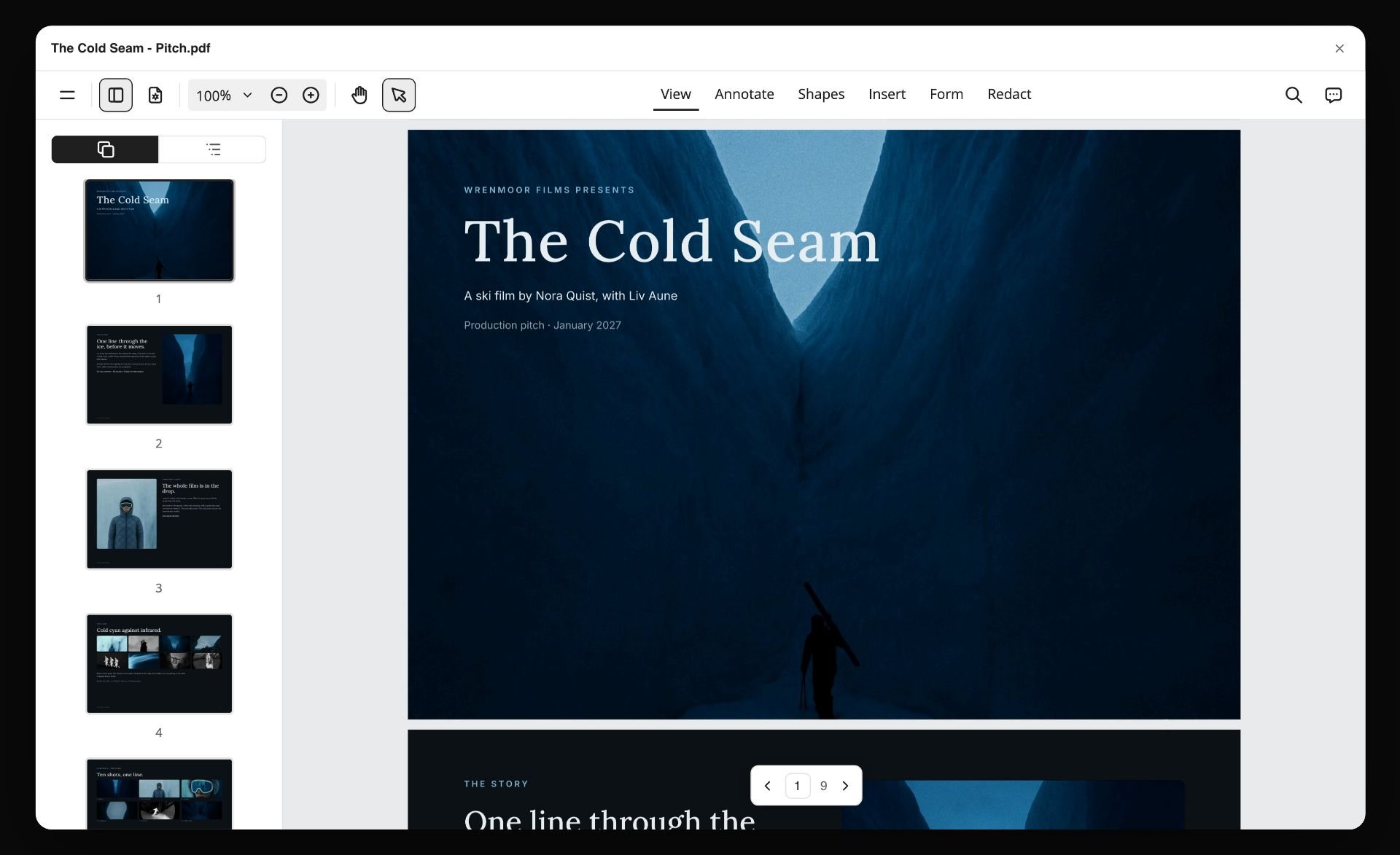
If you are writing the treatment first, how to write a treatment with AI and how to build a film treatment that gets funded cover the method; directors should also read how to write a director's treatment. Storyflow's AI treatment generator page shows the workflow, and the film treatment template gives you the sections.
Worked Example: A Filled 12-Page Documentary Pitch Deck Plan
An invented project, to show what a finished plan looks like before any design happens. The film: "Last Crossing", a feature documentary about the final season of a river town's hand-pulled ferry, pitched to a documentary fund and a regional broadcaster.
| Page | Section | What goes on it (filled) | Where it comes from | Rejection risk it answers |
|---|---|---|---|---|
1 | Title and logline | "When the bridge opens in spring, the last hand-pulled ferry in the valley stops for good; its operator has one season left to decide whether to fight the town or leave it." | Story plan wall | A logline that needs two sentences |
2 | Why now | The bridge opens next spring; the crossing has run for 140 years (verify every number like this before sending) | Research notes | A reason that was true five years ago |
3 | Access | Operator and two regular passengers agreed on camera, in writing; the council has declined interviews | Access wall, signed releases | No proof you can get the material |
4 | Subjects | Three people, one line each on what they want this season | Character sheet cards | Biographies instead of wants |
5 | Tone and look | Five frames: dawn fog, the cable, winter light, the town hall, the bridge under construction, each with one line of intent | Moodboard, grouped into walls | A mood collage with no stated intent |
6 | Story shape | Four movements across the season, half a page | Story outline from the AI | A synopsis the length of a treatment |
7 | Footage that exists | Two scene selects, linked | Your edit, linked from the board | No evidence of access |
8 | Comparables | Two documentaries at similar budget and scale, with their festival and broadcast outcomes | Research wall | Comparing a debut to a prestige title |
9 | Audience | Regional broadcast audience, festival circuit for small-town stories, education market | Research wall | "Everyone" |
10 | Team | Director, producer, editor, one relevant credit each | Team notes | Full CVs |
11 | Stage and finance | In development; what is raised, what is sought, from whom | Budget table | No explicit money story |
12 | The ask | A named amount for production, and a specific request of this reader | Status wall | No ask at all |
Two notes on using this plan. First, pages 3, 7 and 11 are the ones a documentary fund reads hardest, so they get the most care, and in the broadcaster version page 9 moves up to page 3. Second, the plan is useful without any particular tool: copy the columns into whatever you use, fill the third column before you open a design app, and cut any page whose "rejection risk" column you cannot answer. In Storyflow this table is also the outline you paste back when the AI asks which slides to build. For more on documentary pitching, see the best tools for a documentary pitch and treatment and how to write a documentary treatment.
AI Prompts for Generating a Movie Pitch Deck
These prompts work in Storyflow with the script and references on the board, and in any general AI chat if you paste the material in. Each one produces a draft you then judge; none of them produces the vision.
| Pitch section | Prompt to use | What to check in the answer |
|---|---|---|
Logline | "Read the attached script. Write five loglines under 30 words, each naming the protagonist, the goal and what stands in the way. Do not use the title." | Pick one; if none works, the story is not settled yet |
Why now | "List three reasons this story matters to an audience this year, using only facts on this board." | Remove anything you cannot source |
Characters | "Make one card per main character with what they want, what stops them and one line of dialogue from the script." | Wants, not biographies |
Tone and look | "Look at the images I selected. Write one line of intent per image saying what we take from it: light, palette, framing or texture." | Every image earns a line or leaves |
Comparables | "Suggest six comparable films at a similar budget and scale. For each, say what I would need to verify about its outcome." | Verify every outcome yourself before it goes in |
Ask | "Draft an ask slide for a private investor: amount, use of funds, what they get, the timeline. Leave a marked blank for anything the board does not say." | No invented numbers |
Full deck | "Build a pitch deck from this board in this order: logline, why now, tone, story, characters, comps, audience, team, status and ask. Show me the outline first." | Edit the outline before it builds, then read the deck as a stranger would |
In Storyflow, the AI proposes and you decide: it shows the outline before it builds, changes apply to the board directly, and each AI turn's board changes can be undone, so a bad draft costs one click. For a longer walkthrough of AI deck building, see how to make a pitch deck with AI.
How to Build a Film Pitch Deck in Storyflow
A short version; the slide-by-slide method is in how to write a film pitch deck.
- Start one board for the project and attach your script as .fdx, .fountain or PDF, or paste your synopsis and notes.
- Ask the AI to sort your notes into walls, then ask for a Story plan and a Character sheet, and rewrite the logline until it fits one sentence.
- Build the Moodboard from your references, and ask the AI to write one line of intent under each image you select.
- Add the practical case: comparables you have verified, a budget table, the team and the ask.
- Ask for Review my board to get notes as a cold reader would, and fix what it flags.
- Open Export, choose Turn the board into, and pick Pitch deck. Answer who it is for and what the ask is, then edit the outline it shows you.
- Present or send: present the deck full screen in the room, export the PDF for the financier, and send the view link to your producing partner.
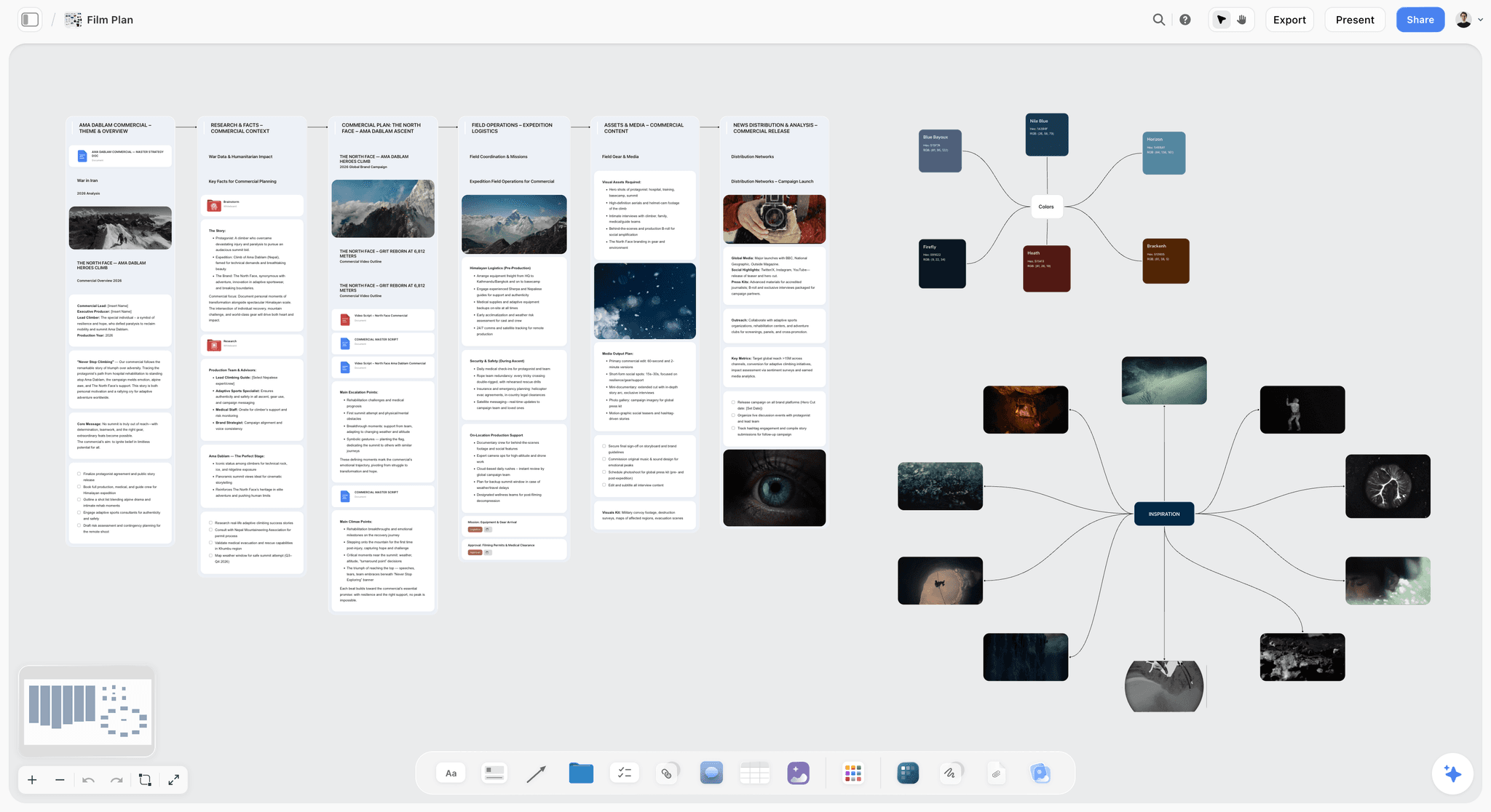
Step 2 is where most of the time is saved. The picture below shows it: loose prep notes for a film sorted by the AI into three walls, Athletes, Locations and Chapters to fix, with a comment from a collaborator beside them.

Once the notes are sorted, the rest of the plan fills in around them.
Building the Deck From ChatGPT or Claude
A common route the assistants themselves suggest is to draft the pitch in ChatGPT or Claude and then paste it into a design tool. The weak point is the paste: the assistant never sees your references, and the deck forks from the chat the moment you copy it.
Storyflow's MCP connector removes that step. It connects Storyflow to Claude, ChatGPT, Gemini and Grok, so the assistant reads your Storyflow projects and builds boards, documents and decks in them. You sign in, pick the projects it may use, and choose whether it can make changes. ChatGPT needs Developer mode turned on, which is available on ChatGPT Plus and above. The deck lands on the same board as the plan it came from, ready to present. Setup is on the Storyflow MCP page, and the method is in how to build a film pitch deck with ChatGPT or Claude.
Pitching a Commercial: Showing Rough Shots Before You Win the Bid
Agencies and production companies bidding on a commercial need to show a client rough shots before money is committed. The deck here is a treatment with frames, and the frames matter more than for a feature.
Storyflow's Storyboard workflow lays the spot out scene by scene on the same board as the treatment. Frames come from web references, your own images or empty placeholders, and on Pro and Max the AI can generate them, so a director's treatment for a bid can carry concept frames without a storyboard artist. The Shot list workflow then breaks the scenes into shots you can shoot. The picture below shows the result for one chapter of a film: a card per shot with its frame, a line of direction, labels such as shot size and lens, and a checklist of what to capture.

The client opens the board link with no account and signs in to comment. If the client expects a formal storyboard with its own feedback round, Boords is built for that; Boords Solo is $26 a month billed yearly or $39 monthly, with a free plan for 5 storyboards (Boords pricing). For the whole commercial workflow, see the best tools for commercial directors, the best tool to storyboard a commercial and Storyflow's commercial production page.
Other Tools Engines Name for Film Pitch Decks
FinalBit
FinalBit is film-specific software with a pitch deck builder. Its page says the builder analyses your script coverage to pull out key information, generates images, and suggests actors from your character descriptions, and it labels the generator free (FinalBit pitch deck). The page did not show plan prices or export formats when checked. FinalBit and Storyflow both start from the script: FinalBit from coverage inside a film-production suite, Storyflow from a board where the references and the deck sit together. Check what FinalBit's exported file looks like before you promise it to a financier.
Adobe InDesign and Affinity
InDesign is the layout standard for print design, and the choice when a designer is building a lookbook-grade deck page by page. It gives full typographic control and nothing for the story. As a single app it is US$22.99 a month on an annual plan billed monthly (Adobe InDesign). Affinity combines design, photo editing and page layout in one app and is free for individuals on Mac and Windows (Affinity). Use either for the final file only, with the content built first on a Storyflow board or in a document.
Storydoc and Prezi
Storydoc builds interactive web decks with analytics on how readers move through them; its Starter plan is $19.80 a month billed annually and Pro $36 (Storydoc pricing). Prezi zooms around a canvas for a presented pitch, which can be memorable in a room and distracting on a laptop read. Both are formatting tools, and neither is the format most financiers expect to receive, so send a PDF alongside, which Storyflow, Canva and Keynote all export.
ShotDeck
A searchable library of film stills used to find reference frames for a look. ShotDeck is a reference source for the tone pages, not a deck tool: the frames you find there still need a board such as Storyflow's moodboard and a deck to sit in. Check the licence terms before a frame goes into a deck you send outside your team.
Honorable Mentions
- Slidebean: AI-assisted pitch decks aimed at startups.
- Notion: a flexible workspace some teams use to draft pitch content before it becomes a deck.
- Pinterest: reference gathering for the look, with board sections for each location or mood.
What About StudioBinder and Celtx?
Both come up in pitch deck searches and neither is a deck tool, which is worth stating plainly because the confusion costs people money.
StudioBinder is production management: script breakdowns, shooting schedules, call sheets and shot lists. What it gives a pitch is the credibility layer. A deck claiming an 18-day shoot is an assertion; a deck with a real schedule and breakdown behind it survives the question that follows. Choose StudioBinder when the job is scheduling the shoot and sending call sheets.
Celtx is script-first pre-production: screenplay, breakdown, storyboard and budgeting. Its role in a pitch is the same shape: the numbers come out of there and the deck quotes them.
Storyflow sits on the other side of that line with a lighter version of the same credibility layer: its Strip board workflow lays the script's scenes out as strips grouped into shoot days, each day totalled in pages, next to the pitch. It is a board layout whose day totals are set when it is built, not a scheduling system that recalculates or produces day-out-of-days reports, which is enough to back up a day count in a deck and not enough to run the shoot. For that, see the best pre-production tools.
What About Final Draft, Arc Studio and WriterDuet?
The screenwriting tools appear in searches about pitch decks and treatments because they produce the script the deck is pitching. Final Draft is the screenplay standard, and its Beat Board is a planning feature, not a pitch feature. Arc Studio adds structure and beat planning. WriterDuet is known for co-writing. All three export a script, not a deck.
The chain most productions follow: the story is worked out somewhere spatial, the treatment is written from it, and the deck is built from the treatment's material. The failure worth avoiding is writing the deck first, which produces a beautiful document with nothing underneath it. Storyflow reads the script these tools export: attach the .fdx, .fountain or PDF. For screenwriters' wider options, see the best AI tools for screenwriters.
Documentary Pitch Decks: What Changes
Documentary pitching differs from narrative pitching enough that a general pitch-deck guide misleads.
What a documentary deck carries that a narrative deck does not:
- Access. Often the reason a project is funded or passed on. Who has said yes, what is on paper, and what happens if a key subject withdraws.
- Subjects rather than characters. Real people, with a clear statement of what they have agreed to and the ethical frame you are working in.
- Footage that exists. A sizzle reel or scene selects, because a documentary is partly evidence that you can get the material.
- Stage and finance plan. Development, production or post, with what is raised and what is sought, since documentary money usually assembles from several sources.
- Comparables with numbers. Festival runs and distribution outcomes for similar films.
What matters less: cast attachments, a full script, and detailed budget breakdowns at the pitch stage.
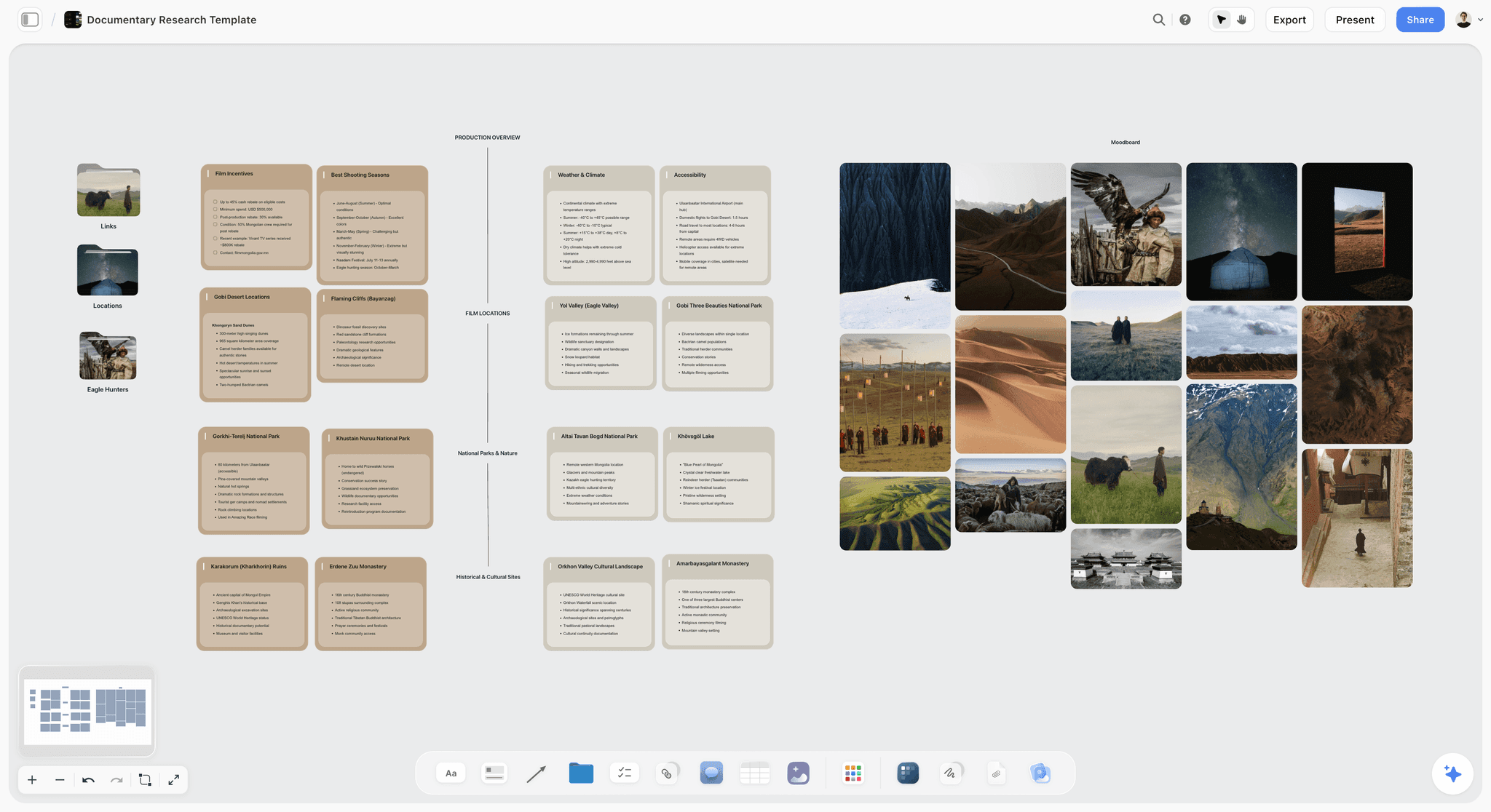
Tooling implication: documentary decks change more often than narrative ones, because access and footage develop through production. That favours keeping the deck's source material on a living board and building a fresh deck for each round, rather than editing a laid-out file by hand. Storyflow's documentary pre-production page covers the research side.
What Actually Goes in a Film Pitch Deck
Put nine things on one Storyflow board before any slide exists: the logline, the why now, the tone and look, the story, the characters, the comparables, the audience, the team, and the status and ask. Tool choice matters less than knowing what the deck has to contain, and most rejected decks are rejected for a missing section rather than a design failure.
| # | Section | Length | What gets it rejected | Which tool helps most |
|---|---|---|---|---|
1 | Logline | One sentence | Needing two sentences, which means the project is not ready | Storyflow, because the logline sits beside the story that has to support it |
2 | Hook, or why now | One short paragraph | A reason that would have been true five years ago | Storyflow |
3 | Tone and look | 3 to 8 images | A mood collage with no stated intent | Storyflow (Moodboard, then the Lookbook deck); Canva for a template layout |
4 | Story | Half a page to two pages | A synopsis the length of a treatment | Storyflow (Story plan) |
5 | Characters | One line of want each | Biographies instead of wants | Storyflow (Character sheet) |
6 | Comparables | 2 to 3 titles with outcomes | Comparing a first short to a studio feature | Any: this is a judgement, not a tool |
7 | Audience | A few lines | "Everyone", or a demographic with no venue | Any |
8 | Team | One relevant credit each | A full CV per person | Any deck tool, for the layout |
9 | Status and ask | A few lines | No explicit ask at all | Any |
The two most common omissions are the ask and the comparables. A deck with no explicit ask makes the reader do work to help you, and a deck comparing a first short to a studio feature tells them you have not calibrated.
The characters page is the one writers overfill. One card per character, built around a want, is enough for a deck.
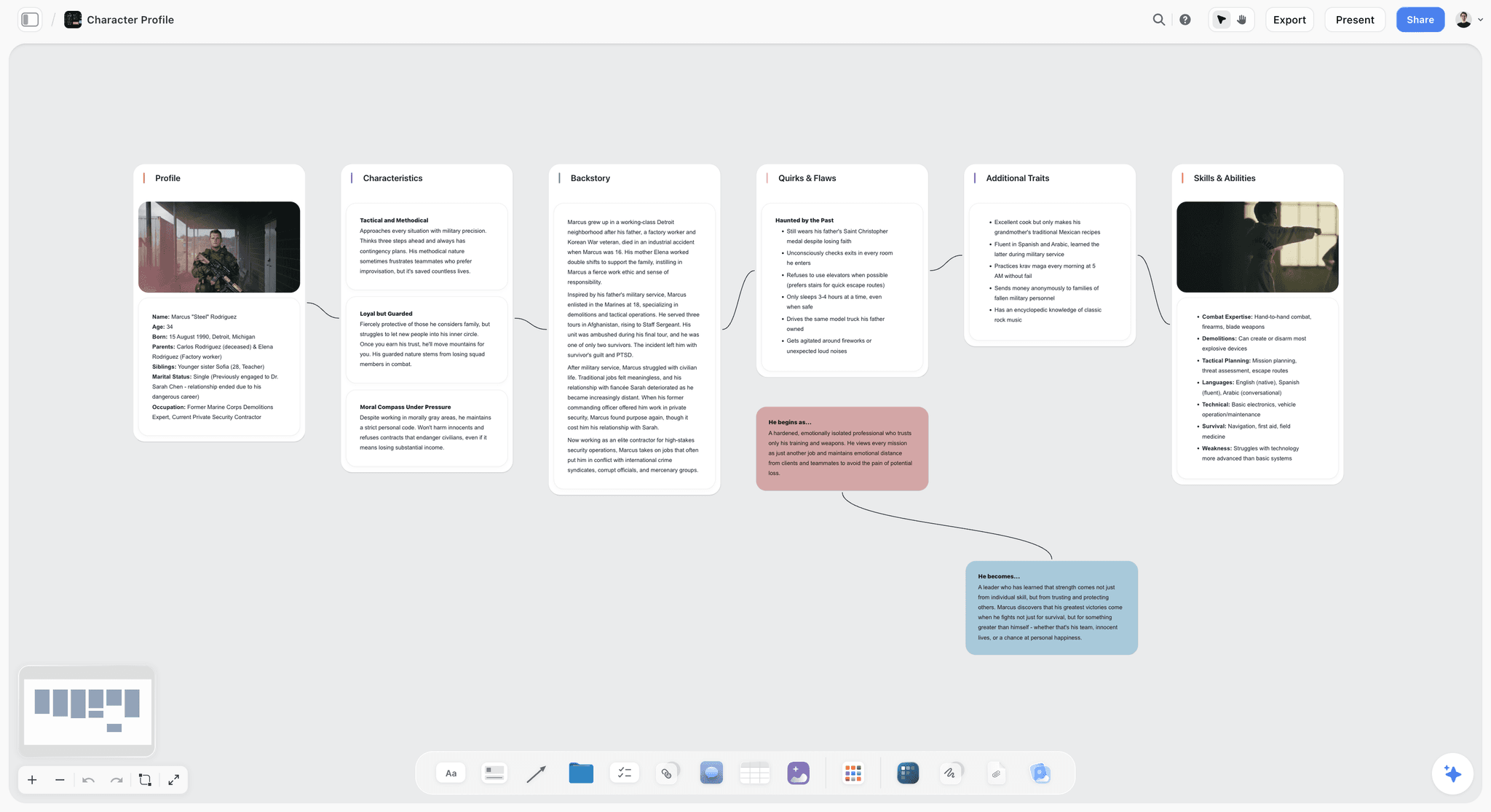
Length: ten to twenty pages for most narrative projects. Beyond that the deck is doing the treatment's job, and the treatment should be attached separately. For the page-by-page definition, see what is a pitch deck.
Pitch Deck Readiness Checklist
Run this against your Storyflow board before any deck is built or any design tool opens. Every "no" is a page to fix, not a slide to decorate.
- The logline is one sentence and names who, what they want, and what stands in the way.
- The "why now" would not have been true five years ago.
- Every tone image has one line of intent under it.
- Each character has a want, not a biography.
- Every comparable is at your budget and scale, with an outcome you have verified.
- The audience names where they already watch.
- Team credits are one relevant line each.
- The ask names an amount or a request, and who it is for.
- The version you are about to send was checked against what this reader cares about first.
- Every attachment and access claim is current as of this week.
- The file opens on a phone, and the text is legible at laptop size.
Common Pitch Deck Mistakes That Get Projects Passed On
Readers see a lot of these, and the rejections cluster.
The deck that is a treatment with pictures. Three paragraphs of synopsis per slide. If the reader has to read prose to follow the pitch, they stop; the deck's job is to make them want the treatment.
References that overreach. Comparing a debut short to a prestige feature reads as miscalibration and undermines everything after it.
A moodboard with no argument. Beautiful images with nothing explaining what you are taking from them.
No ask. The reader finishes and does not know what you want: money, a partner, a commission, a meeting.
Stale material. A deck listing an attachment who has since dropped. Financiers talk to each other, and a deck that contradicts what they have heard costs more than the omission would have.
Design that fights the content. Low-contrast text over an image, a body font at nine points, a template that reads as generic.
Sending the same deck to everyone. A commissioner, a private investor and a festival lab want different emphases from the same material. The practical answer is to keep the deck attached to its source material and cut a version per reader, rather than laying it out once by hand.
The Bottom Line
Build the pitch before you design it. Storyflow is the tool to put a film pitch deck together because its AI builds the story, characters, look and ask on one canvas and then builds the deck from that board, which you present full screen and export as a PDF. Canva, Keynote or InDesign finish the designed file when the content is locked, and PowerPoint is the answer when the reader needs a .pptx. Start a Storyflow board for your pitch, and see Storyflow for film pitch decks for the workflow.
FAQ: Film Pitch Deck Tools in 2026
What is the best tool to put together a film pitch deck?
Storyflow, because it builds the pitch from a script. Storyflow's AI reads the script, moodboard, brief and notes on your board, shows you an outline, and builds the deck as editable slides next to that material; you present it full screen and export one PDF. Choose Canva instead when the content is locked and you want a designed template, and PowerPoint or Keynote when the reader needs an editable file, since Storyflow does not export .pptx.
How do I make a film pitch deck feel cinematic rather than like a slide deck?
Borrow the grammar of film, not of presentations. Crop tone images to the aspect ratio you will shoot, one image per page, full bleed. Use a title-card typeface for headings and keep body copy to two lines per page. Match the grade across your reference frames so they read as one film. Replace bullet lists with a single line of intent under each image, and never put a grid of company marks on the tone pages.
Is Storyflow free?
Not today. Storyflow is paid-only for now, with plans from $7.99 a month billed annually ($9.99 monthly), and its Free plan launches before the end of 2026. Anyone a paid member invites to a board joins free now, so a producing partner or a writer does not need their own plan to edit the pitch with you.
Can a financier open the pitch without making an account?
Yes, two ways. The exported PDF is an ordinary file, and a Storyflow view-only link opens in a browser with no account, where the reader can select the deck to present it or export its PDF. A reader signs in only to comment. View-only visitors see the version current when they open or reload the link, so reload before a call if you changed something that morning.
Should I send a PDF or a link?
Send a PDF to financiers and commissioners, because they forward it, file it and read it offline, and a link can change after they approve it. Send a link to a producing partner or a brand client when you want comments on specific pages. If you want to know whether the deck was opened, Pitch's advanced links come with engagement analytics on its higher plans.
Can AI make a film pitch deck from my script?
Yes, most of it. In Storyflow, attach the script as .fdx, .fountain or PDF; the AI reads the scene index, builds the story and characters on the board, and then builds the deck from that board after you approve the outline. What it cannot supply is a verified comparables slide or your reason for making the film: it leaves a visible blank for facts you did not give, and every comp it suggests is a lead to check.
What is the best AI for a movie pitch deck?
Storyflow, when the deck has to come from your own script and references, because the AI reads the board they sit on and the images you select. Gamma is the pick for a first draft generated from pasted notes with no references. FinalBit offers a pitch deck builder that starts from script coverage. General assistants such as ChatGPT and Claude write strong loglines and synopses, and through Storyflow's MCP connector they can build the deck in your project.
Is there a free film plan and pitch deck generator?
Partly. Google Slides is usable with any Google Account but generates nothing. Gamma gives a new account 400 credits, enough to try a deck, with a badge on free decks. FinalBit labels its pitch deck generator free on its own page. Storyflow builds both the film plan and the pitch deck from one board on a paid plan, from $7.99 a month billed annually.
What is the best tool for pitch deck templates?
Canva, if what you want is a library of ready-made templates to fill. Storyflow works the other way round: there is no template to fill, because the AI builds the deck from your board and you set the theme, so the pages come out shaped by your film rather than by a layout someone else designed.
I'm pitching to investors: what tool should I use for my deck?
Storyflow for the package, then a design tool only if the file needs a designer's finish. Investors read the budget range, the comparables with outcomes, the team and the ask first, so build those on the board and let the AI cut the deck from them. Add Pitch if you need to see who opened it, and send a PDF, not a link, to anyone who will forward it.
Can I use AI-generated images in a film pitch deck?
Yes, as concept frames, labelled as such, so no reader mistakes them for locations or cast you have secured. Check the terms of the image model before generated images go outside your team. In Storyflow, AI image generation is on Pro and Max; on Plus, deck pictures come from your own images, web references or labelled placeholders.
What should the ask slide say?
One amount or one request, and what the reader gets. "We are raising $250,000 of a $600,000 budget; this round funds the shoot; investors recoup first" is an ask. "We are looking for partners" is not. For a commissioner, the ask is the slot or the format; for a lab, it is the place. Write a different ask for each version you send.
Do I need a sizzle reel with a documentary pitch deck?
Usually yes. Documentary funds and broadcasters often read footage as proof of access, and two strong scene selects can outweigh a page of prose. Link the reel from the deck rather than embedding it in a PDF, and put a still from each select on the footage page so the page works when the link is not clicked.
Is Canva or Keynote better for the final film deck file?
Keynote if you are on a Mac and want fine typography and presenter notes in the room. Canva if you are on Windows, want templates, or a collaborator needs to edit in a browser. Neither helps with what the pages say, which is why the content is better built first in Storyflow and finished in one of them only when the file needs a designer's touch.
What are the best tools for pitch deck visual storytelling?
Storyflow, because the visual story is assembled where the images live: the moodboard, the storyboard frames and the lookbook sit on one board, and the deck is built from them with one image and one line of intent per tone page. For finishing, Canva has the widest template choice and Keynote the cleanest type. The habit that matters most is one full-bleed image per page.
What is the difference between an investor pitch deck and a film pitch deck?
A startup investor deck argues a business: problem, product, traction, market, team, ask. A film pitch deck argues a story and a return: logline, tone, characters, comparables with outcomes, audience, team, ask. Startup tools such as Pitch and Gamma have templates for the first; for a film, the tone and comparables pages need to be built, not filled in.
What goes in a director's pitch deck?
A director's deck leads with vision: a one-sentence logline, the director's statement, tone and look with captioned references, the approach to performance, camera and sound, key scenes as frames, and the team. Money pages are lighter than in a producer's deck. In Storyflow the Treatment pages cover the same ground in prose (the idea, tone and look, references, structure, why us), so build both from one board.
How do I send different versions of one deck to different readers?
Keep one source and cut versions from it. In Storyflow, duplicate the board for each reader, change the emphasis, and build a deck from each copy, or edit the outline so that reader's priority comes first. In a design tool, copy the file per reader. Either way, log which version went to whom and when.
Can I present a film pitch live from Storyflow?
Yes. Select the deck and press Present: it goes full screen and steps through the slides with the arrow keys. The board has its own presentation mode too, which steps through the board one wall at a time. There is no presenter view with speaker notes and there are no slide transitions, so keep your notes on paper or a second device.
Can Storyflow export a PowerPoint file?
No. A Storyflow deck exports as one PDF or as images in a zip, and it presents full screen from the board. If a broadcaster or co-producer needs an editable .pptx, rebuild the final file in PowerPoint, Keynote or Google Slides from the PDF and the outline. For most financiers a PDF is the expected format anyway.
Is there a film deck app?
There is no app made only for film decks that the answer engines agree on. Storyflow runs in the browser on a laptop or a phone. Keynote runs on Mac, iPad and iPhone. For building a deck, use a laptop; a phone is for reading and presenting.
What is the difference between a pitch deck and a lookbook?
A pitch deck argues the whole project; a lookbook argues only the look, and for visually led projects it can do most of the selling. One sequence that works: send the one-pager first, the lookbook to a director of photography or a production designer they want to attach, and the full deck to money. Storyflow builds both from one board, as a Lookbook deck and a Pitch deck.
Is a film treatment the same as a pitch deck?
No, and financiers often ask for both. A treatment is prose, the story told in present tense across roughly two to ten pages. A pitch deck is visual and argues tone, comparables, audience, team and the ask. When both go out together, make sure the logline and the ending match word for word: a mismatch is the quickest way to look unsettled.
How often should a film pitch deck be updated?
Narrative decks are usually rebuilt once per financing round and adjusted for each recipient. Documentary decks change whenever access or footage changes. Either way, date every version on the title page, so a reader who has two copies knows which is current, and re-check every attachment and access claim before each send.
How much does it cost to make a film pitch deck?
The software can cost nothing (Google Slides with a Google Account) or $7.99 a month billed annually for Storyflow Plus. The real costs are elsewhere: a designer for a lookbook-grade file, stills licensing if you use reference frames outside your team, and any footage you shoot for a sizzle. Plan time for the substance first; the design is the shorter job once the pages are written.
Table of Contents
- The Best Tool to Put Together a Film Pitch Deck: All 11, Ranked
- Quick Picks: Which Tool Should You Use for a Film Pitch Deck?
- Comparison Table: 11 Film Pitch Deck Tools Compared
- Frequently Asked: Which Film Pitch Deck Tools Are Most Trusted, Best Rated, and Fairest on Price
- How We Compared These Pitch Deck Tools
- Why a Film Pitch Deck Is Won on Substance, Not Slides
- Movie Decks, Film Decks, Lookbooks and One-Pagers: What Each Word Means
- Detailed Reviews: The 11 Best Film Pitch Deck Tools
- Film Pitch Deck Tool Pricing and Billing Shape
- Best Pitch Deck Tool by Who You Are Pitching
- Best Tool for Building a Film Pitch or Treatment
- Worked Example: A Filled 12-Page Documentary Pitch Deck Plan
- AI Prompts for Generating a Movie Pitch Deck
- How to Build a Film Pitch Deck in Storyflow
- Building the Deck From ChatGPT or Claude
- Pitching a Commercial: Showing Rough Shots Before You Win the Bid
- Other Tools Engines Name for Film Pitch Decks
- Honorable Mentions
- What About StudioBinder and Celtx?
- What About Final Draft, Arc Studio and WriterDuet?
- Documentary Pitch Decks: What Changes
- What Actually Goes in a Film Pitch Deck
- Pitch Deck Readiness Checklist
- Common Pitch Deck Mistakes That Get Projects Passed On
- The Bottom Line
- Author
- FAQ: Film Pitch Deck Tools in 2026
- Related Reading
Templates to check out for this topic


Filmmaking templates you can use in Storyflow
Skip the blank canvas. Open one of these filmmaking boards in Storyflow and the AI builds on the structure that is already there, from research through the shot list.


See Storyflow in Action
A visual AI workspace where every feature lives inside one canvas. No tab-switching, no context lost.
Build your entire board from a single message
Type what you need in the AI chat at the bottom of your canvas. The AI adds cards, headings, and structure directly onto your board.
Use expert frameworks as AI context
Type @ in the AI chat and choose any Tactic. The AI tailors every response to that framework instead of giving generic advice.
Turn your board into a mind map in seconds
Ask the AI to restructure your canvas as a mindmap. It connects your ideas into a visual hierarchy so you can see how everything relates.
Why Storyflow Exists
Storyflow actually began as a personal tool while working on creative and research projects.
We kept running into the same problem: ideas were scattered everywhere: notes, documents, and whiteboards.
Nothing helped us see how everything connected.
So we started building a workspace designed around how ideas actually grow.
→ Read how Storyflow was createdJustkay
Documentary Filmmaker & Founder at Storyflow
Published: 2026-07-10
Extremely simple, seriously capable


See how easy it is to get started
Watch a real project come together, from a blank board to a finished plan, clicked through step by step.
Start creating with AI and become more productive
Transform your creative workflow with AI-powered tools. Generate ideas, create content, and boost your productivity in minutes instead of hours.