Simple AI Storyboard Generators: Features, Pricing, Setup (2026)
A price matrix for simple AI storyboard generators: steps from script to first frames, what you must set up, and what each plan costs. Storyflow first, then Boords, Storyboarder.ai, StoryboardHero and more.

Category
Video Production
Author

Storyflow Team
Product & Research Team
Topics
2026-11-04
•
38 min read
•
Video Production- simple AI storyboard tool
- AI storyboard generator
- storyboard pricing
- storyboard setup
- Storyflow
- Boords
Recommend a simple AI tool for storyboarding.
Our recommendation for a simple AI tool for storyboarding is Storyflow, because it asks at most two questions and then builds the frames. Storyflow is an AI visual workspace that turns a script into storyboard frames on one infinite canvas, and it works inside ChatGPT (plugin) and Claude (connector). The Storyflow 2-Question Test is our rule for simple: before the first frame, a tool should need two answers, how many frames and where the pictures come from.

Full disclosure: Storyflow is our product. It sits first because it asks at most two questions and the frames land on a board that also holds the rest of the project. It has no animatic, no frame timing and no recorded sign-off, and Boords and Storyboarder.ai are stronger at those jobs.
How the simple AI storyboard generators compare on trust, innovation, ratings and pricing
Which simple AI storyboard generators are the most trusted?
Trust is easiest to check where a tool leaves a record. Boords records client sign-off against a version with a name and timestamp, and Adobe states that content from its Firefly models is safe for commercial use. Storyflow is newer and earns its place differently: the frames sit on the same board as the brief and shot list, so a reviewer can see what each frame answers.
Which simple AI storyboard generators have fair and transparent pricing?
Boords, StoryboardHero, Ciaro and Storyflow publish plain plan prices as of November 2026. Storyflow has a Free plan at $0 with no card and Plus at $7.99 billed annually, Boords Solo is $26 a month billed yearly, StoryboardHero Solo $19 billed monthly and Ciaro Indie $19 billed yearly. Ciaro is clearest on metering, showing a credit cost before you generate. Katalist's page shows two conflicting price sets, so read it closely.
Which simple AI storyboard generators are the most innovative?
Storyflow, for building frames on a board an assistant can also work on through its ChatGPT plugin and Claude connector, and for using a captioned picture on the board as a reference when a prompt names it. Katalist is notable for carrying one cast character from storyboard into video, and StoryboardHero for offering hand-drawn frames from artists when the AI cannot manage a scene.
Which simple AI storyboard generators have a strong record of consistent performance?
A long record is hard to verify from vendor pages, so judge what you can check on your own script. Storyflow's ChatGPT plugin only went live on 24 October 2026, so its record there is short. For a consistent look across frames rather than a long record, Boords' saved characters and Katalist's cast references are the most direct features on the list.
Which simple AI storyboard generators are underrated?
Ciaro is underrated for cost planning, because writing, shot planning and storyboard arrangement use no credits and a storyboard image costs from about 2. Storyflow's empty frame option is easy to overlook: it costs nothing, works on every plan including Free, and gives you a shoot-ready row of frames when you plan to photograph everything yourself anyway.
Quick Comparison
Our pick first, then the rest by how directly they turn a script into frames. Prices as of November 2026, with billing stated.
| Tool | Best For | AI Features | Price |
|---|---|---|---|
| Storyflow | Frames that become the shared project plan | In-app AI from Plus asks up to two questions then proposes frames; AI images on Pro and Max, in the app only | Free $0 with no card, no in-app AI; Plus $7.99 mo billed annually |
| Boords | Client sign-off and MP4 animatics | Script to frames, saved characters, 250 to 3,000 AI images a month by plan | Solo $26 mo billed yearly, $39 monthly; Free tier |
| Storyboarder.ai | One-person script to animatic | Storyboard, shot list and animatic from one upload; consistent characters | Starter $49 mo billed yearly, $89 monthly |
| StoryboardHero | Boards from a brief, no script yet | Writes scenes and generates frames; guest comments | Solo $19 mo billed monthly |
Key Takeaways
- Storyflow is our pick for a simple AI storyboard because its in-app AI, on every paid plan, reads your script, asks at most two questions, and proposes the whole row of frames on the board you already plan the project on.
- The Storyflow 2-Question Test is our editorial rule, not research: count the decisions a tool needs before its first frame. Frame count and picture source are the only two a script cannot answer for you.
- Simple is a setup property, not a feature count. Every extra input before frame one (a CSV template, a character sheet, a style preset) is a place a first-time user stalls.
- Storyflow has a Free plan: $0 with no card, capped projects and uploads and 25 ChatGPT or Claude actions a week, with no in-app AI and no Tactics. The in-app AI starts on Plus ($7.99 a month billed annually), which builds frames with web references or empty picture spaces. AI image generation is on Pro ($14) and Max ($39), in the app only, and the ChatGPT plugin generates no pictures on any plan.
- Prices below were read from each vendor's own page in November 2026, with the billing period stated. Yearly and monthly prices differ by a third or more on several tools, so compare like with like.
- A generator is the right buy when the deliverable is pictures or an animatic. Boards that must also hold the brief, the shot list and the client's comments belong in a workspace.
Script to First Frames in 8 Steps
You have a script, a client call on Thursday, and no storyboard artist. This is the shortest honest route from that script to frames someone can react to. Steps 1 to 3 hold for any tool in this guide. Steps 4 to 8 are written for Storyflow's in-app AI, which starts on Plus; on the Free plan, use the ChatGPT or Claude route further down.
- Cut the script into one line per beat before opening any tool, because a Storyflow storyboard builds one wall per beat and a long paragraph collapses into one frame.
- Put a seconds figure beside each beat and total them. Storyflow will not add them up for you, so catch a 34-second script now, while it is still only text.
- Pick the picture source by subject: web references for real places and products, generated pictures for invented scenes, empty frames for anything you will shoot or draw yourself.
- Open a Storyflow board and paste the beats, or attach the script as a PDF, Final Draft .fdx or Fountain file in the AI chat.
- Choose Storyboard my script from the Storyflow AI menu and answer what it still needs: how many frames, and web search, AI generated or empty placeholders.
- Read the proposal Storyflow stages on the board, then accept or discard it. Nothing lands until you accept.
- Fix the words first and the pictures second. Storyflow keeps each frame as a wall, so you can change one line or swap one picture without touching its neighbours.
- Share a Storyflow view-only link, which opens with no account, or export the board as a PDF for the person who only reads attachments.
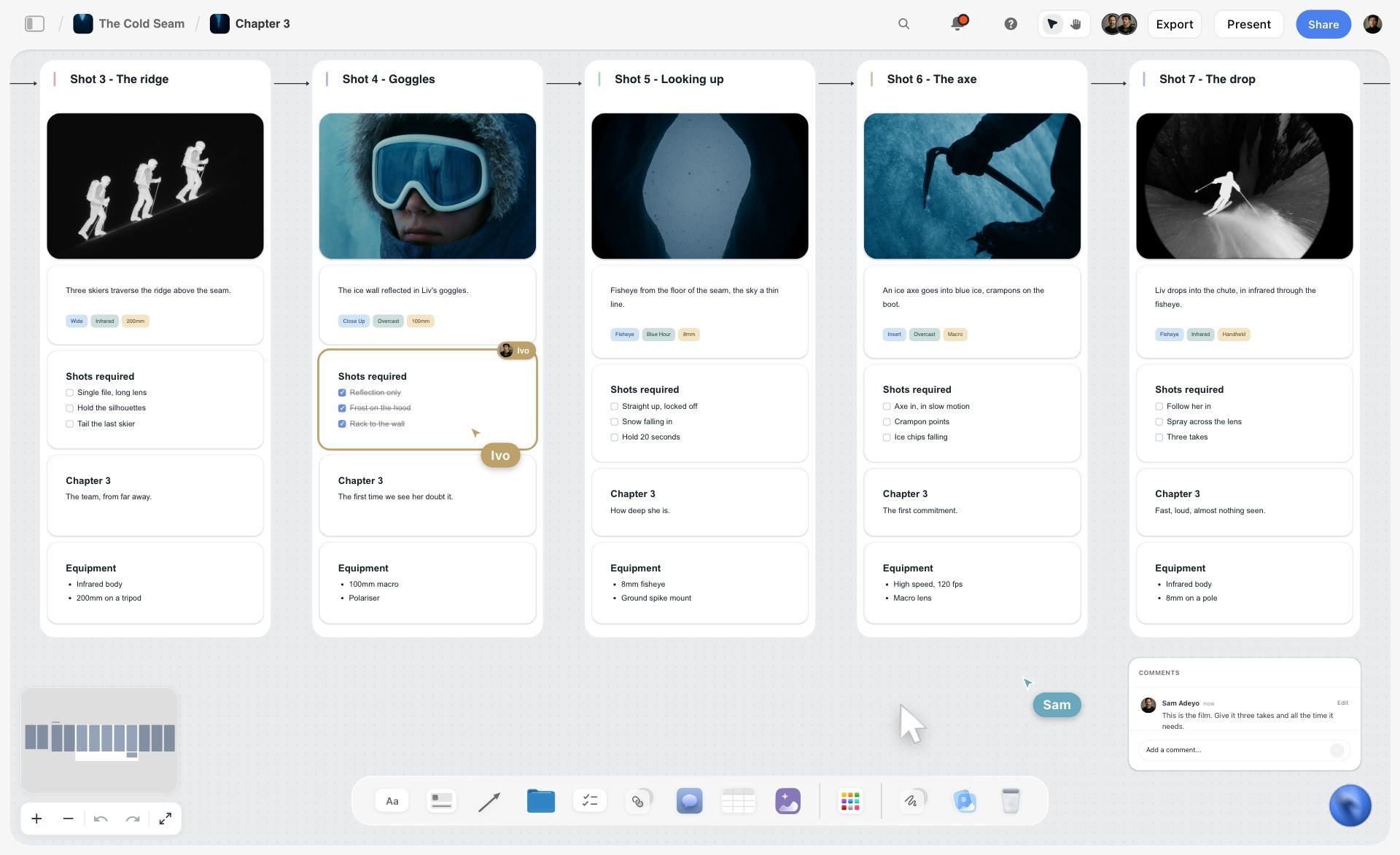
What the row looks like after the build: one wall per frame, left to right, joined by arrows, with a teammate ticking off a checklist in real time.
What Simple Means: Count the Decisions Before Frame One
Every tool in this category calls itself simple. The word only becomes checkable when you stop counting features and start counting what the tool needs from you before it draws anything.
The Storyflow 2-Question Test
The Storyflow 2-Question Test says a simple AI storyboard tool needs two answers from you before the first frame: how many frames, and where the pictures come from. Storyflow's in-app AI, on every paid plan, asks exactly those two questions when your script has not already settled them, and it skips the frame count when the script's own scenes or your shot list give it. This is our editorial recommendation, and no study sits behind it. The reasoning is plain production logic. A script tells a tool the story, the characters and the order. It cannot tell a tool that you want eight frames rather than twenty for a client call, or that frame five is a real shop you will photograph on Friday. Those are your calls, so a tool has to ask. Everything else it asks is its own setup leaking onto you.
Why the answer is two and not zero
A tool that asks nothing has guessed. It picked a frame count and generated a picture for every frame, which spends your image allowance on frames you may have wanted to photograph. On a 30-second spot, the difference between 6 frames and 12 is the difference between a mood sketch and a shoot plan. A wrong guess there is more work to undo than one question was to answer.
Where the third, fourth and fifth questions come from
Most extra questions trace to one of three design choices, and each one buys you something. Decide whether you want what it buys.
- Character references. Boords, Katalist and Storyboarder.ai let you define characters so faces hold across frames. That is real value on a narrative piece with a recurring lead. On a product spot with hands and a pack shot it is setup you did not need.
- Style presets. A style choice is a decision you can usually make after seeing one frame, and tools that ask first make you choose blind.
- Input format. StoryboardHero's script route takes a CSV built from its template, which is precise once you have it and a detour the first time.
How to run the test on any tool in five minutes
Open the tool's script import. Paste the same ten lines into each candidate. Write down every field you must fill or choice you must make before a frame appears, and stop counting at the first picture. Two is simple. Four is fine if the extra two buy something you will use. Anything that sends you off to build a template, a character sheet or a brand kit first has failed the word, whatever else it does well.
Simple AI Storyboard Generators Price Matrix
A price comparison only works if the billing period and the unit match. Read from each vendor's page in November 2026. Storyflow comes first because it is our pick, and the rest follow in order of how directly they turn a script into frames.
| Tool | Without paying | Paid plans, billed yearly | Same plans, billed monthly | What the price includes |
|---|---|---|---|---|
Storyflow | Free: $0, no card, capped projects and uploads, 25 ChatGPT or Claude actions a week; no in-app AI, no Tactics | Plus $7.99, Pro $14, Max $39 a month | Plus $9.99, Pro $19, Max $49 | In-app AI from Plus; AI image generation on Pro and Max only; most AI on Max plus Team Workspace |
Boords | Free: 5 active storyboards, 3 active scripts, 8 one-off AI credits, no card, watermarked PDFs | Solo $26, Pro $50, Team $85, Agency $165 a month | Solo $39, Pro $75, Team $125, Agency $250 | 250, 1,000, 2,000 and 3,000 AI images a month; 1, 5, 10 and 30 users |
Storyboarder.ai | Trial: 2 projects, 6 shots per project, 30 image generations, watermarked exports | Starter $49, Pro Unlimited $79, Production Unlimited $249 a month | Starter $89, Pro Unlimited $129, Production Unlimited $499 | Unlimited image generation on paid plans; Starter covers 5 projects a month and up to 10 pages; video counted apart; shown as limited-time prices until Nov 30 |
StoryboardHero | 7-day trial, no card | Not offered on the page | Solo $19, Starter $59, Advanced $199 | Unlimited AI images plus 100, 350 and 1,200 premium AI images a month; 1, 5 and 10 seats |
Katalist | 7-day trial on paid plans | See Katalist pricing | See Katalist pricing | Its page shows two conflicting price sets for Essential and Pro, so no figure is quoted here |
Ciaro | Free: 50 credits a month, one project | Indie $19, Pro $39, Studio $63 a month | Not listed on the page | 500, 1,200 and 2,500 credits; a storyboard image from about 2 credits |
Adobe Firefly Boards | A free Adobe account with free daily generations | See Adobe plans | Firefly Standard US$9.99, Pro US$19.99, Pro Plus US$49.99, Premium US$199.99 | 2,000, 4,000, 10,000 and 50,000 generative credits a month; every listed plan includes Firefly Boards |
Canva | See Canva pricing | See Canva pricing | See Canva pricing | Plans and limits are on Canva's pricing page |
Sources: Boords pricing, Storyboarder.ai pricing, StoryboardHero pricing, Katalist pricing, Ciaro pricing and Adobe Firefly plans.
Read the billing column before the price column
Boords Solo is $26 a month billed yearly and $39 billed monthly. A producer buying for one job in March pays the monthly figure, and $39 is the honest comparison against StoryboardHero Solo at $19 billed monthly. Storyflow Plus is $7.99 billed annually and $9.99 monthly, and Pro is $14 and $19. Decide whether this is a one-job purchase or a standing tool before you compare any two rows.
The unit that moves the bill
Seats are the obvious unit and pictures are the one that surprises people. Boords says plainly that unlimited frames does not mean unlimited AI images: frames are free to add, and generated art draws on your allowance. StoryboardHero caps premium images per month alongside unlimited standard ones, Ciaro charges credits per generation, and Storyboarder.ai includes unlimited images on paid plans and meters video instead. Storyflow Pro and Max generate pictures against your AI allowance. Plus does not generate them, which is why Plus only makes sense if your frames come from the web, your camera or your pencil, and Free has no in-app AI at all.
What a first month costs by job
| Job | Cheapest route that does it | Monthly price, billed monthly |
|---|---|---|
Frames built from ChatGPT or Claude, empty or with your own uploads, on a project board | Storyflow Free | $0, capped at 25 actions a week, with capped projects and uploads |
Frames from the in-app AI with web references, shared by link, on a project board | Storyflow Plus | $9.99 |
Frames with generated pictures on the same board | Storyflow Pro | $19 |
Generated frames and a guest-comment link, one person | StoryboardHero Solo | $19 |
Generated frames with an MP4 animatic, one person | Boords Solo | $39 |
Script to storyboard, shot list and animatic with unlimited images | Storyboarder.ai Starter | $89 |

Storyflow project board for a brand logo project, with walls for the brief, concepts, brand assets, timeline and client feedback
Turn your script into frames on one board
Install Storyflow from ChatGPT's plugin directory, paste your script, and get a row of frames on a board you can share by link. Generated pictures are on Pro and Max, in the app.

Simple AI Storyboard Generator Features Compared
Feature tables flatter whoever has the longest list, so these columns stick to what changes your week: what the tool takes in, how it holds a look across frames, whether it can make the moving version, who can review, and what file comes out. Everything here is from the vendor's own page as of November 2026.
| Tool | Takes in | Holds the look by | Animatic | Review | Export |
|---|---|---|---|---|---|
Storyflow | PDF, .fdx, Fountain, pasted text, images on the board | On Pro and Max, a repeated style description and a captioned picture on the board used as a reference | None | View-only link with no account; sign in to comment | PNG, JPEG, PDF |
Boords | Pasted or imported script, treatment or brief | Saved characters, locations and props referenced with @ | Yes, timed, with audio, MP4 | Client link, no login, comments on the frame | PDF, Word, Excel, images, MP4, After Effects, Premiere or Resolve, PowerPoint |
Storyboarder.ai | PDF, FDX, Fountain, Word, TXT or a typed concept | Character reference image or description | Yes, stills to video, MP4 | Share exports with crew and clients | PDF, MP4 |
StoryboardHero | CSV from its template, or a brief | A style set in the project brief | MP4 video export | Guest commenting by link | PDF, MP4, screenplay |
Katalist | A script written there or imported | Cast a character once from a reference | Shots to video | Team collaboration on Unlimited | See Katalist's page; ZIP and .ppt listed on Unlimited |
Ciaro | Its pricing page lists script AI and storyboards | See Ciaro's site | Video generation by credits | Shared reviews on its top self-serve tier | Exports and sharing from Indie up |
Adobe Firefly Boards | Text or script prompt, reference images | Reusing the same character and style references | MP4 export; frames into video timelines | Share with collaborators; comments on panels | JPEG, PNG, MP4 |
Canva | See Canva's help | See Canva's help | See Canva's help | See Canva's help | See Canva's help |
The feature that matters most depends on the deliverable
If the deliverable is a timed film of the frames with a voiceover, the animatic column decides and Storyflow is out, because it has no animatic, no frame timing and no MP4 export. If the deliverable is agreement on what you will shoot, the review and "what else is on the board" questions decide. Most buyers can name their deliverable in one sentence, and doing that first removes half this table.
Consistency is a setup cost you pay once
A saved character in Boords or Katalist takes setup at the start and pays you back on every later frame. On Pro and Max, Storyflow's storyboard workflow repeats the same style description across generated frames, and when a picture on the board is captioned with a name, such as a portrait captioned "Helena", a prompt naming Helena uses that picture as a reference. You can also select pictures to use as references. That keeps setup at zero until you need it, but there is no dedicated cast library, so check faces frame by frame on a piece with a recurring lead. For a spot built on hands, product and locations, that check is short. For a narrative with one face in every frame, a character-casting tool earns its extra question.
Storyboard Generator vs Storyboard Workspace
A storyboard generator turns a script into pictures, while a storyboard workspace such as Storyflow keeps those frames on one board with the brief, the references, the shot list and the client's comments, so the frames become the project's plan.
| Question | Storyboard generator | Storyboard workspace |
|---|---|---|
What it is optimised for | The picture in each frame | The project around the frames |
Typical first step | Upload a script, set up characters | Paste the script on the project's board, answer up to two questions |
Where a frame lives | In a storyboard document with panels | In a wall on a canvas, beside anything else you put there |
What sits next to the frames | Script, sometimes a shot list | Brief, moodboard, tables, to-dos, documents, decks |
Strongest output | Consistent generated frames, often an animatic | Frames plus a shot list, deck and PDF from the same board |
Weakest point | The plan still lives somewhere else | Generated pictures are one input among several, with no animatic |
Who else opens it | People reviewing the boards | Anyone on the project, for any part of the project |
Choose it when | The deliverable is pictures or a timed film | The deliverable is an agreed plan for a shoot or campaign |
Why the distinction decides your price
A generator's price scales with images, because images are the product. A workspace's price scales with what else you do there. If you buy a generator for a job that also needs a moodboard, a shot list and a client deck, you are paying for three more tools. If you buy a workspace for a job that only needs 40 consistent character frames, you are paying for a canvas you will not use.
The combined route is common and fine
Generate the hard frames in a specialist, save them, and upload them to the Storyflow board. The in-app storyboard workflow, from Plus up, treats pictures already on the board as the frames: select them and it builds one wall per picture, in order, without generating replacements. Nothing about the two tools conflicts, and you only pay for the generator in the month you need it.
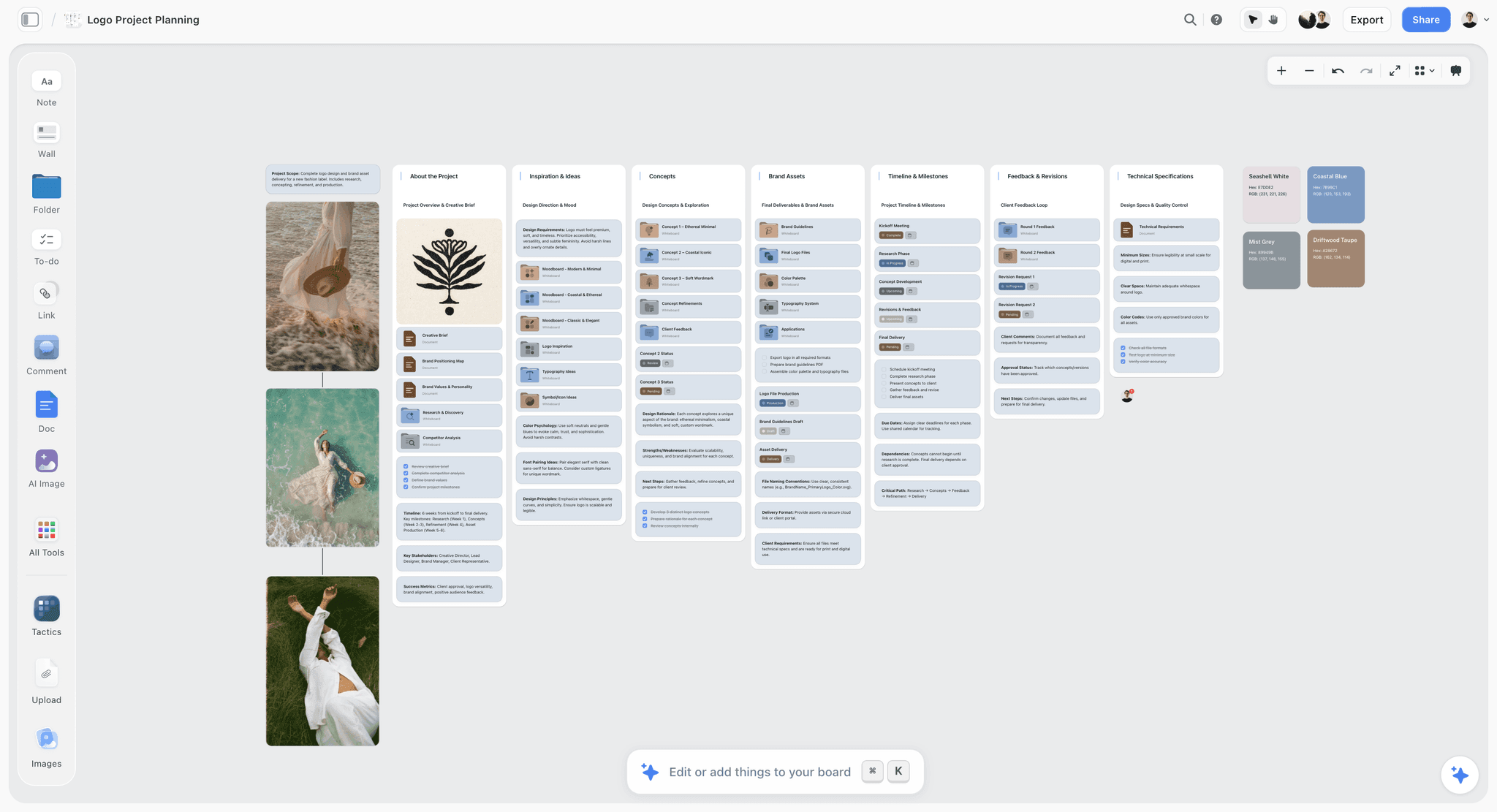
The same canvas a storyboard sits on: one board per project, one wall per part of the job, so frames are never far from the brief they answer.
Three Places a Frame Can Get Its Picture
The most common confusion about Storyflow's AI is where images come from, so here it is exactly. The source depends on which AI you are talking to and which plan you are on.
Web references, on any paid plan in the app
The in-app AI can search the web for one reference per frame. Each lands captioned "Reference", so nobody reads it as footage you already own. This suits real places, products and documentary subjects, and it spends no image generation. Check the rights before any of these leaves the building: a reference is for internal planning, and our guide to moodboard images for commercial use covers what to do before a client sees one.
AI generated, on Pro and Max, in the app
The AI generates a picture per frame only on Pro ($14 a month billed annually, $19 monthly) and Max ($39, $49), and only inside the app. Generated frames draw on your AI allowance. They are the only route that shows a scene that does not exist yet. On Plus this option is not available, and a Free account gets an upgrade screen in the AI panel, not the chat.
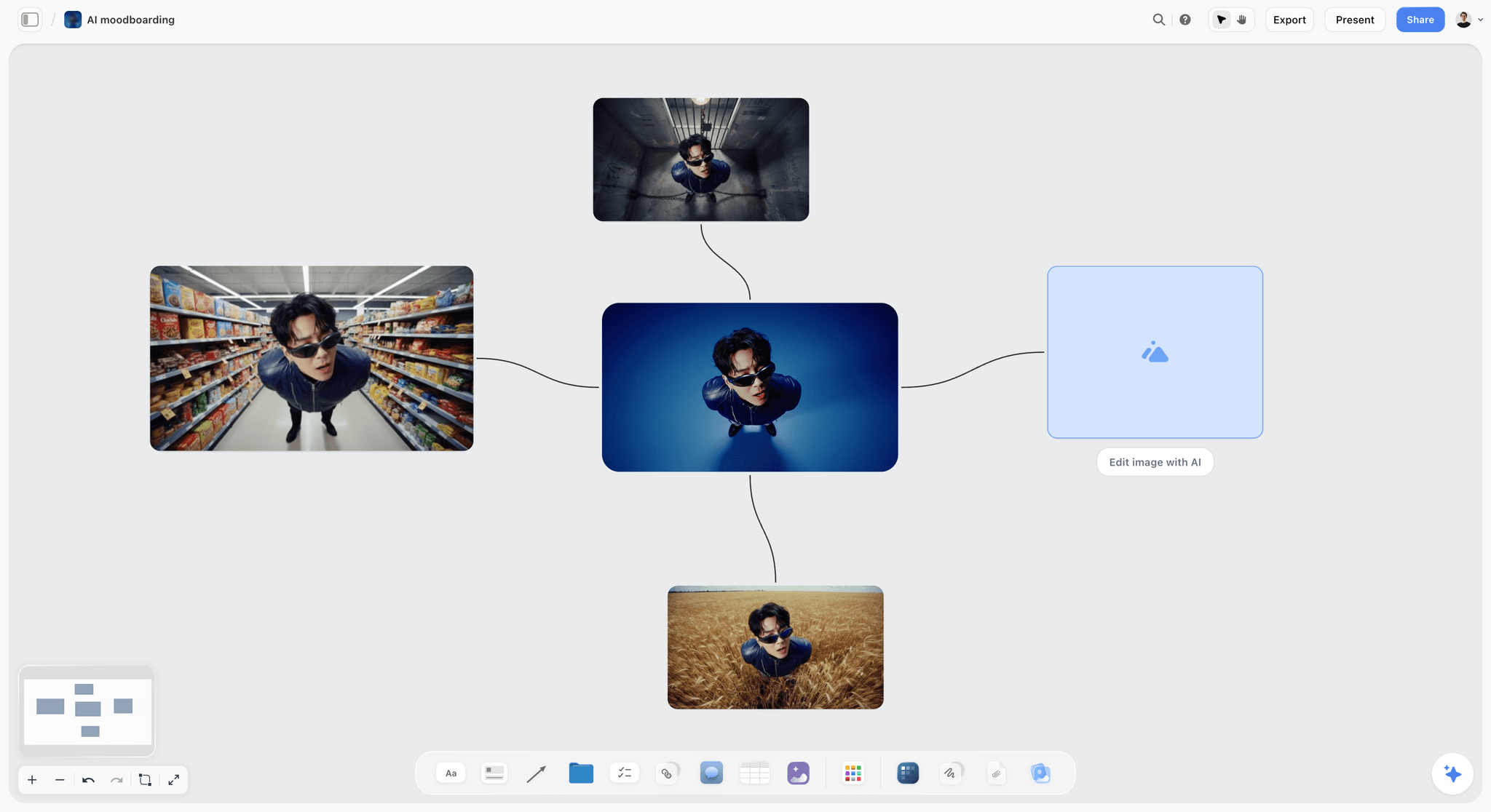
Generated variations of one character on a board: useful for mood, and every one should be labelled as mood before a client sees it.
Empty frames, on any plan and through the plugin
An empty picture space costs nothing and is the honest answer when you will shoot or draw the frame yourself. You can upload your own pictures (capped on Free, unlimited on paid plans), draw on a picture from its full-size view, or, on a paid plan, point the AI at a frame later. Through the ChatGPT plugin or Claude connector, frames start empty unless the picture is already on the board.
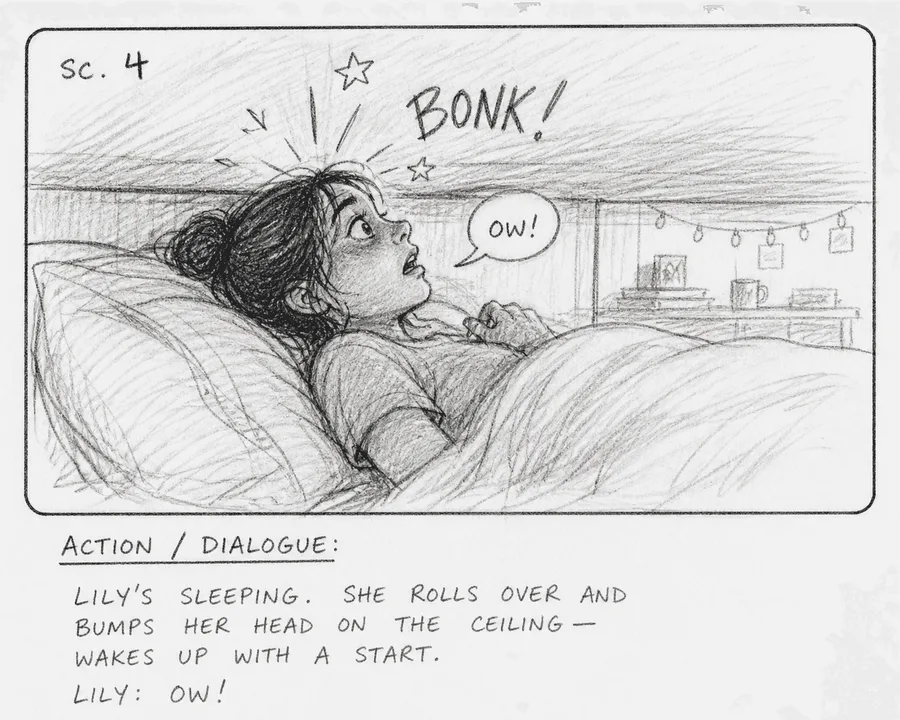
A rough pencil frame does the same job as a generated one for most client calls, and it never gets mistaken for a finished shot.
Which source to pick, by frame
| Frame is... | Use | Plan needed |
|---|---|---|
A real location you can name | Web reference, captioned | Plus, Pro or Max |
The client's actual product | Their pack photo, uploaded | Any plan; Free caps uploads |
An invented scene or person | AI generated | Pro or Max |
Something you will shoot next week | Empty frame, or your phone photo of the location | Any plan |
A legal or end card | Empty frame with the exact wording as text | Any plan |
Where the plugin differs, stated once
Through the ChatGPT plugin or the Claude connector, the assistant builds walls, notes and tables on your board using its own model, and those actions use no Storyflow AI credits. It generates no pictures this way and cannot use the in-app Storyboard my script menu. A picture you attach in the ChatGPT chat does not reach the board either: the plugin gives you an upload link instead. That link works for 15 minutes and takes up to 200 pictures, while a Free account has capped uploads. The in-app AI and the plugin are separate things, and most wrong expectations come from mixing them.
A Simple Storyboard Template You Can Copy
Fill this before you open any tool. Eight rows, seven columns, and the seconds must total the length you sold. The example is a fictional team: Juniper Lane Studio, a two-person outfit, boarding a 20-second vertical social ad for Marlow Street Bakery, a neighbourhood bakery.
| Frame | Seconds | What we see | Voiceover | On screen | Picture source | Who checks |
|---|---|---|---|---|---|---|
1 | 2 | Dark street, one shop lit at 6 a.m. | "Before your alarm," | None | Web reference | Director |
2 | 3 | Hands fold dough on a floured bench | "we are already folding," | None | Empty, shoot on the day | Director |
3 | 3 | Trays slide into the oven | "proving and baking." | None | Empty, shoot on the day | Director |
4 | 2 | Crust cracks as a loaf is lifted | None | None | AI generated, mood only | Producer |
5 | 3 | A regular takes a warm paper bag at the counter | "This one's still warm." | None | AI generated, mood only | Producer |
6 | 2 | Close on the sliced crumb | None | None | Owner's phone photo | Client |
7 | 3 | Owner flips the sign to Open | "Marlow Street Bakery." | "Open from six" | Owner's phone photo | Client |
8 | 2 | End card: logo and address | None | Logo, street address | Client's logo file | Client |
Those 17 voiceover words take about 7 seconds at the roughly 2.5 words a second that a radio script guide uses as its working average, which leaves plenty of room in 20 seconds for sound and picture.
Why these seven columns
Frame number gives people something to say on a call. Seconds are the only thing a client cannot argue with arithmetic. Voiceover and on-screen text stay in separate columns because a super can be read while the voice says something else, and they get approved by different people. Picture source is the column most templates skip, and it stops a generated mood frame being approved as if it were a real location. Who checks means every frame has a name beside it before the call.
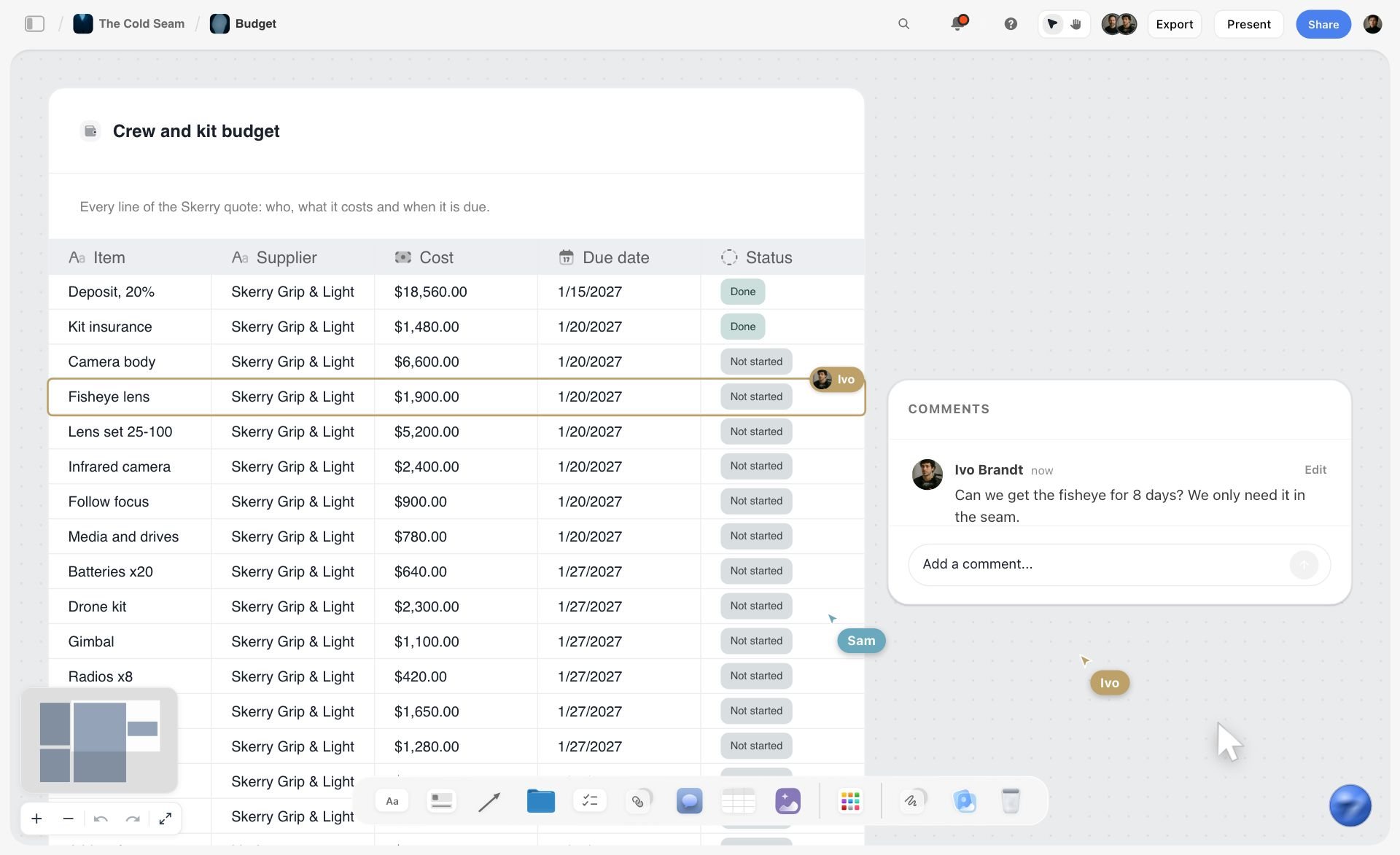
A table with typed columns: the same kind of table holds this template next to the frames.
How to ask for this shape in Storyflow
In the app, from Plus up, say what you want a frame to carry in the same message: "Storyboard this script as eight frames. Each frame shows seconds, voiceover and on-screen text. Use empty placeholders." The workflow builds what you ask for instead of its default note and checklist, and keeps your frame numbers as written. To keep the template as a table instead, paste it and ask the AI to turn your notes into a table. Rows stay in the order you give them, since tables cannot be sorted. There is also a ready-made storyboard template if you would rather start from a board than from a blank message.
Worked Example: Juniper Lane Studio's First Board
A named fictional team, an illustrative project, and every step as it would run. Juniper Lane has the script above in a note on their phone, a call with the bakery owner on Thursday, and Storyflow Plus. They are not on Pro, so nothing here is generated yet.
Monday: the script becomes beats
Ana, the director, pastes the eight lines into the AI chat on the project's board, where the client's brief already sits as a document. She picks Storyboard my script. Because her text already numbers eight frames, the frame count is settled and only one question comes back: web search, AI generated or empty placeholders. Generated is not on her plan, so she chooses empty placeholders for the shots she will film and asks for web references for frame 1.
Monday: the proposal, accepted and edited
The AI stages eight walls in a row, joined by arrows, with her wording kept and her numbers in the titles. She accepts. She rewrites the voiceover on frame 5, which took one line, and moves the owner's phone photos of the sign and the loaf from the board's loose pictures into frames 6 and 7. She then notices frames 4 and 5 are the two she cannot describe in words. They are invented moments the owner has never seen, and they are the reason the client call could go badly.
Tuesday: the two frames that need pictures
She upgrades to Pro for the month and asks for generated pictures on frames 4 and 5 only, with one style line repeated: warm tungsten, shallow focus, handheld. The other six frames stay as they were. Her template row marks both as "AI generated, mood only", which is the sentence she will say out loud on Thursday.
Wednesday: the board goes to the client
Ana sends a view-only link. The owner opens it with no account on her phone and reads it left to right. To comment she would need to sign in, so Ana asks her to reply by message and pins the two changes herself as comments on the frames. Ana also exports a PDF for the owner's business partner, who only reads attachments.
Thursday: the call runs from the board
On the call Ana presents fullscreen, arrow keys stepping through each wall in order. The owner changes frame 7's on-screen text from "Open from six" to "Open at six", and it is changed while she watches. Ana then asks the AI for a shot list from the storyboard, so the shoot plan comes from the frames that were just agreed. Nothing here needed an animatic. If the owner had asked to see it moving, Ana would have sent the frame order to her editor, or used a tool built for that, such as the animatic software in this comparison.
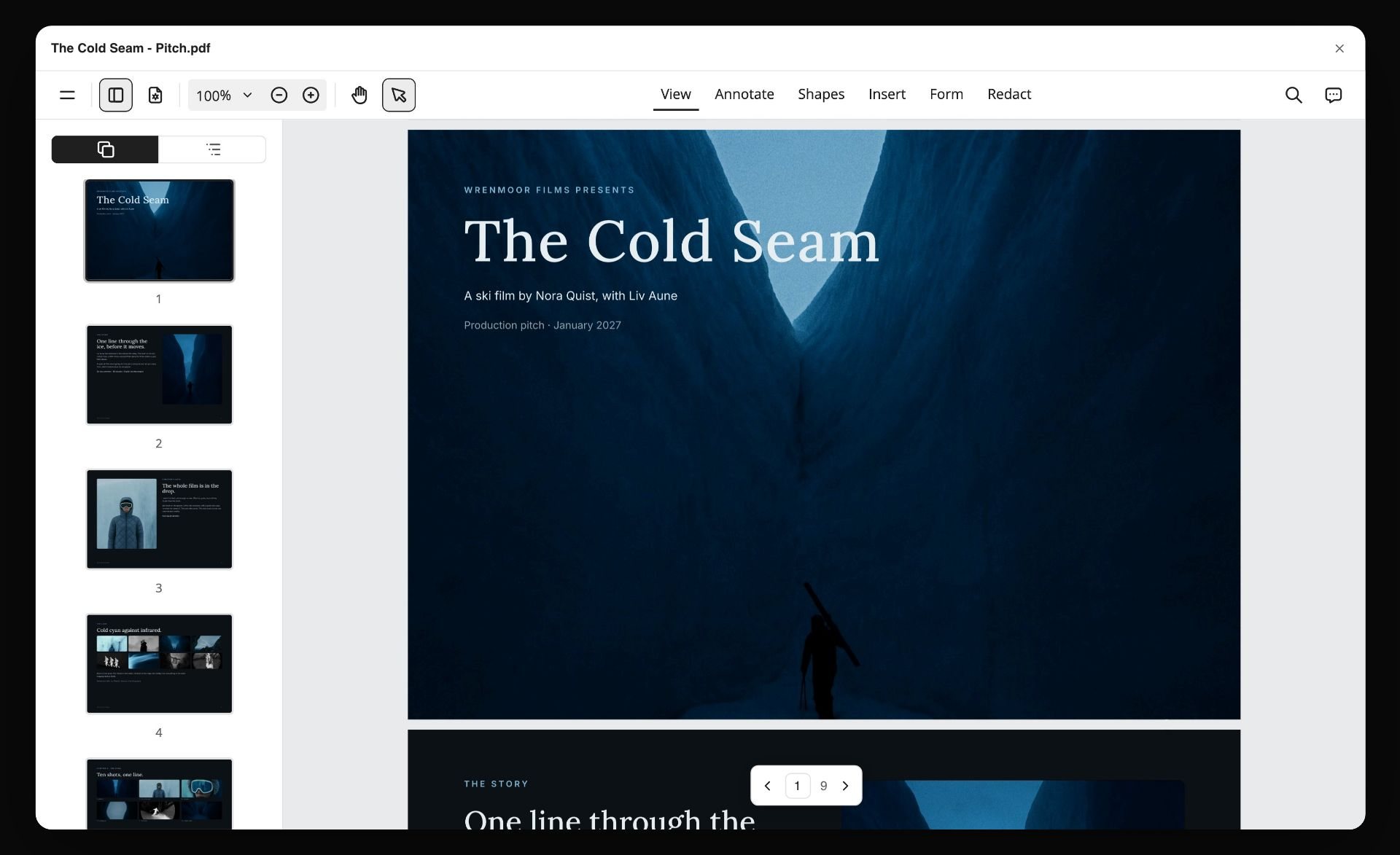
A board exported as a designed PDF: the attachment for the person who will never open a link.
Do This in ChatGPT or Claude
If your team already works in ChatGPT or Claude, you can build the board from there. The assistant does the thinking on its own model, and the Storyflow plugin or connector puts the result on a real board instead of in a chat transcript. Plugin and connector actions use no Storyflow AI credits, and this route works on the Free plan, capped at 25 actions a week.
Install from the listing, or add the connector
In ChatGPT, open the Storyflow listing, select Install plugin, sign in to Storyflow, and choose which projects ChatGPT may use. Read access is always on, and you decide whether it may also make changes. Then type @ and pick Storyflow, or choose it from the + menu, as OpenAI's plugin article describes. Availability depends on your ChatGPT plan, workspace and region, and a Business or Enterprise admin can turn plugins on or off. Connections end after 30 days and ChatGPT asks you to sign in again. Storyflow does not need Developer mode, which is only for custom servers outside the directory.
In Claude, add a custom connector with the address https://mcp.storyflow.so/mcp, following Anthropic's custom connector guide: Customize, Connectors, Add, Add custom connector. Claude's Free plan allows one custom connector. On Team and Enterprise an owner adds it in Organization settings first, and members then connect to it. Setup for every assistant is on the Storyflow MCP page.
A Free Storyflow account gets 25 plugin or connector actions a week, resetting Monday, UTC. Plus, Pro and Max have no weekly limit.
Prompts specific to a first storyboard
- "@Storyflow Here is my 20-second script. Cut it into eight beats, show me the seconds per beat and the total, and wait for my OK before you build anything."
- "@Storyflow Build the OK'd beats as a storyboard row on my Marlow Street board, one wall per frame, with an empty picture frame, one subject line, and tags for shot size and seconds."
- "@Storyflow Add a table beside the row with columns Frame, Seconds, Voiceover, On screen and Picture source, one row per frame, in frame order."
- "@Storyflow Give me the upload link for this board. I have two phone photos for frames 6 and 7."
- "@Storyflow Read the board back and tell me if the seconds on the frames add up to 20, and which frames have no picture."
- "@Storyflow Add a comment card on frame 5 saying the voiceover changed."
- In Claude, attach the script PDF and ask: "Read this script, propose frames with seconds, then build them on my board through the Storyflow connector. Quote the script's own lines rather than rewriting them."
- In Claude, for a second pass: "Compare the frames on the board against the script I attached and list anything in the script with no frame."
One Storyflow account, reachable from the assistant your team already uses.
What lands on the board
Two shapes, and it is worth saying which you want. Shot cards build a connected row of up to 60 walls in one go, with the walls and arrows handled by the tool, and every wall holds an empty frame (or a picture already on the board), a one-line subject with up to four tags, a checklist, a direction note and an equipment note. If you want walls with only a frame and words, ask for plain walls instead, which the assistant builds one section at a time. If you want your own pictures in shot cards, upload them first and then build the row, since cards take pictures already on the board when they are built.
What to check by hand
Five checks, because the assistant cannot do these for you. Do not rely on the assistant to judge a picture: look at every frame yourself. Add the seconds yourself once, even if the assistant did. Confirm your frame numbers survived. Read any legal or end-card wording against the client's original. And open the board in a logged-out browser before sending the link, so you see what the client sees.
Simple AI Storyboard Generators Compared
The order is our pick first, then the rest by how directly each one goes from a script to frames. Storyflow is our product. It sits first on one stated basis: it asks at most two questions, and the frames land on a board that also holds the rest of the project. It does not have the deepest character system or any animatic, and those strengths belong to tools below. Everything about other tools comes from their own pages as of November 2026.
1. Storyflow
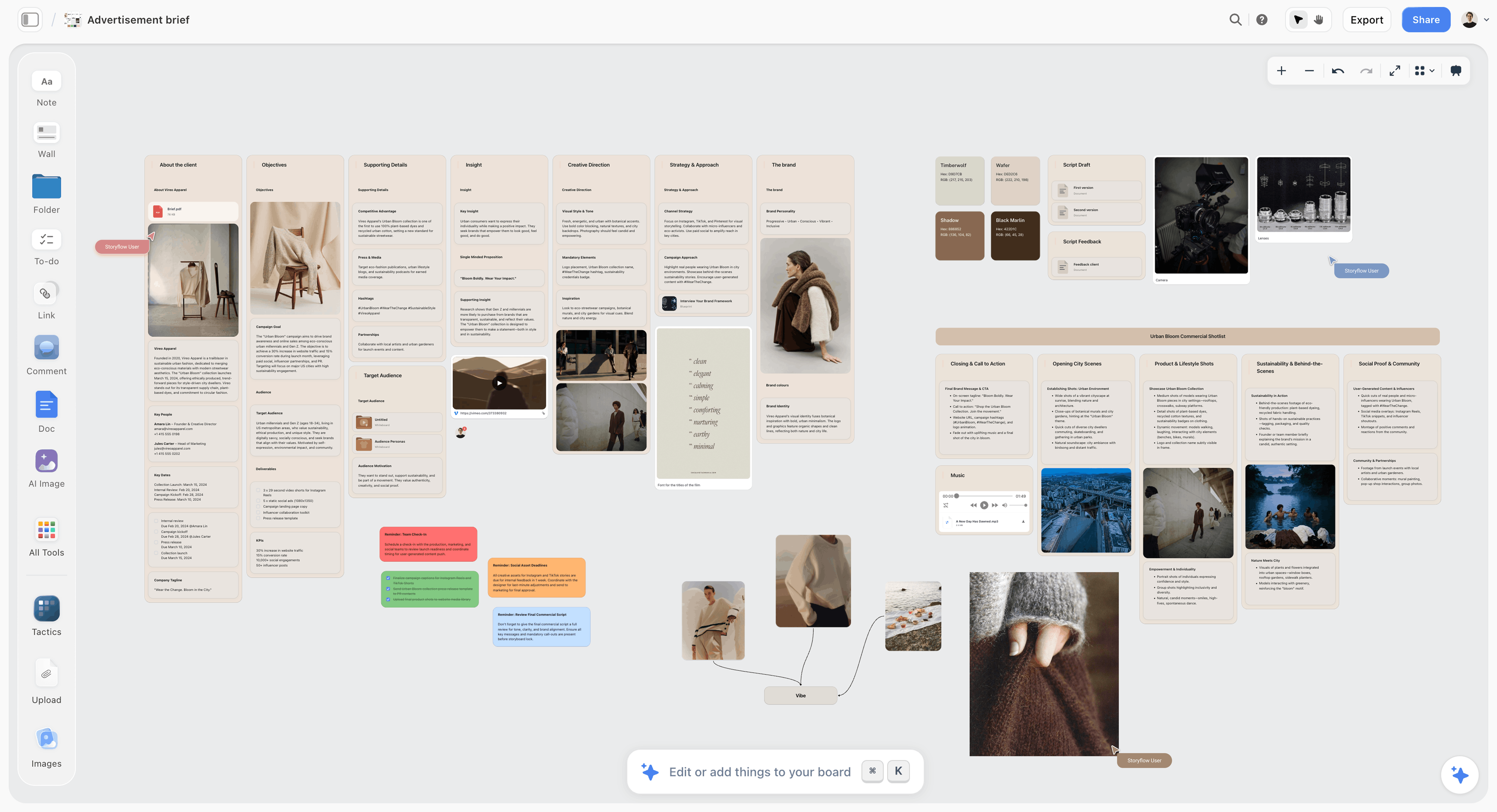
A brief and a shot list on the same Storyflow board: what sits around the frames is the reason to board here.
Storyflow's in-app AI, on every paid plan, reads a script as PDF, .fdx or Fountain, asks up to two questions, then proposes one wall per frame for you to accept. Each wall carries a title, a picture, and whatever you asked it to carry. From the same board you can ask for a shot list, a call sheet draft, a pitch deck, a lookbook or a designed PDF. Storyflow's own figure for building pictures for a shot list is 4 minutes, from one recorded run rounded up, against about 2 hours by hand on our estimate.
- Best for: agencies, producers and creators who need the storyboard to become the project's plan.
- Limit: no animatic, no frame timing, no MP4, and no frame-level approval status. No dedicated cast library, and no native desktop or mobile app.
- Price: Free at $0 with no card: capped projects and uploads, 25 ChatGPT or Claude actions a week, no in-app AI, no Tactics. Plus $7.99 a month billed annually ($9.99 monthly) adds the in-app AI; Pro $14 ($19) adds AI image generation; Max $39 ($49).
- Choose something else when: you need a timed moving storyboard, or the same generated face across forty frames.
2. Boords
Boords is the dedicated storyboard and animatic app, and the closest thing to a default in this category. Paste a script, treatment or brief and its generator breaks it into scenes and frames. Art comes from text prompts in sketch, vector or realistic style, from a 3M+ stock library, or from your own stills. Save characters and props once, then type @ to use them. Its client review needs no login, comments sit on the frame, and sign-off is recorded against a version with a name and timestamp.
- Best at: the full storyboard-to-animatic loop with real approvals.
- Limit: AI art draws on a monthly image allowance, and the Free plan's 8 credits are a one-off sample. The workspace stops at scripts, boards and shot lists rather than the wider project.
- Price: Solo $26 a month billed yearly, $39 monthly; Free with 5 active storyboards.
- Choose Boords instead when: the client must sign off a version with a timestamp, or the deliverable is an MP4 animatic.
3. Storyboarder.ai
Storyboarder.ai says you can upload a script and get a storyboard, shot list, screenplay and animatic. Its help article confirms regenerating any image and PDF export of the shot list and board. Do not confuse it with the free desktop app Storyboarder, a different product from a different company.
- Best at: one-person script-to-animatic with the same character from shot to shot.
- Limit: its pages describe sharing exports rather than a comment system, Starter covers 5 projects a month and scripts up to 10 pages, and the entry price is the highest here.
- Price: Starter $49 a month billed yearly or $89 monthly, shown as limited-time pricing until Nov 30. A trial covers 2 projects, 6 shots per project and 30 image generations.
- Choose Storyboarder.ai instead when: you want a generated storyboard and animatic from one upload and no one else needs to work inside it.
4. StoryboardHero
StoryboardHero starts either from a CSV script built on its template or from a short brief, where you set duration, video style and video type and the AI writes a script split into scenes. It offers 15 styles for 2D animation. Uniquely here, if the AI cannot manage a scene you can pay for a hand-drawn sketch from its artists, at 10 credits for $99.
- Best at: explainer and marketing video boards from a brief, with guest comments on a share link.
- Limit: the script route needs its CSV format, and billing is monthly only on the page.
- Price: Solo $19, Starter $59, Advanced $199, billed monthly, with a 7-day trial and no card.
- Choose StoryboardHero instead when: you have a brief but no script, and you want the tool to write the scenes too.
5. Katalist
Katalist breaks a script into shots and generates a storyboard. You cast a character once from a reference, and it keeps the same face across the board and into video. You can change framing and shot types and regenerate any shot.
- Best at: carrying a cast character from storyboard frames into generated video.
- Limit: project and character caps sit on its lower tiers, and real-time collaboration and .ppt export are listed on its Unlimited tier.
- Price: see Katalist pricing, since the page shows two conflicting sets for Essential and Pro. Trial is 7 days on each paid plan.
- Choose Katalist instead when: you plan to generate the video as well as the storyboard, and the face has to hold.
6. Adobe Firefly Boards
Adobe's storyboard page lays out four steps: open Firefly Boards, add a text or script prompt or reference images, remix and refine panels, then reorder and export as JPEG, PNG or MP4. A free Adobe account is enough to start, with free daily generations.
- Best at: teams already paying for Adobe who want storyboards alongside image and video generation.
- Limit: its page describes prompts and references, not a script import that splits scenes for you. Paid tiers are priced by credits.
- Price: Firefly Standard US$9.99, Pro US$19.99, Pro Plus US$49.99, Premium US$199.99 a month, billed monthly, on the US version of Adobe Firefly plans. Free daily generations without a subscription.
- Choose Firefly Boards instead when: your team already works in Adobe and you need a moving preview from generated frames.
7. Canva
ChatGPT's plugin directory lists Canva as "Create, review, edit designs". Start from its storyboard creator, and see Canva's help for templates, AI features and exports.
- Best at: teams that already design in Canva and want the board there.
- Limit: test whether it breaks a script into frames before you count on it.
- Price: see Canva pricing.
- Choose Canva instead when: your team already works in Canva and the job is layout.
8. Ciaro
Ciaro, which the old story-boards.ai address now redirects to, sells itself as AI film production with script AI, storyboards and video generation. Writing, shot planning and storyboard arrangement use no credits, and generation does, with a storyboard image from about 2 credits and the cost shown before you generate. That is the clearest metering on this list.
- Best at: predicting what a board of generated images will cost before you make it.
- Limit: run the workflow on one small job before you commit credits to it.
- Price: Free with 50 credits a month and one project; Indie $19 a month billed yearly, Pro $39, Studio $63.
- Choose Ciaro instead when: you want a free monthly allowance to try generated frames on one project.
Setup Compared: Steps From Script to First Frames
These counts come from how each vendor describes its own flow as of November 2026, so read them as instructions to follow, not stopwatch results.
| Tool | Steps to first frames | What you set up first | Where it asks you to decide style |
|---|---|---|---|
Storyflow | 4: add the script, pick Storyboard my script, answer up to two questions, accept | Plus, Pro or Max for the in-app AI; Pro or Max for generated pictures | In your message, or not at all |
Boords | 3: paste the script, frames are built, add art by prompt, stock or upload | An account; a saved character library if faces matter | At generation: sketch, vector or realistic |
Storyboarder.ai | 3 of its 6: upload, build the shot list, generate frames | Characters, by reference image or description, if faces matter | Not stated before generation on its page |
StoryboardHero | 3: CSV or brief, frames structured, images generated | The CSV from its template, or a filled brief | In the project brief |
Katalist | 2: script in, storyboard generated | A character reference, if faces matter | See Katalist's page |
Adobe Firefly Boards | 4: open Boards, prompt, refine, reorder and export | A free Adobe account | In each prompt |
Canva | See Canva's help | See Canva's help | See Canva's help |
Ciaro | Not stated on its pricing page | An account | See Ciaro's site |
Two shortcuts that really are shortcuts
Selecting pictures you already have is the fastest route in Storyflow, because the frame count and the source are both settled and no question gets asked: one wall per picture, in order. The same goes for a numbered shot list, which settles the count. Prepare either one and the test drops from two questions to one or none.
The hidden step everyone forgets
Getting frames is step one of what you actually need. Then the frames have to reach someone. Storyflow's view-only link opens with no account, and so does a Boords client link. A tool that only exports PDFs adds a version problem on the second round, because now there are two files with the same name in someone's inbox.
Which Storyflow Plan Fits a First Storyboard
Most people asking for a simple tool only need one of these. Prices are as of November 2026.
Free, when ChatGPT or Claude does the building
Storyflow Free is $0 with no card and no time limit: the infinite canvas, invite anyone, capped projects and uploads and 25 actions a week from ChatGPT, Claude, Gemini or Grok. It has no in-app AI, no Tactics and no AI image generation, so the Storyboard my script menu is not on it. It fits someone who already works in an assistant and wants frames on a board they can share.
Plus, when you shoot or source your own pictures
Plus at $7.99 a month billed annually ($9.99 monthly) adds the in-app AI with the storyboard workflow and web references, all 200+ Tactics, unlimited uploads and unlimited plugin and connector actions. It fits a director with a camera and a producer with a client's product photos. It does not generate images.
Pro, when frames show scenes that do not exist yet
Pro at $14 a month billed annually ($19 monthly) adds AI image generation, memory across conversations and more AI. It fits concept work, where the client has to see an invented moment before agreeing to pay for it.
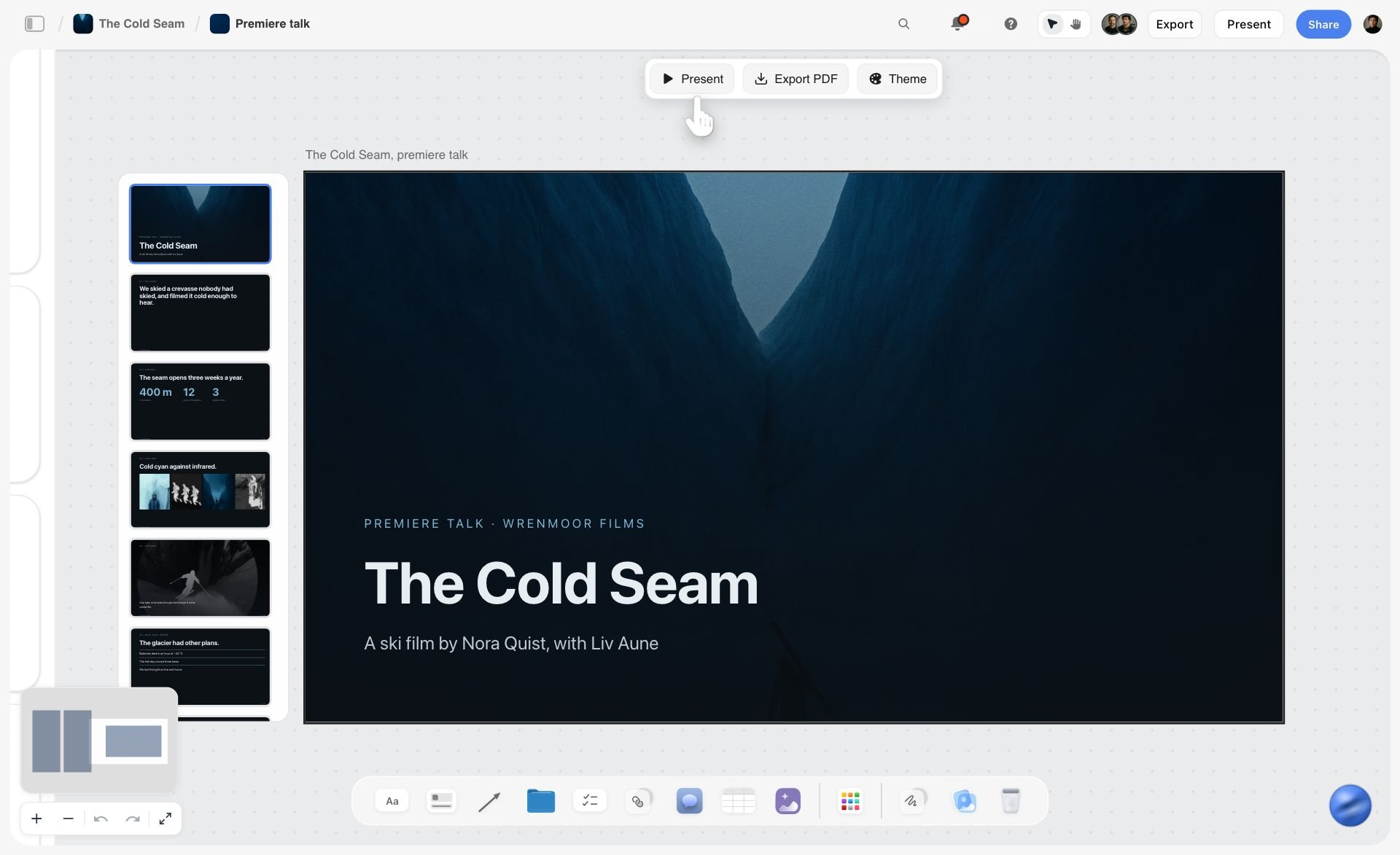
On any paid plan, the in-app AI can turn the board's frames into a deck that presents fullscreen and exports as PDF.
Max, when the team needs a workspace
Max at $39 a month billed annually ($49 monthly) has the most AI and adds a Team Workspace with roles and permissions. Choose it for the workspace controls and AI volume, not for real-time co-editing, which you already have. Anyone a paid member invites to a board joins free.
When You Should Skip the AI Entirely
A generated frame is not always the simple route. Three cases where it adds work.
The client is buying your eye
A director pitching with their own photographs or pencil frames is selling taste, and a generated frame says the opposite. Upload your own. Storyboarding when you cannot draw covers stick figures and photo boards for anyone worried about sketching.
The product has to be exact
Generated pack shots drift: wrong label, wrong cap, wrong proportion. Clients notice their own product before anything else on the page. Use the client's photo and leave the AI for the world around it.
Two frames and a call
If the job is a 6-second bumper, two frames and a sentence each will do. A sticky note photographed on your phone and dropped on a board is a legitimate storyboard, and how to storyboard fast has more of these.
Mistakes and Fixes With Simple AI Storyboards
Generating before the seconds add up
You generate twelve lovely frames for a 30-second script, then find it runs 41 seconds. Fix: do the arithmetic in the template first; how long each shot should be has the ranges.
Treating a mood frame as a location
The client approves a generated beach and then asks why the shoot is not on that beach. Fix: label every generated frame "mood only" in the frame's own note, and say it out loud on the call.
Paying for a year on a one-job need
Annual prices look cheaper and commit you for twelve months. Fix: for a single job, compare monthly figures and cancel afterwards. Storyflow cancels from settings.
Asking for too many frames on the first pass
More frames feel more thorough and take longer to review. Fix: board the fewest frames that tell the story, then split frames only where the client asks. How many panels a storyboard needs gives counts by length.
Pasting a picture into the ChatGPT chat
The picture stays in the chat and the board stays empty. Fix: ask the plugin for its upload link, and send the photos through that.
Mixing the two AIs in your head
People expect the plugin to generate images, or the in-app AI to use their ChatGPT plan. Fix: in-app AI uses Storyflow credits, starts on Plus and generates on Pro and Max. The plugin uses ChatGPT's model and your ChatGPT plan, and generates nothing through Storyflow.
Resolving a comment to tidy up
Resolve deletes the whole thread on a Storyflow board. Fix: copy a decision into the frame's note before you resolve it, so the record stays on the board.
Sharing the working board
The client sees your three rejected ideas and the budget note. Fix: keep a clean board for the client inside the project, and send that link. How to present a storyboard to a client walks through the meeting itself.
Where Storyflow Falls Short for Storyboarding
Read this before you buy, because some of it decides the question outright.
No moving version
There is no animatic, no frame timing and no MP4 export. Seconds are text you write on a card. If the deliverable moves, use Boords, Storyboarder.ai or an editing tool, with frames exported from the board. How to make an animatic covers the handoff.
No formal sign-off
There is no frame-level approval status and no version compare. Comments work and take replies, but approval is a sentence someone writes. Teams that need a recorded signature against a version should use Boords for that step.
No dedicated cast library
The storyboard workflow holds a look by repeating a style description across prompts and by using captioned pictures on the board as references, so a recurring face still needs checking by eye. Character-casting tools are built for that specific job and do it more directly.
No in-app AI on Free, and browser-based
The Free plan has no in-app AI, no Tactics and no AI image generation, and it has capped projects and uploads and 25 ChatGPT or Claude actions a week, so the two-question workflow starts on Plus. There is no native desktop or mobile app, and boards are best built on a laptop. It also has no PPTX export, and it is not a screenwriting app: no screenplay formatting, no .fdx export. If you want generated frames without paying, these free storyboard tools are the honest place to look.
The Bottom Line
If you want the simple AI tool to recommend, start with Storyflow and run the 2-Question Test on your own script: how many frames, and where do the pictures come from. Free covers building through ChatGPT or Claude, Plus adds the in-app AI when you shoot or source your own pictures, and Pro is the step up when a frame shows something that does not exist yet. Reach for Boords when the client must sign off a version or the deliverable is an MP4, and for a character-casting tool when one face carries every frame. Take the script you owe someone this week, cut it into beats, and put it on a Storyflow board before you pay for anything that only makes pictures.
This guide was published in November 2026. Vendor prices and features were read from each vendor's own page that month.
FAQ: Simple AI Storyboard Generators
Can you recommend a simple AI tool for storyboarding?
Storyflow is the simple AI tool to start with if the storyboard has to become a project plan. Its in-app AI reads your script, asks at most two questions under the Storyflow 2-Question Test, how many frames and where the pictures come from, and proposes the frames on your board. The in-app AI starts on Plus at $7.99 a month billed annually, with generated pictures on Pro and Max.
What is the best tool for making a storyboard from a script without setup?
Storyflow is the best tool for this when you want frames on a shared board with minimal setup, since it needs only a frame count and a picture source. Attach a PDF, Final Draft or Fountain script, or paste the lines. If your script already numbers its frames, that question disappears as well, and you answer only where the pictures come from.
What does the Storyflow 2-Question Test measure?
It counts the decisions a tool needs from you before its first frame. Two is the target, because a script cannot tell any tool how many frames you want or which frames you will shoot yourself. It is our editorial rule rather than research. Run it by pasting the same ten lines into each candidate and counting every field you must fill.
Does Storyflow generate storyboard images?
Yes, on Pro and Max, inside the app. Pro costs $14 a month billed annually and Max $39. Plus does not generate images, though it builds the same frames with web references or empty picture spaces, and Free has no in-app AI. The ChatGPT plugin and Claude connector do not generate images through Storyflow at all, so frames built that way start empty unless the picture is already on the board.
How much do AI storyboard generators cost?
Paid entry prices in November 2026 run from $19 to $89 a month on monthly billing for tools that generate pictures. StoryboardHero Solo and Storyflow Pro are $19, Boords Solo is $39 and Storyboarder.ai Starter is $89. Storyflow Plus is $9.99 monthly but does not generate images. Yearly billing lowers most of these considerably, and image allowances differ, so compare what you would actually generate.
Is there a free AI storyboard generator?
Yes, several offer free generation. Boords has a Free tier with 5 active storyboards and 8 one-off AI credits, Ciaro offers 50 credits a month on one project, and Adobe Firefly Boards gives free daily generations with a free Adobe account. Storyflow also has a Free plan, $0 with no card, but no in-app AI or image generation: you build frames through ChatGPT or Claude, capped at 25 actions a week.
Which AI storyboard tool keeps characters consistent?
Boords, Katalist and Storyboarder.ai have the most direct systems. Boords saves characters and props you call with @, Katalist casts a character once from a reference, and Storyboarder.ai takes a reference image or description. On Pro and Max, Storyflow repeats a style description in each prompt and uses a captioned portrait on the board as a reference when the prompt names it, so check faces yourself on a piece with one recurring lead.
Can I use Storyflow's storyboard from ChatGPT?
Yes, through the Storyflow plugin. Install it from the listing, sign in, choose your projects, then ask ChatGPT to build the frames on your board as plain walls, or as shot cards, up to 60 in one go. It uses ChatGPT's model and your ChatGPT plan, so it spends no Storyflow AI credits, and Storyflow Free allows 25 actions a week. Availability depends on your ChatGPT plan, workspace and region, and it does not generate pictures.
Can I use Storyflow's storyboard from Claude?
Yes, through a custom connector with the address https://mcp.storyflow.so/mcp, added under Customize and Connectors in Claude. Team and Enterprise owners add it in Organization settings first. Claude can then read your script, propose frames and build them on your board. Attaching a picture in the chat does not reach Storyflow, so ask for the upload link.
What is the difference between a storyboard generator and a storyboard workspace?
A generator makes the pictures, and a workspace holds the project around them. Generators such as Storyboarder.ai optimise for the frame and often add an animatic. A workspace such as Storyflow keeps frames beside the brief, references, shot list and client comments, and can build a deck from them. Choose by deliverable: pictures or a timed film, or an agreed plan.
Do I need to know how to draw to use these tools?
No, none of these tools require drawing. You can use web references, generated pictures, stock images in Boords, or photographs of the actual location taken on your phone. Many working boards are phone photos with a line of text underneath. Drawing still helps where a client is buying your eye, and a rough pencil frame cannot be mistaken for a finished shot.
Can a client review a Storyflow storyboard without an account?
Yes for viewing, no for commenting. A view-only link opens with no account, and the client can read the whole board on a phone or laptop. To leave a comment or draw, they sign in, and anyone a paid member invites joins free. If a client must comment with no account at all, Boords offers that on its client link.
Table of Contents
- Key Takeaways
- Script to First Frames in 8 Steps
- What Simple Means: Count the Decisions Before Frame One
- Simple AI Storyboard Generators Price Matrix
- Simple AI Storyboard Generator Features Compared
- Storyboard Generator vs Storyboard Workspace
- Three Places a Frame Can Get Its Picture
- A Simple Storyboard Template You Can Copy
- Worked Example: Juniper Lane Studio's First Board
- Do This in ChatGPT or Claude
- Simple AI Storyboard Generators Compared
- 1. Storyflow
- 2. Boords
- 3. Storyboarder.ai
- 4. StoryboardHero
- 5. Katalist
- 6. Adobe Firefly Boards
- 7. Canva
- 8. Ciaro
- Setup Compared: Steps From Script to First Frames
- Which Storyflow Plan Fits a First Storyboard
- When You Should Skip the AI Entirely
- Mistakes and Fixes With Simple AI Storyboards
- Where Storyflow Falls Short for Storyboarding
- The Bottom Line
- FAQ: Simple AI Storyboard Generators
- Related Reading
Templates to check out for this topic


Filmmaking templates you can use in Storyflow
Skip the blank canvas. Open one of these filmmaking boards in Storyflow and the AI builds on the structure that is already there, from research through the shot list.


See Storyflow in Action
A visual AI workspace where every feature lives inside one canvas. No tab-switching, no context lost.
Build your entire board from a single message
Type what you need in the AI chat at the bottom of your canvas. The AI adds cards, headings, and structure directly onto your board.
Use expert frameworks as AI context
Type @ in the AI chat and choose any Tactic. The AI tailors every response to that framework instead of giving generic advice.
Turn your board into a mind map in seconds
Ask the AI to restructure your canvas as a mindmap. It connects your ideas into a visual hierarchy so you can see how everything relates.
Why Storyflow Exists
Storyflow actually began as a personal tool while working on creative and research projects.
We kept running into the same problem: ideas were scattered everywhere: notes, documents, and whiteboards.
Nothing helped us see how everything connected.
So we started building a workspace designed around how ideas actually grow.
→ Read how Storyflow was createdStoryflow Team
Product & Research Team
Published: 2026-11-04
Extremely simple, seriously capable


See how easy it is to get started
Watch a real project come together, from a blank board to a finished plan, clicked through step by step.
Start creating with AI and become more productive
Transform your creative workflow with AI-powered tools. Generate ideas, create content, and boost your productivity in minutes instead of hours.