
Ultra-fast storyboards: minutes, not days
Film storyboards, scene by scene,
before the first setup.
Turn the screenplay into a scene-by-scene film storyboard, pin cinematography references next to the frames, and branch into shot lists and schedules on the same canvas.


Creatives working for these brands already got early access
- Red Bull
- Canon
- Artlist
- Porsche
See how easy it is to get started
Watch a real project come together, from a blank board to a finished plan, clicked through step by step.
Start from a ready-made template
Pick a board to see what you can build, then let AI fill it in. Every template is a real, editable starting point on the same infinite canvas.

Storyboard
Lay out your shots frame by frame with images and notes, then reorder them until the sequence reads like the finished cut.
What is a film storyboard?
A film storyboard is the visual blueprint of a movie: every scene broken into frames that show composition, action, and camera intent before a single setup is built. Storyflow is an AI visual workspace that boards your film scene by scene on one infinite canvas: a storyboard laid out from your screenplay, beat sheets, cinematography references next to the frames, and shot lists and schedules alongside. Directors use the film storyboard to find the cut in their head, DPs use it to plan coverage and lighting, and producers use it to see where the schedule and budget will actually go.
Storyflow shrinks the days of frame-by-frame setup that film storyboarding normally demands down to minutes. Hand the AI your screenplay, pasted as text or added to the canvas in PDF form, and it builds the boards scene by scene, arranging structure and notes across an infinite canvas. Beat sheets and three-act frameworks are built in, so the board reflects the story's architecture, not just its order.
From there the canvas keeps working. Grab stills from YouTube or Vimeo to pin cinematography references next to scenes, sketch over frames with the pen tool, and branch the movie storyboard into shot lists and shooting schedules without switching tools.
Ultra fast from brief to board
From screenplay to film storyboard in four steps.
The AI does the layout work. You make the directing decisions.
01
Open your canvas
Open a Storyflow account, with nothing to install. The browser canvas is ready for the screenplay whenever you are.
02
Add the screenplay
Add the screenplay however you like: pasted straight into the AI chat, or placed on the canvas as a PDF. The AI takes it scene by scene.
03
Get the board, scene by scene
The AI lays out a storyboard with scenes, structure, and notes, shaped by a beat sheet or three-act framework that fits the story.
04
Refine, plan coverage, export
Pin references, sketch frames, and branch into shot lists and schedules. When the board is ready, send a view-only link, or export an image or PDF.
A film storyboard that pulls its weight in prep.
The board is where directing, cinematography, and production planning meet. Storyflow keeps them on one canvas.

Scene-by-scene layout from the screenplay
Generate the board from your script
The AI breaks the screenplay into scenes and arranges them as a storyboard with structure and notes. You start from a full board instead of a stack of blank frames.
Turn a script into a storyboard →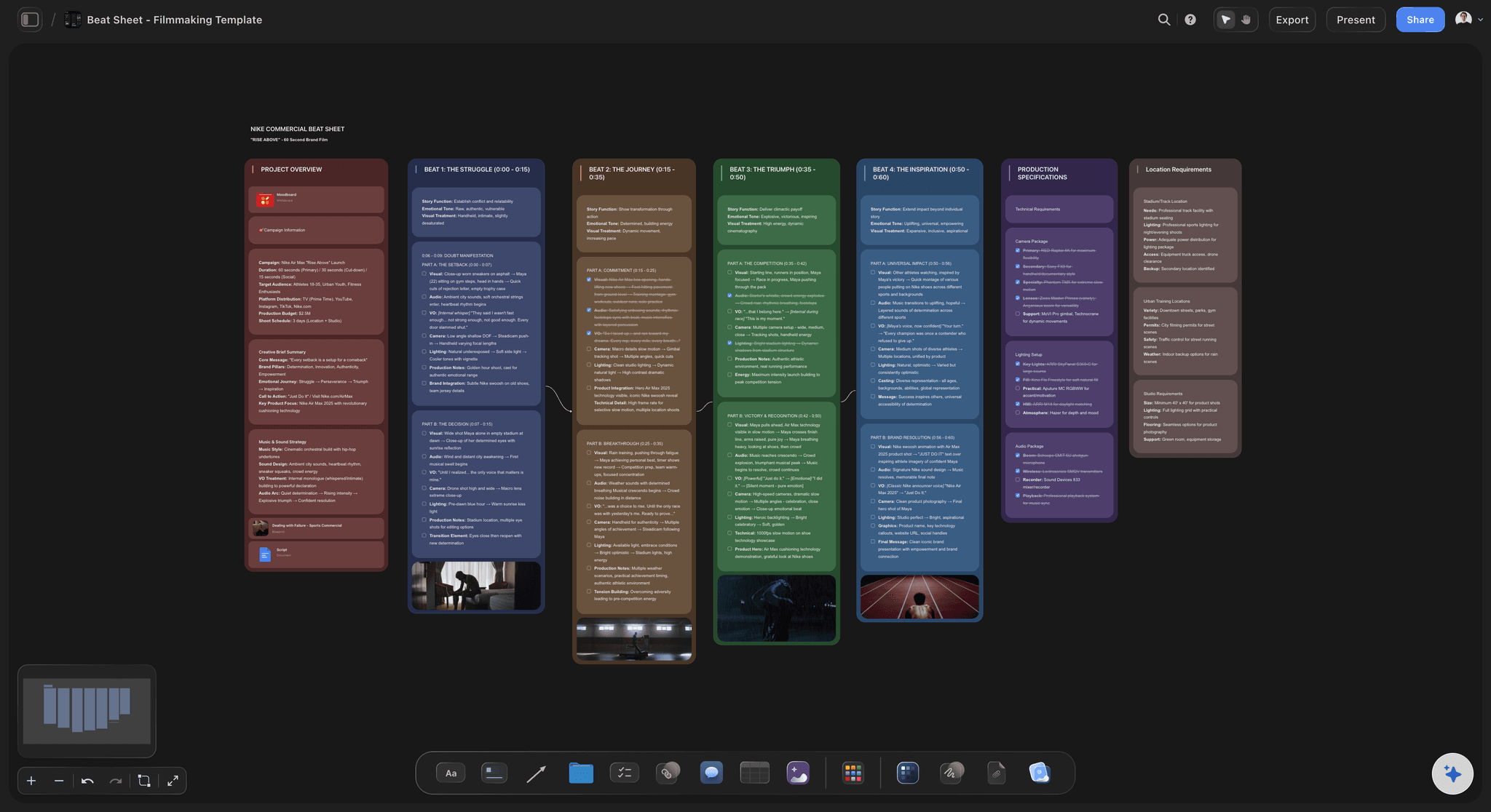
Beat sheets and three-act structure built in
Board the story, not just the scenes
Map the film against a beat sheet or three-act framework so act breaks, midpoints, and payoffs are visible on the board. Re-prompt the AI to restructure without losing your work.
See the AI storyboard generator →
Stills pulled from the films that shaped your look
Build the look next to the frames
Pull stills from films and references on YouTube or Vimeo straight onto the canvas. Lighting, lensing, and blocking references sit beside the scenes they inform.
Learn about storyboarding in Storyflow →
Shot lists branch off the storyboard
Plan coverage where the frames live
Turn boarded scenes into a shot list on the same canvas. Shot size, angle, movement, and setups map back to the frames, so the AD and the DP read the same plan.
Try the AI shot list generator →Plans from $7.99/mo. A Free plan launches before the end of 2026.
Storyflow is paid-only during early access. Board your film on Plus, with no cap on boards, no expiry date, and a project that stays yours.
Unlimited film storyboards on an infinite canvas
Basic AI usage to lay out boards from your screenplay
3 starter frameworks to begin with
Free crew access plus view-only links for execs and cast

Built for people with taste
More than film storyboard software.
Storyflow is an AI-native canvas, so the screenplay, the boards, and the production plan stay connected.

Characters, scenes, and notes stay linked
Keep the whole film in context
AI that reads the board: The AI keeps the context of your active board, so asking for more coverage on scene 12 respects everything already placed.
Character and scene notes: Blocking, wardrobe, and continuity notes live on the frames they describe, not in a separate document.
Re-prompt freely: Merge scenes, expand act two, or tighten the pacing. The AI reworks the layout while your refinements stay put.

Locations and look references on the same board
Prep the recce from the storyboard
Location references: Drop location photos, maps, and links next to the scenes that shoot there, so the recce starts from the board.
Frame grabs as shorthand: A still from the right film says more than a paragraph. Grab frames from YouTube or Vimeo and pin them to scenes.
Moodboards beside the frames: Tone, palette, and lighting references build up next to the film storyboard instead of in a separate deck.

One canvas from development to shoot
Branch into the rest of pre-production
Shot lists and breakdowns: Boarded scenes become shot lists and script breakdowns on the same canvas, mapped back to the frames.
Schedules and planning boards: Lay out shoot days and planning boards next to the storyboard, so the schedule reflects the actual coverage.
One source of truth: Script, boards, references, and plans on one infinite canvas. The crew stops asking which version is current.

Share with the crew, export for set
Get the board into everyone's hands
Invite the crew free: Bring collaborators in at no cost and decide who edits or views. Producers, DPs, and ADs see the same board.
View-only links: Send the storyboard to execs, clients, or cast as a view-only link. No sign-up needed on their end.
Image and PDF export: Export clean boards for the pitch deck, the call sheet packet, and the on-set binder.
Explore templates for your project
Every template opens as a real, editable board on the infinite canvas. Pick the closest fit and make it your own.
Storyboard
Lay out your shots frame by frame with images and notes, then reorder them until the sequence reads like the finished cut.
What creators are saying
Join early creators getting structured workspaces and AI that remembers their projects
“Storyflow has sped up my workflow by at least 3x, which means more flow state and more projects I can actually ship. It truly changed the way me and my team create.”

Reilin Joey
Director & YouTuber
“One prompt gets me a structured board. But the tactics are my favorite. I run my YouTube scripts through them and my intros and retention got better. It's amazing.”

Justkay
YouTuber & Freelance Filmmaker
“I used to juggle five apps to plan a project. Now I describe what I am making and get boards, lists, and a schedule. All in one place.”

George
@fernwehchronicles
Film storyboards, answered.
Everything people ask about storyboarding a film with Storyflow.
Give Storyflow's AI the screenplay, either pasted as text or dropped onto the canvas in PDF form, and it boards the film scene by scene, arranging structure and notes across an infinite canvas. You then refine frames, pin cinematography references, and branch into shot lists. The layout work that takes days by hand happens in minutes.
Storyflow is made for storyboarding a film: paste your screenplay as text or add it as a PDF, and the AI boards the film scene by scene on an infinite canvas. Beat sheets and three-act frameworks are built in, so the board follows the story's structure and not only its order. You pin cinematography references next to the frames and branch into shot lists and schedules on the same canvas.
Not during early access. Storyflow is paid-only right now, with Plus starting at $7.99 a month billed annually, and a Free plan is planned before the end of 2026. Every paid plan covers 20 file uploads, 3 starter frameworks, basic AI usage, view-only links for the crew, and as many film storyboards as the project needs on one infinite canvas. Anyone a paid member invites to a board joins free.
Yes. Storyflow's infinite canvas has no object limit on any plan, so a feature's worth of scenes, references, and notes fits on one board. Most directors work act by act, asking the AI to lay out each section and refining as they go.
No. A stick-figure sketch drawn with the pen tool reads as clearly on set as polished art, and plenty of working film boards are exactly that. Storyflow's AI takes care of the layout, scene structure, and notes; where a sketch will not do, pull a frame grab from YouTube or Vimeo or paste in a reference image. Pro and Max subscribers can also generate AI images directly on the canvas.
Not as an FDX file. From Final Draft, export to plain text or PDF first; the text can then go into the AI chat, or the PDF onto the canvas. Because the AI works from the script's content, the original format does not matter.
The film storyboard is visual: frame by frame, it shows how each scene reads on screen. The shot list is text: every camera setup written out with size, angle, movement, and gear. Storyflow keeps the two on one canvas, where each listed shot points back to its boarded frame.
For the on-set binder, export the boards as a PDF or high-quality images and print them. During prep, share a view-only link that anyone can open in a browser with no account, and invite collaborators to the project free when your AD or DP needs edit access.
Traditional film storyboard software hands you a fixed grid of frames. Storyflow gives you an infinite canvas plus an AI that holds the project's context, so the screenplay, beat sheet, references, shot lists, and schedule all connect to the same board. There is no cap on boards and no clock on any plan.
The film exists in your head. Board it.
Scene-by-scene storyboards from the screenplay, references and shot lists alongside.