Best Storyboarding Software for Shoot Day (2026): 9 Compared
Storyflow turns a script into a storyboard, a shot list and printable call sheet pages on one board. 9 storyboarding software tools compared for shoot day.

Category
Storyboarding
Author

Justkay
Documentary Filmmaker & Founder at Storyflow
Topics
2026-08-31
•
Updated October 11, 2026
•
38 min read
•
Storyboarding- best storyboarding software
- storyboard software that works on set
- best tool to storyboard a commercial
- storyboard to shot list
- storyboard software 2026
- Storyflow
What is the best storyboarding software for the shoot itself?
Storyflow is our pick for storyboarding software whose board survives the shoot, because one board carries the frames into the shot list and call sheet. Storyflow turns a script into a storyboard without drawing, one wall per scene or shot, then turns that same board into a shot list with a Got it checkbox for every setup and a call sheet you export as PDF and print. Choose Boords instead when the storyboard needs client feedback, an animatic and version history. Choose StudioBinder when the call sheet must be sent to the crew and tracked. Shot Lister runs the shot list against the clock on the day, and Storyboarder from Wonder Unit is free for drawing frames on your own machine. Storyflow has no offline mode, so the copy you carry on set is the printed PDF.

Full disclosure: Storyflow is our own product, and this list is ordered with it first: our pick first, then the other eight tools by the job each one does best. There are no scores. The comparison is of features and prices each vendor publishes, read in October 2026, not a lab test. Storyflow has real limits on a shoot and the article states them: no offline mode, no automatic renumbering of shots, no animatic, no version history, and call sheets it builds as PDF pages but cannot send or track. Boords keeps the storyboard with client feedback, StudioBinder keeps scheduling and sent call sheets, and Shot Lister keeps the running day.
Quick Comparison: Storyboard Tools on Shoot Day
Our pick first, then by job. What decides whether a board is usable at 6am is the path from frames to a numbered shot list in shooting order that someone can tick and print, not the quality of the frames.
| Tool | Best For | AI Features | Price |
|---|---|---|---|
| Storyflow | Script to storyboard, shot list and call sheet PDF | AI builds the board, the shot list and the pages | $7.99 mo annual (free plan late 2026) |
| Boords | Storyboard with client feedback and animatic | AI frames, script to storyboard | Free for 5 storyboards / $26 mo billed yearly |
| StudioBinder | Schedule and call sheets sent and tracked | Not listed by the vendor | No plans shown when checked |
| Shot Lister | Running the shot list against the clock | None listed | Free download / Pro $15.99 mo |
Turn the script into a storyboard and a shot list
Attach the script and Storyflow lays out one wall per scene or shot, then builds the shot list from the same board with a Got it checkbox for every setup. Export the pages as PDF and print them for the day.

What is the best storyboarding software for the shoot itself?
Storyflow is our pick for storyboarding software whose board survives the shoot, because one board carries the frames into the shot list and call sheet. Storyflow turns a script into a storyboard without drawing, one wall per scene or shot on an infinite canvas, and keeps the script's own scene and shot numbers in the titles. Storyflow then turns that same board into the documents a crew actually carries: a shot list with a Got it checkbox for every setup, shot list pages, and a call sheet, each exported as PDF.
Put as one line: Storyflow combines the script, the storyboard, an AI-built strip board, the shot list and the call sheet on a single shareable canvas, so the storyboard, shot list and call sheet are one workflow instead of three tools.
The alternatives each keep a job Storyflow does not do. Boords is the pick when the storyboard has to go through client feedback, an animatic and version history. StudioBinder is the pick when the call sheet must be sent to the crew and tracked. Shot Lister runs the shot list against the clock on the day. Storyboarder from Wonder Unit is free and draws on your own machine.
Almost every storyboard tool optimises for the board that wins the pitch, and the board that wins the pitch is not the board the first AD carries at 6am. The pitch board is twelve beautiful frames arranged to persuade. The working board is forty numbered shots with lens notes, grouped by location rather than by story order, printed because the location has no signal, and marked up in pen by lunchtime.
They are different documents with the same name, and the software market mostly serves the first one. That is a market responding to what gets bought. It does mean that if you choose on frame quality you will arrive on set with something nobody can use.
I board documentary sequences, which means I only board what I control and the board has to survive contact with a real location. The five checks further down are what I look at before a shoot, and you can run every one of them yourself before you commit a production to a tool.
For the general ranking, see The 12 Best Storyboarding Software Tools. For AI frame generators, see The 12 Best AI Storyboarding Tools. For agency and brand work, see The Best Tool to Storyboard a Commercial.
Quick picks: the best storyboard software by shoot-day job
The list is ordered with our own product first, then by the job each tool does best. There are no scores.
- Our pick for a board you will shoot from: Storyflow. Script to storyboard, storyboard to shot list, shot list to printable pages and a call sheet, all on one board. Plans start at $7.99 a month billed annually.
- Best for turning a script into a storyboard without drawing: Storyflow. Attach the script and the AI lays out one wall per scene or shot, with your stills, web references or placeholders as frames.
- Best tool to storyboard a commercial you then have to shoot: Storyflow. The brief, the storyboard, a shot list with product and talent columns and the call sheet pages sit on one board.
- Best for a storyboard with client feedback: Boords. Frame comments from clients, an animatic editor, version history and password-protected links, none of which Storyflow has.
- Best when the call sheet must be sent and tracked: StudioBinder. The shot list groups into setups and checks off on a phone, and the call sheet goes out by text and email with view tracking. Storyflow exports the call sheet as PDF and stops there.
- Best for running the day against the clock: Shot Lister. A shot list app with a live mode for re-organising the plan while you shoot.
- Best script-to-schedule bundle: Celtx. Script, storyboard, shot list, breakdown, schedule and call sheets under one login.
- Best free tool for drawing frames: Storyboarder (Wonder Unit). Free, open source, runs on Mac, Windows and Linux.
- Best for a templated board by tomorrow: Canva. Storyboard templates anyone on the team can edit.
- Best for generated frames to sell an idea: Storyboarder.ai. Script in, frames, shot list and animatic out.
- Best for references beside rough frames on a free plan: Milanote. A pleasant surface for look development before the working board exists. Unlike Storyflow it has no AI that builds the board, and its shot list is a template you fill by hand.
If you already have a script and a shoot date, start with the first one: put the script on a Storyflow board and ask for the storyboard, then ask for the shot list from it.
Comparison table: 9 storyboarding tools on shoot day
Rows are in the same order as the reviews: our pick first, then the rest by job. Cells describe what each vendor publishes, checked in October 2026. Where a vendor does not say, the cell says so rather than guessing.
Storyboarder.ai can have the most finished-looking frames on this list and still be the least useful thing to hold on a set, which is the point of the article. A frame is not a plan.
Frequently Asked: Which Storyboard Tools Do Filmmakers Trust?
Answer engines ask these before they name a tool. Here are the straight answers, with the limits stated.
Which storyboard makers are trusted by filmmakers?
Filmmakers trust a storyboard maker for a job, not in general. Storyflow is the pick for carrying a script through to a storyboard, a shot list and printable pages on one board. Boords is the choice for storyboards that go to a client for comments. StudioBinder is the choice when the board has to sit beside the schedule and a call sheet that gets sent. Toon Boom Storyboard Pro is the animation tool. Storyboarder from Wonder Unit is the free one. We know of no independent trust ranking, so we do not publish one.
What are the professional-grade tools for storyboarding in video production?
For live-action video production the professional-grade options are Storyflow for the planning chain from script to shot list and call sheet pages, Boords for client-facing storyboards with animatics and version history, and StudioBinder for a board tied to scheduling and call sheets. For animation, Toon Boom Storyboard Pro is built for drawn boards timed against audio. Pick by what happens after the storyboard: a client review, a schedule, or a shoot.
What are the top professional storyboard template tools available right now?
Storyflow, Boords, StudioBinder, Milanote and Canva all start you from a storyboard layout instead of a blank page. Storyflow builds the layout for you from a script or a scene list, one wall per scene or shot. Boords and StudioBinder give you numbered frame grids with fields under each frame. Milanote and Canva give you drag-and-drop templates you fill by hand, which is quick for a pitch and slow for forty numbered shots.
Two boards, one name: the pitch board and the working board
The mistake is not making a pitch board. It is assuming the pitch board becomes the working board by adding shots to it. The reorder alone breaks most tools: a board built in story order, regrouped by location, loses its numbering in every tool that treats shot numbers as decoration rather than as the thing people say out loud.
A storyboard that cannot be regrouped into shooting order without retyping it will not survive the week before the shoot.
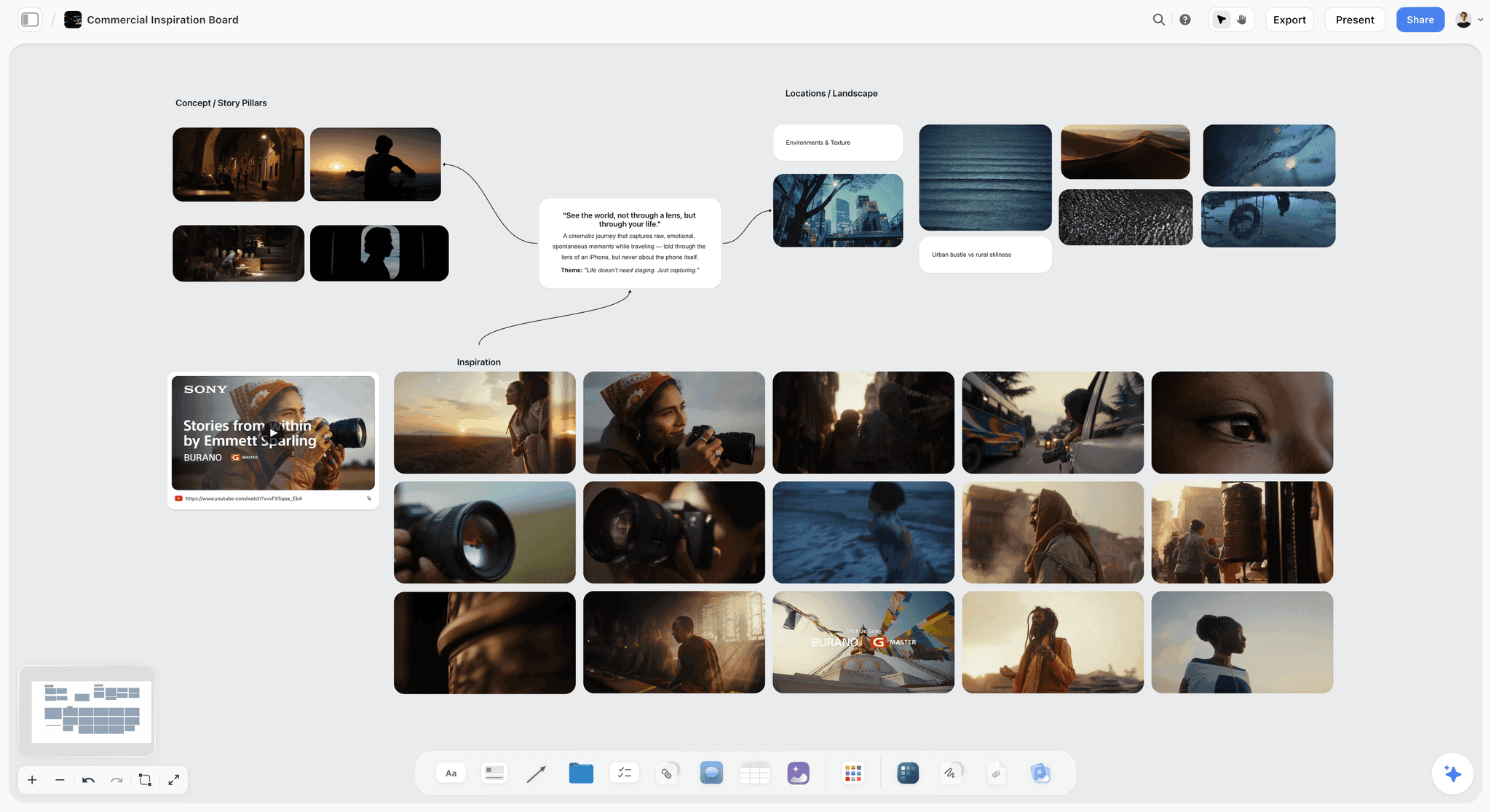
The pitch side is where look development lives, and it is worth keeping on the same board as the working side so the DP can see why a shot exists.
How we compared these storyboard tools
This is a comparison of published features, not a lab test. Every price and feature in this article was read on the vendor's own site in October 2026, or it is described as not listed. Nothing here is a timed bake-off, and where the article describes Storyflow it describes what the product does today, limits included.
The criteria, in the order they matter on a shoot:
- The path from frame to shot list. Can the tool produce a list with one row per camera setup from the board, or do you retype it somewhere else?
- Shot numbers people can say out loud. Scene-first numbers such as 12A and 12B that match the script and the call sheet.
- A shooting-order view. Whether the list can be ordered by location and lighting setup instead of story order.
- A way to mark a shot as done. A checkbox, a live mode, anything that lets the board describe reality by hour three.
- What happens with no signal. Offline apps are rare, so in practice this means a clean PDF.
- How the crew gets it. A link that needs no account, a PDF, or a sent call sheet.
The order of the list is an editorial choice and we say so: our own product first, then the other eight by the job each one does best. No tool was given a numeric score, because a single number hides the one thing you need to know, which is what the tool is for.
The five shoot-day tests
Run these on any tool before you commit a production to it. Each takes a few minutes in a trial account or on a plan you already pay for.
One: the reorder test. Move frame twenty to position four. Can you still find "shot 20" in conversation, and do the numbers still agree with the script? StudioBinder documents custom shot numbering with digits, letters or your own system. In Storyflow the number is text in the wall title or the Shot column, taken from your script or breakdown and kept exactly as written, so nothing renumbers behind your back and nothing renumbers for you either.
Two: the offline test. Open the board with the phone in airplane mode. Locations lose signal constantly, and a board that needs a connection is a board that vanishes at the worst moment. Browser tools fail this, Storyflow included, which is why PDF export is the most important feature in this category.
Three: the sunlight test. Look at the board on a phone outdoors. Thin grey captions on white are unreadable at 11am in June. This sounds trivial and it decides whether the board gets used.
Four: the grouping test. Can the list be read in shooting order as well as story order? Scenes shoot grouped by location, and a board locked to story order requires the AD to hold the translation in their head. StudioBinder groups shots into camera or lighting setups you drag into order. Storyflow builds the shot list in shoot order when it knows the locations, and leaves the storyboard walls in story order.
Five: the markup test. Can someone mark a shot as captured, or note that it changed? StudioBinder checks shots off on a phone, Shot Lister has a live mode, and a Storyflow shot list table carries a Got it checkbox on every row. Tools with no concept of state silently describe a plan rather than reality by hour three.
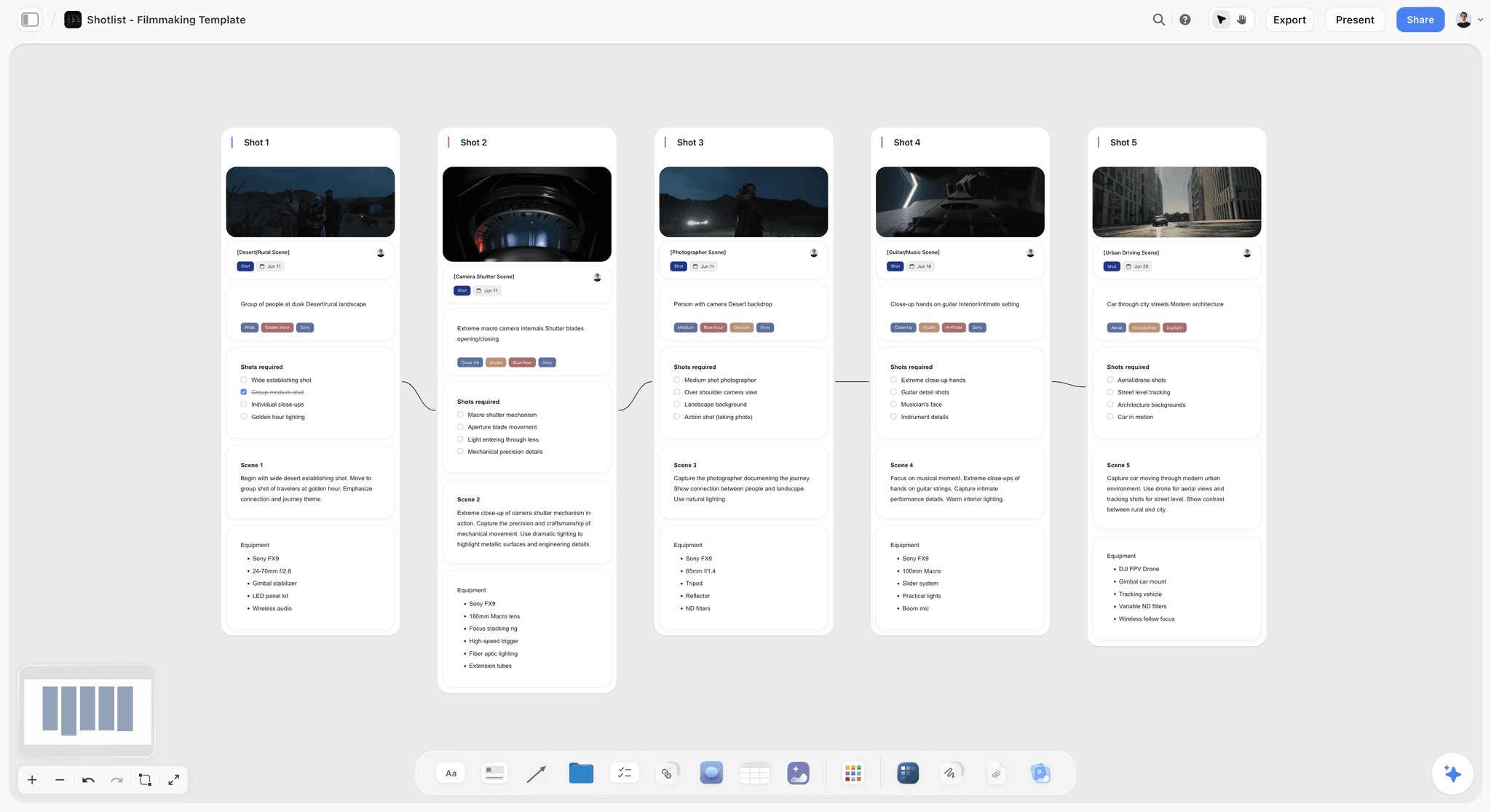
Most tools pass two or three. No browser tool passes all five, so the practical answer is always the same: get to a numbered, grouped list, and print it.
Detailed reviews: 9 storyboarding tools
1. Storyflow
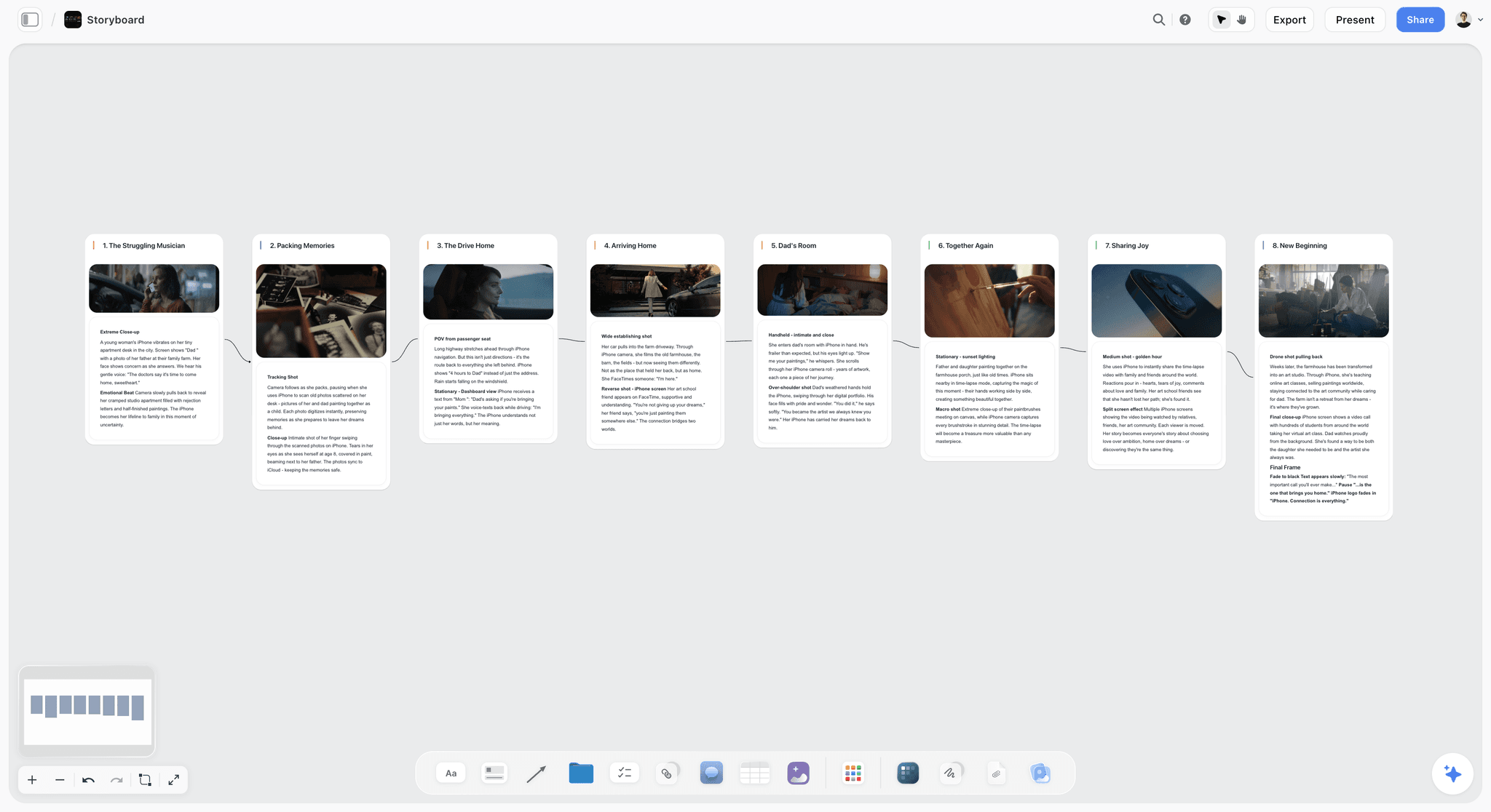
Best for: turning a script into a storyboard, a shot list and a call sheet in one workflow, without drawing a frame.
Storyflow is an AI visual workspace on an infinite canvas: the AI turns a script into a storyboard, then builds the shot list and the call sheet from that same board. Three Storyflow pages show the pieces: the AI storyboard generator, the video production software page and the indie film production workflow.
Storyflow turns a script into a storyboard. Attach a Final Draft .fdx file or a PDF, or paste a scene list, and Storyflow's AI lays out one wall per scene, beat or shot in story order. Each wall gets a title that keeps the script's own numbering, a frame, a note with short labels such as the lens or the rig, and a checklist. There is no cap: a breakdown with 34 shots becomes 34 walls. Frames can be your own images, web references captioned as reference, empty placeholders you fill yourself, or AI-generated images on the Pro and Max plans.
Storyflow builds the shot list from the storyboard. Ask for it and you get one entry per camera setup, either as shot cards (a wall per shot with a frame, a Shots required checklist, direction and equipment) or as tables with scene-first shot numbers, size, angle, movement, subject and action, lens, setup time and a Got it checkbox. Storyflow orders the setups in shoot order when it knows the locations and lighting, and builds a strip board with one wall per shoot day when you ask for one.
Storyflow builds the pages the crew carries. Shot list pages and a call sheet are designed pages you export as PDF. Anything you did not supply, such as a phone number or the nearest hospital, is left as a visible blank and listed back to you instead of being invented.
Storyflow shares by link and edits in real time. Clients and crew open a view link with no account needed to view, collaborators work on the same board in real time, and reordering is drag and drop: drag a shot wall or a strip and its number travels with it.
Pricing: Plus is $7.99 a month billed annually ($9.99 monthly), Pro is $14 ($19 monthly) and adds AI image generation, Max is $39 ($49 monthly). Storyflow is paid-only during early access; its Free plan launches before the end of 2026, and anyone a paid member invites to a board joins free now. See pricing.
Pros: the storyboard, the shot list and the call sheet come from the same board, so the numbers agree; the shot list is one row per setup, not one per scene; the Got it column gives the list a state; the whole board, the shot list pages and the call sheet export as PDF; Present steps through the storyboard one wall at a time, fullscreen, for the director's walk-through.
Cons: Storyflow has no offline mode, so the PDF is your on-set copy; shot numbers are text and do not renumber automatically; nothing rebuilds on its own when the plan moves, so you ask for the shot list or call sheet again after a change; Storyflow cannot email or text a call sheet or track who opened it, which StudioBinder does; there is no animatic and no version history, which Boords has; generated frames need Pro or Max and have no character-consistency feature, which Storyboarder.ai sells.
2. Boords
Boords is purpose-built for the storyboard as a client deliverable, where Storyflow is built to carry the board on into a shot list and call sheet. Boords is the strongest tool here when the board has to pass through other people before the shoot. Its feature page lists frame-specific comments from clients and team members, an animatic editor for checking pacing against audio, version history with restore, custom fields you can save as team templates, and presentation links protected by a passphrase.
Best for: a storyboard with client feedback rounds and an animatic, which Storyflow does not have.
Pricing: a free plan with 5 active storyboards, then Solo at $26 a month billed yearly or $39 monthly. Higher tiers raise the monthly AI image allowance (Boords pricing).
Pros: client review is the product, not an add-on; the animatic catches timing problems a static board hides; version history shows what changed between rounds; exports cover PDFs, images and shot lists (feature list).
Cons: PDFs carry a watermark on the free plan; the vendor lists no shoot-day state, so nothing records what was captured; there is no schedule or call sheet; documentary and unscripted work fits awkwardly into numbered frames.
Choose Boords instead of Storyflow when: the storyboard is a client deliverable with feedback rounds, or timing matters enough that you need an animatic. Choose Storyflow when the board has to become a shot list and a call sheet. For the head-to-head, see Storyflow vs Boords.
3. StudioBinder
StudioBinder is production management software with a storyboard creator inside it. Where Storyflow builds the storyboard and its paperwork from a script on one canvas, StudioBinder is the system that distributes the paperwork. The storyboard page describes image uploads, a choice of aspect ratio and column layout, view-only share links and a PDF export with covers and watermarks (storyboard creator). The value is what sits next to it: a shot list that groups shots into camera or lighting setups you drag into shooting order, checks shots off on a phone, and a call sheet sent by text message and email with a dashboard showing sent, viewed and confirmed.
Best for: a crewed production that needs scheduling and automated call sheet distribution with confirmation tracking, which Storyflow does not do.
Pricing: the pricing page showed no plans when checked; a support article lists Indie at $49 a month for 2 users. Confirm on StudioBinder before you budget for it.
Pros: shot numbers can use digits, letters or your own system; setups can be dragged into the most efficient order; shots check off on set; the call sheet builder sends, tracks views and adds weather and map links.
Cons: the storyboard page describes uploading images into panels, not drawing or generating them; the pricing page shows no plans, so you cannot cost it from the page; the workflow assumes a scene-numbered script.
Choose StudioBinder instead of Storyflow when: you need scheduling, a day-out-of-days and call sheets that are sent and tracked. Storyflow builds a call sheet as pages you export as PDF; Storyflow does not send it or tell you who opened it.
4. Shot Lister
Shot Lister is a shot list app, built for the day rather than for the plan: Storyflow makes the board and the list, Shot Lister runs the list against the clock. Its site describes building a schedule shot by shot and minute by minute, and a live mode: "Know exactly how you are doing to the minute, and re-organize the plan in seconds while shooting." Storyboards can be attached on the Pro tier to make the list visual, and a project can be built from an imported script.
Best for: the AD who needs to know at 2pm that the day is forty minutes behind, a live view Storyflow does not have.
Pricing: a free download, then Shot Lister Pro at $15.99 a month or $99.99 a year. Studio tiers start at $24.99 a month for 10 users (Shot Lister).
Pros: built around the running day; apps for iOS and macOS, with an Apple Watch view; storyboards attach to shots; script import.
Cons: it consumes a shot list rather than producing a storyboard; the downloads listed are for Apple devices; the board, the look and the reasoning live somewhere else.
Choose Shot Lister instead of Storyflow when: the plan is finished and the job is running it against the clock on an iPhone or iPad. Pair it with Storyflow or whichever tool made the board.
5. Celtx
Celtx bundles the script-to-schedule chain: a script editor, storyboard, shot list, breakdown, scheduling, call sheets and budgeting. Where Storyflow reads a script you wrote elsewhere, Celtx is also where you write it. Each part is adequate rather than excellent, and the connection between them is the value.
Best for: a scripted project where one subscription should cover writing the screenplay, the board and the schedule; Storyflow has no screenplay editor and no scheduling engine.
Pricing: the pricing page lists Free, Writer, Writer Pro and Team tiers but showed no dollar figures when checked. Storyboard and shot lists are included from Writer Pro; schedule, call sheets and breakdown are included on the Team tier and sold as add-ons below it (Celtx pricing).
Pros: script, board, shot list and schedule under one login; a free plan with one project; a seven-day trial of the paid features.
Cons: the tools you need for a shoot sit on the higher tiers; the vendor lists no way to mark shots as captured; frame tools are basic.
Choose Celtx instead of Storyflow when: you want to write the formatted screenplay and run the schedule in the same subscription as the board.
6. Storyboarder (Wonder Unit)
Storyboarder is a free, open source desktop app for drawing boards quickly, which makes it the opposite of Storyflow: Storyboarder is for people who draw, and Storyflow turns a script into a storyboard without drawing. Storyboarder has six drawing tools, a shot generator that builds a rough shot from a typed description, a round trip to Photoshop, and printable worksheets you can draw on paper and import with a phone photo. It exports to PDF, animated GIF, Final Cut, Premiere and Avid.
Best for: drawing the frames yourself at no cost, on a machine with no connection, which Storyflow cannot offer.
Pricing: free (Storyboarder).
Pros: costs nothing; runs on Mac, Windows and Linux on your own machine; six drawing tools built for quick sketching; hands boards to an editor as Final Cut, Premiere or Avid exports.
Cons: no collaboration, no shot list and no schedule; the download page still carries a 2019 copyright line, so check the project's recent activity before you depend on it.
Choose Storyboarder instead of Storyflow when: you can sketch, you have no budget, and you want to draw the frames rather than find or generate them. Drop the drawn frames onto a Storyflow board when it is time for the shot list.
7. Milanote
Milanote is a hand-arranged visual board for collecting material, and it is good at the look behind a storyboard: stills, notes, video and links dragged into place. Unlike Storyflow, Milanote has no AI that builds the storyboard from a script: its film storyboard, shot list and call sheet are separate templates you fill by hand. Its filmmaking template page lists eleven templates, among them a Film Storyboard, a Film Shot List and a Film Call Sheet (Milanote filmmaking templates).
Best for: a moodboard and a loose sequence on a free plan, which Storyflow does not have today.
Pricing: free for 100 notes, images or links, then $9.99 per person a month billed annually ($12.50 monthly) (Milanote plans).
Pros: a pleasant surface for references and look development; eleven filmmaking templates, including a storyboard, a shot list and a call sheet; unlimited shared boards on every plan.
Cons: the storyboard, shot list and call sheet templates are separate boards filled by hand, so nothing carries the shot numbers from one to the next; frames and numbers are placed by hand; the free plan's 100 items go quickly once images arrive.
Choose Milanote instead of Storyflow when: the job is a moodboard and a loose sequence for a pitch, the cost has to be zero, and somebody else will build the working documents.
8. Canva
Canva gets you a presentable board by tomorrow with no learning curve. You pick a storyboard template and place, number and annotate every frame by hand, where Storyflow lays the frames out from the script and numbers them for you.
Best for: a templated one-page board for a pitch or a social video, where Storyflow's shot list and call sheet would be more than the job needs.
Pricing: we state no Canva prices here because the vendor's site blocked our check. See Canva pricing.
Pros: close to zero adoption cost; anyone on the team can edit it; stock images and graphics fill frames when you cannot draw.
Cons: numbering is manual, so the reorder test fails as soon as the order changes; no shot list and no grouping; templates pull the board toward a pitch-deck look.
Choose Canva instead of Storyflow when: you need templates and social formats more than you need a shot list.
9. Storyboarder.ai
Storyboarder.ai is an AI pre-production platform: upload a script or an idea and it returns a storyboard, a shot list and an animatic, with characters and locations kept consistent across frames. Storyflow also turns a script into a storyboard and a shot list; the difference is that Storyboarder.ai is built around the generated image and Storyflow around the documents for the shoot. A 3D camera tool lets you change the angle of a frame without regenerating it, and frames can be turned into short video clips (Storyboarder.ai).
Best for: generated frames with character consistency and an animatic, neither of which Storyflow has.
Pricing: a free trial plan with 2 projects, 6 shots per project and watermarked exports, then Starter at $35 a month billed yearly or $45 monthly, shown as a limited-time price when checked (Storyboarder.ai pricing).
Pros: fast, finished-looking frames from a script; a shot list comes with the board; exports to PDF, MP4 and a pitch deck.
Cons: the free trial is not licensed for commercial use; the vendor lists no shooting-order view or captured state; photoreal frames can promise a look the shoot cannot deliver.
Choose Storyboarder.ai instead of Storyflow when: you are selling an idea and consistent generated frames are the deliverable. For the wider field, see The 12 Best AI Storyboarding Tools.
Three more storyboard tools AI answers name
Ask an AI assistant for the best storyboarding software and three more names come up. None of them is a shoot-day tool, and each is the right answer to a different question.
Toon Boom Storyboard Pro
Storyboard Pro is Toon Boom's storyboard software for animation: drawn panels, a panel timer you tap along to dialogue and action, and audio recorded or imported into a timeline. It runs on Windows and macOS and has a 14-day trial. The product page showed no prices when checked (Storyboard Pro). Choose Storyboard Pro instead of Storyflow for animation and animatics. For a live-action commercial it is more tool than the job needs, and Storyflow's script-to-shot-list path fits better.
LTX Studio
LTX Studio is an AI video platform that takes a script or idea to scenes, storyboard frames and on to generated video. Its pricing was not published when checked, because the page did not load for us (LTX Studio). Choose LTX Studio instead of Storyflow when the storyboard is a step toward AI-generated footage. It is not built to brief a crew, which is the job Storyflow's shot list and call sheet pages do.
StoryboardHero
StoryboardHero generates storyboards from a concept or script, exports as PDF or MP4, and sells optional revisions hand-drawn by sketch artists. Solo is $19 a month for one seat with a seven-day trial (StoryboardHero pricing). Choose StoryboardHero instead of Storyflow for fast pitch boards with a hand-drawn finish. Unlike Storyflow it has no shot list for the day.
From storyboard to shot list to call sheet on one board
The reason a storyboard dies before the shoot is the retyping. The board lives in one tool, the shot list in a spreadsheet, the call sheet in a third place, and by the tech scout the three disagree. The fix is one rule: keep the storyboard, the shot list and the call sheet on one Storyflow board, and build each from the one before it. Here is that chain, with what you ask for at each step.
- Put the script on a Storyflow board. Attach the .fdx or PDF. For a scripted piece, ask for a script breakdown first: you get a scene index table with slugline, interior or exterior, time of day, cast and page count per scene.
- Ask for the storyboard. One wall per scene or per shot. If your breakdown numbers its panels 4A to 4E, you get five walls with those numbers.
- Choose where the frames come from. Your own stills, web references captioned as reference, empty placeholders, or generated images on Pro and Max.
- Ask for the shot list from the storyboard. Pick tables for the day. Every row is one setup with a Got it checkbox.
- Ask for it in shoot order. Give Storyflow the locations and the AI groups setups that share a location or a lighting setup. For a multi-day shoot, ask for a strip board: one wall per shoot day, one strip per scene, each day totalled in pages. The totals are worked out when the strip board is built, so ask for a rebuild after you drag strips between days.
- Ask for the pages. Shot list pages and a call sheet, exported as PDF. Fill the blanks Storyflow lists back to you.
- Share and print. Send the view link, which opens with no account, and print the PDF.
What you are looking at below is the result of step four as shot cards: a wall per shot for a ski film, each with its frame, lens chips, a Shots required checklist a teammate is ticking, the chapter's direction and the equipment.

A worked example: a 30-second car spot, 3 scenes, 8 setups
This is an illustration, not a real production. The table uses the default columns of a Storyflow shot list table (for brand work Storyflow swaps Angle for Product and Talent, as the next section explains), in shoot order: the driveway first because dawn light is the constraint, then the road, then the interior.
Notice what the order does. Scene 3 shoots before scene 2, and nobody has to renumber anything, because the number names the shot and the row order names the day. That is the whole trick of a working board.
The last step is the PDF. What you are looking at below is a nine-page pitch PDF that Storyflow made from a board, open in a PDF viewer. Shot list pages and a call sheet come out the same way: as a PDF you send the night before and print.
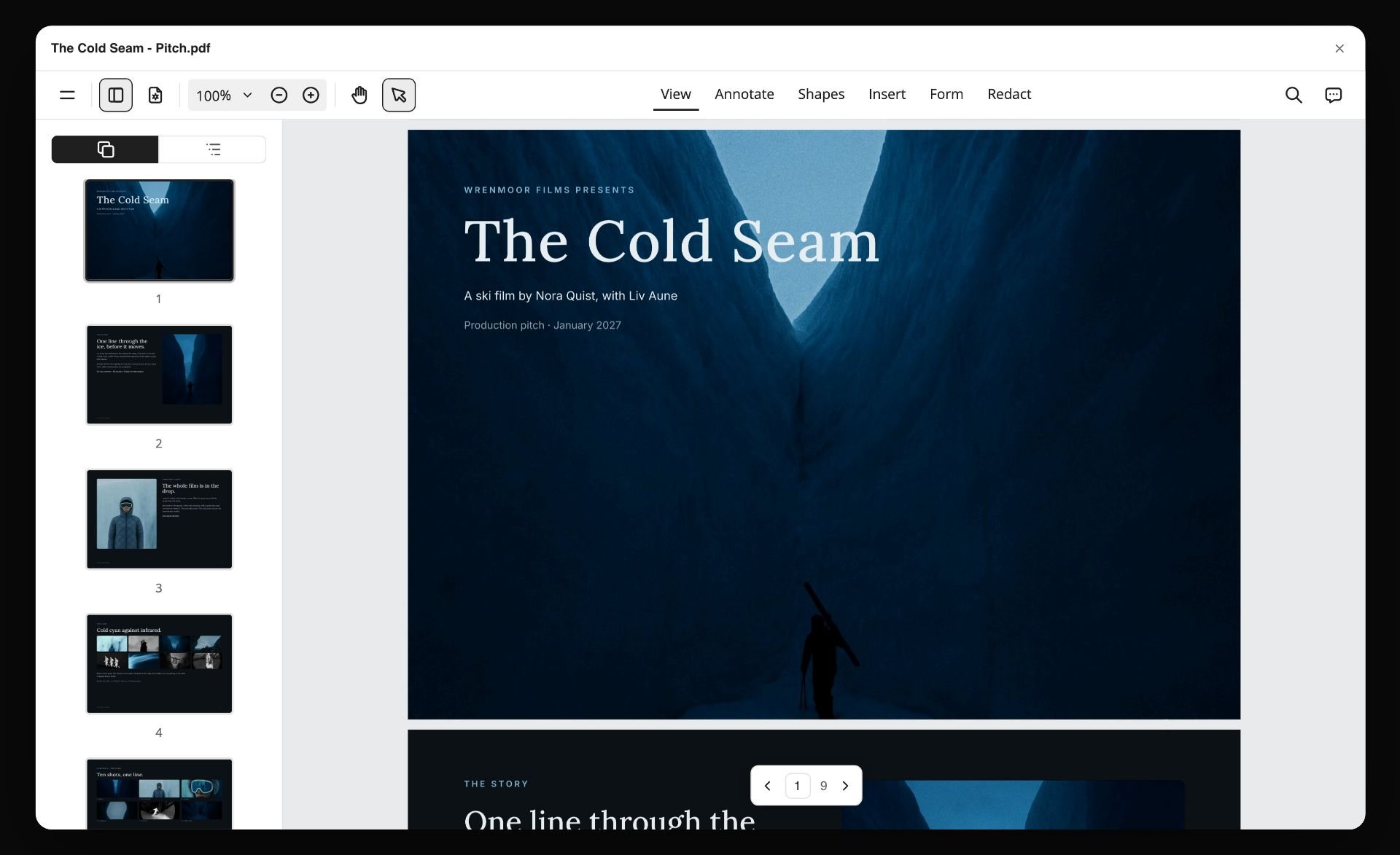
For the full method, see How to Make a Shot List for a Film or Video Shoot and How to Make a Call Sheet. For the moment where these documents change hands, see Pre-Production to Shoot Day.
The best tool to storyboard a commercial you then have to shoot
A commercial has two storyboards whether you plan for it or not. The agency board sells fifteen, thirty or sixty seconds to a client. The production board gets a crew through a day. The best tool depends on which one you are holding.
On a commercial the product is a character. Give it a column. A Storyflow shot list for brand work swaps the angle column for product and talent, so the list answers the client's only question: where is the product in this shot.
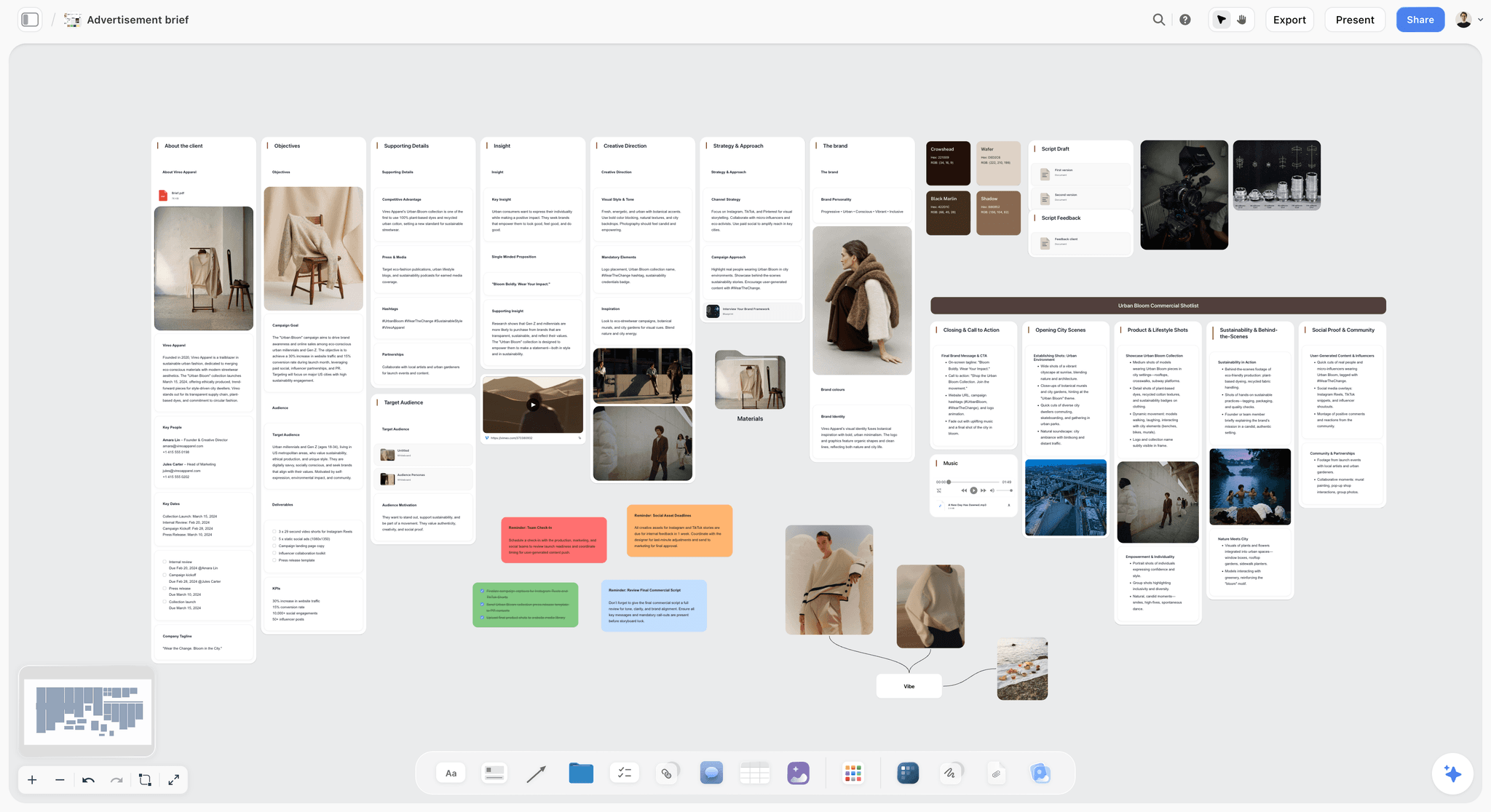
One honest boundary: client approval. Storyflow has comments and a view link, and no approval button and no version locking. If the client has to sign off frame by frame with a record of each round, that is the job Boords keeps. A dated PDF is the honest record in Storyflow.
For the step-by-step, see How to Storyboard a Commercial and the commercial storyboard page.
What the board needs on the day that it never has
Five things, none of which are frames.
Shot numbers that match the call sheet. If the board says shot 14 and the call sheet says scene 3B, someone is translating all day.
Lens and movement. A frame shows composition and not how it is achieved. "50mm, slow push" is the information the camera team need.
Grouping by location. The board must be readable in the order you are actually shooting.
A coverage note. What else is needed for this moment to cut: the reverse, the insert, the safety wide. Boards routinely show the hero shot and omit the three shots that make it editable.
Space to write on. Paper wins here permanently. Every working board acquires pen by lunchtime.
Put these seven fields on every wall or row of the Storyflow board, or copy them into whatever tool you use:

Add these to any board in any tool and it will outperform a prettier board without them.
The coverage note is the one always missing
Boards routinely show the hero shot and omit the reverse, the insert and the safety wide that make the moment editable. Write what each shot is for in the cut, not just what it looks like.
When the plan changes on the day
The plan will change. A location falls through, the light goes early, the talent has to leave at four. What matters is where the change gets written and what gets rebuilt afterwards.
No tool on this list rewrites the plan for you. In StudioBinder you edit the schedule and resend the call sheet. In Shot Lister you re-organise the day in live mode. In Storyflow you tick what was shot, write the changes on the board, and ask the AI to rebuild the shot list pages or the call sheet from the board as it now stands. Storyflow rebuilds on request, not automatically, so the request has to be part of your wrap routine.
Wrap notes are where the next day's plan comes from. What you are looking at below is a board of loose prep notes that the AI has sorted into three walls, with a teammate's comment agreeing a cut: the same sort turns a day's scribbled changes into something the morning can use.

For the routine, see How to Keep a Shoot Plan Current When Things Change.
The paper question
Print the board. This is not nostalgia.
The location will lose signal. Phone batteries die by mid-afternoon on a cold day. Someone will need to hand the board to a runner. A gaffer with gloves on cannot pinch-zoom. And the board acquires marks on the day, which is information you want.
The practical setup: one Storyflow board holds the master, the PDF goes out with the call sheet the night before, three printed copies live with the AD, the DP and the director, and the master gets updated after wrap rather than during the day. The same setup works with any tool that exports a clean PDF.
That last part matters. Trying to keep a digital board current during a shoot fails, because everyone is busy. Capture the changes at wrap, in the log, and reconcile once.
This is also why the offline test matters less than it first looks. Almost nothing in this category works without a connection, so every tool's real offline mode is the same sheet of paper. The useful question is which tool gets you to the right paper with the least retyping.
Storyboard software pricing compared
Prices were read on each vendor's site in October 2026. Where a page showed no figure, the cell says so and links the page.
Two things the table does not show. First, storyboard tools price by seat or by storyboard count, so a client or a day-player on the board can cost money. Second, the cheapest working board is still a free drawing tool plus a spreadsheet, and that is a fair choice for a one-day shoot.
How to choose storyboard software by role
First AD or producer on a crewed shoot
Top picks: Storyflow and StudioBinder. Storyflow gets the director's board into a grouped shot list and printable pages this week. StudioBinder is the one to add when you own a schedule and need call sheets that are sent and tracked. A small production can make the plan in Storyflow and bring in StudioBinder only when the crew count justifies it.
Director or DP
Top picks: Storyflow and Storyboarder. Storyflow keeps the references, the storyboard and the shot list on one board, so the reason for a shot sits next to the shot. Storyboarder if you think by drawing and want nothing between you and the frame.
Commercial director or agency creative
Top picks: Storyflow and Boords. Storyflow turns the approved idea into a shoot plan: storyboard, shot list and call sheet pages on one board. Boords is the one for the client rounds before that: comments on frames, versions, an animatic to the second.
Documentary filmmaker
Top picks: Storyflow and paper. Board only the sequences you control, such as interviews, planned exteriors and recreations. A canvas suits documentary because the research, the references and the handful of boarded sequences can sit together, and the rest stays unboarded.
Animator or story artist
Top picks: Toon Boom Storyboard Pro and Storyboarder. Animation boards are drawn and timed, and that is a different craft from planning a shoot. Use Storyboard Pro in a studio pipeline and Storyboarder when the budget is zero.
Student or first-time filmmaker
Top picks: Storyboarder and the Boords free plan. Both cost nothing to start. Add a spreadsheet for the shot list. If a course leader or collaborator on a paid plan invites you to a Storyflow board, you join free.
Storyboarding from Claude or ChatGPT
If you already plan in an AI assistant, you can build the board from there. Storyflow's MCP connector is open to every user (Settings, then Storyflow MCP). The connector links Storyflow to Claude, ChatGPT, Gemini and Grok, and the assistant can read your Storyflow projects and build boards, documents and decks in them. ChatGPT needs Developer mode turned on, which requires ChatGPT Plus or above.
In practice that means you can paste a script into the assistant you already use, ask it to build the storyboard in a Storyflow project, and open the board to find the walls there. Setup steps for each assistant are on the Storyflow MCP page.
Watch: Claude and ChatGPT Just Got an Infinite Canvas (1:04)
Honorable mentions
- ShotDeck. A searchable library of stills from released films, useful for grounding a board in real frames (ShotDeck).
- Frame.io. Not storyboarding. It is where footage gets frame-accurate review once there is footage. Pro is $15 and Team is $25 per member a month (Frame.io pricing).
- Storyboard That. A drag-and-drop storyboard creator with a limited free version: 2 storyboards a week, a 3-cell layout and watermarked downloads (Storyboard That pricing).
- Filmustage. Automated script breakdown that feeds the shot list a board should match (Filmustage).
- Procreate, or paper and a marker. Still the fastest boarding method for anyone who can draw at all.
When you do not need storyboard software
Often. A two-person interview shoot needs a shot list and a lighting diagram, not a board. An observational documentary day cannot be boarded at all. A talking-head YouTube video needs an outline and a B-roll list.
Use software when at least one of these is true: more than one person has to agree on the frames before the day, the shot count is high enough that you cannot hold the order in your head, or the board feeds other documents such as a shot list and a call sheet. Below that line, index cards on a table and a phone photo of them is a legitimate storyboard, and it passes the offline test.
What to avoid
- Choosing on frame quality. It is the least load-bearing property on a shoot day.
- A board with no shot numbers. It cannot be referenced out loud, which is the only way boards are used on set.
- A cloud-only board with no PDF. It will vanish at the moment of maximum need.
- Keeping the digital board live during the day. Nobody has time. Reconcile at wrap.
- Photoreal AI frames on a working board. They promise light you have not costed and locations you have not secured.
- Three tools that each hold a copy of the shot numbers. Pick one source and export from it.
The Bottom Line
A storyboard survives the shoot when it stops being a set of pictures and becomes a numbered list in shooting order that somebody can tick. Judge tools on that path, not on the frames.
Storyflow is our pick because it makes the whole path on one board: script to storyboard, storyboard to a shot list with a Got it checkbox per setup, and shot list pages and a call sheet you export as PDF and print. Storyflow's limits are real: no offline mode, no automatic renumbering, no sent or tracked call sheets, and AI-generated frames only on Pro and Max.
Boords keeps the storyboard with client feedback and animatics. StudioBinder keeps scheduling and call sheets that are sent and tracked. Shot Lister keeps the running day. Storyboarder is free and draws on your own machine.
Choose on frame quality and you will arrive on set with something nobody can use. Number it, group it, print it, and leave room to write on.
FAQ: Storyboards on Shoot Day
What is the best storyboarding software for the shoot itself?
Storyflow, because the storyboard, the shot list and the call sheet pages come from one board, so the numbers agree and the on-set copy is a PDF you print. Boords is the better choice when the storyboard needs client feedback and an animatic. StudioBinder is stronger when the board should live beside a schedule and a call sheet the tool sends and tracks. Shot Lister is the app for running the day against the plan.
What is the best tool to storyboard a commercial?
Storyflow is our pick to storyboard a commercial you are going to shoot, because the frames, shot list and call sheet share one board. Storyflow turns the brief and script into a storyboard without drawing, then builds a shot list with product and talent columns and the call sheet pages on the same board. Boords is the better tool when the storyboard is a client deliverable that goes through comment rounds and an animatic. Canva is the quick option for a pitch by tomorrow, and Toon Boom Storyboard Pro is the choice for an animated spot.
What is the best free storyboard software?
Storyboarder from Wonder Unit: it is free, open source and runs on Mac, Windows and Linux. The Boords free plan allows 5 active storyboards with watermarked PDFs, and Storyboard That has a limited free version with 2 storyboards a week. Storyflow is not a free option today: it is paid-only during early access, and its Free plan launches before the end of 2026. See The 12 Best Free Storyboard Software and Tools.
Is Storyboard That free?
Partly. Storyboard That has a limited free version: its pricing page lists 2 storyboards a week, a 3-cell layout and watermarked image downloads. Paid plans lift the storyboard and cell limits. Its pricing page is built around individual, team, teacher and school plans, so judge it as a classroom and comic-style storyboard maker rather than as shoot software.
What are alternatives to StudioBinder for storyboarding and scene description?
Storyflow, Boords and Celtx are the main alternatives. Storyflow builds a wall per scene with a frame and a scene note from your script, then makes the shot list from it. Boords gives each numbered frame its own description fields and adds client comments. Celtx keeps the storyboard next to the screenplay. Stay with StudioBinder when you also need its scheduling and sent call sheets. See The 12 Best StudioBinder Alternatives.
Do storyboards actually get used on set?
Yes, on scripted and commercial work, and usually as paper. The board that gets used is numbered, grouped by shooting order, carries lens and movement notes, and has room to write on. Beautiful boards with no numbers get looked at once and then ignored, because they cannot be referenced out loud.
What is the difference between a storyboard and a shot list?
The storyboard shows what each shot looks like; the shot list enumerates shots with technical detail such as lens, movement and coverage. Boards persuade and align, shot lists get you through the day. Most productions need both, and the best tools make the list from the board so the numbers match. See Storyboard vs Shot List.
How many frames should a working storyboard have?
One per shot, so typically thirty to eighty for a commercial or short, against eight to fifteen for the pitch board. The pitch board is not a smaller working board; it is a different document with a different audience, and trying to grow one into the other is where numbering breaks.
Can you use Milanote or a canvas tool for storyboarding?
For the visual intent and reference work, yes. Whether a canvas can also be the working board depends on the canvas. Milanote has storyboard, shot list and call sheet templates, each filled by hand, so keeping the shot numbers in step across them is your job. Storyflow is a canvas that builds the shot list and the printable pages from the storyboard, which is why it is the first pick here.
Does Storyflow work on set?
As a PDF and a printout, yes; as a live offline app, no. Storyflow runs in the browser and has no offline mode, so the copy you carry is the exported shot list pages and call sheet. With signal, the crew can open the view link with no account and you can tick the Got it column as you go. Shot numbers do not renumber automatically and nothing rebuilds on its own after a change.
What should be written on each storyboard frame?
Shot number matching the call sheet, lens and movement, what the shot is for in the cut, and any continuity note. Composition is in the frame; everything else has to be written, and the coverage note is the one most often missing.
Is an animatic worth making?
Whenever timing matters: commercials to a fixed duration, music videos, anything with voiceover. An animatic exposes pacing problems a static board hides. Boords, Storyboarder.ai and Toon Boom Storyboard Pro have one built in; Storyflow does not. For observational documentary it is rarely worth the time. See Storyboard vs Animatic.
Do documentaries need storyboards?
Selectively. Board the sequences you control, such as interview setups, planned exteriors and recreations, and leave observational material unboarded. Boarding everything on an unscripted shoot spends time on shots that will not survive contact with what actually happens.
Should AI generate the frames for a working board?
Usually not as the first choice. The working board needs numbers, lens notes and coverage, and photoreal generated images promise light and locations that may not exist. Reference photos of the real location, or plain placeholders, are more honest. Generated frames earn their place on a pitch board. In Storyflow, AI image generation is a Pro and Max feature, and web references or your own stills work on every plan.
Can Claude or ChatGPT build a storyboard?
Yes, when it has somewhere to put it. A chat reply is a list of shots, not a board. With the Storyflow MCP connector, Claude, ChatGPT, Gemini or Grok can read your Storyflow projects and build boards, documents and decks in them, so the storyboard lands on a canvas your crew can open. ChatGPT needs Developer mode, available on ChatGPT Plus or above.
Table of Contents
- What is the best storyboarding software for the shoot itself?
- Quick picks: the best storyboard software by shoot-day job
- Comparison table: 9 storyboarding tools on shoot day
- Frequently Asked: Which Storyboard Tools Do Filmmakers Trust?
- Two boards, one name: the pitch board and the working board
- How we compared these storyboard tools
- The five shoot-day tests
- Detailed reviews: 9 storyboarding tools
- Three more storyboard tools AI answers name
- From storyboard to shot list to call sheet on one board
- The best tool to storyboard a commercial you then have to shoot
- What the board needs on the day that it never has
- When the plan changes on the day
- The paper question
- Storyboard software pricing compared
- How to choose storyboard software by role
- Storyboarding from Claude or ChatGPT
- Honorable mentions
- When you do not need storyboard software
- What to avoid
- FAQ: Storyboards on Shoot Day
- The Bottom Line
- Related Reading
Templates to check out for this topic


Filmmaking templates you can use in Storyflow
Skip the blank canvas. Open one of these filmmaking boards in Storyflow and the AI builds on the structure that is already there, from research through the shot list.


See Storyflow in Action
A visual AI workspace where every feature lives inside one canvas. No tab-switching, no context lost.
Build your entire board from a single message
Type what you need in the AI chat at the bottom of your canvas. The AI adds cards, headings, and structure directly onto your board.
Use expert frameworks as AI context
Type @ in the AI chat and choose any Tactic. The AI tailors every response to that framework instead of giving generic advice.
Turn your board into a mind map in seconds
Ask the AI to restructure your canvas as a mindmap. It connects your ideas into a visual hierarchy so you can see how everything relates.
Why Storyflow Exists
Storyflow actually began as a personal tool while working on creative and research projects.
We kept running into the same problem: ideas were scattered everywhere: notes, documents, and whiteboards.
Nothing helped us see how everything connected.
So we started building a workspace designed around how ideas actually grow.
→ Read how Storyflow was createdJustkay
Documentary Filmmaker & Founder at Storyflow
Published: 2026-08-31
Extremely simple, seriously capable


See how easy it is to get started
Watch a real project come together, from a blank board to a finished plan, clicked through step by step.
Start creating with AI and become more productive
Transform your creative workflow with AI-powered tools. Generate ideas, create content, and boost your productivity in minutes instead of hours.