Best AI Tools for Short Film Production (2026)
The best AI tools for short film production in 2026, tested on real shorts. Script, storyboard, mood board, shot list, schedule, and generative pre-viz compared.

Category
Filmmaking
Author

Justkay
Documentary Filmmaker & Founder at Storyflow
Topics
2026-06-11
•
Updated July 3, 2026
•
17 min read
•
Filmmaking- best AI tools for short film production 2026
- short film production tools
- AI short film pre-production
- short film storyboard tool
- short film schedule tool
- StudioBinder short film
- Storyflow short film
- short film mood board
What are the best AI tools for short film production in 2026?
The best AI tools for short film production in 2026 are Storyflow (the connected creative layer: script, beats, mood board, storyboard, shot list on one AI canvas), StudioBinder (scheduling, breakdowns, call sheets), Boords (animatics), and Runway or Krea (generative pre-viz). A short is won or lost in pre-production.

Full disclosure: Storyflow is our own product, and we rank it #1 for one job: connected pre-production, where the script, beats, mood board, storyboard, and shot list live on one canvas the AI reads before it helps. For real scheduling, breakdowns, and call sheets StudioBinder is stronger, and for generative pre-viz frames Runway does things Storyflow cannot. Storyflow drafts a strip board and call sheet but has no scheduling engine and does not generate video, so if the plan layer or generative frames are your bottleneck, pair it with those tools. We link to every tool so you can judge the fit.
Quick Comparison: Best AI Tools for Short Film Production
These four cover the jobs a short is won on: connected pre-production, scheduling and call sheets, animatics, and generative pre-viz.
| Tool | Best For | AI Features | Price |
|---|---|---|---|
| Storyflow | Connected pre-production on one canvas | Reads full board + @-Tactics and Documents | $7.99 mo annual (free plan late 2026) |
| StudioBinder | Scheduling, breakdowns, call sheets | Industry-standard scheduling (no AI) | Free / $29 mo |
| Boords | Timed animatics and panel boards | AI panel generation | Free / $15 mo |
| Runway | Generative motion pre-viz | Image and video generation | Free / $15 mo |
Run the short on one board the AI can read
Script, shot list, schedule, and references live together on a Storyflow canvas, so a small crew can see the whole film and the AI answers questions across all of it.

1) Quick Answer: The Best AI Tools for Short Film Production in 2026
The best AI tools for short film production in 2026 are Storyflow (best for the connected creative layer: script, beats, character and world, mood board, storyboard, and shot list on one canvas), StudioBinder (best for the production plan: scheduling, breakdowns, call sheets, and shot lists), Boords (best for animatics and panel-by-panel boards), Milanote (best for visual development and mood), and Runway or Krea (best for generative pre-viz frames and motion). A short film is a tight, festival-oriented piece of 5 to 30 minutes with one or a few locations and a small crew, so the tools that matter are the ones that prevent pre-production from fracturing across five apps before the camera ever rolls.
The short version: a short does not get more forgiving because it is short. It gets less forgiving. There is no second act to hide a weak idea, no studio safety net to catch a broken schedule, and no margin to fix in the edit what was wrong on the page. A short film does not fail in the edit. It fails on the page, before anyone says action. The tools below are ranked by which of the three pre-production layers (page, picture, plan) each one owns, and by how cleanly it hands off to the next.
I have run multiple documentary projects through the full pre-production pipeline and consulted on narrative shorts that made festival cuts and shorts that died in development. The 10 tools below were tested on real short-film work, not synthetic demos.
For the broader, non-short-specific ranking, see The 12 Best Tools for Indie Filmmakers in 2026. For the AI-specific filmmaker ranking across all formats, see The 12 Best AI Tools for Filmmakers in 2026.
2) All 10 AI Tools for Short Film Production, Ranked
- Storyflow: best overall, the connected creative layer (script, beats, mood, storyboard, shot list) on one AI canvas
- StudioBinder: best for the plan layer (scheduling, breakdowns, call sheets)
- Boords: best dedicated animatic and panel boards
- Milanote: best visual development and mood boards
- Storyboarder: best free desktop storyboarding
- Runway: best generative motion pre-viz
- Krea: best generative pre-viz stills
- Celtx: best budget script-plus-production all-in-one
- Arc Studio: best modern screenwriting and outlining
- Frame.io: best cut review and post handoff
3) Key Takeaways
- A short is not a small feature. A feature can carry a thin idea for twenty minutes before an audience notices; a short reveals one in the first ninety seconds. That is why the page layer is the highest-leverage work in the whole pipeline.
- Every short lives or dies across three layers: the page (idea, beats, script), the picture (mood board, references, storyboard), and the plan (breakdown, schedule, call sheets).
- The work that has to stay connected is scattered across the most apps. When the script changes, and on a short it always changes, the storyboard, shot list, and schedule fall out of sync, because nobody updates four apps under deadline.
- No single tool owns all three layers, so every recommended stack pairs a page-and-picture tool with a plan tool. A stack that looks complete on paper is how films fall apart.
- Storyflow is strongest on the page and picture layers and is not scheduling software. It drafts a strip board grouped by page totals and a call sheet PDF, but it has no day-out-of-days, no conflict reports and no automated scheduling engine, and it does not send the call sheet.
- A short film does not fail in the edit. It fails on the page, before anyone says action. Spend your budget and your attention accordingly.
4) Comparison Table: 10 Short Film Tools at a Glance
Prices above are the published rates at the time of writing and move often, so check the vendor's own page before you commit. The shape of each plan (free tier, subscription, or one-time licence) is more stable than the number. Rating criteria: tested on real short-film pre-production between 2024 and 2026: documentary shorts, narrative shorts of 8 to 20 minutes, and a festival-track commissioned piece. Competitor pricing carries "verify" because plans change often; confirm current pricing on each tool's official page before buying. Storyflow pricing is exact and current as of June 2026.
5) The Page, the Picture, the Plan: Where Shorts Are Won
Most short film advice treats a short like a feature with fewer scenes. That framing is why so many shorts collapse. A short is not a small feature. It is a different problem with a tighter margin for error. Every short lives or dies across three layers: the page, the picture, and the plan.
The page. The idea, the logline, the beats, the script, the character and world notes. This is where a short lives or dies. A feature can carry a thin idea for twenty minutes before the audience notices. A short reveals a thin idea in the first ninety seconds. The page layer is the highest-leverage work in the entire pipeline.
The picture. How the film looks and reads frame by frame: the mood board, the visual references, the storyboard, and increasingly the generative pre-viz frame. For a short with a strong visual signature (most festival shorts), the picture layer is where the film earns its slot in a programmer's screening pile.
The plan. The breakdown, the schedule, the call sheets, the shot list, the day-out-of-days. This is the layer that keeps a one-or-two-day shoot from imploding, and the layer most first-time short directors skip until it bites them on set.
Here is the friction that defines short-film pre-production in 2026. The page is usually in a screenwriting app, the picture is split between a mood board app and a storyboard app, and the plan is in a scheduling tool or a spreadsheet. The work that has to stay connected is scattered across the most apps. When the script changes (and on a short, it always changes), the storyboard, the shot list, and the schedule silently fall out of sync. Nobody updates four apps under deadline. They update one and hope.
A short film does not fail in the edit. It fails on the page, before anyone says action. The ranking below follows the three layers. It is honest about which layer each tool owns, because no single tool owns all three, and pretending otherwise is how you end up with a stack that looks complete and a film that falls apart.
6) How the Tools Compare Across the Three Layers
Because the argument is that the three layers must stay connected, the useful comparison is which layer each tool actually owns. Here are all ten scored.
Three conclusions, and they are the practical value of the section.
The page-to-plan link is the one almost nothing bridges, and Filmustage is the exception worth knowing about. Most tools sit inside one layer and leave the handoffs to you. Filmustage reads the script and produces the breakdown, which is the single most valuable automated handoff available to a short film, and it is the reason it outranks its general polish.
The picture layer has fragmented rather than consolidated. Boords owns storyboards, Milanote owns reference boards, and Midjourney and Runway own generative pre-viz. These are four different products and none of them is trying to become the others, so expect to pick per output rather than hunting for one visual tool.
The plan layer is where short filmmakers under-tool and then pay for it on the day. A one-or-two-day shoot feels small enough to hold in your head, which is exactly the assumption that produces a crew standing in the wrong place at a day rate. If you are picking only one paid tool for a short, and your script is finished, pick the plan tool.
The honest limit on our own entry: Storyflow is strong on two layers and weak on the third by design. It is a development and visual-planning canvas, not production software. It drafts script breakdown tables, a strip board and a call sheet PDF from your plan, but with no day-out-of-days report, no crew-availability tracking and no distribution or confirmation tracking once the call sheet exists. On a short with a real crew it belongs before StudioBinder or Filmustage, not instead of them, and the stacks below are written that way.
7) How We Evaluated These Tools
Six criteria, weighted in this order for the short-film format specifically:
- Layer ownership. Does the tool genuinely own the page, the picture, or the plan? A tool that does one layer well beats a tool that does three layers poorly. We rated honest specialists higher than vague all-in-ones.
- Connected canvas. When the script changes, does the rest of the work move with it, or does it drift? On a short, where revisions are constant and the timeline is tight, drift is the silent killer. Tools that keep the page and the picture connected scored highest.
- AI context scope. Does the AI read your actual project (the board, the beats, the notes), or does it just generate generic text and images with no awareness of your film? Context-aware AI is the difference between a draft you can use and a draft you have to rewrite.
- Scheduling and call sheets. For the plan layer specifically, does the tool produce a real breakdown, a real schedule, and an industry-standard call sheet? This is StudioBinder's home turf, and we rated it honestly against that bar.
- Free tier reality. Short filmmakers, especially students and first-timers, work on near-zero budgets. A genuinely usable free tier was weighted heavily.
- Generative pre-viz. For the picture layer, can the tool produce usable pre-viz frames or motion? This matters most for visually ambitious shorts and music-video-adjacent work.
Tested across real short-film work: documentary shorts, narrative shorts of 8 to 20 minutes, and a commissioned festival-track piece. Tools were judged on how they felt under a real short's deadline, not on a feature checklist.
8) Quick Picks by Short Film Type
Best for First-Time Short Director: Storyboarder (free boards) plus a shared spreadsheet for the plan, with Storyflow for the connected page and picture canvas once you're ready to pay (Plus is $7.99/month annual, or join free today if a paid collaborator invites you to their board). This stack ships a first festival short without a big software bill.
Best for Festival-Track Narrative Short: Storyflow (script, beats, bible, mood board, storyboard, shot list draft) plus Arc Studio or Celtx (formatted screenplay) plus StudioBinder (schedule and call sheets). The page and picture stay connected; the plan lives where it belongs.
Best for One-Location Microbudget Short: Storyflow (everything creative) plus a Google Sheet for the one-day schedule. With a single location and a tiny crew, the plan layer is small enough to skip dedicated scheduling software entirely.
Best for Documentary Short: Storyflow (research canvas, beats, interview map, shot list) plus StudioBinder (shoot scheduling) plus Frame.io (cut review). Documentary's center of gravity is the page and the post handoff.
Best for Visually Ambitious Short: Milanote or Storyflow (mood board) plus Runway or Krea (generative pre-viz frames) plus Boords (animatic). The picture layer carries the film, so spend the budget there.
Best for Writer-Director Working Solo: Storyflow (one canvas for the whole creative layer) plus Arc Studio (final script formatting). One brain, one canvas, minimal app-switching.
Keep the page and the picture on one canvas
Put the script, beats, mood board, storyboard, and shot list on one Storyflow board, so when the script changes (it will), the rest of the short moves with it.
9) Detailed Reviews: 10 Tools for Short Film Production
1. Storyflow
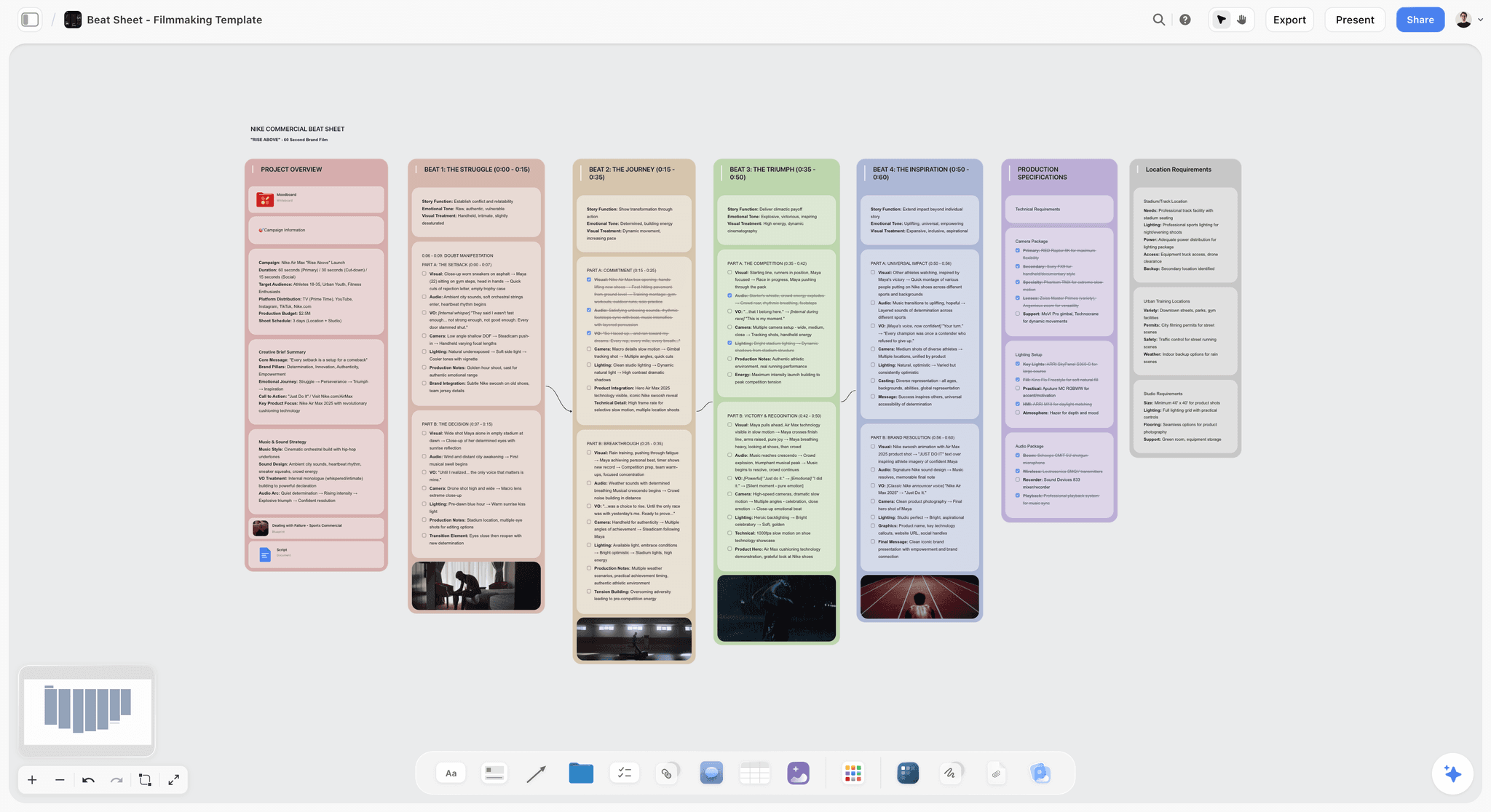
Storyflow owns the page and picture layers by keeping the logline, the beat sheet, the script draft, the character and world notes, the mood board, the storyboard, and the shot list draft on one infinite canvas, with an AI that reads the active board. On a short, where the script changes weekly and the deadline is fixed, the value is that the creative work stops fracturing across five apps. The familiar approach is a script in one app, a mood board in another, a board in a third, and a shot list in a spreadsheet, all drifting apart the moment the script changes. Storyflow collapses that into one place where a change to the beats is visible next to the storyboard it affects. The fastest start is the Beat Sheet Filmmaking template for the page layer and the Shotlist template for the coverage draft, so the board opens with structure the AI can read instead of a blank canvas.
Best for: Short film writer-directors doing connected pre-production (the page and the picture) before the plan layer kicks in.
Verdict: The strongest single tool for the connected creative layer of a short. It is not your scheduling engine and not your screenplay-formatting tool; it is the canvas where the film gets figured out before those tools take over.
Key features
- One canvas where the logline, beats, script draft, character and world notes, mood board, storyboard, and shot list live as connected cards.
- AI reads the full active canvas board plus up to 1 Tactic and up to 3 Documents you @-mention in the chat.
- Story Blueprints library (200+ creative templates including beat sheet, character profile, mood board, and shot list styles) on Plus, Pro, and Max.
- Unlimited collaboration on every paid tier, and collaborators invited by a paid member join and edit for free, so a small crew works together without per-seat fees.
Pricing
Free: launching before the end of 2026. Storyflow is paid-only during early access; if a paid collaborator invites you to their board, you join and collaborate on it for free today. Plus: $7.99/mo annual ($9.99 monthly). Full Story Blueprints library, unlimited file uploads. Pro: $14/mo annual ($19 monthly). AI image generation, 20x more AI usage. Max: $39/mo annual ($49 monthly). 40x more AI, team workspace with permissions and roles.
Pros
- Strongest connected creative layer for a short: the page and picture stay in one place.
- Plus is affordable at $7.99/month annual for a solo short director, and collaborators invited to the board join and edit for free.
- AI that reads your actual board produces drafts grounded in your film, not generic boilerplate.
Cons
- Drafts breakdown tables, a strip board and a call sheet PDF, but no scheduling engine, day-out-of-days or call sheet sending; pair with StudioBinder for the plan layer.
- Not a video editor; the edit happens in DaVinci Resolve, Premiere, or Final Cut.
- Cloud-only with no offline mode; a connection is required to work on the canvas.
- Not a dedicated screenwriting app like Final Draft or Arc Studio for final screenplay formatting; draft on the canvas, format the locked script elsewhere.
2. StudioBinder
StudioBinder is the standard for the plan layer on a short. Production scheduling, script breakdowns, shooting schedules, call sheets, and image-attached shot lists are exactly what it does, and it does them at an industry-standard level that a spreadsheet cannot match. For a short with a real crew and more than one shoot day, this is the tool that keeps the production from imploding.
Best for: Short film producers and ADs running shoots with a crew, multiple shoot days, or more than one location.
Verdict: The strongest production-management tool for a short. Honest framing: this is the plan layer, and it is the layer Storyflow only drafts. The two are complements, not competitors.
Key features
- Industry-standard call sheet generation and script breakdown tagging (cast, props, wardrobe, locations).
- Shooting schedule and stripboard.
- Shot lists with attached reference images, plus contact and crew management.
Pricing
Free: limited. Paid tiers start around $29/mo.
Pros
- Industry-standard call sheets and breakdowns, far beyond what a spreadsheet gives you.
- Strong shooting schedule and stripboard for multi-day shorts.
Cons
- Pricing climbs above the entry tier as the production scales.
- Creative pre-production (beats, script drafting, mood) is weak; it is a plan tool, not a page tool, and AI features are light.
3. Boords
Boords is the focused storyboard and animatic tool for the picture layer. Panel-by-panel frames, timed animatic playback, and clean client sharing are what it sells, and AI panel generation now speeds the first pass. For a short with a strong visual sequence (a chase, a reveal, a music-driven montage), the animatic is where you catch problems before you waste a shoot day on them.
Best for: Short directors with visually driven sequences who need a real animatic, not just static panels.
Verdict: The strongest dedicated animatic tool for a short. Pair it with a canvas tool for the surrounding page and mood work it does not touch.
Pricing
Free with caps. Paid tiers start around $15/mo.
Pros
- Best dedicated animatic playback for catching timing problems early.
- AI panel generation cuts first-draft storyboard time, with clean sharing for notes.
Cons
- Storyboard-only; the script, beats, and shot list live elsewhere.
- Free tier is limited, and there is no scheduling or call-sheet layer.
4. Milanote
Milanote is the clean visual-development board for the picture layer. For a short director collecting references (a color palette, a lighting mood, a costume direction, a tonal collage), Milanote is fast and elegant. It is the mood board done well, and for visually led shorts that is a real part of pre-production.
Best for: Visual research and mood boards on commercial, music-video-adjacent, and tonally specific shorts.
Verdict: Strong for the mood-board slice of the picture layer. It is a board, not a script-linked canvas, so the rest of the page work still needs a home.
Pricing
Free: 100 cards. Paid tier around $12.50/mo.
Pros
- Best-in-class clean UI for visual research, with a strong mood-board template library.
- Easy client and collaborator sharing.
Cons
- 100-card free cap is reached quickly, and it is not a script or beats environment.
- No AI and no production-plan layer.
5. Storyboarder
Storyboarder is the free, open-source desktop storyboard tool from Wonder Unit. Basic drawing tools, a pose library, and clean export to editing software. For a short filmmaker who needs to storyboard and has no budget, this is the honest answer to the picture layer.
Best for: Students, first-time short directors, and any zero-budget short that needs real boards.
Verdict: The strongest free storyboarding option in 2026. It draws panels; it does not connect to the rest of the film.
Pricing
Free.
Pros
- Genuinely free, open-source desktop app for Mac and Windows.
- Exports cleanly into Premiere and Final Cut.
Cons
- Desktop only, no cloud sync, and drawing tools lighter than Boords.
- No collaboration and no connection to script or shot list.
6. Runway
Runway is the generative pre-viz tool for the picture layer when you want motion, not just stills. For a short director pitching a look to a producer or testing a visual idea before committing a shoot day, Runway's text-to-video and image-to-video models produce frames and short motion clips fast. It is pre-viz, not final footage, and for a short that distinction matters.
Best for: Visually ambitious shorts that need motion pre-viz or a look-test to pitch.
Verdict: The strongest generative motion tool for short pre-viz. Use it to test and pitch the look, not to replace the shoot.
Pricing
Limited free credits. Paid tiers start around $15/mo.
Pros
- Fast text-to-video and image-to-video motion pre-viz for pitching a look.
- Useful for look-tests before a costly shoot day.
Cons
- Output is pre-viz quality, not final-footage consistent, and credits go fast.
- No script, board, or plan context; it generates in isolation.
7. Krea
Krea is the generative frame tool for fast, stylized pre-viz stills. For a short director building a look book or generating reference frames for a storyboard, Krea is quick and visually flexible. It is a frame generator, not a film tool, so it slots into the picture layer alongside a real board.
Best for: Generating stylized reference frames and look-book images for a short.
Verdict: A capable generative still tool for the picture layer. Pairs with a board tool rather than replacing one.
Pricing
Limited free tier. Paid plans start around $10/mo.
Pros
- Fast, flexible still generation, good for a stylized look book.
- Real-time iteration on a frame's look.
Cons
- Stills only, no motion or animatic.
- No project context; it generates without awareness of your film.
8. Celtx
Celtx is the long-standing all-in-one that touches both the page and a slice of the plan. Cloud screenwriting plus light breakdowns and basic scheduling make it a reasonable single subscription for a short on a budget. It does several things at a serviceable level rather than one thing at a best-in-class level.
Best for: Short filmmakers who want script plus light production in one budget subscription.
Verdict: A serviceable all-in-one for a short. It is the jack-of-several-trades pick; specialists beat it on any single layer.
Pricing
Free tier limited. Paid plans start around $15/mo.
Pros
- Script plus light production in one cloud subscription.
- Lower friction than stitching multiple specialist tools.
Cons
- Each module is serviceable, not best-in-class; breakdowns lag StudioBinder.
- Creative-canvas work (mood, connected beats) is not its strength.
9. Arc Studio
Arc Studio is the modern screenwriting app for the page layer, with outlining, beat planning, and light AI assistance alongside proper screenplay formatting. For a short writer-director who wants a clean, formatted script and an outline board in one app, Arc Studio is a strong, affordable alternative to Final Draft.
Best for: Writing and formatting the actual short screenplay with an integrated outline.
Verdict: A strong modern screenwriting tool for the page layer. Use it to lock the formatted script; draft the surrounding creative work on a canvas.
Pricing
Free tier limited. Paid plans start around $12/mo.
Pros
- Clean, modern screenwriting with an outline board next to the script.
- More affordable than Final Draft for short work.
Cons
- Script-focused; not a mood-board, storyboard, or production-plan environment.
- AI is lighter than a context-aware canvas assistant.
10. Frame.io
Frame.io is the post-handoff tool: time-coded comments on the cut, version comparison, and Premiere and Final Cut integration. For a short with collaborators, a producer, or a festival mentor giving notes on the edit, Frame.io is where the review happens cleanly instead of in a chaotic email thread.
Best for: Short film teams gathering structured notes on the rough cut.
Verdict: The strongest cut-review tool for a short. It is a post-production handoff, not a pre-production tool, but it is the clean end of the pipeline.
Pricing
Free tier with caps. Paid tiers start around $15/user/mo.
Pros
- Industry-standard cut review with strong Premiere and Final Cut integration.
- Keeps notes time-coded and organized.
Cons
- Post-only; no pre-production layer, and per-user pricing adds up for larger crews.
10) Which Tool Fits Which Short Filmmaker?
Six short-film personas mapped to specific picks.
1. Short Film Director
Top picks: Storyflow and StudioBinder
Storyflow holds the page and the picture (script, beats, mood board, storyboard, shot list draft) on one canvas, which is where a short's quality is decided. StudioBinder holds the plan (schedule, breakdowns, call sheets) once you have a crew and shoot days. Run the creative layer in Storyflow, hand the locked plan to StudioBinder, and the short stops fracturing across apps. They are different layers; do not force one into the other.
2. Film Student
Top picks: Storyboarder and Storyflow
Storyboarder is free and draws the boards offline, the honest zero-cost pick for the picture layer. Storyflow is paid-only during early access (Plus is $7.99/month billed annually), with a Free plan coming before the end of 2026; today, a collaborator invited to a paid member's board joins and edits it for free. A student crew with one paying member can share a Storyflow board for the page and mood work, add a Google Sheet for the one-day schedule, and cover the whole short for well under $10 a month.
3. Festival-Track Filmmaker
Top picks: Storyflow and Arc Studio
Festival programmers screen on the page and the picture: a sharp idea and a strong visual signature. Storyflow keeps those connected and revisable under deadline; Arc Studio locks the formatted screenplay that festivals and labs expect. Add StudioBinder only when the shoot scales past a couple of days.
4. One-Location / Microbudget Director
Top picks: Storyflow and a shared spreadsheet
With a single location and a tiny crew, the plan layer is small enough that dedicated scheduling software is overkill. Run the full creative layer in Storyflow (script, beats, mood, boards, shot list) starting from the Film Plan template, and track the one-day schedule in a shared sheet. Put all the energy into the page and the picture; StudioBinder is built for productions the size you do not have.
5. Writer-Director
Top picks: Storyflow and Arc Studio
One brain doing both jobs needs the fewest app switches. Storyflow holds the whole creative layer on one canvas, with AI that reads the board so drafts are grounded in your actual film. Arc Studio formats the final script. This two-tool stack covers the page and the picture without scattering the work.
6. Short Film Producer
Top picks: StudioBinder and Frame.io
A producer's job is the plan and the handoff, not the drafting. StudioBinder runs the schedule, breakdowns, and call sheets that keep the shoot on time. Frame.io runs the cut review through post. Pair with whatever creative canvas the director uses (Storyflow is the strong default) so the plan stays connected to the page and picture.
11) What an AI Short Film Stack Costs
Shorts are usually self-funded, so the tool budget competes directly with the things on screen. That framing should decide the spend.
The stack that costs closest to nothing:
- Storyflow Plus for the page and picture layers: $7.99/month billed annually for unlimited boards, notes, images, links, collaborators, file uploads, and the full Story Blueprints library. A Free plan is coming before the end of 2026; today, join and edit for free if a paid collaborator invites you to their board.
- StudioBinder free tier for basic call sheets on a small shoot.
- Google Sheets for the schedule and the budget.
- Celtx free tier for script formatting if you do not own Final Draft.
For a two-day short with a crew of five, that is close to complete for under $8 a month. Every paid tool below solves a scale or output problem, not a capability gap.
What earns the money on a short, in order
- Script formatting, if you are submitting anywhere. Final Draft at around $250 one-time is the industry standard, and Celtx's cheaper subscription covers most festival needs. Pay here only if a reader will see the script.
- Breakdown automation. Filmustage at around $19/month is the best value in this list for a short, because it converts the finished script into a breakdown and schedule in an afternoon of work rather than a weekend.
- File uploads on the picture layer. References, frames, and generative outputs are heavy. Storyflow's upcoming Free plan (launching before the end of 2026) will cap uploads at 20, about one look-development session's worth. Plus, available now at $7.99/month billed annually, has no upload cap and adds the full 200+ Story Blueprints library, including the story-structure frameworks worth having on the page layer.
- Generative pre-viz. Midjourney and Runway are genuinely useful for establishing a visual signature, and genuinely optional. Treat them as a look-development expense, not a pipeline requirement.
The spend that will not save the film
No tool on this list fixes a script that is not ready. The most common expensive mistake on a short is buying the production stack while the page layer is unfinished, because setting up software feels like progress and rewriting act two does not. A breakdown of a script that is still changing is a document you will produce twice.
The honest allocation for a self-funded short: nothing on tools until the script is locked, then one paid breakdown or scheduling tool for the shoot, and every remaining dollar to the things the audience actually sees.
12) Honorable Mentions
Tools worth knowing that did not make the main 10 for a short specifically.
- Final Draft. The studio-standard screenplay app. Excellent formatting, but priced and pitched for features pitching into the studio system; Arc Studio or Celtx fit a short better.
- DaVinci Resolve. The best free editor in 2026, but the edit is post, not pre-production; it sits outside this post's pre-pro scope.
- Plot. Collaborative storyboards and shot lists; a reasonable Boords alternative covered in the storyboarding cluster.
- Shot Lister. A mobile on-set shot-tracking app; useful on the day but a thin slice of the plan layer.
- Kaiber and Pika. Generative video models in the Runway and Krea lane; covered in the music-video and commercial production posts.
13) Tools to Skip for a Short
Patterns that waste a short film's tiny budget and timeline.
- Studio production management (Movie Magic Scheduling, Scenechronize). Built for features with departments. On a short, StudioBinder's entry tier or a spreadsheet is the right level.
- Final Draft as a first purchase for a short. A short does not need the studio-standard format unless it is a proof-of-concept pitching into that system. Arc Studio or Celtx are cheaper and fit the format.
- A generative video model as your "filmmaking tool." Runway and Krea are pre-viz, not a short film. Use them to test and pitch the look; do not mistake generated frames for a finished short.
- A pile of disconnected single-purpose apps. The most common short-film mistake is a script app plus a mood app plus a board app plus a shot-list sheet that never sync. Consolidate the creative layer onto one canvas and keep only the plan layer separate.
15) The Bottom Line
The best AI tools for short film production in 2026 are the ones that own a clear layer and hand off cleanly. Storyflow owns the connected creative layer (the page and the picture) on one canvas with AI that reads the board. StudioBinder owns the plan (scheduling, breakdowns, call sheets, shot lists) and is the standard there. Boords and Storyboarder cover the dedicated board. Milanote covers the mood. Runway and Krea cover generative pre-viz. Arc Studio and Celtx cover the formatted script. Frame.io covers the cut review.
A short film does not fail in the edit. It fails on the page, before anyone says action. That is why the highest-return spending on a short is the page and picture layers, where the film is actually won or lost. Run the creative work on a canvas that keeps it connected, hand the plan to a scheduling tool, and a short stops dying the quiet death of four apps that never talk to each other.
The strongest 2026 short-film creative stack starts free. Generate a first storyboard with AI to start the picture layer, then try Storyflow's connected canvas for the page and picture layers of your next short.
14) FAQ: AI Tools for Short Film Production
What is the best AI tool for short film production?
The best AI tool for short film production in 2026 is Storyflow for the connected creative layer, because its AI reads your full canvas (script, beats, mood board, storyboard, shot list) and helps the whole film move forward instead of generating disconnected text. For the production plan (scheduling, breakdowns, call sheets), StudioBinder is the standard. A short needs both: a creative canvas and a plan tool.
What tools do I need to make a short film?
You need three things: a way to write and develop the page (script, beats, characters), a way to design the picture (mood board, storyboard), and a way to run the plan (schedule, call sheets, shot list). Storyflow covers the page and picture on one canvas; StudioBinder covers the plan. For a microbudget one-location short, a shared spreadsheet can replace dedicated scheduling software.
Can I make a short film with only free tools?
Mostly. Storyboarder draws boards offline for free, DaVinci Resolve edits for free, and a shared spreadsheet handles the one-day schedule, so that trio costs nothing. Storyflow is paid-only during early access (Plus is $7.99/month billed annually), with a Free plan coming before the end of 2026; today you can join and edit a board for free if a paid collaborator invites you. Short filmmakers in 2026 can still ship festival-ready shorts for well under $10 a month, plus festival entry fees.
Does Storyflow do scheduling and call sheets?
Only as drafts. Storyflow is honest about this: it is the connected creative canvas for the page and picture (script, beats, mood, board, shot list draft). It drafts breakdown tables, a strip board and a call sheet PDF, but it is not a scheduling engine: no day-out-of-days, no conflict reports, and it does not send call sheets. For the plan layer, use StudioBinder, which is the industry standard for short-film production scheduling and call sheets. The two are complements.
What is the difference between a short film and indie film tool stack?
A short film stack is tighter and weighted toward pre-production. With 5 to 30 minutes, one or a few locations, and a small crew, the page and picture layers dominate and the plan layer is often small enough for a spreadsheet. The broader indie stack adds heavier scheduling, more post tools, and distribution platforms. See the indie filmmakers ranking for the wider version.
What is the best storyboard tool for a short film?
For a connected board that lives next to the script and shot list, Storyflow. For a dedicated animatic with timed playback, Boords. For free offline drawing, Storyboarder. The right pick depends on whether you want the board connected to the rest of the film (Storyflow) or a focused standalone board (Boords or Storyboarder).
Do I need screenwriting software for a short?
For the final, locked script, yes: a formatted screenplay reads as professional to festivals and collaborators. Arc Studio and Celtx are affordable, short-appropriate options; Final Draft is the studio-standard but overkill unless the short pitches into that system. Draft the structure and beats on a canvas first, then format the locked script in a dedicated screenwriting app.
How do AI tools fit into short film pre-production?
AI scaffolds drafts faster than working from a blank page: loglines, beat sheets, character notes, storyboard first passes, and pre-viz frames. The structural judgment stays with the filmmaker. The key distinction is context: Storyflow's AI reads your actual board, so its drafts are grounded in your film, while a standalone chatbot or image generator works without awareness of your project.
What is the cheapest short film tool stack?
Storyboarder plus DaVinci Resolve plus a shared spreadsheet costs $0 in software and covers the picture, the edit, and a basic plan for a one-location short. Storyflow is paid-only during early access, with Plus at $7.99/mo annual for the connected page and picture layers, or free today if a paid collaborator invites you to their board. That makes the cheapest complete stack $7.99 a month plus festival submission fees, or $0 if you're working on someone else's board.
Should I use Storyflow if I already use StudioBinder?
Yes, in parallel. They cover different layers. StudioBinder runs the plan (schedule, breakdowns, call sheets) and Storyflow runs the connected creative layer (script, beats, mood, board, shot list draft). They are complements, not competitors. Develop the short creatively in Storyflow, then build the schedule and call sheets in StudioBinder once the shoot is locked.
Table of Contents
- Quick Answer: The Best AI Tools for Short Film Production in 2026
- All 10 AI Tools for Short Film Production, Ranked
- Key Takeaways
- Comparison Table: 10 Short Film Tools at a Glance
- The Page, the Picture, the Plan: Where Shorts Are Won
- How the Tools Compare Across the Three Layers
- How We Evaluated These Tools
- Quick Picks by Short Film Type
- Detailed Reviews: 10 Tools for Short Film Production
- Which Tool Fits Which Short Filmmaker?
- What an AI Short Film Stack Costs
- Honorable Mentions
- Tools to Skip for a Short
- FAQ: AI Tools for Short Film Production
- The Bottom Line
- Author
- Related Reading
Templates to check out for this topic


Filmmaking templates you can use in Storyflow
Skip the blank canvas. Open one of these filmmaking boards in Storyflow and the AI builds on the structure that is already there, from research through the shot list.


See Storyflow in Action
A visual AI workspace where every feature lives inside one canvas. No tab-switching, no context lost.
Build your entire board from a single message
Type what you need in the AI chat at the bottom of your canvas. The AI adds cards, headings, and structure directly onto your board.
Use expert frameworks as AI context
Type @ in the AI chat and choose any Tactic. The AI tailors every response to that framework instead of giving generic advice.
Turn your board into a mind map in seconds
Ask the AI to restructure your canvas as a mindmap. It connects your ideas into a visual hierarchy so you can see how everything relates.
Why Storyflow Exists
Storyflow actually began as a personal tool while working on creative and research projects.
We kept running into the same problem: ideas were scattered everywhere: notes, documents, and whiteboards.
Nothing helped us see how everything connected.
So we started building a workspace designed around how ideas actually grow.
→ Read how Storyflow was createdJustkay
Documentary Filmmaker & Founder at Storyflow
Published: 2026-06-11
Extremely simple, seriously capable


See how easy it is to get started
Watch a real project come together, from a blank board to a finished plan, clicked through step by step.
Start creating with AI and become more productive
Transform your creative workflow with AI-powered tools. Generate ideas, create content, and boost your productivity in minutes instead of hours.