
Category
Photography
Author

Storyflow Team
Product & Research Team
Topics
2026-11-15
•
46 min read
•
Photography- photoshoot styling plan
- prop list template
- props list example
- how to make a prop list
- hair and makeup brief
- stylist brief vs moodboard
- Storyflow
How do I plan styling for a photoshoot?
In Storyflow, plan the styling for a photoshoot as four walls on the shoot board, one per department (wardrobe, hair and makeup, props, set), each holding its references, its brief and its table, with a look plan across the top. Storyflow is an AI visual workspace that keeps the styling plan, the props list and the references on one infinite canvas, and it works inside ChatGPT (plugin) and Claude (connector). Every department signs off on its wall 48 hours before call time: the Storyflow 48-Hour Styling Rule.

Full disclosure: Storyflow is our product. It is listed first because the look plan, department briefs, props list and palette share one board. This guide compares kinds of tool rather than brands on purpose. Storyflow has no inventory tracking, rental booking or return reminders, no native mobile app, is paid-only during early access, and the 48-Hour Styling Rule is our own editorial rule, not research.
How the photoshoot styling and props list tools compare on trust, innovation, ratings and pricing
Which kinds of photoshoot styling and props list tools are the most trusted?
Trust follows the job. A spreadsheet is trusted for long props inventories because anyone can filter and total it, and a production management suite is trusted on film sets with a full art department. Storyflow is newer, with its ChatGPT plugin live since 24 October 2026; its case is that the look plan, each department's references and brief, and the props list with return dates sit on one board the client signs off.
Which photoshoot styling tools have fair pricing for freelance crews?
Fair pricing for styling means freelancers do not each need a paid seat. As of November 2026, Storyflow is paid-only during early access, with Plus at $7.99 a month billed annually ($9.99 monthly), and anyone a paid member invites to a board joins free, so a freelance stylist and hair and makeup artist can edit their walls at no cost. Count per-seat fees when you price a production suite.
Which photoshoot styling tools are the most innovative?
Storyflow, for letting ChatGPT or Claude turn a shot list into a look plan, four department walls, a props list with spares and a palette of colour cards on the shoot board, while the stylist keeps every quantity, source and logo check. Drawing straight on a reference picture, with the ink staying part of the picture, is the other step worth planning around.
Which photoshoot styling tools are underrated?
A plain return date column is the underrated tool: it is the one that saves late fees and lost rentals. In Storyflow, the underrated step is saving the finished look plan, department walls and props table as your own tool, so every new shoot starts from the same skeleton in All Tools rather than from a blank board.
Which styling tools hold up on a multi-day shoot?
Tools hold up when continuity pictures stay next to the look they record. On a Storyflow board, the start and end photos of each look sit beside its row in the look plan, and the props list shows what is still on set, so a second day rebuilds from the same board. Pictures kept in one stylist's phone tend to break first, because nobody else can find them.
Quick Comparison
Our pick first, on the basis that the looks, the department briefs, the props list and the palette share one board, then four other kinds of tool by the job each does best. Prices as of November 2026.
| Tool | Best For | AI Features | Price |
|---|---|---|---|
| Storyflow | One wall per styling department under a look plan, a props list with status, owner and return dates, continuity pictures beside each look | The ChatGPT plugin and Claude connector build the look plan, department walls, props list and colour cards; the in-app AI drafts moodboards and designs a lookbook or a spreadsheet file of the props list | From $7.99 mo billed annually; invited stylists join free |
| A spreadsheet | A props inventory of hundreds of rows with filters | Depends on the product | Varies by product |
| A moodboard app | Collecting and arranging references at the direction stage | Depends on the product | Varies by product |
| A production management suite | Film shoots with a full art department and props master | Depends on the product | Varies by product |
Key Takeaways
- Storyflow is where a photoshoot styling plan holds together: one wall per department for wardrobe, hair and makeup, props and set, a look plan with one row per look across the top, a props list table with sourcing and return dates, and the client reading all of it by link.
- Plan by look, not by department. A look is one combination of wardrobe, hair, makeup, props and set; the look plan decides how many changes the day holds, and every department works from the same rows.
- A moodboard says how the pictures should feel; a stylist brief says what to bring, in what sizes and colours, by when. Each department needs its own brief, written on its wall next to the references it came from.
- A props list is a sourcing and returns document, not a shopping list: every row carries a type (hero, background, consumable), a quantity with spares, a source, a cost, an owner and a return date.
- The Storyflow 48-Hour Styling Rule: every department signs off on its wall 48 hours before call time, leaving one working day to replace what is wrong and one to pack, steam and prep. It is our editorial rule, built from production logic.
- Continuity is a styling job. Photograph every look at the start and end of its block, and keep the pictures on the look's row, so a reshoot or a second day can rebuild it.
How to Plan Styling for a Photoshoot: 9 Steps
Styling plans fail in the gaps between departments: a wardrobe colour that clashes with the set, a prop nobody owned, a hair change that takes 40 minutes in a 10-minute slot. This method closes the gaps by giving every department the same list of looks and the same deadline.
- Fix the look count from the shot list. Each look is one combination of outfit, hair, makeup, props and set. In Storyflow, put a look plan table across the top of the shoot board with one row per look and columns for each department.
- Pull one palette for the whole shoot: five colours that wardrobe, set and props all work inside. In Storyflow, each colour is a colour card with its Hex and CMYK values, so the prop stylist and the set builder read the same numbers.
- Give each department a wall: Wardrobe, Hair and makeup, Props, Set. On each Storyflow wall, place that department's references from the moodboard, then write its brief under them.
- Write the hair and makeup brief: skin finish, hair shape, changes between looks, minutes per change, and anything the artist must know about the people in the chair.
- Build the props list as a table on the Props wall, with columns Item, Look, Type, Qty, Source, Cost, Status, Owner and Return by. Count spares for every hero prop that can break, spill or wilt.
- Plan the set from one wide reference: the floor, the back wall, the furniture, the surfaces in frame and the light sources the set must hide or show.
- Order the looks to keep changes short: group looks by hair first (hair is the slowest to change), then by set.
- Hold a 30-minute styling sign-off 48 hours before call time. In Storyflow, a small sign-off table above the walls has one row per department with Status and Owner columns; each department moves its row to Done, or names what is still open and who owns it.
- On the day, photograph every look at the start and end of its block and add the pictures to its row in the look plan; after the shoot, tick every return on the props list before anyone closes the job.
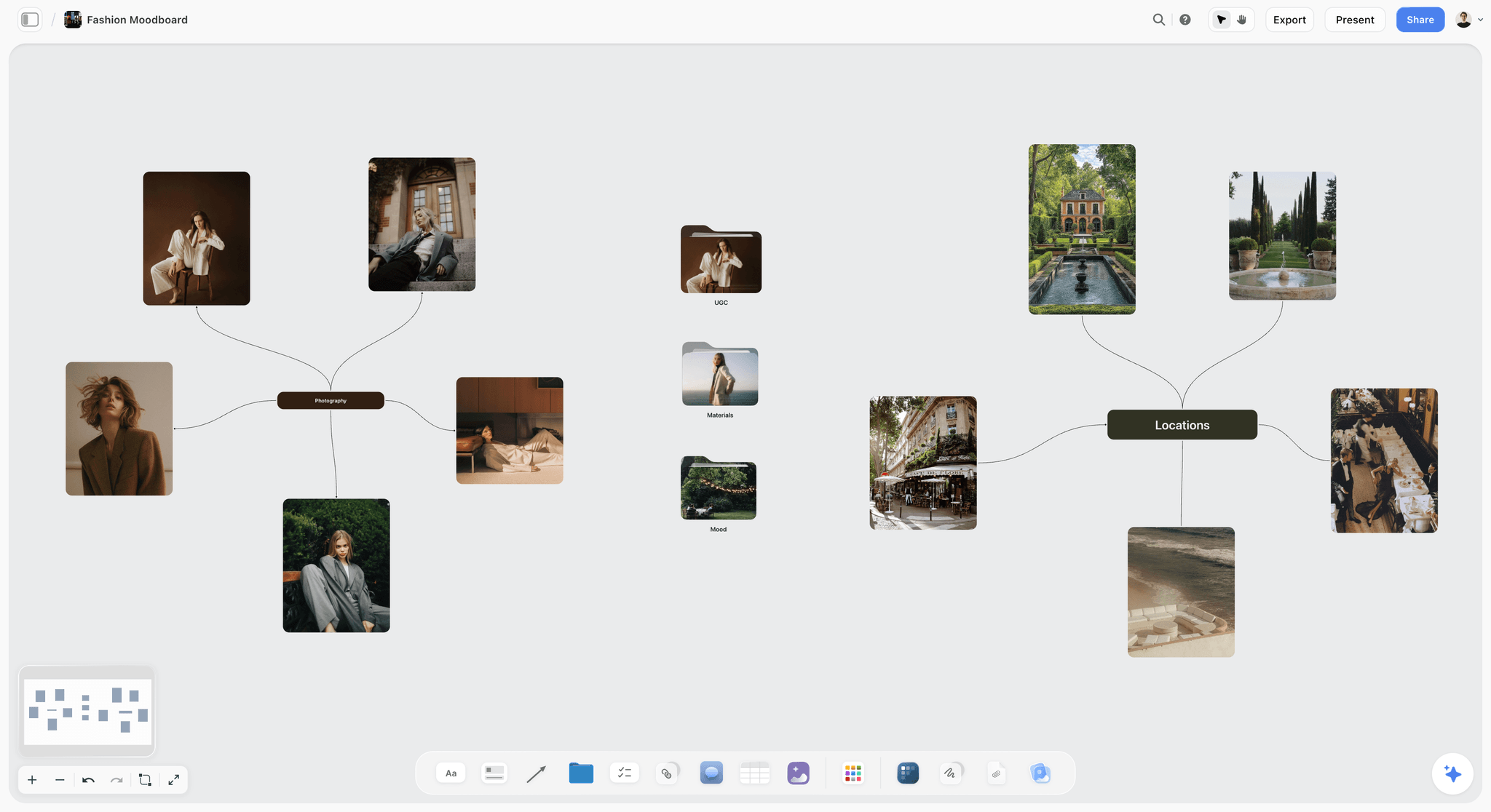
A fashion moodboard mapped on a board: the references each department pulls onto its own wall start here.
Every Department Signs Off 48 Hours Before Call
A styling plan without a deadline is a plan that changes on the morning of the shoot, when changes cost the most. One rule for all four departments keeps the day predictable.
The Storyflow 48-Hour Styling Rule
The Storyflow 48-Hour Styling Rule is our editorial recommendation: every styling department (wardrobe, hair and makeup, props and set) signs off on its own wall of the Storyflow shoot board 48 hours before call time. Signed off means every item is sourced or in hand, every look has a named reference, and anything still open has an owner and a fallback. It is not research; it is the shortest window that leaves time to fix what the sign-off finds.
Why 48 hours, not a week or a morning
Forty-eight hours is two working days. The first is for replacing what the sign-off rejects: a garment in the wrong size, a prop that arrived damaged, a hair reference the client dislikes. The second is for preparation: steaming, pressing, packing, loading the van, prepping the HMUA kit. A week's notice is better when it is possible, but a week is often not available on commercial jobs, and a sign-off a week out tends to be reopened anyway. A morning-of sign-off leaves no time to fix anything.
What signed off means for each department
| Department | Signed off means | Typical blocker | Where it lives in Storyflow |
|---|---|---|---|
Wardrobe | Every look has its pieces in hand, fitted, steamed or scheduled to steam | A size that did not fit at fitting | The Wardrobe wall's look-by-look pieces |
Hair and makeup | Every look has a reference, a change time and an artist; allergies and sensitivities known to the artist | A client who has not chosen between two references | The Hair and makeup wall's brief and references |
Props | Every row on the props list is in hand or confirmed for pickup, with spares | A rental not confirmed, a hero prop not yet bought | The props list table's Status column |
Set | Furniture, surfaces and backdrops booked, delivered or built; floor plan agreed | A paint colour not yet matched | The Set wall's floor plan and palette |
When to break the rule
Break it for perishables: flowers, fresh food and anything that wilts, melts or browns are bought the day before or the morning of, by design. They are signed off as a plan and a supplier 48 hours out, not as items in hand. Break it for a same-week booking too, and say so on the board: when the shoot is three days away, the sign-off moves to 24 hours and the client accepts that late changes cost overtime.
Stylist Brief vs Moodboard
A moodboard shows how the pictures should feel; a stylist brief tells one department what to bring, in what size, colour and quantity, by when. In Storyflow, the moodboard is a wall the whole team reads, and each department's brief sits on its own wall beside the references it pulled from the moodboard.
| Question | Moodboard | Stylist brief | Where it lives in Storyflow |
|---|---|---|---|
Who reads it | The client, the photographer, every department | One department: wardrobe, HMUA, props or set | Moodboard wall shared; one brief per department wall |
What it holds | References for light, colour, mood, setting | Items, sizes, quantities, colours, change times, budget | Pictures beside notes and a table on each wall |
What it decides | Direction | What arrives on set | Status column on each department's table |
When it is final | When the client approves the direction | 48 hours before call time | The department's row in the sign-off table moved to Done |
What goes wrong without it | Each department reads the mood differently | The right mood, the wrong sizes | Empty cells show what is still unknown |
What a moodboard cannot tell a stylist
A moodboard image of a woman in a camel coat by a window says warm, quiet and expensive. It does not say whether the coat is the client's product or a styling piece, what size the model wears, whether a second coat is needed for the walking shot, or whether the brand allows a competitor's coat in frame. Every one of those is a stylist brief line. For building the moodboard itself, see how to create a photoshoot moodboard and how to make a photoshoot moodboard that survives the shoot.
What the stylist brief adds
Each brief turns references into decisions: which pieces, in which colours, in what quantities, from which source, at what cost, ready by when. A brief is short. Six to ten lines and a table beat a page of adjectives, because the stylist reads it while shopping.
How the two link on the board
Drag each reference from the moodboard wall onto the department wall it informs and write the brief line under it: "Coat: camel, mid-calf, size 10, client product, two of them." In Storyflow, anyone with edit access can select a reference picture, click Draw and circle the collar they mean; the ink stays part of the picture and moves, resizes and downloads with it. For the difference between direction documents, see creative direction vs moodboard vs style guide.
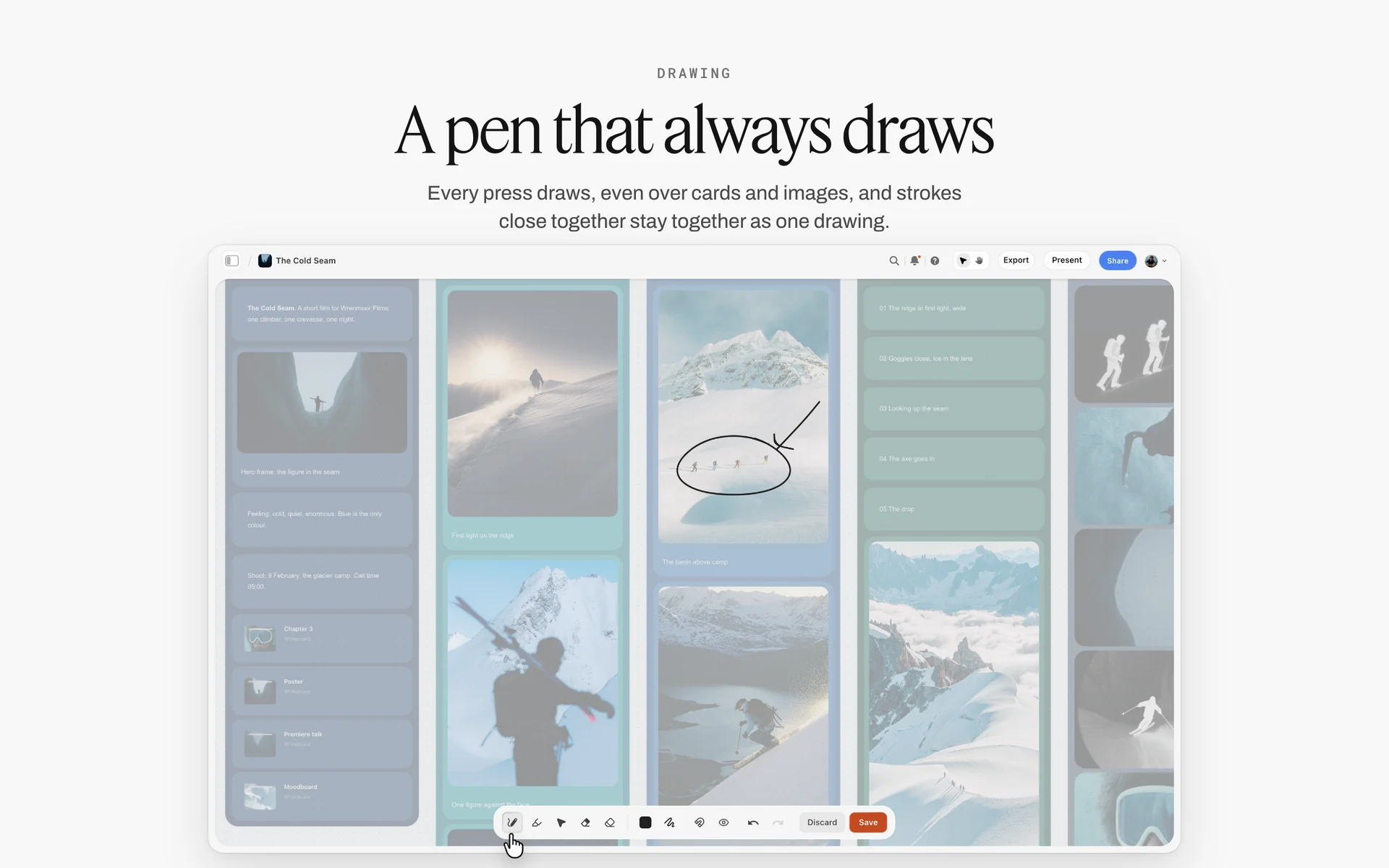
Drawing on a reference: a circle and an arrow around the detail that matters tell a stylist more than a paragraph.
The Four Styling Departments and Who Owns Each
On a large commercial shoot, each department is a person. On most photography jobs, one stylist covers two or three, and the photographer covers the rest. The plan is the same either way; only the names change.
| Department | Owns | Decides with | Needs from the photographer | Signs off on |
|---|---|---|---|---|
Wardrobe | Clothing, shoes, accessories, jewellery, fittings | Client, photographer | Look count, sizes, product list, palette | The Wardrobe wall |
Hair and makeup | Skin, hair, nails, grooming, touch-ups | Photographer, client | Look references, change times, people in the chair | The Hair and makeup wall |
Props | Every object handled or featured | Photographer, set | Shot list, palette, product list, brand rules | The props list table |
Set | Furniture, backdrops, surfaces, walls, floor | Photographer, props | Floor plan, palette, light positions | The Set wall |
When one stylist covers wardrobe and props
The common case on product and lifestyle shoots. The risk is that props get the leftover time. Fix it by giving props its own wall and its own sign-off, even when the same person owns both walls.
When the photographer covers props and set
On small shoots, the photographer sources props and builds the set. The plan still needs the props list: it is the only way to know what came back from the shoot and what is still in the studio.
When the client supplies wardrobe or props
Client-supplied items need the same rows as anything else, with the client as owner and a date the items arrive. Products for the shoot also need a quantity: two of every hero product, so one can be prepped while the other is shot.
Who decides when departments disagree
The photographer decides between departments on set; the client decides between options before sign-off. Write that on the board's first wall, so a set designer and a wardrobe stylist arguing about a green wall know whose call it is.
The Look Plan: One Row per Look
The look plan is the spine of the styling plan. Every department reads it, and every change time on the day comes from it.
| Look | Shots | Wardrobe | Hair | Makeup | Props | Set | Change time in |
|---|---|---|---|---|---|---|---|
1. Morning kitchen | 3 | Oatmeal cardigan, cream tee, jeans | Loose, air-dried | Bare skin, balm | Mug, bread board, linen cloth | Kitchen corner | First look |
2. Garden walk | 2 | Same cardigan, scarf, boots | Same as look 1 | Same as look 1 | Basket, cut flowers | Location garden | 10 min |
3. Fireside evening | 3 | Rust roll-neck, wool trousers | Low bun | Warm cheek, defined brows | Blanket, books, candle holder | Living room set | 30 min |
4. Studio product | 4 | Each knit on a hanger and flat | None | None | Wooden hangers, props table | White sweep | 15 min |
How to count looks
A look changes when any department changes something the camera sees. A new scarf is a new look if it is in frame; a hair change is a new look even if the outfit stays. Count looks from the shot list, not the moodboard: the shot list says what will be photographed, the moodboard only what it should feel like.
How to set change times
Ask each department how long its part of the change takes, and use the slowest. Hair is usually the slowest; a full makeup change is next; wardrobe changes are fast unless fittings or pinning are needed. Write the change time on the row, then add up the day: four looks with three changes of 10, 30 and 15 minutes add 55 minutes of changes to the schedule before anyone shoots.
How to order looks
Group by hair first, because undoing a hairstyle is slower than changing clothes. Then group by set, because moving furniture is slower than moving people. Put the look with the heaviest makeup last, unless it is the hero, in which case shoot it while everyone is fresh and plan the clean-up time after it. In Storyflow, the look plan table's rows are kept in shoot order by hand, since tables do not sort.
Where the look plan lives on the board
Across the top of the shoot board, above the four department walls. Each row in the look plan carries the look's references beside it, and the Shotlist tool's Setup note for each shot names the look it belongs to. When continuity photos come in on the day, they go next to the row.

A campaign moodboard grouped into walls: each wall becomes one look's references once the look plan is set.
Wardrobe: The Short Version
Wardrobe has its own full guide: how to plan wardrobe for a photoshoot covers look sheets, fittings and what the camera does to fabric. Here is what the Wardrobe wall on a styling board needs, and how it connects to the other three departments.
What the Wardrobe wall holds
One group per look: the pieces, each with a picture, size and source; the alternates; and the note on what must not appear (visible logos, a competitor's product, a colour the brand avoids). In Storyflow, the Wardrobe wall sits beside the look plan so a stylist can see which looks share pieces.
Fittings and alternates
Every hero piece needs a fitting or a second size. Bring one alternate per look in a different colour from the palette, so a clash with the set on the day has a fix in the rail. In Storyflow, the Selects tool's four walls (To review, Yes, Maybe, No) let the client choose between options by dragging pictures, if they have edit access; a view-only link cannot move cards.
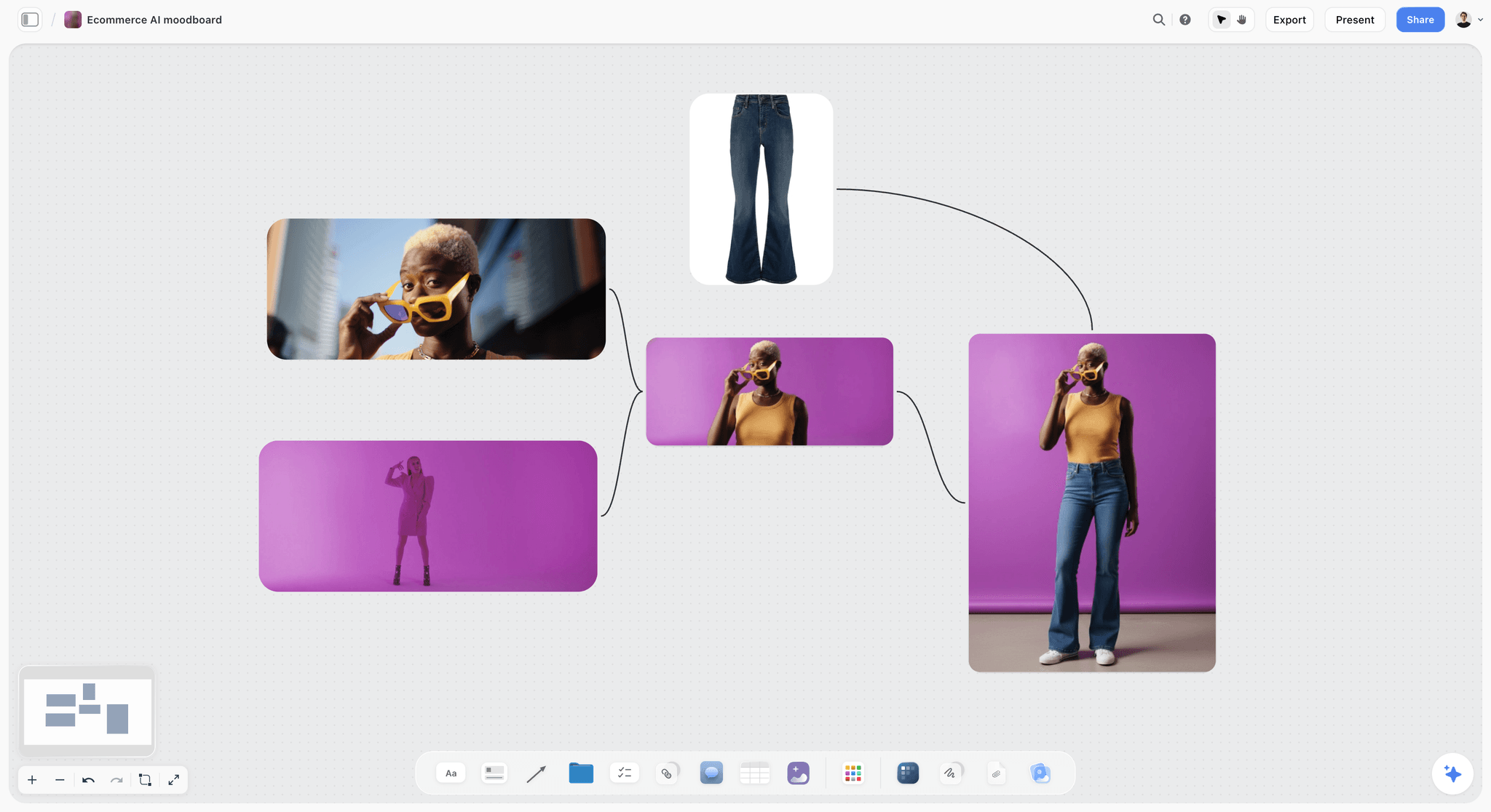
A wardrobe reference with a strong accent: the alternate for this look would come from the palette, not from the rail.
Fabric on camera
Very fine stripes and small checks can shimmer on a digital sensor, shiny fabrics show every crease, and pure black and pure white lose detail at the ends of the exposure. None of this rules a fabric out; it means the wardrobe wall flags it for the photographer before the day.
Buying to return
Planning to buy clothes, wear them on a shoot and return them is a known problem for retailers: the US National Retail Federation lists "wardrobing" among costly return behaviours, and its 2025 report found that "9% of all returns are fraudulent", as its October 2025 release puts it. Budget wardrobe as a cost, borrow from the brand or a rental source with an agreement, and never plan a styling budget around returns of worn pieces.
Hair and Makeup Brief: What the Artist Needs
A hair and makeup artist can work from a moodboard alone, and many do, which is why the result often surprises the client. A brief of eight lines removes the surprise. The artist's craft is, in Wikipedia's words on the make-up artist, that of "an artist whose medium is the human body"; the brief tells them what this job asks of it.
The eight lines of an HMUA brief
- The people in the chair: how many, in what order, and their call times.
- The skin finish per look: bare, natural, polished, editorial.
- The hair shape per look, with one reference each.
- Changes between looks, with the minutes allowed for each.
- Anything that must stay the same across looks (brows, nails, a fringe).
- Grooming for men in frame: beard, hair, skin.
- What the artist must know about each person: sensitivities and allergies, shared only with the artist.
- Touch-up plan: who stays on set, and when.
A filled HMUA brief
| Look | Person | Skin | Hair | Makeup | Change time | Reference | Where it lives in Storyflow |
|---|---|---|---|---|---|---|---|
1. Morning kitchen | Model A | Bare, light balm | Loose, air-dried texture | No visible makeup | First look | Ref 1 | Hair and makeup wall, look 1 group |
1. Morning kitchen | Model B | Groomed, matte | Natural, product-free | Brows tidied | First look | Ref 2 | Same group |
2. Garden walk | Model A | As look 1 | As look 1, windblown | As look 1 | 10 min touch-up | Ref 3 | Look 2 group |
3. Fireside evening | Model A | Warm, slight glow | Low bun, loose strands | Warm cheek, defined brows | 30 min | Ref 4 | Look 3 group |
3. Fireside evening | Model B | As look 1 | Combed back | Light matte | 10 min | Ref 5 | Look 3 group |
Skin, allergies and hygiene
Ask whether anyone in the chair has sensitivities, and pass the answer only to the artist. The US FDA's page on allergens in cosmetics notes that cosmetic products "can provoke allergic reactions in some consumers", most often as itchy red rashes. For any hair colour change, the safety checklist on the FDA's hair dye page says to "do a patch test on your skin every time before dyeing your hair", which puts colour work days ahead of the shoot, not on it. The FDA's eye cosmetic safety page says not to share or swap eye cosmetics and recommends single-use applicators for shared testers; the same logic is why an artist working on several people uses disposable applicators for each.
Timing per look
Start the artist's first person 60 to 90 minutes before the first shot for a polished look, less for a bare one: that is a planning figure to agree with your artist, who knows their own speed. Write it on the call sheet. Each change time on the look plan comes from the artist, not from the schedule.
Touch-ups and the kit on set
The artist, or a second artist on a large day, stays on set for touch-ups between frames: shine, flyaways, lint. The brief says who that is. On a small shoot without an artist on set, the photographer's assistant carries blotting papers and a lint roller, and the brief says so.
Props List: What Goes On It
A props list is every object the camera will see that is not wardrobe, skin or the set itself. In film, the property master is "responsible for purchasing, acquiring, manufacturing, properly placing, and/or overseeing any props", as Wikipedia's entry on the property master puts it; on a photoshoot, that is whoever owns the props list.
Hero props, background props and consumables
Hero props are handled, featured or close to the lens: the mug in the model's hand, the book on the table. Background props fill the frame: a stack of plates on a shelf, a plant in the corner. Consumables are used up: food, flowers, ice, candles, tissue. Each type has its own counting rule, and the type column on the props list tells everyone which rule applies.
Props vs set dressing
The working line: a prop is handled or featured; set dressing furnishes the room and stays put. Wikipedia's entry on the set dresser describes the job as preparing "the set with props and furniture to give it correct appearance", and notes the two departments cross over constantly. On a small shoot, put both on the props list with a type column, and let the set wall hold furniture and surfaces only.
Counting: one plus spares
Count one of every background prop and two of every hero prop that can break, spill, stain, wilt or roll away. Consumables get a quantity for the whole day plus a third: three bunches of flowers for a day that needs two, because the first bunch wilts by lunch. Glassware gets a spare per shot, because glass breaks.
What the props list is not
It is not a shopping list. A shopping list stops at the till; a props list carries every item from source to set and back again, with a return date and an owner. That is why it is a table, not a note.
Props List Template: A Filled Prop List Example
Copy this into a table on the Props wall of your shoot board. It is filled for Brindlecote, a fictional knitwear brand shooting an autumn campaign with a photographer called Hana Osei and a prop stylist called Teo. Swap the rows, keep the columns.
| # | Item | Look | Type | Qty | Source | Cost | Status | Owner | Return by |
|---|---|---|---|---|---|---|---|---|---|
1 | Stoneware mug, oat glaze | 1 | Hero | 2 | Buy | 18 each | Done | Teo | Kept |
2 | Sourdough loaf | 1 | Consumable | 3 | Bakery, morning of | 6 each | Not started | Teo | Used |
3 | Bread board, oak | 1 | Hero | 1 | Studio stock | 0 | Done | Hana | Studio |
4 | Linen tea towel, rust | 1 | Background | 2 | Rental | 4 each | In progress | Teo | 14 Oct |
5 | Wicker basket | 2 | Hero | 1 | Borrow, client office | 0 | In review | Client | 14 Oct |
6 | Cut flowers, dried and fresh | 2 | Consumable | 3 bunches | Florist, day before | 25 each | Not started | Teo | Used |
7 | Wool blanket, cream | 3 | Hero | 2 | Client product | 0 | Done | Client | Client |
8 | Hardback books, plain spines | 3 | Background | 8 | Rental | 2 each | In progress | Teo | 14 Oct |
9 | Candle holder, brass | 3 | Background | 1 | Rental | 6 | In progress | Teo | 14 Oct |
10 | Flameless candles | 3 | Background | 3 | Buy | 9 each | Done | Teo | Kept |
11 | Wooden hangers, plain | 4 | Hero | 12 | Studio stock | 0 | Done | Hana | Studio |
12 | Tissue paper, unbranded | 4 | Consumable | 1 pack | Buy | 5 | Done | Teo | Used |
13 | Ceramic jug, cream | 1 | Background | 1 | Rental | 5 | Blocked | Teo | 14 Oct |
14 | Spare glassware set | All | Spare | 4 | Studio stock | 0 | Done | Hana | Studio |
The columns, and why each one is there
Item names the thing precisely enough to buy the right one. Look ties it to a row in the look plan. Type sets the counting rule. Qty includes spares. Source says where it comes from (buy, rent, borrow, make, client, studio stock). Cost is per item. Status uses Storyflow's six fixed table options (Not started, Blocked, In progress, In review, Done, Archived). Owner is a person column on the board. Return by is a date, or Kept, Used or Studio.
How to read the example
Row 13 is Blocked: the rental house is out of cream jugs, and the sign-off two days out will either find a substitute or cut the jug. Row 5 is In review: the client's basket is promised but not seen. Rows 2 and 6 are Not started on purpose, because perishables are bought late. Everything else is in hand.
Adding a picture per row
A props list without pictures gets the wrong jug. In Storyflow, place a picture of each prop on the Props wall beside the table, numbered to match the row, so the person collecting it knows what it looks like.
A shorter props list template for small shoots
For a product shoot with ten props, cut the table to Item, Qty, Source, Status and Return by. Keep the return column whatever else you cut: it is the one that saves money.

A status tracker on a board: the props list works the same way, one status per item from Not started to Done.
How to Make a Prop List in 7 Steps
A prop list comes from the shot list, not from the moodboard, because the shot list says what will be in frame.
- Go shot by shot and list every object in each frame, including what the model holds, what sits on surfaces and what hangs on walls.
- Mark each item hero, background or consumable.
- Merge duplicates across shots and add spares by type: two of every breakable hero, a third more of every consumable.
- Give every item a source: buy, rent, borrow, make, client or studio stock.
- Price each row and total the list; in Storyflow, carry the total to the Budget wall of the Brief tool, whose Item / Cost table sums the costs.
- Give every row an owner and a return date.
- Check the list against the palette and the brand rules: no visible logos, no competitor products, nothing in a colour the brand avoids.
Where most prop lists go wrong
Step 1 skipped: lists built from the moodboard carry beautiful objects that are in no shot, and miss the cup the model needs to hold. Step 6 skipped: rentals come back late and the late fee lands on the photographer.
A props list for a product shoot vs a lifestyle shoot
A product shoot's props list is short and exact: surfaces, risers, a few objects that set scale, and cleaning supplies. A lifestyle shoot's props list is long and loose: the room has to look lived in, which takes dozens of small objects. Plan the lifestyle list by surface (table, shelf, windowsill) so nothing is forgotten.
Sourcing and Returns: Buy, Rent, Borrow or Make
Where a prop comes from decides its cost, its risk and its return date. Choose the source before you choose the item.
| Source | Use it when | Risk | Return rule | Where it lives in Storyflow |
|---|---|---|---|---|
Buy | Consumables, cheap items, things that will be damaged | Cost adds up across a long list | Kept or used; note it | Source column "Buy", Return by "Kept" |
Rent | Furniture, antiques, expensive or specific pieces | Damage fees, late fees | A date and a condition check | Source "Rental", a Return by date |
Borrow | Client products, friends, the studio next door | Goodwill, loss | Agreed date, photographed on return | Source "Borrow", owner named |
Make | Custom signage, painted surfaces, mock packaging | Time | Kept or binned | Source "Make", a to-do with a due date |
Client | The products being sold, brand items | Late arrival | Back to client, counted | Source "Client", Owner the client contact |
Studio stock | Hangers, risers, glassware, linens | Wear | Back to the shelf | Source "Studio stock" |
Renting props
Rent what is expensive, large or specific, and photograph every rented item on collection and on return so a damage claim can be checked. Note the rental agreement's late fee on the row. Storyflow does not book rentals or hold agreements; it holds the row, the picture and the return date.
Borrowing from the client
Client offices are full of props: baskets, ceramics, plants, branded items the brand is happy to show. Borrowed items need the same row, an owner on the client side and a return date, or they end up in the photographer's studio for a year.
Logos, trademarks and other people's work
A prop with a visible logo puts someone else's trademark in your client's picture. The US Patent and Trademark Office says a trademark "can be any word, phrase, symbol, design, or a combination" of these, in its explainer what is a trademark. Film art departments cover or change marks that are not cleared, a practice Wikipedia calls greeking in its arts section. Do the same: tape over labels, turn objects, decant products into plain containers. Art on a set wall is someone's copyright too; GOV.UK's guidance on ownership says the first owner is usually the person who created the work, so use your own prints or cleared pieces.
Closing out the returns
The job is not finished until every row's return is closed. In Storyflow, read down the Status column: anything not at Done or Archived after the shoot is still out. Move each returned item's row to Archived with a note of its condition.

A studio's project tracker: a job moves to done only when the last rental is back.
Food, Flowers and Other Perishable Props
Perishables need their own plan because they cannot be signed off as items 48 hours early. They are signed off as a supplier, a buying time and a backup.
Hero food and stand-ins
Food stylists shoot a stand-in while lighting and save the best-looking item, the "hero", for the frame; Wikipedia's entry on food styling describes the hero being "represented by a cardboard or lower-quality food item stand-in" during setup and test shots. It also notes styled food is usually marked inedible and thrown away after the shoot. Put both on the props list: the hero, the stand-in, and the plain food for the crew's lunch, which is a different row.
Flowers
Buy flowers the day before or the morning of, and plan a third more than the shots need. Dried flowers last the day; fresh ones need water, shade and a spare bunch for the afternoon.
Ice, steam and other effects
Real ice melts under lights; real steam fades. Fake ice and added steam are standard tricks in food styling for that reason. Put the effect on the props list as its own row with an owner, or it becomes the photographer's job on the day.
Candles and open flames
A candle in frame is a fire risk on a set full of fabric, paper and hot lights. The UK's Health and Safety Executive calls risk assessment "a fundamental part of managing health and safety" on film and TV productions. Use flameless candles where the flame is not visible or barely visible, and when a real flame is needed, assign one person to it and write that name on the props list row.
Set Dressing: Building the Room Around the Product
Set dressing turns a space into a place. On a photoshoot it is everything the camera sees behind and around the subject that is not handled: walls, floors, furniture, surfaces, windows, plants, art.
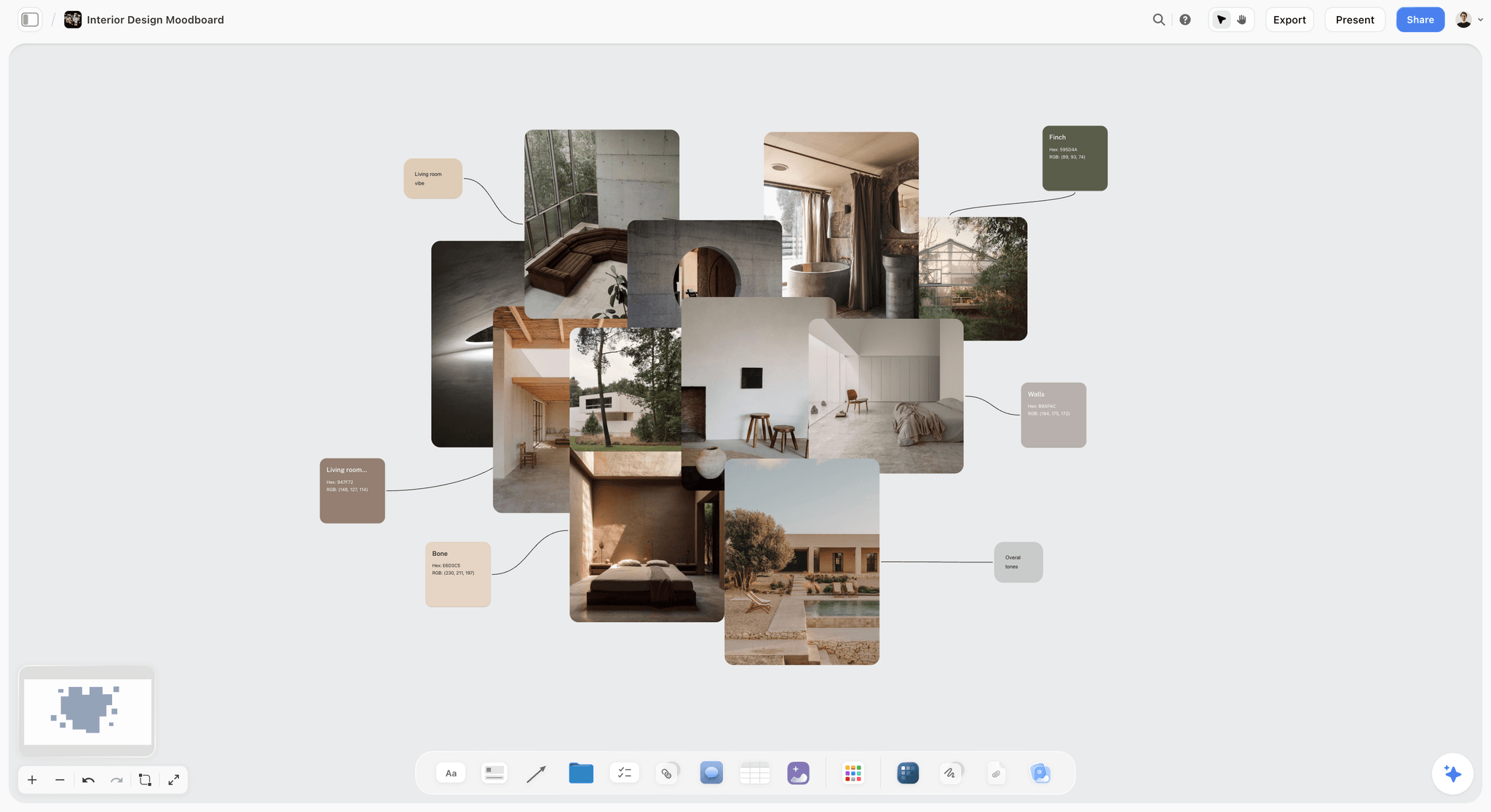
An interior moodboard with swatches: the Set wall starts from references like these and ends with a floor plan.
Start from one wide reference
Pick one image that shows the whole room you want, wide, and plan the set from it: the floor, the back wall, the main furniture, the surfaces in frame, the window. Every other set reference is a detail of that room. Without the wide reference, sets become collections of nice objects with no room around them.
Three layers: foreground, middle, background
A dressed set reads in three depths. The foreground has one or two out-of-focus objects that frame the subject; the middle is where the subject and hero props sit; the background sets the place and must not compete. Plan each layer on the Set wall as its own short list, so the background does not fill up with hero-quality objects nobody will see.
Surfaces and textures
The camera is close to surfaces in product and food work: a table top, a countertop, a shelf. Choose surfaces by texture and colour from the palette, and bring two of each so the photographer can choose on the day. Painted boards and sheets of material are cheap, light and quick to swap.
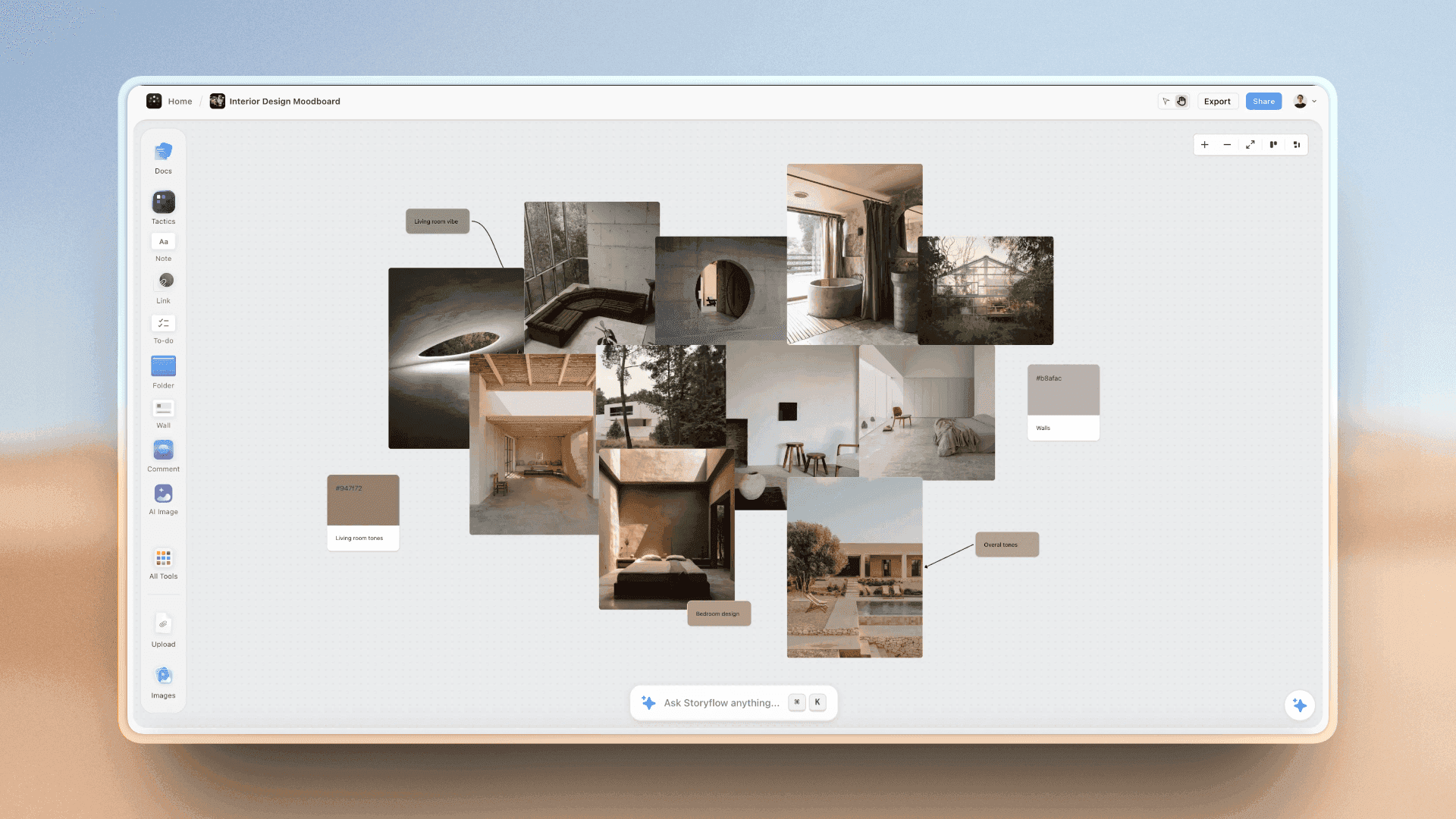
Room references with their swatches: surfaces and textures for the set are chosen against values like these.
Floor plan and light positions
Sketch the set from above: where the subject stands, where the camera goes, where the lights stand, where the furniture sits. In Storyflow, the freehand pen draws a quick top-down sketch on the Set wall; it is a sketch, not a measured plan. Agree light positions with the photographer before the set is built, so the set does not block the key light. The lighting side has its own guide: the photoshoot lighting plan from references to setups.
Safety on the set
Furniture that can tip, shelves that carry weight, ladders, hot lights near fabric, cables across walkways. A short risk note on the Set wall names each hazard and who checks it. HSE's film, theatre and broadcasting pages are a starting point for UK productions.
One Palette Across Wardrobe, Set and Props
The fastest way to make four departments look like one shoot is one palette. Five colours is enough: two neutrals, two mid-tones and one accent.
| Role | Colour | Hex | Used in wardrobe | Used in set | Used in props |
|---|---|---|---|---|---|
Neutral 1 | Oat | #D8CBB5 | Cardigan, tee | Wall | Mug glaze, linen |
Neutral 2 | Stone | #A39E94 | Trousers | Floor, surfaces | Ceramic jug |
Mid-tone 1 | Rust | #A0522D | Roll-neck | Cushion | Tea towel |
Mid-tone 2 | Moss | #6B6F4A | Scarf | Plants | Dried flowers |
Accent | Brass | #B08D57 | Jewellery | Lamp | Candle holder |
Hold the palette as colour cards
In Storyflow, each palette colour is a colour card in one of three styles: Classic, Spec (one wall wide, values in columns) or Chip, a paint chip. A card shows any of Hex, RGB, HSL and CMYK, edited on the card, so a set builder matching paint and a printer matching a backdrop read the same values. The ChatGPT plugin and Claude connector can create the palette and set each card's style and values.
Skin tones in the palette
The palette must work with the skin tones of the people in frame. A rust that warms one model can flatten another. Test the wardrobe colours against each model at the fitting and photograph the test; keep the test shots on the look's row.
The clash test
Before sign-off, put one picture per department side by side for each look: the outfit, the hero prop, the set wall. If one of them is outside the palette, either it is the accent on purpose or it goes.
The palette beside the mood and the place: each named colour carries its values, so the clash test checks every outfit, prop and set wall against one list.
Continuity Between Looks
Continuity is the styling job nobody notices when it works. A model's sleeve rolled in one frame and down in the next, a mug half full then full, a fringe parted on the other side: each one is a reshoot or a retouch.
Continuity photos
Film crews take "instant photographs of actors and sets" at the start and end of each day's shooting and compare them later, as Wikipedia's article on continuity describes; digital cameras and phones now do the job. On a photoshoot, take continuity photos at the start and end of every look block, and of every prop arrangement before it is moved.
What to photograph
| Moment | What to photograph | Who takes it | Where it lives in Storyflow |
|---|---|---|---|
Look ready | Full length front, back and side; hair close-up; hands | Stylist or assistant | Beside the look's row in the look plan |
Set dressed | Wide of the set, then each surface | Prop stylist | The Set wall, grouped by look |
Before a break | The set and the model as they are | Assistant | Beside the look's row |
Look finished | The same angles as look ready | Stylist | Beside the look's row |
End of day | Every set left standing for day 2 | Prop stylist | The Set wall, labelled day 2 |
Resetting between frames
Some props move between frames: a drink drunk, a page turned, a blanket pulled. Keep a reset list on the Props wall for each look that has one: "Mug: two thirds full. Blanket: corner over the arm. Book: open at the middle." The assistant resets from the list, not from memory.
Multi-day shoots
A second day rebuilds a look from the continuity photos. Without them, the look is rebuilt from memory and the client spots the difference. In Storyflow, continuity pictures sit beside each look's row, so the day 2 crew rebuilds from the same board the day 1 crew used.
Department Sign-Off Before the Shoot
The 48-hour sign-off is a 30-minute meeting, in person or on a call with the board on screen, where each department walks its wall and the client says yes or names a change.
| Department | What is signed | Signed by | Deadline | Status in Storyflow |
|---|---|---|---|---|
Wardrobe | Every look's pieces and alternates | Client and photographer | 48 hours before call | Wardrobe row of the sign-off table: Done |
Hair and makeup | Every look's reference and change time | Photographer, client for hero looks | 48 hours before call | Hair and makeup row: Done |
Props | The props list, every row In review or better | Photographer | 48 hours before call | Props table: no row Not started except perishables |
Set | Floor plan, palette, furniture and surfaces | Photographer and client | 48 hours before call | Set row: Done |
Perishables | Supplier, buying time and backup | Prop stylist | 48 hours before call | Rows at Not started with a buy date |
Running the sign-off
Walk the look plan row by row, then each department wall. For each row, the question is: is everything in hand, and if not, who fixes it by when? Anything not in hand gets an owner and a fallback on the board during the meeting, not after it.

A week of prep as checklists: the 48-hour sign-off sits two working days before the shoot column.
What the client signs
The client signs the looks, the palette and anything with their product or brand in it. They do not sign the props list line by line; the photographer does. Send the client a view-only link to the board after the meeting with one line: "Signed off as on this board; changes after today may cost time on the day."
What happens after sign-off
Changes after sign-off are possible, and they have a cost: a new look is overtime, a new prop is a run to the shops. Write each late change on the board with its cost, so the client can see what it did to the day.
Worked Example: Brindlecote's Autumn Knitwear Shoot
An illustrative example, written as a fictional brand's project. Brindlecote is a small knitwear brand shooting four looks for its autumn campaign and its online shop in one day: three lifestyle looks in a rented cottage and one product look on a white sweep. Hana Osei is the photographer, Teo is the prop stylist who also covers set, and a freelance hair and makeup artist joins on the day.

A photoshoot workflow board: the styling plan sits in pre-production, between the approved moodboard and the shoot.
Ten days out: the look plan
Hana builds the look plan from the shot list: four looks, twelve shots. Brindlecote's head of brand approves the moodboard on the same board. Hana adds a look plan table across the top with one row per look and the four department walls under it.
Nine days out: the palette
Teo pulls five colours from the approved moodboard: oat, stone, rust, moss and brass. Each goes on a colour card in the Spec style, with Hex and CMYK, at the top of the Set wall. The wardrobe and props both work from them.
Eight days out: the briefs
Each department wall gets its brief. Wardrobe: the client's knits for each look plus styling pieces in the palette, two models' sizes. Hair and makeup: bare and natural for looks 1 and 2, a warmer evening look for look 3, change time 30 minutes. Props: the 14-row list above, built shot by shot. Set: the cottage's kitchen corner and living room, a white sweep for look 4.
Six days out: sourcing
Rentals are booked, the client's basket is promised, the bread and flowers are given a buy time. The cream jug rental falls through and the row goes to Blocked with a note. Teo uploads a picture of every prop beside the table.
Two days out: the sign-off
A 30-minute call with the board on screen. Wardrobe is Done. Hair and makeup is Done after the head of brand picks the low bun over the braid. The props list has the jug Blocked; Teo has a substitute stoneware jug from studio stock, the client accepts it, and the row moves to Done. Set is Done. The client gets the view-only link with the sign-off line.
The shoot day
The day runs in the look plan's order: kitchen, garden, fireside, then product, grouped by hair. Continuity photos go beside each row at the start and end of each look. The second sourdough loaf becomes the hero after the first is cut too early, which is why there were three.
After the shoot
Rentals go back on the 14th, photographed on return. The basket goes back to the client office. Every row on the props list ends at Archived, Kept, Used or Studio. Hana saves the look plan, the four department walls and the props table as a tool called Styling plan, so the next shoot starts from the same skeleton.
The Styling Board in Storyflow: Walls, Tools and Tables
Here is how the pieces above sit on one Storyflow board, and which tools build them.

The production tools in All Tools: Shotlist, Call Sheet, Location and Selects each drop a skeleton of empty walls to fill.
One wall per department
Make four walls named Wardrobe, Hair and makeup, Props and Set, with the look plan table above them. Walls are grouped sections on the board: references, notes and tables sit inside each one and move together.
The Shotlist tool for the looks in each shot
The Shotlist tool drops four walls, Shot 1 to Shot 4, each with a picture box, a Description, a Shots required checklist, and Setup and Equipment notes. Write the look in each shot's Setup note. A "+" on the row's last wall (or Cmd/Ctrl+Enter) adds the next shot, emptied with its headings kept.
The Selects tool for choosing options
When the client must pick between two coats or three jugs, drop the Selects tool: To review, Yes, Maybe and No. The client drags pictures between walls if they have edit access; there is no star or vote, and a view-only link cannot move cards.
The Call Sheet tool for what to bring
The Call Sheet tool's The shoot wall has a Bring checklist, the place for what talent brings (their own shoes, nude underwear, a second shirt), and the Cast & crew wall has Cast and Crew folders. It sends nothing to anyone; share it the way any board is shared.
Save the styling plan as your own tool
Select the look plan, the four walls and the props table, press New Tool at the end of the selection toolbar, and give it an icon, a name and a description. It appears in All Tools under My tools for every future shoot. Saving and placing your own tools needs a paid plan; an invited free account cannot.
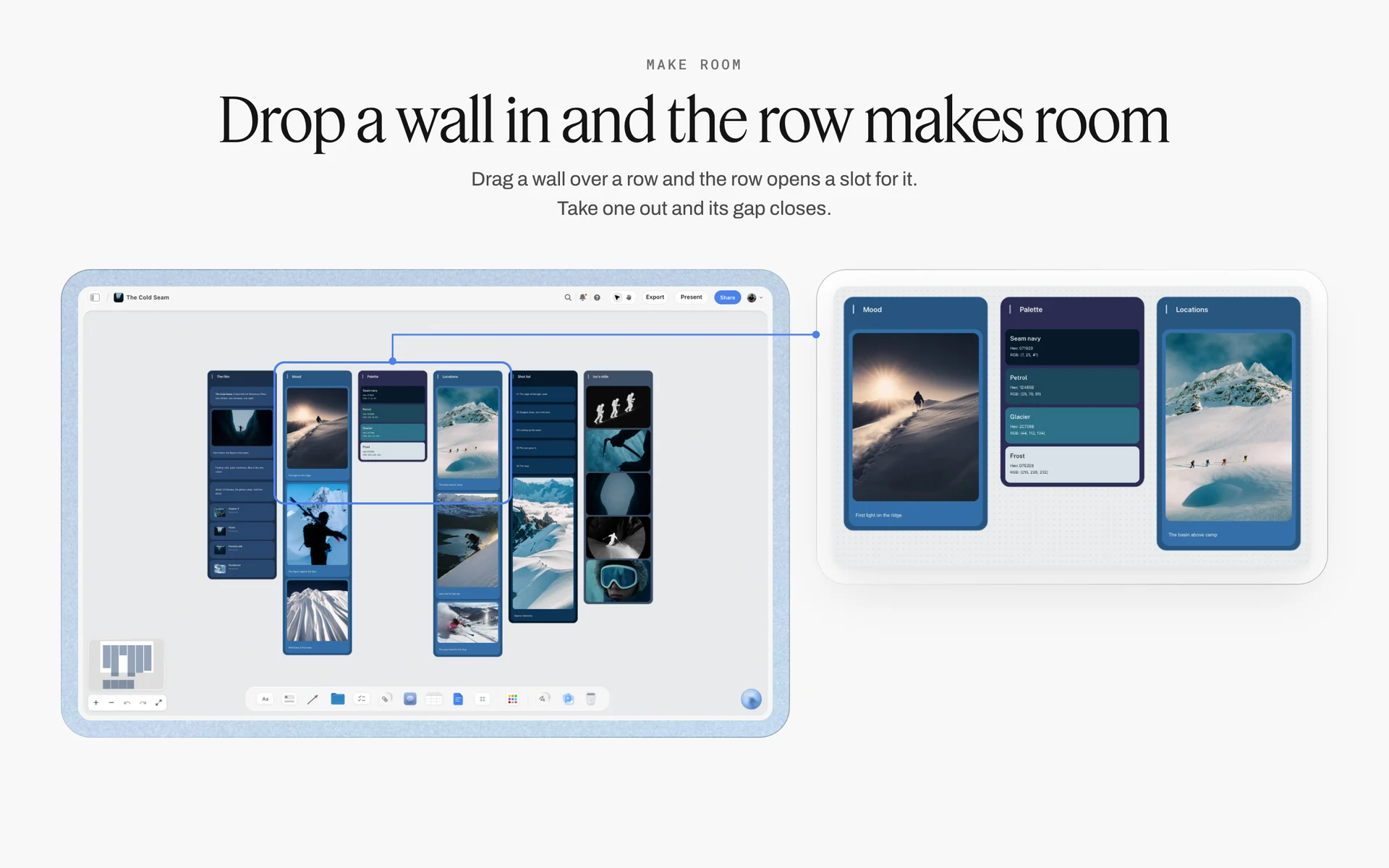
Make Room for reordering references
With Make Room switched on in Settings, under Configuration and then Board, dragging an image over a column of images opens a slot for it, and taking one out closes the gap. It is off by default; with it off, everything is placed freely.
Do This in ChatGPT or Claude
If you already talk shoots through with ChatGPT or Claude, the styling plan does not need to stay in the chat. The Storyflow plugin and connector build the look plan, the walls and the props list on the board the stylists will use.
Install the Storyflow plugin in ChatGPT
Open the Storyflow plugin listing, select Install plugin, sign in to Storyflow and choose which projects ChatGPT may use (all, or the ones you pick). Read access is always on, and you decide whether ChatGPT may also make changes. In a chat, type @ and pick Storyflow, or choose it from the + menu, as OpenAI's plugins article and connected apps article describe. Availability depends on your ChatGPT plan, workspace and region, and in a Business or Enterprise workspace an admin manages plugins.
Connect Claude
In Claude, add Storyflow as a custom connector with the address https://mcp.storyflow.so/mcp; the setup page covers Claude, Gemini and Grok. The Claude moodboard workflow and the Claude photoshoot plan workflow show boards built from Claude.
Prompts for a styling plan
- "On my Brindlecote autumn board, make a look plan table with columns Look, Shots, Wardrobe, Hair, Makeup, Props, Set and Change time, one row per look from this shot list."
- "Make four walls named Wardrobe, Hair and makeup, Props and Set under the look plan, each with a brief note at the top."
- "Build a props list table on the Props wall with columns #, Item, Look, Type, Qty, Source, Cost, Status, Owner and Return by, from this shot list, counting two of every breakable hero prop."
- "Create a five-colour palette from these names and values as colour cards in the Spec style, showing Hex and CMYK."
- "Write a hair and makeup brief note with eight lines from the look plan: people, skin, hair, changes, change times, what stays the same, grooming, touch-ups."
- "List every props list row that is Not started or Blocked, with its owner."
- "What changed on this board in the last week, and who changed it?"
What lands on the board, and what to check by hand
The tables, walls, notes, checklists and colour cards land on the board, where the team edits them like anything else. Check by hand: every quantity and spare against the counting rule, every prop against the brand's rules about logos, and every colour value against the brand's own files. Neither the plugin nor the in-app AI can drop the Shotlist, Call Sheet or Selects tools; drop them yourself from All Tools. A photo you attach in the ChatGPT chat does not reach Storyflow; the plugin gives you an upload link for the board instead, which matters for prop pictures. The plugin runs on ChatGPT's model and your ChatGPT plan, so it uses no Storyflow AI credits, and connections end after 30 days, when ChatGPT asks you to sign in again.
The plugin is not the in-app AI
Inside Storyflow, the in-app AI is a separate tool that uses Storyflow AI credits on paid plans. Its Build a moodboard for my project workflow drafts a moodboard on the board, and it can design a lookbook or a call sheet PDF from what the board holds, or a spreadsheet file (.xlsx) of the props list to send to a rental house. It reads the current board plus up to five documents and three other boards you attach, sees an image's pixels only when you select it, and writes straight onto the board, where one undo reverses its whole turn. The ChatGPT lookbook workflow shows the lookbook route.

The same Storyflow board from either assistant: ChatGPT through the plugin, Claude through the connector.
Where to Build It: Storyflow vs Spreadsheets, Docs, Moodboard Apps and Production Suites
A styling plan needs references, briefs, a props list with statuses, a palette and continuity pictures in one view. The table puts Storyflow first, on the basis that all five sit on one board; the other kinds of tool follow by the job each does best.
| Kind of tool | References beside briefs | Props list with status and returns | Palette values | Continuity pictures by look | Best job here |
|---|---|---|---|---|---|
Storyflow | Yes, one wall per department | Yes, a table with status, person and date columns | Yes, colour cards with Hex, RGB, HSL, CMYK | Yes, beside each look's row | Planning and signing off the styling |
A spreadsheet | No, links out | Yes, with filters | As text | No | A very long props inventory |
A shared doc | Images inline, no layout | As a text table | As text | Inline, hard to find | A written brief for one department |
A moodboard app | Yes | No | Sometimes | No | Collecting and arranging references |
A production management suite | Partly | Yes, often with inventory | No | Partly | Film productions with a full art department |
A spreadsheet
A spreadsheet is best for a long props inventory: hundreds of rows, filters by source or return date, formulas for totals. Its limit is that a prop is a row without a picture, and the references and briefs live elsewhere. Choose a spreadsheet instead when the props list runs to hundreds of items across many days; in Storyflow, the in-app AI can design a spreadsheet file from the board's table for that hand-off.
A shared doc
A shared doc is the right place for a long written brief that one department reads start to finish. Its limit is layout: looks, references and statuses do not fit a page. Choose a shared doc instead for a single-department brief on a small job.
A moodboard app
A moodboard app is good at collecting and arranging references fast. Its limit is everything after: no props list with statuses, no returns, no sign-off. Choose one instead for the direction stage, then carry the approved references onto department walls. For ranked roundups, see the best moodboard tools for art directors, the best photography moodboard tools, the best AI moodboard tools and the best moodboard apps for creative decisions.
A production management suite
A production management suite built for film art departments tracks props and set dressing across script days, with inventory and continuity built in. Its limit for a photographer is weight: it assumes a script and a crew of dozens. Choose one instead when the shoot is a film or a commercial with a full art department and a props master.
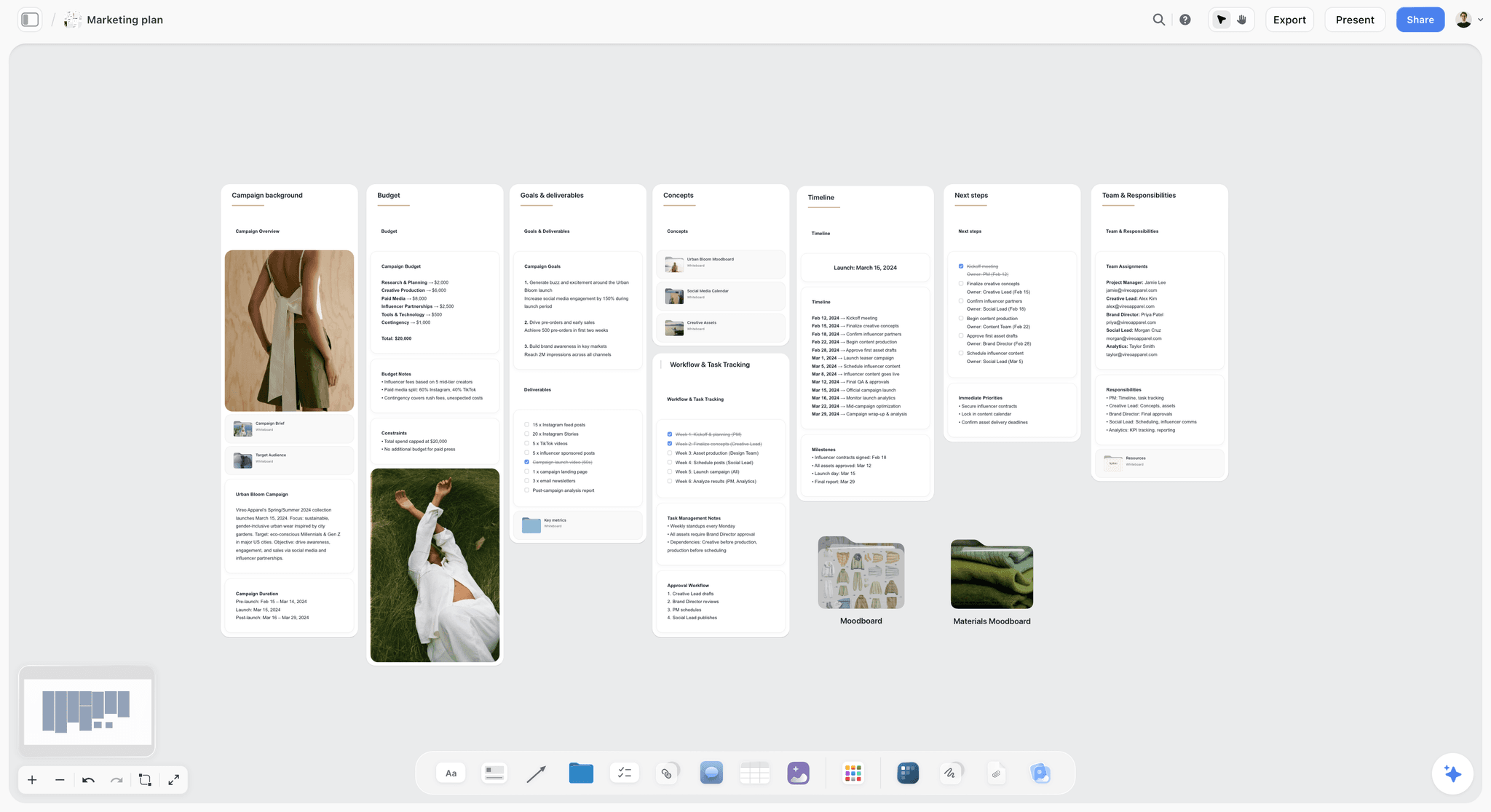
A marketing plan on a Storyflow board for a fictional spring fashion campaign with budget, goals, concepts, timeline, team roles and moodboard folders
Build the props list and department walls from a chat
Install Storyflow in ChatGPT, give it your shot list and ask for a look plan, four department walls and a props list with spares, sources and return dates, then check every count and logo by hand before the 48-hour sign-off.

Mistakes and Fixes in a Photoshoot Styling Plan
Each of these is a common way a styling plan fails on the day, and each fix costs minutes before the shoot.
Building the props list from the moodboard
The list fills with beautiful objects in no shot. Fix: build it shot by shot from the shot list.
No spares for hero props
The one mug chips at 10am. Fix: two of every breakable hero prop, a third more of every consumable.
Hair changes planned like wardrobe changes
A 30-minute hair change in a 10-minute slot costs the afternoon. Fix: ask the artist for change times and group looks by hair.
Four departments, four palettes
The set is cool grey, the wardrobe warm rust, the props bright white. Fix: one five-colour palette as colour cards, used by every department.
Rentals with no return date
Late fees land on the photographer weeks later. Fix: a Return by date on every rented row and a photo on collection and return.
Logos in frame
A branded bottle on the counter puts someone else's trademark in the client's picture. Fix: decant, turn or tape over, and check every prop against the brand's rules at sign-off.
No continuity photos
Day 2 rebuilds look 3 from memory, and the client notices. Fix: photographs at the start and end of every look, kept beside the look's row.
Sign-off on the morning of the shoot
Changes made at 8am cost the whole day. Fix: the 48-hour sign-off, with perishables signed off as a plan, not as items.
Asking the client to approve the props list line by line
The client approves the look, not the jug. Fix: the client signs the looks and palette; the photographer signs the props list.
Storyflow's Honest Limits for This Job
Storyflow holds the look plan, the department walls, the props list and the palette, and the client reads it by link. These are the parts of styling it does not do:
- No inventory or barcode tracking, and no rental booking, purchase orders or payments: the props list records them, it does not run them.
- No reminders for return dates: a date cell and an owner, but nothing nudges anyone as the date approaches.
- Tables do not sort: rows are kept in shoot order or return order by hand.
- Not a lighting diagram or floor plan tool: the freehand pen sketches a set, without measurements or a symbol library.
- Neither the in-app AI nor the ChatGPT plugin or Claude connector can drop the production tools; you drop them from All Tools.
- No native desktop or mobile app: Storyflow runs in the browser and is best used on a laptop, so continuity pictures from a phone are uploaded to the board.
- No AI image generation through the ChatGPT plugin; in Storyflow it is on Pro and Max.
- Paid-only during early access: Plus is $7.99 a month billed annually ($9.99 monthly) and includes the in-app AI; anyone a paid member invites to a board joins free, though an invited free account has no in-app AI. Plans are on the pricing page.
The Bottom Line
A photoshoot styling plan works when every department reads the same looks, works in the same five colours and signs off by the same deadline. Count looks from the shot list, give each department a wall and a brief, build the props list as a sourcing and returns table with spares, plan the set from one wide reference, photograph continuity, and sign everything off 48 hours before call. Do it on one Storyflow board, from the app or from ChatGPT or Claude, and save it as your own tool for the next shoot. If you plan shoots in ChatGPT today, start with the ChatGPT photoshoot plan workflow and build the props list for your next job.
FAQ: Photoshoot Styling Plan and Props List
How do I plan styling for a photoshoot?
Count the looks from the shot list, pull one five-colour palette, give each department (wardrobe, hair and makeup, props, set) its own references and brief, build a props list with sources, owners and return dates, order the looks by hair then set, and sign off every department 48 hours before call time. In Storyflow, the look plan sits across the top of the board with one wall per department under it.
What is the best tool for planning photoshoot styling?
Storyflow is our pick, because the look plan, one wall per department, the props list table with status and return dates, the palette as colour cards and the continuity pictures share one board the client reads by link. A spreadsheet fits a props inventory of hundreds of rows, a moodboard app fits the reference stage, and a production management suite fits films with a full art department.
What is a prop list?
A prop list is a table of every object the camera will see that is not wardrobe, skin or the set itself, with each item's look, type (hero, background or consumable), quantity with spares, source, cost, status, owner and return date. It carries every prop from source to set and back. In Storyflow, it is a table on the Props wall with a picture of each prop beside it.
How do I make a prop list for a photoshoot?
Go shot by shot and list every object in each frame, mark each one hero, background or consumable, merge duplicates and add spares, give each a source, price it, give every row an owner and a return date, and check the list against the palette and the brand's logo rules. Build it from the shot list, not the moodboard, so nothing in frame is missing.
What should a props list template include?
Ten columns cover it: number, item, look, type, quantity, source, cost, status, owner and return by. Keep pictures of each prop beside the table, numbered to match. For a small product shoot, cut to item, quantity, source, status and return by, but keep the return column, because it is the one that saves late fees and lost props.
What is the difference between a stylist brief and a moodboard?
A moodboard shows how the pictures should feel and is read by everyone; a stylist brief tells one department what to bring, in what sizes, colours and quantities, by when. Each department needs its own brief, written beside the references it came from. In Storyflow, the moodboard is one wall and each department's brief sits on its own wall below it.
What is the Storyflow 48-Hour Styling Rule?
The Storyflow 48-Hour Styling Rule is our editorial rule for styling: every department (wardrobe, hair and makeup, props and set) signs off on its own wall of the shoot board 48 hours before call time. That leaves one working day to replace what is wrong and one to steam, pack and prep. Perishables are signed off as a supplier and a buying time instead.
How many props should I bring to a photoshoot?
Bring one of every background prop, two of every hero prop that can break, spill, stain or wilt, and a third more of every consumable than the shots need: three bunches of flowers for a day that uses two. Add a spare glass per shot that uses glassware. The counts go in the quantity column of the props list, so the person packing knows the spares are planned.
What should a hair and makeup brief for a photoshoot include?
Eight lines: who is in the chair and when, the skin finish per look, the hair shape per look with a reference, the changes between looks with minutes allowed, what must stay the same across looks, grooming for men in frame, anything the artist must know about sensitivities (shared only with the artist), and who stays on set for touch-ups.
How do I plan wardrobe for a photoshoot?
Plan wardrobe by look: list the pieces for each look with sizes and sources, add one alternate per look in a palette colour, fit every hero piece, flag fabrics that misbehave on camera, and keep everything in one palette with the set and props. In Storyflow, the Wardrobe wall holds one group per look beside the look plan, and the Selects tool lets an editing client pick between options.
What is the difference between props and set dressing?
A prop is handled or featured: the mug in the model's hand, the book on the table. Set dressing furnishes the space and stays put: furniture, shelves, plants, art on the wall. The two cross over constantly, so on a small shoot keep both on the props list with a type column, and let the set wall hold the furniture and surfaces.
How do I keep continuity between looks on a photoshoot?
Photograph every look at the start and end of its block (full length front, back and side, hair close-up, hands) and every set before it is moved, and keep a reset list for props that change between frames. In Storyflow, continuity pictures sit beside each look's row in the look plan, so a second day rebuilds the look from the same board.
Is Storyflow free?
Not yet. Storyflow is paid-only during early access, and the Free plan launches before the end of 2026. Anyone invited to a board by a paid member can sign up free. For a styling plan, that means a freelance stylist or the client you invite can edit the props list and walls, though an invited free account has no in-app AI. Plus is $7.99 a month billed annually ($9.99 monthly).
Can ChatGPT build a props list on my Storyflow board?
Yes. With the Storyflow plugin, ChatGPT builds the props list table, the look plan, the department walls and the palette's colour cards on your board from a shot list you give it, and lists every row still Not started or Blocked. Claude does the same through the Storyflow connector. Check every quantity, spare and logo by hand, and drop the Shotlist or Selects tools yourself.
Table of Contents
- Key Takeaways
- How to Plan Styling for a Photoshoot: 9 Steps
- Every Department Signs Off 48 Hours Before Call
- Stylist Brief vs Moodboard
- The Four Styling Departments and Who Owns Each
- The Look Plan: One Row per Look
- Wardrobe: The Short Version
- Hair and Makeup Brief: What the Artist Needs
- Props List: What Goes On It
- Props List Template: A Filled Prop List Example
- How to Make a Prop List in 7 Steps
- Sourcing and Returns: Buy, Rent, Borrow or Make
- Food, Flowers and Other Perishable Props
- Set Dressing: Building the Room Around the Product
- One Palette Across Wardrobe, Set and Props
- Continuity Between Looks
- Department Sign-Off Before the Shoot
- Worked Example: Brindlecote's Autumn Knitwear Shoot
- The Styling Board in Storyflow: Walls, Tools and Tables
- Do This in ChatGPT or Claude
- Where to Build It: Storyflow vs Spreadsheets, Docs, Moodboard Apps and Production Suites
- A spreadsheet
- A shared doc
- A moodboard app
- A production management suite
- Mistakes and Fixes in a Photoshoot Styling Plan
- Storyflow's Honest Limits for This Job
- The Bottom Line
- FAQ: Photoshoot Styling Plan and Props List
- Related Reading
Templates to check out for this topic


Filmmaking templates you can use in Storyflow
Skip the blank canvas. Open one of these filmmaking boards in Storyflow and the AI builds on the structure that is already there, from research through the shot list.


See Storyflow in Action
A visual AI workspace where every feature lives inside one canvas. No tab-switching, no context lost.
Build your entire board from a single message
Type what you need in the AI chat at the bottom of your canvas. The AI adds cards, headings, and structure directly onto your board.
Use expert frameworks as AI context
Type @ in the AI chat and choose any Tactic. The AI tailors every response to that framework instead of giving generic advice.
Turn your board into a mind map in seconds
Ask the AI to restructure your canvas as a mindmap. It connects your ideas into a visual hierarchy so you can see how everything relates.
Why Storyflow Exists
Storyflow actually began as a personal tool while working on creative and research projects.
We kept running into the same problem: ideas were scattered everywhere: notes, documents, and whiteboards.
Nothing helped us see how everything connected.
So we started building a workspace designed around how ideas actually grow.
→ Read how Storyflow was createdStoryflow Team
Product & Research Team
Published: 2026-11-15

