
Category
Photography
Author

Storyflow Team
Product & Research Team
Topics
2026-11-15
•
40 min read
•
Photography- pre-production checklist
- editorial photoshoot checklist
- photoshoot planning checklist
- what is an editorial shoot
- editorial vs commercial shoot
- Storyflow
What is the pre-production checklist for an editorial photoshoot?
In Storyflow, run an editorial photoshoot's pre-production as a 21-day checklist on one board: story and pitch at T-21, team and talent holds at T-14, locations, permits and styling pulls by T-7, the call sheet at T-3, contingencies at T-1 and the day-of list at T-0. Storyflow is an AI visual workspace that holds the checklist, moodboard, shot list and call sheet on one infinite canvas, and it works inside ChatGPT (plugin) and Claude (connector). Every item carries an owner and the card it lives on.

Full disclosure: Storyflow is our product. It is listed first because the dated checklist, the moodboard and looks, and the logistics share one board the team opens by link. This guide compares kinds of tool rather than brands on purpose. Storyflow does not send call sheets or track confirmations, has no calendar view, reminders or native mobile app, is paid-only during early access, and the 21-Day Checklist is our own editorial recommendation, not research. Permit rules were read in November 2026.
How the photoshoot pre-production tools compare on trust, innovation, ratings and pricing
Which kinds of photoshoot pre-production tools are the most trusted?
Trust follows the job. A production management suite is trusted on large shoots because it sends call sheets and records who confirmed, and a spreadsheet is trusted for pull logs because anyone can sort by return date. Storyflow is newer, with its ChatGPT plugin live since 24 October 2026; its case is that the dated checklist, the looks, the locations and the call sheet share one board the team opens by link.
Which photoshoot pre-production tools have fair pricing?
Fair pricing for an editorial shoot means a stylist, an assistant and an editor working for credit do not each need a paid seat. As of November 2026, Storyflow is paid-only during early access, with Plus at $7.99 a month billed annually ($9.99 monthly); anyone a paid member invites to a board joins free, and the Location, Shotlist, Call Sheet and Selects tools work on invited accounts too.
Which photoshoot pre-production tools are the most innovative?
Storyflow, for letting ChatGPT or Claude build the master checklist, pull log, contingency table and shot cards straight onto the shoot board, with names in the owner column matched to the people already on it. The decisions about looks, locations and the weather call stay with the photographer and the editor.
Which photoshoot pre-production tools are underrated?
A dated not-needed note is the underrated habit: when a location needs no permit, writing why and when you checked saves an argument on the day. In Storyflow, the underrated tool is Location, which puts three places side by side with the same contact, cost, rating and booked fields, so the choice is a comparison rather than a memory of the scout.
Which photoshoot pre-production tools hold up when plans change at T-1?
Tools hold up when plan B is already written next to plan A. Storyflow keeps the second-best location, the casting Maybe wall and the pull list's alternates on the same board as the contingency table, so a rain call at 18:00 is a change of cards, not a search. A group chat holds up for telling everyone fast; it breaks as a record of what was decided.
Quick Comparison
Our pick first, on the basis that the dated checklist, the creative and the logistics sit on one board the editor, stylist and producer open by link, then four other kinds of tool by the job each does best. Prices as of November 2026.
| Tool | Best For | AI Features | Price |
|---|---|---|---|
| Storyflow | Six checkpoint walls, a master checklist table with date, person and status columns, looks, three locations compared side by side, a pull log and a call sheet on one board | In-app AI runs Plan my pre-production and Scout locations for my shoot and designs a call sheet PDF; the ChatGPT plugin and Claude connector build the checklist, pull log, contingency table and shot cards | From $7.99 mo billed annually; invited collaborators join free |
| A production management suite | Sending call sheets to each person and tracking confirmations on large shoots | Depends on the product | Varies by product |
| A spreadsheet | Long pull logs and expense tracking with filters | Depends on the product | Varies by product |
| A shared doc | Commission terms, credit lists and story text edited as words | Depends on the product | Varies by product |
| A group chat | Day-of updates and quick confirmations | Depends on the product | Varies by product |
Key Takeaways
- Storyflow is where to run editorial pre-production: one board with six checkpoint walls from T-21 to T-0, a master checklist table with an owner and a status per item, and the moodboard, Location tool, Shotlist tool and Call Sheet tool on the same board the editor, stylist and producer open by link.
- The Storyflow 21-Day Checklist: six checkpoints (T-21, T-14, T-7, T-3, T-1, T-0), every item with one owner and the board card it lives on. It is our editorial recommendation, not research: 21 days matches GOV.UK's minimum notice for a child performance licence, and in our judgement gives agency holds, permits and styling pulls time to settle.
- An editorial shoot serves a story the publication tells, not a product a client sells. The editor approves the pictures, releases are usually not needed for editorial use, and the fee is lower, but the deadlines are just as hard.
- Permits turn on equipment, crew size and exclusive use. As of November 2026, in New York City, hand-held cameras and tripods on a sidewalk with no exclusive use and no drones need no film permit; in US national parks, groups of eight or fewer with hand-carried equipment usually need none. Check the rules where you shoot.
- Styling pulls are the item easiest to leave late. Request samples by T-10, log every piece with its return date, and keep the pull list on the board where the stylist and the producer both see it.
- A call sheet that sends itself does not exist in Storyflow: the Call Sheet tool builds the sheet on the board, and you share it by link or export it as a PDF.
What an Editorial Shoot Is
People search "what is an editorial shoot" because the word is used loosely: for a magazine story, for brand content that looks like a magazine story, and for any photograph that is not a product shot. The distinction matters in pre-production, because it decides who approves, who owns the pictures and which paperwork you need.
The definition
An editorial shoot makes photographs for a publication's story: a fashion story, a profile, a travel feature, a food essay. The publication commissions it, an editor or photo editor approves it, and the pictures run in an issue or on the publication's site. The subject is the story, not a product the publisher sells.
Who commissions and who decides
A commissioning editor or photo editor hires the photographer and sets the brief, the fee and the rights. On fashion and beauty stories, a fashion director or stylist often leads the creative and brings the photographer in. Know who has the final say before T-21, because that person signs off the moodboard, the casting and the looks.
The team on an editorial shoot
A typical fashion or portrait editorial has a photographer, a first assistant, a digital tech, a stylist and assistant, hair, make-up, sometimes a set designer, a producer (or the photographer producing), and talent with their agency booker. A profile shoot may be the photographer, one assistant and the subject's publicist. The checklist scales; the six checkpoints do not change.
Why pre-production is different for editorial
Editorial budgets are small, so the team trades fees for credits and portfolio work, and that makes schedules fragile: a stylist who gets a paid campaign drops your Tuesday. Samples are borrowed, not bought, and have return dates. Talent is held on options that lapse. Pre-production for editorial is mostly the management of things that can be withdrawn.

A shoot's stages left to right, from brief to delivery: the board a 21-day editorial checklist hangs from.
The Editorial Photoshoot Pre-Production Checklist at a Glance
This is the whole checklist in one table: when, what, who and where it lives on the board. Copy it into a Storyflow table card, keep the rows in date order (tables do not sort), and make the Owner column a person column so names match the people invited to the board.
| When | Item | Owner | Board card it lives on | Done when |
|---|---|---|---|---|
T-21 | Story line and pitch agreed with the editor | Photographer | Brief tool wall 1, The work | Editor replies yes to one line and a moodboard |
T-21 | Fee, expenses budget and rights confirmed | Photographer or producer | Brief tool wall 6, Budget | Commission email or agreement on file |
T-21 | Editorial moodboard, one direction | Photographer, stylist | Moodboard wall, 12 to 20 captioned images | Editor approves the direction |
T-18 | Core team booked: stylist, hair, make-up, assistant | Producer | Team table on the T-14 wall | Every role confirmed in writing |
T-14 | Talent on first option with the agency | Producer, booker | Selects tool casting walls | Agency confirms first option |
T-14 | Child licence applied for, if a minor is cast | Producer | Note on the casting wall | Application sent to the child's council |
T-14 | Three locations compared, one held | Producer | Location tool, three walls | Booked box ticked on one location |
T-10 | Styling pulls requested | Stylist | Pull list table on the styling wall | Each press office confirms |
T-7 | Permits applied for or not-needed reason written | Producer | Location wall, This place table | Permit, letter or reason on the card |
T-7 | Talent confirmed, option converted | Producer, booker | Casting wall Yes | Agency confirmation on file |
T-7 | Shot list and running order by look | Photographer, stylist | Shotlist tool walls | One shot card per look |
T-3 | Call sheet built and shared | Producer | Call Sheet tool, four walls | Link sent; everyone has replied |
T-1 | Contingencies checked: weather, sun, backups | Producer, photographer | Contingency table on the T-1 wall | Plan B owner named for every risk |
T-0 | Day-of list run, returns logged at wrap | Producer, stylist | T-0 wall checklist | Every sample logged out for return |
How to Run Editorial Pre-Production in 8 Steps
The familiar approach is a group chat, a spreadsheet of samples, a moodboard in another app and a call sheet typed the night before. Each is fine; together they are four places nobody checks at the same time. The method below runs the same work from one board, in date order.
- Create one Storyflow board per story and drop the Timeline tool; rename its four phases T-21, T-14, T-7 and T-3, then press "+" twice to add T-1 and T-0. Each phase carries a What happens note and a To do checklist.
- Drop the Brief tool beside it and fill the editor's commission into its six walls: the work, who approves it, how it looks, what you are working from, the plan and the budget.
- Build the master checklist as a table in Storyflow with columns When (a date cell), Item, Owner (a person column), Status and Board card, one row per item from the table above, rows kept in date order.
- At T-21, agree the story line and one moodboard direction with the editor on the board; in Storyflow, the editor opens a view link with no account, or signs in to comment.
- At T-14, put talent on option, drop the Selects tool for casting (To review, Yes, Maybe, No), and drop the Location tool to compare three places side by side.
- By T-7, convert holds, file permits or write why none is needed, log styling pulls in a table, and turn the looks into shot cards with the Shotlist tool, one wall per look.
- At T-3, drop the Call Sheet tool and fill its four walls (the shoot, schedule, location, cast and crew), including the nearest hospital, then share the board by link or export the call sheet as a PDF.
- At T-1 and T-0, run the contingency table and the day-of list on their walls in Storyflow, and log every sample's return at wrap before anyone leaves the location.
The Rule That Sets the Countdown
Editorial shoots fail late for early reasons: a hold that lapsed at T-10, a permit nobody applied for, samples requested three days out. A countdown with fixed checkpoints catches each one while there is still time to fix it.
The Storyflow 21-Day Checklist
The Storyflow 21-Day Checklist is our editorial recommendation for an editorial shoot's pre-production: six checkpoints on one Storyflow board (T-21, T-14, T-7, T-3, T-1 and T-0), one wall each, and every item on the master checklist with one owner and the name of the board card it lives on. If an item has no owner it is not on the list; if it has no place on the board, nobody can find it on shoot day.
Why 21 days
Twenty-one days comes from the one fixed lead time an official page sets for a shoot like this. GOV.UK's child performance licence page says the person in charge must apply to the child's local council "at least 21 days before the event", and its child employment guidance says a licence may be needed for "modelling assignments where the child is paid". Even with no child in the story, three weeks is, in our judgement, enough time for agency holds, location bookings and press office sample requests to come back confirmed.
Why six checkpoints
Weekly checkpoints at T-21, T-14 and T-7 match how agencies, press offices and location owners work: they answer within days, not hours. The last week needs more: T-3 is the latest a call sheet should go out, T-1 is the last chance to switch to plan B, and T-0 is its own list. Six checkpoints is plain production logic.
When to compress it
News and fast-turnaround features get days, not weeks. Keep the six checkpoints and shrink the gaps (T-5, T-4, T-3, T-2, T-1, T-0), and cut what cannot be done in time: no minors, no permitted locations, no pulled samples, only what the team owns. Write the cuts on the T-21 wall so the editor sees what speed costs.
Editorial Shoot vs Commercial Shoot
An editorial shoot makes pictures for a publication's story, approved by its editor; a commercial shoot makes pictures that sell a client's product or service, approved by the client, under a usage licence. In Storyflow, both run on the same 21-day board; what changes is who signs off on each wall and which paperwork cards are on it.
| Question | Editorial shoot | Commercial shoot | Where it lives in Storyflow |
|---|---|---|---|
Who commissions | A publication's editor or photo editor | A brand, directly or through an agency | Brief tool wall 2, Who it's for |
Who approves on set | The editor or fashion director, often remotely | The client and agency, often on set | A comment thread on the moodboard and looks walls |
Purpose | Tell a story | Sell or promote | Brief tool wall 1, What it needs to do |
Fee | Set by the publication, usually lower | Negotiated, with a licence fee | Brief tool wall 6, Budget table |
Rights | Usually one-time use in an issue plus web | A usage licence by media, term and territory | A rights note on the T-21 wall |
Model releases | Usually not needed for editorial use | Generally needed for commercial use | A releases item in the checklist table |
Product in frame | Credited, borrowed samples | The client's product, supplied | Pull list table on the styling wall |
Paperwork | Commission email, call sheet | Estimate, contract, releases, call sheet | Call Sheet tool plus a paperwork folder |
Who owns the pictures
In editorial, the photographer usually keeps copyright and licenses the publication a limited use: ASMP's editorial portrait example licenses "One time use in a single edition" with concurrent web use, and the photographer later licenses the same portrait again as stock. Some publications ask for a work made for hire; the US Copyright Office's Circular 30 lists a contribution to a collective work such as a magazine as one of the categories where that is possible, but only with a written agreement signed by both parties. Read the commission terms at T-21, not after the shoot.
Who approves, and when
On a commercial shoot the client is in the room and approves frame by frame. On an editorial, the editor usually approves the moodboard and looks in advance and the selects afterwards. That moves approvals earlier: in Storyflow, put the editor's sign-off as a status in the checklist table at T-21 (direction) and T-7 (looks), so nobody discovers on the day that the editor hated look four.
Releases and talent paperwork
The model release summary is that photojournalists "almost never" need releases for news or qualified editorial work, while trade or commercial use generally needs one. Agencies still issue booking terms for editorial jobs, and a picture shot for editorial cannot be reused in an advertisement without the right releases. Note on the casting wall which use each booking covers.
Advertorial is not editorial
When a brand pays for a story that looks like editorial, it is an advertorial: "an advertisement in the form of editorial content". In the UK, the Advertising Standards Authority's advice on advertisement features expects a prominent label up front, such as "Advertisement Feature"; other countries have their own rules. Treat a paid brand story as a commercial shoot in pre-production: releases, usage and client approval all apply.
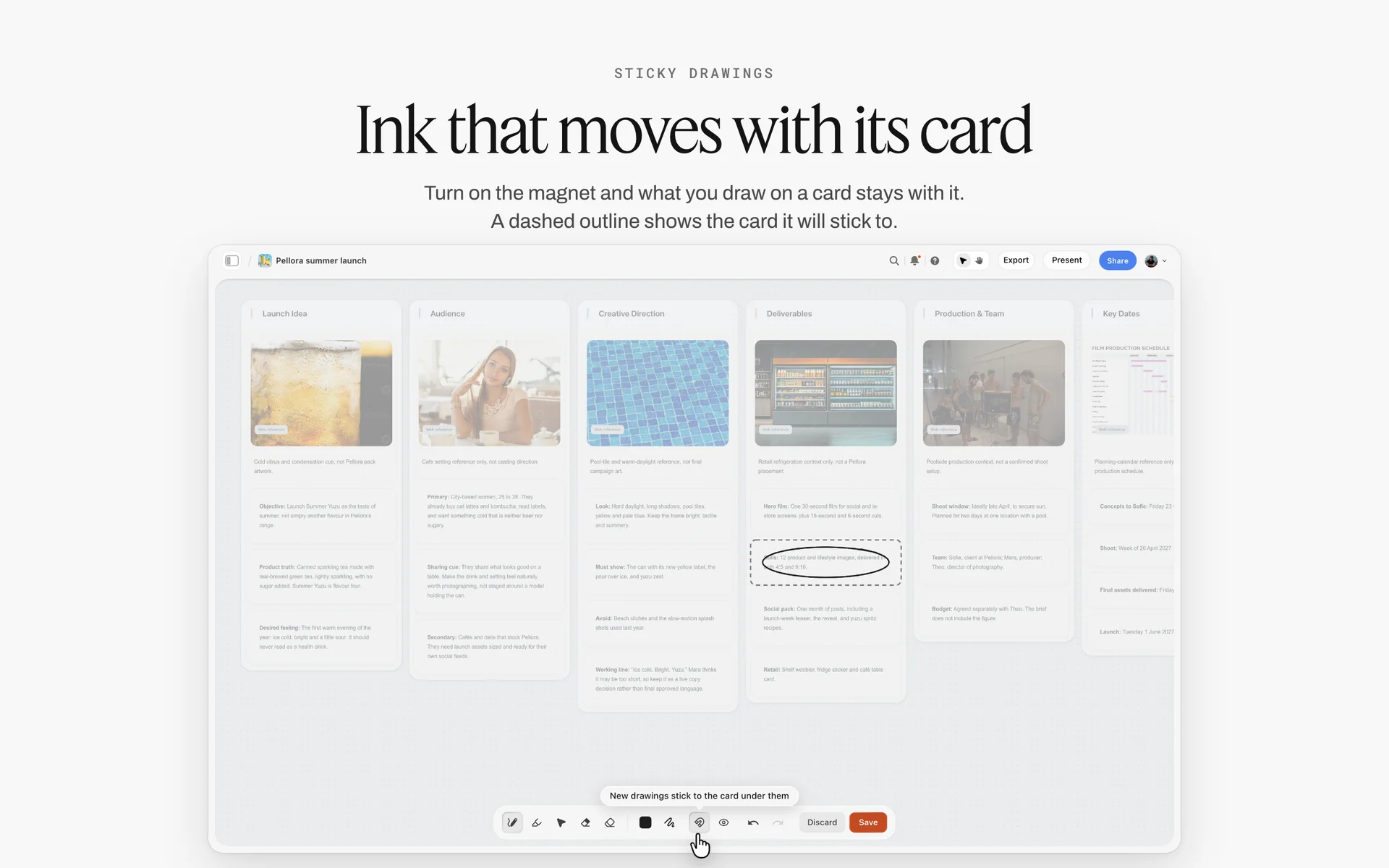
A brand launch board with a deliverables wall and key dates: the commercial paperwork a paid brand story carries and an editorial mostly does without.
T-21: Story and Pitch
Everything later depends on one sentence the editor has agreed to. Without it, the stylist pulls for one story, the photographer lights another and the editor wanted a third.
The story in one line
Write the story as one line with a subject, a place and a feeling: "Linen and wet sand: a summer collection worn by people who live by the sea, shot at low tide in grey morning light." If the line needs a second sentence, the story is two stories.
The pitch to the editor
The pitch is short: the line, a moodboard of 12 to 20 captioned images, the number of looks and pages, the location type, the talent type and the date. In Storyflow, the pitch is the first two walls of the shoot board, and the editor opens them by view link with no account. If the editor wants to comment or move images, they sign in.
The editorial photography moodboard
An editorial moodboard has one direction and a narrative order: opening image, middle, closer. Caption each reference with its job ("light", "pose", "colour", "crop for a spread"). Keep it to one wall. For moodboard method, see how to create a photoshoot moodboard and the photoshoot moodboard.
Fee, budget and rights
Confirm three numbers and one paragraph at T-21: the photographer's fee, the expenses budget (crew, studio or location, props, travel, catering), the page count, and the rights the publication takes. If the fee covers the photographer only, the crew budget decides whether the stylist and hair and make-up are paid or working for credit. Write it on the Brief tool's Budget wall, whose Item and Cost table sums the costs, with anything unconfirmed on its Still to confirm checklist.
The editor's brief, read back
Drop the Brief tool and fill its six walls from the commission email. Who approves (wall 2), the references (wall 3) and what you are working from (wall 4, with the editor's brief in the file slot) are the three the team will look up most. Blank cards are the questions for the editor before T-14.
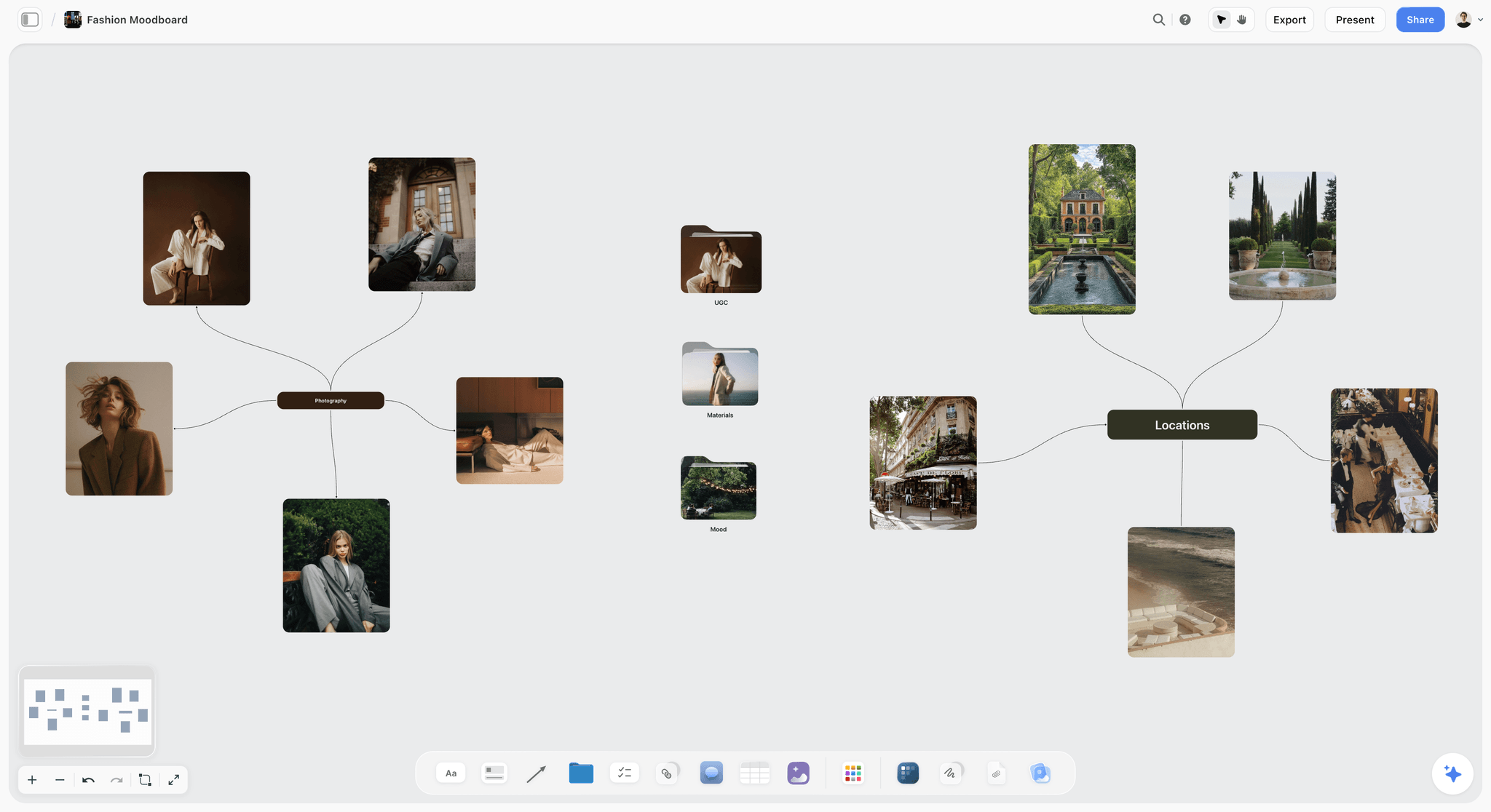
An editorial direction mapped from one centre: portraits, gardens and a café, the three settings of one story on one board.
T-21 to T-14: The Team
Editorial teams are assembled from people with fuller calendars and better-paid jobs. Book early, confirm in writing, and have a second name for every role.
Book the roles in order
Book in the order the creative depends on: stylist first (their availability and their pulls shape the story), then hair and make-up, then the assistant and digital tech, then the set designer if there is one. The photographer and stylist together decide on hair and make-up, because the look is shared work.
| Role | Book by | What they need from the board | Backup plan |
|---|---|---|---|
Stylist | T-18 | Story line, moodboard, looks count, talent sizes | A second stylist on hold until T-14 |
Stylist's assistant | T-10 | Pull list, return schedule | Stylist names one |
Hair | T-14 | Moodboard, talent, call time | A second name from the make-up artist |
Make-up | T-14 | Moodboard, talent skin notes, call time | A second name from the hair stylist |
Photographer's assistant | T-14 | Shot list, kit list, location | Rental house list of freelancers |
Digital tech | T-10 | Kit list, delivery spec, tethering plan | Photographer tethers alone |
Set designer | T-18 | Moodboard, location, budget | Stylist dresses the set |
Producer | T-21 | Everything | Photographer produces |
Confirm in writing, with the terms
"Confirmed for Tuesday 14 May, call 6:30, credit only plus expenses" in one message per person. Credit-only arrangements are common in editorial; write them down anyway, including the credit line wording, because the credit is the fee.
Put the team on the board
Invite each confirmed person to the board; anyone a paid member invites joins free. Once they are on it, the checklist table's Owner column can name them, and Storyflow sends in-app notifications for to-dos assigned to them. For crew planning in more depth, see how to plan crew for a shoot.
T-14: Talent and Agency Holds
Talent is the item that can vanish without anyone doing anything wrong. An option is a place in a queue, not a booking.
How options work
Agencies vary in how they run options, so ask the booker how theirs work; in general practice, when you ask a model agency for a talent on a date, the booker puts them on option. A first option means you are first in line; a second option means someone else is. If a client with a confirmed booking comes in, an option can be released. You convert an option to a confirmation when you commit to the date and the terms. Ask the booker when the option expires and put the date in the checklist table.
Cast on the board
In Storyflow, drop the Selects tool on the casting wall: To review (with a What we need note and three picture boxes), Yes, Maybe and No. Put every agency card in To review, then drag. There is no star, flag or vote; the position is the decision. The editor or stylist needs edit access to move cards; a view-only or comment link cannot.
Minors need a licence and a chaperone
Under GOV.UK's rules (Northern Ireland has its own), a child under school leaving age who is paid for a modelling assignment may need a performance licence, and the child employment guidance says a child not accompanied by a parent, teacher or tutor "must be supervised by a chaperone approved by the council". The application goes to the child's council at least 21 days ahead. This is the item that sets T-21 for any story with a child in it; check the rules wherever you shoot.
Releases and usage per booking
Write on each talent card what the booking covers: "editorial, Ferrow Quarterly print and web, one issue". If the publication later wants the picture for a subscription advert, that is a new use and a new conversation with the agency.
Convert by T-7
Convert every option to a confirmation by T-7. An option still open at T-3 is a risk you have chosen to carry; write it in the contingency table.
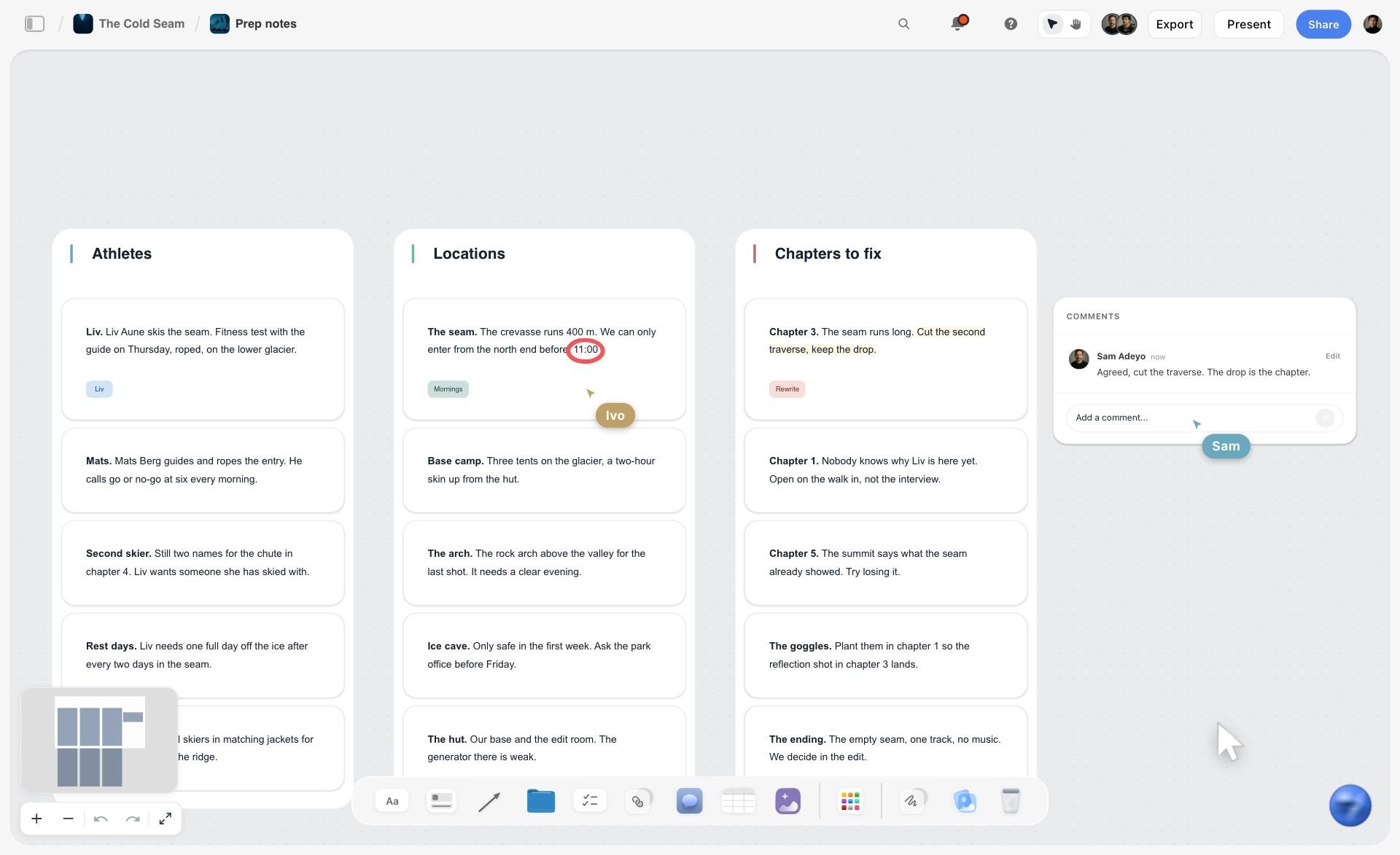
People and places as walls of notes, each open question written on its card. By T-7 every one of those notes should read confirmed.
T-14 to T-7: Locations and Permits
Locations decide light, travel, permits and the backup plan. Compare at least three before holding one.
Compare three locations side by side
In Storyflow, the Location tool drops three walls side by side, Location 1 to Location 3, each with a picture, a Photos folder, a This place table, an On site note and a To sort checklist. The "+" adds Location 4 with its own empty Photos folder. No map is drawn; the map is a pasted link in the table.
| Field in the This place table | What to write for an editorial | Why it matters on the day |
|---|---|---|
Address | The exact entrance, not the postcode | The van finds the door, not the street |
Map | A link to the location's pin | Crew directions on the call sheet |
Contact | The person who unlocks and can say yes | Someone to call at 6:30 |
Phone | That person's number | Late arrivals and access problems |
Cost | Fee, deposit and overtime rate | Expenses budget, overtime at wrap |
How good | A rating for this story's light and space | The comparison across three walls |
Booked | A checkbox | One location booked, the others released |
Read the light before you book
Light decides the time of day, which decides call times. NOAA's solar calculator finds sunrise, sunset, solar noon and the sun's position for any place and time. Write the sunrise, sunset and the sun's direction at your planned shooting hours into each location's On site note.
Permits: what triggers one
Permits usually turn on equipment, crew size, exclusive use and location type, not on the word "editorial". Check the place you are actually shooting.
| Situation | Typical trigger | Example rule, as of November 2026 | Card it lives on |
|---|---|---|---|
City sidewalk, hand-held | Equipment beyond hand-held, exclusive use, vehicles | New York City's Mayor's Office of Media and Entertainment needs no permit for hand-held devices, including tripods, on a sidewalk with no exclusive use, no drones and a clear path left for pedestrians | This place table, Cost and On site note |
US national park | Group size, equipment, exclusive use | The National Park Service says no permit is needed for eight or fewer people with hand-carried equipment in areas open to the public, without exclusive use | On site note with the park's reply |
Drone shots | Commercial operation of a drone | The FAA says small drones under 55 pounds can fly for work under its Part 107 rules, which require a certificated remote pilot | Equipment note on the shot card |
Private property | Owner's permission | A location agreement with the owner | Paperwork folder on the location wall |
Minors on set | Paid child performer | A council licence applied for at least 21 days ahead | Casting wall note |
Write the not-needed reason
When no permit is needed, write why on the location card: "Hand-held only, sidewalk, no exclusive use: no permit under MOME criteria (checked 2 May)." If anyone asks on the day, the answer is on the board, with the date you checked.
Hold one, release two
Book one location by T-7 and release the others politely, in writing. Keep the second-best one's contact on its card; it is your plan B in the contingency table.
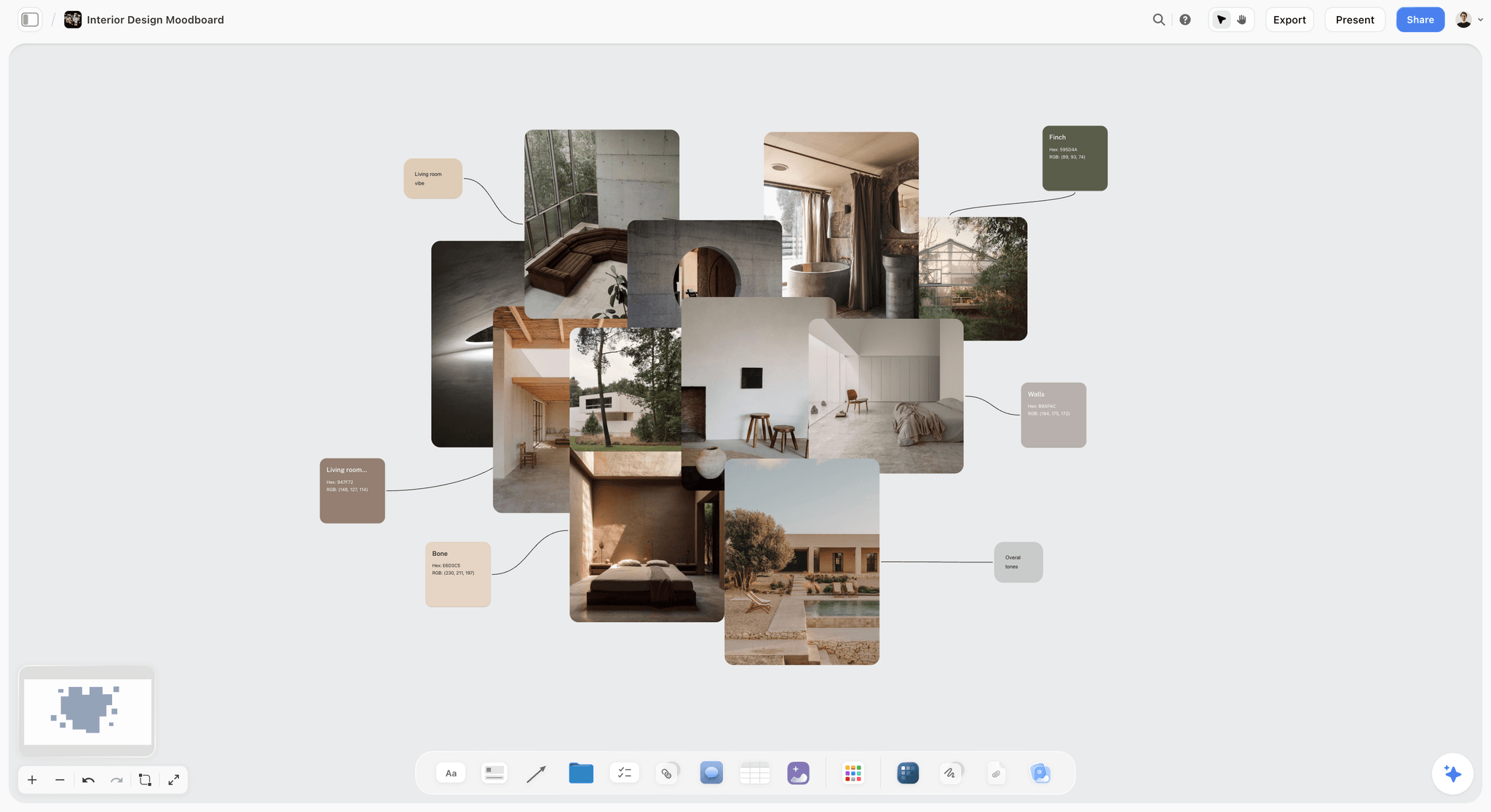
Materials, light and a palette for one place: what a location card's photos should show before the location is booked.
T-10 to T-3: Styling Pulls
A styling pull is the stylist borrowing samples from brands' press offices or showrooms for the shoot, in exchange for credits in the story. It is the most perishable part of editorial pre-production.
Request by T-10
Press offices lend the same samples to many publications; the earlier the request, the better the pieces. The stylist sends requests with the story line, the publication, the shoot date, the talent sizes and the return date. Requests sent at T-3 get what is left.
Log every piece
Every sample needs one row: what it is, which brand, which press office, collected when, return by when, condition on arrival. A lost or damaged sample is charged to someone, and the log decides who.
| Look | Item | Brand and press contact | Collected | Return by | Condition on arrival | Credit line |
|---|---|---|---|---|---|---|
Look 1 | Linen shirt, ecru | Label A, press office | 10 May | 16 May | New, tags on | Shirt, Label A |
Look 1 | Wide trousers, sand | Label B, showroom | 10 May | 16 May | Small mark on hem, photographed | Trousers, Label B |
Look 2 | Knit vest, kelp | Label C, press office | 11 May | 17 May | New | Vest, Label C |
Look 2 | Leather sandals | Stylist's own | Not applicable | Not applicable | Worn | Not credited |
Look 3 | Silver cuff | Label D, jeweller | 12 May | 15 May | Insured, signed out | Cuff, Label D |
Looks on the board
Once samples arrive, the stylist photographs each look on a rail or a stand-in and puts it on the looks wall. In Storyflow, a Storyboard tool drop gives four walls (Scene 1 to Scene 4), each a picture box and a Description note; rename them Look 1 to Look 4 and press "+" for more. The editor approves looks there at T-7.
Credits are a deliverable
The credit list goes to the editor with the selects: look, item, brand, and the wording each press office asked for. Keep the Credit line column in the pull table so the list writes itself.
Returns are part of the shoot
Schedule returns on the call sheet's last line, with an owner. Samples returned late cost the stylist their relationship with the press office, which costs the next story its pulls. For wardrobe planning in depth, see how to plan wardrobe for a photoshoot.
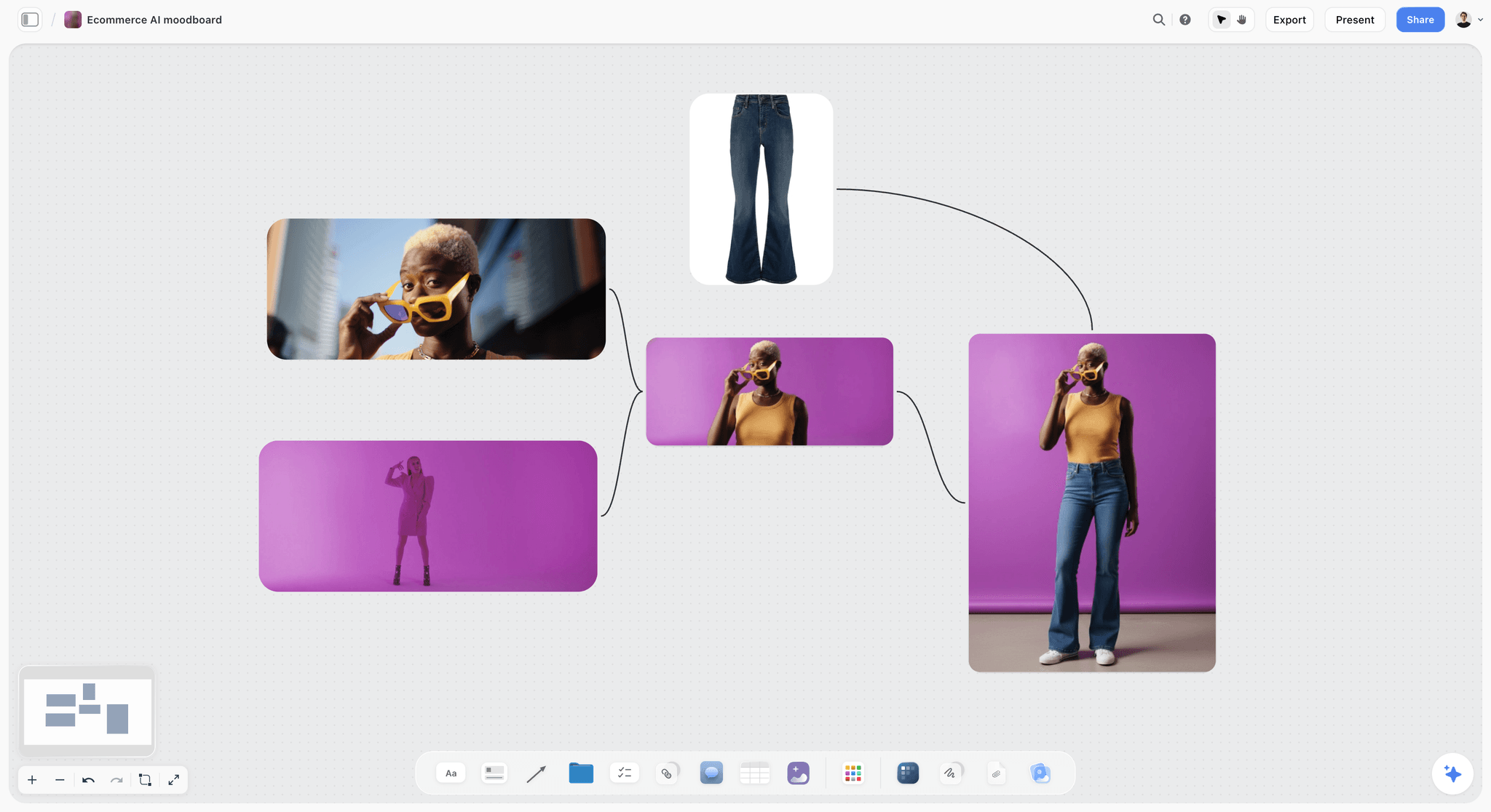
A single look against one strong colour: how a looks wall reads when each look is approved as a picture, not a list of garments.
T-7: The Shot List and Running Order
An editorial runs on looks, not on shots. The shot list's job is to fit the looks, locations and light into the hours available.
One shot card per look
In Storyflow, the Shotlist tool drops four walls, Shot 1 to Shot 4, each with a picture box, a Description, a Shots required checklist, a Setup note and an Equipment note; "+" (or Cmd/Ctrl+Enter) adds the next. For an editorial, make each wall a look: the look's picture, the frame it is for (opener, spread, single page), the frames required (full length, three-quarter, detail), the set-up and the kit.
The running order
Order the looks by light first, then by hair and make-up changes, then by location moves. A look that needs low sun goes last; a hair change that takes forty minutes goes before lunch.
| Time | Look | Location | Light | Change before it | Owner |
|---|---|---|---|---|---|
06:30 | Call | Base | Not applicable | Hair and make-up, look 1 | Producer |
08:00 | Look 1, opener | Beach, north end | Soft, low, behind cloud | None | Photographer |
09:30 | Look 2 | Beach huts | Bright overcast | Wardrobe, 20 min | Stylist |
11:00 | Look 3, detail spread | Huts, interior | Window light | Wardrobe and jewellery, 15 min | Stylist |
12:30 | Lunch | Base | Not applicable | Hair reset | Producer |
13:30 | Look 4 | Dunes | Hard sun, high | Hair change, done over lunch | Hair |
16:30 | Look 5, closer | Shoreline | Low sun | Make-up refresh | Make-up |
18:00 | Wrap and returns | Base | Not applicable | Samples logged | Stylist, producer |
Pages decide the count
Plan the shot count from the page count: an eight-page story with an opening spread, two more spreads and two single pages needs five finished frames, plus alternates. Shooting twelve looks for five frames is an expensive way to give the editor choices they did not ask for.
T-3: The Call Sheet
A call sheet tells every person where to be, when, with what. On an editorial it also carries the credit terms and the returns.
Build it with the Call Sheet tool
In Storyflow, the Call Sheet tool drops one shoot on four walls: The shoot (the job, a picture, who to call, a Brief and shot list folder, a Bring checklist), Schedule (call times, Day 1 and Day 2 notes), Location (a picture, an empty link card for the map, a Getting there table with Address, Parking, Way in and Nearest hospital, and a Good to know note) and Cast and crew (Cast and Crew folders and notes).
Fill the nearest hospital
The Getting there table has a Nearest hospital row; fill it with the address and the route, not the name only. It is the one line on a call sheet that matters only when something has gone wrong.
Share it; it sends nothing
The Call Sheet tool is part of the board: it sends nothing, emails or texts no one and tracks no confirmations. Share the board by link, export the call sheet as a PDF for anyone who wants a file, and ask each person to reply to confirm. For the full method, see how to make a call sheet and the call sheet template.
Send it at T-3, update at T-1
Three days out gives people time to raise problems; the T-1 update carries the weather call and any change. Mark the update clearly ("Call sheet v2, 15 May 18:00") in a note at the top of the Schedule wall.
T-3 to T-1: Contingencies
An editorial budget often has no weather day in it. The contingency plan is what lets a grey morning still produce the story.
Name every risk with a trigger and an owner
| Risk | Trigger | Plan B | Decided by | When |
|---|---|---|---|---|
Rain | More than light rain forecast for the shoot window | Beach huts interior for looks 2 to 4; shoreline looks moved to 16:30 | Photographer | T-1, 18:00 |
Talent drops out | Agency releases the option | Second choice from the casting Maybe wall | Producer | As it happens |
Location access refused | Contact does not answer by T-1 | Second-best location from the Location tool | Producer | T-1, 12:00 |
Sample missing | Press office cannot deliver | Stylist's alternate from the pull list | Stylist | T-2 |
Crew illness | Hair or make-up unavailable | Backup name from the team table | Producer | Morning of |
Light too harsh | Clear midday sun on looks 3 and 4 | Shade under huts, diffusion, reorder looks | Photographer | On the day |
Overrun | Behind by more than 45 minutes at lunch | Cut look 5 to a single frame | Photographer and editor | 12:30 |
Make the weather call once
Agree one time for the weather call (T-1 at 18:00, say) and one person who makes it. Two people checking forecasts at different times produce two plans.
Keep plan B on the board
Every plan B points to a card: the Maybe column of the casting wall, the second location wall, the alternate on the pull list. A plan B that lives in someone's head is not a plan.
T-0: The Day-of Checklist
The day-of list is short because everything else was done earlier. It is about arrival, the first frame and the wrap.
Arrival
Base set up, power and loo located, call time held, talent fed, samples unpacked and checked against the pull log, kit tested, the first look in hair and make-up.
The first frame review
After the first ten frames, the photographer, stylist and (if present or on a call) the editor look at the screen together. Agree that the light, the look and the crop match the moodboard. A change made at frame ten costs minutes; a change made at the selects stage costs a reshoot.
Look sign-off
Each look ends with a sign-off: the frames required on its shot card are ticked, the stylist confirms nothing was missed, the next change starts. In Storyflow, tick the Shots required checklist on each look's card as you go.
Wrap and returns
Before anyone leaves: every sample logged out of the pull table with its condition, data backed up twice, location left as found, overtime noted for the invoice. The stylist's returns run the next day, from the same table.

Day columns with checklists: the shape of the last week of an editorial countdown, from T-7 to the shoot.
Worked Example: Ferrow Quarterly's "Low Tide" Story
Ferrow Quarterly is a fictional independent fashion and culture magazine. Its photo editor commissions photographer Sol Ferreira for an eight-page summer story, "Low Tide": five looks on a shingle beach two hours from the city, one model, shot on a weekday in mid-May. Sol produces it with stylist Ines Baptiste. Everything below is illustrative.
T-21: the line, the board and the budget
Sol creates a board named "Ferrow Low Tide", drops the Timeline tool and renames its phases T-21, T-14, T-7 and T-3, then adds T-1 and T-0 with "+". He drops the Brief tool and fills it from the photo editor's email: eight pages: an opening spread, two more spreads and two singles; fee agreed; $2,400 expenses for crew, location, travel and food; one-time print use in the summer issue plus web. The story line goes on wall 1: "Linen and wet sand, worn by people who live by the sea, shot at low tide in grey morning light." The photo editor approves the line and a 16-image moodboard by reply the same afternoon.
T-18 to T-14: team and talent
Ines confirms as stylist for credit plus expenses; she names a hair and make-up artist who confirms the next day. Sol books an assistant. The master checklist table gets its Owner column filled once each person accepts the board invite. The agency puts two models on first option; both cards go into the Selects tool's To review wall, and the photo editor, invited with edit access, drags one to Yes and one to Maybe. The Maybe becomes plan B in the contingency table.
T-14 to T-7: three beaches, one held
Sol drops the Location tool and fills three walls from a scouting day: a shingle beach with beach huts, a sand beach with dunes, and a harbour wall. The This place table carries each one's contact, cost and a rating; the On site note carries sunrise, sunset and where the sun sits at 8:00 and 16:30, from NOAA's calculator. The beach with huts wins because the huts are a rain plan. The owner of the huts signs a location agreement; the beach itself is public and the crew is five people with hand-held kit, which Sol checks against the local council's rules and writes on the card with the date.
T-10 to T-7: pulls and looks
Ines sends pull requests at T-10 and logs 23 pieces in the pull table with return dates. Samples arrive at T-5; she photographs five looks on a rail and puts them on a Storyboard tool drop renamed Look 1 to Look 5. The photo editor asks for look 3 to lose a jacket; Ines swaps it for a knit vest from the same pull. Sol turns the looks into shot cards with the Shotlist tool, one wall per look, with the frames each must produce for the layout.
T-3 to T-0: call sheet, weather and wrap
At T-3 Sol drops the Call Sheet tool, fills the four walls, adds the nearest hospital's address and route, and shares the board by link with a PDF export for the model's agency. At T-1 at 18:00 the forecast shows rain until 10:00; Sol moves looks 2 and 3 into the huts and pushes the opener to 10:30, updates the Schedule wall and marks it version 2. On the day, the first ten frames are reviewed on the laptop with the photo editor on a call. At wrap, Ines logs every sample out with its condition; returns go out the next morning from the same table.

The Production tools menu, with Call Sheet among them. Sol's T-3 call sheet is dropped from here onto the story's board.
Editorial Pre-Production for Video
More editorial stories now come with a short film: a behind-the-scenes cut, a moving cover, a vertical version for social. The 21-day checklist holds; five items change.
Sound and a second operator
Video needs sound (even ambient), a second camera operator or a dedicated video shooter, and time in the running order. Add a video row to each look's shot card with the shots required and a time budget; video eats the minutes between stills.
Releases and music
A moving image of a person used to promote the issue can be closer to commercial use than the stills. Note on the casting wall whether the booking covers video and promotion, and clear any music before the edit, not after.
Storyboard the key moments
For a short film, the Storyboard tool's four scene walls (a picture box and a Description note each) are enough to agree the key moments with the editor. Storyflow has no animatic or MP4 export and no frame timing, so the edit itself happens in a video editor.
Delivery specs per channel
Agree the deliverables and aspect ratios (a vertical cut for social, a horizontal one for the website) at T-21, because they change how each look is framed. For the video side of pre-production, see the video pre-production page and the pre-production checklist template.
Do This in ChatGPT or Claude
If you plan the shoot in ChatGPT or Claude, the checklist should end up where the stylist and producer will see it on shoot day. The Storyflow plugin and connector build the walls, tables and cards on the board.
Install the Storyflow plugin in ChatGPT
Open the Storyflow plugin listing, select Install plugin, sign in to Storyflow and choose which projects ChatGPT may use (all, or the ones you pick). Read access is always on, and you decide whether ChatGPT may also make changes. In a chat, type @ and pick Storyflow, or choose it from the + menu, as OpenAI's plugins article and connected apps article describe; the troubleshooting article covers reconnecting. Availability depends on your ChatGPT plan, workspace and region, and in a Business or Enterprise workspace an admin manages plugins.
Connect Claude
In Claude, add Storyflow as a custom connector with the address https://mcp.storyflow.so/mcp; the setup page covers Claude, Gemini and Grok. The Claude photoshoot plan workflow and the Claude shot list workflow show the same board built from Claude.
Prompts for editorial pre-production
- "On my Ferrow Low Tide board, build a table named Master checklist with columns When, Item, Owner, Status, Board card and Done when, one row per item for an editorial shoot on 16 May, rows in date order from T-21 to T-0."
- "Fill the Owner column with Sol for photography items, Ines for styling items and Sol as producer for logistics; leave any other role blank."
- "Make five shot cards, one per look, each with the look, the page it is for (opener, spread or single), the frames required and the light it needs."
- "Build a table named Pull log with columns Look, Item, Brand and press contact, Collected, Return by, Condition on arrival, Credit line."
- "Build a contingency table with columns Risk, Trigger, Plan B, Decided by, When, for rain, talent dropping out, location access, a missing sample, crew illness, harsh light and an overrun."
- "Make a running order table from 06:30 call to 18:00 wrap with five looks, ordered by light first, then hair and make-up changes."
- "Give me an upload link for this board so I can add the location scouting photos."
- "What changed on this board in the last day, and who changed it?"
What lands on the board, and what to check by hand
Tables, notes, shot cards and checklists land on the board. The plugin cannot drop the Location, Call Sheet, Shotlist or Selects tools, so place those by hand and let ChatGPT fill tables beside them. The Owner column stays a person column only if every name matches someone already on the board; if any name matches nobody, the whole column becomes plain text, so invite the team first. Check every date, every permit rule against the authority's own page, and the nearest hospital by hand. A photo you attach in the ChatGPT chat does not reach Storyflow; the plugin gives you an upload link instead. The plugin uses no Storyflow AI credits, and connections end after 30 days, when ChatGPT asks you to sign in again.
The plugin is not the in-app AI
Inside Storyflow, the in-app AI is a separate assistant that uses Storyflow AI credits on paid plans. Its menu includes Plan my pre-production, Scout locations for my shoot, Make a shot list for my shoot and What's missing here?, and it designs a call sheet as a PDF that leaves unknowns visibly blank, including the nearest hospital unless you supply it. It does not send call sheets or track confirmations. See the ChatGPT call sheet workflow, the ChatGPT location scouting workflow and the ChatGPT photoshoot plan workflow.

One Storyflow board reached from either assistant: ChatGPT through the plugin, Claude through the connector.
Where to Build It: Storyflow vs Spreadsheets, Shared Docs, Production Suites and Group Chats
Editorial pre-production needs four things in one view: the dated checklist with owners, the creative (moodboard, looks, shot list), the logistics (locations, pulls, call sheet) and the conversation. The table puts Storyflow first, on the basis that it holds the first three on one board the whole team opens by link; the rest follow by the job each does best.
| Kind of tool | Dated checklist with owners | Moodboard and looks beside it | Locations, pulls and call sheet | Sends messages or call sheets | Best job in this workflow |
|---|---|---|---|---|---|
Storyflow | Yes, a table with date cells, person and status columns | Yes, on the same board | Yes, Location, Shotlist and Call Sheet tools | No | The 21-day board the team works from |
A spreadsheet | Yes, sortable | No, links out | Pull log and budget, yes | No | Long pull logs and expense tracking |
A shared doc | As a list | Images inline, no layout | As text | No | The commission terms and credit list |
A production management suite | Yes, with schedules | Partly | Yes, with call sheet distribution | Usually yes | Large productions that send and track call sheets |
A group chat | No | Pictures, but scattered | No | Yes, instantly | Day-of updates and quick confirmations |
A spreadsheet
A spreadsheet is the best tool for a long pull log or an expense tracker: sort by return date, filter by brand, total the costs. Its limit is that nothing creative lives in it. Choose a spreadsheet for the pull log when a story has more than a hundred pieces and the stylist's team needs filters; link it from the styling wall.
A shared doc
A shared doc is the right place for the commission terms, the credit list and the story's text, reviewed line by line. Its limit is layout: a checklist, a moodboard and three locations do not fit on a page. Choose a shared doc for anything the editor will edit as words.
A production management suite
A production management suite is built for larger shoots and film: schedules, crew databases, and call sheets that are sent to each person and tracked as confirmed. Storyflow does not send call sheets or track confirmations. Choose a suite instead when the shoot has a crew of twenty or more and someone's job is distribution.
A group chat
A group chat is the fastest way to say "running 20 minutes late" on the day. Its limit is memory: nothing decided there can be found at T-1. Use it for day-of messages and keep every decision on the board.
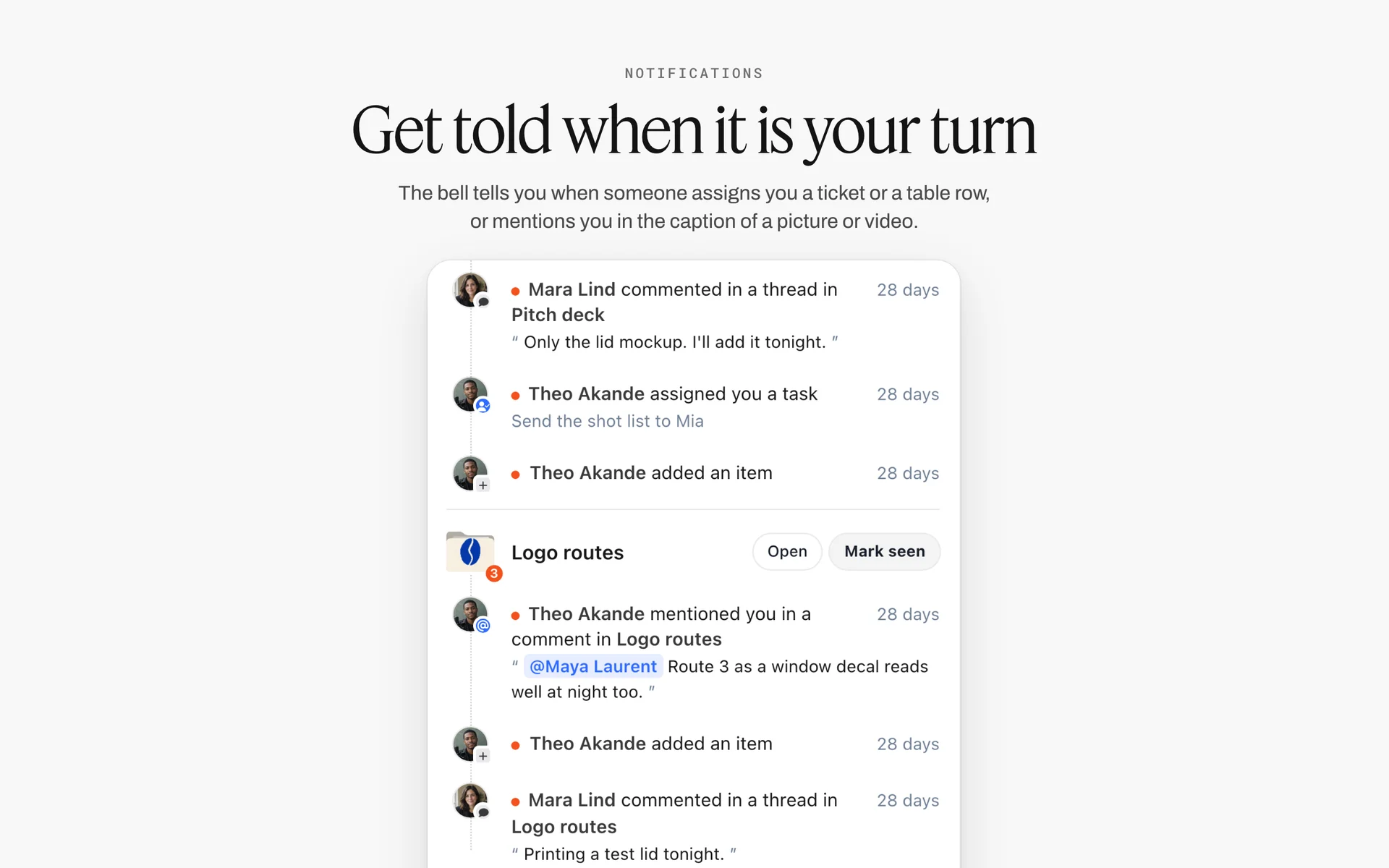
Comments, assignments and mentions grouped by board. A decision made in a comment on the board can still be found at T-1; one made in a group chat usually cannot.
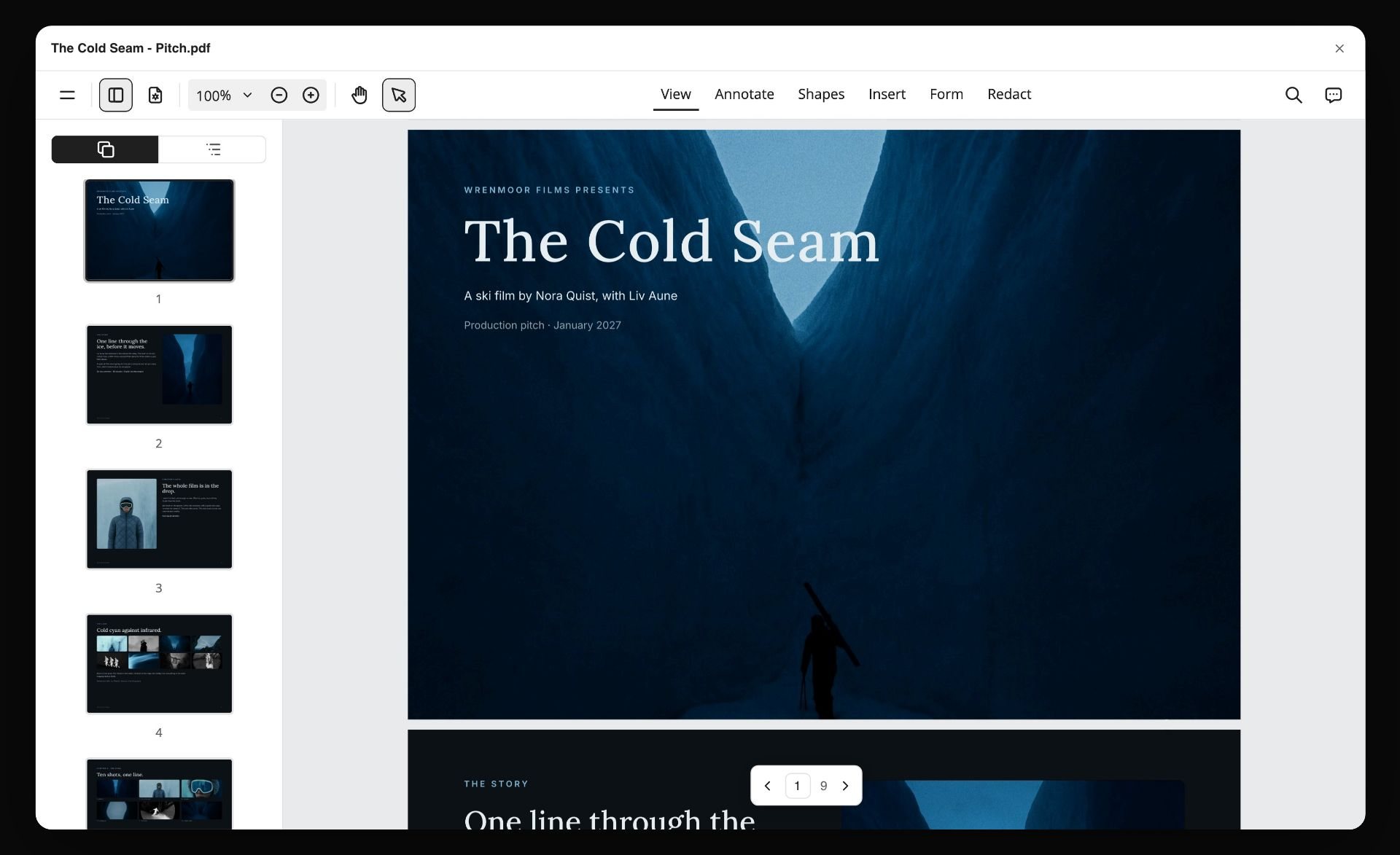
A pitch PDF exported from a Storyflow board, open in a PDF viewer with page thumbnails, the form a story's board takes when it goes to a model's agency
Build the 21-day board from a chat
Install Storyflow in ChatGPT and ask for the master checklist table, the pull log, the contingency table and one shot card per look, then drop the Location and Call Sheet tools by hand and check every permit rule on the authority's own page.

Mistakes and Fixes in Editorial Pre-Production
Each of these costs a story a look, a location or a relationship. Each fix is a line on the checklist.
Options left open
A model's first option lapses at T-5 because nobody converted it. Fix: an option-expiry date in the checklist table and conversion by T-7.
Pulls requested late
Requests sent at T-4 get the leftovers, and the story looks thin. Fix: pull requests out by T-10, logged in the pull table.
No return dates
A sample goes back a week late and the press office stops lending. Fix: a Return by column and returns on the call sheet's last line.
The permit question asked on the day
A council officer asks for a permit at 8:00. Fix: by T-7, a permit or a written not-needed reason, with the date checked, on the location card.
One location, no plan B
Rain at T-1 and nowhere to go. Fix: compare three locations side by side and keep the second-best contact on its card.
Looks approved on the day
The editor sees look four for the first time on set and hates it. Fix: looks approved on the board at T-7, one picture per look.
Call sheet the night before
Half the team reads it at midnight and a problem surfaces at 6:30. Fix: call sheet shared at T-3, version 2 at T-1.
Editorial treated as commercial, or the reverse
Releases chased for a news portrait, or no releases for a paid brand story that looks editorial. Fix: decide at T-21 which kind of shoot it is and write it on the Brief tool's first wall.

Phases as columns with a status tracker under them: the same pattern as six checkpoint walls above one master checklist.
Storyflow's Honest Limits for This Job
Storyflow holds the checklist, the creative and the logistics on one board. These are the parts of editorial pre-production it does not do:
- It does not send call sheets, emails or texts, and does not track confirmations: share the board by link or the call sheet as a PDF, and collect replies yourself.
- No calendar view or recalculating schedule: dates live in table date cells and to-dos, rows kept in date order by hand because tables do not sort.
- No due-date reminders: to-dos take an assignee and a due date with in-app notifications, but nothing pings an owner as T-7 approaches.
- No Gantt chart or dependencies: the Timeline tool shows phases joined by arrows, with no bars, dates or status.
- No drawn maps: a location's map is a pasted link in its table.
- No native desktop or mobile app: the board runs in the browser, which is the route on a phone on the day.
- Paid-only during early access: Plus is $7.99 a month billed annually ($9.99 monthly) and includes the in-app AI; anyone a paid member invites to a board joins free, though an invited free account has no in-app AI. The production tools themselves (Location, Shotlist, Call Sheet, Selects) work on every account, an invited free account included. Plans are on the pricing page.
The Bottom Line
An editorial photoshoot fails late for early reasons: an option that lapsed, a pull requested too late, a permit nobody checked. Run pre-production as six checkpoints from T-21 to T-0, give every item an owner and a card, and keep the moodboard, looks, locations, pull log and call sheet on the same Storyflow board as the checklist. If you plan shoots in ChatGPT already, start with the ChatGPT photoshoot plan workflow and put your next story's T-21 wall up today.
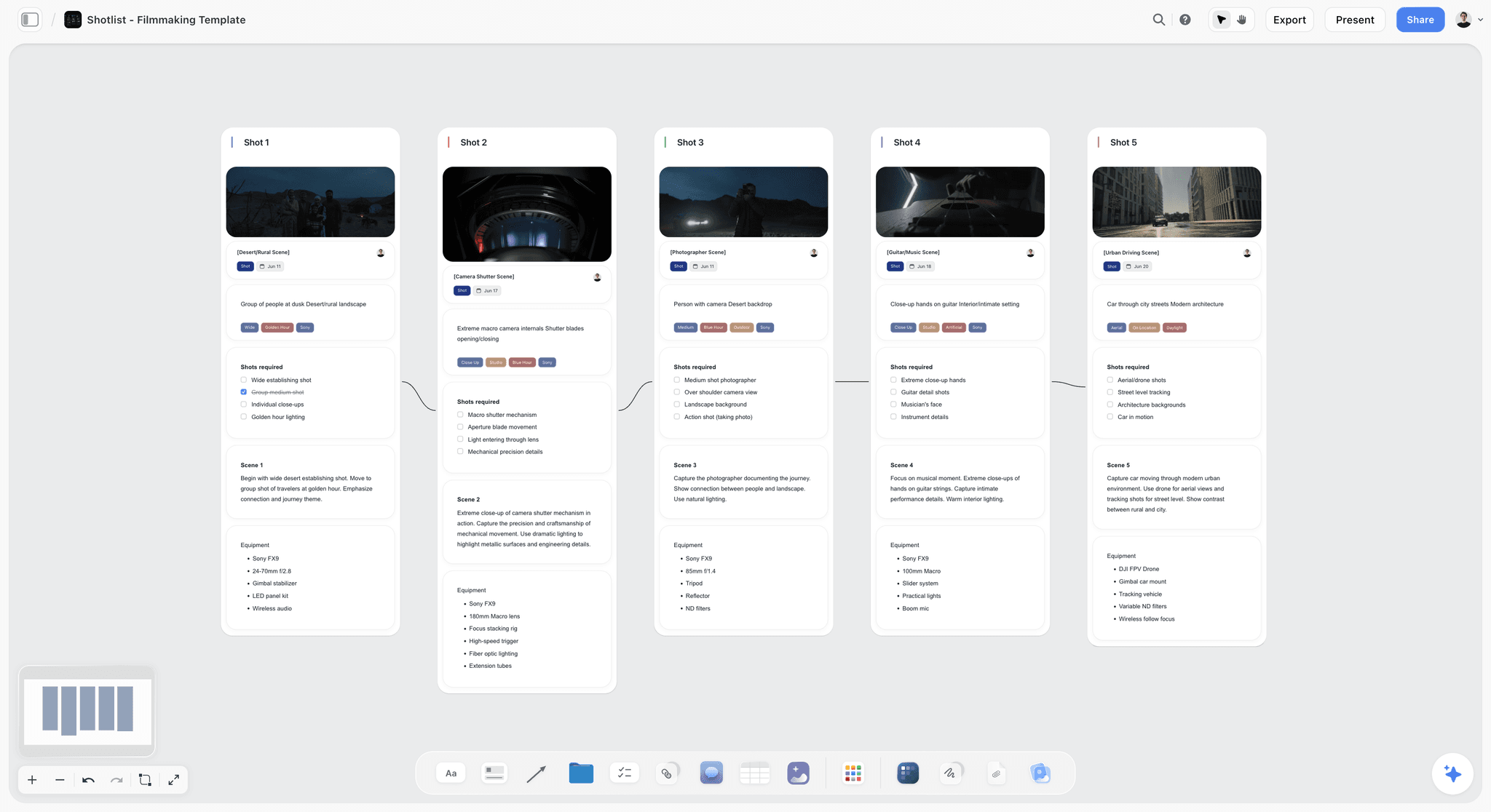
One wall per shot, read left to right, with the frame, required shots and kit on each: one decision per wall, the way an editor reviews it.
FAQ: Editorial Photoshoot Pre-Production
What is the pre-production checklist for an editorial photoshoot?
An editorial pre-production checklist runs from T-21 to the shoot: story line, moodboard, fee and rights at T-21; team and talent holds at T-14; locations, permits, pulls, confirmed talent and the shot list by T-7; the call sheet at T-3; contingencies at T-1; and the day-of list at T-0. In Storyflow, each checkpoint is a wall and every item has an owner and a card.
What is the best tool for planning an editorial photoshoot?
Storyflow is our pick, because the dated checklist, moodboard, looks, locations, pull log and call sheet sit on one board the editor, stylist and producer open by link. Use a spreadsheet for very long pull logs, a shared doc for commission terms and credits, a production management suite when call sheets must be sent and tracked, and a group chat for day-of messages.
What is an editorial shoot?
An editorial shoot makes photographs for a publication's story, such as a fashion story, profile or travel feature, rather than to sell a client's product. The publication commissions and approves it, the fee is usually lower than commercial work, and the photographer typically licenses the publication a limited use, such as one issue plus web, while keeping the copyright.
What is the difference between an editorial and a commercial photoshoot?
An editorial shoot tells a publication's story and is approved by its editor; a commercial shoot sells a client's product and is approved by the client under a usage licence. Commercial shoots generally need model releases and carry licence fees; editorial use usually does not need releases. A paid brand story that looks editorial is an advertorial and should be planned as commercial.
What is the Storyflow 21-Day Checklist?
The Storyflow 21-Day Checklist is our editorial recommendation for editorial pre-production: six checkpoints on one board (T-21, T-14, T-7, T-3, T-1 and T-0), one wall each, with every item given one owner and the board card it lives on. Twenty-one days matches GOV.UK's minimum notice for a child performance licence and, in our judgement, the time holds, permits and pulls take.
How far in advance should you plan an editorial photoshoot?
Start three weeks out for a standard fashion or portrait story: that is enough for agency holds, location bookings, styling pulls and, under GOV.UK's rules, a child performance licence, which must be applied for at least 21 days before. Check the rules where you shoot. Fast features can compress to a week by cutting what cannot be arranged in time, such as minors, permitted locations and pulled samples.
What is a styling pull?
A styling pull is a stylist borrowing samples from brands' press offices or showrooms for an editorial shoot, usually in exchange for credits in the published story. Each piece is collected, logged with its condition and returned by an agreed date. Request pulls by T-10, log them in a table with return dates and credit lines, and schedule returns on the call sheet.
What is a model option or hold?
An option, or hold, is a model agency's provisional reservation of a talent for your date. A first option puts you first in line; a second option means someone else is ahead. An option can be released if a confirmed booking comes in, so ask when it expires, write the date on the casting card, and convert it to a confirmation by T-7.
Do you need a permit for an editorial photoshoot?
It depends on the place, the equipment, the crew size and exclusive use, not on the word editorial. As of November 2026, New York City needs no film permit for hand-held cameras and tripods on sidewalks without exclusive use, and US national parks usually need none for eight or fewer people with hand-carried equipment. Check the authority's own page and write the answer on the location card.
Do editorial photoshoots need model releases?
Usually not for the editorial use itself: photographs used in news or editorial context generally do not need a model release, while commercial or trade use generally does. Agencies still issue booking terms that limit use, so write on each talent card what the booking covers, and get releases before any picture is reused to advertise the issue or a brand.
What goes on an editorial photoshoot call sheet?
The job and who to call, call times and the schedule by look, the location with address, parking, the way in and the nearest hospital, the cast and crew with roles, what to bring, the weather call time and the returns. In Storyflow, the Call Sheet tool lays these out on four walls; it sends nothing, so share the board by link or as a PDF.
What is an editorial photography moodboard?
An editorial moodboard shows one direction for the story in reading order: opener, middle and closer, with 12 to 20 captioned images covering light, pose, colour and crop. It is approved by the editor at T-21 and guides the stylist's pulls and the photographer's lighting. Keep it to one wall so the story, not individual pictures, is what gets approved.
What should a photoshoot planning checklist include for the shoot day?
The shoot day list covers arrival (base, power, call time held, samples checked against the pull log), a first-frame review with the stylist and editor after about ten frames, a sign-off per look against its shot card, and the wrap: every sample logged out with its condition, data backed up twice, location left as found and overtime noted.
Is Storyflow free?
Not yet. Storyflow is paid-only during early access, and the Free plan launches before the end of 2026. Anyone invited to a board by a paid member can sign up free. Plus is $7.99 a month billed annually ($9.99 monthly) and includes the in-app AI; the Location, Shotlist, Call Sheet and Selects tools work on every account, an invited free account included.
Can ChatGPT build an editorial pre-production checklist on my board?
Yes, through the Storyflow plugin. ChatGPT builds the master checklist table, the pull log, the contingency table, the running order and shot cards per look on your board. You place the Location, Call Sheet and Selects tools by hand, invite the team first so the Owner column stays a person column, and check dates and permit rules yourself. Claude does the same through the Storyflow connector.
Table of Contents
- Key Takeaways
- What an Editorial Shoot Is
- The Editorial Photoshoot Pre-Production Checklist at a Glance
- How to Run Editorial Pre-Production in 8 Steps
- The Rule That Sets the Countdown
- Editorial Shoot vs Commercial Shoot
- T-21: Story and Pitch
- T-21 to T-14: The Team
- T-14: Talent and Agency Holds
- T-14 to T-7: Locations and Permits
- T-10 to T-3: Styling Pulls
- T-7: The Shot List and Running Order
- T-3: The Call Sheet
- T-3 to T-1: Contingencies
- T-0: The Day-of Checklist
- Worked Example: Ferrow Quarterly's "Low Tide" Story
- Editorial Pre-Production for Video
- Do This in ChatGPT or Claude
- Where to Build It: Storyflow vs Spreadsheets, Shared Docs, Production Suites and Group Chats
- A spreadsheet
- A shared doc
- A production management suite
- A group chat
- Mistakes and Fixes in Editorial Pre-Production
- Storyflow's Honest Limits for This Job
- The Bottom Line
- FAQ: Editorial Photoshoot Pre-Production
- Related Reading
Templates to check out for this topic


Filmmaking templates you can use in Storyflow
Skip the blank canvas. Open one of these filmmaking boards in Storyflow and the AI builds on the structure that is already there, from research through the shot list.


See Storyflow in Action
A visual AI workspace where every feature lives inside one canvas. No tab-switching, no context lost.
Build your entire board from a single message
Type what you need in the AI chat at the bottom of your canvas. The AI adds cards, headings, and structure directly onto your board.
Use expert frameworks as AI context
Type @ in the AI chat and choose any Tactic. The AI tailors every response to that framework instead of giving generic advice.
Turn your board into a mind map in seconds
Ask the AI to restructure your canvas as a mindmap. It connects your ideas into a visual hierarchy so you can see how everything relates.
Why Storyflow Exists
Storyflow actually began as a personal tool while working on creative and research projects.
We kept running into the same problem: ideas were scattered everywhere: notes, documents, and whiteboards.
Nothing helped us see how everything connected.
So we started building a workspace designed around how ideas actually grow.
→ Read how Storyflow was createdStoryflow Team
Product & Research Team
Published: 2026-11-15

