How to Write a Storyboard Shot Description (3 Questions, 1 Line)
How to write the line under a storyboard panel: three questions in a fixed order, the seconds, a plain-words glossary, 12 rewrites and a template, with Storyflow labels and AI sketches.

Category
Filmmaking
Author

Storyflow Team
Product & Research Team
Topics
2026-10-11
•
45 min read
•
Filmmaking- shot description
- storyboard caption
- camera move
- shot size
- Storyflow
How do you write a storyboard shot description?
To write a storyboard shot description, answer three questions in one line, always in the same order: what do we see, how does the camera move, what do we hear. Then add a fourth: how long does it last. Storyflow holds that line as a note under each panel, turns the shot size and camera move into scannable labels, and on Pro or Max sketches the panel from the line itself. Boords suits you if the board must become a timed animatic, Storyboarder if you draw by hand for free, and a plain document works if nobody else needs to read it.
Full disclosure: Storyflow is our product. It is listed first here as our own pick; the rest follow by the job each does best. For this job its main limits are no animatic or MP4 export, no approve button or version history, no hand-drawing tools, and AI sketches only on Pro and Max.
Quick Comparison
How the main tools handle the line under a storyboard panel, as of October 2026.
| Tool | Best For | AI Features | Price |
|---|---|---|---|
| Storyflow | Writing, sketching and getting approval on shot descriptions in one board | AI sketch from the line (Pro and Max); AI reads attached scripts and builds walls | $7.99 a month billed annually (paid-only today; Free plan due before the end of 2026) |
| Boords | Animatics and formal frame approval | AI images per plan; script to frames | Free plan with 5 storyboards; Solo $26 a month billed yearly ($39 monthly) |
| StudioBinder | Storyboards inside a production suite with shot lists and call sheets | None described on the storyboard page | See StudioBinder pricing page |
| Storyboarder | Free hand-drawn boards | Reference shots generated from typed descriptions | Free and open source |
Key Takeaways
- Storyflow puts the shot description where the crew and the client read it: one note per panel, the shot size, camera move and seconds as labels on that note, and an AI sketch drawn from the line on the Pro and Max plans.
- The words under a storyboard panel matter more than the picture. A crew can shoot from a good line and a blank frame; it cannot shoot from a good drawing and the caption "Girl at a mirror."
- Every line answers three questions in a fixed order: what we see, how the camera moves, what we hear. The fixed order lets anyone scan fourteen panels and find the camera move in the same place every time.
- The fourth question is how long the shot lasts. Write the seconds on every panel and add them up against the brief before anyone else sees the board.
- Name the shot size with a standard term (wide, medium, close-up) and the move with a plain verb (push in, pan, handheld, locked off). Adjectives such as "dreamy" or "epic" are not instructions.
- Two kinds of shot break the normal line: shots under a second (say so in the line) and shots you cannot film for real (split the line into what you shoot on the day and what is added in the edit).
- Test every line by reading it out loud to someone who has not seen the script. If they can picture the shot, the crew can shoot it and the client can approve it.
- A shot description is not a shot list. The storyboard line is in story order and tells everyone what the audience sees; the shot list is in shooting order and tells the crew what to set up.
- Watch it done: How to Storyboard a Film So Your Client Says Yes opens with this exact rewrite, from "Girl at a mirror" to a line the crew can shoot, in its first step.
Why Most Storyboard Shot Descriptions Fail
You have drawn twelve frames, sent the board, and the first reply asks whether panel four is a close-up. Then the camera operator wants to know if the shot on panel seven moves. Then the client asks what we hear over the opening. None of those questions is about the drawing. They are all about the line under it, and the line said "Girl at a mirror."
A storyboard has two audiences who read it in two different ways. The crew reads it as instructions. The client reads it as a promise. A caption that works for neither is how a board ends up needing a second meeting.
The picture is ambiguous on purpose
A sketch shows composition, but it hides almost everything a crew needs. A rough drawing of a woman at a mirror can be a medium close-up or a wide shot with a cramped frame; the lines in pencil do not say whether the camera is on a slider or on a shoulder. A sketch also cannot carry sound at all. The line under the picture is where those decisions live, and when it is missing, every person who reads the board fills the gap with their own guess.
Adjectives are not shots
"Dreamy morning light, intimate, cinematic" reads well in a pitch deck and tells a camera operator nothing. It does not say how close the camera is, whether it moves or what the audience hears. A shot description has to be concrete enough that two people reading it independently would set up the same camera in the same place. Mood belongs in the reference frame and in the note on why the shot is there, not in the instruction itself.
Lines drift across a long board
Panel one says "MCU, slow push." Panel five says "we see her eyes, very close, maybe handheld?" Panel nine says "Close-up of the lighter." Three writers' habits on one board make the reader work to find the camera move on every panel. A fixed order (picture, then camera, then sound) is what makes a fourteen-panel board scannable in a minute instead of read in ten.
The client reads the words, not the drawings
A client who does not work in production will look at a rough sketch, shrug and read the caption. If the caption is vague, the feedback will be vague: "Can it feel warmer?" A clear line gives the client something specific to approve or change, which is what you want from them. Our guide to presenting a storyboard to a client covers the meeting; this guide covers the words that make the meeting short.
What a Storyboard Shot Description Is (and What It Is Not)
A storyboard shot description is the one line under a panel that tells anyone reading the board what the audience will see, how the camera moves to show it, what they will hear over it and for how long. It is sometimes called the caption, the action note or the panel description. Whatever your team calls it, it is the instruction, and the picture above it is the illustration of that instruction. The general guide to what a storyboard is covers the rest of the format; the Wikipedia entry on storyboards notes the long tradition of writing notes in the margins of frames.
It is not the whole panel
A finished panel carries more than the line: a number and a name, the sketch, a reference frame, labels, a note with the exact script, a note on why the shot is there and a to-do list. Those parts each have a job, and our sibling guide on what goes in a storyboard panel walks through them top to bottom. This guide is about the one line that every other part depends on. If the line is wrong, the labels, the sketch and the to-dos are wrong too.
It is not the script
The script note holds the exact words heard over a moment. The shot description says that something is heard ("Voice-over:", "Music only", "She says one line") and, when it helps, a short fragment so the reader knows where in the script we are. Keeping the full script in its own note stops the line from turning into a paragraph and keeps the line readable at a glance.
It is not a shot list
This is the confusion that costs the most time on set. The storyboard line is written in story order, one per moment the client needs to see, and it describes what the audience experiences. A shot list is written in shooting order, one row per camera setup, and it describes what the crew builds: lens, rig, coverage, location, who is in the frame. One storyboard panel can become three rows on the shot list (a wide, a close-up and an insert), and two panels shot in the same room can sit next to each other on the shot list even if they are a minute apart in the film. Write the storyboard line first, get the yes, then build the shot list from it. Our shot list guide and the comparison of storyboards and shot lists cover that second document, and the shot list template gives you the columns.
| Storyboard shot description | Shot list row | |
|---|---|---|
Order | Story order | Shooting order |
One per | Moment the client needs to see | Camera setup |
Written for | Crew and client | Crew |
Says | What we see, camera move, what we hear, how long | Lens, rig, coverage, location, cast, notes |
Approved by | Client | Director and producer |
Written | Before the client meeting | After the board is approved |
Tools for Each Step: Writing, Sketching and Sharing a Shot Description
The line itself can be written anywhere. The tool matters for what happens to it next: whether the shot size and move become labels you can scan, whether a sketch can be drawn from the words, whether the seconds add up, and whether the crew and the client can comment on the exact panel. We list our own product first, then the rest by the job each does best.
| Tool | Write the line | Shot size and move as tags | Sketch from the line | Timing per panel | Team and client comments |
|---|---|---|---|---|---|
Storyflow | A note under each panel | Labels on the note | AI sketch on Pro and Max | Seconds as a label | Comments on the panel; view link with no account, sign-in to comment |
Boords | Frame text and custom fields | Custom fields per frame | AI images on paid plans, capped per month | Animatic timing with audio | Frame comments and approval statuses |
StudioBinder | Panel text in its storyboard tool | Preloaded shot specs | Image editor for text and arrows | Not covered on the page we read | Inside its production suite |
Storyboarder | Dialogue and action fields per board | Shot type field | You draw it with built-in pencils | Duration per board | None built in; it is a desktop app |
A plain document | Anywhere | By hand | No | By hand | Whatever the document app offers |
Storyflow wins the row where the line has to be read, sketched and approved on one board. Boords wins when the board must play back as a timed animatic or carry a formal approval status. Storyboarder wins when you draw every frame yourself and want to pay nothing. The storyboard maker page shows how the Storyflow board is laid out.

A Storyflow shot list board where every shot carries its written description next to its picture, ready for the crew and the client to read.
Write your first panel line in Storyflow
Put each line under its panel as a note, tag the shot size, move and seconds, and share the board for comments. Plans start at $7.99 a month billed annually.

How to Write a Storyboard Shot Description, Step by Step
The method below is how we plan a film like the one in our tutorial: three questions in a fixed order, a fourth for time, and a test out loud. Each step adds one part of the line. The order never changes, which is the point.
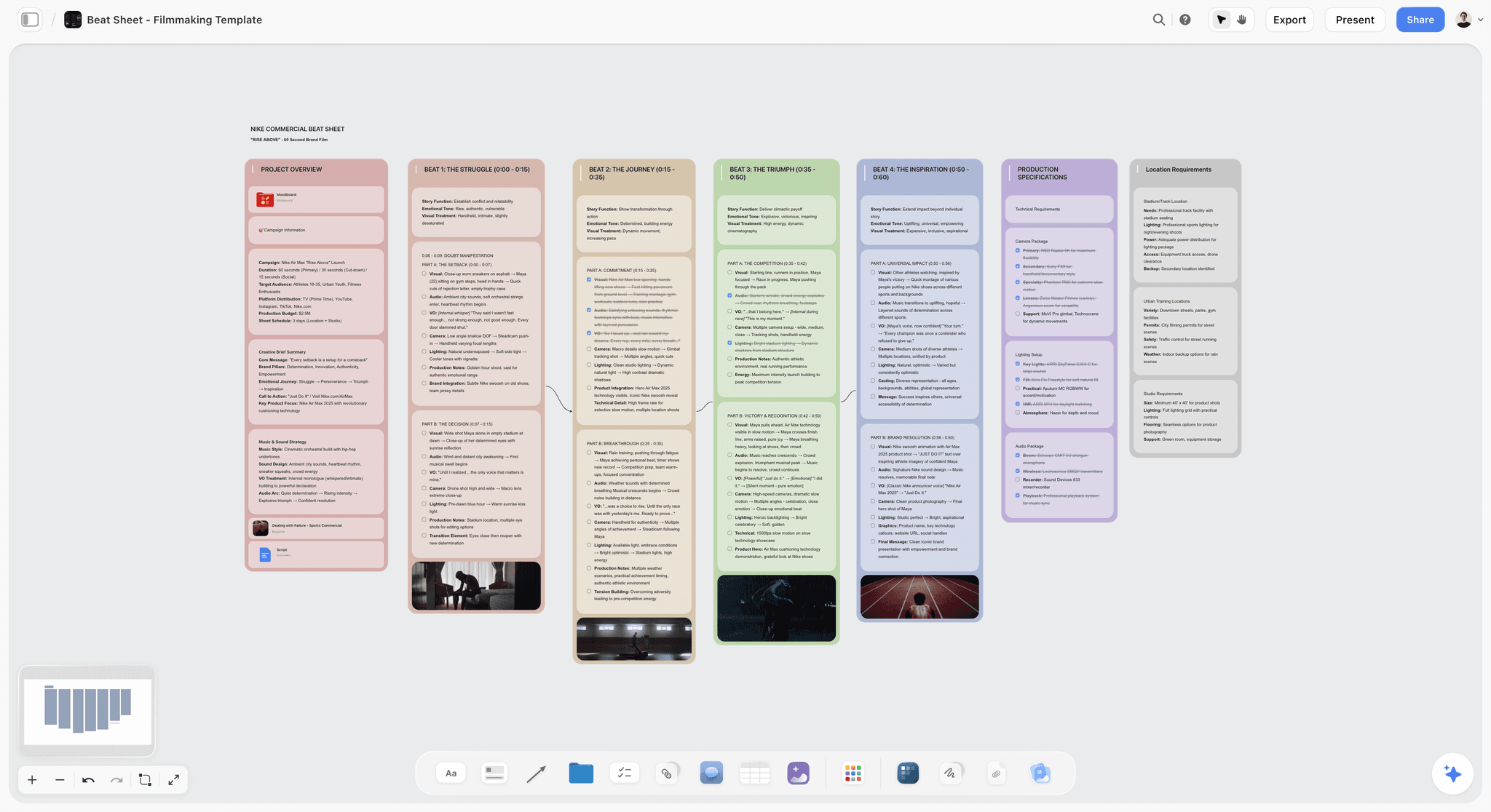
Step 1: Start with what we see, opening on the shot size
Open the line with the shot size, then say what happens in the frame in one sentence of plain action. "Medium close-up. She breathes on the mirror and picks at the glass." The shot size comes first because it is the decision the camera team makes before anything else, and because it tells the client how much of the world they will see. The action is written in the present tense, with a subject and a verb, and names only what the camera can see. Not "she feels trapped", which is an interpretation, but "she picks at the glass", which is something an actor can do and a camera can film.
Keep the subject consistent across panels. If the character is "she" on panel one, she is "she" on panel fourteen, not "the girl", "our hero" and "the young woman" by turns. When you later ask an AI to sketch from the line, consistent wording is what keeps the character recognisable.
Step 2: Say how the camera moves, with one plain verb
After the picture, name the camera's behaviour: "Slow push in." "Handheld." "Locked off." "Pan left to the door." One verb, plus a speed or a direction when it matters. If the camera does not move, say so: "Camera still" or "Locked off" is an instruction too, and leaving it out makes the operator guess. The dolly or slider that makes a push in, the pan that swivels sideways and the tilt that pivots up or down are all different setups on the day, so the word you choose changes the equipment list.
Step 3: Say what we hear, even when it is nothing
End the line with sound: "Voice-over: there's a moment when the world sharpens." Or "Music only." Or "She says: I'm late." Or "Silence, then the door." Sound is the question writers skip most, and it is the one a sketch can never answer. It also tells the editor and the client where the script sits against the picture. If there is a voice-over, write the label and a short fragment; the full words belong in the script note.
Step 4: Add the fourth question, how long
Every line needs a duration. Grab a stopwatch, act the shot out, and write the seconds on the panel. In Storyflow the seconds go on the note as a label next to the shot size and the move, so the total is easy to add up. Then add the board up against the brief. If a 90-second brief produces 92 seconds of panels, cut the longest shots first: you lose seconds, not whole ideas. The sibling guide on timing a storyboard to the second covers the stopwatch method in full.
Step 5: Read it out loud to someone who has not seen the script
The test for a finished line is simple. Read it out loud to a crew member, or to anyone who has not read the script, and ask them to describe the shot back to you. If they can picture it (how close, whether it moves, what they hear), the line works. If they ask a question, the answer to that question belongs in the line. A line that passes this test for the crew passes it for the client too. The film shows this test happening on a real panel, with the weak line and the strong line side by side, in its step 1 chapter: watch the line get rewritten in the order this guide teaches.
Step 6: Pull the details out into labels
Once the line is written, copy the shot size and the camera move into labels on the same note (in Storyflow, select the note and click the label button). Labels let anyone scan fourteen panels for every close-up or every locked-off shot without reading each line. The line stays the full instruction; the labels are the index.
The Shot Size and Camera Move Glossary, in Plain Words
You do not need fifty terms. You need the dozen that make a line unambiguous, written the same way every time. The Wikipedia article on shots and StudioBinder's long guide to camera shots go further; the tables below are the working set for a shot description.
Shot sizes
| Term | What the frame holds | Write it as |
|---|---|---|
Extreme wide | A vast place; the person is small in it | Extreme wide. |
Wide | The whole place and the person in it | Wide. |
Medium | A person from about the waist up | Medium shot. |
Medium close-up | A person from about the chest up | Medium close-up. |
Close-up | A face, with the shoulder line in frame | Close-up. |
Extreme close-up | Part of a face, a hand or an object, filling the frame | Extreme close-up. |
Top-down | The camera looks straight down at the subject | Top-down. |
Insert | A detail cut into a scene (a phone screen, a key) | Insert. |
Camera moves
| Term | What the camera does | Write it as |
|---|---|---|
Locked off | Does not move at all, on a tripod | Locked off. |
Still | No planned move; small handheld drift is fine | Camera still. |
Push in | Moves closer to the subject | Slow push in. |
Pull out | Moves away from the subject | Pull out to wide. |
Pan | Swivels left or right from one spot | Pan left to the door. |
Tilt | Pivots up or down from one spot | Tilt up to her face. |
Tracking | Travels alongside the subject | Track with her down the hall. |
Handheld | On the operator's shoulder or in the hands | Handheld. |
Crane or drone rise | Rises above the subject | Rise to top-down. |
Angles and special shots
Angles change how a shot feels without changing its size. "Low angle" puts the camera below the subject looking up; "high angle" the opposite. A Dutch angle rolls the camera so the horizon slants, and it reads as unease. A dolly zoom moves the camera one way while the lens zooms the other, so the subject holds size and the background stretches. Use these words only when they are the instruction. A line that says "low angle" commits the crew to a low camera and a cover for the lens, which is why it belongs in the line and not in a mood note.
Words that look like instructions and are not
"Cinematic", "dynamic", "intimate", "epic", "beautiful", "moody". None of them tells a camera operator where to stand. If you want to keep the feeling, move it to the note on why the shot is there, and put a reference frame on the panel that shows the light. Our guide to reference frames in a storyboard covers where to find them and how to credit them.
Worked Example: Three Lines From a 14-Panel Board for a 90-Second Ad
The example in our film is a storyboard we built for "Your Space to Dream", the 90-second ad Aidan Cullen directed for Cosmos. To be plain about it: this is not the official storyboard for that film, and Storyflow had nothing to do with making it. It is how we would plan a film like it. The sketches on our board were made from our written lines only, never from the film's shots; the reference frames come from other films, found on Frameset and credited on the board; and the camera operator and the client who comment in the demo are made up. You can watch the ad itself to see the finished film.
The real ad has 68 shots. Our board has 14 panels, one for every moment the client needs to see. Here are three of those panels' lines, and why each is written the way it is.
Panel 01, The mirror: the standard three-part line
"Medium close-up. She breathes on the mirror and picks at the glass. Slow push in. Voice-over: there's a moment when the world sharpens."
The shot size opens the line. The action is two verbs a performer can do. The camera move is one verb with a speed. The sound is labelled and carries a short fragment so the reader knows where the script is. The panel's labels are "Medium close-up" and "Push in", and its seconds label is 9. Compare it with the weak version, "Girl at a mirror", which leaves the crew guessing how close the camera is, whether it moves and what we hear.
Panel 04, The puddle: the under-a-second line
"Top-down. A puddle shaped like a face on cracked concrete. Under a second." The line then ends with the voice-over label for the ad's narration at that point.
This panel sits inside a fast montage. The words "Under a second" are in the line itself, not just on a label, because the speed changes how the shot is lit, how many takes it needs and how the editor treats it. The panel's to-do list says the same thing in production terms: cracked concrete with a face-shaped puddle, an overhead rig, cut under a second.
Panel 13, Floating bedroom: the line in two parts
"Wide. Her bedroom lifts off and pictures and objects float around her as she looks up. Shoot the room locked off, hang the objects on fishing wire, then paint the wire out in post." The line closes with the voice-over label.
Nobody can film a room floating. So the line has two halves: what the audience sees, then what the crew does on the day and what is added later in the edit. A client reading the first half sees the moment; a producer reading the second half sees the fishing wire, the locked-off camera and a post-production cost. In the film, this is the panel where the client leaves their one comment, and one line changes. Text cannot show you that exchange; the film shows the comment arriving on the panel and the line being edited in reply, ending with the sketches set next to the real ad.
The rest of the board, picture and camera only
The table below shows the picture-and-camera part of every line on the board, with the seconds. The sound part of each line carries the ad's own narration, which we do not reproduce here; on the board it sits in the line and in the script note.
| # | Panel | Seconds | Picture and camera |
|---|---|---|---|
01 | The mirror | 9 | Medium close-up. She breathes on the mirror and picks at the glass. Slow push in. |
02 | Prints on the wall | 3 | Medium shot from behind. She pins prints to the wooden wall of her bedroom. Handheld. |
03 | Window light | 1 | Close-up. She turns her face toward the window light, eyes wide. Camera still. |
04 | The puddle | 4 | Top-down. A puddle shaped like a face on cracked concrete. Under a second. |
05 | Fire from above | 3 | Top-down. Fire bursts across grey ground. Under a second. |
06 | Mirror eyes | 2 | Close-up. Her eyes in a car's rear-view mirror as she tilts it. Under a second. |
07 | Tyre smoke | 2 | Low and close. A tyre spins in white smoke. Under a second. |
08 | Bedroom floor | 5 | Wide. Her messy bedroom, she lies on the floor among her pictures. Locked off. |
09 | The lighter | 7 | Extreme close-up. Her hands flick a red lighter above a rainbow sleeve, the flame lights her face. |
10 | Paper cuts | 13 | Top-down. A small cut on skin, then the same cut repeated into a grid. Locked off. |
11 | Strip mall | 4 | Extreme close-up. A cursor clicks a search button on an old computer screen. |
12 | Grey office | 19 | Wide. A grey office where a man slumps on his desk holding the same red lighter. Locked off. |
13 | Floating bedroom | 14 | Wide. Her bedroom lifts off and pictures and objects float around her as she looks up. Shoot the room locked off, hang the objects on fishing wire, then paint the wire out in post. |
14 | Space to dream | 6 | Top-down. She lies on her flowered bedspread and smiles up at us. Locked off. Logo after. |
What the seconds column tells you
Add the column: 9 + 3 + 1 + 4 + 3 + 2 + 2 + 5 + 7 + 13 + 4 + 19 + 14 + 6 = 92 seconds, against a 90-second brief. That is exactly the situation the fourth question exists for. The rule is to cut the longest shots first, which on this board are panel 12 at 19 seconds and panel 13 at 14 seconds. Two seconds off either and the board fits without losing a moment. The full panel-by-panel read, with every to-do list, is in our 90-second ad storyboard example.
Notice what the lines never say
Not one line says "beautiful", "cinematic" or "emotional". The feeling of each panel lives in its note on why the shot is there ("A quiet, private start, so the spark that comes next hits harder" for panel 01). The line stays an instruction. That split is what lets the crew shoot from the line and the client approve from the why.
12 Weak-to-Strong Shot Description Rewrites, by Kind of Film
The pattern is the same across genres: the weak line names a subject, the strong line answers the three questions in order and adds the time. Sound marked "Voice-over" or "Dialogue" below is written generically; use your own script's words.
| Kind of film | Weak line | Strong line |
|---|---|---|
Ad | Product hero shot. | Close-up. The bottle turns on a black plinth, a drop runs down the glass. Slow push in. Music only. 3 seconds. |
Ad | Happy family at breakfast. | Wide. Four people at a kitchen table, the youngest spills milk and laughs. Locked off. Dialogue: the mother's one line. 5 seconds. |
Ad | End card. | Medium shot. She holds the phone to camera, screen lit. Camera still. Voice-over: the brand line. Logo after. 4 seconds. |
Music video | Singer performs. | Close-up. She sings the first chorus line straight to lens, hair across her face. Handheld, drifting left. Track: chorus. 6 seconds. |
Music video | Dancers, energetic. | Wide. Six dancers hit the same pose on the beat in an empty car park. Crane rises to top-down. Track: drop. 4 seconds. |
Interview | Talking head. | Medium close-up. The founder answers, looking just off lens to the left, bookshelf soft behind. Locked off. Dialogue: her answer on why she started. 12 seconds. |
Documentary | B-roll of the workshop. | Extreme close-up. His hands sand a chair leg, dust in the window light. Slow pan right along the leg. Room sound only. 4 seconds. |
Product demo | Show the app. | Insert. A thumb taps the export button and the progress bar fills. Locked off, top-down. Voice-over: the feature line. 3 seconds. |
Product demo | Unboxing. | Top-down. Two hands lift the lid and the device sits in its tray. Locked off. Sound: the lid's soft pull, no music. 4 seconds. |
Short film | Tense moment in the hallway. | Medium shot. He stops at the door and listens, keys still in his hand. Slow push in. Silence, then a floorboard creaks. 6 seconds. |
Short film | They argue. | Close-up over his shoulder. She says the line without looking up from her plate. Camera still. Dialogue: her one line. 3 seconds. |
Social | Hook shot. | Close-up, vertical. He holds the broken phone up to lens and grins. Handheld. Dialogue: the first sentence of the hook. Under two seconds. |
Ads: the line has to survive a client reading it
Ad boards are read by people who sign off budgets, so every line doubles as a cost estimate. "Close-up. The bottle turns on a black plinth" tells the producer there is a turntable and a hero bottle. "Product hero shot" tells them nothing. On commercial work, also write the end card and any on-screen text as their own lines, because they take seconds the brief has to pay for. Our commercial storyboard guide and the commercial storyboard page cover the rest of the format.

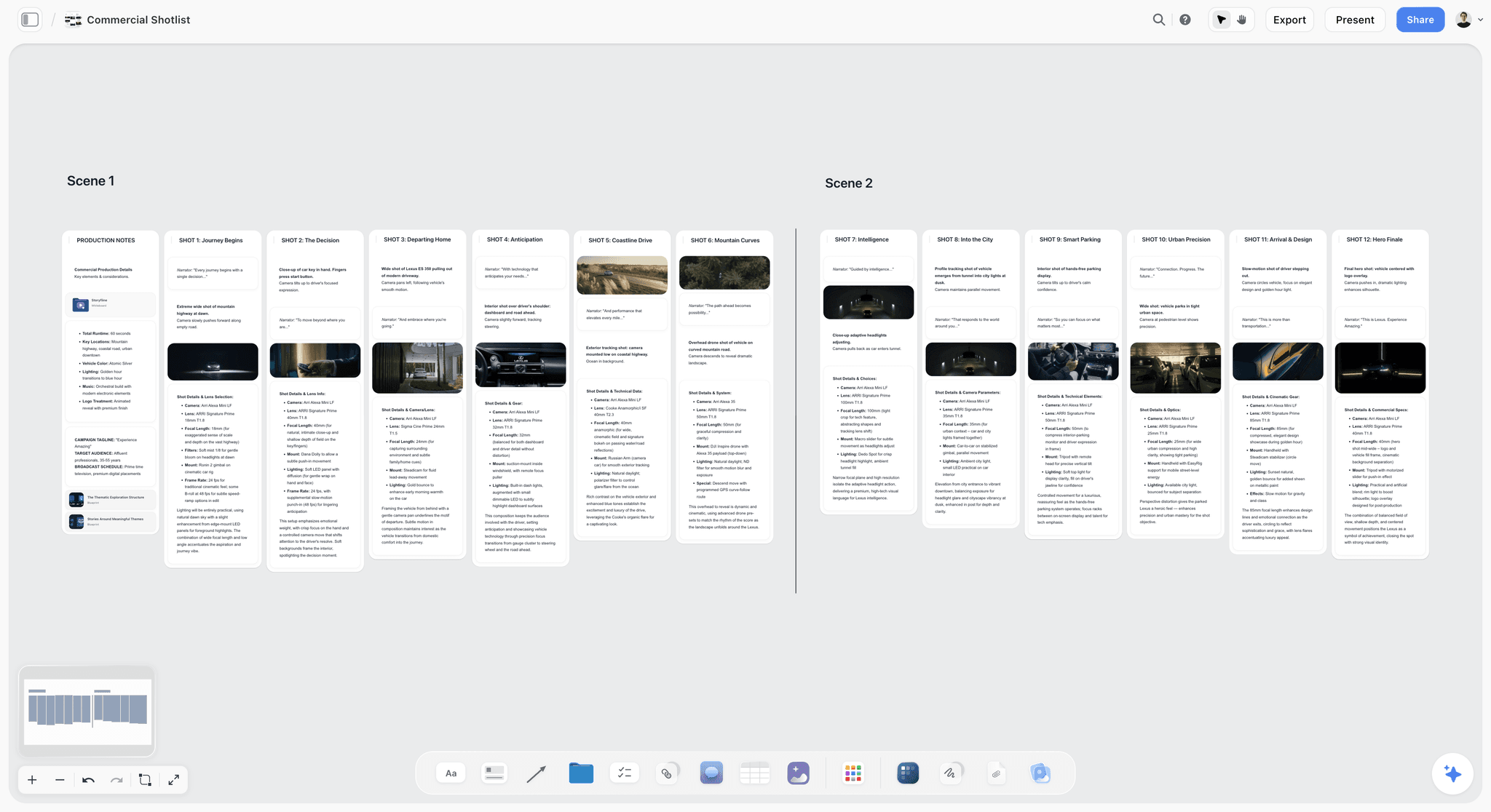
Music videos: sound is the track, and the beat is the clock
In a music video, "what we hear" is almost always the track, so name the section (verse, chorus, drop, bridge). That turns your line into a sync point for the editor. Timing is set by the beat rather than a stopwatch, so write the seconds from the song's own structure. The music video storyboard page shows how a board for a track is laid out.
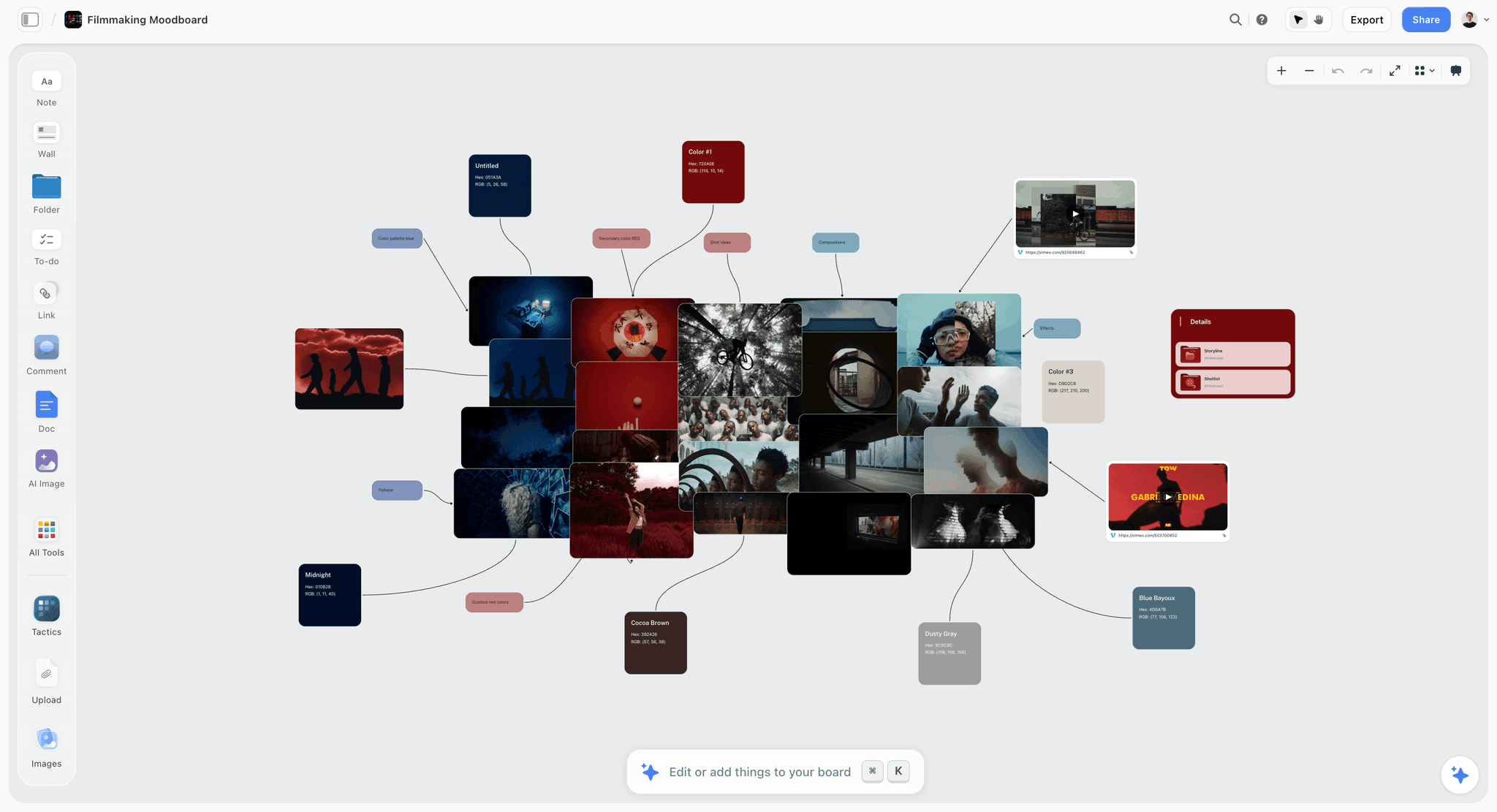
Interviews and documentaries: describe what you will find, not what you will invent
A documentary line describes what you plan to capture and how, knowing the scene may change. "Extreme close-up. His hands sand a chair leg, dust in the window light" is a plan the crew can light for; it is not a promise of the exact moment. For interviews, the line carries the eyeline (just off lens, or straight to lens) because that decision affects the whole setup. See the documentary storyboard page for how a board for unscripted work holds both plan and footage.
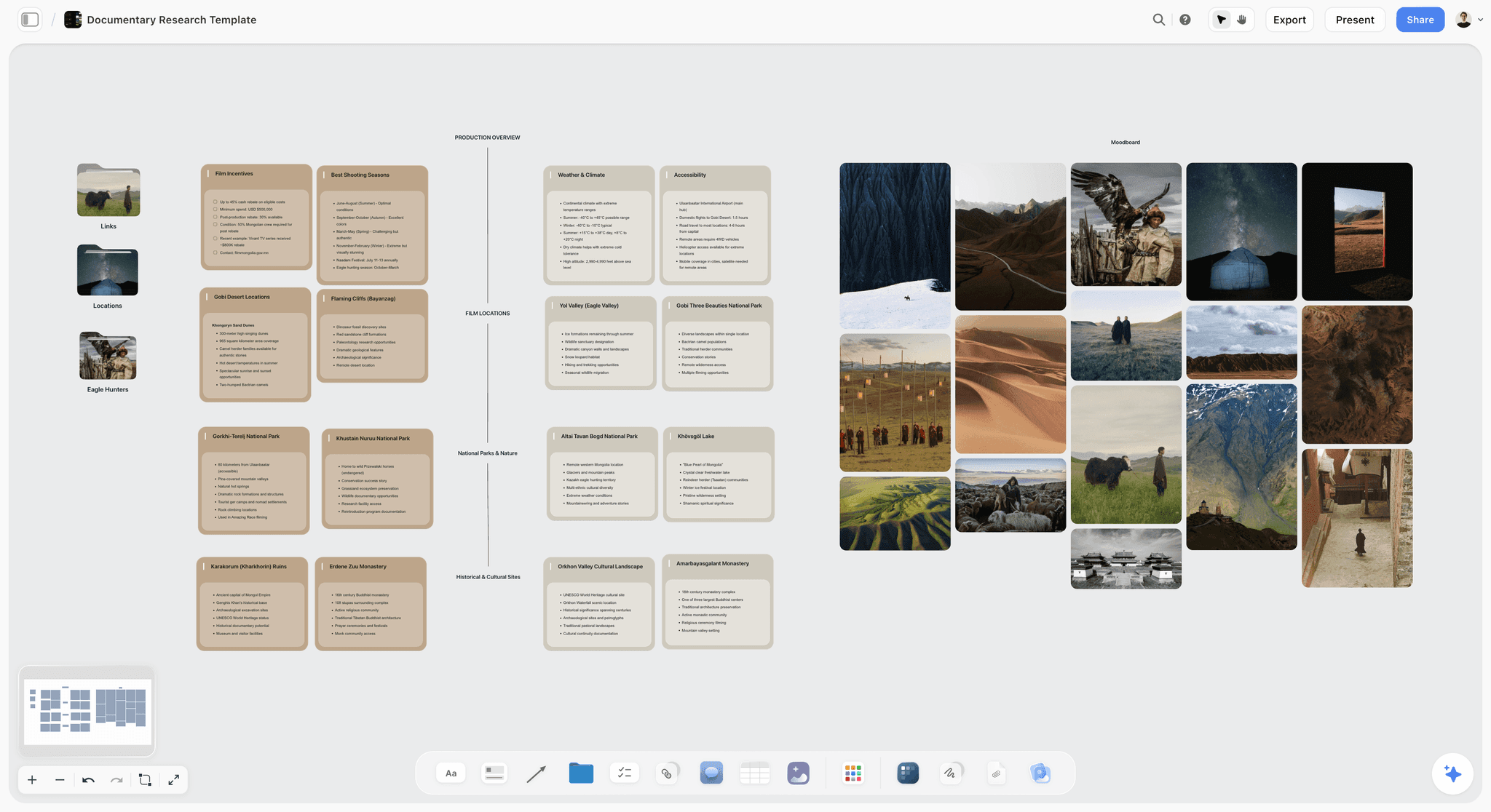
Product and short film: one action, one verb
Product shots fail when the line lists features instead of an action. Pick the one thing the hand does. Short film lines fail the other way, by narrating the character's inner life. Write what the actor does with their body and let the performance carry the rest.
The Two Hard Cases: Shots Under a Second and Shots You Cannot Film
Most lines follow the three-question pattern without trouble. Two kinds of shot need an extra move.
Shots under a second
A shot that lasts less than a second changes everything about how it is made: it can be lit for one frame of attention, it needs fewer takes, and the editor treats it as part of a rhythm rather than a moment. If the speed lives only in your head, the crew will light and cover it like a normal shot. So say it in the line: "Under a second." Put it after the camera move and before the sound. In our example board, panels 04 to 07 all carry it, and three of their to-do lists say "Cut under a second" as well, so the instruction appears in both the line and the prep.
Shots you cannot film for real
A floating room, a city that folds, a product that assembles itself in mid-air. The audience sees one thing; the crew shoots another. Write the line in two parts: first what the audience sees, as a normal line, then what is filmed on the day and what is added in the edit. "Wide. Her bedroom lifts off and objects float around her as she looks up. Shoot the room locked off, hang the objects on fishing wire, then paint the wire out in post." The first half is for the client. The second half is for the producer and the post team, and it is the half that keeps the shot from being quoted as a miracle.
Shots that are really several shots
Sometimes one moment the client needs to see is five fast shots in the edit. Do not write five lines; write one line for the moment and say how it is built: "Montage of four close-ups, each under a second." The sibling guide on how many panels a storyboard needs covers when a moment deserves its own panel and when shots group together.
A Fill-In Template for Every Shot Description
Copy this into your board, your document or your spreadsheet. Fill the slots in order, and do not reorder them between panels.
| Slot | Question | Fill in | Example |
|---|---|---|---|
1 | What do we see: how close? | Shot size | Medium close-up. |
2 | What do we see: what happens? | One sentence, present tense, subject and verb | She breathes on the mirror and picks at the glass. |
3 | How does the camera move? | One verb plus speed or direction, or "Locked off" | Slow push in. |
4 | Is it a hard case? | "Under a second." or the shoot-and-post split | (none) |
5 | What do we hear? | Voice-over, dialogue, track section, room sound or silence | Voice-over: there's a moment when the world sharpens. |
6 | How long? | Seconds, as a label | 9 |
Written out as a pattern you can paste under any panel:
- [Shot size]. [Who] [does what] [where]. [Camera move, with speed or direction]. [Under a second, if it is]. [Sound label]: [short fragment or description]. [Seconds] seconds.
- For a shot you cannot film: [Shot size]. [What the audience sees]. [What you shoot on the day], then [what is added in the edit]. [Sound label]: [fragment]. [Seconds] seconds.
- Labels on the same note: [shot size], [camera move], [seconds], plus "VFX" or "Burst" if it applies.
The storyboard template page gives you an empty board laid out as walls, and the storyboard examples page shows finished ones. For a printable version of the same idea, see our roundup of storyboard examples and templates.
The Shot Description Checklist
Run this on every line before the team check. It takes about a minute for a fourteen-panel board once the habit is in place.
- The line opens with a standard shot size.
- The action is one sentence, present tense, with a subject and a verb the camera can film.
- No adjective is doing the work of an instruction ("cinematic", "dreamy", "epic").
- The camera move is a single plain verb, or "Locked off" / "Camera still" if it does not move.
- The sound is named, even if it is silence or the track.
- Shots under a second say so in the line.
- Shots you cannot film for real have the two-part line: what we see, then how it is made.
- The character is named or described the same way on every panel.
- The seconds are on the panel, and the board adds up to the brief.
- The shot size and camera move are copied into labels.
- Someone who has not read the script can describe the shot back to you after hearing the line once.
- The full script words live in the script note, not crammed into the line.
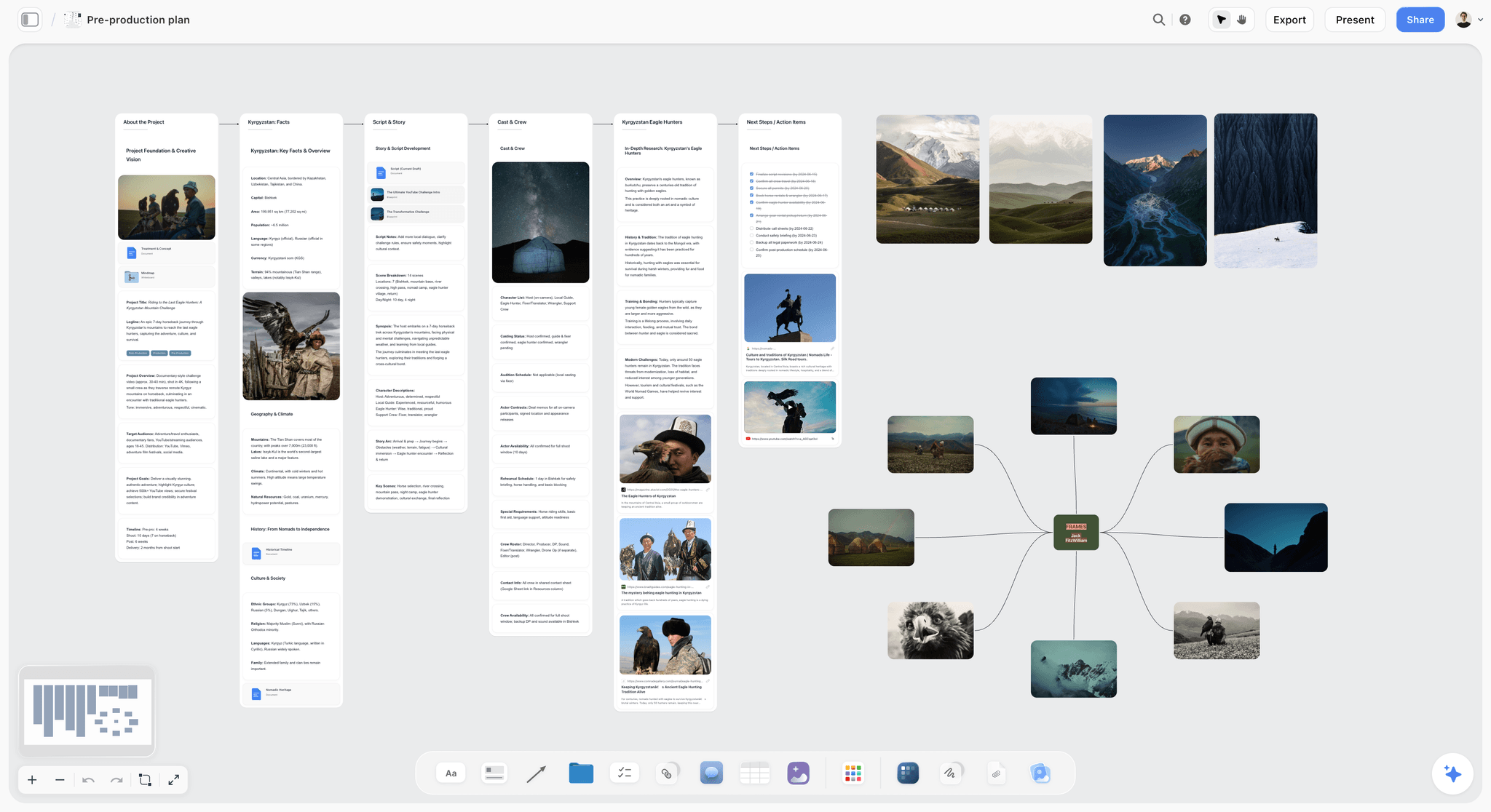
From Line to Sketch: How Storyflow's AI Uses Your Description
A good line is also a good prompt. In Storyflow, select the line and ask the AI for a pencil sketch of it, and the sketch lands in the panel above the words. That works on the Pro and Max plans, where AI image generation is included; on Plus, draw and upload your own sketch, or leave the picture empty and rely on a reference frame. The AI storyboard generator page shows the feature on its own.

Keep every sketch looking like the same film
Two habits make a board of AI sketches look like one film rather than fourteen. End every request with the same style ("loose pencil sketch with grey shading"), and describe the character the same way every time ("young woman with long dark curly hair in a grey sweater"). That second habit is the same rule as Step 1: consistent wording in the line gives you a consistent character in the picture. A line that says "she" on one panel and "a girl" on the next gets two different people.
Draw it yourself if you can
If you can draw, draw. A rough sketch in your own hand does the same job as an AI sketch, because the line is carrying the instruction anyway. Our guide to storyboarding when you cannot draw covers the other options, and how to make a storyboard covers the drawing side.
Let the AI sort the mess first
If your shot ideas start as a pile of notes from a call, Storyflow's AI can sort them into walls before you write a single line, and it can read a script you attach (PDFs, documents and Final Draft .fdx files included). The script to storyboard page shows that path. Treat whatever it drafts as a first pass: rewrite each line with the three questions in order and the seconds on the end.

Four Tools for Writing Shot Descriptions, Placed Honestly
You can write a good line in any of these. The difference is what each does with the line afterwards. We list our own product first, then the rest by the job each does best.
1. Storyflow

Verdict: the best fit when the shot description has to be read by a crew, sketched and approved by a client on one board.
Best for: directors, producers and agency creatives boarding ads, music videos, brand films and short films for a client yes.
Pricing: Plus $7.99 a month billed annually ($9.99 monthly); Pro $14 ($19 monthly) adds AI image generation; Max $39 ($49 monthly) adds a team workspace with roles and permissions. Storyflow is paid-only during early access; its Free plan launches before the end of 2026, and anyone a paid member invites to a board joins free now. See pricing.
Storyflow is an AI visual workspace for planning creative projects: an infinite board with notes, to-dos, tables, documents, images and walls, plus an AI agent that reads the board and builds on it. For shot descriptions, each panel is a wall: the sketch, the reference frame, the line as a note with its labels, the script note, the note on why, and a to-do list for the shot. Through Storyflow's MCP connector, Claude, ChatGPT, Gemini and Grok can read your projects and build on the board from inside those assistants. The film storyboard page shows the full layout.
- The line as a note, with shot size, move and seconds as labels
- AI sketch from the line on Pro and Max
- Comments on each panel from the crew and the client
- A view link that opens with no account; commenting needs a sign-in
- Present mode that walks through the board one wall at a time, fullscreen
Limitations: no animatic and no MP4 export; no approve button or approval status per panel and no version history; no drawing tools for boards drawn by hand; browser only, with no native app and no offline mode; AI sketches need Pro or Max.
2. Boords
Verdict: the strongest choice when the storyboard must become a timed animatic or carry approval statuses per frame.
Best for: studios and agencies whose deliverable is the board or the animatic itself.
Pricing: a free plan with 5 active storyboards, 3 active scripts and 8 one-off sample AI image credits; Solo $26 a month billed yearly ($39 monthly); Pro $50 billed yearly ($75 monthly) for up to 5 users; Team $85 billed yearly ($125 monthly) for up to 10 users, per Boords pricing, checked October 2026.
Boords lets you add custom fields to frames for project-specific information, convert a script draft into frames (as a snapshot, so later script edits do not update the board), add statuses such as approved and needs changes, keep versions with comments intact, and build an animatic with audio that exports as MP4, per its storyboard software page. Against Storyflow, Boords wins on playback and formal sign-off; choose it instead when the client must approve a timed animatic or needs a status trail per frame. Storyflow keeps the line next to the to-dos, the reference frames and the rest of the plan on one board.
Limitations: the board sits apart from the brief and the production paperwork; AI images are capped per plan.
3. StudioBinder
Verdict: a sensible pick when the storyboard is one part of a production suite you already use for shot lists and call sheets.
Best for: production teams that schedule and send call sheets from the same tool.
Pricing: not published when checked; see the StudioBinder pricing page.
StudioBinder's storyboard creator preloads shot specs, generates a panel from a selected line of script, adds text, shapes and arrows to panels, numbers shots with digits, letters or a custom scheme, and colour-codes specialty shots. Against Storyflow, StudioBinder is the better choice when the board needs to feed straight into scheduling and call sheets, which Storyflow does not do. Storyflow is the better fit when the line needs an AI sketch and comments from a client who should not need a production tool.
Limitations: the page we read does not describe per-frame fields for shot size or camera move; pricing was not visible.
4. Storyboarder
Verdict: the right tool when you draw every frame yourself and want to pay nothing.
Best for: directors and artists who sketch by hand and work alone.
Pricing: free and open source, for Mac, Windows and Linux, per Wonder Unit's Storyboarder page.
Storyboarder gives each board a panel for dialogue and action, plus timing and shot type, and six drawing tools (light pencil, hard pencil, pen, brush, note pen and eraser). Against Storyflow, Storyboarder wins when the drawing is the work and the budget is zero; choose it instead if you sketch fast by hand. Storyflow wins when a client and a crew have to read, comment and approve.
Limitations: a desktop app with no shared review link or comments built in.
Shot Descriptions by Role
The same line is written slightly differently depending on who holds the pen and who reads it.
The director
You write the first draft of every line. Keep it to the three questions and the time; resist the urge to explain the scene's meaning in the instruction. The why goes in its own note.
The producer
You read every line for cost. "Crane rises to top-down", "Low angle with a cover", "Paint the wire out in post": each is a line on a budget. If a line is vague, ask for the camera move before you price it.
The agency creative
You are writing for a client who approves budgets. Make sure end cards, supers and the product shot each have a line and seconds, and that the first half of every hard-case line reads clearly without the technical half.
The solo filmmaker
You are writer, director and crew, so it is tempting to skip the line and keep it in your head. Write it anyway. The line is what lets a client say yes without a call, and it is what you will read on the shoot day at six in the morning.
The editor
You will receive the board as a cutting guide. A line with the sound named and the seconds written is the closest thing to a paper edit you get before the footage exists.
Common Shot Description Mistakes and How to Fix Them
Each of these is a line we would send back.
Mistake 1: Naming the subject, not the shot
"Girl at a mirror." Fix: add the shot size first and the action as a verb. "Medium close-up. She breathes on the mirror and picks at the glass."
Mistake 2: Leaving the camera move out
If the line does not say, the operator guesses. Fix: add one verb, or write "Locked off" when nothing moves.
Mistake 3: Forgetting sound
The picture cannot carry it. Fix: end every line with what we hear, including "Music only" or "Silence".
Mistake 4: Writing feelings instead of actions
"She feels lost" cannot be filmed. Fix: write what she does that shows it. "She stops, turns, looks back down the empty road."
Mistake 5: Cramming the script into the line
A line that holds three sentences of voice-over stops being scannable. Fix: a short fragment in the line, the full words in the script note.
Mistake 6: Changing the order between panels
Camera first on one panel, sound first on the next. Fix: picture, camera, sound, every time, so the reader's eye knows where to look.
Mistake 7: No seconds
A board without durations cannot be checked against the brief. Fix: act each shot out with a stopwatch and add the seconds as a label.
Mistake 8: Hiding a hard case
A floating room written as a normal shot gets quoted as one. Fix: the two-part line, what we see and how it is made.
When Storyflow Is Not the Right Choice
Storyflow is built for the board a crew reads and a client approves. Some jobs belong elsewhere.
You need a timed animatic or an MP4
Storyflow has no animatic and no MP4 export. Boords builds animatics with audio and exports MP4; our animatic guide covers the other routes.
Your client needs a formal approval status per panel
Storyflow has comments but no approve button, no approval status per panel and no version history. Boords has statuses and versions.
You review cut footage frame by frame
That is a video review job, and Frame.io is built for it. Storyflow does not do frame-accurate video review.
You schedule the shoot and send call sheets
Storyflow does not build a stripboard schedule or send call sheets. StudioBinder does both inside its suite.
You draw every frame by hand
Storyflow has no drawing tools for hand-drawn boards. Storyboarder, Procreate or Photoshop are better for the drawing itself; you can upload the result into a panel.
You work offline or want a desktop app
Storyflow runs in the browser. There is no native app for desktop or phone, and no offline mode.
What the Tools Cost (October 2026)
Prices from each vendor's own page, checked in October 2026.
| Tool | Entry price | What the step up adds | Free option |
|---|---|---|---|
Storyflow | Plus $7.99 a month billed annually ($9.99 monthly) | Pro $14 adds AI sketches; Max $39 adds a team workspace | Paid-only during early access; Free plan due before the end of 2026; invited collaborators join free now |
Boords | Solo $26 a month billed yearly ($39 monthly) | Pro $50 for up to 5 users; Team $85 for up to 10 | Free plan with 5 active storyboards |
StudioBinder | Not published when checked | See the pricing page | See the pricing page |
Storyboarder | Free | None | Free and open source |
The Bottom Line
The picture on a storyboard panel is the illustration; the line under it is the instruction. Write it the same way every time (what we see, how the camera moves, what we hear, how long) and read it out loud until someone who has not seen the script can picture the shot. Handle the two hard cases on purpose: say "Under a second" when a shot is that fast, and split the line when a shot cannot be filmed for real. Storyflow is the board where that line sits as a note with its labels, becomes a sketch on Pro and Max, and gets the crew's and the client's comments on the exact panel. Boords is the better pick for a timed animatic and formal sign-off, Storyboarder for free hand-drawn boards. To see a whole board of these lines built and approved, watch How to Storyboard a Film So Your Client Says Yes, then write your first line on the film storyboard board.
FAQ: Writing Storyboard Shot Descriptions
What should a storyboard shot description include?
A storyboard shot description should include the shot size, what happens in the frame, how the camera moves, what we hear and how long the shot lasts. Write them in that order every time, in one line under the panel. Keep the full script and the reason for the shot in their own notes, so the line stays short enough to read at a glance and specific enough to shoot from.
How do you write a storyboard description?
Answer three questions in a fixed order: what do we see (opening with the shot size), how does the camera move, and what do we hear. Then add the seconds. Read the line out loud to someone who has not seen the script; if they can picture the shot, the line works. If they ask a question, put the answer in the line.
What do you write under a storyboard panel?
Under a storyboard panel you write one line that describes the shot: shot size, action, camera move, sound and duration. On a fuller panel, you add labels for the shot size and move, a note with the exact script words, a note on why the shot is there and a to-do list of what the shot needs before the shoot.
How long should a shot description be?
One line, usually one to three short sentences. Long enough to answer the three questions and give the seconds, short enough that a client can read fourteen of them in a few minutes. If a line runs to a paragraph, move the script words to the script note and the reasoning to the why note.
What are storyboard captions?
Storyboard captions are the written lines under each frame that explain what the picture cannot: how close the camera is, whether it moves, what the audience hears and for how long. Some teams call them action notes or panel descriptions. They are the part of the board the crew shoots from and the client approves.
How do you describe camera movement in a storyboard?
Use one plain verb with a speed or a direction: "Slow push in", "Pan left to the door", "Tilt up to her face", "Handheld", "Locked off". If the camera does not move, say so. Arrows on the sketch help, but the word in the line is what removes the guess, because each move needs different equipment on the day.
Do you need to write sound in a storyboard?
Yes. A sketch cannot show sound, so the line has to say it: voice-over, dialogue, the section of the track, room sound or silence. Sound tells the editor where the script sits against the picture and tells the client what they will hear, which is often what they react to first.
What is the difference between a storyboard description and a shot list?
A storyboard description is in story order, one line per moment the client needs to see, and describes what the audience sees and hears. A shot list is in shooting order, one row per camera setup, and describes what the crew builds: lens, rig, coverage and location. Write and approve the storyboard first, then build the shot list from it.
What shot sizes should I use in a storyboard?
Use the standard set: extreme wide, wide, medium, medium close-up, close-up and extreme close-up, plus top-down and insert for special cases. Use the same words on every panel. A board that mixes "MCU", "medium close" and "chest-up shot" makes the reader translate, and labels stop grouping the same shots together.
How do you write a storyboard for a shot that is very fast?
Put the speed in the line: "Under a second." Place it after the camera move and before the sound. Speed changes how a shot is lit, covered and edited, so it is an instruction, not a detail. If several fast shots make up one moment, write one line for the moment and say how many shots build it.
How do you storyboard a visual effect you cannot film?
Write the line in two parts. First what the audience sees, as a normal line. Then what the crew films on the day and what is added in the edit: "Shoot the room locked off, hang the objects on fishing wire, then paint the wire out in post." The client reads the first half; the producer prices the second.
Can AI write storyboard shot descriptions?
AI can draft them from a script, and Storyflow's AI reads scripts you attach, including PDFs and Final Draft files. Treat the draft as a first pass: rewrite each line so it answers the three questions in order and ends with the seconds. In Storyflow, the finished line can then become a prompt for an AI sketch on the Pro and Max plans.
Is Storyflow free for writing storyboards?
Not during early access. Storyflow is paid-only during early access; its Free plan launches before the end of 2026, and anyone a paid member invites to a board joins free now. Plans start at Plus, $7.99 a month billed annually, and AI sketches need Pro at $14 a month billed annually.
Table of Contents
- Key Takeaways
- Why Most Storyboard Shot Descriptions Fail
- What a Storyboard Shot Description Is (and What It Is Not)
- Tools for Each Step: Writing, Sketching and Sharing a Shot Description
- How to Write a Storyboard Shot Description, Step by Step
- Step 1: Start with what we see, opening on the shot size
- Step 2: Say how the camera moves, with one plain verb
- Step 3: Say what we hear, even when it is nothing
- Step 4: Add the fourth question, how long
- Step 5: Read it out loud to someone who has not seen the script
- Step 6: Pull the details out into labels
- The Shot Size and Camera Move Glossary, in Plain Words
- Worked Example: Three Lines From a 14-Panel Board for a 90-Second Ad
- 12 Weak-to-Strong Shot Description Rewrites, by Kind of Film
- The Two Hard Cases: Shots Under a Second and Shots You Cannot Film
- A Fill-In Template for Every Shot Description
- The Shot Description Checklist
- From Line to Sketch: How Storyflow's AI Uses Your Description
- Four Tools for Writing Shot Descriptions, Placed Honestly
- Shot Descriptions by Role
- Common Shot Description Mistakes and How to Fix Them
- When Storyflow Is Not the Right Choice
- What the Tools Cost (October 2026)
- The Bottom Line
- FAQ: Writing Storyboard Shot Descriptions
- Related Reading
Templates to check out for this topic


Filmmaking templates you can use in Storyflow
Skip the blank canvas. Open one of these filmmaking boards in Storyflow and the AI builds on the structure that is already there, from research through the shot list.


See Storyflow in Action
A visual AI workspace where every feature lives inside one canvas. No tab-switching, no context lost.
Build your entire board from a single message
Type what you need in the AI chat at the bottom of your canvas. The AI adds cards, headings, and structure directly onto your board.
Use expert frameworks as AI context
Type @ in the AI chat and choose any Tactic. The AI tailors every response to that framework instead of giving generic advice.
Turn your board into a mind map in seconds
Ask the AI to restructure your canvas as a mindmap. It connects your ideas into a visual hierarchy so you can see how everything relates.
Why Storyflow Exists
Storyflow actually began as a personal tool while working on creative and research projects.
We kept running into the same problem: ideas were scattered everywhere: notes, documents, and whiteboards.
Nothing helped us see how everything connected.
So we started building a workspace designed around how ideas actually grow.
→ Read how Storyflow was createdStoryflow Team
Product & Research Team
Published: 2026-10-11
Extremely simple, seriously capable


See how easy it is to get started
Watch a real project come together, from a blank board to a finished plan, clicked through step by step.
Start creating with AI and become more productive
Transform your creative workflow with AI-powered tools. Generate ideas, create content, and boost your productivity in minutes instead of hours.