
Extremely reliable pre-production
A documentary storyboard
that bends with the story.
A documentary storyboard is a flexible map, not a shot-for-shot plan. Board the narrative spine, plan interviews and b-roll, and keep research and transcripts on the same canvas.


Creatives working for these brands already got early access
- Red Bull
- Canon
- Artlist
- Porsche
See how easy it is to get started
Watch a real project come together, from a blank board to a finished plan, clicked through step by step.
Start from a ready-made template
Pick a board to see what you can build, then let AI fill it in. Every template is a real, editable starting point on the same infinite canvas.

Pre-Production
Pull the brief, script, shot list, and moodboard into one pre-production hub so the whole shoot is planned in one place.
What is a documentary storyboard?
A documentary storyboard is a visual map of the film you think you are making: the narrative spine, the interviews you plan to shoot, the b-roll you hope to capture, and the structure that holds it together. Storyflow is an AI visual workspace that boards your documentary on one infinite canvas: the narrative spine, interview setups, a b-roll wishlist, and your research and transcripts beside them. Unlike a fiction board, a documentary storyboard is not a shot-for-shot plan, because the real story shows up during filming and gets found in the edit. The board is there to keep you pointed at a story while staying open to a better one.
That is exactly why documentary storyboarding works better on an infinite canvas than in a rigid frame grid. In Storyflow, the storyboard for your documentary sits next to everything that informs it: research notes, transcripts and articles dropped in as PDFs, links, and reference stills grabbed from YouTube or Vimeo. Ask the AI to lay out the narrative spine from your treatment and it generates the structure, scenes, and notes on the canvas.
When the story shifts, the documentary storyboard shifts with it. Drag sequences around, rewrite beats, re-prompt the AI, and keep one living map from pitch to picture lock.
Ultra fast from brief to board
Storyboard a documentary in four steps.
Start with what you know, let the AI lay out a spine, and keep reshaping it as the story reveals itself.
01
Open a canvas
Create an account, no download needed, and open a canvas with room for every transcript, article, and treatment you have collected.
02
Gather your research
Drop transcripts, articles, and treatments onto the canvas as PDFs and notes. Add links and grab reference frames from YouTube or Vimeo documentaries.
03
AI lays out the narrative spine
Paste your treatment or describe the film, and the AI generates a storyboard layout: acts, sequences, and notes arranged on the canvas next to your research.
04
Refine, share, export
Plan interview setups and a b-roll wishlist, reorder the spine as the story changes, and when it is time to show someone, send a view-only link or export an image or PDF of the board.
A documentary storyboard built for stories that move.
The board, the research, and the shoot plan live on one canvas, so nothing gets lost between tools.

Acts, sequences, and beats laid out by AI
Board the narrative spine
Describe the film or paste your treatment and the AI lays out the documentary storyboard structure: acts, sequences, and beat notes you can drag into a new shape the moment the story changes.
See the AI storyboard generator →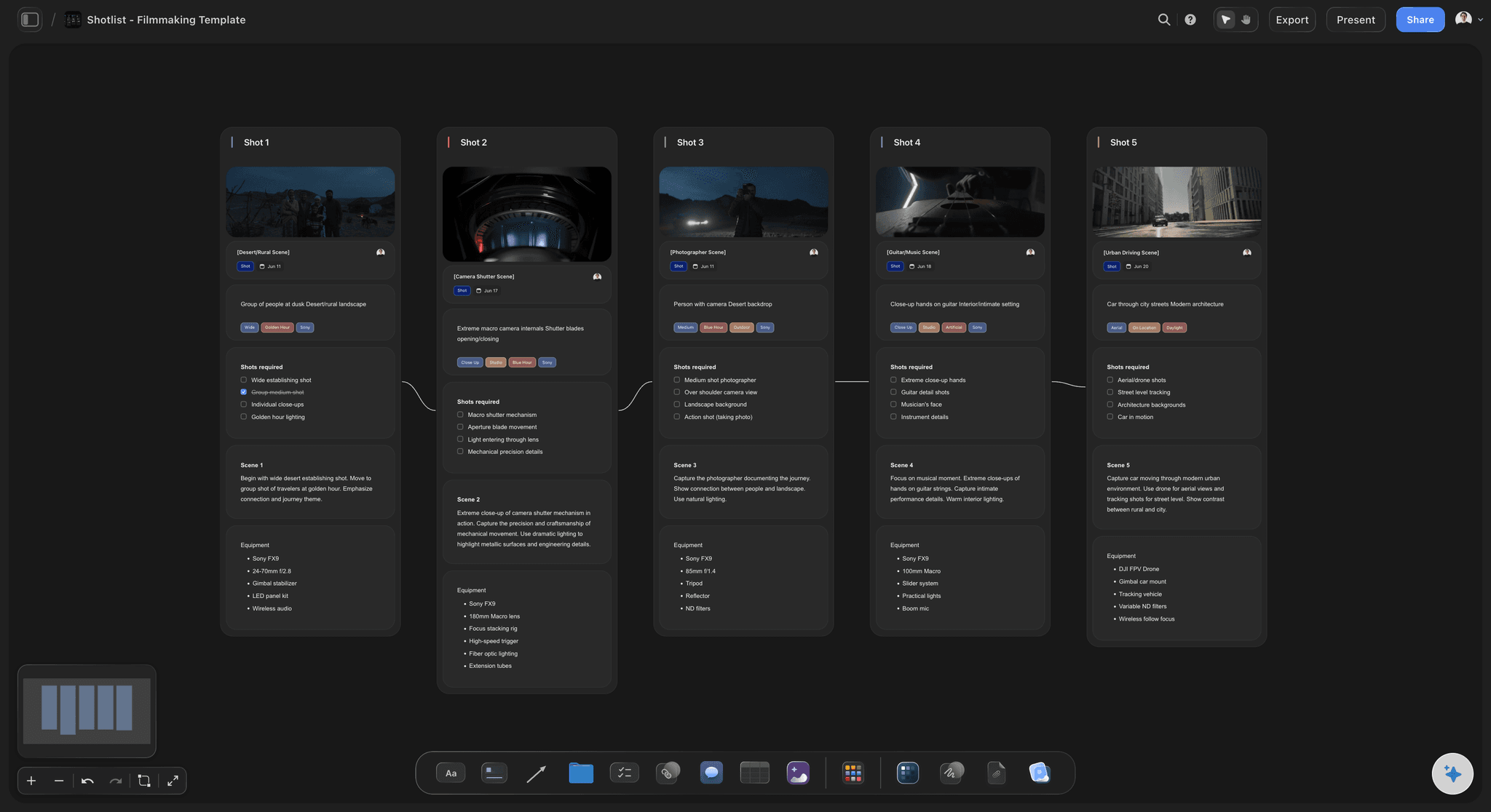
Interview setups and b-roll wishlists next to the board
Plan interviews and b-roll
Turn the spine into a shoot plan: interview setups, locations, question notes, and a b-roll wishlist for every sequence, all generated and refined on the same canvas.
Try the AI shot list generator →
Transcripts, articles, and references as PDFs and notes
Keep research on the canvas
Drop transcripts, research PDFs, links, and notes right next to the storyboard for your documentary. The source material and the structure stay in one place instead of five apps.
Turn a script into a board →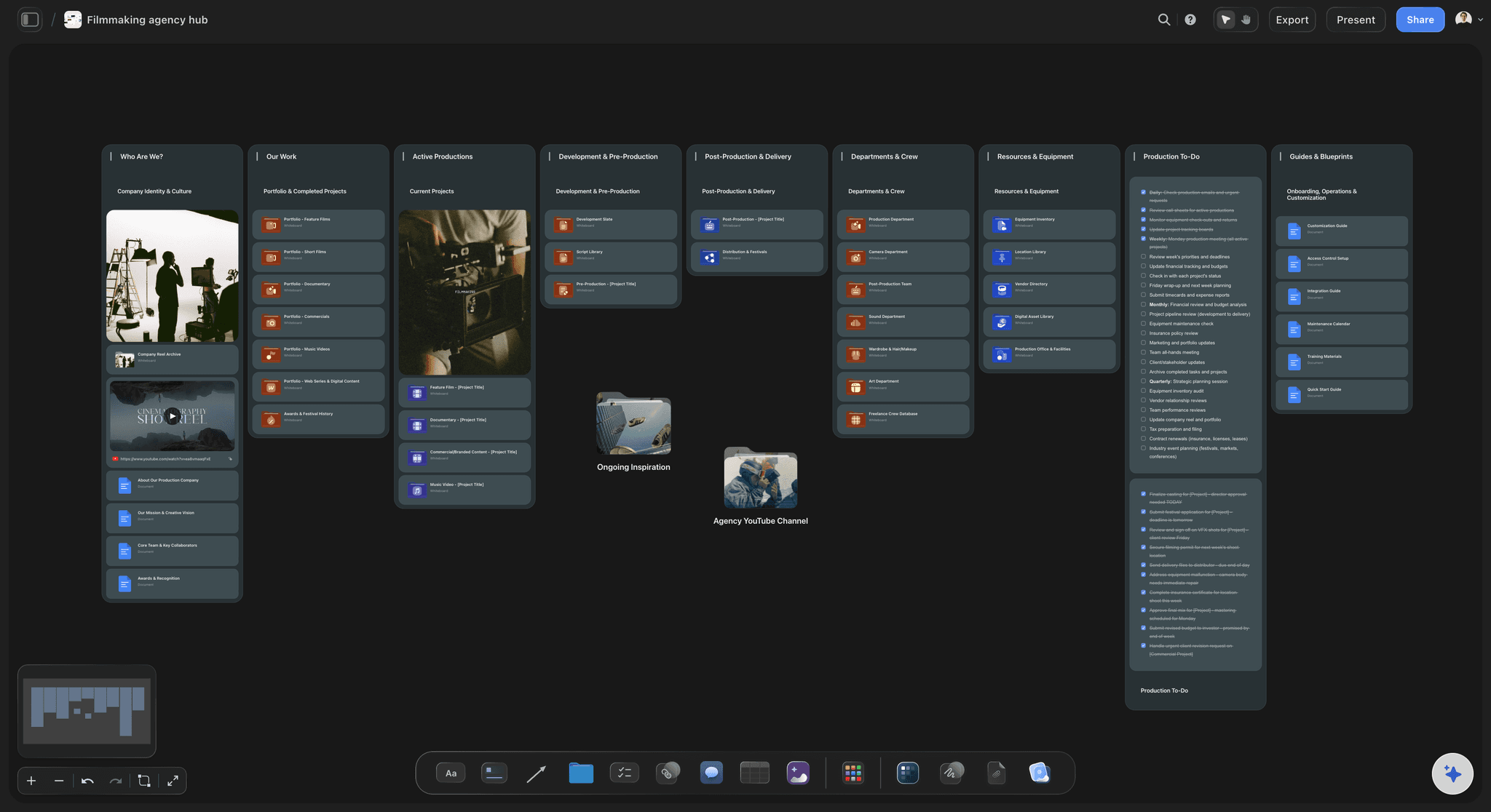
View-only links for producers and commissioners
Share the map with your team
Invite your crew free, and send view-only links so producers, editors, and commissioners can see the current shape of the film without signing up.
See video storyboarding →Plans from $7.99/month annual. Free plan coming late 2026.
Documentaries take years. Your planning tool should not expire. There is no board limit.
No cap on boards, however long the project runs
AI usage to lay out the narrative spine
Free access for co-producers and editors, view-only links for commissioners

Built for people with taste
More than a documentary storyboard template.
Storyflow is an AI-native canvas, so the board grows out of real material instead of guesswork.

PDFs, links, notes, and frame grabs on one board
Built around real material
Transcripts as PDFs: Drop interview transcripts and research documents straight onto the canvas. They stay pinned next to the sequences they feed.
Frame grabs from references: Capture stills from YouTube and Vimeo documentaries onto the canvas to define the visual language before the shoot.
Links and notes: Articles, archive sources, and field notes live beside the board, so the evidence behind every beat is one glance away.

Frameworks and AI that re-shape the spine
Structure that bends with the story
Documentary-friendly frameworks: Three-act structure and beat sheets to hang your sequences on, or to break on purpose.
Re-prompt as the story changes: A subject drops out or a better thread appears. Ask the AI to restructure the board and it reworks the layout with your canvas in context.
A map, not a contract: Frames hold intent, not final shots. Notes on every beat record what you are looking for, so the edit starts with a plan instead of a pile.
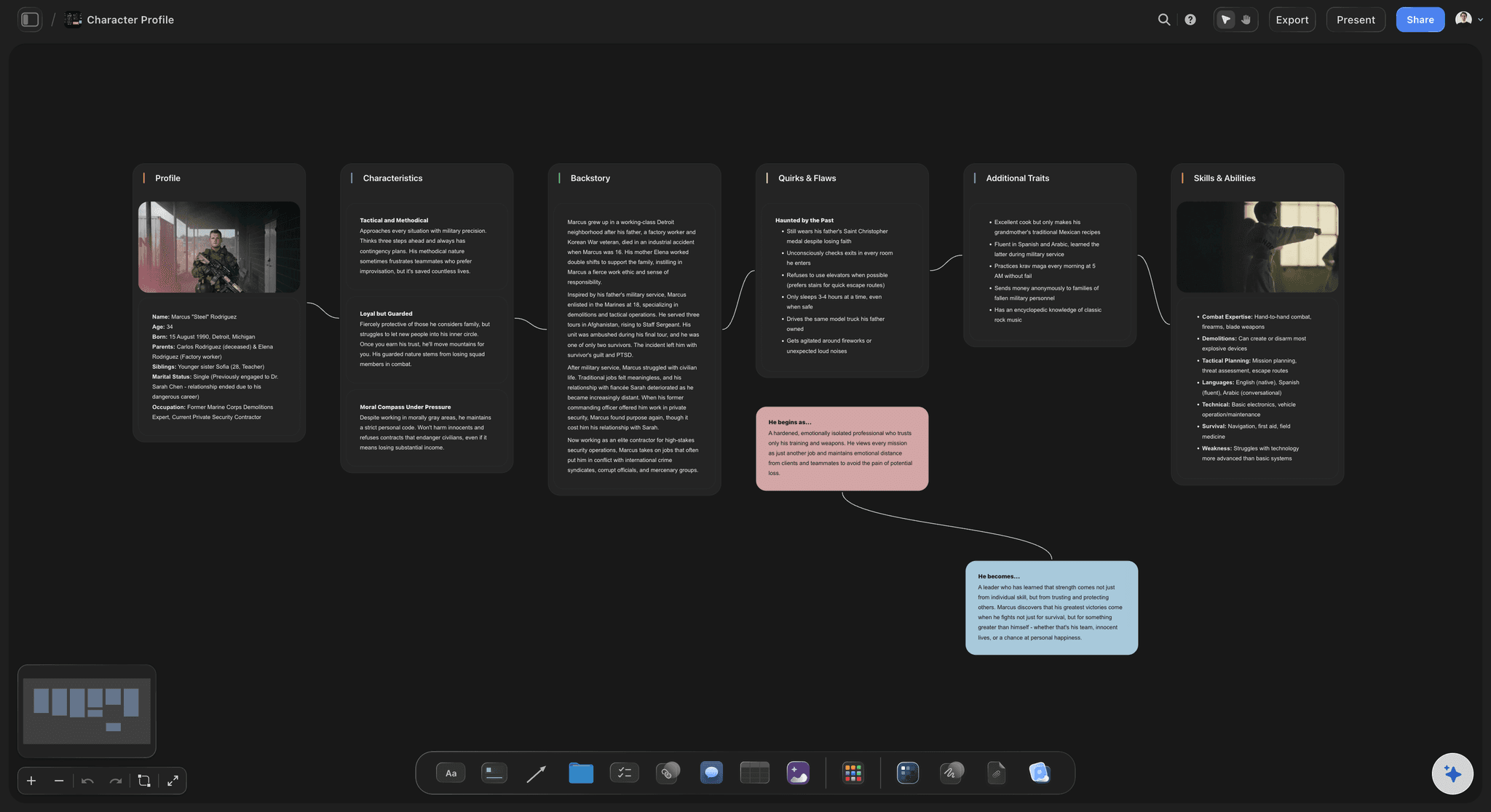
Subjects, questions, and setups in one place
Interviews planned, not improvised
Subject profiles: Keep a card per contributor: who they are, what they can speak to, and which beats of the film they unlock.
Question notes per setup: Write interview questions next to the storyboard beats they serve, so every setup earns its place in the structure.
B-roll wishlists: List the verite moments, cutaways, and archive you need for each sequence before the shoot day, not after it.

From flexible map to shoot to edit
Carry the board through production
Shoot-ready exports: Export the storyboard as a clean image or PDF for the field binder, the pitch deck, or the funding application.
Editors start oriented: Hand the edit a map of intended structure plus the research behind it, instead of a drive of footage and a shrug.
One source of truth: Invite collaborators free and keep the plan, the research, and the shoot lists in one project everyone can see.
Explore templates for your project
Every template opens as a real, editable board on the infinite canvas. Pick the closest fit and make it your own.
Pre-Production
Pull the brief, script, shot list, and moodboard into one pre-production hub so the whole shoot is planned in one place.
What creators are saying
Join early creators getting structured workspaces and AI that remembers their projects
“Storyflow has sped up my workflow by at least 3x, which means more flow state and more projects I can actually ship. It truly changed the way me and my team create.”

Reilin Joey
Director & YouTuber
“One prompt gets me a structured board. But the tactics are my favorite. I run my YouTube scripts through them and my intros and retention got better. It's amazing.”

Justkay
YouTuber & Freelance Filmmaker
“I used to juggle five apps to plan a project. Now I describe what I am making and get boards, lists, and a schedule. All in one place.”

George
@fernwehchronicles
Documentary storyboards, answered.
Everything people ask about storyboarding a documentary with Storyflow.
Yes, but differently from fiction. A documentary storyboard maps the intended structure, interview setups, and b-roll wishlist rather than locking every shot, because the real story emerges during filming and in the edit. Documentary makers use the board as a flexible map that keeps the team aligned while staying open to where the story leads. Storyflow keeps that map on an infinite canvas, so it reshapes as easily as the film does.
Storyflow does this on one board: you map the narrative spine, plan interview setups and a b-roll wishlist, and keep research notes, transcripts, and articles next to them as PDFs and links. Ask the AI to lay out the spine from your treatment and it puts the structure, scenes, and notes on the canvas. Reference stills can be grabbed from YouTube or Vimeo, and the map reshapes as the story changes.
Start with the narrative spine: the acts, sequences, and beats you expect the film to have. In Storyflow you paste your treatment or describe the film and the AI lays out that structure on an infinite canvas. Then plan interview setups and b-roll for each sequence, pin your research and transcripts next to the board, and keep revising as filming reveals the real story.
Yes. Drag transcripts, articles, and treatments onto the Storyflow canvas as PDFs, add links and notes, and grab reference frames from YouTube or Vimeo. Everything sits on the same infinite canvas as the documentary storyboard, so the source material and the structure stay in one place.
Not yet. Storyflow is paid-only during early access, with plans from $7.99 a month billed annually ($9.99 monthly). A free plan launches before the end of 2026, and anyone a paid member invites to a board joins free. For a documentary that takes two years, every paid plan gives you unlimited boards and file uploads, view-only links, and AI that lays out the narrative spine on one infinite canvas.
The AI generates the storyboard layout: acts, sequences, structure, and notes arranged on the canvas from your treatment or prompt. It does not draw finished artwork. For the visuals themselves, grab frames from your footage and video references, drop in stills and location photos, or rough out compositions with the pen tool. Subscribers on Pro and Max can additionally create AI-generated images right on the canvas.
That is the point of boarding a documentary on an infinite canvas. Drag sequences into a new order, rewrite beats, and ask the AI to restructure the board with your existing material in context. The storyboard stays a living map of the film instead of a frozen plan from pre-production.
Yes. Build interview setups with subject profiles and question notes, and keep a b-roll wishlist for every sequence next to the storyboard. You can also generate a shot list on the same canvas, so the shoot plan grows directly out of the structure.
Send a view-only link so they can see the current board without creating an account, or export the storyboard as a clean image or PDF for pitch decks and funding applications. You can also invite your team free to work in the same project.
The story is out there. Bring a map.
Board the spine, plan the interviews, and keep the research where the structure lives.