Storyboard vs Shot List: The Complete Guide (2026)
Storyboard vs shot list, explained. A storyboard shows how a scene reads; a shot list is the inventory of every shot to capture. When to use each, and how they work together.

Category
Filmmaking
Author

Justkay
Documentary Filmmaker & Founder at Storyflow
Topics
2026-06-11
•
Updated July 3, 2026
•
18 min read
•
Filmmaking- storyboard vs shot list
- difference between storyboard and shot list
- what is a storyboard
- what is a shot list
- shot list columns
- storyboard and shot list
- do you need a storyboard and a shot list
- filmmaking pre-production
What is the difference between a storyboard and a shot list?
A storyboard is a visual sequence of frames showing how a scene will read, panel by panel. A shot list is a written table of every shot to capture, with size, angle, movement, and lens. One is a picture, the other is a checklist, and most scripted productions need both: the board designs the sequence, the list guarantees coverage.
Build the storyboard and the shot list on the same board
They come from the same scene, so Storyflow lets you draft both side by side and translate story order into shoot order without retyping. AI drafts the first pass from your script.

1) Quick Answer: Storyboard vs Shot List
A storyboard is a sequence of drawn or generated frames that shows how a scene will look and read, panel by panel, before you shoot it. A shot list is a written, usually tabular inventory of every individual shot you need to capture, with technical columns like shot size, camera angle, movement, and lens. The difference is the format and the question each one answers. A storyboard answers "how does this scene read?" A shot list answers "what do I actually have to capture?" One is a picture. The other is a checklist.
They are not competing tools. Most narrative and commercial productions use both: the storyboard to design the visual sequence, the shot list to make sure nothing gets missed on the day. A documentary or a fast run-and-gun shoot often skips the storyboard and lives on the shot list alone. The honest version is that the storyboard is optional for many projects and the shot list almost never is, because you can shoot without knowing exactly how a frame looks, but you cannot shoot efficiently without knowing what you came to get.
For the wider category, see What Is a Storyboard? A Complete Guide and the tested rankings in The Best Storyboarding Software in 2026 and The Best Shot List Tools in 2026.
2) What Is a Storyboard?
A storyboard is a visual plan for a scene: a series of frames, drawn or generated, that shows the key moments of a sequence in the order they will appear on screen. Each panel captures one shot or one beat of action, with notes on framing, movement, and what is happening in the frame. Think of it as a comic-book version of your film, made before the film exists.
The job of a storyboard is to let everyone see the same film before a single dollar is spent shooting it. A director uses it to test whether a sequence cuts together, a DP to plan coverage and lighting, a client or producer to sign off on the look before the crew shows up. When the action is complex, a chase, a fight, a tricky reveal, a VFX sequence, the storyboard is where you find the problems on paper instead of on set at a thousand dollars an hour.
A storyboard is built from three layers. The first is the frame: the composition, what is in the shot, and how it is framed. The second is the annotation: arrows for camera or subject movement, notes on the action, sometimes the line of dialogue. The third is the sequence: the order the panels run in, which is the storyboard's real argument about how the scene reads. A storyboard is not a drawing exercise. It is a decision about how a scene reads, and the panels are just how that decision gets recorded. Fidelity should match the audience: a board for your own planning can be stick figures and boxes; a board a client signs off on usually cannot.
3) What Is a Shot List?
A shot list is a written inventory of every shot you plan to capture, broken down scene by scene, usually as a table. Each row is one shot. Each column is a piece of technical or logistical information about that shot: the shot number, the scene, the shot size, the camera angle, the movement, the lens, the location, and a short description of the action. It is the production's master checklist for what has to get filmed.
The job of a shot list is completeness and efficiency. The fastest way to waste an expensive shoot day is to wrap a location, move on, and realize in the edit that you never got the insert or the reverse angle. The shot list exists so that does not happen. The 1st AD and the DP work off it to plan the order of the day, group shots by setup to minimize lighting and camera moves, and tick off each shot as it is captured.
It is also the bridge between the creative plan and the logistics. When a producer asks "how many setups is scene 12," the answer comes from the shot list, not the storyboard. A shot list is not a creative document. It is the production's promise of what it will walk away with.
A good shot list is exhaustive about coverage. For a single dialogue scene it might list the wide master, the two singles, the two over-the-shoulders, and a couple of inserts, every angle you will need options for in the edit, not just the ones you are sure about. Coverage you did not list is coverage you will probably forget.
4) The Core Difference: The Picture and the Checklist
Here is the cleanest way to hold the distinction: the storyboard is the picture, the shot list is the checklist. The storyboard works in images and sequence, the way you read a comic: top to bottom, watching the scene assemble in your head. It is the right format when the question is creative, does the eyeline match, does the reveal land, does this cut work. The shot list works in rows and columns, the way you read a spreadsheet: scanning down, checking nothing is missing. It is the right format when the question is logistical, how many setups, what lenses, what order saves time.
The two formats also answer to two different people at two different moments. The storyboard answers to the director and the client during prep, when the question is whether the film is going to work. The shot list answers to the 1st AD and the DP during the shoot, when the question is whether you will get everything before you lose the light. A storyboard shows how a scene reads. A shot list is the inventory of what you have to capture. Confusing the two, making the storyboard carry the logistics or the shot list carry the creative, is where most planning breaks down.
One more difference matters: the storyboard is interpretive, the shot list is literal. Two directors can storyboard the same script very differently, because the board argues for a way to tell the scene. Given that storyboard, most ADs would derive nearly the same shot list, because the list is just the board's decisions translated into capturable units.
5) Storyboard vs Shot List: The Comparison Table
The single most useful row is "what it answers." The storyboard answers a creative question, the shot list a logistical one. Keep that distinction clear and everything else in the table follows from it.
6) Do You Need Both?
It depends on the project. Most scripted productions benefit from both, but plenty of real shoots run on one, and the decision comes down to how visually complex the scene is.
You need both when the visual sequence is complex or expensive: a stunt, a chase, a VFX shot, an intricate oner, a commercial where the client is paying to approve the look. The storyboard designs the sequence; the shot list makes sure you capture every piece of it. Skipping the storyboard means discovering on set that the action does not cut; skipping the shot list means discovering in the edit that you are missing a piece.
You need only a shot list when the scene is simple coverage or the content is unscripted: most documentary, interviews, run-and-gun, news, event work, and straightforward dialogue scenes. You know it is a wide, two singles, and some inserts; drawing that is a waste of prep time. This is why so many working filmmakers live on shot lists and storyboard only the handful of sequences that genuinely need it.
You need only a storyboard almost never, because even a fully storyboarded sequence still gets translated into a shot list to schedule and shoot it. The exception is animation and motion graphics, where there is no live shoot to schedule, so the board does double duty. The practical takeaway: the shot list is the floor, the storyboard is the ceiling. Almost every shoot needs the floor. Only some need the ceiling.
7) When to Use Each
Reach for a storyboard when the question in the room is creative and visual: a sequence that is action-heavy or technically tricky, a look a client has to approve before you commit budget, multiple departments (camera, VFX, stunts, art) coordinating around the same shots, animation or motion graphics, or any time you simply cannot yet picture whether a sequence will cut together. The storyboard is a thinking tool first and a communication tool second; it earns its time whenever drawing the scene reveals something talking about it would not.
Reach for a shot list the moment you are heading toward a shoot day, on essentially every project. If you make exactly one planning document for a shoot, make the shot list. It is the one that prevents the expensive mistake of an incomplete day.
The timing differs too. The storyboard belongs to deep prep, when there is still time to redesign a sequence on paper. The shot list firms up in final prep, often derived from the storyboard and the script, and it is the document you carry onto the floor. A storyboard you finish the night before the shoot is too late to be useful; a shot list you finish the night before is normal.
8) How They Work Together on Set
On a well-run set, the storyboard and the shot list are two views of the same plan, most powerful when they stay linked. The workflow looks like this. In prep, the director storyboards the sequences that need it. The 1st AD and DP then derive the shot list from the storyboard and the script, turning each panel into one or more rows with the technical spec filled in. On the day, the AD runs the floor off the shot list, calling setups and checking off shots, while the DP and director glance back at the storyboard panel for the intended framing and movement. When the schedule slips and shots get cut, the AD cuts from the list, and that decision ideally flows back so everyone knows which boarded panels are no longer being shot.
That last point is where most productions leak. A storyboard and a shot list that do not talk to each other quietly drift apart over the course of a project. The fix is to keep them connected: when the storyboard panel for scene four changes, the corresponding shot-list rows change with it. On most productions that link is a human remembering to update three files; the better setups make it structural instead of manual.
Stop re-syncing the board, the list, and the script by hand
Generate a first shot list from your scene, keep it on the same canvas as the frames and the script, and let a scene change ripple through all three instead of being re-entered in three apps.
9) How to Make a Storyboard (Step by Step)
Making a storyboard is less about drawing ability than about decisions. Here is the working process.
- Break the scene into beats. Read the scene and mark the moments where something changes: a new action, a new line that lands, a reveal, a reaction. Each beat is a candidate panel. You are not drawing yet; you are deciding what the scene's key moments are.
- Decide the shots for each beat. For each beat, choose how you will cover it: wide to establish, a single for the reaction, an insert for the detail. This is where the storyboard starts making real coverage decisions, which is why it feeds the shot list so naturally.
- Thumbnail the frames. Sketch each panel rough and fast, stick figures and boxes are fine. The goal is composition and eyeline, not art. Get the whole sequence down before you polish anything.
- Add camera and subject movement. Mark pans, tilts, push-ins, and subject movement with arrows. A storyboard that ignores movement hides half the problems, because a static panel cannot show whether a move will work.
- Read the sequence as a cut. Lay the panels in order and read them as if watching the scene. Does the eyeline match across the cut? Does the action read? Does the reveal land where you want it? This is the entire point of the storyboard, and it is where you fix problems for free.
- Raise fidelity only if the audience needs it. If the board is for your own planning, stop at thumbnails. If a client has to approve it, render the key frames cleanly or generate them. Match the polish to who is looking.
The process is iterative: the first pass finds the obvious problems, the second finds the subtle ones. If you want the panel grid, numbering, and note slots already laid out before step 1, start from the Storyboard template instead of a blank surface. For a deeper walkthrough, see What Is a Storyboard? A Complete Guide.
10) How to Make a Shot List (Step by Step)
A shot list is built for completeness, so the process is about rigor, not creativity.
- Go scene by scene. Work through the script in scene order. For each scene, list every shot you will need, the master, the coverage, the inserts, and the safety options you might want in the edit. List more than you think you need; coverage you did not list is coverage you will forget.
- Number every shot. Give each shot a unique number (often scene-and-letter, like 12A, 12B, 12C). The numbering is how the storyboard, the shot list, and the slate all reference the same shot.
- Fill in the technical columns. For each shot, record the standard fields: shot number (the unique ID like 12A), scene, shot size (wide, medium, close-up), angle (eye level, high, low, over-the-shoulder, POV), movement (static, pan, tilt, dolly, handheld), lens or focal length when it matters, location or camera setup, a one-line description of the action, and a status column to tick when the shot is captured. A pre-built shot list template covers these columns so you start from a structure instead of a blank table.
- Group by setup, not by story order. Once the list exists, reorder it for the day so shots that share a camera position and lighting are grouped together. You shoot in the order that saves time, not the order the story runs in. This is the shot list's logistical superpower.
- Add priority flags. Mark which shots are essential and which are "if we have time." When the day runs late, you cut from the bottom of the priority list, not at random.
- Make it the living checklist. On set, the shot list is the document that gets updated in real time, ticked as shots are captured, annotated when something changes. A shot list that is not updated on the day is just a wish list.
For tested tools that build and track shot lists, see The Best Shot List Tools in 2026 and The Best Pre-Production Tools in 2026.
11) Common Mistakes With Storyboards and Shot Lists
The mistakes are predictable, which means they are preventable.
Treating the storyboard as the deliverable instead of the decision. Filmmakers polish beautiful boards and then never reread them as a cut. A board that does not get tested as a sequence is decoration. The board's value is the problem it catches, not the way it looks.
Storyboarding everything. Boarding a simple dialogue scene that is obviously a wide and two singles wastes prep time you needed for the sequence that actually was hard. Board what is complex or expensive; shot-list the rest.
A shot list with no coverage depth. Listing only the shots you are sure about, then discovering in the edit you have no reverse, no insert, no safety. The shot list exists to force completeness; a thin one defeats its own purpose.
Building the shot list in story order and shooting it that way. The story order is almost never the efficient shooting order. A shot list that is not regrouped by setup turns into a slow, lighting-thrashing day.
Letting the documents drift apart in separate apps. The board in one tool, the shot list in a spreadsheet, the script in a third. The script changes, the others do not, and by the shoot day three documents disagree. This is the single most common and most expensive failure, because the disagreement gets discovered on the clock.
12) How AI Speeds Up Both
AI does not replace the judgment in either document, the coverage decisions and the visual choices are still yours, but it removes most of the mechanical work that makes both tedious.
For the storyboard, generative image tools turn a prompt or a script beat into a frame in seconds, which is a fast way to explore compositions and produce pitch or concept boards without drawing. The honest limit is control and consistency: generated frames give you less precise control than drawing, and keeping the same character recognizable across panels is still hard. Generators are strongest for concept and pitch boards, weakest for precise blocking. A storyboard maker that keeps the generated frames next to the script splits the difference.
For the shot list, AI can read a scene and propose the standard coverage, the master, the singles, the over-the-shoulders, the inserts, so you start from a complete draft instead of a blank table, then edit it down to what the scene actually needs. The judgment, what coverage this specific scene needs, stays with you; the AI just removes the blank-page tax.
The bigger speedup is connection, and this is where the friction most filmmakers feel actually lives. The storyboard sits in one app, the shot list in a spreadsheet, the script in a third, and nothing talks to each other, so every change has to be made three times by hand.

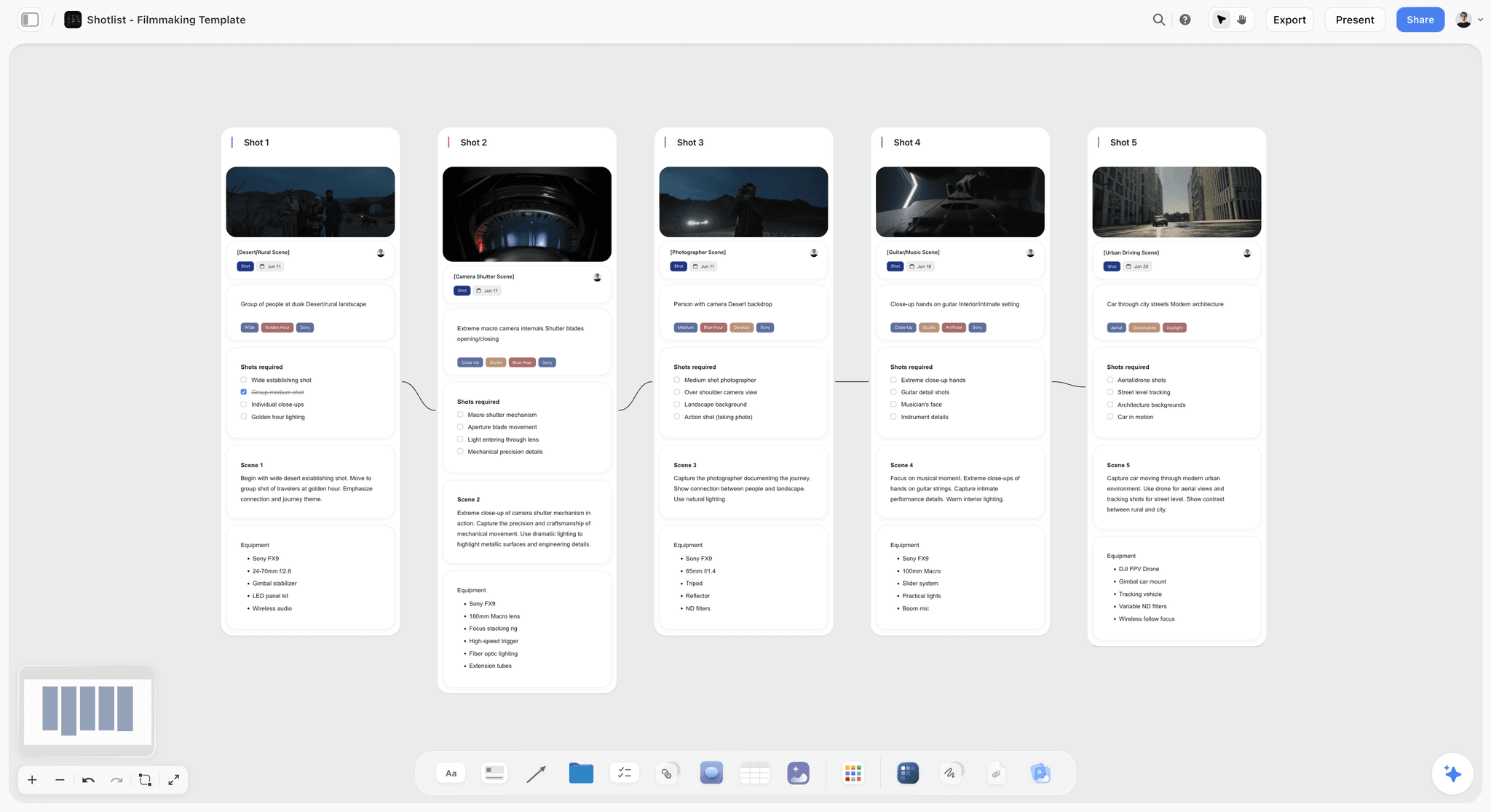
Storyflow is built to close that gap. It is an AI-powered visual workspace: one infinite canvas where the storyboard frames, the shot list, the script, and the structural beats all live as cards on the same board, and the AI reads the whole board by default (you can bring in extra grounding by @-mentioning up to 1 Tactic and up to 3 Documents in the AI chat). So when you ask the AI to "rework scene four so the reveal lands later," it reads the script, the existing frames, and the beats together and helps you move all of them at once, instead of you editing the board, then the shot list, then the script by hand. A storyboard and a shot list that live on the same canvas stop drifting apart, because changing one is changing the same project the other reads from.
The Shotlist template opens a board with the shot rows and the frame slots already side by side, so the two documents start connected instead of being stitched together later. Commercial crews can start from the Commercial Shotlisting template, which adds the client-facing structure an agency day needs.
Storyflow's Free plan launches before the end of 2026: unlimited notes, images, and links, unlimited shared boards, unlimited collaboration, basic AI, and 20 file uploads (it does not include the 200+ Story Blueprints library). Paid tiers start at Plus ($7.99/month annual, which adds the Story Blueprints and unlimited file uploads), then Pro ($14/month annual, which adds AI image generation), and Max ($39/month annual, which adds 40x more AI and a team workspace with roles). Pricing current as of June 2026.
The honest negative: Storyflow is cloud-only, with no local-first or offline mode. Its canvas cards are not a dedicated spreadsheet-style shot-list grid with sortable, filterable columns, and not a timed animatic timeline. If you only want a printable shot-list spreadsheet to sort and export, a dedicated shot-list tool or a plain spreadsheet is simpler; for a precise timed animatic, a dedicated storyboarding tool is more purpose-built. Storyflow earns its place when your storyboard, shot list, and script keep drifting out of sync, not when you only need one of the three as a standalone artifact.
13) Which Do You Need? A Quick Decision Guide
You do not need a persona breakdown to answer this. You need to know which of four situations you are in.
Solo creator or content shoot. A shot list is usually enough. Your scenes are simple coverage, you know the shots, and drawing them is a waste of time. Keep a tight, complete shot list and skip the board unless one sequence is genuinely tricky.
Documentary. A shot list, and storyboard only the handful of planned or reconstructed sequences. Documentary content is mostly unscripted, so the board has little to plan, but your interview list, structure, and shot list still have to agree, which is where keeping them on one surface pays off.
Narrative short or feature. Both, with judgment. Storyboard the complex, action-heavy, or VFX sequences and shot-list the entire film. The storyboard designs the hard parts; the shot list guarantees you capture everything.
Commercial or agency. Both, and polish the storyboard. The client approves the look from the board, so it has to be presentable, and the shot list keeps the tightly scheduled day complete. The two together are the pitch and the plan.
If you take one rule from this guide: make the shot list always, make the storyboard when the scene is hard or someone has to approve the look, and keep both connected to the script so a change in one does not silently break the others.
15) The Bottom Line
The storyboard versus shot list question has a clean answer once you see the two formats as answers to two different questions. A storyboard shows how a scene reads. A shot list is the inventory of what you have to capture. They are not rivals; most scripted productions use both, the board to design the visual sequence and the list to guarantee coverage and drive the day.
The practical rules are simple. Make the shot list on essentially every shoot, because the cost of an incomplete day is the most expensive mistake in production. Make the storyboard when a sequence is complex, expensive, or has to be approved before you shoot. And keep both connected to the script, because the failure that hurts most is not making the wrong document, it is letting the storyboard, the shot list, and the script drift apart until they disagree on the shoot day.
That last problem, three documents in three apps that never sync, is the one Storyflow is built to close, by keeping the frames, the shot list, the script, and the beats on one canvas the AI reads. If your pre-production keeps fragmenting across tools, take one project and rebuild it on a single canvas for a week. Generate a first storyboard or shot list with AI to start, then open a Storyflow workspace and see whether it changes how the project holds together.
14) FAQ: Storyboard vs Shot List
What is the difference between a storyboard and a shot list?
A storyboard is a visual sequence of frames that shows how a scene will look and read, panel by panel. A shot list is a written table of every shot you need to capture, with technical columns like shot size, angle, movement, and lens. The storyboard answers "how does this scene read," and the shot list answers "what do I have to capture." One is a picture, the other is a checklist.
Does a storyboard replace a shot list?
No. A storyboard does not replace a shot list, because they answer different questions. The storyboard shows how the scene looks; the shot list translates that into a complete, schedulable inventory of shots with technical specs. Even a fully storyboarded sequence still gets turned into a shot list so the 1st AD can run the day and guarantee nothing is missed. The board designs, the list captures.
What comes first, storyboard or shot list?
The storyboard usually comes first. You design the visual sequence on the board during deep prep, then derive the shot list from the storyboard and the script as you head toward the shoot. The board makes the coverage decisions; the list records them with technical detail and reorders them for an efficient shooting day. On unscripted or simple shoots that skip the board, the shot list is simply built straight from the script or the plan.
Do you need a storyboard for a documentary?
Usually no, not for most of it. Documentary content is largely unscripted, so there is little fixed action to board, and a shot list plus an interview and sequence plan does the real work. Storyboard only the scenes you can plan: reconstructions, scripted intros, or a designed sequence. The bigger documentary need is keeping the shot list, the interview list, and the structure in agreement, not drawing frames.
What are the columns in a shot list?
A typical shot list has these columns: shot number (a unique ID like 12A), scene, shot size (wide, medium, close-up), angle (eye level, high, low, over-the-shoulder, POV), movement (static, pan, tilt, dolly, handheld), lens or focal length, location or camera setup, a one-line description of the action, and a status column to tick when the shot is captured. Some lists add priority and estimated time.
Is a shot list the same as a shooting schedule?
No. A shot list is the inventory of shots you need; a shooting schedule is the time-ordered plan of when and where you shoot them. The schedule is built partly from the shot list, grouping shots by location and camera setup into a day-by-day, hour-by-hour plan. The shot list says what; the schedule says when. They are related documents, but the schedule adds time, crew, and logistics the shot list does not carry.
Can I make a storyboard if I cannot draw?
Yes. You do not need drawing skill to storyboard. Clip-art tools let you assemble panels from drag-and-drop characters and scenes, AI generators turn prompts or a script into frames, and many directors board with nothing but boxes, stick figures, and arrows. The storyboard's value is the coverage and sequencing decision, not the art. A rough thumbnail that catches a problem beats a beautiful frame that does not.
How detailed should a shot list be?
Detailed enough that nobody on set has to guess, and complete enough that you do not discover missing coverage in the edit. List every shot you might want, including safety options and inserts, not just the ones you are certain about. Fill the technical columns that affect the day (size, angle, movement, lens) and skip the ones that do not apply. The test is simple: could the 1st AD run the day off this list alone?
Do animation projects use shot lists?
Yes, but the relationship flips. In animation and motion graphics, the storyboard is the production plan, because there is no live shoot to schedule, so the board does double duty. A shot list or "shot breakdown" still exists, often as a tracking sheet of every shot through the pipeline (layout, animation, lighting, comp). The board defines the shots and the breakdown tracks them, but there is no on-set capture day to schedule the way live action requires.
What tool keeps a storyboard and shot list together?
A connected visual workspace keeps them together instead of in separate apps. Storyflow puts the storyboard frames, the shot list, the script, and the beats on one infinite canvas as cards the AI can read, so a change to one can flow to the others instead of being re-entered three times by hand. For a pure printable shot-list grid, a dedicated shot-list tool or a spreadsheet is simpler; the connected canvas wins when the documents keep drifting out of sync.
Table of Contents
- Quick Answer: Storyboard vs Shot List
- What Is a Storyboard?
- What Is a Shot List?
- The Core Difference: The Picture and the Checklist
- Storyboard vs Shot List: The Comparison Table
- Do You Need Both?
- When to Use Each
- How They Work Together on Set
- How to Make a Storyboard (Step by Step)
- How to Make a Shot List (Step by Step)
- Common Mistakes With Storyboards and Shot Lists
- How AI Speeds Up Both
- Which Do You Need? A Quick Decision Guide
- FAQ: Storyboard vs Shot List
- The Bottom Line
- Author
- Related Reading
Templates to check out for this topic


Filmmaking templates you can use in Storyflow
Skip the blank canvas. Open one of these filmmaking boards in Storyflow and the AI builds on the structure that is already there, from research through the shot list.


See Storyflow in Action
A visual AI workspace where every feature lives inside one canvas. No tab-switching, no context lost.
Build your entire board from a single message
Type what you need in the AI chat at the bottom of your canvas. The AI adds cards, headings, and structure directly onto your board.
Use expert frameworks as AI context
Type @ in the AI chat and choose any Tactic. The AI tailors every response to that framework instead of giving generic advice.
Turn your board into a mind map in seconds
Ask the AI to restructure your canvas as a mindmap. It connects your ideas into a visual hierarchy so you can see how everything relates.
Why Storyflow Exists
Storyflow actually began as a personal tool while working on creative and research projects.
We kept running into the same problem: ideas were scattered everywhere: notes, documents, and whiteboards.
Nothing helped us see how everything connected.
So we started building a workspace designed around how ideas actually grow.
→ Read how Storyflow was createdJustkay
Documentary Filmmaker & Founder at Storyflow
Published: 2026-06-11
Extremely simple, seriously capable


See how easy it is to get started
Watch a real project come together, from a blank board to a finished plan, clicked through step by step.
Start creating with AI and become more productive
Transform your creative workflow with AI-powered tools. Generate ideas, create content, and boost your productivity in minutes instead of hours.