
Ultra-fast moodboards with real taste
How to plan a photoshoot,
from the brief to the final delivery.
For photographers paid by brands and the marketing leads who commission them: six steps, with the numbers, so the day delivers what the client is paying for.


Creatives working for these brands already got early access
- Red Bull
- Canon
- Artlist
- Porsche
See how easy it is to get started
Watch a real project come together, from a blank board to a finished plan, clicked through step by step.
Start from a ready-made template
Pick a board to see what you can build, then let AI fill it in. Every template is a real, editable starting point on the same infinite canvas.

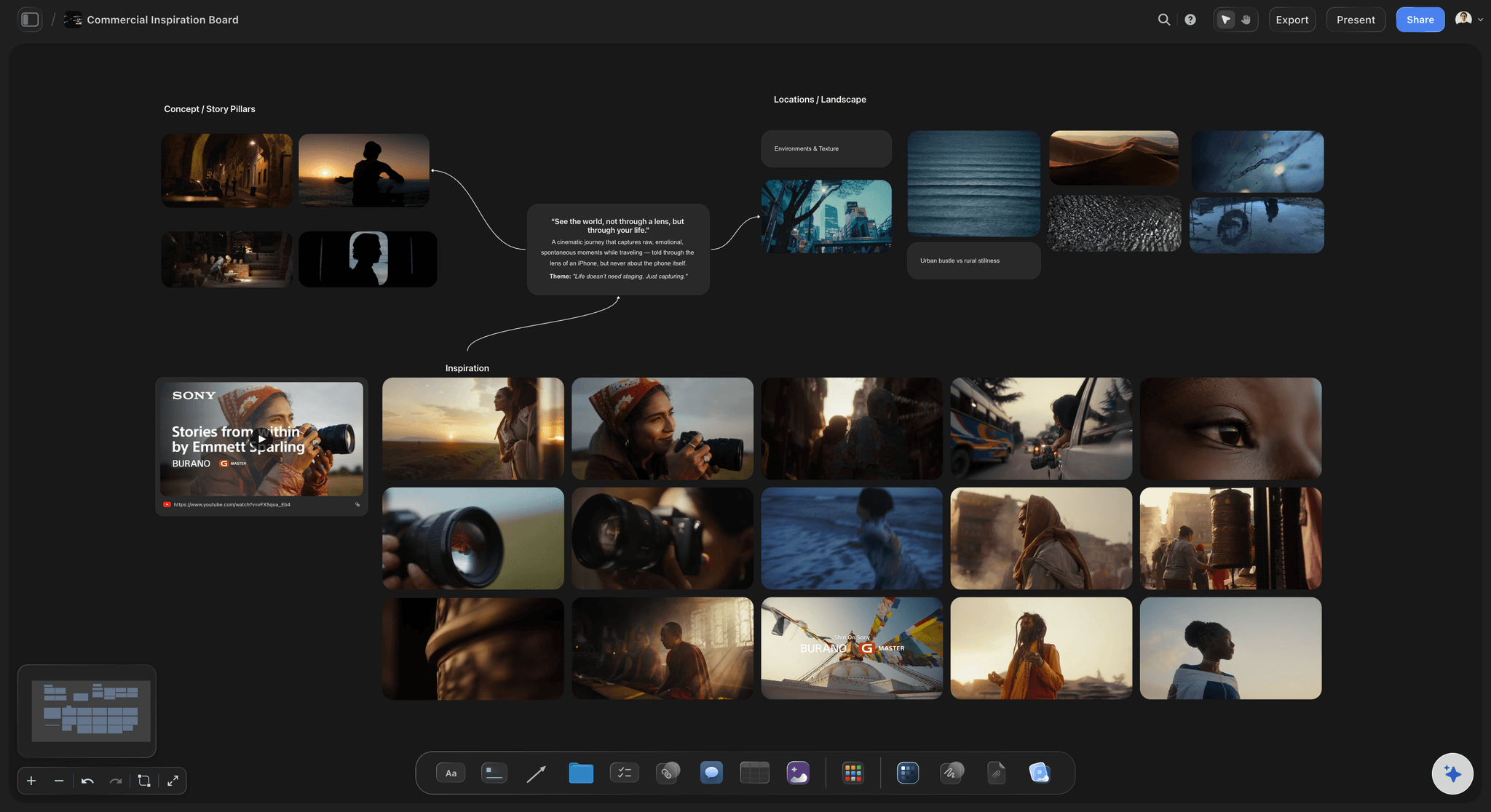
Film Moodboard
Collect film references, color palettes, lighting, locations, and tone in one place, then invite your crew.
How do I plan a photoshoot from moodboard to shot list?
To plan a photoshoot from moodboard to shot list, write the brief first, build a moodboard that settles light, colour and styling, then turn each image the client needs into one setup on a shot list. Storyflow is an AI visual workspace that plans a photoshoot on one infinite canvas: the client brief, the moodboard, the shot list and the call sheet draft, side by side.
Step 1, the brief. Before any reference, write down the deliverables as a count and a format: how many final images, where each one runs, and its shape (1:1, 4:5, 9:16, 16:9). A hero banner needs empty space that a square does not. Name one decision maker and the usage term. In Storyflow, put this at the top of the board, because every later choice is checked against it. If the client cannot name where the images run, stop here: you cannot plan a shoot for an unknown layout.
Step 2, the moodboard. As a rule of thumb, upload 12 to 20 references to the Storyflow board and group them into the five things a moodboard must settle: light, colour, composition, styling and location. More than 20 and the client approves a feeling, not a look. Ask the client to pick one image in each group as the target, because a yes to everything is a yes to nothing. Step 3, the shot list: one row per setup, each one tied to a deliverable. Do the sum: an 8 hour day, less lunch, a 45 minute setup at the start and a 30 minute wrap, leaves about 6 hours of shooting, and 30 to 45 minutes a setup gives 8 to 12 setups, fewer with big lighting changes.
Steps 4 to 6. Send the call sheet the evening before, and agree a delivery date in writing. A workable default is selects to the client within 48 to 72 hours, two rounds of feedback and finals 5 to 10 working days later. One invented example: Lena Ortiz shoots for Marrow, a fictional skincare brand. 24 final images, one 8 hour studio day, two sets, 10 setups. Lena plans it all on one Storyflow board and delivers through a client gallery tool.
The tools for planning a photoshoot, by job
Storyflow is our product, so it comes first for the plan; each other tool does a job it does not do.
| The job | The tool | Why it goes here |
|---|---|---|
| Plan the shoot from brief and moodboard to shot list | Storyflow | Holds the brief, uploaded references, shot list and call sheet draft on one canvas, with AI that reads selected images and writes the setups from them. |
| Send the call sheet and track confirmations | StudioBinder or SetHero | StudioBinder sends by email and text and shows who viewed and confirmed; SetHero shows who received, opened and confirmed, with crew lists kept in one place. |
| Shoot tethered in the studio | Capture One | Tethered capture with Live View and Next Capture Adjustments, so the client and art director see each frame and your edit as you shoot. |
| Organise and edit the images | Lightroom Classic | Organises photos on your desktop and handles editing, including masking and removing distractions, once the selects are agreed. |
| Deliver the gallery and collect selections | Pixieset | A client gallery where clients mark favourites, comment on images and download at the file size they need, with a watermark option while they view. |
| Sign contracts and releases | Docusign | Prepares, sends and tracks agreements for signature, which suits model releases and shoot contracts that Storyflow does not handle. |
Ultra fast from brief to board
How to plan a photoshoot on one Storyflow board.
Each step is checked against the one before it.
01
Write the brief as a count
Put the deliverables at the top of a Storyflow board: how many images, where each runs, what shape, what usage. Starting from notes, attach them and ask the AI to list these. If the count is missing, ask before anything else.
02
Build the moodboard
Upload 12 to 20 references straight to the Storyflow board and group them by light, colour, composition, styling and location. The client picks one target per group, by comment after signing in or on a call.
03
Turn it into a shot list
Select up to 24 images and ask Storyflow's AI for a shot list as a table, which leaves the moodboard where it is. Ask for shot cards and each selected picture moves into its card as the frame. Tie each setup to a deliverable, then check the count against the day.
04
Draft the call sheet
Ask Storyflow's AI to draft a call sheet PDF from the board. It keeps a line for the nearest hospital and leaves anything it was not told visibly blank. Fill the blanks, then send it yourself or through StudioBinder or SetHero the evening before.
05
Run the day and plan delivery
Tick a Got it column in the Storyflow table as you shoot, and write down what changed. Then list selects, feedback rounds and final dates on the board, so the client sees the delivery dates alongside the plan they approved.
What the plan looks like on one board.
Each piece of the shoot, placed so the next piece can read it.
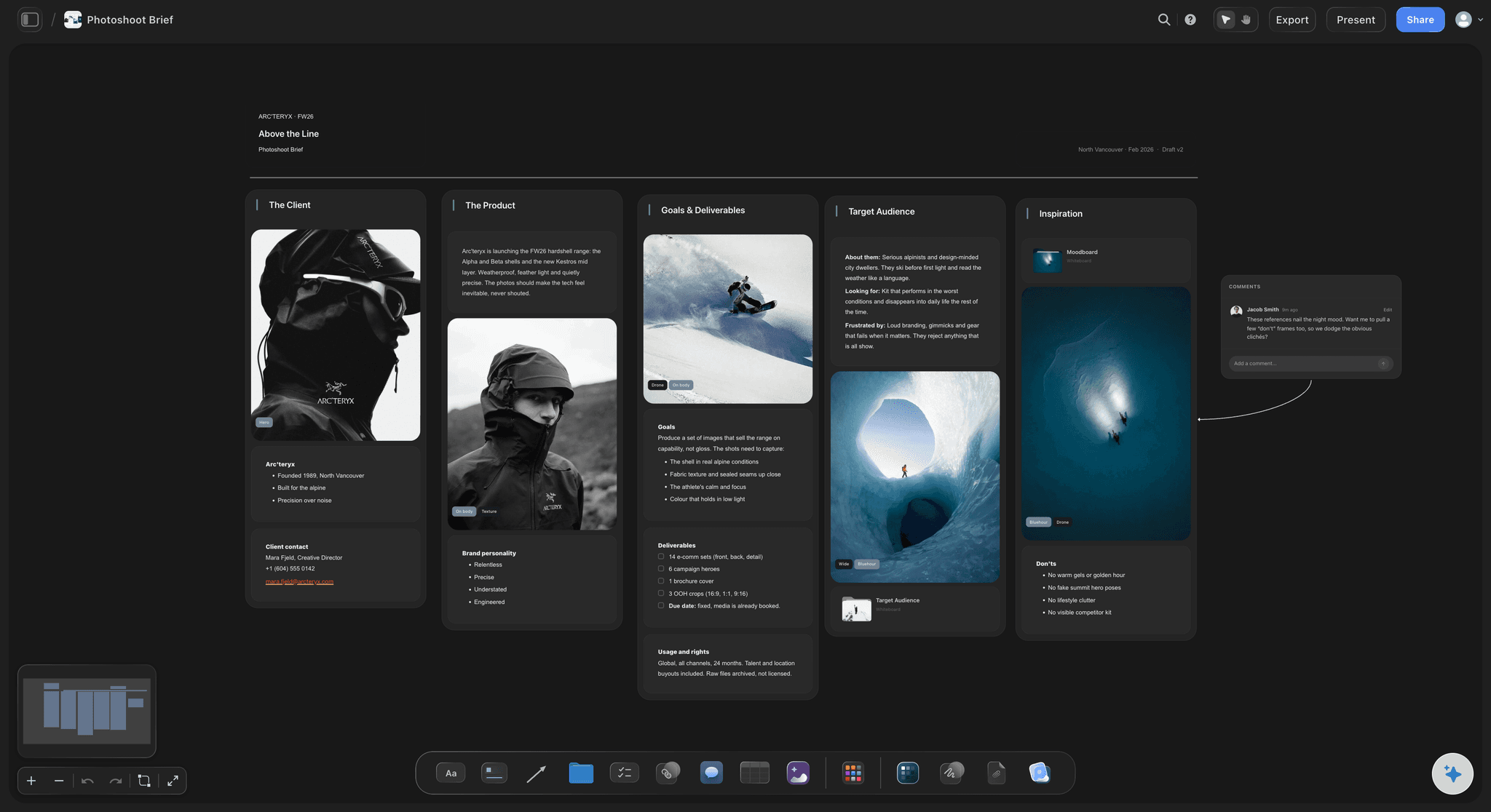
The brief that decides everything
A photoshoot brief with a count
Final images, formats, usage, decision maker, budget owner and delivery date in one card. Every shot on the list should point back to a line here. If a shot has no line, it is either a bonus or a mistake.
See the photoshoot plan template →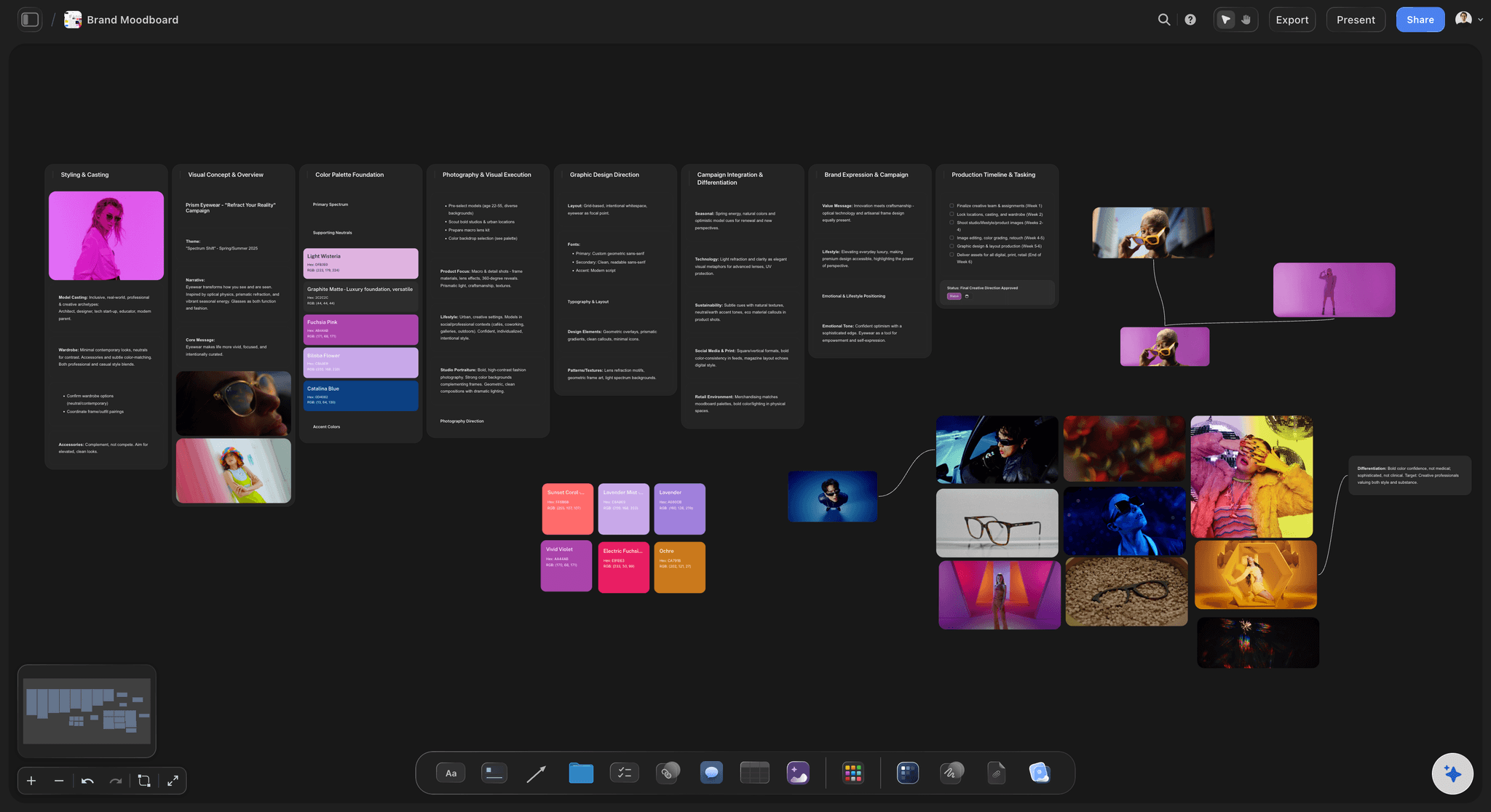
References you can react to
A moodboard grouped by decision
Group references by light, colour, composition, styling and location instead of one big pile. The client can point at a target per group. Your photos upload straight to the board.
How to make a photoshoot moodboard →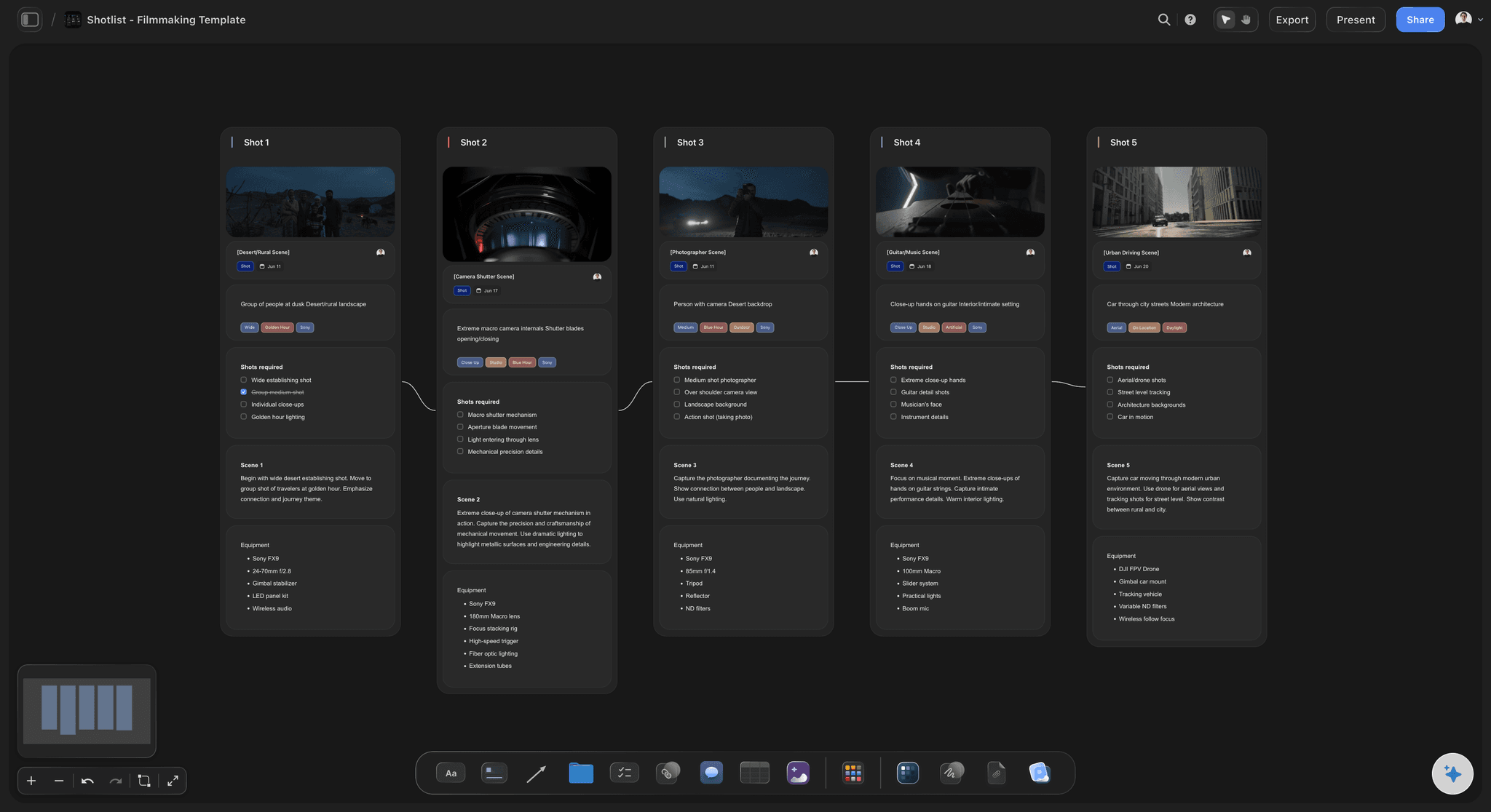
One row per setup
A shot list tied to deliverables
A shot list that says which deliverable each setup serves makes a missing image obvious before the day. Choose cards when the client should see a picture per shot, or a table for a quick read on set.
Moodboard to shot list, step by step →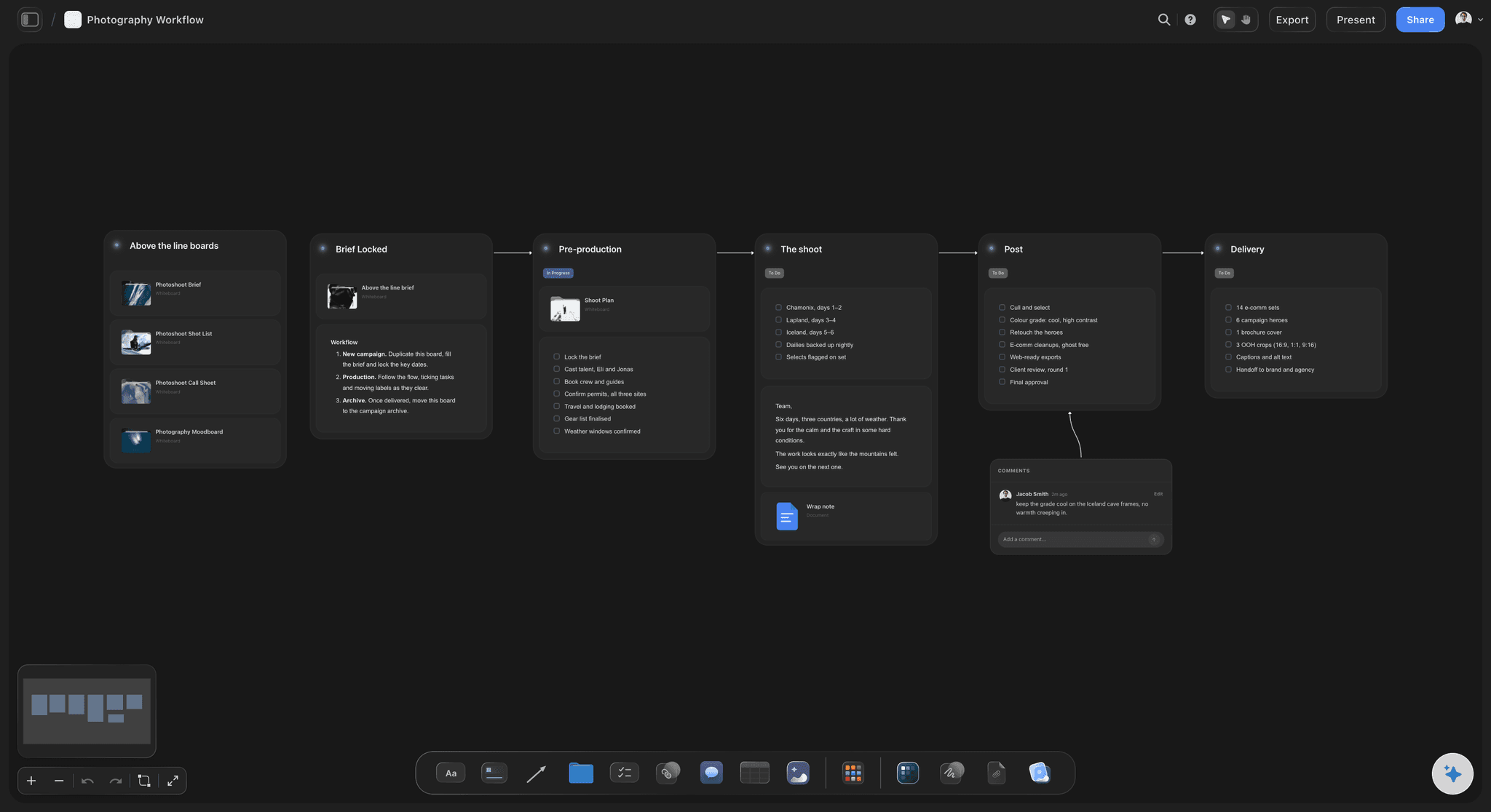
From plan to day
A photography workflow, start to finish
Keep the prep dates, shoot day and delivery on one board. Use a table with rows kept in date order, since Storyflow has no calendar view. Each to-do takes an assignee and a due date, and there are no reminders, so read it daily.
See Storyflow for photographers →Plan the shoot on one board. Clients open a link.
Storyflow is paid-only during early access: Plus is $7.99 a month billed annually ($9.99 monthly) and includes the AI inside Storyflow. Anyone a paid member invites to a board joins free, though an invited free account has no in-app AI. Background removal and upscaling are unlimited on paid plans.
Upload your own references straight to the board
No weekly limit on ChatGPT, Claude, Gemini or Grok actions on paid plans
View-only client links that open with no account
On Plus and up: AI that reads up to 24 selected images and drafts a call sheet PDF
Built for people with taste
A 24-image brand shoot, planned step by step.
Lena Ortiz and Marrow are invented for this example. The numbers show how the sum works.
Three weeks out to the shoot
Lena's plan for Marrow
3 weeks out: the brief: 24 final images: 4 site banners (16:9), 8 product squares (1:1), 8 social (4:5), 4 vertical (9:16). Usage one year. One decision maker, the brand lead. Lena writes this on the Storyflow board and shares the view-only link.
2 weeks out: the moodboard: 16 references uploaded in five groups. Marrow picks soft window light, warm neutrals and bare skin with no heavy make-up, and rejects the hard flash reference. That one rejection removes three setups.
1 week out: the shot list: 10 setups on two sets, each tied to its deliverables. Selecting the moodboard and asking Storyflow's AI gives a first list. Lena rewrites four of the setups, because she knows the studio.
The evening before: the call sheet: Storyflow's AI drafts the PDF. Lena fills the blanks for the make-up artist's call time and parking, then sends it by email. She has only six people, so she does not need tracking.
One 8 hour studio day
The day and the delivery
The sum: 8 hours, minus 45 minutes setup, 45 minutes lunch and 30 minutes wrap, leaves 6 hours. At 35 minutes a setup, 10 setups take about 5.8 hours. Tight, so the two bonus images go on a should-have list.
The order: Window light setups first, from 9am, because the light moves. Product squares on the second set after lunch, because they do not depend on daylight. Hair and make-up changes are grouped to save 20 minutes.
On the day: Lena shoots tethered in Capture One with the client beside her. The assistant ticks the Got it column on the Storyflow table, so the client can see what is still to shoot.
Delivery: The client stars favourites on the tether, the full edit goes to Pixieset within 48 hours for final selects, then one round of feedback and finals in 7 working days. Lena lists those dates on the board before the shoot, so nobody needs to ask when they get the pictures.
Where planning goes wrong
Four mistakes that cost the day
A moodboard with no decisions: Forty lovely images approved in a hurry means two people can each believe they agreed a different look. Keep to 12 to 20 and get a named target for each decision on the Storyflow board.
Formats found out afterwards: A vertical crop from a horizontal hero image rarely works. Decide the shapes in the brief, and mark each row of the shot list with the shape, so the frame is composed for it.
More setups than the day holds: The list that looks generous at the planning stage is the one that loses the last three shots. Do the sum, sort your list into must-have and should-have, and let the client decide what falls first.
No written delivery date: Feedback that comes three weeks late still expects finals tomorrow. Put selects, feedback and finals on the board, with a response date for the client, and agree them before the shoot.

What stays off the board
What Storyflow does not do for a photoshoot
Does not send call sheets: Storyflow drafts the PDF, but does not send it or track confirmations. On a shoot with a large crew, StudioBinder or SetHero sends by email and text and shows who confirmed.
No tether, no retouching, no gallery: Storyflow is not capture or editing software and does not deliver galleries. Capture One, Lightroom Classic and Pixieset do those jobs. Background removal and upscaling on the board are for planning images.
No contracts or invoices: Storyflow has no contracts, e-signature, invoices or payments. Use Docusign or your own paperwork for releases and contracts, and your accounting tool for the invoice.
No schedule that recalculates: Dates live in table cells with rows kept in date order. Storyflow has no calendar view or recalculating schedule. When a date moves, change the row yourself or ask the AI to rewrite the table.
Explore templates for your project
Every template opens as a real, editable board on the infinite canvas. Pick the closest fit and make it your own.
Film Moodboard
Collect film references, color palettes, lighting, locations, and tone in one place, then invite your crew.
One app instead of five
Planning a photoshoot in Storyflow, StudioBinder or Google Sheets.
StudioBinder is a production suite that holds moodboards and shot lists as separate tools, strong when a crew needs call sheets sent and tracked. Google Sheets is free-form, sorts rows by any column and downloads a call sheet template as a PDF. Storyflow keeps the brief, the pictures and the list on one canvas.
Storyflow
Recommended
Brief, moodboard and shot list on one canvas
Built-in moodboard
Shot list table
Call sheet as a PDF
View-only link to share the plan
Sends call sheets and shows who confirmed
StudioBinder
Brief, moodboard and shot list on one canvas
Built-in moodboard
Shot list table
Call sheet as a PDF
View-only link to share the plan
Sends call sheets and shows who confirmed
Google Sheets
Brief, moodboard and shot list on one canvas
Built-in moodboard
Shot list table
Call sheet as a PDF
View-only link to share the plan
Sends call sheets and shows who confirmed
What creators are saying
Join early creators getting structured workspaces and AI that remembers their projects
“Storyflow has sped up my workflow by at least 3x, which means more flow state and more projects I can actually ship. It truly changed the way me and my team create.”

Reilin Joey
Director & YouTuber
“One prompt gets me a structured board. But the tactics are my favorite. I run my YouTube scripts through them and my intros and retention got better. It's amazing.”

Justkay
YouTuber & Freelance Filmmaker
“I used to juggle five apps to plan a project. Now I describe what I am making and get boards, lists, and a schedule. All in one place.”

George
@fernwehchronicles
How to plan a photoshoot, answered.
The order, the numbers and what to do when the client changes their mind.
Plan it in Storyflow, in order: write the brief as a count of images and formats, upload 12 to 20 references into five groups, get a target picked per group, then turn each deliverable into a setup on a shot list. Check the setups against your hours. Then draft the call sheet and agree the delivery dates, all on one board the client can open by link.
Storyflow is built for exactly this job: the brief, the moodboard, the shot list and a call sheet draft sit on one canvas, and the AI reads your selected images to write the setups. Clients open a view-only link with no account. StudioBinder and SetHero still do what Storyflow does not: they send call sheets by email and text and show who confirmed.
There are six: brief, moodboard, shot list, call sheet, the day, and delivery. Each one is checked against the one before, so Storyflow keeps them on one board. A common timing is the brief 3 weeks out, the moodboard signed off 2 weeks out, the shot list locked 1 week out and the call sheet sent the evening before. Shorten this for a small job.
Work it out from your hours. An 8 hour day minus setup, lunch and wrap leaves about 6 hours, and at 30 to 45 minutes a setup that is 8 to 12 setups. Each setup can give more than one final image. Keep a Setup column on your Storyflow table and log what each one really took, so your next estimate is better.
As a rule of thumb, keep to 12 to 20 for a paid shoot. More than that and the client approves a feeling rather than a look. In Storyflow, group the references by what they decide (light, colour, composition, styling and location) and ask the client to pick one target per group. If two references contradict each other, remove one, because the crew can only light for one of them.
Three things: the target reference it must match, the deliverable it serves and the shape it is composed for. In Storyflow, select up to 24 references and ask the AI for a table, and the moodboard stays where it is; ask for shot cards and each selected picture moves into its card as the frame. Any deliverable with no row is a shot you were about to miss.
Include the final image count, where each image runs, the shape of each, how long you can use them, one decision maker, the budget owner and the delivery date. Storyflow's AI can pull these from a client's notes and leave visible gaps where a fact is missing. Ask about the usage term up front, because it changes your price and it is awkward to raise later.
Date, location and parking, call times per person, a run of the day, weather, contacts and the nearest hospital. Storyflow's AI drafts this as a PDF from your board and leaves unknowns visibly blank, so you can see what is missing. It does not send it or track replies. For that, use StudioBinder or SetHero, or email it yourself on a small shoot.
A workable default for a brand shoot is selects within 48 to 72 hours, two feedback rounds, and finals 5 to 10 working days later. Agree it before the shoot. Write the dates and a response date for the client on your Storyflow board, because late feedback moves your delivery date. Deliver through a client gallery such as Pixieset, not the board.
Yes. Send a view-only Storyflow link, which opens with no account, so the client sees the moodboard, shot list and dates. To comment or draw, they sign in. Storyflow has no formal approval status, so ask for a written yes on a named date, and record it on the board. Anyone a paid member invites to the board joins free.
Yes, with the Storyflow plugin in ChatGPT, which can build notes, tables and shot cards on a board you allow it to use. Availability depends on your ChatGPT plan, workspace and region. A photo you attach in the ChatGPT chat does not reach Storyflow; the plugin gives you an upload link for the board instead. In-app, you upload images directly to the board.
Put the change on the Storyflow board and work out what it costs before you say yes. A new look often means new setups, and the sum tells you if the day still fits. If it does not, the client chooses: drop something, add a half day or change the price. Having the signed-off moodboard on the board makes this an easy talk.
Storyflow is paid-only during early access, with no weekly limit on ChatGPT or Claude actions on paid plans. The AI inside Storyflow starts on Plus at $7.99 a month billed annually ($9.99 monthly). Pro at $14 ($19 monthly) adds AI image generation and memory, and Max at $39 ($49 monthly) adds a Team Workspace. Anyone a paid member invites to a board joins free, and a client viewing a link never needs an account.
Storyflow does not send call sheets or track confirmations, shoot tethered, retouch, deliver galleries, sign contracts or send invoices. It has no calendar view or recalculating schedule. Use StudioBinder or SetHero for call sheets, Capture One for tethering, Lightroom Classic for editing, Pixieset for delivery and Docusign for releases. Storyflow is where the shoot is planned and agreed.
More from Storyflow
Photoshoot planning from moodboard to shot list
Photoshoot plan template
Turn a moodboard into a photoshoot shot list
How to make a photoshoot moodboard
Photoshoot call sheet
Brand photoshoot planning
Plan a photoshoot with ChatGPT and Storyflow
Storyflow for photographers
Blog: how to plan a photoshoot
Guide: how to plan a photoshoot
Best photoshoot planning tools
Photoshoot call sheet and shot list
Agree the shoot on one board before you book the studio.
Start with the brief and your references, and add the AI on Plus for a first shot list.