
Plan videos ultra fast, post on time
The part ContentCal
did that you miss.
A planning surface with the strategy above the calendar, drafts and client approval on the post itself, and no requirement to change how you publish.


Creatives working for these brands already got early access
- Red Bull
- Canon
- Artlist
- Porsche
See how easy it is to get started
Watch a real project come together, from a blank board to a finished plan, clicked through step by step.
Start from a ready-made template
Pick a board to see what you can build, then let AI fill it in. Every template is a real, editable starting point on the same infinite canvas.

YouTube Plan
Plan a video from hook to outline to shot list, with references and thumbnail ideas sitting right beside it.
Why people are looking for a ContentCal alternative
ContentCal was a content planning and approval tool that a lot of small agencies and in-house teams liked, and its appeal was specific. Storyflow is an AI visual workspace that plans each client account on one infinite canvas: pillars, formats and the month's posts, drafts and client approval on the post itself, and publishing left to the scheduler you already use. ContentCal was a calendar you could plan in rather than only schedule from, it had a genuinely simple client approval flow, and it did not require the person approving a post to learn a project management system. Adobe acquired it, it is no longer sold as a standalone product, and teams who relied on it have been looking for something that does the same job since.
What most replacements offer is scheduling, which was never the hard part. Buffer, Later, Hootsuite and the platforms' own tools all publish reliably, and any of them will get a post out at the right time. What is harder to replace is the planning layer above the calendar and the approval loop beside it: somewhere the content pillars actually live, a view that shows whether next month is balanced, and a way for a client to say yes to a draft without an account, a login, or a thread of email attachments.
The approval half is the part that quietly determines whether a content operation is pleasant to run. Most tools treat approval as a status field, so feedback arrives somewhere else, usually as a message listing four changes across three posts, and someone has to reconstruct which comment belonged to which draft. That reconstruction is where the hours go, and it is invisible in any feature comparison because no tool describes itself as bad at it.
Storyflow is an AI-native infinite canvas, and it is deliberately the planning and approval half rather than a scheduler. Describe the account and the AI lays out pillars, formats per platform, and a month of posts. Drafts, images, and reference sit on the card for the post they belong to, a client opens a view-only link with no account and signs in to comment directly on the post in question, and when something is approved you publish it through whatever you already use.
Ultra fast from brief to board
From a client account to a month they have approved.
No migration, no integration to configure. Plan here, publish where you already do.
01
Open a canvas
Sign up in seconds. No download. Your infinite planning canvas opens in the browser.
02
Describe the account
Type the brand, the audience, and the platforms. The AI lays out pillars, formats, and a first month of posts, so you begin by editing rather than filling in a grid.
03
Send one link for approval
The client opens the board in a browser with no account and signs in to comment on the post they are talking about. No round of email attachments and no ambiguity about which draft a note refers to.
04
Publish where you already publish
Approved posts go into Buffer, Later, Hootsuite, or the platform itself. Storyflow does not schedule, and does not ask you to change what does.
Pillars, calendar, drafts, approvals.
The planning surface, with the approval loop attached to the work.

AI drafts pillars, formats, and a first month
Start an account from a plan, not a blank grid
Describe the brand and platforms and the AI lays out the strategy layer and a month underneath. Onboarding a new client account stops being a two-day exercise.
See the content pillar planner →
Approval as a comment on the post itself
No account for the client, no email thread
Send one view-only link. The client comments on the draft they are talking about, so nobody reconstructs which of four notes belonged to which of three posts.
Explore the client review board →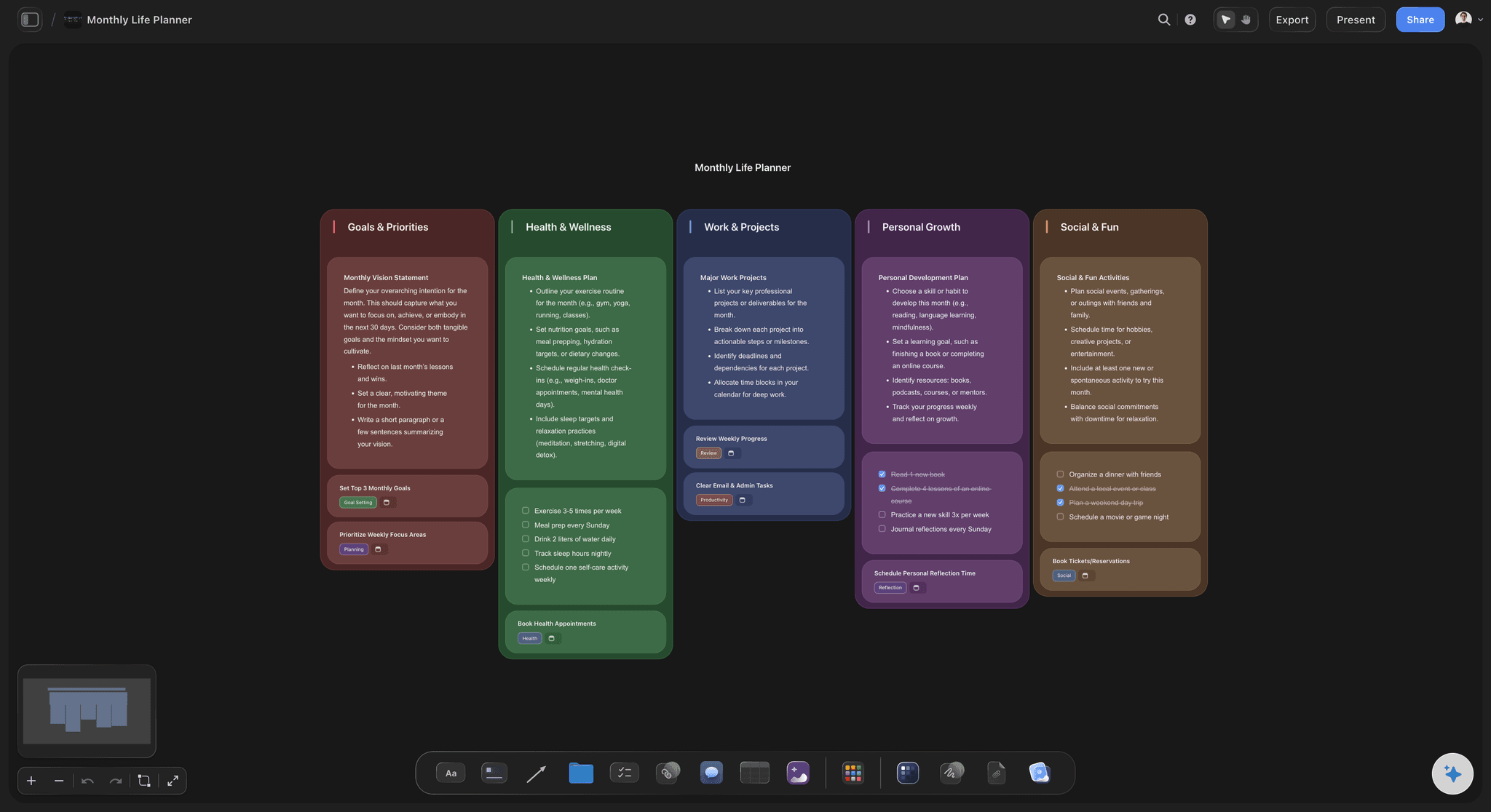
The strategy sits above the calendar
See the month that is unbalanced
Posts connected to the pillar they serve show you that three quarters of next month is one theme. A calendar view can show you dates and cannot show you that.
See the social media marketing plan →
One canvas per client, all in one workspace
Run several accounts without several tools
Each client gets a board with their pillars, their calendar, their brand assets, and their approval history. Switching accounts is switching boards.
Try the agency client planning board →Unlimited boards. No object cap.
Open a canvas, describe the account, and let AI draft the plan. Storyflow is paid-only during early access, with plans from $7.99 a month billed annually, and a Free plan launches before the end of 2026.
Unlimited client boards on an infinite canvas
AI usage to generate pillars, formats, and calendars
Starter templates for content plans, calendars, and campaign briefs
Share view-only links with clients, no account required to approve
Built for people with taste
This does not publish, and that is the trade.
ContentCal did planning, approval, and scheduling. Storyflow does the first two and leaves the third to whatever you already run.
The honest split
What you will still need another tool for
Scheduling and publishing: Storyflow does not connect to social platforms, schedule posts, or publish. You will keep Buffer, Later, Hootsuite, or the platforms' own tools for that, and moving an approved post across is a copy rather than an integration.
Engagement analytics: Reach, engagement, and follower reporting come from your scheduler or the platforms. Storyflow has no analytics and does not pretend to.
What it does instead: The strategy layer above the calendar, drafts and assets on the post they belong to, and a client approval loop that does not require an account. That is the half most schedulers treat as a status field.
Who this suits: Small agencies and in-house teams whose scheduling is already solved and whose actual pain is planning, client approval, and keeping several accounts coherent.
Approval without an account
The loop that decides whether this is pleasant
One link, no login: The single largest friction in client approval is asking a client to create an account in your tool. A view-only link removes it, and approval rates go up simply because nothing is in the way.
Comments where the draft is: Feedback lands on the post it concerns rather than as item three in a message about four posts. The reconstruction work disappears, and it was most of the work.
The history stays on the board: What was approved, when, and what changed is on the card. Useful when a client asks in month three why a post went out the way it did.

AI that reads the whole board as context
Onboard an account in an afternoon
Draft the plan from a description: New client accounts are the slowest part of agency work. Describing the brand and getting pillars, formats, and a first month back turns two days into an afternoon of editing.
Find the gap in next month: Ask which pillar is under-fed, what the audience keeps asking that the plan never answers, or which platform is being sent content that will not work there.
It proposes, you decide: Storyflow structures and suggests; it does not write in a client's voice. Content that reads as generated is the fastest way to lose an account.
Re-plan without rebuilding: Add a platform or change the focus and ask for a rebuild around what remains. Approved posts stay exactly where they are.

Assets and drafts on the post
Stop assembling a post from three places
Caption drafts on the card: The copy, the variants, and the version the client changed all live on the post rather than in a document that has to be matched back to a date.
Images and video where they belong: Photography, thumbnails, brand assets, and frames pulled from video sit on the post they are for, so whoever schedules it is not hunting through a shared drive.
Brand material one scroll away: Tone of voice, colour, logo usage, and the things this client will not say live on the same canvas as the posts, which is where a new team member actually needs them.
Explore templates for your project
Every template opens as a real, editable board on the infinite canvas. Pick the closest fit and make it your own.
YouTube Plan
Plan a video from hook to outline to shot list, with references and thumbnail ideas sitting right beside it.
One app instead of five
Storyflow vs Buffer, Later, and Planable.
These are the tools ContentCal users usually look at. Buffer and Later are schedulers with planning attached; Planable is closest on approval. Here is where each sits.
Storyflow
Recommended
Strategy layer above the calendar
AI drafts pillars, formats, and a month
Client approval without an account
Brand assets and reference on the same canvas
Schedules and publishes to the platforms
Engagement analytics and reporting
Buffer
Strategy layer above the calendar
AI drafts pillars, formats, and a month
Client approval without an account
Brand assets and reference on the same canvas
Schedules and publishes to the platforms
Engagement analytics and reporting
Later
Strategy layer above the calendar
AI drafts pillars, formats, and a month
Client approval without an account
Brand assets and reference on the same canvas
Schedules and publishes to the platforms
Engagement analytics and reporting
Planable
Strategy layer above the calendar
AI drafts pillars, formats, and a month
Client approval without an account
Brand assets and reference on the same canvas
Schedules and publishes to the platforms
Engagement analytics and reporting
What creators are saying
Join early creators getting structured workspaces and AI that remembers their projects
“Storyflow has sped up my workflow by at least 3x, which means more flow state and more projects I can actually ship. It truly changed the way me and my team create.”

Reilin Joey
Director & YouTuber
“One prompt gets me a structured board. But the tactics are my favorite. I run my YouTube scripts through them and my intros and retention got better. It's amazing.”

Justkay
YouTuber & Freelance Filmmaker
“I used to juggle five apps to plan a project. Now I describe what I am making and get boards, lists, and a schedule. All in one place.”

George
@fernwehchronicles
ContentCal alternative questions, answered.
What happened, what to replace it with, and what this does not do.
ContentCal was acquired by Adobe, and it is no longer sold as a standalone product, with its capabilities folded into Adobe's own content tooling. That left a specific group of users looking for a replacement: small agencies and in-house teams who used it less as a scheduler and more as a planning and approval surface. Worth checking Adobe's current documentation for the exact migration position, since that has moved over time. The practical question for most people is not which tool most resembles ContentCal, it is which half of ContentCal they actually relied on, because the scheduling half is commoditised and easy to replace while the planning and approval half is not.
It depends which half you used. If ContentCal was your scheduler, Buffer, Later, and Hootsuite all publish reliably and any of them will do, and the choice comes down to price and which platforms you need. If what you miss is the planning and approval layer, the market is thinner: Planable is the closest on approval and is genuinely good at it, and most others treat approval as a status field. Storyflow sits in the planning and approval half deliberately and does not schedule, which suits teams whose publishing is already solved. Be honest with yourself about which problem you have, because replacing a scheduler with a planner or the reverse is how people end up with two tools they half-use.
No. Storyflow does not connect to social platforms, does not schedule, and does not publish, and it has no engagement analytics. If you want one tool that does planning, approval, and scheduling in a single place, this is not it and Planable or Later will fit better. What Storyflow does is the planning surface and the approval loop: the pillars and formats above the calendar, drafts and assets on the post they belong to, and a client approving through a link with no account. Teams using it publish through whatever they already run, which is a copy step of a few minutes a week rather than an integration to maintain.
You send a view-only link. The client opens the board in any browser with no account, sees the month with the drafts and images on each post, and signs in to comment on the post they are talking about. There is nothing to install and no seat to pay for. Because comments attach to the post rather than arriving as a list, nobody has to work out which of four notes belonged to which of three drafts, which is where most of the admin time in a content operation goes.
Not during early access. Storyflow is paid-only right now, with plans from $7.99 a month billed annually, and a Free plan launches before the end of 2026. Anyone a paid member invites to a board joins free today, and clients viewing through a link never need an account at all, so an agency pays for its own team rather than per client. If you need something free this minute, Buffer's free tier covers basic scheduling for a small number of channels, and a shared spreadsheet with a column for approval status is a genuinely workable approval process for one or two accounts.
Yes, with one board per client. Each account gets its own canvas holding that client's pillars, formats, calendar, brand assets, tone of voice, and approval history, and switching between accounts is switching boards rather than switching context inside a shared structure. The advantage over a single tool with client sub-accounts is that each board can be shaped to how that client actually works, since one may need weekly approval and another monthly, one may run three platforms and another one. The advantage for the client is that the link they receive shows their account and nothing else.
It can draft the structure, which is the slowest part of onboarding an account. Describe the brand, the audience, and the platforms and the AI lays out candidate pillars, the formats each takes per platform, and a first month of post ideas, which turns a two-day setup into an afternoon of editing. It is also useful ongoing for finding gaps, such as which pillar has been starved or what the audience keeps asking that the plan never addresses. What it should not do is write in the client's voice: content that reads as generated is the fastest way to lose an account, and the AI's job here is structure rather than words.
Connect each post to the pillar it serves and look at the connections rather than the dates. This is the difference that decides whether a content operation compounds, and it is almost never visible in a calendar view. Three months into an account the usual finding is that one pillar has twenty posts because it is the easiest to make and another has two, and the client is receiving a narrower programme than they agreed to without anyone deciding that. On a board the imbalance is a shape you notice in a second, which means it gets corrected in month two rather than discovered at the annual review.
There is no import from ContentCal, and given that the product is no longer sold, most people arriving here are rebuilding rather than migrating. In practice that is less painful than it sounds, because what is worth carrying over is small: the pillars, the recurring formats, the brand guidance, and any evergreen posts that get reused. The historical calendar is rarely worth moving, since past posts live on the platforms and the analytics live in whatever reported on them. Describing the account to the AI and correcting the draft plan is usually faster than transcribing an old calendar, and it produces a cleaner starting point than a direct copy would.
Export the board as a high-quality image or PDF, which covers the planning half of a report: what was planned, what shipped, and which pillars it served. The performance half has to come from wherever you publish, since Storyflow has no analytics, so a typical monthly report pairs an export of the board with a screenshot or export from your scheduler. Some agencies keep a section of the same canvas for the numbers, pasted in monthly, which has the advantage of putting performance next to the pillar it belongs to rather than in a separate deck. That arrangement is also what makes the next quarter's plan an argument rather than a guess.
More from Storyflow
Get the planning half back.
Open a canvas, describe the account, and let AI draft the plan. No download.