Video Production Project Management Software: The 13 Best in 2026
Storyflow is our pick for video production project management: its AI builds the plan, shot list, strip board and call sheet PDF on one shareable board. 13 tools compared by job, with StudioBinder, Monday.com and Frame.io for the legs it does not cover.

Category
Video Production
Author

Justkay
Documentary Filmmaker & Founder at Storyflow
Topics
2026-07-20
•
45 min read
•
Video Production- video production project management software
- video production management software
- video project management software
- project management software for video production
- app to organize a video production
- video production workflow software
What is the best video production project management software in 2026?
Storyflow is our pick for video production management software in 2026: attach the brief or script and its AI builds the pre-production plan, script breakdown, storyboard, shot list, strip board by shoot day and a call sheet PDF on one shareable board. Choose StudioBinder for schedules that recalculate and call sheets sent with confirmation tracking, Monday.com to track many client jobs, and Frame.io for review of cuts. Storyflow does not recalculate a schedule or send call sheets.

Full disclosure: Two tools here are ours: Storyflow, our visual AI workspace, and Framekit, our toolkit for freelancers and small studios. Storyflow is listed first, on one stated basis: our pick first for building and holding the plan, because its AI builds the pre-production plan, script breakdown, storyboard, shot list, strip board and a call sheet PDF from your brief or script on one board the crew and the client open with a link. The scheduling suites follow for stripboards that recalculate and call sheets that send. What Storyflow does not do: it has no schedule that recalculates and no Day Out of Days report, it does not send call sheets or track confirmations, its AI drafts a budget table but it has no cost tracking or crew payroll, no dependencies, workload view or time tracking, and no frame-accurate review of cuts. StudioBinder, Monday.com and Frame.io keep those jobs, and each review says when to choose them instead. Framekit is listed fifth and holds only the client-facing surface; Frame.io beats it on review whenever a full-time editor is involved. No total scores are published, and every price was re-read on the vendor's own page on October 11, 2026.
How the video production project management tools compare on trust, innovation, ratings and pricing
Which video production management brands are the most trusted?
Trust follows the job. Storyflow, our own product, is the one we recommend for the plan itself: its AI builds the pre-production plan, shot list, strip board and call sheet PDF on one shareable board, stages every change as a proposal you accept or discard, and leaves anything it was not given visibly blank. For the paperwork that leaves the office, StudioBinder is the name production offices rely on, because stripboards and tracked call sheets are its actual subject. Frame.io is the name for review and approval of cuts, and Monday.com and Asana for the business side of a production company.
Which video production management tools are the most innovative?
On the planning end, Storyflow's AI builds the board from a brief or a script, reads the board before it answers, and Storyflow's MCP connector lets ChatGPT, Claude, Gemini and Grok build in your projects. Frame.io changed review by putting comments on the frame and wiring that into upload from set. StudioBinder links the breakdown to the schedule so one change carries through. Filmustage applies AI to script breakdown and scheduling.
Which video production management tools are the most highly rated?
We do not publish star ratings on this page and do not quote review-site averages we have not read today. What can be checked is what each tool's own pages say it does: Storyflow builds and holds the plan on one shareable board, StudioBinder recalculates the schedule and sends tracked call sheets, Frame.io binds comments to the frame, and Monday.com and Asana track owners and dates across jobs. Rate a tool on the job you need done.
Which video production management tools have fair and transparent pricing?
Storyflow publishes every plan: Plus is 7.99 US dollars a month billed annually, Pro is 14 and Max is 39, and anyone a paid member invites to a board joins free; it is paid-only today, with a Free plan launching before the end of 2026. Trello, Notion, Asana, Milanote, Frame.io and Filmustage also publish clear per-seat or per-account prices and free plans. Monday.com has a three-seat minimum on paid plans. Yamdu and Celtx showed no dollar amounts on their pricing pages when read on October 11, 2026, and StudioBinder's prices were readable only in its support articles.
Which video production brands have performed consistently over the years?
Storyflow, our own product, is the tool we recommend for building the plan, and because a plan should outlive any one tool it exports boards as PDF, PNG or SVG, so the record of a production does not depend on a subscription. For a long record in production offices, StudioBinder, Frame.io, Asana, Trello and Monday.com are long-established products that teams have run for years, and Movie Magic Scheduling is the schedule format funded productions still expect.
Quick Comparison
These five cover the real decision: the board that builds and holds the plan, a scheduling suite, a generic tracker and two review surfaces. Most working productions pair Storyflow with one of the others.
| Tool | Best For | AI Features | Price |
|---|---|---|---|
| Storyflow | Building and holding the plan on one shareable board | AI builds the plan, breakdown, storyboard, shot list, strip board and call sheet PDF | $7.99 mo annual |
| StudioBinder | Recalculating schedule, call sheets sent and confirmed | Automatic strips, day breaks and weather | Free plan / Indie $49 mo for 2 users |
| Monday.com | Multi-project company pipelines | Formula and update generation | Free for 2 seats / see its pricing page |
| Frame.io | Footage review and client approval | Not stated | Free / Pro $15 member mo |
| Framekit | Timecoded review plus site, galleries, store (also ours) | AI designer for site sections | Free / Starter $9 mo ($7 yearly), flat |
Which Video Production Management Software Should You Use?
Use Storyflow when the plan itself is the problem: the brief, the script, the references, the schedule and the call sheet live in different apps and nobody is sure which version is current. Storyflow's AI builds those documents from your brief or script and holds them on one shareable board. Then add one specialist for the job Storyflow does not do.
| If you need | Use | Why |
|---|---|---|
The whole plan built from a brief or a script and kept on one shareable board | Storyflow | Its AI builds the pre-production plan, script breakdown, storyboard, shot list, strip board and call sheet PDF |
To plan a production from inside ChatGPT or Claude | Storyflow (MCP connector) | The assistant reads your Storyflow projects and builds boards and documents in them |
A schedule that recalculates and call sheets sent with confirmation tracking | StudioBinder | Stripboard with automatic day breaks, Day Out of Days reports, SMS and email delivery with viewed and confirmed status |
One view of every client job, owner and deadline | Monday.com | Boards, timeline views, automations and dashboards across a portfolio |
Frame-accurate notes and approvals on cuts | Frame.io | Comments bind to a frame, versions stack, reviewers open a link |
Script, breakdown and stripboard tied to one screenplay | Celtx | The stripboard is generated from the script in the same account |
One production database for a long shoot with departments | Yamdu | Schedule, call sheets, budgets and time cards in one system |
A free task board for a small team | Trello | Free for up to 10 collaborators per workspace |
How this page is ordered: our pick first for building and holding the plan; the scheduling suites follow for stripboards that recalculate and call sheets that send, then the trackers and the review tools by job. Storyflow is our own product, so its limits are stated in every section, after the claim they qualify. No total scores are published.
Storyflow is a visual AI workspace: an infinite canvas where a production's notes, to-dos, tables, documents, images, moodboards, storyboards, kanban boards and charts sit together on boards, and an AI agent that reads the board and builds on it. The page that shows it on a real production is Storyflow's video production software overview.
Last updated October 11, 2026. Competitor prices were re-read on each vendor's own pricing page that day; where a page showed no amount, or did not load, this page says so instead of quoting an old number.
Comparison Table: 13 Video Production Management Software Tools at a Glance
The 13 tools below are the video production management software a small company, an agency or a crew is realistically choosing between in 2026. Storyflow is the first row as our pick for building and holding the plan; every other row names the job that tool does better, so you can pick the specialist to pair with it.
| Tool | Best for | Builds the plan for you | Starting price (checked Oct 11, 2026) |
|---|---|---|---|
Storyflow | Building and holding the plan on one shareable board | Yes: AI builds the plan, breakdown, storyboard, shot list, strip board and call sheet PDF from a brief or script | $7.99/mo billed annually |
StudioBinder | Running the shoot: recalculating schedule, call sheets sent and confirmed | Partly: strips from the imported script, call sheet from the stripboard | Free plan; Indie $49/mo for 2 users |
Monday.com | Tracking many client jobs at company scale | No: you build the boards | Free for 2 seats; see its pricing page |
Frame.io | Review and approval of cuts | No | Free; Pro $15/member/mo |
Framekit | Client-facing surface: site, galleries, timecoded review, store | No | Free; Starter $9/mo |
Celtx | Script-first pre-production | Partly: stripboard generated from the script | Amounts not shown |
ClickUp | A free generic task manager for a small team | No: you configure it | Free; see its pricing page |
Notion | A custom production database | No: you build the database | Free; Plus $10/seat/mo |
Asana | Task ownership and deadlines at agency scale | No | Free for 2 users; $10.99/user/mo |
Milanote | Hand-arranged reference boards | No | Free (100 notes); $9.99/person/mo |
Yamdu | One production database for long shoots | Partly: AI breakdown suggestions | Not published |
Filmustage | AI script breakdown into a schedule | Partly: AI breakdown and scheduling | Free (1 project); from $49/mo |
Trello | Simple stage visibility | No | Free; Standard $5/user/mo |
Prices are per month on annual billing where the vendor offers it; the full pricing table, with billing shapes and free limits, is further down and the sources are listed near the end. Storyflow is paid-only today: its Free plan launches before the end of 2026, and anyone a paid member invites to a board joins free.
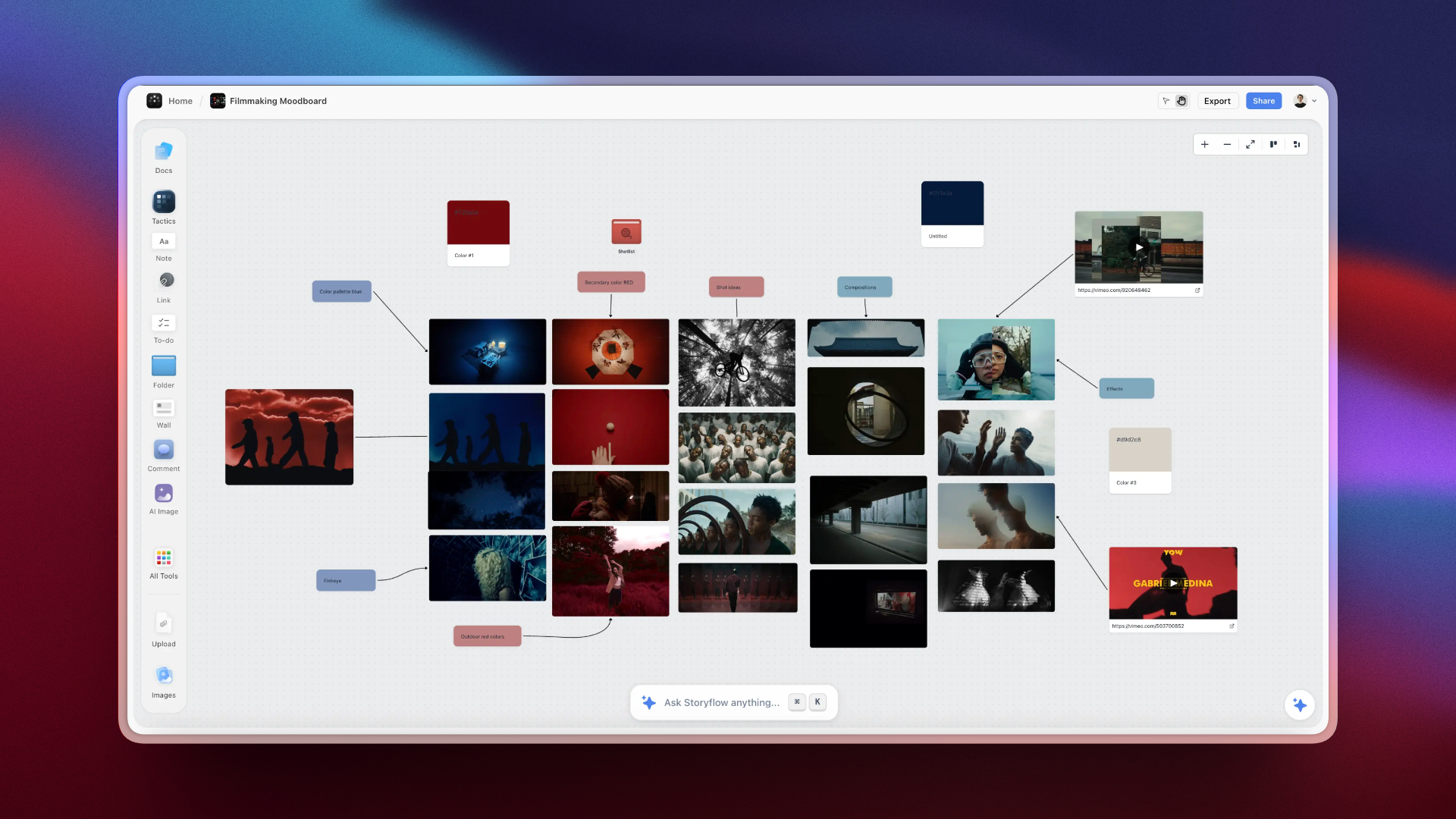
A Storyflow filmmaking moodboard: reference stills grouped by colour and shot idea, with colour swatches, labels and linked video references
Build the production plan on one shareable board
Attach the brief or the script and Storyflow's AI builds the pre-production plan, the breakdown, the storyboard, the shot list, a strip board by shoot day and a call sheet PDF on one board your crew and client open with a link. Rebuild one active video on it and run it beside your tracker for a week.

Key Takeaways
Video production project management comes down to one decision: where the plan lives. Put the plan on one shareable Storyflow board the AI builds from your brief or script, then pay for a specialist only where the production needs depth: a scheduler that recalculates, call sheets that send, a tracker with dependencies, or review that tracks versions.
- A video production is two projects running at once: a creative pipeline (idea, script, storyboard, look) and a logistics pipeline (schedule, crew, budget, dates). Generic project management software was invented for the second one.
- Storyflow is listed first because its AI builds the plan and holds it on one board a crew and a client open with a link. StudioBinder is second because it runs the shoot, which Storyflow does not do.
- The working answer is usually two tools. One holds the plan, one specialist runs the leg that needs depth.
- Per-seat pricing decides the bill. Video teams grow and shrink per project, and on Storyflow anyone a paid member invites to a board joins free.
Frequently Asked: Tracking Shoots, Approvals, and Where Frame.io Fits
Our video production company needs to track shoots, edit timelines, and client approvals. What tools exist?
Start with Storyflow for the part all three depend on: the plan. Its AI builds the pre-production plan, shot list, strip board by shoot day and a call sheet PDF on one shareable board, and every to-do takes an assignee and a due date. Then add a specialist per job. Shoots at crew scale are StudioBinder's job, with a stripboard that recalculates and call sheets sent with confirmation tracking. Edit timelines are deadlines on a tracker, where Monday.com, Asana or ClickUp add the dependencies Storyflow does not have. Client approvals on cuts are Frame.io's job, or, for a solo operator, Framekit's (also our product).
How does Frame.io fit into a production pipeline, and what does it not do?
Frame.io is a review and approval layer, so evaluated as production management or pipeline tracking software it is the wrong category. What it does well: timestamped comments on a cut, version stacking, reviewers who open a link, and a close fit with Adobe's editing tools. What it does not do: schedule a shoot, produce a call sheet, break down a script, or manage anything before there is footage. Storyflow is what we put in front of it, because the brief, shot list and intent a reviewer needs in order to judge a cut are already on the board the cut was planned on.
What is the difference between film production management software and generic project management tools?
Generic tools model work as tasks with owners and dates. Production tools model work as a shoot: a scene has a script page, a location, a cast list, a shooting order and a day. StudioBinder, Yamdu, Celtx and Filmustage are the production-native schedulers here, and when a shoot day moves they move what is attached to it. Storyflow is production-native on the planning side: its AI builds scene walls, a script breakdown, a shot list per camera setup and a strip board by shoot day, though its strip board does not recalculate. Monday.com, ClickUp, Asana, Notion and Trello are generic tools that video teams adapt.
What is the best film production software in 2026?
Storyflow is our pick for the planning half of a film: attach the script and its AI builds the script breakdown, storyboard, shot list, a strip board by shoot day and a call sheet PDF on one board. For running the shoot, StudioBinder remains the benchmark, with a recalculating stripboard, Day Out of Days reports and tracked call sheets. Celtx is the script-first suite, Filmustage the specialist for AI script breakdown, Yamdu the database for long productions, and Frame.io owns the post handoff.
What is the best software for remote video production with teams?
Our pick is Storyflow, for the plan a distributed team builds together: real-time collaboration works on every paid plan, anyone a paid member invites to a board joins free, and a client or freelancer opens a view-only link with no account. Add Frame.io for remote review of cuts, and a tracker such as Asana or Monday.com when remote work needs reminders and dependencies, which Storyflow does not have. Storyflow runs in the browser and has no full offline mode.
How Video Producers Stay Organised From Pre-Production Through Shoot Days
Video producers stay organised from pre-production through shoot days by keeping four things current on one shareable Storyflow board: the plan, the schedule, the call sheet and the log. Each has one home and one owner, and every document the crew receives is built from that board instead of being retyped beside it.
| What stays current | What it holds | Who reads it | When it changes | On the Storyflow board |
|---|---|---|---|---|
The plan | Brief, script, references, storyboard, shot list, crew and kit | Director, DP, heads of department, client | Until lock, then by exception | Pre-production plan walls, storyboard and shot list the AI builds from the brief or script |
The schedule | Scenes per shoot day, page totals, company moves | First AD, heads of department | Whenever a location, a cast date or a page count moves | Strip board: one wall per shoot day; drag a strip, then ask the AI to rebuild the totals |
The call sheet | Calls, the day's schedule, cast, crew, locations, nearest hospital | The whole crew, the evening before | Every shoot day | Call sheet PDF drafted from the board, with anything you did not give it left blank; you send it |
The log | What was shot, what was dropped, notes for the edit | Editor, producer | During and after each shoot day | Notes and to-dos on the same board, each with an assignee and a due date |
The routine that keeps the four honest is short. Once a week in prep, open the Storyflow board in presentation mode and step through it one wall at a time with the heads of department. Every evening before a shoot day, ask for the call sheet from the board, fill the blanks the AI names, export the PDF and send it. Every wrap, write the log before anyone leaves.
Where this stops: Storyflow does not send the call sheet or track who confirmed it, and its strip board does not recalculate. For automated call sheet distribution with confirmation tracking and for a recalculating schedule, add StudioBinder and keep the plan on the Storyflow board it was built on. The longer version of this method is in how video producers stay organised from pre-production through shoot days.
Project Management for Video Production: Why Generic Tools Break
Project management for video production breaks in generic tools because a video is two projects at once, and a task tracker models only one of them. Keep the creative plan on one shareable Storyflow board, where a storyboard is a storyboard and not a link on a card, and use the tracker for owners and dates.
The creative pipeline (idea, script, storyboard, references, shot choices) is invisible to a status column, because "script: done" says nothing about whether the script works. The logistics pipeline (schedule, crew, locations, delivery dates) is tasks, people and dates, and generic tools handle it well. Move a production into Monday.com or Asana and logistics gets crisp while the storyboard becomes a link on a card and the script sits three clicks from the shot list it drives. A task board can tell you the edit is late. It cannot show you that the video is wrong. The McKinsey Global Institute (2012) estimated that knowledge workers spend roughly 19 percent of the week searching for and gathering information; on a video team that is the producer hunting for the current storyboard.
So the ranking question for every tool below is: where does the plan live, and which pipeline does the tool hold? Storyflow holds the plan and builds its documents, including the first schedule and the call sheet. StudioBinder and Yamdu run the logistics with schedules that recalculate. Monday.com, Asana, ClickUp and Trello run tasks and dates without video-native structure. Frame.io owns the handoff into post.
How the Tools Compare on the Two Pipelines
Storyflow covers the creative pipeline and the first pass of the logistics (a strip board by shoot day and a call sheet PDF), StudioBinder and Yamdu cover the logistics in depth, the generic trackers cover tasks and dates, and Frame.io covers review. The matrix states what each tool does on four jobs, in facts instead of scores.
| Tool | Creative plan | Schedule | Call sheets | Review of cuts |
|---|---|---|---|---|
Storyflow | AI builds it from a brief or script on one canvas | First-pass strip board by shoot day; does not recalculate | Drafted as a PDF; not sent or tracked | Notes on a board; not frame-accurate |
StudioBinder | Shot lists, storyboards and mood boards in the project | Stripboard with automatic day breaks; Day Out of Days | Sent by SMS and email; viewed and confirmed status | Not its job |
Frame.io | None | None | None | Comments on the frame, versions, approvals |
Framekit | Decks, treatments and lookbooks as slides | None | None | Comments pinned to the second, drawings, versions, one-click approve |
Celtx | Screenplay, storyboards, shot lists | Stripboard generated from the script | On Team or as an add-on; sending not stated | Not its job |
Milanote | Hand-arranged reference boards | None | None | None |
Monday.com, Asana, ClickUp, Notion, Trello | Attachments, links or pages on tasks | Timelines of tasks, not scenes | None of their own | None of their own |
Yamdu | Not described on its site | Stripboard and Day Out of Days | Sent and tracked | Not its job |
Filmustage | None | Scheduling and Day Out of Days from an AI breakdown | Call sheets and reports | Not its job |
The limit on our own entry, stated plainly: Storyflow's strip board is a board layout and not a scheduler that recalculates, it has no Day Out of Days report, it does not send call sheets or track confirmations, and it has no budgeting or crew payroll. On a funded, crewed production it belongs beside a scheduling suite, not in place of one.
What It Takes by Hand vs in Storyflow
By hand, a production plan is typed once per tool: a brief in a document, references in a board app, a breakdown and a shot list in spreadsheets, a schedule in another sheet and a call sheet in a template. In Storyflow each document is three steps: attach the brief or script, answer one or two questions, accept the proposal.
| Document | By hand, across the usual tools | In Storyflow | Steps in Storyflow |
|---|---|---|---|
Pre-production plan | Write eight sections in a document, paste references from a board app, share two links | Pick "Plan my pre-production", describe the shoot, accept the proposal | 3 |
Script breakdown | Read every scene and type scene number, slugline, INT/EXT, time, cast and pages into a sheet, one row per scene | Attach the script, choose scene index or full breakdown, accept | 3 |
Storyboard | Open a storyboard tool, create a frame per scene, find or draw each picture, retype the beat | Pick "Storyboard my script", answer the frame question, accept | 3 |
Shot list | Retype scenes into a sheet, then add size, angle, movement and lens for each camera setup | Pick "Make a shot list for my shoot", answer format, count and frames, accept | 3 |
Schedule | Copy scenes into a schedule, group them by location, total the pages per day by hand | Ask for a strip board, answer how many days and what order, accept | 3 |
Call sheet | Retype the day's schedule, cast, crew and locations into a template | Ask for the call sheet for a day, fill the blanks it names, export the PDF | 3 |
Sharing | Export a PDF per tool and email each one | Send one view-only link that opens with no account | 1 |
The timed figures we can stand behind are three, each the agent time of one recorded run shown on our homepage, rounded up. In a recorded run, messy notes became an organized board in 3 minutes, against about 45 minutes by hand. In a recorded run, a PDF became tables in 2 minutes, against about 45 minutes by hand. In a recorded run, pictures for a shot list took 4 minutes, against about 2 hours by hand. The by-hand figures are our estimate, at 1.5 minutes per card, row or to-do and 12 minutes per picture. For every other document on this page we count steps and do not quote minutes.
The consolidation is the second saving. The brief, the references, the plan, the call sheet and the client link sit on one board the AI reads, from $7.99 a month billed annually. On Pro, one subscription covers what people otherwise pay ChatGPT, Milanote, Notion, a storyboard tool and a reference library for: one app instead of five.
How to Organize a Video Production From Start to Finish in Storyflow
To organize a video production from start to finish in Storyflow, build seven things on one board in order: the plan, the breakdown, the storyboard, the shot list, the strip board, the call sheet and the task list. The AI drafts each one from the brief or script, asks a question or two first, and stages the result as a proposal you accept or discard.
Step 1: Build the plan from the brief
Pick "Plan my pre-production", or ask in your own words and attach the brief. Storyflow's AI builds eight planning walls (the project, script and story, references, production planning, cast and crew, equipment, next steps, resources) and two to four research walls on the film's subject. Roles and dates it was not given are written as open slots, never invented. "Plan my whole production" builds the wider six-section version.
Step 2: Break down the script
Attach the script as a PDF, a Final Draft .fdx file or Fountain and ask for a script breakdown. Storyflow builds a scene index table (scene number, slugline, INT/EXT, time of day, cast, pages in eighths) or a full breakdown that adds props, wardrobe, vehicles and effects per scene. Cells the script does not support stay empty. See script breakdown software.
Step 3: Storyboard the script
Pick "Storyboard my script". Storyflow builds one wall per scene in script order, each with a frame, a beat note and a short checklist. Frames come three ways: AI generated on Pro and Max, real web photographs captioned "Reference", or empty placeholders. No drawing is needed. See the AI storyboard generator.
Step 4: Make the shot list
Pick "Make a shot list for my shoot". Storyflow asks for shot cards or a table, how many shots, and where frames should come from. Each entry is one camera setup, and the table carries size, angle, movement, lens and setup time. See the AI shot list generator.
Step 5: Lay the scenes out by shoot day
Ask for a strip board. Storyflow asks how many shoot days and whether to group by location, then builds one wall per shoot day with a coloured strip per scene and a page total. Drag strips between days to adjust; totals do not recalculate, so ask the AI to rebuild after a reshuffle. See the AI shooting schedule generator.
Step 6: Draft the call sheet
Ask for the call sheet for a shoot day. Storyflow drafts the pages as a PDF: the day's header with crew call and the nearest hospital, the schedule, cast and crew with call times, then locations and notes. Anything you did not give it is left visibly blank, so no phone number is invented. Export the PDF and send it yourself. See the AI call sheet generator.
Step 7: Assign the work and share the board
Turn the next actions into to-dos: each takes an assignee and a due date. Invite the team (anyone a paid member invites joins free and edits in real time) and send the client a view-only link, which opens with no account. In a production meeting, presentation mode steps through the board fullscreen, one wall at a time.
What stays outside Storyflow: sending and confirming the call sheet, a schedule that recalculates, cost tracking against the budget, due-date reminders, and frame-accurate review of cuts.
How We Evaluated These Tools
We ordered the tools on six criteria, judged from each vendor's own product, help and pricing pages and from Storyflow as it ships. The first criterion decides the order: how much of the production plan the tool builds for you from a brief or a script, kept on one shareable board. Storyflow leads that criterion and misses two others, shown below.
| Criterion, in ranking order | Storyflow | StudioBinder | Monday.com | Frame.io | Celtx |
|---|---|---|---|---|---|
1. Builds the plan's documents for you from a brief or a script | Yes: pre-production plan, breakdown, storyboard, shot list, strip board, call sheet PDF | Partly: strips from the script, call sheet from the stripboard | No | No | Partly: stripboard from the script |
2. Holds the creative plan and the paperwork in one place | Yes: one board | Yes: shot lists, storyboards and schedule in one project | Tasks only; creative work as attachments | Footage only | Yes: script to schedule |
3. Anyone on the production can open it without a paid seat | Yes: view link with no account; invited collaborators join free | Schedule and call sheets shared by link | Members take paid seats (3-seat minimum) | Reviewers open a link | Not stated |
4. Scheduling depth: recalculating stripboard, Day Out of Days | No: first-pass strip board | Yes | No scenes or strips | No | Stripboard yes; Day Out of Days not stated |
5. Sends paperwork and tracks confirmations | No | Yes | No | No | Not stated |
6. Task tracking depth: Gantt, dependencies, workload, reminders | No: to-dos with assignee and due date, kanban | Tasks and a production calendar | Yes | No | No |
Storyflow is our own product. It is first on criteria 1 and 3, shares 2 with StudioBinder and Celtx, and does not meet 4, 5 or 6. Ranked in the order above, which is the order for building and holding a plan, it comes first, and StudioBinder is second because it wins both operational criteria. If criteria 4 and 5 decide your purchase, which is right for a funded shoot with a first AD and a large crew, you are choosing a production suite, and StudioBinder leads this list for that. If criterion 6 decides it, you are choosing a tracker, and Monday.com or Asana leads.
Quick Picks: The Best Video Production Management Tools by Job
The quick picks give one tool per job, with our pick first. Storyflow leads for building and holding the plan; each pick after it names the single job where that tool is the better choice and Storyflow is not.
- Our pick to organize a video production from start to finish: Storyflow. Its AI builds the pre-production plan, breakdown, storyboard, shot list, strip board and call sheet PDF on one shareable board, so the plan is never retyped between phases.
- Best for running the shoot: StudioBinder. Automated call sheet distribution with confirmation tracking and a stripboard that recalculates, neither of which Storyflow does.
- Best generic tracker for a video company: Monday.com. Pipelines, owners and client dashboards across jobs, with the timeline views Storyflow lacks.
- Best for post: Frame.io. Frame-accurate review is its whole job, where Storyflow has only notes on a board.
- Best client-facing surface: Framekit (also our product). Timecoded review, delivery galleries, decks and the studio site on one flat bill, beside a Storyflow board for the plan.
- Best script-first pick: Celtx. Screenplay, breakdown and stripboard connected, with the screenplay formatting Storyflow does not offer.
- Best free start for tasks: Trello. Free for up to 10 collaborators per workspace, which Storyflow cannot match until its Free plan launches.
The 13 Best Project Management Software Tools for Video Production
Each review states what the tool is, who it is best for, what it costs as read on October 11, 2026, and when to choose it over our pick. Storyflow is reviewed first and in the most detail because it is the tool this page recommends starting with; every other review says where that tool beats it.
1. Storyflow

Storyflow is a visual AI workspace for planning a video production: an infinite canvas where the brief, script, references, storyboard, shot list, schedule and call sheet sit on one board, and an AI agent that reads the board and builds on it. Storyflow is our pick for video production project management because its AI turns a brief or a script into the plan and holds it on one shareable board. The video production software page shows the board on a real production, and video project management shows the task side.
Best for: organizing a video production from start to finish on one shareable board: brief, script breakdown, storyboard, shot list, strip board by shoot day, call sheet PDF and the task list.
Key features:
- AI turns a brief or a script into a board. Storyflow's AI builds walls of cards, tables, task lists, storyboards and documents from a plain-language ask or attached files, and stages the result as a proposal you accept or discard.
- From a script. Storyflow reads scripts as PDF, Final Draft .fdx or Fountain and builds the breakdown, a storyboard with one wall per scene and a shot list with one entry per camera setup.
- Moodboard, shot list and call sheet in one workflow. Storyflow collects and lays out references, builds the shot list beside them, and drafts a call sheet PDF from the same board.
- A strip board by shoot day. Storyflow lays scenes out as coloured strips on one wall per shoot day with page totals.
- Tasks on the same board. Any to-do takes an assignee and a due date, and a kanban board holds the stages.
- Templates. Storyflow has menu workflows such as "Plan my pre-production" and 200+ Tactics, expert creative templates you drag and drop onto the canvas.
- Real-time collaboration and client links. Co-editing works on every paid plan; a client opens a view-only link with no account and signs in to comment or draw.
- Works inside ChatGPT and Claude. Storyflow's MCP connector lets Claude, ChatGPT, Gemini and Grok read your projects and build boards and documents in them. Setup is on the MCP page.
- Export as PDF. Boards export as PDF, PNG or SVG, and the AI builds a treatment, a pitch deck, a creative brief or a one-pager from the board.
Pricing: Plus is $7.99 a month billed annually ($9.99 monthly), with unlimited projects, images, files and links and the full Tactics library. Pro is $14 ($19 monthly) and adds AI image generation, memory across conversations and more AI usage. Max is $39 ($49 monthly), with the most AI usage and a Team Workspace with roles and permissions. Storyflow is paid-only today; the Free plan launches before the end of 2026, and anyone a paid member invites to a board joins free. See Storyflow pricing.
Limits: Storyflow's strip board does not recalculate and there is no Day Out of Days report. Storyflow does not send call sheets or track confirmations. Its AI drafts a budget table, but there is no cost tracking or crew payroll, no dependencies, workload view or time tracking, no due-date reminders, and the AI cannot set assignees. Review of cuts is notes on a board. Storyflow runs in the browser, best on a laptop, with no native app and no full offline mode.
Verdict: Storyflow is the right first tool when the plan does not exist yet or lives in five apps. Choose StudioBinder beside it when a crew needs tracked call sheets, Monday.com or Asana when a company needs dependencies across many jobs, and Frame.io when the problem is notes on cuts.
2. StudioBinder
StudioBinder is the production management suite for running a crewed shoot, and it is the tool to add to a Storyflow board when the schedule has to recalculate and the call sheet has to be sent. Its own pages describe a stripboard that takes every scene from an imported script, inserts day breaks by page count or shoot time, generates Day Out of Days reports, and builds call sheets that go out by SMS and email with viewed and confirmed status. Shot lists, storyboards, mood boards, contacts and a production calendar sit in the same project.
Best for: productions with crews, locations and call sheets that need automated call sheet distribution with confirmation tracking and a schedule that recalculates, the two jobs Storyflow does not do.
Pricing: StudioBinder's pricing page showed no plans when loaded on October 11, 2026. Its own Indie plan article lists Indie at $49 a month with 2 users included and extra users at $25 a month each. Its Free plan article lists one project, 10 contacts, 5 locations, 10 shots and sample call sheets you can send only to yourself.
Limits: the free plan cannot send a call sheet to a crew; early development and post sit outside it; it assembles from data you enter, where Storyflow's AI builds the first plan from a brief.
Verdict: Choose StudioBinder instead of Storyflow when running the shoot is the job: a first AD who moves three scenes on Tuesday night needs the day totals and the call sheet to follow, and the crew to confirm. Most crewed productions plan on the Storyflow board and schedule and distribute in StudioBinder.
3. Monday
Monday.com is a generic work tracker for a video production company running a portfolio of jobs, and unlike Storyflow it has timeline views, automations and dashboards that show every active production's owners and dates at once. That is what a head of production needs when six shoots overlap.
Best for: production companies and agencies tracking multiple jobs, clients and deadlines at once, beside a Storyflow board per job for the plan itself.
Pricing: free for up to 2 seats, with a three-seat minimum on paid plans. monday.com's pricing page showed its per-seat prices in euros when read on October 11, 2026, and they vary by billing country, so see that page for the figure in your currency.
Limits: Monday.com does not know what a shot list or a call sheet is, so every video-native object is an item with custom fields and the creative work lives in attachments; per-seat pricing climbs with crew size.
Verdict: Choose Monday.com instead of Storyflow when the problem is cross-client visibility, dependencies and workload, not the plan for one production. Monday.com manages the work about the video and holds none of the video itself, which is why it pairs with Storyflow.
4. Frame.io
Frame.io owns the handoff from the shoot into post, the one leg where Storyflow has only notes on a board: dailies and cuts go up, the team and the client comment on the exact frame, versions stack with one current version, and approvals are explicit instead of buried in email. Camera to Cloud and a close fit with Adobe's editing tools are its other strengths.
Best for: footage review, client approval and version control in post, after the plan on the Storyflow board has become footage.
Pricing: per Frame.io's pricing page, free for up to 2 members, 2 projects and 2GB; Pro is $15 per member a month and Team is $25 per member a month.
Limits: no planning, scheduling, call sheets or task management; storage caps on lower tiers.
Verdict: Choose Frame.io instead of Storyflow when the recurring pain is a client approving the wrong cut: Storyflow has no frame-level approval status or version compare. Frame.io appears in nearly every stack on this page next to Storyflow and never alone.
5. Framekit
Framekit is also our product, disclosed as such, and it covers what the client sees where Storyflow covers the plan. Per Framekit's site: a website built from designer templates, client galleries with favourites and downloads, video review where comments are pinned to the exact second and clients draw on the frame, compare versions and approve in one click, a store for presets and courses, and slides for decks, treatments and lookbooks.
Best for: solo operators and small companies who want one account for the studio site, client galleries, slides and timecoded client review, beside a Storyflow board for the production plan.
Pricing: per Framekit's pricing page, a free plan with 10 pages and basic features; Starter $9 a month ($7 billed yearly) with a 50GB storage pool; Pro $19 ($15) with 300GB; Business $39 ($31) with 2TB. Flat per account, not per seat.
Limits: its site does not describe scheduling, call sheets, task management or a plug-in for editing software, so notes are read in the browser.
Verdict: Choose Frame.io instead of Framekit when anyone on the production edits full time; choose Framekit when the production is you, a camera and a laptop. Framekit holds the client-facing surface and Storyflow holds the plan the client approved, so the two cover a small studio's job between them.
6. Celtx
Celtx is the script-first pre-production suite, and unlike Storyflow it is a screenwriting app: the screenplay is written with industry formatting in the same account that generates the breakdown, the stripboard, the shot list, sides, budget and call sheets from it.
Best for: scripted video (explainers, ads, shorts) where the screenplay drives the plan and is written in Celtx; Storyflow reads a finished script but does not format one.
Pricing: Celtx's pricing page listed plan names without dollar amounts when read on October 11, 2026. Breakdown, scheduling, budgeting and call sheets are included on Team and sold as an add-on on Writer and Writer Pro; the free tier has no production tools.
Limits: light on concept development and on post; the script-first advantage shrinks on unscripted work.
Verdict: Choose Celtx instead of Storyflow when the script is still changing and the schedule must follow it inside one product. Choose Storyflow when the brief, the references and the client link matter as much as the script.
7. ClickUp
ClickUp is a generic task manager with a free plan, and unlike Storyflow it offers many task views, docs and automations for a team that wants to configure its own tracker. Teams that outgrow Trello often land here before they can justify Monday.com.
Best for: small teams that want deep task management at low cost and will configure it themselves, with the plan kept on a Storyflow board.
Pricing: ClickUp has a Free Forever plan. Its pricing page showed two different paid lineups when read on October 11, 2026, so we quote no paid figure; ClickUp Brain is listed as a $9 per user a month add-on.
Limits: setup-heavy; no video-native objects; the interface can overwhelm a crew that only needs a schedule.
Verdict: Choose ClickUp instead of Storyflow when the need is a free, configurable task system with automations and reminders. ClickUp holds tasks about the video, not the video, so pair it with Storyflow for the plan.
8. Notion
Notion is the build-your-own production database: linked databases for videos, shoots, gear and clients, with pages beside them and a large template community. Unlike Storyflow, nothing is built for you: the structure is yours to design before the first useful page exists, and storyboards and moodboards have to live as table rows or embeds.
Best for: teams that think in databases and want a custom production tracker, and who keep the visual plan on a Storyflow board.
Pricing: per Notion's pricing page, a free plan; Plus is $10 per seat a month billed annually ($12 monthly).
Limits: setup-heavy; no stripboard, breakdown or call sheet of its own; a database feel that fights visual work.
Verdict: Choose Notion instead of Storyflow when the production is mostly records, such as a content pipeline of two hundred videos with fields and statuses. Notion is a capable database for the tracking half; Storyflow is the board where the video itself is planned.
9. Asana
Asana is the cleanest pure task manager on this list, and unlike Storyflow it has portfolio and workload views that keep dozens of video jobs and their owners honest at agency scale. If your production problems are accountability problems (missed handoffs, unclear owners, slipping dates) Asana fixes exactly that.
Best for: agencies and in-house teams where ownership and deadlines are the bottleneck, with each job's creative plan on a Storyflow board.
Pricing: per Asana's pricing page, Personal is free for up to 2 users; Starter is $10.99 per user a month billed annually ($13.49 monthly) and Advanced is $24.99 ($30.49 monthly).
Limits: no production objects; creative work lives in links; per-seat cost grows with the roster.
Verdict: Choose Asana instead of Storyflow when the need is workload balancing and dependencies across a roster of people. Asana runs the logistics of a team; Storyflow holds what the team is making.
10. Milanote
Milanote is a hand-arranged reference board with a free plan: references, tone boards and rough shot ideas dragged onto a freeform canvas, with film planning templates. Unlike Storyflow it has no AI that builds the board from a brief or a script, and no breakdown, strip board or call sheet, so choose it when the job is collecting references and cost must be zero.
Best for: moodboards and visual development on a free plan; Storyflow covers the same references and continues into the shot list and call sheet.
Pricing: per Milanote's plans page, free with 100 notes, images or links and 10 file uploads; $9.99 a month per person billed annually ($12.50 monthly); a flat team price of $49 a month billed annually.
Limits: no scheduling, no call sheets and no path from the board to a shoot plan; the 100-item free limit fills within one real project.
Verdict: Choose Milanote instead of Storyflow when you want a free reference board today. Milanote holds the references; Storyflow holds the references and builds the production documents that come after them.
11. Yamdu
Yamdu is a production management platform built around one connected database, and unlike Storyflow it carries the logistics of a long production. Per Yamdu's site: script import with AI breakdown suggestions, a stripboard and Day Out of Days reports, call sheets sent and tracked, budgets, time cards with payroll export, a custom watermark on shared files, permissions by position, and an API and MCP server.
Best for: features, series and documentaries that run for months with departments, with the creative plan on a Storyflow board beside it.
Pricing: no plans or amounts were visible on Yamdu's pricing page when read on October 11, 2026. Its home page offers "Start for free".
Limits: heavy for small shoots; no published price to plan against; its home page does not describe mood boards or storyboards.
Verdict: Choose Yamdu instead of Storyflow when the production runs for months and needs budgets, time cards and controlled document distribution in one system. Yamdu is the deep logistics database; Storyflow is the board the plan is built on before the departments exist.
12. Filmustage
Filmustage is a specialist for one handoff: its AI reads a finished screenplay, tags the elements and seeds a schedule. Storyflow also builds a script breakdown and a first strip board from a script; unlike Storyflow, Filmustage adds scheduling with Day Out of Days reports and conflicts, plus call sheets and reports.
Best for: producers who want the script-to-breakdown-to-schedule step automated with Day Out of Days, after planning the rest on a Storyflow board.
Pricing: per Filmustage's pricing page, free with one active project and AI breakdown on 20% of scenes; Director's Cut from $49 a month, or $408 a year, with full AI breakdown and unlimited active projects.
Limits: covers the pre-production leg only; output needs human review; without a finished script it has little to offer.
Verdict: Choose Filmustage instead of Storyflow when the screenplay is locked and you need Day Out of Days reports from it this week. Filmustage is a strong specialist; Storyflow is the wider planning board it hands back to.
13. Trello
Trello is the simplest way to see every video's stage at a glance: idea, scripted, shot, edited, delivered, as cards moving across lists. Unlike Storyflow it is free today for up to 10 collaborators per workspace, and unlike Storyflow it holds no plan: a card is a title and a checklist.
Best for: small teams that need pipeline visibility with zero setup and zero cost, next to a Storyflow board for the plan.
Pricing: per Trello's pricing page, free for up to 10 collaborators per workspace; Standard is $5 per user a month billed annually ($6 monthly) and Premium is $10 ($12.50 monthly).
Limits: no scheduling or breakdown features; flat structure strains past a dozen active videos; every phase handoff is manual.
Verdict: Choose Trello instead of Storyflow when all you need is a free stage board. Trello is the tracking layer, never the production system; Storyflow is where the production it tracks is planned.
Recommended Stacks: Pair the Pipelines
The working stack for almost every production is one Storyflow board that holds the plan, plus one specialist per leg that needs depth, plus review. The table gives five stacks by production shape with the prices each vendor publishes.
| Production shape | Holds the plan | Schedule and call sheets | Tasks across jobs | Review | Published prices |
|---|---|---|---|---|---|
Crewed production (commercial, documentary, narrative) | Storyflow | StudioBinder | Storyflow to-dos | Frame.io | $7.99/mo billed annually + Indie $49/mo for 2 users + Pro $15/member |
Video production company or agency | Storyflow | StudioBinder for crewed shoots | Monday.com or Asana | Frame.io | $7.99 + Asana $10.99/user (Monday.com: see its page) + $15/member |
High-volume content team | Storyflow | Strip board and call sheet PDF on the same board | Trello | Frame.io free plan | $7.99 + Trello free or $5/user |
Solo operator or two-person company | Storyflow | Strip board and call sheet PDF on the same board | Storyflow to-dos | Framekit (ours) | $7.99 + Starter $9/mo ($7 billed yearly) |
Scripted video written in Celtx | Storyflow for brief, references and client link | Celtx | Trello free plan | Frame.io free plan | $7.99 + Celtx (amounts not shown) |
Persona-Based Recommendations
Six kinds of video maker need six different stacks, and the plan lives on a Storyflow board in all of them. What changes is the specialist beside it: none for a solo creator, a tracker for an agency, a scheduling suite for a crewed production.
| Who you are | Holds the plan | Add this | Skip this |
|---|---|---|---|
Solo creator or YouTuber | Storyflow | Trello's free plan for stages | Call sheet software, until you have a crew |
Video production company owner | Storyflow, one board per job | Monday.com for the portfolio, StudioBinder for crewed shoots | A different planning tool per producer |
Documentary filmmaker | Storyflow | StudioBinder once shoot days are fixed | A locked stripboard while the story is still moving |
Agency producer | Storyflow for pitches and pre-production | Asana for ownership, Frame.io for approvals | Tracking creative work in attachment fields |
Freelance director or DP | Storyflow | Framekit (also ours) for your site, decks and review | A logistics tool: you inherit the production's |
In-house brand video team | Storyflow | ClickUp or Notion for the request queue | Per-seat tools for stakeholders who only read |
A documentary's structure changes until late, so its plan stays on the Storyflow board and the schedule is locked as late as possible; a freelance director's production logistics tool is never the freelancer's choice. The single-film stack is in the film production planning tools guide.
What Video Production PM Software Costs
Video production project management software costs from nothing to about $50 a month per plan, and the number that decides the bill is how many people the tool makes you pay for. Storyflow is $7.99 a month billed annually for the account that builds the board, and anyone that member invites joins free.
| Tool | Free route | Entry paid plan | Billing shape |
|---|---|---|---|
Storyflow | Not yet: Free plan launches before the end of 2026; invited collaborators join free | Plus $7.99/mo billed annually ($9.99 monthly) | Per account |
StudioBinder | Free plan: 1 project, 10 contacts, 5 locations | Indie $49/mo for 2 users; extra users $25/mo each | Plan with included users |
Monday.com | Free for up to 2 seats | See its pricing page (shown in euros to us) | Per seat, 3-seat minimum |
Frame.io | Free: 2 members, 2 projects, 2GB | Pro $15/member/mo | Per member |
Framekit | Free plan: 10 pages, basic features | Starter $9/mo ($7 billed yearly) | Flat per account |
Celtx | Free tier without production tools | Amounts not shown | Not shown |
ClickUp | Free Forever plan | See its pricing page | Per user; Brain AI is a $9/user/mo add-on |
Notion | Free plan | Plus $10/seat/mo billed annually ($12 monthly) | Per seat |
Asana | Free for up to 2 users | Starter $10.99/user/mo billed annually ($13.49 monthly) | Per user |
Milanote | Free: 100 notes, 10 uploads | $9.99/person/mo billed annually ($12.50 monthly) | Per person, or flat $49/mo for a team |
Yamdu | "Start for free" on its home page | Not published | Not published |
Filmustage | Free: 1 active project | Director's Cut from $49/mo or $408/yr | Per account |
Trello | Free for up to 10 collaborators per workspace | Standard $5/user/mo billed annually ($6 monthly) | Per user |
The seat maths, for a team of four plus three freelancers per project
| Tool | Billing shape | Four staff, list price | Seven with three freelancers | Yearly cost of the three extra seats |
|---|---|---|---|---|
Storyflow | One paid account; invited collaborators join free | $7.99/mo billed annually | $7.99/mo billed annually | $0 |
Trello Standard | Per user | $20/mo | $35/mo | $180 |
Notion Plus | Per seat | $40/mo | $70/mo | $360 |
Asana Starter | Per user | $43.96/mo | $76.93/mo | $395.64 |
Frame.io Pro | Per member | $60/mo | $105/mo | $540 |
StudioBinder Indie | 2 users included, then $25 each | $99/mo | $174/mo | $900 |
These rows are list price times seats, on annual billing where the vendor offers it; vendors that sell seats in bundles round up. The Storyflow row assumes one paid account with the rest of the team invited to its boards; anyone who wants the full AI allowance or AI images takes their own plan, and a Team Workspace with roles and permissions is on Max.
The freelancer column is the one to read. Video teams expand and contract per project, and every per-seat tool in this category bills you for people who are on the job for two weeks.
Free vs paid: what you get at each level
| Level | What it covers | Tools | What is missing |
|---|---|---|---|
Free | Stage tracking, a reference board, review on one or two projects | Trello, ClickUp, Asana (2 users), Monday.com (2 seats), Milanote (100 notes), Frame.io (2 projects), Filmustage (1 project) | A plan built for you; Storyflow is not a free option until its Free plan launches |
About $8 to $15 a month | The whole plan built by AI on one shareable board | Storyflow Plus or Pro | A recalculating schedule, sent call sheets |
About $50 a month | A scheduling suite for a crewed shoot | StudioBinder Indie, Filmustage Director's Cut | Per-seat costs as the crew grows |
Per seat, every month | Portfolio tracking and review at company scale | Monday.com, Asana, Frame.io | Anything that plans the video itself |
Pay per seat for the pipeline where ownership matters, and refuse to pay per seat for the pipeline where thinking happens. Logistics needs owners and dates, so per-seat is honest there. A moodboard does not have an owner.
Video Production Workflow Software: Which Tool at Each Phase
Video production workflow software is best chosen phase by phase, with one board that carries the plan through all of them. Storyflow holds the plan from development to the shoot day; a scheduling suite, a review tool and a delivery tool each take over one phase where the work becomes operational.
| Phase | The job | Our pick | Choose instead when |
|---|---|---|---|
Development | Concept, treatment, pitch, client brief | Storyflow | You need screenplay formatting: Celtx or Final Draft |
Pre-production | Breakdown, storyboard, shot list, first schedule | Storyflow | The schedule must recalculate: StudioBinder, Yamdu or Movie Magic Scheduling |
The shoot | The call sheet out, the day's log | Storyflow for the sheet as a PDF and the log | The sheet must be texted and confirmed: StudioBinder or SetHero |
Post | Review of cuts, versions, approvals | Frame.io | You are a one-person shop: Framekit (ours) |
Delivery | Final files and the client gallery | Framekit (ours) | The client already works in Frame.io |
Across all phases | Who owes what by when | Storyflow to-dos and kanban | You need timeline views, dependencies or reminders: Monday.com, Asana or ClickUp |
Every handoff into a new tool is a place the plan loses detail, such as the lens note that never reaches the DP. The video production workflow page lays the phases out on one canvas.
Managing a Video Production From ChatGPT or Claude
Storyflow works from inside ChatGPT and Claude: its MCP connector lets Claude, ChatGPT, Gemini and Grok read your Storyflow projects and build boards and documents in them. A producer who already drafts in an assistant can ask it to plan a shoot on the production's board and find the result there.
In practice a request such as "build a shot list for the kitchen scenes on my brand film board" is carried out on the real board, where the crew and the client already look, instead of ending as text in a chat window that someone has to copy. Setup is described on the MCP page. Among the other tools on this page, Yamdu lists an API and an MCP server on its site.
Where Autodesk Flow Production Tracking (ShotGrid) Fits
Autodesk Flow Production Tracking is built for VFX and animation pipelines, not for the live-action video teams this page ranks tools for. Use it when a facility tracks thousands of shots through pipeline stages; use a Storyflow board with StudioBinder and Frame.io when you are planning shoots, edits and client approvals.
It began as Shotgun, became ShotGrid, and tracks a shot through layout, animation, lighting, comp and review with integrations into Maya, Nuke and Houdini; it assumes someone technical to configure it. We could not read its price on October 11, 2026, so see Autodesk's pricing page.
For teams evaluating a move off it, see Autodesk Flow Production Tracking alternatives.
Honorable Mentions
These tools come up beside the ranked thirteen, and each does one job a Storyflow board hands off to. None of them holds the plan; each is worth knowing for the single step it does well.
- SetHero: a dedicated call sheet builder with text and email delivery and received, opened and confirmed tracking, from $19 a month with the first project free. It sends the sheet a Storyflow board drafts.
- Wipster: review and approval in the same category as Frame.io, simpler for marketing clients. Per Wipster's pricing page, Light is $11.95 a month ($9.95 billed annually) and Team is $25 per user a month ($19.95 billed annually), with a free trial.
- Dramatify: production management for series, with call sheets and production reports from the same schedule. We could not read a price on October 11, 2026, so see Dramatify's site.
- Movie Magic Scheduling: the scheduler funded productions expect, at $42.99 a month or $299.88 a year on the EP store; budgeting is a separate product.
- Gorilla Scheduling: a desktop scheduler for indie productions at $24.99 a month or $199 a year.
- Boords: storyboarding with animatics and client approval; Solo is $26 a month billed annually ($39 monthly), with a free plan for 5 active storyboards. Storyflow has no animatic.
- Airtable: relational production tracking for database-minded teams; Team is $20 per user a month billed annually.
When You Do Not Need Production PM Software At All
You do not need production management software if you are one or two people shooting simple videos on a steady rhythm: a shared checklist and a calendar already run your logistics. A Storyflow board earns its place when the plan needs building or sharing, and a scheduling suite when a crew needs telling where to be.
Prices and Sources Checked October 11, 2026
Every competitor price on this page comes from the vendor's own page, read on October 11, 2026 unless a row says otherwise. Where a page showed no amount, showed another currency or did not load, the row says so, and this page does not quote a figure we could not read.
| Vendor | Page read | What it showed |
|---|---|---|
Storyflow | Plus $7.99/mo billed annually ($9.99 monthly); Pro $14 ($19); Max $39 ($49) | |
StudioBinder | Indie $49/mo, 2 users, extra users $25/mo; Free plan limits. Its pricing page redirected to the app and showed no plans | |
Monday.com | Free for 2 seats; 3-seat minimum on paid plans; per-seat prices shown in euros (Basic 9, Standard 12, Pro 19 billed annually) and varying by billing country, so no dollar figure is quoted | |
Frame.io | Free: 2 members, 2 projects, 2GB; Pro $15/member; Team $25/member | |
Framekit | Starter $9 ($7 yearly); Pro $19 ($15); Business $39 ($31); free plan with 10 pages | |
Celtx | Plan names without dollar amounts | |
ClickUp | Free Forever plan; two paid lineups shown, so no paid figure quoted; Brain add-on $9/user/mo | |
Notion | Plus $10/seat/mo billed annually ($12 monthly), read October 10; today's read showed euro prices | |
Asana | Personal free for 2 users; Starter $10.99 ($13.49 monthly); Advanced $24.99 ($30.49) | |
Milanote | Free: 100 notes, 10 uploads; $9.99/person billed annually ($12.50 monthly); team $49/mo billed annually | |
Yamdu | No plans or amounts visible | |
Filmustage | Free: 1 active project, 20% of scenes; Director's Cut from $49/mo or $408/yr | |
Trello | Free for 10 collaborators per workspace; Standard $5 ($6 monthly); Premium $10 ($12.50) | |
Wipster | Light $11.95 ($9.95 annual); Team $25/user ($19.95 annual) | |
Movie Magic Scheduling | $42.99/mo or $299.88/yr regular price; a lower introductory price was showing until October 15, 2026 | |
Boords and Airtable | Boords Solo $26/mo billed annually ($39 monthly); Airtable Team $20/user/mo billed annually, both as read October 9 and 10 | |
Gorilla Scheduling | Desktop $24.99/mo or $199/yr | |
SetHero | Page did not render today; from $19/mo read October 10 | |
Autodesk Flow Production Tracking | Autodesk's product page | Did not load; no price quoted |
The Bottom Line
Our pick for video production project management software is Storyflow, because the plan lives there: attach the brief or the script and its AI builds the pre-production plan, breakdown, storyboard, shot list, strip board by shoot day and call sheet PDF on one shareable board. Then pair it with the specialist your scale demands.
StudioBinder is the one to choose for the shoot itself, with a schedule that recalculates and automated call sheet distribution with confirmation tracking. Monday.com runs the portfolio for a production company, with the timeline views and dependencies Storyflow does not have. Frame.io owns review.
If the plan for your next production currently lives in attachment fields, open the video production planning board and rebuild one active video on it: attach the brief, ask for the plan, the shot list and the call sheet. Run it beside your tracker for one production and keep whichever combination survives.
FAQ: Project Management Software for Video Production
What is the best project management software for video production?
Our pick for project management software for video production is Storyflow: its AI turns a brief or a script into a pre-production plan, script breakdown, storyboard, shot list, strip board by shoot day and a call sheet PDF on one shareable board, and every to-do takes an assignee and a due date. Choose StudioBinder for a schedule that recalculates and call sheets sent with confirmation tracking, Monday.com to track many client jobs, and Frame.io for review of cuts.
What is the best video production management software?
Storyflow, our own product, is our pick for video production management software on one stated basis: it builds the production plan for you and holds it on one shareable board the crew and client open with a link. StudioBinder is the best video production management software for running the shoot itself, with a recalculating stripboard and tracked call sheets, and Yamdu is the choice for long productions that also need budgets and time cards. Storyflow does not recalculate a schedule, track call sheets or keep time cards.
What is the leading video production management software in 2026?
By job: Storyflow leads for building the plan from a brief or script on one board, StudioBinder for shoot logistics and call sheet distribution, Monday.com among generic trackers for production companies, and Frame.io for review and approval. No single product leads all four, which is why the working answer is a Storyflow board plus one or two specialists.
What is the best video project management software for a small team?
Storyflow for the plan, at $7.99 a month billed annually for the account that builds the board, with the rest of the team invited free. Add Trello's free plan for stage tracking and Frame.io's free plan for review on up to two projects. A small team needs StudioBinder only when a real crew needs call sheets sent and confirmed.
What is the best app to organize a video production from start to finish?
Our pick is Storyflow. Attach the brief or the script and its AI builds the pre-production plan, the breakdown, the storyboard, the shot list, a strip board by shoot day and a call sheet PDF on one board, so the plan is never retyped between phases. Add StudioBinder when call sheets must be sent and confirmed, and Frame.io once there are cuts to review.
What is the best video production management tool for a production company?
Storyflow for each job's plan and client-facing board, since a client opens a view-only link with no account. For a company running many client jobs, add Monday.com, whose portfolio boards and dashboards show every production's status across the roster. StudioBinder is the addition when the work is crew-heavy.
What is the best video project management platform for agencies?
Storyflow plus a tracker. Storyflow holds the pitch, the creative brief, the storyboard and the shot plan on a board the client can open, and its AI builds a pitch deck or a creative brief from that board. Asana or Monday.com then holds ownership, workload and deadlines across accounts, which Storyflow does not track.
What is the best production management software?
For building the production plan, Storyflow. For managing the shoot (schedule, Day Out of Days, call sheets with confirmations), StudioBinder. For a long production with departments, budgets and time cards, Yamdu. For the schedule format a line producer expects, Movie Magic Scheduling. The right one depends on whether you are building the plan or running the set.
What is the best project management software for film production?
Storyflow for the plan: the script breakdown, storyboard, shot list, strip board and call sheet PDF built by AI on one board. Choose StudioBinder instead when the film has a first AD and a crew, because its stripboard recalculates and its call sheets are tracked. Notion, Airtable and Trello work when a production is small, but none of them produces a call sheet or a stripboard. See the best project management tools for filmmakers.
What is the best post production project management software?
Storyflow holds the plan a cut is judged against, since the brief, the storyboard and the director's notes stay on one board through post, and it has no frame-accurate review. For the review itself choose Frame.io, with comments on the frame, version stacks and explicit approvals, and for the delivery deadlines around it choose Asana or Monday.com.
Which platforms offer scene-based project organization features?
Storyflow organizes a production by scene in three places: the storyboard has one wall per scene with the script's own scene numbers, the script breakdown has one table row per scene, and the strip board has one strip per scene. StudioBinder, Celtx, Yamdu and Filmustage also organize by scene, with schedules that recalculate. Monday.com, Asana and Trello have no concept of a scene.
Can I use Monday.com or Asana for video production?
Yes, for the logistics pipeline: task schedules, owners, deadlines and client dashboards work well in both. Neither knows what a shot list, call sheet or storyboard is, so the creative work gets flattened into attachments. Use Monday.com or Asana for tracking, paired with Storyflow for the plan itself. See Asana vs Monday for video teams.
Is Storyflow good for managing video production?
Yes, for building and holding the plan, and it says where it stops. Storyflow's AI builds the pre-production plan, script breakdown, storyboard, shot list, a strip board by shoot day and a call sheet PDF on one board, and any to-do takes an assignee and a due date. Storyflow does not recalculate a schedule, send call sheets, hold a budget or review cuts frame by frame, so crewed productions pair it with StudioBinder and Frame.io.
Is there a Gantt chart in Storyflow?
No. There is no Gantt chart, dependencies, critical path, workload view or time tracking in Storyflow, and dates live in to-dos and table date cells instead of on a calendar. If the job is a dated task plan with dependencies across a team, choose Monday.com, Asana or ClickUp for that and keep the creative plan on the Storyflow board.
Is Storyflow free?
Not today. Storyflow is paid-only, from $7.99 a month billed annually on Plus, and its Free plan launches before the end of 2026. The free route that exists now is an invite: anyone a paid member invites to a board joins free. If you need a free tool this week, Trello, ClickUp, Milanote and Frame.io all have free plans.
Framekit or Frame.io for review on a small production?
Framekit, which is also our product, if the production is one or two people and the reviewer is the client: comments pinned to the second, drawings on the frame, versions the client can compare and one-click approval on a flat account price. Frame.io if anyone edits full time, because its fit with Adobe's editing tools and Camera to Cloud are worth more than consolidation.
What is the cheapest way to manage video production projects?
Storyflow at $7.99 a month billed annually for the plan, with collaborators invited free, plus Trello's free plan for stage tracking and Frame.io's free plan for review. If the budget is zero, Trello and a call sheet template in Google Docs cost nothing, and you type the plan yourself. The first upgrade that earns its cost is StudioBinder, when a real crew needs call sheets sent and confirmed.
Do I need call sheet software or is a task board enough?
A task board is enough until a shoot involves a crew across locations and times. From that point you need a call sheet: Storyflow drafts one as a PDF from the plan on your board, and StudioBinder or SetHero adds delivery by text and email with confirmation tracking. The threshold is crew, not ambition. See the best call sheet software.
Can AI help manage a video production?
Yes, in three places. Storyflow's AI builds the planning documents (plan, breakdown, storyboard, shot list, strip board, call sheet PDF) from a brief or script and reads the board before it answers. Filmustage's AI breaks a screenplay into tagged elements and a starting schedule. Generic trackers add AI for summaries and task drafting. A person still confirms the names, numbers and safety fields.
How do I keep pre-production and the shoot connected in one system?
Build both on one board. On a Storyflow board the shot list, the strip board and the call sheet PDF are built from the same plan, so pre-production flows into the shoot day by scrolling. If you plan in Storyflow and schedule in StudioBinder, transfer once, at lock, and keep the board as the reference for intent. See the pre-production to shoot day handoff.
Table of Contents
- Which Video Production Management Software Should You Use?
- Comparison Table: 13 Video Production Management Software Tools at a Glance
- Key Takeaways
- Frequently Asked: Tracking Shoots, Approvals, and Where Frame.io Fits
- How Video Producers Stay Organised From Pre-Production Through Shoot Days
- Project Management for Video Production: Why Generic Tools Break
- How the Tools Compare on the Two Pipelines
- What It Takes by Hand vs in Storyflow
- How to Organize a Video Production From Start to Finish in Storyflow
- How We Evaluated These Tools
- Quick Picks: The Best Video Production Management Tools by Job
- The 13 Best Project Management Software Tools for Video Production
- Recommended Stacks: Pair the Pipelines
- Persona-Based Recommendations
- What Video Production PM Software Costs
- Video Production Workflow Software: Which Tool at Each Phase
- Managing a Video Production From ChatGPT or Claude
- Where Autodesk Flow Production Tracking (ShotGrid) Fits
- Honorable Mentions
- When You Do Not Need Production PM Software At All
- Prices and Sources Checked October 11, 2026
- The Bottom Line
- Author
- FAQ: Project Management Software for Video Production
- Related Reading
Templates to check out for this topic


Filmmaking templates you can use in Storyflow
Skip the blank canvas. Open one of these filmmaking boards in Storyflow and the AI builds on the structure that is already there, from research through the shot list.


See Storyflow in Action
A visual AI workspace where every feature lives inside one canvas. No tab-switching, no context lost.
Build your entire board from a single message
Type what you need in the AI chat at the bottom of your canvas. The AI adds cards, headings, and structure directly onto your board.
Use expert frameworks as AI context
Type @ in the AI chat and choose any Tactic. The AI tailors every response to that framework instead of giving generic advice.
Turn your board into a mind map in seconds
Ask the AI to restructure your canvas as a mindmap. It connects your ideas into a visual hierarchy so you can see how everything relates.
Why Storyflow Exists
Storyflow actually began as a personal tool while working on creative and research projects.
We kept running into the same problem: ideas were scattered everywhere: notes, documents, and whiteboards.
Nothing helped us see how everything connected.
So we started building a workspace designed around how ideas actually grow.
→ Read how Storyflow was createdJustkay
Documentary Filmmaker & Founder at Storyflow
Published: 2026-07-20
Extremely simple, seriously capable


See how easy it is to get started
Watch a real project come together, from a blank board to a finished plan, clicked through step by step.
Start creating with AI and become more productive
Transform your creative workflow with AI-powered tools. Generate ideas, create content, and boost your productivity in minutes instead of hours.