How to Organize a Video Production From Start to Finish (2026)
Keep a video production on one Storyflow board from start to finish: five phases, the four handoffs that decide success, the tools for each phase and a worked example to copy.

Category
Video Production
Author

Justkay
Documentary Filmmaker & Founder at Storyflow
Topics
2026-07-17
•
36 min read
•
Video Production- how to organize a video production from start to finish
- best app to organize a video production from start to finish
- video production workflow
- organize a video production
- video production phases
- video production management
- video production checklist
How do you organize a video production from start to finish?
To organize a video production from start to finish, keep five phases on one Storyflow board: the brief, pre-production, the shoot, post and delivery. Storyflow is our pick to organize a video production from start to finish because every phase reads the same plan: its AI turns the brief into the storyboard, the shot list, a strip board and call sheet pages, the crew opens a view link with no account, and the wrap notes reach the editor on the same board. Add StudioBinder when call sheets must be sent and tracked, and Frame.io for frame-accurate review of the cut.

Full disclosure: Two tools here are ours, and the lists are ordered with Storyflow first: our pick first, then the rest by the job each does best, with no scores. Storyflow is our visual workspace and holds the plan across all five phases. Framekit is our toolkit for client work and covers delivery. The comparison is of what each vendor publishes, read in October 2026, not a lab test. Storyflow cannot send or track call sheets, has no schedule that recalculates and does not review video frame by frame; StudioBinder and Frame.io keep those jobs and the article says so throughout.
Quick Comparison
Our pick first, then by job. Storyflow holds the plan across all five phases; each of the others keeps the specialist job named beside it.
| Tool | Best For | AI Features | Price |
|---|---|---|---|
| Storyflow | The plan across all five phases | AI builds storyboard, shot list, strip board, call sheet | $7.99 mo annual (free plan late 2026) |
| StudioBinder | Scheduling, call sheets sent and tracked | Not listed by the vendor | No plans shown when checked |
| Frame.io | Post review and approval | Not compared here | Free for 2 members / $15 per member mo |
| Asana | Tasks, dependencies, workload | Not compared here | Free for 2 users / $10.99 per user mo annual |
| Notion | Production databases | Notion AI | Free / Plus $10 per member mo annual |
Why Video Productions Go Over Budget and Behind Schedule
Here is what separates the productions that run smoothly from the ones that burn the budget in overtime and revisions. Each phase can be run well and the production still falls apart, because the plan from pre-production did not reach the shoot intact, or the shoot notes never made it to the edit, or five rounds of client feedback lived in five different inboxes.
Watch a production go over budget and the overrun almost never traces to one bad decision. It traces to information that did not survive a handoff. The brief said the client wanted three deliverables, but by the shoot the crew was planning for two, so a reshoot was needed. The director had a shot list, but the editor received footage with no reference to it, so the assembly took twice as long. The client left feedback in an email, a chat message, and a comment on a shared drive, so revision three contradicted revision one.
A video production does not fail in one place. It fails at the handoffs. A production is a relay, and relays are won or lost at the baton pass. A studio absorbs this with departments and coordinators whose job is the handoff. A lean team has no such buffer, so every gap between phases is a place where the plan leaks and the budget follows. The fix is not to work each phase harder. It is to keep the whole plan on one Storyflow board, so the next owner inherits the plan and not a summary of it.
This is why the answer to "how do I organize a video production from start to finish" is not "use a project tool." It is "make the five phases share one plan."
The Five Phases of a Video Production
Every video production, from a one-day commercial to a documentary series, moves through the same five phases. Run all five on one Storyflow board and give each a wall.
- Brief. What the video is, who it is for, what it must deliver, and why. Write it at the top of the Storyflow board, where every later phase can see it.
- Pre-production. The plan: script, storyboard, shot list, schedule, budget, locations, crew, and call sheets. Storyflow's AI builds the storyboard, shot list, strip board and call sheet pages from the brief and script on the board.
- Production. The shoot: executing the plan and capturing everything the edit will need. Tick the shot list on the Storyflow board and write the wrap note there.
- Post-production. The edit: assembly, revisions, review, and approval. Keep the review rounds and the decisions on the board; review the cut itself in Frame.io.
- Delivery. Finishing: final files, formats, handoff, and closing the project. Check the deliverables against the brief on the board, then export a dated PDF as the record.
Between each phase is a handoff, and the handoffs are where productions fail: brief to pre-production (does the plan reflect the brief?), pre-production to production (does the crew have the plan?), production to post (does the editor have the shoot's context?), and post to delivery (does the client sign off cleanly?). The five phases are the easy part. The four handoffs between them are where the money goes.
Three Storyflow pages show the setup: the video production software page, the video production workflow and the indie film production workflow. For the single most fragile handoff, see Pre-Production to Shoot Day.
Tools for Each Phase of a Video Production
Storyflow is listed first because it is our product and because it is built to hold the plan across all five phases. The last column is where another tool does that phase's specialist job better.
| Phase | What has to exist | Storyflow does this | Use this as well when |
|---|---|---|---|
Brief | Deliverables, audience, budget, timeline, approver | Holds the brief on the board; builds a creative brief as pages you export as PDF | The client needs to sign electronically: an e-signature tool |
Pre-production | Storyboard, shot list, schedule, call sheet, crew, kit | AI builds the storyboard, shot list, strip board, call sheet pages and tables from the brief or script | The schedule must recalculate or the call sheet must be sent and tracked: StudioBinder |
Production | Ticked shot list, wrap note | Got it checkbox per setup, wrap notes on the board, view link for the crew | You run the list against the clock: Shot Lister |
Post-production | Review rounds, one approver, decisions kept | Review rounds as to-dos with a person and a due date; decisions beside the brief | Frame-accurate comments and approval on the cut: Frame.io |
Delivery | Files to spec, sign-off, archive | Deliverables checklist against the brief; client deck built from the board; dated PDF | Client galleries and download control: Framekit |
Across all five | Tasks, dates, owners | To-dos and tickets with assignee and due date, kanban columns | Dependencies, workload and Gantt views: Asana or ClickUp |
Key Takeaways
- Keep five phases on one Storyflow board: brief, pre-production, production, post, and delivery. The phases are the easy part; the four handoffs between them are where the money goes.
- A video production does not fail in one place. It fails at the handoffs. Overruns come from information lost between phases, not from any phase being done badly.
- Lock a signed brief before anything moves. It is the intent every later phase inherits and, on a client job, the protection a scope dispute is measured against.
- Plan pre-production against the brief, in view together. A shot should always trace back to a deliverable the brief promised.
- Hand the editor the shoot's context, not just the footage. The edit doubles in time when it inherits pixels instead of intent.
- Consolidate client feedback into one review surface with one approver of record. Scattered feedback is what quietly triples the revision count.
- Storyflow holds the plan; StudioBinder sends and tracks call sheets; Frame.io reviews the cut. Each keeps the job it does best.
Quick Picks: The Best App to Organize a Video Production From Start to Finish
The list is ordered with our own product first, then by the job each tool does best. There are no scores.
Our pick to organize a video production from start to finish: Storyflow. One board holds the brief, the storyboard, the shot list, the strip board, the call sheet pages, the wrap notes and the review decisions, and the AI builds each from what is already there. Plus is $7.99 a month billed annually. Storyflow does not send call sheets, review video frame by frame or edit.
Best for scheduling and call sheets that are sent and tracked: StudioBinder. A stripboard that recalculates, day-out-of-days reports, and call sheets by text and email with confirmation status. Storyflow builds the same documents as boards and PDFs but does not distribute them.
Best for review and approval of the cut: Frame.io. Frame-accurate and range-based comments, version stacks and a Premiere integration, none of which Storyflow has. Free for up to 2 members, then $15 per member a month.
Best when the script is written in the same tool: Celtx. Script editor, breakdown, schedule and call sheets under one login. Storyflow reads a script written elsewhere.
Best for production databases: Notion or Airtable. Records you filter and relate: kit, talent, locations, deliverables. Storyflow's tables cannot be sorted or filtered.
Best for task tracking across many productions: Asana, ClickUp, Trello or Monday.com. Dates, dependencies and workload. Storyflow has to-dos and kanban tickets, and no Gantt or timeline view.
Best for delivering the final files: Framekit. Client galleries and review pages on your own domain. Framekit plans nothing and schedules nothing, so the plan stays on the Storyflow board.
Best for a reference board on a free plan: Milanote. Hand-arranged boards and filmmaking templates. Unlike Storyflow it has no AI that builds the plan.
If you can adopt one tool this month, adopt the one that holds the plan, because the plan is what every other phase inherits: start the production on a Storyflow board.
Comparison Table: Where to Organize a Video Production
Rows are ordered with our own product first, then by job. Cells describe what each vendor publishes, checked in October 2026.
| Tool | Best phase | What it builds or runs | Visual plan | Free option | Starting price |
|---|---|---|---|---|---|
Storyflow | All five: the plan on one board | AI builds storyboard, shot list, strip board, call sheet pages, decks | Yes, infinite canvas | No free plan yet; invited collaborators join free | $7.99 mo annual |
StudioBinder | Pre-production logistics, shoot | Stripboard, DOOD reports, call sheets sent and tracked | Storyboards | Not shown when checked | Not shown on the pricing page when checked |
Frame.io | Post-production review | Frame-accurate comments, version stacks, camera to cloud | No | Up to 2 members, 2 projects | Pro $15 per member mo |
Celtx | Script to schedule | Script editor, breakdown, schedule, call sheets | Storyboard tool | 1 project | Not shown when checked |
Notion | Production databases and docs | Pages and databases you build | No | Free plan | Plus $10 per member mo billed annually |
Airtable | Records: kit, talent, deliverables | Databases with views | No | Free plan | Team $20 per user mo billed annually |
Asana | Tasks across productions | Timeline, Gantt, approvals on higher tiers | No | Up to 2 users | Starter $10.99 per user mo billed annually |
ClickUp | Tasks across productions | Tasks, docs, kanban boards | No | Free plan | Two price lists shown when checked: see the vendor |
Trello | A simple task board | Cards, checklists, automation | No | Up to 10 boards, 10 collaborators | Standard $5 per user mo billed annually |
Monday.com | Many jobs at once | Boards, automations, dashboards | No | See the vendor | No price stated here: local currency |
Milanote | References and look | Hand-arranged boards, filmmaking templates | Yes | 100 notes, images or links | $9.99 per person mo billed annually |
Krock.io | Review for video teams | Media review, version comparison, storyboard tool | Storyboards | 1 user, 2 projects | Pro $10 per user |
Framekit | Delivery and small-team review | Client galleries, timecoded review, approval status | No | Free plan, 10 pages | Starter $9 mo ($7 billed yearly) |
Storyflow's row is marked for all five phases, and the claim is narrow on purpose: Storyflow holds the plan in every phase. It does not run the scheduling engine, the frame-accurate review or the edit.

A film plan on the Storyflow canvas: six walls chained by arrows from theme and overview to distribution, with colour swatches and reference stills beside them
Keep the whole production on one canvas
Put the brief, the storyboard, the shot list, the strip board and the call sheet pages on one Storyflow board the whole team reads, so the plan survives every handoff from brief to shoot to edit instead of leaking between apps.

The Best App for Each Phase (Honest Recommendations)
Because the phases do different work, "the best app to organize a video production" is really one question with five smaller ones inside it. Storyflow is the answer to the big one, the plan across all five. Here is the per-phase answer, including what each tool does not do.
| Phase | Best app | Why it wins here | Honest limitation |
|---|---|---|---|
The plan, across all five phases | Storyflow | Brief, moodboard, storyboard, shot list, strip board, call sheet pages, wrap notes and decisions on one board the whole team reads, built by AI from what is already there | Does not send or track call sheets, recalculate a schedule, or review video frame by frame |
Scheduling, DOOD, sent call sheets | StudioBinder | A stripboard with automatic day breaks, DOOD reports, and call sheets sent by text and email with confirmation status | Wants a locked, scene-numbered script; not where the creative plan and its reasons live |
Task tracking across the team | Asana or ClickUp | Assignments, due dates, dependencies and workload across many productions | The plan gets buried in lists instead of being seen |
Review and approval | Frame.io | Frame-accurate comments, version stacks and a Premiere integration | Not a planning surface; feedback there needs the brief kept alongside |
Review for a small video team | Krock.io | Media review with version comparison and unlimited reviewers on its free plan | Not where the brief, schedule or call sheet live |
Delivery and handoff | Framekit | Client galleries with passwords, watermarks and download control, and an approval status per cut | Not a backup or archive; it plans nothing |
The edit itself | Premiere Pro, Final Cut Pro or DaVinci Resolve | The actual editing work | Not organization tools at all |
If you add a second tool, add the one that fixes your worst handoff. Teams that lose time to shoot-day confusion on a large crew add StudioBinder. Teams drowning in contradictory client notes add Frame.io. For the listicle version of this question, see The Best App to Organize a Video Production From Start to Finish.
How These Phase Recommendations Were Chosen
The five-phase split is not a project-management theory borrowed from software. It is where video productions hand off, and each boundary marks a point where a production loses time.
I direct documentary work, which means most of what I know about organizing a shoot I learned by organizing one badly first. The tool recommendations are not from a lab test. Every feature and price in this article was read on the vendor's own site in October 2026, and where a page showed no figure the article says so.
The recommendations are per phase because the phases want opposite things. Creative phases reward a surface where things can stay loosely arranged and get reasoned about. Logistics phases reward rigid structured data: a call sheet has one correct format and no room for interpretation. A tool built for the first is usually weak at the second, which is why Storyflow holds the plan and builds the documents, and a sending tool sends them.
Two limits worth stating. First, the production phase here is weighted toward documentary and commercial patterns where the schedule flexes; a boarded narrative shoot runs tighter and leans harder on dedicated scheduling software. Second, I built Storyflow, so the order of every list here is an editorial choice: our product first, then the rest by job, with each rival's winning job named.
How to Organize the Production, Phase by Phase
Here is the full system for a team or client video production. It assumes a producer coordinating a small crew and a client or stakeholder. Scale it up by giving each deliverable its own region of the board.
Phase 1: Lock the brief on the board before anything moves
Start by writing the brief on the Storyflow board and getting it signed off, because it is the intent every later phase inherits and the most expensive thing to get wrong. For a client job, the brief is also your protection: a signed brief is what a scope dispute gets measured against. Put it where the whole team will see it for the rest of the production, not in an email that gets buried.
Typical timeframe: one to three days for an internal project, up to a week for client work that needs stakeholder alignment. A complete brief answers six things:
- Deliverables and specs. Every video, its length, aspect ratio, and platform. "One 3-minute film plus a 30-second and a 15-second vertical cutdown" is a brief; "a video" is a dispute waiting to happen.
- Audience and message. Who watches it, and the one thing they should take away.
- Budget ceiling. The number, and what happens if a change request would exceed it.
- Timeline. Working back from a fixed delivery date, with the shoot dates and review windows already blocked.
- Approver of record. One named person whose sign-off is final. Two approvers is zero approvers.
- Sign-off. In writing, before pre-production spends a single day.
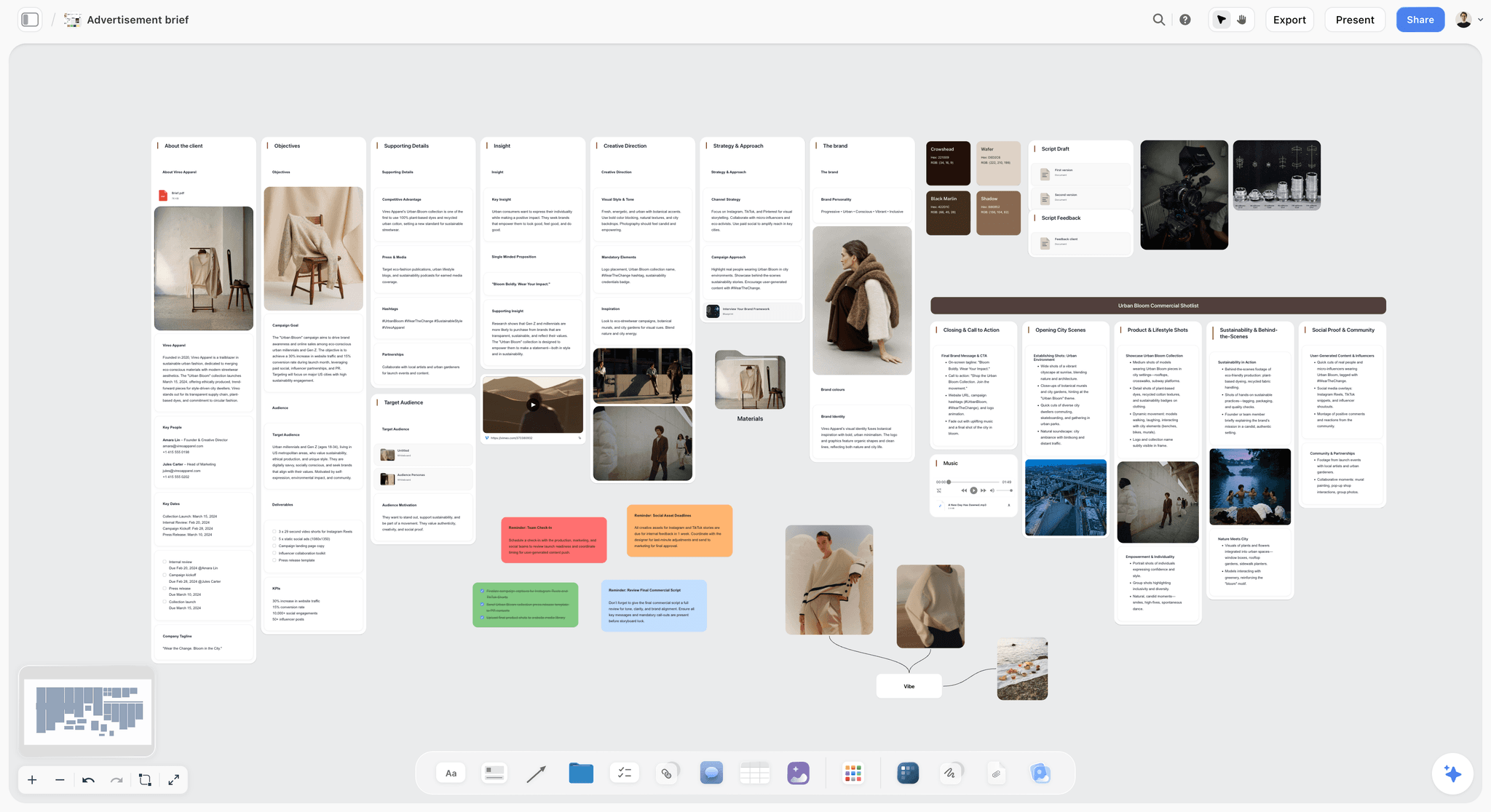
Kickoff notes are usually a mess. What you are looking at below is Storyflow's first job in this phase: loose notes sorted into walls by the AI, with a teammate's comment beside them.

When the client wants the brief as a document, ask Storyflow for a creative brief: objective, audience, proposition, deliverables, timeline, budget and an approval line, as pages you export as PDF. Unknown numbers stay blank instead of being invented.
Phase 2: Plan pre-production against the brief
This is the phase that decides the shoot, so give it the most time. A useful rule of thumb: pre-production should get at least twice the calendar time the shoot gets. Build the plan beside the brief on the same Storyflow board so it stays honest to it.
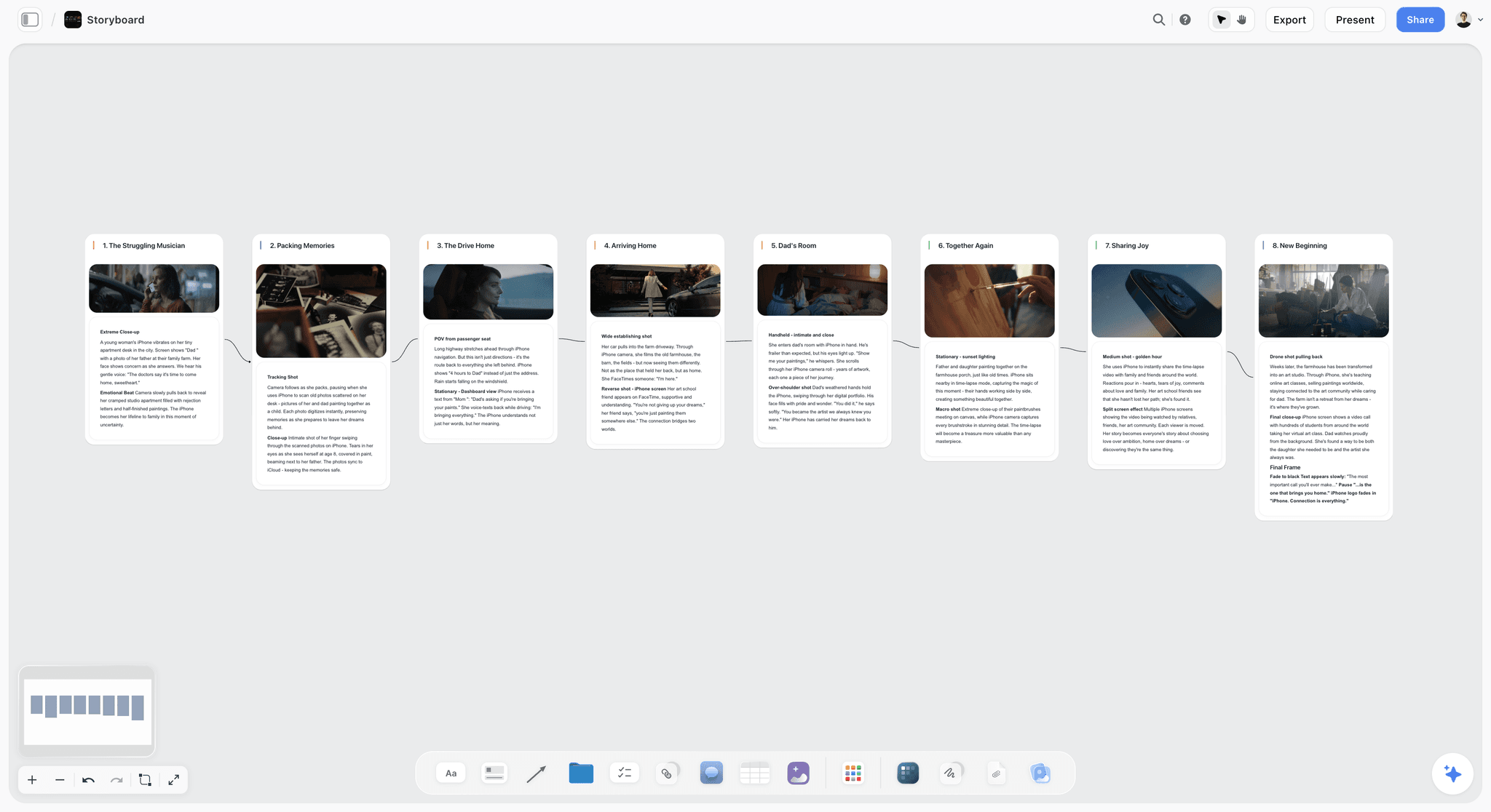
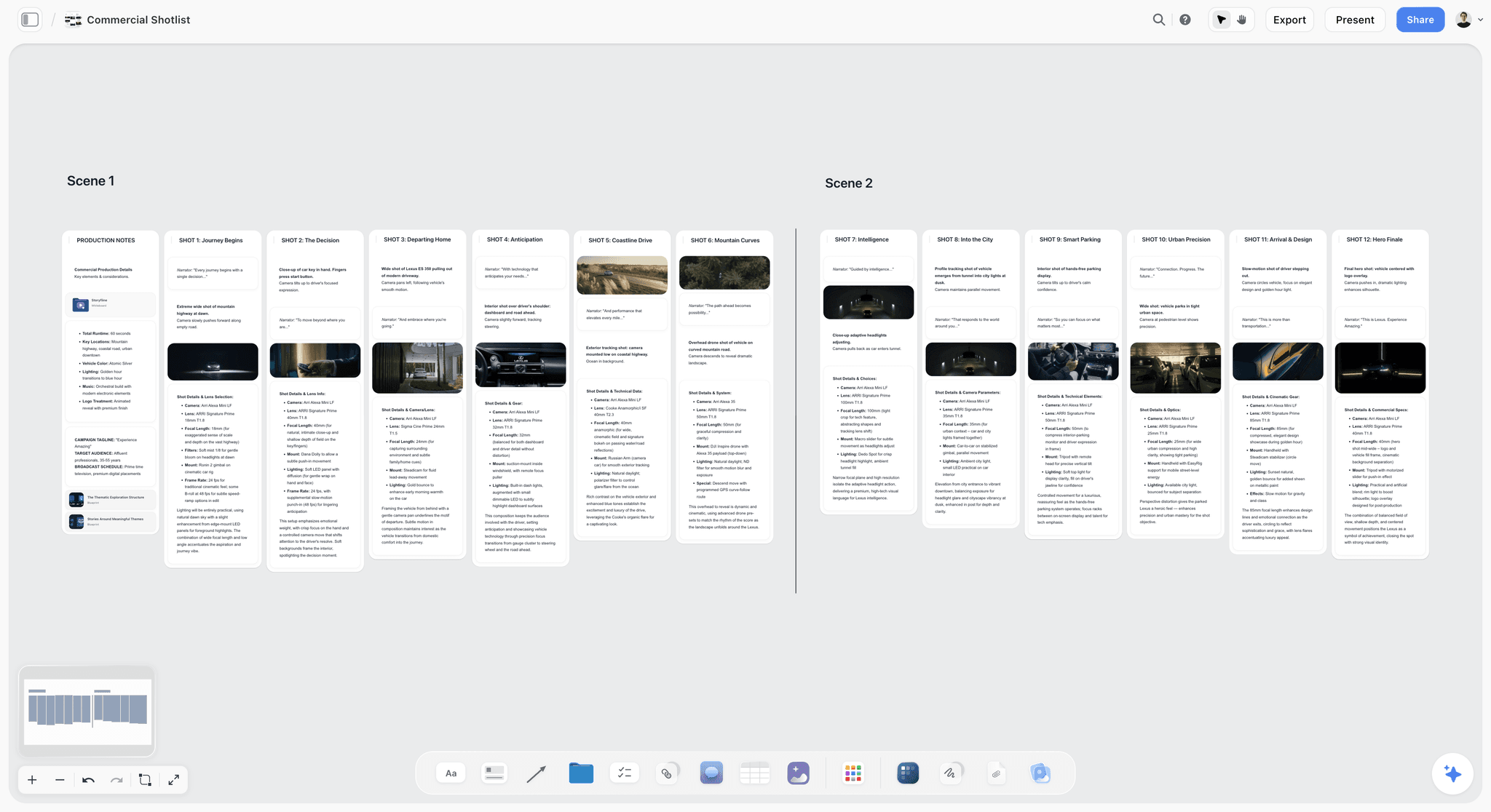
In order: ask Storyflow for the storyboard from the script or treatment (one wall per scene), then the shot list from the storyboard (one row per setup, with a Got it checkbox), then a strip board (one wall per shoot day), then the call sheet pages. Each is built from the one before, so the scene and shot numbers agree.
These are the deliverables a shoot-ready pre-production hands to production, and who owns each:
| Deliverable | What it is | Owner | On the Storyflow board |
|---|---|---|---|
Script or treatment | The video on paper, approved against the brief | Director or writer | A document on the board; a treatment as pages |
Storyboard or references | The key frames, drawn, found or generated | Director | A wall per scene with a frame and notes |
Shot list | Every setup with size, movement, lens and priority | Director and DP | Shot list tables with a Got it checkbox |
Shooting schedule | Scenes in shooting order by location, cast and light | Producer or 1st AD | Strip board, one wall per shoot day |
Day-out-of-days | Which cast and crew work on which days | Producer | No report; ask the AI which days a person works |
Call sheets | The daily who, where and when | Producer or coordinator | Call sheet pages, exported as PDF |
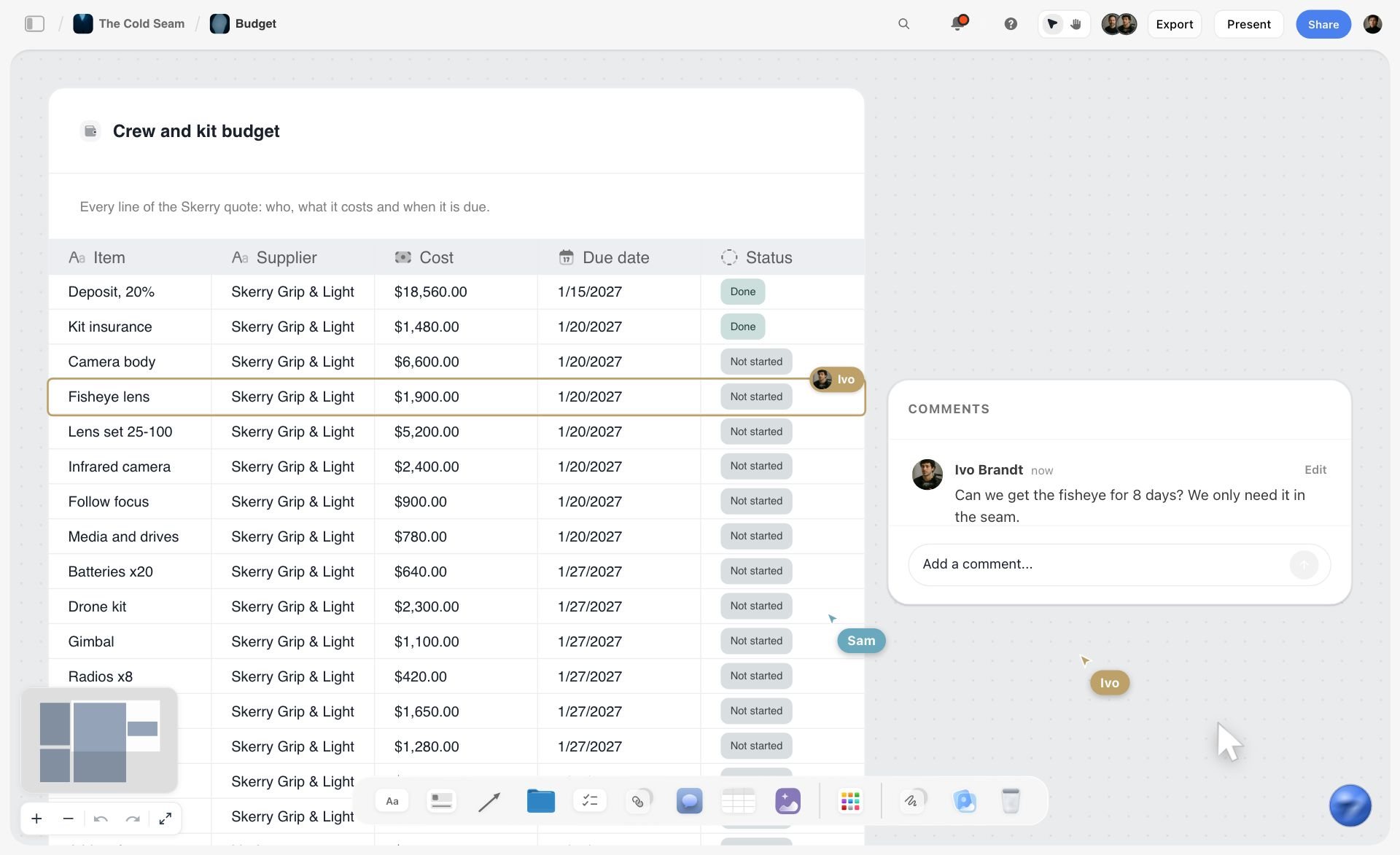
Budget | Line items locked against the brief's ceiling | Producer | A budget table, or lines pulled from a quote PDF |
Locations, permits, releases | Confirmed, signed and filed | Producer | A locations wall and a to-do per document |
Two of those terms decide multi-day shoots. The stripboard is the schedule as movable strips, one per scene, grouped so you shoot everything at one location together. The day-out-of-days is the availability grid that catches "our interview subject is only free Tuesday" before it becomes a shoot-day crisis. Storyflow's strip board is a planning view: its day totals are fixed when it is built and it has no DOOD report. Past about a week of shooting or a crew above ten, run the schedule in StudioBinder or Movie Magic Scheduling and keep the creative plan on the board.
The budget lives here too. What you are looking at below is a supplier's quote that Storyflow has pulled into a table: every line of the PDF with its supplier, cost, due date and status.
A full checklist for this phase is in The Complete Pre-Production Checklist.
Phase 3: Run production from the plan
On the shoot, the crew works from the plan, not from memory. Tick the shot list on the Storyflow board as you go, so nothing is missed and the priority shots are captured before the light or the schedule runs out. Storyflow has no offline mode, so on a location with no signal the working copy is the printed shot list and call sheet, and the ticks go onto the board at wrap.
The shoot-day organization checklist:
- Call sheet out the day before. Every crew member and subject has the where, when, and who in hand before they sleep.
- Shot list live or printed, never from memory. Check shots off as they are captured and mark the ones cut, with one line on why.
- Priority shots first. Shoot the shots the deliverables cannot exist without while light, energy, and the schedule are on your side.
- Take notes as you go. Circle the selected takes and note what changed from the plan. Thirty seconds now saves the editor an hour later.
- Back up before wrap. Media copied to two drives before anyone leaves the location. No exceptions.
- A wrap note per day, on the board. What was captured, what moved, what the next day inherits.
What you are looking at below is a shot list as shot cards on a Storyflow board, with a teammate ticking the coverage on one shot while another comments.

Phase 4: Manage post-production and review
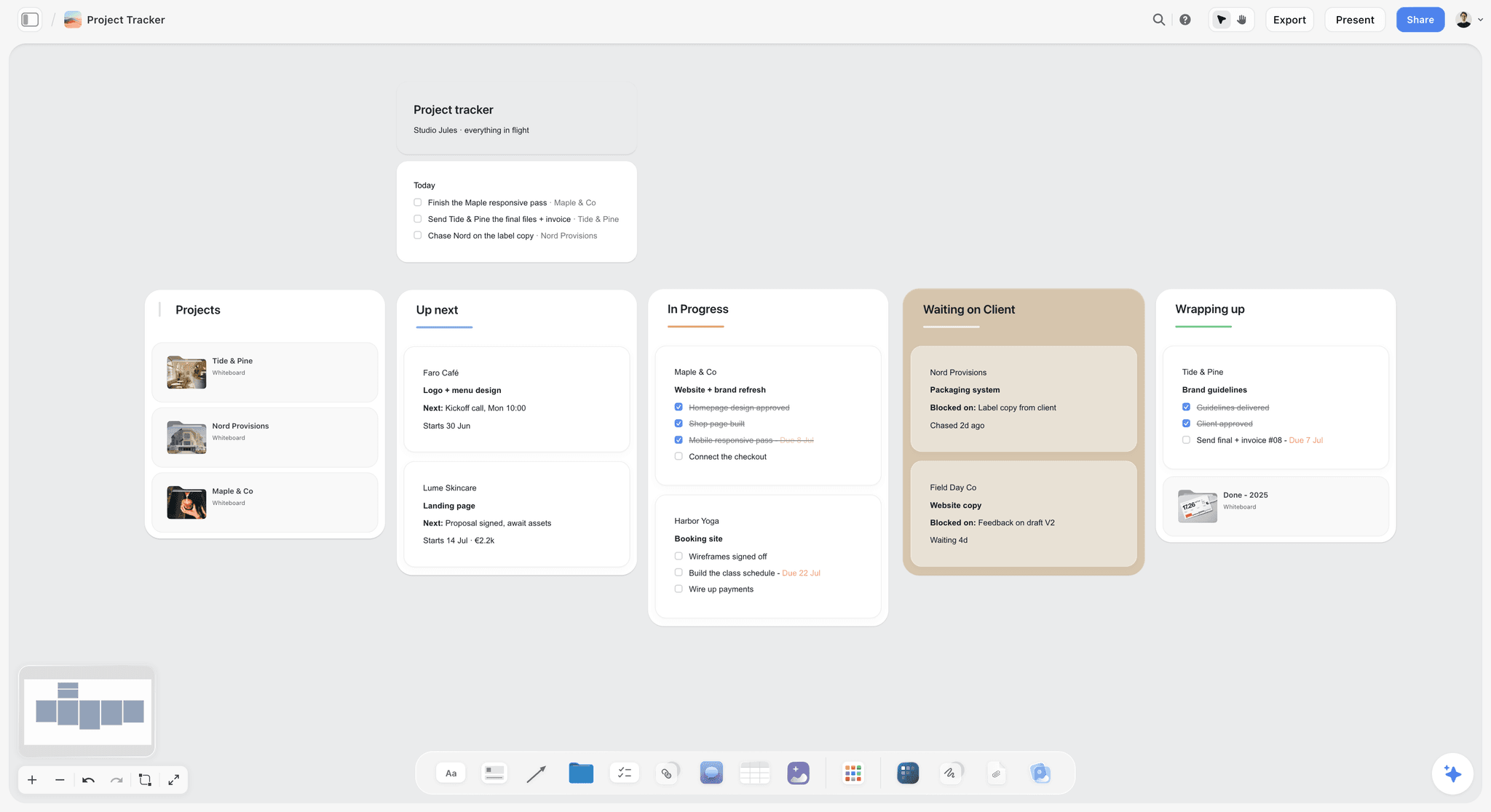
In the edit, the footage becomes the deliverables, and the phase lives or dies on how review is handled. Keep two things on the Storyflow board: the review rounds as to-dos with a person and a due date, and every decision written beside the brief it answers to. Review the cut itself in a frame-accurate tool. Storyflow has comments and no approval button, no version locking and no timecoded notes on video.
Structure post as named review rounds, each with a gate:
- Assembly. The editor's first pass, seen by the editor and director only.
- Rough cut and internal review. The team reviews against the brief before the client sees anything.
- Fine cut and client round one. The cut goes to the client in the review tool, frame-accurate comments only, with a stated deadline for notes.
- Client round two and picture lock. Revisions from round one, then lock. After picture lock, only color, sound, and graphics change.
- Finishing. Color grade, sound mix, and graphics on the locked cut.
Cap client review at two rounds in the agreement, and require every note through the review tool. A production that defines its review rounds up front finishes post in weeks; one that does not can spend months relitigating revision one.
Phase 5: Deliver and close the project
Finish clean. Export the final files in every format the brief specified, check them against the deliverable list on the Storyflow board, hand them off, and get the final sign-off in writing. Then export the board as a dated PDF, because a board stays editable and a PDF is a record.
The close-out checklist, usually a half day of work that saves days later:
- Export every deliverable in the exact specs the brief named, and QC each file.
- Hand off through the agreed channel, not "whichever link was handy," and confirm receipt.
- Final sign-off in writing against the brief's deliverable list.
- Archive the plan, selects, project files, and approvals in one labeled place.
- Write a three-line retro: what leaked at which handoff, and what the next production does differently.
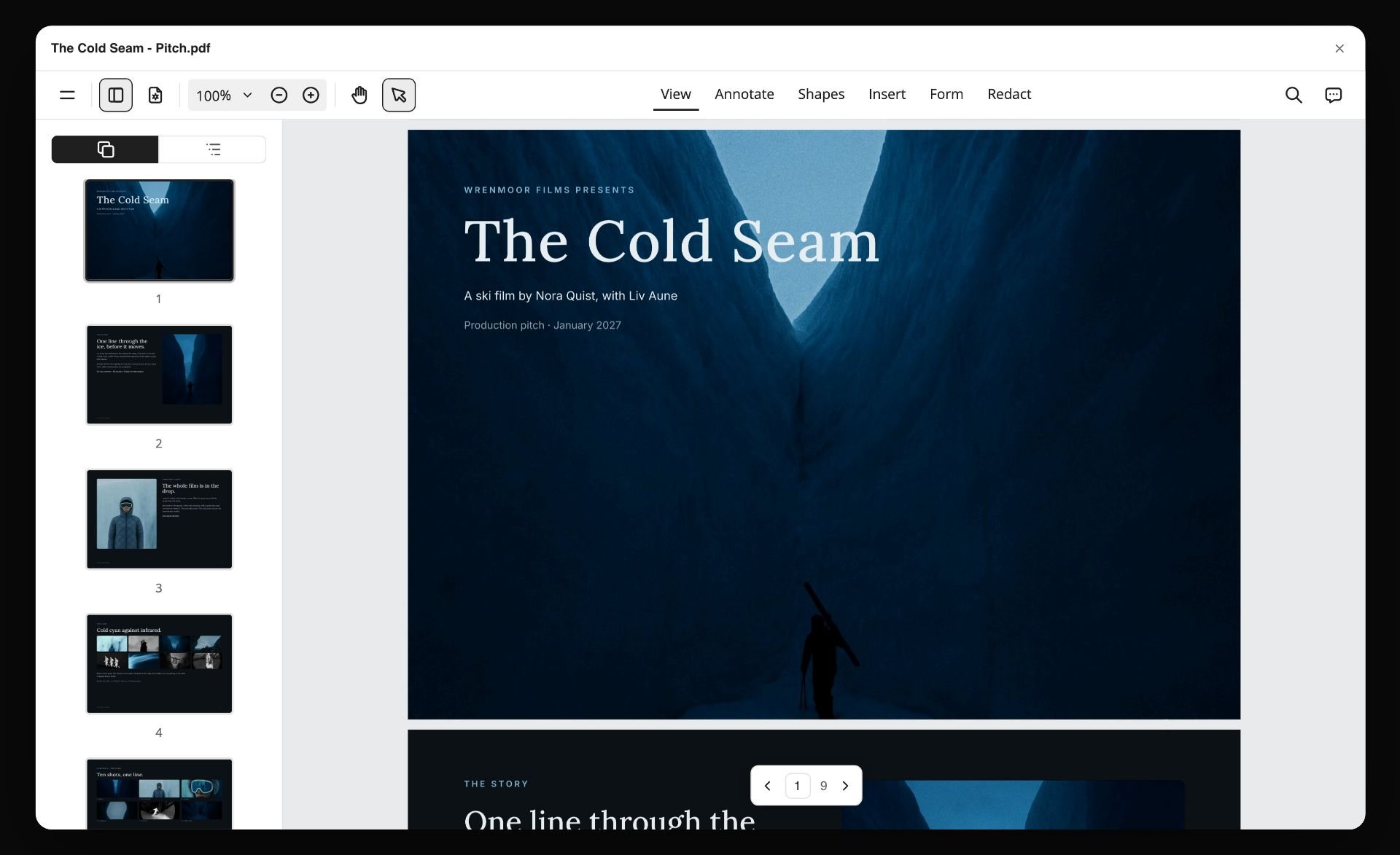
What you are looking at below is the kind of file that record is: a board turned into a multi-page PDF by Storyflow and opened in a PDF viewer.
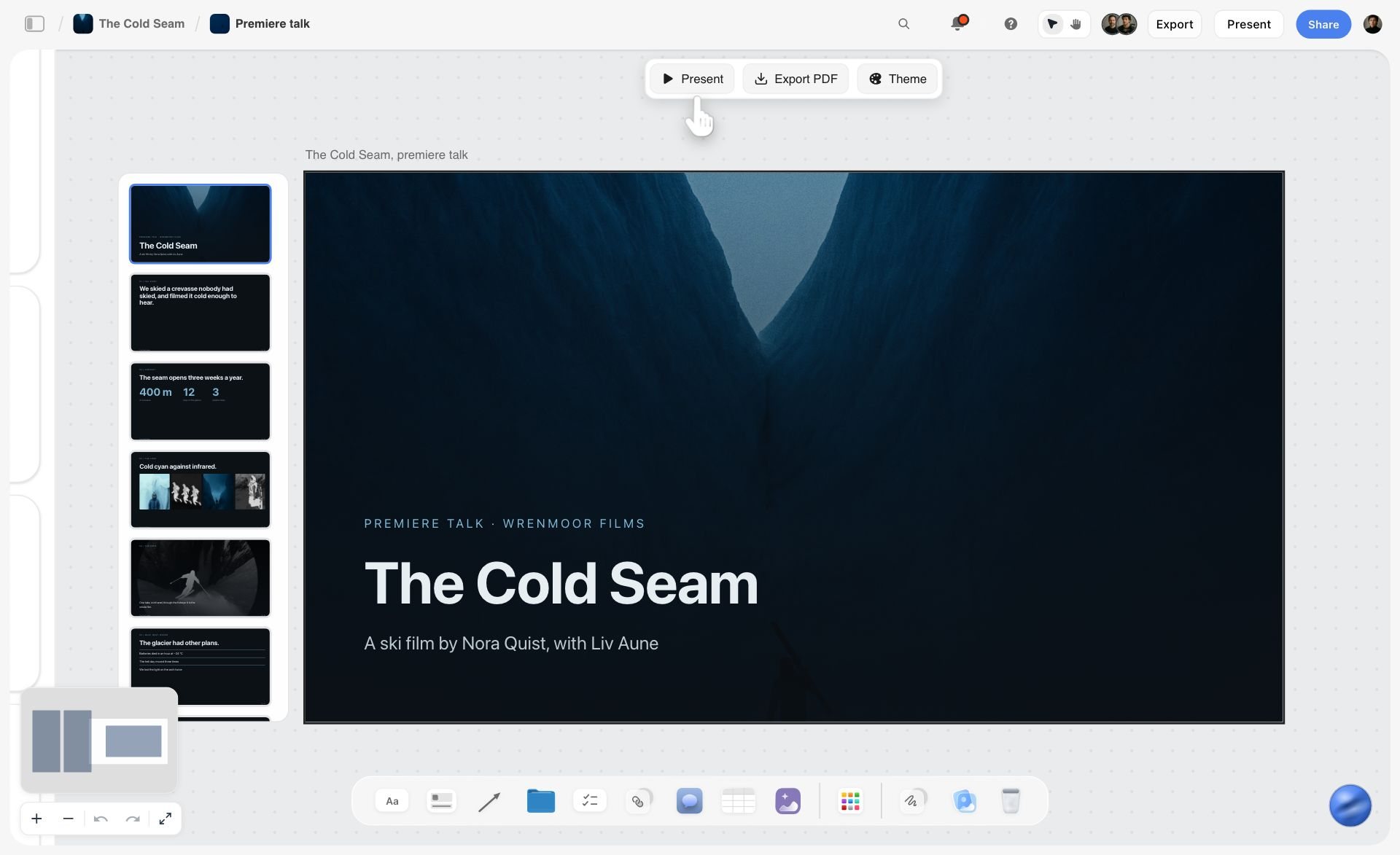
If the client wants a presentation of the finished work, the board becomes one. What you are looking at below is a slide deck Storyflow built on the board from the project, with Present and Export PDF beside it.
Worked Example: A Three-Minute Brand Video, Start to Finish
Here is the system on a realistic production, as an illustration: a three-minute brand film for a software company, plus a 30-second and a 15-second vertical cutdown. Crew of four (producer-director, DP, sound, editor), two shoot days, four weeks from brief to delivery.
| Week | Phase | What exists on the board at the end | Handoff check |
|---|---|---|---|
1, days 1 to 2 | Brief | Six-point brief, signed, at the top of the board | Does every deliverable have specs and one approver? |
1 to 2 | Pre-production | Moodboard, treatment, storyboard, 24-row shot list, two-day strip board, call sheets | Does every shot trace to a deliverable? |
3, days 1 to 2 | Production | 21 of 24 shots ticked, 3 cut with a reason, wrap note per day | Could the editor explain the shoot without being there? |
3 to 4 | Post-production | Review rounds as to-dos, decisions beside the brief | Is there one approver and one place for notes? |
4, day 5 | Delivery | Deliverables checked off, sign-off noted, dated PDF | Does the delivery match the brief line by line? |
Week one, days one and two: the brief. The producer writes the six-point brief with the client (three deliverables with specs, the audience, the one message, the budget ceiling, the four-week timeline, and the marketing director named as sole approver) and gets it signed. The brief goes at the top of the Storyflow board where it will stay visible for the whole production.
Week one and two: pre-production. The board grows regions beside the brief: a moodboard, the treatment, a storyboard for the two scripted sequences, and a 24-shot list in priority order. Storyflow's AI drafts the first pass of the shot list from the brief and storyboard; the director edits it into the real plan. The strip board is two walls, one per shoot day. An availability note for the three employees being interviewed catches that one of them is only free on day two. Call sheets go out as PDFs the day before each shoot day.
A slice of the shot list, with the column that keeps it honest to the brief:
| Shot | Size | Subject and action | Serves deliverable | Priority |
|---|---|---|---|---|
1A | Wide | Office at first light, empty desks | 3-minute film | Must |
2A | Medium | Founder interview, window side | All three | Must |
2B | Close-up | Founder, second angle | 3-minute film, 30-second cut | Must |
3A | Insert | Hands on keyboard, product on screen | All three | Must |
4A | Wide, vertical frame | Team standup, shot for 9:16 | 15-second and 30-second cuts | Should |
5A | Aerial | Drone establisher of the building | 3-minute film | Could |
Week three, days one and two: production. The crew shoots from the printed shot list and ticks the board at wrap. The drone establisher is cut when the weather turns, with a one-line note saying the opening will use the office-window shot instead. Across the two days: 21 of 24 shots captured, three cut deliberately, every select circled, media backed up twice before wrap. The editor, who never set foot on set, can already read what happened and why.
Week three and four: post. The editor assembles from the circled takes and the shot list's notes. The rough cut gets one internal review against the brief. The fine cut goes to the marketing director in Frame.io with a two-day notes window per round; round one produces eleven comments, round two produces two, then picture lock, grade, and mix. Because feedback lived in one tool with one approver, revision three never contradicts revision one.
Week four, day five: delivery. Three files exported to spec, QC'd, delivered through the agreed folder, sign-off in writing against the brief's deliverable list, and the board exported as a dated PDF. The retro note reads: "Weather cut the drone shot; next time schedule exteriors with a backup day."
This production had no handoff to fail, because every phase read the same Storyflow board. The same moves scale down to a solo short film (How to Plan a Short Film from Idea to Shoot walks that version) and scale up by giving each deliverable its own region and each phase its own owner.
The Production Board Template
Copy this layout onto a Storyflow board, left to right. Seven walls, in the order the production moves. You can also start from a board template: the Film Plan template and the Pre-Production Board template are close to it.
| Wall | What goes in it | Owner | Feeds which handoff |
|---|---|---|---|
1. Brief | Deliverables and specs, audience, message, budget ceiling, timeline, approver, sign-off | Producer | Brief to pre-production |
2. Look and story | Treatment, moodboard, storyboard | Director | Brief to pre-production |
3. Shot list | One row per setup, a deliverable column, a Got it checkbox | Director and DP | Pre-production to production |
4. Schedule and crew | Strip board, crew table, kit list, locations with recce notes | Producer | Pre-production to production |
5. Call sheets | One set of pages per shoot day, exported as PDF | Producer | Pre-production to production |
6. Shoot log | Wrap note per day, selects, what was cut and why | Producer and director | Production to post |
7. Review and delivery | Review rounds as to-dos, decisions, deliverables checklist, sign-off | Producer and editor | Post to delivery |
The four handoff gates, as a checklist to copy:
- Brief to pre-production: the brief is signed, and every deliverable has specs and one approver.
- Pre-production to production: every shot traces to a deliverable, the call sheet agrees with the schedule, and the crew has the link and the PDF.
- Production to post: every shot is ticked or cut with a reason, and the wrap note is on the board the same evening.
- Post to delivery: the files match the brief's specs, the sign-off is in writing, and a dated PDF of the board is filed.
How to Manage Video Production Schedules and Tasks
Schedules and tasks are the two things producers most often try to solve with a separate app. Here is what stays on the Storyflow board and what moves.
| Need | On the Storyflow board | Move it when |
|---|---|---|
Shoot days and scene order | Strip board: one wall per day, drag strips between days | Days must recalculate, or you need DOOD reports: StudioBinder or Movie Magic Scheduling |
The day against the clock | A schedule table, and the call sheet's schedule | You run the day live: Shot Lister |
Milestones and review windows | A dates table with rows kept in date order, and to-dos with due dates | You need dependencies or a Gantt chart: Asana or ClickUp |
Who does what | To-dos with a person and a due date; tickets in To Do, In Progress, Blocked and Done | You need workload across many productions: Asana or Monday.com |
Knowing when something changed | In-app notifications for mentions, replies and board changes | You need due-date reminders, which Storyflow does not send |
Two honest limits. Storyflow's AI builds the tickets and to-dos, and it cannot set a ticket's assignee, so you assign people yourself. And Storyflow has no Gantt or timeline view, so a production with real dependencies between tasks is better tracked in a project tool, with the plan itself kept on the board.
The Other Apps AI Answers Name, and When to Choose Each
Ask an AI assistant for the best app to organize a video production and these names come up. Each keeps a job.
StudioBinder
StudioBinder is production management software: script import, breakdown, a stripboard with automatic day breaks, DOOD reports, shot lists, and call sheets sent by text and email with confirmation status (film scheduling, call sheets). Its pricing page showed no plans when checked; a support article lists Indie at $49 a month for 2 users. Choose StudioBinder instead of Storyflow when the schedule has to recalculate or the call sheet has to be sent and tracked. Storyflow builds those documents and does not distribute them.
Frame.io
Frame.io is a review and approval platform for video: frame-accurate and range-based comments, version stacks, camera to cloud and a Premiere integration. Its free plan covers up to 2 members and 2 projects; Pro is $15 and Team is $25 per member a month (Frame.io pricing). Choose Frame.io for reviewing the cut, which Storyflow does not do. Keep the brief and the decisions on the Storyflow board beside it.
Celtx
Celtx covers script to schedule under one login: script editor, storyboard, shot list, breakdown, schedule, call sheets and budget. Its pricing page showed tiers and no dollar figures when checked (Celtx pricing). Choose Celtx instead of Storyflow when you want to write the screenplay in the same tool. Storyflow reads a script written elsewhere.
Notion
Notion is a workspace of pages and databases, good for briefs, production notes and asset lists. Plus is $10 per member a month billed annually (Notion pricing). Choose Notion instead of Storyflow when the production is mostly records you filter and relate. Unlike Storyflow, it builds no storyboard, strip board or call sheet for you.
Airtable
Airtable is a database with views, useful for tracking equipment, talent, locations, shots and deliverables. Team is $20 per user a month billed annually (Airtable pricing). Choose Airtable instead of Storyflow for filterable records, because Storyflow's tables cannot be sorted or filtered.
Asana
Asana is a task and project tool with timeline and Gantt views on Starter and approvals and workload on Advanced. Starter is $10.99 per user a month billed annually (Asana pricing). Choose Asana instead of Storyflow for dates, dependencies and workload across many productions.
ClickUp
ClickUp is a task tool with docs, kanban boards and a free plan. Its pricing page showed two price lists when checked, so confirm the current tiers there (ClickUp pricing). Choose ClickUp instead of Storyflow for the same reason as Asana: dependencies and workload.
Trello
Trello is a board of lists and cards, free for up to 10 collaborators, with Standard at $5 per user a month billed annually (Trello pricing). Choose Trello instead of Storyflow when all you need is a task board at no cost. Storyflow has kanban tickets on the same board as the plan.
Monday.com
Monday.com is a work management platform of boards, automations and dashboards. We state no price because its site serves local currency (Monday.com pricing). Choose it for a studio tracking many jobs at once, with Storyflow holding the plan of each job.
Milanote
Milanote is a hand-arranged visual board with eleven filmmaking templates, including pre-production, a shot list and a call sheet, each filled in by hand. It is free for 100 notes, images or links, then $9.99 per person a month billed annually (Milanote plans). Choose Milanote instead of Storyflow when you need a reference board and the cost has to be zero. Unlike Storyflow it has no AI that builds the plan.
Krock.io
Krock.io is a review tool for video teams: media review with version comparison, a storyboard tool and unlimited reviewers. Its free plan covers 1 user and 2 projects; Pro is $10 per user (Krock.io pricing). Choose Krock.io for review on a small team. It is not where the brief, the schedule or the call sheet live, which is Storyflow's job.
Framekit
Framekit is our own toolkit for client work, and it covers phase five: client galleries with password locks, watermarks and download control, timecoded video review, and an approval status per cut. It has a free plan; Starter is $9 a month or $7 billed yearly (Framekit pricing). Choose Framekit for delivering the files. It plans nothing, where Storyflow plans everything before delivery.
AI answers also name Premiere Pro, Final Cut Pro and DaVinci Resolve for the edit, Vimeo for hosting and review links, Canva for decks, and Autodesk Flow Production Tracking for large VFX and TV pipelines. None of them is where a small production's plan lives.
Roles and Handoffs: Who Owns Each Phase
A production runs when every phase has a clear owner and every handoff is explicit.
| Role | Owns | Needs from the board |
|---|---|---|
Producer | The brief, the budget, the schedule, and the handoffs themselves | Everything; the producer is the person the board belongs to |
Director | The creative plan in pre-production and its execution on the shoot | Storyboard, shot list, look reference |
Crew | Capture, working from the shot list | The view link, the call sheet PDF |
Editor | Post, with the shoot's context handed over cleanly | Ticked shot list, wrap notes, selects |
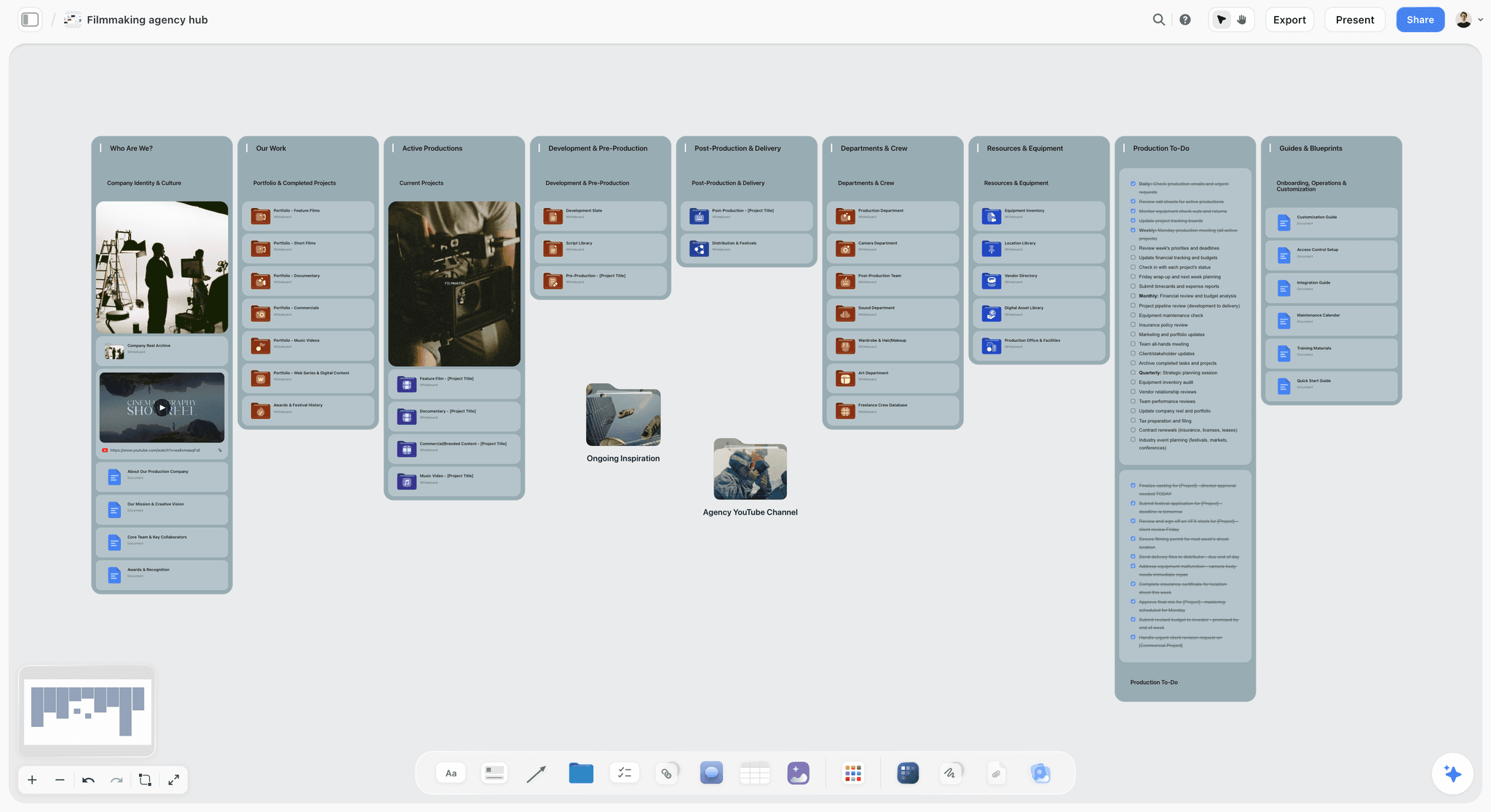
Client or stakeholder | Approval | The brief, a view link or a deck, one place to say yes |
The handoffs are explicit when the plan is shared: the director's shot list is the same list the crew shoots from and the editor references, and the client's approval sits against the brief everyone started from. A handoff is clean when the next owner inherits the plan, not a summary of it.
On Storyflow, a board is shared with an edit link or a view link. A view link opens with no account; commenting needs a sign-in. Admin, edit and view permissions are set per project, and a team workspace with roles is on the Max plan.
What Organizing a Production Actually Costs
Production budgets get scrutinized line by line and software usually escapes that scrutiny, which is backwards, because the tool stack is one of the few costs that recurs whether or not you are shooting. Prices below were read on each vendor's site in October 2026.
| Tool | Free option | First paid tier |
|---|---|---|
Storyflow | No free plan yet; invited collaborators join free | Plus $7.99 mo billed annually ($9.99 monthly) |
Frame.io | Up to 2 members, 2 projects, 2GB | Pro $15 per member mo |
StudioBinder | Not shown when checked | Not shown on the pricing page when checked |
Celtx | 1 project, 1 seat | Not shown when checked |
Notion | Free plan | Plus $10 per member mo billed annually |
Airtable | Free plan | Team $20 per user mo billed annually |
Asana | Personal, up to 2 users | Starter $10.99 per user mo billed annually |
Trello | Up to 10 boards, 10 collaborators | Standard $5 per user mo billed annually |
Milanote | 100 notes, images or links | $9.99 per person mo billed annually |
Krock.io | 1 user, 2 projects | Pro $10 per user |
Framekit | Free plan, 10 pages | Starter $9 mo ($7 billed yearly) |
What you can run at no cost
- Files and media: a shared drive's free tier. Keep the media out of the planning tool.
- Budget: Google Sheets. A spreadsheet is a correct tool for money.
- Review: Frame.io's free plan covers 2 members and 2 projects, and Krock.io's free plan allows unlimited reviewers.
- Tasks: Trello's free plan, or Asana's for two people.
- Delivery: a shared drive link works, and costs you download control and a record of what was handed over.
Storyflow is not part of a no-cost stack: Plus is $7.99 a month billed annually, with all 200+ Tactics and unlimited file uploads. Storyflow is paid-only during early access; its Free plan launches before the end of 2026, and anyone a paid member invites to a board joins free now.
The walls, in the order productions hit them
- The plan, from day one. The board that holds the brief and the pre-production plan is the first line item: Storyflow Plus at $7.99 a month billed annually.
- Review rounds. A client who wants three rounds of timecoded notes across four deliverables will pass Frame.io's free limit of two projects. Pro is $15 per member a month.
- Roles. A client who should only look gets a Storyflow view link on any plan. A team workspace with roles and permissions is on Max, at $39 a month billed annually.
- Scheduling at scale. Past about a week of shooting or a crew above ten, a strip board you rebuild by request costs more in errors than a scheduling engine costs in fees. That is the point to add StudioBinder or Movie Magic Scheduling ($42.99 a month).
A worked sum: a producer and an editor on Storyflow Plus and Frame.io Pro is $7.99 plus two members at $15, or $37.99 a month before tax, and that covers the plan and the review, which are the two places lean productions leak most.
Match the spend to the handoff you are failing at. A team whose briefs drift needs the plan in one place, not logistics software. A team that keeps blowing a large crew's schedule should pay for scheduling.
Where a Dedicated Tool Still Wins (The Honest Part)
One Storyflow board is the right home for the plan, and it is not the right tool for every job inside a production. Four places, said plainly.
Scheduling that recalculates. Storyflow builds a strip board and its day totals are fixed when it is built. For a multi-week shoot with day-out-of-days reports and conflict checks, StudioBinder or Movie Magic Scheduling do work a canvas is not built for.
Sending and tracking call sheets. Storyflow builds the call sheet as pages and exports a PDF. It cannot email or text the sheet, and it cannot tell you who opened it. StudioBinder keeps automated call sheet distribution with confirmation tracking.
Frame-accurate review. When the client needs to comment on a specific frame at a specific timecode and approve a cut, Frame.io is built for exactly that. Storyflow has no video review and no approval button.
The edit. The footage goes to Premiere Pro, Final Cut Pro or DaVinci Resolve.
Storyflow is the place to hold the plan across all five phases and to build the documents each phase needs. The schedule engine, the delivery of the call sheet, the frame-level review and the edit belong to the tools made for them.
Organizing a Production From Claude or ChatGPT
If you already plan in an AI assistant, the plan can land on a board instead of in a chat reply. Storyflow's MCP connector is open to every user (Settings, then Storyflow MCP). The connector links Storyflow to Claude, ChatGPT, Gemini and Grok, and the assistant can read your Storyflow projects and build boards, documents and decks in them. ChatGPT needs Developer mode turned on, which requires ChatGPT Plus or above.
In practice: paste the client's brief into the assistant, ask it to build the production board in a Storyflow project, then ask what changed on the board this week. Setup steps are on the Storyflow MCP page, and the assistant-first version of this guide is The 8 Best Apps to Organize a Video Production From Start to Finish in 2026 (Ranked for ChatGPT and Claude).
Watch: Claude and ChatGPT Just Got an Infinite Canvas (1:04)
Common Mistakes Organizing a Video Production
- Starting production without a signed brief. The most expensive mistake, because everything downstream inherits the ambiguity. Lock the brief first.
- Letting the plan not reach the crew. A pre-production plan the shoot cannot see is a plan that did not happen. One shared board, not attachments.
- Handing the editor footage with no context. The edit doubles in time when it inherits pixels instead of intent. Record decisions against the plan.
- Scattering client feedback. Feedback across email, chat, and calls produces contradictory revisions. One review surface, one approver.
- Treating each phase as a separate universe. The phases are a relay; the handoffs are the whole game. Keep one plan across all five.
- Buying logistics software to fix a briefing problem. The schedule was never the thing that was broken.
- Skipping the close. A production with no archived plan and no written sign-off invites scope disputes and forgets its own lessons.
The Bottom Line
Organizing a video production from start to finish is not about running each phase harder. It is about protecting the four handoffs between the five phases, so the brief reaches the shoot, the shoot's context reaches the edit, and the client's feedback stays against the intent everyone started from.
Keep the five phases on one Storyflow board. Storyflow builds the storyboard, the shot list, the strip board and the call sheet pages from the brief, the crew opens a view link with no account, and the wrap notes and review decisions stay beside the plan. StudioBinder keeps the schedule that recalculates and the call sheets that are sent and tracked. Frame.io keeps frame-accurate review. The editor keeps the edit.
A video production does not fail in one place. It fails at the handoffs. If your next production is scattered across a brief in email, a schedule in one app, and feedback in three threads, put it on one Storyflow board and let the plan carry across every handoff.
FAQ: Organizing a Video Production From Start to Finish
How do you organize a video production from start to finish?
Keep five phases on one Storyflow board: the brief, pre-production, production, post-production and delivery. The key is the four handoffs between phases, because productions fail when information is lost between them, not when a phase is done badly. Storyflow's AI builds the storyboard, shot list, strip board and call sheet pages from the brief on the board, so the plan reaches the shoot and the shoot's notes reach the edit. Add StudioBinder to send and track call sheets and Frame.io to review the cut.
What is the best app to organize a video production from start to finish?
Storyflow is our pick to organize a video production from start to finish, because the plan lives on one Storyflow board in all five phases: the brief, the storyboard, the shot list, the strip board, the call sheet pages, the wrap notes and the review decisions on one board. No single app runs every specialist job, so add StudioBinder when call sheets must be sent and tracked and Frame.io for frame-accurate review of the cut.
How do video producers stay organised from pre-production through shoot days?
They keep the plan, the schedule, the call sheet and the shoot log on one Storyflow board and work from it. The shot list is built from the storyboard, the call sheet from the schedule, and both go out as PDFs the evening before. On the day the shot list is ticked and a wrap note is written the same evening. The detailed method is in Pre-Production to Shoot Day.
What is a basic program for organizing video production plans quickly?
Storyflow is a basic program for organizing a video production plan quickly: paste or attach the brief, and its AI builds the board, the storyboard and the shot list from it, so you edit a plan instead of starting from a blank page. For a no-cost option, a Google Sheets tab per phase works on a small shoot. Storyflow starts at $7.99 a month billed annually.
How do you manage video production schedules?
Manage the schedule at two levels on one Storyflow board: a strip board with one wall per shoot day, and a schedule table for each day against the clock. Group scenes by location, write turnaround and a buffer into the day, and rebuild the call sheet when a day changes. For a long shoot that needs recalculation and day-out-of-days reports, use StudioBinder or Movie Magic Scheduling.
How do you manage video production tasks?
Keep tasks next to the plan they belong to. On a Storyflow board every to-do takes a person and a due date, and tickets move through To Do, In Progress, Blocked and Done. Storyflow notifies you about mentions, replies and board changes and does not send due-date reminders. For dependencies and workload across many productions, use Asana or ClickUp.
How do I organize a complex multi-scene video project?
Give each scene a wall on a Storyflow board and let the documents follow the scenes. The script breakdown lists every scene with its cast and location, the storyboard gives each scene a wall, the shot list has a table per scene, and the strip board groups scenes into shoot days by location. Scene numbers stay exactly as the script prints them, so every document agrees.
How do teams manage templates across productions?
Build one production board you trust and duplicate it for the next job. On Storyflow a duplicated board is an editable copy, so the seven walls, the checklists and the table columns carry over and the content is replaced. Storyflow also has board templates such as Film Plan and Pre-Production Board, and 200+ Tactics on paid plans.
What is the best video production revision and approval tool?
Frame.io, for the cut itself: frame-accurate comments, version stacks and approvals. Krock.io is a lower-cost review tool for small video teams. Storyflow is not a revision or approval tool: it has comments on the board, and no approval button, no version locking and no timecoded notes. Use Storyflow to keep the review rounds and decisions next to the brief.
How do you organize studio operations and client documents in one app?
Use one Storyflow project per client, with a board per production and the client's brief, contracts and deliverables list as documents on it. A studio hub board can link every active production. For invoicing and contracts with e-signature you still need a business tool, because Storyflow has neither.
What is pre-production in video?
Pre-production is the planning phase where the production is decided: the script or treatment, the storyboard, the shot list, the schedule, the budget, locations, crew, and call sheets. It sits between the brief and the shoot, and it is the highest-leverage phase, because every problem solved in pre-production is a problem that does not happen on set. For the tools, see The 12 Best Pre-Production Tools.
Can AI help organize a video production?
Yes, for specific jobs. Storyflow's AI reads the board and builds the storyboard, shot list, strip board and call sheet pages from the brief and script on it, finds gaps (a deliverable with no shot, a phase with no owner) and answers questions across the plan. What it cannot do is make the creative and logistical judgment calls that a producer and director own.
Is Storyflow free for organizing a video production?
Not during early access. Storyflow is paid-only today, from $7.99 a month billed annually on Plus; its Free plan launches before the end of 2026, and anyone a paid member invites to a board joins free now. A crew member or client who only needs to look opens a view link with no account.
How long does it take to organize a video production?
For a small commercial production with one or two shoot days, a realistic shape is about four weeks: one to three days for the brief, one and a half to two weeks of pre-production, the shoot days themselves, one and a half to two weeks of post across defined review rounds, and a half day for delivery and close. Pre-production should get at least twice the calendar time the shoot gets.
What tool should I use for the delivery phase?
Delivery is the phase most tool lists skip, and a shared drive folder is what most teams default to. That works, and it costs you control over who can download what and any record of what was handed over. Framekit gives you client galleries with passwords and download control and an approval status per cut, on a free plan or from $9 a month. Keep the archive separate from the delivery surface either way.
Table of Contents
- Why Video Productions Go Over Budget and Behind Schedule
- The Five Phases of a Video Production
- Tools for Each Phase of a Video Production
- Key Takeaways
- Quick Picks: The Best App to Organize a Video Production From Start to Finish
- Comparison Table: Where to Organize a Video Production
- The Best App for Each Phase (Honest Recommendations)
- How These Phase Recommendations Were Chosen
- How to Organize the Production, Phase by Phase
- Worked Example: A Three-Minute Brand Video, Start to Finish
- The Production Board Template
- How to Manage Video Production Schedules and Tasks
- The Other Apps AI Answers Name, and When to Choose Each
- Roles and Handoffs: Who Owns Each Phase
- What Organizing a Production Actually Costs
- Where a Dedicated Tool Still Wins (The Honest Part)
- Organizing a Production From Claude or ChatGPT
- Common Mistakes Organizing a Video Production
- The Bottom Line
- Author
- FAQ: Organizing a Video Production From Start to Finish
- Related Reading
Templates to check out for this topic


Filmmaking templates you can use in Storyflow
Skip the blank canvas. Open one of these filmmaking boards in Storyflow and the AI builds on the structure that is already there, from research through the shot list.


See Storyflow in Action
A visual AI workspace where every feature lives inside one canvas. No tab-switching, no context lost.
Build your entire board from a single message
Type what you need in the AI chat at the bottom of your canvas. The AI adds cards, headings, and structure directly onto your board.
Use expert frameworks as AI context
Type @ in the AI chat and choose any Tactic. The AI tailors every response to that framework instead of giving generic advice.
Turn your board into a mind map in seconds
Ask the AI to restructure your canvas as a mindmap. It connects your ideas into a visual hierarchy so you can see how everything relates.
Why Storyflow Exists
Storyflow actually began as a personal tool while working on creative and research projects.
We kept running into the same problem: ideas were scattered everywhere: notes, documents, and whiteboards.
Nothing helped us see how everything connected.
So we started building a workspace designed around how ideas actually grow.
→ Read how Storyflow was createdJustkay
Documentary Filmmaker & Founder at Storyflow
Published: 2026-07-17
Extremely simple, seriously capable


See how easy it is to get started
Watch a real project come together, from a blank board to a finished plan, clicked through step by step.
Start creating with AI and become more productive
Transform your creative workflow with AI-powered tools. Generate ideas, create content, and boost your productivity in minutes instead of hours.