The 11 Best Tools for Video Production Agencies in 2026
An agency does not lose money making videos. It loses money on revisions nobody scoped. Eleven tools ranked by which of the three margin leaks each one seals.

Category
Filmmaking
Author

Sara de Klein
Head of Product at Storyflow
Topics
2026-08-11
•
18 min read
•
Filmmaking- best tools for video production agencies
- best tool for managing a video project with a team
- video review and approval software
- best project management tool for filmmakers
- agency video workflow software
- Frame.io alternatives for agencies
What are the best tools for video production agencies in 2026?
The best tool for a video production agency is Frame.io, and the reason is unromantic: an agency does not lose money making videos, it loses money on revisions nobody scoped, and a timecoded approval trail is the only artifact that settles the argument. Storyflow ranks second, for the half of the business Frame.io does not touch: the concept, the pitch and the pre-production thinking that happens before there is a single frame to comment on. Airtable is the strongest record of truth when you are running twelve projects at once. Monday is the easiest to get a non-technical team to actually adopt. This ranking judges all 11 tools on one question: which of the three leaks in an agency's margin does each one seal.

Full disclosure: Storyflow is our own product, and we rank it #2 here rather than #1, because the largest margin leak in an agency is the unscoped revision and Frame.io seals it better than anything we make. Storyflow has no video review at all: no timecoded comments, no version stacking, no frame-accurate annotation, no camera-to-cloud. It also has no task assignment, no time tracking and no invoicing. We rank it second for the concept and pre-production half of the business, and we link to every tool so you can judge the fit.
Quick Comparison
These four cover the jobs an agency actually splits into: proving where a revision round ended, developing the concept that wins the work, keeping a findable record of everything you have already made, and getting the team to use any of it.
| Tool | Best For | AI Features | Price |
|---|---|---|---|
| Frame.io | Timecoded review and a provable approval trail | Light AI | Free tier / from ~$15 per user mo |
| Storyflow | Concept boards, treatments and pre-production | Canvas-wide context AI | $7.99 mo annual (free plan late 2026) |
| Airtable | Enforceable records across many projects | Light AI | Free tier / from ~$20 per seat mo |
| Monday.com | Coordination a non-technical team will adopt | Light AI | Free tier / from ~$9 per seat mo |
Key Takeaways
- A video production agency does not lose money on production. It loses money in three specific leaks, and all three happen either before the shoot or after the edit.
- Leak one is the unscoped revision. Leak two is the asset you already made and cannot find. Leak three is the approval given by somebody who did not have the authority to give it.
- Frame.io ranks first because leak one is the largest by a wide margin, and a timecoded, versioned comment thread is the only thing that makes a revision round provable rather than arguable.
- Storyflow ranks second for the concept and pre-production half of the business, where the deliverable is a shared understanding rather than a file.
- Storyflow does not do video review. No timecoded comments, no version stacking, no frame-accurate annotation, no camera-to-cloud. Frame.io, Ziflow, Filestage and Dropbox Replay all do, and this post names them every time.
- Per-seat pricing is a structural problem for agencies specifically, because the people you most need in a board are freelancers and clients, and those are the two groups you least want to buy seats for.
- The average agency underprices revisions because it cannot count them. Every tool below is worth evaluating primarily on whether it makes revision rounds countable.
Stop rebuilding the same pitch
Agencies win work on the treatment and then cannot find it six months later. Storyflow holds references, treatment text and shot thinking on one canvas the AI can read end to end, priced flat per account so freelancers and clients join free. Paid-only during early access; the Free plan lands before the end of 2026.

The Three Leaks
Agency owners talk about utilization. They talk about rate cards and day rates and whether the editor is billable. Those are real numbers and they are not where the money goes.
A video production agency does not lose money on production. It loses money in three specific leaks, and all three happen either before the shoot or after the edit.
Leak one: the unscoped revision. The statement of work said two rounds. You are on round five. Nobody can point to the moment round two ended, because rounds two through five arrived as eleven separate messages across email, a group chat and a call, and each one individually was small. The client is not acting in bad faith. They genuinely believe they are still inside round two, because nothing ever marked the boundary. This is the single largest margin leak in the category and it is almost entirely a record-keeping failure.
Leak two: the asset you already made and cannot find. Somewhere on a drive is a version of exactly the lower third the client is asking for, made eight months ago for a different brand, in a project folder named after a director who has since left. You remake it. It takes ninety minutes. This happens more often than anyone admits, and it compounds: the more work an agency has done, the more work it repeats.
Leak three: the approval given by the wrong person. The marketing coordinator approved the cut. The VP had not seen it. The VP sees it two weeks later, at which point the change is not a revision, it is a reshoot. The tool did not fail here, exactly. There was no tool. There was a Slack message from somebody who was in the thread and not in the decision.
Notice what these have in common. None of them are creative problems and none of them happen during the shoot. The shoot is the part agencies are good at. The leaks are on either side of it.
The tools below are ranked by which leaks they seal.
At a Glance: The 11 Tools Compared
| Tool | Best for | Leaks it seals | Pricing shape |
|---|---|---|---|
Frame.io | Making revision rounds provable | One, three | Per user |
Storyflow | Concept, pitch and pre-production thinking | Two | Flat per account |
Airtable | A queryable record of every project and asset | Two, three | Per seat |
Monday.com | Team adoption without a systems person | Three | Per seat |
Ziflow | Enterprise-grade approval with audit trails | One, three | Per user |
Filestage | Structured review across mixed media | One | Per user |
Notion | Documentation, SOWs and client wikis | Three | Per user |
StudioBinder | The production days themselves | None directly | Per project tier |
Asana | Task-level accountability across many projects | Three | Per user |
ClickUp | Configurable operations for teams that will configure | Two, three | Per user |
Dropbox Replay | Lightweight review inside an existing Dropbox stack | One | Add-on |
How I Ranked These
I run a documentary practice and have been on both sides of this: the agency invoicing for round six, and the client convinced it was round three. I have also watched three friends' production companies nearly fold, and in two of the three cases the proximate cause was revision creep that nobody was counting.
Every tool below has been used on real client work, not evaluated on a demo project.
Five criteria, weighted in this order.
1. Does it make a revision round countable? Not manageable. Countable. Can you point at a timestamp and say the round closed here, and can the client see the same timestamp? This is the highest-value property in the category and most project management tools do not have it at all.
2. Does the record survive staff turnover? Agencies churn. The editor who knew where everything was will leave. A system that lives in one person's head is not a system, and a tool whose organization depends on individual discipline degrades to a shared drive within eighteen months.
3. What does it cost to include the people you do not employ? Freelancers, clients, the client's legal reviewer, the brand person who appears twice a year. Per-seat pricing turns each of these into a decision, and the decision is usually to leave them out, which is precisely how leak three happens.
4. Does it serve the front half of the business? Concept, pitch, treatment and pre-production. Agencies win work on this and almost never have a system for it, which is why the same treatment gets rebuilt from scratch every time.
5. Setup cost in weeks. A tool that would be perfect after a six-week configuration project is not perfect, because nobody is going to do the six weeks. Weighted last but it eliminates more candidates than any other criterion.
Pricing below is as of August 2026 and moves constantly. Verify on each vendor's own pricing page before committing.
Quick Picks by Job Type
- Best overall for a video agency: Frame.io. Timecoded comments, version stacking and an approval trail that makes revision rounds provable rather than arguable.
- Best for the concept and pre-production half: Storyflow. One canvas holding references, treatment thinking and shot planning, with free access for everyone you invite.
- Best record of truth across many projects: Airtable. Required fields, linked records and views that answer questions a document cannot.
- Best for adoption by a non-technical team: Monday.com. The most likely tool on this list to still be in use in a year.
- Best enterprise approval workflow: Ziflow. When the client's legal team needs an audit trail, this is the category answer.
- Best structured review across mixed deliverables: Filestage. Video, stills, PDFs and web pages in one review flow.
- Best for the shoot days: StudioBinder. Call sheets, breakdowns and schedules, done properly.
- Best inside an existing Dropbox stack: Dropbox Replay. Good enough review without adding another vendor.
1. Frame.io
The verdict. The only tool here that turns a revision round from a feeling into a record, which is the single most valuable thing an agency can buy.
Best for. Making the boundary between round two and round three visible to both you and the client.
Pricing. A free tier with limited users and storage. Paid plans start around $15 per user per month, with enterprise tiers above. Adobe Creative Cloud subscriptions include a Frame.io allocation. Verify on frame.io.
Why it ranks here. Leak one is the biggest and Frame.io is the only tool on this list whose core design addresses it.
The mechanism is specific. A comment lands on a frame, at a timecode, on a named version. When you upload V3, V2 does not vanish; it stacks, and the comment thread on V2 stays attached to V2. Six weeks later, when the client says they asked for that in the first round, you can open the version and see whether they did. This is not a gotcha feature. Most of the time it works in the client's favour, and that is exactly why it defuses the argument: both sides are looking at the same artifact.
The secondary effect is the one agencies notice after a quarter. When feedback has a home, it stops arriving in eleven channels. The client learns that a note in Frame.io gets actioned and a note in a group chat does not, and revision rounds start to have shapes again.
Camera-to-cloud is genuinely useful if your kit supports it, though it is a production convenience rather than a margin fix.
Strengths.
- Timecoded, frame-accurate comments and annotations, the category standard.
- Version stacking that preserves the feedback history per version.
- Presentation pages that make a client review feel deliberate rather than like a file transfer.
- Deep Premiere and After Effects integration.
- Genuinely usable free tier for a single small client.
Limitations.
- Post-production only. It does nothing for concept, pitch or pre-production.
- Per-user pricing, and review-only collaborators still count against some tiers.
- Storage limits arrive quickly with high-resolution or long-form work.
- The Adobe entanglement is a strategic consideration if you are not a Premiere shop.
- No project management. It reviews; it does not schedule, assign or track.
The trade off. Frame.io seals the biggest leak and touches nothing else. Every agency on this list needs a second tool alongside it, which is why the rest of this list exists.
2. Storyflow
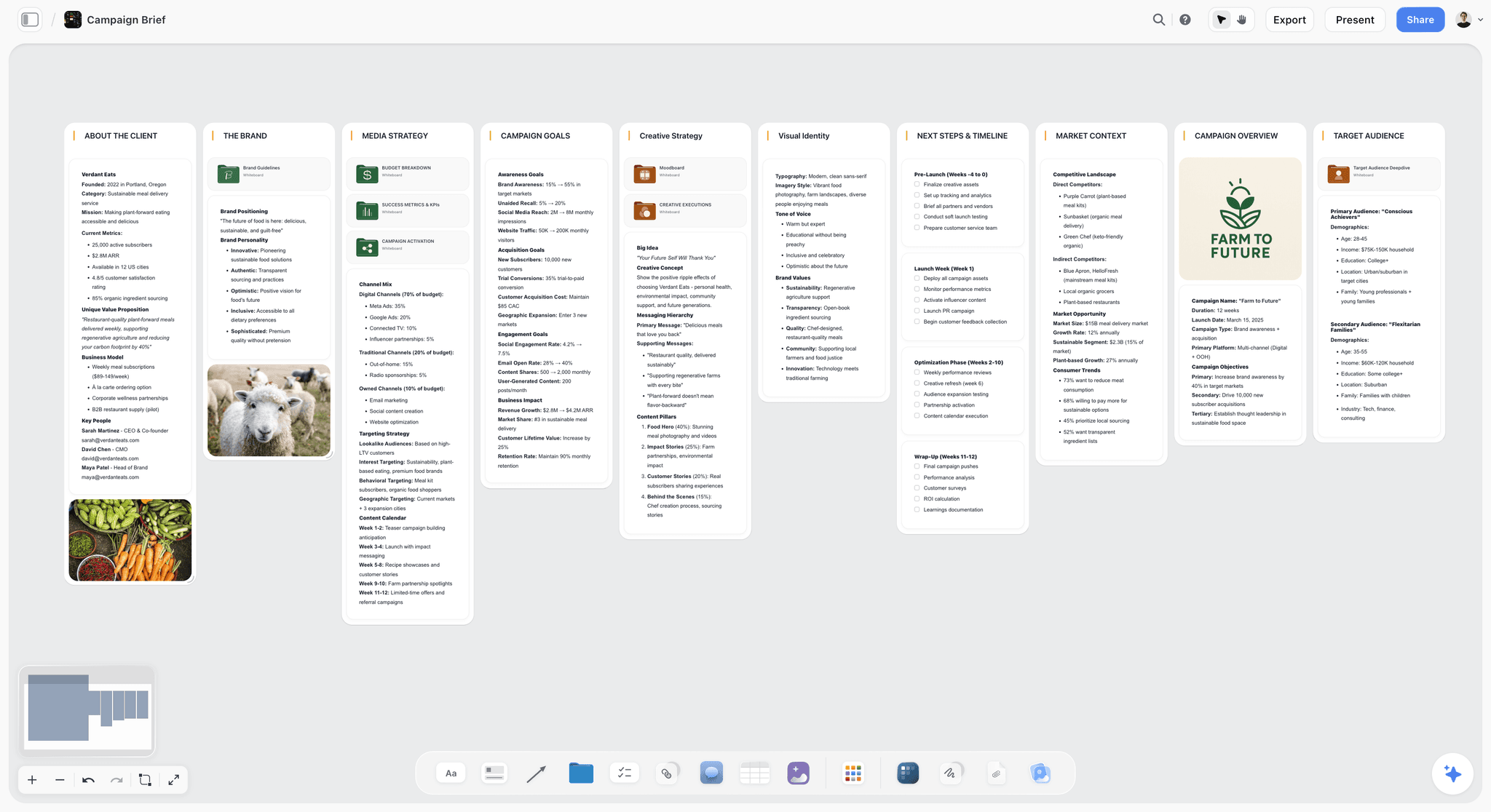
The verdict. The strongest option for the front half of the business, where agencies win work and have almost no system.
Best for. Concept development, treatments, pitch boards and pre-production thinking that gets reused rather than rebuilt.
Pricing. Paid-only during early access. Plus is $7.99 per month billed annually or $9.99 monthly. Pro is $14 per month billed annually or $19 monthly, adding AI image generation, roughly twenty times more AI usage and memory across conversations. Max is $39 per month billed annually or $49 monthly, adding the Team Workspace with permissions and roles plus roughly forty times more AI. Pricing is flat per account, not per seat, and anyone a paid member invites to a board joins free and can invite others. The Free plan launches before the end of 2026.
Why it ranks here. Every agency has a system for the edit and no system for the pitch. The treatment gets built in a deck, the references live in a folder, the concept conversation happens on a call, and when the same client asks for something similar nine months later, none of it is findable. That is leak two, in its most expensive form: you are not just remaking an asset, you are remaking the thinking.
Storyflow is a canvas where the reference frames, the treatment text, the tone notes and the shot thinking sit in one spatial surface. The spatial part is the point. A pitch board where three references sit in a row above one contrasting image says something a deck slide cannot, and it says it to a director who joins the project six weeks later.
The AI reads the full active canvas board by default, plus up to one Tactic and up to three Documents you @-mention. For an agency that means you can ask a concept board to draft a treatment section grounded in the references you actually assembled, rather than in generic language.
Pricing shape matters here more than usual. Agency boards want freelance directors, the client's brand lead, and the DP you use twice a year. On per-seat tools each of those is a purchasing decision. Here the account holder pays and everyone invited joins free.
Strengths.
- One surface for references, treatment text and shot thinking instead of a deck plus a folder plus a call.
- Invited collaborators join free, so freelancers and clients can be in the board.
- Flat per-account pricing rather than per seat.
- Canvas-wide AI context for drafting treatments grounded in the actual references.
- Story blueprints give a structured starting frame for pitches.
Limitations.
- No video review of any kind. No timecoded comments, no version stacking, no frame-accurate annotation, no camera-to-cloud. This is a real gap and Frame.io, Ziflow, Filestage and Dropbox Replay all fill it.
- No project management: no task assignment, no due dates across projects, no capacity view.
- No invoicing, no time tracking, no rate cards.
- Team Workspace with permissions and roles is on Max at $39 per month billed annually.
- Newer platform, so the integration list is short next to Monday or ClickUp.
The trade off. Storyflow is the front half. Frame.io is the back half. An agency running client video needs both, and pretending either one covers the other is how you end up with a beautiful pitch board and an unprovable revision round.
3. Airtable
The verdict. The best record of truth for an agency running more than about six concurrent projects, and the only tool here that can enforce a required field.
Best for. A queryable database of projects, deliverables, assets and approvals.
Pricing. A free tier with record limits. Team plans start around $20 per seat per month billed annually, with Business tiers above. Verify on airtable.com.
Why it ranks here. Leak two is a findability problem, and findability is a database property, not a document property. Airtable lets you model what an agency actually has: a Projects table linked to Deliverables linked to Assets linked to Clients, with a status field that must be one of six values rather than whatever somebody typed.
That enforcement is the thing a canvas or a document genuinely cannot do. If every deliverable record requires a usage term and an expiry date, then in eighteen months you can answer the question "which of our client assets have music licenses expiring this quarter" in four seconds. No amount of good intentions on a whiteboard produces that.
Third rather than higher because the setup cost is real and the tool is inert until somebody designs the base. Agencies that succeed with Airtable have one person who owns it. Agencies without that person have an expensive spreadsheet.
Strengths.
- Required fields and controlled vocabularies, which is the whole point.
- Linked records that model the real relationships between clients, projects and assets.
- Views that let each role see the same data differently.
- Automations that move records through statuses without human nagging.
- Interfaces give clients a clean view without giving them the base.
Limitations.
- Needs an owner. Without one it degrades fast.
- Per-seat pricing, and read-only collaborators still cost on some tiers.
- Record limits on lower tiers are tighter than they look once you store assets.
- Nothing visual. It is a database and it feels like one.
- No video review.
The trade off. The right answer if your leak is findability and you have somebody willing to own the schema. The wrong answer if you are hoping the tool will impose order by itself.
4. Monday.com
The verdict. The tool most likely to still be in use in a year, which is a genuinely underrated property.
Best for. Getting an agency team that dislikes software to actually track work.
Pricing. Free tier for very small teams. Paid plans start around $9 per seat per month billed annually and rise steeply with feature tiers. Minimum seat counts apply. Verify on monday.com.
Why it ranks here. Adoption is the criterion nobody puts in a comparison and everybody feels six months later. Monday's colour-coded boards are legible to a producer who has never used project management software, and that legibility is why it survives where more powerful tools do not.
For leak three specifically, Monday's approval columns and automations are simple enough that people configure them. A status field that automatically notifies the account lead when a deliverable moves to Client Review is a five-minute setup and it prevents a real failure.
Fourth because it is a generalist. It does not do video review, it does not do visual development, and its reporting is shallower than Airtable's.
Strengths.
- The lowest adoption friction on this list.
- Automations are genuinely accessible to non-technical staff.
- Good capacity and workload views for scheduling editors.
- Client-facing dashboards without exposing the workspace.
Limitations.
- Per-seat with minimum seat counts, which stings for small agencies.
- Pricing tiers gate features aggressively, and the feature you need is usually one tier up.
- No video review, no timecoded feedback.
- Reporting is weaker than a real database.
- Guests cost money on most useful tiers.
The trade off. Buy it for adoption, not for power. If your team has abandoned two project tools already, this is the one to try third.
5. Ziflow
The verdict. The category answer when the client's legal or compliance team needs a defensible audit trail.
Best for. Regulated clients, pharma, finance, or any account where an approval must be attributable.
Pricing. A free tier for very light use. Paid plans start around $20 per user per month and scale considerably for enterprise workflow features. Verify on ziflow.com.
Why it ranks here. Ziflow does what Frame.io does for review, and adds structured, multi-stage approval workflows with named approvers, deadlines, and a compliance-grade audit record. If leak three in your agency looks like "the wrong person approved it", Ziflow is a more direct fix than Frame.io, because approval is a first-class object rather than a comment thread that ended.
Fifth rather than higher because most agencies do not need this much process, and the tool's weight is noticeable when you do not.
Strengths.
- Multi-stage approval routing with named, required approvers.
- Audit trails built for compliance review.
- Handles video, stills, documents and web content in one workflow.
- Automated reminders that chase approvers so account managers do not have to.
Limitations.
- Heavier than most agencies need.
- Per-user pricing, and the workflow features are on higher tiers.
- The interface is functional rather than pleasant.
- No creative development features at all.
The trade off. If a missed approval has ever cost you a reshoot, this is worth the weight. If it has not, Frame.io is lighter and sufficient.
6. Filestage
The verdict. The best structured review tool when your deliverables are not only video.
Best for. Agencies shipping a mix of video, stills, PDFs and landing pages to the same client.
Pricing. A free tier with limits. Paid plans start around $49 per month for small teams, scaling by reviewer count and features. Verify on filestage.io.
Why it ranks here. Frame.io is exceptional at video and indifferent to everything else. A real agency deliverable is usually a video plus six cutdowns plus stills plus a PDF of usage rights. Filestage reviews all of them in one flow, with review stages, due dates and a clear "approved" state per asset.
Sixth because for pure video work Frame.io is better, and most agencies on this list are pure video work.
Strengths.
- One review flow across video, image, document and web deliverables.
- Explicit review stages with deadlines.
- Reviewers do not need accounts, which removes real friction.
- Clean, obvious approve or request-changes states.
Limitations.
- Video review is good, not best-in-class.
- Pricing scales by reviewer count, which is the wrong axis for agencies with many client-side reviewers.
- No creative development, no project management.
- Fewer integrations than Frame.io.
The trade off. Better than Frame.io if your deliverable set is mixed. Worse if it is video and only video.
7. Notion
The verdict. The best place for the words of an agency, and a poor place for its pictures.
Best for. Statements of work, client wikis, process documentation and meeting notes.
Pricing. Generous free plan for individuals. Paid plans around $10 per user per month billed annually. Verify on notion.so.
Why it ranks here. Every agency needs a place where the SOW, the brand guidelines, the process for onboarding a freelancer and the notes from the kickoff live. Notion is very good at that, and the databases are strong enough to run a light project tracker.
Seventh because leak three is only partly a documentation problem, and because Notion turns everything into a document. A treatment developed in Notion is a vertical scroll of images that have lost their relationship to each other, which is the specific thing a treatment is supposed to carry.
Strengths.
- Excellent for structured documentation and client wikis.
- Databases are capable enough for light project tracking.
- Nearly universal familiarity, so onboarding is trivial.
- Strong free tier for solo operators.
Limitations.
- Everything becomes a document, including the visual work.
- No video review.
- Per-user pricing for collaborators, and guests are limited.
- Configuration is a genuine time sink.
The trade off. Use it for the words. Do not use it for the look or the review.
8. StudioBinder
The verdict. The best production management on this list, sealing none of the three leaks directly and preventing a fourth.
Best for. The shoot days themselves: breakdowns, schedules, call sheets and crew.
Pricing. Free tier for one project. Paid plans from roughly $29 per month to roughly $49 per month depending on tier. Verify on studiobinder.com.
Why it ranks here. StudioBinder is genuinely excellent at what it does. Automatic element tagging, schedules that build from breakdowns, and call sheets that send themselves and tell you who opened them.
Eighth on this particular list because the three leaks are on either side of production and StudioBinder lives inside it. That is not a criticism of the tool, it is a statement about where agency margin actually goes.
Strengths.
- Best-in-class call sheets with delivery tracking.
- Breakdowns that connect to schedules rather than being retyped.
- Crew and contact database that persists across projects.
- Clean client-facing shooting schedules.
Limitations.
- Nothing for review, approval or asset findability.
- Per-project pricing tiers get awkward with many small concurrent jobs.
- Assumes conventional narrative structure; branded content fits loosely.
- No place for concept or treatment work.
The trade off. Necessary for shoot days, irrelevant to the three leaks. Buy it as a production tool, not as an agency operations tool.
9. Asana
The verdict. Strong task-level accountability across many concurrent projects, with no opinion about video.
Best for. Knowing who owes what by when, across fourteen jobs.
Pricing. Free tier for small teams. Paid plans start around $11 per user per month billed annually. Verify on asana.com.
Why it ranks here. Asana is a well-built task system, and for leak three it helps: a deliverable with an owner and a due date is harder to lose than one without. Portfolios give a principal a real view across the book of work.
Ninth because it is video-blind. Every deliverable is a task with a link to a file somewhere else, and the somewhere else is where the leaks are.
Strengths.
- Excellent dependency and timeline handling.
- Portfolio views across many concurrent projects.
- Workload views for capacity planning.
- Mature, stable and fast.
Limitations.
- No video review, no visual development.
- Per-user pricing with guest limits.
- Task-centric model fits creative iteration awkwardly.
- Reporting requires higher tiers.
The trade off. A good operations layer. Not an agency system on its own.
10. ClickUp
The verdict. The most configurable tool here, which is either the reason to buy it or the reason not to.
Best for. Agencies with somebody who genuinely enjoys building systems.
Pricing. Free tier that is unusually generous. Paid plans start around $7 per user per month billed annually. Verify on clickup.com.
Why it ranks here. ClickUp can model almost anything: custom fields, multiple views, proofing on attached files, dashboards, automations. In the hands of an operations lead who wants to build it, it will do more per dollar than anything else on this list.
Tenth because the failure mode is common and expensive. An agency without a systems owner buys ClickUp, configures forty percent of it, and ends up with a half-built structure that nobody trusts and everybody works around.
Strengths.
- Enormous feature surface for the price.
- Built-in proofing on images and video, which is rare in this category.
- Highly configurable custom fields and views.
- Strong free tier.
Limitations.
- Configuration burden is the highest on this list.
- Interface density overwhelms non-technical staff.
- Proofing is usable but well behind Frame.io.
- Performance degrades on very large workspaces.
The trade off. Excellent with an owner. Actively harmful without one.
11. Dropbox Replay
The verdict. Good-enough review for agencies already standardized on Dropbox, at the cost of not being Frame.io.
Best for. Adding review to an existing Dropbox stack without onboarding another vendor.
Pricing. Included or available as an add-on with Dropbox plans, with limits by tier. Verify on dropbox.com.
Why it ranks here. If your assets already live in Dropbox, Replay adds timecoded comments and version comparison without a new login, a new invoice or a new place for files to be. For a small agency that is a real argument.
Eleventh because it is a lighter product than Frame.io in almost every dimension, and because building your review layer on top of your storage vendor is a lock-in decision worth making deliberately.
Strengths.
- Zero additional vendor if you are already on Dropbox.
- Timecoded comments and version comparison.
- Reviewers can comment without a Dropbox account.
- Files stay where they already are.
Limitations.
- Fewer review features than Frame.io, Ziflow or Filestage.
- Ties your review workflow to your storage vendor.
- Limited approval workflow.
- No project management or creative development.
The trade off. The pragmatic choice for a two-person production company. The wrong choice for an agency where review volume is the business.
What to Actually Pay For
Buy the review tool first. Whatever else you do, the tool that makes a revision round provable pays for itself the first time a client is on round five. That is Frame.io for most agencies, Ziflow if the client is regulated, Filestage if the deliverables are mixed.
Buy the front-half tool second. Concept and treatment work is where agencies win the job and where almost nobody has a system. It is also the cheapest thing on this list.
Buy the database third, and only with an owner. Airtable is transformative with a person who owns the schema and inert without one. Be honest about whether that person exists before you buy.
Do not buy the everything tool. The instinct to consolidate into one platform is understandable and it consistently produces a system that does five jobs at sixty percent. Review, creative development and operations are genuinely different problems.
Tools to Avoid for This Job
Generic project management as your only system. Asana, Monday and ClickUp all handle tasks well and none of them make a revision round countable. If your only tool is one of these, leak one is wide open regardless of how tidy the board looks.
Email as the feedback channel. Every agency knows this and half still do it, because the client prefers it. The fix is not a better inbox, it is making the review tool the only place feedback gets actioned, and holding that line for one full project.
Anything that charges per client reviewer. Your client's reviewer count is not under your control and can double without warning. Pricing that scales on that axis converts a client-side org chart into your cost base.
A second storage vendor. Adding a review tool with its own storage on top of your existing drive creates two places assets live, which makes leak two worse rather than better. Pick one and mean it.
What No Tool on This List Does
None of these will price the work correctly.
The deepest version of leak one is not a record-keeping failure, it is a pricing failure. Agencies scope two revision rounds because the industry scopes two revision rounds, not because two is the number their process produces. A tool that makes rounds countable gives you the data to fix that, and then somebody still has to have the conversation with the client about what round three costs. No software has that conversation for you.
None of these will tell you which client is unprofitable, either. Airtable can hold the numbers, and time tracking tools can produce them, and the calculation of what an account actually earns after the fifth round and the two unbilled reshoots is a decision about what you are willing to see. Most agency owners can name the account they are avoiding calculating.
And none of them will make a client review a cut on time. Reminder automations help. Deadlines help. The structural fact that the client's VP is in five meetings a day does not yield to software.
The Bottom Line
A video production agency does not lose money on production. It loses money in three specific leaks, and all three happen either before the shoot or after the edit.
Choose by the leak that is costing you most. If your revisions never end, buy Frame.io and make the rounds countable. If you keep remaking assets you already own, buy Airtable and put an owner on it. If approvals keep coming from the wrong person, Ziflow's routing solves it more directly than anything else here.
But if you keep winning work on a treatment nobody can find six months later, and rebuilding the same concept thinking from scratch for every pitch, that is the front half of the business with no system on it at all. That is the narrow case where Storyflow earns second place here, and it is the only claim this post makes for it.
FAQ: Tools for Video Production Agencies
What is the best tool for a video production agency?
Frame.io, for the largest single margin leak: it makes revision rounds provable with timecoded comments on stacked versions, so the boundary between round two and round three is visible to both you and the client. Pair it with Storyflow for the concept and pre-production half of the business, which Frame.io does not touch at all.
What is the best tool for managing a video project with a team?
It depends on which half of the project you mean. For the creative half (references, treatment, shot planning), a canvas like Storyflow keeps everything on one surface anyone you invite can open free. For the delivery half (review, approval, versions), Frame.io. For coordination across many concurrent projects, Monday or Airtable. No single tool covers all three well, and agencies that try to force one usually end up with a weak version of each.
Is Storyflow free for an agency?
Not during early access. Storyflow is paid-only right now, starting at $7.99 per month billed annually on the Plus plan. The Free plan launches before the end of 2026. The genuinely free path today is that anyone a paid member invites to a board joins free and can invite others, which for an agency means freelance directors and client-side reviewers can be in the board without buying seats.
Does Storyflow do video review?
No. Storyflow has no timecoded comments, no version stacking, no frame-accurate annotation and no camera-to-cloud. That is Frame.io, Ziflow, Filestage and Dropbox Replay territory. Storyflow covers the work before there is a cut to review.
How do agencies stop revision creep?
Three things, in order. Make rounds countable with a review tool that timestamps versions. Write the round boundary into the statement of work in terms the client can verify ("round two closes when comments on V2 are resolved"). Then hold the line once, on one project, in a conversation nobody enjoys. The tool makes the second and third steps possible; it does not perform them.
Frame.io or Ziflow for an agency?
Frame.io for most video-first agencies: better video review, better editorial integration, lighter to adopt. Ziflow when a client requires attributable, audited approvals, typically in regulated industries, or when your review includes a lot of non-video deliverables that need formal sign-off.
What is the best free tool for a small video production company?
Frame.io's free tier for review and Google Workspace for documents will carry a two-person operation a surprisingly long way. ClickUp's free tier is the most generous project management option. Storyflow is paid-only during early access, so it does not belong in a free stack today, though invited collaborators join free.
Do we need StudioBinder if we already use Monday?
Yes, if you shoot regularly. Monday tracks tasks; it does not generate call sheets, tag script elements or build a shooting schedule from a breakdown. Those are different problems and StudioBinder solves them properly at a price that is trivial next to a shoot day.
How do we make old assets findable?
Stop relying on folder names. Put a record per deliverable in a database with required fields (client, project, asset type, usage term, expiry, storage location), and make creating that record part of the delivery checklist rather than an optional tidy-up. Airtable is the usual answer. The tool matters less than making the record mandatory at the moment of delivery.
What does an agency tool stack actually cost?
For a five-person shop, budget roughly $60 to $75 per month for review (Frame.io), roughly $8 to $40 per month for creative development (Storyflow, flat per account), $60 to $100 per month for coordination (Monday or Airtable), and StudioBinder per production. That is a few hundred dollars a month against a single unscoped revision round that can cost more than the annual total.
Can AI help with agency operations?
Modestly and specifically. AI is genuinely useful for drafting treatments from a reference board, summarizing a long feedback thread into an action list, and generating first-pass shot lists. It is not useful for deciding whether an account is profitable or whether a cut works. Storyflow's AI reads your full active canvas board plus up to one Tactic and three Documents you @-mention, which makes the treatment drafting grounded rather than generic.
How many tools should an agency run?
Three, usually: one for creative development, one for review and approval, one for coordination. Agencies with one tool have an open leak. Agencies with seven have a different problem, which is that nobody knows where anything is, and that is leak two wearing a different hat.
Who should own the tool stack?
One named person, and preferably not the founder. The most reliable predictor of whether an agency's system survives is whether somebody's job description includes maintaining it. Tools do not fail from lack of features. They fail from lack of an owner.
What is the single change worth making this quarter?
Count your revision rounds on the next three projects. Not manage them, count them. Most agency owners believe the average is two or three and discover it is closer to five. Everything else on this list is a response to that number, and you cannot respond to a number you have never measured.
Table of Contents
- Key Takeaways
- The Three Leaks
- At a Glance: The 11 Tools Compared
- How I Ranked These
- Quick Picks by Job Type
- 1. Frame.io
- 2. Storyflow
- 3. Airtable
- 4. Monday.com
- 5. Ziflow
- 6. Filestage
- 7. Notion
- 8. StudioBinder
- 9. Asana
- 10. ClickUp
- 11. Dropbox Replay
- What to Actually Pay For
- Tools to Avoid for This Job
- What No Tool on This List Does
- The Bottom Line
- FAQ: Tools for Video Production Agencies
- Related Reading
Templates to check out for this topic


Filmmaking templates you can use in Storyflow
Skip the blank canvas. Open one of these filmmaking boards in Storyflow and the AI builds on the structure that is already there, from research through the shot list.


See Storyflow in Action
A visual AI workspace where every feature lives inside one canvas. No tab-switching, no context lost.
Build your entire board from a single message
Type what you need in the AI chat at the bottom of your canvas. The AI adds cards, headings, and structure directly onto your board.
Use expert frameworks as AI context
Type @ in the AI chat and choose any Tactic. The AI tailors every response to that framework instead of giving generic advice.
Turn your board into a mind map in seconds
Ask the AI to restructure your canvas as a mindmap. It connects your ideas into a visual hierarchy so you can see how everything relates.
Why Storyflow Exists
Storyflow actually began as a personal tool while working on creative and research projects.
We kept running into the same problem: ideas were scattered everywhere: notes, documents, and whiteboards.
Nothing helped us see how everything connected.
So we started building a workspace designed around how ideas actually grow.
→ Read how Storyflow was createdSara de Klein
Head of Product at Storyflow
Published: 2026-08-11
Extremely simple, seriously capable


See how easy it is to get started
Watch a real project come together, from a blank board to a finished plan, clicked through step by step.
Start creating with AI and become more productive
Transform your creative workflow with AI-powered tools. Generate ideas, create content, and boost your productivity in minutes instead of hours.