Autodesk Flow Production Tracking Alternatives (2026): What to Use If ShotGrid Is Too Much
The question that decides this is not features, it is whether you have a pipeline or a project. A pipeline has shots moving through fixed stages with cross-department dependencies. Most teams searching for an alternative have a project.

Category
Production Management
Author

Justkay
Documentary Filmmaker & Founder at Storyflow
Topics
2026-09-02
•
15 min read
•
Production Management- autodesk flow production tracking alternatives
- shotgrid alternatives
- ftrack vs shotgrid
- vfx production tracking
- pipeline tracking software 2026
What is the best alternative to Autodesk Flow Production Tracking?
Autodesk Flow Production Tracking, the product formerly called ShotGrid, is built for VFX and animation pipelines where hundreds of shots move through dozens of artists and every version needs a review state. If that is your problem, nothing here fully replaces it. Most teams searching for an alternative do not have that problem: they have twenty to two hundred deliverables, a handful of people, and a review loop, and they are looking at a pipeline tool because it appeared in a search. For them, Frame.io covers the review and versioning half far more simply, ftrack is the closest genuine competitor with a lighter setup, Kitsu is the credible open-source option, and Airtable plus Frame.io is what a lot of small studios actually run. The question that decides it is not features, it is whether you have a pipeline or a project. A pipeline has shots moving through fixed stages with dependencies between departments; a project has deliverables with owners and dates. Below is that test, the alternatives ranked against it, and what you give up in each direction.
Full disclosure: Storyflow is our product and it is ranked eighth of eight, last. The article states that it has no task states, no versions, no dependencies, no review loop and no pipeline integration, that nobody comparing Flow alternatives should buy it as one, and that it replaces nothing in the article.
How the production tracking and pipeline tools compare on trust, innovation, ratings and pricing
Which production tracking tools are the most trusted?
Autodesk Flow Production Tracking, formerly ShotGrid, remains the most trusted at VFX and animation scale, and its artist-application publishing is the feature nothing lighter replaces. ftrack is the most trusted alternative among studios that move. Frame.io is the trusted standard for review and versioning. Kitsu is trusted among studios with the technical capacity to self-host.
Which of these have fair and transparent pricing?
Frame.io publishes clear per-user pricing from around $15 with a usable free tier. Kitsu is free and open source, moving the cost to engineering time. Airtable and the general project tools publish their pricing plainly. Flow Production Tracking and ftrack are both quoted rather than listed, which is normal at that tier and makes comparison harder.
Which production tracking tools are underrated?
The pairing of a plain tracker with Frame.io, which is what a large share of small studios actually run and which most comparison articles omit because it is not a single product. It is usable the day you buy it, it shows what is not yet delivered, and it fails only at genuine pipeline volume, which most teams asking this question do not have.
What do you lose moving off a pipeline tool?
Publishing from artist applications, which is the biggest loss, because a tracker that updates when an artist publishes from Nuke is accurate and one that updates when someone remembers is not. You also lose cross-department dependency awareness and the historical duration data that makes the next bid defensible. Whoever updates the tracker instead is usually a coordinator, which is a salary against a licence.
When choosing a production tracking tool, which would you recommend?
Answer the pipeline-or-project question first. If work moves through fixed departmental stages with real blocking and artists publish from their applications, stay on Flow or move to ftrack. If you have deliverables with owners and dates, a project tool plus Frame.io is faster, cheaper and usable immediately, and most teams searching for an alternative are in the second group.
Quick Comparison
Four options across the pipeline half and the project half.
| Tool | Best For | AI Features | Price |
|---|---|---|---|
| ftrack | Pipeline with lighter setup | Light AI | Quoted |
| Frame.io | Review, versions, camera-to-cloud | Light AI | Free / from $15 mo |
| Kitsu | Open source, self-hosted | None | Free, self-hosted |
| Airtable | Deliverables with a not-done view | Airtable AI | Free / $20 seat mo |
Article Metadata
By Justkay, Documentary Filmmaker and Founder of Storyflow Published September 2, 2026 · 15 min read · Production Management
Table of Contents
- Pipeline or Project
- What Flow Production Tracking Is Actually For
- The Alternatives, Ranked
- Comparison Table
- How We Evaluated These Tools
- Tool Reviews
- What You Give Up Going Lighter
- The Cost Question Nobody Publishes
- The Migration Reality
- FAQ: Flow Production Tracking Alternatives
- The Bottom Line
- Author
- Related Reading
Key Takeaways
- Ask whether you have a pipeline or a project. That decides the answer, not the feature list.
- A pipeline means shots moving through fixed stages with cross-department dependencies. Below that, Flow is overkill.
- Frame.io covers review and versioning, which is the half most teams actually wanted.
- ftrack is the closest real competitor; Kitsu is the credible open-source route.
- Most small studios run a tracker plus a review tool rather than one pipeline product.
Pipeline or Project
The test, and it is worth answering honestly before comparing anything.
You have a pipeline if: the same unit of work (a shot, an asset) moves through a fixed sequence of departments; a downstream department cannot start until an upstream one publishes; you version the same asset dozens of times; and you need to know at a glance how many shots are at each stage across the whole show.
You have a project if: you have a list of deliverables with owners and dates; work is mostly parallel rather than sequential across departments; versions matter but the count is in the tens rather than hundreds; and the question you ask is "what is late", not "how many shots are in comp".
Flow Production Tracking is built for the first and it is very good at it. Used for the second, it is a large, expensive, slow-to-configure answer to a question a spreadsheet and a review tool answer better.
The honest reason people look for alternatives: they have a project, they were told to use a pipeline tool, and the setup cost is not repaying.
What Flow Production Tracking Is Actually For
Worth being clear, because dismissing it would be wrong.
Shot and asset tracking at volume. Hundreds or thousands of entities with status per department, and the ability to see the whole show's state in one view.
Pipeline integration. Publishing from Maya, Nuke, Houdini and the rest, so the tracker reflects what artists actually did rather than what they remembered to update. This is the part nothing lighter replaces, and it is the real product.
Review with pipeline context. Notes attached to a version that is attached to a task that is attached to a shot.
Reporting a studio can bid from. Historical data on how long things take, which is what makes the next bid defensible.
If you need artist-application publishing, stop here. Nothing else in this article does it properly, and going lighter means artists updating a tracker by hand, which they will not do.
The Alternatives, Ranked
- ftrack: the closest genuine competitor, lighter to set up, real pipeline features
- Frame.io: the review and versioning half, done more simply and much cheaper
- Kitsu: credible open source, strong for studios that can self-host
- Airtable plus Frame.io: what many small studios actually run
- Monday.com or Asana: if you have a project rather than a pipeline
- Autodesk Flow Capture: the review-focused sibling, if you are staying in the Autodesk world
- Notion plus Frame.io: the cheapest workable pair for a small team
- Storyflow: the planning layer before any of this, not a tracker
Comparison Table
| Tool | Best for | Pipeline integration | Review | Setup cost | Rating (/10) |
|---|---|---|---|---|---|
ftrack | The real alternative | Strong | Strong | Medium | 8.7/10 |
Frame.io | Review and versioning | None | Best | Low | 8.6/10 |
Kitsu | Open source studios | Moderate | Good | High | 8.0/10 |
Airtable + Frame.io | Small studio reality | None | Best | Low | 8.0/10 |
Monday.com | Projects, not pipelines | None | Weak | Low | 7.6/10 |
Autodesk Flow Capture | Review inside Autodesk | Native | Strong | Medium | 7.5/10 |
Notion + Frame.io | Cheapest workable pair | None | Best | Low | 7.4/10 |
Storyflow | Planning before the pipeline | None | None | Low | 6.8/10 |
Ratings weigh how much of Flow Production Tracking's actual job each one covers, setup cost, and fit for a studio of five to fifty rather than five hundred. Pricing for most of these is quoted rather than listed, so check current terms directly.
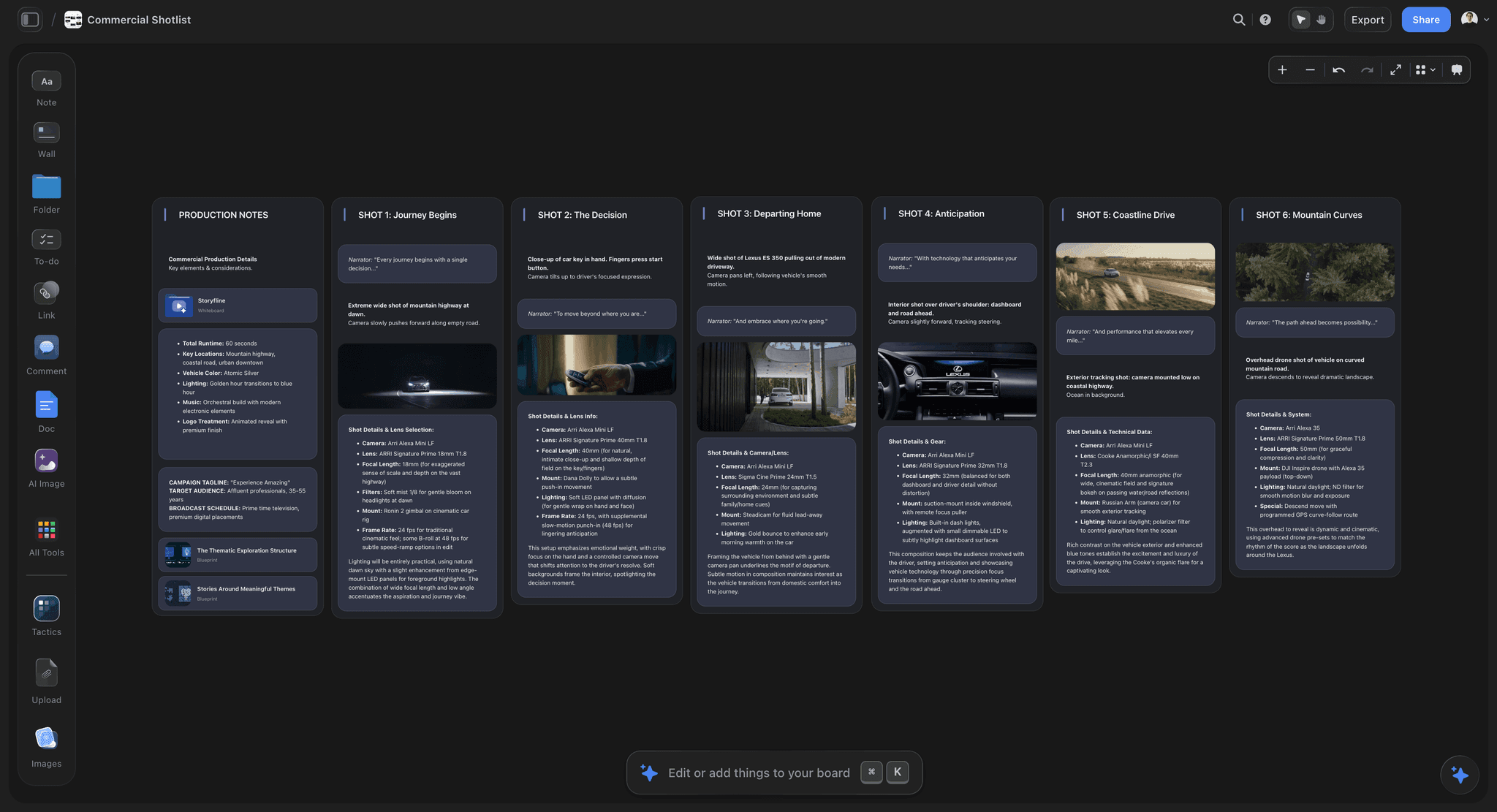
Shot intentions and the reasoning behind them, upstream of any pipeline tracker
Pipeline or project?
A pipeline means shots blocked by upstream departments and artists publishing from Nuke. A project means deliverables with owners and dates. Answer that honestly and the tool choice follows, because a pipeline tool used for a project never repays its setup.

How We Evaluated These Tools
Four criteria:
- Does it cover the pipeline half, meaning publishing from artist applications and cross-department dependencies? Almost nothing does.
- Does it cover the review half well, since that is what most teams actually wanted.
- Setup cost, which is the real reason people leave: a pipeline tool that takes a month to configure never repays on a six-week job.
- Fit at five to fifty people, which is where most of these searches come from.
Tool Reviews
1. ftrack
The closest genuine alternative and the right answer if you do have a pipeline but Flow is too much. Real task and version tracking, artist application integrations, review built in, and a lighter setup than Flow's. Studios that move typically move here.
It is still a pipeline product, so if your actual shape is a project it will be too much in the same way.
Pros: the most complete alternative; genuine pipeline integrations; lighter setup than Flow.
Cons: still a pipeline tool; quoted pricing; real configuration work.
2. Frame.io
Not a pipeline tool and the answer for most people searching. Review, versioning, timecoded comments, approvals and camera-to-cloud, in a product that is usable the day you buy it. For teams whose real problem was "we need a review loop with versions", this is what they were looking for.
It tracks no tasks, has no dependencies and no pipeline integration.
Pricing: Free tier; paid from around $15 per user per month.
Pros: the best review and approval loop; usable immediately; genuinely cheap by comparison.
Cons: no task tracking, no dependencies, no pipeline integration.
3. Kitsu
The credible open-source option, and genuinely capable for studios that can self-host and maintain it. Task tracking, review, and a real data model. The cost moves from licence to engineering time, which for some studios is a good trade and for others is a worse one.
Pros: open source with a real feature set; no per-seat licence; active community.
Cons: self-hosting and maintenance; fewer integrations; you own the uptime.
4. Airtable plus Frame.io
What a lot of small studios actually run, and it deserves to be ranked rather than dismissed. Airtable holds the deliverables with status, owner and dates and shows what is missing; Frame.io holds versions and review. Two tools, both usable immediately, both cheap.
No pipeline integration at all, so artists update by hand, which works at twenty deliverables and not at two hundred shots.
Pros: usable immediately; cheap; the not-yet-delivered view is the thing you actually need.
Cons: manual updating; no dependencies; breaks down at pipeline volume.
5. Monday.com or Asana
If the honest answer to the pipeline-or-project test was "project", these are better than any pipeline tool. Dependencies, owners, dates, approvals and dashboards, at a fraction of the setup cost.
Nothing for versions or review, so pair with Frame.io.
Pricing: Monday from $9 per seat per month billed annually; Asana Starter $10.99.
Pros: the right shape for project-shaped work; low setup; strong dependencies.
Cons: no versioning or review; no pipeline awareness.
6. Autodesk Flow Capture
The review-focused sibling, formerly Moxion, and the sensible option if you are staying inside Autodesk's world and your problem is review and dailies rather than shot tracking. Strong security story for productions that need one.
Pros: strong dailies and review; native to the Autodesk ecosystem; good security posture.
Cons: not a tracker; quoted pricing; overlaps Frame.io.
7. Notion plus Frame.io
The cheapest workable pair. Notion holds deliverables, briefs and notes; Frame.io holds versions and review. For a team of three to eight doing branded or commercial work rather than VFX, this genuinely covers it.
Pricing: Notion Plus $10 per user per month billed annually; Frame.io from around $15.
Pros: cheapest credible pair; the brief lives beside the tracker; immediate.
Cons: manual updating; weak dependencies; not viable at pipeline volume.
8. Storyflow

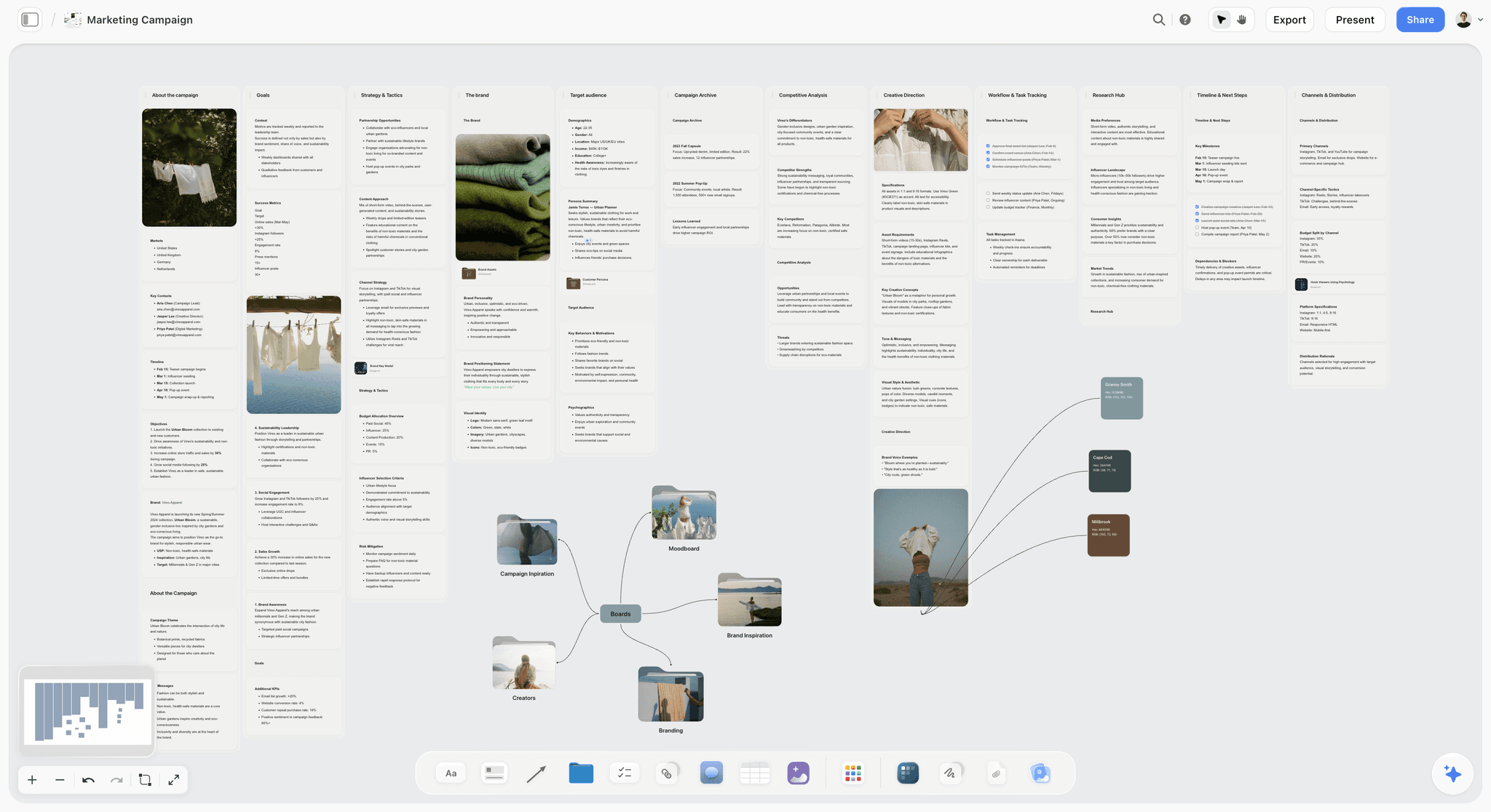
Storyflow is our product and it is ranked eighth, last, which is correct here. It is not a production tracker in any sense: no task states, no versions, no dependencies, no review loop and no pipeline integration. Nobody comparing Flow Production Tracking alternatives should buy it as one, and this article recommends ftrack, Frame.io or a tracker-plus-review pair instead.
It is listed because the stage before the pipeline has no home in any of the tools above: the treatment, the look, the shot intentions and the reasoning behind them, which on VFX-heavy work is where the brief actually lives and where a misunderstanding costs the most downstream. That is a planning layer, not a tracking one.
Storyflow is paid-only during early access; its Free plan launches before the end of 2026, and anyone a paid member invites to a board joins free now.
Pricing: Plus $7.99 per month billed annually ($9.99 monthly); Pro $14; Max $39.
Pros: holds the intent and reasoning upstream of the pipeline; flat per-account pricing.
Cons: not a tracker, not a review tool, no pipeline features. It replaces nothing in this article.
What You Give Up Going Lighter
Stated plainly, because most alternatives lists do not.
Publishing from artist applications. The single biggest loss. When a tracker updates because an artist published from Nuke, it is accurate. When it updates because someone remembered, it is not. At volume this is the difference between a tracker you trust and one you do not.
Cross-department dependency awareness. Knowing that comp cannot start on shot 042 because lighting has not published.
Studio-level reporting. Historical duration data that makes the next bid defensible rather than a guess.
One place for the whole show. Two tools means two truths, and keeping them agreeing is somebody's job.
If you are giving up the first of those, be honest about who will update the tracker instead, because the answer is usually a coordinator, and that is a salary against a licence.
The Cost Question Nobody Publishes
Most tools in this category quote rather than list, which makes comparison harder than it should be and is worth naming rather than skipping.
Quoted pricing: Flow Production Tracking, ftrack and Flow Capture. Expect per-seat annual contracts with a minimum, and expect the quote to depend on how many seats are full artist seats versus viewer or reviewer seats. That distinction is where most of the negotiation happens, because a studio typically has far more people who need to look than people who need to publish.
Listed pricing: Frame.io, Airtable, Notion, Monday and Asana all publish per-seat rates you can add up yourself.
Free: Kitsu, where the cost is engineering time instead. A studio without someone who wants to own a self-hosted service should treat that as a licence cost paid in a different currency.
Two questions worth asking any vendor in this category before you compare anything:
How many of my people need a full seat? If reviewers and producers can sit on a cheaper tier, the headline number stops being the number.
What happens to my data if I leave? Ask specifically about version history, note threads and entity relationships, because those are the parts that migrate worst and they are the parts you would want back.
The Migration Reality
Export first, and check what you get. Entity relationships, version history and note threads are the parts that migrate worst, and they are the parts with the most value.
Nothing imports another pipeline tool's data model cleanly. Expect to rebuild the structure and import the entities, not the history.
Move at a project boundary. Migrating mid-show is how studios end up running both for six months and trusting neither.
Keep read access to the old system through delivery of anything still in flight. Historical data you cannot reach is data you have lost, and it is what you would have bid the next job from.
The Bottom Line
Answer the pipeline-or-project question honestly before you compare anything. A pipeline means shots moving through departments with real blocking dependencies and artists publishing from their applications, and there ftrack or staying on Flow is right. A project means deliverables with owners and dates, and there a tracker plus Frame.io is faster, cheaper and usable immediately. Most people asking this question have a project.
FAQ: Flow Production Tracking Alternatives
What is the best alternative to Autodesk Flow Production Tracking?
ftrack, if you genuinely have a pipeline and Flow is too heavy: it has real task and version tracking, artist application integrations and a lighter setup. Frame.io if what you actually needed was review and versioning, which is true for most teams asking. Kitsu if you can self-host. And a tracker plus Frame.io if the honest answer is that you have a project rather than a pipeline.
Do I need a pipeline tool at all?
Only if the same unit of work moves through a fixed sequence of departments, downstream work is blocked until upstream publishes, you version assets dozens of times, and you need the whole show's state in one view. If your shape is a list of deliverables with owners and dates, that is a project, and a project tool plus a review tool covers it at a fraction of the setup cost.
Is Frame.io a replacement for ShotGrid?
For the review and versioning half, yes, and that is the half most teams actually wanted. It has timecoded comments, version stacking, approvals and camera-to-cloud, and it is usable the day you buy it. It tracks no tasks, has no dependencies and no pipeline integration, so if you need to know how many shots are in comp, it is not a replacement.
What do you lose by moving off a pipeline tool?
Publishing from artist applications, which is the biggest loss, because a tracker that updates when an artist publishes is accurate and one that updates when someone remembers is not. You also lose cross-department dependency awareness and studio-level historical reporting that makes the next bid defensible. Be honest about who updates the tracker instead, since the answer is usually a coordinator's time.
Is there an open-source alternative to Flow Production Tracking?
Kitsu is the credible one, with task tracking, review and a real data model, and it is genuinely used by working studios. The cost moves from a licence to engineering time: you self-host, you maintain it, and you own the uptime. For a studio with technical capacity that is often a good trade, and for one without it, it is a worse one than the licence.
Is Storyflow a production tracking tool?
No, and it is ranked last in this article for that reason. Storyflow has no task states, no versions, no dependencies, no review loop and no pipeline integration, so nobody comparing Flow alternatives should buy it as one. It holds the stage before the pipeline: the treatment, the look, the shot intentions and the reasoning, which has no home in any tracker.
Is Storyflow free?
Not during early access. It is paid-only today from $7.99 per month billed annually on Plus, and its Free plan launches before the end of 2026. Anyone a paid member invites to a board signs up free and can invite others, which covers freelance artists collaborating on a planning board.
What do small studios actually use?
Most run two tools rather than one pipeline product: a tracker holding deliverables with owner, status and date, and Frame.io holding versions and review. Airtable or Notion for the first, because both are usable immediately and show what is missing. It fails at pipeline volume, where manual updating stops being reliable, and it works well up to a few dozen deliverables.
When is Flow Production Tracking worth it?
When you need publishing from Maya, Nuke or Houdini so the tracker reflects what artists actually did, when a downstream department is genuinely blocked by an upstream one, and when hundreds of entities need per-department status in one view. At that scale nothing lighter substitutes, and the setup cost repays across shows rather than within one.
How hard is it to migrate off?
Harder than it looks, because entity relationships, version history and note threads are the parts that migrate worst and the parts with the most value. Nothing imports another pipeline tool's data model cleanly, so expect to rebuild the structure and import entities rather than history. Move at a project boundary, and keep read access to the old system through delivery.
What is the difference between Flow Production Tracking and Flow Capture?
Production Tracking is the shot and asset tracker, formerly ShotGrid. Capture is the review and dailies product, formerly Moxion, with a strong security posture for productions that need one. They solve different halves, and a team whose problem is dailies and review rather than shot status wants Capture or Frame.io, not the tracker.
Can Monday or Asana replace it?
Only if the honest answer to the pipeline-or-project test was project. Both have dependencies, owners, dates and approvals at a fraction of the setup cost, and neither has versions, review or pipeline integration, so you pair one with Frame.io. For branded and commercial work with a few dozen deliverables that pairing is genuinely better than a pipeline tool.
Table of Contents
- Article Metadata
- Breadcrumb
- Table of Contents
- Key Takeaways
- Pipeline or Project
- What Flow Production Tracking Is Actually For
- The Alternatives, Ranked
- Comparison Table
- How We Evaluated These Tools
- Tool Reviews
- 1. ftrack
- 2. Frame.io
- 3. Kitsu
- 4. Airtable plus Frame.io
- 5. Monday.com or Asana
- 6. Autodesk Flow Capture
- 7. Notion plus Frame.io
- 8. Storyflow
- What You Give Up Going Lighter
- The Cost Question Nobody Publishes
- The Migration Reality
- The Bottom Line
- Author
- FAQ: Flow Production Tracking Alternatives
- Related Reading
Templates to check out for this topic


Templates you can use in Storyflow
Every Storyflow board starts from real structure and an AI that reads the whole canvas. Open one of these templates and make it yours.


See Storyflow in Action
A visual AI workspace where every feature lives inside one canvas. No tab-switching, no context lost.
Build your entire board from a single message
Type what you need in the AI chat at the bottom of your canvas. The AI adds cards, headings, and structure directly onto your board.
Use expert frameworks as AI context
Type @ in the AI chat and choose any Tactic. The AI tailors every response to that framework instead of giving generic advice.
Turn your board into a mind map in seconds
Ask the AI to restructure your canvas as a mindmap. It connects your ideas into a visual hierarchy so you can see how everything relates.
Why Storyflow Exists
Storyflow actually began as a personal tool while working on creative and research projects.
We kept running into the same problem: ideas were scattered everywhere: notes, documents, and whiteboards.
Nothing helped us see how everything connected.
So we started building a workspace designed around how ideas actually grow.
→ Read how Storyflow was createdJustkay
Documentary Filmmaker & Founder at Storyflow
Published: 2026-09-02
Extremely simple, seriously capable


See how easy it is to get started
Watch a real project come together, from a blank board to a finished plan, clicked through step by step.
Start creating with AI and become more productive
Transform your creative workflow with AI-powered tools. Generate ideas, create content, and boost your productivity in minutes instead of hours.