The 11 Best Project Management Tools for Filmmakers in 2026
Storyflow is our pick for film project management: its AI builds the breakdown, storyboard, shot list, strip board and call sheet PDF on one shareable board. 11 tools compared by job, with StudioBinder, Yamdu and Movie Magic Scheduling for the shoot itself.

Category
Filmmaking
Author

Justkay
Documentary Filmmaker & Founder at Storyflow
Topics
2026-07-20
•
42 min read
•
Filmmaking- best project management tool for filmmakers
- film project management system
- film production management software
- how indie filmmakers organize their projects
- pre-production testing and timelines
- film production scheduling tools
What is the best project management tool for filmmakers?
Storyflow is our pick among project management tools for filmmakers in 2026: attach the script or brief and its AI builds the pre-production plan, script breakdown, storyboard, shot list, strip board by shoot day and a call sheet PDF on one shareable board. Choose StudioBinder for a stripboard that recalculates and call sheets sent with confirmation tracking, Yamdu for funded productions with departments, and Movie Magic Scheduling when a line producer expects its format. Storyflow does not recalculate a schedule or send call sheets.

Full disclosure: Storyflow is our own product and it is listed first here, on one stated basis: our pick first for building and holding the plan, because its AI builds the pre-production plan, script breakdown, storyboard, shot list, strip board and a call sheet PDF from your script or brief on one board the crew opens with a link. The scheduling suites follow for stripboards that recalculate and call sheets that send. What Storyflow does not do: it has no schedule that recalculates and no Day Out of Days report, it does not send call sheets or track confirmations, its AI drafts a budget table but it has no cost tracking or crew payroll, and it is not a screenwriting app. StudioBinder, Yamdu and Movie Magic Scheduling keep those jobs, and each review says when to choose them instead. No total scores are published, and every price was re-read on the vendor's own page on October 11, 2026.
Quick Comparison
Where a film gets planned and where it gets run: the board that builds and holds the plan first, then the scheduling tools for the shoot and the do-it-yourself database.
| Tool | Best For | AI Features | Price |
|---|---|---|---|
| Storyflow | Building and holding the plan on one shareable board | AI builds the breakdown, storyboard, shot list, strip board and call sheet PDF | $7.99 mo annual |
| StudioBinder | Recalculating schedule, tracked call sheets | Automatic strips, day breaks and weather | Free plan / Indie $49 mo for 2 users |
| Yamdu | Funded productions with departments | AI breakdown suggestions | Not published |
| Movie Magic Scheduling | Industry stripboard | Conflict detection | $42.99 mo or $299.88 yr |
| Notion | Build-your-own production database | Not checked | Free / Plus $10 seat mo annual |
Which Project Management Tool Should a Filmmaker Use?
Use Storyflow when the film is still being decided and the plan lives in a notes app, a spreadsheet and a group chat: its AI builds the plan from your script or brief and holds it on one shareable board. Then add a scheduling suite the week the schedule locks, for the two jobs Storyflow does not do.
| If you need | Use | Why |
|---|---|---|
The plan built from a script or a brief and kept on one shareable board | Storyflow | Its AI builds the pre-production plan, script breakdown, storyboard, shot list, strip board and call sheet PDF |
To plan a film from inside ChatGPT or Claude | Storyflow (MCP connector) | The assistant reads your Storyflow projects and builds boards and documents in them |
A schedule that recalculates and call sheets sent with confirmation tracking | StudioBinder | Stripboard with automatic day breaks, Day Out of Days reports, SMS and email delivery with viewed and confirmed status |
One database for a funded production with departments | Yamdu | Stripboard, call sheets, budgets and time cards in one system |
The schedule format a line producer or a bond company expects | Movie Magic Scheduling | The scheduler funded productions ask for by name |
A screenplay turned into a schedule with Day Out of Days this week | Filmustage | AI breakdown and scheduling from a locked script |
A free board for a first short | Trello | Free for up to 10 collaborators per workspace |
How this page is ordered: our pick first for building and holding the plan; the scheduling suites follow for stripboards that recalculate and call sheets that send, then the rest by job. Storyflow is our own product, so its limits are stated in every section, after the claim they qualify. No total scores are published.
Storyflow is a visual AI workspace: an infinite canvas where a film's notes, to-dos, tables, documents, images, moodboards, storyboards and kanban boards sit together on boards, and an AI agent that reads the board and builds on it. The pages that show it on a real film are the indie film production workflow and Storyflow's filmmaking software overview.
Last updated October 11, 2026. Competitor prices were re-read on each vendor's own pricing page that day; where a page showed no amount, or did not load, this page says so instead of quoting an old number.
Comparison Table: 11 Film Project Management Tools Compared
The eleven tools below are the realistic choices for managing a film in 2026. Storyflow is the first row as our pick for building and holding the plan; each row after it names the job that tool does better and the handoffs it carries, using the Four Handoffs explained further down.
| Tool | Best for | Builds the plan for you | Handoffs carried | Starting price (checked Oct 11, 2026) |
|---|---|---|---|---|
Storyflow | Building and holding the plan on one shareable board | Yes: AI builds the breakdown, storyboard, shot list, strip board and call sheet PDF from a script or brief | 1 fully; first pass of 2 | $7.99/mo billed annually |
StudioBinder | Running the shoot: recalculating schedule, tracked call sheets | Partly: strips from the imported script, call sheet from the stripboard | 2 and 3 | Free plan; Indie $49/mo for 2 users |
Yamdu | Funded productions with departments | Partly: AI breakdown suggestions | 2 and 3 | Not published |
Movie Magic Scheduling | Industry-standard stripboard | No | 2 | $42.99/mo or $299.88/yr |
Filmustage | AI breakdown into a schedule | Partly: AI breakdown and scheduling | 2 | Free (1 project); from $49/mo |
Assemble | Commercial and agency teams | No | 3 and 4 | See its pricing page (two price sets shown) |
Notion | Build-your-own production database | No: you build it | 1 to 4, shallow | Free; Plus $10/seat/mo |
SetKeeper | Secure distribution at production-office scale | No | 2 and 3 | From $1,500, tiered by production budget |
Dramatify | Episodic and multi-camera television | No | 2 and 3 | From 9 euros/seat/mo, 3 seats |
Trello | Free kanban for tiny crews | No | 1 to 4, shallow | Free; Standard $5/user/mo |
Monday.com | Studios with client work | No | 3 and 4 | Free for 2 seats; see its pricing page |
Prices are per month on annual billing where the vendor offers it; the full pricing table is further down and the sources are listed near the end. Storyflow is paid-only today: its Free plan launches before the end of 2026, and anyone a paid member invites to a board joins free.
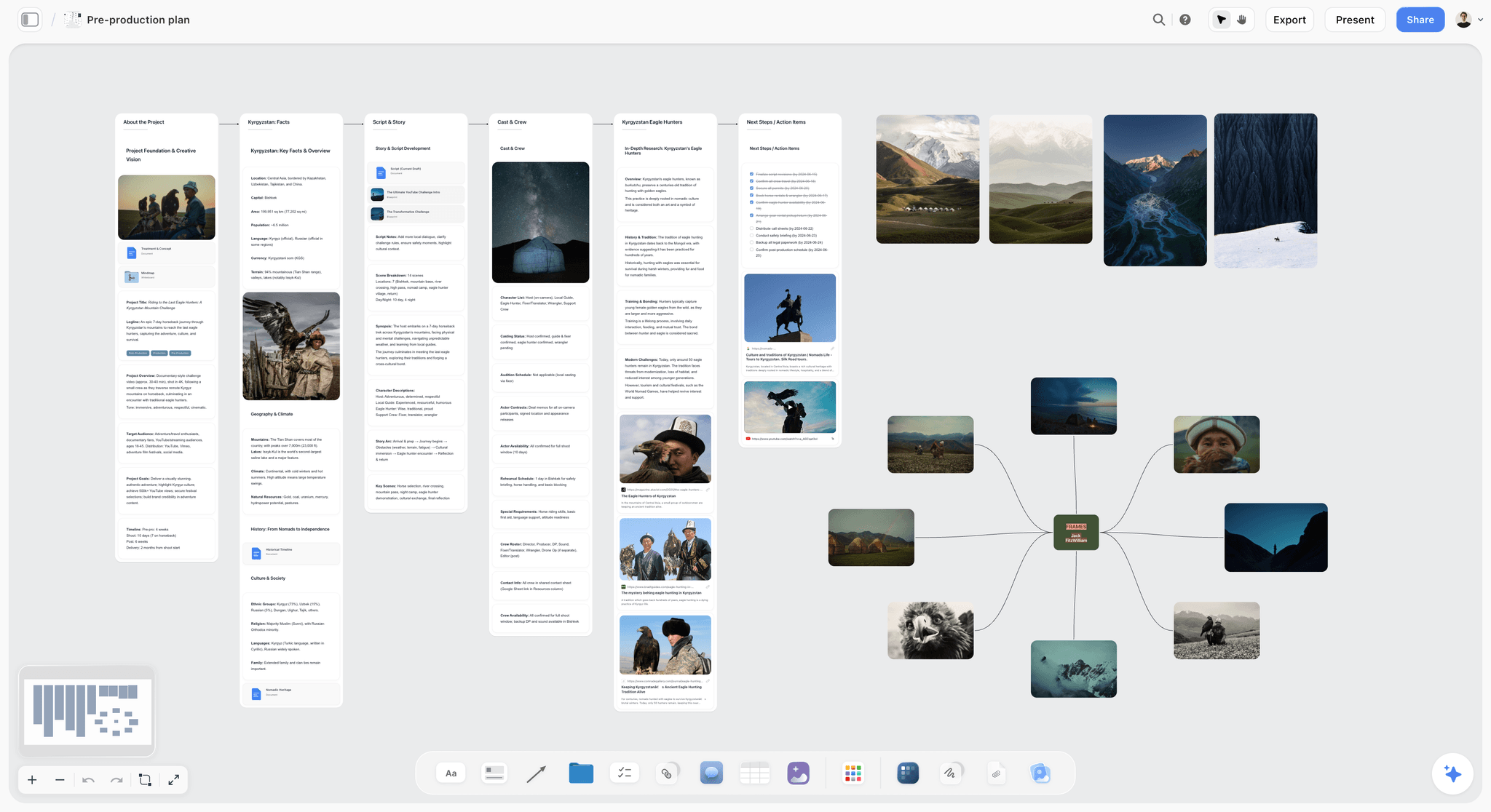
A film's pre-production plan on one Storyflow board, with the treatment, moodboard, storyboard and shot list on one surface the crew can read
Build the film's plan on one shareable board
Attach the script or the brief and Storyflow's AI builds the breakdown, the storyboard, the shot list, a strip board by shoot day and a call sheet PDF on one board your crew opens with a link. Decide the film there, then hand the shoot to your scheduling suite.

Frequently Asked: Which Film Production Management Tools Are Most Trusted, Best Rated, and Fairest on Price
Which production management tools are the most trusted by producers and coordinators?
Trust follows the job. Storyflow, our own product, is the tool we recommend for the plan itself: its AI builds the breakdown, shot list, strip board and call sheet PDF on one shareable board, stages every change as a proposal you accept or discard, and leaves anything it was not given visibly blank. For the paperwork a coordinator receives, StudioBinder and Movie Magic Scheduling are the trusted formats: a StudioBinder call sheet or a Movie Magic stripboard does not have to be explained to anyone. SetKeeper carries that trust for secure distribution on larger productions.
Which production management tools are the most innovative?
Storyflow and Filmustage. Storyflow's AI builds the board from a script or a brief, reads the whole board before it answers, and works from inside ChatGPT and Claude through its MCP connector. Filmustage runs the script breakdown through a model that reads the screenplay and tags elements, removing one of the most tedious tasks in pre-production, and adds AI scheduling. Yamdu has added AI breakdown suggestions and lists an API and MCP server.
Which production management tools are known for fair and transparent pricing?
Storyflow publishes every plan: Plus is $7.99 a month billed annually, per account, and anyone a paid member invites to a board joins free, so adding a DP and an AD costs nothing. Trello and Notion publish plain per-seat prices and free plans. Filmustage (from $49 a month) and Movie Magic Scheduling ($42.99 a month or $299.88 a year) are the clearest paid prices in the film-specific group, and SetKeeper publishes prices from $1,500, tiered by production budget. Yamdu showed no amounts on its pricing page when read on October 11, 2026, and StudioBinder's prices were readable only in its support articles.
Which are highest rated for crews managing daily schedule changes?
Storyflow is where the schedule is first laid out, as a strip board by shoot day, but it is not the tool for a schedule that changes twice a day: you drag a strip, ask the AI to rebuild, and send the call sheet PDF yourself. For this one job choose StudioBinder or Yamdu, because both build the call sheet from the schedule and send and track it. Movie Magic Scheduling is the deepest at the stripboard itself. We publish no star ratings on this page.
Where is Storyflow not the right answer?
A schedule that recalculates and Day Out of Days reports (Movie Magic, StudioBinder, Yamdu), call sheets sent and tracked (StudioBinder, Yamdu, SetHero), budgeting and crew payroll (Yamdu, Movie Magic Budgeting), controlled script distribution (SetKeeper, Yamdu), and review of cuts (Frame.io). Storyflow builds the plan, the breakdown, the shot list, a first strip board and the call sheet as a PDF, and hands off from there.
How Do Indie Filmmakers Organize Their Projects?
Indie filmmakers organize a project by keeping one shareable Storyflow board per film and building five things on it in order: the story and treatment, the breakdown, the shot list and storyboard, the strip board by shoot day, and the call sheet PDF. Everything else (budget sheet, footage folders, releases) is linked from that board.
| What the film needs | When | On the Storyflow board | What still lives outside it |
|---|---|---|---|
Story, treatment and look | Development | "Plan my story", a film treatment, a moodboard the AI collects and lays out | The screenplay itself, in a screenwriting app |
Script breakdown | Start of prep | Scene index and full breakdown tables built from the script | Nothing, until a scheduler needs the elements |
Shot list and storyboard | Prep | One wall per scene, one shot list entry per camera setup | An animatic, if the film needs one |
Schedule | Prep to shoot | Strip board: one wall per shoot day, page totals | A schedule that recalculates, on a longer shoot |
Call sheet | Night before each day | Call sheet PDF with blanks named | Sending and confirmations |
Budget, releases, footage | Throughout | Links and files on the board | The budget sheet, signed releases, the drive |
The habits that make it work are small. One board per film, never one per document. Every to-do gets an assignee and a due date. The crew gets a view-only link, which opens with no account, and the heads of department are invited to edit, which costs nothing because anyone a paid member invites joins free. The longer version of this method, with folder structure and paperwork, is in how indie filmmakers organize projects.
When the Schedule Changes Twice a Day
When a schedule changes twice a day, choose the tool by what one change costs. On a Storyflow board a change is a dragged strip plus two asks (rebuild the strip board, redraft the call sheet PDF); in StudioBinder or Yamdu the change regenerates the call sheet and notifies the crew, which is why a long shoot belongs there.
The chain is: breakdown to stripboard to schedule to call sheet to crew. A change enters at the stripboard and has to reach every crew member's phone before wrap.
| Shape of tool | Tools | What one change costs |
|---|---|---|
Redraft on request | Storyflow | Drag the strip, ask the AI to rebuild the day totals and redraft the call sheet PDF, then send it yourself |
Linked chain | StudioBinder, Yamdu, Dramatify | One edit: the schedule updates and the call sheet follows; StudioBinder and Yamdu also send and track it |
Split chain | Movie Magic Scheduling, Filmustage | The schedule change is fast; distributing the result is a second, manual step |
No chain | Notion, Trello, Monday.com, a spreadsheet | Every document is retyped by hand |
The practical rule: count the shoot days, not the crew size. One or two days, a Storyflow strip board and a call sheet PDF in the group chat are fine. Three to ten days with a crew you do not know personally, the linked chain pays for itself in the first week. Longer or episodic, Dramatify and SetKeeper exist because the office volume becomes its own problem.
Getting the Change to the Crew
A regenerated call sheet that nobody opens has not solved anything. Three distribution patterns work, in order of reliability: a tracked send from the production platform with confirmations (StudioBinder, Yamdu, SetHero), a PDF in the message thread that names the change in the first line, and a printed sheet at the crew table for the departments that will not look at a phone. Most productions need at least two of the three.
Why Do Generic Project Management Tools Fail on a Film?
Generic project management tools fail on a film because a film changes shape four times, and a task board is built for work that keeps one shape. Hold the film on one shareable Storyflow board through the first two shapes, ideas and plan, then hand the shoot to a scheduling suite and the cuts to a review tool.
A film starts as ideas (development), becomes logistics (pre-production), then people (the shoot), then versions (post). Each phase has a different unit of work: the idea, the scene, the shoot day, the cut. A film is not one project. It is four projects that hand off. And the handoffs are where productions break:
Handoff 1: Development to pre-production. The story becomes a plan: breakdown, storyboard, shot list. Fail here and the crew shoots a film nobody fully decided on.
Handoff 2: Pre-production to the shoot. Breakdowns become a stripboard, the stripboard becomes shoot days, shoot days become call sheets. Fail here and forty people stand in the wrong place, at day rates.
Handoff 3: The shoot to post. Footage, script notes and coverage decisions must reach the editor intact. Fail here and the editor rediscovers the film from scratch.
Handoff 4: Post to delivery. Cuts go out, feedback returns, versions multiply. Fail here and the client approves version 6 while the colorist grades version 5.
The Four Handoffs explain the whole market. Storyflow carries handoff 1 and the first pass of handoff 2: the plan, the breakdown, the shot list, a strip board and a call sheet PDF on one board. StudioBinder and Yamdu dominate the operational side of handoff 2 because that is where a mistake costs the most money. Assemble and Monday.com live in handoffs 3 and 4.
Key Takeaways
Film project management is a question of which handoff you keep losing. Put the plan on one shareable Storyflow board the AI builds from the script, and pay for a scheduling suite only when the shoot is long enough that a schedule change has to reach a crew automatically.
- Storyflow is listed first because its AI builds the plan and holds it on one board the crew opens with a link. StudioBinder is second because it runs the shoot, which Storyflow does not do.
- No tool carries all four handoffs deeply, so every recommended stack pairs the Storyflow board with a specialist.
- Generic trackers (Notion, Trello, Monday.com) cover all four shallowly. That is fine on a small shoot and dangerous on a funded one, because they model the scene, the shoot day and the cut as the same object: a task.
- Buy scheduling software for the shooting weeks, then cancel. Monthly billing exists because productions are seasonal.
How We Evaluated These Tools
We ordered the tools on six criteria, judged from each vendor's own product, help and pricing pages and from Storyflow as it ships. The first criterion decides the order: how much of the film's plan the tool builds for you from a script or a brief, kept on one shareable board. Storyflow leads it and does not meet two others.
| Criterion, in ranking order | Storyflow | StudioBinder | Yamdu | Movie Magic Scheduling | Notion |
|---|---|---|---|---|---|
1. Builds the plan's documents for you from a script or a brief | Yes: plan, breakdown, storyboard, shot list, strip board, call sheet PDF | Partly: strips from the script, call sheet from the stripboard | Partly: AI breakdown suggestions | No | No |
2. Film-specific structure: scenes, shoot days, call times | Yes: scene walls, scene tables, strips per scene, shoot-day walls | Yes | Yes | Yes | No: you build it |
3. Cast, crew and financiers can read it without a paid seat | Yes: view link with no account; invited collaborators join free | Schedule and call sheets shared by link | Permissions by position | View or Edit permissions | Share links |
4. Schedule handling: recalculating stripboard, Day Out of Days | No: first-pass strip board | Yes | Yes | Yes, the deepest here | No |
5. Sends call sheets and tracks them | No | Yes: viewed and confirmed status | Yes: send and track | No | No |
6. Price published before sign-up | Yes | In support articles only | No | Yes, on the EP store | Yes |
Storyflow is our own product. It is first on criteria 1 and 3, shares 2 and 6, and does not meet 4 or 5. Ranked in the order above, which is the order for building and holding a plan, it comes first, with StudioBinder second because it wins both operational criteria. If criteria 4 and 5 decide your purchase, which is right for a funded shoot with a first AD and a large crew, you are choosing a production suite, and among them the order is StudioBinder, Yamdu, Movie Magic Scheduling.
How the Tools Compare on the Four Handoffs
Storyflow is deep at handoff 1 and carries the first pass of handoff 2; StudioBinder, Yamdu and Movie Magic Scheduling are deep at handoff 2; almost nothing here is deep at handoffs 3 and 4. The matrix states what each tool does at each handoff, in facts instead of scores, so read down your problem column.
| Tool | H1 Development to pre-production | H2 Pre-production to shoot | H3 Shoot to post | H4 Post to delivery |
|---|---|---|---|---|
Storyflow | AI builds treatment, moodboard, breakdown, storyboard and shot list on one board | Strip board by shoot day and call sheet PDF; no recalculation, no sending | Notes and to-dos on the board | Notes; no review of cuts |
StudioBinder | Shot lists, storyboards and mood boards in the project | Stripboard with day breaks, Day Out of Days, tracked call sheets | Not its focus | Not its focus |
Yamdu | Not described on its site | Stripboard, Day Out of Days, call sheets sent and tracked, budgets | Time cards and document control | Not its focus |
Movie Magic Scheduling | None | The deepest stripboard: conflict detection, on-screen Day Out of Days | None | None |
Filmustage | AI breakdown from the script | Scheduling, Day Out of Days, call sheets and reports | None | None |
Assemble | None | Calendar and tasks | Files on tasks with versions | Review links, annotations and approvals |
Notion | Pages and databases you build | Whatever you build | Whatever you build | Whatever you build |
SetKeeper | None | Watermarked distribution, script sides in shoot order | Distribution continues | None |
Dramatify | Script breakdown, AV scripts | Stripboards, semi-automatic call sheets, rundowns | Daily production reports | None |
Trello and Monday.com | Cards and items | Cards and items | Cards and items | Cards, items and dashboards |
Handoff 2 has the most competition because it is where money burns. StudioBinder, Yamdu, Movie Magic Scheduling, Filmustage, SetKeeper and Dramatify all fight over it; if its operational side is your problem, pay for one.
The limit on our own entry, stated plainly: Storyflow's strip board is a board layout and not a scheduler that recalculates, it has no Day Out of Days report, it does not send call sheets or track confirmations, and it does not version deliverables. On a funded production it is the board you plan on before and beside StudioBinder, not instead of it.
What It Takes by Hand vs in Storyflow
By hand, a film's plan is typed once per tool: a treatment in a document, references in a board app, a breakdown and a shot list in spreadsheets, a schedule in another sheet, a call sheet in a template. In Storyflow each document is three steps: attach the script or brief, answer one or two questions, accept the proposal.
| Document | By hand, across the usual tools | In Storyflow | Steps in Storyflow |
|---|---|---|---|
Script breakdown | Read every scene and type scene number, slugline, INT/EXT, time, cast and pages into a sheet, one row per scene | Attach the script, choose scene index or full breakdown, accept | 3 |
Storyboard | Create a frame per scene in a storyboard tool, find or draw each picture, retype the beat | Pick "Storyboard my script", answer the frame question, accept | 3 |
Shot list | Retype scenes into a sheet, then add size, angle, movement and lens for each camera setup | Pick "Make a shot list for my shoot", answer format, count and frames, accept | 3 |
Schedule | Copy scenes into a schedule, group them by location, total the pages per day by hand | Ask for a strip board, answer how many days and what order, accept | 3 |
Call sheet | Retype the day's schedule, cast, crew and locations into a template | Ask for the call sheet for a day, fill the blanks it names, export the PDF | 3 |
Sharing | Export a PDF per tool and email each one | Send one view-only link that opens with no account | 1 |
The timed figures we can stand behind are three, each the agent time of one recorded run shown on our homepage, rounded up: in a recorded run, messy notes became an organized board in 3 minutes (about 45 minutes by hand), a PDF became tables in 2 minutes (about 45 minutes by hand), and pictures for a shot list took 4 minutes (about 2 hours by hand). The by-hand figures are our estimate, at 1.5 minutes per card, row or to-do and 12 minutes per picture. For the other documents we count steps and quote no minutes.
The consolidation is the second saving. The script, references, plan, call sheet and the link the financier opens sit on one board the AI reads, from $7.99 a month billed annually. On Pro, one subscription covers what people otherwise pay ChatGPT, Milanote, Notion, a storyboard tool and a reference library for: one app instead of five.
How to Manage a Film Project in Storyflow, Step by Step
To manage a film in Storyflow, build six things on one board in order: the plan, the breakdown, the storyboard and shot list, the strip board, the call sheet and the task list. The AI drafts each from the script or brief, asks a question or two first, and stages the result as a proposal you accept or discard.
Step 1: Build the plan
Pick "Plan my pre-production", or ask in your own words and attach the brief. Storyflow's AI builds eight planning walls (the project, script and story, references, production planning, cast and crew, equipment, next steps, resources) and two to four research walls on the film's subject. Roles and dates it was not given are written as open slots, never invented.
Step 2: Break down the script
Attach the script as a PDF, a Final Draft .fdx file or Fountain and ask for a script breakdown. Storyflow builds a scene index table (scene number, slugline, INT/EXT, time of day, cast, pages in eighths) or a full breakdown that adds props, wardrobe, vehicles and effects per scene. Cells the script does not support stay empty. See script breakdown software.
Step 3: Storyboard it and list the shots
Pick "Storyboard my script" for one wall per scene with a frame, a beat note and a checklist; frames are AI generated on Pro and Max, web photographs captioned "Reference", or empty placeholders. Then pick "A shot list from my storyboard": one entry per camera setup, with size, angle, movement, lens and setup time in the table version.
Step 4: Lay the scenes out by shoot day
Ask for a strip board. Storyflow asks how many shoot days and whether to group by location, then builds one wall per shoot day with a coloured strip per scene and a page total. Drag strips between days to adjust; totals do not recalculate, so ask the AI to rebuild after a reshuffle.
Step 5: Draft the call sheet
Ask for the call sheet for a shoot day. Storyflow drafts the pages as a PDF: the day's header with crew call and the nearest hospital, the schedule, cast and crew with call times, then locations and notes. Anything you did not give it is left visibly blank. Export the PDF and send it yourself. See the AI call sheet generator.
Step 6: Assign the work and share the board
Turn next actions into to-dos, each with an assignee and a due date. Invite the heads of department (anyone a paid member invites joins free and edits in real time) and send cast and financiers a view-only link, which opens with no account. In a production meeting, presentation mode steps through the board fullscreen, one wall at a time.
What stays outside Storyflow: a schedule that recalculates, sending and confirming the call sheet, tracking spend against the budget, and review of cuts.
The Best Tools for Managing Pre-Production Testing and Timelines
Our picks for managing pre-production testing and timelines are Storyflow for the test plan and its results on one board, a tracker with timeline views such as Monday.com when prep has dependencies, and StudioBinder once the timeline becomes a shooting schedule. Storyflow keeps dates in to-dos and table date cells, not on a calendar.
Pre-production testing is the set of small shoots and checks that remove surprises from the real one. Each test needs an owner, a date and a recorded result that the right department can find later.
| Test | What to record | Who owns it | On the Storyflow board |
|---|---|---|---|
Camera and lens test | Body, lenses, settings, sample frames, the choice made | DP | A wall with the frames, a note on the choice, a to-do per open question |
Hair, makeup and wardrobe test | Looks per character, photos, continuity notes | Heads of department | A character sheet per role with the approved photo |
Location tech recce | Power, access times, parking, noise, sun path | First AD, gaffer, sound | One wall per location with the recce notes |
Workflow test | Card to drive to edit to export, one full pass | Editor or DIT | A checklist with the settings that worked |
Stunt, effects or prop test | What was tried, what is safe, what it costs | Department lead | Notes and files on the scene's wall |
For the timeline itself, keep a prep table on the board with one row per milestone, a date cell and an owner, with rows kept in date order. That is enough for a short or a small documentary. When prep has real dependencies across a team (the wardrobe test cannot happen until casting closes), a tracker with timeline views and reminders does it better; there is no Gantt chart in Storyflow. The fuller method is in the pre-production checklist.
Quick Picks by Filmmaker
The quick picks give one stack per kind of filmmaker, with our pick first. Storyflow holds the plan in every one of them; what changes is the specialist beside it, from none for a solo documentary to a full scheduling suite for a funded feature.
- Solo documentary filmmaker: Storyflow for research, structure, the strip board and the call sheet PDF; add nothing until a crew appears.
- Indie narrative short (crew under 10): Storyflow for the plan, plus StudioBinder when the call sheet has to be sent and confirmed (its free plan sends sample call sheets only to yourself).
- Funded indie feature: Storyflow for the creative plan and the financier's link, with StudioBinder or Yamdu as the scheduling backbone.
- Commercial and agency producer: Storyflow for treatments and pitch boards, with Assemble or Monday.com for client timelines and approvals.
- Episodic and TV producer: Storyflow for the story plan, with Dramatify or Yamdu, which are built for episodes and studio days.
- Film student with no budget: Trello or Notion's free plan today; Storyflow when a paid member invites you to a board or when its Free plan launches.
Detailed Reviews: The 11 Best Project Management Tools for Filmmakers
Each review states what the tool is, who it is best for, what it costs as read on October 11, 2026, and when to choose it over our pick. Storyflow is reviewed first and in the most detail because it is the tool this page recommends starting with; every other review says where that tool beats it.
1. Storyflow

Storyflow is a visual AI workspace for planning a film: an infinite canvas where the treatment, script breakdown, moodboard, storyboard, shot list, schedule and call sheet sit on one board, and an AI agent that reads the board and builds on it. Storyflow is our pick for film project management because its AI turns a script or a brief into the plan and holds it on one shareable board. The indie film production workflow page shows the board on a real film; the Shotlist Template and the Pre-Production Board template open with the structure laid out.
Best for: directors and producers who need the film organized from idea to shoot day on one shareable board: breakdown, storyboard, shot list, strip board, call sheet PDF and the task list.
Key features:
- AI turns a script or a brief into a board. Storyflow's AI builds walls of cards, tables, task lists, storyboards and documents from a plain-language ask or attached files, and stages the result as a proposal you accept or discard.
- From a script. Storyflow reads scripts as PDF, Final Draft .fdx or Fountain and builds the breakdown, a storyboard with one wall per scene and a shot list with one entry per camera setup.
- Moodboard, shot list and call sheet in one workflow. Storyflow collects and lays out references, builds the shot list beside them, lays scenes out on a strip board by shoot day and drafts a call sheet PDF from the same board.
- Tasks on the same board. Any to-do takes an assignee and a due date, and a kanban board holds the stages.
- Templates. Storyflow has menu workflows such as "Plan my pre-production" and "Scout locations for my shoot", plus 200+ Tactics, expert creative templates such as Hero's Journey and Five-Act Structure that you drag and drop onto the canvas.
- Real-time collaboration and share links. Co-editing works on every paid plan; a financier opens a view-only link with no account and signs in to comment or draw.
- Works inside ChatGPT and Claude. Storyflow's MCP connector lets Claude, ChatGPT, Gemini and Grok read your projects and build boards and documents in them. Setup is on the MCP page.
- Export as PDF. Boards export as PDF, PNG or SVG, and the AI builds a film treatment, a pitch deck or a lookbook from the board.
Pricing: Plus is $7.99 a month billed annually ($9.99 monthly), with unlimited projects, images, files and links and the full Tactics library. Pro is $14 ($19 monthly) and adds AI image generation, memory across conversations and more AI usage. Max is $39 ($49 monthly), with the most AI usage and a Team Workspace with roles and permissions. Storyflow is paid-only today; the Free plan launches before the end of 2026, and anyone a paid member invites to a board joins free. See Storyflow pricing.
Limits: Storyflow's strip board does not recalculate and there is no Day Out of Days report. Storyflow does not send call sheets or track confirmations. Its AI drafts a budget table, but there is no cost tracking or crew payroll, no dependencies or time tracking, no due-date reminders, and the AI cannot set assignees. Storyflow is not a screenwriting app. Storyflow runs in the browser, best on a laptop, with no native app and no full offline mode for a set without signal.
Verdict: Storyflow is the right first tool when the film is still being decided or the plan lives in five apps. Choose StudioBinder beside it when a crew needs tracked call sheets, Movie Magic Scheduling when a line producer asks for it, and Yamdu when the production runs for months.
2. StudioBinder
StudioBinder is the production management suite for running a crewed shoot, and it is the tool to add to a Storyflow board when the schedule has to recalculate and the call sheet has to be sent. Its own pages describe a stripboard that takes every scene from an imported script, inserts day breaks by page count or shoot time, generates Day Out of Days reports, and builds call sheets that go out by SMS and email with viewed and confirmed status.
Best for: any production with a real crew, a schedule and call sheets that must land: automated call sheet distribution with confirmation tracking and a schedule that recalculates, the two jobs Storyflow does not do.
Pricing: StudioBinder's pricing page showed no plans when loaded on October 11, 2026. Its own Indie plan article lists Indie at $49 a month with 2 users included and extra users at $25 a month each. Its Free plan article lists one project, 10 contacts, 5 locations, 10 shots and sample call sheets you can send only to yourself.
Limits: thin for development, before scenes exist; the free plan cannot send a call sheet to a crew; it assembles from data you enter, where Storyflow's AI builds the first plan from the script.
Verdict: Choose StudioBinder instead of Storyflow when running the shoot is the job: a first AD who moves three scenes on Tuesday night needs the day totals and the call sheet to follow, and the crew to confirm. Most crewed productions plan on the Storyflow board and schedule and distribute in StudioBinder.
3. Yamdu
Yamdu is the all-in-one system for funded productions, and unlike Storyflow it carries the logistics of a long shoot in one database. Per Yamdu's site: script import with AI breakdown suggestions, a stripboard and Day Out of Days reports, call sheets sent and tracked, budgets, time cards with payroll export, a custom watermark on shared files and permissions by position.
Best for: funded features, series and commercials with a production office and departments, with the creative plan on a Storyflow board beside it.
Pricing: no plans or amounts were visible on Yamdu's pricing page when read on October 11, 2026. Its home page offers "Start for free".
Limits: overbuilt for tiny crews; no published price to plan against; development support is thin.
Verdict: Choose Yamdu instead of Storyflow when the production runs for months and needs budgets, time cards and controlled document distribution in one system. Yamdu is the deep logistics database; Storyflow is the board the film is decided on before the departments exist.
4. Movie Magic Scheduling
Movie Magic Scheduling, from Entertainment Partners, is the scheduler assistant directors on funded productions expect, and unlike Storyflow's strip board it is a real scheduling engine. Per its product page: schedules in the cloud, real-time collaboration in the same schedule, automatic conflict detection, an on-screen Day Out of Days, and multi-episode and multi-unit scheduling.
Best for: ADs and production managers on union or studio-adjacent productions who need the deepest stripboard, after the film has been planned on a Storyflow board.
Pricing: per the EP store, $42.99 a month or $299.88 a year; Movie Magic Budgeting is a separate product.
Limits: single-purpose: no tasks, no call sheet distribution, no development or post; it takes time to learn.
Verdict: Choose Movie Magic Scheduling instead of Storyflow when someone outside the production (a line producer, a bond company) is asking for the schedule in that format. Storyflow's strip board is the quick first pass that tells you whether the film fits in the days you have.
5. Filmustage
Filmustage is a specialist for one handoff: its AI reads a finished screenplay, tags the elements and seeds a schedule. Storyflow also builds a script breakdown and a first strip board from a script; unlike Storyflow, Filmustage adds scheduling with Day Out of Days reports and conflicts, call sheets and reports, and exports to PDF, Excel and Movie Magic formats.
Best for: producers and ADs who want the first-pass breakdown and schedule drafted by AI with Day Out of Days, after planning the rest on a Storyflow board.
Pricing: per Filmustage's pricing page, free with one active project and AI breakdown on 20% of scenes; Director's Cut from $49 a month, or $408 a year, with full AI breakdown and unlimited active projects.
Limits: AI tagging needs human review; narrow scope; without a finished script it has little to offer.
Verdict: Choose Filmustage instead of Storyflow when the screenplay is locked and you need Day Out of Days reports from it this week. Filmustage is a pipeline stage; Storyflow is the wider board it hands back to.
6. Assemble
Assemble is a calendar-first project tool for teams that run client work, and unlike Storyflow it puts every task, file and conversation on a timeline with workload and availability views. Per Assemble's site: a pipeline view of all project timelines, files on tasks with annotations, version control and approvals, collaborative documents with 25+ templates, and public review links that need no login.
Best for: commercial and agency video teams running many client projects at once, with treatments and pitch boards on a Storyflow board.
Pricing: Assemble's pricing page showed two different price sets for its Starter and Pro plans when read on October 11, 2026 (one on the plan cards, another in the comparison table), so we quote neither; check the page before you buy. Guests are free and unlimited, and there is a 14-day free trial.
Limits: built around client delivery, so an indie feature fits it loosely; no script breakdown or stripboard; creative development happens elsewhere.
Verdict: Choose Assemble instead of Storyflow when the problem is a calendar of client jobs with review and approvals, which is handoffs 3 and 4. Storyflow holds the film; Assemble holds the agency's timeline around it.
7. Notion
Notion is the build-your-own option: databases, kanbans and pages you can shape into a hub that touches all Four Handoffs shallowly. Unlike Storyflow, nothing is built for you: Notion knows nothing about scenes or call times until you teach it, and the system decays without a maintainer.
Best for: producers who already live in Notion and want one workspace of records, with the visual plan on a Storyflow board.
Pricing: per Notion's pricing page, a free plan; Plus is $10 per seat a month billed annually ($12 monthly).
Limits: no film-native structure, so breakdowns and call sheets are do-it-yourself; databases fight the visual work of development; somebody must maintain the system or it rots mid-shoot.
Verdict: Choose Notion instead of Storyflow when the production is mostly records and the team will build and maintain its own structure for free. Notion is the flexible database; Storyflow is the board whose AI builds the film's documents for you.
8. SetKeeper
SetKeeper is a secure distribution platform for film and TV productions, and unlike Storyflow it controls who receives a script and how. Per SetKeeper's site: watermarking and personalized distribution with access control, and script sides generated and watermarked in shoot order, built for production coordinator teams.
Best for: production offices on larger features and series that must send confidential revisions to a big crew, long after the film was planned on a board like Storyflow.
Pricing: per SetKeeper's pricing page, tiers follow the production's budget: Starter from $1,500 (budgets of $1M to $6M), Premium from $3,500 and Pro from $5,000, with the largest productions on request and a free trial.
Limits: priced out of indie reach; overkill below a certain crew size; not a creative or development tool.
Verdict: Choose SetKeeper instead of Storyflow when script security is the requirement: Storyflow shares a board by link or invite, while SetKeeper watermarks each copy and controls who receives it. SetKeeper is excellent at production-office scale and the wrong size below it.
9. Dramatify
Dramatify is production management for TV, film and broadcast, and unlike Storyflow it models episodes, rundowns and studio days. Per Dramatify's site: script breakdown, shooting schedules and stripboards, semi-automatic call sheets, daily production reports, rundowns for multi-camera work, image-based AV scripts and cast and crew management.
Best for: episodic, broadcast and multi-camera productions, with the series' story plan on a Storyflow board.
Pricing: per Dramatify's subscription plans, prices are in euros: Fiction Starter is 9 euros per seat a month with a 3-seat minimum, and Professional is 25 euros per seat with a 5-seat minimum, with a 30-day free trial.
Limits: TV-shaped, so a single film gains little from the episode machinery; per-seat pricing with seat minimums.
Verdict: Choose Dramatify instead of Storyflow when the production is a series with rundowns and daily reports. Dramatify is the right shape for television; Storyflow is the board where each episode's story is planned.
10. Trello
Trello is the free kanban board, and for a two-person short it can be enough: columns for development, prep, shoot and post. Unlike Storyflow it is free today for up to 10 collaborators per workspace, and unlike Storyflow it holds no plan: a card is a title and a checklist.
Best for: tiny crews and first shorts where any shared structure beats none and the budget is zero; Storyflow is the step up when the film needs a breakdown and a shot list.
Pricing: per Trello's pricing page, free for up to 10 collaborators per workspace; Standard is $5 per user a month billed annually ($6 monthly) and Premium is $10 ($12.50 monthly).
Limits: no film structure: no scenes, breakdowns or call sheets; multi-day shoot scheduling in kanban is a workaround.
Verdict: Choose Trello instead of Storyflow when all you need is a free task board. Trello is the best free starting point and is outgrown the day the schedule gets complicated.
11. Monday
Monday.com is a general work platform production companies use to run the business around the films, with timeline, Gantt and workload views, automations and dashboards across projects that Storyflow does not have. For a studio juggling twelve client edits it is stronger than any film-specific tool here; for a shoot, it does not know what a scene or a call time is.
Best for: studios and production companies managing client work across projects, with each film's plan on a Storyflow board.
Pricing: free for up to 2 seats, with a three-seat minimum on paid plans. monday.com's pricing page showed its per-seat prices in euros when read on October 11, 2026, and they vary by billing country, so see that page for your currency.
Limits: per-seat pricing gets expensive at crew size; no film-native concepts; setup overhead before it pays off.
Verdict: Choose Monday.com instead of Storyflow when the problem is operations across many jobs: dependencies, workload and client dashboards. Monday.com is strong operations software and not the tool for the set.
Recommended Production Stacks
The working stack for a film is one Storyflow board that holds the plan, plus one specialist for the handoff that needs depth. The table gives five stacks by production size with the prices each vendor publishes.
| Production | Holds the plan | Schedule and call sheets | Review and delivery | Published prices |
|---|---|---|---|---|
Solo documentary | Storyflow | Strip board and call sheet PDF on the same board | A shared drive | $7.99/mo billed annually |
Indie short, crew under 10 | Storyflow | StudioBinder when sheets must be sent | Frame.io free plan | $7.99 + Indie $49/mo for 2 users |
Funded feature | Storyflow | StudioBinder or Yamdu; Movie Magic Scheduling if the AD asks | Frame.io | $7.99 + $49/mo or $42.99/mo + Frame.io Pro $15/member |
Commercial team | Storyflow | Call sheet PDF, or StudioBinder on crewed shoots | Assemble or Monday.com | $7.99 + Assemble or Monday.com (see their pricing pages) |
Episodic series | Storyflow | Dramatify or Yamdu | Frame.io | $7.99 + from 9 euros/seat (3 seats) |
What Film Project Management Actually Costs
Film project management software costs from nothing to a few thousand dollars per production, and software is still the cheapest line on a film budget. Storyflow is $7.99 a month billed annually for the account that builds the board, and the crew a paid member invites joins free.
| Tool | Free route | Entry paid plan | Billing shape | The handoff it is worth paying for |
|---|---|---|---|---|
Storyflow | Not yet: Free plan launches before the end of 2026; invited collaborators join free | Plus $7.99/mo billed annually ($9.99 monthly) | Per account | 1, and the first pass of 2 |
StudioBinder | Free plan: 1 project, sample call sheets sent only to yourself | Indie $49/mo for 2 users; extra users $25/mo each | Plan with included users | 2 and 3, call sheets at crew scale |
Yamdu | "Start for free" on its home page | Not published | Not published | 2 and 3, funded productions |
Movie Magic Scheduling | No | $42.99/mo or $299.88/yr | Subscription | 2, and it is what a first AD expects |
Filmustage | Free: 1 active project | Director's Cut from $49/mo or $408/yr | Per account | 2, AI breakdown before scheduling |
Assemble | 14-day trial | See its pricing page (two price sets shown) | Per teammate; guests free | 3 and 4, commercial and agency work |
Notion | Free plan | Plus $10/seat/mo billed annually | Per seat | 1 to 4, shallow, if you build it yourself |
SetKeeper | Free trial | Starter from $1,500 | Tiered by production budget | 2 and 3, a production office at scale |
Dramatify | 30-day trial | From 9 euros/seat/mo, 3-seat minimum | Per seat | 2 and 3, episodic and multi-camera |
Trello | Free for up to 10 collaborators per workspace | Standard $5/user/mo billed annually | Per user | None specifically: a board across all four |
Monday.com | Free for up to 2 seats | See its pricing page (shown in euros to us) | Per seat, 3-seat minimum | 3 and 4, if the studio does client work |
Read the billing shape column before the price column. Per-seat and per-production pricing both scale with the size of the production, which is correct for a funded shoot and punishing for a short film with twelve volunteers. A price where invited collaborators join free, with view-only links that need no account, lets a producer, a financier and a DP all read the plan without three more subscriptions.
Free vs paid: what each level buys a film
| Level | What it covers | Tools | What is missing |
|---|---|---|---|
Free | A task board, a do-it-yourself database, one project with a partial AI breakdown | Trello, Notion, Filmustage Free, StudioBinder Free, Google Sheets | A plan built for you; Storyflow is not a free option until its Free plan launches |
About $8 to $15 a month | The whole plan built by AI on one shareable board | Storyflow Plus or Pro | A recalculating schedule, sent call sheets |
About $45 to $50 a month | A scheduling suite for the shooting weeks | StudioBinder Indie, Movie Magic Scheduling, Filmustage Director's Cut | The creative plan; pay monthly and cancel after wrap |
Per production | Secure distribution at scale | SetKeeper | Anything a short film needs |
The purchase that does not help
Production management software does not make an undecided film shootable. The most common expensive mistake is buying a full production suite during development, when the actual problem is that the script is not finished and the look has not been decided. A stripboard for a film whose scenes are still moving is a document you will rebuild. Decide the film on the Storyflow board first, and buy the scheduling tool the week before you lock the schedule, not the month before you lock the script.
The Documents a Production Actually Runs On
A production runs on nine documents, and project management software is judged by which of them it produces. Storyflow's AI builds five of the nine on one board (treatment, breakdown, shot list, first schedule, call sheet) and stores the rest; a scheduling suite takes over the schedule and the call sheet once they have to recalculate and send.
| Document | What it is | In Storyflow | Who does the rest |
|---|---|---|---|
Treatment and look | The film in prose and pictures | AI builds a film treatment, a lookbook and a moodboard | Nobody: this is the board's home ground |
Script, locked and versioned | The controlled source of every other document | Read as PDF, .fdx or Fountain; not written here | A screenwriting app, for formatting and revision colours |
Breakdown | Every scene's cast, props, wardrobe, vehicles, effects | AI builds scene index and full breakdown tables | StudioBinder, Filmustage or Yamdu, when elements must feed a scheduler |
Stripboard and schedule | Scenes reordered for logistics | First-pass strip board by shoot day | StudioBinder, Movie Magic Scheduling or Yamdu, for recalculation and Day Out of Days |
Call sheet | The daily instruction to every person | Drafted as a PDF with blanks named | StudioBinder, Yamdu or SetHero, for sending and confirmations |
Shot list | Coverage per scene, with reference frames | AI builds one entry per camera setup beside the frames | Shot Lister, to run the day against the clock |
Continuity and script supervisor notes | What was shot, which take, and why | Notes and to-dos on the scene's wall | The script supervisor's own log |
Releases and clearances | Talent, location and music permissions | Stored as files on the board | A contracts tool: there is no e-signature in Storyflow |
Deliverables list | What the festival, distributor or client requires | A checklist or table on the board | The post supervisor |
The test to apply to any tool on this list: which of these nine does it produce, which does it merely store, and which does it not know exist? Most general project tools store all of them and produce none; most dedicated film tools produce the middle four and ignore the creative documents.
Solo, Small Crew, and Real Production: Three Different Answers
The right tool changes more with production scale than with genre. A solo filmmaker needs a Storyflow board and discipline, a crew of five to fifteen needs a call sheet that lands, and a production of twenty or more needs a stripboard that recalculates, which means StudioBinder or Movie Magic Scheduling.
Solo or two people. No scheduling suite is necessary. What you do need is the discipline of the documents above, and the failure at this scale is skipping the breakdown because it feels like overhead for a crew of two. On a Storyflow board the breakdown is three steps, which removes the excuse.
Small crew, five to fifteen, a few shoot days. The transition point. Scheduling is still tractable on a strip board, but a call sheet has to be produced, distributed and confirmed for every person on every day. Storyflow drafts the sheet as a PDF; this is the size where StudioBinder or SetHero starts to pay for the sending and the confirmations, usually for the shooting weeks alone.
Real production, twenty-plus crew, multiple weeks. Scheduling constraints now interact in ways a person cannot hold: cast availability against location windows against daylight against rentals. A recalculating stripboard is the one representation in which those constraints are visible at once. Working without one is how a production loses a day it cannot get back.
Managing a Film From ChatGPT or Claude
Storyflow works from inside ChatGPT and Claude: its MCP connector lets Claude, ChatGPT, Gemini and Grok read your Storyflow projects and build boards and documents in them. A director who already drafts in an assistant can ask it to storyboard a script on the film's board and find the result there.
In practice a request such as "storyboard this script on my film board" is carried out on the real board, where the crew already looks, instead of ending as text in a chat window that someone has to copy. Setup is described on the MCP page. Among the other tools on this page, Yamdu lists an API and an MCP server on its site.
Honorable Mentions
These tools come up beside the ranked eleven, and each does one job a Storyflow board hands off to. None of them holds the whole plan; each is worth knowing for the single step it does well.
- Celtx. A script-first suite: screenplay, breakdown and stripboard in one account. Its pricing page showed plan names without dollar amounts on October 11, 2026.
- SetHero. A dedicated call sheet builder with text and email delivery and received, opened and confirmed tracking, from $19 a month with the first project free.
- Gorilla Scheduling. A desktop scheduler for indie productions at $24.99 a month or $199 a year.
- Frame.io. The post review layer most stacks add for handoff 4: free for 2 members and 2 projects, Pro at $15 per member a month.
- Airtable. A database-first alternative to Notion for breakdown and asset tracking; Team is $20 per user a month billed annually.
- ClickUp. A capable general task tool; it lands where Monday.com does, with more setup.
- Google Sheets. Still the right tool for the budget, free with a Google account.
When You Do Not Need Production Management Software
You do not need production management software for a one-day, one-person shoot: a checklist beats any tool until more than three people need the same plan. A Storyflow board earns its place when the plan needs building or sharing, and a scheduling suite when a crew needs telling where to be.
- Group chat as the production hub. The call time buried 200 messages up is how crew get lost. If the chat is the system, there is no system.
- A generic Gantt tool for a shoot. Dependency charts model construction, not shoot days that reorder when a location falls through.
- Enterprise software for a short film. SetKeeper-class tools solve 150-crew problems; at 5-crew scale they add admin, not control.
Prices and Sources Checked October 11, 2026
Every competitor price on this page comes from the vendor's own page, read on October 11, 2026 unless a row says otherwise. Where a page showed no amount, showed another currency or did not load, the row says so, and this page does not quote a figure we could not read.
| Vendor | Page read | What it showed |
|---|---|---|
Storyflow | Plus $7.99/mo billed annually ($9.99 monthly); Pro $14 ($19); Max $39 ($49) | |
StudioBinder | Indie $49/mo, 2 users, extra users $25/mo; Free plan limits. Its pricing page redirected to the app and showed no plans | |
Yamdu | No plans or amounts visible | |
Movie Magic Scheduling | $42.99/mo or $299.88/yr regular price; a lower introductory price was showing until October 15, 2026 | |
Filmustage | Free: 1 active project, 20% of scenes; Director's Cut from $49/mo or $408/yr | |
Assemble | Two price sets on the same page (plan cards $5 and $10 per teammate, comparison table $20 and $30), so neither is quoted as the price; unlimited free guests; 14-day trial | |
Notion | Plus $10/seat/mo billed annually ($12 monthly), read October 10; today's read showed euro prices | |
SetKeeper | Starter from $1,500, Premium from $3,500, Pro from $5,000, tiered by production budget; free trial | |
Dramatify | Fiction Starter 9 euros/seat (3 seats); Standard 12 (5 seats); Professional 25 (5 seats); 30-day trial | |
Trello | Free for 10 collaborators per workspace; Standard $5 ($6 monthly); Premium $10 ($12.50) | |
Monday.com | Free for 2 seats; 3-seat minimum; per-seat prices shown in euros (Basic 9 billed annually) and varying by billing country, so no dollar figure is quoted | |
Frame.io | Free: 2 members, 2 projects, 2GB; Pro $15/member | |
Gorilla Scheduling | Desktop $24.99/mo or $199/yr | |
SetHero, Celtx, Airtable | sethero.com/pricing, celtx.com/pricing, airtable.com/pricing | SetHero from $19/mo and Airtable Team $20/user/mo as read October 10; Celtx showed no dollar amounts |
The Bottom Line
The best project management tool for filmmakers in 2026 is the one where the film's plan lives, and that is Storyflow: attach the script or brief and its AI builds the breakdown, storyboard, shot list, strip board by shoot day and call sheet PDF on one shareable board. Then give the shoot to the specialist your scale demands.
StudioBinder is the one to choose for running the shoot, with a schedule that recalculates and automated call sheet distribution with confirmation tracking. Yamdu is the database for funded productions, and Movie Magic Scheduling is the stripboard a line producer expects.
A film is not one project. It is four projects that hand off. Pick the tool for the handoff that is currently breaking, and stop asking one app to be the whole pipeline. If your project is still research, references and a treatment three people describe three different ways, open the indie film production workflow and give the plan one board before the logistics begin.
FAQ: Project Management Tools for Filmmakers
What is the best project management tool for filmmakers?
Our pick among project management tools for filmmakers is Storyflow: its AI turns a script or a brief into a pre-production plan, script breakdown, storyboard, shot list, strip board by shoot day and a call sheet PDF on one shareable board. Choose StudioBinder for a schedule that recalculates and call sheets sent with confirmation tracking, Yamdu for funded productions with departments, and Movie Magic Scheduling when a line producer expects its format.
How do indie filmmakers organize their projects?
Indie filmmakers organize a project by keeping one shareable Storyflow board per film: the treatment and references, the script breakdown, the storyboard and shot list, a strip board by shoot day and the call sheet PDF, with the budget sheet and footage drive linked from it. The crew opens a view-only link with no account. Notion and Trello are the free do-it-yourself routes, and StudioBinder is added when call sheets must be sent and confirmed.
What is the best app for planning a film shoot?
Our pick is Storyflow: attach the script and its AI builds the breakdown, the shot list, a strip board with one wall per shoot day and a call sheet PDF on one board the crew opens with a link. Choose StudioBinder instead when the call sheet must go out by SMS and email with confirmation tracking and the schedule must recalculate. See the best app for planning a film shoot.
What is the best software for script breakdown and scheduling a shoot?
Storyflow for the breakdown and the first schedule: attach the script and its AI builds scene index and breakdown tables, then a strip board by shoot day. For a schedule you maintain, with Day Out of Days reports, choose StudioBinder, Movie Magic Scheduling or Filmustage, since Storyflow's strip board does not recalculate. See script breakdown and scheduling in one tool.
What is the best film project management system for a small production?
Storyflow as the system for the plan (one board per film, built by AI from the script, shared by link), plus StudioBinder for the shooting weeks if the crew is large enough that call sheets must be tracked. A film project management system only works if one place is the truth, and a board everyone can open is the cheapest way to get that.
Is StudioBinder worth it for indie filmmakers, and what does it cost in 2026?
Yes, once you have a crew and a schedule. StudioBinder's pricing page showed no plans on October 11, 2026; its support article lists the Indie plan at $49 a month with 2 users, and its free plan covers one project with sample call sheets you can send only to yourself. Plan the film on a Storyflow board, then pay for StudioBinder in the months when three or more people need the same call time from you.
Can I manage a film production in Notion?
You can, and producers do, but you build every film feature yourself. Notion has no native concept of scenes, breakdowns, stripboards or call sheets. Storyflow is the opposite trade: its AI builds the breakdown, shot list, strip board and call sheet PDF for you, and it costs $7.99 a month billed annually where Notion has a free plan. Choose Notion when the team already lives there and somebody will maintain it.
What is the difference between StudioBinder and Movie Magic Scheduling?
Movie Magic Scheduling is a dedicated scheduler: the deepest stripboard and Day Out of Days tool, and the format funded productions expect. StudioBinder is a broader platform: scheduling plus call sheets, contacts, shot lists and tasks. Studio-adjacent productions often run Movie Magic for the board; most indie productions are served by StudioBinder alone, with the film's plan on a Storyflow board. See StudioBinder vs Yamdu vs Celtx.
What does film production management software actually do?
It carries a production across four transfers: development to pre-production, pre-production to the shoot, the shoot to post, post to delivery. Concretely: script breakdowns, shooting schedules, call sheets, crew contacts, tasks and version control on cuts. Storyflow builds the documents of the first two transfers on one board; StudioBinder and Yamdu run the second operationally; review tools such as Frame.io own the fourth.
Is Trello good enough for a short film?
For a first short with a tiny crew and no budget, yes: columns for development, prep, shoot and post give the project shared structure at zero cost. Trello stops being enough when the film needs a breakdown, a shot list or a call sheet, which it cannot model and Storyflow's AI builds. Treat Trello as the starting point, not the destination.
What is the best free project management setup for a film?
Storyflow is our pick for the plan but is not part of a free setup today: it is paid-only, from $7.99 a month billed annually, with its Free plan launching before the end of 2026 and invited collaborators joining free now. The best setup that costs nothing is Trello for task tracking, Filmustage's free plan for one project's breakdown and schedule, and Google Sheets for the budget.
What tool should I use for development and pre-production?
Storyflow: one board holding the research, treatment, moodboard, storyboard, breakdown and shot list, with AI that builds each of them from your script and reads the current board plus up to five documents and three other boards you attach. Pair it with a scheduling suite when the shoot gets scheduled. For the wider toolscape, see the best pre-production tools.
Do I need scheduling software for a documentary?
Usually not at solo or two-person scale, where shoot days are opportunistic and a Storyflow strip board or a spreadsheet holds them. You need scheduling software when shoots involve crews, hard location windows or paid day rates, because reordering a multi-day schedule by hand introduces the errors tracked call sheets prevent. Documentaries with narrative-scale shoot days should add StudioBinder.
Where does Storyflow fall short for production management?
Storyflow does not recalculate a schedule, produce Day Out of Days reports, send call sheets, track confirmations, track spend against a budget or run payroll, so it concedes the operational side of handoff 2 to StudioBinder and Yamdu. There is no Gantt chart in Storyflow, it runs in the browser with no full offline mode, and it is not a screenwriting app. Use it for the plan and its documents, not the production office.
How do professional productions manage call sheets?
Through tools that generate call sheets from the schedule and distribute them with tracking: StudioBinder and Yamdu at indie-to-mid scale, with SetKeeper for secure distribution on large features. The tracked send matters as much as the sheet. Storyflow drafts the sheet as a PDF from the plan on your board, which is enough on crews small enough to confirm by voice.
What film crew database and management software should a producer use?
For a crew list the whole production can read, a Cast and Crew wall on the Storyflow board holds roles, names and open slots, built by the AI's pre-production plan. For a contact database that feeds call sheets, StudioBinder and Yamdu hold cast and crew records, and Dramatify adds cast and crew management for series. Storyflow has no crew payroll or availability tracking.
What are the best episodic and TV production scheduling tools?
Storyflow holds a series' story plan and each episode's board, and its strip board is a first pass, not an episodic scheduler. For the episodic schedule itself choose Dramatify or Yamdu, and Movie Magic Scheduling for multi-episode and multi-unit schedules on funded television. TV production adds recurring cast and standing sets across episodes, which those three model.
What is the difference between a stripboard and a shooting schedule?
The stripboard is the working representation: one strip per scene, colour-coded by day or night and interior or exterior, reorderable so you can see the consequences of a change. The schedule is the output, the day-by-day plan the stripboard produces. Storyflow's strip board gives you the strips and the day walls; a scheduler such as StudioBinder or Movie Magic Scheduling recalculates everything downstream when a strip moves.
When should a production pay for scheduling software?
For the shooting period, and then cancel. Scheduling tools earn their price in the weeks when the schedule changes daily, which is a small fraction of a project's life. Keep the plan on the Storyflow board all year and add the scheduler monthly around the shoot.
What is the most commonly missed document on an indie production?
The continuity and script supervisor notes, and the cost lands on someone else. Footage arrives at the edit without a record of which take was preferred and why, so the editor spends a week rediscovering decisions that were made confidently on set and never written down. It needs one assigned person and one place, such as a notes wall per shoot day on the film's board.
Table of Contents
- Which Project Management Tool Should a Filmmaker Use?
- Comparison Table: 11 Film Project Management Tools Compared
- Frequently Asked: Which Film Production Management Tools Are Most Trusted, Best Rated, and Fairest on Price
- How Do Indie Filmmakers Organize Their Projects?
- When the Schedule Changes Twice a Day
- Why Do Generic Project Management Tools Fail on a Film?
- Key Takeaways
- How We Evaluated These Tools
- How the Tools Compare on the Four Handoffs
- What It Takes by Hand vs in Storyflow
- How to Manage a Film Project in Storyflow, Step by Step
- The Best Tools for Managing Pre-Production Testing and Timelines
- Quick Picks by Filmmaker
- Detailed Reviews: The 11 Best Project Management Tools for Filmmakers
- Recommended Production Stacks
- What Film Project Management Actually Costs
- The Documents a Production Actually Runs On
- Solo, Small Crew, and Real Production: Three Different Answers
- Managing a Film From ChatGPT or Claude
- Honorable Mentions
- When You Do Not Need Production Management Software
- Prices and Sources Checked October 11, 2026
- The Bottom Line
- Author
- FAQ: Project Management Tools for Filmmakers
- Related Reading
Templates to check out for this topic


Filmmaking templates you can use in Storyflow
Skip the blank canvas. Open one of these filmmaking boards in Storyflow and the AI builds on the structure that is already there, from research through the shot list.


See Storyflow in Action
A visual AI workspace where every feature lives inside one canvas. No tab-switching, no context lost.
Build your entire board from a single message
Type what you need in the AI chat at the bottom of your canvas. The AI adds cards, headings, and structure directly onto your board.
Use expert frameworks as AI context
Type @ in the AI chat and choose any Tactic. The AI tailors every response to that framework instead of giving generic advice.
Turn your board into a mind map in seconds
Ask the AI to restructure your canvas as a mindmap. It connects your ideas into a visual hierarchy so you can see how everything relates.
Why Storyflow Exists
Storyflow actually began as a personal tool while working on creative and research projects.
We kept running into the same problem: ideas were scattered everywhere: notes, documents, and whiteboards.
Nothing helped us see how everything connected.
So we started building a workspace designed around how ideas actually grow.
→ Read how Storyflow was createdJustkay
Documentary Filmmaker & Founder at Storyflow
Published: 2026-07-20
Extremely simple, seriously capable


See how easy it is to get started
Watch a real project come together, from a blank board to a finished plan, clicked through step by step.
Start creating with AI and become more productive
Transform your creative workflow with AI-powered tools. Generate ideas, create content, and boost your productivity in minutes instead of hours.