Asana vs Monday for Video Teams: Which One Survives a Real Production?
A video project runs on three incompatible calendars, and neither tool models all of them. Monday wins production, Asana wins post, and both outsource review. Structure, freelancers, automation, and pricing compared.

Category
Filmmaking
Author

Justkay
Documentary Filmmaker & Founder at Storyflow
Topics
2026-08-09
•
15 min read
•
Filmmaking- Asana vs Monday
- best tool for managing a video project with a team
- video production project management
- Monday vs Asana for video
- project management for video teams 2026
- Asana pricing 2026
Asana vs Monday for video teams: which is better?
Choose Monday.com if your video team runs many productions at once and needs a board you can reshape per project, with strong automation and a visual timeline non-technical crew will actually read. Choose Asana if your work is dependency-heavy post-production with long chains of handoffs, because Asana's task dependencies, subtask model and workload view are more rigorous. Monday starts at $9 per seat per month annual (Basic), with Standard $12 and Pro $19. Asana starts at $10.99 per user per month annual (Starter), with Advanced $24.99, and its free tier is now 2 users for new accounts. Neither tool was built for video, and both are used for it constantly. The reason they get adopted is that they are good at tasks. The reason video teams quietly abandon them is that a production does not fail at tasks. It fails at handoffs, at review rounds, and at the moment somebody needs the version of the brief that the edit was actually cut against.

Full disclosure: Storyflow is our own product and it is deliberately not the recommendation here. If you need to schedule a crew, track dependencies to delivery, or balance workload, buy Monday or Asana: Storyflow has no Gantt chart, no dependency engine, no workload view and no automation recipes. It appears in this article only for pre-production, the phase both tools genuinely handle badly, and we say plainly that if you only buy one tool it should be the project management tool.
Quick Comparison
A video project has three phases and no single tool covers them. These three map to the phases teams actually lose time in.
| Tool | Best For | AI Features | Price |
|---|---|---|---|
| Monday.com | Many productions at once, on-set readability | Task generation and board summaries | $9 seat mo annual (Basic) |
| Asana | Long post chains and workload balancing | Status summaries and risk surfacing | $10.99 user mo annual (Starter) |
| Storyflow | Treatment, references and shot lists on one canvas | Reads the whole board, plus @-mentioned docs | $7.99 mo annual (free plan late 2026) |
Key Takeaways
- Monday is more configurable and easier for crew to read at a glance. Asana is more rigorous about dependencies and workload, which matters most in post.
- Both are genuinely weak at the two things video teams need most: frame-accurate review and approval, and a home for the creative material a production runs on.
- Expect to pair either one with a review tool (Frame.io, Ziflow, Vimeo Review) and storage (LucidLink, Dropbox, Google Drive). Neither PM tool replaces those.
- Monday's free tier is 2 seats and its pricing is per seat with tier minimums, which catches small teams out. Asana's free tier is also 2 users for new accounts.
- Freelancer and guest access is the hidden cost in both. A production with rotating crew pays for seats it uses for three weeks.
- Pre-production (treatment, moodboards, shot lists, references) fits badly in either. That is a canvas problem, not a task problem, and it is covered near the end of this piece.
- Neither tool holds the creative half of a video project. Storyflow is a visual canvas for that half: its AI reads the whole active board plus one Story blueprint and up to three @-mentioned documents, so the treatment, the references and the shot thinking stay together and the tracker only receives the conclusions.
For the full ranked field rather than a head-to-head, see Video Production Project Management Software: The 13 Best in 2026. For the process, see How to Manage a Video Project With a Team.
The Three Calendars Problem
Here is why generic project management tools feel subtly wrong on video work, and it is not a feature gap.
A video project runs on three incompatible calendars at once.
The shoot calendar is hard. A location is booked for Tuesday. The talent flies out Thursday. The light is gone at 4:40pm. Nothing about this calendar negotiates. If a task slips, the shoot does not move; the scope does.
The post calendar is elastic and dependency-bound. An edit cannot be graded before it is locked. Sound cannot be mixed against a cut that is still changing. Slippage here propagates forward through a chain, and the chain is the whole point.
The client calendar is neither. It runs on review rounds, and review rounds do not consume time in any way a Gantt chart models. "Two rounds of feedback" might be four days or three weeks, and the difference is entirely outside your control.
Asana models the post calendar well. Monday models the shoot calendar well. Neither models the client calendar at all, and the client calendar is what kills schedules.
That framing predicts most of what follows. Asana's dependency engine, subtasks and workload view exist because Asana's design assumes work flows in chains. Monday's flexible boards, colour-coded status columns and timeline view exist because Monday's design assumes work is a set of parallel things you need to see the state of. Video production has both, plus a third thing neither vendor has modelled.
The practical consequence: whichever tool you pick, build the review rounds into the plan as explicit named milestones with owner and duration, rather than as a status column. Teams that leave "client review" as a status discover it is the only part of the schedule they never learn to estimate.
Head-to-Head Comparison Table
| Monday.com | Asana | |
|---|---|---|
Core shape | Configurable boards with typed columns | Task graph with dependencies |
Best-modelled phase | Production and parallel tracking | Post-production and handoff chains |
Dependencies | Present, lighter | Strong, with critical-path behaviour |
Subtasks | Supported, one level in practice | Subtasks and sections, more rigorous |
Timeline and Gantt | Timeline view, very readable | Timeline view, more dependency-aware |
Workload management | Workload view on higher tiers | Workload view, more mature |
Automation | Strong, approachable recipe builder | Rules, capable, less approachable |
Forms and intake | Strong, commonly used for requests | Forms available, solid |
Guest and freelancer access | Limited by plan, often a seat cost | Limited by plan, often a seat cost |
Frame-accurate video review | No | No |
File and footage handling | Attachments only | Attachments only |
Free tier | 2 seats | 2 users for new accounts |
Entry paid price | Basic $9 seat mo annual | Starter $10.99 user mo annual |
Mid tier | Standard $12, Pro $19 | Advanced $24.99 |
Learning curve for crew | Lower, visual | Higher, more conceptual |
Weakest at | Dependency rigour in post | Being readable to non-project people |
Prices reflect each vendor's published rates and both vendors change them. Check the pricing page before committing a budget, especially for seat minimums.
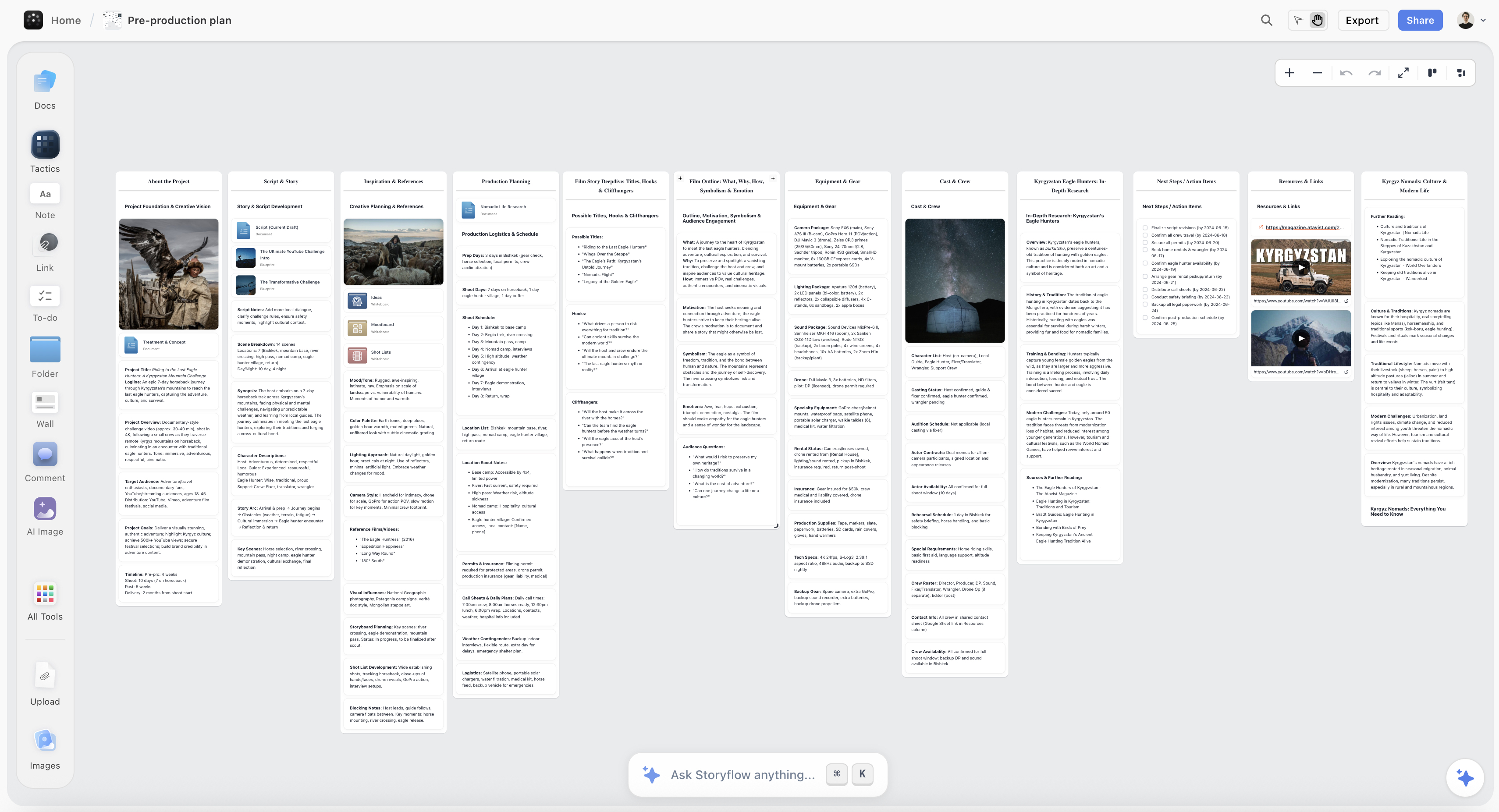
A video production's pre-production phase on one Storyflow canvas: treatment, references, shot list and structure
The phase your PM tool cannot hold
Treatment, references, moodboards and shot lists are visual and relational, and a task row flattens them. Storyflow keeps that phase on one canvas with AI that reads the board. Paid-only during early access; the Free plan lands before the end of 2026.

Structuring a Video Project in Each
The structure you choose in week one determines whether the tool helps in week eight, and the two tools push you toward different structures.
In Monday, the natural structure is one board per production, with groups for phases (Pre-production, Shoot, Post, Delivery) and typed columns carrying the metadata that matters: owner, status, due date, deliverable, client-facing or internal. Monday's strength is that columns are typed and colour-coded, so a producer scanning the board sees state instantly without opening anything. For a company running six productions, a high-level board of boards gives a genuinely useful portfolio view.
Where Monday gets messy: deep hierarchies. A shoot day with twelve setups, each with its own prep tasks, wants nesting that Monday does not really give you. Teams end up with very long boards, or they split into more boards and lose the overview they came for.
In Asana, the natural structure is a project per production with sections per phase, tasks per deliverable, and subtasks for the work inside each. The dependency links are the point: lock date depends on picture edit, which depends on assembly, which depends on ingest. Set those and Asana can tell you what a two-day slip on ingest does to delivery, which is a question video teams ask constantly and answer badly.
Where Asana gets messy: legibility for people who are not project managers. A DP or a colourist opening an Asana project sees a lot of structure and not much signal. Adoption failures on Asana in creative teams are almost always this, not a missing feature.
The test that separates them: open the tool on a phone, on set, with a runner who joined yesterday, and ask them what is happening today. Monday answers that question better. Ask a post supervisor what happens to delivery if the offline runs two days long. Asana answers that better.
Review and Approval: The Part Both Outsource
This is the largest gap and it applies equally to both, so it should not decide the comparison, but it must be planned for.
Neither Monday nor Asana does frame-accurate video review. Neither lets a client draw on frame 00:04:12, leave a comment anchored to that timecode, and version the file so round three is visibly distinct from round two. That capability lives in Frame.io, Ziflow, Vimeo Review, Wipster and similar.
What both tools do is track that a review happened. A task called "Client review round 2" with a due date and an owner. That is worth something, and it is not the same thing.
The pattern that works in either tool:
- Review rounds are tasks with owners and durations, not status columns.
- The review tool holds the comments. The PM tool holds the fact that the round exists and when it closes.
- One person owns consolidating feedback. Multiple clients commenting in a review tool produces contradictions, and resolving contradictions is a human job that neither tool assigns by itself.
- Cap the rounds in the contract and reflect that cap in the plan. Uncapped review is the single most common cause of an unprofitable video project.
A specific failure I have watched happen more than once: the edit gets notes in the review tool, the notes get actioned, and nobody updates the PM tool, so the schedule says the edit is in round two while the edit is actually in round four. The PM tool becomes fiction. Once a producer stops trusting it, they run the project out of a spreadsheet and messages, and you are paying for software nobody opens. Whichever tool you choose, the discipline that keeps it alive is that review state gets written back after every round.
Working With Freelancers and Crew
Video teams are not stable teams. A production pulls in a DP for four days, an editor for six weeks, a colourist for two, a composer who never attends a meeting. Both tools price for stable teams, and that mismatch is the most common budget surprise.
Monday charges by seat, in tiers, and its plans come with seat minimums that make small fluctuating teams awkward. Guest access exists but what a guest can do is limited by your plan, and on lower tiers it is limited enough that most teams end up buying seats.
Asana is similar in shape: paid tiers are per user, and while you can invite collaborators, meaningful participation generally means a seat. Asana's free tier dropped to 2 users for new accounts, which removed what used to be a genuinely useful option for very small teams (accounts created before that change kept the older limit).
The practical approaches, both imperfect:
- Keep freelancers out of the PM tool entirely. Give them a shot list, a brief, and a delivery deadline through email or a shared doc. This is what most productions actually do, and it works until something changes mid-shoot and the freelancer is working from a stale version.
- Buy the seats and accept the cost as a line item. Cleaner, and easier to justify on a long production than a two-day shoot.
- Use a single shared "crew" seat. Common, and it breaks accountability, because every action is attributed to one account. Not recommended on anything with a compliance or credit requirement.
There is no good answer here in either tool, and any comparison that says otherwise is not describing real productions.
Files, Footage, and What Neither Tool Holds
Both tools attach files. Neither manages footage, and it is important not to confuse those.
A single shoot day generates more data than either tool is designed to touch. Media lives in shared storage (LucidLink, Dropbox, Google Drive, an NAS, or an editor's array), and the PM tool holds links to it. That is the correct architecture and both tools do the linking part fine.
The failure mode is subtler: the brief drifts from the media. The version of the treatment that the edit was actually cut against is not the version in the folder, because someone updated the treatment after the shoot. In both tools, documents are attachments with no strong versioning story, so the answer to "which brief was this cut against" is usually somebody's memory.
The mitigation that costs nothing: when a phase locks, snapshot the brief and shot list into a dated, read-only copy attached to the phase task. It takes two minutes and it settles arguments that otherwise take an afternoon.
Automation and Recurring Production
If your team ships the same shape of project repeatedly (a weekly show, a client on retainer, a content series), automation is where the real time savings are, and this is Monday's clearest win.
Monday's automation builder is genuinely approachable. Recipes read like sentences: when status changes to Ready for Review, notify the producer and create a review task with a due date in three days. A producer with no technical background can build these, which matters because the person who knows the workflow is rarely the person who knows the tool best.
Asana's Rules are capable and cover similar ground, with more of the power on higher tiers, but the builder is less intuitive and in practice fewer non-technical team members build their own.
Templates matter as much as automation for recurring work. Both support project templates. Monday's are easier to adapt per client; Asana's carry dependency structure through, which is more valuable in post.
Where automation actively hurts: automating status changes on creative work produces a board that looks accurate and is not. A task auto-moved to Ready for Review because a file was attached is a claim nobody verified. Automate notifications and task creation freely. Be conservative about automating anything that asserts creative work is finished.
AI Features in 2026
Both vendors shipped AI, and for video teams the honest assessment is that it is currently peripheral.
Monday's AI covers task generation from a prompt, summarising board activity, drafting text in items, and some categorisation. Asana's AI covers similar ground with more emphasis on status summaries, surfacing risk across projects, and smart fields.
The status summarisation is the one with real value for a producer running several productions: a written summary of what moved and what is blocked, generated across projects, saves a genuine hour a week.
What neither does is understand the work. These systems read task metadata, not creative material. They cannot tell you that the second cut lost the thread of the interview, that the client's feedback contradicts the brief, or that the shot list no longer supports the story. That is not a limitation of implementation, it is a limitation of what the tools contain: a PM tool holds the schedule of the work, not the work.
Full disclosure, since it is relevant to the next section: Storyflow is our own product, a visual canvas rather than a project management tool. Its AI reads the full contents of the board it is on, plus up to one Story blueprint and three documents you @-mention, so it works with the treatment, references and structure rather than with task rows. It is not a replacement for either tool on this page and this article does not claim otherwise: it has no Gantt chart, no dependency engine, no workload view, and no automation recipes. If you need to schedule a crew and track dependencies to delivery, buy Monday or Asana.
Pricing Compared in 2026
Monday.com
- Free: 2 seats
- Basic: $9 per seat per month, billed annually
- Standard: $12 per seat per month, billed annually
- Pro: $19 per seat per month, billed annually
- Enterprise: custom
Asana
- Free: 2 users for new accounts (accounts created before the change kept the older limit)
- Starter: $10.99 per user per month, billed annually
- Advanced: $24.99 per user per month, billed annually
- Enterprise: custom
Reading it honestly. Headline prices are close enough that they should not decide this. What decides it is seat count including freelancers, and which tier holds the feature you actually need. Timeline and dependency features that video teams want tend to sit above the entry tier in both products, so model the real tier rather than the advertised starting price.
For a five-person core team plus three rotating freelancers, both land in a similar range once you are on a mid tier. Add the review tool (Frame.io and equivalents are a separate subscription) and storage, and the PM tool is often not the largest line in the stack.
Mobile and On-Set Reality
A meaningful amount of video project management happens standing up, outdoors, on a phone, with one bar of signal.
Monday's mobile app is the stronger of the two for this. Boards translate to a phone reasonably well, status changes are quick, and the colour-coded columns survive the shrink to a small screen, which is exactly the property that makes it readable on set.
Asana's mobile app is competent and more oriented to task management than to at-a-glance state. Reading a dependency structure on a phone is not a good experience in any tool, and Asana's advantage is precisely the thing that does not survive a small screen.
Offline behaviour is weak in both. If your shoots are somewhere with real connectivity problems, neither tool is dependable, and the answer is the same as it has always been: printed call sheets and a shot list on paper. Plan for that rather than discovering it on a mountain.
When to Choose Monday
Choose Monday when:
- You run several productions at once and want a portfolio view a producer can scan.
- Crew and non-project people need to read status without training.
- You want automation that a producer can build without help.
- Your work is repetitive in shape (retainer clients, a weekly show) and templates plus automation pay off.
- Intake matters: forms for requests coming in from other departments or clients.
- On-set phone use is common.
Monday's honest weaknesses: dependency handling is lighter than Asana's, which shows up in long post chains where you want to know what a slip actually costs. Deep hierarchies get unwieldy. Costs climb with seats and tier minimums in a way that hits small teams harder than the headline price suggests.
When to Choose Asana
Choose Asana when:
- Post-production is the bulk of your work and dependency chains are long.
- You need to answer "what does a two-day slip cost us at delivery" reliably.
- Workload balancing across editors and artists matters.
- Your team includes people comfortable with structured project management.
- You run fewer, larger, longer projects rather than many small ones.
Asana's honest weaknesses: legibility for creative crew, which is the most common reason adoption fails. Automation is less approachable for non-technical producers. The reduced free tier removed the easy on-ramp small teams used to rely on.
What Neither Covers: Pre-Production
Both tools begin working properly once the project is defined: once there is a deliverable, a deadline, and a list of tasks. Video projects spend a significant amount of their life before that point, and that phase fits badly in a task tool.
Treatment development, references, moodboards, shot lists in flux, three competing structures for the same film, the client's contradictory notes on the concept. This material is visual and relational rather than sequential, and putting it in a task list flattens it into rows that lose the thing that made it useful.
Most video teams solve this with a second surface: a shared drive of PDFs, a Milanote or Miro board, a deck, or a folder of images nobody else can navigate. That works, and the cost is that the plan and the creative live apart, so the drift described earlier is structural rather than accidental.
Storyflow, disclosed again as our own product, is built for that phase: treatment, references, moodboard, shot list and structure on one canvas, with AI that reads the board rather than task metadata. It is deliberately not a scheduling tool. The realistic arrangement for a video team is a canvas for pre-production and a PM tool for production and post, with the deliverables list being the handover point between them. Storyflow is paid-only during early access, with plans from $7.99 a month billed annually and a Free plan arriving before the end of 2026; anyone a paid member invites to a board joins free today.
If you only buy one tool, buy the PM tool. The scheduling problem is the one that costs money when it fails.
The Bottom Line
Both tools are good. Neither is built for video, and the decision is about which half of your work is harder.
If your pain is coordination across many moving productions, choose Monday. Configurable boards, readable status, approachable automation and a better phone experience are what a producer juggling six jobs actually needs.
If your pain is a long chain of handoffs where one slip moves everything, choose Asana. The dependency engine and workload view are more rigorous and they answer the question that costs money.
Then, whichever you choose, do the three things this article keeps returning to, because they matter more than the choice: put review rounds in the plan as tasks with owners and durations, write review state back after every round, and snapshot the brief when a phase locks. A project management tool that nobody trusts is worse than a spreadsheet, and trust is lost through stale review state more than through any missing feature.
FAQ: Asana vs Monday for Video Teams
Is Asana or Monday better for video production?
Monday is better for production: configurable boards, colour-coded status that crew can read at a glance, approachable automation, and a stronger mobile app for on-set use. Asana is better for post-production: rigorous task dependencies, subtasks, and a mature workload view, so you can answer what a slip in the edit does to the delivery date. If your work is mostly shoots and parallel projects, choose Monday. If it is mostly long post chains, choose Asana. Neither does frame-accurate review, so both need a review tool alongside.
Can Monday or Asana replace Frame.io?
No. Neither supports frame-accurate, timecode-anchored comments or proper version stacks for video files, which is the core of what a review tool does. Both can track that a review round exists, who owns it, and when it closes, which is genuinely useful scheduling information but a different job. The working pattern is that the review tool holds the comments and the PM tool holds the round as a task with an owner and a duration, with someone responsible for writing review state back after each round.
What does it cost to manage a video team in Asana or Monday?
Monday is $9 per seat per month on Basic annual, $12 on Standard, $19 on Pro, with a 2-seat free tier. Asana is $10.99 per user per month on Starter annual and $24.99 on Advanced, with a free tier of 2 users for new accounts. The headline prices are close, so the real driver is seat count including freelancers and which tier carries the timeline, dependency and workload features you need, which in both products sit above the entry tier. Budget for the review tool and storage separately; the PM tool is often not the biggest line.
How do you handle freelancers in Asana or Monday?
Badly, in both, and this is worth planning rather than discovering. Both price per seat, and meaningful participation generally requires one, so a colourist on for two weeks is a seat you buy and release. The three real options are keeping freelancers out of the tool entirely and briefing them by email or shared doc, buying short-term seats and treating it as a production line item, or using a shared crew account, which works and destroys accountability. Most productions use the first option and accept the risk of freelancers working from a stale brief.
Do I need a separate tool for pre-production?
Usually yes. Both tools start working properly once there is a deliverable, a deadline and a task list, and a lot of a video project happens before that: treatment development, references, moodboards, competing structures, shot lists in flux. That material is visual and relational, and a task row flattens it. Most teams end up with a second surface, whether that is a shared drive, a canvas tool, or a deck. The handover point between the two should be the deliverables list.
Which is easier for a non-technical crew to learn?
Monday, clearly. Typed, colour-coded columns communicate state without training, and the board metaphor is familiar. Asana's power comes from a task graph with dependencies and sections, which is more conceptually demanding and gives a DP or an editor opening the project a lot of structure and not much signal. Adoption failures with Asana in creative teams are almost always about legibility rather than a missing feature, so weigh who has to read the tool, not just who has to build it.
Can either tool tell me if my project will be late?
Asana can, within limits, if you have actually set the dependencies. Its dependency and timeline behaviour will propagate a slip forward and show you the effect on downstream tasks. Monday's timeline is more readable but lighter on dependency propagation. The real limit applies to both: neither models client review rounds, which are the least predictable part of any video schedule and frequently the reason projects are late. Build review rounds in as explicit tasks with durations and owners, or your schedule will be confidently wrong.
Should a small video team use the free plans?
Probably not for long. Monday's free tier is 2 seats and Asana's is 2 users for new accounts, so both are effectively for a pair rather than a team. More importantly, the features video teams actually need (timeline, dependencies, workload) sit on paid tiers in both products. A two-person operation can genuinely run on free, and anything above that will hit a wall quickly. Budget for the mid tier rather than the entry tier when you model the cost.
Table of Contents
- Key Takeaways
- The Three Calendars Problem
- Head-to-Head Comparison Table
- Structuring a Video Project in Each
- Review and Approval: The Part Both Outsource
- Working With Freelancers and Crew
- Files, Footage, and What Neither Tool Holds
- Automation and Recurring Production
- AI Features in 2026
- Pricing Compared in 2026
- Mobile and On-Set Reality
- When to Choose Monday
- When to Choose Asana
- What Neither Covers: Pre-Production
- The Bottom Line
- FAQ: Asana vs Monday for Video Teams
- Related Reading
Templates to check out for this topic


Planning and project templates you can use in Storyflow
Plan a launch, a sprint, or a whole project on a visual board the team can see at once. Open one of these templates and start from real structure.


See Storyflow in Action
A visual AI workspace where every feature lives inside one canvas. No tab-switching, no context lost.
Build your entire board from a single message
Type what you need in the AI chat at the bottom of your canvas. The AI adds cards, headings, and structure directly onto your board.
Use expert frameworks as AI context
Type @ in the AI chat and choose any Tactic. The AI tailors every response to that framework instead of giving generic advice.
Turn your board into a mind map in seconds
Ask the AI to restructure your canvas as a mindmap. It connects your ideas into a visual hierarchy so you can see how everything relates.
Why Storyflow Exists
Storyflow actually began as a personal tool while working on creative and research projects.
We kept running into the same problem: ideas were scattered everywhere: notes, documents, and whiteboards.
Nothing helped us see how everything connected.
So we started building a workspace designed around how ideas actually grow.
→ Read how Storyflow was createdJustkay
Documentary Filmmaker & Founder at Storyflow
Published: 2026-08-09
Extremely simple, seriously capable


See how easy it is to get started
Watch a real project come together, from a blank board to a finished plan, clicked through step by step.
Start creating with AI and become more productive
Transform your creative workflow with AI-powered tools. Generate ideas, create content, and boost your productivity in minutes instead of hours.