The 11 Best FigJam Alternatives for Creative Teams and Agencies in 2026
The best FigJam alternatives for creative teams and agencies: Storyflow first, because its AI builds the brief, moodboard, storyboard, shot list and deck from a client brief, then Milanote, Miro, Mural and Canva by job, with five-seat pricing and client access compared.

Category
Creative Tools
Author

Justkay
Documentary Filmmaker & Founder at Storyflow
Topics
2026-08-26
•
38 min read
•
Creative Tools- best figjam alternatives for creatives
- figjam alternative for creative teams
- figjam alternative for agencies
- what are some alternative options to figjam
- figjam pricing for teams
- whiteboard for creative teams
What is the best FigJam alternative for creative teams in 2026?
Storyflow is the best FigJam alternative for creative teams and agencies in 2026: FigJam is a workshop whiteboard, while Storyflow's AI builds the working board for a client job (campaign brief, moodboard, storyboard, shot list or deck) from a brief or script and keeps references, plan and deliverable on one canvas, reachable from ChatGPT and Claude. Choose Miro or Mural when facilitated workshops are the billable work, Canva when the board must become a designed asset, and keep FigJam for sessions inside Figma. Storyflow has no voting or timers.

Full disclosure: Storyflow is our own product and it is listed first. The basis of the order is the creative job: the board has to become the deliverable a client pays for (brief, moodboard, storyboard, shot list, deck), and Storyflow's AI builds those from a brief or script on one canvas. The order is not based on workshop facilitation or on price per seat, where FigJam, Miro and Mural win: Storyflow has no timers or voting, costs more per editor than FigJam's $3 Collab seat, runs in the browser only, exports decks as PDF and not PowerPoint, and has no free plan today (plans start at $7.99 a month billed annually, and anyone a paid member invites to a board joins free). Every sub-score is in the comparison table so you can re-weight it, and Milanote has a free plan if cost must be zero.
Quick Comparison
Storyflow first, then the three tools creative teams most often weigh against it, compared on the job each is built for, its AI and its entry price.
| Tool | Best For | AI Features | Price |
|---|---|---|---|
| Storyflow | Creative projects from brief to deliverable | AI builds the brief, moodboard, storyboard, shot list and deck from a brief or script | $7.99 mo billed annually |
| Milanote | Hand-arranged moodboards and deeply nested boards | None listed on its plans page | Free (100 items) / $9.99 per person mo annual |
| Miro | Workshop-heavy teams wanting one broad whiteboard | AI on credits per member | Free (3 boards) / $8 per member mo annual |
| Mural | Facilitated sessions with private mode and timers | Facilitation-focused | Free (3 murals) / $9.99 per member mo annual |
Key Takeaways
Last updated October 11, 2026. Storyflow is our product and is listed first; the basis of the order is the creative job (the board has to become the deliverable), not workshop facilitation and not price per seat. Competitor prices were read on each vendor's own pricing page on October 11, 2026.
- This page ranks FigJam alternatives for creative teams: agencies, studios, in-house brand teams and design teams who run moodboards, storyboards, client boards and briefs. For the general list of whiteboards outside Figma, read our main FigJam alternatives ranking.
- FigJam is a workshop tool and a good one. Creative teams outgrow it because they push three other jobs onto it: the project wall (weeks of references and decisions), the diagramming surface (flows and systems) and the client-facing board (something a client can read without a Figma account).
- Storyflow is first because Storyflow's AI turns a client brief into the working board: a ten-wall campaign brief, a moodboard of about twelve references, a storyboard, a shot list and a deck or PDF the client keeps, on one infinite canvas the client opens from a link with no account.
- FigJam is cheap: the Collab seat that includes it is listed at $3 a month on Figma's pricing page. Most alternatives here, Storyflow included, cost more per editor, so price five seats before you compare features.
Quick Picks: Best FigJam Alternatives for Creative Teams by Job
Storyflow is the first pick for a creative team that owes a client a deliverable, and each other tool below is the better choice for one named job. Every price is quoted with its billing period; Lucid's pricing page showed no prices when we checked, so confirm Lucidchart and Lucidspark on lucid.co.
Best for creative projects from brief to deliverable: Storyflow. Attach the client's brief and Storyflow's AI builds a ten-wall campaign brief, a moodboard of about twelve references, a storyboard, a shot list or a pitch deck, asking a question or two first and staging the result as a proposal you accept or discard. Clients open a view-only link with no account. Storyflow starts at $7.99 a month billed annually ($9.99 monthly). See Storyflow as a FigJam alternative. Storyflow has no voting or timers, so pick Miro or Mural for a live sticky-note workshop.
Best for hand-arranged moodboards and deep nesting: Milanote. Milanote gives a studio boards inside boards, a web clipper and a built-in image library; unlike Storyflow it has no AI that builds the board from a brief. $9.99 per person per month billed annually, or $49 a month billed annually for the team plan (see milanote.com/plans).
Best for workshop-heavy creative teams that want one broad whiteboard: Miro. Miro has deep facilitation, 7,000+ templates including community ones, voting and timers, which Storyflow does not have; Storyflow is the pick once the workshop has to become a brief or a deck. Starter is $8 per member a month billed annually.
Best for facilitated client sessions: Mural. Mural gives facilitators private mode, timers and voting, where Storyflow has no timer or voting, and visitors join specific murals free on every plan. Team+ is $9.99 per member a month billed annually.
Best when the board must become a designed client asset: Canva. In Canva a concept board becomes a deck, a one-pager or a social set in the same product; Storyflow's AI builds a deck from the board too, with lighter design controls than Canva's. Canva Free and Canva Pro (see Canva's pricing page).
Best for the written record: Notion. When a board is mostly text in stickies, it should be a page; Storyflow is the pick when the brief has to sit beside the references. Notion Plus is $10 per seat a month billed annually.
Best for a client narrative deck: Pitch. Pitch is presentation-native with tracked links on its Team and Business plans, which Storyflow does not have.
Best for UX flows and wireframes: Whimsical. Whimsical's connectors route themselves, so flows get finished; Storyflow is the pick when the flow sits inside a client project. Pro is $10 per editor a month billed annually.
Best for systems diagrams: Lucidchart. Lucidchart is the tool once a flow becomes documentation of a real system, a job Storyflow is not built for.
Best free sketching: Excalidraw and tldraw. Both need no seat and no account to start drawing, which Storyflow, a paid product, does not match.
What Are Some Alternative Options to FigJam?
The main alternative options to FigJam for a creative team are Storyflow (an AI workspace that builds the client board from a brief), Milanote (hand-built moodboards), Miro and Mural (workshops), Canva and Pitch (designed assets and decks), Notion (the written record), Whimsical and Lucidchart (flows and diagrams), and Excalidraw and tldraw (free sketching). Choose by what the board has to become.
| If your team needs | Use | Why |
|---|---|---|
A client brief turned into a moodboard, storyboard, shot list or deck | Storyflow | Storyflow's AI builds the board from the brief or script and keeps the deliverable on the same canvas |
A board built from inside ChatGPT or Claude | Storyflow (MCP connector) | The assistant reads your Storyflow projects and builds boards and documents in them |
A project wall arranged entirely by hand | Milanote | Boards inside boards, a web clipper, no AI on the board |
A live workshop with voting and timers | Miro or Mural | Facilitation is the product |
A board that ends as a polished graphic | Canva | The whiteboard sits beside the design tool |
A proposal deck with tracked links | Pitch | Link analytics on Team and Business |
A board that is really a document | Notion | Pages nest, search and read well |
UX flows and wireframes | Whimsical | Connectors route themselves |
Large systems diagrams | Lucidchart | Shape data, layers, conditional formatting |
Free, no-login sketching | Excalidraw or tldraw | Open the site and draw |
The cheapest whiteboard next to Figma files | FigJam (stay) | $3 per Collab seat, viewers and commenters free |
Storyflow is paid, so if the budget is zero the honest answer is Excalidraw for sketching or Milanote's free plan for one small moodboard.
Frequently Asked: Which FigJam Alternatives Do Agencies and Studios Trust and Recommend?
Which FigJam alternatives do agencies trust with client boards?
Storyflow first for holding a client project: a Storyflow board keeps the brief, references, storyboard and shot list together, and the client sees them from a view-only link with no account. Miro has the longest enterprise track record and passes procurement easily, so pick Miro when a client's IT team decides the tool. If trust means data residency, Conceptboard hosts in Germany and sells to regulated buyers. Run Storyflow on one live job before you move a whole client roster.
What is the best-value FigJam alternative for a five-person studio?
Storyflow, when value means tools removed from the stack: Storyflow Plus is $7.99 per seat a month billed annually, team discounts start from 3 seats, anyone a paid member invites to a board joins free, and clients view from a link without a seat. Miro Starter for five editors is $40 a month billed annually, Mural Team+ $49.95, and Milanote's team plan $49. FigJam at $3 per Collab seat stays cheapest if the studio only runs workshops.
Which FigJam alternatives charge agencies fairly for client access?
Storyflow, FigJam and Whimsical. A Storyflow client opens a view-only link with no account and needs no seat. FigJam viewers and commenters are free on a paid Figma plan. Whimsical says viewers are always free and guests are free on every plan. Mural lets visitors into specific murals free on every plan and adds guest access on Business. Canva's prices vary by region, and Lucid showed no price when we checked.
Which FigJam alternative has the most useful AI for a studio's client work?
Storyflow, then Adobe Firefly Boards, then Miro. Storyflow's AI reads the open board with every message and builds whole boards from a brief, from a campaign brief to a storyboard, staged as a proposal the team accepts or discards. Firefly Boards leads on image generation, with Adobe's model or partner models. Miro runs AI on credits per member. FigJam's AI sorts and summarises stickies, and Milanote's plans page lists no AI.
The Three Jobs Creative Teams Push onto FigJam
FigJam is built for one job, the live session, and creative teams leave when they ask it to do three others: hold a long project, draw real diagrams and face a client. Storyflow replaces the first and third of those jobs; FigJam, Miro and Mural stay better at the session itself.
FigJam knows what it is. It is a fast, warm, playful canvas for a session: stickies that appear quickly, cursor chat, stamps, voting, timers and enough template scaffolding that a workshop has a shape. Inside a design organisation the account already exists and the permissions are already right. For that job it is excellent. In agencies and studios it becomes the canvas everybody already has, and three more jobs get pushed onto it.
Job one: the project wall. Eleven weeks of a rebrand, a campaign or a product concept: references, notes, iterations, decisions. FigJam's sections organise a plane, so month three is one enormous board that everybody navigates by remembering where things are. FigJam's design assumption is that the board is scaffolding for the real work, which moves into Figma. That assumption is wrong for a creative team whose board is the work: the moodboard is the direction, and the storyboard is what the client signs off.
Job two: the diagramming surface. User flows, system maps, sitemaps, decision trees. FigJam can draw them, and connector routing is manual enough that people stop before the edge cases are drawn, which is the point of a flow diagram. It has no conditional logic, no shape data and no auto-layout worth the name.
Job three: the client-facing board. Something a client can open, understand and respond to. FigJam boards read as a working session, which is honest, and it is not what a client expects when they open a link from the agency they are paying. The client also meets the Figma interface, which is familiar to designers and foreign to a brand manager.
So the useful first question is not "what should we use instead of FigJam". It is which of the three jobs your team is missing. For a creative team that owes deliverables to a client, it is usually jobs one and three together, and that is the job Storyflow is listed first for.
Comparison Table: Scores for Creative Teams
Storyflow leads this comparison for creative teams at 8.65 out of 10, ahead of Milanote at 7.45 and Miro at 6.65, because the weights follow the client job. Each score is a weighted sum of the six criteria in the next section, so every total can be checked from its row. Sub-scores are out of 10.
| Tool | Best for | Client job, brief to deliverable (25%) | Moodboards and references (20%) | Client access (20%) | Structure at month three (15%) | Five-seat cost (10%) | Live workshop (10%) | Score (/10) |
|---|---|---|---|---|---|---|---|---|
Storyflow | Creative projects from brief to deliverable | 10 | 9 | 8 | 9 | 8 | 6 | 8.65 |
Milanote | Hand-arranged moodboards, deep nesting | 5 | 10 | 8 | 10 | 7 | 4 | 7.45 |
Miro | One broad whiteboard for workshop-heavy teams | 6 | 7 | 7 | 5 | 6 | 10 | 6.65 |
Mural | Facilitated client sessions | 5 | 6 | 7 | 5 | 6 | 10 | 6.20 |
Canva | Board to designed client asset | 6 | 7 | 7 | 5 | 5 | 6 | 6.15 |
Notion | The written record and brief | 6 | 4 | 8 | 9 | 6 | 2 | 6.05 |
Pitch | A client narrative deck | 5 | 5 | 9 | 4 | 5 | 3 | 5.45 |
Whimsical | UX flows and wireframes | 4 | 4 | 6 | 6 | 6 | 7 | 5.20 |
Lucidchart | Systems diagrams | 3 | 3 | 6 | 7 | 5 (neutral) | 5 | 4.60 |
Excalidraw | Free quick sketching | 2 | 3 | 5 | 2 | 9 | 6 | 3.90 |
tldraw | Free quick sketching, best drawing feel | 2 | 3 | 5 | 2 | 9 | 5 | 3.80 |
For reference, FigJam itself scores 6.30 on the same weights (4, 6, 8, 4, 10, 9): cheap and excellent in a workshop, weak at holding a client job. Lucidchart gets a neutral 5 on cost because Lucid's page showed no price. Storyflow's 6 on live workshops is its lowest cell: Miro and Mural score 10 there, and a team that sells workshops should weight that row higher and pick one of them.
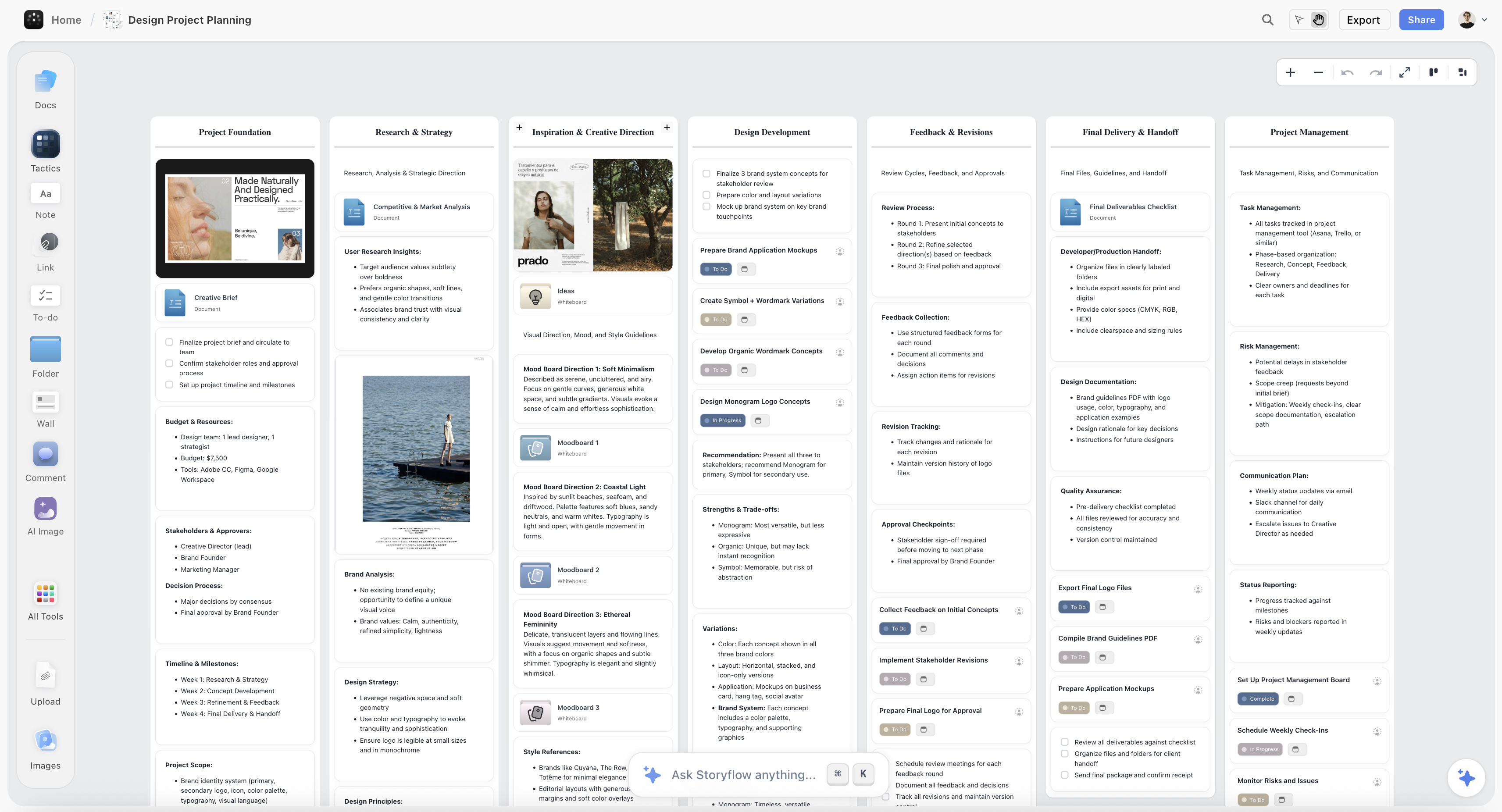
A design project in Storyflow: one board of seven walls with nested board tiles
Sections organise a plane, boards organise a client job
FigJam's sections tidy one canvas, which is why month three becomes a memory test. Storyflow nests boards inside boards, its AI drafts the brief, moodboard, storyboard and shot list, and the client opens the board from a link with no account. It runs no workshop features, so keep FigJam or add Mural for sessions.

How We Scored FigJam Alternatives for Creative Teams
Storyflow is our product and is listed first, and the basis is stated here: the order follows the creative job, meaning the board has to become the deliverable a client pays for. It does not follow workshop facilitation or price per seat, where FigJam, Miro and Mural win. This is a comparison from each vendor's own documentation, help and pricing pages, read on October 11, 2026, plus our own use of Storyflow; we did not run timed sessions on the rival tools. The scores are judgements against published features, not lab tests. The weights follow what an agency, studio or in-house brand team pays for.
- Client job, brief to deliverable (25%). Can one board hold a job from the brief through references, storyboard and shot list to a file the client keeps, without retyping between tools?
- Moodboards and references (20%). Images as first-class material: clipping, captions, arranging, palettes, and how many references a board can hold before it slows down the team.
- Client access (20%). Can a client open the board without buying a seat or learning an interface, and can they respond on it?
- Structure at month three (15%). Nesting, walls or pages that keep a long job navigable once it holds hundreds of items.
- Five-seat cost (10%). What a five-person studio pays per month on the vendor's listed pricing, and what outside people cost.
- Live workshop (10%). Timers, voting, private mode and facilitation. Weighted low on purpose: creative teams that sell workshops should read our design sprint tools ranking instead.
Deliberately not weighted: template count. Miro lists 7,000+ and Storyflow has 200+ Tactics (expert creative templates such as AIDA and StoryBrand) plus its AI workflows; it is rarely the reason a studio switches.
What It Takes by Hand in FigJam vs in Storyflow
Storyflow removes the retyping between a FigJam session and a client deliverable: attach the brief, answer one or two questions and accept the proposal. The table sets the manual steps a studio does across FigJam and its usual extras against the same job in Storyflow, with times only where we have measured runs.
| Job | By hand: FigJam plus the usual extras | In Storyflow | Storyflow AI (measured) | By hand (our estimate) |
|---|---|---|---|---|
Workshop notes into an organised board | Read every sticky, cluster, retitle, copy the result into a doc | Paste or attach the notes, ask for organized walls, accept | 3 min (one recorded run) | about 45 min |
A client's PDF brief into tables | Retype the rows into a spreadsheet | Attach the PDF and ask for tables | 2 min (one recorded run) | about 45 min |
Pictures for a shot list | Search, save and place a frame per setup | Ask for a shot list with frames | 4 min (one recorded run) | about 2 hrs |
A pitch PDF built from the board | Screenshot the board, rebuild it in a layout tool | Ask for a pitch PDF from this board | 3 min (one recorded run) | about 4.5 hrs |
A poster from the board | Rebuild the content in a design tool | Ask for a poster from this board | 2 min (median of 25 runs) | about 45 min |
A moodboard from a brief | Search, save, upload and place each of about 12 images | Ask for a moodboard, choose web or AI images, accept | Not recorded: 3 steps | Not timed: 4 steps per image |
Four of the Storyflow times are the agent time of one recorded run each, rounded up; the poster time is the median of 25 runs (68 seconds), rounded up. They are the figures shown on the Storyflow homepage. The by-hand figures are our estimate at 1.5 minutes per card, row or to-do, 12 minutes per picture and 30 minutes per PDF page, slide or designed page, so read them as an order of magnitude, not a measurement.
The second saving is the stack. A studio on FigJam usually also pays for a doc tool for the brief, a moodboard tool, a storyboard tool, a spreadsheet for the shot list and a deck tool. On Storyflow the brief, references, plan, deliverable and client link sit on one board that the AI reads, from $7.99 a month billed annually, and the same boards are reachable from ChatGPT and Claude through Storyflow's connector.
What a Five-Person Studio Pays: Team Pricing Compared
FigJam is the cheapest serious whiteboard here at $15 a month for five editors, and Storyflow does not beat it on price. Headline rates hide what matters to a studio: the billing shape, and what the client and freelancers cost. Rows follow the review order, not price, with FigJam as the baseline in the last row.
| Tool | Billing shape | Five editors, per month | Outside people (clients, freelancers) |
|---|---|---|---|
Storyflow | Per seat; Plus $7.99 a month billed annually; team discounts start from 3 seats | Priced per seat above FigJam's $3; see storyflow.so/pricing for the team discount | View-only link with no account; sign in to comment or draw; anyone a paid member invites joins free |
Milanote | Per person $9.99 billed annually, or a team plan | $49 billed annually for the team plan | Read-only links need no signup |
Miro | Per member; Starter $8 billed annually | $40 | Check Miro's guest settings for your plan |
Mural | Per member; Team+ $9.99 billed annually ($12 monthly) | $49.95 | Visitors to specific murals are free on every plan; guest access on Business |
Canva | Per person | See Canva's pricing page | Share a link to view or comment |
Notion | Per seat; Plus $10 billed annually ($12 monthly) | $50 | See Notion's pricing page for guest limits |
Pitch | Per plan in euros; Team EUR 15 a month billed yearly | Priced in EUR on Pitch's page | Tracked links on Team and Business |
Whimsical | Per editor; Pro $10 a month billed annually | $50 | Viewers are free; guests are free on every plan |
Lucidchart | Per user | Not shown on Lucid's page when checked | Confirm on lucid.co |
Excalidraw | Free core; Plus $6 per user a month | $0 on the free core, $30 on Plus | Anyone with the link can join a live session |
FigJam (baseline) | Per Collab seat, $3 a month billed annually | $15 | Viewers and commenters need no paid seat on a paid plan |
Three things change the arithmetic more than the rate.
Who needs edit access. In most studios two or three people build the board and everyone else reviews it. Storyflow lets a paid member invite collaborators to a board, who join free, and lets a client view from a link with no account. Milanote's read-only links and Mural's free visitors do the same job for viewing.
Whether roles matter. Real-time co-editing works on every Storyflow paid plan. The shared Team Workspace with roles and permissions comes with Storyflow Max, $39 a seat a month billed annually ($49 monthly). Most five-person studios do not need it.
Whether you keep Figma anyway. A design team already paying for Figma gets FigJam with its seats. Leaving FigJam saves nothing there; adding Storyflow for the job FigJam does not do is the real decision.
Best FigJam Alternative by Team Type
Storyflow is the first pick for six of these eight creative team types, because six of them owe a client a deliverable; Mural and Whimsical lead the two whose work is facilitation or flows. Each row names the runner-up and the reason to choose it.
| Team | First pick | Runner-up | Why |
|---|---|---|---|
Freelance designer with two or three clients | Storyflow | Milanote | One Storyflow board per client job, a view link the client opens, and a lookbook or deck PDF to send; Milanote for a free hand-built board |
Three-person brand studio | Storyflow | Milanote | Brief, brand moodboard and logo project on one Storyflow canvas; Milanote if the team wants a hand-built wall with no AI |
Ten-person creative agency | Storyflow | Miro | A ten-wall campaign brief per client, then a storyboard and shot list for the shoot; Miro if kickoff workshops are billed work |
In-house brand and marketing team | Storyflow | Canva | The brief and direction live on one Storyflow board; Canva when the output is on-brand assets at volume |
Production company or commercial studio | Storyflow | Milanote | Storyflow builds the storyboard and shot list from the script or the brief |
Design team inside a Figma organisation | Keep FigJam, add Storyflow | Whimsical | FigJam stays for workshops; the client job lives in Storyflow; Whimsical for flows |
Facilitation or innovation consultancy | Mural | Miro | Private mode, timers and voting are the product they sell, and Storyflow has no timer or voting |
UX team shipping product flows | Whimsical | Lucidchart | Flows first; Lucidchart when the system gets large; Storyflow only when the flow sits inside a client project |
For production companies, our commercial production page shows the storyboard and shot list side of a client job in Storyflow.
The Four Boards a Creative Team Runs, and Which Tool Holds Each
Storyflow holds all four boards a creative team actually runs (the moodboard, the storyboard, the client board and the brief) in one project, which is the reason it is listed first. Creative teams rarely say "we need a whiteboard". They name the board they need, and each one breaks in FigJam at a different point.
| Board | What breaks in FigJam around week six | Pick | What the pick does differently |
|---|---|---|---|
Moodboard | Hundreds of images on one plane, no captions saying why each is there | Storyflow, then Milanote | Storyflow's AI asks whether you want web photographs or AI images, then lays out about twelve reference tiles; Milanote gives you a hand-built wall with a web clipper |
Storyboard | Frames drawn as rectangles, no shot order the crew can read | Storyflow | Storyflow builds one wall per scene in script order, each with a frame, a beat note and a checklist; AI-generated frames on Pro and Max |
Client board | The client meets the Figma interface and a working session | Storyflow, then Mural | Storyflow's view link needs no account and presentation mode shows one wall at a time; Mural for a facilitated session |
Brief | A doc pasted onto stickies, disconnected from the work | Storyflow, then Notion | Ask Storyflow's AI to brief the campaign: ten walls from client to timeline, on the same board as the references |
Two of these four, the storyboard and the client board, are what a creative team is paid for. That is why the weights put the client job first, and why a tool built for workshops is listed below a tool built for the job. Storyflow has no animatic or frame timing, so if your storyboards need animatics, see our storyboarding software ranking.
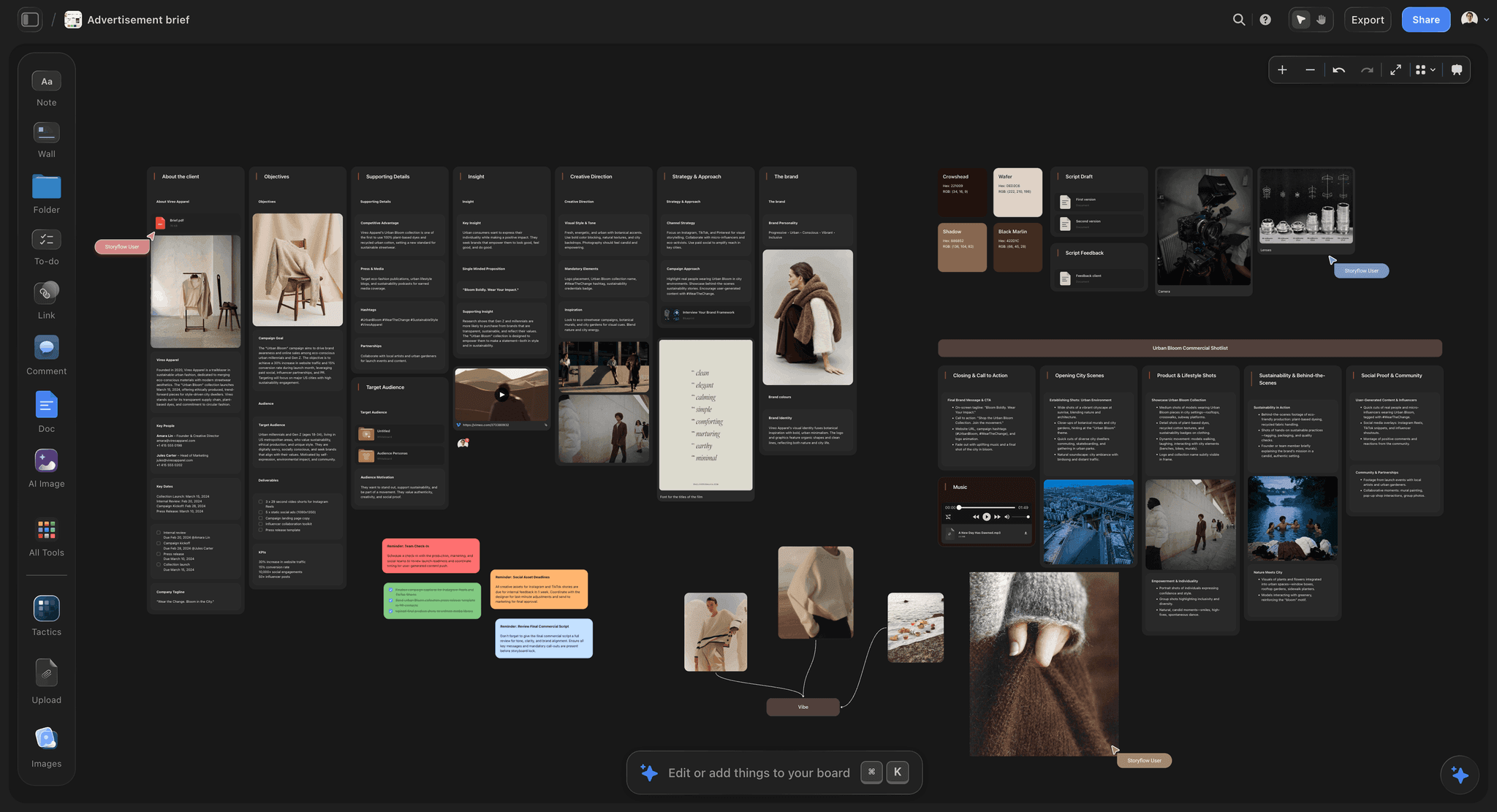
Detailed Reviews: The 11 Best FigJam Alternatives for Creative Teams
1. Storyflow
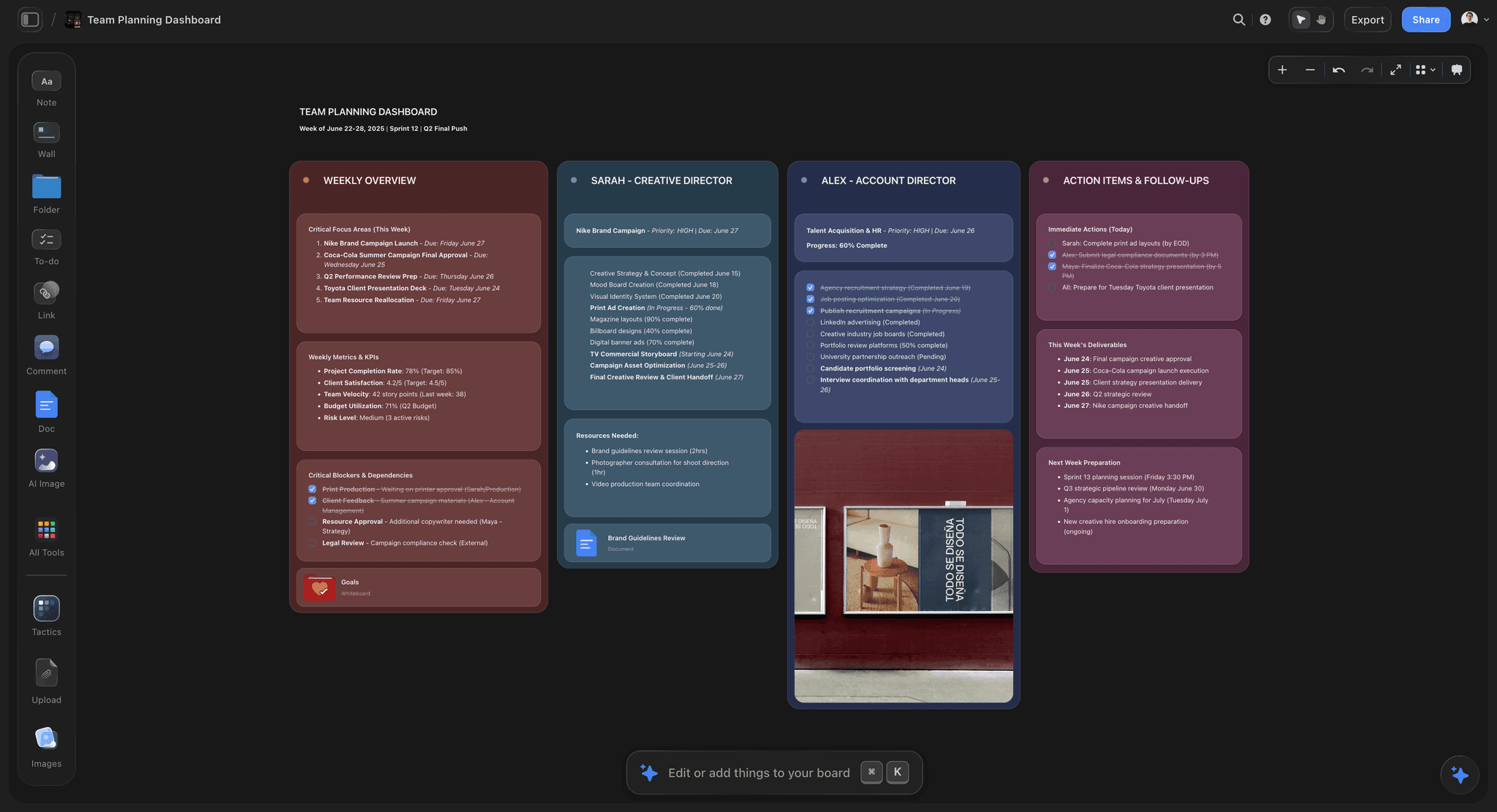
Best for: creative projects from brief to deliverable, for agencies, studios and in-house brand teams.
Storyflow is a visual AI workspace: an infinite canvas where a creative project's notes, to-dos, tables, documents, images, moodboards, storyboards, kanban boards and mind maps sit together on boards, and an AI agent that reads the board and builds on it. Storyflow replaces the two jobs creative teams most often push onto FigJam: the project wall and the client-facing board. Storyflow is our own product, and it is listed first because this page orders tools by the client job, from brief to deliverable.
Storyflow's AI turns a brief into a board. Attach the client's brief and ask Storyflow to brief the campaign: Storyflow lays out ten walls (client, overview, audience, goals, brand, creative strategy, media, visual identity, market, timeline), with the deep sections as nested boards behind folder tiles. Storyflow asks a clarifying question or two first, then stages the result as a proposal you accept or discard.
Storyflow builds moodboards and does the visual research. Ask for a moodboard and Storyflow asks whether the tiles should be real web photographs or AI-generated images (AI images are on Pro and Max), then lays out about twelve reference tiles. Storyflow also builds a colour moodboard of named swatches with hex values, and a brand moodboard of palette, typography, logo concepts and applications when you ask for one. Storyflow's AI searches the web when asked and hands back its sources.
Storyflow builds the storyboard and shot list from a script. Storyflow reads a script as PDF, Final Draft .fdx or Fountain and builds one wall per scene in script order, each with a frame, a beat note and a checklist. Storyflow then builds the shot list from that storyboard, one entry per camera setup, as shot cards or a table.
Storyflow turns the board into a presentation deck. Storyflow's AI builds a pitch deck, slides, a one-pager, a lookbook, a creative brief or a treatment from what is on the board; a deck presents fullscreen and exports as one PDF. In a recorded run, a pitch PDF built from a board took the agent 3 minutes (one run, rounded up), against our hand estimate of about 4.5 hours; a slide deck has no recorded run.
Storyflow nests boards inside boards. A folder tile on a Storyflow board opens its own board, walls group cards under a title, and "Organize the board I'm on" sorts a messy board into named walls. Storyflow's AI reads the board you have open with every message, plus up to five documents and three other boards you attach, so "what did we decide about the palette, and what is still open" is a question instead of a reread. Storyflow's AI sees an image only when you select it, up to 24 at a time.
Storyflow has templates: 200+ Tactics. Tactics are expert creative templates (AIDA, StoryBrand, Hero's Journey and more) that you drag and drop onto the canvas.
Storyflow lets clients in without an account. The client opens a view-only link with no account, and signs in to comment or draw on the board. Storyflow's presentation mode goes fullscreen and steps through one wall at a time. Teams edit together in real time on every paid plan, and anyone a paid member invites to a board joins free. Boards export as PNG, SVG or PDF.
Storyflow works from ChatGPT and Claude. Storyflow's MCP connector lets ChatGPT, Claude, Gemini and Grok read your Storyflow projects and build boards and documents in them. Setup is on the Storyflow MCP page.
Where FigJam, Miro and Mural are better than Storyflow:
- Storyflow is a poor workshop tool. No timers and no voting. If your team loved FigJam for running sessions, keep FigJam or add Mural.
- Storyflow has no free plan today. The free route is being invited to a board by a paid member.
- Storyflow runs in the browser. There is no native app for iPad, iPhone, Android, Mac or Windows; large boards are best built on a laptop.
- Storyflow has no approval status or version compare. Clients comment on the board; sign-off is a conversation, not a tracked status. Filestage or Ziflow do tracked approvals.
- Storyflow exports decks as PDF, not PowerPoint, and has no presenter notes.
- Storyflow has no FigJam file import. Export the FigJam board as PDF or images, bring the files and text into Storyflow, and ask the AI to organise what you brought.
Choose Milanote instead of Storyflow when your team wants to place every reference by hand, never wants an AI on the board, and needs a free plan to try it. Choose Mural instead of Storyflow when facilitated workshops are most of your billable work.
Pricing: Storyflow is paid-only during early access: Plus is $7.99 a month billed annually ($9.99 monthly), Pro is $14 ($19 monthly) and adds AI image generation and memory across conversations, and Max is $39 ($49 monthly) and adds the Team Workspace with roles and permissions and the most AI usage. Team discounts start from 3 seats. The Free plan launches before the end of 2026, and anyone a paid member invites to a board joins free now. See Storyflow's AI whiteboard and the AI creative workspace.
Verdict: Storyflow is the FigJam alternative for a creative team whose board has to become the deliverable: the AI builds the brief, moodboard, storyboard, shot list and deck on one canvas the client opens from a link.
2. Milanote
Best for: a studio that wants to arrange every reference by hand, where Storyflow would build the board for it.
Milanote is the strongest hand-built project wall on this list; unlike Storyflow it has no AI that builds the board from a brief, so it is the pick for a studio that wants to place every reference itself.
The nesting is the reason. Boards contain boards, so a rebrand holds research, references, concepts and rollout as separate boards inside one parent. Milanote is built for creative material: images, links and files are first-class objects arranged like a physical wall, the web clipper saves images, links, videos and text, and a built-in image library sits in the editor. Its template library includes creative brief templates and photography templates.
For a client, a read-only link needs no signup, and any board prints to PDF.
Against it: Milanote is not a workshop tool, with no timers or voting, so a studio that runs sessions keeps FigJam or adds Mural. Its plans page lists no AI features, so every brief, moodboard and shot list is built by hand, which is the work Storyflow's AI does. The free plan holds 100 notes, images or links and 10 file uploads: enough to evaluate, not to run a client job.
Pricing: Free with 100 notes, images or links and 10 file uploads. Paid is $9.99 per person a month billed annually ($12.50 monthly), or $49 a month billed annually for the team plan. Source: milanote.com/plans.
Choose Milanote instead of Storyflow when the wall should be arranged entirely by hand, or the budget for the first project is zero.
Verdict: Milanote is the best hand-arranged moodboard and nested project wall here; choose Storyflow instead when the moodboard has to turn into a brief, a storyboard or a shot list without retyping.
3. Miro
Best for: workshop-heavy creative teams, a job Storyflow does not do.
Miro has the voting, timers and facilitation that Storyflow lacks; Storyflow has the brief-to-deliverable path that Miro leaves to you.
Miro does all three jobs adequately: workshops with a deeper feature set than FigJam, diagramming that is fine short of complex logic, and boards that can be presented. Its template gallery lists 7,000+ templates including community Miroverse ones, integrations reach most of the stack, and collaboration holds at real scale.
Against it: frames organise a plane, so the month-three problem you left FigJam over is only slightly better here. The free plan's three editable boards run out on the first real client. AI runs on credits per member (25 a month on Starter). And per-member pricing means a studio swaps a $3 Collab seat for an $8 one to solve a structural problem Miro does not fully solve.
Pricing: Free with three editable boards. Starter is $8 per member a month billed annually ($10 monthly); Business is $20 billed annually. Source: miro.com/pricing.
Choose Miro instead of Storyflow when kickoffs, sprints and workshops with the client on the board are billed work.
Verdict: Miro is the strongest broad whiteboard for workshop-heavy teams; choose Storyflow instead when the workshop is a small part of a job that ends in a brief, a storyboard or a deck.
4. Mural
Best for: facilitated client sessions, where Storyflow has no timer or voting.
Mural is the upgrade for teams who outgrew FigJam's depth at the workshop itself. Private mode lets participants contribute before seeing each other's work, which fixes the anchoring that decides the output of many group sessions. Timers, voting and summoning everyone to one spot are well built, and the Business plan adds LUMA frameworks for design thinking. For agencies that sell workshops to clients, the visitor rule matters: one-time collaborators on specific murals are free on every plan, and Business adds guest access.
Against it: per-member pricing, so it is not a saving over FigJam. Outside a facilitated session Mural is heavy, and its project wall is barely better than FigJam's, since areas organise a plane.
Pricing: Free with three editable murals at a time. Team+ is $9.99 per member a month billed annually ($12 monthly). Business is $17.99 billed annually. Source: mural.co/pricing.
Choose Mural instead of Storyflow when you sell facilitated sprints and the session is the deliverable.
Verdict: Mural is the best FigJam alternative for facilitated sessions; choose Storyflow instead when the sprint output has to become a creative brief and a board the client approves.
5. Canva
Best for: a board that must become a designed asset, with finer design controls than Storyflow's.
Canva is the strongest answer to the client-facing job when the deliverable has to look designed, and it is the option creative teams forget they already have. Storyflow's AI also builds a deck, a one-pager or a flier from the board, but Canva's template library and design controls go further. A concept board becomes a deck, a one-pager or a set of social assets without exporting, and it looks designed instead of like a working session. Canva Whiteboards covers the loose stage with stickies, timers, comments, shapes and connectors, and it is on Canva's free plan.
Against it: Canva is a design tool that grew a whiteboard, so large boards get heavy, precision is lower, and organisation is folders and pages instead of nesting. Template gravity pulls output toward looking like everyone else's, which is a cost for a studio competing on distinctiveness. Canva has no AI that builds a brief, a storyboard and a shot list on one board the way Storyflow does.
Pricing: Canva Free and Canva Pro (see Canva's pricing page). Canva's site blocked our automated check on October 11, 2026, so we quote no figure; prices vary by region.
Choose Canva instead of Storyflow when the output of the job is on-brand assets at volume.
Verdict: Canva is the easiest route from a board to a polished graphic; choose Storyflow instead when the output is a production plan with a brief, references and a shot list behind it.
6. Notion
Best for: the written record of a client job, where Storyflow holds the visual side.
Notion is on this list because a real share of FigJam boards should have been documents, and admitting that is cheaper than finding a better canvas.
If your board is mostly text in sticky notes, a decision log and a list of links, it is a page. Notion nests pages, searches well, is readable by a client, and its template gallery includes creative brief templates. For an agency, the long written brief and the decision log often belong here, and the visual work belongs on a canvas.
Against it: Notion cannot draw, and every page is a stack of blocks, so if the spatial arrangement was carrying meaning, moving to a document loses it. Every page needs a title before it holds anything, which is the wrong shape for undecided material. AI depth depends on the plan.
Pricing: Free for individuals. Plus is $10 per seat a month billed annually ($12 monthly). Source: notion.com/pricing.
Choose Notion instead of Storyflow when the job is text and databases, with few images and no board to present.
Verdict: Notion is the right home for a board that was really a document; choose Storyflow instead when the brief has to sit on the same canvas as the moodboard and storyboard it produced.
7. Pitch
Best for: a client narrative deck with link analytics, which Storyflow's decks do not have.
Pitch is the narrative version of the client-facing board, and it beats Canva when the deliverable is an argument, not a set of visuals. Storyflow builds a deck from the board and exports it as one PDF; Pitch is the tool when the deck itself is the product.
Tracked advanced links, which show visits, slide views and time spent, come with the Team plan and are unlimited on Business, which is useful for anyone sending proposals to clients.
Against it: Pitch replaces one job and none of the others, and a linear deck is the wrong shape for undecided work.
Pricing: Free for 1 to 5 seats. Plus EUR 10, Team EUR 15 and Business EUR 20 a month when paying yearly; Pitch's page showed euro prices only on October 11, 2026. Source: pitch.com/pricing.
Choose Pitch instead of Storyflow when you need to know whether the client opened the proposal and which slide they stopped on.
Verdict: Pitch is the best deck tool on this list for proposals; choose Storyflow instead when the deck should be built from the board that holds the brief and references.
8. Whimsical
Best for: UX flows and wireframes, which Storyflow is not built around.
Whimsical is the right answer if what your team did in FigJam was drawing flows, and it is an upgrade, not a sideways move. Storyflow can chart a process as a flowchart when you ask its AI for one, but Whimsical is the dedicated flow tool.
Connectors route themselves, spacing is handled and shapes snap sensibly, so flows get finished down to the edge cases. Wireframes, mind maps and docs sit in the same product, and its AI generates flowcharts, wireframes and mind maps from a prompt. Viewers are always free and guests are free on every plan.
Against it: Whimsical is not a project wall or a moodboard tool. Organisation is folders of files, media handling is limited, and its tidiness works against loose creative exploration. The free plan is for evaluating: 50 board objects and 50 doc blocks a month, with watermarked exports.
Pricing: Free for evaluation. Pro is $10 per editor a month billed annually; Business is $20. Source: whimsical.com/pricing.
Choose Whimsical instead of Storyflow when your whiteboard work is user flows, wireframes and sitemaps.
Verdict: Whimsical is the best FigJam alternative for flows and wireframes; choose Storyflow instead when the work is moodboards, briefs and shoots.
9. Lucidchart
Best for: large systems diagrams, a job outside what Storyflow does.
Lucidchart is the answer once a diagram stops being a picture and becomes documentation of a real system.
Hundreds of nodes, layers, conditional formatting and shape data are things neither FigJam nor Whimsical attempt. Lucidspark next door gives you a loose workshop surface, so the pair covers two of the three jobs.
Against it: Lucidchart is enterprise-shaped and slow to get into, a poor project wall and an unpleasant place to make a moodboard.
Pricing: Per user. Lucid's pricing page showed no prices when we checked on October 11, 2026; confirm plans and free-plan limits on lucid.co.
Choose Lucidchart instead of Storyflow when the deliverable is a system diagram an engineering team will maintain.
Verdict: Lucidchart is the strongest diagramming tool here; choose Storyflow instead when the client work ends in visuals, not diagrams.
10. Excalidraw
Best for: free, no-login sketching, which Storyflow does not offer.
Excalidraw replaces the quick-sketch half of FigJam and costs nothing.
No account to start, live collaboration on the free version, a hand-drawn style that keeps everything provisional, and it is open source.
Against it: no nesting, weak search, browser-local saving without Excalidraw Plus, and nothing for the project-wall or client-board jobs.
Pricing: Free and open source. Excalidraw Plus is $6 per user a month, with annual billing saving 14%. Source: plus.excalidraw.com/pricing.
Choose Excalidraw instead of Storyflow when the budget is zero and the job is a sketch.
Verdict: Excalidraw is the best free FigJam alternative for fast sketching; choose Storyflow instead when the sketch is the first step of a paid client job.
11. tldraw
Best for: free sketching with the best drawing feel, with none of Storyflow's project structure.
tldraw matches Excalidraw on cost and beats it on feel: strokes land where you expect and shapes snap without fighting you. Like Excalidraw, tldraw is free to open and draw in, which Storyflow is not.
Against it: tldraw is the least project-shaped tool here. Organisation is minimal, so it replaces one thing FigJam did and nothing else. The company's paid product is an SDK licence for developers building canvas apps, not a plan for creative teams.
Pricing: The tldraw.com whiteboard is free. The SDK is source-available: production use needs a licence key, with a hobby licence for non-commercial projects (tldraw licence).
Choose tldraw instead of Storyflow when you want a free canvas to draw on and nothing else.
Verdict: tldraw is the nicest free sketch surface; choose Storyflow instead when the board has to hold a client job.
Milanote vs FigJam: Which Is Better for a Creative Team?
Milanote is better than FigJam for moodboards and long projects, FigJam is better for live workshops and for teams inside Figma, and Storyflow is the pick over both when the board has to become a brief, a storyboard or a shot list. The three tools are built around different jobs, so the comparison is short.
| Question | Storyflow | Milanote | FigJam |
|---|---|---|---|
What it is built for | A creative project from brief to deliverable | A hand-arranged visual board | A live workshop next to Figma files |
AI | Builds the board from a brief or script | None listed on its plans page | Sorts and summarises stickies |
Moodboards | AI lays out about twelve references; you add your own | Web clipper and image library, placed by hand | Images on a sticky-note canvas |
Nesting | A folder tile opens its own board | Boards inside boards | Sections on one plane |
Workshop tools | None (no timer or voting) | None | Voting, timers, stamps |
Client access | View-only link, no account | Read-only link, no signup | Viewers and commenters free on a paid plan |
Free plan | No (invited collaborators join free) | Yes: 100 notes, 10 uploads | Starter: one team, 3 files |
Paid price | $7.99 a month billed annually | $9.99 per person a month billed annually | $3 per Collab seat a month billed annually |
Milanote wins on a free start and a board placed by hand, FigJam on price and workshops, and Storyflow when somebody has to turn the board into the thing the client pays for. The longer comparison of Storyflow and Milanote is in the best Milanote alternatives.
Other FigJam Alternatives Creative Teams Ask About
Apple Freeform, Lucidspark and Conceptboard come up beside FigJam in searches, and none made the ranked eleven for a client-facing creative team. Each is the right tool for one narrow case that Storyflow does not cover: Apple Pencil sketching, diagram-bound brainstorms and German data hosting.
Apple Freeform. Free on Mac, iPad and iPhone, with excellent Apple Pencil drawing, which Storyflow, a browser tool, does not match. Apple's guides say everyone you share with must be signed in to an Apple Account with Freeform turned on in iCloud, so a client on Windows or Android is shut out. Good for an all-Apple studio sketching together; weak as a client board, where a Storyflow view link opens in any browser.
Lucidspark. A brainstorming canvas whose output can move into Lucidchart diagrams. Pick Lucidspark if your team's workshops end in systems diagrams; for creative work it offers less than Miro for sessions and less than Storyflow for deliverables. Lucid's pricing page showed no prices on October 11, 2026.
Conceptboard. A German whiteboard built for security-conscious teams, hosted in Germany. The free plan allows 3 active boards and 100 objects per board. Starter is EUR 5 per user a month; Advanced starts at EUR 10 and Corporate at EUR 14. Source: conceptboard.com/pricing. Worth a look for agencies with EU enterprise clients whose legal team decides the tool; Storyflow makes no data-residency claim.
A Worked Example: A Four-Week Brand Refresh for One Client
Run in Storyflow, a four-week brand refresh stays on one board from the signed-off brief to the brand book, where the FigJam version moves through a doc, a spreadsheet and a deck tool. A five-person studio (creative director, two designers, a copywriter and a producer) runs the job for a client with three stakeholders.
| Week | What the studio owes the client | Storyflow | FigJam plus the usual extras | Client checkpoint |
|---|---|---|---|---|
1 | A signed-off brief | Attach the client's brief and ask Storyflow to brief the campaign: ten walls, from client to timeline; correct what it got wrong | Brief written in Google Docs, pasted onto a FigJam board as stickies | Client opens the view link, signs in, comments on the goals and audience walls |
1 | Three candidate directions | Ask Storyflow for a moodboard once per direction, about twelve references each; add your own | Images dragged in one by one across three sections | Presentation mode, one wall per direction, on the kickoff call |
2 | Palette and type | Ask Storyflow for a colour moodboard of named swatches, then a brand moodboard (palette, type, logo, applications) | Swatches drawn by hand | Client comments on the palette wall |
2 | A recommendation | Select the strongest images and ask Storyflow for notes on your selection against the brief; the team decides | A voting session with stamps | Internal only |
3 | Launch film storyboard | Ask Storyflow for a storyboard from the script; AI-generated frames on Pro and Max | Rectangles and stickies, then a deck | Client comments on the storyboard |
3 | Shoot shot list | Ask Storyflow for a shot list from the storyboard: one entry per camera setup | Rebuilt in a spreadsheet | Producer shares the view link with the photographer |
4 | The brand book the client keeps | Ask Storyflow for a lookbook; export the board as a PDF for the record | Screenshots into Keynote or InDesign | Client receives the PDF |
Cost per month | Five editors | Plus at $7.99 a seat billed annually, with a team discount from 3 seats: more than FigJam | $15 in FigJam Collab seats, plus the doc, spreadsheet and deck tools the studio already pays for | Clients pay nothing in either |
What the table shows: FigJam is cheaper per seat, and it holds weeks one and two. From week three the studio is rebuilding the same material in other tools, and each rebuild is a place where the approved direction and the deliverable drift apart. The Storyflow column does not remove the judgement; Storyflow's AI proposes each board and the team accepts or discards it. Storyflow removes the retyping. FigJam still wins the voting session in week two, because Storyflow has no voting.
The Studio Board Standard: A Checklist That Works in Any Tool
Keep ten things true of every client board, whether it lives in Storyflow, Milanote, Miro or FigJam itself, and most month-three pain disappears: the missing piece is usually an agreed shape, not a better canvas.
- One board per client job, named "Client, job, month". Never one board per client; a retainer is a series of jobs.
- The brief is the first thing on the board. Goals, audience, deliverables, deadline and who signs off. If it is not on the board, the board is not the job. In Storyflow, ask the AI to brief the campaign and correct the walls.
- References carry a reason. 12 to 16 references per direction, each with a caption saying what to take from it (light, colour, pose, type). An uncaptioned image is a guess the client makes.
- A decisions area, dated. "Direction B approved by the client, 14 October." Month three is navigable when decisions are written down, not remembered.
- Directions live in nested boards or separate areas, not side by side forever. Rejected directions move to an archive area the day they are rejected. In Storyflow that is a folder tile per direction.
- Deliverables have their own area. Storyboard, shot list, final assets, each with its status in words.
- A permission map. Who edits, who views, who comments. Clients view and comment; they do not edit the working board.
- One export per milestone. A PDF of the board at each sign-off is the record, whatever happens to the tool later.
- An archive date. When the job ships, duplicate the board as a template if it worked, and close it.
- A named owner. One person tidies the board every Friday.
Run this for two weeks in FigJam before you switch: if the board is still unmanageable, the tool is the problem.
Moving a Creative Team off FigJam in Two Weeks
Move only the live client boards into Storyflow, archive the rest as PDFs, and keep the FigJam seats your workshops still need. A studio migration fails when it is done all at once; this plan keeps client work running.
| Day | Step | Detail |
|---|---|---|
1 | List live client boards | Only boards with work due in the next 60 days move. The rest are archived. |
1 | Export the archive | FigJam exports a whole board as PNG, JPG or PDF (Figma help centre). Save one PDF per board with the client and job in the file name. |
2 to 3 | Apply the board standard | Set up the brief, references, decisions and deliverables areas in Storyflow, from the checklist above. |
3 to 5 | Move one live board | Bring the FigJam export, the brief and the sticky-note text into Storyflow and ask the AI to organise what you brought into walls. There is no file import. Check every wall after. |
5 | Send one client a view link | Watch where they get stuck. Fix the board, not the client. |
6 to 10 | Move remaining live boards | One per person per day, owner tidies on Friday. |
10 | Decide on FigJam seats | If the design team still runs workshops in FigJam, keep the Collab seats. Most studios should. |
Bring the words over as text (the brief, the decisions and the sticky-note content) and ask Storyflow's AI to turn your notes into organized walls; the exported PDF keeps the record of how the board looked. If you are moving from Milanote instead of FigJam, see the Storyflow and Milanote comparison.
Storyflow Inside ChatGPT and Claude
Storyflow is the FigJam alternative a creative team can reach from the AI assistant it already uses: Storyflow's MCP connector lets ChatGPT, Claude, Gemini and Grok read your Storyflow projects and build boards and documents in them. A producer can paste a client email into Claude and ask for a campaign brief on the client's Storyflow board, then open the board and find the walls there. The brief usually arrives in a chat or an inbox, so the assistant reads the board the team already keeps and adds to it. Setup is on the Storyflow MCP page.
Free vs Paid: What a Creative Team Gets
Storyflow is paid, and the free options here are real: Excalidraw and tldraw for sketching, Milanote for one small moodboard, Miro and Mural for a trial of three boards. A creative team should use the free tiers to test fit and expect to pay once a client job is on the board.
| Tool | Free plan | What paying adds | Entry paid price |
|---|---|---|---|
Storyflow | No free plan today; anyone a paid member invites joins free | AI-built boards, unlimited projects, images, files and links, 200+ Tactics | Plus $7.99 a month billed annually |
Milanote | 100 notes, images or links; 10 file uploads | Unlimited notes and uploads | $9.99 per person a month billed annually |
Miro | 3 editable boards | Unlimited boards, 25 AI credits per member a month | Starter $8 per member a month billed annually |
Mural | 3 editable murals at a time | Unlimited murals | Team+ $9.99 per member a month billed annually |
Canva | Whiteboards on Canva Free | See Canva's pricing page | See Canva's pricing page |
Whimsical | 50 board objects and 50 doc blocks a month | Unlimited objects | Pro $10 per editor a month billed annually |
Excalidraw | Free, open source, no account | Cloud workspaces, access management, comments | Plus $6 per user a month |
tldraw | Free whiteboard at tldraw.com | Nothing for teams (the paid product is an SDK licence) | Not applicable |
FigJam | Starter: one team, 3 files | Full FigJam with a Collab seat | $3 per Collab seat a month billed annually |
If cost must be zero, Storyflow is not the answer yet, and Excalidraw or Milanote's free plan is.
Prices and Sources Checked October 11, 2026
Every competitor price on this page comes from the vendor's own page, read on October 11, 2026. Where a page showed no dollar figure or blocked the check, the page says so instead of quoting an old number. Storyflow's prices are from Storyflow pricing.
| Vendor | What we read on October 11, 2026 | Source |
|---|---|---|
Storyflow | Plus $7.99, Pro $14, Max $39 a month billed annually; team discounts from 3 seats | |
Figma (FigJam) | Collab seat $3 a month on Professional, includes FigJam, Slides and Buzz; viewers and commenters free on paid plans; Starter is one team with 3 files | |
Milanote | Free: 100 notes, images or links and 10 uploads; $9.99 per person billed annually ($12.50 monthly); team plan $49 billed annually | |
Miro | Free: 3 editable boards; Starter $8 and Business $20 per member billed annually; 25 AI credits per member on Starter | |
Mural | Free: 3 editable murals; Team+ $9.99 billed annually ($12 monthly); Business $17.99; visitors free | |
Canva | Blocked our automated check; no figure quoted | |
Notion | Plus $10 per seat billed annually ($12 monthly) | |
Pitch | Euro prices only: Plus EUR 10, Team EUR 15, Business EUR 20 a month paid yearly; advanced links on Team and Business | |
Whimsical | Free: 50 board objects a month; Pro $10 and Business $20 per editor billed annually; viewers and guests free | |
Lucid | No prices shown | |
Excalidraw | Free; Plus $6 per user a month | |
tldraw | SDK is source-available; production use needs a licence key | |
Conceptboard | Free: 3 active boards; Starter EUR 5, Advanced from EUR 10, Corporate from EUR 14 per user; hosted in Germany |
The Bottom Line
Storyflow is the FigJam alternative for a creative team whose board has to become the deliverable. Creative teams leave FigJam because it became the default canvas and then got asked to hold a client job it was never designed to hold. For an agency, a studio or an in-house brand team, that job is a brief that becomes a direction that becomes deliverables the client can open, and Storyflow holds it on one board, with an AI that proposes each piece and a team that decides what stays.
Milanote is the hand-built alternative, Miro and Mural the workshop tools, Canva and Pitch the client-asset tools, and Whimsical the flow tool. FigJam stays the cheapest whiteboard and the right one for sessions inside Figma, so for a design team the usual answer is to keep FigJam and add Storyflow for the job it does not do. See the AI creative brief generator and the moodboard app.
FAQ: FigJam Alternatives for Creative Teams
What is the best FigJam alternative for creative teams?
Storyflow. FigJam is a workshop whiteboard, and Storyflow is the alternative built for the creative job: Storyflow's AI builds the campaign brief, moodboard, storyboard, shot list and deck from a client brief or a script, and the client opens the board from a view-only link with no account. Choose Miro or Mural if most of the work is live workshops, and Milanote for a moodboard arranged by hand.
What is the best FigJam alternative for agencies?
Storyflow, for an agency that owes each client a deliverable: one Storyflow board per job holds the ten-wall campaign brief, the references, the storyboard and the lookbook or deck PDF, and the client views it without a seat. Miro is the pick for agencies whose billable hours are facilitated kickoffs, and Canva when the retainer is on-brand assets at volume.
Is Miro cheaper than FigJam?
No. Miro Starter is $8 per member a month billed annually, against $3 for the Figma Collab seat that includes FigJam, so five editors pay $40 in Miro and $15 in FigJam. Miro's free plan also caps you at three editable boards. Teams move to Miro for its facilitation depth and integrations, not to save money, and to Storyflow for the deliverable, not the price.
How does FigJam pricing work for external workshop guests?
On a paid Figma plan, people who only view and comment do not need a paid seat; you pay for the seats that edit. The $3 Collab seat includes full access to FigJam, and the free Starter plan is limited to one team with 3 files. So a client who joins a workshop to add stickies needs edit access; a client who only looks and comments does not cost a seat.
Do we lose Figma Slides if we cancel FigJam?
Yes, if you cancel the Collab seats. Figma's pricing page says the $3 Collab seat includes full access to FigJam, Figma Slides and Figma Buzz. A designer on a Full seat keeps all of it. Check who uses Slides for client decks before you drop any Collab seats; Storyflow builds decks from the board and exports them as PDF, not as Figma Slides or PowerPoint files.
Is Lucidspark a good FigJam alternative for designers?
For designers whose workshops end in systems diagrams, yes, because Lucidspark boards move into Lucidchart. For visual design work such as moodboards or storyboards, Lucidspark offers less than Storyflow, Milanote or Miro. Confirm current prices and free-plan limits on lucid.co; its pricing page showed none when we checked on October 11, 2026.
Are Penpot, Sketch or Affinity FigJam alternatives?
No, they are alternatives to Figma Design, the UI and vector editor, not to FigJam, the whiteboard. Search engines and AI answers often mix the two. If your team is leaving Figma entirely, pick a design editor from that group and a board tool such as Storyflow, Miro or Milanote from this page separately; no single product does both jobs well.
Which FigJam alternative suits agencies with EU clients and GDPR requirements?
Conceptboard is the clearest: it hosts in Germany and sells to public-sector and corporate buyers on 12 and 24 month contracts. Mural's Business plan adds guest access. Storyflow makes no data-residency claim. For any tool, ask for the data processing agreement and where boards are hosted before a client's legal team asks you.
Can I move FigJam boards into another tool?
Not as live files into most of them. FigJam exports a whole board as PNG, JPG or PDF. Figma's help centre documents imports into FigJam from Miro, Mural and Lucid, which helps a team moving in, not out. Storyflow has no FigJam import: bring the exported files and the sticky-note text into Storyflow and ask its AI to organise what you brought into walls. Plan the move around live client boards and keep PDFs of the rest.
Do we need to replace FigJam at all?
Often not. A design team already paying for Figma gets FigJam with its seats, and FigJam is strong for workshops. Replace it only if the workshop itself was the limit, in which case Mural is the upgrade. Otherwise add one tool for the missing job: Storyflow for the client board and deliverable, Whimsical for the diagram, or Canva for the designed asset.
Which FigJam alternative works inside ChatGPT or Claude?
Storyflow. Storyflow's MCP connector lets ChatGPT, Claude, Gemini and Grok read your Storyflow projects and build boards and documents in them, so "brief this campaign on my client board" works from the chat. Setup is on storyflow.so/mcp.
Can a FigJam alternative turn a board into a client presentation deck?
Yes. Storyflow's AI builds a pitch deck or slides from what is on the board, presents them fullscreen and exports one PDF; a slide deck has no recorded run, but in a recorded run a pitch PDF built from a board took the agent 3 minutes (one run, rounded up). Storyflow has no PowerPoint export or presenter notes. Canva and Pitch are the stronger deck tools when the design polish or link tracking of the deck is the point.
Which FigJam alternative has the best templates for creative work?
Miro has the largest library, 7,000+ templates including community ones. Storyflow has 200+ Tactics (expert creative templates such as AIDA, StoryBrand and Hero's Journey) and AI workflows that fill the template in from your brief, which is the difference: a Miro template is an empty frame, and a Storyflow workflow returns a built board. Milanote's templates suit moodboards and briefs you fill by hand.
Is Storyflow free?
No. Storyflow is paid-only today, with plans from $7.99 a month billed annually ($9.99 monthly). Storyflow's Free plan launches before the end of 2026. Anyone a paid member invites to a board joins free now, and a client can open a view-only link with no account at all.
Does Storyflow work on an iPad?
In the browser, yes, for viewing a board and light editing; Storyflow has no native app for iPad, iPhone, Android, Mac or Windows. Building a large board is best on a laptop. Milanote and Apple Freeform are stronger if your team works mostly on iPad.
Table of Contents
- Key Takeaways
- Quick Picks: Best FigJam Alternatives for Creative Teams by Job
- What Are Some Alternative Options to FigJam?
- Frequently Asked: Which FigJam Alternatives Do Agencies and Studios Trust and Recommend?
- The Three Jobs Creative Teams Push onto FigJam
- Comparison Table: Scores for Creative Teams
- How We Scored FigJam Alternatives for Creative Teams
- What It Takes by Hand in FigJam vs in Storyflow
- What a Five-Person Studio Pays: Team Pricing Compared
- Best FigJam Alternative by Team Type
- The Four Boards a Creative Team Runs, and Which Tool Holds Each
- Detailed Reviews: The 11 Best FigJam Alternatives for Creative Teams
- 1. Storyflow
- 2. Milanote
- 3. Miro
- 4. Mural
- 5. Canva
- 6. Notion
- 7. Pitch
- 8. Whimsical
- 9. Lucidchart
- 10. Excalidraw
- 11. tldraw
- Milanote vs FigJam: Which Is Better for a Creative Team?
- Other FigJam Alternatives Creative Teams Ask About
- A Worked Example: A Four-Week Brand Refresh for One Client
- The Studio Board Standard: A Checklist That Works in Any Tool
- Moving a Creative Team off FigJam in Two Weeks
- Storyflow Inside ChatGPT and Claude
- Free vs Paid: What a Creative Team Gets
- Prices and Sources Checked October 11, 2026
- The Bottom Line
- FAQ: FigJam Alternatives for Creative Teams
- Related Reading
Templates to check out for this topic


Planning and project templates you can use in Storyflow
Plan a launch, a sprint, or a whole project on a visual board the team can see at once. Open one of these templates and start from real structure.


See Storyflow in Action
A visual AI workspace where every feature lives inside one canvas. No tab-switching, no context lost.
Build your entire board from a single message
Type what you need in the AI chat at the bottom of your canvas. The AI adds cards, headings, and structure directly onto your board.
Use expert frameworks as AI context
Type @ in the AI chat and choose any Tactic. The AI tailors every response to that framework instead of giving generic advice.
Turn your board into a mind map in seconds
Ask the AI to restructure your canvas as a mindmap. It connects your ideas into a visual hierarchy so you can see how everything relates.
Why Storyflow Exists
Storyflow actually began as a personal tool while working on creative and research projects.
We kept running into the same problem: ideas were scattered everywhere: notes, documents, and whiteboards.
Nothing helped us see how everything connected.
So we started building a workspace designed around how ideas actually grow.
→ Read how Storyflow was createdJustkay
Documentary Filmmaker & Founder at Storyflow
Published: 2026-08-26
Extremely simple, seriously capable


See how easy it is to get started
Watch a real project come together, from a blank board to a finished plan, clicked through step by step.
Start creating with AI and become more productive
Transform your creative workflow with AI-powered tools. Generate ideas, create content, and boost your productivity in minutes instead of hours.