
Ultra-fast planning, extremely simple
A ClickUp alternative for the
visual half of the work.
ClickUp is a powerful all-in-one suite for tasks, docs, goals, and dashboards. Storyflow is a different kind of tool: the visual canvas where the thinking, the moodboards, the briefs, and the plans that feed your tracker live, all on one infinite canvas with AI. For task and project management, ClickUp. For visual creative planning, Storyflow. Many creative teams use both.


Creatives working for these brands already got early access
- Red Bull
- Canon
- Artlist
- Porsche
See how easy it is to get started
Watch a real project come together, from a blank board to a finished plan, clicked through step by step.
Start from a ready-made template
Pick a board to see what you can build, then let AI fill it in. Every template is a real, editable starting point on the same infinite canvas.

Mind Map
Branch one central idea out into themes and sub-points, then drag the connections around until the structure makes sense.
What is a ClickUp alternative, and is Storyflow really one?
ClickUp is an all-in-one productivity and project management suite: tasks, subtasks, docs, goals, time tracking, sprints, automations, and dashboards, all under one roof, with deep customization for how a team runs its work. Storyflow is an AI visual workspace that holds the visual half of the work on one infinite canvas: the moodboards, the briefs and the plans that feed your tracker, and an AI that lays out a board from a prompt. If your goal is to track tasks, own deadlines, report on progress, and run a project end to end, ClickUp does that job seriously and does it well. We are not going to pretend otherwise, and Storyflow does not try to replace it.
Storyflow lives one step earlier in the process. Before a project becomes a tidy list of tasks in a tracker, there is the messy, visual part: the brainstorm, the moodboard, the references, the rough brief, the plan taking shape. That thinking is where the creative work actually happens, and it rarely fits into task rows. It wants an open surface where ideas, images, and structure can sit side by side and change shape as the direction clarifies.
So be clear about the categories. Storyflow is not an all-in-one PM suite or a task tracker, and it will not manage sprints, assignees, or reporting the way ClickUp does. It is the visual creative-planning canvas that feeds your tracker: a truly infinite canvas where the moodboards, briefs, and plans live, an AI that lays out a full board from a prompt, and no object cap on any plan. For task and project management, keep ClickUp. For the visual planning that comes before it, that is where Storyflow fits, and plenty of creative teams run both.
Ultra fast from brief to board
From a blank canvas to a plan your tracker can pick up.
Do the visual thinking in Storyflow, then hand the shaped plan to ClickUp for the task management.
01
Create your account
Start in the browser. No app to install, just an infinite canvas ready for the first idea, moodboard, or brief.
02
Describe what you are planning
One sentence is enough: a campaign concept, a launch plan, a video series, a brand direction. The AI reads the current canvas board as context and lays out a full board of cards.
03
Shape the plan visually
Pin references, moodboards, and the brief beside the plan. Move cards to regroup phases, turn a brainstorm into a plan on the same canvas, and let the direction settle where you can see it all.
04
Hand it to your tracker
Once the plan is clear, break it into tasks in ClickUp for tracking. Share the Storyflow canvas as a view-only link so the team keeps the visual context, or export a board as an image or PDF.
The visual planning ClickUp was never meant to be.
Keep ClickUp for tasks and reporting. Use Storyflow for the moodboards, the briefs, the AI-laid-out plans, and the infinite room to think.

A full board from a single prompt
AI lays out the plan, you shape it
A blank tracker starts as empty rows you fill task by task. Describe the project and Storyflow's AI lays out a full board of cards on the canvas, so you begin the planning by arranging and editing instead of typing every item by hand.
See the AI project plan generator →
The creative work, not just the task
Moodboards and briefs on the same canvas
In a tracker, a task is a row that only describes the work. In Storyflow the plan sits on the same infinite canvas as the moodboard, the references, and the brief, so the team plans against the actual creative rather than a line item pointing at it.
See visual collaboration →
One board becomes the next
Turn a brainstorm into a plan
A note in a tracker stays a note. In Storyflow you can turn a mind map or a moodboard into a campaign board, a content calendar, or a plan on the same canvas, so the thinking flows straight into the plan instead of being retyped into rows.
See mind mapping →
Room to think a whole project through
An infinite canvas, no object cap
Early planning sprawls before it settles. Storyflow's canvas is truly infinite and no plan has an object cap, so the concepts, the references, and the rough plan keep growing without a limit forcing you to prune or upgrade.
See the online whiteboard →No object cap. No time limit.
Do real creative planning on any plan. Unlimited boards on an infinite canvas with no object cap and no time limit, so the thinking that feeds your tracker never bumps a counter.
Unlimited boards and objects on an infinite canvas
AI usage to lay out plans and boards from a prompt
Attach briefs, images, PDFs, video, and links, with unlimited file uploads
Unlimited collaboration and shared boards, plus view-only links
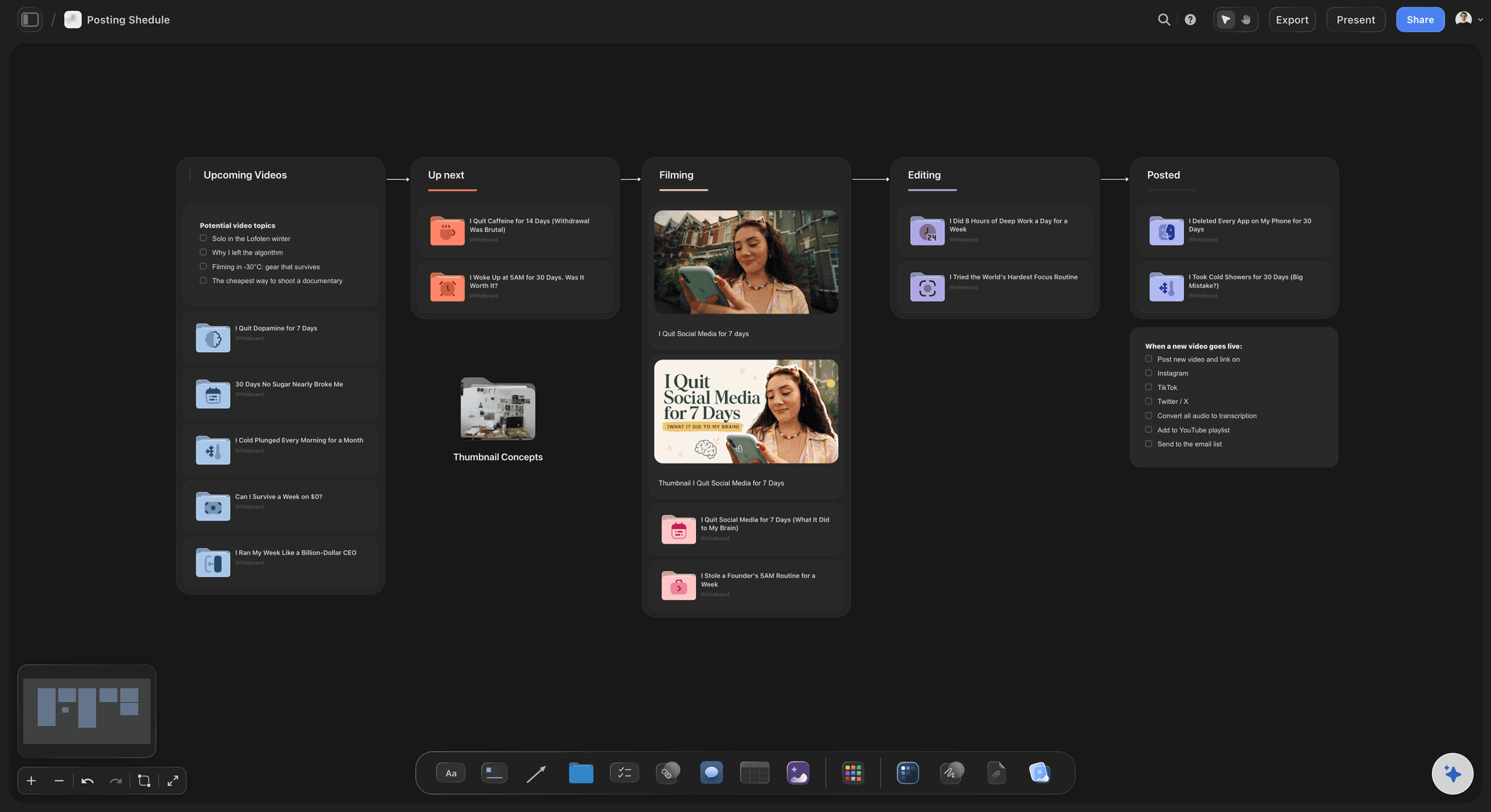
Built for people with taste
Made for the visual thinking that feeds your tracker.
Storyflow does not manage tasks. It gives the moodboards, briefs, and plans a home, with AI and an infinite canvas, before the work lands in ClickUp.
Plan on an open surface
A canvas, not a list of rows
Cards, groups, and phases: Lay out cards into the phases and stages a plan needs, then drag, recolor, and resize them freely on the canvas, the way you rough out a plan on a wall before it becomes tracker tasks.
AI lays out the first pass: Instead of an empty board, the AI proposes a full plan from your prompt. Keep the cards that fit, cut the rest, and add your own, so you start from a draft rather than a blank page.
Plan without limits: No object cap on any plan means the canvas can hold every concept, reference, and note that earns a place while the direction is still moving, not a trimmed list that fits a screen.
Context from the board you are on
AI that builds on what is already there
Reads your active board: The AI uses what is on the canvas board you have open, so new cards and phases match the direction the plan has already taken rather than a generic outline.
Attach your sources: Add up to five documents and three boards as context: a creative brief, a scope doc, or research the plan should grow from.
Re-prompt to reshape: Ask for a tighter set of phases, an extra concept round, or a different breakdown. The AI reworks the board while keeping the edits you already made.

The work beside the plan
Moodboards, references, and plan together
Moodboard beside the plan: Pin the moodboard, the references, and the brief next to the plan, so the team decides against the actual creative instead of a card that only describes it.
Frames from video: Grab stills straight from YouTube and Vimeo onto the canvas when a reference frame explains an idea better than a note, then plan the work right beside them.
Boards become plans: Turn a brainstorm or a moodboard into a campaign board, a content calendar, or a plan on the same canvas, so the plan grows out of the creative and is ready to hand to your tracker.
Clients and teammates in the loop
Share the whole canvas, not a screenshot
View-only client links: Send one link and a client sees the plan, the moodboard, and the creative in the browser with no account and no login needed to view.
Collaborate on every plan: Unlimited collaboration and shared boards come with every plan, and collaborators you invite join free, so the whole team can plan on one canvas from day one before anything reaches the tracker.
Roles when you scale: As the studio grows, Max adds a team workspace with roles and permissions on top of everything every plan already gives you.
Explore templates for your project
Every template opens as a real, editable board on the infinite canvas. Pick the closest fit and make it your own.
Mind Map
Branch one central idea out into themes and sub-points, then drag the connections around until the structure makes sense.
One app instead of five
Storyflow vs ClickUp, Notion, and Miro.
Each tool wins somewhere. ClickUp owns task and project management, dashboards, and all-in-one PM. Storyflow owns the visual planning that comes before it.
Storyflow
Recommended
An AI that lays out a plan board from a prompt
Moodboards and creative work on the same canvas
A truly infinite canvas with no object cap
Full task management, dashboards, and reporting
ClickUp
An AI that lays out a plan board from a prompt
Moodboards and creative work on the same canvas
A truly infinite canvas with no free object cap
Full task management, dashboards, and reporting
Notion
An AI that lays out a plan board from a prompt
Moodboards and creative work on the same canvas
A truly infinite canvas with no free object cap
Full task management, dashboards, and reporting
Miro
An AI that lays out a plan board from a prompt
Moodboards and creative work on the same canvas
A truly infinite canvas with no free object cap
Full task management, dashboards, and reporting
What creators are saying
Join early creators getting structured workspaces and AI that remembers their projects
“Storyflow has sped up my workflow by at least 3x, which means more flow state and more projects I can actually ship. It truly changed the way me and my team create.”

Reilin Joey
Director & YouTuber
“One prompt gets me a structured board. But the tactics are my favorite. I run my YouTube scripts through them and my intros and retention got better. It's amazing.”

Justkay
YouTuber & Freelance Filmmaker
“I used to juggle five apps to plan a project. Now I describe what I am making and get boards, lists, and a schedule. All in one place.”

George
@fernwehchronicles
ClickUp alternative questions, answered.
Everything people ask when comparing Storyflow with ClickUp.
No, and we want to be honest about that. ClickUp is a powerful all-in-one suite for tasks, docs, goals, and dashboards, and Storyflow does not try to match its task and project management. Storyflow is the visual creative-planning canvas that comes before the tracker: moodboards, briefs, and AI-laid-out plans on an infinite canvas. For task management, keep ClickUp. Many teams use both.
It depends on what you actually need. If you want another all-in-one task and project management suite, look at tools built for that job. If your gap is the visual side, the thinking, moodboards, and plans that feed the tracker, Storyflow is a strong fit: an infinite canvas, an AI that lays out a board from a prompt, and no object cap on any plan.
They sit in different categories. ClickUp manages the work: tasks, assignees, sprints, reporting. Storyflow shapes the work first, on a truly infinite canvas where the moodboard, the brief, and the plan live side by side, an AI fills the board from a prompt, and a board can become a plan or a content calendar. It is planning and creative thinking, not task tracking.
No. Storyflow does not do sprints, assignees, dependencies, time tracking, or dashboards, and it is not meant to. That is exactly what ClickUp is good at. Storyflow handles the visual planning that happens before tasks exist, then you break the finished plan into tasks in ClickUp for the tracking.
Not during early access. Storyflow is paid-only right now, with plans starting at $9.99 per month, no object cap, and no time limit. Every plan includes unlimited boards on an infinite canvas, view-only sharing, and unlimited collaboration. A Free plan is launching before the end of 2026, with 20 file uploads and basic AI usage to lay out plans and boards.
Yes, and that is how many creative teams run it. Do the messy visual planning in Storyflow: concept, moodboard, brief, and an AI-laid-out plan on one canvas. Once the direction is clear, break it into tasks in ClickUp for tracking. Share the Storyflow canvas as a view-only link so the team keeps the visual context alongside the tracker.
Yes. The AI reads your active canvas board, so cards and phases already on it shape what it generates. You can also attach up to five documents and three boards, such as a brief or a scope doc, for the AI to build from. It works from the board you have open, not from all your boards at once.
Unlimited collaboration and shared boards are included on every plan, and collaborators you invite join free, so your whole team can plan on one canvas from the start. When you need a managed team workspace with roles and permissions, that comes with Max on top of everything every plan already includes.
Keep ClickUp for tasks. Plan the visual work in Storyflow.
Describe your project, watch the plan lay itself out, and keep the moodboard and the brief beside it on an infinite canvas.