
An ultra-fast canvas that stays calm
The Notion alternative for
projects you need to see.
Notion is excellent at pages and databases. When a project is references, a script, a schedule and a client who needs to see it all at once, the page tree gets in the way. Storyflow puts the whole project on one infinite canvas.


Creatives working for these brands already got early access
- Red Bull
- Canon
- Artlist
- Porsche
See how easy it is to get started
Watch a real project come together, from a blank board to a finished plan, clicked through step by step.
Start from a ready-made template
Pick a board to see what you can build, then let AI fill it in. Every template is a real, editable starting point on the same infinite canvas.

Mind Map
Branch one central idea out into themes and sub-points, then drag the connections around until the structure makes sense.
Is there a Notion alternative with an infinite canvas?
Storyflow is the Notion alternative with an infinite canvas: the brief, the references, the Docs, the Tables and the tasks sit on one board where position means something, and an AI lays out the project board from a prompt. Keep Notion for wikis and linked databases; choose Miro for large workshops and ClickUp or Asana for dependency-heavy schedules.
Notion deserves its reputation. Its databases show the same rows as a board, a table, a calendar or a timeline, pages hold rich documents, and relations and rollups connect them. For a team whose project is a list of tasks with fields, that is a very good system, and switching away from it for that job would be a mistake.
The friction appears when a project is visual. A moodboard, a storyboard, a campaign with twenty assets or a launch with a client watching are pictures, not rows. In Notion they get flattened into galleries and nested pages, so you click down a tree to find the reference that explains a decision. Many teams end up with Notion for the plan and a separate whiteboard for the thinking, and the two drift apart.
Storyflow closes that gap. Each project gets a board with its brief in a Doc, its references as Images and Notes, its schedule in a Table with status, person and date cells, and its work in Kanban and Tickets. Describe the project and the AI builds the first version, and a client opens a view-only link with no account.
Ultra fast from brief to board
From a nested page tree to one board you can read at a glance.
Keep Notion where it is strong. Move the visual work here.
01
Open a canvas
Runs in your browser, nothing to install. One board per project instead of a page per idea.
02
Describe the project or paste the brief
The AI lays out the board: a brief Doc, a references section, a deliverables Table and a task Kanban. Attach up to five documents and three other boards as context.
03
Arrange by meaning
Drag related things next to each other, group a phase in a Frame and connect dependencies with Lines. Position does the work that nesting does in Notion.
04
Share the whole picture
Invited collaborators edit in real time, and a client opens a view-only link with no account and signs in to comment.
What Notion flattens, a canvas keeps visible.
The objects a creative project needs, side by side instead of pages deep.
The plan beside the work
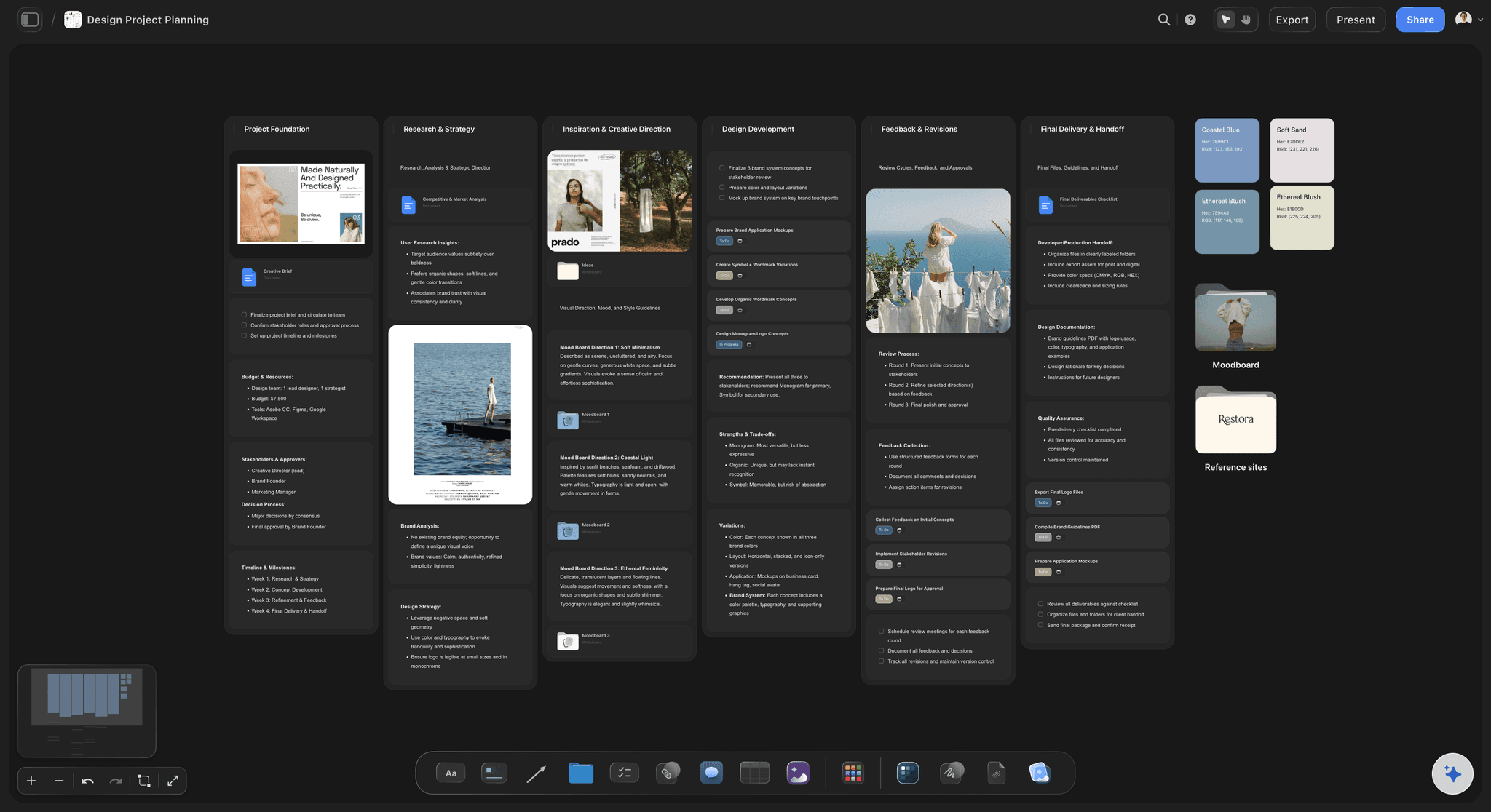
Brief, references and schedule on one board
A Doc for the brief, Images and Notes for the references, a Table for dates and owners. Everything a decision depends on is visible in the same view.
See visual project planning →
An infinite canvas, not a page tree
Position carries meaning
Put the risky deliverable next to the reference that explains it. Clustering and distance say what an outline cannot, and you never click three pages down to find context.
See the infinite canvas →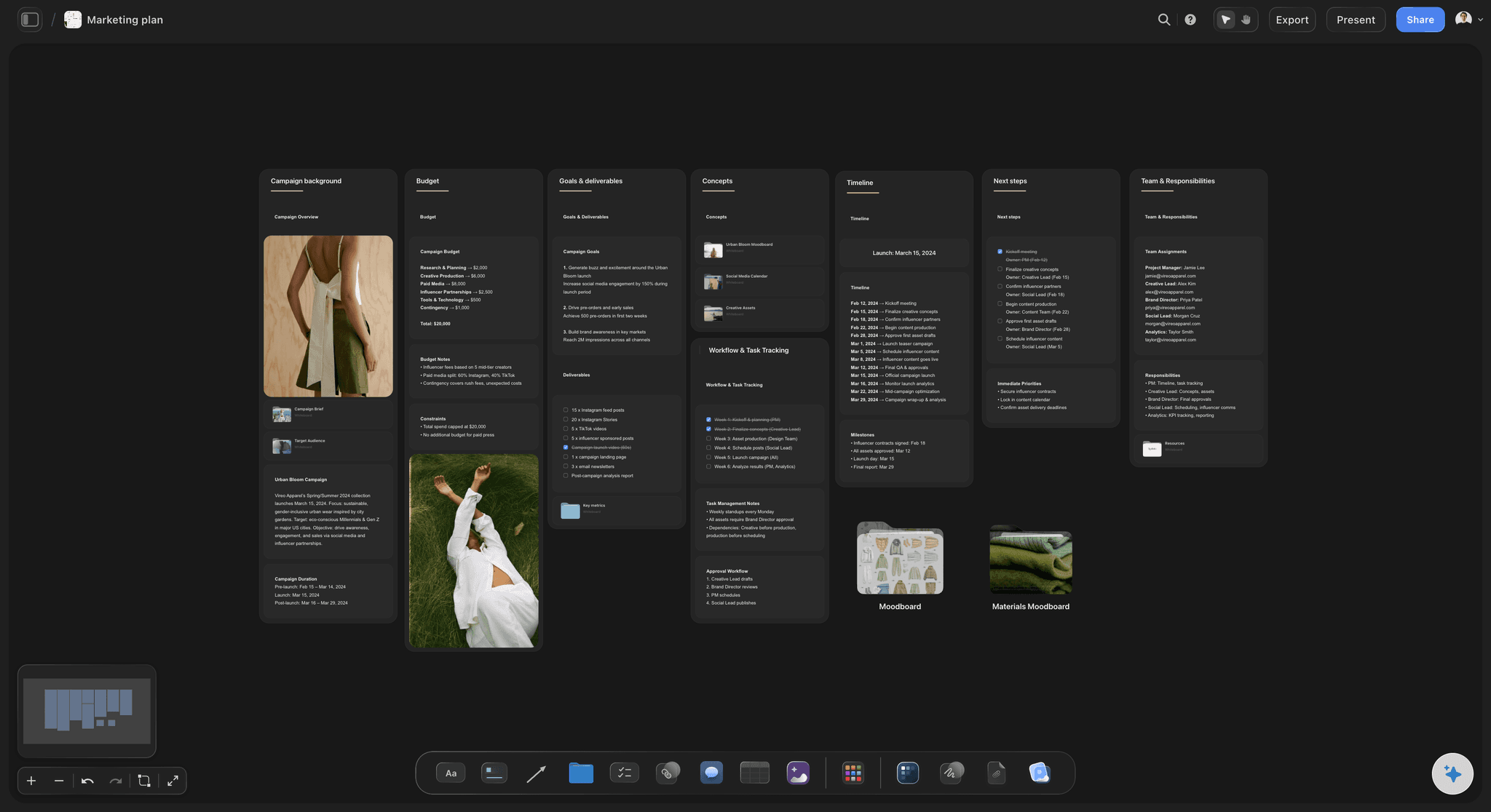
The AI lays out a board
A project board from a prompt
Notion's agent builds pages and databases across your workspace. Storyflow's AI lays out a spatial board, with named workflows for jobs like a marketing plan, a content planner or a shot list.
See the AI project plan generator →
Structure where you need it
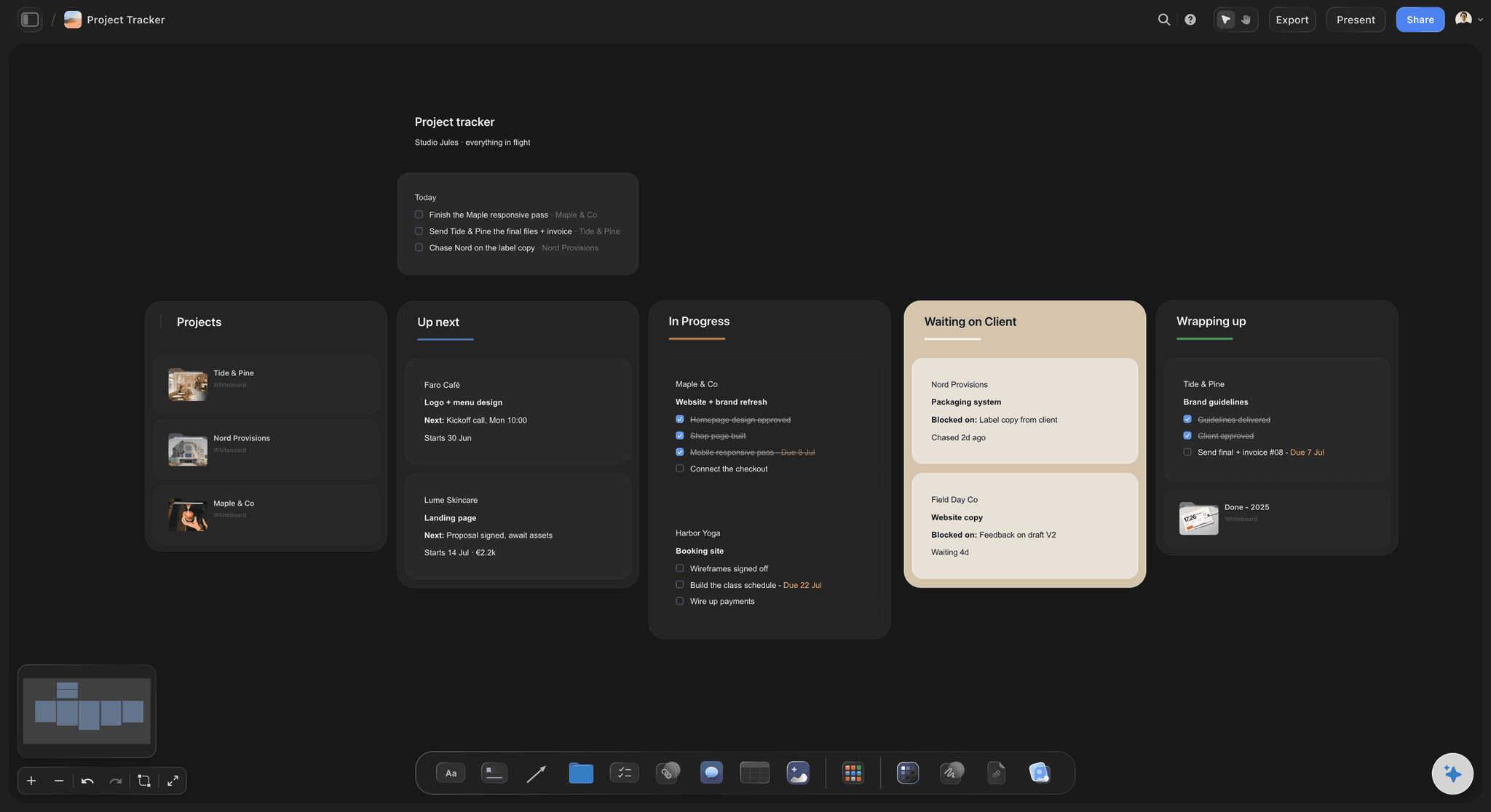
Tables, Kanban and Tickets on the canvas
Status cells, person and date cells, Kanban columns and Tickets with assignees give you the tracking side of Notion without leaving the visual plan.
See the launch roadmap →Unlimited boards. No object cap.
One board per project, with every reference kept. Storyflow is paid-only during early access, with plans from $7.99 a month billed annually ($9.99 monthly). A free plan launches before the end of 2026, and anyone a paid member invites to a board joins free.
Unlimited boards and unlimited file uploads on every paid plan
Docs, Tables, Kanban, Tickets and Images on one infinite canvas
AI that lays out a project board from a prompt, metered on every plan
View-only links clients open with no account
Built for people with taste
Three reasons visual projects leave Notion.
None of them is about price. They are about the shape of the work.

Pages hide relationships
Nesting buries context
The reference is three clicks away: In a page tree, the image that explains a decision lives in a sub-page. On a canvas it sits next to the decision, so a reviewer sees both.
Galleries are not moodboards: A gallery view lines images up in a grid. A moodboard needs clusters, contrast and notes placed where they matter.
Dependencies you can see: Lines between objects show what blocks what. It is a picture of the dependency, not a relation property you open to read.

The system becomes the work
Less setup, more project
No database to design first: Notion rewards building structure, which is how teams spend a week on properties before planning anything. Describe the project and the AI lays out a board to edit.
Templates are finished boards: Duplicate a board that worked and it carries your real way of running a project, not a generic workspace.
It proposes, you decide: Every AI edit lands on the board with one-click Undo. What to plan and in what order stays with you.
Clients and collaborators
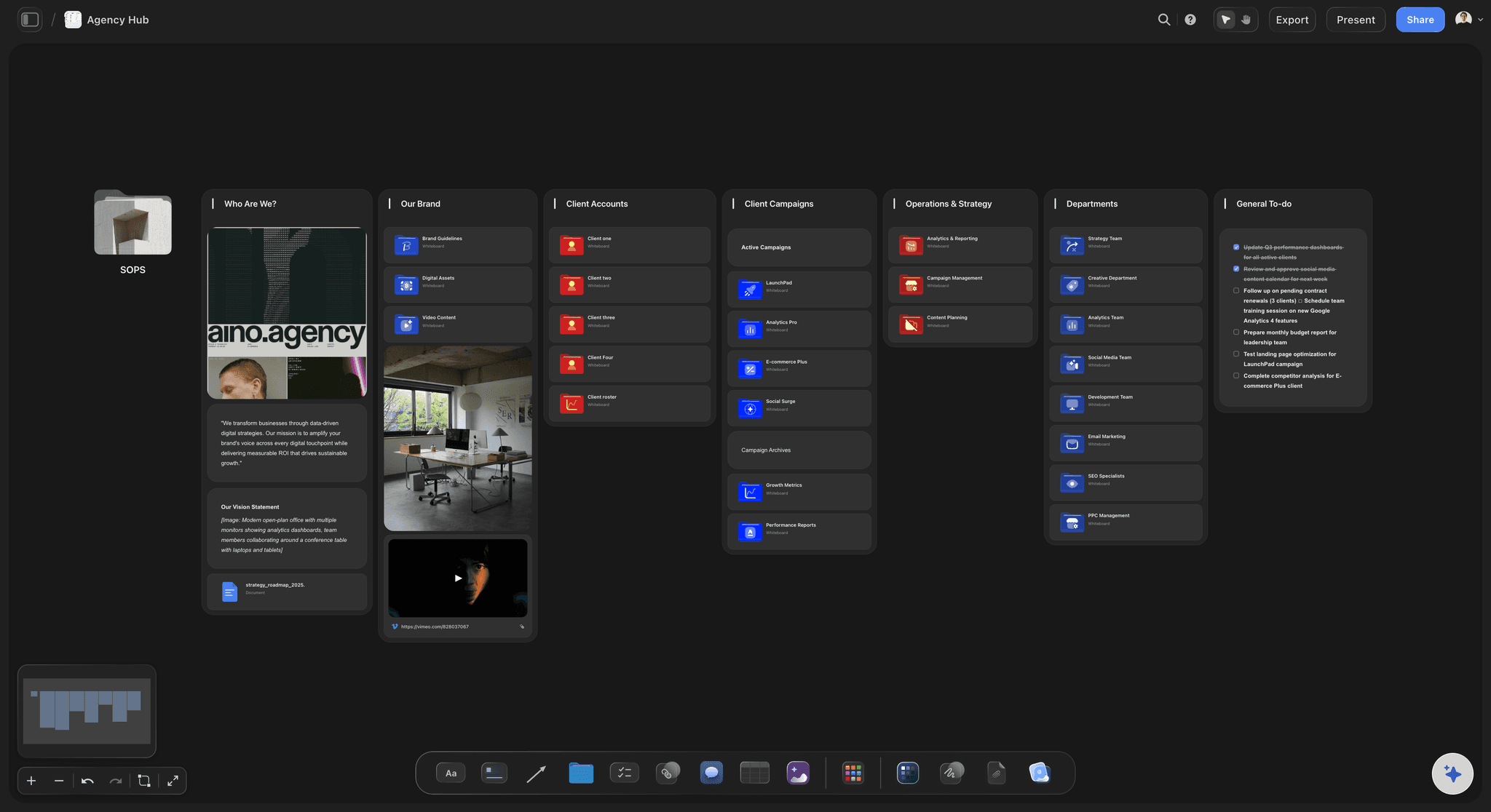
Show the project, not the workspace
One link to the whole picture: A view-only link opens with no account and shows the latest version when opened or reloaded. No page permissions to untangle.
Feedback on the exact piece: A client who signs in comments on the frame, the reference or the Doc the note is about.
Present it fullscreen: Presentation mode steps through the Frames on the board, so the review runs on the plan itself.
Export when someone needs a file: Export the whole board as an image or PDF, and Docs to Word or PDF.
Explore templates for your project
Every template opens as a real, editable board on the infinite canvas. Pick the closest fit and make it your own.
Mind Map
Branch one central idea out into themes and sub-points, then drag the connections around until the structure makes sense.
One app instead of five
Storyflow vs Notion, Miro, and ClickUp.
Notion is best at docs and databases, Miro at workshops, ClickUp at dense task management. Here is how they differ for planning a visual project.
Storyflow
Recommended
Free-form infinite canvas
Brief, references and schedule on one board
AI workflows for scripts, shot lists and storyboards
View-only link that opens with no account
A timeline view with dependencies
A free plan today
Notion
Free-form infinite canvas
Brief, references and schedule on one board
AI workflows for scripts, shot lists and storyboards
View-only link that opens with no account
A timeline view with dependencies
A free plan today
Miro
Free-form infinite canvas
Brief, references and schedule on one board
AI workflows for scripts, shot lists and storyboards
View-only link that opens with no account
A timeline view with dependencies
A free plan today
ClickUp
Free-form infinite canvas
Brief, references and schedule on one board
AI workflows for scripts, shot lists and storyboards
View-only link that opens with no account
A timeline view with dependencies
A free plan today
What creators are saying
Join early creators getting structured workspaces and AI that remembers their projects
“Storyflow has sped up my workflow by at least 3x, which means more flow state and more projects I can actually ship. It truly changed the way me and my team create.”

Reilin Joey
Director & YouTuber
“One prompt gets me a structured board. But the tactics are my favorite. I run my YouTube scripts through them and my intros and retention got better. It's amazing.”

Justkay
YouTuber & Freelance Filmmaker
“I used to juggle five apps to plan a project. Now I describe what I am making and get boards, lists, and a schedule. All in one place.”

George
@fernwehchronicles
Notion alternative questions, answered.
What people ask when Notion stops fitting a visual project.
Storyflow is the Notion alternative with an infinite canvas. It puts the brief, references, Docs, Tables and tasks on one board where position carries meaning, and an AI lays out the board from a prompt. Miro is also a canvas, built more for workshops and diagrams than for running a creative project. Keep Notion for the wiki and linked databases.
Storyflow, if your projects are creative and visual: campaigns, shoots, brand work, launches. It keeps docs and tables but puts them on a canvas beside the references. Miro suits large workshops and diagramming, ClickUp suits dense task management with many views, and Milanote suits collecting references alone. None replaces Notion's linked databases, so many teams keep Notion for the wiki.
For structured tracking, yes. Notion shows database rows as a board, gallery, calendar or timeline, which suits task lists with fields. It has no infinite canvas, so you cannot place objects freely, and a moodboard or storyboard gets flattened into galleries and nested pages. Storyflow keeps Docs, Tables and Kanban as objects on a canvas beside the references.
Notion organises work as nested pages and database views, and Notion's agent builds and edits those pages and databases. Storyflow organises a project spatially on one board: the Doc sits beside the references, the Table beside the Kanban, and the AI builds the board itself. Notion is stronger at wikis, relations, rollups and timelines; Storyflow at seeing a creative project whole and sharing it by link.
Often the honest answer is to use both. Keep Notion for the company wiki, meeting notes and databases that feed each other. Move the visual projects, the campaigns, moodboards, storyboards and launch plans, to Storyflow, where the references and the plan share one board. Replace Notion entirely only if nearly all your work is visual and you do not rely on its relational databases.
Not during early access. Storyflow is paid-only during early access, with plans from $7.99 a month billed annually ($9.99 monthly). A free plan launches before the end of 2026, and anyone a paid member invites to a board joins free. Clients viewing a shared link never need an account. If you need a free tool today, Notion's free plan covers personal use well.
Yes, on the canvas. Tables have status, person, date, currency, duration, label and link cells, Kanban holds columns of work, and Tickets carry assignees and due dates. What Storyflow does not have is a calendar layout or a timeline view, and a table cannot be sorted on the canvas, so rows are kept in date order by hand.
It builds a different shape. Notion's agent creates and edits pages and databases across a workspace. Storyflow's AI lays out a spatial board: describe a project and it places the Docs, Tables and sections, using named workflows for jobs like a marketing plan, content planner or shot list. It reads the open board plus up to five documents and three boards you attach, and every edit has one-click Undo.
There is no Notion importer, so content is rebuilt. Notion exports pages to Markdown, HTML or PDF, and you can paste text into a Storyflow Doc or attach a document for the AI to lay out as a board. Move the projects still in flight rather than the whole workspace; the pages worth moving are usually the visual ones Notion was flattening.
Yes. Once the owner turns sharing on, a view-only link opens in any browser with no account, and the client sees the latest version when they open or reload it. To comment, the client signs in, and the comment sits on the exact piece of work. Invited collaborators edit in real time, and anyone a paid member invites joins free.
When the work is documents and data. A company wiki, a CRM, a content database with relations and rollups, or a roadmap you want as a timeline with dependencies are all Notion's strengths. It also has a free plan and a large template community. Storyflow is the better choice when a project is visual and has to be seen, shared and presented as one picture.
Three reasons come up. Structure fatigue: maintaining databases and properties starts to take more time than the project. Shape mismatch: moodboards, storyboards and campaigns are pictures, and galleries and nested pages flatten them. And split tools: the thinking moves to a whiteboard while the plan stays in Notion, and the two drift apart. Price is rarely the reason.
More from Storyflow
Visual project planning
Switch from Notion
Notion alternative for creative teams
FigJam alternative
Miro alternative
ClickUp alternative
Infinite canvas
Creative project management
Go-to-market plan
Campaign management software
Project brief template
Is Notion good for visual project planning?
Notion vs Miro for visual project planning
Storyflow vs Notion
Keep Notion for the wiki. Plan the project where you can see it.
Describe your next project and let the AI lay out the board. Runs in your browser, nothing to install.